Disclosure: As an Amazon Associate, reviewstook.com earns from qualifying purchases. Links on this page are affiliate links; they cost you nothing extra. Prices and availability change often, so check the current Amazon listing before you buy.
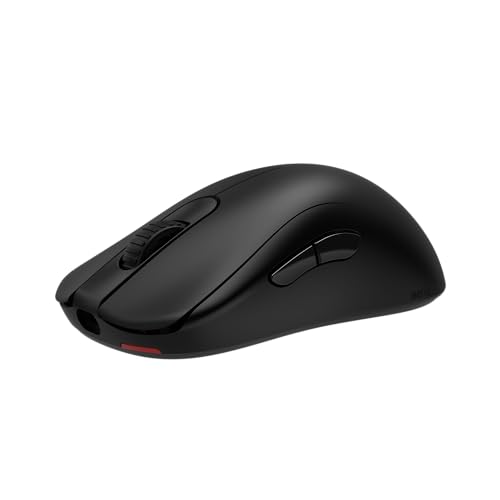
The zowie za13 dw takes the same uncompromising esports philosophy as its U-series sibling and answers a different hand. Where the U2 is a low, claw-driven silhouette, the ZA shape carries a taller, more pronounced hump that fills the palm and supports a relaxed, anchored grip — and the DW revision equips it with a 4K enhanced receiver, a 3950 sensor, and driverless operation. This review covers the ZA13-DW itself, explains how its smaller ZA12-DW sibling differs, and helps you decide whether the high-hump family fits the way you actually hold a mouse during a long competitive evening.
The essential idea is support. A taller hump gives the palm a consistent contact patch, which spreads effort across the hand and suits players who found flatter mice tiring or vague. At 65 grams in the ZA13 size, the mouse stays light enough for fast corrections while feeling more substantial than its smaller sibling. If that description sounds like your hand’s biography, read on; if you steer purely with fingertips and like a mouse that nearly vanishes, the U-series review linked later is your page.
Key Takeaways
- Symmetrical shape with a high, palm-filling hump — the defining ZA trait — in a 65-gram wireless body for the ZA13 size.
- 4K enhanced receiver and 4K wireless polling, with a 3950 sensor, put the DW revision at the current top of the line’s link technology.
- Driverless as always in this family: settings live on the mouse and travel to any computer untouched by software.
- The ZA12-DW is the smaller sibling at 55 grams — same idea, scaled for smaller hands or a more fingertip-leaning hold.
- Size choice within the family matters as much as the family choice itself; the number in the name is a size, not a quality grade.
- Palm and relaxed claw players gain the most; pure fingertip players should compare the flatter U shape before deciding.
In this guide
Quick Picks: ZA13-DW or its smaller sibling?
| Pick | Listing highlights | Best suited to | Link |
|---|---|---|---|
| BenQ Zowie ZA13-DW 4K wireless | 65g, symmetrical, 3950 sensor, 4K enhanced receiver, driverless | Medium-to-larger hands, palm and relaxed claw | Check price on Amazon |
| BenQ Zowie ZA12-DW 4K wireless | 55g, symmetrical, 3950 sensor, 4K enhanced receiver, driverless | Smaller hands wanting the same high-hump idea | Check price on Amazon |
Read the table as a sizing chart wearing a product table’s clothes. Both mice share the DW platform; the ten grams and the millimetres between them are a fit decision, and fit decisions are made by hands, not by specification rankings.
How were these picks chosen?
Both listings were confirmed through marketplace data, with titles naming the BenQ Zowie ZA13-DW and ZA12-DW respectively, their weights, the 3950 sensor, and the 4K enhanced receiver. The ZA13-DW is the subject pick and is reviewed first; the ZA12-DW is included and labelled throughout as the smaller sibling, never as a lesser model. Each pick appears with its official product image immediately before its review section. No other mice are linked on this page.

BenQ Zowie ZA13-DW 4K — the high-hump flagship size
Badge: Best for palm and relaxed claw players wanting DW technology. The ZA13-DW combines the family’s tallest support profile in its most popular size with the newest link: 4K wireless polling through the enhanced receiver, the 3950 sensor, and the usual driverless discipline, at 65 grams.
- Shape: symmetrical with a pronounced central hump
- Weight: 65 grams
- Sensor: 3950 generation
- Link: 4K enhanced receiver, 4K polling wireless
- Configuration: driverless, on-device settings
- Buttons: esports-focused, minimal set
Strengths
- The hump gives the palm a stable anchor, reducing the micro-grip adjustments that tire hands across long sessions.
- The 4K link and modern sensor remove equipment doubt entirely; misses are yours, which is what competitive players actually want.
- At 65 grams it stays agile for flicks while feeling more planted than ultra-light shells during slow tracking.
Trade-offs
- Fingertip players may find the hump intrusive, forever reminding them of a contact they prefer to avoid.
- Small hands can find the ZA13 size’s length and height a stretch, which is precisely the gap the ZA12 exists to fill.
- The family’s no-software stance still applies in full; customisation fans should look elsewhere with no hard feelings.
The ZA13-DW is best understood as the comfort-performance intersection of the Zowie catalogue: nothing about it chases the lightest or the flashiest, and everything about it assumes a player who sits down for serious hours and wants their hand supported through all of them. In a market addicted to novelty, a shape refined across generations and now given the newest link technology is a quietly confident product.
Best for: medium-to-larger handed palm and relaxed claw players in competitive titles who play long sessions. / Not suited for: pure fingertip players, very small hands, or software customisation enthusiasts.

BenQ Zowie ZA12-DW 4K — the smaller sibling
Badge: Best for smaller hands wanting the ZA idea. The ZA12-DW scales the high-hump design down and trims the weight to 55 grams, keeping the 3950 sensor, the 4K enhanced receiver, and driverless operation identical in spirit to its bigger sibling.
- Shape: symmetrical with a pronounced hump, smaller size
- Weight: 55 grams
- Sensor: 3950 generation
- Link: 4K enhanced receiver, 4K polling wireless
- Configuration: driverless, on-device settings
- Role: smaller-hand counterpart to the ZA13-DW
Strengths
- Smaller hands get genuine palm support without stretching to reach the primary buttons past the hump.
- The lighter shell makes fingertip corrections within a supported grip feel especially quick.
- Platform parity means choosing it is a pure fit decision, with no technology penalty attached.
Trade-offs
- Larger hands will feel cramped and may curl into a claw the shape was not asking for.
- The smaller footprint offers less surface for a fully relaxed palm to spread across during casual play.
- As with the ZA13, the minimal button set and absent software define its borders honestly.
Smaller siblings in product families are often quietly downgraded; the pleasure of this one is that the downgrade is purely dimensional. A player with smaller hands receives the same sensor, the same link, and the same design intelligence, in a shell their fingers can actually command. If hand-size charts have always placed you between sizes, the lighter weight here also makes it the easier of the two to adapt to during a trial week.
Best for: smaller-handed palm and claw players who want flagship link technology in a fitting shell. / Not suited for: larger hands, or anyone seeking an ergonomic right-handed contour.
Zowie Za13 Dw: how to tell whether the hump fits your grip
Rest your hand on your current mouse the way you do in the third hour of a session, not the way you pose it in a shop. If your palm settles onto the shell and your fingers drape rather than hook, a hump like the ZA’s will feel like a handshake. If your palm hovers and only fingertips and the heel of the hand make contact, the hump will feel like furniture in a room you are trying to keep empty. Neither grip is more skilled; they are different anatomies of control, and Zowie simply builds honestly for both camps — this shape for the settlers, the flatter U shape in Zowie U2 for the hoverers.
Length matters alongside height. The ZA13 size suits hands that can cover its shell without the fingertips overshooting the front edge, which would bend the wrist into compensation. When in doubt between the two sizes here, remember that a slightly smaller mouse can be gripped with more finger involvement, while a slightly larger one cannot be shrunk by willpower. The ten-gram difference follows the same logic: the ZA12’s lighter shell forgives a learning week, while the ZA13’s extra substance rewards a hand that already knows it wants support.
What does 4K wireless polling change, and what does it cost?
Polling is how often the mouse reports its position. A 4K link reports far more frequently than the long-standing 1000 Hz standard, producing a denser stream of positions that can feel smoother in fast pans on high-refresh displays. The cost is power: the radio works harder, so battery life shortens compared with gentler settings, and the sane habit is to treat the top setting as a match mode rather than a permanent one if your sessions are long. The fuller science, including where diminishing returns begin, is covered in mouse polling rate explained, and the mice built entirely around extreme polling are rounded up in best 8KHz polling rate mice.
What 4K polling does not do is rescue a bad shape fit, a worn pad, or a receiver buried behind a metal PC case. Order your setup hygiene first — receiver on the desk with clear line of sight, pad clean, feet fresh — and let the link technology be the final polish rather than the foundation. That ordering is the difference between an esports setup and a shopping habit.
How to set up and trial the ZA13-DW properly
Give the mouse a structured week. Keep your sensitivity and pad unchanged from your previous setup, set the mouse’s own options before the first session, and play your normal titles at your normal hours. Notice the third-hour feeling specifically, because support shapes earn their keep late in sessions when a flatter mouse would have your hand quietly clenching. Notice, too, whether your palm contact stays consistent during lifts; the hump should make re-placement after a lift feel automatic, returning your fingers to the same geography every time.
Complete the desk picture while you trial. A supportive chair and a desk height that keeps your forearm level will either confirm the hump’s comfort or expose that your fatigue was postural all along — the CS2-focused seating guide at best chair for CS2 treats that side seriously. And pair the mouse with a pad whose stopping character matches your game; the control-cloth discussion in Xraypad Origin Pro Cerberus is the natural companion read.
Common mistakes when choosing within a mouse family
Assuming the bigger number means the better mouse is the first; within this family the digits encode size, and a pro-sized shell on a smaller hand is a downgrade in every way that matters. The second is buying the DW technology for a setup whose monitor and habits cannot reveal it, while starving the unglamorous parts — pad, feet, chair — that reveal themselves every minute. The third is judging a support shape in a five-minute shop grip, when its entire argument is about hour three.
Fourth, players sometimes switch families and sizes simultaneously, then blame the technology for the strangeness that any shape change brings. If you are coming from another brand, expect a week of recalibration and budget your judgement accordingly. Fifth, do not ignore the smaller sibling out of pride. Hands are not a hierarchy, and the ZA12’s existence in full DW specification is an invitation to choose fit over ego — an invitation the broader market, surveyed in best gaming mice, extends far less often than it should.
How do the two ZA sizes compare?
| Factor | ZA13-DW | ZA12-DW |
|---|---|---|
| Weight | 65 grams | 55 grams |
| Shape | Symmetrical, high hump, larger size | Symmetrical, high hump, smaller size |
| Sensor | 3950 generation | 3950 generation |
| Link | 4K enhanced receiver, 4K polling | 4K enhanced receiver, 4K polling |
| Configuration | Driverless | Driverless |
| Natural hand | Medium to larger, palm or relaxed claw | Smaller, palm or claw with fingertip help |
Identical rows for technology, different rows for fit — that is the entire comparison, and it is a healthier pattern than most product families manage. Your hand makes this decision; your preferences about software and buttons were already answered by the family name.
Final recommendation
Choose the ZA13-DW if your palm settles when you play, your hand is medium or larger, and your sessions run long: it is the support shape with the newest link, and it will feel like it was built by people who watched players like you for years — because it was. Choose the ZA12-DW with equal confidence if your hand is smaller. And if your palm hovers and your fingertips steer, take the hint and read the U2 review instead; the best mouse in this catalogue is the one whose shape your hand stops noticing.
How does the ZA13-DW behave across a long competitive season?
Support shapes reveal themselves over months rather than minutes. The first week teaches your fingers the new geography — where the hump meets the palm, where the buttons live relative to a settled hand. The first month is when the late-session effect appears: the third hour feels like the first, because the hand has been held rather than asked to hold itself. Across a season, the mouse’s consistency becomes its identity. There is no software profile to drift, no lighting configuration to reset, no battery surprise that a weekly charging ritual has not already prevented. What remains is the shape, doing the same quiet job in month six that it did in week one, which is precisely what players who buy this family are purchasing.
That long view also reframes the price tier honestly. A mouse used daily for years divides its cost into a trivial daily figure, and the relevant comparison is not against cheaper mice but against the cost of replacing lesser mice as they disappoint. Durability habits help: keep the receiver’s line of sight clear so the radio never works harder than it must, store the mouse out of crushing bag chaos when travelling, and treat the feet as the scheduled consumable they are. The ZA13-DW is built for a long service life; owners who meet it with basic care tend to retire it out of curiosity about new shapes rather than out of necessity.
What separates a good trial from a misleading one?
A good trial respects the adaptation curve. Judge the mouse at the end of a week of normal play, in your normal games, at your normal hours — not at the end of an excited first evening when every piece of new equipment feels revelatory, and not after one bad match when everything feels broken. Keep a few honest notes: how the hand felt in hour three, whether lifts re-seated themselves automatically, whether your grip migrated during tense rounds. Those notes, reread on day seven, will tell you more than any aggregate of strangers’ opinions, because they describe the only hand the mouse must convince.
A misleading trial changes three variables at once, falls in love or in hate within an hour, or — the subtlest trap — tests a support shape with a posture borrowed from a flatter mouse. If you have hovered your palm for years, give the hump a genuine chance by consciously letting the palm settle during the trial’s first days; the shape cannot demonstrate its thesis to a hand that refuses to sit in it. Players who run the trial properly almost always reach a clear verdict, and a clear no is as valuable as a clear yes when a return window still exists to honour it.
Frequently asked questions
What do the numbers 12 and 13 mean in the ZA names?
They are size designations within the shape family, not quality tiers or generations. The ZA13 is the larger shell and the ZA12 the smaller, and both DW versions carry the same sensor and receiver technology. Choosing between them is a hand-fit decision, ideally made by comparing your hand size and grip against the shape guidance in this guide.
Is the ZA13-DW good for claw grip?
For a relaxed claw, yes — the hump supports the palm while the fingers hook, which many claw players find less tiring than a flat shell. For an aggressive, fingertip-led claw with a hovering palm, the lower U-series shape usually feels more natural. The distinction is where your palm lives during play, and an honest look at your third-hour posture answers it.
Does the 4K polling noticeably drain the battery?
Higher polling always costs power in wireless mice, this one included, because the radio reports far more often. Practical owners treat the top polling setting as a performance mode for serious sessions and keep a simple charging rhythm around it. The mouse remains entirely usable at gentler settings for everyday play and work, where the difference is hardest to perceive.
Can I use the ZA13-DW for office work?
Comfortably, yes — a supportive shape and precise sensor serve a workday well, and driverless operation means it behaves the same on a work laptop as on a gaming rig. What it will not give you is productivity hardware such as a free-spinning scroll wheel or a thicket of remappable buttons, because it was designed for a different master. Many owners happily use one mouse for both and accept that trade.
How does the ZA13-DW differ from the U2-DW?
Platform siblings, shape opposites. Both offer the 3950 sensor generation and 4K enhanced receiver in driverless bodies, but the ZA’s tall hump supports a settled palm while the U2’s low, inward-curved shell serves claw and fingertip steering. Weight differs slightly too, at 65 grams here against 60 there. Choose by grip first; the technology will not notice which you picked.
What pad pairs well with this mouse?
A control-leaning cloth pad complements the supported, deliberate style this shape encourages, and the mid-weight shell tracks calmly on such surfaces. Players in faster, tracking-heavy titles sometimes prefer a balanced surface instead. Consistency matters more than the specific choice: one clean pad, learned well, beats a rotation of novelties.
How does the ZA shape sit within the wider Zowie family story?
The family’s shapes are best read as a small atlas of hands. The flatter, inward-curved U serves the fingertip steerers. The ZA’s hump serves the settlers. Other letters in the catalogue serve other silhouettes again, each refined across generations with a conservatism that frustrates novelty hunters and delights professionals, whose muscle memory is a career asset no launch event should be allowed to devalue. The DW platform now runs across that atlas like a common electrical system in a range of houses: pick the architecture your hand lives in, and the wiring — sensor, receiver, polling — comes with it at the same standard.
That is why this guide spends its words on grip and size rather than on benchmark theatre. Within a family this disciplined, the technology rows of the comparison tables are deliberately boring, and the fit rows carry all the consequence. If you take one idea from the page, take that ordering with you to every future mouse purchase, from any maker: shape, size, weight, then — and only then — the numbers.
What is the honest case against buying it?
The prosecution opens with fit: a hump this committed will simply never suit a fingertip player, and no amount of DW technology changes the geometry of a hand that wants to hover. It continues with philosophy: the driverless, minimal-button stance that purists celebrate is a genuine deprivation for players whose games reward macros and layered profiles. It notes the premium tier, the charging ritual all wireless demands, and the fact that a support shape’s benefits are invisible in a shop and only provable across weeks — an awkward purchase for the impatient. And it closes with the observation that players in fast, tracking-heavy titles sometimes prefer a flatter, more agile-feeling shell even when their palms settle, because taste in motion is personal in ways anatomy charts cannot settle.
If that paragraph describes you, walk away with the guide’s respect — toward the U-series sibling if your fingers steer, or toward the wider market if your games want buttons and software. If, instead, you read the prosecution nodding at its fairness but unmoved in your essentials — your palm settles, your sessions run long, your titles are competitive, your desk is a serious place — then the defence rests, and the ZA13-DW is very likely the mouse your hand has been describing to you for years.
How do you maintain the link and the shell over years?
Keep the receiver where the mouse can see it, on the desk rather than behind the tower, and away from the electromagnetic neighbourhood of spinning drives and crowded hubs. Wipe the shell with a dry or barely damp cloth when grip begins to feel polished by skin oils, because a support shape’s control depends on the palm’s friction staying honest. Inspect the sensor lens occasionally for the dust that even careful desks accumulate, and blow it clear rather than wiping it with anything that could scratch. Store the charging cable in the same place forever, so the weekly ritual never becomes a search party.
Finally, keep your own records as this family quietly demands: sensitivity, polling preference, and the date the feet were last changed, noted in whatever app or notebook you actually maintain. Driverless hardware returns your settings faithfully forever, but it cannot return your memory of what those settings were after a house move or a new PC. The players who look effortlessly consistent across years are usually just the players who wrote things down — a habit this site recommends for pads, chairs, keyboards, and now, with feeling, for mice.
How does the ZA13-DW compare with the wider esports market?
The wider market’s centre of gravity sits with lower, flatter shapes, because flat photographs well and offends nobody in a thirty-second shop grip. The ZA’s hump is a deliberate step off that centre, and its persistence across generations — now crowned with the DW platform — is evidence of a constituency the mainstream underserves: players whose palms want contact, whose sessions run long, and whose buying is driven by the third hour rather than the first minute. Against ergonomic right-handed rivals, the ZA offers a symmetrical alternative for players who dislike a handed contour or who switch grips between titles. Against ultra-light flagships, it offers substance: ten grams of presence that some hands read as stability rather than cost.
None of that makes it the market’s best mouse, because mice do not admit that ranking in any honest form. It makes it the market’s clearest answer to a specific, common, and badly served question — what should a settling palm buy? — and clarity of that kind is rarer and more useful than another decimal of sensor performance. If the question is yours, the shortlist is short, and this mouse sits at its head with the newest link technology in its family. If the question is not yours, the same clarity tells you to leave, which is a service in itself.
What should switchers from other brands expect in week one?
Expect your aim to feel simultaneously steadier and stranger. Steadier, because the supported palm removes a layer of micro-correction your old shape was silently taxing you for. Stranger, because your lift-and-replace rhythm, your button timing, and your sense of where the mouse’s centre lives must all be redrawn around the hump. Games will feel a half-step off for several sessions, and death replays will show overshoots in the direction of the new contact patch as your hand learns how much mouse is behind your fingers now. This is the normal tuition every shape change charges, and it is refunded — with interest, if the fit is right — by the end of the trial week this guide prescribed.
Help the tuition along with boring discipline: one sensitivity, one pad, your usual titles, no other new equipment competing for your adaptation budget. Resist reviewing the mouse aloud to friends mid-week; verdicts spoken early have a way of becoming self-fulfilling. At the week’s end, consult your notes — hour-three comfort, lift behaviour, grip migration — and decide like an engineer rather than a fan. The ZA13-DW does not need your loyalty. It needs your hand’s honest report, and it was designed, patiently and across many generations, to earn a good one from the hands it was built for.
How does hand size interact with the two sizes, in practice?
Forget the tape measure for a moment and think in terms of coverage. On the right size, your palm’s contact patch lands on the hump’s crown without your fingers needing to reach for the buttons or curl back from them; the primary clicks fall under the pads of your index and middle fingers, and the side buttons meet your thumb without a grip change. On a size too large, the fingers stretch, the wrist compensates by angling, and the hump’s crown presses a spot your palm did not volunteer. On a size too small, the palm overhangs, the fingers crowd, and the support the shape exists to provide leaks away at the edges. Those sensations — reach, crown, overhang — are the true sizing chart, and they can be assessed in the first evening of a trial more reliably than any centimetre table, which is why this guide keeps prescribing the trial week with such insistence.
If you fall between the sizes, let your grip cast the deciding vote. A palm-leaning between-sizer usually thrives on the ZA13, because contact is the point and the larger crown gives the settling hand more to settle on. A claw-leaning between-sizer usually thrives on the ZA12, because the lighter, smaller shell leaves the fingers more of the work they want to do. Either way the DW platform underneath is identical, so the decision can be made purely by the hand — a luxury most product families, which ration their best technology to their largest size, do not extend. Honour the luxury by using it: choose the size your hand reports, not the size your pride prefers.
What does the ZA13-DW ask of your desk and pad?
Very little, and exactly the right things. It asks for a receiver with a view, a pad whose stopping character matches your titles, and enough clear territory for the longer swipes a supported, lower-sensitivity style tends to use. It asks that the desk edge not intrude on the forearm’s path, because a supported grip slides the whole arm more than a fingertip style does, and an edge that a hoverer never notices can become a settler’s nightly irritation. And it asks for the chair-and-desk geometry this site’s seating guide tunes, because a palm that settles onto a mouse attached to a shrugged shoulder is a support system undermined at the top. None of these asks is expensive; all of them are the difference between a mouse that feels designed and a mouse that feels merely purchased.
How do you adapt your aim when switching to a humped shape?
The recalibration here lives in the wrist rather than the fingers. A settled palm moves the pivot of small corrections backward, so the same hand motion produces a slightly different arc until your brain redraws its map — expect a few evenings of shots landing a whisper high or wide in a consistent direction, which is the signature of a geometry change rather than a skill change. Consistency of error is good news: it means one variable moved, and your correction should be patience, not settings. Practise tracking drills at comfortable speed, let the palm genuinely settle instead of hovering out of old habit, and the arc will re-centre itself on the schedule every shape change follows — days of strangeness, a week of negotiation, then a morning where the mouse has simply become your mouse.
Resist, during that negotiation, the temptation to raise sensitivity to chase the old feeling. The hump’s gift is stability at your existing settings, and raising sensitivity to escape the adaptation week trades the gift away for a familiarity that would have returned on its own. Players who hold their settings and their nerve through the week emerge with both the new shape and their old aim, which is the entire object of the exercise. Players who tinker emerge with neither, plus a story about how the mouse never felt right — a story this guide is determined you will not be telling.
What is this mouse’s place in a player’s longer equipment story?
Every long playing life has a chapter where comfort stops being a luxury and becomes the strategy — where the question shifts from what wins a highlight reel to what can be held, nightly, for years, without the body filing complaints. The ZA13-DW is a chapter-three mouse in that story: specific, unshowy, engineered around the unglamorous truth that hands age, sessions lengthen, and support compounds like interest. Younger players in their accumulation era may find it plain, and they are right to keep exploring; the mouse will keep, because its shape has already kept across more product cycles than most of its rivals have existed. When a player’s priorities mature toward the third hour and the third year, this is one of the shapes waiting for them, now with the newest link in its family — less a launch than a standing invitation.
How do you choose between the ZA and its flatter sibling, finally?
One observation, made at the end of a long session, settles it: watch where your palm lives. Settled and draped, with the hand resting its weight into the shell, you are this page’s reader and the hump is your architecture. Hovering, with the fingers curled and steering like a pianist’s, you are the U2 review’s reader, and no specification on this page should detain you. The genuinely uncertain can film their hand from the side during a real match and let the footage vote; cameras have no brand loyalty, and the grip they report is the only grip worth buying for. Beneath the silhouettes, remember, the platform is shared — the same sensor generation, the same 4K link philosophy, the same driverless discipline — so the choice costs nothing in technology whichever way it falls. That is a rare kindness in a product family, and it exists so that the hand, alone, can decide.
Closing note: support, engineered quietly
The ZA13-DW is what happens when a maker spends generations asking a single question — how does a settling hand want to be held? — and then, having answered it, equips the answer with its newest electronics without disturbing a curve. Buy the size your hand reports, hold your settings steady through the adaptation week, keep the receiver in sight and the feet fresh, and the mouse will repay you in the currency it trades in: third hours that feel like first ones, seasons that feel like weeks, and a shape so thoroughly learned that your hand will one day reject lesser mice on contact, without consulting you at all.
One more test: what your second mouse tells you
After a month, perform the swap test: play one session on your previous mouse. A shape that has been adopted makes its predecessor feel like a borrowed shoe — flat where your palm now expects architecture, vague where your lifts now expect a landing. A shape that has not been adopted produces the opposite report, and that report deserves the same respect, delivered while a return is still possible. Support shapes produce particularly honest swap tests, because the hump’s presence is impossible to half-feel: your hand either misses it within a round or is relieved to be rid of it, and either answer, acted on promptly, is a successful purchase process. What you must not do is argue with the result — hands are illiterate in marketing and therefore incorruptible, which is the entire reason this guide has routed every important question back to yours.
Frequently revisited: ZA13 or ZA12, one last time
Because it is the only decision this page truly asks of you, here is the rule of thumb with its exceptions attached. Rest your hand on a table as if it were holding an invisible mouse at the end of a long day. If your fingers lie long and your palm covers a generous territory, begin with the ZA13 and let the trial argue you down. If your hand reads compact, or your grip borrows fingertip help even when you settle, begin with the ZA12 and let the trial argue you up. The trial — a week, one variable, honest notes — outranks the rule, the size charts, and this guide, in that order. What cannot be argued with is the platform beneath the choice: whichever size your hand elects arrives with the family’s full DW technology, so the election can be held on fit alone, with no technology tax on the smaller constituency. Vote with your hand; it is the only electorate that has to live with the result.
The glossary this mouse deserves
Hump: the raised crown of the shell, here pronounced, whose contact with a settling palm defines the ZA idea. Relaxed claw: the hybrid hold in which the palm rests while the fingers hook — this shape’s second native grip. Symmetrical: one silhouette mirrored across its centre line, with no handed contour. Driverless: configuration performed on the device, travelling with it to any computer. Polling: the cadence of position reports, raised to 4K by this model’s enhanced receiver. Enhanced receiver: the wireless bridge that wants line of sight and repays it with a steadier link. Feet: the replaceable sliding pads whose freshness governs glide more than any menu setting. With those terms settled, every remaining question about this mouse is a question about your own hand — which is, and always was, the review’s thesis in miniature.
What a great support mouse should leave behind
Judge this mouse, a season from now, by what is absent. Absent: the end-of-session hand stretch you used to perform without thinking, the grip adjustments that punctuated every long match, the low-grade awareness of your own fingers that competed with the round for your attention. Absent, too, the suspicion that your equipment is a draft — the settings live in the mouse, the shape has been stable across generations, and there is nothing left to configure except your own game. In their place, a palm that settles like a cat in a familiar chair and a hand that simply reports for duty. That is the state the ZA13-DW was engineered to produce, across a design lineage long enough that its newest electronics feel less like a launch and more like a maintenance of trust.
If the swap test or the trial week tells you the hump is not your architecture, let the verdict stand without a grudge; the family built a flatter answer for your hand, and this page’s sibling review is waiting with it. But if your palm settles — really settles, in the third hour, on an ordinary evening — then you have found the rarest thing in gaming hardware: a product whose entire argument you can feel, and whose argument is about you. Buy the size that fits, keep the records this guide nags you to keep, and let the mouse disappear into years of unremarkable, supported, entirely forgettable excellence.
A parting checklist for the day you order
Watch your palm at the end of a long session and let it file the family’s application on your behalf. Measure the hand, then choose the size by coverage — crown, reach, overhang — rather than by number. Plan the receiver’s sightline and the pad’s territory before the box arrives, and order spare feet in the same breath. Freeze your sensitivity and every other variable for the trial week, let the palm genuinely settle instead of hovering out of habit, and keep the hour-three notes that will deliver the verdict. Run the swap test at the month’s end and obey its result without negotiation. A support mouse bought with that much intention tends to stay bought for the length of a playing life, repaying the care in the least dramatic currency imaginable: evenings, hundreds of them, in which your hand never once asked to be thought about. Hold out for that standard — from this mouse, from its flatter sibling, from any maker’s flagship — and your equipment will finally become what it was always supposed to be, which is invisible.
How the ZA13-DW rewards the player who keeps a log
A driverless mouse quietly transfers one job from software to its owner: remembering. The log that answers it needs only a page — sensitivity, polling preference, the date the feet last changed, and a line each month about the third hour’s report. That page becomes priceless at every transition a playing life contains: the new PC that arrives with factory everything, the house move that scrambles the desk, the slump that whispers the equipment has drifted when the page can testify it has not. Support shapes benefit doubly from the habit, because their whole value is a posture repeated exactly, and a log is how a posture survives interruption. Start the page on the evening the mouse arrives, while its settings are still the ones you chose deliberately, and let it accumulate the quiet authority that only records have. In a year, when a newer player asks how your setup stays so consistent, you will be able to show them the least glamorous and most transferable secret in competitive gaming: somebody wrote things down.
What to do in the first ten minutes after it arrives
Charge it while you clear the desk’s mouse territory properly, perhaps for the first time in months. Place the receiver in open sight of that territory, set your sensitivity on the mouse itself, and then — the step every excited buyer skips — sit down and simply rest your hand on the shell for a full minute before playing anything. Feel where the crown meets the palm, where the fingers land relative to the buttons, whether the size you chose tells the truth your hand expected. Then play one disposable, unscored session, letting the palm settle as it wants to, and write the log’s first line about the third sensation that matters: how the hand felt when the session ended. Judge nothing else that evening. The verdict belongs to day seven, and the mouse, patient across all its generations, can wait for it.
A note for the player who is still deciding between wired and wireless
The support shape’s oldest fans sometimes arrive from wired mice they have used for a decade, suspicious that a battery and a radio are two failure modes a cable never offered. The suspicion was once an argument; the current platform has retired it to a preference. A 4K enhanced receiver with a clear view of the desk is, for the games this mouse serves, a solved problem, and the remaining trade is ritual against freedom: a weekly charge and a receiver’s placement, exchanged for a desk with no cable negotiating your swipes and a mouse that moves between machines like a favourite pen. For a settling-palm player the freedom has a specific flavour, because a supported grip slides the whole arm further than a fingertip style does, and cable drag taxes exactly that travel. Try the trade under trial-week rules, with the swap test waiting at the end, and let your own evenings — not nostalgia, not novelty — settle a question that technology already has.
A final encouragement for the settling hand
If your hand has spent years compromising — hovering over flat shells because the market photographs flat, curling around small mice because small is fashionable, ending sessions with a stretch you perform so automatically you have stopped counting it as information — treat that history as the review that matters most. The ZA13-DW exists because a maker kept faith with your kind of hand across enough generations for the newest link technology to arrive at its door. Meet it halfway: one honest trial week, settings held steady, notes kept, verdict obeyed. Whatever the verdict, you will never again buy a mouse by photograph, and that alone repays the reading of this page. If the verdict is yes, welcome to the quietest corner of competitive gaming, where the equipment is settled, the palm is home, and the game — finally, entirely — is the loudest thing in the room.