Disclosure: As an Amazon Associate, reviewstook.com earns from qualifying purchases. Links on this page are affiliate links; they cost you nothing extra. Prices and availability change often, so check the current Amazon listing before you buy.
The lamzu maya x is a 47-gram wireless gaming mouse built around one idea: give medium and larger hands a genuinely light symmetrical shell without the flex, creak, and coating compromises that used to come with that weight class. Lamzu took the original Maya shape, stretched it into a larger footprint, fitted a PAW3950 sensor and optical main switches, and shipped it with a Nordic 52840 microcontroller that handles its wireless link. This review works through who that combination suits, where the shape helps or hurts depending on grip, and how the Maya X stacks up against the Razer Viper V3 Pro, the Logitech G Pro X Superlight 2, and the GravaStar Mercury X Pro.
Shape is the honest starting point for any mouse discussion, because sensor numbers have converged at the top end while shells have not. Two players with identical aim routines can disagree completely about the Maya X purely because one grips with fingertips hovering and the other rests a palm along the rear hump. Everything below therefore treats fit as the primary filter and electronics as the tiebreaker, which mirrors how a purchase decision actually plays out once the box is open and the return window starts ticking.
Key takeaways
- The Maya X suits claw and fingertip players with medium-to-large hands who want a sub-50-gram symmetrical mouse.
- Optical switches remove double-click ageing worries, while the dust-proof encoder guards the scroll wheel feel.
- Its closest rivals win on software polish, brand support, or battery endurance rather than raw tracking.
- Grip fit decides this purchase; players who need a tall palm-filling hump should look elsewhere first.
In this guide
Quick picks at a glance
Four mice cover the realistic shortlist around this product. The Maya X itself is the review subject and the lightest option here. The Viper V3 Pro brings Razer’s mature wireless stack and a shape many competitive players already know. Logitech’s Superlight 2 answers with hybrid switches and the broadest retail support of the group. GravaStar’s Mercury X Pro takes a magnesium shell in a different visual direction while matching the high polling ambitions of the others.
- Lamzu Maya X — the subject pick: 47 grams, PAW3950 sensor, optical switches, symmetrical shell for larger hands.
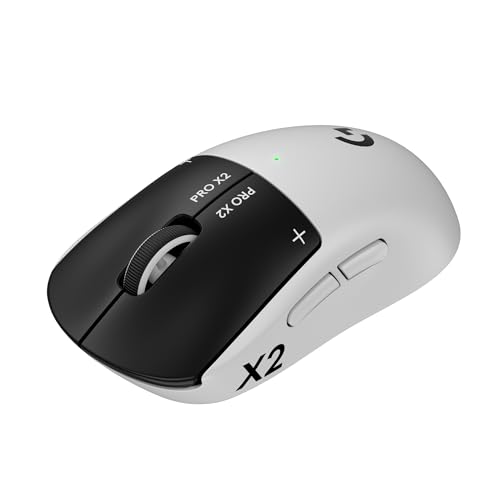
- Razer Viper V3 Pro — the polished alternative: 54 grams in black, Focus Pro sensor generation, long battery endurance.
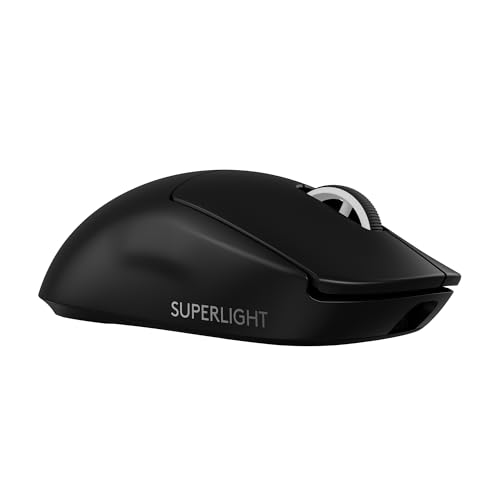
- Logitech G Pro X Superlight 2 — the safe mainstream choice: HERO 2 sensor, LIGHTFORCE hybrid switches, USB-C charging.
- GravaStar Mercury X Pro — the magnesium wildcard: 49 grams, PAW3950 sensor, Bluetooth alongside its gaming dongle.
How the Lamzu Maya X was assessed
This assessment weighs the Maya X on the criteria that separate flagship ultralight mice in daily play: shell rigidity under squeeze, click consistency between the two main buttons, scroll steps that stay defined after months of weapon swapping, glide quality on cloth pads, and wireless behaviour during fast direction changes. Latency claims are treated cautiously because polling rate alone does not describe how a mouse feels; the interaction between sensor position, weight distribution, and skate layout matters more in a flick shot than a headline number on the packaging.
Comparison picks were chosen because a Maya X shopper genuinely cross-shops them. All three alternatives sit in the same ultralight wireless tier, all three use flagship-grade optical sensors, and each one makes a different trade: Razer prioritises ecosystem and endurance, Logitech prioritises familiarity and support, and GravaStar prioritises materials and styling. Holding those three fixed lets the Maya X be judged on its own merits instead of against straw opponents from a lower tier.

Lamzu Maya X review: the larger ultralight, examined closely
Badge: Review subject — lightest pick in this roundup
- Weight: 47 grams as listed
- Sensor: PixArt PAW3950 optical, up to 30,000 DPI as listed
- Switches: optical main switches
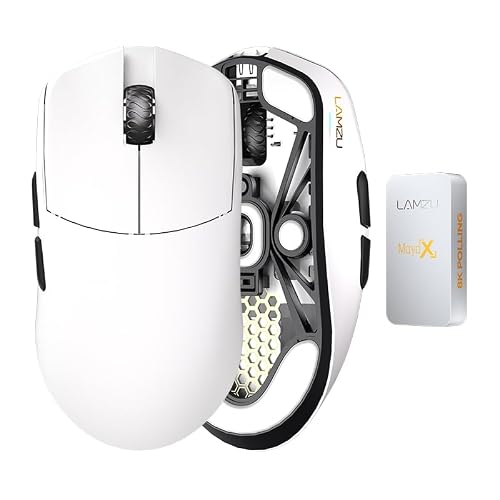
- Shape: symmetrical, larger Maya footprint, white finish on this listing
- Wireless: Nordic 52840 MCU handling the connection
- Encoder: dust-proof scroll encoder
The first thing the Maya X gets right is proportion. Plenty of ultralight mice chase a low number by shrinking the shell until only fingertip players can use them comfortably, but this is explicitly the larger Maya, and that extra length and width change who can adopt a relaxed claw without their ring finger hunting for a resting place. The hump sits towards the rear-middle of the shell, supporting the base of the fingers during palm-leaning moments while still leaving the front low enough for fingertip micro-corrections in tactical shooters.
Click feel is the second strength. Optical switches actuate without the contact bounce that eventually produces accidental double inputs on ageing mechanical switches, and the pair on this mouse feels matched: neither button demands noticeably more force than the other, and the travel before actuation is short without becoming hair-trigger during tense holds. Side buttons sit where a thumb lands naturally in claw grip, with enough separation that pressing the rear button mid-fight does not drag the front one along with it.
Tracking behaviour is exactly what a PAW3950 flagship should deliver. The sensor position, slightly forward of centre, gives swipes a responsive pivot that claw players tend to prefer, and the mouse shows no visible smoothing or angle snapping in slow diagonal drawing. Lift-off behaviour stays composed on standard cloth surfaces, and the stock skates glide evenly once the protective film is removed, which sounds trivial until you meet a mouse whose feet arrive with an edge that scratches for the first week.
Battery expectations deserve plain language. A 47-gram mouse cannot carry a huge cell, so players who enable the highest polling settings for every session should expect a charging rhythm measured in days rather than weeks. The sensible routine is a moderate polling rate for ranked grinding and the maximum only for tournament-style sessions, topping up over USB while the PC is idle. Treating the cable as a weekly ritual rather than an emergency rescue keeps the weight advantage intact without mid-match anxiety.
Strengths
- Genuinely light at 47 grams while keeping a usable size for bigger hands
- Optical switches promise consistent clicks over a long service life
- Dust-proof encoder protects scroll definition in dusty rooms and pet-friendly homes
Trade-offs
- Small battery means high-polling habits shorten the gap between charges
- Symmetrical shell offers no sculpted support for a fully relaxed palm grip
- Lamzu’s software and support footprint is smaller than Razer’s or Logitech’s
Best for: claw and fingertip players with medium-to-large hands chasing the lightest credible flagship. / Not suited for: palm-grip players who want a tall, hand-filling hump and week-long battery spans.

Razer Viper V3 Pro: the endurance alternative
Badge: Alternative — longest wireless stamina here
- Weight: 54 grams in the black finish as listed
- Sensor: Razer Focus Pro optical generation, 35K DPI as listed
- Switches: third-generation optical switches
- Polling: up to 8000 Hz capability as listed
- Battery: up to 95 hours as listed
- Buttons: 8 programmable controls
Razer’s Viper line has been the default recommendation in this class for years, and the V3 Pro earns that status through refinement rather than novelty. Its shape is a touch safer than the Maya X: the sides are less aggressively tapered, the hump is flatter, and the whole mouse reads as a known quantity for anyone moving from an earlier Viper. Players who compete in long sessions will notice the battery gap most, because the Viper keeps going through a full week of evening play where lighter rivals ask for a cable sooner.
The trade is seven grams and a different click character. Razer’s optical switches feel crisp but slightly sharper in sound and rebound than Lamzu’s tuning, which some players love and others find fatiguing over a long aim-training routine. Synapse remains the most divisive part of the package: it is powerful, occasionally heavy-handed, and entirely optional for basic DPI and polling changes if you prefer onboard memory after a one-time setup on a spare machine.
Strengths
- Outstanding battery endurance for a flagship wireless mouse
- Shape is a proven, low-risk fit for most claw grips
- Deep retail availability makes replacement skates and support easy
Trade-offs
- Heavier than the Maya X by a margin flick-heavy players can feel
- Highest polling modes still drain the cell quickly when enabled
- Software ecosystem asks for more patience than Lamzu’s lighter tooling
Best for: competitors who value endurance and a familiar shape over the last few grams. / Not suited for: weight minimalists who count every gram before a tournament.

Logitech G Pro X Superlight 2: the mainstream flagship
Badge: Alternative — broadest support network
- Sensor: HERO 2 optical, 32,000 DPI as listed
- Switches: LIGHTFORCE hybrid optical-mechanical
- Buttons: 5 programmable buttons
- Charging: USB-C
- Platforms: PC and Mac as listed
- Connection: LIGHTSPEED wireless
Logitech’s Superlight 2 is the mouse your teammates most likely already own, and that ubiquity is itself a feature: borrowed setups at a LAN feel familiar, replacement parts are everywhere, and G Hub profiles travel between machines painlessly. The potato-like symmetrical shape is the most neutral here, with a gentle hump that neither pushes a claw into place nor abandons a relaxed grip entirely. For a Maya X shopper, the question is whether that neutrality beats Lamzu’s larger, more committed shape.
LIGHTFORCE switches split the difference between optical longevity and mechanical tactility, giving a click that feels closer to a traditional gaming mouse while keeping optical actuation speed. The Superlight 2 also behaves impeccably at its standard polling settings, and its wireless link is famously stubborn in crowded radio environments like convention halls and shared student housing, where cheaper dongles sometimes stutter during peak evening congestion on neighbouring networks.
Strengths
- Neutral shape fits the widest range of hands and grips
- Hybrid switches keep a familiar mechanical click character
- Support, spares, and community knowledge are unmatched in this group
Trade-offs
- Costs flagship money without the absolute lowest weight
- Five buttons is the leanest layout here for MMO or productivity macros
- Design language is deliberately plain next to the GravaStar
Best for: players who want the lowest-risk flagship purchase in the category. / Not suited for: bargain hunters or players who need many side buttons.

GravaStar Mercury X Pro: magnesium with personality
Badge: Alternative — magnesium shell, boldest styling
- Weight: 49 grams as listed
- Shell: magnesium alloy with openwork styling
- Sensor: PAW3950, 32K DPI as listed
- Polling: 8000 Hz dongle included as listed
- Extras: Bluetooth 5.1 alongside gaming wireless, RGB accents
- Battery: up to 110 hours as listed under lighter settings
GravaStar builds the mouse for players who are tired of identical black potatoes. The Mercury X Pro’s magnesium shell feels cool and rigid in the hand, the cut-outs genuinely help sweaty palms during summer sessions, and the included high-polling dongle removes the separate accessory purchase that some rivals require. Under the styling sits the same PAW3950 sensor family as the Maya X, so tracking pedigree is not the compromise it might appear to be from the product photos.
Open shells collect dust by design, so this pick asks for a blast of compressed air now and then, and the metal texture divides opinion: some players read it as premium, others as busy. Bluetooth inclusion makes it the only mouse here that doubles gracefully as a travel pointer for a laptop bag, switching from ranked queue to presentation duties without a second device rattling around beside your keyboard at a co-working desk.
Strengths
- Rigid magnesium shell at a weight close to the Maya X
- High-polling dongle is in the box rather than an extra purchase
- Bluetooth mode gives it a second life as a travel mouse
Trade-offs
- Openwork shell needs regular dust clearing
- Styling is polarising and will not suit a minimal desk
- Brand support network is smaller than Razer’s or Logitech’s
Best for: players who want flagship tracking wrapped in distinctive hardware. / Not suited for: minimalists and anyone who hates cleaning peripherals.
Head-to-head: where each mouse pulls ahead
Weight order runs Maya X, Mercury X Pro, Viper V3 Pro, then the Superlight 2 close behind the Razer, yet the practical gaps are smaller than forum arguments suggest. Seven grams between the Lamzu and the Razer registers during repeated 180-degree turns in arena shooters, then fades from awareness in slower tactical play where crosshair placement does the heavy lifting. Players switching from a 90-gram mouse will feel any of these four as a revelation; players switching between these four are tuning, not transforming.
Battery order nearly reverses the weight order. The Viper V3 Pro and Mercury X Pro advertise the longest spans under moderate settings, the Superlight 2 sits comfortably in the middle, and the Maya X asks for the most frequent top-ups when its polling is pushed. None of this matters if your desk routine includes a charging cable within reach, and all of it matters if your setup travels between home, office, and a friend’s place every weekend without a fixed charging spot.
Shape remains the deciding axis. The Maya X is the largest shell here and the only one explicitly framed as the bigger sibling of a smaller model, which makes it the natural recommendation when a standard ultralight felt cramped. The Viper’s flatter profile suits players who keep their palm floating, the Superlight’s neutrality suits everyone adequately and nobody perfectly, and the Mercury’s textured metal rewards players who grip firmly and reposition often during long sessions.
Buying guide: choosing an ultralight mouse without regret
Measure your hand before reading another specification. Length from fingertip to wrist crease and width across the knuckles take thirty seconds with a ruler and immediately narrow this field: hands at the larger end of the scale are exactly who the Maya X’s stretched shell was drawn for, while smaller hands may find its length pushing the side buttons further forward than a relaxed thumb prefers during quiet desktop browsing between matches.
Next, name your grip honestly rather than aspirationally. Watch a replay of your own play or simply notice where your fingers rest during a film: full palm contact, curled claw, or hovering fingertips each reward a different hump position. Buying for the grip you wish you had is the most expensive mistake in this category, because an ultralight mouse amplifies fit problems; there is no heavy shell inertia to mask a shape your hand keeps fighting through every tracking correction.
Polling rate deserves a cooler head than marketing gives it. Moving from standard wireless polling to the highest modes yields diminishing returns that most players cannot identify in blind tests, while the battery cost is immediate and certain. A wiser allocation is a quality cloth pad, fresh skates, and a sensibly placed dongle on an extension cable close to the pad, all of which improve consistency more reliably than chasing the largest number in a settings panel.
Finally, consider the support horizon. A mouse is a two-to-four-year companion for most players, so switch longevity, skate availability, and warranty handling belong in the decision. Optical switches on the Maya X, Viper, and Mercury sidestep the double-click failure mode entirely, while Logitech’s hybrid approach keeps the feel many veterans prefer. None of the four is a bad bet; the risk is mismatch, not quality, and mismatch is preventable with the measurements above.
How to set up the Maya X on day one
Begin by removing every skate film, charging the mouse fully, and placing the wireless receiver on the included extension near the front edge of your pad, clear of metal desk legs and USB 3 hubs that can crowd the signal. Update the firmware before changing any setting, then set your DPI in the software and copy the profile to onboard memory so the mouse behaves identically on a machine where the software is not installed, such as a tournament PC or a borrowed laptop.
Step two is sensitivity translation. If your previous mouse used a different sensor position or weight, give the Maya X three full sessions at your existing sensitivity before adjusting anything; the lighter shell will make the same settings feel faster because your stopping power changes. Adjust in small steps of about five percent, testing with a fixed routine of tracking, flicking, and target switching, and write down the value that survives all three rather than the one that produced a single highlight clip.
Step three is button discipline. Bind only what you will actually press under pressure: a melee or push-to-talk on the rear side button, perhaps a ping on the front one, and leave exotic macros for a keyboard layer. Every extra binding is a potential mis-press during a retake. Finish by checking the scroll wheel through your game’s weapon cycle or gadget wheel, since the dust-proof encoder should give clean, single steps; if a game offers a scroll sensitivity or debounce option, tune it now rather than mid-season.
Common mistakes Maya X buyers make
The first mistake is enabling maximum polling permanently and then blaming the mouse for weekly charging. High polling is a session tool, not a lifestyle. The second is gripping harder to compensate for the missing weight; ultralight mice reward a lighter touch, and a death grip recreates the fatigue the purchase was meant to remove while also pushing the shell into micro-rotations that look like sensor problems on a replay.
A third mistake is judging the shape in the first ten minutes. Hand posture adapts over several days, particularly when moving from a heavier ergonomic shell, so a fair trial means a week of normal play before concluding the hump is wrong. The fourth is neglecting skate break-in and pad pairing: a worn, shiny pad centre will make any flagship sensor feel muddy, and replacing a tired pad often revives an older mouse so completely that the upgrade itch disappears for another season.
Final recommendation
Choose the lamzu maya x when your hands are medium-to-large, your grip is claw or fingertip, and you want the lightest credible flagship shell without shrinking into a mini mouse. Choose the Viper V3 Pro when battery endurance and a proven shape outrank the last few grams, the Superlight 2 when support and neutrality matter most, and the Mercury X Pro when materials and styling are part of the pleasure. Measured against its brief, the Maya X is the specialist’s pick of this group, and specialists rarely regret buying the tool shaped for them.
Frequently asked questions
Is the Maya X too big for fingertip grip?
Fingertip players with smaller hands may find the length unnecessary, because the rear of the shell sits close to the palm even when only the fingers steer. Medium and larger hands, though, gain exactly the control surface that mini ultralights deny them, and the low front end keeps fingertip micro-adjustments easy. If your current mouse forces your fingers into a fully splayed span, this larger footprint is the correction rather than a problem.
How often will the Maya X need charging?
Expect a rhythm of days at high polling settings and considerably longer stretches at standard wireless rates, with the exact span shaped by session length and lighting choices. A weekly overnight charge covers most routines comfortably. Players who travel to events should carry the cable regardless, because wired mode removes battery from the list of things that can go wrong before an important match begins on an unfamiliar desk.
Do optical switches really feel different?
They feel slightly cleaner on release and they age differently, because there is no metal contact to oxidise or bounce as years pass. The actuation itself remains a familiar click, not a mushy membrane sensation. The practical benefit shows up in year three, when a mechanical rival might start registering doubles during inventory drags while the optical pair keeps its original behaviour through the same workload.
Which pad pairs best with a 47-gram mouse?
A balanced cloth pad with moderate friction suits most Maya X owners, giving the light shell enough stopping feedback without turning tracking into a workout. Very slick glass or hard pads can make a 47-gram mouse feel skittish until sensitivity drops, while heavily textured control pads may wear skates faster. If your current pad has a polished shiny patch in the centre, replace the pad before blaming the mouse for inconsistent glide.
Can the Maya X work for office days as well?
Yes, with the caveat that its shape is tuned for gaming grips rather than all-day palm rest. For mixed use, save a lower-DPI profile for spreadsheets and editing, and the precise sensor that helps in shooters also helps when selecting small timeline handles in video software. Players who spend eight hours mousing before they game may still prefer keeping a dedicated ergonomic mouse beside the keyboard for work hours.
What should I check before the return window closes?
Run through click consistency on both main buttons, scroll steps in both directions, a slow diagonal line test in a drawing program, and a full evening at your chosen polling setting to gauge charging rhythm. Confirm the shell has no creak when squeezed at the sides and that both side buttons are reachable without regripping. These ten minutes of checks separate a keeper from a return far more reliably than another hour of specification reading.
Inside the shell: why 47 grams feels different at hour three
Lightness changes more than flick speed; it changes how fatigue accumulates across a long session. A heavier mouse asks the forearm to brake a larger mass at the end of every swipe, and that braking work is what players feel as wrist heaviness late in a scrim block. At 47 grams the Maya X nearly removes the braking problem, so stopping accuracy depends on pad friction and finger pressure instead, both of which are easier to train deliberately. Players who suffer end-of-session aim decay often improve simply because the last hour of play stops being a strength exercise disguised as practice.
There is a counterweight to that praise, and honest reviews should state it: some players use shell mass as a stabiliser for tiny tracking corrections, the way a heavier camera lens steadies handheld footage. Remove the mass and their crosshair develops a fine tremor during slow strafes until the muscles recalibrate. That recalibration usually completes within a week of regular play, but a player with a match tomorrow should not unbox any ultralight tonight and expect their established muscle memory to survive the swap untouched.
Weight distribution matters as much as the headline figure. The Maya X keeps its mass centred rather than nose-heavy, so the mouse rotates around a point close to the sensor instead of dragging its front through turns. Centred balance is why two mice with identical weights can feel different in a figure-eight drill, and it is also why adding grip tape to only one end of an ultralight is a quiet way to ruin its handling while chasing a problem that never existed.
Sensor behaviour in slow, fast, and diagonal motion
Flagship sensors are best separated by behaviour at the extremes. At very low speeds the PAW3950 tracks pixel-level adjustments without the dead zone that older sensors showed when a player crept a crosshair onto a distant head. At high speeds it holds its line through the violent direction reversals of a close-range duel, where a lesser sensor might spin out or clip the motion. Diagonal movement, the forgotten test, stays free of the staircase stepping that angle snapping would introduce, which matters for players whose natural swipe arcs rather than runs flat.
DPI choice interacts with all of this in a way worth understanding. Running a very high DPI with a tiny in-game multiplier and running a moderate DPI with a larger multiplier can produce the same centimetres per turn while feeling subtly different in menu navigation and in games that read raw input unevenly. The Maya X stores profiles onboard, so experiment during a quiet week: settle on one combination, commit it to memory slots, and stop revisiting the question every time a streamer mentions a new setting on a broadcast.
Surface tuning is the last sensor topic, and it is refreshingly boring here. The mouse behaves consistently across common black cloth pads, and lift-off distance stays low enough that resetting the mouse mid-swipe does not drag the crosshair on the way down. Coloured or glass surfaces can change that behaviour, so anyone playing on an unusual desk surface should run the diagonal test again after changing pads rather than assuming the flagship sensor label guarantees identical manners everywhere it travels.
Wireless manners in crowded homes and shared flats
A gaming mouse rarely enjoys a clean radio environment. Routers, neighbours’ networks, wireless headsets, and a phone hotspot all share the same air, and the Nordic-based link in the Maya X handles that crowd with the steadiness expected at this tier. The practical variable under your control is receiver placement: a dongle buried behind a steel case at floor level will underperform the same dongle on its extension cable at desk height near the pad, regardless of which brand printed its logo on the shell.
Cable behaviour deserves a mention because every wireless mouse becomes wired eventually. The charging cable is light and flexible enough that an emergency wired session does not feel like dragging an anchor, which was not true of earlier ultralights whose stiff cables fought every movement. Still, treat wired play as the exception. If you find yourself tethered most evenings, the honest conclusion is that your polling habits exceed your charging habits, and adjusting one of those two routines restores the experience you paid for.
Travel exposes a different wireless weakness: the forgotten receiver. Lamzu’s receiver has no storage slot inside the mouse, a common omission in weight-obsessed designs where every gram of shell is accounted for. Players who game on the move should adopt a small ritual, receiver into the same pouch pocket every single time, because a flagship mouse paired with a cable for a whole trip is a self-inflicted downgrade that no firmware update can fix afterwards.
Living with the Maya X: cleaning, skates, and grip tape
Maintenance on an ultralight is light work, literally and figuratively. Blow dust from the sensor lens weekly if your desk hosts a pet, wipe the shell with a barely damp cloth rather than solvents that attack coatings, and inspect the skates monthly for the shiny wear band that signals replacement time. The dust-proof encoder earns its keep here, because the scroll wheel is traditionally the first component to feel gritty in a dusty room, and preventing ingress beats any cleaning routine invented afterwards.
Skate replacement is a small ceremony worth doing properly. Warm the old feet gently, lift them without gouging the recesses, clean the residue fully, and press the new set down evenly before giving the mouse an hour of gentle use to seat them. Mixing one fresh skate with three worn ones creates a rocking glide that players often misdiagnose as a sensor fault. Keep a spare set in the desk drawer; at this weight class, skate condition is a meaningful percentage of total glide quality.
Grip tape is optional and should stay that way until a real problem appears. If summer humidity turns the shell slippery during long sessions, thin tape on the sides restores purchase without changing the shape’s intent. Apply it symmetrically, weigh the mouse again if you are particular, and remove it before concluding the shape does not fit, because tape adds width exactly where a borderline fit has no width to spare. Many owners will never need it, and needing it is not a defect in either the mouse or the hand.
Three player profiles and how the Maya X treats each
Consider the tactical shooter player who holds angles for long stretches and fights in short, violent bursts. For this profile the Maya X offers a still, low-effort hold and an explosive first flick when the angle is finally challenged, with optical clicks that answer instantly when a duel starts without warning. The main discipline required is resisting the urge to raise polling for every casual match, because this player’s sessions are long and the battery notices habits that the scoreline never will.
Consider the arena and movement-shooter player, whose mouse never rests. Here the centred balance and low mass pay their largest dividend, because constant repositioning stops accumulating forearm debt by the second hour. This profile should pay closest attention to pad choice, since their play style exposes glide inconsistency ruthlessly, and to skate wear, which arrives sooner when the mouse covers kilometres of cloth every week chasing opponents through vertical maps.
Consider finally the mixed gamer who plays shooters twice a week and spends the remaining evenings in strategy, role-playing, and desktop work. The Maya X serves this profile well if expectations are set correctly: it is a specialist tool that also does general duty, not a comfort-first ergonomic design. A saved low-DPI profile and a relaxed grip during non-gaming hours keep the relationship healthy, and the mouse’s light touch in strategy games, where camera pans repeat for hours, turns out to be an underrated pleasure.
What a fair trial week looks like
Day one belongs to setup and calibration, not judgement. Charge fully, update firmware, place the receiver properly, translate your sensitivity, and play familiar content at low stakes. Days two and three belong to volume: your normal games, your normal hours, no setting changes allowed, because constant adjustment prevents the adaptation you are trying to measure. Note only two things each evening, hand comfort at the end of play and whether any mis-clicks or scroll errors actually occurred.
Days four and five are for stress tests that resemble your hardest content: ranked matches, aim routines, or the fastest game in your library. This is when polling experiments belong, run as an A and B comparison across matched sessions rather than as a vibe. Day six is the honesty checkpoint where you compare notes against your previous mouse, which should still be within reach; a direct back-to-back hour exposes shape preferences that memory alone tends to rewrite in favour of whichever device is newer and shinier.
Day seven decides. If comfort notes improved across the week and the error log stayed empty, the Maya X fits your hand and your habits, and remaining doubts are just the unfamiliarity that another fortnight will dissolve. If a specific pain point repeated on three separate days, believe it; shapes do not negotiate. Returning a well-made mouse that fits someone else is not a failed purchase, it is the trial system working exactly as it should for both parties.
Maya X versus the smaller Maya: why the size exists
The Maya X exists because the original Maya’s admirers kept adding the same footnote to their praise: wonderful mouse, wish it were bigger. Lamzu answered by scaling the footprint rather than redesigning the philosophy, so the X keeps the symmetrical outline, the low front, and the centred mass, then gives larger hands the length their fingers were folding to find. Owners of the smaller mouse who felt perfectly served gain nothing by switching; the X is a sibling for different hands, not a sequel that obsoletes its predecessor.
That distinction matters for second-hand buyers and for players choosing between the two listings today. If your hand measures at the compact end, the original’s shorter shell will place the side buttons under your thumb more naturally and let a fingertip grip float free of the rear shell entirely. If you have ever finished a session with your pinky dragging on the pad because a mouse offered it nowhere to live, the X was drawn specifically to end that arrangement, and its extra size is a feature rather than bulk.
There is also a control argument for the larger shell that has nothing to do with comfort. A longer base gives the ring and pinky fingers a broader platform for the subtle counter-pressure that steadies a hard stop after a flick, and many claw players find their stopping accuracy improves when those fingers stop hovering. The benefit is personal and testable within the trial week described earlier; measure your stopping consistency on both a small and large mouse if you can borrow one, and let the target tell you which footprint your hand prefers.
Software, profiles, and the settings worth changing
Lamzu’s configuration tool covers the essentials without demanding a permanent background residency: DPI stages, polling selection, lift-off behaviour, debounce-related choices where offered, and profile storage to the mouse itself. The healthiest workflow is front-loaded. Spend twenty minutes on day one setting DPI stages you will genuinely use, most players need two at most, then export or note the configuration and close the software until a firmware update gives you a reason to return.
Resist the temptation to mirror a professional’s entire settings file. A pro’s DPI and polling choices are entangled with their pad, their game, their role, and a decade of habit; importing the numbers imports none of the context. What you can borrow profitably is their discipline: few stages, deliberate polling, nothing bound that the hand cannot find blind. The Maya X rewards that discipline because its hardware ceiling is high enough that configuration, not capability, becomes the limiting factor for nearly every owner.
One setting deserves a specific warning, and that is lift-off distance pushed to its minimum for bragging rights. Extremely low lift-off can introduce tracking dropouts on uneven or worn pad areas during the exact repositioning swipes where reliability matters most. Leave a small margin unless your surface is immaculate and your testing proves the aggressive setting behaves there. Reliability across a whole season outranks a laboratory optimum that fails on the one scuffed patch of cloth your mouse crosses fifty times a night.
Longevity: what wears out and what does not
Project the Maya X across three years of ownership and the wear map is predictable. Skates wear first and are consumables by design. The battery will slowly lose peak capacity, as all small lithium cells do, which mostly shortens the gap between charges rather than threatening sudden failure. The shell coating may polish smooth where fingers rest, a cosmetic change that some owners counter with tape. Notice what is absent from that list: the main clicks, protected by optical actuation from the double-click decay that retires many mechanical mice early.
The scroll wheel historically joins the failure list through dust and lint working into its mechanism, which is precisely the pathway the dust-proof encoder is meant to close. No seal makes a mouse immortal, and a workshop-dusty environment will test any peripheral, but the design intent is correct: protect the component whose failure owners feel in every inventory scroll and weapon swap. Combined with the encoder’s defined steps, the wheel should feel in year two much as it did in month two.
Support expectations should be set by company scale. Lamzu is a specialist brand, not a conglomerate, so community forums and retailer handling will carry more of your support experience than a global service network would. That is the honest cost of buying from the sharp end of the market, balanced by the fact that the product itself is built around standard, well-understood components. For most enthusiasts the exchange is acceptable, and the four picks in this review exist precisely so you can choose your own point on that spectrum.
Desk setup details that quietly change the verdict
Chair height and desk depth influence mouse satisfaction more than most specification debates. If your forearm angles sharply upward to reach the pad, even a perfectly shaped shell will load your wrist during long holds, and owners sometimes blame a new mouse for an ergonomic problem that predates it by years. Set the chair so the elbow rests near a right angle, keep the pad fully supported rather than hanging off the desk edge, and only then judge the Maya X’s hump position, because the shape was designed for a neutral arm rather than a climbing one.
Monitor distance plays a subtler role. Players who sit close to a large display make bigger physical swipes to cross the same angular distance in game, which multiplies the benefit of a light shell across an evening. Players on smaller displays at longer distances may find the weight difference between these four mice harder to detect, and for them the decision rightly tilts towards battery life, support, and price tier rather than grams. Context decides which specification deserves to headline your own shortlist.
Cable management for charging sounds trivial until the first time a dangling cable drags across the pad during a wired emergency session. Route the charging lead so it approaches the desk from behind the monitor with slack coiled neatly, and the one evening a year you play tethered will feel controlled instead of chaotic. Small rituals like this separate owners who describe a product as flawless from owners who describe the identical product as fiddly; the hardware is the same, the habits around it are not.
A short word on value across this shortlist
All four mice in this review sit in the premium tier, so the value question is not which one is cheap but which one’s strengths align with money you would otherwise spend fixing a mismatch. A player who charges nightly gains nothing from the Viper’s endurance advantage and should not pay a premium for it in their personal calculus. A player who travels weekly gains nothing from a gram saved and everything from the Mercury’s Bluetooth. Value in a mature category is alignment, and alignment is knowable before purchase if the buyer is honest about their routine.
The Maya X’s value case rests on a specific scarcity: genuinely light mice shaped for larger hands remain uncommon, because the market’s ultralight race rewarded shrinking shells. If that scarcity describes your hand, the Maya X is not merely a good mouse but one of the few correct answers available, and correctness is worth more than a marginal saving on a smaller mouse you would grip uncomfortably for years. If your hand is average, the field opens, and the alternatives in this review compete on equal footing for your money.
Whichever pick wins, budget a modest reserve for the ecosystem around it: a fresh pad if yours is worn, spare skates for year two, and possibly grip tape for summer. These small purchases protect the large one. Owners who skip them sometimes conclude a flagship mouse disappointed them, when in truth the flagship was asked to perform on a tired surface with worn feet, a handicap no sensor generation can overcome and no review can warn about too many times.
Who should wait, and who should buy now
Players mid-season with a major tournament inside the next fortnight should wait, regardless of how well the Maya X fits on paper, because adaptation curves are real and a familiar mouse at ninety percent is worth more in a knockout bracket than a better mouse at seventy percent familiarity. Buy during the off-season or a quiet ranked stretch, give the shape the full trial week, and arrive at the next serious event with the adaptation already behind you instead of scheduled across it.
Players whose current mouse is actively failing, double-clicking through inventory screens or dropping its wireless link mid-match, should buy now and without much deliberation between these four. A failing peripheral taxes every session it survives, and any of the picks here restores reliability immediately. Within that urgency, the Maya X is the right call when the larger shell matches your hand, because fixing reliability and fit in a single purchase avoids a second transaction when the emergency replacement turns out to cramp you.
Players who are simply curious, whose current flagship works and fits, can afford the luxury of patience and borrowing. Try a teammate’s ultralight for an evening, run the hand measurements, and watch how your own grip behaves on a larger shell before spending. Curiosity purchases are where premium mice go to fill drawers, and the discipline of a borrowed trial protects both your budget and your opinion of a product that might suit you perfectly in a different season of your playing life.
A note on colour, coating, and the white finish
The verified listing examined here is the white finish, and colour is not purely cosmetic on a mouse handled for thousands of hours. White shells show skate dust and desk grime sooner, which some owners read as honest wear and others as a cleaning obligation, while the coating’s texture can differ subtly between colourways of the same model across the industry. If your desk aesthetic runs dark, check the listing’s current colour options before ordering and choose with your tolerance for visible wear in mind, not only the product photography.
Coating grip also changes with climate. In a humid room the Maya X’s surface stays cooperative for most hands, while in dry winter air some players find smooth shells wandering during relaxed holds. That is a property of skin and season as much as plastic, and it is why the grip tape discussion earlier in this review is framed as a seasonal adjustment rather than a correction of a design flaw. Judge the coating across a full day of your own weather before reaching for accessories.
Related guides
the sibling Maya X buying angle
mouse grip styles explained in depth
wireless gaming keyboards for fast-paced shooters
keyboard and mouse combos for a tidy office desk