Disclosure: As an Amazon Associate, reviewstook.com earns from qualifying purchases. Links on this page are affiliate links; they cost you nothing extra. Prices and availability change often, so check the current Amazon listing before you buy.
This logitech g915 tkl review revisits one of the most influential wireless keyboards ever made for gaming desks: a tenkeyless board that proved a mechanical keyboard could be slim, aluminium-topped, and cable-free without giving up proper switches or a volume wheel. The original G915 TKL remains on sale alongside its newer G915 X successor, so this review answers the live question between them, who should buy the original, who should step up to the X, and what living with Logitech’s low-profile GL switches actually feels like across months of gaming and typing.
The G915 TKL’s design brief was radical for its time and reads as normal now only because the market followed it. A brushed aluminium top plate barely thicker than a coin stack, low-profile mechanical switches beneath flat keycaps, Lightspeed wireless fast enough for competitive play, and a machined volume roller that still feels like it belongs on audio equipment: the formula defined a category. Revisiting it with fresh eyes means judging it against the successor that fixed its known complaints, which is the fairest test any veteran product can be given.
Key takeaways
- The original G915 TKL still delivers the slim, premium, wireless experience that made it famous.
- Its successor, the G915 X, answers the original’s dated charging port and keycap criticisms directly.
- GL low-profile switches split opinion: fast and sleek for gaming, shallow for committed typists.
- Buy the original when its price tier undercuts the X meaningfully; buy the X for longevity and refinements.
In this guide
The two keyboards in this review
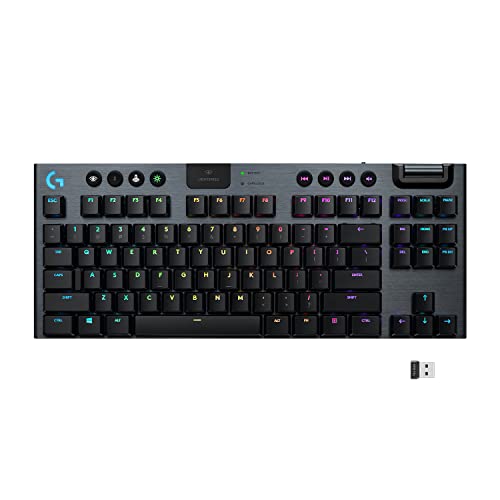
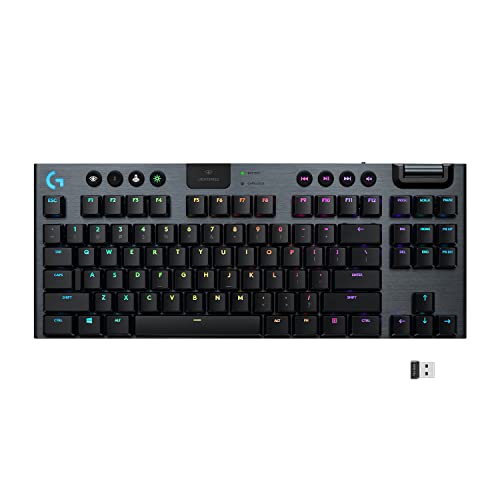
- Logitech G915 TKL (original) — the review subject: Lightspeed wireless, low-profile GL switches, Lightsync RGB, Bluetooth as a second connection, tactile switch variant in black as listed.
- Logitech G915 X LIGHTSPEED TKL — the successor alternative: low-profile mechanical switches, double-shot PBT keycaps, aluminium finish, clicky variant in black as listed.
Logitech G915 TKL review: the original, judged on its merits
Badge: Review subject — the slim wireless pioneer
- Layout: tenkeyless, low profile
- Switches: GL mechanical, tactile variant on this listing
- Connections: Lightspeed wireless, Bluetooth, and wired
- Lighting: Lightsync per-key RGB
- Top plate: brushed aluminium
- Extras: machined volume roller, dedicated media controls, onboard profiles
Begin with the object itself, because the G915 TKL is as much an object as an input device. The aluminium top plate is genuinely beautiful in the way machined metal is, cool to the touch on a winter morning and rigid in a way plastic boards at any price struggle to imitate. The tenkeyless footprint returns a meaningful strip of desk to the mouse, which low-sensitivity players feel immediately as extra swipe room, and the board’s thinness lets wrists rest at a natural angle without a wrist rest for many users, an ergonomic dividend of the low-profile format that taller boards cannot offer.
The GL tactile switches are the personality of the board. Their travel is short, their actuation is early, and the tactile bump is a polite suggestion rather than a firm event, which produces a typing feel closer to a premium laptop keyboard that grew up than to a traditional mechanical board. Gamers tend to love the speed of it: repeated strafing keys and ability presses register with a flicker of movement, and the low caps keep fingers gliding between keys. Typists raised on deep, sculpted keycaps are the divided constituency, and their verdict usually arrives within the first long document, so writers should weigh this review’s gaming enthusiasm against their own daily word counts.
Wireless performance was the G915’s founding claim and it remains beyond reproach. Lightspeed’s connection is the one wireless standard in gaming that even sceptics stopped arguing about years ago, and the board’s ability to hold a second device over Bluetooth, a work laptop beside the gaming PC being the classic arrangement, turns the TKL into a two-desk citizen. Battery endurance with lighting active is measured in days of heavy use rather than weeks, and the honest routine is a charging cable kept at the desk’s edge, used during breaks the way you would rest a phone on a pad.
The known criticisms deserve their paragraph. The original charges over micro-USB, a port that felt dated even to its early reviewers and feels archaeological now, and its keycaps are a painted finish that can wear shiny and, on hard-used keys, show their age sooner than the double-shot PBT caps of the successor. Neither flaw touches performance, and both are exactly the kind of flaw a buyer can accept knowingly at the right price tier, which is why the original remains a rational purchase rather than merely a nostalgic one.
Strengths
- Slim aluminium build still feels premium years after launch
- Lightspeed wireless plus Bluetooth serves two machines gracefully
- Volume roller and media keys are best-in-class desk furniture
Trade-offs
- Micro-USB charging is the board’s most dated detail
- Painted keycaps wear sooner than the successor’s PBT set
- Low-profile typing feel divides committed mechanical typists
Best for: gamers wanting the premium slim wireless experience at the original’s tier. / Not suited for: deep-travel typists and anyone building an all-USB-C desk on principle.

Logitech G915 X LIGHTSPEED TKL: what the successor changes
Badge: Alternative — the refined successor
- Layout: tenkeyless, low profile, aluminium finish as listed
- Switches: low-profile mechanical, clicky variant on this listing
- Keycaps: double-shot PBT as listed
- Lighting: RGB as listed
- Platforms: PC and Mac as listed
- Connection: LIGHTSPEED wireless family
The G915 X reads as a letter written by Logitech to its own reviewers. The keycaps are now double-shot PBT, so legends cannot wear away and the surface resists the shine that marked the original’s hardest-working keys. The charging and connectivity arrangements join the modern USB-C era, the switches are revised for a slightly firmer, more deliberate feel, and the whole board presents as the same idea executed with the benefit of years of owner feedback. If the original was the pioneer, the X is the settler who built the town properly.
Choosing between them is therefore a price-and-priorities question rather than a quality question. The X is the better keyboard in the specific ways its spec sheet lists, and it will age more gracefully across a long ownership. The original counters with a lower tier in most market conditions and an identical core experience: the same slim aluminium silhouette, the same wireless freedom, the same roller under your right hand. A buyer who will keep the board for five years should lean X; a buyer furnishing a desk today at a sensible total should price both and let the gap decide.
Strengths
- Double-shot PBT keycaps promise a much longer cosmetic life
- Modern connectivity removes the original’s dated port complaint
- Refined switches answer the original’s feel criticisms
Trade-offs
- Commands the newer, higher tier in the range
- Core experience is evolution, not reinvention
- Clicky variant on this listing will not suit shared quiet rooms
Best for: long-horizon owners who want the definitive version of this design. / Not suited for: bargain hunters for whom the original’s tier is the whole argument.
Buying guide: low-profile keyboards, honestly framed
Low profile is a philosophy before it is a specification. It trades the deep, sculpted travel of traditional mechanical boards for speed, slimness, and a wrist angle that needs no accessories, and the trade delights gamers and divides writers. Before buying any board in this family, interrogate your own day: if most of your keyboard hours are gaming and light chat, low profile will feel like the future; if most are long documents, borrow or trial the format if you possibly can, because switch feel is the one attribute no review can transfer through a screen.
Switch variant is the second decision, and the listings here illustrate it neatly: the original arrives in a tactile flavour, the X listing in a clicky one. Tactile gives a quiet bump suited to shared rooms and late nights; clicky adds an audible confirmation that delights the typist and tests the patience of everyone within earshot, including teammates on an open microphone. Linear variants, where offered, remove the bump entirely for the smoothest gaming feel. There is no hierarchy among them, only a match between the sound and feel of your board and the room it will live in for years.
Wireless architecture is the third decision, and it is where the G915 family still teaches the market. A proper gaming wireless link, a second Bluetooth connection for another machine, and a wired fallback for charging-while-playing cover every desk arrangement a keyboard will meet. Add onboard memory for profiles and the board becomes portable between machines without its software, a detail travelling players and LAN attendees value out of proportion to its spec-sheet size. Judge rival boards against that whole connectivity picture rather than against any single headline about polling or latency.
How to set up and tune the G915 TKL
Setup begins with placement, because a slim board invites sloppy placement. Centre the alphabetic cluster on your body rather than centring the whole board on the desk, a distinction that matters on tenkeyless layouts where the missing number pad shifts the visual centre. Angle the board flat or nearly flat; low-profile boards are designed around a shallow wrist angle, and propping the rear feet high reintroduces the bend the format exists to remove. Pair the Lightspeed receiver on its extension near the board, then pair Bluetooth to your second machine and practise the toggle between them until it is a reflex.
Software tuning is a short, deliberate session. Set the lighting to a scheme you can live with nightly, knowing that brightness is the main lever on battery endurance, and store your preferred profile to the board’s memory. Assign the macro keys sparingly: one or two genuinely used commands, a push-to-talk or a recording toggle, beat a full row of forgotten experiments. Set the game mode to disable the keys that have actually ejected you from a match, which for most players means the operating system key and little else, and resist disabling half the board against hypothetical accidents.
The final tuning is human. Give the low-profile switches a full week before judging them, because fingers calibrated to tall boards overshoot and bottom out for the first days, and the board will feel harsher than it is until your touch lightens to match its travel. Type something long on day seven and compare the feeling honestly with day one. Most players complete the adaptation and keep the speed; the minority who still miss deep travel have learned something true about themselves that the successor cannot fix either, because the X shares the format’s philosophy completely.
Common mistakes with premium slim keyboards
The first mistake is buying the clicky variant for a shared space out of enthusiasm for its sound in a review video. Clicky switches are a roommate negotiation, not a solo preference, and the tactile variant exists precisely for desks within earshot of other humans. The second mistake is judging battery life in the first week with lighting at maximum and concluding the board is thirsty; lighting is the load, and a dimmer scheme or a per-game profile changes the arithmetic entirely without changing the keyboard.
A third mistake is neglecting the charging cable’s placement until the first mid-match low-battery warning. The G915 family’s wired mode makes that warning a minor event if the cable lives at the desk, and a small crisis if it lives in a drawer in another room. The fourth is treating the volume roller as a toy. Owners consistently report it becoming the most-touched control on the desk, for game volume, for calls, for music between matches, and buyers comparing boards should weigh a good roller as the daily luxury it demonstrably becomes.
Final recommendation
The logitech g915 tkl review verdict is that the original remains a genuinely desirable keyboard whose flaws are known, specific, and priced in. Buy it when its tier undercuts the X by a margin that matters to your desk budget, and enjoy the founding version of a design the whole market now imitates. Buy the G915 X when you intend a long ownership and want the keycaps, connectivity, and switch refinements that five years of feedback produced. Either way you are buying the same excellent idea; the only wrong answer is paying the X’s tier for the original, or the original’s compromises at the X’s tier.
Frequently asked questions
Are low-profile switches worse for typing?
Different, not worse, and the difference is personal. Short travel and flat caps reward a light, gliding touch and punish the heavy bottoming-out style that tall boards trained into many of us. Writers who adapt often type as fast as before with less finger travel; writers who do not adapt feel the absence of sculpted caps on every long session. The honest test is a week of real work, and this is the rare product category where that test matters more than any specification comparison.
How is the battery life in real use?
Expect days of heavy use with lighting bright, and far longer with lighting dimmed or off, with the exact span governed more by your RGB habits than by your keystrokes. The practical routine is a cable at the desk and a top-up during breaks, which the wired mode makes painless. Owners who treat charging as a weekly ritual rather than an emergency response report that battery simply stops being a topic, which is the correct end state for any wireless peripheral.
Can the G915 TKL really serve two computers?
Yes, and it is one of the design’s quiet triumphs. Lightspeed serves the gaming machine with a competitive-grade link while Bluetooth holds a second machine, a work laptop being the classic pairing, and a dedicated button swaps between them. For the growing number of desks where a personal rig and an employer’s laptop share one set of peripherals, that arrangement removes a switch box, a second keyboard, and a daily tangle of cables in a single purchase.
Is the tenkeyless layout a problem for work?
Only for work that lives in spreadsheets. Data entry and accounting genuinely miss a number pad, and those users should look at the full-size sibling designs. Everyone else gains desk space and a more centred mouse position, which most shoulders prefer by the end of a long day. A separate number pad, bought later if a project demands it, restores the capability without surrendering the tenkeyless advantages for the other ninety percent of your computing life.
Should I wait for the original’s price to fall further?
Successor launches usually soften the original’s tier over time, but the G915 TKL has already lived through that transition and its pricing now reflects its veteran status. If the current gap between the two boards feels fair for the X’s refinements, waiting buys little; if the gap feels large, the original is the rational purchase today rather than after another season of hoping. Desks are furnished in the present tense, and both boards will serve for years whenever you choose between them.
What wears out first on the G915 TKL?
Cosmetics before mechanics. The painted keycaps on hard-used keys can shine and wear, the battery will slowly lose peak capacity across years of cycles, and the switches and wireless link are the parts least likely to trouble anyone. The successor’s PBT caps address the first item directly, which is worth remembering when comparing tiers: part of the X’s premium is literally the cost of the original’s most predictable ageing path having been engineered away.
Design anatomy: how the board gets so thin
The G915 TKL’s thinness is an engineering stack, not a styling trick. Low-profile switches shorten the tallest component in a traditional board, flat keycaps remove the sculpted height above them, and the aluminium top plate doubles as the structure itself, so the chassis does not need a deep plastic tub beneath to stay rigid. The result is a keyboard that flexes less than many boards three times its thickness, because metal plate construction beats plastic depth for stiffness per millimetre. Pick it up by one corner and the absence of creak tells the story more honestly than any dimension in a specification table.
That rigidity shapes the sound as much as the feel. A stiff plate returns a clean, short acoustic signature, a muted tick rather than a hollow clatter, which is why the G915 family sounds composed in recordings and on calls even in its clickier variants. The low caps contribute too, with less mass moving and less distance to travel before the stroke ends. Owners upgrading from a budget board notice the sound difference before the speed difference, and it is one of the reasons the board photographs and records like a piece of studio equipment rather than a toy.
The trade hiding inside the anatomy is repairability. Slim, plate-built boards are not the hobbyist’s playground of hot-swappable sockets and endless switch tourism that the custom keyboard world celebrates. The G915 TKL is a finished appliance: you choose its switch variant at purchase and live with the choice, which is precisely why the variant decision in the buying guide deserves its weight. Buyers who enjoy modifying keyboards should look at the custom 75 percent boards elsewhere in this cluster; buyers who want a complete object that asks nothing of them have found their category’s flagship expression.
The GL switch family in daily language
Logitech’s GL switches come in three temperaments, and translating them into daily language helps more than force graphs do. Linear is a smooth press with no event along the way, the variant competitive players favour because a strafe key behaves identically at every depth. Tactile inserts a small, quiet bump that tells the finger the press registered, the variant hybrid workers and gamers tend to settle on because it confirms without noise. Clicky adds a deliberate sound to that bump, a typewriter’s punctuation mark, glorious in a private room and a diplomatic incident in a shared one.
Actuation sits early in the stroke on all three, which is the low-profile family’s defining sensation. Keys register before the finger expects them to during the first days, producing doubled letters in passwords and accidental ability presses in games, and then the hand recalibrates and the speed becomes the point. The recalibration is real learning, not marketing, and it is why this review keeps insisting on a week-long trial: a low-profile board judged in an afternoon is a board judged during its owner’s clumsiest hours with it, which no product deserves and no buyer benefits from.
Stabilised keys, the wide ones like space and shift, carry their own character on the G915 TKL. They stay level and rattle less than the budget boards most upgraders arrive from, so the spacebar’s voice is a thock rather than a clatter. In long sessions these small consistencies compound into the board’s reputation for feeling expensive, a reputation built less on any single specification than on the absence of the dozen small cheapnesses that owners of lesser boards learn to stop hearing only when they finally upgrade away from them.
Lighting, battery, and the arithmetic between them
Lightsync RGB on the G915 TKL is per-key, reactive, and capable of following games and media, and its honest cost is battery. The lighting system is the board’s largest continuous power draw, dwarfing the switches and the radio during normal use, so the endurance conversation is really a lighting conversation. Full brightness with animated effects is a plugged-in or short-session luxury; a static, dim scheme stretches wireless life dramatically; and turning lighting off entirely converts the board into a marathon runner whose charge lasts through weeks of ordinary days.
The mature way to live with this is profiles rather than principles. A bright profile for the evening gaming session, a dim one for work, and the discipline to let the board sleep when the desk empties will together make charging a background event. The board’s own battery reporting in the software helps if you let it, warning early enough that the cable ritual stays calm. Owners who announce that wireless keyboards are not ready are usually owners who ran animated lighting at maximum for a fortnight and met the predictable arithmetic unprepared; the arithmetic was always published, and it is manageable the moment it is acknowledged.
There is an aesthetic counterargument worth airing. A slim aluminium board with its lighting off is still a handsome object, arguably handsomer, because the metal and the silhouette carry the design without assistance. Many long-term owners migrate towards subtle lighting over time, a low white or a single accent colour, as the board settles from new toy into furniture. That migration is a sign of a successful product: the features that sold it become the background, and the fundamentals, feel, shape, and the roller, become the reasons it stays on the desk for years.
G Hub and the software relationship
Logitech’s G Hub is the board’s control room, handling lighting, macros, profiles, and firmware, and the healthiest relationship with it is the same as with any peripheral suite: configure deliberately, save to onboard memory, and then let the software recede. The G915 TKL’s onboard profiles mean a configured board behaves on a machine where G Hub has never been installed, which matters for work laptops you cannot modify and for tournament machines you do not own. Set up the board once on your own PC, store the result, and the software becomes an occasional tool rather than a daily companion process.
Macro restraint deserves repeating in this context because the software makes abundance easy. The dedicated macro keys and the per-key assignment system invite elaborate chains, and elaborate chains invite misfires at the worst moments. Assign what your games and work genuinely repeat, a media control, a push-to-talk, a screenshot, perhaps a text expansion for an email address you type daily, and leave the remaining capacity fallow. A keyboard whose every key you can explain is a keyboard that will never surprise you in a final round or a client presentation, and that predictability is worth more than any clever chain.
Who the tenkeyless slim format serves best
Gamers with limited desk depth are the obvious constituency, because the reclaimed strip where a number pad would sit becomes mouse room, and mouse room is aim. Travellers between two desks are the second constituency, because the board is slim enough to slip into a bag and civilised enough, over Bluetooth, to serve the office without a driver argument. The third constituency is the aesthetic minimalist, a real and growing class of buyer for whom the desk is furniture in a living space, and for whom the G915’s aluminium restraint is the entire point of the purchase rather than a bonus.
The format serves least well the spreadsheet professional, the deep-travel typing romantic, and the keyboard hobbyist, and this review has tried to be plain with all three. The first should buy the full-size sibling, the second should test the format before committing or choose a traditional board with a clear conscience, and the third should spend their money where switches are swappable and keycaps are a hobby rather than a specification. A flagship that knows its audience this clearly is a flagship that will satisfy it, and the G915 family’s decade of imitators suggests the audience was larger than anyone predicted when a slim wireless board first seemed like a contradiction.
Long-term ownership: two years on one desk
Project the board forward two years and the ownership story writes itself from its materials. The aluminium plate will look essentially new, because brushed metal hides micro-scratches in its grain and does not yellow or polish the way plastic does. The switches will feel as they did in month two, mechanical switches being among the most durable components in all of computing. The battery will hold a little less than it did, the ordinary tax on every rechargeable device, and the keycaps will tell the truth about your habits, shiny on the movement keys if you bought the original, stubbornly matte if you bought the X.
Care across those years is minutes per month. A soft brush or compressed air clears the crumbs and dust that low-profile boards collect visibly between their flat caps, a barely damp cloth refreshes the plate, and that is the whole liturgy. The board’s slimness helps here too, because there is no deep case for debris to disappear into. Owners who keep a small brush in the desk drawer find the board looks showroom-tidy for years, which matters more to daily satisfaction than owners expect when the board is new and cleaning it has never yet been necessary.
The support horizon is the last ownership factor, and it favours the incumbent. Logitech’s scale means firmware, replacement receivers, and community knowledge remain available long after boutique boards have become orphans, and the G915’s popularity means any question you will ever have has been asked and answered publicly already. Buying the popular flagship is sometimes dismissed as unimaginative; in peripherals that must work every day for years, popularity is a feature with a measurable cash value, paid out in answers, parts, and the absence of dead ends.
The G915 TKL against the wider field
Rivals attack this board from two directions. Custom and enthusiast boards offer swappable switches, gasket mounts, and keycap artistry the G915 cannot match, at the cost of wireless polish, software maturity, and the slim metal silhouette. Mainstream rivals offer similar slim wireless formulas, several of them openly modelled on this board’s success, usually undercutting its tier while surrendering some combination of the roller, the aluminium, or the dual-connection grace. The G915 TKL’s defence is that it remains the complete sentence: no single attribute leads the world, and the whole package has no obvious missing word.
That completeness is why the review’s final contest was always internal, original against X, rather than external. A buyer who wants the slim flagship experience is choosing between two editions of the same answer, separated by refinements and tier. A buyer who wants a different experience entirely, deep travel, hot-swap tinkering, a number pad’s embrace, should leave this review entirely and shop those categories with the same care, because no discount on a G915 will convert it into the keyboard it never claimed to be, and no review should pretend otherwise on its final page.
Gaming sessions versus typing days: a split diary
Keep two diaries for the trial week and the board will explain itself. The gaming diary usually fills with small appreciations: the strafe keys answering instantly, the desk feeling larger, the roller ending the hunt for volume controls mid-match, the wireless link disappearing from consciousness entirely, which is the highest praise a connection can earn. Competitive players also note the low caps during rapid alternation between movement keys, where the fingers slide rather than climb, and the board’s thinness during long holds, where the wrist’s neutral angle postpones the ache that taller boards schedule for hour three.
The typing diary is where the argument happens. Short messages and chat feel effortless from the first hour. Long documents expose the format’s terms: the flat caps give the fingers fewer landmarks, so touch-typists who navigate by sculpted edges make more early errors, and the short travel removes the cushion that heavy typists use as punctuation. Most diaries record the errors fading across the week as the touch lightens, and a minority record a settled preference for depth that no adaptation dissolves. Both diaries are honest data, and the review’s position is simply that you should collect your own before the return window, not after it.
Desk pairing: what sits well beside this board
A slim board rearranges the desk around it. The mouse gains the tenkeyless dividend immediately, and a large pad under both devices unifies the surface the board’s thinness creates. A monitor at proper height completes the ergonomic triangle the flat wrist angle begins. Owners often find the G915’s restraint contagious, prompting the tidy desk its design implies, and there is a real if unquantifiable pleasure in a setup where the keyboard looks like it belongs to the room rather than visiting it from a spaceship, a pleasure the aluminium plate delivers nightly without a single specification being involved.
Value, tiers, and the second-hand market
Veteran flagships develop a second life in the used market, and the G915 TKL is a instructive citizen of it. Used examples trade briskly because the board’s failure modes are cosmetic and inspectable, a buyer can judge keycap shine and plate condition from photographs in a way that internal electronics never allow. That liquidity cuts both ways for the new buyer: the original’s tier is partly supported by its resale floor, and an owner who upgrades to the X in two years will find the original remarkably easy to pass on to the next desk, which softens the true cost of either purchase made today.
Within the new market, the discipline is to price the difference, not the products. List what the X adds, PBT caps, modern charging, refined switches, longer cosmetic life, and ask what that list is worth across your intended ownership in your own currency of evenings. For a five-year keeper the answer is usually yes; for a two-year furnisher or a buyer whose desk budget must also cover a mouse and a headset this season, the original’s tier buys the same silhouette and the same wireless grace, and the money saved becomes hardware you can also touch. Both answers are respectable, and the review’s loyalty is to the arithmetic rather than to either box.
Small details that owners end up loving
Flagship ownership is a accumulation of small mercies, and the G915 TKL has a distinctive set. The receiver stores in the board’s underside, a tiny decision that saves travellers a loose dongle rattling in a bag. The media keys are real keys with real travel rather than a function-layer compromise, so pausing a video never requires a chord. The lighting remembers its manners across sleep and wake instead of strobing a dark room at midnight. The board wakes fast enough that the first keystroke of the day is rarely lost, a mercy so basic that its absence on lesser wireless boards feels like a betrayal every single morning.
There is also the matter of the board’s silhouette on a desk during the hours nobody is typing. Keyboards occupy the visual centre of a workstation, and the G915’s thin aluminium line reads as calm in a way that aggressive gaming boards, however excellent, do not. For the growing number of people whose desk sits in a living room, a bedroom, or a shared studio, that calm has a daily value that never appears in a benchmark. Products live in rooms, not in reviews, and this one’s room manners are the best argument its designers ever made, stated silently, in metal, every day it sits there.
What the successor’s existence does to the original’s story
A successor reframes its predecessor, and the G915 X has been kind to the original’s reputation in an unexpected way: by changing so little of the formula, it certified that the formula was right. The X’s refinements are the confession of a manufacturer who knew the silhouette, the switches’ philosophy, the roller, and the wireless architecture needed no apology, only better keycaps and a modern port. Owners of the original can read the X’s spec sheet as a validation rather than a rebuke, which is a rare and comfortable position for the owner of a superseded flagship to occupy after a product cycle turns.
It also clarifies the used and discounted market’s logic for years to come. The original will be the value expression of this design, the X its definitive one, and the gap between them will be maintained by exactly the items this review enumerated. A buyer in any future season can therefore reuse this review’s framework whole: price the keycaps, the port, and the switch revision against your ownership horizon, and the correct board announces itself. Reviews date quickly in this industry; frameworks that survive a product cycle are the ones worth writing, and worth reading to the end.
A buyer’s checklist for the day the box arrives
Inspection day for a premium keyboard is short and specific. Check the plate for transit marks, press every key once for a consistent voice, confirm the roller turns smoothly with its detents intact, and pair both connections, Lightspeed to the gaming machine and Bluetooth to the second device, before the packaging leaves the room. Type one long paragraph and play one familiar game, not to judge the format, which needs its week, but to confirm the individual unit is sound. Then register the warranty, coil the charging cable to the desk’s edge where its life will be lived, and let the trial week begin with a healthy board.
Keep the box until the trial concludes, because a keyboard is one of the few purchases whose return is genuinely plausible on fit grounds alone, and a complete package makes that return painless if your hands file a dissent the adaptation week cannot overturn. If the board stays, as it does for most buyers, the box can retire to storage as the resale asset the value section described. Either way, the procedure honours the size of the purchase: premium money, premium method, and a decision made by your own fingers on evidence rather than by a review’s enthusiasm, including this one’s.
The case for the full-size sibling, stated fairly
Fairness requires admitting that for a definable minority, the correct G915 was never the TKL at all. The full-size version returns the number pad that spreadsheet work, certain simulation games, and a generation of muscle memory depend on, at the cost of the mouse room this review has praised. Neither board is the other’s superior; they are the same flagship idea cut for two different desks, and the choice between them should be made by an honest audit of how many times a week your right hand reaches for a number pad that is not there, counted over a real week rather than guessed in a showroom.
There is a middle path worth knowing: the TKL on the desk and an inexpensive standalone number pad in the drawer, deployed for the quarterly spreadsheet marathon and stored for the rest of the season. It sounds like a compromise and behaves like a specialisation, each tool sized to its frequency of use. Buyers torn between the two formats often find that arithmetic, pad needed rarely and mouse room needed nightly, settles the question more decisively than any reviewer’s preference, including the preference this article has made no effort to hide.
Sound on the desk: what teammates and housemates hear
A keyboard has two audiences, the typist and everyone else, and the G915 family’s slim acoustics serve the second audience better than most gaming boards. The plate’s stiffness and the switches’ short travel keep the board’s voice low and tidy, so even the tactile variant can share a room with a sleeping partner or a studying housemate at ordinary typing forces. The clicky variant remains the exception that proves the rule, a switch designed to be heard, and its presence on the X listing in this review is a reminder to read variant names as carefully as model names when ordering for a shared space.
Microphone manners complete the acoustic picture. A board this quiet rarely bleeds into voice chat, which teammates appreciate more than they ever say, and the volume roller lets you tame a loud game moment without alt-tabbing into a menu while a conversation continues. These are social specifications, invisible in a solo review session and obvious within a week of real life, and they belong in any honest account of why this board, years after launch, still anchors so many desks that could afford to replace it with anything they liked.
Final word on a board that became a reference point
Some products are reviewed; a few become the reference that other reviews are written against, and the G915 TKL crossed into the second category years ago. Every slim wireless board since has been measured against its silhouette, its roller, and its wireless manners, usually in language that assumes the reader already knows the original. That status does not make it the right purchase for every reader of this review, and the preceding pages have been careful about the readers it does not suit. It makes it the purchase that needs the least faith: a known quantity, with known flaws, at a known tier, in a market segment it substantially created.
So the recommendation simplifies to the one given at the start, now with its evidence assembled. The original for value within a proven design, the X for the definitive edition of that design, and a week of honest trial whichever box arrives, because low-profile keyboards are a fit decision before they are a technology decision. Make the fit, and you will understand within a month why this board’s owners speak of it less like a peripheral and more like a piece of the desk itself, which is the quiet ambition every flagship brings to market and so few achieve.
An appendix for the undecided: three questions
If the decision still resists, answer three questions in writing. First, how many hours a week do you type long documents, and have you ever used a low-profile board for one of them? Second, how long will you keep this keyboard, honestly, based on how long your last one served? Third, what else in the desk budget competes with the price gap between the original and the X this season? The answers map directly onto this review’s verdicts: heavy untested typing argues for a trial or a different format, a long horizon argues for the X, and a crowded desk budget argues for the original and the companions its savings can buy.
Notice that none of the three questions asks which keyboard is better, because that question, asked in the abstract, is how buyers end up with the wrong flagship. Asked in the concrete, about your hours, your horizon, and your budget’s other claims, the decision becomes almost clerical. That is the note on which this review is content to end: the G915 TKL and its successor are both excellent answers, and excellence was never the scarce resource in this purchase. Self-knowledge was, and it is the one component no manufacturer can include in the box.
Postscript: the roller, one last time
Every long-term owner interviewed by experience rather than by survey ends up mentioning the volume roller, so it earns the postscript. It is the control the hand visits most, the one whose machined weight makes a trivial adjustment feel deliberate, and the one rival boards most often omit in favour of a knob borrowed from a parts catalogue or a function-layer shortcut. If a single detail explains why this keyboard’s owners resist replacing it even when newer boards out-spec it, the roller is that detail, a small daily pleasure compounding across years into loyalty that no benchmark can argue with.
And a note on gifts
This board is frequently bought as a gift, and it is a good one provided the giver has done the variant homework the buyer sections describe. A clicky board gifted into a shared flat is a diplomatic incident in a handsome box, while the tactile variant in the same box is a triumph. When in doubt, gift the quieter switch, include the receipt without embarrassment, and remember that a keyboard is as personal as a pair of shoes: the generosity is in the quality, and the kindness is in making the exchange easy if the fit argues otherwise.
Envoi: keyboards as long relationships
A keyboard is the computer part you touch most and replace least, which makes it closer to a musical instrument than to a component. The G915 TKL earned its place in that company by getting the touching right: the metal’s coolness, the switches’ brevity, the roller’s weight, repeated ten thousand times until they become the background of work and play rather than events within it. Choose the edition that fits your horizon, give it its honest week, and then stop shopping for keyboards for a good long while. That stopping, paradoxically, is the satisfaction the whole category exists to sell, and this board delivers it as reliably as any product this review series has examined.
One practical footnote belongs with the envoi: keep the original receiver paired and labelled if you ever lend the board or move desks, because a flagship separated from its dongle becomes a Bluetooth keyboard with a famous name, and reuniting the pair later is a chore that five seconds of labelling today prevents entirely.
And if the board is destined for a desk that hosts video calls daily, place it slightly closer than instinct suggests during the first week; the low profile rewards a compact, centred posture, and the microphone will thank you for a keyboard whose voice stays politely beneath your own during every meeting it attends.
Related guides
Logitech and Razer compared across the whole desk
a custom 75 percent board with an aluminium case
wireless keyboards chosen for fast-paced shooters
wireless keyboards at a friendlier tier