Disclosure: As an Amazon Associate, reviewstook.com earns from qualifying purchases. Links on this page are affiliate links; they cost you nothing extra. Prices and availability change often, so check the current Amazon listing before you buy.
The mouse sold under the g pro x3 superstrike name — listed by Logitech’s own catalogue entry as the G PRO X2 SUPERSTRIKE — takes the idea that reorganised competitive keyboards and applies it to the two buttons your index and middle fingers live on. Instead of conventional microswitches that close at a fixed point and reset at another, its main clicks use magnetic analog switches with rapid trigger, so a click can reset the instant your finger begins to release it, and the actuation depth itself can be tuned in software. Wrapped around that experiment is a familiar flagship formula: a 61-gram wireless shell in the Pro X lineage, Logitech’s HERO-class sensing, high polling, USB-C charging and adjustable click haptics that let you change how a click feels without changing when it fires. The question this review answers is whether analog clicking is a genuine competitive tool or a solution shopping for a problem — and the honest answer turns out to depend almost entirely on which games you play and how your fingers work.
Two stablemates frame the decision. The G Pro X Superlight 2 is the established flagship: the mouse that defined the modern ultralight wireless category, with hybrid optical-mechanical switches, a shape refined across two generations of professional feedback, and none of the Superstrike’s experimental risk. The G305 Lightspeed is the budget elder — a small, AA-powered wireless mouse whose sensor and wireless performance embarrassed far pricier rivals for years, included here because a remarkable number of Superstrike shoppers are upgrading from exactly this mouse and deserve to know what each step up actually buys. All three were verified against the site’s Creators API catalogue data on 2026-11-24, with exact listing titles recorded in the accompanying sources file.
Key takeaways
- Analog main clicks with rapid trigger shorten the reset path between shots, which matters most in semi-automatic and tap-fire play.
- Adjustable actuation lets deliberate clickers sink the firing point deep while twitch clickers run it hair-trigger shallow.
- Click haptics tune feel independently of function — a first for a mainstream flagship mouse.
- The Superlight 2 remains the safer flagship for players who value a proven shape and switch feel over experimentation.
- The G305 still makes sense as a first wireless mouse; the Superstrike is an upgrade for players who already know their grip and their games.
In this guide
Brief verdict on the Superstrike
Logitech has built the most technologically interesting gaming mouse in its catalogue, and for a specific player it is also the best. If your titles reward rapid, repeated, precisely timed clicks — tactical shooters with semi-automatic rifles, rhythm-inflected aim trainers, any game where you feather shots rather than hold a beam — the combination of rapid trigger clicks and adjustable actuation removes a small mechanical delay from every single shot, thousands of times a session. If your play is dominated by holding angles with a scope or spraying automatic weapons, the advantage thins to near nothing and the Superlight 2’s proven shape and switch feel make the more sensible flagship. Either judgement requires the longer analysis below, because the Superstrike’s value hides in mechanics that a spec sheet cannot convey. It is also worth stating plainly at the outset that nothing in this mouse is a gimmick in the pejorative sense: every headline feature maps to a real mechanical property, and the debate is about how much those properties are worth to a given player, not about whether they exist. Reviews that dismiss analog clicking as marketing have usually not spent a week tap-firing with it; reviews that crown it revolutionary have usually not priced the alternatives. This one aims to do neither.
How the comparison set was chosen
Comparison mice were chosen to answer the questions buyers actually ask. Is the new analog flagship better than the old mechanical flagship — hence the Superlight 2, same brand, same competitive brief, different switch philosophy. And how far has the budget end come — hence the G305, which remains the default recommendation for a first serious wireless mouse. Rival flagships from other brands are discussed in prose where they illuminate a point, but only catalogue-verified products carry links and detailed review sections, per this site’s standing rule that a recommendation must be traceable to a confirmed listing.
Detailed reviews

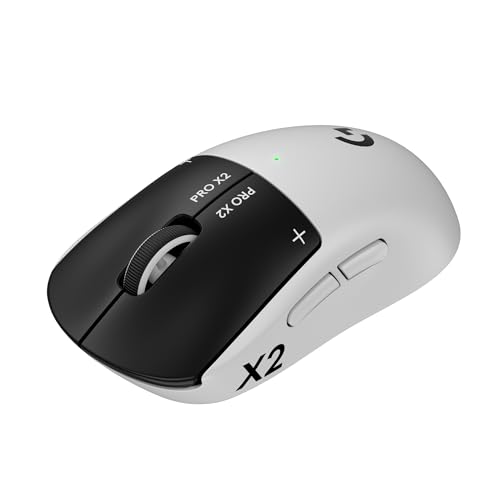
Logitech G Pro X2 Superstrike — the analog-click flagship
Badge: Best for tap-fire and semi-automatic specialists
- Weight: 61 grams per the verified listing
- Switches: magnetic analog main clicks with rapid trigger
- Extras: adjustable click haptics, adjustable actuation
- Connection: wireless with USB-C charging
- Polling: up to 8K as listed
The first hour with analog clicks is a recalibration exercise. A conventional mouse button has a geography you learned years ago: press, click, release past the reset point, press again. The Superstrike’s buttons report travel continuously, so the click fires at the depth you configure and resets the moment travel reverses. In a tap-firing drill the effect is immediate and slightly uncanny — the second, third and fourth shots arrive with a rhythm that feels limited by your finger rather than by the switch. Semi-automatic rifles in tactical shooters are the obvious beneficiaries, but so is any repeated-click task: burst discipline in Apex, pistol rounds in Valorant, even the mundane speed of confirming a burst of edits in a photo cull. The adjustable actuation completes the system. Players with a heavy resting finger can sink the firing point until accidental clicks vanish; players with a light, hovering grip can run it so shallow that intention and shot become nearly simultaneous.
The haptics deserve separate praise because they solve a real objection to analog switches: feel. Magnetic switches in keyboards are often described as smooth but characterless, and a mouse click lives or dies on its tactility. Logitech’s answer is adjustable click feedback, letting you dial how pronounced the click sensation is without touching the actuation or reset behaviour. It is a genuinely thoughtful piece of engineering — function and feel decoupled, each tuned to the player. Around the switches, the rest of the mouse is disciplined flagship practice: 61 grams that disappear under a fingertip or claw grip, a safe symmetrical shape inherited from the Pro line’s years of professional iteration, wireless performance that has long since stopped being a conversation, and battery behaviour consistent with the flagship line. The risks are equally identifiable. This is a first-generation mechanism in a product category where players keep mice for years; the software tuning takes an evening to converge; and players whose games never ask for rapid repeated clicks are paying flagship money for a feature their play cannot cash.
Strengths
- Rapid trigger clicks measurably shorten the path between repeated shots
- Actuation depth and haptic feel tune independently to the player’s fingers
- Proven Pro-line shape and 61-gram wireless build carry no experimental compromises
Trade-offs
- First-generation switch system asks early adopters to accept some unknown longevity
- Benefits concentrate in semi-automatic and tap-fire play; automatic-weapon players gain little
- Flagship pricing for a feature set some players will never exercise
Best for: competitive players whose games reward repeated precise clicking and who enjoy tuning their gear. Not suited for: players who mostly hold automatic fire, or anyone who wants a mouse that needs no configuration thought at all.

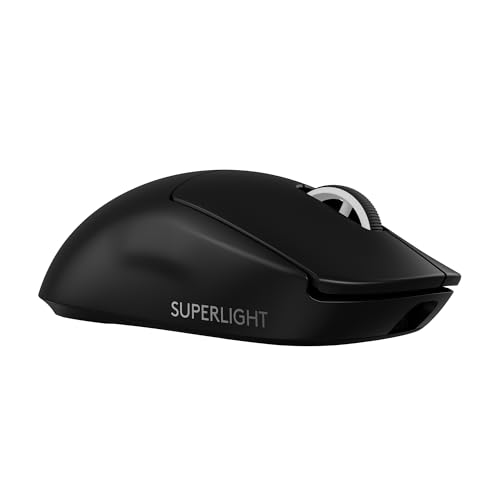
Logitech G Pro X Superlight 2 — the proven flagship
Badge: Best for players who want the safe professional choice
- Sensor: HERO 2, up to 32,000 DPI per the listing
- Switches: LIGHTFORCE hybrid optical-mechanical
- Buttons: 5 programmable
- Charging: USB-C
- Shape: symmetrical Pro lineage, right-handed use
The Superlight 2’s review can be shorter because its argument is simpler: everything about it has already survived years of professional scrutiny. The shape is the industry’s reference symmetrical shell, sized for fingertip and claw grips, with a coating and side profile that disappear during play. Its LIGHTFORCE hybrid switches pair an optical actuation path — fast and immune to contact degradation — with a mechanical click feel that players consistently describe as crisp, which was the previous generation’s answer to the same speed-versus-feel problem the Superstrike now attacks with magnets. The HERO 2 sensor tracks beyond any human requirement, the wireless link is the benchmark rivals are measured against, and the whole package asks nothing of its owner beyond charging it occasionally and choosing a sensitivity.
That maturity is both the recommendation and the limitation. Nothing here will surprise a player upgrading within the Logitech line, including the absence of rapid trigger: repeated clicks still pay the mechanical reset toll, small as modern switches have made it. Players who have never felt that toll will not miss its removal. Players who tap-fire for a living and have felt it should read the Superstrike section again. For everyone else — the scoped angle-holder, the automatic-rifle entry fragger, the all-rounder who plays six genres — the Superlight 2 remains the flagship that needs no explanation at checkout and no adjustment period after it.
Strengths
- Reference shape and sensor with years of professional validation
- Hybrid switches deliver speed with a familiar, crisp mechanical feel
- Zero learning curve for players already in the Logitech ecosystem
Trade-offs
- No rapid trigger; repeated clicks keep a conventional reset path
- Conservative design offers little to excite an upgrader from the first Superlight
- Five buttons is a minimal complement for MMO or heavy macro play
Best for: competitive all-rounders who want the proven flagship and no experiments. Not suited for: tap-fire specialists chasing the last mechanical delay, or players needing many side buttons.

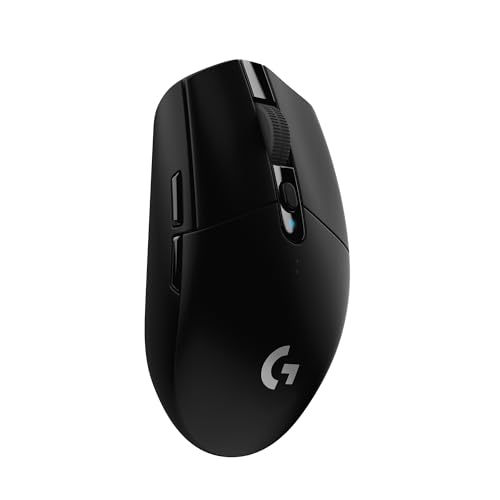
Logitech G305 Lightspeed — the budget benchmark that refuses to retire
Badge: Best first wireless gaming mouse
- Sensor: HERO, 12,000 DPI per the listing
- Battery: single AA, up to 250 hours as listed
- Buttons: 6 programmable
- Memory: on-board profile storage
- Connection: LIGHTSPEED wireless via USB receiver
Every few years a product is so correctly priced and competently built that it becomes the control group for its entire category, and the G305 is that product for wireless mice. Its HERO sensor delivers tracking that casual measurement cannot separate from flagships, its LIGHTSPEED connection is the same wireless lineage the professional line uses, and its AA battery trades the rechargeable convenience of expensive mice for months of runtime and the ability to revive a dead mouse with a drawer battery in ten seconds. The small shell suits fingertip and claw grips and smaller hands, travels happily in a laptop bag, and has introduced more players to wireless gaming than any rival at its tier.
Its relevance to a Superstrike shopper is as a calibration point. The distance from a G305 to a Superlight 2 buys shape refinement, rechargeable convenience, lighter weight and hybrid switches. The distance from there to a Superstrike buys an entirely new click mechanism. Players should climb that ladder one honest rung at a time: if your current mouse is a G305 and your aim still improves monthly, the flagship money may serve you better saved until your technique plateaus and peripherals become the bottleneck. If you already live at the plateau, the G305’s presence here is a reminder of how good the baseline has become — and therefore how specific the flagship’s advantages must be to justify themselves. That discipline, applied honestly, is what separates an upgrade from a purchase: the flagship must name the exact interval, gram or gesture it improves, and the G305’s competence forces it to do exactly that.
Strengths
- Sensor and wireless performance far beyond its price tier
- AA battery delivers months of play and instant revival
- Compact, durable shell suits travel and smaller hands
Trade-offs
- Heavier than flagships, with weight biased by the battery
- Conventional switches with conventional reset behaviour
- Micro-USB era design details date its charging and cable story
Best for: first-time wireless buyers, travellers, and smaller hands on a budget. Not suited for: players seeking flagship weight, shape refinement or analog clicks.
Buying guidance: clicks, shapes and sensors in that order
Why switch technology suddenly matters in mice
For a decade, mouse switches were a solved problem discussed only when they failed. Three developments reopened the question. Optical switches removed contact wear and debounce delay. High polling rates shrank the remaining electronic delays until the switch’s mechanical reset became a visible share of the click-to-click interval. And competitive play itself shifted toward tap-fire and burst disciplines where that interval is spent hundreds of times a match. Analog magnetic switches are the logical endpoint of that progression: if the button reports position continuously, reset stops being a place and becomes a decision the firmware makes instantly. Whether that endpoint is worth flagship money depends on how much of your play spends that interval — a question only your game list can answer.
Shape and grip outrank every electronic feature
The most expensive mistake in mouse buying is choosing electronics inside a shell your hand dislikes. Grip style decides which shapes are even candidates: fingertip players thrive on short, light, symmetrical mice like the three reviewed here; palm players often need a taller, longer shell that none of these provides; claw sits between. Hand size then filters further — the G305’s compact frame is a blessing under a small hand and a cramp under a large one. Measure your current mouse, note where your fingers actually rest during play rather than at the desktop, and let those facts veto products before any switch technology gets a vote. A rapid trigger click inside an ill-fitting shell is a fast answer delivered by an uncomfortable hand.
Sensors and DPI: the specification that stopped mattering
Every mouse in this review tracks far beyond human need, and that is now true across the entire serious market. DPI figures in the tens of thousands describe a sensor’s ceiling, not a setting any player uses; competitive sensitivities live in the low thousands of effective DPI regardless of the headline. What still separates sensors is behaviour at the margins: clean tracking at very low lift-off, no smoothing or acceleration surprises, stable performance across polling rates. All three mice here pass those tests comfortably, which is precisely why this review spends its words on switches and shapes instead. When a specification stops differentiating, honest buying advice moves on.
Weight and the balance question nobody prints
Headline weight is printed to the gram while weight distribution goes unmeasured, yet distribution is what your wrist experiences. A mouse whose mass centres under the sensor feels nimble at its stated weight; one biased rearward by a battery — the G305’s honest compromise — feels heavier in flicks than the number suggests. The 61-gram Superstrike and its Superlight sibling both centre their mass well, which is part of why the Pro shape feels effortless across grips. If you are choosing between near-equal weights, prefer the mouse whose balance reviewers and owners describe as neutral, and treat any single-gram advantage as marketing arithmetic.
Tuning analog clicks: a first-evening routine
Step one: set actuation to the factory depth and play normally
Resist the configurator for the first session. Play your usual games at stock settings and simply notice the clicks — where they fire relative to your old mouse, whether any shots arrive uninvited, whether rapid sequences feel different at all. This baseline matters because every adjustment that follows should be measured against your unmodified first impression, not against a fantasy of what analog clicks ought to feel like.
Step two: find your accidental-click threshold
Open the software and move the main buttons’ actuation one step shallower, then play a low-stakes mode. Repeat, session by session, until you catch the first accidental click — a shot fired while you were merely resting or repositioning. Back off one step. That setting is your personal optimum: the shallowest point your particular finger weight and grip can sustain. Players with a hovering fingertip grip will land far shallower than players who rest their fingers fully, and both are correct.
Step three: enable rapid trigger and drill the rhythm
Turn rapid trigger on for the main buttons and spend ten minutes in a practice range tap-firing at a wall target with a metronome mindset: even spacing, deliberate rhythm, gradually increasing tempo. Listen for where your rhythm breaks — that tempo ceiling is roughly what the feature bought you, and it will rise over the first week as your finger learns it no longer needs to fully release. If clicks begin dropping at high tempo, soften the reset sensitivity a step; analog tuning is a negotiation between speed and certainty, and certainty wins ties.
Step four: set haptics by feel, then stop touching them
Adjust the click haptics last, with actuation locked, because feel is easiest to judge when function is stable. Choose the setting that makes a click feel confirmed without making it feel heavy, then leave it alone for a week. Haptics are the setting most prone to endless fiddling precisely because they carry no performance consequence; treat them like chair height — set once, correctly, and forget.
Step five: save profiles per game, not per mood
Store one profile for tap-fire titles and one relaxed profile for everything else, with deeper actuation for desktop use. The relaxed profile is not a compromise; it is what keeps a precision instrument from firing when you click a spreadsheet. Players who skip it invariably end up blaming the mouse for behaviour their own single-profile laziness configured.
Side-by-side comparison
| Mouse | Click system | Rapid trigger | Power | Character |
|---|---|---|---|---|
| G Pro X2 Superstrike | Magnetic analog, tunable haptics | Yes, on main clicks | Rechargeable, USB-C | Experimental flagship for tap-fire play |
| G Pro X Superlight 2 | LIGHTFORCE hybrid optical-mechanical | No | Rechargeable, USB-C | Proven professional all-rounder |
| G305 Lightspeed | Conventional mechanical | No | Single AA, months of runtime | Budget benchmark and travel mouse |
The table’s story is a ladder of specialisation. Each rung costs more and serves a narrower, more specific need better. The buying error is not choosing the wrong rung; it is skipping the self-knowledge the ladder asks for — your grip, your games, and whether your current mouse’s clicks have ever once felt like the reason you lost a fight.
Common mouse-buying mistakes
Chasing the newest switch for games that cannot use it
Holding an automatic weapon’s trigger spends none of the interval rapid trigger shortens. Players whose rifles are all full-auto, whose abilities are all holds and toggles, should let shape, sensor and price decide — and those criteria may well crown the Superlight 2 or an even humbler mouse.
Ignoring grip because a shape is famous
The Pro shape is famous because it suits the two most common competitive grips, not because it suits every hand. Palm grippers and very large hands have ended up disappointed by mice they bought on reputation. Ten minutes measuring your own hand saves a return and a resentful review.
Setting DPI to the number on the box
A sensor capable of tens of thousands of DPI should still be run at the modest sensitivity your aim was trained on. The headline figure describes headroom for flawless tracking at any setting, not a recommendation. Players who crank DPI to feel they got their money’s worth are paying for precision and then spending it on jitter.
Forgetting the mousepad in the upgrade budget
A flagship mouse on a worn, inconsistent pad is a sports car on gravel. If your pad predates your last two mice, it may be the actual bottleneck in your aim setup, and it costs a fraction of any mouse in this review to find out.
Final recommendation
Buy the Superstrike if your games ask your clicking finger to perform rhythm, not just pressure — it is the first mainstream mouse to treat the click itself as a tunable instrument, and tap-fire players will feel the difference within one practice session. Buy the Superlight 2 if you want the flagship experience with the experimentation already done by two generations of professionals. Keep or buy the G305 if your technique is still developing, your hands are small, or your budget has better work to do elsewhere in the setup. The honest hierarchy is not good, better, best; it is general, proven and specialised, and the right answer is the one matched to the fights you actually lose. One practical way to make the match is to review your last dozen defeats honestly before ordering anything: if missed timings and fumbled bursts genuinely appear in that autopsy, the Superstrike is aimed at your problem; if the autopsy names positioning, crosshair placement and decisions, spend the flagship money on the monitor or the chair and let a humbler mouse carry your already-sufficient clicks. Equipment bought against a diagnosed weakness keeps its value for years; equipment bought against a vague hope becomes next season’s drawer clutter, whatever its switch technology.
The mechanics of a click, explained properly
To judge what Logitech changed, it helps to walk a conventional click through its life. Your finger presses the button shell, which pivots onto a microswitch plunger. The plunger travels until metal contacts meet — that is actuation, the shot. You release; a spring pushes the plunger back until the contacts separate — that is reset, and only after reset can the next shot exist. Between those two events sits a small but non-negotiable slice of travel, and firmware adds a debounce interval on top, waiting to confirm the contact has settled before believing it. Optical switches deleted the debounce problem by watching a light beam instead of a bouncing contact. Magnetic analog switches delete the geography itself: a sensor reports the plunger’s position many times per millisecond, actuation becomes a chosen depth, and reset becomes the firmware noticing that travel has reversed. The click you feel is then free to be theatre — which is why the Superstrike can offer adjustable haptics without touching performance. Feel and function, welded together for thirty years of mouse design, have been separated, and each can now be optimised on its own terms.
There is a second, quieter consequence. A conventional switch wears at its contacts, and its end-of-life failure — the double-click that fires twice for one press — is so common it has become a genre of forum complaint. A position sensor has no contacts to pit or oxidise, so the analog design removes that failure mode in principle, the same argument magnetic keyboards make. First-generation caution still applies to the product as a whole, but the specific mechanism is, on paper, the more durable idea.
Three players, three different answers
The tactical-shooter rifler
Consider a Valorant player whose rifle work is built on disciplined bursts and counter-strafed single taps. For this player the Superstrike’s click system addresses the exact mechanical interval their technique spends most: the reset between shots that must land at full accuracy. Combined with the keyboard-side movement discipline covered in our G Pro X TKL Rapid review, the setup becomes coherent — every input device in the chain optimised for stop-and-shoot precision. This is the buyer the mouse was designed around, and for them the flagship price defends itself.
The battle-royale all-rounder
An Apex or Warzone player lives a different input life: automatic fire held through strafes, shotguns fired in singular committed clicks, abilities on side buttons, and constant looting clicks in menus. Rapid trigger helps the shotgun and the occasional burst discipline, but most of this player’s clicks are single, unhurried events where reset speed is irrelevant. Shape, weight and sensor dominate their experience, which points to the Superlight 2 — or to saving money — unless the analog experiment itself appeals. Honest reviewing means saying the flagship feature is a minor character in this player’s story.
The hybrid worker whose mouse earns its keep in spreadsheets
Plenty of gaming mice spend their weekdays in documents, and the Superstrike’s tunability cuts both ways there. A relaxed desktop profile with deep actuation makes it a perfectly civilised office mouse with an excellent sensor, and its wireless receiver can live in the work laptop while Bluetooth-class convenience is the one thing this performance line does not prioritise. Buyers who hot-desk between machines daily may find the Superlight 2’s equally focused approach no better, and both lose to a dedicated productivity mouse for that life. The gaming flagships earn their place at a gaming desk that moonlights, not the reverse.
Ownership notes: batteries, feet and firmware
Flagship wireless mice ask for a small maintenance liturgy. The PTFE feet that make them glide will wear over a year or two of heavy use and are replaceable; a mouse that begins to feel scratchy is usually asking for feet, not retirement. The rechargeable battery prefers partial cycles to constant full charges, and the USB-C port means the cable that charges your phone can rescue a forgotten charge before a match. Firmware updates on this class of mouse occasionally adjust sensor or wireless behaviour, so checking the software a few times a year is worthwhile — but avoid updating on the morning of an important session, a rule that applies to every peripheral and most operating systems. Finally, keep the receiver close and unobstructed: a receiver buried behind a metal case at the far side of a desk is the most common cause of the wireless hesitation that owners then blame on the mouse.
Will professionals actually use analog clicks?
Professional adoption is the test every gaming innovation claims and few pass quickly, because professionals are conservative for rational reasons: their income depends on equipment behaving identically under stress, and a new switch mechanism is an unknown introduced into the most practised motion of their working lives. The realistic forecast for analog clicks mirrors what happened with rapid trigger keyboards — a season of curiosity, adoption first by younger players and by specialists in the most click-intensive roles, and gradual normalisation as the mechanism proves itself across a year of tournament play. Nothing about the technology automates a decision, which keeps it comfortably inside equipment rules that restrict input automation rather than input sensing. For the amateur buyer, the professional question is mostly a proxy for reliability, and the honest answer is that the proxy has not finished measuring yet. Early adopters are buying genuine performance characteristics plus genuine first-generation uncertainty, in proportions only they can price.
Upgrading from an older mouse: what will actually change
Players arriving from a wired mouse of five years ago will experience the Superstrike as three upgrades stacked. The first is wireless freedom, which reorganises aim more than any specification: no cable drag on flicks, no bunching against the monitor stand, a desk that stops fighting you. The second is weight — dropping from a hundred-plus grams to sixty-one changes how aiming feels at a muscular level, rewarding fingertip control and punishing the arm-swing habits that heavy mice trained. The third, smallest and most specific is the click system itself. Sequencing matters for honest self-assessment: play the first week attributing improvements to the stack in that order, and only credit the analog clicks for what remains — the rhythm of repeated shots — once the novelty of lightness and freedom has faded into habit. Players upgrading from a Superlight 2 run the cleaner experiment, since for them only the third change exists, and their verdict on rapid trigger will be the purest signal of all.
One more practical note belongs here: keep your old mouse. A new flagship’s first month is exactly when a firmware quirk, a forgotten charge or simple homesickness for the old shape can strike, and a drawer with a working G305 in it converts each of those moments from a crisis into a shrug. The backup mouse is the cheapest insurance in competitive gaming, and it doubles as the loaner that finally convinces a friend to take their own setup seriously.
How click speed claims should be read
Mouse marketing has entered its millisecond era, and buyers need a reading strategy for the numbers. A click’s journey to the screen includes switch travel, sensor or contact detection, debounce or firmware confirmation, the mouse’s own processing, the wireless or USB trip, the game’s input sampling and the display’s refresh — a relay in which the switch runs only the first leg. Rapid trigger shortens the first leg’s return trip, which is why its benefit appears specifically between repeated clicks rather than on the first shot. Any claim that a mouse is some large multiple faster than another is slicing one leg of the relay and presenting it as the race. The honest comparisons are narrower and still meaningful: at the tempo of high-level tap-firing, the interval between shots shrinks by an amount a trained finger can feel and a disciplined drill can demonstrate. Feel and drill, not arithmetic, are the right instruments here, and both are available to any buyer within the return window of a purchase — which is the practical reason to buy from a retailer whose returns policy lets the experiment happen at your own desk.
The shape, examined at the level of fingers
Because all three mice in this review descend from safe, symmetrical design schools, their differences reward close reading. The Superstrike and Superlight 2 share the Pro shell’s defining traits: a low front that keeps the clicking fingers nearly level, a mid-height hump that supports a claw without forcing a palm, and sides that taper enough for fingertip players to lift the mouse without a squeeze. Sixty-one grams makes that shell feel like an extension of the hand’s skeleton rather than an object it pushes. The G305 compresses the same ideas into a smaller, eggier silhouette whose narrower waist suits small hands and whose rear weight bias from the AA cell is its one ergonomic tax. None of the three serves a true palm grip on a large hand, and none offers the sculpted right-side support of an ergonomic shape — players whose hands ache on symmetrical mice should treat that absence as decisive and shop the ergonomic category instead, because no switch technology compensates for a hand in pain by the third match of the evening.
Button placement tells a similar story of disciplined minimalism. Two side buttons, positioned for the thumb’s natural arc, cover the competitive essentials — melee, push-to-talk, ping — without inviting the accidental presses that plague button-rich mice in frantic moments. Players migrating from MMO mice will feel the austerity immediately and should decide honestly whether their keybind habits can consolidate; most find they can, and that the consolidation improves their play by forcing the important actions onto the strongest fingers. The scroll wheels across the line are unremarkable in the best sense: stepped, predictable, and quiet about their work, with the wheel click firm enough to serve as a dependable bind.
Settings that pair with analog clicks
A new click system lands inside an existing sensitivity ecosystem, and the two interact in ways worth an evening’s attention. Players who tap-fire at long range often discover that the faster reset tempts them into a faster rhythm than their crosshair placement supports — the mouse can now fire before the aim has settled, and accuracy quietly bleeds. The fix is not in the mouse software but in the drill: practise bursts at the tempo your aim can honour, and let the hardware’s headroom remain headroom. In the other direction, players with a deliberate, patient style may find a deeper actuation setting restores the sense of commitment each shot used to require, turning the analog system into a customisable deliberateness tool rather than a speed tool. That flexibility is the deepest argument for the technology: it does not impose a philosophy of clicking, it hands the philosophy back to the player, in both directions.
In-game settings deserve the same audit. Some titles offer their own input buffering or fire-mode behaviours that assume conventional switch timing, and a rapid trigger mouse can make an aggressive in-game setting feel erratic where it once felt helpful. If a particular title feels worse after the upgrade while others feel better, suspect the interaction before suspecting the hardware, and test that title with rapid trigger disabled — the profile system makes this a two-minute experiment rather than a dilemma. Keeping one profile with the analog features off is also the cleanest diagnostic for any future weirdness: it separates mouse questions from game questions instantly.
Longevity, resale and the first-generation question
Flagship mice hold their value unusually well when they succeed, and the Superlight line’s second-hand market is the proof: clean examples change hands briskly because the shape is known and the failure modes are understood. A first-generation mechanism enters that market with a question mark, which cuts both ways — cautious buyers get a discount for their caution, and early adopters who guess right own the mouse everyone else will want next season. The practical hedges are mundane: keep the box and receiver, register the warranty, buy from authorised channels so the warranty is real, and keep firmware current. None of this is exciting, and all of it is how a flagship purchase stays a good one across the three or four years these mice are typically kept. The Superstrike’s fundamentals — shape, weight, sensor, wireless — are inherited from a line that has already proven it can age gracefully; only the clicks are new, and they are new in a direction the whole industry is travelling.
Accessibility and the players flagship reviews forget
Adjustable actuation has an audience beyond competitors: players whose hands fatigue, cramp or simply lack the finger strength they once had. A click that can be set to fire on a whisper of travel, with haptic confirmation replacing the need to bottom out a stiff switch, lowers the physical cost of every interaction in a session. Conversely, players whose hands tremor slightly can sink actuation deep and let the mouse forgive what a hair-trigger flagship would punish. Mainstream reviews rarely discuss mice in these terms, yet the analog system’s configurability is the first flagship feature in years that serves the fastest and the most fragile hands from the same settings page. If either description sounds like you, the tuning routine earlier in this review matters more than any verdict: begin from comfort, find the depth where clicking stops costing effort, and let competitive considerations arrange themselves around that foundation.
The symmetrical shell also deserves a word for left-handed players, who are routinely exiled to a tiny corner of the mouse market. A symmetrical flagship with side buttons on one side is not a true ambidextrous gift — the buttons still favour the right thumb — but the main-click system, the sensor and the shape are fully available to a left hand, which is more than most ergonomic flagships offer. Left-handed players should weigh that against the small set of genuinely ambidextrous rivals, and should test whether they use side buttons enough for the compromise to matter.
What a week of drills reveals that a first impression cannot
Peripheral reviews are usually written in the honeymoon, so it is worth describing the longer arc this mouse demands. Days one and two belong to novelty and configuration; every drill feels like a discovery and every setting feels provisional. Days three and four are the trough, when the novelty has worn off but the finger has not finished relearning, and scores in familiar trainers often dip slightly below the old mouse’s numbers. This trough is where returns are born, and it says more about motor learning than about hardware. By the end of the first week the rhythm consolidates: tap-firing sequences that required conscious effort on day one run on their own, and the comparison against the old mouse stops being about feel and becomes about results in the drills you trust. Players evaluating any switch-technology change — this mouse, a rapid trigger keyboard, a new sensitivity — should budget for the same arc and refuse to verdict before it completes. The trough is not a defect in the product. It is the tuition the improvement charges, and it is cheaper than most players fear and more predictable than most reviews admit.
A closing note on evidence and how this review weighs it
Claims about input hardware live on a spectrum of evidence, and this review has tried to keep each claim on its proper rung. That magnetic sensing removes fixed reset travel is engineering fact, readable from how the mechanism works. That the removal is perceptible in tap-fire drills is a repeatable experience any owner can test in an evening. That it will raise a given player’s rank is a hope, not a finding, because rank is made of positioning, communication, game knowledge and a dozen other crafts no mouse performs for you. Buyers should hold manufacturers — and reviewers — to that ladder of honesty. The Superstrike earns its recommendation on the first two rungs, which are solid. The third rung is yours to climb, and the mouse’s contribution to the climb is that it stops charging your fingers a toll they never owed.
Frequently asked questions
Is the Superstrike the same mouse as the G Pro X3 Superstrike?
The product researched under the g pro x3 superstrike name is listed in Logitech’s catalogue data as the G PRO X2 SUPERSTRIKE, with magnetic analog switches, rapid trigger and adjustable haptics. Naming varies between review coverage and retail listings, so match the feature set — analog clicks, 61 grams, rapid trigger — rather than the numeral when comparing listings.
Does rapid trigger on a mouse help in every shooter?
No. It shortens the interval between repeated clicks, which benefits semi-automatic weapons, burst fire and pistol play. Fully automatic fire, charged shots and hold-to-scope play spend almost none of that interval, so players of those styles will feel little difference.
Will analog clicks feel strange?
At first, slightly — the reset point your finger memorised is gone. The adjustable haptics exist precisely to bridge that strangeness, and most players report the new feel becoming normal within a few sessions, after which conventional clicks feel oddly deliberate by comparison.
How does the Superstrike compare with the Superlight 2 for claw grip?
Both share the Pro lineage’s symmetrical shell philosophy that claw and fingertip grips favour. The difference is under the buttons, not around them: choose the Superstrike for its click system, the Superlight 2 for its proven hybrid switches, and let your games arbitrate.
Is the G305 still worth buying alongside these flagships?
Yes, for the roles it has always owned: first wireless mouse, travel mouse, small-handed players, and anyone whose budget is better spent on a monitor or pad this year. Its sensor and wireless link remain honestly competitive; what it lacks is flagship refinement, not competence.
What polling rate should I run?
Run the highest rate that remains stable on your system for competitive play, and do not lose sleep over it. Beyond the standard high rates, gains shrink below perception for nearly everyone; a stable setting you never think about beats a theoretically faster one that stutters. Players on older systems should also remember that very high polling asks more of the processor on every mouse movement, so a mid setting that keeps frame times smooth is a legitimate competitive choice rather than a surrender. Test in your most demanding title, watch the frame-time graph rather than the scoreboard, and keep the fastest setting that leaves the graph undisturbed.
How should I practise with the analog clicks before trusting them in ranked play?
Treat the first week as a calibration period rather than a honeymoon. Begin in a practice range with a deliberately forgiving click threshold, one that fires only when you clearly mean it, and spend short sessions simply tapping targets at a walking pace so your finger learns where the actuation point lives. Each following day, lower the threshold slightly and repeat the same drill, watching for the moment accidental shots begin to appear while you are merely resting your finger on the button. That moment marks your personal floor, and the sensible working setting sits a small step above it. Players who skip this ladder and copy a professional’s threshold usually discover the mismatch mid-round, when a tense grip fires a shot they never decided to take. The drill feels tedious for exactly as long as it needs to, and after it, the hardware disappears from your attention, which is the entire point of buying it.
What if a setting feels perfect in drills yet wrong in real matches?
Trust the matches, because they contain information the range cannot reproduce. Adrenaline changes how hard you grip, how far your finger travels and how patiently you wait between clicks, so a threshold tuned in calm conditions is only a first draft. Keep a short note after each session describing one specific moment, a shot that fired early, a click that felt swallowed, rather than a general verdict about the evening. After three or four sessions a pattern usually emerges, and it points to a single adjustment instead of a wholesale reset. Change that one thing, then repeat the loop. This unglamorous rhythm, observe, note, adjust once, is how experienced players converge on settings they stop thinking about, and it protects you from the common trap of rebuilding your configuration every time a single frustrating round demands an explanation.
Related guides
the G305 X Superlight in detail
our G Pro X TKL Rapid keyboard review
best gaming mouse pads for control and speed