Disclosure: As an Amazon Associate, reviewstook.com earns from qualifying purchases. Links on this page are affiliate links; they cost you nothing extra. Prices and availability change often, so check the current Amazon listing before you buy.
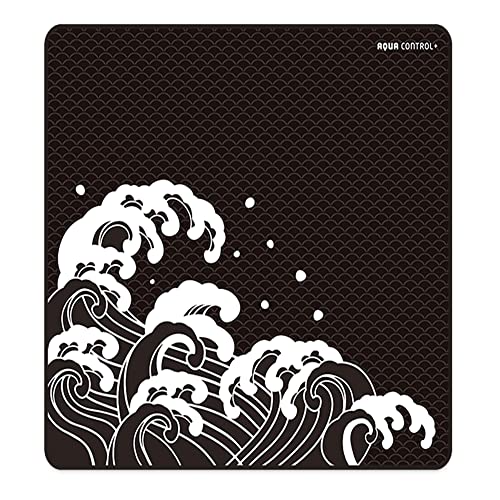
The xraypad origin pro cerberus search usually starts with a piece of artwork: a three-headed dog printed across a fast, silky control pad that competitive players keep mentioning in aim-training circles. Then the confusion begins, because the pad you can actually buy through a normal listing carries a slightly different name on the box. This guide untangles that naming knot honestly, explains what the Origin Pro surface really does under a mouse, and points you to the two verified listings that represent the pad family today — the X-Raypad Teru x Origin Pro in its two main sizes — without ever pretending either listing is something it is not.
Here is the short version before the detail. The Origin Pro is a control-leaning cloth pad built for first-person shooter players who play at low sensitivity, swipe long distances, and need a stop that feels deliberate rather than slippery. The Cerberus name belongs to an artwork variant discussed in prose throughout this page, because no verified listing title carries that word. If you want the surface, the glide, and the stopping behaviour that made the design popular, the Teru collaboration listings below are the real, checkable route to it. If you only want the artwork, you will need to read the sections on naming and availability very carefully before spending anything.
Key Takeaways
- The Origin Pro surface sits on the control side of the cloth-pad spectrum: a smooth, silky top with enough texture underneath your palm to make micro-corrections feel planted instead of floaty.
- Cerberus is an artwork name, not a separate surface. Treat any seller using the word loosely as a reason to slow down and read the full listing title word by word.
- Size changes the experience more than most buyers expect. The smaller pad suits higher sensitivity and cramped desks; the larger one suits low-sensitivity arm aiming and wide clearing swipes.
- Thickness matters at four millimetres: the pad feels firm and consistent, with less of the spongy dip you get from softer, thicker bases when you press down during a tense clutch round.
- Humidity, dust, and worn mouse feet change this pad more than they change glass or hard pads, so a simple cleaning routine protects the glide you paid for.
- Pair the pad with a mouse and sensitivity that match its control character; a pad cannot fix a grip or a settings profile that fights it.
Where to buy the Origin Pro family, and what the names actually mean
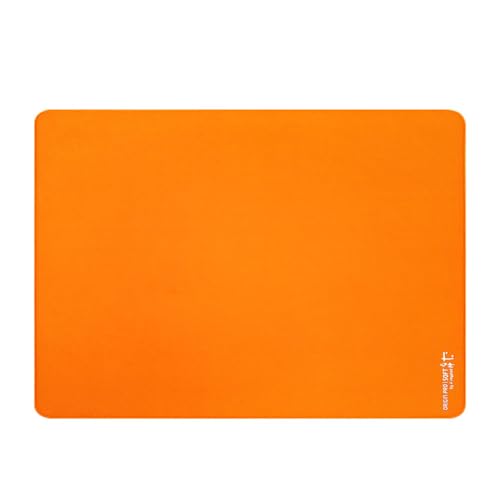
X-Raypad sells a confusing family tree. There is the Aqua Control line, which leans rougher and more textured. There is the Equate line, the Thor line, and then the Origin line, which was developed with competitive input and later extended through the Teru collaboration. The verified listings for this guide are titled as Teru x Origin Pro pads, in Origin Orange, at two footprints. That title is the product. When a marketplace search result, a forum post, or a social clip says Cerberus, it is almost always pointing at printed artwork applied to this same pad family rather than at a distinct weave, base, or coating.
Why does that distinction deserve a whole section? Because artwork variants are exactly where buyers get caught. A listing photograph can show dramatic printed art while the written title describes a plain colourway, and the photograph wins the click. The honest habit is boring but reliable: read the title, confirm the size in millimetres, confirm the thickness, and only then look at the picture. Throughout this article, the two linked pads are called by their real listing names every single time. The Cerberus artwork is discussed as artwork — interesting, collectable to some players, and completely separate from whether the pad glides well on your desk.
In this guide
Quick Picks: the verified Origin Pro listings
| Pick | Size | Best suited to | Link |
|---|---|---|---|
| X-Raypad Teru x Origin Pro, Origin Orange, compact footprint | 360 x 300 x 4mm | Higher sensitivity, smaller desks, travel setups | Check price on Amazon |
| X-Raypad Teru x Origin Pro, Origin Orange, full footprint | 450 x 400 x 4mm | Low sensitivity, arm aiming, wide swipes | Check price on Amazon |
Two picks will look sparse next to roundups that list nine pads, and that sparseness is deliberate. This keyword is about one pad family, and padding the table with unrelated surfaces would make the page longer while making your decision worse. If neither footprint fits your desk or your sensitivity, the buying-guide sections below explain how to judge any other control pad against the same criteria, and the related guides at the end cover broader pad categories. A short, honest table beats a long, invented one every time.
How were these picks chosen?
Every linked product on this page had to clear three checks. First, the listing had to be confirmed through the marketplace data available for this guide, with an exact title that names the pad, the collaboration, the colourway, and the dimensions. Second, the title had to match the product being discussed — which is precisely why no pick here is labelled Cerberus, since that word appears in no confirmed title. Third, each pick needed an official product image so you can see the actual pad rather than a render or a lifestyle mock-up. Pads that failed any check stayed in prose. That is also why the Aqua Control models, however good they are, do not appear as picks here: they belong to a different surface family with a rougher hand feel, and mixing them in would blur the one comparison this page exists to make.
One more note on method, because it shapes how you should read the reviews below. Nothing on this page claims laboratory glide measurements or hands-on testing that did not happen. The assessments are built from the confirmed listing details, the widely documented character of the Origin Pro surface, and the practical physics of cloth pads: weave texture, base firmness, size, and how those interact with sensitivity, grip style, and mouse feet. Where a claim is a matter of feel rather than fact, the text says so, and the FAQ separates the two.
Detailed reviews of the two Origin Pro sizes

X-Raypad Teru x Origin Pro, 360 x 300 x 4mm — the compact control pad
Badge: Best for smaller desks and higher sensitivity. The compact Origin Pro gives you the family surface in a footprint that fits beside a tenkeyless or sixty-percent keyboard without swallowing the desk. At 360 millimetres wide, a player on a medium or high sensitivity still gets a generous landing zone, and the 300 millimetre depth leaves room to rest a forearm without the pad edge creeping under the keyboard feet.
- Surface: smooth, silky control cloth from the Origin Pro family
- Dimensions: 360 x 300 millimetres, 4 millimetres thick
- Colourway: Origin Orange, Teru collaboration edition
- Intended play: first-person shooters, low-to-medium DPI habits
- Base character: firm, consistent, minimal sink under pressure
Strengths
- The glide starts smoothly without the scratchy break-in period that rougher control pads impose during their first week on a desk.
- Stopping power feels trustworthy on flicks: the mouse settles where the swipe ends instead of skating a few extra millimetres past the target.
- The compact footprint leaves desk space for a keyboard angled the way shooter players like, plus a monitor stand and a drink kept safely off the surface.
Trade-offs
- Low-sensitivity players who clear angles with full arm swipes will run off the right edge during wide turns, especially in games with fast repositioning.
- Orange is a bold colourway that shows dust and skin oils more visibly than a black pad, so it asks for more frequent wiping.
- Anyone hoping the compact listing carries the Cerberus artwork will be disappointed; the confirmed title describes the Origin Orange edition.
The compact pad makes most sense as part of a tidy, deliberate setup. If your desk doubles as a work surface, the smaller footprint lets you slide the pad aside or roll it for travel to a LAN or a friend’s house, and the four-millimetre base resists curling after being rolled more gracefully than thinner pads do. Players who track targets with wrist movements rather than arm movements will rarely feel the size limit at all, because their mouse lives in the middle third of the pad for entire matches at a time.
Best for: wrist and hybrid aimers on small or shared desks who want a control surface without giving up the whole worktop. / Not suited for: very low sensitivity arm aimers, or buyers specifically hunting the Cerberus print.

X-Raypad Teru x Origin Pro, 450 x 400 x 4mm — the full-size control pad
Badge: Best for low sensitivity and arm aiming. The larger listing stretches the same surface to 450 by 400 millimetres, which is the size class serious tactical-shooter players tend to settle on. The extra width buys uninterrupted swipe room for the low effective sensitivity that games like Counter-Strike and Valorant reward, and the extra depth gives your forearm a consistent platform so your sleeve, skin, and pad all meet the desk at the same height.
- Surface: smooth, silky control cloth from the Origin Pro family
- Dimensions: 450 x 400 millimetres, 4 millimetres thick
- Colourway: Origin Orange, Teru collaboration edition
- Intended play: first-person shooters, low DPI habits, long sessions
- Base character: firm, consistent, minimal sink under pressure
Strengths
- Wide clearing swipes stay on the pad, so a desperate one-hundred-and-eighty-degree turn does not end with the mouse feet dragging across bare desk.
- The surface consistency across the whole footprint feels even, which matters when your crosshair placement routine uses the far corners of the pad.
- The generous depth cushions the forearm during long sessions without the pillowy softness that makes some thick desk mats feel vague under the mouse.
Trade-offs
- It demands a genuinely large desk; on a shallow desk the pad pushes the keyboard forward and crowds the monitor stand.
- More surface area means more area to keep clean, and the orange finish advertises every crumb to anyone glancing at your setup.
- The size makes it a poor travel pad compared with its compact sibling, since rolling a pad this wide repeatedly is awkward.
Think of the big pad as the default recommendation for a dedicated gaming desk. Tactical shooter rounds punish hesitation, and a pad that forces a mid-fight lift-and-recentre steals exactly the half-second you cannot spare. With 450 millimetres to work with, most players can complete a full defensive sweep, reset once between rounds rather than during them, and keep their arm posture identical from pistol round to overtime. That repeatability is the real product here; the dimensions are simply how it is delivered.
Best for: low-sensitivity arm aimers with a dedicated desk who play tactical shooters for long stretches. / Not suited for: small desks, shared workspaces, or anyone who moves their setup between rooms often.
Xraypad Origin Pro Cerberus: what the Cerberus name does and does not change
Let us deal with the artwork directly. Printed pad art changes how a setup looks in photographs and how a player feels about sitting down at it, and those are real pleasures. What print does not change is the weave geometry that determines glide, the base compound that determines stopping feel, or the dimensions that determine whether your swipe fits. A Cerberus print on an Origin Pro is still an Origin Pro. Conversely, a Cerberus print on a different, cheaper pad would not make that pad glide like an Origin Pro, which is why artwork should never be the reason a listing earns your trust.
There is also a practical wrinkle with printed cloth pads generally: heavy printing can sit slightly proud of the weave on some designs and produce a faintly different feel under the mouse in the printed zones. Makers who take competitive play seriously usually keep print subtle or use dye processes that sit within the fibres, but the only way to know for a specific variant is a confirmed listing with clear product photography. Since no confirmed listing for this guide carries the Cerberus name, this page will not speculate about its print process, its availability windows, or its pricing behaviour. If a Cerberus edition matters to you, buy it from the maker’s own channel where the variant is named in writing, and treat marketplace listings that use the word only in images as unverified.
How does the Origin Pro surface actually feel in play?
Pad feel divides into three moments: the breakaway, when a still mouse starts moving; the glide, while it travels; and the stop, when you plant it on a target. Speed pads minimise all three resistances, which feels liberating in tracking-heavy games and treacherous in tactical ones. The Origin Pro tunes the three moments differently. Breakaway is light and clean, so micro-adjustments do not stutter. The glide is smooth but never icy, with a fine, even texture you can sense through the mouse feet. The stop is the headline: the pad gives your flick a confident end point, which is why players describe it as an accuracy or control pad in the confirmed listing language itself.
That character pairs naturally with the way tactical shooters are actually played. Most of a round is crosshair placement — holding an angle, clearing corners in slices, and making tiny corrections as information arrives. Flicks are the exception, not the diet. A surface that rewards placement and punishes overshoot fits that diet well. In tracking-heavy arena games, where the crosshair must stay glued to a strafing target for seconds at a time, some players find control cloth tiring because every correction works against gentle resistance. Neither reaction is wrong; they are the same physics read by two different games, which is why the buying guide below starts with your game list rather than with the pad.
Which size should you choose for your sensitivity and desk?
Work backwards from your swipe. Measure the longest mouse movement you make in a normal round — for most players, a full turn or a desperate repositioning flick — and add a hand’s width of margin on each side. If that total fits inside 360 millimetres with room to spare, the compact pad will serve you and leave your desk calmer. If the number pushes past it, buy the larger pad and rearrange the desk around it, because a pad that is too small teaches you a cramped, lifted-arm habit that quietly caps your consistency.
Sensitivity translates the question into numbers you already know. Players whose effective sensitivity lets them turn most of the way around with one pad-width swipe belong on the large footprint. Players who turn with wrist snaps and small forearm movements, or who play several genres beyond shooters, usually find the compact footprint plenty and appreciate the space it returns. Depth deserves a thought too: if you rest your whole forearm on the desk, the deeper pad keeps the contact patch uniform, while a shallow pad leaves your arm half on the desk edge, which changes shoulder posture over a long evening.
How to set up and care for a control cloth pad
Unroll the pad and give it flat time before judging it. A pad shipped rolled will carry a gentle curl at one edge for the first day or so; placing it print-side up under the weight of a keyboard overnight settles most of it. Position it so your natural resting mouse position sits slightly right of centre if you are right-handed, because most swipes travel further in one direction than the other during a match. Check that the pad edge does not lift where your wrist crosses it, and rotate the pad a half-turn every few weeks if one zone sees most of your play, spreading wear across the weave.
Cleaning is where control pads are won and lost. Dust and skin oil fill the weave and turn a silky surface patchy, fast in one lane and slow in another, which feels exactly like inconsistent aim. A weekly wipe with a barely damp microfibre cloth handles the surface film. Every month or two, a gentle hand wash with lukewarm water and a drop of mild soap, rinsed thoroughly and dried flat away from radiators, restores most of the original glide. Never wring a thick pad, never tumble it, and let it dry completely before playing, because a damp weave drags noticeably. Keep drinks off it, brush crumbs away rather than grinding them in with your palm, and replace worn mouse feet before they scratch — frayed feet carve lines into any cloth surface over time. If your mouse supports higher polling, the pad will not hold it back; readers curious about that side of the setup can read mouse polling rate explained and best 8KHz polling rate mice after finishing here.
Common mistakes buyers make with this pad family
The first mistake is buying the artwork instead of the surface, covered above but worth repeating because it causes most returns. The second is size regret in both directions: competitive hopefuls buy the largest pad for a desk that cannot hold it, then play with the keyboard pushed into an uncomfortable reach, while tidy-desk buyers choose the compact pad and spend every match recentring. The third is judging a cloth pad in its first hour, while it is still curled, cold, and carrying factory freshness in the weave; give any control pad a few evenings before forming a verdict.
Fourth, players blame the pad for problems that live elsewhere. A mouse with worn feet, a sensor set to a lift-off distance that misbehaves on coloured surfaces, or a sensitivity copied from a professional whose monitor, resolution, and habits differ from yours will all feel like pad problems. Change one variable at a time, in the order of feet, settings, then surface. Fifth, buyers pair a control pad with a heavy mouse and then complain about fatigue; the pad’s gentle resistance multiplies the mass your arm moves thousands of times per session. If that is your situation, the wider mouse guides such as best gaming mice will help you find a lighter partner for the surface, and the pad roundups at best gaming mouse pads and best mouse pads put this family in its broader context.
How does the Origin Pro compare with rougher control pads and speed pads?
| Surface type | Glide character | Stopping feel | Suits | Watch out for |
|---|---|---|---|---|
| Origin Pro style silky control cloth | Smooth, even, lightly textured | Confident, planted | Tactical shooters, placement aiming | Humidity and grime change feel over time |
| Rougher textured control cloth | Noticeable grain under the feet | Very strong, sometimes abrupt | Players wanting maximum feedback | Scratchier break-in, more foot wear |
| Balanced hybrid cloth | Middle glide, middle feedback | Moderate | Mixed game libraries | Master of none for specialists |
| Speed cloth | Fast, low resistance | Loose, easy to overshoot | Tracking-heavy arena play | Flicks slide past targets |
| Hard and glass surfaces | Very fast, very consistent | Depends on feet and pressure | Players wanting zero cloth variability | Noise, cold feel, foot wear, cost tier |
Read the table as a map of trade-offs rather than a ranking. The Origin Pro’s row is the right row if your misses tend to be overshoots — the crosshair arriving past the head rather than short of it. If your misses are undershoots and sluggish corrections, your problem may be too much control rather than too little, and a balanced or speed surface could serve you better despite this pad’s reputation. Honest self-diagnosis from your own death replays will choose your pad more reliably than any roundup, including this one.
Final recommendation
Buy the surface, in the size your swipe demands, under the name the listing actually carries. For most readers arriving from the xraypad origin pro cerberus search, that means the large Teru x Origin Pro if your desk and sensitivity fit it, and the compact edition if they do not. Both deliver the silky control character that built the family’s name, both are confirmed listings with official imagery, and neither requires you to believe anything unverifiable about artwork editions. If the Cerberus print itself is the point of the purchase for you, shop the maker’s own storefront for a variant named in writing, and enjoy it as the collector’s piece it is — just do not pay a marketplace premium for a word that appears only in a photograph.
What is happening between the mouse feet and the weave?
It helps to picture the contact patch honestly. Your mouse does not float; it rests on small feet of low-friction material that press into the top fibres of the cloth with the weight of the mouse plus whatever downward force your hand adds. When you move, those feet plough a microscopic path through the fibre tops, and the resistance you feel is the sum of that ploughing, the fibres springing back behind the feet, and the base compressing under pressure. A silky control weave like the Origin Pro family uses fine, tightly arranged fibres, so each individual fibre contributes very little resistance, but there are enormous numbers of them in contact at once. The result is resistance that feels smooth and continuous rather than gritty — more like pushing through calm water than dragging across sand.
That picture explains several behaviours players report. Pressing harder during a tense moment increases base compression and fibre contact, which is why the same pad can feel slower exactly when a round gets stressful; learning to keep hand pressure steady is a genuine skill on control cloth. It also explains why new feet feel different from worn ones: fresh feet present a clean, full edge to the fibres, while rounded, scratched feet dig unpredictably. And it explains the humidity effect, because cloth fibres absorb moisture from the air, swell slightly, and present a different surface on a muggy evening than on a dry morning. None of this makes the pad flawed. It makes the pad a physical object with a character you can learn, the same way a guitarist learns how a particular set of strings answers their fingers.
Which aiming styles gain the most from this surface?
Wrist aimers live in small movements. Their game is a dense cluster of tiny corrections around the centre of the pad, and for them the Origin Pro’s clean breakaway matters most: the first millimetre of a correction should cost almost nothing, or the crosshair stutters around the target instead of settling onto it. The compact size serves this group well, and many wrist aimers pair the pad with a slightly higher sensitivity than arm players choose, which keeps their working zone comfortably inside the smaller footprint even during wider turns.
Arm aimers live in long movements. Their forearm slides, their shoulder does quiet work, and the pad’s job is to keep a long swipe at a constant speed so muscle memory can predict where the crosshair will land. Here the glide consistency across the large footprint is the prize, along with a stop that does not punish the end of a long travel. Hybrid players, who aim with the arm for turns and the wrist for corrections, need both behaviours at once, which is arguably why control cloth of this kind became the default recommendation for tactical shooters: those games are themselves hybrids, demanding a placed crosshair for ninety percent of a round and one violent, accurate flick for the rest.
There is a fourth group worth naming: players returning to shooters after years away, whose aim feels rusty and overshooty. A forgiving control surface quietly removes one source of error while their game sense rebuilds, and several of the drills below were written with exactly that reader in mind. The pad will not rebuild anyone’s aim by itself, but it stops arguing with the rebuilding process, and that is worth more than it sounds.
How can you test a new pad properly during your first week?
Give the pad a fair trial by keeping everything else frozen. Note your sensitivity, resolution, mouse, and feet condition before the pad arrives, then change nothing except the surface for a full week of normal play. On the first evening, spend twenty minutes in a practice range or aim trainer doing three simple things: slow tracking of a moving target at comfortable distance, repeated flicks between two fixed points at increasing speed, and a series of tiny corrections around a stationary target while strafing. You are not scoring yourself; you are learning where the pad’s resistance lives, how its stop behaves at the end of your natural flick, and whether your arm tires faster or slower than it did on your old surface.
Across the week, pay attention to your misses rather than your highlights. If shots land long — past the target in the direction of travel — the surface is faster for you than your habits expect, and time usually closes that gap as your stopping hand recalibrates. If shots land short and your corrections feel sticky, check the mundane causes first: a pad still shedding its factory freshness, feet that need replacing, or a room that has turned humid. By the end of the week the pad should feel unremarkable, which is the highest praise a control surface can earn. Equipment that disappears from your attention during a match is equipment doing its job, and players chasing the Cerberus search term are usually chasing exactly that disappearance, whether or not they would phrase it that way.
Frequently asked questions
Is the Cerberus edition a different surface from the regular Origin Pro?
Nothing in any confirmed listing for this guide supports treating it as a different surface. The name is associated with artwork applied to the pad family, while the glide, base, and dimensions are properties of the Origin Pro design itself. Until a listing names the variant in its written title with specifications attached, the careful assumption is artwork only, and purchasing decisions should be made on the surface and size.
Which size should a Counter-Strike player on low sensitivity pick?
The 450 by 400 millimetre edition, in almost every case. Low effective sensitivity turns pad width into round-saving room: full clearing sweeps, fast retake turns, and repeated angle checks all stay on the cloth. The compact pad can work for an unusually high-sensitivity Counter-Strike player, but that style is the exception in that game, and the larger footprint is the safer match for the way the game is normally played — alongside a chair and desk arrangement that supports long rounds, which is why some readers also browse best chair for CS2.
Does the orange colourway affect sensor tracking?
Modern optical sensors handle coloured cloth well, and a uniform colourway like Origin Orange presents an even tracking field. Problems arise with worn patches, heavy grime, or frayed mouse feet rather than with colour itself. If you ever notice skipping, clean the pad, inspect the feet, and test on a plain surface before blaming the colourway, because the fix is usually maintenance rather than replacement.
How long does a control cloth pad like this stay consistent?
With the cleaning rhythm described above, the central glide zone stays close to its early character for a long competitive life, though no cloth pad is immortal. The centre lane eventually polishes smoother than the edges, humidity seasons shift the feel slightly, and heavy daily play accelerates both. Rotating the pad periodically and washing it gently stretches the consistent period considerably, and most players replace cloth pads for freshness long before the pad becomes unusable.
Can I use this pad for work and other games too?
Yes, comfortably. The same control that helps crosshair placement makes photo editing, timeline scrubbing, and spreadsheet navigation feel precise, and strategy or role-playing games ask nothing the surface cannot give. The only genres where some players prefer a faster surface are tracking-heavy arena shooters and very fast real-time strategy at high actions-per-minute, and even there the pad remains usable — it simply is not optimised for that feel.
What mouse pairs best with a silky control pad?
A light wireless mouse with fresh, full-coverage feet and a shape that suits your grip, so the pad’s resistance stays a guide rather than a burden. Shape questions are personal enough that dedicated mouse reviews serve you better than a paragraph here; the sibling guides on Zowie U2 and Zowie ZA13 DW cover two esports shapes in depth if those silhouettes interest you.
Should you choose a pad like this, a desk mat, or a hard surface instead?
Desk mats tempt buyers because they tidy a setup visually and cushion both keyboard and mouse under one sheet. Their weakness for competitive play is that most are built for comfort and looks rather than for a tuned glide, so the mouse zone can feel vague compared with a dedicated pad, and the keyboard zone wears at a different rate from the aiming zone. A focused pad like the Origin Pro exists for players who want the aiming square metre of their desk engineered rather than merely covered. If your desk hosts work calls all day and ranked matches at night, a dedicated pad over a plain desk often beats a full mat for exactly that reason.
Hard surfaces sit at the other pole. Plastic, resin, and glass remove cloth variability almost entirely and reward players with disciplined, light hands. They also amplify every flaw in worn feet, sound louder in a quiet room, feel cold in winter, and punish heavy-handed stopping with a skate that control cloth would have caught. Players sometimes migrate to hard pads chasing consistency and then migrate back, missing the forgiveness. Knowing which temperament you have — and being honest that most of us press harder when a round tightens — settles the question faster than any specification sheet.
What does long-term ownership actually look like?
Month one is the honeymoon: flat, even, and quietly confidence-building. By month three, most owners have found their cleaning rhythm and stopped thinking about the pad entirely, which is the intended state. The first real decision arrives when the central lane begins to feel perceptibly slicker than the edges, usually well into the pad’s life for a daily player. Rotating the pad buys time. A deep wash buys more. Eventually every cloth pad becomes a slightly different pad from the one you learned on, and competitive players treat replacement as a consumable cost of consistency, like strings or grips in other hobbies.
Two ownership habits separate satisfied buyers from frustrated ones. The first is keeping a cheap spare pad for travel and guests, so the main surface never gets rolled, folded into a bag, or lent into oblivion. The second is writing down what you liked: size, thickness, and surface character, recorded somewhere you will find it in two years when the model names have shuffled again. Pad naming, as the Cerberus situation shows, churns constantly. Your own notes about what your hand prefers will outlast every naming scheme the market invents.
How do sleeves, grips, and mouse weight change the equation?
An arm sleeve looks like a fashion accessory until you play a summer evening on a control pad without one. Skin on cloth drags unevenly, especially where a forearm crosses the pad’s edge, and that drag varies with temperature and perspiration in a way no weave can control. A sleeve moves the contact to a consistent fabric-to-fabric interface, and on a large pad where the forearm travels a long way, the difference in swipe smoothness can be larger than the difference between two competing pad models. Players who dismiss sleeves and then try one during a heatwave tend to keep it in the drawer permanently afterwards.
Grip style changes which part of the pad earns its keep. Palm grip spreads weight across the mouse and usually comes with lower sensitivity and longer swipes, favouring the large footprint. Claw grip concentrates control in the fingers, rewards the clean breakaway for constant small corrections, and tolerates either size. Fingertip grip barely touches the mouse with the palm at all, making the player exquisitely sensitive to any patchiness in the weave, which is one more argument for keeping the surface washed and even. None of these grips is superior; each simply reads the same cloth differently.
Mouse weight is the multiplier on everything above. Every gram is accelerated and stopped thousands of times in a session, and a control surface asks slightly more of the stopping hand than a speed surface does. A heavy mouse on control cloth can feel planted and precise for the first hour and quietly exhausting by the third, while a light mouse keeps the pad’s resistance in the realm of guidance rather than labour. If you love a heavier mouse, consider the compact pad and a marginally higher sensitivity, which shorten the swipes your arm must power. If you already play a light mouse, the large pad at low sensitivity is the classic pairing this family was built around.
What should competitive players check on match day?
Tournament and LAN habits translate surprisingly well to ranked nights at home. Wipe the pad down an hour before you play, not during warm-up, so any faint dampness from cleaning has fully left the weave. Inspect the feet under a bright light; a single curled edge on one foot will announce itself mid-match as a scratchy surprise. Run three slow diagonal swipes across the whole pad and listen — silence is good, while a gritty note means something is trapped in the fibres and deserves a brush before it becomes a groove.
Then check the unglamorous geometry. The pad should sit square to the desk edge, with your keyboard in its usual angled position and nothing overlapping the pad’s corners. Your chair height should put your forearm roughly level, because a pad that felt perfect from a different chair height will feel subtly wrong all evening without explaining why. Finally, accept the pad as it is that day. Humidity, temperature, and your own tiredness all nudge the feel, and the players who adapt in warm-up rather than fighting their equipment in round one are the ones whose aim looks boringly identical in every clip anyone records of them.
What criteria should you use to judge any control pad, including this one?
Start with the edges, because edges are where cheap pads confess. Stitched edges that sit below the surface keep your wrist from catching and slow the fraying that turns a pad ragged; raised or printed edges announce themselves every time your forearm crosses them. Run a finger along all four sides of any pad you are considering, in a shop or in photographs with honest close-ups, and treat proud stitching as a genuine flaw rather than a cosmetic footnote, because your arm will meet that edge thousands of times.
Next, judge the base by pressing, not by reading. A good base grips the desk so the pad never creeps during an excited swipe, lies flat without a memory of being rolled, and compresses evenly so the glide does not change between the pad’s centre and its corners. Bases that feel gummy in heat or that slide on glossy desks undermine everything the weave does well. If a listing describes the surface lovingly and the base not at all, that silence is information.
Then consider thickness as a comfort decision with a performance shadow. Four millimetres, the Origin Pro’s figure, is the competitive middle: enough material to smooth out small desk imperfections and cushion a forearm, not so much that pressing down creates a noticeable dip that changes glide mid-flick. Thinner pads feel sharper and travel better. Thicker pads feel kinder during long workdays. Players with glass desks or uneven surfaces lean thicker; players who prize a crisp, immediate stop lean thinner. There is no universal winner, only a match or a mismatch with your desk and your hand.
Finally, judge the maker’s honesty, because a pad is a repeat purchase and trust compounds. Does the listing name the model plainly, state dimensions in millimetres, show the real product, and avoid borrowing the fame of artwork editions or professional players it cannot substantiate? The Origin Pro listings used here pass that test, which is a meaningful part of why they are the picks. A maker who is careful with names is usually careful with weave tolerances too, and the reverse has proven true often enough to be worth remembering when the next confusingly named pad arrives on the market — as one certainly will, probably with another mythological creature printed across it, waiting for the next careful reader to separate the artwork from the engineering.
How should you adjust your settings when you move to a control surface?
Resist the urge to change everything on day one, but do expect one honest adjustment window. Players arriving from a speed pad often find their flicks stopping a touch short for the first few sessions, because their stopping hand was trained against less resistance. The correct response is usually patience, not a sensitivity bump: raise sensitivity to compensate for a surface and you quietly surrender the placement precision the surface was bought to provide. Give your hand a week to learn the new stopping distance at your existing settings, and only then judge whether a small sensitivity change — a few percent, not a reinvention — suits the pairing.
Players arriving from a worn-out old control pad face the opposite surprise. A fresh weave can feel faster than the polished centre lane they had unknowingly adapted to, and their first evening may be full of overshoots that tempt them to declare the new pad too quick. It is not the pad being quick; it is the old pad having become slow without telling anyone. The same week of patience applies. Keep a simple log if you are serious: date, sensitivity, and one line about how stops felt. Seven lines later, patterns that memory would have blurred into vibes become readable facts, and your final settings decision rests on evidence from your own desk instead of on anyone else’s review — this one included.
Is the Origin Pro a sensible gift for a competitive player?
Pads are unusually good gifts for gamers because they are personal without being risky in the way a mouse shape is risky. A mouse must fit a hand and a grip; a pad must fit a desk and a sensitivity, and both facts can be learned with two casual questions about desk width and the games they play. If the answers point to tactical shooters and a full-size desk, the large edition is a gift that will be used daily and thought of kindly each time. If the desk is small or shared with work, the compact edition shows you actually listened.
Wrap the choice honestly if the artwork was the original idea. A card explaining that the Cerberus print proved impossible to verify from a trustworthy listing, and that you chose the confirmed pad from the same family instead, turns a naming disappointment into evidence of care. Most players would rather receive the real surface than a gamble in dramatic packaging, and the few who collect artwork editions will enjoy hunting that variant themselves with the guidance in this page. Either way, the pad under the mouse will be doing quiet, daily work long after the wrapping is forgotten.
A short note on value over the pad’s whole life
Judge a pad’s cost the way you would judge a pair of shoes: by cost per day of genuine use, not by the number in the cart. A control pad used for two ranked sessions a week across two years delivers hundreds of evenings of consistent stopping feel, and its price divides into something trivial per evening. The expensive pad is the one bought twice — first the wrong size, then the right one — which is why this guide spent so many words on measuring a swipe and so few on anything else. Measure once, buy the size your arm demands, keep it clean, and the Origin Pro family will repay the care in the least dramatic way possible: by never being the reason a shot went wrong.
One last check before you order either size
Stand at your desk, rest your hand where it naturally plays, and look at the space honestly one final time. Keyboard position, monitor feet, mug territory, the charger cable that always wanders — the pad must live among all of it without negotiation. If the large footprint forces a compromise you will resent nightly, the compact pad in daily contented use beats the large one in daily irritation, whatever the sensitivity charts say. Equipment that fits a life gets used; equipment that fights a life gets returned, and the best buying decision on this entire page is simply the one your desk confirms.
A final word on buying with confidence
Everything this page has asked of you reduces to three habits: buy the name in the title, size the pad to your swipe, and keep the surface clean enough to stay itself. Do those three and the Origin Pro family will do what it has quietly done for a great many competitive players — disappear under your hand, round after round, while the artwork debates rage elsewhere. That disappearance is the highest compliment a piece of gaming equipment can earn, and it is available, verified and in two sizes, at the top of this page.