Disclosure: As an Amazon Associate, reviewstook.com earns from qualifying purchases. Links on this page are affiliate links; they cost you nothing extra. Prices and availability change often, so check the current Amazon listing before you buy.
Choosing a valorant mouse is a different job from choosing a mouse for shooters in general, because Valorant rewards a very specific kind of aim. The game is built on stillness and explosion: long seconds of holding a tight angle with the crosshair parked at head height, then one violent flick when a shoulder appears, then micro-corrections measured in single pixels while you counter-strafe and tap. There is almost no tracking aim, almost no spray transfer across moving targets, and almost no forgiveness for a mouse that drifts, wobbles on landing, or adds weight your wrist has to arrest at the end of every flick. The three mice in this guide were chosen for exactly that profile: light shells, symmetrical shapes that suit fingertip and claw grips, flagship optical sensors, and wireless connections that no longer carry any meaningful penalty.
This guide works in four layers. First come the picks themselves, with an honest account of what each one does better than the others. Then a buying guide explains the handful of specifications that actually matter for this game — and the longer list of specifications that are marketing decoration. After that, a practical setup section walks through sensitivity maths, in-game settings, and a short daily drill routine that turns a new mouse into a familiar one. Finally, the questions players actually ask are answered directly, including the uncomfortable one about whether a premium mouse will move your rank at all.
Key takeaways
- Valorant is a flick-and-settle game: low weight and a shape your grip can stop dead matter more than raw sensor numbers, which passed the point of human perception several product generations ago.
- The Razer Viper V3 Pro is the most complete package here — the lightest-feeling full-size option with the strongest wireless specification — while the Logitech G Pro X Superlight 2 is the safer shape for the widest range of hands.
- The Pulsar X2H mini serves the smaller-handed claw and fingertip players the other two quietly exclude, and its raised hump changes how the mouse locks into the palm.
- Set your sensitivity by effective DPI, test it with one full swipe across your pad, and then leave it alone for at least two weeks; most aim problems blamed on mice are sensitivity churn in disguise.
- Polling rate beyond the standard wireless rate gives diminishing returns on ordinary monitors; spend your attention on grip, skates, and pad pairing first.
In this guide
What are the best Valorant Mouse picks right now?
The shortlist below is deliberately short. Valorant’s professional scene has converged on a small family of symmetrical wireless mice, and that convergence is information: when hundreds of players whose income depends on landing first shots independently choose similar hardware, the shared traits — light, symmetrical, wireless, optical switches, no software drama — are the traits worth paying for. Everything outside that family is either serving a different grip, a different game, or a different budget, and those needs are covered in prose further down rather than padded into the table.
| Pick | Best for | Weight class | Sensor (from listing) | Link |
|---|---|---|---|---|
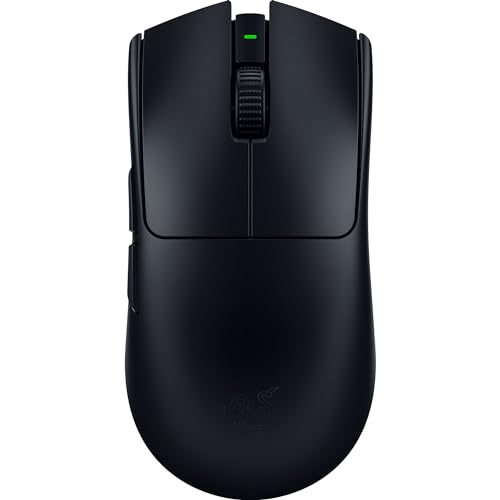
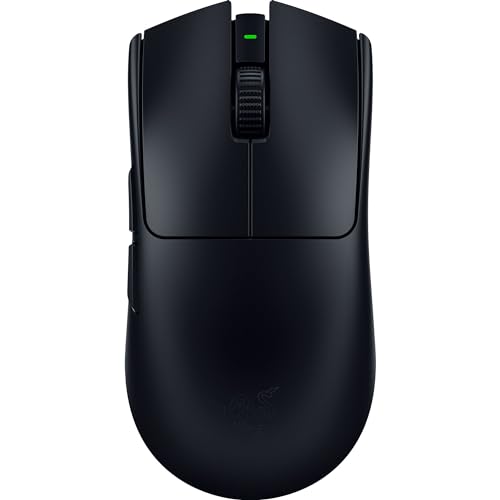
| Razer Viper V3 Pro | Most players; fingertip and relaxed claw | 54 g | Focus Pro 35K optical | Check price on Amazon |
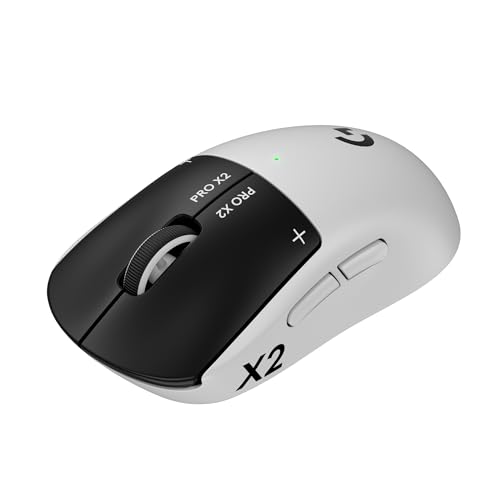
| Logitech G Pro X Superlight 2 | The safest all-round shape | Lightweight class | HERO 2, up to 32,000 DPI | Check price on Amazon |
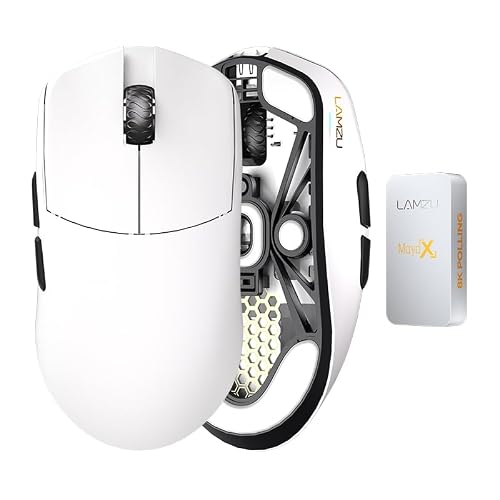
| Pulsar X2H mini | Small hands; aggressive claw | 52 g | PAW3395, 26,000 DPI | Check price on Amazon |
How these three were chosen
Each pick had to clear the same bars. The shape must be symmetrical, because Valorant’s dominant grips — fingertip and claw — evolved around ambidextrous shells, and an ergonomic right-hand sculpt trades flick freedom for palm comfort most tactical-shooter players do not want. The weight must sit in the modern ultralight band, because stopping mass is the whole game when your crosshair placement does the travelling and your flick only covers the last few centimetres. The sensor must be a current flagship optical with no smoothing behaviour players can feel, the switches should be optical or equivalently debounce-free so clicks register on the press rather than after it, and the wireless link must be a proper 2.4 GHz connection rather than Bluetooth, which remains a convenience mode rather than a competition mode. Mice that failed any bar — however famous — were left out, and mice that cleared every bar but duplicated another pick’s exact role were left out too.
One more filter deserves stating plainly: all three picks are verified listings with confirmed availability through the link in each review, and each review below uses only specifications stated in its listing or facts that are standard for the category. Where a number is not confirmed, this guide says so or stays general, because an invented specification is worse than a missing one. Readers comparing wider shortlists may also find our wider best gaming mouse for FPS picks useful, since Valorant is one voice in a larger conversation that includes faster, tracking-heavier shooters.

Razer Viper V3 Pro — the complete flick mouse
Badge: Top pick for most Valorant players
- Weight: 54 g (listing figure)
- Sensor: Focus Pro 35K optical sensor
- Switches: Razer Optical Mouse Switches Gen-3
- Controls: 8 programmable controls
- Battery: up to 95 hours (listing figure, at standard polling)
- Polling: up to 8,000 Hz wireless with the included high-polling setup
- Connection: wireless esports link for PC and Mac
The Viper line has been the default recommendation for tactical shooters for years, and the V3 Pro is the version where Razer stopped decorating and started subtracting. The shell is a clean symmetrical shape with gentle sides, a moderate hump placed towards the middle-rear, and none of the aggressive sculpting that used to push players towards one prescribed grip. In Valorant terms that neutrality is the point: the mouse disappears during the long still phases of a round, and when the flick comes, there is no ridge or flare telling your fingers where they are allowed to be. At 54 grams it is light enough that stopping the mouse at the end of a flick is a finger decision rather than a wrist rescue, which is precisely the mechanical skill — the dead stop on a head-sized target — that separates clean Valorant aim from the overshoot-and-correct pattern.
The sensor headline number will not win you a round; every sensor in this guide is beyond human discrimination. What matters is behaviour: the Focus Pro tracks consistently on the cloth and glass surfaces players actually use, holds its CPI honestly, and does not add smoothing that makes micro-corrections feel like they are arriving through syrup. The Gen-3 optical switches deserve their paragraph too. Optical actuation removes the debounce delay mechanical switches need to avoid double-clicks, so the shot registers when you press, and the switches are immune to the double-click wear failure that used to end the useful life of well-loved mice. For a game where the first bullet is the most accurate and the most valuable, click latency is not a footnote.
The honest trade-offs are shape and price tier. The Viper’s flatter profile fills the palm less than the Logitech below, and strict palm-grip players with larger hands may find it under-supportive during long sessions. The high polling rate is real but hungry: run at the maximum and the battery figure falls sharply, and on a mid-refresh monitor you will not perceive what you paid for in endurance. It sits in the premium tier of the category, and it earns that position on the strength of the whole package rather than any single headline.
Strengths
- Featherweight shell that makes dead-stop flicks repeatable rather than athletic.
- Optical switches remove debounce delay and the classic double-click failure mode.
- Neutral symmetrical shape flatters fingertip and claw grips without prescribing either.
Trade-offs
- Flatter profile can feel under-filled for large-handed palm grips.
- Maximum polling drains the battery far faster than the headline endurance suggests.
- Premium tier positioning; the gains over the pick below are refinements, not revolutions.
Best for: fingertip and claw players who want the most complete current answer and will run sensible polling settings. / Not suited for: palm-grip players wanting a tall, filled shell, or anyone whose monitor and settings cannot use high polling.

Logitech G Pro X Superlight 2 — the shape everyone can use
Badge: Safest all-round shape
- Sensor: HERO 2, up to 32,000 DPI
- Switches: LIGHTFORCE hybrid optical-mechanical switches
- Controls: 5 programmable buttons
- Charging: USB-C
- Connection: LIGHTSPEED wireless
- Platforms: PC and Mac gaming
If the Viper is the specialist’s favourite, the Superlight 2 is the people’s champion, and the reason is a silhouette so inoffensive it has become the reference shape against which other mice are described. The hump is smooth and central, the sides are nearly straight with the faintest taper, the buttons are large and unseparated in feel, and nothing about the shell argues with any grip a human hand has yet invented. Players who buy one mouse and intend to stop thinking about mice — a legitimate ambition — usually end here, because the Superlight asks for no adaptation period and gives no surprises in month six either.
Under the shell, the HERO 2 sensor is Logitech’s flagship and behaves like it: accurate, efficient, and consistent across surfaces, with the company’s characteristically good wireless implementation in LIGHTSPEED. The LIGHTFORCE switches are the interesting compromise — optical actuation for speed and consistency, with a mechanical layer retained so the click still feels like a click rather than a light tap. In practice the clicks are crisp and tactile, and many players who found pure optical switches slightly hollow prefer this hybrid character. Battery endurance is a traditional Logitech strength, helped by the sensor’s efficiency, and USB-C charging finally removes the pocketful-of-cables problem older generations imposed.
The criticisms are known and narrow. Five buttons is the minimum viable set — fine for Valorant, where your keyboard carries the ability keys, but limiting if you wanted mouse-side utility binds. The shape’s very neutrality means it offers no special support to any grip; aggressive claw players who want a hump that pushes back will find more personality in the Pulsar below. And like the Viper, it is priced as a flagship, because it is one.
Strengths
- The most accommodating symmetrical shape in the class; near-zero adaptation time.
- Hybrid switches pair optical speed with a satisfyingly mechanical click feel.
- Efficient sensor and strong wireless make battery anxiety a non-issue.
Trade-offs
- Five buttons is lean for players who bind utilities to the mouse.
- Neutral shell gives claw grips less to lock against than the X2H mini.
- Flagship pricing for what is, deliberately, an exercise in refinement.
Best for: players of any grip who want one safe, proven, buy-it-and-forget-it mouse. / Not suited for: small-handed players who need a genuinely compact shell, or button-heavy binders.

Pulsar X2H mini — the small-hand claw specialist
Badge: Best for small hands and aggressive claw
- Weight: 52 g (1.83 oz, listing figure)
- Sensor: PAW3395 optical, 26,000 DPI
- Switches: optical switch (listing)
- Shape: symmetrical, mini size, raised rear hump
- Connection: 2.4 GHz wireless, 1 ms class
- Colour listed: black
The letter H in this mouse’s name is doing real work: it marks the high-hump variant of Pulsar’s X2 shape, and that hump is the whole argument. Where the two mice above keep their peaks low and central, the X2H mini pushes its highest point up and back, so the shell meets the base of your fingers and the rear of your palm with intent. In an aggressive claw grip — fingers curled, palm hovering or kissing the rear — that raised back turns the mouse into something you pull into your hand rather than something you chase across the pad. For the micro-corrections that follow a Valorant flick, where the adjustment is often a tiny drag of the fingertips against a planted rear contact, the geometry is genuinely helpful rather than merely different.
The mini sizing is the second half of the argument. A large share of players with smaller hands have spent years adapting to mice designed around a larger average, sliding their grip forward, over-curling, and wondering why fingertip aim feels strained. A shell that is actually proportioned to the hand removes that tax. The PAW3395 inside is the sensor that powered a generation of flagship mice and remains entirely sufficient — accurate, low-smoothing, and well understood by every settings guide ever written. Pulsar’s optical switch keeps click behaviour in the modern debounce-free camp, and the wireless link is the standard low-latency 2.4 GHz connection the category expects.
Reservations are about fit and finish expectations. The mini shell is honestly small: medium and large hands will feel cramped, and relaxed palm grips have nowhere to live. Pulsar is a smaller, enthusiast-first brand, so the ownership experience — software polish, support reach — is leaner than the two giants above, even though the hardware itself is taken seriously by the community that buys it. Treat the sizing guidance seriously and this is the most characterful mouse in the guide; ignore it and it is the easiest to buy wrong.
Strengths
- Raised rear hump gives claw grips a real anchor for micro-corrections.
- Genuinely compact shell serves small hands the flagships overlook.
- Proven flagship-class sensor and optical clicks at 52 grams.
Trade-offs
- Too small for medium-to-large hands and unusable for relaxed palm grips.
- Smaller brand: leaner software and support than Razer or Logitech.
- The hump is a commitment; fingertip purists may prefer the flatter Viper.
Best for: small-to-medium hands playing claw or claw-fingertip hybrids who want the mouse to push back. / Not suited for: large hands, palm grips, or anyone who wants the biggest brand’s ecosystem.
How do the three picks compare side by side?
| Question | Viper V3 Pro | Superlight 2 | X2H mini |
|---|---|---|---|
| Grip it flatters most | Fingertip, relaxed claw | Any grip, no favourite | Aggressive claw |
| Hand sizes served | Small to large | Small to large | Small to medium |
| Click character | Pure optical, light and fast | Hybrid, tactile and crisp | Optical, snappy |
| Buttons | 8 programmable controls | 5 programmable buttons | Standard esports set |
| Personality | Refined specialist | Universal default | Enthusiast character pick |
Read the table as a fit chart rather than a league table. All three track flawlessly, click quickly, and connect wirelessly without a perceptible penalty; the differences that survive contact with a real hand are geometry and button count. This is why the guide spends so much of its length on hands and grips — and why our companion piece on how to choose a gaming mouse is worth reading before money moves, especially if you have never measured your hand or named your grip honestly.
Which specs actually matter for Valorant, and which are decoration?
Start with the uncomfortable truth: sensor DPI headlines are decoration. All three picks offer maximums in the tens of thousands, and Valorant players compete at a few hundred. What matters is not the ceiling but the behaviour at ordinary settings — consistent tracking, no angle snapping you did not ask for, no smoothing that delays the cursor’s confession of where your hand went. Every flagship optical sensor of the last several generations passes those tests, which is why this guide treats the sensor as a checkbox rather than a contest.
Weight is a real specification, but with a floor. Lighter mice are easier to stop, and stopping is Valorant’s core mechanical act; yet below the low-fifties in grams, most players find the mouse starts to feel nervous on landing rather than precise, and grip tension rises to compensate. The three picks cluster exactly in the band where returns are still positive. Shape outranks weight anyway: a 60-gram mouse whose hump lands in your palm’s natural pocket will out-aim a 45-gram mouse you hold at arm’s length with your fingertips, every round, because confidence in where the shell sits is what lets the flick become automatic.
Polling rate deserves a calm paragraph because it attracts heated ones. The standard wireless rate already reports position a thousand times a second; higher rates smooth the cursor’s path on high-refresh monitors and can make fast flicks feel marginally more connected, but the benefit shrinks as it grows and the battery cost does not. If you own a fast monitor and play wired-adjacent settings anyway, experiment; if you are on a mainstream display, leave polling at the default, take the endurance, and spend the saved attention on your sensitivity. Our deeper explainer on the best mouse DPI for gaming covers the related myth that a higher DPI number is itself an upgrade — it is a multiplier in a formula, nothing more.
Finally, the unglamorous specifications: skates and cable-free life. Pure PTFE feet in good condition, a pad whose surface matches your stopping style, and no cable drag are worth more than any single electronic figure. A mouse gliding inconsistently because its feet are worn to the plastic will sabotage aim more thoroughly than a mid-tier sensor ever could, and the fix costs a fraction of a new mouse — a point the setup section below returns to with a maintenance routine.
How should you set up a new mouse for Valorant?
Setup begins with arithmetic. Your real sensitivity is your effective DPI: the mouse’s DPI setting multiplied by your in-game sensitivity. Most competitive Valorant players live in a band roughly between 200 and 400 effective DPI, with the middle of that range the most common neighbourhood. If you are coming from another shooter, convert rather than copy: match the distance your crosshair travels for a full turn, then sanity-check with the one-swipe test — from the centre of your pad, one comfortable swipe should turn you somewhere between a half and a full rotation, and you should be able to land small corrections without lifting your wrist off its anchor. Our guide to the best mouse grip for gaming pairs naturally with this step, because the sensitivity that suits a wrist-anchored fingertip grip is not the one that suits a full-arm claw.
Then freeze the variables in the right order. Set the mouse’s DPI in its software and leave it there; change sensitivity only in-game, so your desktop feel never shifts. Turn off any operating-system pointer acceleration — the enhanced-precision option must be off, or every flick distance becomes speed-dependent and unlearnable. In Valorant itself, disable mouse smoothing-style options where offered, keep raw input behaviour as the game intends, and resist the scoped-sensitivity multiplier experiments until your base sensitivity has survived a fortnight of play. Each change you stack on an unsettled base makes the whole stack uninterpretable.
The physical setup matters as much. Pair the mouse with a pad large enough that your one-swipe test never finds an edge; a control-leaning cloth surface suits most Valorant players because the game pays for stopping power, though the glass and speed surfaces discussed in our best gaming mouse pads roundup have their own committed followings. Seat the wireless receiver close to the pad on its extension cable rather than in the back of the PC — distance and metal cases are the two common causes of the mysterious stutter players blame on sensors. Charge on a schedule, not on a warning light: a mouse that dies mid-round teaches you nothing except profanity.
Finally, give the new hardware a curriculum. Spend ten minutes a day for the first week in the practice range doing three things only: flicks to bot heads with a deliberate pause before each shot, so the stop is practised rather than the spray; micro-correction drills where you deliberately start a few pixels off target and walk the crosshair in without firing; and tracking a strafing bot at head height without shooting, to teach the hand that stillness is also a skill. After a week the mouse will feel like yours, and any remaining dissatisfaction is honest information about shape rather than newness.
What mistakes do players make when buying for Valorant?
The first is copying a professional’s sensitivity without copying their context. A pro’s effective DPI is tuned to their pad size, their grip, their role, and ten thousand hours of habit; transplanted into your hand it is a random number wearing a famous name. Use the pro range as a sanity band, find your own value inside it with the swipe test, and then defend that value against your own curiosity for at least two weeks.
The second is buying by weight alone. The ultralight race produced mice that are magnificent in the hand of a fingertip player and miserable under a palm, and spec-sheet shopping cannot tell you which hand you have. If you cannot try a shape, choose the safer silhouette — which is why the Superlight exists in this guide — and treat exotic shapes as second mice, bought knowingly.
The third is sensitivity churn dressed as optimisation. Changing sensitivity after every bad game guarantees you never build the muscle memory that makes aim boring, and boring is the goal: you want the flick handled by habit so your attention is free for the round’s actual decisions. Change one variable at a time, in small steps, with a week between changes, and keep a note of what you changed and why — future you is also a reader of that note.
The fourth is neglecting the glide. Worn skates, a pad washed never or washed wrong, dust in the sensor lens: each quietly taxes every movement, and each is routinely misdiagnosed as a need for a new mouse. Before replacing hardware, clean the lens with a soft brush, inspect the feet for shiny wear-through, and wash or replace the pad. A surprising share of “my mouse feels off” tickets end there.
Which grip should drive your choice?
Grip is the variable players describe worst and feel most, so it deserves a slower treatment than it usually gets. Fingertip grip — only the fingers touch the mouse, the palm floats — offers the widest micro-correction range, because the fingers themselves become a fine-adjustment stage beneath the hand’s coarse movement. It is the grip of the Viper’s happiest owners, and its costs are fatigue over long sessions and a tendency towards tension if the mouse is too small to rest against. If your fingers ache after long queues, the answer is rarely a different sensor; it is a shape that lets the hand share the work.
Claw grip trades some of that fingertip freedom for a locked rear contact: the palm’s base touches the shell’s back, the fingers curl, and the mouse is pulled as much as pushed. This is the grip the X2H mini was drawn around, and its virtue in Valorant is repeatability — the rear contact gives every flick the same starting geometry, so the same hand motion produces the same crosshair motion, which is the entire foundation of muscle memory. Relaxed claw, the hybrid most players actually use, sits between the two and is the natural home of the Superlight’s neutral shell.
Palm grip is the honest outlier in this game. It is comfortable, sustainable, and common among players arriving from slower titles, but it moves the fine control up into the wrist and forearm, where the smallest adjustments are coarsest. A palm player is not wrong — comfort across a long session is a performance variable too — but they should know they are choosing against the grain of these three shells, and an ergonomic shape outside this shortlist may serve them better than forcing a symmetrical mouse to be something it is not. The worst outcome is the unexamined middle: a grip adopted because a favourite player uses it, on a mouse bought because a chart ranked it, neither chosen for the hand that actually holds them.
Does your in-game role change the mouse you want?
More than most players expect. Duelists and entry players live on the first flick: their rounds are decided by the speed and cleanliness of one large correction onto a target that appears where the crosshair almost is. For them the lightest shell and the freest glide are worth real money, and the Viper’s profile — or the X2H mini’s anchor for claw players — maps directly onto the job. Their settings tend to sit at the quicker end of the competitive band, because their average flick distance is longer.
Sentinels, controllers, and anchors play the opposite distribution: long stillness, tiny corrections, and shots taken from pre-aimed positions where the crosshair needs to move millimetres, not centimetres. For them stopping precision and a calm glide matter more than raw flick speed, their sensitivities often sit lower, and a control-leaning pad pairing can matter as much as the mouse itself. The Superlight’s neutrality is a particular fit here, because a mouse that never surprises you is what an anchor holding a pixel angle for forty seconds is actually buying.
Operators — players who scope often — add one more consideration: the scoped sensitivity multiplier and the steadiness of the click under a held angle. Optical and hybrid switches both serve well; what matters more is that the main buttons’ tension suits a deliberate, single, unhurried press rather than a spam click, and that the shell does not creep under a relaxed hand during long holds. None of this changes the shortlist, but it changes which member of it you should take home, and it is a better use of your deliberation than another hour comparing sensor model numbers.
What does ownership look like after the first month?
The honeymoon ends and the maintenance begins, and the mice diverge a little here. All three are closed-shell designs that shrug off dust better than the perforated generation did, but all three reward a monthly ritual: brush the sensor lens, wipe the shell with a barely damp cloth so skin oils do not polish the coating into slipperiness, and inspect the skates under a lamp. A skate with a shiny worn patch or a nicked edge will announce itself as a mysterious inconsistency in your flicks long before it looks broken, and replacement feet are the cheapest aim upgrade in the entire hobby.
Batteries age gracefully in this class if you treat them kindly: charge at convenient intervals rather than running to empty, and avoid leaving the mouse plugged in permanently, which keeps the cell at full charge and ages it faster. Software deserves a mention too — set your DPI and polling once, save the profile to the mouse where onboard memory allows, and then feel free to forget the application exists. The players with the fewest mysterious problems are reliably the ones whose mouse would behave identically on a fresh computer with nothing installed.
When is an upgrade actually due? When the shape is wrong — that never improves. When the switches develop faults on a mechanical-switch mouse. When the battery no longer holds a week’s play. Not when a newer sensor number appears, and not after a bad week of ranked: the most expensive sentence in this hobby is “my mouse is holding me back,” spoken about a mouse that is doing nothing wrong. These three were chosen partly because none of them will give you that excuse for years.
How should you pair a pad and tune the glide?
The mouse is only half of the friction system; the pad decides what the mouse’s lightness means. A speed-leaning surface lets these light shells travel with almost no breakaway force, which flatters large flicks and punishes stopping — the exact trade Valorant usually wants reversed. A control-leaning cloth adds a little static friction at the start of movement and a little drag at the end, and that drag is not inefficiency; it is a brake the game pays you for. Most players migrating from a generic desk mat to a proper control pad describe the same discovery: their flicks did not get faster, they got finished — the crosshair arrives and stays, instead of arriving and sliding past while the hand negotiates.
Humidity and wear quietly rewrite this pairing across a season. Cloth pads slow as they absorb moisture and skin oils, glass pads stay honest but demand clean skates, and every surface drifts from its day-one character. Build a small discipline around it: brush the pad weekly, wash cloth pads gently and rarely, wipe glass before sessions that matter, and replace skates when the glide turns uneven rather than when it turns terrible. Players who maintain the glide rarely shop for mice in frustration, because the frustration was never the mouse.
Size is the last pad decision and the simplest: your sensitivity decides it. Lower sensitivities need a large pad the way a longer lever needs a longer bench; if your one-swipe test reaches the edge before your turn completes, either the pad grows or the sensitivity does, and changing the pad is the change that does not rewrite your muscle memory. Desk mats that extend under the keyboard also stabilise the forearm’s contact patch, which steadier players quietly rely on.
What does a two-week transition plan look like?
Week one is for the hand, not the rank. Play unrated or deathmatch-heavy sessions while the new shell’s geometry becomes the hand’s default expectation, and keep the practice-range curriculum from the setup section running daily — flicks with a pause, deliberate off-target corrections, stillness tracking. Expect your aim to feel worse around day three; that is the old grip’s habits and the new shape’s demands overlapping, and it resolves on its own if the sensitivity stays untouched. Changing settings during this trough is how players turn a one-week transition into a permanent one.
Week two is for verification. Return to your normal modes and watch for specific evidence rather than vibes: are flicks landing short or long in a consistent direction — a sensitivity signal — or scattering randomly, which is a practice signal? Is the hand relaxed at round thirty, or is grip tension creeping in, which is a shape signal? By the end of the fortnight you should be able to say, in one sentence, what the new mouse changed. If you cannot, the honest conclusion is that the old mouse was fine, which is valuable knowledge bought at the price of humility rather than hardware.
Keep the old mouse for a month before selling or shelving it forever. A single session back on the old shell after the transition is the cleanest test of whether the new shape genuinely suits you, because contrast teaches what familiarity hides. Many players discover the difference is smaller than the honeymoon suggested; some discover it is larger. Either answer is worth having before the return window and the resale value both close.
How do you read a mouse review without being misled?
A short media-literacy detour is worth taking, because mouse marketing is engineered to make equivalent products sound different and different products sound equivalent. The first trick is the headline number: DPI ceilings, polling multipliers, and switch lifespan figures are all real and all nearly irrelevant at the values modern flagships have reached, yet they headline listings because they are the only things that fit in a headline. When you see one, translate it into the question it dodges: not “how high is the ceiling” but “how does it behave where I live” — at a few hundred effective DPI, on your pad, in your grip.
The second trick is the borrowed verdict. A mouse praised for a fast, tracking-heavy shooter may be merely adequate for Valorant’s stop-and-settle aim, and a mouse crowned for its comfort in long strategy sessions may be a stone in a flick fight. Reviews — including this one — are answers to questions, and the question matters as much as the answer. That is why this guide keeps returning to the game’s actual demands: stillness, one violent correction, a dead stop, and micro-adjustments measured in pixels. Any feature that does not serve one of those four acts is ambience.
The third trick is subtler: the review unit problem. Mice sent to reviewers are fresh, with perfect skates and tight tolerances; the mouse that reaches you has survived shipping and sits within a production spread. Small brands and large ones alike ship the occasional unit with a creaky shell or a gritty wheel. The practical defence is boring and effective: buy from a listing with a sane returns path, test the click feel and glide in the first days rather than the first hour, and treat a single bad unit as a logistics event rather than a brand verdict. All three picks here come from manufacturers with established support operations or, in Pulsar’s case, an enthusiast community that surfaces problems quickly and publicly.
And a word in defence of the boring specification sheet: the figures in the spec boxes above are drawn from the listings themselves, and where the listing is silent this guide is silent too. You will find no invented weights, no borrowed battery claims from a sibling model, no specifications laundered through another review. If a number matters to your decision and is absent here, the listing is the authority — follow the link in the pick’s review and read the current version, because listings are revised more often than guides are.
What about left-handed and smaller-handed players at the margins?
Symmetrical shells are often marketed as ambidextrous, and the shape truly is — but the side buttons are not. All three picks place their thumb buttons for a right hand, so a left-handed player mousing with the left hand gets the shape and loses the buttons. For Valorant, where the mouse’s button duties are light, that trade is survivable and many left-handed players make it knowingly; but it should be made knowingly, and players who bind utilities to the mouse should test their bind scheme against a button-free side before committing. The alternative — mousing right-handed as many left-handed players were taught — remains common and is a legitimate choice rather than a failure of representation.
Smaller-handed players face the quieter version of the same problem: a market whose “standard” shell assumes a hand larger than theirs. The X2H mini is in this guide precisely because it refuses that assumption, but sizing honesty cuts both ways — a mini shell under a medium hand forces the fingers into a permanent curl that no sensor can compensate for. Measure your hand from fingertip to wrist crease, compare it against the sizing guidance in our wider mouse coverage, and remember that length matters more than width: a slightly narrow mouse is an adjustment, a slightly long one is a wrestling match. Grip tape, discussed in the maintenance sections, can add a millimetre of purchase where a shell is almost right — almost being the operative word.
What should you do in the first hour with the mouse?
Unbox it like an inspector, not a fan. Check both main clicks for even tension and travel, roll the wheel slowly through its full detent range, rock the shell gently for creak, and glide the mouse across your pad in slow diagonals listening for a skate edge catching. Any fault found now is a returns conversation; the same fault found in week three is an argument. Peel the protective films from the skates — a step a surprising number of owners miss, then review their own plastic film’s glide — and confirm the sensor lens is clean.
Then configure once, completely: set DPI to the value your effective-DPI plan requires, set polling to the sensible default, bind the side buttons to what your Valorant layout actually wants, save to onboard memory if offered, and charge the battery to full before the first session so your charging rhythm starts from a known state. Play one deathmatch with no expectations and one practice-range session with the drills from the setup section, and write down — actually write down — your sensitivity, your first impressions of the shape, and anything that feels off. That note is your baseline; without it, every later feeling is unanchored, and unanchored feelings are how good mice get returned and bad settings get kept.
What separates a good Valorant mouse from a great one in round thirty?
Everything above was written from the perspective of round one, when hands are fresh and attention is cheap. Round thirty of a close match is a different country: the forearm is warm and slightly tired, the grip has crept a few millimetres from where it started, the pad’s centre is polished by an hour of traffic, and the flicks that remain are the ones that decide whether the evening is a story or a shrug. A great mouse is the one whose shape still locates itself in a tired hand without being searched for, whose clicks still feel identical to the first round’s, and whose glide has not changed character as the pad warmed. This is why consistency features that sound dull in a listing — stable coatings, hybrid or optical switches that do not age mid-match, batteries that never enter the conversation — are in fact competitive features, and why the final test of any pick here is not a deathmatch but a long evening. Buy for round thirty, and round one will take care of itself. It is also why this guide refuses to rank these three by a single score: the mouse that wins your round thirty is the one shaped like your hand, and hands, unlike leaderboards, do not come in a universal order. Read the three reviews as three answers to three different hands, pick the hand that is yours, and the ranking writes itself.
Frequently asked questions
Is wireless really safe for competitive Valorant?
Yes, and this stopped being a brave position some time ago. Modern 2.4 GHz esports links from all three brands here are effectively indistinguishable from wired in latency for human purposes, and the professional scene’s wholesale migration to wireless is the market’s verdict. Bluetooth is the exception: keep it for laptops and travel, and play on the dedicated wireless link or a cable.
What effective DPI should a beginner start with?
Start in the middle of the competitive band — around 280 to 320 effective DPI is a forgiving neighbourhood — then run the one-swipe test and adjust in small steps. Beginners arriving from high-sensitivity habits usually improve immediately just from entering this range, because Valorant’s head-sized targets punish the overshoot that high sensitivity guarantees.
Does a lighter mouse always aim better?
No. Lighter is easier to stop, which helps flicks, but the benefit fades once the mouse is light enough that your grip, not the shell’s mass, dominates the landing. Most players find their floor somewhere in the low-fifties of grams; below it, returns flatten and nervousness can rise. Shape fit remains the larger variable at every weight.
Should I use the maximum polling rate?
Only if your monitor’s refresh rate is high and you accept the battery cost. On mainstream displays the difference is not perceptible, and even on fast displays it is a refinement rather than a transformation. Try it for a week at default and a week at maximum, in that order, and keep whichever week your aim felt calmer — that experiment is worth more than any forum argument, including the ones summarised in our gaming mouse buying guide.
How long do optical switches and skates last?
Optical switches are rated for very long service and do not develop the double-click fault that ends mechanical switches’ useful lives, so the practical wear items are the skates and the battery. Expect to refresh PTFE feet when glide turns scratchy or uneven — often well within a heavy player’s year — and treat batteries as multi-year components that prefer regular partial charges to deep drains.
Will a better mouse raise my rank?
Not by itself, and any guide promising otherwise is selling something. What a well-fitted mouse does is remove friction between intention and crosshair, so the practice you put in converts to skill at full value instead of leaking away through overshoot, drag, and doubt. Rank follows the practice; the mouse’s job is to stop taxing it. If your current mouse is heavy, wired-dragged, or shaped for someone else’s hand, the upgrade is real. If it is already a light symmetrical wireless mouse, your money is better spent on a pad and your hours on the range.
What is the final recommendation?
Buy the Viper V3 Pro if you want the most complete expression of what a Valorant mouse is now: the lightest full-size shell here, optical clicks, and a shape that serves the game’s dominant grips without argument. Buy the Superlight 2 if your hands, grip, or patience are unmapped territory — it is the pick least likely to be wrong, and its hybrid clicks are the most satisfying in the guide. Buy the Pulsar X2H mini if your hands are small or your claw is aggressive and you have been adapting to other people’s mice for years; it is the only pick here designed around you. Whichever arrives, pair it with a pad that lets it stop — glass converts may want to read the sibling guide to the Wallhack SP glass pad — and with the small-hand sibling VAXEE XE-S wireless in mind if even the mini feels large. Then set your sensitivity once, practise the stop, and let the hardware become the least interesting part of your game, which is the highest praise a mouse can earn.