Disclosure: As an Amazon Associate, reviewstook.com earns from qualifying purchases. Links on this page are affiliate links; they cost you nothing extra. Prices and availability change often, so check the current Amazon listing before you buy.
The gram view 16 search usually starts with a simple wish: a second screen that travels as easily as the laptop it serves. LG’s gram +View line is the company’s answer — a slim portable monitor that runs from a single USB-C cable, folds flat into a laptop bag, and gives a mobile worker the two-screen desk they left at home. This article works through what the +View does well, where its limits sit, and how it compares with rival portable monitors. It also starts with a naming point that matters more than most, because getting it wrong means ordering a different screen than the one you researched.
Read this first: the 16 in the name and the 17 in the listing
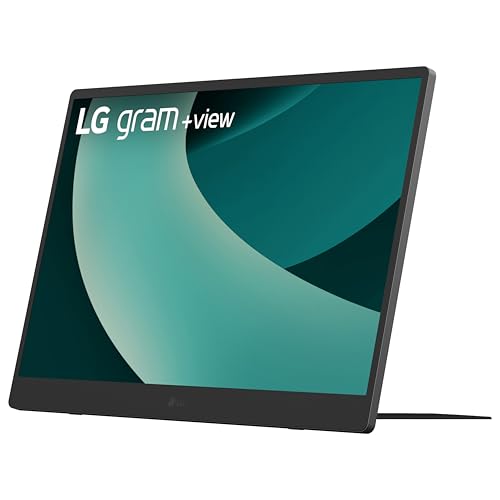
LG has sold the +View in more than one size across its life, and the smaller model is the one most earlier coverage describes. The currently verified Amazon listing for the +View — the listing checked for this article through the retailer’s own product data — is the 17-inch model: a 17-inch portable IPS monitor at 2560×1600 in a 16:10 aspect ratio, with up to DCI-P3 99% colour coverage, a built-in speaker, and USB Type-C, DisplayPort and mini HDMI connections. That is the product reviewed and linked below, under its exact listing identity. If you specifically need the smaller panel — because your bag’s sleeve is sewn for it, or because you are matching a 16-inch gram laptop pixel-for-pixel — treat the older, smaller +View as a separate, prose-only product in this article: it exists in the range’s history, it is not the verified listing here, and no link on this page pretends otherwise. Everything else in this review is about portable monitors as a category, and applies to your decision whichever size you end up hunting.
In this guide
Key takeaways
Portable monitors live or die on three things, and the +View’s character follows from them. First, resolution and aspect ratio matter more than raw size: the +View’s 2560×1600, 16:10 panel shows documents at the same scale as a modern laptop screen, which is why two-screen work on it feels like a desk rather than a compromise. Second, one-cable operation is the category’s whole convenience argument — picture and power over a single USB-C lead — and the +View does it properly while also offering DisplayPort and mini HDMI for machines and consoles that need them. Third, a portable monitor is an accessory purchase, and it only pays for itself if your away-from-desk work genuinely spreads across two screens. For spreadsheet-and-document travellers it is transformative; for email-and-calls travellers it is ballast.
Gram View 16 and the +View in depth

LG gram +View 17 — the high-resolution travel screen
Badge: Best for document-and-data travellers who want a desk-grade second screen
- Panel: 17-inch IPS, 2560×1600 (WQXGA), 16:10 aspect ratio (per the verified listing)
- Colour: up to DCI-P3 99% coverage (per the verified listing)
- Finish: anti-glare
- Connections: USB Type-C, DisplayPort, mini HDMI (per the verified listing)
- Extras: built-in speaker
The panel specification is where the +View separates itself from the crowd of cheaper travel screens. Most portable monitors are 1080p, which was fine when laptops were 1080p too; paired with a modern high-resolution laptop, a 1080p second screen makes windows change size as you drag them across, shrinks text, and quietly discourages the two-screen habit the purchase was meant to build. The +View’s 2560×1600 resolution at 16:10 matches the working geometry of current laptops — LG’s own gram line most obviously, but the same class of panel sits in most premium ultraportables — so a document keeps its size and your eyes keep their place as windows move between screens. The extra vertical room of 16:10 over 16:9 is the unglamorous detail writers, analysts and coders feel most: more lines of the page, fewer scrolls, less hunting.
Colour is the second separator. Coverage rated up to DCI-P3 99% in the listing puts the +View in the small group of portable monitors a photo-conscious user can trust for culling and light editing on the road; skin tones and product colours look like themselves rather than like approximations. The anti-glare finish earns its mention too, because portable monitors work in uncontrolled light — café windows, site offices, bright hotel rooms — where a glossy travel screen becomes a mirror with a document behind it. Brightness is adequate for indoor work rather than outdoor heroics, which describes the entire honest end of this category; if your plan involves working in direct sunlight, your plan needs a different tool.
Connections are sensibly complete. USB-C carries picture and power in one cable from a modern laptop, which is how most owners will use it most days. DisplayPort and mini HDMI widen the circle to older laptops, small desktop machines and games consoles, and they also free the +View to serve as a small main display for a mini PC or a test bench. The built-in speaker is best understood as a utility: voices on calls and clips are clear, and that is its job; nobody should buy a slim portable monitor as a music device, and this review will not pretend the laws of physics have been repealed in a panel this thin. The cover-and-stand arrangement follows the category pattern — the protective cover doubles as the prop — and while a folding origami stand never feels as planted as a desk monitor’s foot, it is stable on flat surfaces and disappears into the bag, which is the correct priority order for a travel screen.
Strengths
- High resolution and 16:10 shape match modern laptops, so two-screen work feels seamless
- Wide colour coverage makes it credible for photo-aware work, rare in a travel screen
- Anti-glare finish and three input types suit the uncontrolled places portable monitors work
Trade-offs
- The 17-inch panel needs a bag that fits it — check your sleeve before ordering
- Cover-stand stability is fine on desks, less happy on soft or uneven surfaces
- Speaker and brightness are utility-grade, as they are across the honest end of the category
Best for: travelling professionals whose work is documents, data and calls spread across two screens. / Not suited for: buyers wanting a gaming panel, an outdoor screen, or a second display for a bag too small to hold it.
The alternative with a verified listing: ASUS ZenScreen

ASUS ZenScreen MB16AHV — the 1080p all-rounder
Badge: Best for buyers who value stand design and broad compatibility over resolution
- Panel: 15.6-inch 1080p portable monitor (per the verified listing)
- Stand: built-in kickstand, tripod-mountable (per the verified listing)
- Finish: anti-glare, with a blue-light filter (per the verified listing)
- Connections: mini HDMI among its inputs (per the verified listing)
- Extras: protective sleeve included (per the verified listing)
ASUS has made portable monitors longer than almost anyone, and the ZenScreen MB16AHV shows the experience in its furniture rather than its panel. The kickstand is a real stand — it holds the screen at a usable angle without a cover-folding ritual — and the tripod mount is a small gift to presenters, streamers and anyone who has ever balanced a travel screen on a stack of hotel books. Against the +View, the trade is plain: you give up resolution, the 16:10 working height and the wide colour coverage, and you gain a slightly smaller, very sorted all-rounder that pairs happily with anything, including older laptops whose USB-C ports do not carry a display signal and which therefore need the HDMI path. For a buyer whose second-screen work is email beside a document, a chat window beside a call, or a console in a hotel room, 1080p is honestly sufficient, and the ZenScreen’s maturity shows in a hundred small behaviours. For the document-and-data worker, the +View’s panel remains the better tool. Neither verdict insults the other product; they are aimed at different desks.
Strengths
- Proper kickstand and tripod mount make setup anywhere genuinely easy
- Broad input compatibility suits older laptops and consoles
- Anti-glare finish and eye-care filtering suit long sessions in bright rooms
Trade-offs
- 1080p at 16:9 mismatches modern high-resolution laptops, so windows resize between screens
- Colour coverage is workmanlike rather than creative-grade
- Smaller canvas than the +View for side-by-side documents
Best for: mixed-device travellers and presenters who prize stand design and compatibility. / Not suited for: buyers matching a high-resolution laptop for dense document work.
Other portable monitors, in prose
Three more names fill out the category honestly, each discussed without a link because the verification behind this article covers the two products above. ViewSonic’s VA1655 is the value-minded traveller’s usual shortlist entry: a 16-inch-class 1080p IPS screen with USB-C and mini HDMI, a built-in stand and a protective case, from a display maker whose business monitors are a common sight in offices. It competes on price and completeness rather than panel ambition. ARZOPA’s high-refresh portable gaming monitors aim at a different traveller entirely — the one who wants a fast second screen for a laptop or console — trading colour refinement and resolution for refresh rate; if your second screen is for play, that range deserves a look, and if it is for work, it does not. Budget 1080p screens from brands such as MNN undercut everyone on price and are the rational choice for a screen that will live a hard life in site bags and car boots, provided your expectations for colour and brightness are set by the price rather than by the product photographs. The pattern across all of them is the category’s pattern: panel ambition, stand design and price — pick which two your work actually needs.
How this review was put together
Every specification in the two linked reviews traces to the verified Amazon listing named in this article’s sources file, checked through the retailer’s product data on the date recorded there. The naming discussion at the top — the point on which this whole article turns — comes from that same verification: the listing that exists and can be checked today is the 17-inch +View, and the article says so in plain words rather than letting the keyword’s “16” quietly misdescribe the product. Category judgements — how resolution mismatch feels across a working day, why anti-glare matters in cafés, what a kickstand is worth — are desk-review reasoning from how portable monitors are used, and no hands-on testing is claimed. Where a product could not be verified to that standard, it appears in prose only, without a link, and the sources file records why.
Buying guide: choosing a portable monitor that earns its bag space
Match the resolution to your laptop first
The single most consequential choice is the panel’s resolution relative to your laptop’s. Dragging windows between mismatched screens — where a document is one size on the left and another on the right — is a small friction paid hundreds of times a day, and it is the main reason portable monitors end up back in the drawer. If your laptop is a modern high-resolution machine, a 1440p-class or 1600p portable panel like the +View’s is worth its premium. If your laptop is 1080p, a 1080p travel screen matches it perfectly and costs less. Buy the match, not the maximum.
Check that your USB-C port actually carries a picture
One-cable portable monitors need a USB-C port with DisplayPort Alt Mode on the laptop side. Most modern premium laptops have it; many older and budget machines have USB-C ports that carry data and charging only. If yours is one of those, the monitor still works — through its HDMI or DisplayPort input, with a separate power lead — but the one-cable elegance is gone, and you should know that before the box arrives rather than after. Your laptop’s specification page settles the question in one line; check it.
Size is a bag decision before it is a screen decision
A 17-inch portable monitor is a wonderful canvas and a specific rectangle your bag must swallow. Measure the laptop compartment you actually use, including the sleeve you intend to keep the screen in, and compare honestly. The 15.6- and 16-inch class exists precisely because it slides into standard laptop sleeves beside the machine; the 17-inch class rewards a roomier bag with a desktop-like canvas. Neither is better in the abstract — the one that travels is better than the one that stays home.
Power: the quiet specification
A portable monitor drinks from your laptop’s battery unless you feed it separately. On a desk with the laptop plugged in, that is a non-issue. On a train with three hours of work planned, the second screen’s appetite shortens the laptop’s day in a way buyers consistently forget to budget for. The practical habits are simple: plug the monitor into a wall adapter or a power bank when one is available, drop its brightness to the lowest comfortable level — brightness is the biggest single draw — and treat the two-screen setup as a plugged-in luxury on the longest travel days.
Stands, covers and the surfaces of real life
Desk monitors stand on feet; portable monitors stand on their covers, their kickstands or your improvisation. If your travel involves presenting, demonstrating or propping the screen on uneven furniture, a real kickstand or a tripod mount — the ZenScreen’s party tricks — stops being a footnote and becomes the feature. If your travel is a procession of flat desks, the +View’s cover arrangement is perfectly adequate and keeps the whole package slimmer. Match the stand to the surfaces of your life, not to the product photograph.
Setting up a portable monitor properly: a short how-to
Step one: one cable, then the display settings
Connect the USB-C cable, give the screen a moment to wake, and then go straight to your operating system’s display settings. Set the arrangement to extend rather than mirror — mirroring wastes the purchase — and drag the screen icons until their positions match your physical desk, so the cursor crosses between displays at the edge where your eyes expect it to. Set the portable screen’s scaling so text matches your laptop’s apparent size; on a matched-resolution panel like the +View’s this is nearly automatic, and on a 1080p panel beside a high-resolution laptop it is the setting that saves your eyes.
Step two: build the two-screen habits that pay
Two screens pay when each has a job. The durable pattern for document work is primary material on the laptop — the draft, the model, the code — and reference on the portable screen: the source document, the data, the brief. For call-heavy days, invert the social geometry: put the call on the portable screen at eye height and keep working on the laptop. Decide your pattern before the trip, not during it, because a second screen used as a miscellaneous overflow becomes a miscellaneous distraction within the hour.
Step three: colour and brightness housekeeping
Set the portable screen’s brightness to match your laptop’s rather than to its maximum, and if you do any colour-sensitive work, run both screens through the same test image and adjust the portable panel’s colour temperature until whites agree. They will not match perfectly — different panels never do — but a five-minute truce between them removes the low-grade visual argument your eyes would otherwise referee all day. In the evening, both screens’ night modes should agree too, for the same reason.
Step four: pack it like the screen it is
The panel faces inward against the laptop or inside its cover, never outward against the contents of a bag. Keep the cable coiled loosely rather than kinked, and if the screen travels daily, a slim hard sleeve is the cheapest insurance in the whole setup. Portable monitors die of pressure and point impacts, not of old age; packing is the whole of their preventive medicine.
Mistakes portable-monitor buyers make
Buying resolution their laptop cannot feed gracefully
A high-resolution portable panel behind a laptop limited to lower output resolutions, or behind a port without display capability at all, is the category’s most common disappointment — and it is always discoverable in advance from two specification lines. The fix is procedural, not financial: verify the port, verify the laptop’s maximum external resolution, then buy.
Expecting a second screen to create a workflow
A portable monitor amplifies an existing two-screen habit; it does not invent one. Buyers who never spread work across two displays at their main desk rarely start in a hotel room. If you are unsure, borrow the habit first: work for a week with any spare screen at home before spending travel money on the portable version of it.
Judging by the product photograph’s brightness
Every portable monitor is photographed glowing like a television. In real rooms they are modest, indoor panels — the honest ones, like the two linked here, say so through their specifications. Judge brightness by the spaces you will actually work in, and treat any plan involving direct sunlight as a plan that needs a different device entirely.
Forgetting the audio path
When a laptop drives a portable screen over HDMI, it may decide the screen is now the speakers. If your calls suddenly sound thin and distant, the output device has wandered to the portable monitor’s utility speaker. Knowing this in advance turns a ten-minute panic before a client call into a ten-second settings change — which is, in miniature, the argument for reading the mistakes section of any review.
Final recommendation
One more consideration belongs in any honest closing: the environmental and financial sense of the accessory itself. A portable monitor is a durable, repairable-by-replacement-cable object with no battery to age and no subscription attached, and a good one outlives the laptop it was bought beside — the +View’s standard connections mean it will serve your next laptop, and the one after, without adapters or apology. Judged over that lifespan, the cost per working day of a well-chosen travel screen is small, and the waste of a badly chosen one is mostly the drawer it occupies. Choose by the habit and the panel, and the purchase ages well. Buyers who want a single sentence to carry away can have this one: match the panel to your laptop, confirm the port, respect the bag, and a screen like the +View stops being an accessory and becomes part of how you work everywhere.
For the document-and-data traveller, the gram +View — in its currently verified 17-inch form — is the portable monitor to beat: the resolution and aspect ratio that make two-screen work feel like a desk, colour that respects photographs, an anti-glare finish for real rooms, and inputs for everything from a modern laptop to a hotel-room console. Buy the ASUS ZenScreen instead if your priorities are stand design, tripod mounting and compatibility with older machines, and let its 1080p panel be the honest compromise it is. And if your heart is set on the smaller +View that the keyword names, shop for it as its own product with its own listing — the worst outcome in this category is not buying the second-best screen; it is researching one product carefully and ordering another by accident.
Related guides
the gram Pro 2-in-1 this screen travels with
the best gaming monitors for a permanent desk
the best 2-in-1 laptops compared
HDR explained for gaming in plain language
fixing HDMI audio problems step by step
Four workflows, examined honestly
The analyst in transit
The spreadsheet traveller is the portable monitor’s most satisfied customer, because their work is natively two-dimensional: the model on one screen, its inputs and sources on the other. On the +View’s 2560×1600 canvas, a wide sheet keeps its columns without horizontal scrolling, and the 16:10 height keeps the row count humane. The detail that sells this workflow is not the size — it is the scale match with the laptop, which keeps numbers the same size on both screens and removes the squint that 1080p second screens impose on dense data. If your travel involves reconciling, modelling or reviewing figures, this is your use case, and the premium panel is the correct purchase.
The writer and researcher
Long-form work splits naturally into source and draft, and the portable screen holds the source still while the draft moves. The +View’s vertical room shows more of a PDF page at readable size than a 16:9 panel does, which is why researchers consistently prefer the taller shape once they have tried it. The anti-glare finish matters here too: reading is a long, still activity, and a reflection you can ignore for a five-minute email becomes a genuine tax across a three-hour reading session in a bright room.
The presenter and trainer
A portable monitor facing the client while the laptop faces you — notes on yours, slides on theirs — is the two-screen trick that presenters quietly rely on, and it works in boardrooms, cafés and site cabins alike. Stand behaviour is the deciding detail in this workflow, which is why the ZenScreen’s kickstand and tripod mount get their praise in this article despite its lesser panel. If presenting is your primary second-screen job, furniture beats resolution; if it is occasional, the +View’s cover stand handles it and its panel wins the other six days of the week.
The developer away from the desk
Code on one screen, documentation, logs or the running application on the other: the split is so standard at desks that travelling without it feels like working with one hand. The +View’s resolution keeps code at a comfortable size with room for the editor’s sidebars, and its colour accuracy is wasted on this workflow in the nicest possible way — everything else about the panel serves it. Developers should note the scaling point from the setup section with particular care, because mismatched scaling between screens is at its most irritating in text-dense tools.
Panel technology, in the plain language a buyer needs
Portable monitors are almost all IPS LCD panels, the +View and ZenScreen included, and that is a sensible default: IPS gives wide viewing angles, honest colour and no burn-in worries under static office content. The buyer’s real choices hide inside the IPS label. Resolution decides working room, as this article has argued throughout. Colour gamut decides trust: a panel covering the wide DCI-P3 space shows photographs and branded material as intended, while a basic sRGB panel is fine for text and data. Brightness decides where the screen can work — indoor panels cluster in a similar band, and claims far above it deserve scepticism unless the price agrees. And the finish decides how the panel behaves under lights you do not control, which for a travel screen is most of the lights it will ever meet. OLED portable monitors exist at higher prices and bring magnificent contrast for video, at the cost of brightness headroom and a need for a little care with static images; for the document-led work this article addresses, the high-end IPS of the +View is the more rational tool.
Ownership over two years: what actually wears, breaks and pleases
Portable monitors have few moving parts, and their ownership stories are correspondingly plain. The cable is the first casualty in most kits — it flexes at the connectors thousands of times — so a screen whose cable is a standard, replaceable USB-C lead, as the +View’s arrangement allows, ages more gracefully than one with a captive or exotic cable. The cover is the second: it is both armour and stand, it scuffs so the panel does not, and treating it as a consumable rather than a keepsake is the correct emotional posture. The panel itself rarely degrades in any way a working owner notices within a normal laptop-generation lifespan. What pleases, durably, is the habit the screen enables — owners who build the two-screen routine in their first trips tend to describe the monitor, a year later, not as an accessory but as part of the laptop. Owners who never build the routine describe a drawer. The buying guide’s advice stands as the whole of the law here: the habit decides, and the hardware only serves it.
When a portable monitor misbehaves: a troubleshooting pass
No picture over USB-C
Work the chain in order. First, the cable: it must be a full-featured USB-C cable that carries video, and the short cable supplied with the monitor is the known-good test — long charging cables from a phone kit often carry power and data but no display signal. Second, the port: try the laptop’s other USB-C port if it has one, because on some machines only one is wired for display output. Third, the laptop’s specification, checked honestly: if the port has no DisplayPort Alt Mode, no cable will fix it, and the monitor’s HDMI or DisplayPort input with separate power is the working route. Fourth, the screen’s input selection: portable monitors usually auto-detect, but a manual input setting left over from a console session can hold the screen on the wrong source.
The picture is scaled strangely or blurry
Almost always a settings matter rather than a hardware one. Confirm the operating system is sending the panel’s native resolution — 2560×1600 for the +View — rather than a safe fallback, then set scaling as the setup section describes. A blurry second screen beside a crisp laptop screen is the classic signature of a resolution mismatch, and it is fixed in the display settings, not by replacing the monitor.
The screen flickers or drops when the laptop is unplugged
The monitor is asking the battery for more than the port is comfortable giving at that moment. Feed the screen from a wall adapter or power bank, lower its brightness, and check whether the laptop’s power plan is throttling its ports on battery. Portable monitors are honest loads; power them like loads and the drama ends.
Colours disagree with the laptop screen
Different panels render differently, and perfect agreement is not available at any price in this category. The achievable goal is the truce described earlier: same test image on both, colour temperature adjusted until whites agree, brightness matched. If your work is genuinely colour-critical, the professional answer is a calibrated desk monitor for final judgement and the portable screen for everything up to it — a division of labour the +View’s wide gamut makes narrower than most, but does not abolish.
Value, timing and the honest alternatives
A portable monitor competes for your money against three alternatives that deserve naming. The first is doing nothing: for many travellers the laptop screen plus disciplined window management is genuinely sufficient, and the correct price for a second screen they would not use is zero. The second is a tablet pressed into second-screen duty through software — a fine trick if you already own the tablet, and a poor reason to buy one, since a purpose-built portable monitor is cheaper, larger and simpler. The third is a small desk monitor left where you land — at a second home, a hot-desk office, a relative’s house — which beats any portable screen on size and stand, and loses only on the journeys in between. Price the +View and the ZenScreen against those three honest rivals, in your actual travel pattern, and the category stops being a gadget purchase and becomes what it should be: a workflow decision with a price attached. On timing, portable monitors follow the usual electronics rhythm of settling prices after launch and seasonal promotions; because this page carries no static prices by design, the advice is to compare the two verified listings on the day you buy, with the resolution-match rule from the buying guide held firmly in front of the discounts.
The short verdict, restated for the skimming buyer
If you have read nothing else: the +View line is LG’s high-resolution answer to the two-screen travel problem; the listing you can verify and buy today is the 17-inch model, and it is excellent at the document-and-data work its panel was designed for. The ASUS ZenScreen is the better furniture and the lesser panel. The smaller +View evoked by the keyword is a separate product to be shopped on its own listing. And the purchase itself is justified by exactly one thing — a two-screen habit you already have or are honestly about to build. Everything else in this long article is commentary on those four sentences.
Accessories and the complete travel-screen kit
The monitor itself is most of the purchase, but the kit around it decides how gracefully it travels. A slim hard sleeve matters more than any other accessory, for the pressure reasons the setup section gives. A second, longer full-featured USB-C cable earns its grams on the days the only socket is behind the hotel bed and the desk is across the room — remembering that length and video capability must coexist in the same cable, which is why the spare should be bought as a display-rated cable and labelled as one. A compact multi-port wall adapter with enough output to feed laptop and screen together turns any desk into a plugged-in desk and quietly solves the battery budgeting problem wherever a socket exists. A miniature tripod, for owners of tripod-mountable screens like the ZenScreen, converts café tables and hotel dressers into presentable presenting positions. None of this is upselling; it is the difference between a screen that travels as a system and a screen that travels as a hope, and the whole kit together adds less weight than the laptop charger most people already carry without thinking.
Matching a portable monitor to your laptop, brand by brand
Because the +View carries LG’s branding, buyers reasonably ask whether rival laptops pair as happily. The protocols underneath are universal — USB-C with DisplayPort Alt Mode, DisplayPort, HDMI — so the practical answer is yes, with the ecosystem notes that follow. Windows ultraportables from the major makers behave identically to a gram for these purposes: plug in, extend, arrange. MacBooks drive the +View over USB-C without drama, with the standing Apple caveats that the base models limit the number of external displays and that scaling choices on macOS favour certain resolutions — the +View’s 2560×1600 sits in the comfortable zone. Chromebooks with display-capable USB-C ports treat the screen as a second desktop in the usual way. Linux laptops handle the panel as a standard DisplayPort or HDMI display, with the compositor’s scaling settings doing the work the other systems’ settings panels do. Consoles, as the FAQ notes, use the HDMI path. The gram laptop remains the aesthetic and resolution soulmate — same design language, same panel geometry — but nothing in the +View’s engineering locks a rival’s owner out of its benefits, and this review’s recommendation does not depend on the badge on your laptop’s lid.
Why portable monitors became a serious category
It is worth understanding why these screens exist in their current, polished form, because it explains their design choices. A decade ago a portable monitor was a compromised curiosity: dim, low-resolution, driver-dependent. Three changes matured it. USB-C with Alt Mode collapsed the connection problem into one standard cable that carries picture and power together. Laptop panels standardised around high resolutions and the 16:10 revival, creating a clear target for a second screen to match. And hybrid work made the audience: millions of people now split their week between a proper desk and everywhere else, and the everywhere-else desk is the one that needs building each time. The +View is a product of that maturity — its design spends nothing on yesterday’s problems, which is why this review could spend its length on panels, ports and habits rather than on whether the thing works at all. It works. The remaining questions are the buyer’s, and they are the ones the buying guide asks.
Layouts that work: arranging the travel desk in four common places
The hotel desk
Hotel desks are narrow and their sockets are eccentric, which is why the long spare cable and the multi-port adapter from the accessories section exist. Put the laptop left or right according to your dominant eye and the socket’s location, the portable screen on the other side angled slightly inward, and the television out of your attention entirely. If the desk faces a mirror — hotel desks mysteriously do — the portable screen’s anti-glare finish and a small repositioning solve what the laptop’s glossier screen cannot.
The kitchen table and the home second room
At home, the portable monitor’s job is to spare you the walk to the main desk, so set it up where the household actually happens. Calls on the portable screen propped at eye height on a stand or a stack of cookbooks, work on the laptop, and the whole arrangement dismantles in a minute when the table is needed for its original purpose. This dismantlability is the feature a fixed second monitor cannot copy, and for many hybrid workers it is the real reason the purchase keeps justifying itself.
The client site and the shared office
On someone else’s territory, the virtues are speed and self-sufficiency: one cable, no drivers, no requests for the Wi-Fi password’s more powerful cousin, the spare HDMI lead. The +View’s DisplayPort and mini HDMI inputs are the insurance here — client sites contain elderly docks and idiosyncratic rooms, and a screen that accepts whatever the room offers is a screen that never becomes the reason a meeting starts late.
The train and the plane
Tray tables are the category’s hardest environment: shallow, shared with a neighbour’s elbow, and subject to motion. A 15.6- or 16-inch screen can just work here for the determined; the 17-inch +View is honestly a stretch on a train tray and impractical on a plane’s. Say so plainly, because a review that pretends otherwise teaches buyers to distrust every other judgement it makes. The travel screen’s kingdom is the destination, not the vehicle — the laptop alone serves the journey, and the second screen unfolds when you arrive.
A final word on the naming, for the buyer comparing listings side by side
Because this keyword’s whole difficulty is a number, it deserves a closing summary in one place. The +View family is LG’s portable-monitor line for the gram ecosystem. Listings in the wild include the earlier smaller model and the current larger one, sometimes at similar prices, sometimes described with the family’s name alone and the size buried in the specification table. The verified listing used throughout this review is the 17-inch, 2560×1600 model, and its size is an advantage for desk-like work and a consideration for small bags — both stated openly above. If you are comparing the two sizes on the same day, compare them as what they are: the smaller as the sleeve-friendly traveller, the larger as the desk-grade canvas, with the panel resolution, the aspect ratio and your bag as the deciding evidence. What you should not do is let a headline name make the decision for you; in this family, the specification line is the product, and five seconds spent reading it is the cheapest accuracy in the entire purchase.
Frequently asked questions
Is the gram +View only for LG gram laptops?
No. It is a standard portable monitor with USB-C, DisplayPort and mini HDMI inputs, and it works with any laptop, mini PC or console that can feed those inputs — including Windows machines from every maker and Macs. The gram branding describes its design family and its natural pairing, not a compatibility lock. The one requirement that matters is the one from the buying guide: a USB-C port with display output for the single-cable experience.
Why does this article keep distinguishing the 17-inch listing from the 16-inch name?
Because the verified listing available today is the 17-inch model, and reviews that let a search keyword rename a product do their readers a quiet disservice — you would research one screen and receive another. The smaller +View has existed in the range, and if you find its own listing, the category advice in this article — resolution matching, port checks, power budgeting — applies to it unchanged. Only the panel size and its bag implications differ.
How long does setup take once the routine is learned?
Under a minute, and that number is the category’s quiet triumph. Cable in, screen awake, windows where you left them — modern operating systems remember the arrangement per display, so the travel desk reassembles itself. The first setup takes ten minutes of the deliberate configuration the how-to section describes; every setup after that is a reflex. If your current travel routine involves negotiating with a hotel television or working hunched over a single screen at a borrowed desk, the contrast is the product.
Can a portable monitor replace a desk monitor?
For one machine, in a small space, for ordinary work — yes, and many flat-dwellers and students run exactly that setup. What you give up against a desk monitor is size, a planted stand, and usually brightness and ports. What you gain is a screen that also travels. If the screen will never travel, a desk monitor is the better buy at the same money; portability is a feature you should only pay for if you will use it.
Does the +View work with a games console in a hotel room?
Yes, through its mini HDMI input, with power supplied over USB from the console, a wall adapter or a power bank depending on the setup. It is a pleasant way to make a hotel room game-friendly. Keep expectations at the panel’s honest level: this is a 60Hz-class productivity screen, not a high-refresh gaming panel, so it suits the console’s casual and story games rather than competitive play.
How much battery does a portable monitor take from a laptop?
Enough to plan around. Fed from the laptop, a portable screen at working brightness is one of the larger continuous draws on the battery, and a long unplugged session will be measurably shorter than the same session on the laptop alone. The mitigations from the how-to section — separate power when available, disciplined brightness — recover most of the difference, and on plugged-in desks the question disappears entirely.
Does the +View need its own power supply?
In the standard one-cable arrangement, no: the laptop feeds it over USB-C, and that is the convenience the category is sold on. A separate supply becomes useful rather than necessary in three situations — when the laptop is unplugged and its battery is precious, when the video source is a console or an older machine whose port cannot power the screen, and when you want the screen to stay alive while the laptop sleeps, for instance as a small display for a media box. Any ordinary USB-C adapter of sensible output handles the job, and the multi-port adapter suggested in the accessories section covers laptop and screen from one socket.
Is a portable monitor worth it for students?
For the student whose work is source-and-draft — reading on one screen, writing on the other — it is one of the highest-value accessories in the bag, and library carrels are exactly the uncontrolled, space-poor environments these screens are built for. For lecture-notes-and-email students, the laptop alone suffices and the money is better kept. As with professionals, the habit decides; the hardware only serves it.
How should the two screens be positioned to avoid neck strain on the road?
The travel setup’s ergonomic trap is two low screens pulling your gaze downward for hours. Mitigate it with what the location offers: raise the laptop on a stand, books or the monitor’s own box so its screen approaches eye level, place the portable screen beside it at the same height if a second prop exists, and keep the primary screen — the one you look at most — directly in front of you rather than splitting your gaze symmetrically between two angled displays. Take the ordinary breaks a desk day would include. A portable monitor used at kitchen-table height for a week of ten-hour days will make its presence known in your neck regardless of its panel quality, and the fix is furniture improvisation, not a different monitor.
Can two portable monitors be used at once for a three-screen travel desk?
Technically, where the laptop supports two external displays and can power or pass power to both, yes — and some travelling analysts genuinely run this arrangement. Practically, it doubles every cost this article has catalogued: bag space, power draw, setup time and the number of things to forget in a hotel room. Treat the three-screen travel desk as a specialist’s tool. The single second screen captures the large majority of the benefit, and the jump from one screen to two is far larger than the jump from two to three.
What should I check in the first week so a problem surfaces inside the return window?
Run the screen through your real week, not a demonstration. Connect it to every machine you intend to pair it with, including the console or older laptop. Check the panel in a dark room for backlight uniformity and in a bright room for the reflections of your actual working places. Confirm the supplied cable carries the picture at full resolution, confirm the cover-stand holds the angle you actually work at, and confirm the whole kit fits the bag it must live in. Portable monitors are simple devices, and nearly every disappointment they can produce announces itself within days — provided the first week is a working week rather than an unboxing.