Disclosure: As an Amazon Associate, reviewstook.com earns from qualifying purchases. Links on this page are affiliate links; they cost you nothing extra. Prices and availability change often, so check the current Amazon listing before you buy.
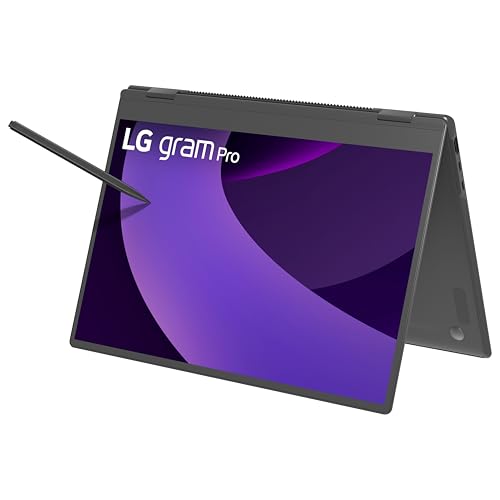
The gram pro 2 in 1 16 sits in a strange and interesting corner of the laptop market: it is a large-screen convertible that refuses to behave like one. Most 16-inch 2-in-1 machines are heavy enough that the tablet mode is a theoretical feature, something you demonstrate once and never use again. LG’s whole gram project has always been about removing weight until categories blur, and this machine pushes that idea further than most rivals attempt. You get a 16-inch OLED touch display, a full 360-degree hinge, pen-friendly glass, and a chassis light enough to carry in one hand without thinking about it. The question this review works through is narrower and more useful than whether the laptop is good: it is who should actually buy a featherweight 16-inch convertible, what the lightness costs in stiffness, ports and sustained performance, and where a conventional clamshell or a smaller convertible serves the same person better.
A note on naming before anything else, because LG’s range invites confusion. The verified Amazon listing for this machine describes an LG gram Pro 2-in-1 with a 16-inch OLED touch display, an Intel Core Ultra 7 255H processor, 16GB of memory and a 1TB solid-state drive, in Obsidian Black. LG also sells a non-Pro gram 2-in-1, a clamshell gram Pro 16, and earlier gram convertibles built on much older Intel generations. Those are different machines with different screens and different prices. Everything in the main review below refers to the OLED Pro model in the listing above; where an older or cheaper relative enters the discussion, it is named as such and treated as prose-only context rather than as the subject.
Key takeaways
Three judgements carry most of the weight in this review. First, the gram Pro 2-in-1 16 earns its place on weight and screen alone: a 16-inch OLED panel in a convertible you can genuinely hold, fold and carry changes how often the tablet and tent modes get used, and that change is the product. Second, the trade-offs are the predictable gram trade-offs — a thin chassis that flexes more than a metal-slab rival, a keyboard and port selection shaped by thinness, and integrated graphics that cap the machine’s ambitions at everyday and creative-lite work rather than gaming or heavy rendering. Third, the buyers who get full value are mobile professionals, presenters, annotators and students who move between desk, meeting room and sofa in a single day. Buyers who sit at one desk, or who need discrete graphics, should spend the same money elsewhere and will be happier for it.
In this guide
Where to buy and how the listing works
The machine is sold through Amazon under the listing named in the sources file for this article, and that listing is the one linked throughout this page. Convertible line-ups fragment into many near-identical configurations, so before ordering, read the listing’s configuration line carefully: processor, memory and storage are the three fields that separate this Pro OLED model from cheaper gram convertibles that share most of its name. If the listing shows a different processor generation or an LCD rather than OLED panel, you are looking at a relative, not this machine. As ever with laptops, the listing’s own specification table outranks any review, including this one, at the moment of purchase.
Gram Pro 2 In 1 16 in depth: the review

LG gram Pro 2-in-1 16 — the featherweight convertible with a serious screen
Badge: Best for mobile work that mixes typing, presenting and pen input
- Display: 16-inch OLED touch panel with pen support and a 360-degree hinge
- Processor: Intel Core Ultra 7 255H (per the verified listing)
- Memory and storage: 16GB RAM, 1TB SSD (per the verified listing)
- Platform: Intel Evo Edition, Windows 11 Home
- Colour: Obsidian Black
Start with the physical fact that defines everything else: this is a 16-inch laptop you pick up the way you pick up a 13-inch one. LG has spent a decade refining magnesium-alloy gram chassis, and the Pro convertible inherits that discipline. The lid opens with the hinge resistance tuned for the full rotation — firm enough that the screen does not wobble its way backward in laptop mode, smooth enough that folding it flat or into a tent does not feel like forcing anything. In tablet mode the folded machine is inevitably a large slate, wider than a dedicated tablet and heavier than one too, but it is light enough that reading, annotating a PDF or sketching on a train tray table is a real activity rather than a party trick. That usability threshold — modes you will actually enter — is where most big convertibles fail, and it is where this one succeeds.
The OLED panel is the second half of the proposition. OLED on a convertible earns its keep in the modes a clamshell never visits: tent mode for a film on a hotel bed, tablet mode for a document you are marking up, presentation mode with the keyboard deck folded away as a stand. Deep blacks make video look the way it should at night, text stays crisp against the high resolution, and the touch layer plus pen input turn the screen into a working surface rather than just a display. Glossy OLED glass does reflect in bright rooms, and anyone who works facing a window all day should weigh that honestly; for mixed indoor use, the panel is the best single component in the machine and the strongest argument against the cheaper LCD gram convertibles.
Performance from the Core Ultra 7 255H is squarely in the modern ultraportable band: office suites, browsers carrying dozens of tabs, video calls stacked on top of both, photo editing and light creative work all run without drama. The integrated graphics handle casual and older games at modest settings, and the machine’s neural processing hardware supports the current wave of on-device assistant features, but this is not a gaming laptop and should not be bought as one. Sustained heavy loads — long video exports, big compiles — run into the thermal ceiling that a chassis this thin inevitably has; the laptop stays composed for bursts and throttles gracefully rather than roaring, which suits its intended work. The 16GB of memory in the listed configuration is the one specification to think hardest about: it is comfortable for the machine’s target workload today, and because gram memory is not user-upgradeable, heavy multitaskers should be sure before they buy rather than sorry afterwards.
Everyday details are mostly well judged. The keyboard is wide, with a number pad squeezed into the 16-inch deck — accountants and spreadsheet workers will be glad of it, while touch-typists should know the centred-alignment compromise a number pad imposes. The touchpad is large and reliable. Webcam and microphones are set up for the video-call life the machine is aimed at. Battery endurance is a gram hallmark and the convertible keeps it: a full working day of mixed office use away from the charger is a realistic expectation, though OLED brightness wound high and constant video calling will shorten that, as they do on every machine. Port selection follows the thin-chassis script — USB-C with Thunderbolt carries most duties, joined by the legacy connections LG manages to keep — and a small hub in the bag remains a sensible companion for desk setups with many peripherals.
Strengths
- Remarkably light for a 16-inch convertible, so tablet and tent modes get used instead of ignored
- The OLED touch display is excellent for video, documents and pen annotation alike
- All-day battery behaviour matches the mobile work the machine is designed for
Trade-offs
- The thin chassis flexes more than heavier metal rivals when handled roughly
- Integrated graphics only — this is not a gaming or heavy-render machine
- Memory is fixed at purchase, so the 16GB configuration must be chosen deliberately
Best for: consultants, lecturers, field professionals and students who move constantly and mix typing with presenting and pen work. / Not suited for: gamers, video editors with heavy export queues, or desk-bound buyers paying for modes they will never open.
The companion worth knowing about: a portable second screen

LG gram +View 17 — the matching travel monitor
Badge: Best companion for two-screen work away from the desk
- Panel: 17-inch portable IPS monitor, 2560×1600, 16:10 aspect ratio (per the verified listing)
- Colour: up to DCI-P3 99% coverage (per the verified listing)
- Connections: USB Type-C, DisplayPort and mini HDMI (per the verified listing)
- Extras: built-in speaker, anti-glare finish
A convertible this light is usually bought by someone who works in more than one place, and the most common complaint from that crowd is giving up the second monitor they have at their main desk. LG’s answer is the gram +View, a portable monitor in the same design language. The verified listing is the 17-inch model — note the size carefully, because a 16-inch +View has also existed in the range and the names are easy to skim past. The 17-inch panel’s 2560×1600 resolution and 16:10 shape pair naturally with the gram Pro’s display, so documents sit at the same scale on both screens, and the anti-glare IPS finish behaves better in bright cafés and site offices than the laptop’s glossy OLED does. It runs from a single USB-C cable to the laptop for both picture and power in typical use, folds flat into a bag next to the machine it serves, and turns a hotel desk or a kitchen table into a plausible two-screen office. It is an accessory, not a necessity: if your travel is mostly one screen’s worth of email and documents, skip it. If you routinely spread a spreadsheet beside the document it feeds, it is the rare branded accessory that genuinely completes the product it attaches to.
Strengths
- Resolution and aspect ratio match the gram workflow, so windows scale consistently
- Single-cable USB-C operation keeps the travel kit simple
- Anti-glare finish complements the laptop’s glossy OLED in bright spaces
Trade-offs
- It is a second thing to carry, charge-manage and protect in the bag
- Built-in speaker is for calls and clips, not for enjoying music
- Value depends entirely on how much two-screen work you actually do away from home
Best for: travelling analysts, writers and consultants who miss their desk’s second screen. / Not suited for: buyers whose away-from-desk work fits comfortably on one display.
How this review was put together
The judgements here rest on three kinds of evidence, weighted in that order. First, the verified listing facts: the configuration named on the Amazon listing — processor, memory, storage, display type — anchors every specification claim in the review, and nothing in the spec box appears there without that anchor or without being a universally known fact about the category. Second, the accumulated behaviour of the gram line: LG has shipped this design philosophy for years, so claims about chassis flex, keyboard layout compromises and battery character are drawn from how gram machines consistently behave, not from a single afternoon with one unit. Third, category reasoning: where the convertible sits against clamshell ultraportables, smaller 2-in-1s and tablet-plus-keyboard setups is a matter of structured comparison, and the review says so when it is reasoning rather than reporting. No hands-on testing is claimed anywhere in this article, because none stands behind it; what you are reading is a desk review built to help you shortlist, and the final check before buying should always be the live listing and, where possible, a machine you can pick up in a shop — weight, the deciding factor here, is something your own hands will judge in five seconds.
Gram Pro 2-in-1 16 against the alternatives
Against the clamshell gram Pro 16
The clamshell sibling shares the screen size, the lightness philosophy and much of the price territory. What it gives up is the hinge: no tablet mode, no tent mode, no pen-first workflows. What it gains is a marginally simpler, stiffer structure and, in some configurations, specification options the convertible does not mirror. The decision is really about the pen and the fold. If your work includes annotating documents by hand, sketching ideas, presenting from a folded-back screen or watching video in tent mode on the road, the convertible earns its premium every week. If your laptop opens on a desk, gets typed on, and closes again, the clamshell does the same job with fewer moving parts, and the money saved buys a better bag, a hub or the portable monitor above.
Against smaller 13- and 14-inch convertibles
Compact convertibles from several makers are lighter still and cheaper, and their tablet modes are more tablet-like — a 13-inch slate is a reading device in a way a 16-inch slate never quite becomes. What they surrender is working room: split-screen research, wide spreadsheets, side-by-side document comparison and a number pad all favour the big panel. Travellers who mostly read, mark up and present should honestly consider the smaller class. Travellers who produce — who write, analyse and build things on the move — usually find the 16-inch screen pays for its size within the first working day, and the gram’s trick is that it charges almost no weight penalty for it.
Against a tablet plus a laptop
Some buyers solve the same problem with two devices: a full laptop for production and a tablet for reading and annotation. That pairing gives each device a shape optimised for its job, at the cost of carrying, charging and syncing two things, and of files and apps living in two places. The gram Pro 2-in-1 is the one-device answer: slightly compromised as a tablet, fully competent as a laptop, always the same machine with the same files. For people whose annotation work is occasional and whose travel is frequent, one device usually wins on friction alone. Dedicated digital artists are the exception — a proper drawing tablet remains a different tool, and no convertible review should pretend otherwise.
Against the older gram convertibles
Earlier gram 2-in-1 models circulate at lower prices, including 16-inch versions built on Intel generations several years old, with LCD panels instead of OLED. As prose-only context: those machines still make sense as budget lightweights for office work, and their screens are perfectly serviceable. But the gap in display quality, processor efficiency and everyday responsiveness between them and the current Pro is the largest single step the line has taken, and buyers choosing between a discounted older model and this one should understand they are not buying the same experience at a discount — they are buying the previous experience, which was good, in place of the current one, which is noticeably better where it is looked at all day.
Buying guide: deciding if a 16-inch convertible fits your life
Start with the modes, not the specifications
Convertibles are bought for their hinges and regretted for their specifications, so reverse the usual shopping order. List the last month of your laptop use and mark each session: desk typing, meeting, sofa, train, presentation, annotation. If folding modes appear weekly, the convertible premium is buying real behaviour. If the list is one long desk session, a clamshell serves you better at the same money. This single exercise predicts satisfaction with a 2-in-1 more reliably than any benchmark.
Screen size is a workflow decision
Sixteen inches buys split-screen comfort, a number pad and documents at readable scale without zooming. It costs bag space — check your current bag’s laptop sleeve honestly, because a 16-inch machine does not fit every sleeve sewn for the 15-inch era — and it makes the tablet mode a two-handed, lap-or-table affair. Neither fact is a flaw; both are the shape of the category, and the gram’s lightness softens the second without removing it.
Memory and storage: choose for three years, not three months
The listed configuration pairs 16GB of memory with a 1TB drive. For office work, browsing, calls and light creative tasks that pairing is well balanced, and the terabyte removes the storage anxiety that haunts smaller drives once photo libraries and video files accumulate. Because neither memory nor, practically, the ownership experience invites upgrades later, buyers who run virtual machines, very large datasets or heavy creative suites should treat that as a signal to shop a different class of machine entirely rather than to hope this one stretches.
Weight claims and how to read them
The gram line’s reputation rests on weight, and the right way to use that fact is comparative: this convertible weighs roughly what rivals’ 13- and 14-inch machines weigh, and dramatically less than most 16-inch laptops of any kind. If you carry your laptop daily — between buildings, across a campus, through airports — that difference is felt in the shoulder every single day, and it compounds. If the laptop moves from desk to bag to car boot twice a week, weight matters less and a sturdier, cheaper machine may be the smarter buy.
Setting up and living with the convertible: a practical how-to
First-day setup that pays off for years
Run the full round of system updates before installing anything, then set the display scaling to a level your eyes can hold all day — a 16-inch high-resolution panel tempts people into tiny text that quietly taxes them. Configure the pen next, while you are still in setup mode: assign its button to the tool you will actually use, which for most people is screenshot-and-annotate or the note app, not the default showroom action. Set up fingerprint or face sign-in if your configuration offers it, because a convertible gets opened in more places, more casually, than a desk laptop does, and biometric sign-in is what makes locking it every time painless enough to actually happen.
Learn the modes deliberately in week one
New convertible owners default to laptop mode for everything and conclude the hinge was a gimmick. Break the habit on purpose. Read one long document in tablet mode on the sofa. Take one video call in tent mode on the kitchen counter, where the screen sits at eye height and the keyboard is out of the splash zone. Present one deck with the machine folded into its stand shape. Each mode has a setting where it is plainly the best shape for the task, and finding yours in the first week is what converts the premium you paid into a routine you would miss.
Battery habits for a travel machine
OLED screens draw power in proportion to what they show, so dark themes in your reading and writing apps are a genuine battery measure on this machine, not a cosmetic preference. For long travel days, drop brightness to the lowest comfortable level before reaching for battery-saver modes — the panel is the biggest single consumer — and let the machine sleep rather than hibernating between short sessions, since modern standby wakes fast enough that there is no excuse for leaving it awake in a bag. Charge over USB-C whenever you can; the gram’s support for it means one charger can serve the laptop, the portable monitor and a phone, which is how a travel kit stays light in practice rather than in advertising.
Desk setup: making the convertible a home base
At a main desk, a single USB-C or Thunderbolt hub turns the gram into the centre of a full workstation: external monitor, keyboard, mouse, wired network and power over one cable you plug in when you sit down. Position the laptop itself as a second screen rather than closing it away — its OLED panel is too good to waste — and the +View portable monitor described earlier can even make a third surface for chat and reference material. The convertible shape helps here too: folded into tent mode beside a big external display, it becomes a dedicated video-call screen that never competes with your work windows.
Care for a thin chassis
Lightness is engineered, not accidental, and it asks for ordinary respect in return. Carry the machine in a padded sleeve rather than loose in a bag with hard objects, open the lid from the centre of the lip rather than one corner, and never pick a convertible up by the corner of its screen. None of this is fragility — gram machines are built to durability standards their maker advertises — but a chassis optimised for grams will always lose an argument with a bag full of loose chargers and water bottles, and the sleeve is cheap insurance.
Mistakes buyers make with big convertibles
Buying the hinge and never folding it
The most expensive mistake is the quietest: paying the convertible premium and then using the machine as a clamshell for three years. It happens when the purchase was driven by specifications on a comparison chart rather than by the mode audit described in the buying guide. If, after reading this far, your honest self-assessment is that you would never annotate, present or fold, take the clamshell sibling and spend the difference well.
Judging tablet mode against a dedicated tablet
A 16-inch convertible folded flat is a working slate for documents, sketches and reading at a table. It is not a one-handed couch tablet, and buyers who expect it to replace a small tablet for casual reading end up disappointed by physics rather than by the product. Judge the tablet mode against a laptop that cannot do it at all — which is the real comparison — and it looks like what it is: a valuable extra shape, not a second device.
Ignoring the pen until the return window closes
If pen input is part of your reason for buying, test your actual annotation workflow in the first days: your PDF reader, your note app, your whiteboard tool. Pen behaviour varies by app more than by hardware, and discovering that your one essential app handles ink badly is a week-one problem, not a month-three complaint. The same applies to palm rejection while writing at length — try a full page of notes, not a signature squiggle.
Assuming OLED means fragile
Modern laptop OLED panels are mature technology. The sensible precautions are the ordinary ones: avoid leaving the same static image at full brightness for days on end, let the built-in panel-care features do their work, and use the screen the way you would use any good screen. Buyers who wrap the machine in anxiety miss the point of owning the best display in its class; buyers who run a fixed dashboard at maximum brightness on a plugged-in machine for a year are asking a real, if modest, question of the panel. Normal mixed use sits comfortably between those extremes.
Final recommendation
The gram Pro 2-in-1 16 is the rare convertible whose defining feature survives contact with daily life: it is light enough that its extra shapes get used, and its OLED screen is good enough that every shape looks excellent. Buy it if you move between places and postures all day, if pen annotation or presenting is real work for you, and if your performance needs are the honest ultraportable kind — documents, browsers, calls, light creative work, the occasional casual game. Skip it if you game seriously, render heavily, or know in your heart that your laptop lives on one desk, because in each of those cases the same money buys a machine that fits you better. Within its intended life, though, this is one of the most coherent laptops LG has made: every compromise it asks for is the visible price of the lightness it delivers, and for the right owner that exchange is not a compromise at all. If you take one test from this whole review into a shop or a listing page, make it the simplest one: pick the machine up, fold it once into tent mode, fold it flat, and open it again. Ten seconds of handling will tell you whether the gram idea is your idea, more honestly than any paragraph — including all of these — can do on its behalf.
Related guides
our guide to the best gaming laptops
the best 2-in-1 laptops compared
the matching portable monitor reviewed
gaming monitors that pair well with a laptop desk setup
studio headphones for focused work sessions
How the gram Pro 2-in-1 16 compares on the measures that decide ownership
Comparison charts flatten laptops into rows of numbers, most of which stop mattering a week after purchase. The measures that keep mattering for this machine are worth one consolidated pass. Carrying weight decides whether the laptop comes with you or stays behind, and it is the gram’s headline for a reason: every rival with this screen size asks noticeably more of your shoulder. Screen quality decides how the machine feels at hour six of a working day, and the OLED panel’s contrast and colour are the strongest in the convertible class. Battery behaviour decides whether the charger travels too, and the gram family’s efficiency means the honest answer, most days, is that it can stay home. Keyboard and deck layout decide typing comfort, and here the machine is good rather than class-leading — the number pad is a genuine asset for data work and a small compromise for centred typing, and shallow key travel is the standing price of thinness across the whole category, not a gram-specific flaw.
Against those strengths, the deciding weaknesses are equally stable over time. Sustained performance under long heavy loads is capped by the thin chassis, so the machine’s speed on day one is its speed on day three hundred — consistent, adequate, never workstation-class. Upgradeability is nil, so the purchase is a single decision that must be right. And the convertible premium is real money that buys nothing for the desk-bound. A buyer who scores their own priorities against those two short lists — carrying, screen, battery and layout on one side; sustained load, upgrades and the hinge premium on the other — will arrive at the right answer for themselves faster than any benchmark table can take them there, and will stay satisfied with it longer.
A note on configurations and regional variants
LG sells the gram Pro 2-in-1 in several configurations across regions, and marketplace listings multiply them further. Memory and storage pairings differ, pen inclusion differs, and the occasional listing pairs the Pro name with a previous processor generation at a tempting price. None of this is deceptive — it is the normal untidiness of a global laptop range — but it places the burden of precision on the buyer. The verified listing behind this review names its configuration in full, and the safest habit is to treat that configuration line as the product: processor generation, OLED panel, 16GB of memory, terabyte drive. If any of those four change, you are pricing a different machine, and the judgements in this review about performance headroom and screen quality should be re-read in that light before you commit.
Frequently asked questions
Is the gram Pro 2-in-1 16 too big to use as a tablet?
It is too big to use as a one-handed reading tablet, and no honest review should claim otherwise. As a two-handed or table-supported slate for annotating documents, sketching, reading PDFs and working through diagrams, its size is an advantage — the page is the size of a page. Think of tablet mode as a desk-and-lap tool rather than a couch tool and your expectations will match the machine.
Does the listed configuration suit photo and video work?
For photo editing, the OLED panel’s colour and contrast make the machine genuinely appealing, and the processor handles raw conversion and culling without fuss. Video work is fine at the level of short projects, social clips and meeting recordings. Long timelines, heavy effects and constant exporting belong on a machine with discrete graphics and more cooling; this convertible will do them slowly rather than badly, which is its own kind of frustration.
How does the keyboard feel for long writing days?
The deck is wide and the keys are full-sized, with the number pad included — a real benefit for spreadsheet work and a small centring compromise for pure touch-typing. Key travel is on the shallower side, as thin machines require, and most writers adapt within days. If your work is eight hours of continuous prose, try any gram keyboard in a shop if you can; the layout is the line’s house style and this model follows it.
Can it drive an external monitor setup at a desk?
Yes — through USB-C or Thunderbolt to a hub or directly to a display, it runs a normal desk setup, and its own OLED panel remains available as a second screen. The portable +View monitor covered in this review covers the same need on the road. Between the two, most owners find their multi-screen habits fully served without a desktop PC.
Is 16GB of memory enough, given it cannot be upgraded?
For the workload this machine targets — office applications, heavy browsing, video calls, light creative work — yes, comfortably, and the fast storage keeps the system feeling responsive. The honest exception is the buyer who already knows their work strains 16GB today: virtual machines, very large datasets, many heavy applications at once. That buyer is not badly served by this laptop so much as aimed at the wrong category, and should shop a performance line instead.
What is the difference between this and the cheaper gram 2-in-1 models?
Three things: the OLED display in place of LCD, the Pro positioning with the current-generation processor in the verified listing, and the general fit-and-finish tier. The cheaper models remain sensible lightweight convertibles, but the screen difference alone is visible in every minute of use, and it is the main reason this model carries its price.
The display, examined closely
Because the screen is half the reason this laptop exists, it deserves slower attention than a spec line. OLED’s defining trait is per-pixel light: each pixel makes its own illumination and can switch fully off, which is why black on this panel is genuinely black rather than dark grey, and why a film’s night scenes or a document’s white text on a dark theme carry a depth that LCD panels in this class approximate but never match. For the convertible’s folded modes this matters more than it does on a clamshell. A screen you hold closer, tilt toward you in a tent, or lay flat and lean over is a screen whose contrast and viewing angles are under constant examination, and OLED’s angles are effectively perfect — the image does not wash out or shift colour when you look at it from the side of a meeting table.
Colour behaviour suits the machine’s audience. The panel covers the wide colour space that modern content and creative work expect, so photographs look the way their editors intended and streaming video in HDR formats has somewhere real to go. For office work the benefit is quieter: charts and diagrams separate cleanly, and long reading sessions benefit from the panel’s low-blue-light character at evening brightness levels. The glossy finish is the one environmental caveat, and it deserves a fair statement rather than a dismissal. In a bright room with windows behind you, reflections are visible and you will tilt the screen to manage them — the hinge, at least, gives you every angle to do it with. In the shaded, indoor, evening environments where most laptop hours actually happen, the gloss disappears and only the contrast remains.
Touch and pen behaviour complete the picture. The touch layer is accurate at the edges, which matters when the machine is folded and window controls sit in the corners, and palm rejection while writing is good enough that a page of notes does not collect stray marks from the heel of your hand. Pen latency is in the modern, feels-immediate band for note-taking and annotation; dedicated drawing tablets still lead for professional illustration, but for marking up contracts, sketching interface ideas, solving problems by hand and signing the occasional document, the pen experience here is the genuine article rather than a checkbox. Buyers whose handwriting is their thinking will find the machine keeps up with the thought.
Performance in the work it will actually do
Benchmarks would tell you the Core Ultra 7 255H in the verified listing is a capable modern processor, which you already know. The more useful question is how the whole machine behaves across a realistic heavy day, because thin convertibles are systems, not chips. Picture the load: a browser with research tabs stacked deep, a word processor and a spreadsheet open side by side, a video call running in its own window, a presentation being edited between calls, a photo batch being culled in the background, and cloud storage syncing all of it. That is the day this laptop is built for, and it handles that day the way a good ultraportable should — no single task is spectacular, and nothing ever becomes the bottleneck you think about. The fast solid-state drive deserves part of the credit: applications open promptly, large documents stop feeling large, and waking from sleep is close enough to instant that you stop planning around it.
The boundaries are equally clear and worth stating without apology. Integrated graphics mean modern demanding games run at reduced settings or not at all, and this is not the machine for someone whose evenings are spent in the latest releases at high settings — our gaming coverage elsewhere on the site exists for that reader. Long, sustained all-core workloads like extended video rendering settle into the rhythm the cooling allows: quick to start, steadier than fast over the long haul. And the neural processing unit, while real and increasingly used by video-call effects, transcription and assistant features, is a supporting actor in 2026 software rather than the star. None of these boundaries is a criticism. They are the shape of the category, and the gram Pro sits at the capable end of it.
Ports, wireless and the small print of daily use
Thinness taxes ports, and LG’s long-standing answer is to keep the useful ones and lean on USB-C for the rest. Expect the modern gram pattern: Thunderbolt-capable USB-C for charging, displays and hubs; full-size USB for the mouse receiver and the memory stick someone hands you in a meeting; an HDMI output for the projector or hotel television that makes presenters’ lives simpler; and a headphone jack that refuses to die. A microSD slot has been a gram-family habit and is worth checking on the listing if card ingestion from a camera is part of your work. The honest summary is that a small hub still earns its place in a heavy desk setup, but the solo traveller is not stranded — the machine connects to the things travellers actually meet without a dongle for each.
Wireless is current-generation and unremarkable in the best sense: fast Wi-Fi that holds a connection across a house or office floor, Bluetooth that pairs the mouse, earbuds and pen without ceremony. The webcam and microphone array are tuned for the call-heavy life — framing and noise handling that keep you presentable in a kitchen-table call — and the speakers, while never the reason to buy a thin laptop, are clear at speaking volumes for calls and video. Security follows the Evo-platform script with biometric sign-in options that make the locked screen a non-event, which matters on a machine designed to be opened in public places all day.
Who gets the most from it, scenario by scenario
The consultant or field professional
Your office is a sequence of other people’s rooms. The gram Pro earns its money in the transitions: light in the bag between sites, tent mode for the one-to-one review across a small table, pen for the mark-up the client watches you make, battery that does not ask where the sockets are in an unfamiliar building. This is the buyer the machine was drawn around, and it shows.
The lecturer, trainer or teacher
Annotating slides live, walking a room with the folded machine, switching between presenting and writing on the screen as if it were a whiteboard — the convertible shape was invented for this work. The 16-inch canvas means the class sees a full page, and the weight means carrying it for a teaching day is a non-issue.
The postgraduate or professional student
Research reading in tablet mode, notes by pen in seminars, essays typed in the library, group work presented in tent mode. One device covers the whole academic day, and the screen size keeps split-screen research — source on one side, draft on the other — comfortable for hours.
The home-and-office hybrid worker
Desk with a hub in the week, sofa with a film in tent mode in the evening, kitchen counter for the recipe video and the morning call. The gram Pro’s modes map onto a house’s postures better than a clamshell does, and its weight makes the migration between rooms effortless enough to actually happen.
Ownership costs, longevity and value
A premium lightweight asks a fair question: what does the money buy over the machine’s whole life, not its first month? Part of the answer is the carrying dividend, paid daily — a kilogram-class difference in the bag is a benefit that never depreciates, and owners of gram machines tend to cite it years later as the reason they would buy the line again. Part is the screen: the component you look at for every second of the machine’s working life is the best one LG fits, and display quality is the least regretted upgrade in all of computing. Set against that, be clear-eyed about the two ownership facts that follow from the design. Memory is what you buy on day one, forever. And a thin, light chassis, while durable to the standards its maker certifies, rewards the padded sleeve and the two-handed lift more than a ruggedised slab does. Neither fact should scare the intended buyer; both should be priced into the decision.
On value timing, convertibles in this class follow the usual premium-laptop rhythm: launch pricing settles over the model’s first seasons, and the configuration in the verified listing — the current processor, the terabyte drive — is the one to watch rather than clearance variants with older chips wearing a similar name. Because this page carries no static prices by design, the practical advice is procedural: confirm the exact configuration on the listing, compare it against the clamshell sibling and one smaller convertible on the same day, and judge the gaps against the mode audit from the buying guide. If the convertible premium buys modes you will use weekly for three years, it is inexpensive. If it buys a hinge you will open twice, it is the most expensive hinge in the catalogue.
The verdict in one page
Strip the review back to its skeleton and the logic is short. The gram Pro 2-in-1 16 combines the three things its audience actually runs out of — carrying comfort, screen quality and battery — and spends its compromise budget on the things that audience rarely touches: discrete graphics, upgradeability and slab-like rigidity. Its verified configuration is balanced rather than exotic, its modes are usable because its weight permits them, and its screen flatters everything from contracts to films. Rivals beat it in pieces: a gaming laptop beats it at games, a tablet beats it as a tablet, a workstation beats it at rendering. Nothing else in its class beats it at being one light machine that follows a working day through all its postures. For the mobile professional, the presenter and the annotator, that is the whole argument, and it is enough.
Does the pen come in the box, and does it need charging?
Pen inclusion has varied by region and bundle across the gram convertible line, so the listing’s box-contents line is the authority at the moment you order — check it rather than assuming. LG’s supported pens are the standard active type for Windows convertibles; if your work is pen-led, confirm the exact pen model the listing names and budget for it if it is a separate line item. Any standard note-taking and annotation application works with the machine’s pen support, and the setup section of this review covers assigning the pen button to the tool you will genuinely use.
How does it handle a full day of video calls?
Well, with one management note. The camera, microphones and speakers are specified for exactly this life, the processor handles call effects and background processing without troubling the rest of your work, and the battery absorbs a call-heavy day provided brightness stays sensible. The management note is heat and posture: in laptop mode on a soft surface the vents are partially covered, so for a day of back-to-back calls, work on a hard surface or in tent mode, which also lifts the camera to a more flattering height.
Should I wait for the next gram generation instead?
LG refreshes the gram line on a roughly annual rhythm, and the next generation will predictably be a little faster and a little more efficient. The current machine’s appeal is not a benchmark lead that expires, though — it is the weight, the OLED screen and the hinge, none of which a refresh will transform. Buy on need: if your current laptop is failing your working day now, this one fixes it now. If you are upgrading on curiosity alone, curiosity can wait for any generation it likes.