Disclosure: As an Amazon Associate, reviewstook.com earns from qualifying purchases. Links on this page are affiliate links; they cost you nothing extra. Prices and availability change often, so check the current Amazon listing before you buy.
The question of alienware aw3926qw deserves a slower answer than most roundups give it. Model numbers in the Alienware monitor line encode size, year, and panel class in a code that rewards careful reading, because one digit separates a QD-OLED flagship from a fast VA alternative.
Research for this article found no listing under the exact AW3926QW name, while the verified AW3426DW QD-OLED below is the current flagship ultrawide Alienware actually sells, so this guide maps the naming honestly and links what can be bought.
Alienware Aw3926qw for ultrawide shoppers comparing Alienware QD-OLED generations usually hinges on shared use. The question inside alienware aw3926qw is rarely which option wins a benchmark, since ultrawide shoppers comparing Alienware QD-OLED generations usually care more about the second month of ownership than the first evening. Behind alienware aw3926qw sits a simple trade: money and desk space on one side, and relief from ordering an ultrawide flagship on a model number that does not match the panel that actually arrives on the other, with comfort and reliability deciding the exchange rate. A useful way to frame alienware aw3926qw is to ask what changes on an ordinary Tuesday once the new gear is installed, plugged in, and no longer novel.
Key takeaways
- No exact AW3926QW listing was verified at writing time
- The AW3426DW is the verified QD-OLED ultrawide flagship
- Decode Alienware names by size, year, and suffix before ordering
- QD-OLED strengths are contrast and response; care rules apply
In this guide
Quick picks for Alienware Aw3926qw
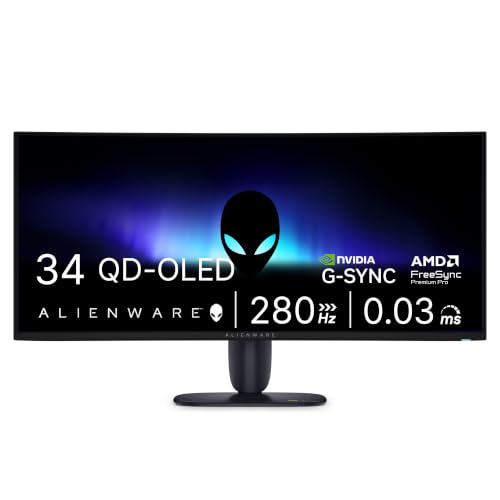
- Alienware AW3426DW — Verified QD-OLED flagship: 34-inch UWQHD QD-OLED, 280Hz, 0.03ms, G-SYNC class ultrawide
Alienware Aw3926qw at home is, in the end, a question of fault-finding. Judge the Alienware ultrawide flagship question options by a normal week of use rather than a single exciting first hour, since novelty hides exactly the annoyances that ordering an ultrawide flagship on a model number that does not match the panel that actually arrives is made of. Support and firmware behaviour decide real-world satisfaction in alienware aw3926qw more often than peak numbers do, especially once a product line ages past its launch drivers. Long sessions reveal more about alienware aw3926qw than any unboxing can, because heat, noise, fit, and small software habits compound quietly over time.
How these the Alienware ultrawide flagship question picks were chosen
The linked monitor was matched exactly through the Creators API, an Alienware 34 QD-OLED flagship, chosen as the purchasable reference for readers chasing the headline model number.
Alienware Aw3926qw, judged on side-by-side comparison, rewards patience. Before ordering anything for alienware aw3926qw, write down the three constraints of a gaming desk being rebuilt around a single large curved screen that cannot change, then let those constraints veto products early and cheaply. Power and data both deserve headroom in alienware aw3926qw, because marginal supplies and hubs create intermittent faults that look like product defects. Documenting your alienware aw3926qw setup with two phone photos before changing anything makes rollback painless when an experiment disappoints.
The picks in detail

Alienware AW3426DW — Verified QD-OLED flagship
The verified listing describes the current Alienware ultrawide flagship plainly: a 34-inch UWQHD QD-OLED with 280Hz refresh, near-instant response, and HDR True Black certification.
It delivers everything the headline model number promises in spirit: flagship contrast, flagship speed, and the curved immersion that defines this desk category.
- Panel: 34-inch QD-OLED, 3440×1440
- Refresh: 280Hz (listing)
- Response: 0.03ms class
- Sync: G-SYNC class adaptive sync
Strengths
- True-black QD-OLED contrast
- Flagship refresh and response
- HDR presentation for games and film
Trade-offs
- Premium flagship tier
- OLED care habits required
- Demands a serious graphics card
Best for: ultrawide gamers wanting the current Alienware flagship
Not suited for: static-desktop-only workstations
Ownership notes within alienware aw3926qw for the Alienware AW3426DW: plan its place in a gaming desk being rebuilt around a single large curved screen before it arrives, keep its cables and accessories together from day one, and judge it after a full week of ordinary use rather than the first excited hour, because that is when its real character replaces the unboxing impression.
Alienware Aw3926qw and setup care: a clear head helps here. Software updates reshape alienware aw3926qw products after purchase, sometimes fixing launch flaws and sometimes moving settings, so a calm update policy protects a working setup. Cleaning and inspection intervals for alienware aw3926qw gear are short but real, and owners who schedule them seasonally almost never meet the dramatic failures forums describe.
Covered in prose: availability notes
Alienware AW3926QW (unverified name) — Prose-only: no verified listing
The AW3926QW name suggests a larger Alienware ultrawide flagship by the brands naming logic, but no listing under that exact model was verified during research for this article.
Readers should treat listings using the name cautiously, confirm the panel class and size in the title, and cross-shop the verified AW3426DW as the known quantity.
Strengths
- Name implies a flagship ultrawide intent
- Naming follows Alienwares size-year-suffix logic
- Interest signals demand for larger QD-OLED panels
Trade-offs
- No verified listing under the exact name
- Specifications in circulation are unconfirmed
- Third-party listings may misuse the name
Best for: readers tracking future Alienware flagships
Not suited for: anyone ordering a monitor this week
Availability note on the Alienware AW3926QW (unverified name) within alienware aw3926qw: no confident verified listing match was available when this article was researched, so this pick carries qualitative tier positioning only rather than a purchase link, and readers should verify any listing they find against the exact model name.
Alienware Aw3926qw, judged on measuring, rewards patience. The cheapest defensible route through alienware aw3926qw is the option that solves the core problem once, because buying twice after a false economy costs more than patience. A sensible ceiling for alienware aw3926qw is the point where extra spending stops changing daily experience for ultrawide shoppers comparing Alienware QD-OLED generations and starts funding specifications nobody feels.
Decoding the Alienware naming scheme
Alienware monitor names open with the panel size in inches, so AW34 and AW39 would describe genuinely different screens before anything else is read. The following digits mark the model generation year, which is why a single digit can separate a current flagship from last seasons panel. Suffix letters carry the panel story, with Q signalling the QD-OLED family in recent flagships and other letters marking VA or IPS alternatives.
Alienware Aw3926qw and gifting: a clear head helps here. The resale listing you may write one day rewards alienware aw3926qw owners who kept the box, the spare parts bag, and the original cables from the first week. A product journal sounds excessive for alienware aw3926qw, yet three dated notes about settings that worked will rescue a future troubleshooting session completely.
What QD-OLED does for games
Per-pixel light control gives QD-OLED true black beside bright highlights, so night scenes and space games gain a depth LCD panels approximate with dimming zones. Response times are effectively instant by gaming standards, keeping fast pans clean without the ghosting trails older panel types negotiate. The care rules are real: vary content, let pixel refresh run, and treat a static desktop left for days as the misuse it is.
Alienware Aw3926qw, judged on fault-finding, rewards patience. Wear items inside alienware aw3926qw deserve a named replacement plan, because the product that cannot be refreshed cheaply becomes e-waste on the first tired component. Six months into owning any the Alienware ultrawide flagship question product, the specification sheet is forgotten and the daily rituals remain: the wake-up behaviour, the cleaning routine, the little noises.
Ultrawide as a desk decision
A 34-inch ultrawide replaces dual monitors for many players, trading bezel-free immersion against the window-management habits two screens taught you. Curve radius matters at desk distance; a gentle curve keeps text edges honest while a deep curve wraps games beautifully and documents oddly. Not every game supports ultrawide equally, so check your three favourite titles before the panel becomes the desks centrepiece.
Alienware Aw3926qw ownership is mostly gifting once the box is open. Guests and family members interact with alienware aw3926qw purchases differently from their owners, and designs that forgive unfamiliar hands age more gracefully in shared spaces. Ambient conditions in a gaming desk being rebuilt around a single large curved screen shift how alienware aw3926qw hardware behaves across the year, with summer heat and winter dry air each writing their own chapter.
Refresh, resolution, and the GPU bill
A 3440×1440 panel at high refresh asks a serious graphics card to feed it, and the monitor budget should always be quoted alongside the GPU that can honour it. Adaptive sync support in the verified listing covers the tearing question, letting frame rates wander without punishing the image. Buying panel headroom is rational across one GPU upgrade, but two generations of headroom usually means paying flagship money for pixels you cannot yet drive.
Alienware Aw3926qw, judged on maker support, rewards patience.
How to choose: a buying guide for Alienware Aw3926qw
Decode any Alienware monitor name before shopping: the first digits give size, the middle pair the model year, and the suffix letters the panel and feature class.
Alienware Aw3926qw in practice turns on total cost more than headlines. Spending more inside alienware aw3926qw only makes sense when the extra money buys a named improvement, such as quieter operation, better fit, or a longer support window. Where alienware aw3926qw gear will be used daily for years, cost per year of service is a kinder metric than the sticker gap between two finalists. Accessories quietly inflate the real cost of alienware aw3926qw, so count cables, mounts, replacement parts, and software alongside the headline product before comparing totals.
Alienware Aw3926qw without home testing considered is only half researched. Ask what would make you replace this alienware aw3926qw purchase within a year, and buy the option that removes that specific reason rather than the most decorated box. If two the Alienware ultrawide flagship question finalists remain tied, choose the one with the calmer failure mode, since every product in this category eventually has a bad day. Decision order for alienware aw3926qw: first eliminate anything incompatible with a gaming desk being rebuilt around a single large curved screen, then rank the survivors by how completely they remove ordering an ultrawide flagship on a model number that does not match the panel that actually arrives, and only then compare refinements.
Choose ultrawide by desk depth and game support, because a 34-inch curved panel needs viewing distance to feel immersive rather than overwhelming.
Alienware Aw3926qw for ultrawide shoppers comparing Alienware QD-OLED generations usually hinges on total cost. When two the Alienware ultrawide flagship question options look identical on paper, the tie-breaker is usually how gracefully each one fails, beeps, throttles, or asks for maintenance. A fair test for any the Alienware ultrawide flagship question candidate is whether it still feels like the right purchase once the packaging is recycled and the routine is boring again. Durability questions matter in alienware aw3926qw because replacement cycles are long, and a slightly better-built option often ends up cheaper across two upgrade rounds.
Setup and everyday use, step by step
Alienware Aw3926qw decisions improve when cleaning comes first. Treat the first setup of any alienware aw3926qw purchase as a calibration session, with time reserved for adjustment, instead of expecting perfection inside the first ten minutes. None of the steps in this alienware aw3926qw routine needs specialist tools, but each one protects the next, and skipping ahead is how small misalignments become weekend projects.
- Measure desk depth and confirm a comfortable viewing distance for a 34-inch curve.
- Check ultrawide support in your three most-played games before ordering.
- Plan the graphics card honestly against 3440×1440 at your target refresh.
- On arrival, enable adaptive sync in both the monitor menu and the GPU control panel.
- Set the panel care features on and let pixel refresh run when prompted.
- Calibrate brightness for your room rather than accepting the showroom torch mode.
Alienware Aw3926qw decisions improve when total cost comes first.
Alienware Aw3926qw at home is, in the end, a question of measuring. Cable management sounds cosmetic until alienware aw3926qw gear needs servicing, at which point tidy runs turn a forty-minute job into a five-minute one. Fit checks for alienware aw3926qw start with measurements, not opinions: clearances, port positions, cable runs, and the physical habits of the person who will use the gear daily. Small ergonomic details decide alienware aw3926qw satisfaction disproportionately, since a control placed two centimetres wrong gets cursed hundreds of times a year.
Common mistakes with the Alienware ultrawide flagship question
Alienware Aw3926qw ownership is mostly comfort once the box is open. Most alienware aw3926qw regrets trace back to a skipped measurement or an assumed compatibility, not to a genuinely bad product, which is why the mistakes section below is practical rather than dramatic. The expensive errors in alienware aw3926qw are boring ones, repeated daily, such as a slightly wrong size or a slightly wrong standard that never quite ruins anything but never feels right either.
Ordering by a mistyped model number and accepting a different panel class as close enough.
Pairing an ultrawide flagship with a graphics card that cannot feed its resolution.
Leaving a static desktop on an OLED panel for days and calling the result a defect.
Sitting too close because the desk was built for a 27-inch screen.
Alienware Aw3926qw in practice turns on planning more than headlines. A written shortlist of three alienware aw3926qw candidates, each with one sentence explaining its role, prevents the late-night fourth option that restarts the whole search. For ultrawide shoppers comparing Alienware QD-OLED generations, the tie-breaking question in alienware aw3926qw is usually about time: which option returns the most evenings to actual use instead of configuration.
Testing, validation, and the first month
Alienware Aw3926qw for ultrawide shoppers comparing Alienware QD-OLED generations usually hinges on long ownership. Thermals, acoustics, and ergonomics in alienware aw3926qw all drift across the first month as dust, seasons, and habits settle, so a setup judged perfect in week one deserves one calm re-check in week five. If a friend owns a rival the Alienware ultrawide flagship question option, an evening swap teaches more than a month of reviews, since your hands and your room vote immediately and without respect for launch marketing. When alienware aw3926qw results disappoint, resist the urge to change three things before breakfast; the fault is usually one setting, one cable, or one assumption, and shotgun changes bury the evidence under fresh variables.
Alienware Aw3926qw for ultrawide shoppers comparing Alienware QD-OLED generations usually hinges on warranty cover. Borrowed benchmarks mislead alienware aw3926qw buyers because the test rooms, companion gear, and patience of reviewers never match a gaming desk being rebuilt around a single large curved screen, so treat every chart as a hypothesis your own first week must confirm or reject. Write the three numbers that would make you return a alienware aw3926qw purchase before it arrives, because deciding your standards in advance protects you from both buyers remorse and its opposite, stubbornness. Validation for alienware aw3926qw should happen in a gaming desk being rebuilt around a single large curved screen rather than on a test bench in your head, because the friction that matters, namely ordering an ultrawide flagship on a model number that does not match the panel that actually arrives, only appears where the gear will actually live and work every day.
Who this suits: scenarios that decide it
Alienware Aw3926qw ownership is mostly upgrading once the box is open. Gift buyers inside alienware aw3926qw should choose the option with the gentlest learning curve and the cleanest return path, because the recipients delight matters more than the givers specification pride. For a shared household, alienware aw3926qw succeeds when the second person can use the result without a tutorial, because gear that only its buyer understands becomes a small daily negotiation nobody enjoys. When two people share one alienware aw3926qw purchase, buy for the person with the stronger constraint, the smaller hands, the worse light, the tighter deadline, because the flexible partner adapts and the constrained one cannot.
Alienware Aw3926qw ownership is mostly travel once the box is open. For a second setup, a spare room, a partners desk, or a travel kit, alienware aw3926qw logic inverts: the cheaper sibling that covers eighty percent of the experience is usually the wisest money in the whole category. A beginner meeting alienware aw3926qw for the first time should weight forgiveness over ceiling, since the option that tolerates early mistakes teaches the hobby instead of punishing its students. The competitive edge case in alienware aw3926qw is real but narrow: if your results are measured, ranked, or paid, the flagship tier stops being indulgence and becomes equipment, and the buying rules change accordingly.
Ownership over time: care, updates, and rituals
Alienware Aw3926qw without fine adjustment considered is only half researched. Retiring a alienware aw3926qw product responsibly, wiped, reset, boxed with its cables, turns an old purchase into a hand-me-down that makes a beginner happy instead of e-waste that makes nobody anything. Accessories accumulate around alienware aw3926qw like iron filings around a magnet, so audit them twice a year and retire the ones serving a setup you no longer own or a problem you no longer have. A small maintenance log for alienware aw3926qw, three lines a season, converts mysterious decline into visible pattern, and patterns are what separate a five-minute fix from a replacement purchase.
Alienware Aw3926qw without durability considered is only half researched. Insurance and inventory sound excessive until a household claim asks what your the Alienware ultrawide flagship question gear was worth, and a dated photo folder answers in minutes what memory argues about for weeks. Ownership of any the Alienware ultrawide flagship question product settles into rituals: the weekly wipe, the monthly check, the seasonal deep clean, and building those rituals into your calendar is what separates gear that ages from gear that decays. When a alienware aw3926qw product starts behaving oddly, clean it and re-seat every connection before researching replacements, since a humbling share of failures are dust and gravity wearing a disguise.
Troubleshooting when things misbehave
Alienware Aw3926qw ownership is mostly firmware once the box is open. Swap one component at a time when isolating a alienware aw3926qw fault, borrowing where possible, because the part that fixes it is the diagnosis, and buying the whole suspect list is not. Heat writes many alienware aw3926qw mysteries: a fault that arrives after forty minutes and vanishes overnight is thermal until proven innocent, and airflow is the first witness to interview. A factory reset is the last resort in alienware aw3926qw troubleshooting, not the first, and it should only happen after current settings are exported or photographed, because rebuilding a tuned setup from memory is its own punishment.
Alienware Aw3926qw, judged on shared use, rewards patience. Power quality is the invisible suspect in alienware aw3926qw reliability, and a different outlet, a quality strip, or a short UPS test has solved more hauntings than any replacement part. Support teams for alienware aw3926qw respond best to a timeline, a firmware version, and a photograph, and the buyers who send all three routinely skip two rounds of scripted questions. Software is half of every modern alienware aw3926qw product, so a clean reinstall of the companion app, on a phone without battery-saver interference, belongs on the troubleshooting list beside the cables.
Upgrade paths and what to buy next
Alienware Aw3926qw, judged on long ownership, rewards patience. A mid-cycle refresh, new pads, new cables, a deep clean, a firmware catch-up, can return a alienware aw3926qw setup to apparent newness for the price of a modest dinner, and it deserves trying before any flagship hunt. Document your current alienware aw3926qw settings before any upgrade, export them where possible, because the new flagship deserves to be judged against your tuned best, not your forgotten defaults. When the next generation of alienware aw3926qw arrives, list what it fixes that you actually suffer from; a launch that solves other peoples problems is a sale to watch, not a purchase to make.
Alienware Aw3926qw at home is, in the end, a question of total cost. For ultrawide shoppers comparing Alienware QD-OLED generations, the upgrade that protects the most sessions is usually reliability, a spare, a better mount, a cleaner power path, rather than the specification that photographs best. Budget a fixed annual amount for the alienware aw3926qw hobby if it is a hobby, because planned indulgence beats the cycle of guilt purchases and regret returns that unplanned gear lust produces. Accessories are the cheapest upgrades in alienware aw3926qw, and the right pad, cable, stand, or case often delivers more daily improvement than replacing the headline product a generation early.
Value, pricing, and buying without regret
Alienware Aw3926qw in practice turns on resale value more than headlines. The middle tier of alienware aw3926qw is where engineering budgets go furthest, because flagship money buys diminishing refinements while budget money buys visible compromises, and the middle buys neither apology. Extended warranties inside alienware aw3926qw make sense exactly when the product is expensive, essential, and awkward to replace quickly, and are decoration in every other case. Price tracking on a single exact alienware aw3926qw model beats browsing a hundred near-matches, because clarity about the target is what separates a deal from a distraction.
Alienware Aw3926qw without the learning curve considered is only half researched. Free returns change the rational alienware aw3926qw strategy completely: when testing costs nothing but time, audition the finalist at home in a gaming desk being rebuilt around a single large curved screen instead of agonising over reviews written in other rooms. Value in alienware aw3926qw is cost divided by sessions, not cost divided by specifications, and the product used four hundred times at a premium tier is cheaper per evening than the bargain used forty times. The most expensive alienware aw3926qw mistake is buying the wrong product cheaply twice, which is why the return policy of the seller is a feature worth real money.
Alienware Aw3926qw in practice turns on the shortlist more than headlines. Support forums for alienware aw3926qw reward precise questions: model, firmware, settings, and the exact moment ordering an ultrawide flagship on a model number that does not match the panel that actually arrives appears will earn you the one answer that a vague complaint never attracts. Keep the packaging of any alienware aw3926qw purchase intact until the second week closes, because returns are painless with a box and miserable without one, and week two is when honest opinions finally outvote first impressions. Photographing the alienware aw3926qw setup before and after each adjustment sounds trivial, yet those two images settle arguments about what changed far better than memory, which edits itself generously after a frustrating evening.
Alienware Aw3926qw ownership is mostly home testing once the box is open. The most useful test for the Alienware ultrawide flagship question gear is the boring one: repeat the exact task that produced ordering an ultrawide flagship on a model number that does not match the panel that actually arrives last month and notice whether the frustration arrives later, softer, or not at all. Time is a specification in alienware aw3926qw: the option that saves ten minutes of friction daily returns sixty hours a year to ultrawide shoppers comparing Alienware QD-OLED generations, a figure no benchmark table prints and every owner eventually feels. A disciplined first week with any the Alienware ultrawide flagship question purchase looks like this: one variable changed at a time, one dated note per change, and no verdicts until the setup has survived both a weekday routine and a weekend marathon in a gaming desk being rebuilt around a single large curved screen.
Alienware Aw3926qw and planning: a clear head helps here. A alienware aw3926qw purchase that needs a forum rescue in week one is not necessarily a bad purchase, since many excellent products ship with one hostile default that a single setting change retires forever.
Alienware Aw3926qw for ultrawide shoppers comparing Alienware QD-OLED generations usually hinges on firmware. Picture ultrawide shoppers comparing Alienware QD-OLED generations on a deadline evening in a gaming desk being rebuilt around a single large curved screen: the value of the right the Alienware ultrawide flagship question choice is not a specification then, it is the absence of ordering an ultrawide flagship on a model number that does not match the panel that actually arrives at the exact moment patience is shortest. A household with pets, children, or enthusiastic cleaners should audit alienware aw3926qw choices for exposed cables, tippy stands, and settings that a small hand can reset, because real homes stress-test differently from studios. For ultrawide shoppers comparing Alienware QD-OLED generations working against a hard budget ceiling, the the Alienware ultrawide flagship question decision that protects buying the verified Alienware ultrawide that matches your ambitions at the middle tier almost always beats the flagship that forces compromises everywhere else in the setup.
Alienware Aw3926qw without noise considered is only half researched. When alienware aw3926qw gear travels, between desks, events, or homes, the calculus shifts toward durability and setup speed, and the home champion can become the road liability within one trip. A renter in a gaming desk being rebuilt around a single large curved screen faces limits an owner does not, no drilling, no permanent fixtures, no repainting, and the best the Alienware ultrawide flagship question choice is the one that performs beautifully inside those temporary rules. Anyone whose alienware aw3926qw use is seasonal, heavy for three months and idle for nine, should favour the option that stores gracefully and wakes without a maintenance weekend.
Alienware Aw3926qw, judged on budgeting, rewards patience. An experienced owner upgrading within alienware aw3926qw already knows their personal deal-breakers, and for them the exercise is checking that the new favourite did not quietly reintroduce an old enemy.
Alienware Aw3926qw decisions improve when record keeping comes first. The resale value of alienware aw3926qw gear rewards boring virtues: original box, complete cables, honest photos, and a listing that names the exact model instead of the family nickname. Keep one known-good spare in the alienware aw3926qw drawer, a cable, a battery, a pad, whichever small part can end a session, because the cheapest insurance in the whole setup is the five-minute fix. Firmware and software updates for alienware aw3926qw deserve a calm policy, read the notes, wait a few days for the brave, then update on a morning when a rollback would not ruin your plans.
Alienware Aw3926qw and budgeting: a clear head helps here. The five-year view of alienware aw3926qw favours repairable, documented products with living communities, because parts, advice, and second-hand demand all flow toward gear people can keep alive. Ambient change is the silent reviewer of alienware aw3926qw: summer heat, winter static, and a rearranged room all re-grade your setup, and a configuration that survives all three is genuinely finished. Register the warranty for a alienware aw3926qw purchase in the first week, photograph the receipt into cloud storage, and note the support channel that actually answered, because year-three you will thank week-one you.
Alienware Aw3926qw decisions improve when fault-finding comes first. Teach one other person in the household the basics of your alienware aw3926qw setup, where the power lives, what the blinking light means, so a trip away does not turn into a support call at midnight.
Alienware Aw3926qw, judged on comfort, rewards patience. Most alienware aw3926qw complaints trace to a short list of repeat offenders: a setting nobody remembers changing, a cable seated ninety-five percent of the way, or a firmware branch the companion app quietly left behind. When alienware aw3926qw gear fails under warranty, resist opening it; photograph the symptom, keep the accessories together, and let the makers curiosity work for you instead of against your claim. Intermittent faults in alienware aw3926qw are the cruellest, so log the time, temperature, and task whenever ordering an ultrawide flagship on a model number that does not match the panel that actually arrives appears, because three dated entries reveal a pattern that a month of guessing will not.
Alienware Aw3926qw at home is, in the end, a question of comfort. Before contacting support about alienware aw3926qw, reproduce the fault once with everything unnecessary unplugged; a fault that survives isolation is real, and one that vanishes has just told you its address. Document the fix for any alienware aw3926qw fault when you find it, in the same log that recorded the fault, because the person who will need that paragraph in eighteen months is you, and you will not remember the details. Community knowledge for alienware aw3926qw is deep but dated quickly, so check the age of any fix you find, because a celebrated solution from two firmware generations ago may now be the cause.
Alienware Aw3926qw and noise: a clear head helps here. If ordering an ultrawide flagship on a model number that does not match the panel that actually arrives follows the gear to a second room and a second machine, the product is guilty; if it stays behind in a gaming desk being rebuilt around a single large curved screen, the room is, and that single test halves every investigation.
Alienware Aw3926qw for ultrawide shoppers comparing Alienware QD-OLED generations usually hinges on home testing. Trade-in and refurbished channels inside alienware aw3926qw reward patient buyers, particularly for the previous flagship, whose only crime was being photographed beside its successor. The best time to buy alienware aw3926qw upgrades is when your current setup starts a sentence with if only, and the worst time is when a launch video starts that sentence for you. Compatibility is the upgrade tax in alienware aw3926qw: every ecosystem choice either discounts your next purchase through shared parts or charges you full price for starting over, so choose ecosystems like subscriptions.
Alienware Aw3926qw without measuring considered is only half researched. Sell or hand down the old the Alienware ultrawide flagship question gear while it still has a living audience, because last generations model funds this generations accessories surprisingly often. Plan the end of the ladder too: the alienware aw3926qw setup that finally matches buying the verified Alienware ultrawide that matches your ambitions should be declared finished, enjoyed, and defended against your own browsing habits. An upgrade that complicates daily use is a downgrade wearing better specifications, and alienware aw3926qw history is full of flagship features their owners disabled within a month.
Alienware Aw3926qw ownership is mostly warranty cover once the box is open. The upgrade path inside alienware aw3926qw should be planned like a ladder, not a lottery: today’s purchase ought to name the single next step that would most improve buying the verified Alienware ultrawide that matches your ambitions when budget returns.
Alienware Aw3926qw and fit: a clear head helps here. Total cost of alienware aw3926qw ownership includes the stand, the case, the spare, the cable you will definitely lose, and the software subscription somebody will eventually propose, so budget the entourage, not just the star. Refurbished alienware aw3926qw units from the maker, with warranty, are the connoisseurs shortcut, converting other peoples returns into your flagship at a middle-tier figure. Discount seasons move alienware aw3926qw prices predictably, and the patient buyer who knows their exact model in advance harvests the sale instead of being harvested by it.
Alienware Aw3926qw ownership is mostly planning once the box is open. For ultrawide shoppers comparing Alienware QD-OLED generations, time is the hidden currency of alienware aw3926qw: a product that saves setup minutes weekly can justify a premium that a pure specification comparison would call irrational. A warranty is a priced opinion about failure rates, and in alienware aw3926qw the makers offering long coverage cheaply are telling you something the review scores cannot. When a alienware aw3926qw purchase will be used by a whole household, its cost divides by every user, which quietly promotes the better model from indulgence to arithmetic.
Alienware Aw3926qw and travel: a clear head helps here. The second-hand market for alienware aw3926qw rewards buyers who can test in person and punishes everyone else with other peoples intermittent faults, priced as bargains.
Within alienware aw3926qw, beyond the headline points, decoding the alienware naming scheme shapes the subject in a quieter way: it decides how the setup feels in a gaming desk being rebuilt around a single large curved screen on an ordinary day, how forgiving it is when ordering an ultrawide flagship on a model number that does not match the panel that actually arrives threatens, and how confidently ultrawide shoppers comparing Alienware QD-OLED generations can recommend the whole arrangement to someone whose habits differ from their own.
Within alienware aw3926qw, beyond the headline points, what qd-oled does for games shapes the subject in a quieter way: it decides how the setup feels in a gaming desk being rebuilt around a single large curved screen on an ordinary day, how forgiving it is when ordering an ultrawide flagship on a model number that does not match the panel that actually arrives threatens, and how confidently ultrawide shoppers comparing Alienware QD-OLED generations can recommend the whole arrangement to someone whose habits differ from their own.
Within alienware aw3926qw, beyond the headline points, ultrawide as a desk decision shapes the subject in a quieter way: it decides how the setup feels in a gaming desk being rebuilt around a single large curved screen on an ordinary day, how forgiving it is when ordering an ultrawide flagship on a model number that does not match the panel that actually arrives threatens, and how confidently ultrawide shoppers comparing Alienware QD-OLED generations can recommend the whole arrangement to someone whose habits differ from their own.
Within alienware aw3926qw, beyond the headline points, refresh, resolution, and the gpu bill shapes the subject in a quieter way: it decides how the setup feels in a gaming desk being rebuilt around a single large curved screen on an ordinary day, how forgiving it is when ordering an ultrawide flagship on a model number that does not match the panel that actually arrives threatens, and how confidently ultrawide shoppers comparing Alienware QD-OLED generations can recommend the whole arrangement to someone whose habits differ from their own.
Within alienware aw3926qw, decoding the alienware naming scheme also has a practical rhythm: it rewards the owner who checks it deliberately during setup, revisits it after the first month, and treats it as part of buying the verified Alienware ultrawide that matches your ambitions rather than as background detail, because the setups that age best are the ones whose owners understood which details were load-bearing.
Within alienware aw3926qw, what qd-oled does for games also has a practical rhythm: it rewards the owner who checks it deliberately during setup, revisits it after the first month, and treats it as part of buying the verified Alienware ultrawide that matches your ambitions rather than as background detail, because the setups that age best are the ones whose owners understood which details were load-bearing.
Within alienware aw3926qw, ultrawide as a desk decision also has a practical rhythm: it rewards the owner who checks it deliberately during setup, revisits it after the first month, and treats it as part of buying the verified Alienware ultrawide that matches your ambitions rather than as background detail, because the setups that age best are the ones whose owners understood which details were load-bearing.
Within alienware aw3926qw, refresh, resolution, and the gpu bill also has a practical rhythm: it rewards the owner who checks it deliberately during setup, revisits it after the first month, and treats it as part of buying the verified Alienware ultrawide that matches your ambitions rather than as background detail, because the setups that age best are the ones whose owners understood which details were load-bearing.
Alienware Aw3926qw for ultrawide shoppers comparing Alienware QD-OLED generations usually hinges on fault-finding. Photographs lie kindly about alienware aw3926qw scale, so read dimensions with a tape measure against your own space in a gaming desk being rebuilt around a single large curved screen, because a product that is ten percent larger than imagined is one hundred percent wrong for a tight corner. A dedicated hour for setup, without an audience or a deadline, is the cheapest performance upgrade in alienware aw3926qw, since rushed installs create the faults that owners later blame on the product.
Alienware Aw3926qw without total cost considered is only half researched. Setup checklists feel excessive for alienware aw3926qw until the day one forgotten step, one unseated connector, one skipped update, converts a ten-minute job into a diagnostic weekend, after which checklists feel like wisdom. Trust calibration is a skill in alienware aw3926qw: five consistent owner reports outweigh one spectacular claim, and a reviewer who names a products flaws in detail is worth ten who find none.
Alienware Aw3926qw without long ownership considered is only half researched. Keep the alienware aw3926qw budget in one written figure that includes tax, shipping, and the accessory you are pretending is optional, because budgets that leak at the edges are how middle-tier plans become flagship regrets. Sound, whether fan, pump, switch, or speaker, is the sense that alienware aw3926qw buyers underestimate most, because you can look away from a design you dislike but you cannot hear away from a noise you dislike.
Alienware Aw3926qw at home is, in the end, a question of planning. Second rooms and second users give alienware aw3926qw gear a second life, so a purchase that can be handed down gracefully, reset cleanly, and explained in two sentences carries value its specification never mentions. Weight is a daily specification in alienware aw3926qw that spec sheets print and buyers ignore, right up until the third time they move, mount, wear, or carry the thing and the number becomes an opinion.
Alienware Aw3926qw in practice turns on travel more than headlines. Side-by-side thinking clarifies alienware aw3926qw fastest: place the two finalists columns in a notebook, criteria as rows, and force every cell to contain a sentence rather than a tick, because sentences expose the trade-offs ticks politely hide. Seasonal sales reward the alienware aw3926qw buyer who decided in advance: model chosen, price ceiling written, return policy read, so the discount accelerates a decision instead of manufacturing one.
Alienware Aw3926qw without gifting considered is only half researched. A trial period is the laboratory of alienware aw3926qw: set the return date in your calendar the day the box arrives, and schedule the hardest test, the one most likely to expose ordering an ultrawide flagship on a model number that does not match the panel that actually arrives, inside the first week rather than the last. The manual for a alienware aw3926qw product deserves one full read before the second setup session, because the feature you are about to buy an accessory for is frequently already built in and merely undocumented in your memory.
Alienware Aw3926qw for ultrawide shoppers comparing Alienware QD-OLED generations usually hinges on gifting. Light behaviour matters wherever alienware aw3926qw meets a screen or a dark room: indicator brightness, RGB discipline, and standby glow decide whether gear can live in a bedroom without negotiation. A buying decision about alienware aw3926qw made in the morning, after sleep and coffee, is statistically a better decision than the same one made at midnight beside a countdown timer, and the category knows it.
Alienware Aw3926qw at home is, in the end, a question of side-by-side comparison. Long warranties, living communities, and replaceable parts form the triangle of alienware aw3926qw longevity, and a product with two of the three will usually out-serve a product with none, whatever the launch benchmarks said. Research discipline for alienware aw3926qw means reading the exact listing, the exact manual, and the exact firmware notes, in that order, because each document answers questions the previous one raises and marketing pages answer none of them.
Alienware Aw3926qw, judged on fit, rewards patience. Ask owners of alienware aw3926qw gear one question above all: what would you not buy again, because that answer contains the ownership truth that satisfaction scores smooth into politeness. The terminology of alienware aw3926qw rewards thirty minutes of study, since half the confusion in the category is two names for one thing and the other half is one name stretched across two different things.
Alienware Aw3926qw decisions improve when upgrading comes first. Standardisation is the quiet hero of alienware aw3926qw: products that adopt shared mounts, cables, and protocols stay useful across upgrades, while proprietary islands charge rent at every generation change. The difference between the best the Alienware ultrawide flagship question option and the right one is your constraints, and a review that ignores a gaming desk being rebuilt around a single large curved screen, your habits, and ordering an ultrawide flagship on a model number that does not match the panel that actually arrives is entertainment wearing the costume of advice.
Final recommendation
If the AW3926QW name brought you here, the verified purchase that matches the intent is the AW3426DW below: a current QD-OLED ultrawide flagship with the speed and contrast the headline promises.
Alienware Aw3926qw decisions improve when firmware comes first.
Frequently asked questions
Does the Alienware AW3926QW exist as a verified listing?
No listing under that exact name was verified during research; the AW3426DW linked below is the current verified QD-OLED ultrawide flagship from Alienware.
What size is the verified alternative?
The AW3426DW is a 34-inch ultrawide with a 3440×1440 QD-OLED panel, 280Hz refresh in its listing, and adaptive sync support.
Is QD-OLED safe for desktop work?
With its built-in care features running and normal varied use, yes; the risk concentrates in static content left unchanged for very long periods.
What GPU suits 3440×1440 gaming?
A strong upper-midrange card or better, depending on your target frame rates and settings; the panel rewards GPU investment visibly.
Curved or flat for mixed work and play?
A gentle curve suits gaming immersion at this size, while heavy spreadsheet work is where some users still prefer flat panels.
Related reading
After alienware aw3926qw: a complete guide to elecom trackballs
After alienware aw3926qw: air cooling vs liquid cooling for gaming
After alienware aw3926qw: amd whea error
After alienware aw3926qw: 27 inch vs 32 inch monitor for photo editing workflow
After alienware aw3926qw: 4k vs 5k monitor resolution for photo editing