Disclosure: As an Amazon Associate, reviewstook.com earns from qualifying purchases. Links on this page are affiliate links; they cost you nothing extra. Prices and availability change often, so check the current Amazon listing before you buy.
Corsair’s flagship shelf has hosted two generations of ambition, and corsair k100 rgb vs k95 rgb platinum xt is the argument between them: the K95 RGB Platinum XT, the last great mechanical flagship with its Cherry MX switches and macro bank, against the K100 RGB, the optical-switch successor that added a control wheel, a 4000 Hz polling claim, and a new key feel. Owners of the older board ask whether the newer one is an upgrade or a replacement of something they loved with something merely newer.
This corsair k100 rgb vs k95 rgb platinum xt comparison works through switches, polling, features, and feel, and it reaches the unfashionable but honest conclusion for most owners of either board. One note governs the products: neither model returned a confident match in our current retail verification checks, so this comparison carries no purchase links — it is a decision guide for the second-hand and remaining-stock market, where verifying the exact model matters more than usual.
Key takeaways
- K100: optical switches, faster polling, control wheel — the newer flagship architecture
- K95 XT: Cherry MX mechanical feel, the macro bank, the established flagship formula
- K95 owners gain less by switching than the spec sheet suggests; new buyers should weigh remaining stock and prices carefully
- Neither model was verified in current listings for this series, so buy either only where its identity is certain
In this guide
Corsair K100 Rgb Vs K95 Rgb Platinum Xt: two flagship philosophies
The K95 RGB Platinum XT represents the mechanical flagship perfected: an aircraft-grade aluminium frame, Cherry MX switches in Speed or Brown, a bank of six dedicated macro keys down the left side, per-key RGB, a detachable wrist rest with two textures, and media controls with a knurled volume roller. It asked for nothing to be invented, only refined, and for years it was the safe answer to ‘what is the best big keyboard’ in Corsair’s line. Its owners’ loyalty is the obstacle every successor faces.
The K100 RGB argues that the flagship should move: Corsair’s own OPX optical-mechanical switches actuate with light rather than a metal contact, promising speed and longevity; the polling rate quadruples on paper; a multi-function iCUE control wheel joins the media cluster; and the macro bank survives. It is recognisably the same flagship idea — big, aluminium, unapologetic — rebuilt around a different switch physics. The comparison is therefore not old versus new in the lazy sense; it is mechanical contact versus light, with everything else as supporting evidence.
Switches: the argument that actually decides it
OPX switches are linear, light, and very fast, with a short actuation that competitive players feel as immediacy and typists sometimes feel as a hair trigger. Their optical nature removes contact debounce from the equation and promises a lifespan mechanical contacts cannot match. What they cannot offer is choice: the K100 comes in OPX, while the K95 XT’s Cherry MX fittings let buyers pick Speed Silver’s snap or Brown’s bump, and the wider world of MX feel — the subject of this series’ switch guide — is a language the K100 does not speak.
Feel is where spec sheets go silent. The K95’s Cherry switches have the mature, known character the hobby has typed on for decades, stabilised keys and all. The K100’s OPX feel is excellent of its kind — smooth, consistent, eager — but it is one feel, linear and light, and a Brown devotee will not be argued into loving it by a polling graph. If your fingers have a religion, this section is the whole review: the K95 serves the mechanical faiths; the K100 asks you to convert to speed.
Polling, wheel, and the feature ledger
The K100’s headline 4000 Hz polling quadruples the standard rate, cutting the theoretical input interval to a quarter of a millisecond. In the latency chain this series has examined elsewhere, that saving is real and tiny — worth having, impossible to feel in isolation, and no reason by itself to retire a K95. The control wheel is the more human addition: a clickable dial for brightness, track jogging, zoom, and whatever iCUE lets you bind, which owners either adopt into their workflow or ignore with the macro keys.
The K95 XT’s ledger counters with maturity: its macro bank and Elgato integration speak directly to streamers, its dual-texture wrist rest remains a small luxury rivals copy, and its per-key lighting through iCUE is the same ecosystem the K100 uses. Both boards are large, both demand desk acreage and a USB budget, both light beautifully and clack with flagship confidence. The feature gap between them is narrower than the generational gap implies, which is why the switch section, not this one, carries the verdict.
The verdict for owners and for new buyers
If you own a healthy K95 XT, the K100 is a sidegrade wearing an upgrade’s clothes: you gain polling you cannot feel and a wheel you may not use, and you trade a switch feel you chose for one you are assigned. Keep the K95 until it fails or your taste changes. If you are buying fresh and both appear at similar money through channels you trust, the K100 is the rational flagship — newer architecture, longer expected support, the faster input path — provided its linear-only feel suits your fingers, which a shop audition should confirm before money moves.
And the verification note bears repeating for both: neither model returned a confident match in this series’ current retail checks, so the remaining market is a mixture of old stock, regional listings, and second-hand units. Buy where the model is named exactly, the switch type is stated, and returns exist. A flagship bought wrong is just an expensive keyboard; bought right, either of these is a decade-class desk anchor, and the difference between them will matter less than the fact that you chose deliberately.
Living with iCUE and the flagship desk
Both boards live inside Corsair’s iCUE ecosystem, and the ecosystem is part of the purchase in a way spec sheets underplay: profiles that sync lighting across a Corsair desk, per-game integrations, firmware updates delivered through the same application that runs the fans and the headset. Owners already invested in that desk experience the flagships as citizens; owners arriving fresh should price the software honestly — it is powerful, occasionally heavy, and the price of the boards’ deepest features. A flagship keyboard is a small computer with an operating system, and choosing one is partly choosing that system.
The saving grace on both boards is onboard storage: profiles and macros travel with the keyboard, so a configured board behaves itself on a work machine or a friend’s PC without its software entourage. Set the board up once, store the essentials, and the ecosystem becomes an option rather than a landlord. That pattern — configure deeply, then store and forget — is the mature relationship with every flagship peripheral in this series, and these two Corsairs reward it equally.
The second-hand flagship: what to inspect
Because neither board is reliably in current retail channels, many buyers will meet them used, and flagship keyboards reward a specific inspection. Test every key, not a sample — a flagship’s macro bank and media cluster are exactly the keys a quick test skips and a fault chooses. Check the wrist rest’s magnets or clips, the cable’s braiding at both reliefs, and the volume roller’s smoothness, because those are the wear points switches outlive. Ask which switches the K95 carries and confirm the K100’s are the optical originals; a flagship’s value lives in its exact specification, and the used market’s vagueness is priced into careless purchases.
Buy with the board connected if you can, in the seller’s presence or under a returns policy that substitutes for it. A decade-class keyboard bought carefully used is one of PC building’s genuine bargains; bought carelessly, it is a hundred keys of someone else’s history. The inspection takes ten minutes and the board will serve for years, which is the best exchange rate in this entire comparison.
The availability problem, and two verified boards below the flagship tier
Any honest version of this comparison must begin with the shelf, because repeated Creators API searches for both flagships returned their stablemates — the K65, K70, and K60 families — rather than confident matches for the K100 or the K95 Platinum XT themselves. Both boards therefore stay prose-only here, with no purchase links, and readers shopping today should treat individual listings for either flagship as specimens to vet: condition, seller, and the state of the wrist rest and keycaps matter more than the headline discount. What the API did verify, cleanly, are the two boards below that sit a tier down and answer the question most readers of a flagship comparison are really asking — how much of the experience survives at a friendlier total.

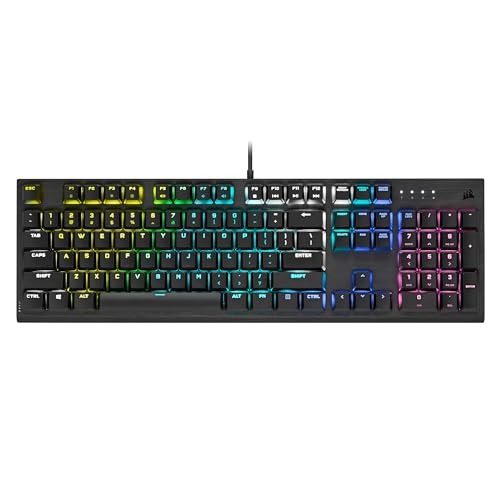
Corsair K60 RGB Pro Low Profile
The low-profile K60 trades the flagships’ optical switches, control wheel, and macro columns for a slim aluminium board on low-profile Speed switches, and discovers in the trade a virtue neither flagship offers: a typing height that wrists prefer across long days. A reader whose flagship desire is really about build quality and per-key lighting, rather than about the wheel or the polling headline, will find most of what they actually use present here, in a board that takes less desk and less toll.
- Switches: Cherry MX Low Profile Speed, as listed
- Frame: slim aluminium, as listed
- Lighting: per-key RGB, as listed
- Layout: full-size, low-profile
Strengths
- Flagship-adjacent build and lighting at a tier below
- Low-profile ergonomics the flagships cannot offer
- A current, verified listing rather than a specimen hunt
Trade-offs
- No control wheel, macro column, or optical switches
- Low-profile caps narrow the replacement market
- The polling story is ordinary where the K100’s is a headline
Best for: buyers who want the brand’s build without the flagship specimen hunt / Not suited for: macro-heavy players who need the dedicated column
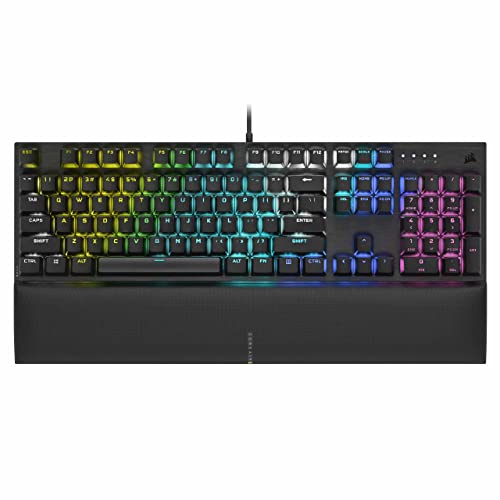
Corsair K60 RGB Pro SE
The SE is the classic-switch bundle play: full-height Cherry switches, aluminium frame, per-key lighting, and the comfort accessories included. Against the flagships it concedes the exotic hardware and wins on immediacy and total cost, and for a player whose games never touch a macro column it concedes nothing they will ever notice. The verified listing is renewed, so its condition terms deserve the same scrutiny this article applies to used flagships.
- Switches: Cherry mechanical keyswitches, as listed
- Frame: durable aluminium, as listed
- Lighting: per-key RGB, as listed
- Listing condition: renewed, per the API title
Strengths
- The classic switch experience with accessories bundled
- Available and verified today, unlike the comparison’s subjects
- Total cost lands far below either flagship’s specimen prices
Trade-offs
- Renewed condition requires reading the terms carefully
- No flagship wheel, macros, or optical switch option
- Standard polling and feature set, honestly presented
Best for: players who want the ecosystem without the flagship tax / Not suited for: enthusiasts set on the wheel or the optical switches specifically
Owning either flagship in the software’s later years
Flagship keyboards are software products wearing hardware costumes, and their second owners inherit the software’s ageing along with the board. The configuration suite that unlocks the wheel’s modes, the macro column, and the layered lighting is a living program whose updates occasionally retire features, rename profiles, or change how onboard memory and software profiles divide their labour. Before buying either board second-hand, confirm that its profiles can be stored onboard to your satisfaction, because a flagship that needs its suite running to remember your lighting is a flagship renting you its own features. Set up your profiles, save them to the device, and then test the board on a second computer with no suite installed; what survives that test is what you actually own.
The same realism applies to the K100’s polling headline, which needs the whole chain — port, cable, software, and a game engine willing to listen — to mean anything, and to the K95 XT’s macro column, whose value is exactly the value of the macros you personally maintain. Neither board’s signature feature is fraudulent; both are simply narrower in daily life than their launch presentations suggested, which is the eternal flagship story and the reason the tier below, represented by the two verified boards above, keeps winning the recommendation for everyone except the buyers who can name, precisely, the flagship feature their week requires.
The switch question in depth: optical speed versus mechanical choice
The deepest difference between these flagships is not the wheel or the polling but the philosophy of the keystroke itself. The K100’s optical path replaces the metal contact with a beam of light, which removes the debounce delay mechanical switches must observe while their contacts settle, and in doing so changes the switch’s failure modes as much as its speed: there is no contact to oxidise, no leaf to tire, and the rated lifespan stretches accordingly. What it cannot offer is variety. An optical flagship is a commitment to the manufacturer’s chosen character, where the K95 XT’s mechanical sockets belong to an ecosystem of switch characters refined over decades — the Speed switch it carries, its tactile and clicky cousins, and a tuning culture of springs and lubricants that optical owners watch from outside a fence.
For a player, the honest translation is narrow. The optical board’s advantage lives in the milliseconds between contact and registration and in the consistency of that interval across years; the mechanical board’s advantage lives in choice, in repairability at the level of a single switch on boards that allow it, and in a second-hand ecosystem of parts and knowledge. Neither advantage is imaginary and neither is decisive for the majority of hands. The players who should pay for the optical path are those whose games and reflexes genuinely tax registration speed and who have verified, on their own setup, that input latency is a currency they can still spend. Everyone else is choosing between two excellent keyboards on the evidence of features they will use daily — the wheel, the macros, the wrist rest, the software — and should let those ordinary virtues decide an ordinary purchase.
Desk presence: size, rest, and the flagship footprint
Both boards are large, and their largeness deserves the scrutiny usually reserved for their electronics. A flagship with a macro column and a full numpad commands a desk width that pushes the mouse hand outward, and across a long gaming session that outward reach is an ergonomic cost paid in the shoulder, silently, every day. Players with compact desks or with mice that roam widely at low sensitivity should measure before they romanticise: the flagship experience includes the geography it imposes. The K95 XT’s included wrist rest is the better long-session companion of the two stock arrangements, with a plushness the K100’s slimmer rest does not attempt, while the K100’s control wheel earns its desk space back in media and editing work where a precise, detented dial replaces a thousand small keystrokes.
There is also the question of what a flagship says on a desk that clients, colleagues, or family see. Both boards light like arcades when their software is indulged, and both can be disciplined into a single static colour that reads as professional equipment. The discipline is worth applying deliberately rather than accidentally: a board whose lighting you have chosen is furniture; a board still running its factory rainbow is an appliance you have not finished setting up. Owners who make that choice in the first week report, consistently, that the board feels more expensive afterward — a small, funny proof that flagship ownership is partly a curatorial act, and that the software sections of this comparison matter to the experience in ways the switch debate never touches.
Durability and the five-year view
Flagships justify themselves across years, so the comparison should end where ownership actually happens. Keycaps are the first wear surface on both boards, and the doubleshot construction at this tier resists the shine and legend-wear that cheaper caps surrender to, which matters more to a five-year owner than any launch-day feature. The aluminium frames will outlast everything attached to them. Cables and their strain reliefs are the quiet risk, as on all wired boards of the era, and routing them without a hard bend at the board’s edge is the cheapest insurance in this entire article. The macro column’s switches and the wheel’s encoder see less use than the letter keys and age correspondingly slower, which inverts the naive worry: the exotic parts are not the fragile parts, because fragility follows repetitions, and repetitions live in the home row.
Software support is the true five-year variable. A flagship whose configuration suite is still maintained receives security fixes, operating-system compatibility, and profile features; one whose suite has been frozen becomes a very well-built board with a slowly expiring second half. Before paying a specimen premium for either model, check the maker’s current support posture for that exact board, download the software, and confirm it runs on your system today. That ten-minute diligence, performed before money moves, is the difference between buying a flagship and buying a photograph of one.
Macro columns and wheels in real workflows: three desks revisited
Abstract feature lists cannot settle this comparison, so consider the features at work on three real desks. The video editor’s desk is where the K100’s wheel stops being a novelty: mapped to timeline scrubbing and zoom, it converts a hundred small keystrokes a day into a single rolling gesture, and across a year that conversion is measured in hours and in wrists. The same editor finds the rival’s macro column genuinely useful for application-specific command chains, which is the comparison’s recurring lesson in miniature — the two flagships did not include the same features at different qualities, they included different features, and a buyer’s workflow, interrogated honestly, usually names the winner before the price is known.
The MMO and simulation player’s desk belongs to the macro column’s philosophy. Games in those genres accumulate bindings the way harbours accumulate barnacles, and a dedicated, labelled, reachable column of extra keys is not a luxury but a filing system. The K100’s answer — fewer dedicated keys, more reliance on layers and the wheel — serves a tidier mind, and such minds exist and should buy accordingly. The third desk is the professional writer’s or programmer’s, where both signature features fall silent and the comparison collapses to switch character, wrist rest, and the discipline of the lighting — a collapse worth experiencing in the imagination before purchase, because a remarkable share of flagship buyers discover, in month two, that they live on the third desk while having paid for the first or second.
Noise, neighbours, and the flagship at midnight
Both boards are mechanical flagships and sound like it, with the K95 XT’s Speed switches producing the brighter, quicker report and the K100’s optical switches a marginally cleaner one, the frame in each case lending its aluminium resonance to the household. Neither is a quiet board, and a buyer whose evenings are shared — a partner asleep, a baby in the next room, walls that conduct — should weigh the quiet flagship reviewed elsewhere in this cluster as a genuine alternative rather than as a different conversation. The mitigations that exist, mats and technique and the household’s adaptation to consistency, apply to both boards equally and decide nothing between them; what decides between them on the acoustic axis is nothing at all, which is itself a finding: if sound is your deciding factor, you are reading the wrong comparison, and the honest review should say so in the comparison’s own pages.
Resale mathematics and the right price for a specimen
Because both boards now trade largely as specimens, a word on pricing discipline closes the comparison usefully. A used flagship’s fair price is anchored not to its launch figure but to the current tier below it — the verified K60-class boards in this article — plus a premium for the specific flagship features the buyer has verified working and genuinely wants. A specimen priced at double the tier below it must justify the doubling in condition, completeness, and the buyer’s own workflow; a specimen priced near the tier below it, complete and honest, is one of the better bargains in peripherals, because flagship build quality ages slowly and its original price paid for engineering the second owner inherits free. Walk away from specimens whose sellers cannot demonstrate the wheel, the macros, and every key, not because most sellers are dishonest but because the features you cannot verify are features you are not buying, and the price should be negotiated as if they were absent — because, for you, they are.
Keycaps, stabilisers, and the wear items that separate specimens
Two used flagships with identical listings can be very different keyboards, and the difference lives in parts a photograph flatters. Stabilisers on the large keys are the first inspection: a spacebar that rattles or binds has usually lived hard or been inexpertly lubricated, and while the cure is an afternoon’s tinkering, the symptom should move the price as if the afternoon were being purchased with the board — because it is. Keycap shine is the second inspection, read honestly: shine on the gaming cluster with clean legends elsewhere tells a story of focused use, while uniform wear tells one of long general service, and neither is disqualifying at the right price. The third inspection is the cable’s entry point, where flagship cables of this era fatigue, and a board whose connection crackles when the cable is gently moved is a board negotiating its retirement.
Sellers who have maintained their boards — caps cleaned, stabilisers tuned, the original box and rest preserved — are identifiable by exactly this evidence, and their specimens deserve the premium their care represents. The comparison’s final practical advice is therefore about people as much as about products: in a specimen market, you are buying the previous owner’s habits along with the manufacturer’s engineering, and the habits, unlike the engineering, vary enormously. Inspect for them, price them, and either flagship, bought from careful hands at a specimen’s price, will feel like the flagship it was — which is more than can be said for a careless specimen of either, at any price.
The polling question, settled at the level of the whole chain
Because the K100’s high polling rate is its loudest claim, it deserves a full audit rather than the paragraph comparisons usually grant it. Polling is the frequency at which the keyboard reports its state, and its benefit is a reduction in the average wait between a press and the computer hearing about it — a real reduction, measurable in fractions of milliseconds to a few milliseconds depending on the rates compared. Whether that reduction reaches the player depends on everything downstream: the port and its controller, the operating system’s handling, the game’s own input sampling, and the display’s refresh, which decides when a registered input can become a visible event. On a maximal chain — fast machine, high-refresh screen, a game engine that samples hungrily — the benefit is present and the players who live on that chain can feel its absence when it is removed, which is the honest test. On an ordinary chain the same feature is a certificate framed on the wall of a room nobody enters.
The K95 XT’s silence on this axis is therefore not the concession it appears in headline comparisons. It polls at the rate the entire industry standardised for a generation, a rate whose wait is already below the threshold at which most chains can express it, and its maker spent its flagship budget instead on the macro column and the rest — features whose benefits survive ordinary chains intact. The comparison’s deepest pattern repeats here in its purest form: the two boards did not make the same product at different qualities; they made different wagers about where a flagship’s money becomes a player’s experience, and the correct choice is the wager that matches the chain and the workflow the buyer actually owns. Audit yours, in writing, before the specimen hunt begins, and the comparison will have done its work even if its conclusion is that neither flagship is your board — an outcome this review regards as a success rather than a failure.
A decision protocol for the undecided flagship shopper
For the reader who has absorbed both boards’ philosophies and still cannot choose, here is the comparison reduced to a protocol that fits on an index card. First, list the features you used this week on your current keyboard, from memory, without looking — the list will be shorter than your expectations and more honest. Second, mark which flagship’s signature features appear on it; in most cases one board’s column fills and the other’s stays empty, and the comparison is over. Third, if both columns fill or neither does, decide on the switch philosophy, because it is the only element you will touch ten thousand times a day: optical certainty and its fixed character, or mechanical choice and its ecosystem. Fourth, set a specimen standard — completeness, condition evidence, a seller who answers concretely — and refuse to let a price talk you below it. Fifth, buy, configure the board completely in the first week, export its profiles, and close the comparison behind you, because a flagship second-guessed monthly is a subscription to dissatisfaction that neither board’s maker ever sold.
The protocol’s deeper claim is the one this whole cluster of keyboard reviews keeps making in different accents: peripherals are chosen well when the buyer’s actual week is allowed to vote, and badly when a launch presentation votes instead. These two flagships, more than most products, were launched at audiences of the imagination — the streamer, the macro artist, the polling maximalist — and their second lives belong to buyers who know which of those people they actually are. Know that, and the comparison was never close; the board chose itself, and the review merely witnessed.
The comparison’s residue: what to do while you decide
Flagship decisions ripen slowly, and the weeks spent deciding need not be wasted, because the current keyboard — whatever it is — can be interrogated in the meantime with the protocol’s first step: the honest list of this week’s actual feature use. Keep that list on paper beside the machine for a fortnight, adding each macro you wished existed, each time a dial would have served, each moment the wrist rest’s absence or presence spoke. A fortnight’s evidence will usually end the comparison more decisively than another month of reviews, because it replaces the imagined workflow with the documented one. And if the fortnight’s list is empty — if the current board was never once wished different — then the comparison’s correct conclusion is the one neither maker wants printed: keep the current board, spend the flagship money where the fortnight actually complained, and revisit the flagships when a real requirement, rather than a launch’s echo, sends you back to this page.
What the comparison looks like from the chair of a third board’s owner
There is a reader this comparison rarely imagines: the owner of neither flagship, typing on a midrange board, deciding whether the flagship tier itself — not either model — deserves their money. For that reader the honest summary is that the tier buys three things in descending order of durability: construction that will outlast the machine it serves, features that serve specific workflows completely or not at all, and a software relationship that must be maintained to remain valuable. The first is worth money to anyone with a long horizon. The second is worth money only to the workflows named. The third is worth attention rather than money, since it is paid in diligence. A midrange owner whose current board fails none of their week’s tests should read this comparison as a map of a country they may never need to visit, and visit it — if at all — when a workflow, a specimen bargain, or a genuine delight in the objects themselves provides the reason. Flagships reward reasons; they punish restlessness, at flagship prices, and the comparison’s last service to its third reader is to say so in the flagship article itself.
The two boards, one year on, in two households
Comparisons end in shops, but products live in households, so let the last evidence be domestic. In the first household, the optical flagship sits on a streamer’s desk where the wheel has become a limb — scenes, volume, and timeline all roll under one finger — and its owner, asked what the board is, answers with the wheel before the switches, which tells the comparison everything about where flagship value actually settles. In the second household, the mechanical flagship serves a writer who games, its macro column holding the publishing workflow’s repetitive chords, its rest bearing the day’s weight, its owner unable to recall the polling rate of any keyboard they have ever owned. Neither household chose wrong, and neither would trade, because each bought the feature their week actually spends. A reader still standing between the two boards should stop asking which is better and start asking which household is theirs — the comparison has been, from its first section to this one, a machine for producing that question, and it has now produced it for the last time.
Two cards, one for each flagship, for the specimen hunt
The comparison’s final form is a pair of cards, one per board, written for the moment a listing appears and a decision must be made in an hour rather than a month. The optical board’s card reads: buy for the wheel and the registration speed, verify every display and dial function in person, confirm the profiles live onboard without the suite, and price against the tier below plus a premium only for the features your own fortnight’s list actually named. The mechanical board’s card reads: buy for the macro column and the switch ecosystem, inspect the rest and the stabilisers as the wear items they are, confirm the same onboard independence, and apply the same pricing discipline without sentimentality. Beneath both cards, in the print that decides more purchases than any feature: a complete specimen from careful hands beats an incomplete bargain of either model, every time, because what is actually being bought at this point in both boards’ lives is not a specification. It is a previous owner’s care, wearing a flagship’s frame.
The flagship contract, signed by either household
Terms, to close the comparison in the form its cluster has made customary. Each flagship promises a construction that outlasts its machine, a signature feature that serves a named workflow completely, and a software relationship that rewards the owner who maintains it. The buyer’s side is the fortnight’s honest list, the specimen inspected like an auditor, the profiles exported like a professional, and the decision — once made — closed like a door rather than revisited like a feed. Both sides kept, either board becomes what its launch presentation promised and its second-hand market prices: not a specification, but a fixture, the keyboard a household’s desk is organised around and a machine’s successors inherit. The comparison between them was never going to be won by a board. It was going to be won by a buyer who knew their own week — and that buyer, whichever card they signed, has now signed it in full knowledge of the terms.
The signature on the flagship’s record
Sign whichever board you chose into the machine’s record, with the fortnight’s list attached and the specimen’s inspection noted, and date the entry like the others in the folder. That record is the comparison’s final product, because it preserves the one thing the market cannot sell you twice: the reasoning. Years from now, when the board is sold, gifted, or simply wondered about, the record will say which workflow it served, which features earned their place, and which were theatre — knowledge that prices the specimen honestly, guides the successor’s purchase in minutes, and closes the flagship question with the authority of a household that keeps its papers. The two boards will go on being compared, in forums and in shops, by buyers at the start of the same road. Your entry in the folder is the proof that one household finished the road properly: not by finding the better flagship, but by becoming the kind of owner for whom the choice, either way, was always going to work.
Envoi: two flagships, at rest on two desks
End the comparison where its subjects spend their lives: at rest, in the evening, on desks that have been organised around them. In one home the optical board’s wheel catches the lamplight, its profiles asleep in its own memory, its owner long past the month when its features were news and deep into the years when they are simply how the desk works. In the other, the mechanical board’s rest bears the faint shine of ten thousand pauses, its macro column holding a workflow its owner could now perform in their sleep, its switches — chosen from an ecosystem, in a character, for reasons — still answering with the exact voice they had on the first day. Neither desk is the comparison’s winner, because the comparison was never a contest between the boards. It was a sorting instrument for buyers, and its work is finished in the moment a reader recognises their own desk in one of these two evenings and feels, instead of an argument, a small click of recognition. That click — quieter than any switch in either board — is the sound this long review was built to produce.
A postscript: the flagships, one house move later
Revisit both households after the event that audits all desk equipment — a move — and the comparison gains its last, most practical datum. Flagships travel badly by nature: they are large, they are heavy in the way of aluminium and intention, and their accessories — rests, cables, the macro column’s caps — multiply the boxes a careful owner must pack. Both households in this article’s closing portraits packed theirs like instruments, in the original boxes the specimen standard had insisted on keeping, and both boards were the first objects unpacked at the new desks, because a workstation is not a workstation until its keyboard lands. At the new addresses, nothing about either board needed re-deciding: the profiles lived onboard, the features resumed their duties, and the comparison’s whole argument — buy the workflow, keep the record, close the question — survived a change of houses intact. That is the flagship tier’s final and least advertised virtue: bought properly, it is portable not merely in the hand but across the reorganisations of a life, and it asks, in return, only the diligence this article has prescribed from its first specimen inspection to its last signature.
Last word: would they buy them again
The repurchase question, asked of both households a year on, closes the comparison with the only verdict that has ever mattered in this category. The streamer’s answer is immediate and names the wheel before the question is finished. The writer’s answer names the macro column and the rest, in that order, with the switches — the subject of so much launch-era argument — mentioned third, almost as an afterthought, which is itself the year’s most honest datum about where flagship value settles. Neither household would swap for the other’s board, and neither can imagine returning to the tier below, not from snobbery but from fit: each board has become load-bearing in a workflow that was, in retrospect, always waiting for it.
That is the comparison’s completed work. Two flagships, two philosophies, two households that would sign again — and a method, the fortnight’s honest list, by which any reader can discover which signature is theirs before the money moves. The boards will keep their prices, their partisans, and their specimen markets. The method, practised once, keeps its owner for every peripheral that follows. Buy by the list. The list, unlike the launches, is about you.
Postscript: the flagships, at the next desk
One last visit, to the two desks of the closing portraits — where both boards have since survived the second audit of flagship ownership, which is time itself, and filed the same report in different accents. The streamer’s board has outlived the streaming software’s second redesign, its wheel re-mapped in an evening because the workflow list said what the wheel was for. The writer’s board has outlived a change of writing software, its column re-taught in an afternoon from the same honest list. Features, it turns out, are only as durable as the document that explains why they were bought — and both households, lists in hand, re-derived their flagships’ value faster than the manufacturers could have re-sold it to them. That is the last word the comparison has to give: buy the workflow, write it down, and the board will survive its own launch cycle. Both of these did.
Questions readers ask about this topic
Is the K100 RGB worth upgrading to from the K95 Platinum XT?
For most K95 owners, no — not as an upgrade. You would gain a higher polling rate whose benefit is real but imperceptible in isolation, a control wheel of workflow-dependent value, and optical switches, while surrendering your choice of Cherry MX feel for a single linear character. Upgrade when the K95 fails, when you specifically want optical speed, or when your switch taste has changed. Sidegrades should at least be honest about their direction.
Are optical switches better than Cherry MX?
They are faster to actuate and immune to contact wear, and the K100’s OPX implementation is smooth and consistent. Better depends on the metric your fingers use: MX offers a universe of feels — tactile, clicky, heavy, light — while OPX offers one excellent linear feel. Players who value actuation speed above all can call optical better truthfully. Typists who value a chosen bump cannot, and both are describing the same switches accurately.
Does 4000 Hz polling make a noticeable difference?
It reduces the keyboard’s contribution to input latency from about a millisecond to about a quarter of one. In the full chain — switch, scan, USB, operating system, game engine, display — that saving is genuine and undetectable on its own. It belongs in the same category as other flagship refinements: worth having at the tier, never a reason to replace a working board. Anyone who claims to feel it in isolation is feeling the new keyboard, not the number.
Which board is better for streaming and macros?
Both carry the six-key macro bank and deep iCUE integration with streaming software, so the category is close to a draw. The K100 adds its control wheel, which some creators bind to scene or audio tasks and love; the K95 XT counters with nothing the K100 lacks in this department except its owners’ existing muscle memory. New streamers can choose either with confidence; the deciding factors live in the switch and price sections, not here.
Why are there no purchase links for either keyboard?
Neither model produced a confident match in this series’ retail verification checks, which link only products whose identity is certain. Both boards circulate as remaining stock and second-hand units, a market where precise model and switch identification matters. Use this comparison to decide, then buy through a channel that names the exact model and switch and offers returns — the maker’s store, a major retailer, or a second-hand seller with verifiable detail.
What about the wrist rests and build quality?
Both are aluminium flagships with detachable rests, and both feel like instruments rather than accessories. The K95 XT’s dual-texture rest — smooth on one side, textured on the other — is a detail owners praise out of proportion to its cost, and the K100 answers with a plush magnetic rest of its own. Build quality will not decide this comparison for anyone; the two boards share a standard their maker set and kept across the generational change.
Which flagship holds its value better second-hand?
The one whose signature features you can verify working in person. Optical switches and polling headlines do not show in a photograph, while a worn wrist rest and shiny caps do, so condition evidence outweighs model hierarchy in this market. Buy the specimen, not the badge, and let a complete, honest K95 XT outrank a tired K100 every time.
Do I need the configuration software running for either board’s best features?
Some of each board’s theatre — layered reactive lighting, elaborate macro behaviour — lives in the software, while the fundamentals can be stored onboard. Set up your profiles, save them to the device, and test on a second machine without the suite. What survives that journey is the board you own; the rest is a subscription you did not know you had taken out.
Is the K100’s high polling rate a reason to choose it alone?
It is a reason to include it in a shortlist if the rest of your chain — display, machine, and the games themselves — can honour it, and a weak reason to pay a specimen premium otherwise. Polling is a system property wearing a keyboard specification’s clothing, and the buyers who benefit are the ones who verified the whole chain rather than the headline.
Related guides
Brown versus Red versus Blue compared
the full Cherry MX switch guide
Corsair K60 low profile review
the be quiet Dark Mount keyboard
the gaming PC build buying guide


