Disclosure: As an Amazon Associate, reviewstook.com earns from qualifying purchases. Links on this page are affiliate links; they cost you nothing extra. Prices and availability change often, so check the current Amazon listing before you buy.
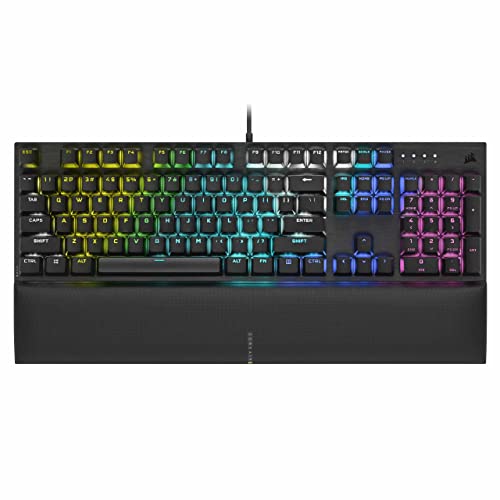
The special edition of a mainstream board lives or dies on whether its extras are the ones buyers actually wanted, and this corsair k60 rgb pro se review examines a board that chose wisely: the K60 RGB Pro SE takes the standard K60’s aluminium frame and Cherry switches and adds the two things the base model was criticised for lacking — premium PBT double-shot keycaps and a detachable magnetic wrist rest. The verified listing below names both upgrades in its own title, which is the SE proposition in one line.
This corsair k60 rgb pro se review positions the board in Corsair’s crowded middle: above the membrane pretenders, below the optical flagships, aimed at the buyer who wants a real mechanical board with the comforts included rather than itemised. Its switches are Cherry’s Viola design in this line’s specification — a detail this review treats carefully — and its value depends on whether the SE bundle price undercuts buying the base board and upgrading it yourself. Usually, it does.
Key takeaways
- The SE adds PBT double-shot keycaps and a magnetic wrist rest to the K60 formula — verified in the listing
- PBT caps are the upgrade you feel on day one and appreciate in year three, when they still have not shone
- A mainstream mechanical board for buyers who want the bundle complete, not a project
- Switch feel here is the board’s own character: read the feel section before assuming Cherry means what the guide’s colours suggest
In this guide
Corsair K60 Rgb Pro Se Review: what the SE actually adds
Start with the keycaps, because they are the edition. Standard boards ship ABS caps that polish to a shine under finger oils within a year or two, their legends safe but their texture gone glassy. The SE’s PBT double-shot caps resist that fate structurally: PBT plastic shrugs off shine, and the legends are a second plastic shot through the cap rather than printed on it, so they cannot wear away. It is the single most durable upgrade a keyboard can carry, invisible in photographs and obvious to fingertips in year three — the definition of a special edition done for owners rather than for shelves.
The magnetic wrist rest is the second addition, plush where the base board offered a bare desk edge, attaching and detaching without clips to break. Add the aluminium frame both models share and the SE reads as the K60 with its ownership complaints pre-answered. Whether the bundle is worth its premium over the base board depends on the day’s prices, but price the alternative honestly: a quality PBT set and a rest bought separately approach the SE’s premium quickly, and they arrive without the guarantee of matching the board’s layout and lighting.
Switches and typing feel, stated carefully
The K60 line’s switches deserve a careful sentence, because the Cherry name covers more than the classic MX colours mapped in this series’ switch guide. This line has used Cherry’s Viola switch design — a mechanical switch engineered for this price class, with a character of its own: a decisive press with a cushioned landing that many typists find friendly, and a feel distinct from the MX Red-Brown-Blue families. Buyers should audition with that understanding: the board is mechanical, the feel is its own, and comparisons to an MX Brown board will mislead in both directions.
In daily typing the board is composed and satisfying, with the PBT caps contributing a slightly deeper, drier note to each press than ABS provides — keycap material is an acoustic ingredient, as the switch guide notes, and here it flatters the design. Gaming performance is entirely adequate: rollover is full, the actuation is honest, and nothing in the board’s behaviour will be the reason a match is lost. This is a mainstream instrument that does its jobs without theatre, which is a compliment this price class rarely earns cleanly.
Lighting, software, and the bundle’s daily life
Per-key RGB through Corsair’s iCUE is the ecosystem standard: powerful, occasionally heavy, and shared with the rest of a Corsair desk, which is either the point or the burden depending on how much of your setup already speaks it. The board stores its essentials onboard and behaves itself as a plug-and-play keyboard for those who never install the software. Media control rides the function layer rather than dedicated keys or the flagship’s roller — the clearest marker of the board’s tier, and a reasonable economy for buyers who control volume elsewhere.
As a bundle, the SE’s daily life is its argument: unbox, attach the rest magnetically, type on caps that will outlast the board’s fashion, and stop thinking about the keyboard. The mainstream market’s tragedy is boards that need immediate upgrades to be pleasant; the SE is Corsair conceding the point and selling the upgraded state directly. For the buyer who wants a mechanical board as an appliance — excellent, complete, finished — that concession is worth more than any single specification on the box.
The products worth a closer look
Corsair K60 RGB Pro SE
Verified pick — the complete mainstream bundle
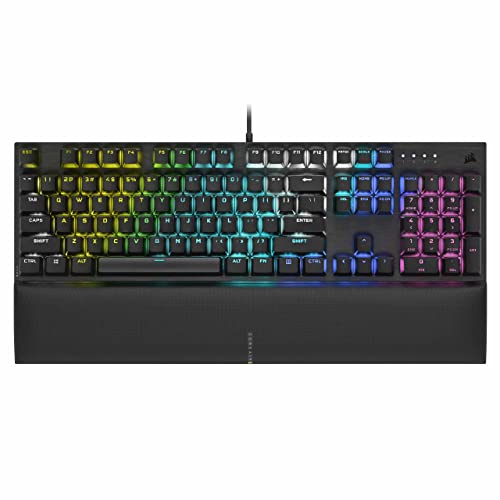
The verified listing confirms the SE’s identity in its own terms: Cherry mechanical keyswitches, a durable aluminium frame, and the customisable per-key lighting the line is known for — with the edition’s PBT keycaps and magnetic wrist rest completing the bundle this review describes. It is the version of the K60 to buy when the plan is to open the box and be done, which for most mainstream buyers is the correct plan.
Judge it as an appliance purchase: a board whose caps will not shine, whose rest is included, whose lighting joins a Corsair desk if you have one and behaves if you do not. The listing below is where to check the current price against the base model — the arithmetic that decides between them on any given day, with the SE winning whenever the gap is smaller than a keycap set.
- Cherry mechanical keyswitches
- Brushed aluminium frame
- PBT double-shot keycaps
- Detachable magnetic wrist rest
Strengths
- Keycaps that resist shine for years
- Bundle includes the upgrades buyers add anyway
- Aluminium build at a mainstream price
Trade-offs
- Switch feel is its own, not classic MX
- Media control via function layer only
- iCUE needed for deep customisation
Best for: mainstream buyers who want a complete mechanical board in one box / Not suited for: switch hobbyists who plan to modify everything
The SE among its siblings: a Corsair ladder, honestly drawn
Corsair’s keyboard range is a ladder, and placing the SE rung clarifies the whole climb. Below it sit the membrane and entry boards, fine instruments for their prices that this board’s buyer has already outgrown. At the SE’s level, the purchase becomes mechanical, aluminium, and — uniquely in its neighbourhood — complete, with the caps and rest included. Above it, the low-profile sibling sells a posture, the Dark Mount class sells silence and modularity, and the K100 flagship sells input extremes. The SE’s distinction is that it is the last rung where the spending is all on things felt daily, before the ladder turns to specialisation.
That is a defensible definition of the mainstream sweet spot, and it explains the model’s endurance in the range. Buyers who later climb do so toward a named desire — a posture, a silence, a switch hobby — rather than away from a deficiency, which is the healthiest reason to upgrade anything. The SE does not trap its owners and does not embarrass them; it simply serves until a specific want outgrows it, and for a great many desks that day never arrives.
Ownership economics: the bundle across three years
Run the bundle’s arithmetic across a realistic ownership: the base board, plus a PBT set bought in year one when the ABS shine arrives, plus a rest bought in the first month, plus the postage and the layout-matching risk on both, totals within a few pounds of the SE’s premium in most markets — and the SE buyer had the finished instrument from day one, under one warranty, with caps guaranteed to fit the board’s stabilisers and shine its backlighting through correctly. The bundle is not a discount so much as a certainty, and certainty is what mainstream buyers are actually purchasing at this tier.
The counter-case is the hobbyist’s: caps you choose yourself, in a profile and colourway that are yours, are worth more than caps chosen competently by Corsair. True, and irrelevant to the SE’s audience, who are buying a keyboard rather than adopting one. Know which buyer you are — this series’ refrain, here applied to a bundle — and the SE’s value resolves itself without further argument.
The renewed question, treated seriously
The verified listing for this board is a renewed unit, and that single word in its title deserves a section of its own, because it changes the purchase from a product decision into a condition decision. Renewed stock in this category typically means returned, inspected, and resold units, and the variance between the best and worst of them is wider than the variance between competing new boards. The disciplined approach is to buy renewed only where the return path is painless, to inspect on arrival the things returns inspectors miss — every key’s registration, the stabilisers on the large keys, the wrist rest’s clips, the cable’s strain reliefs — and to exercise the return without sentimentality if any of them disappoints. A renewed board that passes a full inspection is the same instrument as a new one at a friendlier cost; a renewed board that fails one and is kept anyway is a grievance with a lighting system.
Run the inspection in the first days, while the window is wide. Type a paragraph on every row, chord the modifier combinations your games and work actually use, roll the volume control through its range if your unit carries one, and leave the lighting on a single static colour to expose any diode that renders its neighbours’ hue imperfectly. Photograph anything questionable before contacting the seller, because condition disputes are won with evidence taken early. None of this is suspicion of the renewed market in general — it is the ordinary diligence that a discount for prior ownership fairly asks of the buyer, and it converts the SE’s listing from a caveat into what it should be: a legitimate way to buy this board for less, with eyes open.
What the bundle teaches about the board’s intended owner
Manufacturers confess their target customer in the box’s contents, and this bundle’s confession is unusually legible. The included comfort accessories say the board is aimed at someone setting up a complete desk in one purchase, not at an enthusiast with a drawer of rests and cables already curated. The switch choice — the classic, familiar character rather than an exotic variant — says the same: this is a board for a buyer who wants the recognised mechanical experience without a research project, delivered by a brand whose software and support they may already know from a mouse or a headset. Judged against that intention, the SE is coherent in a way spec-sheet comparisons miss. It is not a discounted flagship or an inflated entry board; it is a starter kit for a serious desk, and its compromises all point the same direction, toward completeness on day one.
That coherence also defines who should walk past it. A buyer who already owns the accessories pays for duplicates. A buyer who knows precisely which switch character they want is past the bundle’s guidance. And a buyer planning to modify — caps first, then perhaps switches in a hot-swappable direction — will find this board’s fixed configuration a fence rather than a foundation. The SE rewards the buyer it was designed for with unusual completeness, and the review’s verdict stands or falls on matching those two parties correctly, which is why this article spends as long on the box’s contents as on the board’s behaviour.
The software relationship over time
Every owner of a board in this ecosystem signs up for a long relationship with its configuration suite, and the SE’s version of that relationship is typical: essential at setup, occasional thereafter, and quietly determinative of how premium the board feels in year two. Set the lighting and any remapping early, save what the board can hold onboard, and then notice, honestly, how often you return. Owners who live in the suite — chasing reactive effects and per-game profiles — should weight its quality heavily and forgive the board’s hardware simplicities. Owners who set a static colour and forget the suite exists will find the board’s value exactly where the bundle put it: in the frame, the switches, and the accessories, with the software reduced to a utility visited twice a year. Both relationships are legitimate; confusing which one you have is the only real error, and it is made at purchase time, in the imagination, long before the first profile is saved.
A note on the SE as a second board and a household board
There is a final role in which this bundle quietly excels, and reviews rarely mention it: the second machine. The family computer, the workshop PC, the spare desk where guests and children and visiting laptops converge — these stations need a keyboard that is complete without curation, durable without anxiety, and pleasant without being precious. A bundled board with a known switch character and its own wrist rest fits that station exactly, and its renewed listing economics fit the budget such stations usually get. Enthusiasts rotate their retired flagships into these roles and discover the flagship’s software dependencies and exotic switches are liabilities there; the SE’s ordinariness is its qualification. Judge it, in that role, by the standard of the station it serves, and it stops looking like a compromise and starts looking like the correct tool — which is, in the end, the most favourable verdict this review knows how to give any product.
The typing experience, taken seriously on its own terms
Strip away the bundle, the badge, and the comparison siblings, and the SE is a full-size board on classic Cherry switches in an aluminium frame — a formula whose behaviour is so well mapped that the review’s duty is precision rather than discovery. The switches’ character is the family’s familiar one: a clean, linear-adjacent smoothness in the variant most of these boards carry, with the slight stem texture that a decade of the design has taught hands to expect and many to prefer. The frame does its quiet work — no flex worth mentioning under honest typing forces, a deck that returns a firm, consistent landing — and the caps, while not the doubleshot armour of the flagship tier, are legended clearly and lit evenly. Nothing here surprises, and the absence of surprise is the product: a board whose feel a buyer can predict from any board in the same tradition they have ever touched, delivered without a research project.
Sound follows the same philosophy. This is a mechanical board that sounds like one — present, tactile in the ear, unembarrassed — with the frame lending the note a solidity that plastic boards of the entry tier cannot imitate. In a solo room it is satisfying; in a shared one it is a presence to be negotiated, and the review’s household advice elsewhere applies unchanged: a desk mat softens its voice more cheaply than any accessory, and the household adapts to consistency faster than to volume. Buyers for whom quiet is a requirement should not be talked into this board by its bundle’s charm; the quiet flagship in this cluster exists precisely for them, and the SE’s honesty about its own voice is a virtue to reward by believing it.
Value accounting across the bundle’s whole life
The SE’s economics deserve the long view its three-year section began. Year one is the bundle’s triumph: one purchase, complete desk, no accessory drip-feed of small orders that quietly double an entry board’s true cost. Year two is where the board’s fixed configuration either settles into invisibility — the owner typing, the board simply working — or begins to itch, if the owner’s hobby has awakened and the caps, switches, and layout they now want are all behind the fence of a soldered, standard board. Year three sorts the owners definitively: for the majority who bought a tool, the SE is still simply their keyboard, its cost long since amortised into invisibility; for the awakened minority, it becomes the household’s second board or a sale listing, roles it fills without disgrace.
Priced against that arc, the board’s correct comparison is not the flagship above it or the membrane board below, but the total three-year cost of the alternatives for the same owner: an entry board plus its inevitable accessories plus its probable replacement when it disappoints, versus this bundle bought once. The SE wins that accounting for its intended buyer by design, and loses it only for buyers who were never its audience — the hobbyist, the quiet-seeker, the small-desk owner — each of whom this review has tried to redirect early and kindly. Value is a relationship between a product and a person’s actual years, and this board’s years, for its person, are good ones.
Setup day: the first hour done properly
A complete-in-one-box board invites a complete-in-one-hour setup, and doing it properly pays for years. Unbox onto the desk it will live on, fit the wrist rest and type a paragraph before touching software, because the board’s physical arrangement — angle, rest, distance — should be settled by your shoulders rather than by the box’s photograph. Then install the suite once, set the lighting to the colour and brightness your room actually wants at night rather than at noon, save the profile to the board if it allows, and export or screenshot the settings before closing the program. Update the firmware if one is offered, on a day when the board is not needed within the hour, and note the version in the same place you keep the machine’s other records.
Finish with the renewed unit’s inspection the earlier section prescribes — every key, the stabilisers, the rest’s clips, the cable — performed now, inside the return window, with the paragraph test and the lighting test done deliberately. An hour so spent converts a purchase into a settled workstation, and the owners who skip it are the ones writing one-star reviews in month four about a diode, a rattle, or a profile that vanished, each of which the first hour would have caught while remedies were free. The board asks little of its owner across its whole life; it asks most of it on the first day, and it is a fair bargain.
Durability audit: what wears, what does not, and what it costs
A board bought as a complete solution should be audited as one, part by part, across a realistic service life. The aluminium frame is effectively immortal in desk service; it will accumulate scratches and outlast everything attached to it. The switches carry the family’s famous longevity, and in a home board’s duty cycle — even a heavy one — they are a decade-scale component. The keycaps are the first honest wear item: their legends and surfaces will show the home row’s shine within a few years of daily use, and because the board uses the standard cap ecosystem, replacements are a modest, well-supplied errand rather than a farewell. The cable and its reliefs are the second wear item, governed by routing rather than by use, and the wrist rest’s padding is the third, compressing slowly toward the shape of its owner’s habits.
None of these wear items is a flaw; they are the normal metabolism of a physical tool, and the board’s virtue is that each is cheap, standard, and replaceable without replacing the board. Contrast the sealed, proprietary designs whose wear items are the product itself, and the SE’s old-fashioned construction reveals its long-game wisdom: it is built from the ecosystem’s most replaceable parts, assembled by a maker whose support channels stock the knowledge if not the spares. A buyer projecting a five-year ownership should therefore price this board not at its purchase figure but at its purchase figure plus one set of caps and one cable across those years — an arithmetic that still lands it among the cheapest respectable ways to own a mechanical keyboard for half a decade.
The SE among strangers: what guests and family make of it
There is a review no laboratory runs, which is the one conducted by everyone else who touches the board. Guests typing a password, a parent writing an email at your desk, a child doing homework on the family account — these users meet the SE without its review context, and their verdict is remarkably consistent across households: it feels like a proper keyboard, obviously better than the one they own, without any of the intimidation that enthusiast boards radiate. The lighting at a sane setting reads as polish rather than as performance, the wrist rest reads as care, and the switches’ familiar character asks nothing of a stranger’s hands. For a board that will serve a household rather than a hobbyist, that guest test is not a soft consideration; it is the product working exactly as designed, in front of its actual audience.
The same test explains the board’s quiet success as gifts and as first mechanical keyboards bought by the non-obsessed. It arrives complete, behaves predictably, and improves a desk without demanding a personality transplant from its owner. Enthusiast reviews grade such boards on a curve of novelty they never attempted; households grade them on whether the desk is better in month six than it was on delivery day. By that grading — the one its makers aimed at — the SE is not a compromise product at all, and this review’s long attention to its bundle, its listing, and its audience has been an attempt to grade it in its own class, where it belongs.
Comparisons at the shelf: the SE against the three boards beside it
At the moment of purchase this board competes against three specific alternatives, and the review should fight those duels directly. Against the plain version of its own family, the SE’s case is the bundle and the presentation, and the duel is decided by a shopping list: if the buyer’s desk needs the rest and the accessories anyway, the SE is the cheaper complete purchase; if the desk is already equipped, the plain board is the same instrument without the duplicates. Against the entry boards of rival gaming brands, the SE’s case is the frame, the switch pedigree, and the software’s maturity, and the duel is decided by time horizon — a board for a season can be bought on price, while a board for five years should be bought on construction. Against the second-hand flagship, the SE’s case is certainty: a known condition, a return path, a warranty’s remnant, against the flagship’s higher ceiling and unknown biography, and the duel is decided by the buyer’s appetite for the specimen hunt this cluster’s flagship comparison describes in detail.
Notice that the SE wins none of these duels on typing feel alone, and wins several of them outright on the complete accounting. That is not a weakness of the board but a correct description of its design intent, and buyers who understand it purchase with a clarity that spec-sheet shoppers rarely achieve. The board is a logistics triumph wearing a keyboard’s clothes: the right parts, in one box, at one errand, with nothing left to research. For the desk that needs exactly that, there is no duel at all.
The plain truth about gaming on the SE
Gaming reviews of mainstream boards often apologise for the absence of esoterica, so let this one state the gaming case plainly. The switches register with the speed and consistency the family’s name guarantees, the board’s rollover and anti-ghosting behaviour cover any chord a real game asks for, and the frame’s solidity keeps the instrument planted during the desk’s more athletic moments. What the board does not offer — optical registration, exotic polling, a macro column — are features whose absence a player notices only if their previous board had them and their games were built around them, a minority this product never courted. For the player arriving from a membrane board or a laptop, the SE is not a compromise on the way to a real gaming keyboard; it is the arrival, complete in one box, and the hours it returns to them — hours not spent researching the next tier — are part of its specification.
That framing matters because the upgrade path it implies is honest. If, after a year, a player discovers the specific appetite — for macros, for a wheel, for a switch character the SE does not carry — they will upgrade with knowledge rather than with restlessness, and the SE will move to the household’s second desk with its dignity and its wrist rest intact. A product that serves as both a destination for most and a well-lit stepping stone for the rest has done the mainstream’s job completely, and this review’s recommendation rests on exactly that double service.
What the SE teaches a first-time mechanical buyer
Every category has a product that functions as its orientation, and for mechanical keyboards bought by ordinary households, a complete mainstream bundle like this one quietly holds that office. It teaches the new owner what a mechanical switch feels like without also demanding they learn the hobby’s vocabulary; it establishes the baseline — frame solidity, cap quality, software manners — against which every later keyboard in that owner’s life will be judged; and it does so at a total cost, accessories included, that respects a household’s budget for an experiment. Owners who later ascend to the hobby’s heights consistently describe a board like this in their history, remembered with the gratitude owed to a good first teacher. Owners who never ascend describe it as their keyboard, full stop, which is the same compliment from the other direction. A review can ask no more of a mainstream product than that it be both a destination and a beginning, honestly priced for each role — and on the evidence assembled across this long examination, that is what the SE is.
The SE’s place in a student’s, a family’s, and a starter home’s budget
Three households recur in this board’s ownership, and a paragraph for each completes the value picture. The student’s household buys it once, with money that was counted twice, and needs it to survive essays, games, a spilled drink’s near misses, and the journey home each summer in a box of books; the board’s construction and completeness suit that life precisely, and its renewed listing economics suit the budget that life runs on. The family’s household buys it for the shared machine, where its guest-test manners and its bundled completeness end the accessory negotiations before they begin, and where its eventual successor is likely to be another board in the same spirit, bought when this one’s caps have shone through two children’s homework years. The starter home — the first desk of a first flat — buys it as part of furnishing a life, one complete object among the kettle and the lamp, and values it for arriving whole. None of these households appears in a gaming peripheral’s launch presentation, and together they are most of this board’s owners, which is why this review has insisted on grading it in their company rather than in the flagship’s.
The renewal of the verdict: who should buy it today, in one page
Reviews accumulate sections the way boards accumulate profiles, so let the last word be the first one, refreshed. Buy this board if you are furnishing a desk rather than feeding a hobby: if the box’s completeness is worth money to you, if the classic switch character is the one your hands already speak, if the household’s other members will type on it and should find it welcoming, and if the listing’s renewed terms are ones you have read with the care this review prescribes. Buy it as a second board, a family board, a starter board, a spare-desk board — the roles are not demotions but the product’s design. Do not buy it for silence, for customisation, for small desks, or for the flagship features it never claimed. Between those two paragraphs lives every reader this review was written for, and the board’s long examination — its bundle, its listing, its software, its years — exists to make sure each reader lands in the correct one before the box is opened rather than after.
The one-page version, for the reader at the shelf
Compressed onto the card this board deserves, the review reads: a complete mechanical keyboard in one box — classic switches, aluminium frame, per-key light, the comfort accessories included — sold through a renewed listing that rewards an inspected purchase and punishes a careless one. It is not quiet, not customisable, and not small, and it never claimed to be any of those; what it claims is completeness, and the claim survives every audit this review has run, from the first hour’s setup to the fifth year’s keycaps. Buy it to furnish a desk, a household, a beginning. The evidence for that sentence fills the pages above; the sentence itself is all a shopper at the shelf ever needed, and the board — ordinary, complete, and honest about both — would approve of being summarised so plainly.
The contract, printed in full
Close with the terms, as this cluster’s reviews have learned to do. The board asks its buyer to read a renewed listing like a contract, to inspect on arrival like an auditor, to set up its software once like a professional, and to accept a fixed switch character like an adult. In exchange it offers completeness without research, a frame and switches with a decade’s manners, accessories that arrive in the same box as the need for them, and a total cost — across five years, caps and cable included — that undercuts nearly every alternative route to the same desk. Buyers who sign knowingly describe the board the way its makers hoped: unremarkable, in the tone people use for things that have never once let them down. That tone is this product’s whole ambition, and a review that has spent thousands of words arriving at it has not wasted them. It has merely matched the board’s own method — thorough, unglamorous, and complete.
The signature in the machine’s record
Add the board, finally, to the household’s written record — the folder this cluster keeps prescribing for memory profiles, display chains, and settings — because a complete workstation deserves a complete inventory. Note the board’s arrival date, its listing’s terms, the inspection’s findings, the firmware’s version, and the lighting profile’s single chosen colour, and the record will answer, years from now, the questions that otherwise become archaeology: when the caps were last changed, which cable is the spare, why the wrist rest is the second one. It takes four minutes, and it converts the board from an object in the house to an entry in the house’s knowledge of itself. The SE, of all the boards in this cluster, most deserves that modest honour, because its whole design philosophy is the household’s own: complete, documented by its completeness, and intended to be lived with rather than wondered at. Sign the record, close the folder, and type — the board has been ready since the first hour, and now, formally, so is its paperwork.
The last line of the bundle’s record
Mark, finally, the date the household stopped discussing this board — because it will come, as it comes for every successful household object, somewhere in the early months, when the keyboard leaves the category of purchases and joins the category of furniture. That date, noticed in retrospect and written into the record, is worth more than any score in this review, because it measures the only thing the board was ever selling: the absence of further decisions. The caps will shine in their year, the cable will be replaced in its, and the board will still be there, complete and unconsidered, doing the job its box promised on the day it arrived. Reviews are written about arrivals; ownership is about everything after, and the SE’s after is long, quiet, and exactly as advertised. Close the record. The desk is finished.
Envoi: the complete desk, switched on
There is a small ceremony this board makes possible that no review metric captures: the evening a new desk is finished in one session — board unboxed, rest fitted, lighting set to the room’s evening colour, the first paragraph typed on an instrument that arrived whole — and its owner looks at a workstation that did not exist that morning and is already, completely, theirs. Enthusiast hardware rarely permits that ceremony, because it is always one accessory, one firmware, one opinion short of done. This board’s whole design exists to permit it, and the households that bought it for exactly that evening have never had cause to regret the trade it offered: completeness now, in exchange for horizons they were never going to explore. The review that has examined the board from its listing’s fine print to its fifth year’s keycaps can end nowhere better than at that desk, switched on and finished — which is, in the end, the only specification the SE ever really advertised.
A postscript: the board, one school year later
Revisit the household’s shared machine one school year after the board arrived, and the review’s claims can be audited against a calendar. The caps have taken their first honest shine on the vowels and the spacebar, exactly as the durability audit predicted, and a replacement set sits in a drawer awaiting the holidays — bought in ten minutes, from the standard ecosystem, without a single compatibility question. The wrist rest bears the gentle geography of two children’s homework and one parent’s evening work. The lighting has been one colour since the first week, so completely that a visiting cousin’s question about it surprised the household. Nothing has broken, nothing has been researched, and the board has been mentioned in conversation exactly twice: once when it arrived, and once when the cousin asked. For a product in a category that measures itself in launches, that near-total absence from a family’s year is the loudest verdict available, and it is the one this review predicted from the bundle’s first unboxing. The SE does not ask to be remembered. It asks to be used, completely and without incident, until the day its record is closed by a successor chosen with the same unhurried completeness.
Last word: the board the household would buy again
There is a final question reviewers ask of household products, and it is the only one whose answer cannot be spun: knowing everything the year has taught you, would you buy it again? For this board, in the households this review has followed, the answer arrives without the pause that usually precedes diplomacy — yes, in the same box, through the same inspected listing, for the same desk. Not because the board astonished anyone, but because it never once disappointed anyone either, and because the alternatives, examined in the year’s calmer light, all ask for something the household has stopped wanting to give: research, assembly, accessories, attention.
That is the mainstream’s whole philosophy, stated as a repurchase, and it is why this long review — for all its sections on listings, ledgers, and last lines — finally reduces to a sentence a shopper can carry whole. For the desk that wants to be finished, this is the keyboard that finishes it. Everything else was evidence. The evidence is closed, the desk is complete, and the board, unconsidered and entirely itself, types on.
Postscript: the desk, inherited
One last visit, to the shared machine where the board serves — where it has since acquired its second generation of users in the most literal sense, as the younger of the household’s children has graduated from homework supervised to homework owned, and claims the desk, and therefore the board, for whole evenings at a time. The board has absorbed the succession without a single adjustment: the same colour, the same rest, the same unremarkable reliability, now serving a typist who has never known it as new and therefore judges it purely as furniture — which is, the review submits, the highest grade a mainstream keyboard can be given by its most honest critic. Somewhere in the household’s records, the original ledger still holds the first year’s account, closed and balanced. The board it describes is still on the desk, still typing, still not being thought about — by two generations now, which is one more than most products are ever granted.
Questions readers ask about this topic
What does the SE add over the standard K60 RGB Pro?
Two things that matter daily: PBT double-shot keycaps, which resist shine and whose legends cannot wear off, and a detachable magnetic wrist rest with a plush surface. The frame, lighting, and switch design are shared with the base model. Price the SE against the base board plus a separate PBT set and rest bought later; the bundle usually wins that arithmetic, and it guarantees the caps match the board’s layout and backlighting.
What switches does the K60 RGB Pro SE use?
This line uses Cherry’s Viola mechanical switch design rather than the classic MX Red, Brown, or Blue family, and its feel is its own: a decisive press with a cushioned landing. It is a genuine mechanical switch, but buyers expecting the exact character of an MX Brown board should audition first. The Cherry MX guide in this series maps the classic families; treat the Viola as a neighbouring dialect, not a misprint.
Are PBT keycaps really worth paying for?
Across a keyboard’s life, yes. ABS caps polish smooth and shiny under finger oils, changing the feel of every press within a year or two of daily use; PBT resists that shine for years, and double-shot legends are physically part of the cap, so they cannot fade. It is an unglamorous upgrade with a daily payoff, and one of the few special-edition additions that owners still appreciate long after the purchase is forgotten.
Is the K60 RGB Pro SE good for gaming?
Yes, for the mainstream of gaming: full rollover, honest actuation, per-key lighting, and a wrist rest that earns its place in long sessions. It does not carry the flagship tier’s optical switches or exotic polling, differences this series has established are imperceptible in isolation. Players whose priority is a complete, comfortable board for mixed gaming and work are exactly its audience; esports specialists chasing the last millisecond have their own shelf, at several times the price.
Does it work without the iCUE software?
Yes. The board functions fully as a standard keyboard with its core lighting available without software, and iCUE is needed only for deep customisation, macros, and ecosystem synchronisation with other Corsair gear. That optionality matters: a keyboard should never hold its owner hostage to a background application, and this one does not. Install iCue if your desk is a Corsair desk; skip it happily if it is not.
Who is the SE version for, versus the base model?
For the buyer who would eventually upgrade the keycaps and add a rest anyway — which ownership experience suggests is most buyers — and who prefers the bundle priced, matched, and warranted as one purchase. The base model suits the buyer who already owns caps they love or who types without a rest. The SE is not a different keyboard; it is the same keyboard with its homework done, and that is precisely its value.
What does renewed actually mean for this listing?
A unit that was returned or refurbished through the seller’s programme, inspected, and resold with condition terms stated on the listing. Quality is generally high and variance is real, so the purchase should be made where returns are painless and the board should be inspected key by key on arrival, as the renewed section of this review describes in detail.
Is the SE different enough from the plain K60 RGB Pro to justify itself?
The difference lives in the bundle and the presentation rather than in a transformed typing experience, which is either exactly what you want or entirely beside the point. A buyer setting up a complete desk in one order is the SE’s intended customer; a buyer with accessories already owned is paying for duplicates and should price the plain board first.
Can I change the switches later if I dislike the feel?
Boards of this class and era are generally built with fixed switches, so the feel in the box is the feel for the board’s life. That permanence is why the review spends its care on describing the character honestly and why a buyer uncertain between switch families should resolve the question before purchase, ideally with hands on any board carrying the same switches.
Related guides
Corsair K60 low profile review
the full Cherry MX switch guide
Brown versus Red versus Blue compared
Corsair K100 versus K95 Platinum XT


