Disclosure: As an Amazon Associate, reviewstook.com earns from qualifying purchases. Links on this page are affiliate links; they cost you nothing extra. Prices and availability change often, so check the current Amazon listing before you buy.
The three colours that built the mechanical keyboard hobby meet in cherry mx brown vs red vs blue, and the choice between them is really a choice between three philosophies of feedback. Red is a smooth, light, uninterrupted press. Brown adds a small tactile bump you feel but barely hear. Blue commits fully: a bump and a deliberate click, engineered in an era when a keyboard was allowed to announce itself. Every other switch conversation since has been a variation on what these three decided.
This cherry mx brown vs red vs blue comparison explains the mechanism behind each feel, maps the colours to the work and play they suit — gaming, typing, shared offices, late-night flats — and covers the honest caveats: that Cherry’s colours are now one dialect among many, that sound depends on the whole keyboard, and that the only verdict that matters is the one your fingers deliver. If you are buying your first mechanical board, this is the decision that teaches you what you like.
Key takeaways
- Red: linear and light — no bump, no click, favoured for fast gaming inputs
- Brown: a gentle tactile bump without the click — the compromise colour for mixed use and shared spaces
- Blue: tactile and deliberately clicky — the most feedback and the most noise, glorious alone and antisocial in an office
- The keyboard around the switch — case, plate, keycaps — shapes sound and feel as much as the colour does
In this guide
Cherry Mx Brown Vs Red Vs Blue: what the colours change mechanically
Inside every Cherry MX switch, a spring, a stem, and a pair of metal contacts decide when a press registers. The colours denote different stems. The Red stem is a smooth ramp: press it and resistance rises evenly until the switch actuates partway down and bottoms out shortly after, with nothing to feel along the way. The Brown stem carries a small bump in its profile, a brief thickening of resistance just before actuation that tells your finger the press has registered without making a sound about it. The Blue stem uses a two-piece click jacket that snaps as it actuates, manufacturing the click as a designed event rather than a side effect.
Actuation force separates them too, mildly: Reds and Browns are light switches that most fingers can use all day, while Blues ask a touch more and repay it with the crispest definition of the three. Travel and actuation distances are near-identical across the family, which is why the argument is purely about feedback character. Your finger learns to type on feedback — to stop pressing once the key has registered, rather than slamming to the bottom — and each colour teaches that lesson in a different language: Red by faith, Brown by touch, Blue by ear.
Red: the gamer’s argument
Linear switches earned their gaming reputation honestly. With no bump to negotiate, a Red press is a single smooth motion, which makes rapid repeated inputs — double-taps, strafing corrections, ability spam — feel frictionless, and makes half-presses and feathered inputs predictable. The light spring keeps fingers fresh across long sessions. In fast genres the absence of tactile interference is not a lack of feedback; it is the feedback, a clean line between intention and actuation that competitive players describe as the switch getting out of the way.
The cost appears at the desk’s other hours. Typists on Reds make more errors, especially early on, because nothing confirms a press short of the character appearing — a mistimed finger brushes a neighbouring key into actuation, and the bottom-out at the end of every press is the only punctuation. Writers who bottom out heavily find Reds fatiguing and imprecise-feeling despite their lightness. None of this is a flaw; it is a specialisation. Reds are the colour of a keyboard that games first and writes second, and they ask you to be honest about which yours does.
Brown: the compromise that became the default
Brown exists because most keyboards must do everything, and its small bump is the minimum viable feedback: enough to confirm a press, quiet enough for an office, unobtrusive enough for gaming. First-time mechanical buyers land on Brown more than any other colour, and the choice is sound — it is the only one of the three that no use case actively dislikes. Typists get their confirmation, gamers get a switch that never argues, housemates get silence, and the finger learns the stop-at-the-bump discipline that makes mechanical typing efficient.
The connoisseur’s complaint is that Brown’s bump is subtle to the point of shyness — detractors call it a scratch in a linear switch rather than a true tactile event, and stronger tactile switches from other makers exist for those who want the bump to speak up. Fair enough, and worth knowing before you buy: if you crave pronounced tactility, Brown will feel like a rumour of it. But subtlety is also why Brown survives every environment. It is the diplomatic colour, and diplomacy is underrated in a device you will use around other humans.
Blue: feedback as a feature, noise as a fact
Blue is the only one of the three designed to be heard, and its fans are sincere: the click is crisp, rhythmic, and satisfying in the way a good mechanical noise can be, turning typing into an audible craft. The two-piece stem gives the most defined tactile event of the family, and writers who compose by ear swear the sound organises their thoughts. In a private room, with the door closed and nobody on a call, a Blue keyboard is a small daily pleasure that its owners defend with genuine affection.
The fact that travels with it is volume. A Blue board in an open office is a workplace incident; on a call, your microphone will broadcast every word you type to the meeting; in a flat at midnight, it is audible through doors. None of this is the switch failing — it is the switch succeeding at its design goal in the wrong environment. Blue is a superb choice with a location requirement, and the requirement is not negotiable by technique. Buy it for the room it will live in, not the room you wish it lived in.
Sound is a system, and other makers speak in colours too
Before blaming or crediting a colour for a keyboard’s sound, remember the rest of the instrument: case material and hollowness, plate stiffness, keycap profile and plastic, desk surface, and whether the board has damping foam all shape the final noise and feel at least as much as the stem does. A Blue switch in a heavy, damped case sounds tidy; a Brown in a hollow plastic shell can clatter embarrassingly. Reviews of a specific board tell you about that board; the colour tells you about the press. Keep the two ledgers separate and you will shop more accurately.
Cherry’s colours also became an industry language: red, brown, and blue now describe feel families across dozens of makers, whose versions differ in spring weight, bump sharpness, and smoothness. A non-Cherry brown may be more tactile than Cherry’s; a modern linear may be smoother than Cherry’s red. Treat the colours as a map of the territory — linear, quiet tactile, clicky — and then read the specific switch’s reviews for its local accent. The map is what this comparison is really selling; the territory has many landlords now.
Choosing, and the second keyboard you will inevitably want
Decide by environment and primary use. Gaming-first in any shared space: Red if your typing is light, Brown if it is not. Writing-first in private: Blue for the joy of it, Brown for the bump without the broadcast. Mixed everything, one keyboard, other people nearby: Brown, and spend the saved deliberation on the board’s build quality. If you can, type on all three in a shop for two minutes each; fingers form verdicts at a speed no article can match, and this article’s honest ambition is to make you understand your verdict once your fingers deliver it.
Know, too, that this is the hobby’s most repeated first decision because it is rarely the last. Hot-swappable boards exist precisely so the colour choice can be revised per-key and per-mood, and many owners end with a gaming board in Reds and a writing board in something tactile. That is not indecision; it is the natural end of the comparison you are reading. Start with the colour that fits your life today, and let the second board be a problem for a richer, more experienced you.
The same colours in other habitats: low profile, silent, and optical rivals
The colour language now travels into formats Cherry’s original line never imagined, and a buyer fluent in it can navigate them. Low-profile switches borrow the colours with shortened travel, as this series’ K60 low-profile review shows — a low-profile Red is recognisably Red in character, compressed. Silent lines attach the colours to damped variants, so a Silent Red is the linear idea with its landing muffled. Rival makers’ optical and hall-effect switches borrow the vocabulary too, describing their feels in Cherry’s colours because the market’s fingers already speak the language.
The translation is never perfect — each format’s physics edits the feel — but the family resemblance is real, and it is why this three-colour comparison remains the hobby’s entry lesson. Learn what linear, tactile, and clicky mean in your own hands on the classic switches, and every subsequent keyboard description becomes a dialect you can parse rather than a claim you must trust. Fluency compounds; that is the actual product this comparison sells.
A two-minute shop test that beats a month of reviews
If a shop near you stocks boards in all three colours, the audition protocol is simple and decisive. Type the same sentence — one with your email address’s rhythm, full of the characters your day contains — on each board for thirty seconds, at your real typing speed, including your mistakes. Then play thirty seconds of your game if the shop allows, or mime its fastest inputs. Notice which board your fingers stopped thinking about, which one’s sound you would defend to a housemate, and which one’s errors annoyed you. Those three observations are your verdict, and they outrank this article, its author, and the entire internet’s accumulated opinion.
Buy the board that wins your test even if it contradicts the consensus for your use case, because the consensus was measured on other hands. The colours exist to be chosen between by the person who will press them a million times; a comparison’s job is to make sure you understand what you chose, and by the end of the shop test, you will.
The mechanics, switch by switch, in slow motion
Strip away the colours and a mechanical switch is a small machine for making and breaking a contact at a precise point in a key’s travel, while telling your finger a story about what happened. The three classics tell three different stories. One stays silent and smooth from top to bottom, one inserts a small tactile event partway down, and one adds an audible announcement to that event. Everything else in this comparison, gaming speed, typing feel, household diplomacy, is downstream of those three mechanical narratives.
| Mechanical trait | Red (linear) | Brown (tactile) | Blue (clicky) |
|---|---|---|---|
| What the finger meets mid-travel | Nothing: a clean, even resistance to the bottom | A rounded bump that confirms the press without stopping it | A bump plus a separate click mechanism that fires with it |
| Where actuation sits | Partway down, reachable without bottoming out | At the bump, so the finger learns the exact success point | At the click, giving ear and finger the same confirmation |
| Sound at the desk | Only the keycap’s bottom-out and release, if you let it travel fully | The same, plus a faint texture from the bump | A deliberate click layered over everything, audible through doors |
| Reset behaviour for rapid repeats | Smooth return with no event to cross twice | The bump is met again on the way up, a small toll per repeat | The click mechanism must reset, which shapes very rapid repetition |
| Fatigue character over a long day | Light and even; fingers glide rather than punch | Slightly more work per press, repaid in certainty | The most eventful press; satisfying or tiring by temperament |
A switch that tells you precisely when the press succeeded, by bump or by click, trains you to stop pressing at that point, which is faster and quieter and kinder to fingers across a working life. A switch that tells you nothing trains either a feather touch learned by feel alone or a habit of bottoming out every key, which is why linear switches feel sublime to practised light typists and mushy to everyone still learning where the bottom is.
The same three switches in four different lives
The programmer in a shared flat
Long typing days and thin walls make this the tactile switch’s natural constituency: the bump confirms without announcing, the neighbours hear nothing, and the code does not care about the last millisecond of key travel. Blue in this life is a diplomatic incident with a keyboard attached, and Red’s silence is welcome but its lack of feedback shows up as doubled letters in the first month, until the fingers learn the board.
The competitive player in a bedroom setup
Here the linear case is strongest: movement keys pressed and released hundreds of times a match, with no bump to cross on the way back up, and a smoothness that suits rapid strafing rhythms. The player’s microphone also votes, because a clicky board broadcasts every input to the whole squad, and some squads vote back.
The writer who drafts by ear
A real constituency exists for whom the click is not noise but metre: the sound marks sentences landing, and the rhythm of a good drafting hour is partly auditory. For a writer alone in a house, Blue’s feedback loop between ear and finger is a feature no silent switch can counterfeit, and the household calculus that rules it out for others simply does not apply.
The hybrid worker-gamer at one desk
One desk, two lives, and no wish to own two keyboards: this is the buyer the tactile middle was invented for, and the market’s default settings agree. Brown’s bump serves the typing day, its manners serve the evening call, and its gaming performance, while not the linear’s equal on paper, is close enough that the player’s skill remains the bottleneck for years.
Sound, properly understood: the board is an instrument
Owners argue about switch sound as if the switch were the whole instrument, when the switch is only the part that starts the noise. The case’s material and hollowness amplify or damp it, the keycaps’ thickness tunes it, the desk beneath reflects it, and the simple act of bottoming out contributes more volume than the switch mechanism in the two quieter designs. This is why the same Brown switches sound discreet in one board and typewriter-adjacent in another, and why judging a switch’s noise from a bare switch tester misleads in both directions.
- Damping rings and softer keycaps attack the bottom-out noise that dominates Red and Brown boards, at a small cost to travel feel that some typists love and others describe as typing on brakes.
- A desk mat is the cheapest acoustic upgrade in computing. It removes the desk’s drum from the ensemble, and it flatters every switch in this comparison, including the clicky one, whose click itself is mechanical and stays.
- Microphone discipline matters more than switch choice for calls. A headset microphone near your face hears less keyboard than a laptop microphone beside the board, whatever you type on. Solve the call problem at the microphone before solving it at the switches.
- Blue’s click cannot be accessory-managed away. Rings and mats tame its accompaniment but the click is the mechanism itself. Buy Blue for rooms where the click is welcome; do not buy it with a rescue plan.
Heard this way, the sound question stops being which switch is quiet and becomes which noises your particular instrument makes, in your particular room, to your particular audience. That question has a testable answer, which the shop-test section of this guide is designed to extract.
Buying the switches themselves: kits, counts, and compatibility
Owners of hot-swappable boards meet these switches as products in their own right, in kits sized for a board or a section of one, and the practicalities deserve a plain paragraph. Count your board’s switches before ordering, including the stabilised keys that still use one switch each; confirm pin compatibility between the kit and your board’s sockets, because three-pin and five-pin variants both circulate and the difference matters at installation; and keep a few spares from the same kit, since a single switch that fails or feels different from its neighbours is replaced in minutes when its twin is in a drawer.
Soldered boards change the stakes: changing switch type becomes a workshop project rather than an evening’s experiment, which argues for deciding the colour by tester and by borrowed boards before committing to a soldered purchase. The tester habit generalises beyond this comparison: a small switch sampler is the cheapest insurance in the mechanical keyboard hobby, because feel is the one specification no product page can transmit.
The verified kits below are the current CHERRY MX2A generation of exactly the switches this comparison covers — the same colours, sold as switch kits for DIY, hot-swap, custom, and gaming keyboards. All four listings were checked for this guide.

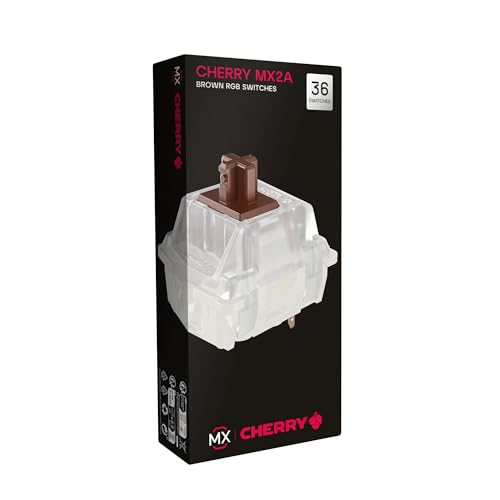
CHERRY MX2A RGB BROWN Switch Kit (36 switches) — the tactile compromise, as a kit
The Brown kit is the comparison’s default made purchasable: 36 original CHERRY MX2A switches with the tactile bump and no click the listing describes as focused and noticeable.
Key specifications (from the verified listing): 36 mechanical switches; RGB version; tactile, no click; for DIY, hot-swap, custom, or gaming keyboards.
Strengths
- The diplomatic colour in kit form — typing confirmation without office noise
- 36 switches cover a compact board or a full board’s main cluster with spares
- Genuine CHERRY MX2A generation, so feel matches this guide’s description
Trade-offs
- The bump is deliberately subtle; pronounced-tactile seekers may want more
- One kit will not fill a full-size board — count your switches first
- RGB housing only earns its keep on boards with per-key lighting
Best for: mixed typing-and-gaming buyers building or refitting a hot-swap board
Not suited for: buyers who want a strong, unmistakable tactile event

CHERRY MX2A RGB RED Switch Kit (36 switches) — the linear gamer’s switch, as a kit
The Red kit carries the linear argument of this comparison into a purchase: 36 original CHERRY MX2A switches, linear with no click, described by the listing as smooth and direct — a single uninterrupted press for rapid, repeated inputs.
Key specifications (from the verified listing): 36 mechanical switches; RGB version; linear, no click; for DIY, hot-swap, custom, or gaming keyboards.
Strengths
- The frictionless press competitive players choose, in genuine CHERRY form
- Smooth, direct actuation suits rapid repeats and feathered inputs
- Same MX2A generation as the other kits here, so colours compare cleanly
Trade-offs
- No tactile confirmation — typing errors rise until your fingers adapt
- Light press invites accidental actuation from resting fingers
- 36 switches will not fill a full-size board on their own
Best for: gaming-first builders refitting a hot-swap board
Not suited for: typists who rely on a bump to confirm each press

CHERRY MX2A RGB BLUE Switch Kit (36 switches) — the clicky classic, as a kit
The Blue kit is feedback as a feature, sold by the box: 36 original CHERRY MX2A switches, tactile with a deliberate click the listing itself calls loud and noticeable. Buy it for a private room, exactly as the Blue section above insists.
Key specifications (from the verified listing): 36 mechanical switches; RGB version; tactile with click (clicky); for DIY, hot-swap, custom, or gaming keyboards.
Strengths
- The most defined tactile event of the three classics, plus the click
- Typing by ear becomes a genuine, rhythmic pleasure in a private room
- Genuine CHERRY MX2A generation — the reference click, not a clone of it
Trade-offs
- Loud by design: calls, offices, and thin walls are all disqualifying
- The click you love is the noise everyone else hears
- One kit will not fill a full-size board — count first
Best for: writers and typists in private rooms who compose by ear
Not suited for: shared offices, calls, or late-night flats
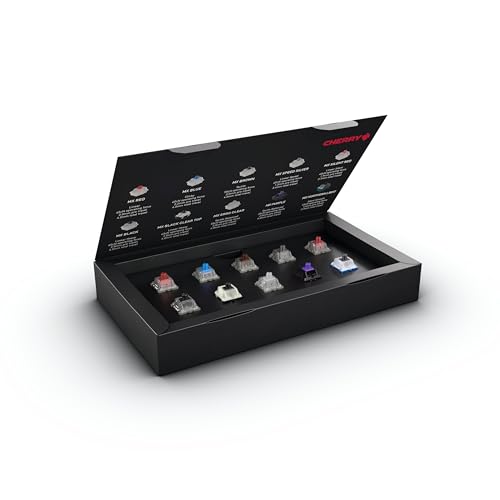
CHERRY MX2A EXPERIENCE BOX (10 switches) — the tester this guide keeps recommending
The Experience Box is the tester habit from the section above as a product: 10 original CHERRY MX2A sample switches spanning linear, tactile, and clicky types, made to be pressed, compared, and learned from before a full kit is bought.
Key specifications (from the verified listing): 10 mechanical switches; sample tester; linear/tactile/clicky mix; for DIY, hot-swap, custom, or gaming keyboards.
Strengths
- Feel all three philosophies under your own fingers before committing
- Settles the Red-Brown-Blue question the way no recording can
- Useful again for every future board and switch decision
Trade-offs
- A sampler, not a board’s worth — it informs a purchase, it is not one
- Ten switches cannot show how a full board sounds as a system
- The colour you prefer on a tester still meets the board’s own acoustics later
Best for: first-time buyers and anyone deciding between the three colours
Not suited for: buyers who already know their colour and need a full kit
Actuation weight and the spring: the variable hiding inside each colour
Colour names the mechanism, but the spring decides how much of your finger’s day the switch spends, and springs vary within colours more than newcomers expect. A light linear and a heavy linear share a mechanism and share almost nothing else at hour six of a working day: one invites floating, fingertip typing that barely bottoms out, the other demands deliberate presses that fatigue smaller hands and reward strong ones. When owners describe the same colour in opposite terms, they are frequently describing different springs wearing the same name, which is why serious switch discussion always pairs colour with weight.
| Trait | Light variants | Standard variants | Heavy variants |
|---|---|---|---|
| Typing feel across a day | Effortless, with accidental presses as the tax | The balance most owners settle on | Deliberate and tiring for fast typists |
| Gaming rapid presses | Fastest to actuate and to release | Predictable, the competitive default zone | Slower repeats, but no accidental strafes |
| Error pattern | Extra letters and unintended abilities | Fewest errors for most hands | Missed letters when fingers tire |
| Who it suits | Light-touch typists, smaller hands, speed seekers | The broad middle of owners | Heavy-handed typists who bottom out everything |
The practical consequence is that a tester session should vary weight as well as colour, because your ideal may be a familiar colour at an unfamiliar weight.
Stabilisers, keycaps, and the rest of the feel stack
New owners blame switches for sensations manufactured elsewhere in the stack, and the two largest impostors are stabilisers and keycaps. Stabilisers serve the wide keys, spacebar, shift, enter, and their rattle or mush is the sound and feel most typists actually judge a board by, because those keys are pressed constantly. A board of perfect switches with dry, rattly stabilisers feels cheap in the exact moments a tester presses the spacebar, which is every few seconds.
Keycaps shape feel through height, sculpting, and material. Taller, sculpted profiles guide fingers and change the leverage of each press; flat profiles speed movement between keys for some hands and lose others entirely. Material changes the sound’s pitch and the surface’s grip under warm fingers. None of this is switch territory, yet all of it will be attributed to the switches by an owner who changes boards and colours simultaneously, which is the methodological error this guide keeps warning against in different costumes: change one variable, judge, then change the next.
- Judge a new board’s switches with its stabilisers forgiven temporarily. Press the letter keys for the switch verdict; the spacebar’s verdict belongs to a different department and can be improved later.
- Carry your keycaps between boards when comparing. A familiar cap set removes one variable from every comparison and is the enthusiast’s quiet laboratory practice.
- Remember the desk in the stack. The board sits on something, and that something is the final layer of both feel and sound, as this guide’s acoustics section established.
Understood as a stack, the colour choice shrinks to its true size: the topmost decision, the one your fingers question with every press, but one decision among several, and rarely the one responsible for a board that disappoints.
The variants shelf: silent, speed, and other descendants of the three classics
The three colours in this comparison are the ancestors of a large family, and knowing the descendants helps a buyer locate the classics honestly. Silent variants add damping inside the switch to soften both the downstroke and the return, serving the shared-office need that Brown only partly meets; their trade is a slightly cushioned feel that some typists describe as precision lost and others as luxury gained. Speed variants shorten the actuation distance for gaming, serving the linear’s constituency with an even quicker trigger, at the cost of accidental presses during ordinary typing that can make a speed board a frustrating word processor.
Optical and magnetic descendants replace the mechanical contact with light or magnetic sensing, gaining adjustable actuation and extreme durability claims while changing the feel subtly and the compatibility completely. They are this comparison’s future tense, and they inherit its questions unchanged: smooth or tactile, quiet or announced, light or heavy. A buyer fluent in the three classics can evaluate any descendant in minutes, because the descendants are answers to the same examination with new technology sitting for it.
Colours and product lines will keep multiplying, but the underlying examination — what your finger meets, what your ear reports, what your household tolerates, and what your games reward — does not change.
The household and workplace diplomacy of switch choice
Switch choice is the rare component decision that other people get a vote in, because they can hear it. The diplomacy has a geography: the click that is charming in a detached house is a negotiation in a flat, a provocation in an open-plan office, and a broadcast on every call the microphone attends. Mature buyers therefore run the household audit before the fingertip audit, listing who hears the keyboard, through which walls, at which hours, and on which calls, and let that list strike Blue from contention where it must, without resentment, because a switch that makes enemies of the people you live and work with is a bad switch for you regardless of its feel.
For those whose audit clears the click, a courtesy protocol keeps it cleared: warn the household before the board arrives, keep the loudest typing out of the sleeping hours, and own a quiet board or a headset-based call setup for the occasions when the click’s timing is wrong. Diplomacy is cheaper than soundproofing and more effective than apology, and the clicky community’s veterans are recognisable by how early they learned it.
Workplaces add a formal layer: some offices have no rule and a strong culture, which is a rule wearing casual clothes. The new employee’s brown-or-red first board is not cowardice but reconnaissance, and the click, if it comes, should arrive after the reputation that can afford it. Keyboards are long-lived colleagues; introduce them as you would a loud friend, with timing and warning.
Long-term ownership: swapping, storing, and the second board
Mechanical keyboards are among the longest-lived peripherals in computing, and the three switch families age into ownership patterns worth anticipating. The hot-swappable board becomes a platform: switches are consumables and experiments, keycaps rotate seasonally, and the owner’s question shifts from which colour to which colour this year, a transformation of this article’s entire debate into a hobby. The soldered board remains a commitment, and its owners value the stability of a decision made once and made well, which is its own legitimate philosophy rather than a failure to evolve.
Storage and spares are the unglamorous infrastructure of that long life. Original switches, labelled by colour and weight, in a bag that future you can find; the switch puller and the keycap puller living with them rather than in a drawer of mysteries; a note of the board’s firmware and any remapping, because keyboards now have settings worth losing. Owners who keep this small archive find that a five-year-old board remains a current board, while owners who do not re-buy their own equipment’s capabilities in confusion.
The second board, when it comes, is usually bought for the other life: the quiet board for calls beside the clicky board for drafting, the linear board for the gaming desk beside the tactile for the office. This guide’s comparison thus ends where the hobby begins, with the discovery that the three colours were never rivals for a throne. They are a palette, and the owner’s desk, given time, tends to collect the whole of it.
The final framework: choosing in one honest sitting
- Run the household audit. Who hears it, where, and when. If the click fails the audit, Blue leaves the table now and the sitting gets shorter.
- Name your dominant activity by hours. Typing hours argue tactile or clicky; gaming hours argue linear or tactile; the honest count, not the aspirational one, casts the vote.
- Press the candidates, or order the tester. Ten switches in the hand outrank ten thousand words, including these. If a tester is impossible, a shop’s display boards and a borrowed board are the substitutes, in that order.
- Choose the weight with the colour. Light, standard, or heavy is half the decision; make it deliberately, from the spring table earlier in this guide, rather than accepting whatever the first listing ships.
- Forgive the board its stabilisers in advance. Judge the switches on the letter keys, and budget the stabiliser tuning as a separate, solvable project, so the colour verdict is not contaminated.
That sitting, honestly conducted, produces a decision with a property no review can give it: it is yours, derived from your rooms, your hours, and your fingers. The three colours will still be there for the second board, and the third, in the order your life discovers them.
Switch terms, translated for the last time
| Term | Plain meaning | Relevance to the three colours |
|---|---|---|
| Linear | A press with no internal event between top and bottom | Red’s definition, and the gamer’s smoothness argument |
| Tactile | A press with a felt bump at the actuation point | Brown’s definition, and the typist’s confirmation |
| Clicky | A tactile press with a separate mechanism adding sound | Blue’s definition, and the household’s negotiation |
| Actuation point | The travel depth at which the press registers | Where the bump and the click live; the point light typists learn to stop at |
| Bottom out | Pressing to the very end of travel | The noise and fatigue habit that feedback switches train away |
| Actuation force | The weight, in grams of force, a press requires | The spring variable hiding inside each colour’s name |
| Hot-swappable | Switches that pull out and press in without soldering | The board property that turns this comparison into an experiment |
| Stabiliser | The mechanism levelling wide keys like the spacebar | The feel impostor that is not the switch’s fault, ever |
Eight terms, three colours, one examination: what the finger meets, what the ear reports, what the household tolerates, what the game rewards. A buyer fluent in the table can walk into any keyboard discussion, including the ones about technologies that do not exist yet, and be fluent there too within minutes.
The switch market’s clones and cousins: reading other makers’ colours
The three colours in this comparison are one maker’s names for three mechanisms, and the wider market speaks in borrowed colours, house colours, and numbers that conceal the same three ideas. A buyer fluent in the mechanisms can decode any of it: ask what the finger meets, ask what the ear hears, ask the force and the travel, and the marketing name becomes a translation rather than a mystery. This fluency matters because the alternatives are often excellent and sometimes better value, and because a board you love may simply not be offered in the original maker’s switches, leaving the cousin as the only route to the feel you chose.
The honest caution runs the other way as well: colour-matching between makers is approximate, because the bump’s shape, the spring’s curve, and the housing’s tolerances are each maker’s own recipe. A tactile from another house is a tactile, but it is not Brown, and testers exist precisely because the family resemblance still leaves room for preference. Buy the mechanism by its class and the specific switch by your fingertips, and the market’s whole shelf, originals and cousins alike, becomes legible.
The keyboard as a long relationship: a closing audit
- Your fingers’ verdict after a month is the only review that matters, and it should be recorded while it is fresh, because the next board’s choice will be made by a person who has forgotten this one’s lessons unless they are written.
- Your household’s verdict arrives as behaviour: doors closing during your typing hours, or not; the call participants commenting, or not. Read it as data and adjust with the courtesy this guide prescribed.
- Your hands’ health is the audit’s serious column. New pain is information, and the switch weight, the board’s angle, and the day’s volume are the variables to move before the information becomes an injury.
- Your curiosity is the audit’s hopeful column. The owner who ends the month wanting to try the other colours has not failed to decide; they have joined the hobby this comparison secretly serves, and the tester is already in their basket.
Three colours, three mechanisms, and a decision that turns out to be a beginning rather than an end: that is the honest summary of the whole comparison. Choose by the audit, type on the choice with commitment for a month, and let the next choice be made by the typist this one creates.
The three colours in the wider market of boards: what to actually buy first
The comparison’s most practical question is the one its title avoids: not which colour, but which board, in which colour, first. The framework that serves newcomers is to buy the board for its build, its layout, its connectivity, and its stabilisers, in a colour chosen by this guide’s audit, in a hot-swappable variant if the budget allows the small premium, because the hot-swap socket converts the colour decision from a marriage into a first chapter. A newcomer who follows that framework owns, within a year, either the right board in the right colour or the right board and a small bag of the right colour, and both outcomes are victories purchased at the price of one board.
The alternative history is common enough to warn against: the newcomer buys a soldered board in a colour chosen from a video’s sound test, discovers the household’s verdict or their own fingers’ dissent in month two, and faces a choice between a desoldering project and a second board. Neither is ruinous, but both were avoidable for the price of a tester and a swappable socket, which is why this guide has recommended those two small purchases with a persistence that might have seemed disproportionate. In a hobby of hundred-unit boards, the ten-unit tester is the highest-value object sold, and it is not close.
Sound tests, videos, and the epistemology of other people’s keyboards
Every newcomer meets these switches first through recordings, and recordings lie in specific, knowable ways. The microphone’s position invents a closeness no ear occupies; the desk in the video is a different drum from yours; the typist’s force is a style, not a standard; and the recording’s processing flatters or damns without confessing. Sound tests are therefore useful for exactly one thing, the relative character of mechanisms, click against bump against silence, and useless for the absolute question of how a board will sound in your room, at your desk, under your hands.
- Use recordings to learn the vocabulary, to hear what a click mechanism is and what bottoming out contributes, the way you would learn instruments from an orchestra guide.
- Use testers and shops for decisions, because your fingers and your room are the only instruments whose readings you will live with.
That epistemology, recordings for vocabulary and reality for verdicts, is the same one this guide’s companion articles applied to televisions, headphones, and latency alike. It might be the single transferable skill in the whole programme: know which evidence is a picture of the thing and which is the thing itself, and never let the picture outvote the thing.
The beginner’s first board, specified
For the reader who arrived undecided and leaves ready to buy, here is the specification this whole comparison converges on. Choose a board whose layout fits your desk and your work, whose stabilisers are respected in reviews, and whose switches are hot-swappable if the budget stretches the small distance. Fit it with the colour your audit chose, Brown if the audit produced a shrug, because the shrug is data and Brown is the shrug’s correct answer. Add the tester to the same order if any doubt survived the audit, because the doubt is cheaper answered before the board arrives than after.
It will produce a good keyboard, honestly chosen, whose lessons are legible, and whose successor, when curiosity or a second desk calls for one, will be chosen by a typist this board educated. First boards are teachers. Choose a kind one.
The colours, in the end, are a kindness
It is worth saying, after thousands of words of comparison, that the existence of these three choices is itself a kindness the industry did not owe anyone. A keyboard could simply be a keyboard, as it was for the decades when membrane domes decided everyone’s feel identically and badly. Instead there is a shelf of mechanisms, weights, and sounds, priced from the modest to the absurd, all of them good enough that the argument between them is an argument among virtues. Brown’s courtesy, Red’s smoothness, Blue’s joyful noise: a buyer choosing among virtues with a clear method is in the happiest position consumer technology offers, which is why this guide has spent its length on the method rather than the crown.
Questions readers ask about this topic
Which Cherry MX colour is best for gaming?
Red is the traditional gaming answer: linear, light, and frictionless for rapid repeated presses, with nothing between intention and actuation. Brown runs it close and is the better choice if the same board must handle serious typing in shared spaces. Blue is the least suited to gaming around other people, purely because of its click. At any level below the professional, the player’s practice dwarfs the switch’s contribution — buy the colour your environment allows.
Are Brown switches good for typing?
Yes — they were designed for exactly the mixed typing-and-everything role. The small tactile bump confirms each press, which reduces errors compared with linear switches and teaches you to type without bottoming out. Writers who want a pronounced bump should look at stronger tactile switches from other makers, since Cherry’s Brown is deliberately gentle. For a first mechanical keyboard that must do everything quietly, Brown remains the safest recommendation in the family.
How loud are Blue switches, really?
Loud enough to be a social fact. Each press produces a deliberate click designed to be heard, and a typing session is a continuous percussion that carries through doors and into microphones. In a private office or a room of fellow enthusiasts, that is charm. In an open-plan office, a shared flat, or a household with a sleeping baby, it is a problem no technique solves. Judge Blue by its room, always.
Do the colours feel different between brands?
The colours name feel families — linear, tactile, clicky — that every maker interprets. One brand’s brown may be noticeably more tactile than Cherry’s; another’s red may be smoother or heavier. Use the colour to shortlist the family, then read reviews of the specific switch for its spring weight and bump character. If a board is hot-swappable, the risk collapses: you can replace the switches themselves if the family’s accent displeases you.
Should a beginner buy Red, Brown, or Blue?
Brown, unless your situation clearly argues otherwise. It is the only colour no environment rejects: quiet enough for offices and calls, tactile enough to learn mechanical typing on, and unobtrusive enough for games. Choose Red instead if gaming dominates and typing is casual; choose Blue only if you type mostly alone and the click itself appeals to you. A beginner’s first board teaches preferences; Brown teaches them with the fewest regrets.
What is bottoming out, and does the colour affect it?
Bottoming out is pressing a key all the way to its mechanical stop instead of releasing after actuation, which happens partway down. It adds noise, finger fatigue, and a mushy end to each press. Tactile and clicky switches fight it by signalling actuation — Brown by feel, Blue by sound — while linear Reds offer no signal, so their users must learn the depth by habit. Lighter typing is a skill every colour rewards; the tactile colours simply tutor it better.
Can I mix switch colours on one keyboard?
Yes, and experienced owners do it deliberately: linears under the movement keys for gaming smoothness, tactiles under the typing keys for feedback, occasionally a clicky switch under a key that deserves ceremony. On hot-swappable boards the experiment costs an evening; the cautions are consistency and taste. Adjacent keys with different weights can feel like a mistake rather than a design until your fingers learn the map, so trial the layout for a full week before judging it, and keep the original switches labelled, because next season’s preference may reverse this season’s experiment.
Do these colours wear out or change feel over time?
Mechanical switches are rated for very long service lives measured in tens of millions of presses, and in ordinary use the board around them ages first. Feel does evolve subtly: springs and stems polish each other with use, and a heavily used board often feels marginally smoother than the same board new, a change owners generally describe as breaking in rather than wearing out. The practical maintenance is cleanliness, since dust inside a switch can introduce scratchiness that mimics wear, and a switch that turns inconsistent is usually a candidate for replacement rather than repair, which hot-swap sockets make a two-minute job.
Related guides
the full Cherry MX switch guide
Corsair K100 versus K95 Platinum XT
Corsair K60 low profile review


