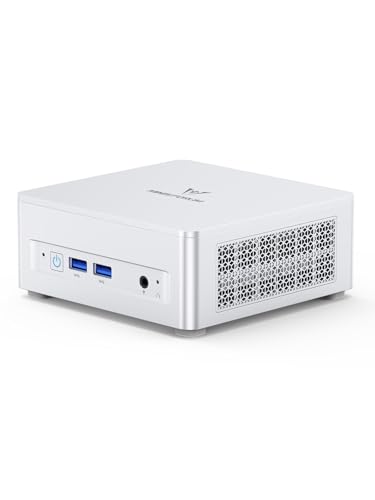
Where to buy
Check the latest price, availability and delivery on Amazon. Orders are placed on Amazon. We may earn a commission from qualifying purchases.
- Best overall workstation under $800: Minisforum UM870 Slim, Ryzen 7 8745H, Radeon 780M, 32GB RAM, 1TB SSD — Check on Amazon
- Beelink SER8, Ryzen 7 8745HS, Radeon 780M, 32GB RAM, 1TB SSD — Check on Amazon
- GMKtec NucBox K8 Plus, Ryzen 7 8845HS, Radeon 780M, 32GB RAM, 1TB SSD, OCuLink — Check on Amazon
- Minisforum UM890 Pro Barebone, Ryzen 9 8945HS, Radeon 780M, no RAM/SSD/OS — Check on Amazon
See 2 more Amazon options
- GMKtec NucBox M6 Ultra, Ryzen 5 7640HS, Radeon 760M, 32GB RAM, 512GB SSD — Check on Amazon
- Apple Mac mini, M4, 16GB unified memory, 256GB SSD — Check on Amazon
Read the full guide ↓
Disclosure: As an Amazon Associate, reviewstook.com earns from qualifying purchases. Links to Amazon on this page are affiliate links; they cost you nothing extra. Listing details such as price and availability change often, so check the current Amazon listing before you buy.
A small space changes what a workstation has to be. In a spare room with a full-size desk, a tower’s footprint is a rounding error; in a studio apartment, a dorm room, a box room or a corner of a shared living room, every square inch of desk is contested ground, and the machine has to earn its place before its specifications matter at all. The good news is that at $800, the serious end of the mini PC market has converged on a genuinely professional specification — an eight-core Ryzen processor, Radeon 780M integrated graphics, 32GB of RAM and a 1TB SSD — inside boxes that occupy less desk than the keyboard in front of them. This guide grades those machines the way a small room grades them: by what they take up once installed, not just by what they can do.
That word “installed” is doing real work, and it is where most small-PC buying goes wrong. A mini PC’s footprint is never just the box. It is the box plus the air the box needs to breathe, plus the power brick that has to live somewhere, plus the cables dropping off the back of the desk, plus the heat the machine pours into a room that may only be ten feet across. A PC that fits on the shelf but cooks inside it has not actually fit. So every review below carries an installation grade alongside the performance story: the form-factor class, where the machine can honestly live, and what it demands from the room around it. One rule applies to all six picks without exception: none of these machines belongs inside a sealed cabinet, a closed cupboard or an unventilated enclosure of any kind. Every one of them cools itself with room air. Seal the air away and you have not tidied the PC — you have shortened its life and throttled its performance. If your only available space is behind a closed door, the correct purchase is a different space, not a different PC.
The honesty note that applies to this whole category applies here too. “Workstation” has a formal meaning — ISV-certified hardware and drivers for professional applications, usually with ECC memory — and no machine under $800 carries either. What these six machines offer is workstation-shaped capability in a fraction of the space: sustained multi-core performance, generous memory, fast storage, multi-monitor output and, in the best cases, near-silent cooling. For developers, photographers, editors working in 1080p or 4K-proxy workflows, data analysts and writers working out of small rooms, that trade is exactly right. Below are the quick picks, what “installed” really costs in space, a five-step checklist to run before you order, detailed reviews of all six machines, and the mistakes that waste money and desk space at this budget.
In this guide
Quick Picks
Short on time, or comparing several options at once? Each row below names a small-space situation and the machine that suits it, with a link to the listing.
| Your space | Pick | Why it fits | Link |
|---|---|---|---|
| Best all-round small desk | Minisforum UM870 Slim | The full tier spec in a documented sub-litre box that mounts behind a monitor, freeing the desk entirely | Check on Amazon |
| Quietest corner of a shared room | Beelink SER8 | Measured around 32 dBA under load — the machine a small room forgives | Check on Amazon |
| Small now, growing later | GMKtec NucBox K8 Plus | OCuLink leaves a door open to an external GPU dock without replacing the machine | Check on Amazon |
| Builders with a spare licence | Minisforum UM890 Pro Barebone | The strongest chip here; you supply RAM, SSD and OS and choose them yourself | Check on Amazon |
| Tightest budget, real work | GMKtec NucBox M6 Ultra | Socketed 32GB and USB4 in a budget-tier build — money left over for the desk itself | Check on Amazon |
| The five-inch answer | Apple Mac mini (M4) | The polished, near-silent Apple route in a five-inch square — with fixed memory and storage, stated plainly | Check on Amazon |
How These Picks Were Chosen
Every machine below passed two filters. The first is the workstation filter: a real Amazon listing in the United States that fits this guide’s budget; 32GB of RAM fitted on every Windows pick, carried in upgradeable slots on all but one; storage and core counts judged against the work — compiling, photo editing, multitasking with containers or a virtual machine, 1080p and proxy-based 4K editing — rather than against the label on the box. Prices in this category move often, so check price on Amazon before you buy — and for the most volatile picks, only buy when the live price sits within this guide’s budget. The one barebone is judged on its completed cost, parts included, never on its kit price. And the honesty filter sits over everything: no pick is described as ISV-certified and none is credited with ECC memory, because no listing or platform document for any of them establishes either.
The second filter is the one this guide exists for: installation. We graded each machine on its form-factor class — monitor-mounted mini, desk-standing mini, or compact square — and on the four things that decide whether a small PC actually works in a small room. Air: how the machine cools itself and how much clearance that cooling needs. The brick: every machine here draws power through an adapter or cord that occupies space of its own and generates its own warmth. Cable drop: how many cables leave the back of the machine, where they fall, and whether a dock can collapse them into one. Heat: a workstation under sustained load is a small heater, and in a ten-foot room that is a comfort question, not a footnote. A note on dimensions, because it matters in a guide about space: measurements and mounting claims appear below only where the maker’s own listing documentation states them. One pick here publishes full dimensions and includes a monitor-mount bracket in the box; where a maker does not publish a figure, we assign the machine a form-factor class and leave the tape-measure work to the checklist and the live listing, rather than borrowing numbers from other models.
What “Installed” Actually Means
Before the reviews, the four costs every small-space buyer should price in — because the box is the smallest part of the installation.
The box. All six machines here are minis: none of them asks for floor space, a tower’s shelf, or a desk deep enough to park a case on. That is the entire premise of the category, and it is genuinely liberating. But “mini” is a class, not a measurement, and the machines in it still differ in how they want to live: one of the six is documented to mount behind a monitor and disappear; the rest sit on the desk or a shelf and take their small patch of it honestly.
The air. Each of these machines pulls room air in and pushes warmed air out, and the vents doing that work cannot be against a wall, under a stack of paper, or inside furniture. As a working rule, leave a hand’s width of clear space on every side a machine vents from, and more behind the exhaust. This is also why the sealed-cabinet refusal in the introduction is absolute rather than advisory: a closed cupboard gives a PC a fixed, shrinking supply of ever-warmer air, and the machine responds the only way it can — by slowing down, getting louder, and aging faster. An open-backed shelf, a monitor mount, or a plain patch of desk in moving room air are all fine. A door that closes is not.
The brick. Mini PCs run on external power adapters, and the adapter is a physical object that runs warm and needs its own ventilated spot — on the desk, on the floor beside it, or on an open shelf. It does not belong in a drawer, a cable-tidy box with a sealed lid, or buried under the desk’s cable pile where its heat has nowhere to go. When you measure your space, measure for the brick as well as the box; the checklist below treats it as its own step for exactly this reason.
The cables and the heat. A workstation’s cable count grows quietly: power, one to three display cables, Ethernet if you wire it, a dock or hub, peripherals. On a small desk those cables drop off the back edge and need somewhere to fall that is not a kink against the wall — a few inches of gap between desk and wall is worth more than any cable-management accessory. And heat is the cost nobody budgets: a machine compiling or exporting for twenty minutes in a small, closed room raises that room’s temperature perceptibly, so placement in the room’s natural airflow — not the dead corner behind the door — matters to machine and owner alike.
Measure Before You Buy: Five Steps
- Measure the spot. Tape-measure the exact place the machine will live — shelf depth, desk corner, the gap behind your monitor — and write the numbers down. Then check them against the dimensions on the live listing you are buying from, not against a review of a different model. If the listing does not publish dimensions, that is a fact to weigh, not a gap to guess across.
- Check the ventilation clearance. Add a hand’s width on every venting side to the machine’s footprint, and confirm the spot can actually give it. If the only spot that fits the box cannot fit the box plus its air, the spot is wrong. Sealed cabinets and closed cupboards fail this step by definition, for every machine in this guide.
- Give the brick an address. Decide now where the power adapter will sit — desk surface, floor, open shelf — and confirm it is ventilated and reachable. If you cannot name the brick’s home, your installation plan is not finished.
- Walk the cable drop. Count the cables that will leave the machine, and trace each one’s path: display cables to the monitors, power to the wall, Ethernet if you run it. Confirm the desk can sit a few inches off the wall so cables fall straight instead of bending hard, and consider whether a USB4 dock — supported by most picks here — can collapse the whole bundle into a single cable to the machine.
- Then order. Only with the spot measured, the air confirmed, the brick housed and the cables walked do you place the order — and when it arrives, confirm the exact configuration in the cart matches what you intended, because this category sells barebone and complete versions, and different memory and storage variants, under lookalike listings.
The 6 Best Workstation PCs for Small Spaces Under $800
Minisforum UM870 Slim — Ryzen 7 8745H, Radeon 780M, 32GB RAM, 1TB SSD
Who it suits: The small-space worker who wants the desk back entirely — full workstation specification, and then the machine disappears behind the monitor.
Start with the performance — it is why this machine leads the guide. The Ryzen 7 8745H is an eight-core, sixteen-thread processor boosting to 4.9GHz, paired with the Radeon 780M integrated graphics that set this tier’s standard: strong enough for GPU-accelerated photo editing, smooth scrubbing of 4K timelines in proxy workflows, and light 3D work. Around that chip sits the specification a professional reads first — 32GB of DDR5-5600 in two SO-DIMM slots, upgradeable to 96GB; a 1TB PCIe 4.0 SSD with a second M.2 slot waiting empty; a rear USB4 port carrying data, video and power delivery for one-cable docking; HDMI 2.1 and DisplayPort 1.4 for up to three displays; 2.5GbE wired networking. It is, in short, the complete tier specification with no obvious compromise.
Installation grade: This is the one machine in the guide whose maker publishes the full physical story, and it is a good one. The chassis measures about 130 × 127 × 50mm — roughly 0.82 litres — and a VESA bracket is included in the box, so the machine can mount to the back of a monitor and take its desk footprint to zero. That is the single most valuable installation property any pick here offers a small room: the workstation stops competing for the desk at all. Mounted or standing, it still needs its air — leave clearance around the vents rather than sandwiching it tight between monitor and wall — and its power brick still needs the ventilated home the checklist describes. On noise, the maker claims below 35dB in performance mode from its phase-change cooling; treat that as a maker figure rather than a measurement, though the machine is well regarded for quiet running. One more honest note: the fitted Wi-Fi is a MediaTek module, fine on Windows but historically extra driver work under Linux — in a small space you may prefer the wired 2.5GbE port anyway. On price, check price on Amazon before you buy: this listing’s price moves with deal events and third-party sellers sometimes ask more, so only buy when the live price sits within this guide’s budget — anything above that is a shortage premium the hardware cannot justify.
- The complete tier specification: 780M graphics, 32GB of socketed RAM expandable to 96GB, a 1TB SSD and a second M.2 slot left free.
- Documented 130 × 127 × 50mm chassis with a VESA bracket in the box — the only pick here that can leave the desk completely.
- USB4 one-cable docking collapses the cable bundle on a small desk.
- Windows 11 Pro and a two-year maker warranty.
Honest limitation: The below-35dB noise number is the maker’s own claim rather than an independent measurement, and the MediaTek Wi-Fi module can mean extra driver work under Linux.
Choose it if you want the best all-round small-space workstation and a desk with no PC on it. Skip it if the listing sits above this guide’s budget when you shop — either wait it out, or take the M6 Ultra below and keep the change.

Beelink SER8 — Ryzen 7 8745HS, Radeon 780M, 32GB RAM, 1TB SSD
Who it suits: Anyone whose workstation shares a small room with the rest of life — a partner sleeping, a baby in the corner, audio work that cannot compete with a fan — and runs long, sustained jobs.
In a big office, noise is a preference. In a small room, noise is a condition of living: the machine is never more than a few feet from your ears, and a compile, an export or a batch render can pin a processor for twenty minutes at a stretch. Its vapor-chamber cooling has been measured by independent reviewers at around 32 dBA under load at typical desk distance — roughly the level of a quiet room’s own ambient sound — and reviewer roundups of this class of machine have repeatedly singled it out as the quietest mini PC of its kind under sustained load. The hardware beneath the quiet is the full tier specification: an eight-core Ryzen 7 8745HS to 4.9GHz, Radeon 780M graphics, 32GB of DDR5 in upgradeable slots to 64GB, a 1TB PCIe 4.0 SSD with a second M.2 slot, USB4, HDMI 2.1 and DisplayPort for three displays, 2.5GbE and Windows 11 Pro.
Installation grade: A desk-standing mini of the standard class — it takes a small, honest patch of desk or open shelf, and its installation demand is the usual one: clear air on the venting sides and a ventilated home for its power brick. Its quietness is itself an installation property, because it is what lets the machine live at arm’s length in a shared room without becoming the room’s dominant sound. What it does not change is the sealed-cabinet rule: a machine this quiet still breathes room air. The honest limitation is price discipline. This model’s price has often sat over this guide’s budget, and sold-out listings have drifted higher still, so check price on Amazon before you buy. This is therefore a buy-at pick, stated as plainly as we can state it: when the live price sits within this guide’s budget, ideally well under it, it is arguably the most pleasant workstation here to live beside; above the budget, the UM870 Slim above does the same work for less money and the premium buys you nothing but impatience. Make sure the configuration in front of you is the 32GB/1TB build rather than the 24GB variant, and let the deal come to you.
- Independently measured at roughly 32 dBA under load — the quietest full-spec machine here, and the one a shared small room forgives.
- The full 780M, 32GB and 1TB specification, with RAM in slots and a second SSD bay.
- Three-display output plus USB4 for a one-dock desk.
Honest limitation: Its price has often sat above this guide’s budget, so the pick only makes sense when the live price falls within the budget line — check price on Amazon.
Choose it if silence is worth waiting for a price dip. Skip it if you need a machine this week at any price — the UM870 Slim does the same class of work without the premium.

GMKtec NucBox K8 Plus — Ryzen 7 8845HS, Radeon 780M, 32GB RAM, 1TB SSD, OCuLink
Who it suits: The small-space buyer whose needs might grow teeth — a future external GPU for rendering or AI work, a fast home network, a second life as a small server — and who cannot afford to buy a bigger room along with a bigger PC.
The K8 Plus answers a specifically small-space anxiety: what happens when the little box stops being enough? Its base specification matches the tier’s best — a Ryzen 7 8845HS, eight cores to 5.1GHz and the fastest sustained clocks of the complete machines here, with Radeon 780M graphics, 32GB of DDR5-5600 in two slots, a 1TB PCIe 4.0 SSD and a second M.2 slot, running Windows 11 Pro. What separates it is the expansion set. An OCuLink port lets you connect an external GPU dock later — the one credible route by which a mini PC grows into heavier 3D, rendering or local AI work without replacing the machine. Dual USB4 ports, dual 2.5GbE networking and display outputs for up to four monitors per the listing family make it equally plausible as a desk workstation today and a homelab or file-serving box in a second career. Growth, for this machine, is a dock on the desk rather than a new tower beside it.
Installation grade: A desk-standing mini, installed like the others — clear air, a housed brick, cables walked off the back of the desk. The installation point worth planning for is the future one: if the OCuLink dock arrives later, it will need its own patch of desk and its own air, so a buyer with eGPU plans should reserve that space in the Step 1 measurement rather than discovering its absence in a year. The catch is this guide’s most volatile pricing, and the review would be dishonest without it up front. Its pricing is the most volatile in this guide, and the memory shortage has spiked the whole category at times. A spike does not make the machine better; it makes the market worse. So the rule is hard: check price on Amazon, buy only when the live price sits within this guide’s budget, and walk away from a listing wearing a shortage premium — the correct purchase then is patience. Confirm at checkout, too, that the configuration is the complete 32GB/1TB build — GMKtec sells a barebone version of this chassis under a similar listing family, and the kit price is not this price.
- OCuLink expansion — the only complete pick here that can grow a discrete GPU later, in dock form rather than tower form.
- Dual USB4, dual 2.5GbE and up to four displays: workstation and homelab in one small box.
- The fastest CPU clocks among the complete machines, with socketed RAM and two SSD slots.
Honest limitation: Its pricing is the most volatile in this guide, so the pick is conditional on the live price sitting within this guide’s budget — check price on Amazon.
Choose it if room to grow matters more than buying convenience. Skip it if the live listing wears its shortage price; the same discipline applies to every pick here, but to this one most of all.

Minisforum UM890 Pro Barebone — Ryzen 9 8945HS, Radeon 780M, No RAM/SSD/OS
Who it suits: The builder-professional in a small room: the developer or IT-literate buyer who already owns a Windows licence or runs Linux, and would rather choose their own memory and storage than accept a factory configuration.
Read the listing title literally: barebone means the box arrives carrying a processor, a motherboard and a cooler — and no RAM, no SSD and no operating system. Judged on its completed cost, honestly, it stands among the strongest workstations here. The Ryzen 9 8945HS is the most powerful chip in the guide — eight cores to 5.2GHz with the Radeon 780M running at its full clock — in a chassis with two DDR5 SO-DIMM slots to 96GB, two PCIe 4.0 M.2 slots, dual USB4 with power-delivery input, dual 2.5GbE and four-display output. Check price on Amazon for the kit itself. Completing it means adding 32GB of DDR5-5600 and a 1TB PCIe 4.0 SSD at current parts prices, so run that total yourself before you buy — with the guide’s strongest CPU and every component chosen by you, including faster or larger storage than any factory pick fits.
Installation grade: Physically, a desk-standing mini like the others — but its installation story has two honest complications a small room should hear. First, review measurements of the platform put it around 43dB in performance mode, making it the loudest pick here under full load; in a small shared room that is a real cost. Second, its expansion subtlety: this chassis’s OCuLink runs through an included M.2 adapter plate, which consumes one of the two M.2 slots — fit an external GPU and you are down to a single SSD bay. Neither point changes the universal rules: clear air around the vents, a ventilated home for the brick, and no sealed cabinet — a machine that runs loudest also breathes hardest, and enclosing it would be the worst placement in this guide. Now the honesty the headline price hides. The completed total excludes the operating system entirely: add a Windows licence if you need one and the figure can cross this guide’s budget, while Linux users pay nothing for the OS and keep the best of the deal. The whole proposition also rides on parts prices, and if memory prices spike further, the factory UM870 Slim becomes the safer arithmetic.
- The guide’s strongest processor, completed to 32GB/1TB with parts you choose yourself.
- RAM and SSD are your choice — capacity, speed and brand, not the factory’s.
- Two USB4 ports, two 2.5GbE ports, four displays, RAM to 96GB.
Honest limitation: The kit price excludes RAM, SSD and the operating system; with a paid Windows licence the completed total can pass this guide’s budget, its OCuLink adapter consumes an M.2 slot, and at around 43dB under load it is the loudest pick here.
Choose it if you run Linux, hold a spare licence, or simply enjoy specifying your own machine. Skip it if you need a PC working the evening it arrives — every complete pick above this one does that.
GMKtec NucBox M6 Ultra — Ryzen 5 7640HS, Radeon 760M, 32GB RAM, 512GB SSD
Who it suits: The value-minded professional in a small room whose work is real but not GPU-heavy — development, writing, data work, office-plus — and who would rather spend the savings on the space itself: a monitor arm, a better chair, a proper desk.
The M6 Ultra is the discipline pick — it asks what your workload actually needs and declines to sell you the rest. Its Ryzen 5 7640HS is a six-core, twelve-thread chip running to 5.0GHz — two cores fewer than the picks above, a gap you will feel in heavy compiles and long exports but not in ordinary professional work — and its Radeon 760M sits one rung below the 780M: fine for photo editing, multi-monitor productivity and light creative work, a step behind on 4K timelines. What it refuses to skimp on is the workstation skeleton: the full 32GB of DDR5 in two socketed slots, USB4 for one-cable docking, display outputs for three 4K monitors, dual 2.5GbE networking and Windows 11 Pro. It sits in the budget tier of this guide — check price on Amazon — which makes it the pick that leaves the most room in the budget for the room around the machine.
Installation grade: A desk-standing mini with the standard installation demands — clear air, a housed brick, a clean cable drop — and one small-space virtue worth naming: because it leaves a meaningful share of the budget unspent, it is the pick that funds its own installation, whether that is the monitor arm that lifts your screen off a shallow desk or the open shelf the machine itself will sit on. The honest limitation is storage. The fitted drive is a 512GB SSD running at PCIe 3.0 speeds — half the tier’s standard capacity and a generation behind on throughput. For code, documents and cloud-backed work, that is a shrug; for local photo and video libraries it fills fast, and large copies will not match the PCIe 4.0 machines above. The maker’s documentation does provide further M.2 expansion in the chassis, so the fix is a second drive rather than a new PC — but budget for it knowingly. A 1TB variant of this machine exists under a different listing: near this price it is the better buy, and if this 512GB configuration is wearing a 1TB price, walk away.
- A budget-tier price point — the full workstation skeleton for well under budget, with money left for the room.
- 32GB of RAM in sockets, USB4 docking, three 4K displays, dual 2.5GbE.
- Six fast cores cover most professional workloads without waste.
Honest limitation: Its fitted 512GB PCIe 3.0 SSD holds half the tier’s standard capacity at a generation slower; heavy local media work will want a second drive.
Choose it if your work is CPU-and-memory work, not graphics work. Skip it if you edit video daily or keep large local libraries — there, the 1TB picks earn their premium.

Apple Mac mini (M4) — 16GB Unified Memory, 256GB SSD
Who it suits: The professional in a small space whose software, clients or sanity live in the Apple ecosystem — iOS and macOS development, Apple-first creative tools, anyone leaving an Intel Mac behind.
The Mac mini is the odd machine in this guide and, for a small room, in some ways the most natural one. Apple’s M4 chip — a 10-core CPU and 10-core GPU — delivers single-core responsiveness that embarrasses everything else here, the machine runs at a whisper under work loads, and macOS on Apple silicon is a genuinely polished professional platform with three-display support (up to two 6K panels over Thunderbolt, per Apple’s specifications). Check price on Amazon — during sale events it can become, on the right week, one of the more affordable complete picks in the guide. For a developer targeting Apple platforms, no substitute exists at any price in this article: you cannot build or buy a Windows mini that runs Xcode.
Installation grade: The base guide’s own description is the honest one — a near-silent five-inch square. It asks for the smallest patch of desk in this guide, its cable set is modest, and its whisper-quiet running suits a shared room as well as the SER8’s measured silence does. The universal rules still apply: it breathes room air like everything else here, so it gets clearance around its vents and never a sealed cabinet, however tidy that would look. The limitations are structural, and Apple buyers should meet them before checkout, not after. Memory and storage are soldered at the factory and can never be upgraded — the 16GB and 256GB in this configuration are what it will die with. Set against this guide’s own standard — 32GB of RAM and 1TB of storage, fitted by every Windows pick — that is a real shortfall for virtual machines, big catalogs and local media, and 256GB fills with professional tooling faster than buyers expect. Stepping up Apple’s ladder fixes it, at Apple’s prices, which leave this budget behind quickly. Nor is there any Windows here at all: if your professional software is Windows-only, this is not a cheaper workstation but a different platform. Buy it from Amazon itself — check price on Amazon first, because third-party sellers have asked well above the usual level on this listing, and no Mac mini is worth paying a markup for.
- The strongest single-core performance and quietest manners in the guide, in a five-inch square.
- The only route to macOS and Xcode under $800 — check price on Amazon, especially during sale events.
- Three-display support including 6K panels, from the smallest desk footprint here.
Honest limitation: Its 16GB of memory and 256GB of storage are soldered and unchangeable — half this guide’s standard spec, forever — and Windows software is simply absent.
Choose it if your work lives inside Apple’s ecosystem. Skip it if you need 32GB of RAM, a terabyte of local storage, or a single Windows application.

Comparison Table
| Product | Processor / Graphics | Memory / Storage | Installation | Link |
|---|---|---|---|---|
| Minisforum UM870 Slim | Ryzen 7 8745H / Radeon 780M | 32GB socketed (to 96GB) / 1TB + spare slot | 130 × 127 × 50mm (~0.82L); VESA bracket in box — can leave the desk entirely | Check on Amazon |
| Beelink SER8 | Ryzen 7 8745HS / Radeon 780M | 32GB socketed (to 64GB) / 1TB + spare slot | Desk-standing mini; measured ~32 dBA under load — built for shared rooms | Check on Amazon |
| GMKtec NucBox K8 Plus | Ryzen 7 8845HS / Radeon 780M | 32GB socketed / 1TB + spare slot | Desk-standing mini; reserve space for a future OCuLink GPU dock | Check on Amazon |
| Minisforum UM890 Pro Barebone | Ryzen 9 8945HS / Radeon 780M | None fitted (slots to 96GB / dual M.2) | Desk-standing mini; ~43dB under load — a working room, not a silent corner | Check on Amazon |
| GMKtec NucBox M6 Ultra | Ryzen 5 7640HS / Radeon 760M | 32GB socketed / 512GB PCIe 3.0 | Desk-standing mini; budget-tier pricing — savings can fund the desk setup itself | Check on Amazon |
| Apple Mac mini (M4) | Apple M4 10-core / 10-core GPU | 16GB soldered / 256GB soldered | Five-inch square; near-silent — the smallest desk footprint here | Check on Amazon |
How to Choose a Workstation PC for a Small Space
- Run the five steps before you fall in love with a spec sheet. Measure the spot, confirm the ventilation clearance, house the brick, walk the cable drop, then order. A machine that wins on paper and loses to your shelf depth is the wrong machine, however fast it compiles.
- Decide where the machine lives: behind the monitor, or on the desk. One pick here — the UM870 Slim — documents a sub-litre chassis and includes a VESA bracket, so it can mount behind a display and free the desk completely. The rest are desk-standing minis that take a small patch honestly. If desk area is your scarcest resource, that distinction outranks half a gigahertz of boost clock.
- Treat noise as a distance problem. In a small room the machine is always close. The SER8’s measured ~32 dBA under load and the Mac mini’s whisper are what let a workstation share a room with sleep, calls and concentration; the barebone’s ~43dB performance mode is a real cost at arm’s length. Price the decibels before you price the cores.
- Never solve a space problem with a sealed cabinet. Every pick in this guide cools with room air. A closed cupboard, a lidded cable box or an unventilated enclosure starves that cooling, and the machine pays in throttling, noise and lifespan. Open-backed shelving, a monitor mount or plain desk in moving air are the only honest “hidden” installations.
- Make 32GB of RAM the floor, and sockets the future. Every Windows pick here fits 32GB, in slots that can grow to 64GB or 96GB. The Mac mini’s soldered 16GB is a ceiling agreed on day one — the single most consequential difference between it and the rest of this guide.
- Complete the barebone arithmetic before admiring it. Kit price plus RAM plus SSD plus an operating system is the real price. Add the kit, the parts and your licence together and check the total against this guide’s budget — a bargain for Linux users and licence holders, a mirage for anyone who forgets the last line.
- Buy calmly, not at the spike. Prices in this category swung violently during the late-2026 memory shortage. Every review above carries a buy line; a workstation bought calmly when its live price sits within budget is the same machine as one bought in a panic at a shortage premium.
What “Workstation” Honestly Means at $800
Two terms do real work in professional computing, and this guide uses neither loosely. ISV certification means a hardware vendor and a software vendor have jointly tested one specific machine-and-driver combination for one specific professional application — SolidWorks, Creo, AutoCAD, Siemens NX and their peers — and will support that combination when it breaks. Certified machines pair workstation graphics lines with certified drivers, and the certification is a large part of what their prices buy. ECC memory catches and corrects the single-bit errors ordinary RAM silently passes through; for long renders, large simulations and financial or scientific work that runs for days, that correction is the difference between a result and a rumor. No machine in this guide carries ISV certification, and none is credited with ECC support, because no listing or platform document establishes either for any of them. If your employer, client or regulator requires either, this entire tier is the wrong shelf — and no amount of smallness makes it the right one.
What this tier does deliver, it delivers honestly — and in a remarkably small volume. Eight-core performance that sustains itself through a long export instead of throttling away. Memory capacity that holds real professional multitasking — in slots that let it grow. Integrated graphics — the Radeon 780M above all — that genuinely accelerate photo editing, timeline scrubbing, CAD navigation and light 3D, working as a real tool rather than a mere display adapter. Storage quick enough that opening a project stops being a coffee break. And acoustic manners that let the machine share a room with you. The workloads that fit are software development and local testing with containers and VMs, photography and design, 1080p editing and 4K work on proxies, 2D CAD and light 3D modeling, data analysis, technical writing with local tooling, and small-server second careers for the dual-LAN picks. The workloads that do not are production GPU rendering, certified engineering seats, heavy simulation and color-critical finishing. A guide that tells you which list you are on is worth more than one that calls everything a workstation, and hopes.
Common Buying Mistakes
- Measuring the box and forgetting the installation. The footprint that matters is box plus air plus brick plus cables. Buyers who measure only the chassis discover the rest on delivery day.
- Hiding the PC in a sealed cabinet to “save space.” You have not saved space; you have built an oven. Every machine here needs moving room air, and closed furniture is refused for all six picks.
- Putting the power brick in a drawer or a sealed cable-tidy box. The brick runs warm and needs ventilation of its own. Give it an open address or expect it to age early and heat its neighbors.
- Pushing the desk flush against the wall. Display and power cables need a few inches to drop without bending hard against the wall; a small gap is the cheapest cable management there is.
- Ignoring noise until the first long export. In a small room, sustained-load volume is a living condition. A machine measured around 32 dBA and one at 43 dB are different housemates.
- Paying for the word “workstation” instead of the specification. At this budget the label certifies nothing — the core count, memory and storage lines are the product.
- Buying a spiked listing. Shortage pricing has pushed picks here well above their usual level. Check price on Amazon, follow the buy line in each review, and let a bad price wait.
- Comparing a barebone kit price against complete machines. The kit is a starting point, not a PC — complete the arithmetic (RAM, SSD, operating system) before declaring it the bargain.
- Accepting soldered memory unknowingly. 16GB that can never grow is a different purchase from 32GB in slots, whatever this month’s benchmark charts say.
- Assuming the listing photo is the configuration. Barebone and complete versions, 24GB and 32GB variants, and 512GB and 1TB variants all sell under lookalike listings in this category. Confirm the exact configuration sitting in the cart before paying.
Final Recommendation
- Most small-space professionals: Minisforum UM870 Slim — the full tier specification, and the one pick that can mount behind a monitor and give the desk back.
- Shared rooms and quiet corners: Beelink SER8 — bought when its live price sits within budget; check price on Amazon.
- Growth without a bigger room: GMKtec NucBox K8 Plus — bought at a fair live price, never at its spike.
- Builders and Linux users: the Minisforum UM890 Pro Barebone, completed with your own parts.
- Tight budgets, real work: GMKtec NucBox M6 Ultra.
- Apple-ecosystem work: the Apple Mac mini (M4), bought from Amazon at or near list.
Our top two for most readers are the UM870 Slim, because it assembles the entire tier specification — 780M, socketed 32GB, 1TB, USB4, three displays — in the only chassis here documented to disappear behind a monitor, and the SER8, because its measured quiet under sustained load is the quality a small shared room feels every working day. The K8 Plus is the hedge for anyone whose graphics needs may outgrow integration; the barebone UM890 Pro is the strongest machine here for anyone licensed and willing to finish it; the M6 Ultra is proof that the workstation skeleton survives in the budget tier, with change left over for the desk; and the Mac mini remains the only door into macOS, in the smallest footprint of all. Readers whose space is larger than their workload should also see Best Workstation PC Under $800 for the full performance-first guide, and those working in tighter budgets should look at Best Workstation PC For Small Spaces Under $500. Whichever you choose, run the five steps first — measure the spot, confirm the air, house the brick, walk the cables, then order — and remember what this tier honestly is: not a certified workstation, but a serious professional tool that happens to fit in one hand.
Frequently Asked Questions
Can I put a mini PC inside a cabinet or cupboard to save space?
No — not a sealed one, and this applies to every machine in this guide. All six cool themselves with room air; a closed cabinet gives them a fixed supply of ever-warmer air, and they respond with throttling, louder fans and shortened component life. An open-backed shelf, a monitor mount or a patch of desk in moving air are all fine. A door that closes is not an installation, it is a slow failure.
How much clearance does a mini PC actually need?
As a working rule, a hand’s width of clear space on every side the machine vents from, and more behind the exhaust. The exact vent layout varies by model, so check the listing photos and maker documentation for the machine you buy — and if a spot fits only the box with nothing to spare, it fails Step 2 of the checklist — choose a different one.
Is a mini PC really a workstation?
For the workloads listed in this guide, yes by capability; by certification, no. These machines deliver sustained multi-core performance, 32GB of memory and fast storage inside a small, quiet box — enough to cover development, photo work, light video and data work completely. They carry no ISV certification and no ECC memory, so regulated or certified engineering and media environments should buy certified hardware instead — at certified prices, and at certified sizes.
Where should the power brick go?
Somewhere ventilated and reachable: on the desk, on the floor beside it, or on an open shelf. The brick runs warm in normal operation, so it does not belong in a drawer, a sealed cable-tidy box, or buried in the cable pile behind the desk. Decide its home before you order — it is Step 3 of the checklist for a reason.
How much RAM does a workstation under $800 actually need?
32GB is this tier’s correct standard — it holds an IDE, containers or a VM, a browser’s worth of documentation and a creative application all at once, without swapping. 16GB — the Mac mini’s fixed allocation — works for lighter professional loads but leaves no headroom, and on soldered machines there is no later fix. If your work involves multiple VMs or very large datasets, choose among the picks whose slots reach 96GB.
Is the barebone UM890 Pro really cheaper than the complete machines?
In hardware, it can be — the kit plus memory and storage you choose can complete it within this guide’s budget, with the strongest CPU in this guide; check price on Amazon for the kit and price the parts before you commit. The saving evaporates if you must buy a Windows licence at full price, and it costs an evening of assembly plus your own warranty legwork on the parts. Linux users and licence holders keep the whole bargain; everyone else should run their own total first.
Why do prices for the same machine vary so much?
The late-2026 memory and SSD shortage repriced the entire category repeatedly, and marketplace sellers add their own spread on top — the K8 Plus in this guide is a clear example of how widely one machine’s price can swing. That is why every review in this guide carries a buy line. Treat a live price far above a pick’s usual level as a reason to wait or switch picks, not as a new normal to accept — always check price on Amazon before you buy.
Should I buy the Mac mini instead of a Windows mini?
If your software lives in Apple’s ecosystem — Xcode above all — yes, and nothing else in this guide is a substitute; it is also the smallest and one of the quietest installations here. Otherwise, weigh the trade honestly: the Mac mini offers the best single-core speed here, against half the memory and a quarter of the storage of the Windows picks, soldered permanently. For platform-neutral professional work, the Windows machines return more workstation per dollar at this budget.
- Best Workstation PC Under $800
- Best Workstation PC Under $500
- Best Workstation PC Under $700
- Best Workstation PC Under $1200
- Best Workstation PC For Beginners Under $800
- Best Workstation PC For Small Spaces Under $500
- Best Workstation PC For Streaming Under $800
- Best Mini PC Under $800
- Best Home Office PC Under $800


