Where to buy
Check the latest price, availability and delivery on Amazon. Orders are placed on Amazon. We may earn a commission from qualifying purchases.
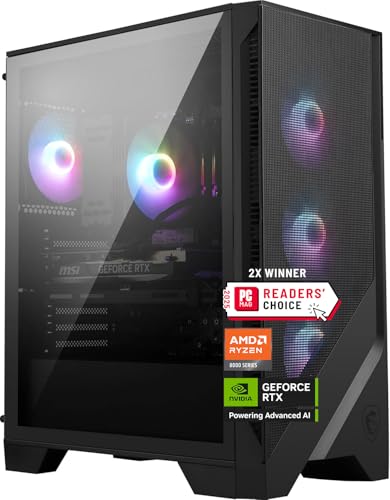
- Best fit for a tight corner: MSI Codex Z2 Gaming Desktop, Ryzen 7 8700F, RTX 5070, 32GB DDR5, 2TB SSD — Check on Amazon
- Skytech Omega Gaming PC, Ryzen 7 7700X, RTX 4070 Super, 32GB DDR5 RGB, White — Check on Amazon
- Skytech Omega Gaming PC, Ryzen 7 7800X3D, RTX 4070 Super, 32GB DDR5 RGB — Check on Amazon
- ASUS ROG Strix G15DS Gaming Desktop, Ryzen 7 7700X, RTX 4070, Aura Sync — Check on Amazon
See 2 more Amazon options
- Acer Nitro 70 N70-130-UR13, Ryzen 9 7900, RTX 4070, 32GB DDR5 — Check on Amazon
- Thermaltake LCGS View i4770 Gaming Desktop, i7-14700KF, RTX 4070, 32GB DDR5 RGB — Check on Amazon
Read the full guide ↓
Disclosure: As an Amazon Associate, reviewstook.com earns from qualifying purchases. Links to Amazon on this page are affiliate links; they cost you nothing extra. Listing details such as price and availability change often, so check the current Amazon listing before you buy.
Start with the sentence nobody selling these machines wants to lead with: not one of the six PCs in this guide is small. Every pick below is a full-size glass-sided RGB tower — designed, quite deliberately, to be looked at. There is no mini PC hiding in this list, no box that tucks behind a monitor, and no pick offers VESA mounting of any kind; if your space is a monitor arm and a sliver of desk behind the screen, stop here and go to the mini PC guides instead, starting with Best Mini Gaming PC Under $1500 and Best Mini PC Under $1500. What this guide is for is the more common problem: a tower sits in a small room, a studio corner, a dorm desk or a shared bedroom, and the question is not whether it is small but whether it will install honestly — where it can stand, which way its glass faces, where its air comes from and goes to, where the cables fall, and how much heat it pours into the room.
That reframing matters because a glass RGB tower has placement demands a plain box does not. The glass side is the product: park the machine with that panel against a wall or buried under a desk and you have paid for a light show you cannot see. Its intake and exhaust are also part of the deal — a mesh front drinks air from the room in front of it, a glass front does not, and a radiator turns the case’s top or rear into its chimney. In a large room these are footnotes; in a small one they decide whether the PC lives on the desk, beside it or not at all. So this guide re-grades the parent guide’s six verified RGB machines — same listings, same verified picks, same buying discipline — purely on installation: form-factor class, documented intake and exhaust behaviour, cable drop, heat, and one hard rule that outranks everything else. None of these six belongs inside a sealed cabinet, a closed TV stand or any other unventilated box, however neatly it would fit — the most tempting and most damaging installation error there is in a small space.
Two carry-overs from the parent guide deserve repeating. First, the money: this tier is violently sale-driven, and prices swing widely through the year — check price on Amazon before you buy, and only buy when the current price sits within this budget. Second, the ceiling: no verified prebuilt with an RTX 4070 Ti Super comes within this budget, whatever a headline claims. For the lighting-first grading of these same six machines — addressable versus fixed effects, control software, the RGB tax — see the parent guide, Best RGB Gaming PC Under $1500. This companion grades the same boxes as furniture that has to breathe.
In this guide
Quick Picks
Short on time? Each row below names a small-space situation and the product that suits it, with a link to the listing.
| Your space | Pick | Why it installs best there | Link |
|---|---|---|---|
| A tight corner or a desk against a wall | MSI Codex Z2, Ryzen 7 8700F, RTX 5070 | Mesh front intake, an air cooler with no radiator to site, and glass on the side, where it costs no air | Check on Amazon |
| A small desk that can carry the show | Skytech Omega, Ryzen 7 7700X, RTX 4070 Super, White | The class benchmark — check price on Amazon — with a 360mm radiator doing exhaust duty — give it open air above and behind | Check on Amazon |
| High-refresh play in a small room | Skytech Omega, Ryzen 7 7800X3D, RTX 4070 Super | The same installation story as the top Omega, wrapped around the tier’s best gaming CPU — at the top of this budget tier, so check price on Amazon | Check on Amazon |
| A room the PC has to leave sometimes | ASUS ROG Strix G15DS, Ryzen 7 7700X, RTX 4070 | Airflow-zoned chassis with a carry handle — the one pick designed to be moved — but only 16GB of RAM | Check on Amazon |
| Under the desk, out of the way | Acer Nitro 70 N70-130-UR13, Ryzen 9 7900, RTX 4070 | The plainest face in the guide — check price on Amazon; it is often the most affordable full-spec option here — the pick that wastes least on a show nobody will see | Check on Amazon |
| A desk that is the room’s display shelf | Thermaltake LCGS View i4770, i7-14700KF, RTX 4070 | A glass-fronted exhibit that needs the most open placement of the six — deal-only at this budget | Check on Amazon |
How These Picks Were Chosen
The set itself is inherited, deliberately: these are the same six verified listings as the parent RGB guide, each verified as a real Amazon listing in the United States — check price on Amazon to confirm the current price sits within this budget. What changed is the grading. A small-spaces guide that simply re-ranked by gaming performance would be the parent guide with a new title, so every pick was re-scored on installation evidence only: form-factor class, the intake and exhaust behaviour its maker documents, whether its cooling needs a radiator site or none, what its cables demand of the wall and the desk edge, and how its heat behaves in the placements small rooms offer — desk corner, floor beside the desk, open shelf, and (refused, for all six) a closed cabinet.
One discipline needs stating plainly, because it shapes everything below: the research behind this guide documents no dimensions, no case volumes, no weights and no noise figures for any of these six machines, and no VESA mounting for any of them — so this guide prints none. You will not find a litre count or a measurement here: inventing them is how buying guides send a tower to a home it does not fit. Instead, the five-step checklist near the end tells you what to measure and where the one authoritative source for each machine’s footprint lives: the live listing’s specification section, checked against your tape before you order. What the documentation does support, and what the reviews grade on, is placement behaviour — which face breathes, which face is glass, where the hot air leaves, and what the machine asks of the socket and the cable run. Those facts, plus your own measurements, decide a small-space installation far more reliably than a volume figure would.
Two standing cautions from the parent guide apply unchanged. A power-supply wattage is stated only where the listing publishes it — published for the two Skytech Omegas (750W Gold), unpublished for the other four in our sources — and no figure is invented for them. Every one of these towers runs on an internal supply, so none has an external brick to house, hide or trip over, and the checklist’s socket question is about reach, not brick-housing. And because boutique listings like Skytech’s warn that the graphics card brand “may vary”, no specific board brand is named for any pick below.
One Form Factor, Six Different Installations
It would be tidy to report that one of these machines is the compact one. It would also be false. All six are full-size towers, and the honest way to separate them is by what each design does with the air, because that is what a small room feels. Think of the six as three installation classes. The first breathes through its face: the MSI’s mesh front panel feeds three intake fans directly from the room, making it the most forgiving tower here about where it stands — its front wants open air, but no radiator does its breathing for it, and its tempered glass sits on the side, out of the airflow path entirely. The ASUS belongs near this class too — multi-zone airflow rather than a sealed face. The second class breathes through its radiator: the two Skytech Omegas and the Thermaltake carry sealed liquid loops, and in a liquid-cooled tower the radiator is the exhaust — the hot air leaves where the radiator sits, so the space above and behind the case is working space, not spare space: park one under a low shelf or hard against a wall and it re-breathes its own heat. The third class is one machine: the Acer, a big-brand tower with lit case fans and no glass exhibit to protect — precisely why it is the guide’s under-desk candidate, the only pick whose presentation you are not wasting by hiding it.
Finally, the heat: a gaming tower under load is a small space heater with a light show, and in a studio flat or box bedroom its output accumulates in the PC’s corner until the machine is drawing its own warmed air back in as intake. The installation answers it: exhaust into open room air, never a wall pocket, and a door or window cracked in the smallest rooms.
The 6 Best RGB Gaming PCs for Small Spaces Under $1,500
MSI Codex Z2 Gaming Desktop — Ryzen 7 8700F, RTX 5070, 32GB DDR5, 2TB SSD
Who it suits: The buyer whose only spot is a corner, a desk end or a floor patch near a wall — the placement most towers tolerate worst — who wants the machine that asks the fewest favours from the room.
The Codex Z2 (model A8NVP-436US) takes the top row in this guide for one documented reason: it is the only pick whose front face is an intake rather than a display. A mesh-style front panel feeds its fans — three intake, one exhaust — straight from the room, and its cooling is an ARGB air cooler rather than a liquid loop, which removes the radiator question from the installation entirely: no radiator to site, no top or rear zone that must be kept clear above all else. The case breathes in at the front and out at the back like a conventional tower, and its tempered-glass side panel sits outside the airflow path, where glass belongs. In a small room that means real freedom — the front wants open air, the back wants a cable’s worth of breathing room, and no other face makes demands. MSI also builds the Z2 from standard parts in a standard case, so future repairs and swaps use ordinary parts, not a proprietary shell.
The lighting, unusually for this guide, is also an installation feature. It runs under MSI’s Mystic Light through MSI Center, and a dedicated LED button on the case cycles through 60 effects, hands control to the software when held, and can switch the rig to darkness outright. In a studio flat or shared bedroom, that button is the difference between a showpiece and a nuisance — the rig goes dark for a film or a partner’s sleep without an app or a reboot. The hardware behind the glass is the guide’s most current — a Ryzen 7 8700F (8 cores, boost to 5.0 GHz), an RTX 5070 of the Blackwell generation with its newer DLSS feature set, 32GB of DDR5 and a 2TB SSD, double the storage of most of this guide, on Windows 11 Home. The pricing demands the usual discipline: this model’s price swings widely and often sits well above this budget, so check price on Amazon and treat the recommendation as applying only when the current price sits within this budget. Two documentation gaps carry over: MSI does not publish the power supply’s wattage in the material behind this guide, so verify it live; and other Codex Z2 configurations share the family name with lesser cards, so match model A8NVP-436US at checkout, not just the words “Codex Z2”.
- Mesh front intake and air cooling: the most placement-tolerant breathing pattern of the six.
- A case button that can kill the lights entirely — the small-bedroom feature that actually gets used.
- Newest GPU in the guide (RTX 5070) and the largest SSD (2TB), in a standard, serviceable case.
Honest limitation: No pick’s price swings wider — it often sits well above this budget — and with the PSU wattage unpublished in the material we verified, that figure has to be confirmed on the live listing.
Choose it if your spot is tight, walled or awkward and you want the tower that copes best with all three. Skip it if the live price sits above this budget — check price on Amazon; above this budget the same chassis sells in configurations this guide does not cover.

Skytech Omega Gaming PC — Ryzen 7 7700X, RTX 4070 Super, 32GB DDR5 RGB, White
Who it suits: The buyer with a small desk that can genuinely carry a tower — open air above and behind it — who wants the full glass-and-liquid show and the tier’s benchmark value in the same footprint.
This Omega (model ST-OMEGA2-1124-W-AM) is a white build behind a tempered-glass side panel, cooled by a 360mm all-in-one liquid cooler whose fans carry the lighting, with 32GB of DDR5 RGB memory glowing mid-board and lighting zones controllable through pre-installed software. Installed, its one non-negotiable is the radiator: in a liquid-cooled tower the radiator is the exhaust, so the air above and behind this case is working air, and the machine must not be slotted under a low shelf, into a desk hutch or back-first into a corner where its heat pools and returns as intake. Give it an open desktop or floor spot, glass facing the room, and it asks nothing else; the white interior even softens the light in a small room. The substance is the tier’s benchmark: a Ryzen 7 7700X, an RTX 4070 Super with 12GB of GDDR6X — a native-1440p card — a 1TB Gen4 NVMe drive, a published 750W Gold power supply (a transparency most of this guide cannot match, and a practical comfort when planning which socket the corner offers) and Windows 11 Home.
Pricing is a headline here, exactly as in the parent guide: this exact model has at times offered standout value for the 4070 Super class, but its price swings widely — check price on Amazon before you buy. When it dips within this budget, this machine is the class performance benchmark and a full showpiece at once, with the lights effectively costing nothing extra. The honest limitations are the standard boutique ones: the price spends long stretches above this budget, so this is a buy-when-it-dips recommendation rather than a standing offer; the graphics card brand may vary under Skytech’s listing language; and the sealed 360mm cooler is a finite-life wear item — when its pump tires years from now, the unit is replaced, not serviced, worth knowing before it goes into an awkward spot.
- The complete show — glass, 360mm RGB liquid cooling, RGB memory, white finish — — check price on Amazon.
- Radiator exhaust is its one placement rule: open air above and behind, and it is content.
- Published 750W Gold PSU — rare transparency, and useful when planning the corner’s socket.
Honest limitation: Pricing is volatile — the listing commonly sits above this budget, so check price on Amazon and buy only when the current price sits within this budget.
Choose it if you have one honest open spot and can wait for the sale rotation. Skip it if your only placement is enclosed or shelf-capped — the radiator needs its chimney — or if you must buy this week at the live price, whatever it is.

Skytech Omega Gaming PC — Ryzen 7 7800X3D, RTX 4070 Super, 32GB DDR5 RGB
Who it suits: The high-refresh player in a small room — competitive 1080p, or 1440p chasing a fast monitor’s ceiling — whose desk spot can give a liquid-cooled tower the same open exhaust path as the pick above.
The installation carries over unchanged from the 7700X Omega, because it is the same showcase platform (model ST-OMEGA2-1126-W-AM): glass side panel deciding the machine’s orientation, 360mm liquid cooler whose radiator is the exhaust and therefore claims the air above and behind the case, 32GB of DDR5 RGB memory, software-controlled lighting zones, a 1TB Gen4 NVMe drive, a published 750W Gold power supply and Windows 11 Home. If the spot works for one Omega it works for the other; if it fails — enclosed, hutch-capped, exhaust into a wall pocket — it fails for both. What changes is entirely inside the glass: the Ryzen 7 7800X3D stacks extra cache precisely where games use it, making it the CPU of choice for CPU-limited play — high-refresh esports, simulation and strategy titles, any setup chasing a fast monitor’s ceiling — while in GPU-limited 1440p play the two Omegas produce near-identical results. One small-room consideration cuts in its favour: a high-refresh setup earns its keep at a desk you sit close to — exactly the small-room arrangement — so the X3D’s headroom is more likely to be felt here than across a living room.
The comparison with the 7700X model is unusually clean. This model sits at the very top of this budget tier when it qualifies at all — check price on Amazon — and the step up from the 7700X buys no lighting, case or cooling: the show is identical, and the entire difference is the processor. Decide it on your games — pay it if they are CPU-limited or your monitor is fast enough to expose the difference; keep it if your play is GPU-heavy 1440p. The caveats are the family ones: in-budget pricing comes and goes with sale rotations rather than holding steady, the card brand may vary, and the sealed cooler will one day be a replacement rather than a repair.
- The tier’s best gaming CPU inside the same installation-friendly showcase as the benchmark Omega.
- Identical footprint demands to the top Skytech — one spot assessment covers both.
- A published 750W Gold PSU and 32GB of RGB DDR5 come standard.
Honest limitation: There is no margin at all at the top of this tier, so a live price above this budget ends this guide’s recommendation — check price on Amazon.
Choose it if your spot passes the Omega test and your games are CPU-limited. Skip it if your play is GPU-limited 1440p — the 7700X Omega shows the same lights and the same frames for less, in the same space.
ASUS ROG Strix G15DS Gaming Desktop — Ryzen 7 7700X, RTX 4070, Aura Sync
Who it suits: The buyer whose small space is not a permanent space — the dorm room, the rented room, the desk that has to clear for exams, guests or a move — and who is already living in ASUS’s peripheral world.
The G15DS (model G15DS-DH774) is the one machine here designed to be picked up: a carry handle, a headphone hook, and cooling arranged in airflow zones rather than behind a sealed display face — a tower meant to be moved between rooms rather than installed once and admired. That mobility is a genuine installation grade: this is the pick you can lift off the desk to vacuum behind it, carry to a LAN weekend, or re-site when the room is rearranged, without the move becoming a project. Its lighting runs under Aura Sync, ASUS’s control platform — the one system here designed to synchronize beyond the case, so the PC’s zones and compatible ASUS peripherals take the same colour and effect from one application. In a small room that unification has a spatial payoff: one glow, set once, instead of every device running its own unsynchronized show. Inside sit the same Ryzen 7 7700X as the benchmark Omega, an RTX 4070 Dual, a 1TB PCIe SSD and Windows 11 Home, with a wired keyboard and mouse in the box.
Two limitations are stated at full size, because both surprise buyers after delivery. Memory comes first: this configuration ships with 16GB of DDR5-4800 in a tier where 32GB — carried by every other pick here — is the standard. Sixteen gigabytes still games, but it is the first component a 2026 buyer will feel, so price the machine as the tower plus a matching memory upgrade from the start — machine + fix, never machine alone — with the added sticks ideally joining the Aura show. The second is the channel: when this model appears within this budget it has typically been via an Amazon marketplace-seller offer rather than Amazon’s own shelf, so check price on Amazon and confirm the seller, the warranty route and the return terms on the live listing before ordering; it does trade near this budget. The power supply’s wattage is likewise unpublished in our sources — check it live; the supply is internal regardless, so the socket question stays one of reach.
- The movable pick: carry handle, headphone hook and an airflow-zoned chassis.
- Aura Sync unifies the PC and ASUS peripherals into one show — worth most in a small room.
- Same 7700X processor as the benchmark pick, with keyboard and mouse included.
Honest limitation: 16GB of RAM in a 32GB tier — budget the upgrade into the purchase — and in-budget offers have typically come via a marketplace seller, so verify seller and warranty live.
Choose it if the PC has to travel, or your desk already glows ASUS. Skip it if you want 32GB and Amazon-sold stock in a fixed installation — the MSI and the Omegas cover that ground.

Acer Nitro 70 N70-130-UR13 — Ryzen 9 7900, RTX 4070, 32GB DDR5
Who it suits: The buyer whose small space leaves the PC exactly one honest option — under the desk or on the floor beside it — and who would rather spend on hardware than on a show that placement will hide anyway.
Every small-spaces guide needs its control pick, and the Nitro 70 is this one’s. Nothing in its hardware is a compromise: a 12-core Ryzen 9 7900, an RTX 4070 with 12GB, 32GB of DDR5-4800, a 1TB PCIe Gen4 SSD, Wi-Fi 6E and Windows 11 Home, with keyboard and mouse in the box per Acer’s specification page. What is modest is the presentation — RGB case fans behind a big-brand tower face rather than a glass exhibit — and in this guide that modesty is an installation virtue. A tower that lives under a desk wastes whatever it spends on being looked at; the Acer spends almost nothing there, so it is the one pick whose value survives the placement small rooms most often impose. Two placement rules still apply, the same physics as everywhere else here: under-desk is acceptable only in the open — a desk with open sides and back, intake drawing room air, exhaust escaping freely — and a closed pedestal, cabinet door or boxed-in footwell is a sealed cabinet by another name, refused for this machine exactly as for the other five. Its lighting control carries a documentation caveat we would rather print than smooth over: Acer’s own community and support material notes that NitroSense RGB and fan control availability varies by exact model and serial range within the Nitro line, so check what your unit offers rather than assuming the full suite — and in a shared bedroom, confirm the fans can be dimmed or darkened before the first night, not after.
At its best, this is often the most affordable full-spec option in the guide — check price on Amazon — for the same class of graphics card as the benchmark Omega and more processor cores. The rest of the story is the familiar warning in its sharpest form: it typically sits well above this budget, and in-budget offers have often come through Amazon’s other-sellers section, so this pick lives or dies on the day you catch it and on which seller is offering the in-budget price. The power supply’s wattage is unpublished in our sources — verify it live; as with every pick here, the supply is internal and there is no brick to place. Treat the Nitro as the guide’s opportunistic buy: live within this budget from a seller you are comfortable with — check price on Amazon — it is arguably the smartest purchase here for the under-desk buyer; well above this budget, it is not in this tier at all.
- A full 32GB, RTX 4070 specification — check price on Amazon; often the most affordable route here when on sale.
- The plainest face here — the pick that wastes least when the placement hides the machine.
- The strongest processor core count in the guide — a 12-core Ryzen 9 — for mixed gaming and work.
Honest limitation: RGB control via NitroSense varies by exact model per Acer’s own support material, its in-budget prices have been documented via other sellers, and under-desk placement is only acceptable in the open — never in a closed pedestal.
Choose it if it sits within this budget — check price on Amazon — and the tower’s home is the floor. Skip it if its current price sits well above this budget, or if the glass showcase is the purchase you set out to make — that is what the four picks above it are for.

Thermaltake LCGS View i4770 Gaming Desktop — i7-14700KF, RTX 4070, 32GB DDR5 RGB
Who it suits: The buyer whose small room has exactly one display-worthy surface — the desk itself — and who wants the PC to be that room’s exhibit, with the patience to buy it only when the price dips into this guide.
Thermaltake’s LCGS line exists to be looked at, and this View i4770 (model V35S-B760-470-LCS) is the most display-led machine in the guide: the glass-fronted View design language the company uses across its showcase range, a white glossy finish, 32GB of DDR5-5600 RGB memory — the fastest memory speed published in this guide — and a closed-loop liquid system, liquid cooling being the founding idea of the LCGS (“Liquid Cooled Gaming System”) badge, with the power supply hidden under a cover so the view stays clean. Graded as an installation, that design cuts both ways, and it ranks last because its demands are the steepest of the six. The glass is on the front — the face other towers breathe through — so this machine’s intake story is the most constrained here, and its liquid loop carries the thermal load that a mesh front would share. It therefore wants the most open placement in the guide: a desktop with air on every side, exhaust room above and behind, and absolutely no shelf cap, hutch or cabinet. Give it that stage and it is the best-looking object in this guide; deny it and you have bought the most placement-sensitive tower here and installed it in the one way it cannot tolerate. The gaming substance is real but a step behind the leaders: an Intel Core i7-14700KF — a many-core hybrid chip excellent for mixed gaming and creation work — paired with a plain RTX 4070 rather than the Super.
No pick in this guide demands stricter price discipline. It typically sits well above this budget and only occasionally dips within it — check price on Amazon and buy only on a dip; paying the typical higher price is effectively a showcase tax, charged not for the glass but for buying on the wrong day. Review coverage adds two honest footnotes: the motherboard is a B760-chipset board, which locks away the KF processor’s overclocking headroom — irrelevant to most buyers, worth knowing for tinkerers — and the closed-loop cooler is a sealed system whose pump, years from now, is a replacement rather than a service, worth weighing for a machine that will live in a fitted spot. The power supply’s wattage is unpublished in the sources behind this guide; it is internal, as on every pick here, so the planning question remains socket reach. Buy this machine only when its price dips within this budget — check price on Amazon — on a desk that can stage it, and it is a legitimate pick. Buy it well above this budget, or install it in a nook, and both halves of the purchase — the price and the placement — have gone wrong at once.
- The guide’s most display-led design: a glass View showcase in white, its RGB memory running at a published 5600MT/s.
- Liquid cooling from a cooling specialist — quiet in operation, and part of the exhibit itself.
- A hybrid Intel CPU in the 20-core class, well suited to gaming-plus-creation workloads.
Honest limitation: Deal-only in the strongest sense — it typically sits far above this budget — and its glass front makes it the most placement-demanding tower in the guide; the B760 board also forecloses CPU overclocking.
Choose it if the desk is a stage, the air around it is open, and you will wait for a dip into this budget — check price on Amazon. Skip it if your spot is a nook, a shelf or a cabinet — every other pick here tolerates a small room better — or if you are buying at the live average.

Comparison Table
| Product | Graphics | Placement class | Installation notes | Link |
|---|---|---|---|---|
| MSI Codex Z2, 8700F | RTX 5070 | Front-breathing tower | Mesh front intake, air cooler — no radiator to site; glass side only; case button kills the lights | Check on Amazon |
| Skytech Omega, 7700X (White) | RTX 4070 Super | Radiator-exhaust tower | 360mm liquid loop is the exhaust — keep air open above and behind; glass side faces the room | Check on Amazon |
| Skytech Omega, 7800X3D | RTX 4070 Super | Radiator-exhaust tower | Same placement rules as the 7700X Omega; the difference is the CPU, not the footprint | Check on Amazon |
| ASUS ROG Strix G15DS | RTX 4070 | Movable airflow tower | Airflow-zoned chassis, carry handle, headphone hook; 16GB catch priced as machine + fix | Check on Amazon |
| Acer Nitro 70 N70-130-UR13 | RTX 4070 | Under-desk tower | Plainest face in the guide; open under-desk only — a closed pedestal is a sealed cabinet | Check on Amazon |
| Thermaltake LCGS View i4770 | RTX 4070 | Glass-front exhibit | Most placement-demanding of the six: open desktop on every side, never a nook or shelf cap | Check on Amazon |
Before You Order: The Five-Step Measure-Before-You-Buy Checklist
Every pick here is a full-size tower, and the research behind this guide documents no dimensions for any of them — so the measuring is yours, ten minutes measuring before the order instead of a returns process after it. Work the five steps in order; a failure at any step means a different spot or a different pick, not hope.
- Step 1 — Measure the spot. Measure the exact place the tower will live: the desk area or floor patch, the height clearance if anything sits above it, and the depth from the wall to the front edge. Then open the live listing for the machine you intend to buy and read its dimensions from the specification section — that listing, not this guide and not a sibling model’s page, is the authoritative source — and confirm the tower fits with room to spare on every side. If the figures and your tape disagree with the plan, believe the tape.
- Step 2 — Check the ventilation clearance. Identify which faces of your chosen pick breathe: front intake on the MSI, radiator exhaust above and behind on the liquid-cooled Omegas and the Thermaltake, zoned airflow on the ASUS, case-fan flow on the Acer. Every breathing face needs open room air — not a wall, not a shelf cap, not a curtain, and never the inside of a closed cabinet, cupboard or TV stand. Sealed-cabinet placement is refused for all six picks without exception: if the only spot is enclosed, the correct purchase is a mini PC from Best Compact Gaming PC Under $1500 or Best Small Form Factor Gaming PC Under $1500, not a tower in a box.
- Step 3 — Give the power an address. All six towers run on internal power supplies, so there is no external brick to house, hide or ventilate — one small-space problem this category does not have. What the step decides is reach: the cord runs from the back of the tower to a wall socket, so confirm one sits within the cord’s natural run, without the cable crossing a walkway or pinching behind the case. A tower pushed hard against the wall to make the cord reach is a tower whose exhaust you have just blocked — solve the socket first, then place the machine.
- Step 4 — Plan the cable drop. The display cable goes into the graphics card’s ports — on the back of the tower, low — and the monitor, keyboard, mouse and network cables converge on the same rear panel. Decide where that bundle falls: down the back of the desk, not across its surface; with enough slack to pull the tower forward; and with the glass side’s orientation settled first, since the show’s direction decides which side of the desk the rear panel faces. If the tower sits on the floor, confirm the cables reach the desk without tension — a taut display cable is the failure that arrives three weeks after the successful installation.
- Step 5 — Then order. Only now — spot measured, clearance confirmed, socket addressed, cable drop planned — place the order, re-checking the live listing one last time: the current price on Amazon against this budget, the model number where a review names one (A8NVP-436US for the MSI; the two Omega models differ by processor), the seller where the in-budget route runs through other sellers (the ASUS and the Acer), and the unpublished specifications — PSU wattage for the four machines whose sources do not publish it.
How to Choose an RGB Gaming PC for a Small Space Under $1,500
- Choose the spot before the machine. Every grading in this guide is a placement grading. A tower bought first and placed second gets the spot that is left; a spot chosen first tells you which of the three installation classes — front-breathing, radiator-exhaust, under-desk — you are actually shopping in, and whether that spot will even show the glass: if it hides the side panel, buy the Acer instead.
- Match the breathing pattern to the spot. A corner or wall-adjacent spot suits the MSI’s mesh front; an open desktop suits the radiator machines, provided the air above and behind stays open; a glass front, the Thermaltake’s, wants the most open stage of all. The full prebuilt version of this grading, beyond the RGB set, is in Best Prebuilt Gaming PC For Small Spaces Under $1500.
- Treat a dark mode as a specification in a shared room. A showpiece with no dimmer becomes a bedroom and movie-night problem. The MSI’s case button, which can switch the rig to darkness outright, is the documented benchmark; for any other pick, confirm the software offers dimming and an off mode before the first night, not after.
- Refuse the sealed cabinet absolutely. It is the one installation error no pick in this guide survives gracefully: intake and exhaust are defeated at the same time, and the machine heat-soaks in its own output. Open under-desk, yes; closed pedestal, cupboard or TV stand, no — for all six, without exception.
- Keep the tier’s hardware discipline. Small room or not, the resident graphics class at this budget is RTX 4070 Super / RTX 5070, with the plain RTX 4070 acceptable in a genuine showcase or ecosystem pick; hold the 32GB memory line, and price the one 16GB pick — the ASUS — as machine + fix. If the room, rather than the lighting, is the whole question, Best Gaming PC For Small Spaces Under $1500 grades the wider field.
- Treat current pricing as the decision. Each of the six can sit well above this budget, so check price on Amazon before buying and set a walk-away point within this budget before opening the listing. Let a missed sale stay missed — the rotation returns, and overpaying does not make a small room any bigger.
Common Buying Mistakes
- Sealing a tower into a cabinet, cupboard or closed TV stand because it fits. Fit is not the test — airflow is, and a sealed enclosure defeats intake and exhaust together. It is the most damaging small-space mistake there is, refused for all six picks in this guide.
- Buying the show and then hiding it: a glass showcase installed glass-to-the-wall or under a desk, its lighting premium spent on an audience of dust. If the placement hides the panel, buy the Acer at its dip instead.
- Assuming “small spaces” means the tower is small. None of these six is — and this guide prints no dimensions for any of them, because the sources document none. Measure the spot, then read the footprint from the live listing’s specification section.
- Hunting for a mount that does not exist: no pick in this guide offers VESA mounting, and none is a behind-monitor machine. That product category is the mini PC — start at Best Mini Gaming PC Under $1500.
- Aiming the exhaust into a wall pocket or a curtain, then blaming the machine for running hot and loud. The heat has to go into open room air; in the smallest rooms, crack a door or window during long sessions.
- Paying full price instead of waiting for a dip. The Thermaltake and the Acer both typically sit well above this budget and only occasionally dip within it — check price on Amazon. At this tier, timing is a specification — and the room does not get any bigger for having overpaid.
- Accepting 16GB of memory at this budget without pricing the upgrade into the purchase — the ASUS’s catch, flagged in its review, and doubly worth heeding in a small setup where opening the case again means clearing the desk again.
- Forgetting the room is shared. A full-glass showpiece is bright; if the PC shares a bedroom, confirm a dark mode or a lighting button before it shares your sleep. First-time buyers working through the wider setup questions should start from Best RGB Gaming PC For Beginners Under $1500.
Final Recommendation
- Tight corners and wall-adjacent spots: MSI Codex Z2 — the mesh front and air cooler make it the most placement-tolerant tower here, and its button kills the lights in a shared room.
- Small desks with open air: Skytech Omega, Ryzen 7 7700X — the benchmark machine and the full show; check price on Amazon and buy only when it sits within this budget.
- High-refresh players: Skytech Omega, Ryzen 7 7800X3D — the same installation, the tier’s best gaming CPU.
- Rooms the PC has to leave: ASUS ROG Strix G15DS — the carry-handle pick, with the 16GB upgrade priced in.
- Under-desk and floor placements: Acer Nitro 70 — often the most affordable full-spec route in the guide when on sale, so check price on Amazon, and the plainest face loses least by being hidden.
- Desk-as-display buyers: Thermaltake LCGS View i4770 — only when its price dips within this budget, so check price on Amazon, and only on an open desktop.
Our top two are the two honest answers to the small-space question. The MSI Codex Z2 asks least of the room: a mesh front that breathes where it stands, an air cooler that removes the radiator from the placement equation, standard parts, the newest graphics card in the guide and double the storage — and a lighting button that can take the whole rig dark, which in a small shared room is not a detail. The Skytech Omega 7700X is the answer when the room can stage a showpiece properly: one open spot with air above and behind it, the glass facing the room, and in return the class’s benchmark performance wearing the full glass-and-liquid show, bought when its price sits within this budget so the lights effectively cost nothing extra. Between them they cover most readers; the X3D Omega serves the high-refresh minority from the same footprint, the ASUS the buyer whose room keeps changing, the Acer the floor, and the Thermaltake the one buyer with a true display desk and the patience for its dip. If your questions concern the lighting itself rather than the room, the parent guide at Best RGB Gaming PC Under $1500 grades the show in full, and Best RGB Gaming PC For Streaming Under $1500 weighs how the glow reads on camera. Measure the spot, refuse the cabinet, check price on Amazon and stay within this budget — and then enjoy the lights: in a small room, installed honestly, they are the furniture.
Frequently Asked Questions
Can I put one of these PCs inside a TV stand or cabinet to save space?
No — not in a closed one, for any of the six. A sealed cabinet defeats intake and exhaust at the same time, so the machine draws its own heated air back in until temperatures and noise climb and components throttle. An open-backed, open-front stand with generous clearance is a different matter; if the furniture has a door that closes, choose an open spot, or a mini PC instead.
Can any of these gaming PCs mount behind my monitor?
None of them. No pick in this guide offers VESA mounting, and all six are full-size towers — behind-monitor installation is a mini PC category, not a tower one. If that is the installation you need, the guides at Best Mini PC Under $1500 and Best Compact Gaming PC Under $1500 cover machines actually built for it.
How much room does a tower need around it?
Enough that every breathing face draws and discharges open room air: the MSI’s mesh front wants an unobstructed face of room in front of it, and the liquid-cooled machines want the air above and behind the case kept open, because their radiators are the exhaust. This guide prints no measurements — its research documents none for any pick — so take the footprint from the live listing’s specification section and test it against your measured spot with the five-step checklist above.
Is a glass side panel bad for cooling in a small room?
No. A glass side panel is a window, not a wall in the airflow path — intake and exhaust happen at the front, top and rear. What restricts air is a sealed glass front, which is why the Thermaltake’s View design is graded as the most placement-demanding here and the MSI’s mesh front as the least. The small-room factor that does matter is the room itself: heat accumulates in a small space, so aim the exhaust into open room air, not a wall pocket.
Can I turn the lights off if the PC is in my bedroom?
On the best-documented system here, yes, from the case itself: the MSI’s LED button cycles its 60 effects, hands control to Mystic Light and can switch the rig to darkness outright. The other picks’ software offers dimming and off modes to varying degrees — and the Acer’s NitroSense control varies by exact model per Acer’s own support material — so if the PC will share your sleep, treat a verified dark mode as a required specification and confirm it live before ordering.
- Best RGB Gaming PC Under $1500
- Best RGB Gaming PC Under $1200
- Best RGB Gaming PC Under $2500
- Best RGB Gaming PC For Beginners Under $1500
- Best RGB Gaming PC For Streaming Under $1500
- Best RGB Gaming PC For 1440p Gaming Under $1500
- Best Prebuilt Gaming PC For Small Spaces Under $1500
- Best Mini Gaming PC Under $1500
- Best Gaming PC For Small Spaces Under $1500


