Where to buy
Check the latest price, availability and delivery on Amazon. Orders are placed on Amazon. We may earn a commission from qualifying purchases.
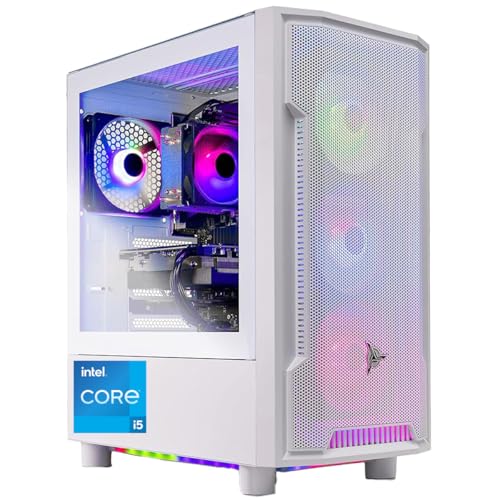
- Best first RGB PC for most beginners: Skytech Archangel, Intel Core i5-14400F, RTX 4060, 32GB DDR5 RGB, 2TB SSD — Check on Amazon
- CyberPowerPC Gamer Xtreme VR, Intel Core i7-13700F, RTX 4060 Ti 16GB — Check on Amazon
- Thermaltake LCGS Quartz i1460, Intel Core i5-14400F, RTX 5060 — Check on Amazon
- iBUYPOWER Scale, AMD Ryzen 5 7600, RTX 4060 Ti 8GB — Check on Amazon
See 2 more Amazon options
- Skytech Nebula, AMD Ryzen 5 5600X, RTX 4060 Ti 8GB — Check on Amazon
- Skytech Blaze4 Mini, AMD Ryzen 7 5700, RTX 4060 Ti 8GB — Check on Amazon
Read the full guide ↓
Disclosure: As an Amazon Associate, reviewstook.com earns from qualifying purchases. Links to Amazon on this page are affiliate links; they cost you nothing extra. Listing details such as price and availability change often, so check the current Amazon listing before you buy.
If this is your first gaming PC, the search that brought you here contains a small trap, so let us disarm it immediately: the letters RGB describe lights, not speed. A glowing PC and a fast PC are two separate purchases that happen to share a box, and at this budget you are paying for both — the glass case, the light-up fans and the glowing memory in these listings account for a real slice of what you pay — money that did not go into a faster graphics card. None of that makes an RGB machine a bad first PC — it makes it a purchase to enter with your eyes open: you are buying a piece of furniture that plays games, graded below as both a complete computer first and a light show second.
The good news is what this budget honestly buys. Every machine in this guide is a complete, new, ready-to-play tower with a real dedicated graphics card — no assembly, no parts list, no compatibility homework. The card class at this budget is the RTX 4060 Ti and the newer RTX 5060, with the plain RTX 4060 in the one pick that spends its difference on presentation, memory and storage instead. In plain terms: strong gaming at 1080p (most first monitors’ resolution) everywhere here, and genuine 1440p gaming — a sharper picture, explained in the glossary — on the stronger cards. Each review names its machine’s catch in plain language, the walkthrough further down takes you from sealed box to first game in eight steps, and the glossary right after the quick picks translates every piece of jargon before it is used against you.
In this guide
Quick Picks
Short on time? Each row below names a buyer type and the system that suits it, with a link to the listing.
| Buyer type | Pick | Why it stands out | Link |
|---|---|---|---|
| Best first RGB PC for most beginners | Skytech Archangel (i5-14400F, RTX 4060, 32GB DDR5 RGB, 2TB) | The complete package: full light show, double the memory and storage of the rest, nothing to fix on day one | Check on Amazon |
| Strongest graphics card, bought on a deal | CyberPowerPC Gamer Xtreme VR (i7-13700F, RTX 4060 Ti 16GB) | The most powerful card here and double its graphics memory — check price on Amazon and buy only when it is within budget | Check on Amazon |
| Newest technology, easiest lighting | Thermaltake LCGS Quartz i1460 (i5-14400F, RTX 5060) | The only current-generation card, lights that all obey one app, and a price that stays under budget | Check on Amazon |
| Best if you will upgrade later | iBUYPOWER Scale (Ryzen 5 7600, RTX 4060 Ti 8GB) | The one machine here built on a platform with a future — check price on Amazon | Check on Amazon |
| Cheapest way in, if you can wait | Skytech Nebula (Ryzen 5 5600X, RTX 4060 Ti 8GB) | The full glass-and-fans show for patient buyers — check price on Amazon and buy only on its sale days | Check on Amazon |
| Smaller desk, extra cores | Skytech Blaze4 Mini (Ryzen 7 5700, RTX 4060 Ti 8GB) | The showpiece in a smaller tower, with an eight-core processor that suits streaming later | Check on Amazon |
The Jargon, in Plain English
Twelve terms explain nearly everything in the six reviews below. Read this section once and the rest of the guide — and every Amazon listing — gets much easier to judge.
- Graphics card (GPU). The part that draws the game, and the one that matters most to how games run — which is why this guide ranks machines by it. The number after RTX is the model; a “Ti” version is a stronger variant, and the GB figure is the card’s own memory, called VRAM.
- Processor (CPU). The part that runs the game itself — the world, the other players, the physics — and everything Windows does besides. More cores help when you game and stream or record at once. A model name ending in F (like the 14400F and 13700F below) means the chip has no built-in graphics of its own — a detail that matters on setup night (see the walkthrough).
- Memory (RAM). The computer’s short-term workspace, measured in GB. Sixteen GB is the working minimum for gaming today; 32GB is comfortable headroom. RAM fits in sticks that slot into the motherboard — in every machine here it can be removed and replaced, which is what makes later upgrades possible.
- Storage (SSD). Where games and Windows live permanently, measured in GB or TB (1TB is roughly 1,000GB). Modern games are large, so 1TB fills faster than first-time buyers expect and 2TB is breathing room. All six machines use fast NVMe SSDs.
- Power supply (PSU). The box inside the PC that feeds electricity to everything else, rated in watts and by an efficiency badge (Gold is a good one). Invisible in the photos, it decides whether a future graphics-card upgrade is a simple swap. A builder printing its wattage in the listing is a good sign; where the wattage is nowhere to be found, this guide says so.
- RGB. Lighting that can change color — fans, memory sticks and strips that glow. Plain RGB sets one color across a whole part at a time.
- ARGB. Addressable RGB: each individual light can be a different color, which is what makes flowing rainbows and gradients possible. ARGB parts are controlled either by software on the PC or by a remote or button cycling saved patterns — two very different experiences, and the reviews tell you which each machine has.
- Resolution (1080p and 1440p). How many dots make up the picture: 1080p is 1920×1080; 1440p is 2560×1440 — noticeably sharper, and noticeably harder work for the graphics card. A game can also be displayed at 1440p without being fully drawn at 1440p — see upscaling, next.
- Upscaling (DLSS). A shortcut where the card draws the game at a lower resolution and software rebuilds it to fill your screen. NVIDIA’s version is called DLSS. At 1440p output, its Quality setting draws at roughly 1707×960 and its Performance setting at roughly 1280×720. It looks far better than those numbers suggest, but a listing that says “1440p” may quietly mean upscaled 1440p — each review tells you which kind its card honestly delivers.
- Refresh rate (Hz). How many times per second your monitor can show a new picture. A basic office monitor does 60; gaming monitors do 144 or more, and games look dramatically smoother — but only if you switch the higher rate on in Windows, because new PCs often arrive set to 60 — step six of the walkthrough fixes it.
- Warranty: parts and labor. Two separate promises: parts covers the cost of a replacement component; labor covers the work of fitting it. One year of each is the standard package among the builders here, and several add free technical support for the machine’s life.
- Renewed, barebone and soldered. Three words worth knowing, because listings elsewhere use them. Renewed means second-hand and refurbished. A barebone is a partial kit — no memory, storage or Windows — that you finish yourself. Soldered parts are fixed to the board permanently and can never be upgraded. Plainly, for this guide: none of the six machines below is renewed, none is a barebone, and none has soldered memory or storage — all six are brand-new, complete and ready to play, with parts you can replace later.
How These Picks Were Chosen
Every machine below is a real Amazon listing in this budget tier in the United States, and each had to pass a beginner’s test before an enthusiast’s one. The beginner’s test has four parts. First, completeness: the machine arrives finished — Windows installed, every part fitted, nothing left to source or assemble. Second, honesty: the card named in the headline is the card in the box, the memory and storage are what the title claims, and where a listing adds a condition — one maker below notes the graphics card’s brand may vary between units, which is normal — the review repeats it rather than hiding it. Third, a named power supply where the builder publishes one, because that line is your evidence the machine was engineered with headroom and can grow later. Fourth, support you can actually reach: an established builder, a whole-system warranty, and a desk behind it.
We did not use these systems ourselves; we read the maker listings and specification pages and compared graphics cards, processors, memory setups, storage, power supplies, cases and — the part most guides skip — how each machine’s lighting is actually controlled. That last point decided rankings here, because there are three kinds of lighting control in this guide and they are not equal. The best kind runs through the motherboard and one piece of software, so fans, cooler and memory change color together and can match other lit gear you buy later. The middle kind cycles ready-made patterns from a remote or case button: simpler, nothing to install, but it will never sync with anything else. And on some PCs elsewhere in this category, one part — usually the processor’s cooler — glows in a fixed rainbow pattern that answers to no control at all. Where a listing leaves that question open, the review tells you to confirm it before ordering rather than discover it on your desk.
Two more filters sat on top. Airflow: a glass case only earned its place if the air still has a way in — a mesh front or a real intake path — because a sealed glass box slowly cooks its hardware. And price discipline: check price on Amazon for every pick before you buy, because prices move. Two machines below are only good buys on their deal days; buying either at its regular price is the most expensive mistake in this guide, and it is entirely avoidable by waiting.
The 6 Best RGB Gaming PCs for Beginners Under $1,200
Skytech Archangel — Intel Core i5-14400F, RTX 4060, 32GB DDR5 RGB, 2TB SSD
Who it suits: The first-time buyer who wants the whole experience in one box — the full light show, generous memory and storage, and nothing that needs fixing, adding or apologizing for on day one.
First, why this machine tops a beginners’ guide rather than an enthusiast’s. Under its white tempered-glass case sits the most completely specified computer in this guide: an Intel Core i5-14400F, an RTX 4060, 32GB of memory — double most of the field — and a 2TB SSD, double everyone else’s storage, all fed by a power supply whose rating Skytech prints in the listing: 650 watts, Gold efficiency. That generosity matters more than it looks: you will not outgrow the storage in your first year of installs, you will not meet the memory ceiling while a browser and voice chat run beside your game, and the named power supply means a stronger graphics card years from now is a swap, not a rebuild.
The show is the full one. The case carries addressable RGB fans, and the memory itself is lit — glowing memory sticks are the detail builders most often quietly drop, and their absence makes lesser showcase PCs look unfinished through the glass. Fans and memory together are the two biggest light surfaces in any build, so this is the one machine here that presents as a single coordinated scene out of the box. The current white edition pairs its glass side with a mesh front panel, which matters more than it sounds: fresh air has a genuine path in, so the case is not sealed against its own cooling. Skytech builds in the USA and backs this one with a one-year parts-and-labor warranty plus free lifetime technical support — for a first-time owner, a feature on par with any component. Price needs one sentence of discipline: check price on Amazon before you buy. When it sits toward the lower end of this tier it is the easiest recommendation in the guide; near the top of the budget you are consciously paying for the presentation — fine, as long as it is conscious.
- Nothing to fix first: 32GB of memory and 2TB of storage are double the guide’s usual, so no early upgrades are queued up.
- The complete light show — addressable fans and lit memory in a white glass case with a mesh front that still breathes.
- A power supply with its name and rating printed (650W Gold), and lifetime free tech support behind the machine.
Honest limitation: The RTX 4060 is the least powerful graphics card in this guide — the money went to presentation, memory and storage instead. It is a superb 1080p card and reaches 1440p with upscaling’s help, but a buyer whose first priority is raw graphics power at 1440p should take the next pick on its deal days. Skytech also notes the card’s brand may vary between units; the model and its memory are what is guaranteed.
Choose it if you want the finished article — the best-looking, most completely specified first PC here, with no homework attached. Skip it if every dollar must go to graphics performance and the lighting leaves you cold.

CyberPowerPC Gamer Xtreme VR — Intel Core i7-13700F, RTX 4060 Ti 16GB, 16GB DDR5, 1TB SSD
Who it suits: The beginner who suspects — correctly — that they will care about performance longer than novelty, and who can wait for a sale before buying.
This machine inverts the first pick’s priorities. Its graphics card, an RTX 4060 Ti, carries 16GB of its own memory — double every other card in this guide — and that figure decides how gracefully a PC ages at 1440p, because sharper textures are exactly what eat graphics memory. Of the six machines here, this one renders demanding games at true 1440p most convincingly. Behind the card sits the strongest processor in the guide, an Intel Core i7-13700F with sixteen threads — more than games alone need, and exactly what a beginner who later tries streaming or video editing will be glad of. The glass case has the maker’s custom RGB case lighting, and a gaming keyboard and RGB mouse come in the box, so the glow reaches the desk without a second purchase.
Now the condition, stated as plainly as the specification: this machine often sits above this guide’s budget at its regular price, and only its deal pricing brings it into this tier. When it is within budget, it is the best performance buy in this guide by a wide margin. Above budget, it is a fine PC in the wrong guide. Check price on Amazon — buy it only when the live price falls within this budget, and let it go without regret when it sits above. Two smaller notes. The lighting here is the middle kind: patterns and colors cycled through preinstalled software or a remote where one is included, pleasant and zero-maintenance, but not the one-app choreography the Thermaltake below offers. And the processor’s included cooler is the modest part of the build — perfectly adequate for gaming, and the first thing owners of this family of machines tend to upgrade later: an optional later job, not a day-one need. CyberPowerPC’s warranty is the standard package: one year on parts and labor, with lifetime technical support.
- The strongest graphics card here, with double the graphics memory — the guide’s truest 1440p machine.
- The most powerful processor in the guide, leaving real headroom for streaming or editing later.
- Keyboard and RGB mouse included, so the desk joins the light show with no extra purchase.
Honest limitation: It only belongs in this guide on deal days — at its regular price it is over budget. The power supply’s wattage is not published in the listing material we verified, so no future graphics-card swap can be promised until you read the delivered unit’s label, and the stock cooler is the build’s weak point.
Choose it if its live price is within budget — check price on Amazon — and performance outranks polish. Skip it if you are buying today at full price, or you want every light you own answering to one app.

Thermaltake LCGS Quartz i1460 — Intel Core i5-14400F, RTX 5060, 16GB DDR4 RGB, 1TB SSD
Who it suits: The beginner who wants the newest technology and the least lighting drama — one app that runs every light, in the tidiest case in the guide, with money left over for a monitor.
Thermaltake’s day job is making cases and cooling, and it shows: this white case, with its 3mm tempered-glass side and full-length cover hiding the power supply and cables, simply looks finished inside in a way most assembled PCs do not. The mesh front lets it breathe. The lighting is the grown-up kind — the processor’s ARGB tower cooler, the glowing ToughRam memory and the case fans all connect to the motherboard and are run together by the standard motherboard lighting software, so the whole interior changes color as one scene, and any lit gear you add later joins the same system. If “lighting ecosystem” means anything to a first-time buyer, it means this: you will never fight three remotes and two apps to make your desk one color.
The RTX 5060 is the only current-generation card in this guide, and it brings the newest version of DLSS, including a feature that creates extra frames to make motion look smoother in supported games. Honestly described, it improves how smooth a game looks without making the game respond faster the way genuinely drawn frames do, so competitive players rely on the card’s real rendering — which at 1080p is strong, and at 1440p is capable in lighter games with upscaling carrying the heavy ones. The processor is the same proven ten-core i5-14400F as the first pick. Pricing is this machine’s quiet superpower: check price on Amazon — it is a mid-range pick in this tier that typically leaves room in the budget for a monitor, where the what-else-you-will-spend section argues a beginner’s next dollars belong anyway. Its power supply is published, too: 600 watts, Gold rated.
- The only current-generation graphics card in the guide, with the newest DLSS features.
- Every light — cooler, memory, fans — obeys one piece of software through the motherboard; no remote juggling.
- A mid-range position in this tier that leaves real budget for a monitor — check price on Amazon.
Honest limitation: Its memory is the older DDR4 kind. That performs perfectly well today, but it closes the cheap future upgrade path the DDR5 machines keep open — years from now, moving platform means replacing memory along with everything else. Coverage of this configuration also notes a single fitted SSD slot with expansion falling back to a different drive type, so check the live listing if a second fast drive is already in your plans.
Choose it if you want current technology, one-app lighting and change left over. Skip it if you intend to upgrade this same machine piece by piece for five years — start with a DDR5 pick instead.

iBUYPOWER Scale — AMD Ryzen 5 7600, RTX 4060 Ti 8GB, 16GB DDR5, 1TB SSD
Who it suits: The beginner thinking in years rather than months — someone buying a first PC they intend to improve in place.
The Scale’s argument is underneath its tempered glass. Its Ryzen 5 7600 sits on AMD’s AM5 platform, the one current platform with a published multi-generation future — in plain English: when a faster processor tempts you in three years, you can swap the chip and keep the machine, where the Intel picks here would need a new motherboard too. Its RTX 4060 Ti with 8GB of graphics memory is the tier’s standard strong card — true 1440p in lighter games, upscaling-assisted in heavy ones — and it is the one machine here you do not have to time or set alerts for — check price on Amazon to confirm it still sits within this budget before you buy. The case is iBUYPOWER’s tempered-glass RGB design with RGB fans, the listing promises 16-color case lighting, and a gaming keyboard and RGB mouse are bundled, so like the CyberPowerPC it arrives with the desk included.
Its lighting is the preset kind — colors and effects cycled by the case’s own control rather than scenes composed in software. Set a color you like and it will hold it for years; ask it to ripple in time with a game and you are shopping in the wrong ecosystem — that is the Thermaltake’s trick, not this one’s. The honest limitation is visible through the glass, literally: the 16GB of memory arrives as a single stick, and that stick is not lit. One stick instead of two leaves real performance on the table in processor-sensitive games — memory works faster in pairs — and in a showcase case the single dark stick is also the one unfinished-looking thing in the window. The flaw is, though, the cheapest in the guide to cure: one matching second stick, fitted in minutes, fixes the performance and the picture in the same purchase. The how-to-choose section therefore counts this machine as machine plus stick — and it still compares well.
- The only pick whose processor can be upgraded years later without replacing the motherboard.
- A mid-range pick in this tier — check price on Amazon before you buy.
- Glass RGB case with keyboard and RGB mouse in the box.
Honest limitation: The single, unlit 16GB memory stick is both a measurable performance compromise and the one dark spot in the glass — budget the matching second stick from day one. The power supply’s wattage is not published in the listing material we verified, so graphics-card swaps cannot be promised until the delivered unit’s label has been read.
Choose it if you are the type to upgrade a machine rather than replace it. Skip it if you want the light show finished on day one with no follow-up purchase of any kind.

Skytech Nebula — AMD Ryzen 5 5600X, RTX 4060 Ti 8GB, 16GB DDR4, 1TB SSD
Who it suits: The patient beginner — someone whose purchase day can be chosen by a price alert rather than by impatience, and who wants the full show for the least money in this guide.
The Nebula is a well-judged formula. Behind tempered glass with a mesh front sit four RGB fans that do double duty — they are the light show and the intake airflow at once, the healthiest arrangement a showcase case can have — and behind them a Ryzen 5 5600X and an RTX 4060 Ti 8GB, a pairing that has been the default recommendation at this level for years because it works: high-refresh 1080p gaming, and 1440p with upscaling’s help in the titles that need it. Memory is 16GB of DDR4, storage a 1TB SSD, and the power supply is published at 600 watts with a Gold rating, so a future card swap has a documented foundation. Skytech’s familiar package applies: assembled in the USA, one-year parts-and-labor warranty, lifetime free technical support, and the note that the graphics card’s brand may vary between units.
Everything else about this pick is how much its price moves, and a beginner should understand it before falling for the photograph. On its sale days it is, full stop, a budget-friendly route in this guide to a 4060 Ti behind glass. The same machine is a bargain, a fair buy and a poor buy depending on which week you meet it, so the rule here is absolute: check price on Amazon, and buy it only when the live price sits comfortably within this budget; otherwise, the Scale and the Quartz are steadier value — close the tab and wait. The platform underneath is the standing caveat: the 5600X’s generation is finished technology, so this machine’s upgrade story is a bigger SSD and, one day, a new PC rather than a new processor. If you replace rather than upgrade, and let a sale pick your day, that caveat costs you nothing.
- Four RGB fans behind a mesh front — the lights and the cooling are the same hardware, as they should be.
- A budget-friendly glass-and-lights 4060 Ti in the guide when the sale is live — check price on Amazon.
- A proven processor-and-card pairing behind a named 600W Gold power supply.
Honest limitation: The most price-sensitive pick in the guide — its price can sail far past this budget — on a finished platform with no processor upgrade path. It is a recommendation with a condition attached: buy only when the live price is well within budget.
Choose it if you can wait for the dip and pounce. Skip it if you are buying this week at whatever price the listing happens to be wearing.

Skytech Blaze4 Mini — AMD Ryzen 7 5700, RTX 4060 Ti 8GB, 16GB DDR4, 1TB SSD
Who it suits: The beginner with a small desk — or a first streaming attempt in their future — who wants the showpiece at a scale a bedroom can absorb.
The Blaze4 Mini shrinks the formula without gutting it. Its compact tower pairs a mesh front with addressable RGB fans, so the lighting reads at desk scale rather than filling the room — the right proportion for a bedroom desk, a dorm or a shared living room where a full-size glowing tower would be a negotiation. Inside, a Ryzen 7 5700 brings eight cores to the same RTX 4060 Ti 8GB the Nebula carries, alongside 16GB of DDR4 memory, a fast 1TB SSD and a published 650W Gold power supply. Those extra cores are the quiet selling point a beginner may not know to look for: games alone will not use them all, but the day you stream your play, record it, or keep a dozen guide tabs open beside the game, the headroom is real — and it costs nothing in gaming performance at this card level.
Its pricing has the same shape as its sibling’s, softened: check price on Amazon, and on its sale days it is arguably the best all-round value here — eight cores, the tier’s standard card, a Gold-rated power supply and the full lit presentation in the smallest box. Skytech’s standard terms apply, including assembly in the USA, a one-year parts and labor warranty, lifetime free support and the brand-may-vary note on the graphics card.
Three honest limitations. The name flatters it: “Mini” describes a compact tower, not a genuinely small PC, so measure your space against the dimensions on the live listing rather than the badge. A smaller case is also tighter to work inside when service day comes — everything is standard and reachable, but you will move cables and fans to reach it. And like the Nebula, it stands on finished technology: no processor upgrade path, so buy it as a complete appliance for this desk and this card generation, at a deal-influenced price. Bought that way, it fills both roles — first PC and room’s centerpiece — without disappointing either.
- An eight-core processor — the streaming-friendly chip of the guide — behind the standard strong card.
- Addressable RGB fans and a mesh front in the guide’s smallest footprint.
- A mid-range pick on its sale days — check price on Amazon before you buy.
Honest limitation: “Mini” overstates the shrink, compact cases are fiddlier to service, and the platform is finished — buy it as a complete appliance, not a project.
Choose it if desk space is tight or streaming is on your horizon. Skip it if you want elbow room to grow into bigger cards and coolers later.

Comparison Table
| Product | Graphics card | Memory / Storage | Power supply | Price | Link |
|---|---|---|---|---|---|
| Skytech Archangel (i5-14400F) | RTX 4060 8GB | 32GB DDR5 RGB / 2TB | 650W Gold, published | Check price on Amazon | Check on Amazon |
| CyberPowerPC Gamer Xtreme VR (i7-13700F) | RTX 4060 Ti 16GB | 16GB DDR5 / 1TB | Not published — check the delivered label | Check price on Amazon — buy only within budget | Check on Amazon |
| Thermaltake LCGS Quartz i1460 (i5-14400F) | RTX 5060 8GB | 16GB DDR4 RGB / 1TB | 600W Gold, published | Check price on Amazon | Check on Amazon |
| iBUYPOWER Scale (Ryzen 5 7600) | RTX 4060 Ti 8GB | 16GB DDR5, single stick / 1TB | Not published — check the delivered label | Check price on Amazon | Check on Amazon |
| Skytech Nebula (Ryzen 5 5600X) | RTX 4060 Ti 8GB | 16GB DDR4 / 1TB | 600W Gold, published | Check price on Amazon — buy only well within budget | Check on Amazon |
| Skytech Blaze4 Mini (Ryzen 7 5700) | RTX 4060 Ti 8GB | 16GB DDR4 / 1TB | 650W Gold, published | Check price on Amazon | Check on Amazon |
Your First Evening: From Sealed Box to First Game
Whichever of the six you buy, setup night follows the same eight steps. None requires tools beyond what is in the box, and the whole sequence takes an unhurried hour or so, most of it waiting on downloads.
- Choose the spot before you unbox. The PC wants a hard, flat surface with open air around it — on the desk is ideal for a glass machine you paid to look at. Leave a hand’s width behind and above it for warm air to escape, and never seal it inside a closed cabinet: a showcase case in a cupboard is an oven with a window. If the tower must live on the floor, a board under it keeps its intake fans out of the carpet.
- Open it, then power it. Many prebuilts ship with protective foam inside the case — if yours has it, the side panel comes off (usually two thumbscrews) and the foam comes out before anything is switched on; the maker’s quick-start sheet will say so, and skipping this is the classic first-evening mistake. Connect the power cable, and before pressing the front button, check the power supply’s switch at the back of the case is flipped on — a PC that seems dead on arrival is very often just that rocker switch, left off at the factory.
- Plug the monitor into the graphics card — not the motherboard. This step catches more first-time owners than every other combined. Your monitor cable goes into the ports on the graphics card — the horizontal row of sockets low on the back of the case. The similar ports higher up, on the motherboard’s panel, are the wrong ones. On three machines in this guide — the Archangel, the CyberPowerPC and the Quartz, whose processors carry an F in their names — those motherboard ports are connected to nothing at all, because the chips have no built-in graphics to fall back on: plug in there and you get a black screen and a rising panic that the PC is broken. It is not broken; the cable is in the wrong hole. On every pick, F or not, the card’s ports are the only ones that use the hardware you paid for.
- Connect the peripherals and a wired internet cable if you can. Keyboard and mouse go into any USB ports — the CyberPowerPC and the Scale include both in the box. All six have Wi-Fi, but for setup night an Ethernet cable to your router, if the layout allows one, makes the coming downloads far faster and more reliable; you can return to wireless afterward.
- Let Windows update itself, then update the graphics driver. The first boot walks you through Windows’ own setup — language, account, privacy choices. After that, open Windows Update and let it work through everything it offers, restarting as often as it asks; a new PC has months of updates queued. Then install NVIDIA’s app and let it fetch the current graphics driver — the driver the card shipped with is rarely the current one, and games notice the difference.
- Set your monitor’s real refresh rate. Gaming monitors almost never arrive running at their advertised speed — Windows defaults to 60. Go to Settings, then System, then Display, then Advanced display, and choose the highest refresh rate your monitor offers. This thirty-second step is the difference between the smoothness you paid for and an ordinary office picture.
- Verify that the machine you received is the machine you ordered. Confirm the delivered configuration against the model number in your order: the Archangel is ST-ARCH4-1247-W-AM, the CyberPowerPC GXiVR8040A14, the Quartz S2QT-B760-560-LCS, the Scale SCA5N46T01, the Nebula ST-NEBULA-0762-B-AM and the Blaze4 Mini ST-BLAZE4MINI-1266-B-AM. Then open Task Manager (right-click the taskbar) and check the Performance tab: the card’s model and memory, the total memory fitted and the storage size should all match the listing. Builders sell families of near-identical machines under one name; this five-minute check, done in week one while every remedy is free, turns a wrong-variant delivery into an errand.
- Install a game store and one game. Steam is the default starting point; the Epic Games Store and the Xbox app cover most of the rest. Install one game — something you already own or a free title — and play it for twenty minutes: listen for anything unusual, and check the lights behave as the listing described. Keep the box until the return window closes; only then does it go to recycling.
What Else You Will Spend
The tower is the largest purchase in a first setup, not the only one — and none of the rest is smuggled into a pick’s price above.
The monitor comes first. If your current screen is an old 1080p office panel, it is now the weakest part of your setup, and it should be next in line — ahead of every other accessory. Match it to the card you bought: the Archangel’s RTX 4060 is happiest driving a 1080p screen at a high refresh rate, while the 4060 Ti and RTX 5060 machines can feed a 1440p gaming monitor — the single most visible upgrade a beginner can make. A tower paired with a proper monitor beats a tower in front of a tired screen, every time.
One pick has a planned fix, counted as machine plus fix. The iBUYPOWER Scale’s single memory stick should be joined by a matching second stick, and its real cost is the machine plus that stick. Do it in the first month, not the first year. The CyberPowerPC’s modest stock cooler is the softer version of the same idea: not a day-one need, but the first upgrade its owners eventually make. Every other pick needs nothing.
The ordinary rest: a keyboard and mouse, if you do not already own any — included with the CyberPowerPC and the Scale, needed separately for the other four; a headset or speakers for sound; desk space itself, measured before ordering, especially for the full-size towers. And the 1TB machines will eventually want a second drive as your library grows — a painless later addition on all six, not a reason to stretch today. None carries a price in this guide, deliberately — they vary too much by taste to quote honestly — but all belong in the budget conversation before the tower’s price tag ends it.
Upgrades, in Plain Terms
A first PC should be bought for what it is, but it helps to know what each machine can become.
A stronger graphics card later is the upgrade that turns this tier’s machine into next tier’s, and it is only promised where the evidence supports it: a published power supply with real headroom, in a standard case. On that test, four picks earn the promise — the Archangel (650W Gold published), the Quartz (600W Gold), the Nebula (600W Gold) and the Blaze4 Mini (650W Gold). For the CyberPowerPC and the Scale, the wattage is not published in the material we verified, so the promise is withheld rather than guessed: when your machine arrives, read the label on its power supply, and that number — not this guide — settles what card your machine can feed.
A faster processor later is, in this guide, a one-machine story: the Scale’s AM5 platform accepts newer chips as a straight swap. The other five stand on finished platforms, where a processor upgrade eventually means a new motherboard as well.
More memory and more storage are open to every pick: memory slots and drive mounts are standard throughout, nothing is soldered, and the Scale’s second-stick fix above is the worked example of how painless the memory version is. If you do only one upgrade in your first year, make it the one your pick’s review flagged.
How to Choose Your First RGB Gaming PC
- Pick the graphics card first, the glow second. The card decides your gaming life for years; the case decides how it looks doing it. In this guide the honest order is the CyberPowerPC’s 16GB card, then the 4060 Ti 8GB and RTX 5060 machines, then the Archangel’s 4060 — choose your rung, then the prettiest box on it.
- Ask how the lights are controlled before you buy. One app through the motherboard (the Quartz) grows with you. A remote’s presets (the Scale, and the CyberPowerPC’s arrangement) are simple and stay simple. If a listing cannot say how its lighting is controlled, treat that silence as your answer.
- Count the memory sticks, not just the gigabytes. Sixteen GB on one stick performs worse than the same 16GB on two, and through glass you can see the difference too. Where a pick ships single-stick, count its cost as the machine plus the second stick — compare on that basis.
- Respect the walk-away rule. The CyberPowerPC and the Nebula are recommendations only when their live prices sit within this budget; the same machines above budget are different, worse purchases wearing the same names. Check price on Amazon, and remember a missed sale always comes around again.
- Check the model number in the cart. Every pick in this guide is one configuration inside a family sharing a name. The model numbers in step seven of the walkthrough are the ground truth — match yours before money moves.
- Leave money for the monitor. If choosing a cheaper pick funds a proper gaming screen, that trade wins. A mid-priced tower in front of a good monitor is a better first setup than a ceiling-priced tower in front of an old one.
Common Buying Mistakes
- Believing RGB is a performance feature. The lights are furniture; the graphics card is the performance. Buy both knowingly or you will pay for one believing it was the other.
- Plugging the monitor into the motherboard on setup night and concluding from the black screen that the PC is dead. On the three F-processor machines here there is no fallback picture at all — the cable belongs in the graphics card, always.
- Buying a deal-dependent machine at its regular price because a guide praised it on a deal day. The CyberPowerPC and the Nebula bought above budget are the two traps with names in this guide.
- Assuming every light can be controlled, then discovering a fixed rainbow element that no software reaches. Confirm the control route on the listing first.
- Skipping the week-one configuration check. A wrong variant discovered in month three is an argument; discovered in week one, it is a return label.
- Throwing the box away on day one. Keep it until the return window closes and the machine has survived real gaming sessions.
- Spending the entire budget on the tower and connecting it to a decade-old monitor. The setup is the product; the tower is only its largest part.
Final Recommendation
- Most beginners: Skytech Archangel — the complete, finished package, with nothing to fix and support for life.
- Performance first, bought on the deal: CyberPowerPC Gamer Xtreme VR — only when its live price is within budget, never above.
- Newest technology, calmest lighting: Thermaltake LCGS Quartz i1460.
- The five-year owner: iBUYPOWER Scale — with its second memory stick budgeted.
- The patient deal hunter: Skytech Nebula — only when its live price is well within budget, or not at all.
- Small desks and future streamers: Skytech Blaze4 Mini.
Our top two for a first RGB gaming PC are the Archangel and the CyberPowerPC, because they answer the two shapes this purchase honestly takes. The Skytech Archangel is the beginner’s machine in the fullest sense: the complete light show, double the memory and storage, a named power supply, and nothing on your to-do list but the walkthrough above. The CyberPowerPC Gamer Xtreme VR is the performance answer — the strongest card in the guide with double the graphics memory — provided its live price is within budget — check price on Amazon. Between them, the Quartz is the balanced middle with money left for a monitor, and the Scale is the machine that grows. If your budget stretches further, the same angle at the next tier is covered in Best RGB Gaming PC Under $1500; if it needs to shrink, Best RGB Gaming PC For Beginners Under $800 applies this discipline lower down, and the full showcase field at this price lives in Best RGB Gaming PC Under $1200. Check the model number, respect the walk-away rule, plug the monitor into the card — and your first evening will go the way the walkthrough says.
Frequently Asked Questions
Is an RGB gaming PC a sensible first PC?
Yes, as long as you know what you are buying: a normal gaming PC plus a presentation premium for the glass and lighting. The machines here were required to be good computers first — real graphics cards, honest memory and storage, named power supplies where published — so the premium buys looks on top of substance, not instead of it. If the looks genuinely do not matter, the same money in a plain case buys a stronger card — a legitimate choice too.
Will these PCs play games at 1440p?
With the terms kept straight, yes. The CyberPowerPC’s 16GB card renders demanding games at true 1440p. The 4060 Ti 8GB and RTX 5060 machines render 1440p natively in lighter titles and use DLSS upscaling in the heaviest — a good picture, honestly labeled. The Archangel’s RTX 4060 is a 1080p card that visits 1440p through upscaling. None of them is a native 4K machine in demanding games; that is a higher budget’s product. The dedicated treatment of this tier’s sharper-picture question is at Best RGB Gaming PC For 1440p Gaming Under $1200.
What should my first upgrade be?
Whichever honest limitation your pick shipped with: on the Scale, the matching second memory stick; on the CyberPowerPC, eventually, a better processor cooler; on any of them, a second storage drive when the library outgrows the first. A stronger graphics card is the upgrade that changes the machine’s class — the upgrades section above states which four picks can be promised one.
- Best RGB Gaming PC Under $1200
- Best RGB Gaming PC Under $800
- Best RGB Gaming PC Under $1500
- Best RGB Gaming PC For Beginners Under $800
- Best RGB Gaming PC For Beginners Under $1500
- Best RGB Gaming PC For Streaming Under $1200
- Best RGB Gaming PC For Small Spaces Under $1200
- Best RGB Gaming PC For 1440p Gaming Under $1200
- Best Gaming PC Under $1200
- Best Prebuilt Gaming PC Under $1200
- Best Budget Gaming PC Under $1200


