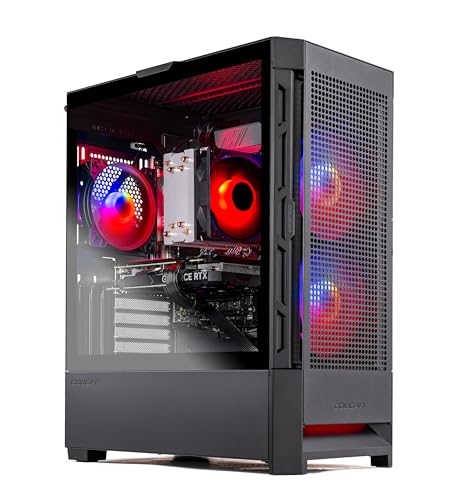
Where to buy
Check the latest price, availability and delivery on Amazon. Orders are placed on Amazon. We may earn a commission from qualifying purchases.
- Best fit for a small space: Skytech Blaze4 Mini, AMD Ryzen 7 5700, RTX 4060 Ti 8GB, compact tower — Check on Amazon
- Skytech Nebula, AMD Ryzen 5 5600X, RTX 4060 Ti 8GB — Check on Amazon
- Thermaltake LCGS Quartz i1460, Intel Core i5-14400F, RTX 5060 — Check on Amazon
- Skytech Archangel, Intel Core i5-14400F, RTX 4060, 32GB DDR5 RGB, 2TB SSD — Check on Amazon
See 2 more Amazon options
- iBUYPOWER Scale, AMD Ryzen 5 7600, RTX 4060 Ti 8GB — Check on Amazon
- CyberPowerPC Gamer Xtreme VR, Intel Core i7-13700F, RTX 4060 Ti 16GB — Check on Amazon
Read the full guide ↓
Disclosure: As an Amazon Associate, reviewstook.com earns from qualifying purchases. Links to Amazon on this page are affiliate links; they cost you nothing extra. Listing details such as price and availability change often, so check the current Amazon listing before you buy.
Start with the sentence most guides in this category bury: not one machine in this guide is small. Five of the six are full-size towers, and the sixth is a compact tower whose name promises more shrinkage than it delivers. If your plan is a PC that hides behind the monitor, hangs off the back of it, or disappears into a media unit, stop here and go to the guides written for machines that actually do that — Best Mini PC Under $1200, Best Mini Gaming PC Under $1200 and Best Small Form Factor Gaming PC Under $1200 cover hardware built for those spots. This guide is for the other, very common small-space problem: the room is tight, the desk is small, the floor area is contested — and you still want a real RGB tower with a real graphics card. For that buyer, “small spaces” is not a size. It is an installation question, and it is the question this guide grades on.
So the ranking below is not the ranking in our main guide to this tier, Best RGB Gaming PC Under $1200, reprinted with a new title. The silicon has not changed — the same six listings and the same cards — but the order has, because the criteria have. Here a pick earns its place by how it installs: which form-factor class it belongs to, whether its intake air has a documented path in, where its exhaust heat goes in a room with no spare air, how its cables drop, and how much delivery-day certainty its listing gives you. One discipline runs through everything that follows and it is worth stating once, plainly: the research behind this guide documents no case dimensions, no volumes and no mounting standard for any of these six machines, so this article prints none and claims none. Where a measurement decides the purchase, the review tells you to take it from the live listing — the only place it is documented — and the checklist near the end walks you through measuring your spot before any box is ordered.
The short version: the Skytech Blaze4 Mini is the only pick in a smaller form-factor class and takes the top spot on that basis, with the mesh-front Skytech Nebula behind it as the easiest full tower to keep breathing in a tight room. The Thermaltake Quartz is the tidiest install of the six, the Archangel is the biggest machine and the biggest specification at once, the iBUYPOWER Scale is the steady, long-ownership tower, and the CyberPowerPC — the strongest card here — installs worst, so check price on Amazon before committing to it. Every pick is also refused, in advance and without exception, for one placement: a sealed cabinet. A glass tower with a door closed in front of it is not a small-space solution; it is a slow cooker with lighting.
In this guide
Quick Picks
Short on time, or comparing several options at once? Each row below names a small-space situation and the system that suits it, with a link to the listing.
| Your space | Pick | Why it installs best there | Link |
|---|---|---|---|
| Tightest footprint of the six | Skytech Blaze4 Mini (Ryzen 7 5700, RTX 4060 Ti 8GB) | The only compact-tower class here, with a mesh front — smaller desk claim, honest intake | Check on Amazon |
| Full tower, small warm room | Skytech Nebula (Ryzen 5 5600X, RTX 4060 Ti 8GB) | Mesh front and four RGB fans doing intake duty — the most straightforward breathing in the guide | Check on Amazon |
| Neatest cable story | Thermaltake LCGS Quartz i1460 (i5-14400F, RTX 5060) | Full-length PSU cover hides the cable run; mesh front; current-generation card | Check on Amazon |
| Biggest spec, room to place it | Skytech Archangel (i5-14400F, RTX 4060, 32GB DDR5 RGB, 2TB) | Double memory and storage of the field; current white edition pairs glass with a front mesh | Check on Amazon |
| Steady choice, standard tower | iBUYPOWER Scale (Ryzen 5 7600, RTX 4060 Ti 8GB) | AM5 platform for the buyer who keeps a machine for years; check price on Amazon | Check on Amazon |
| Strongest card, check the live price first | CyberPowerPC Gamer Xtreme VR (i7-13700F, RTX 4060 Ti 16GB) | 16GB of VRAM behind glass — but the glass front gives its card the least intake help here | Check on Amazon |
How These Picks Were Chosen
The six systems are exactly the six verified in our base guide to this tier — same ASINs, nothing re-researched into existence for this angle. What changed is the grading. Each machine was re-scored on installation criteria, in this order: form-factor class first, because a compact tower and a full tower are different furniture; documented intake second, because a mesh front named in the maker’s own listing text is a fact while a photographed vent is a hope; exhaust and heat behaviour third, since a small room has less air to absorb a tower’s output; the cable story fourth — where the power cord, display cable and peripherals physically run; and delivery-day certainty last, meaning how much of what arrives is pinned down by the listing rather than left to a production run. Where the base research documents a fact — a mesh front, a published power-supply rating, a fan layout — the review uses it. Where it does not, the review says so and routes you to the live listing.
That rule bites hardest on measurements, so it gets its own paragraph. No dimensions, weights, volumes or sound figures are documented for any pick in the underlying research, and no pick documents a VESA mount or any other wall or monitor mounting standard. Accordingly, this guide prints no measurements and claims no mounting for any machine — every “fits” statement below is about form-factor class and placement, not about a number. The Blaze4 Mini’s own base review makes the same point about its name: “Mini” is a relative term inside one maker’s range, not a measurement, and its case dimensions are a live-listing check. Treat every pick that way. The five-step checklist further down turns that discipline into a routine: measure the spot, confirm the clearances, settle where power and cables live, and only then order.
One buying discipline carries over at full strength, because a small-space plan built around the wrong purchase is still a bad plan. For every pick here, check price on Amazon before you order and only buy when the live price fits this guide’s budget. That check matters most for the CyberPowerPC and the Nebula, whose value depends most on timing, and for the Archangel, which should be a deliberate purchase, not a casual one. The Blaze4 Mini, the Quartz and the Scale are the calmer choices in this set, but they still need the same live check before you order.
The 6 Best RGB Gaming PCs for Small Spaces Under $1,200
Skytech Blaze4 Mini — AMD Ryzen 7 5700, RTX 4060 Ti 8GB, 16GB DDR4, 1TB SSD
Who it suits: The buyer whose desk or floor patch is genuinely limited and who wants the smallest claim on it this tier offers — without leaving the tower format or the RTX 4060 Ti behind.
The Blaze4 Mini takes first place in this guide for the simplest reason in it: it is the only pick in a compact-tower form-factor class. The other five are full-size towers, and in a small room that class difference is the whole game — it decides whether the machine lives on the desk beside the monitor or takes the floor spot the desk cannot give up. The case pairs that smaller footprint with a mesh front and ARGB fans, so the compact box is not a sealed one: the intake path is documented in the maker’s own listing text, and the fans that produce the light show are the same hardware feeding the card its air. At desk scale the presentation reads correctly, too — a compact glass tower glows at the size of the furniture around it rather than dominating a small room the way a full tower’s light show can.
Inside, the specification asks for no apologies. The Ryzen 7 5700 brings eight cores — the most multitasking headroom in this guide, useful if the same small desk is also a streaming or work desk — behind the tier’s standard RTX 4060 Ti 8GB, with 16GB of DDR4-3200 memory, a 1TB NVMe SSD and a 650W Gold power supply whose rating is published, which matters for placement confidence: a named supply is a known quantity when the machine will live in a warm corner. For pricing, check price on Amazon — this pick is positioned as a mid-range option in this tier, so confirm the live price fits this guide’s budget before you order. Skytech’s standard package applies — assembled in the USA, one-year parts and labor warranty, lifetime free technical support, and the maker’s note that the GPU brand may vary between units.
Now the honesty this angle owes you. “Mini” is generous. This is a compact tower, not a small-form-factor machine: it will not go behind a monitor, it offers no documented mounting of any kind, and its exact dimensions are not part of the verified research — measure your spot, then read the dimensions off the live listing and compare the two numbers yourself before ordering. A smaller case also works against you on service day: everything inside is standard and reachable, but the working room is tighter, and the glass shows every shortcut afterward. And the platform underneath is finished AM4/DDR4 technology, so the upgrade story is storage now and a new machine later. None of that dethrones it here — for a small space, the smallest honest tower with a documented intake and the tier’s standard card is the right answer — but buy it as a compact tower, not as the miniature the badge implies.
- The only compact-tower class in the guide — the smallest desk or floor claim of the six.
- Mesh front documented in the maker’s listing text, with ARGB fans doing intake and lighting at once.
- Eight-core Ryzen 7 5700 and a published 650W Gold PSU rating.
Honest limitation: “Mini” overstates the shrink, no mounting is documented for it, its exact dimensions must come from the live listing, and compact cases are fiddlier to service.
Choose it if your space is the binding constraint and a compact tower fits it. Skip it if you need behind-monitor or mounted placement — that is a different product category, linked in the introduction.

Skytech Nebula — AMD Ryzen 5 5600X, RTX 4060 Ti 8GB, 16GB DDR4, 1TB SSD
Who it suits: Buyers with a full-tower-sized spot in a small, warm room, who need the machine to breathe easily in it — and who can let the calendar pick their buying day.
If the Blaze4 Mini wins on footprint, the Nebula wins on air. Its case is a full-size tempered-glass tower, but the front is mesh and the four RGB fans behind it are documented in the maker’s listing text as fitted for maximum airflow — which, translated out of listing language, means the intake path is the most straightforward in this guide: air comes through the front, across the components, and out, without negotiating a glass panel first. In a small room that matters twice over. The machine runs cooler for a given workload, and a cooler machine’s fans run slower and quieter while it does it — the difference between a tower you can keep on the desk in a bedroom and one that gets exiled to the floor. Placement still has rules: the mesh front needs open room in front of it, not a wall or a curtain, and the rear exhaust needs somewhere to go that is not the inside of a cabinet. Given those, the Nebula is the least fussy full tower here to keep fed with air.
The hardware is the proven pairing of this tier: a Ryzen 5 5600X with the RTX 4060 Ti 8GB, 16GB of DDR4-3200 and a 1TB NVMe SSD, behind a 600W Gold power supply with its rating published. Nothing exotic, and for an install-and-forget machine in a tight room, proven is a virtue — there are no surprises in how this combination behaves under load. Skytech’s package is the familiar one: assembled in the USA, one-year parts and labor, lifetime free support, GPU brand may vary. Pricing, though, is the pick’s defining condition, so check price on Amazon before you order and only buy when the live price fits this guide’s budget. If the live price looks uncompetitive, the steadier picks in this guide are better value; if it fits the budget, this is an easy buy for a warm small room.
The placement caveats are the class caveats. It is a full tower — the desk claim and the floor claim are full-sized, its dimensions are a live-listing check like every pick here, and no mounting is documented for it. The AM4/DDR4 platform is finished, so buy it as a complete appliance for this room rather than a foundation. And like all six picks it is refused for sealed-cabinet placement: the mesh front that makes it the best breather in the guide is precisely what a closed cabinet door defeats. Give it open air and a live price that fits the budget and it is the easiest full tower in this guide to live with in a small room.
- Mesh front with four RGB fans documented for airflow — the most straightforward intake path here.
- Published 600W Gold PSU rating and the tier’s most proven CPU/GPU pairing.
- Check price on Amazon — value depends on timing, so confirm the live price before you buy.
Honest limitation: A full-size tower with a full-size footprint, on a finished AM4/DDR4 platform, and a live price you need to check carefully before buying.
Choose it if you have a tower-sized spot with open air around it and the live price fits your budget — check price on Amazon first. Skip it if the live price does not fit this guide’s budget, or your only spot is enclosed.

Thermaltake LCGS Quartz i1460 — Intel Core i5-14400F, RTX 5060, 16GB DDR4 RGB, 1TB SSD
Who it suits: Buyers whose small space is also a tidy space — the neatest cable story in the guide, a mesh front, and the only current-generation card, in a white glass case.
The Quartz installs like it was designed by people who think about where cables go, because it was: Thermaltake is a case and cooling maker that also builds PCs. The white chassis has a tempered-glass side panel over a full-length power-supply cover, and that cover is the small-space feature nobody photographs: the cable run from the supply disappears under it, so the drop behind the desk is one tidy bundle leaving a clean interior. The front is mesh, so intake air has its documented path in; the CPU sits under an ARGB tower cooler; and the 16GB of ToughRam DDR4-3600 is RGB memory, so the lit interior presents as one scene. The lighting hangs off the motherboard’s addressable headers and runs through standard motherboard software sync — relevant in a small room because one app also means one off switch, and a glass case in a bedroom is a nightlight unless its lighting is genuinely controllable.
The card is the current-generation argument: the RTX 5060 8GB is the only 50-series GPU in this guide, bringing DLSS 4 with multi frame generation to supported titles — framed honestly, as everywhere in this batch: frame generation smooths presentation, it does not reduce input latency the way rendered frames do, and the card’s real rendering is strong at 1080p and capable at 1440p in lighter titles with upscaling for the heavy ones. Behind it sits the same ten-core i5-14400F as the Archangel’s, and a 600W 80 Plus Gold power supply with its rating published. For pricing, check price on Amazon — the Quartz is positioned in the mid-range of this tier, so confirm the live price fits this guide’s budget before you order and leave room in your plans for the monitor arm or the desk the room actually needs.
The limitations are platform and expansion rather than placement. DDR4 is the value choice that ends the cheap upgrade path — the next platform move replaces memory along with board and CPU. Coverage of this configuration notes a single populated M.2 slot, with further storage expansion falling back to a 2.5-inch drive; if a second NVMe is in your plans, confirm the situation on the live listing before ordering. And the class caveats apply as they do to every full tower here: no documented mounting, dimensions from the live listing, open air required — the mesh front earns its keep only if the room lets it breathe. Within those, this is the install that looks deliberate soonest: cables hidden by design, intake documented, lighting under one app’s control.
- Full-length PSU cover hides the cable run — the tidiest drop behind the desk in the guide.
- Mesh front and motherboard-synced ARGB: documented intake, one control point, one off switch.
- RTX 5060 current-generation card — check price on Amazon before you buy.
Honest limitation: DDR4 closes the cheap memory upgrade path, and storage expansion beyond the fitted SSD is limited on this configuration — check the live listing if a second NVMe matters to you.
Choose it if you want the cleanest install and current-generation silicon in a full tower. Skip it if you plan to upgrade this exact machine for years — the DDR5 picks amortize better.

Skytech Archangel — Intel Core i5-14400F, RTX 4060, 32GB DDR5 RGB, 2TB SSD
Who it suits: Buyers who have a full-tower spot with open air around it and want the most generously specified machine in the guide living there — double the memory and double the storage of everything else here.
On installation criteria the Archangel starts with a question mark and answers most of it. The case is a white tempered-glass tower, and the current white edition is specified with a front mesh — which, if your unit is that edition, gives the intake air a real path in and makes this a glass case that is not sealed against its own cooling. That conditional is doing honest work: Skytech revises case editions under the same family name, so the front of the specific listing you order is a live-listing confirmation, not an assumption, and it is the single most important check in this review. Get the mesh-front edition and the placement story is good — a full tower that breathes from the front, with ARGB fans and 32GB of lit DDR5 memory presenting as one coordinated scene through the glass. In a small room with a white desk setup, it also earns its footprint visually in a way the black towers do not: it reads as furniture that belongs in the room rather than equipment stored in it.
The specification underneath is the guide’s most generous. An i5-14400F drives an RTX 4060 8GB — a step below the 4060 Ti cards around it, and this guide will not dress that up — but the spend goes to capacity instead: 32GB of DDR5 RGB memory where rivals ship 16GB, and a 2TB NVMe SSD, double every other pick, behind a 650W Gold power supply. In a small space the storage is a placement feature, not just a spec: 2TB inside the case is an external drive that does not need a home on a small desk. Pricing demands discipline, though, so check price on Amazon before you order: only buy when the live price fits this guide’s budget, and treat this as a deliberate purchase, not a casual one. Skytech’s terms are the standard ones: assembled in the USA, one-year parts and labor, lifetime free technical support, GPU brand may vary.
As a placement, be clear-eyed about the class: this is a full-size tower with a full-size claim on the desk or floor, no documented mounting, and dimensions that live on the listing rather than in this guide. Its card is also the weakest here, which in a hot, small room has one small silver lining — it asks the least of the case’s airflow — but the buyer choosing it should be choosing the capacity and the presentation, knowingly. Confirm the mesh front on the live listing, give it open air on at least the front and rear, keep it out of any enclosure, and it is the most complete machine in this guide to live with.
- 32GB of lit DDR5 and a 2TB SSD — the 2TB lives inside the case instead of as one more box on a small desk.
- Current white edition pairs the glass with a front mesh — confirm that edition on the live listing.
- Named 650W Gold PSU — check price on Amazon before you buy.
Honest limitation: The RTX 4060 is the weakest card in this guide, the mesh front is edition-dependent and must be confirmed on the live listing, and its live price needs a careful check against this guide’s budget.
Choose it if you have open-air room for a full tower and value capacity and presentation over the last step of card performance. Skip it if the listing in front of you has a sealed glass front, or native 1440p in demanding titles is the priority.

iBUYPOWER Scale — AMD Ryzen 5 7600, RTX 4060 Ti 8GB, 16GB DDR5, 1TB SSD
Who it suits: The long-term owner: a standard full tower positioned in the mid-range of this tier, on the one platform here that upgrades in place for years.
The Scale’s small-space case is about predictability rather than footprint. It is a conventional full-size tower in iBUYPOWER’s tempered-glass RGB chassis — the listing’s own feature text promises a tempered glass RGB gaming case with 16-color RGB lighting — with RGB fans inside and a bundled iBUYPOWER gaming keyboard and RGB mouse, so the desk joins the setup without extra boxes competing for its surface. Nothing about its placement is exotic, and that is the point: standard tower, standard parts, a power supply you can replace when the day comes, memory and storage you can reach. A machine that will be serviced and upgraded in the same small room for years benefits from being ordinary underneath the glass, and the Scale is the most ordinary-underneath pick here in the best sense.
Checking the live price is the other half of the install argument. Check price on Amazon before you order and only buy when the live price fits this guide’s budget. For a buyer furnishing a small room on a schedule, this is the calmer purchase in the guide, without the timing pressure the Nebula and CyberPowerPC demand. Under the glass, the Ryzen 5 7600 sits on AMD’s AM5 socket with DDR5 memory, the one platform here with a published multi-generation future: a CPU upgrade years from now is a chip swap, not a rebuild, which is also a small-space virtue — the tower you already have room for is the tower you keep. The RTX 4060 Ti 8GB is the tier’s standard strong card, and the package rounds out with WiFi ready, Windows 11 Home and a one-year warranty.
Two honest debits. The 16GB of DDR5-5200 arrives as a single non-RGB stick: single-channel memory leaves measurable performance on the table in CPU-sensitive games, and through the glass the one dark, unmatched stick is the visible flaw in the light show. Plan for the second matching stick from day one — it fixes the performance and the picture in the same purchase, and it should be treated as a separate follow-up purchase. Second, the lighting is preset-style: sixteen colors and effects cycled through the case’s control rather than per-device scenes in software. Set a color and it holds it happily for years; ask it to sync with a growing ARGB collection and you are in the wrong ecosystem — the Quartz above is the sync pick. Placement-wise it is a full tower with the usual rules: dimensions from the live listing, no documented mounting, open air, no enclosures.
- A steady mid-range choice in this tier — check price on Amazon before you buy.
- AM5 and DDR5: the tower you have room for is the tower you can keep upgrading.
- Standard parts throughout, with a bundled RGB keyboard and mouse keeping the desk count down.
Honest limitation: The single non-RGB 16GB memory stick is a single-channel compromise you can also see through the glass; budget the second stick, and note the lighting is preset-style rather than software-synced.
Choose it if you want a no-drama purchase and a machine that ages in place. Skip it if you want the finished, fully synced light show on day one with no follow-up purchase.

CyberPowerPC Gamer Xtreme VR — Intel Core i7-13700F, RTX 4060 Ti 16GB, 16GB DDR5, 1TB SSD
Who it suits: Performance-first buyers with a full-tower spot in a room that can spare the air — who check the live price carefully and accept the weakest installation story in the guide as the trade-off for the strongest card.
The silicon case is unarguable, so it goes first: an i7-13700F — eight performance cores plus eight efficiency cores — driving an RTX 4060 Ti with 16GB of VRAM, double every other card here, which makes it the tier’s most honest native-1440p machine and the one with the longest useful life at high texture settings. The case is CyberPowerPC’s tempered-glass tower with what the listing calls custom RGB case lighting, RGB fans behind the glass and a bundled gaming keyboard and RGB mouse. Lighting control is the middle ecosystem — preinstalled software or a dedicated remote where included, with buyer reports describing remote control of the lighting sequence — presets from the couch rather than scenes composed in an app, with the compensating virtue that it needs no software maintenance.
On installation, though, this pick finishes last in this guide, and the reasons are documented rather than vibes. The case design is glass-forward, and the base research notes it gives the card less intake help than the mesh-front picks here — in a large room that is a footnote, but in a small room it is the headline, because the machine’s exhaust heat and the room’s temperature chase each other upward through a long session. The stock CPU cooler is the modest part of the build: adequate for the 13700F’s gaming loads, but the first component owners of this family of systems tend to upgrade, and an early cooler swap is a service job you should plan the space for. The power supply’s rating is not published in the verified research for this configuration, which removes one piece of delivery-day certainty the Nebula, Quartz, Archangel and Blaze4 Mini all provide. None of this makes it a bad machine — it makes it a machine for a spot with open air on every side and a buyer who has read this paragraph.
Checking the live price is the other half of the discipline. Check price on Amazon before you order and only buy when the live price fits this guide’s budget — if it does not, do not buy it for this budget at all. When the live price does fit, it is the strongest card in the guide with the glass thrown in, and for a performance-first buyer with the right spot, that trade — weakest install, strongest silicon — can be the right one. CyberPowerPC’s one-year parts and labor warranty with lifetime technical support is the standard integrator package; register it in the first week. Just do not let the deal rush you past the placement questions: full tower, glass front, no documented mounting, dimensions from the live listing, and an absolute refusal for enclosed placement, where its intake disadvantage compounds fastest.
- RTX 4060 Ti 16GB — double the VRAM of the field and the tier’s truest native-1440p card.
- The strongest CPU in the guide for gaming-plus-streaming loads, with bundled RGB peripherals.
- Strong performance for this tier when the live price fits the budget — check price on Amazon first.
Honest limitation: The glass-forward case gives its card the least intake help in the guide, the stock cooler is the build’s weak point, the PSU rating is unpublished in the verified research, and its live price needs a careful check against this guide’s budget.
Choose it if the live price fits this guide’s budget — check price on Amazon first — and your spot offers open air on every side. Skip it if the live price does not fit the budget, or your only placement is tight, warm or enclosed.

Comparison Table
| Product | Form-factor class | Documented intake | Best small-space use | Link |
|---|---|---|---|---|
| Skytech Blaze4 Mini (Ryzen 7 5700) | Compact tower | Mesh front, ARGB fans | The tightest desk or floor spot a tower can honestly serve | Check on Amazon |
| Skytech Nebula (Ryzen 5 5600X) | Full tower | Mesh front, four RGB fans | A warm small room that needs the easiest-breathing tower | Check on Amazon |
| Thermaltake LCGS Quartz i1460 (i5-14400F) | Full tower | Mesh front | The tidiest cable drop and the current-generation card | Check on Amazon |
| Skytech Archangel (i5-14400F) | Full tower | Front mesh on the current white edition — confirm on the listing | The biggest capacity, where the room can take a full tower | Check on Amazon |
| iBUYPOWER Scale (Ryzen 5 7600) | Full tower | Tempered-glass RGB case; intake path not detailed in the verified research | The steady-price tower you keep and upgrade for years | Check on Amazon |
| CyberPowerPC Gamer Xtreme VR (i7-13700F) | Full tower | Glass-forward front; least intake help in the guide | Maximum card performance in a spot with open air all round | Check on Amazon |
Measure Before You Buy: A Five-Step Checklist
Every disappointment in this category is a measurement that happened after delivery instead of before it. Work through these five steps in order — the order is the point — before any box is ordered.
Step 1 — Measure the spot. Tape-measure the exact place the machine will live: the desk’s spare width and depth, or the floor patch, including the height to the underside of the desk or shelf above it. Then take the candidate’s dimensions from its live Amazon listing — dimensions are documented there, not in this guide — and compare your numbers against theirs. A tower that fits the tape measure but leaves no room for the cables behind it has not actually fit, which is what the next steps are for.
Step 2 — Confirm the ventilation clearance. Whatever the spot’s raw dimensions, the machine needs open air at its intake and a path away for its exhaust. For the mesh-front picks — the Blaze4 Mini, the Nebula, the Quartz, and the Archangel in its mesh-front edition — the front face must face the room, not a wall, a curtain or the side of a bookcase. And the standing refusal, stated once here and applied to all six picks without exception: none of these towers goes inside a sealed cabinet, a closed TV unit or any enclosure with a door. Glass towers move a lot of air by design; an enclosure returns their own exhaust to their intake until the card throttles and the fans announce it at full speed. If the only spot in the room is enclosed, the honest purchase is a mini PC from the guides linked in the introduction, not any machine in this one.
Step 3 — Settle the power’s address. None of the six picks uses an external power brick — every one has an internal power supply — so there is no brick to house, hide or keep ventilated, and the checklist item becomes the cord instead: where is the wall socket relative to the spot, does the machine’s power cord reach it without crossing the room, and is there a surge protector’s worth of space where the plug lands? In small rooms the socket is often behind the furniture the PC is about to join; discovering that after delivery means extension leads, and extension leads draped past a tower’s exhaust are nobody’s plan. Answer the socket question while the spot is still empty.
Step 4 — Walk the cable drop. The display cable must run from the graphics card’s ports — the ones low on the rear of the tower, not the motherboard’s ports higher up — to the monitor, and in a small room that run is rarely the straight line in the product photo. Walk it physically: down the back of the desk, along the floor, up to the monitor, with slack at both ends for the tower to be pulled out on service day. Add the wired peripherals and an Ethernet cable if the setup uses one, and check the combined drop fits the desk’s cable channel or the floor run you actually have. The Quartz’s PSU shroud tidies the inside of this story; the outside of it is yours to plan.
Step 5 — Then order, after a live price check. Only with the spot measured, the air confirmed, the socket located and the cable run walked should you check price on Amazon for the pick you want and confirm the live price fits this guide’s budget. That final check applies to all six picks, and it matters most for the CyberPowerPC, the Nebula and the Archangel. A machine that fits the room and fits the budget at the live price is the whole thesis of this guide; either half alone is a compromise wearing the other’s clothes.
How to Choose an RGB Gaming PC for a Small Space Under $1,200
- Start with the class, not the card. Decide whether your spot takes a compact tower or a full tower before comparing a single specification. In this guide that one decision is the difference between the Blaze4 Mini and the other five, and no graphics card upgrades a tower out of its form-factor class.
- If the machine must disappear, leave this category. Behind-monitor, mounted and in-unit placements belong to mini PCs and small-form-factor machines built for them. No pick here documents any mounting standard, and pretending a tower is a substitute is how cabinets become ovens.
- Grade the intake, not the glass. A mesh front named in the maker’s own listing text is a documented fact; a beautiful render is not. In a small room the intake path decides fan noise as much as temperature, because a starved case runs its fans harder to do the same work.
- Treat the room as part of the cooling system. A tower exhausts its heat into your room’s air. Small, closed, sun-warmed rooms punish glass-forward designs first — which is why the CyberPowerPC’s ranking falls here while its card ranking leads the base guide.
- Count the desk, not just the tower. Storage inside the case is desk space you do not spend on external drives; bundled peripherals are desk items you do not buy separately. The Archangel’s 2TB and the Scale’s bundled keyboard and mouse are small-space features wearing specification clothes.
- Ask where the cables land. PSU shrouds, rear clearance and the cable drop decide whether a small desk stays usable. Plan the drop before the purchase, using Step 4 of the checklist, not after the tower is already standing in the only spot it fits.
- Keep the live price check welded to the picks. A small-space plan usually has one spot and one budget. Check price on Amazon for every pick and only buy when the live price fits this guide’s budget — overspending here can push the monitor or desk the room also needs out of the budget entirely.
- Plan the service day. Compact cases are tighter to work in and full towers are heavy to pull out; either way, leave the slack in the cable drop and the clearance behind the machine that future-you will need. The glass will show every shortcut taken putting it back.
Common Buying Mistakes
- Believing the word “Mini” instead of the tape measure — a compact tower is smaller than its siblings, not small, and its dimensions are a live-listing check, not a vibe.
- Putting any of these towers inside a sealed cabinet or closed TV unit. This is the category’s one absolute: the enclosure defeats the cooling the case was designed around, and no pick in this guide is exempt.
- Shoving a mesh-front tower flush against a wall or curtain and starving the intake you specifically paid for.
- Standing a tower directly on carpet, where the pile chokes bottom intake and the machine drinks dust — a board or stand under it is part of the install, not an accessory.
- Measuring the tower and forgetting the cables: the spot fits the box, then the display cable, power cord and peripherals have nowhere to drop.
- Buying the CyberPowerPC without checking the live price because a guide called it the strongest pick — check price on Amazon first, and walk away if the live price does not fit this guide’s budget.
- Choosing the glass-forward showpiece for the warmest, smallest room in the house, then blaming the machine for fan noise that the placement guaranteed.
- Skipping the first-week checks because the install looks finished: confirm the delivered configuration against the model number, register the warranty, and run the machine under load while the return window is open.
Final Recommendation
- Tightest space: Skytech Blaze4 Mini — the only compact tower here, with a documented mesh front.
- Full tower, warm room: Skytech Nebula — check price on Amazon first.
- Neatest install, current-gen card: Thermaltake LCGS Quartz i1460.
- Most capacity in a full-tower spot: Skytech Archangel — confirm the mesh-front edition on the live listing.
- Steady choice, long ownership: iBUYPOWER Scale, with the second memory stick planned for.
- Strongest card, right spot: CyberPowerPC Gamer Xtreme VR — check price on Amazon first.
Our top two for small spaces are the Blaze4 Mini, because it is the only pick that reduces the furniture problem itself, and the Nebula, because its documented mesh-front intake makes it the full tower least likely to punish a small room — provided you check price on Amazon and the live price fits this guide’s budget. Between them they cover the two honest shapes this search takes: shrink the class, or keep the class and manage the air. The same six machines graded on presentation and performance live in Best RGB Gaming PC Under $1200; the tighter-budget version of this angle is at Best RGB Gaming PC Under $800 and the step up at Best RGB Gaming PC Under $1500. Measure the spot, confirm the air, settle the socket, walk the cables — then order.
Frequently Asked Questions
Is any PC in this guide actually small?
No — and the guide says so rather than letting the keyword imply it. Five picks are full-size towers and the sixth, the Blaze4 Mini, is a compact tower: smaller than its siblings, still unmistakably a tower. If your definition of a small-space PC is a machine that hides behind a monitor or mounts out of sight, the honest recommendations are the mini PC and small-form-factor guides linked in the introduction. This guide serves the buyer who has a limited desk or floor spot and wants a tower in it.
Can I put one of these towers inside a TV cabinet or media unit?
Not with the door closed, and this guide refuses that placement for all six picks. A glass tower is designed to exchange air with the room; a sealed enclosure feeds it back its own exhaust until temperatures climb, the card throttles and the fans run loud enough to hear over the television the cabinet exists for. An open-backed, doorless unit with generous clearance is a different question — measure it against Step 2 of the checklist — but a closed cabinet is a no for every machine here.
Can any of these PCs mount behind a monitor or on a wall?
None of them documents a VESA mount or any other mounting standard in the verified research, so this guide claims mounting for no pick. These are towers: they stand on a desk or on the floor. If a listing’s live page shows a mounting option the research did not document, treat it as new information to verify with the maker — do not assume it from this guide, and do not improvise a mount for a glass tower.
Desk or floor — where should a tower live in a small room?
Whichever spot passes the checklist. On the desk, the tower is off the dust layer, its intake stays cleaner and its lighting is at eye level — at the cost of desk surface, which is why the compact class exists. On the floor, the desk stays clear, but the machine needs a board or stand under it rather than carpet, clearance at its intake, and a cable drop planned for the longer run. The wrong answer is the spot chosen by default because the tower arrived before the measuring did.
How do I know the Blaze4 Mini will fit my desk?
Measure the desk spot first (Step 1 of the checklist), then read the case dimensions from the live Amazon listing and compare the two sets of numbers, leaving room behind the machine for its cable drop. The verified research behind this guide deliberately does not print the Mini’s dimensions — “Mini” is a name inside one maker’s range, not a measurement — and any guide that quotes you a figure it did not verify is guessing with your money. The same routine applies to all six picks.
Does the lighting matter in a small room?
More than in a large one, in both directions. A glass tower in a small room is a significant light source: pleasant as a backdrop, intrusive in a bedroom at night. Software-synced systems like the Quartz can be set dark from one app; preset systems like the Scale cycle to an off state from their case control; the CyberPowerPC’s remote does the same job from the couch. Confirm the control route on the live listing before ordering — the off switch’s location is a genuine buying detail when the machine shares your sleeping space.
- Best RGB Gaming PC Under $1200
- Best RGB Gaming PC Under $800
- Best RGB Gaming PC Under $1500
- Best RGB Gaming PC For Beginners Under $1200
- Best RGB Gaming PC For Streaming Under $1200
- Best RGB Gaming PC For 1440p Gaming Under $1200
- Best Mini PC Under $1200
- Best Small Form Factor Gaming PC Under $1200
- Best Gaming PC Under $1200
- Best Prebuilt Gaming PC Under $1200


