Where to buy
Check the latest price, availability and delivery on Amazon. Orders are placed on Amazon. We may earn a commission from qualifying purchases.
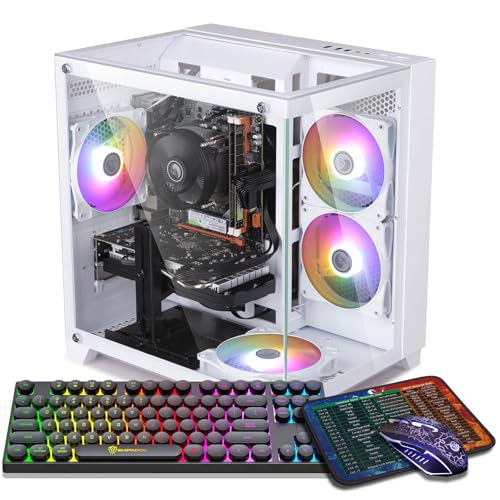
- Best 1440p renderer under $700, on sale only: ZER-LON Gaming PC, Ryzen 5 5500, RTX 4060 8GB, 16GB DDR4, 1TB NVMe, RGB Fan x4, White — Check on Amazon
- STGAubron Gaming PC, Ryzen 5 5500, RTX 3060 12GB, 16GB DDR4, 1TB SSD, RGB Fan x4 — Check on Amazon
- IPASON Gaming PC Desktop, Ryzen 5 5600, RTX 3060 12GB, 16GB DDR4-3200, 1TB NVMe — Check on Amazon
- Skytech Blaze 3.0 Gaming PC, i5-10400F, RTX 3060 12GB, 3 x RGB Dual Ring Fans, 600W Gold — Check on Amazon
See 2 more Amazon options
- STGAubron Gaming PC, Ryzen 5 5500, RTX 3050 6GB, 16GB DDR4, 1TB SSD, RGB Fan x6, White — Check on Amazon
- Skytech Shadow Gaming PC, Ryzen 5 3600, GTX 1660 Super, 16GB DDR4, RGB Fans — Check on Amazon
Read the full guide ↓
Disclosure: As an Amazon Associate, reviewstook.com earns from qualifying purchases. Links to Amazon on this page are affiliate links; they cost you nothing extra. Listing details such as price and availability change often, so check the current Amazon listing before you buy.
This search asks for two upgrades at once — a lit show case and a 1440p monitor — on a $700 budget, and it deserves a straight answer about what that money actually buys. Every machine in this guide can display 1440p: plug any of them into a 2560×1440 panel and the desktop, the text and the video will all be natively sharp. Displaying is the easy half. The hard half is rendering — computing every one of those 3.7 million pixels, sixty or more times a second, inside a game — and at $700 no graphics card renders demanding modern games natively at 1440p. Not one pick below does it, and any guide that implies otherwise is selling you the monitor’s specification as if it were the PC’s.
What $700 honestly buys for 1440p gaming is a two-part pattern, and this guide grades every pick on both parts. Part one is native rendering where the silicon genuinely reaches it: lighter games, older games and esports titles rendered at a true 2560×1440, which the stronger cards here — an RTX 4060 and three RTX 3060 12GB machines — do credibly at sensible settings. Part two is the working pattern for everything heavier: the game renders at 1080p, or at a DLSS internal resolution below 1440p, and is upscaled onto the panel, while the monitor still pays you back every day in desktop sharpness, readable text and a crisper interface. Bought with that understanding, a $700 RGB machine plus a 1440p screen is a coherent setup. Bought expecting native 1440p in the newest releases, it is a disappointment with nice lighting. The RGB half is graded as in our base guide: only what the listings document — fan counts, control methods, included peripherals — never what the photos suggest.
One framing note before the picks: prices in this class move often, several machines below can sit above the $700 budget on an ordinary day and belong here only when they fall within it, and every volatile pick therefore carries its walk-away rule in plain language — check the current price on Amazon, and if it sits above this tier, wait or step up a tier.
In this guide
Quick Picks
Short on time, or comparing several options at once? Each row below names a buyer type and the product that suits it, with a link to the listing.
| Buyer type | Pick | Why it stands out | Link |
|---|---|---|---|
| Best 1440p renderer, sale only | ZER-LON Gaming PC, Ryzen 5 5500 / RTX 4060 8GB | The newest card here and the only one with frame generation — check price on Amazon and buy only when it falls within the $700 budget | Check on Amazon |
| Best texture budget at 1440p | STGAubron Gaming PC, Ryzen 5 5500 / RTX 3060 12GB | 12GB of VRAM for 1440p textures, four RGB fans and lit peripherals — check price on Amazon and buy only when it falls within this budget | Check on Amazon |
| Best hardware value | IPASON Gaming PC Desktop, Ryzen 5 5600 / RTX 3060 12GB | The strongest CPU here with the same 12GB card — check price on Amazon | Check on Amazon |
| Best documented package | Skytech Blaze 3.0, i5-10400F / RTX 3060 12GB | Documented lighting control, mesh-front case and a named 600W Gold PSU | Check on Amazon |
| Most lights, 1440p display | STGAubron Gaming PC White, Ryzen 5 5500 / RTX 3050 6GB | Six RGB fans in white; a 1080p renderer behind a 1440p screen, positioned in the lower part of this tier — check price on Amazon | Check on Amazon |
| Best budget RGB | Skytech Shadow, Ryzen 5 3600 / GTX 1660 Super | RGB fans and a discrete card, positioned at the lower end of the range — a 1080p machine, honestly labelled | Check on Amazon |
How These Picks Were Chosen
The budget was applied the way a buyer experiences it: a machine belongs in this guide if it fits the $700 budget when you check the current price on Amazon, and where a listing often sits above the line, the review says so plainly rather than presenting it as an everyday fit for the tier. The six machines are the verified set from Best RGB Gaming PC Under $700, re-graded here on the question this keyword actually asks — what each one does with a 1440p panel — rather than on lighting alone.
That re-grading used three rendering criteria, in this order. First, native reach: which games a card can honestly render at 2560×1440, judged at class level for an RTX 4060, an RTX 3060 12GB, an RTX 3050 6GB or a GTX 1660 Super — never invented per-game frame rates for machines we have not benchmarked. Second, the upscaling toolkit: DLSS exists only on the RTX cards, because it needs NVIDIA’s Tensor cores; where this guide quotes DLSS internal resolutions, they are DLSS’s published scaling figures, attached to DLSS and to nothing else. The GTX 1660 Super has no Tensor cores, so it has no DLSS — its upscaler is FSR, which this guide credits generically, with no internal-resolution figures attached, because none are documented for these machines. Third, memory: at 1440p, VRAM is the texture budget, and upscaling cannot rebuild textures the card had to throw away — so 12GB grades above 8GB, and 8GB above 6GB, whatever the fan count says.
The lighting was scored exactly as documented in the base guide: lit fan counts stated in the listings, control methods where a maker publishes them, lit peripherals where they are in the box, and an explicit “not specified” where the verified listing data names the hardware and stops there. We did not use these PCs ourselves; we read the maker listings, manuals and Amazon listings, and compared them. Monitor guidance is class-level: the base research documents no display-output counts or refresh-rate ceilings for these listings, so this guide claims none and tells you to read the live listing’s port list before pairing a panel.
The 6 Best RGB Gaming PCs for 1440p Gaming Under $700
ZER-LON Gaming PC — Ryzen 5 5500, RTX 4060 8GB, RGB Fan x4, White
Who it suits: The buyer whose priority is the rendering itself — the newest graphics architecture in this guide, in a white four-fan case — and who is genuinely willing to wait for the price to come to them.
On the question this keyword asks, this is the strongest renderer here. The RTX 4060 is a generation newer than the 3060s around it, and at 1440p that shows in two places: it renders lighter and older titles natively at 2560×1440 with the most headroom of any pick, and in heavier games its DLSS toolkit is the most complete — Quality mode reconstructs a 1440p image from an internal render of roughly 1707×960, and it is the only card here with DLSS frame generation, which inserts generated frames to smooth motion on the panel. Read frame generation correctly: it is a display-side smoothing feature. It does not raise the render resolution or reduce input latency — it makes an upscaled 1440p image feel smoother, a real benefit and a different one from native rendering. The supporting cast matches the card: a six-core Ryzen 5 5500, 16GB of DDR4 and a 1TB NVMe SSD, with the presentation specified in the listing — RGB Fan x4 in a white case, which throws the fans’ light back into the room.
The counterweight is memory, and at this resolution it is not a footnote. The 4060 carries 8GB of VRAM against the 3060 picks’ 12GB, and 1440p textures are exactly where that difference gets spent: in the newest texture-heavy releases, this card can be the faster renderer and still be the one asked to lower texture settings first, because upscaling reduces the rendering load but not the memory the textures occupy. Buy it knowing which half of the trade you value — rendering speed and frame generation, or texture headroom over the machine’s life. Then the price discipline: check the current price on Amazon. This listing often sits above this budget, so it belongs in a $700 guide only when it falls within the line, and its first-place ranking holds only inside that window — buy when it falls within the budget, and if it sits above the line, compare the $800 tier instead. Its Wi-Fi is also the older Wi-Fi 5 standard, a small thing near a router and a real one across a house.
- RTX 4060 — the newest renderer here, with the widest native-1440p reach in lighter titles.
- The only card in the guide with DLSS frame generation, for smoother motion on the panel.
- RGB Fan x4 in a white case, as the listing itself specifies.
Honest limitation: 8GB of VRAM is the tightest texture budget among the guide’s serious 1440p picks, and the listing often sits above this budget — check the current price on Amazon and treat it as a buy only when it falls within the $700 budget.
Choose it if you can wait until it falls within the $700 budget and rendering comes first. Skip it if you are buying today at whatever it costs, or texture longevity matters more than frame generation — the 12GB machines below trade blows with it for exactly that reason.

STGAubron Gaming PC — Ryzen 5 5500, RTX 3060 12GB, RGB Fan x4
Who it suits: Buyers who want the 1440p pattern done the durable way — the card with the memory this resolution actually eats — plus the full lit setup, and who will check the current price on Amazon and buy when it falls within this budget rather than on a random Tuesday.
If the ZER-LON is the sprinter, this is the stayer. The RTX 3060 12GB is the version of the card a 1440p guide should be built around, because the extra memory over the 8GB cards keeps texture settings where you put them as games get heavier — and textures, not raw shading, are the first thing 1440p spends. Its native reach is real but bounded: esports titles, older games and lighter modern releases render at a true 2560×1440 at sensible settings. For demanding modern games the honest pattern is DLSS — Quality renders internally at roughly 1707×960 and reconstructs the 1440p image, Balanced drops the internal render to roughly 1485×836, and Performance to roughly 1280×720, a 720p-class render wearing a 1440p output, to be chosen knowingly, as a last resort. Around the card sit a Ryzen 5 5500, 16GB of DDR4 and a 1TB SSD, and the presentation is documented rather than implied: four RGB fans, an RGB keyboard and mouse in the box, Wi-Fi 6 and Bluetooth 5.2 in the listing data, and a stated one-year warranty.
The conditions attached to it are about price, and they bite. Check the current price on Amazon before anything else: this listing often sits above this guide’s ceiling, so the rule is absolute — when it falls within the $700 budget, this is arguably the best-balanced 1440p purchase in the guide; above that line it is competing with the $800 tier while carrying this tier’s parts, and the correct move is to wait or step up. Two further honest notes. The listing does not publish the power supply’s wattage or brand, which caps GPU upgrade planning until you open the case and read the label. And STGAubron is a value integrator rather than a boutique builder — expect competent assembly and a stated warranty, and spend the first week verifying every connection while the return window is open.
- RTX 3060 12GB — the texture budget this resolution rewards, in the card’s correct full-memory form.
- DLSS Quality gives demanding games a credible upscaled-1440p route at roughly 1707×960 internal.
- Four lit fans and a lit keyboard and mouse — the whole desk glows from a single box.
Honest limitation: It earns its place only when it falls within this budget, not at its usual higher position — check price on Amazon — and its power supply is unpublished in the listing data.
Choose it if you catch it when it falls within the $700 budget and want the balanced 1440p pattern with the show included. Skip it if the live price is above the line, or an unpublished PSU worries you — the Skytech further down names its power supply.

IPASON Gaming PC Desktop — Ryzen 5 5600, RTX 3060 12GB, 1TB NVMe
Who it suits: The performance-first buyer — the strongest documented hardware pairing at the tier, positioned low in this tier — who treats case lighting as a bonus rather than a specification.
The rendering hardware here is identical in kind to the pick above and slightly better in company. The graphics card is the same RTX 3060 12GB, so everything said about its 1440p pattern applies unchanged: native rendering for esports, older and lighter titles, and DLSS — Quality at roughly 1707×960 internal, Balanced at roughly 1485×836, Performance at roughly 1280×720 — carrying the demanding releases onto the 1440p panel. What changes is the processor: the Ryzen 5 5600 is the strongest gaming CPU in this guide, a genuinely quicker chip than the 5500s around it, and at 1440p that matters in the high-refresh esports titles where the processor, not the card, sets the ceiling. The rest of the specification is done properly — 16GB of DDR4-3200 with heat spreaders, a 1TB NVMe SSD, a 550W power supply, Windows 11 Home — and, positioned low in this tier for its hardware — check price on Amazon — it is an accessible route to the 12GB card with the best CPU attached. On hardware value alone, this guide could end right here.
Its place in an RGB guide carries one transparent caveat, carried over from the base guide because it is a fact about the listing: the documented listing data specifies the hardware in detail and does not specify a lighting system. The listing photos will show the case this configuration currently ships in, and IPASON’s gaming line is sold in lit cases — but a photo is weaker evidence than the named fan counts the picks around it offer, and this guide grades it that way. If the live listing’s case satisfies your eyes, you have bought the tier’s best 1440p hardware; if guaranteed, specified lighting is the point, the STGAubron above and the Skytech below document theirs. One more documented wrinkle: this listing family has shown variant drift over time, with style names shifting between card configurations — confirm the style in your cart reads Ryzen 5 5600 and RTX 3060 before you pay, and check the machine against the listing on arrival. The graphics card brand may vary, as the listing notes — standard practice in this tier, but one more reason the arrival check matters.
- Ryzen 5 5600 — the strongest gaming CPU in this guide — feeding the same 12GB card.
- Positioned low in this tier — an accessible route here to this card with 1TB of storage attached.
- 1TB of NVMe storage and heat-spreader DDR4-3200 — the supporting cast is specified properly.
Honest limitation: Its lighting is not specified in the verified listing data, and this listing family has drifted between configurations over time — verify the style name in the cart and the machine on arrival.
Choose it if hardware value leads and case lighting is a welcome extra. Skip it if a specified, countable lighting system is the point of the purchase — the neighbouring picks exist for exactly that.

Skytech Blaze 3.0 Gaming PC — Intel Core i5-10400F, RTX 3060 12GB, 3 x RGB Dual Ring Fans
Who it suits: Buyers who want the same 1440p-capable card as the picks above, but with the lighting documented rather than decorative — and a named power supply and an established US builder behind the glass.
The rendering story is the 3060 story, because the card is the same: the listing specifies an RTX 3060 at 12GB GDDR6, so its 1440p pattern matches the STGAubron and IPASON above — native rendering in esports, older and lighter titles, and DLSS carrying the heavier releases, with Quality reconstructing 1440p from an internal render of roughly 1707×960. What distinguishes this pick is everything around the card. Skytech’s listing names three RGB dual-ring fans — ring-lit fans throw a halo rather than a lit hub, the look most buyers pictured — inside a Phanteks Metallic Gear Neo Air case with a mesh front, the airflow-correct way to build a show PC: glass where you look, mesh where the air enters. Skytech’s own manual for the Blaze 3.0 line documents how the lighting is controlled — typically a dedicated button on the case or pre-installed software — putting this pick in the small group at this tier whose control method is a published fact rather than a hope. The supporting hardware holds the tier standard: an i5-10400F six-core, 16GB of DDR4-3200, a 1TB SSD, and a 600W 80 Plus Gold power supply named in the listing — documented headroom for a future card, which is the natural upgrade a 1440p buyer eventually wants. A gaming keyboard and mouse are in the box, the listing promises no bloatware, and Skytech backs it with a one-year parts-and-labor warranty, lifetime free technical support and US assembly. Check the current price on Amazon before you buy.
The compromises are platform compromises. The i5-10400F is a capable six-core gaming chip, but it sits on Intel’s finished LGA1200 platform: there is no meaningful CPU upgrade path in this socket, so the machine’s future is a GPU swap into that good power supply, not a processor refresh — and at 1440p, where esports frame rates lean on the processor, the Ryzen picks hold a small edge. The listing also ships Windows 10 Home; since the processor sits on Microsoft’s Windows 11 supported list, confirm the free upgrade rather than assuming it has already happened. And like most integrators, Skytech notes the graphics card brand may vary — the specification is guaranteed, the specific card maker is not. None of that dents what this pick is: the one for the buyer who reads spec sheets, because its spec sheet answers questions the others leave open.
- The same 12GB card and DLSS toolkit as the guide’s leaders — check price on Amazon.
- Three dual-ring RGB fans in a named mesh-front case, with control documented in Skytech’s manual.
- 600W 80 Plus Gold PSU, named in the listing — documented headroom for the GPU upgrade 1440p eventually asks for.
Honest limitation: The i5-10400F sits on a finished platform with no CPU upgrade path, and the listing ships Windows 10 Home — confirm the Windows 11 upgrade before you settle in.
Choose it if paperwork — warranty, a named PSU, documented control — matters as much as the glow. Skip it if a processor upgrade is in your future — the Ryzen picks here ride the longer-lived AM4 path.

STGAubron Gaming PC, White — Ryzen 5 5500, RTX 3050 6GB, RGB Fan x6
Who it suits: Buyers for whom the light show is the headline and the 1440p panel is mainly a sharper desktop — the maximum documented fan count in this guide, in white, with lit peripherals — who play the games a 3050-class card genuinely handles.
Grade this one plainly, because its ranking depends on the distinction this guide runs on: this is a 1440p display machine with a 1080p renderer’s heart. The RTX 3050 in its 6GB form does have Tensor cores, so DLSS is genuinely available to it — but availability is not capacity. Native 1440p rendering is honest only for the lightest territory: esports titles and older games at reduced settings. In modern releases the working pattern is a 1080p render upscaled to the panel, and even DLSS Performance at 1440p output — an internal render of roughly 1280×720 — asks a great deal of a 6GB card in demanding games; expect texture compromises the 12GB picks above simply do not face, because 6GB is the tightest texture budget in this guide and 1440p spends it fastest. What the machine does superbly is the other half of the keyword: six RGB fans — the highest documented count here — plus the same RGB keyboard and mouse in the box, in a white case that bounces light around the room, wrapped around a Ryzen 5 5500, 16GB of DDR4 and a 1TB SSD, with Wi-Fi 6 and Bluetooth 5.0 in the listing data. Positioned in the lower part of this tier, it makes the most illuminated machine in the guide also one of the more accessible: as a sharper-desktop, esports-and-back-catalog setup under a 1440p screen, it is a coherent purchase — made knowingly.
Price discipline applies in milder form: this listing can drift above the lower part of the tier where it belongs, so check the current price on Amazon and buy when it sits within this budget, not when it has drifted above it. The listing family shares the STGAubron notes from earlier in the guide: an unpublished power supply in the verified data, and a value brand’s support depth rather than a boutique’s. And one sentence deserves repeating: if your games are new AAA releases and your expectation is native 1440p, this is the wrong pick wearing the right keyword — the same brand’s 3060 machine sits near the top of this guide for that reason.
- Six lit fans in a white, light-multiplying case — the highest documented count in the guide.
- A genuinely sharp 1440p desktop and honest esports/older-game rendering, positioned in the lower part of this tier.
- The same lit keyboard and mouse as its black sibling, included in the box.
Honest limitation: The RTX 3050 6GB is a 1080p renderer — native 1440p reaches only the lightest titles at reduced settings, and its 6GB is the tightest texture budget here.
Choose it if the look leads, your library is esports, indies and back catalog, and you catch it when it falls within this budget. Skip it if you play new releases and expect them rendered at 1440p — that expectation belongs to the 3060 and 4060 picks.

Skytech Shadow Gaming PC — Ryzen 5 3600, GTX 1660 Super, RGB Fans
Who it suits: Buyers whose real budget is $500, who want a lit machine from a known builder under a 1440p screen — and who are honest that the screen is for the desktop and the back catalog, not for rendering new games at its native resolution.
The Shadow is this guide’s floor, and the 1440p grading of it can be done in one breath: the GTX 1660 Super is a 1080p card. It has no Tensor cores, which means — stated explicitly, because listings blur this — it has no DLSS: the upscaling toolkit that carries the RTX picks in demanding games does not exist on this hardware. Its one upscaler is FSR, credited here generically and honestly: FSR can lift a 1080p render onto a 1440p panel on this card, and that is a usable pattern for older and lighter games, but it is a softer reconstruction than DLSS on the RTX picks and it does not change what the card is. Native 1440p rendering is confined to esports titles at low settings; everything else is a 1080p render on a 1440p display, which — to be fair to the machine — still buys you the sharper desktop, text and interface that are half the reason to own the panel. What this lower-end position buys is real: RGB fans per the listing, 16GB of DDR4-3000, a 1TB SSD — storage is not strangled, unusually at this end of the range — a six-core Ryzen 5 3600, and the same Skytech proposition as the Blaze: an established integrator, a stated warranty, and support that exists after checkout.
The limitations are generational and absolute. Beyond the missing DLSS, the 1660 Super has no usable ray tracing, so the two technologies modern games increasingly assume are both absent; its ceiling is fixed in a way the RTX picks’ ceilings are not. The Ryzen 5 3600, meanwhile, is a generation older than the 5500s and 5600 elsewhere in this guide, and the listing ships Windows 10 Home — with the same confirm-the-free-upgrade homework as its sibling. Read the Shadow as a deliberate floor: it exists so a buyer whose real budget is $500 finds a lit machine with honest labelling instead of stretching to this tier for a resolution story that, at this card, was never true — and so everyone else can see exactly what stepping up to this tier buys at this keyword, which is not brightness and not even mainly the panel. It is the renderer.
- Lit fans and a real discrete card from an established builder, positioned at the lower end of the range.
- A full 1TB SSD — storage, unusually at this end of the range, is not the sacrifice.
- The guide’s honest floor: a sharp 1440p desktop and back-catalog play, plainly labelled.
Honest limitation: No DLSS — the GTX 1660 Super has no Tensor cores — and no usable ray tracing; native 1440p is esports-at-low-settings only, and the listing ships Windows 10.
Choose it if $500 is the real budget and esports plus back catalog is the real library. Skip it if 1440p gaming, rather than a 1440p desktop, is the actual goal — every RTX pick above is the correct spend.

Comparison Table
| Product | Graphics | Honest 1440p verdict | Link |
|---|---|---|---|
| ZER-LON Gaming PC, White (B0FFGRS282) | RTX 4060 8GB | Widest native reach in lighter titles; DLSS + frame generation for the rest; 8GB texture ceiling | Check on Amazon |
| STGAubron Gaming PC (B0FCYPWLSN) | RTX 3060 12GB | Native in lighter titles; DLSS Quality route for demanding games; best texture budget | Check on Amazon |
| IPASON Gaming PC Desktop | RTX 3060 12GB | Same card, strongest CPU — the esports high-refresh pick; lighting not specified | Check on Amazon |
| Skytech Blaze 3.0 | RTX 3060 12GB | Same 1440p pattern, best documented package around it | Check on Amazon |
| STGAubron Gaming PC, White | RTX 3050 6GB | 1440p display, 1080p renderer; native only in the lightest titles | Check on Amazon |
| Skytech Shadow | GTX 1660 Super 6GB | No DLSS; FSR from a 1080p render; native 1440p is esports at low settings | Check on Amazon |
Render vs Display: The Distinction This Whole Guide Runs On
A 1440p monitor shows 2560×1440 pixels no matter what is feeding it. That is the display’s job, and every pick here — down to the guide’s floor pick — does it perfectly for the desktop, for text, for video and for a game’s interface. Rendering is the separate job of producing each frame of the game itself at that resolution, and it is roughly 78 percent more pixel work than 1080p, every frame, forever. When a listing says a machine “supports 1440p,” it is describing the display job. When this guide grades a pick’s 1440p gaming, it is describing the rendering job. Most disappointment with this keyword is those two sentences being read as one.
Upscaling is the bridge between them, and it deserves exact numbers rather than adjectives. DLSS renders the game at a lower internal resolution and reconstructs a 1440p output from it. At a 1440p output, DLSS Quality renders internally at roughly 1707×960, Balanced at roughly 1485×836, and Performance at roughly 1280×720 — which is why this guide keeps translating the modes into plain language: Quality is a genuinely good-looking route that demanding games on the 3060 and 4060 picks can use, Balanced is a visible step down taken for smoothness, and Performance is a 720p-class render and should be treated as a last resort, not a feature. Those figures belong to DLSS and are printed only where DLSS exists — on the RTX 4060, 3060 and 3050 picks. The GTX 1660 Super has no Tensor cores and therefore no DLSS at all; its upscaler is FSR, which this guide credits generically — it lifts a lower render onto the panel, on any card — without attaching internal-resolution figures to it. Frame generation, exclusive here to the RTX 4060, sits on the display side of the line entirely: it synthesises additional frames to smooth motion, changes neither the render resolution nor the input latency, and should never be quoted as evidence a game is “running at 1440p.”
And 4K? Refused, for the whole tier, and the same arithmetic shows why. A 4K output carries about two and a quarter times a 1440p output’s pixels; even DLSS Quality at 4K renders internally at roughly 2560×1440 — a full native-1440p workload, which is the very thing this tier’s cards ration carefully — and DLSS Performance at 4K still renders at roughly 1920×1080 internally. A $700 machine that treats native 1440p as an achievement is not a 4K gaming machine with the settings turned down; it is a 1440p machine, and it will serve you well exactly as long as it is bought as one. Readers whose target is genuinely higher should start from the native-rendering guides — Best 1440p Gaming PC Under $700 grades machines on rendering first — and budget accordingly.
Pairing the 1440p Monitor
Buy the panel even though games will often render below it. The upscaled image still lands on a natively sharp screen, the desktop and text are sharp all day, and in lighter titles where these cards do render natively, the panel is already there. Note that 1440p is not an integer multiple of 1080p — about 1.33 times per axis — so a plain 1080p render stretched to the panel is slightly soft; that softness is exactly what DLSS and FSR exist to manage, an argument for using them rather than avoiding the monitor.
Two disciplines govern the pairing itself. First, outputs: the base research for these six machines documents no display-output counts and no refresh-rate ceilings for any pick, so this guide claims none — read the live listing’s port list for the exact machine you are buying, and connect the monitor to the graphics card’s outputs, never the motherboard’s. That second clause is not pedantry: none of these six processors carries integrated graphics — the Ryzen 5500, 5600 and 3600 have none, and the i5-10400F is an F-suffix chip with graphics disabled — so the motherboard’s display ports are dead on every pick, and a monitor plugged into one shows nothing. Second, settings: Windows frequently leaves a new panel at a default refresh rate below the one on the box, so set the panel’s real refresh rate in display settings on the first evening — a high-refresh 1440p panel earns its money in esports and lighter titles on the stronger picks here, not in native rendering of the newest releases.
The RGB Half of the Keyword, Kept Brief and Honest
The lighting grading here is inherited from the base research. Under $700, “RGB” almost always means preset effects — fans cycling patterns chosen by a case button or remote — rather than addressable, software-synced ARGB, and the two look identical in listing photos. What is documented here: four lit fans and lit peripherals on the black STGAubron, six lit fans and lit peripherals on the white one, three dual-ring fans with a control method described in Skytech’s own manual on the Blaze, RGB fans per the listing on the Shadow, four fans in the ZER-LON’s white case — and, on the IPASON, no lighting system specified in the verified listing data at all, which is precisely why it serves as the hardware benchmark: the full show sits above it in the tier, and the LEDs themselves are plainly not the expensive part, since the Shadow at the lower end of the range is lit too. The rule the base guide runs on survives the change of angle intact: at equal budget, card first, fans second — and at this keyword, that rule matters twice, because the card is now carrying a resolution as well as a frame rate.
How to Choose an RGB Gaming PC for 1440p Gaming Under $700
- Decide which 1440p you actually mean. Native rendering in lighter, older and esports titles — the 4060 and 3060 picks deliver that. Demanding modern games at 1440p on this budget means an upscaled image, full stop. If only native will do, the honest move is a bigger budget, not a more optimistic reading of this one.
- Grade VRAM as the texture budget. Upscaling shrinks the rendering load; it does not shrink the textures. At 1440p the 3060s’ 12GB outlasts the 4060’s 8GB, which outlasts the 3050’s 6GB — pick your position on that ladder deliberately, because it decides which settings you lower first in two years’ games.
- Check the upscaler against the silicon. DLSS requires an RTX card with Tensor cores: the 4060, 3060 and 3050 picks have it, the GTX 1660 Super pick does not and never will — its route is FSR. Any listing copy implying DLSS on GTX hardware is wrong, and worth treating as a warning about the listing.
- Translate the DLSS mode before you count it. Quality at 1440p output is a render of roughly 1707×960; Performance is roughly 1280×720. A machine advertised as “1440p with DLSS” may be describing either — know which one your games will use.
- Treat frame generation as smoothness, not resolution. Only the RTX 4060 pick has it. It makes motion feel faster; it does not make the render bigger or the controls quicker, and it is not by itself a reason to forgive a smaller texture budget.
- Read the lighting spec, not the lighting photo. Count what the listing itself documents — lit fans, control method if published, peripherals if included. A fan count in the listing title is evidence; a rainbow in the gallery is marketing, and at this angle the card matters even more than the count.
- Check the current price on every pick. Several listings in this class can sit above the $700 budget and only fall within it on sale. Check the current price on Amazon for each candidate, and let a price above the line be a reason to wait — not a reason to stretch.
- Insist on a named power supply if upgrades are planned. The natural upgrade for a 1440p buyer is a stronger card in two years, and a published wattage and rating — the Blaze’s 600W Gold is the guide’s example — is headroom you can plan around. An unpublished PSU is a question you will answer with a screwdriver first.
- Hold 16GB of RAM and an SSD as non-negotiables. At $700 there is no excuse for 8GB or a hard drive, and neither a fan count nor a resolution claim compensates for either. Every pick here clears the bar; anything elsewhere that does not, fails regardless of glow.
- Spend the first week inspecting. Value integrators reward a careful first owner: confirm the machine matches the listing, plug the monitor into the card, set the panel’s real refresh rate, and run your actual games at your actual settings — inside the return window. First-time buyers may prefer the walkthrough framing in Best RGB Gaming PC For Beginners Under $700.
Common Buying Mistakes
- Reading “supports 1440p” as “renders games at 1440p.” The first is a statement about the monitor port; the second about the graphics card, and at $700 they are different statements. This is the keyword’s most expensive misunderstanding.
- Quoting DLSS Quality as native 1440p. It is a reconstruction from an internal render of roughly 1707×960 — a good one, and the right way to play demanding games on this budget, but calling it native sets expectations the next game will correct.
- Expecting 4K from this tier because the card “does 1440p.” Even DLSS Quality at 4K carries a full native-1440p internal workload; a machine rationing that workload is not a 4K machine at lower settings, it is a 1440p machine at its limit.
- Picking the fan count over the graphics card — six lit fans on a 3050 against four on a 3060 — without weighing the trade. At 1080p that trade costs settings; at 1440p it costs the resolution itself.
- Paying above this budget for a machine whose whole qualification is falling within it on sale. In this class a listing can move well above the line; buying it there and calling it a $700 PC is the tier’s most common own goal.
- Plugging the monitor into the motherboard. No processor in this guide has working integrated graphics, so those ports are dead — the cable belongs in the graphics card, and “no picture” on a new machine is usually this, not a fault.
- Buying the high-refresh 1440p panel and the native-settings expectation together. The panel is a good purchase; the expectation is not. Pair the screen with the upscaled pattern this guide describes and both halves of the keyword deliver.
- Forgetting the room. A panoramic tower needs desk space and breathing room on its intake side; buyers measuring a compact desk should start from Best RGB Gaming PC For Small Spaces Under $700 instead.
Final Recommendation
- Best renderer, patient buyers: ZER-LON Gaming PC with the RTX 4060 — bought only when it falls within the $700 budget; check price on Amazon.
- Best balance of textures, show and price discipline: STGAubron Gaming PC with the RTX 3060 12GB, when it falls within this budget; check price on Amazon.
- Hardware value, lights as a bonus: IPASON Gaming PC Desktop.
- Documentation, warranty and airflow: Skytech Blaze 3.0.
- Maximum light show, 1440p desktop: STGAubron White with six RGB fans.
- Real budget is $500: Skytech Shadow.
Our top two at this budget are the ZER-LON, for the strongest rendering toolkit in the guide — the widest native reach, the only frame generation — inside its sale window, and the STGAubron 3060 machine, for the trade that ages best at this resolution: 12GB of texture headroom, the full lit setup, when it falls within this budget. Between them they cover the two honest shapes of 1440p at $700: render as much as the newest silicon allows, or bank the memory that keeps textures high while DLSS does the lifting. If neither falls within this budget when you shop, the IPASON is the standing answer — positioned low in this tier for the hardware it carries, check price on Amazon — the tier’s best hardware pairing, with whatever lighting its current case provides as a bonus rather than a promise. Shoppers whose priority is the broadcast rather than the resolution should see Best RGB Gaming PC For Streaming Under $700; those working to a smaller budget should see Best RGB Gaming PC Under $500, and those ready to leave the sale-watching behind should step up to Best RGB Gaming PC Under $800, where the 4060 class becomes the everyday proposition instead of the event. Check the current price on Amazon, confirm the style in the cart, plug the monitor into the card — and let the walk-away rules do their work.
Frequently Asked Questions
Can a $700 RGB gaming PC really game at 1440p?
Yes — with the honest definition this guide uses. Esports titles, older games and lighter modern releases render natively at 2560×1440 on the RTX 4060 and RTX 3060 12GB picks at sensible settings. Demanding modern games are played as upscaled 1440p: rendered lower, reconstructed by DLSS, and displayed on the panel, which still gives you the sharp desktop and interface all day. What $700 does not buy is native 1440p in the newest releases, and no pick here claims it.
Is DLSS Quality actually rendering at 1440p?
No. At a 1440p output, DLSS Quality renders the game internally at roughly 1707×960 and reconstructs the 2560×1440 image from it. The result looks far better than a plain 960p image stretched to the screen — the reconstruction is the technology’s whole point — but the rendering workload is the internal resolution’s, not the output’s, and Balanced (roughly 1485×836 internal) and Performance (roughly 1280×720 internal) step down from there. Quote the mode, not just the output, whenever a listing says “1440p with DLSS.”
Which pick is best for native 1440p?
For raw rendering reach, the ZER-LON’s RTX 4060 — the newest card here, and the only one with frame generation for smoothing motion. For texture longevity, the three RTX 3060 12GB machines argue back: their extra memory holds 1440p texture settings the 8GB card will eventually have to lower. Reasonable buyers land on both sides; neither side should expect native 1440p in demanding new releases from any of them.
Can the GTX 1660 Super pick use DLSS?
No, and the reason is hardware, not settings: DLSS runs on NVIDIA’s Tensor cores, and the GTX 1660 Super has none. Its upscaler is FSR, which works on the card and lifts a 1080p render onto a 1440p panel — a usable pattern for older and lighter games, and the honest ceiling of the guide’s floor pick, positioned at the lower end of the range. Any listing or review implying DLSS on this card is mistaken.
Should I buy a 1440p monitor if games will often render at 1080p?
Yes. The panel pays you back outside games — text, desktop, video and interfaces are natively sharp — and inside them, an upscaled image on a 1440p screen looks better than the same render on a 1080p screen, while lighter titles will render natively and use every pixel. Just set the panel’s real refresh rate in Windows, connect it to the graphics card’s outputs rather than the motherboard’s — no processor here has integrated graphics, so those ports are dead — and read the live listing for your machine’s exact outputs, since this guide documents no port counts for any pick.
What about 4K gaming on these machines?
Refused, plainly. A 4K output is about two and a quarter times the pixels of 1440p; even DLSS Quality at 4K renders internally at roughly 2560×1440 — the full native workload this tier rations — and DLSS Performance at 4K still renders at roughly 1920×1080 internally. These are 1440p machines with an upscaling pattern, and good ones at that job. Buy them for it, or budget up for 4K.
Why does VRAM matter more at 1440p than it did at 1080p?
Because textures are stored at the resolution they are displayed at, and 1440p textures are bigger. Upscaling reduces the shading work per frame; it does not reduce the memory textures occupy, so when a card runs out of VRAM the setting that falls is texture quality — visibly, in exactly the detail a sharper panel was bought to show. That is why this guide grades the 3060s’ 12GB above the 4060’s 8GB, and the 3050’s 6GB as the budget 1440p spends fastest.


