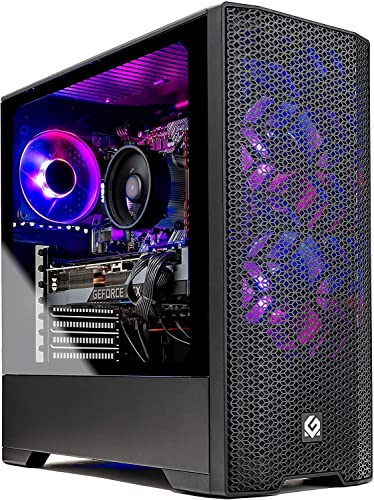
Where to buy
Check the latest price, availability and delivery on Amazon. Orders are placed on Amazon. We may earn a commission from qualifying purchases.
- Best RGB gaming PC for a small space under $700: Skytech Blaze 3.0 Gaming PC, i5-10400F, RTX 3060 12GB, 3 x RGB Dual Ring Fans, Mesh-Front Case, 600W Gold — Check on Amazon
- IPASON Gaming PC Desktop, Ryzen 5 5600, RTX 3060 12GB, 16GB DDR4-3200, 1TB NVMe — Check on Amazon
- STGAubron Gaming PC, Ryzen 5 5500, RTX 3060 12GB, 16GB DDR4, 1TB SSD, RGB Fan x4 — Check on Amazon
- ZER-LON Gaming PC, Ryzen 5 5500, RTX 4060 8GB, 16GB DDR4, 1TB NVMe, RGB Fan x4, White — Check on Amazon
See 2 more Amazon options
- STGAubron Gaming PC, Ryzen 5 5500, RTX 3050 6GB, 16GB DDR4, 1TB SSD, RGB Fan x6, White — Check on Amazon
- Skytech Shadow Gaming PC, Ryzen 5 3600, GTX 1660 Super, 16GB DDR4, RGB Fans — Check on Amazon
Read the full guide ↓
Disclosure: As an Amazon Associate, reviewstook.com earns from qualifying purchases. Links to Amazon on this page are affiliate links; they cost you nothing extra. Listing details such as price and availability change often, so check the current Amazon listing before you buy.
Start with the sentence most versions of this guide would bury: not one of the six machines below is small. Every pick here is a full-size gaming tower — built to stand on a desk or the floor beside one — and no amount of careful shopping turns a tower into a mini PC. If the space you are furnishing is a shelf, a TV stand, or the back of a monitor, this is the wrong guide: the machines that genuinely live in those places are covered in Best Mini PC Under $700 and Best Mini Gaming PC Under $700.
So what is this guide for? The much more common version of the problem: a small room, a small desk, a dorm, a bedroom corner, a shared flat — a place where a full-size tower is the machine you want, but where every centimetre of placement, every cable and every degree of waste heat has to be negotiated because the room gives you no slack. What they need is a tower chosen and installed like it matters: one whose intake can breathe in the only spot available, whose cables reach without crossing the room, whose heat does not turn a small bedroom into a sauna by midnight, and whose glow — this is still the RGB guide — reads as a deliberate part of the room rather than a light show leaking into everyone else’s evening. That is the grading used below: installation first, hardware second, lighting third.
Two documentation notes before the picks, because they shape everything that follows. First, dimensions: the verified listing research behind this guide does not publish a trustworthy size, weight or noise figure for any of these six machines, so this guide prints none — not one measurement, for any pick. That is deliberate: nothing below invents a footprint to sound precise, and it makes the measuring work in the checklist later in this guide load-bearing — your tape measure and the live listing’s stated size are the only two honest numbers in the transaction. Second, mounting: none of the six is a mountable machine — no VESA plate, no behind-monitor bracket, no wall-mount story. Towers stand; they do not hang. If a listing photo suggests otherwise, it is selling a desk arrangement, not a mounting system.
In this guide
Quick Picks
Short on time, or comparing several options at once? Each row below names a buyer type and the product that suits it, with a link to the listing.
| Buyer type | Pick | Why it stands out | Link |
|---|---|---|---|
| Best for a tight spot | Skytech Blaze 3.0, i5-10400F / RTX 3060 12GB | The only documented mesh-front intake here — the case that breathes close to a wall | Check on Amazon |
| Best hardware per dollar | IPASON Gaming PC Desktop, Ryzen 5 5600 / RTX 3060 12GB | The strongest CPU-card pairing in the guide — check price on Amazon and keep room in the budget for the desk it stands on | Check on Amazon |
| Best complete lit setup | STGAubron Gaming PC, Ryzen 5 5500 / RTX 3060 12GB | Four RGB fans plus a lit keyboard and mouse in the box — one purchase lights the whole small desk | Check on Amazon |
| Best current-generation card | ZER-LON Gaming PC, Ryzen 5 5500 / RTX 4060 8GB | A current-generation card in a white four-fan case — check price on Amazon | Check on Amazon |
| Most lights, white build | STGAubron Gaming PC White, Ryzen 5 5500 / RTX 3050 6GB | Six RGB fans in white — the biggest glow in the guide, on a cooler-running card class | Check on Amazon |
| Best budget RGB | Skytech Shadow, Ryzen 5 3600 / GTX 1660 Super | The gentlest heat and noise class in the guide — check price on Amazon | Check on Amazon |
How These Picks Were Chosen
The starting pool is the same six machines as the main RGB-under-$700 guide — same verified listings — re-graded here on the questions a small room asks: Can the case breathe in a realistic placement, intake close to a wall, a desk side or a curtain? How much heat and fan noise does the hardware class pour into a room that may also be a bedroom? How certain is the delivery-day picture? Then the usual hardware questions, then the lighting.
That order explains the ranking: because the verified research documents no dimensions for any pick, no pick below is ranked by size. All six are the same form-factor class — full-size towers — and anyone who calls one standard tower “the compact one” without a published measurement is guessing at your expense. The ranking instead follows documented installation facts: a named case with a mesh front outranks an unspecified case, a published power supply outranks an unpublished one (one less reason to open the case on delivery day), and a cooler-running graphics card class outranks a hotter one when the room is small and the door is closed.
Pricing is handled live throughout. Check price on Amazon for each pick and confirm the live price fits your budget before you order, because listings in this tier move often. Performance is described at class level throughout — what an RTX 3060 12GB, an RTX 4060, an RTX 3050 6GB or a GTX 1660 Super does as a class — with no invented per-game frame rates for machines nobody here has benchmarked. One filter sat on top of everything: no pick was allowed to solve the space problem by cheating it. Nothing here is recommended for a closed cabinet, a wardrobe or a sealed TV unit — for any pick, at any price — and that refusal gets its own section below rather than a footnote.
The 6 Best RGB Gaming PCs for Small Spaces Under $700
Skytech Blaze 3.0 Gaming PC — Intel Core i5-10400F, RTX 3060 12GB, 3 x RGB Dual Ring Fans
Who it suits: Small-room buyers whose only available spot is an honest one — against a wall, beside a desk, under a shelf — and who need the case to cope with that placement instead of demanding a better room.
Every tower here has to live somewhere imperfect; the Blaze is the only pick whose case design is documented well enough to say how it will cope. Skytech’s listing names the case — a Phanteks Metallic Gear Neo Air — and names its construction: a mesh front, with the display glass on the side where it belongs. A mesh front drinks air across its whole face, so the machine keeps breathing close to a wall or beside a desk leg; a sealed glass front feeds through narrow side slots — exactly what small-room placements block. The three dual-ring fans sit behind that mesh, throwing a diffused glow rather than hard points of light — ambience instead of glare, in a room with a bed in it. Skytech’s manual for the line documents the lighting control — typically a case button or pre-installed software — so the brightness question, which matters when the machine is three steps from where you sleep, has a documented answer.
The rest of the delivery-day picture is equally plan-able. The power supply is named in the listing: 600W, 80 Plus Gold. That sounds like an upgrade detail, and it is, but in a small room it is first an installation detail — a published PSU means the machine arrives as a finished object you place, plug in and cable, not a box you must open on a cramped desk to read a label. The hardware underneath is the tier standard done properly: an RTX 3060 specified at 12GB GDDR6, 16GB of DDR4-3200, a 1TB SSD, keyboard and mouse in the box, a one-year parts-and-labor warranty with lifetime tech support, assembled in the USA. Check price on Amazon for current pricing. Treat it as the guide’s reference install: mesh front facing the room’s open air, side glass toward the room, never an intake facing a wall.
The compromises are platform compromises. The i5-10400F is a capable six-core gaming chip on Intel’s finished LGA1200 platform, so there is no meaningful processor upgrade path; the machine’s future is a graphics card swap into that documented power supply. The listing ships Windows 10 Home — the processor is on Microsoft’s Windows 11 supported list, so confirm the free upgrade rather than assuming it — and the graphics card brand may vary — the specification is guaranteed, the maker is not.
- Named mesh-front case — the only documented intake design in the guide, and the one that tolerates tight placement.
- Lighting control documented in Skytech’s manual: case button or pre-installed software — brightness you can plan a bedroom around.
- 600W 80 Plus Gold PSU published in the listing: no case-opening detective work on delivery day.
Honest limitation: The i5-10400F’s platform is finished — no CPU upgrade path — the listing ships Windows 10 Home, and like every pick here it is a full-size tower: its exact size is a live-listing check, not a figure this guide can print.
Choose it if your spot is tight, against a wall, or in a room you also sleep in. Skip it if you plan to upgrade the processor later — the Ryzen picks below sit on the longer-lived AM4 path.

IPASON Gaming PC Desktop — Ryzen 5 5600, RTX 3060 12GB, 1TB NVMe
Who it suits: The performance-first buyer in a small room — the one whose space problem is really a budget problem, who wants the strongest machine and will arrange the room around it.
This machine is the guide’s benchmark. The Ryzen 5 5600 is the strongest gaming processor of the six — a genuinely quicker chip than the 5500s and the older Intel six-core around it — paired with the RTX 3060 12GB, 16GB of DDR4-3200 with heat spreaders, a 1TB NVMe SSD and a 550W power supply, running Windows 11 Home. Check price on Amazon for current pricing. Its budget-friendly positioning in this tier earns a specific argument in a small-spaces guide: value here leaves more of your budget for what a small room can use better than extra fans — the desk the tower stands on, the monitor arm that frees the surface, the cable channel that keeps the drop tidy. As a budget-friendly route to this tier’s resident card with its best CPU attached, it is the pick that leaves budget for the room itself.
The installation picture is where this review must be careful: the verified listing data specifies the hardware in detail, but it does not specify a lighting system — and it does not document the case’s intake design either. So this pick is graded by class and by candour: a full-size tower with an internal, published 550W supply — worth something on delivery day — whose placement behaviour beyond that is a live-listing question. Read the current listing’s case description before you order; if the case is a sealed-glass design, place it with its intake slots clear of walls and desk sides, exactly as the checklist below prescribes.
One more documented wrinkle, carried over at full size: this listing family has shown variant drift, with style names shifting between card configurations — confirm the style in your cart reads Ryzen 5 5600 and RTX 3060 before you pay, and check the delivered machine against the listing on arrival. The listing also notes the graphics card brand may vary, standard practice at this price. None of this displaces the proposition: the tier’s best hardware at a budget-friendly position in this tier, with its case an open question you are told to close before ordering, not after.
- The Ryzen 5 5600 is the quickest gaming processor of the six, paired with the 12GB RTX 3060.
- Budget-friendly positioning in this tier leaves room in the budget for the desk, arm and cable management a small room actually needs.
- 550W power supply published in the listing data; 1TB NVMe and DDR4-3200 done properly.
Honest limitation: The verified listing data specifies neither its lighting nor its case’s intake design, and the listing family has shown configuration drift — verify the style name in the cart, the case description on the live listing, and the machine on arrival.
Choose it if hardware per dollar leads and you will do the case homework before ordering. Skip it if you want the installation facts in writing up front — that is the Skytech above.

STGAubron Gaming PC — Ryzen 5 5500, RTX 3060 12GB, RGB Fan x4
Who it suits: Buyers furnishing a small desk as one purchase — tower, lit fans, lit keyboard and mouse from a single box — who will check the live price carefully before they buy.
Small rooms punish piecemeal buying: every separate accessory is another box, another cable, another delivery. This STGAubron is the guide’s one-checkout answer: the tier’s resident graphics card — the RTX 3060 in its 12GB form, whose extra memory keeps texture settings high at 1080p — with a six-core Ryzen 5 5500, 16GB of DDR4 and a 1TB SSD, presented through four documented RGB fans, with an RGB keyboard and mouse in the box so the desk lights as a single scheme from a single order. Wi-Fi 6 and Bluetooth 5.2 are in the listing data, and wireless networking is how a small desk avoids the cable spaghetti that makes a tight setup feel twice as cramped. The listing states a one-year warranty.
As an installation, grade it as the glass-show-case class it presents itself as: the display panel faces the room, the intake path stays clear — do not push the case hard against a wall or desk side on its intake side, do not let a curtain live against it, and do not slide it into a desk’s enclosed tower cubby, because that cubby is the sealed cabinet this guide refuses for every pick (the full argument is in its own section below). What the listing data does not publish is the power supply’s wattage or brand. The PSU is internal, so there is no external brick to place; read its label during your first-week inspection, while the case is open for the cable check, rather than discovering it on upgrade day.
Check price on Amazon for current pricing before you order. Read that as the rule it is: when the live price fits this tier’s budget, this is the most complete small-desk purchase in the guide; if the live price sits well above this tier, compare it with the next tier up instead. STGAubron is also a value integrator rather than a boutique builder: expect competent assembly and a stated warranty rather than a deep support organisation, and spend the first week checking every connection, cable and setting while the return window is wide open — advice that doubles in a small room, where a faulty machine is a tower in the middle of your only one.
- The RTX 3060 in its 12GB form — the full-memory version this tier should be built on.
- Four RGB fans plus an RGB keyboard and mouse: the whole small desk lights from one box and one delivery.
- Wi-Fi 6 and Bluetooth 5.2 — the wireless standards that keep a small desk’s cables to a minimum.
Honest limitation: Pricing varies, so check price on Amazon and confirm the live price fits this tier’s budget before you buy, and the power supply is unpublished in the listing data.
Choose it if the live price fits your budget (check price on Amazon) and you want tower and lit peripherals settled in a single order. Skip it if the live price sits above this tier, or you want every installation fact published — the Skytech names its power supply and its case.

ZER-LON Gaming PC — Ryzen 5 5500, RTX 4060 8GB, RGB Fan x4, White
Who it suits: The patient buyer furnishing a white small-room setup — desk, peripherals, tower — who wants the newest graphics card in the guide and will wait for its price to behave.
White is a small-room strategy before it is a fashion choice. A white case reflects its fans’ light back into the room instead of absorbing it, so four lit fans in white read as a brighter, larger presence than the same fans in black — and a bright object looks deliberate where a dark tower looks like clutter. The listing specifies the presentation plainly: RGB Fan x4, in white. Underneath it sits the most modern hardware in this guide — an RTX 4060, a generation newer than the resident 3060, more efficient, and the only card here with DLSS 3 Frame Generation — with a Ryzen 5 5500, 16GB of DDR4 and a 1TB NVMe SSD. Efficiency earns its place here too: a newer-generation card doing the same work draws power more frugally, and across a long evening in a bedroom-sized space, waste heat is a placement fact, not a footnote.
As an installation it belongs to the glass show-case class, with the standard grammar: display side to the room, intake side clear of walls, curtains and desk panels, and never — like every pick here — inside an enclosed cabinet or tower cubby. The power supply is unpublished — read its label at the first-week inspection; it is internal, so there is no brick to house. One connectivity note: its Wi-Fi is Wi-Fi 5, a generation behind the STGAubron picks’ Wi-Fi 6. Across a small flat, where the router is rarely a room away, that is close to a non-issue; in a room at the far end of a large shared house, weight it — and remember a wired Ethernet run settles the question permanently.
Now the part of this review that matters most: check price on Amazon for current pricing. This is a reach pick in this tier, best bought when the live price fits your budget, so set an alert and check the live listing before you order. The counterweight is memory: the RTX 4060 carries 8GB against the 3060’s 12GB in the picks above, so in today’s games its frame generation wins, while in tomorrow’s texture-heavy ones the older card’s larger memory may age more gracefully.
- The RTX 4060 stands alone here as the current-generation card, and alone in offering DLSS 3 Frame Generation.
- Four RGB fans in a white case, specified in the listing itself — white multiplies the light in a small room.
- A 1TB NVMe SSD and 16GB of DDR4 round out a specification with no weak supporting part.
Honest limitation: Pricing can sit above this tier, so check price on Amazon and buy only when the live price fits your budget; Wi-Fi is the older Wi-Fi 5 standard, and the power supply is unpublished.
Choose it if the live price fits your budget when you check price on Amazon and you are building a white setup. Skip it if you are buying today regardless of price — if the live price is high for this tier, compare it with the next tier up instead.

STGAubron Gaming PC, White — Ryzen 5 5500, RTX 3050 6GB, RGB Fan x6
Who it suits: Buyers whose small room is also their backdrop — the machine will be seen, constantly, at close range — and whose games suit a 3050-class card played honestly.
Count the fans: six. The listing for this white STGAubron specifies RGB Fan x6 — half again as many lit fans as its black sibling above — plus the same RGB keyboard and mouse in the box, around a Ryzen 5 5500, 16GB of DDR4 and a 1TB SSD, with Wi-Fi 6 and Bluetooth 5.0 in the listing data. In a small room that specification reads differently: the machine is never across the room, it is at arm’s length, in peripheral vision all evening, and a white case bouncing six fans’ worth of light around a compact space — the most illuminated machine here is also positioned as a budget-friendly option in this tier. There is a second, quieter virtue: the RTX 3050 6GB is a cooler, gentler hardware class than the 3060 machines above it. Less heat into a small room, less fan work to move it — for a buyer whose games are esports titles, indies and the back catalog, that trade is not a compromise at all.
The placement grammar is the show-case grammar, with one addition the fan count makes specific: six fans are six air movers, and they earn their keep only if the air has somewhere to come from and somewhere to go. Keep the intake side clear of the wall, the exhaust side out from under a shelf lip, and — the standing refusal, applied here as everywhere — never enclose it in a cabinet or tower cubby, where six fans simply stir hot air in a box. The family notes carry over: PSU unpublished (internal, so no brick to place; read its label at the first-week inspection), support a value brand’s rather than a boutique’s.
The trade, printed plainly because the glow must not blur it: the RTX 3050 in 6GB form is a class below the 3060 machines that lead this guide — 1080p on medium-to-high settings with DLSS doing real work, and texture compromises in the newest releases that the 12GB cards do not face. That is a legitimate exchange — but it should be made knowingly. Check price on Amazon for current pricing, and buy when the live price fits your budget.
- Six lit fans, the most any listing in this guide documents, inside a white case that throws their light back into the room.
- RGB keyboard and mouse included, and Wi-Fi 6 keeps the small desk’s cable count down.
- Budget-friendly positioning in this tier, on the cooler-running card class a small room appreciates.
Honest limitation: A 3050 in 6GB form sits a clear class under the 3060 machines — expect 1080p at medium-to-high settings with DLSS helping, not high settings with room to spare — check price on Amazon for current pricing.
Choose it if appearance leads your list, your library fits a 3050, and the live price fits your budget when you buy (check price on Amazon). Skip it if you play new AAA releases at high settings — the same brand’s 3060 machine above is the correct spend.

Skytech Shadow Gaming PC — Ryzen 5 3600, GTX 1660 Super, RGB Fans
Who it suits: Buyers whose small space is also a shared space — a living room corner, a family room, a younger player’s bedroom — where the machine must be welcome at the volume and temperature of ordinary life.
Grade the Shadow the way a small room grades things, and it stops looking like the guide’s floor and starts looking like its diplomat. Its hardware class — a GTX 1660 Super with a six-core Ryzen 5 3600, 16GB of DDR4-3000 and a 1TB SSD — is the gentlest in this guide: the least heat poured into a small room across an evening, the least fan noise competing with a conversation or a television, and a budget-friendly machine in this tier — check price on Amazon — leaving more of your budget for the monitor and desk. Skytech’s listing specifies RGB fans behind glass, so the look the keyword asks for is present, and behind it stands the same builder proposition as the Blaze: an established integrator, a stated warranty, support that exists after checkout.
As an installation it is the simplest here, for a reason worth naming: modest hardware is forgiving hardware. The placement grammar still applies — open air on the intake side, no enclosed cabinets, cables dropped tidily rather than trailed — but a machine of this class makes fewer demands on every one of those points. If your room gives you one mediocre corner and no good ones, this is the machine that minds least.
The limitations are generational and absolute: the GTX 1660 Super has no DLSS and no usable ray tracing, so its performance ceiling is fixed in a way the 3060 picks’ ceilings are not — it will not grow into new releases, only fall behind them. The Ryzen 5 3600 is a generation older than the 5500s and 5600 elsewhere here, and the listing ships Windows 10 Home — same confirm-the-free-upgrade note as its sibling. Read the Shadow as the guide’s honest floor: it exists so a buyer on a tighter budget — or whose real constraint is a room that must stay a room — finds a lit machine with honest labeling instead of stretching to a higher tier for capability their library never uses.
- The gentlest heat and noise class in the guide — the pick a shared room will like most.
- Lit fans and a real discrete graphics card from a known builder — check price on Amazon.
- A full 1TB SSD, where budget machines usually cut storage first.
Honest limitation: With no DLSS and no ray tracing on the 1660 Super, a processor a generation old, and Windows 10 in the listing, the performance ceiling is fixed — buy it with open eyes or not at all.
Choose it if your room is shared, your budget is tighter, and your library is esports and back catalog. Skip it if new releases are your library — the correct money is on a 3060 pick above.

Comparison Table
| Product | Graphics | Installation notes, as documented | Link |
|---|---|---|---|
| Skytech Blaze 3.0 | RTX 3060 12GB | Named mesh-front case; lighting control documented; 600W Gold PSU published | Check on Amazon |
| IPASON Gaming PC Desktop | RTX 3060 12GB | 550W PSU published; case and lighting not specified in verified data — check the live listing | Check on Amazon |
| STGAubron Gaming PC (B0FCYPWLSN) | RTX 3060 12GB | RGB Fan x4 plus lit peripherals; Wi-Fi 6; PSU unpublished | Check on Amazon |
| ZER-LON Gaming PC, White | RTX 4060 8GB | RGB Fan x4 in white; newest, most efficient card class; PSU unpublished | Check on Amazon |
| STGAubron Gaming PC, White | RTX 3050 6GB | RGB Fan x6; cooler-running class; Wi-Fi 6; PSU unpublished | Check on Amazon |
| Skytech Shadow | GTX 1660 Super 6GB | Gentlest heat and noise class; RGB fans per listing | Check on Amazon |
Fitting a Tower Into a Small Room: What Actually Decides It
Strip the problem down and a tower in a small room is decided by three physical facts, none of which is the tower’s colour scheme. The first is intake air. A gaming PC moves room air through a box; where that air comes from is the difference between a quiet machine and a loud, hot one. Cases take air in through the front — mesh, ideally — or through slots around a glass front, and every placement rule in this guide reduces to one sentence: the side the air enters must face open room. A tower pushed flush against a wall on its intake side is breathing through a straw: its fans work harder, sound louder, and still deliver less. This is why the Blaze’s documented mesh front leads the guide: mesh is the intake design most forgiving of the placements small rooms actually offer.
The second fact is exhaust. Warmed air leaves at the rear and top, and it needs somewhere to go that is not straight back into the intake: a tower under a low shelf recycles its own heat against the shelf’s underside, and a corner does the same more slowly. Give the rear open room and keep the top vents clear, and the physics settles itself. The third fact is the room itself. A 3060-class machine under load is a modest space heater, and a small closed room notices: across a long session the room — and the intake air — warms, and fans climb. The cooler classes here — the 3050 and 1660 Super picks — pour less heat into that equation, which is why they grade better in this guide than raw performance suggests.
The Five-Step Measure-Before-You-Buy Checklist
Run these five steps in order, before ordering. They exist because this guide prints no dimensions — the verified research documents none — so the only measurements that matter are yours and the live listing’s.
- Measure the spot. Tape-measure the exact place the tower will live — floor beside the desk, or the desk surface itself — and record the gap’s width, the depth front-to-back, and the height clearance under any shelf. Then compare the live listing’s stated size for the exact configuration in your cart against your numbers, with room to spare on every side — a tower that fits with nothing left over does not fit, because steps two and four need the leftover. If the listing’s size is missing or vague, treat that as information — and as one more reason the Blaze, whose case is a named retail product, grades as the low-uncertainty pick.
- Check the ventilation clearance. Ask where your measured spot’s air comes from and goes. The intake side — front, on every pick here — needs open room in front of it, not a wall, a curtain, a radiator or another piece of furniture. The exhaust needs an unobstructed path behind and above. If your spot fails this step, the spot is wrong, not the PC: move the furniture, choose the floor beside the desk over the cubby inside it. No later step can rescue a machine that cannot breathe.
- Give the power its address. A note first: none of the six picks uses an external power brick. Every one runs an internal supply, so there is no brick to house — the power question for a tower is older and simpler: where is the wall socket, and does the cord reach it without crossing a walkway or stretching taut? In a small room the socket is often behind the bed or the wardrobe, so settle it on paper now: socket position, cord route along the wall, surge protector where the cable drop (next step) can meet it. Decide the position first and route the power to it — a tower whose cord dictates its position ends up in the wrong one.
- Plan the cable drop. List every cable that will run between the tower and the rest of the setup: display cable to the monitor, Ethernet if you wire it (in a small room you usually can — the router is close, and wired is the cheapest performance in this guide), keyboard, mouse, headset, and the monitor’s own power. For each one: does it drop straight down behind the desk, or trail across the room? Tower-on-desk setups drop everything a short distance; tower-on-floor setups need the display cable to reach the desk without tension at either end. Measure the longest run, check it against the cables you own, and buy length before the machine arrives — one short cable leaves a finished setup spread across the room for a week.
- Then order. Only now — spot measured, clearance confirmed, power addressed, cables planned — place the order, and place it only after you check price on Amazon for the pick you want and confirm the live price fits your budget. When it arrives: confirm the delivered configuration matches the listing (the IPASON’s style name, every pick’s card and storage), read any unpublished power supply’s label while the case is open for the cable check, place the tower where step one measured, and keep the packaging until the first week’s inspections are done.
The Sealed-Cabinet Refusal
One placement is refused outright, for all six picks, without exceptions: inside a closed cabinet, a wardrobe, an enclosed TV unit, or a desk’s doored tower cubby. A gaming PC converts electricity into heat and moves that heat into the room with fans; seal it in a box and the fans move the same heat around inside the box, the intake air climbs toward the exhaust temperature, and the machine responds the only ways it can — fans at full speed, components throttling, lifespan shortening. A lit tower behind a cabinet door looks tidy in a photograph and cooks in real life. If your furniture offers only an enclosed home, the honest options are these: door off and back open (a shelf, effectively), the tower beside the furniture instead of inside it, or a mini PC designed for enclosed, low-power living. Do not buy any tower from this page and close a door on it.
How to Choose an RGB Gaming PC for a Small Space Under $700
- Accept the form factor first. Every machine here is a full-size tower. If your space cannot give one open air at its intake and a clear exhaust path, no pick on this page solves your problem — the mini PC guides do. Decide that honestly before falling for a light show.
- Measure before you fall in love. Run the five-step checklist above with your actual spot, socket and cables. A tower chosen against measurements fits; one chosen against a listing photograph is a return waiting for a courier.
- Prefer documented intakes in tight placements. A named mesh-front case — the Blaze’s Neo Air is the example — tolerates a tower living close to walls and furniture. Glass fronts are not disqualified, but they demand the placement discipline their intake slots need.
- Grade heat by hardware class, not by hope. In a small or shared room, the cooler classes (the 3050 and 1660 Super picks) are a feature, not a failure — provided your library honestly suits them. If you play new releases, buy the 3060 class and manage the room instead: door open, exhaust path clear.
- Count a published power supply as an installation feature. A named PSU (the Skytechs publish theirs) makes delivery day placement, not investigation; with an unpublished one, schedule the label-reading into your first-week inspection.
- Wire the network. Small rooms put the router within a cable’s reach more often than any other housing type; a wired connection removes the Wi-Fi generation question (Wi-Fi 6 versus the ZER-LON’s Wi-Fi 5) entirely, and costs less than any other upgrade here.
- Check the live price for every candidate. Prices in this tier move often, so check price on Amazon, set alerts, confirm the live price fits your budget, and let a high live price be a reason to wait — not a reason to stretch.
- Treat 16GB of memory and solid-state storage as the floor. Nothing in this tier excuses 8GB or a spinning hard drive, and no fan array makes up for either; all six picks here clear that floor, and anything elsewhere that does not should be rejected however brightly it glows.
- Decide what the light is for. In a room of your own, brightness is taste; in a room you share or sleep in, documented lighting control and a white case’s lamp-like glow are planning questions. First-time setup help lives at Best RGB Gaming PC For Beginners Under $700.
Common Buying Mistakes
- Closing a cabinet door on a gaming tower. The most destructive small-space decision there is: the machine recycles its own exhaust, fans run at full speed, components throttle and age. Leave the door off, move the tower, or buy a mini PC.
- Assuming a tower in this guide is “the small one.” All six are the same full-size class, and the verified research documents no dimensions for any of them. Buyers who skip the tape measure and the live-listing size check are gambling on a return.
- Hunting for a VESA mount or a behind-monitor bracket for a tower. None exists for any pick here; towers stand on desks and floors. Readers who need a machine on the back of a monitor need Best Mini Gaming PC Under $700, not a bracket catalogue.
- Pushing the case flush against the wall to “save space.” The centimetres saved are paid for in intake air, fan noise and heat; the spot beside the desk with open air beats the spot against the wall every time.
- Buying without checking the live price first. In this class prices move a lot between checks, so check price on Amazon and confirm the live price fits this tier’s budget before you buy — paying well over budget and calling it a budget-tier PC is the tier’s most common own goal.
- Letting fan count outrank the graphics card — six lit fans on a 3050 over four on a 3060 — without seeing the exchange you are making. The fans show in photographs; the card shows in every minute of play.
- Forgetting the cable drop until delivery day. A tower on the floor with a display cable two hand-widths too short becomes a tower in the middle of the room for a week. Measure the runs in step four of the checklist, before ordering.
- Buying for 1440p on this tier’s budget. Expect a 1080p tier that visits 1440p through upscaling; if native 1440p is the requirement, start from Best RGB Gaming PC For 1440p Gaming Under $700 or plan to spend a tier higher.
Final Recommendation
- Most small rooms: Skytech Blaze 3.0 — the documented mesh intake, the named power supply and the manual-documented lighting control make it the tower that tolerates real placements.
- Hardware per dollar, room arranged around it: IPASON Gaming PC Desktop.
- One-box small desk, tower and lit peripherals together: STGAubron Gaming PC with the RTX 3060 12GB — check price on Amazon and buy only when the live price fits this tier’s budget.
- White setup, newest card, patient buyers: ZER-LON Gaming PC, when the live price fits your budget.
- Maximum light at close range, cooler class: STGAubron White with six RGB fans.
- Shared room, tighter budget: Skytech Shadow.
Our top two for a small space are the Skytech Blaze 3.0, because it is the only pick whose installation behaviour is documented well enough to plan a room around — mesh where the air enters, glass where the eye looks, a power supply in print — and the IPASON, because its budget-friendly positioning in this tier buys the tier’s strongest hardware and leaves more of your budget for the desk, the monitor arm and the cable channel. If the live price does not fit your budget when you shop, patience is a specification too — check price on Amazon again later rather than stretching. Shoppers working to a smaller budget should see Best RGB Gaming PC Under $500, those ready to step up a tier should see Best RGB Gaming PC Under $800, and small-room streamers should read Best RGB Gaming PC For Streaming Under $700 first.
Frequently Asked Questions
Are any of these PCs actually small?
No. All six picks are full-size gaming towers. They suit small rooms because they can be installed well in one — open intake, clear exhaust, planned cables — not because they are compact. If the space itself is small — a shelf, a TV stand, the back of a monitor — the correct products are mini PCs, covered in Best Mini PC Under $700.
Can I mount one of these behind my monitor or on the wall?
No — no VESA pattern, no bracket, no mounting hardware for any of the six, and this guide claims mounting for no pick. Towers are heavy boxes of warm air designed to stand on a horizontal surface with their vents open. Behind-monitor mounting is a mini PC feature; it is one of the main reasons that category exists.
Can I put the tower inside my desk cabinet or TV unit to keep things tidy?
Not with the door on, and not in a sealed unit — for any pick in this guide. A gaming PC survives by exchanging air with the room; enclose it and it breathes its own exhaust, runs its fans at full speed, throttles and ages early. The workable versions of tidy are: the cabinet with door removed and back open (a shelf, effectively), the tower beside the furniture in open air, or a low-power mini PC designed for enclosed living. Tidiness that costs the machine its airflow is not tidiness, it is storage.
How much room does a tower need around it?
This guide prints no dimensions, because the verified research documents none for these six machines — so the honest answer is procedural. Measure your spot (step one of the checklist), compare it with the live listing’s stated size for the exact configuration you are buying, and require clearance beyond the fit: the front must face open room, and the rear and top must exhaust into air that can leave. A tower that fits exactly, touching on all sides, does not fit. If a listing will not state its size, favour the picks whose cases are named, retail-documented products.
Do these PCs need an external power brick, and where does it go?
None of them has one. All six picks run internal power supplies, so there is no brick to house — one of the quiet conveniences of the tower class over mini PCs. What remains is the wall socket: where it is, whether the cord reaches it along the wall without crossing a walkway, and where the surge protector sits. Step three of the checklist walks through it.
Will a gaming tower make a small bedroom too hot or too loud?
It will warm it — every gaming PC is a small space heater under load — but the size of the effect follows the hardware class. The 3060-class picks are the warmest here and will raise a small closed room’s temperature across a long session; the 3050 and GTX 1660 Super picks pour noticeably less heat into the room and run their fans easier, which is a genuine reason to choose them if your library suits them. Placement does the rest: open intake, clear exhaust, and a door ajar beat any specification. Sealing the machine away to hide the problem does not work — that is the cabinet mistake above, trading a warm room for a cooking PC.
What if every price I check today is above $700?
Then the market is having one of its weeks. Check price on Amazon again later and wait until the live price fits your budget: set alerts on the two or three listings you genuinely want, and weigh the tier above — Best Gaming PC Under $700 follows the same hardware with no lighting filter, and the next RGB tier up can be better value than a pick in this guide bought well over budget. Never settle it the other way, by paying well over this tier’s budget for parts that belong to this guide and calling the difference close enough.


