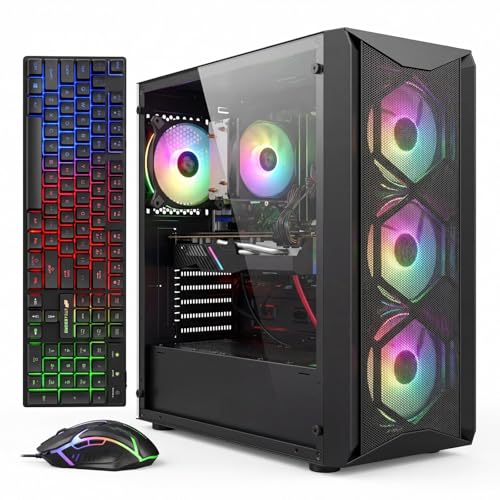
Where to buy
Check the latest price, availability and delivery on Amazon. Orders are placed on Amazon. We may earn a commission from qualifying purchases.
- Best overall RGB gaming PC for beginners under $700: STGAubron Gaming PC, Ryzen 5 5500, RTX 3060 12GB, 16GB DDR4, 1TB SSD, RGB Fan x4 — Check on Amazon
- Skytech Blaze 3.0 Gaming PC, i5-10400F, RTX 3060 12GB, 3 x RGB Dual Ring Fans, 600W Gold — Check on Amazon
- IPASON Gaming PC Desktop, Ryzen 5 5600, RTX 3060 12GB, 16GB DDR4-3200, 1TB NVMe — Check on Amazon
- ZER-LON Gaming PC, Ryzen 5 5500, RTX 4060 8GB, 16GB DDR4, 1TB NVMe, RGB Fan x4, White — Check on Amazon
See 2 more Amazon options
- STGAubron Gaming PC, Ryzen 5 5500, RTX 3050 6GB, 16GB DDR4, 1TB SSD, RGB Fan x6, White — Check on Amazon
- Skytech Shadow Gaming PC, Ryzen 5 3600, GTX 1660 Super, 16GB DDR4, RGB Fans — Check on Amazon
Read the full guide ↓
Disclosure: As an Amazon Associate, reviewstook.com earns from qualifying purchases. Links to Amazon on this page are affiliate links; they cost you nothing extra. Listing details such as price and availability change often, so check the current Amazon listing before you buy.
If this is your first gaming PC, welcome — and take a breath, because this is a friendlier purchase than the listings make it look. Every machine in this guide arrives built, tested and ready to plug in. You are not assembling anything or picking parts from a compatibility chart. What you are buying at $700 is a genuinely good games machine — the graphics card most of these PCs carry plays modern games smoothly at the standard screen resolution explained below — that also happens to glow. The glowing part is real, it is fun, and it is the reason this keyword exists. It is also, honestly, the least important part of the purchase, and this guide is written to keep it in that order: machine first, light show second, with every piece of jargon translated as it appears.
Two things are worth understanding before any of the reviews, because they decide whether you end up happy. The first is what the letters RGB actually get you at this price. Some PCs let you control every light from software, per fan, synced with your keyboard. Most PCs under $700 do something simpler: the fans run preset patterns — rainbows, slow fades, a fixed color — chosen with a button on the case or a small remote, and no app can teach them new tricks. Both kinds look great in a dark room; only the first kind can grow with you later. Where a maker’s documents say how a machine’s lights are controlled, the review tells you; where the listing only counts the fans, the review tells you that instead, because silence almost always means the simple kind.
The second thing is price behavior. Prices on machines like these move around a lot from week to week, and several picks below spend much of the year above this budget — they earn their place here because their prices genuinely do come down into this tier on sale, not because someone rounded down. So check the live price on Amazon for every pick before you buy, and treat the under-$700 budget as a firm line: a pick belongs in this guide only when its current price fits that budget. Follow that rule and a first purchase stays a good one; ignore it and you have made the most common beginner mistake — overpaying for the right machine.
In this guide
Quick Picks
Short on time, or comparing several options at once? Each row below names a buyer type and the product that suits it, with a link to the listing.
| Buyer type | Pick | Why it stands out | Link |
|---|---|---|---|
| Best overall for a first PC | STGAubron Gaming PC, Ryzen 5 5500 / RTX 3060 12GB | The full package — strong card, four lit fans, lit keyboard and mouse in the box — check price on Amazon | Check on Amazon |
| Best if you want everything in writing | Skytech Blaze 3.0, i5-10400F / RTX 3060 12GB | Named power supply, documented light control, real warranty from an established US builder | Check on Amazon |
| Best machine for the money | IPASON Gaming PC Desktop, Ryzen 5 5600 / RTX 3060 12GB | The strongest parts pairing in the guide — buy it for the hardware; check price on Amazon | Check on Amazon |
| Best graphics card, if you can wait for a sale | ZER-LON Gaming PC, Ryzen 5 5500 / RTX 4060 8GB | The newest card here and a white four-fan case — buy only when the live price fits this budget; check price on Amazon | Check on Amazon |
| Most lights for the money | STGAubron Gaming PC White, Ryzen 5 5500 / RTX 3050 6GB | Six lit fans and lit peripherals in white, at a budget-friendly tier — check price on Amazon | Check on Amazon |
| Best for tighter budgets | Skytech Shadow, Ryzen 5 3600 / GTX 1660 Super | Lit fans and a real graphics card from a known builder — check price on Amazon | Check on Amazon |
How These Picks Were Chosen
Each machine below is a real Amazon listing that belongs in this under-$700 tier when its live price fits the budget — check price on Amazon before you buy, because listings move in and out of this tier. Where a listing spends most of its life above that line, the review says so plainly, because a beginner deserves the whole picture. Machines with no separate graphics card at all were excluded however bright their photos were, as was anything calling one thin light strip a lighting system, and anything we could not confirm belongs in this tier.
We did not plug these PCs in ourselves. We read the makers’ listings, specification pages and manuals for each machine, and we judged them the way a first-time buyer should: the graphics card first, because it does most of the work in games; then memory and storage, because too little of either ages a PC fast; then the power supply, because whether the maker names it decides what you can upgrade later; and only then the lighting, scored only on what is documented: the listing’s fan count, published control, included lit peripherals. Performance is described by class — what a card of this kind is for — never by frame rates for machines we have not tested.
One promise about language: this guide translates as it goes. The glossary below explains every term the reviews rely on. Know the vocabulary already? Skim ahead. If not, five minutes here makes the rest of the page easy.
The Jargon, in Plain English
- Prebuilt. A complete PC that arrives assembled and tested, with Windows already installed. The opposite of building your own from separate parts. Everything in this guide is a prebuilt.
- Graphics card (GPU). The part that draws your games. It matters more than anything else in the box for how games look and how smoothly they run. Names like RTX 3060 or GTX 1660 Super are models; within a generation, the bigger number is the stronger card.
- VRAM. The graphics card’s own memory, listed in gigabytes (GB) after the card’s name — 12GB, 8GB, 6GB. Games load their textures into it. More VRAM means high texture settings keep working as games get newer; it is the quiet reason some cards age better than others.
- Processor (CPU). The part that runs the game itself — the world, the opponents, the physics — while the graphics card draws it. Names like Ryzen 5 5500 or Core i5-10400F are models. All six processors in this guide are six-core or better, which is plenty for gaming.
- RAM (memory). The PC’s short-term workspace, separate from storage. 16GB is the comfortable standard at this price and every pick here has it. RAM comes on sticks that slot into the board — in all six machines here it can be replaced or increased later; nothing is permanently fixed.
- SSD (storage). Where games and files live permanently, measured in GB or TB (1TB is roughly 1,000GB). An SSD is the fast kind of storage; every pick here has a 1TB one, which holds a healthy game library.
- 1080p and resolution. Resolution is how many dots make up the picture. 1080p is the standard gaming resolution this whole budget is built for. Higher resolutions exist and cost much more to run well; nothing in this guide pretends otherwise.
- Refresh rate. How many times per second your monitor redraws the picture, measured in Hz. Many monitors can show 144 pictures per second or more but arrive set to 60 — the walkthrough below includes the one-minute fix, the most common free upgrade beginners never claim.
- RGB and ARGB. Colored lighting. At this price it usually means preset patterns — rainbow cycles and fades chosen by a case button or remote. ARGB (addressable RGB) is the fancier kind: software controls each light, everything syncs, and more lit parts can join later. Pretty is not the same as controllable, and the reviews keep the two separate.
- Power supply (PSU). The box inside the PC that feeds electricity to everything else, rated in watts. You will never look at it for fun, but it decides whether a future graphics card can simply be swapped in. Makers who print the wattage are showing their work; makers who do not are asking for trust.
- Graphics card ports vs motherboard ports. The back of the PC has two clusters of sockets that look alike: one belongs to the graphics card, the other to the motherboard. Your monitor must plug into the graphics card’s cluster. Plug into the motherboard’s instead and you get a black screen or a picture running on weak built-in graphics while your expensive card sits idle. The walkthrough makes this step hard to get wrong.
- DLSS. A feature on NVIDIA’s RTX cards that renders games at a lower resolution and sharpens them back up, so they run faster with little visible cost. Cards with GTX in the name do not have it. The RTX 4060 here adds a further trick, frame generation, which inserts extra frames to make motion look smoother.
- Renewed, barebone, soldered — three words you can relax about here. A renewed PC is refurbished and second-hand; a barebone is a half-finished kit you complete with your own parts; soldered parts are fixed to the board forever. None of the six PCs in this guide is any of those three things — all six are brand-new, complete machines with ordinary replaceable parts inside.
The 6 Best RGB Gaming PCs for Beginners Under $700
STGAubron Gaming PC — Ryzen 5 5500, RTX 3060 12GB, RGB Fan x4
Who it suits: A first-time buyer who wants the whole experience in one delivery — the strong graphics card, the glowing case, a keyboard and mouse that light up to match — and can time the purchase to a price dip.
Start with why this machine leads the guide. Its graphics card is the RTX 3060 with 12GB of VRAM, the detail beginners most often miss: it is what lets texture settings stay high in current games instead of being turned down within a year. Around it sit a six-core Ryzen 5 5500, 16GB of memory and a 1TB SSD — the correct supporting cast, with nothing quietly shrunk to pay for the presentation. The presentation is not a guess from photographs: the listing states four RGB fans, and an RGB keyboard and mouse are included, so the desk lights up as one purchase, not a tower now and an accessories hunt later. Wi-Fi 6 and Bluetooth 5.2 are in the listing data, a one-year warranty is stated, and it runs Windows 11 Home from day one.
Now the condition, and it is a real one: this machine belongs in this guide only when its live price fits the under-$700 budget. Its everyday price often sits above this tier, so check price on Amazon before you buy. When the live price fits the budget this is the most complete first PC in the guide; when it sits well above the line it is an ordinary machine wearing this guide’s recommendation as a costume, and the right move is to wait for a sale or look a tier above. Two smaller honest notes. The maker does not publish the power supply’s wattage, so nobody can promise today that a stronger graphics card will simply swap in later — read the label inside first, as the upgrades section explains. And STGAubron is a value brand, not a famous one: expect a stated warranty rather than white-glove support, and spend your first week checking the machine against the listing while returning it is still easy.
- RTX 3060 with 12GB of VRAM — the version of this card that ages best.
- Four lit fans plus a lit keyboard and mouse — the whole desk glows from a single purchase.
- 16GB of memory and a 1TB SSD — no corner cut to pay for the looks.
Honest limitation: It qualifies only when its live price fits this budget, not at its everyday price, which often sits higher — check price on Amazon — and its power supply wattage is not published.
Choose it if its live price fits the budget and you want the complete lit setup in a single order. Skip it if the price showing today is well above the line, or you want a named power supply in writing — the next pick provides exactly that.

Skytech Blaze 3.0 Gaming PC — Intel Core i5-10400F, RTX 3060 12GB, 3 x RGB Dual Ring Fans
Who it suits: A beginner who wants the paperwork to be as good as the glow — a named power supply, published light controls, and an established American builder answering the phone if anything goes wrong.
Skytech’s listing answers questions most listings at this price leave blank. The fans are specified, not implied: three dual-ring RGB fans, whose rings light up in a halo — the look most people picture when they imagine a lit PC. The case is named too, a Phanteks Metallic Gear Neo Air, and its front is mesh rather than glass — the sensible way to build a show PC, since the glass side displays the interior while the mesh front lets air actually get in. Better still, Skytech’s manual for this line documents how the lighting is controlled — typically a case button or the software it ships with. Underneath, the hardware matches the guide’s standard: an RTX 3060 specified at 12GB, 16GB of memory, a 1TB SSD, and a power supply named outright at 600 watts, Gold-rated — written proof of headroom for a future graphics card. A keyboard and mouse are included, no junk software is pre-installed, and Skytech states a one-year parts-and-labor warranty with lifetime technical support, assembled in the USA. Check the live price on Amazon before you buy.
Two things to know before you fall for it. The processor, an Intel Core i5-10400F, sits on a finished platform: there is no meaningful processor upgrade later, so its future is a graphics card swap into that good power supply, not a processor refresh. The letters at the end of its name also carry this guide’s one firm setup warning — the F means this processor has no built-in graphics of its own, so plug your monitor into the motherboard’s sockets instead of the graphics card’s and you get a black screen and a moment of panic. The walkthrough below shows exactly which sockets are which. Finally, it ships with Windows 10 Home; the processor is on Microsoft’s supported list for the free Windows 11 upgrade, so treat confirming it as a first-week task. Skytech also notes the card’s brand may vary — the specification is guaranteed, the particular maker is not.
- Three dual-ring RGB fans in a named mesh-front case — glass where you look, airflow where it counts.
- Light control described in the maker’s own manual: case button or included software.
- A 600W Gold power supply, named in the listing — documented room for a future card.
Honest limitation: The processor’s platform is finished, so there is no processor upgrade path, and it ships with Windows 10 Home — the free Windows 11 upgrade needs confirming.
Choose it if documentation, warranty and a named power supply matter as much as the glow. Skip it if you dream of upgrading the processor one day — the Ryzen machines here sit on a longer-lived path.

IPASON Gaming PC Desktop — Ryzen 5 5600, RTX 3060 12GB, 1TB NVMe
Who it suits: A beginner whose priority order is honest: the strongest machine first, lights as a welcome bonus rather than a promised feature.
Every guide like this needs one machine that shows what the money buys when styling is not the point, and this is it — and it happens to be a bargain. Its processor, the Ryzen 5 5600, is the quickest gaming processor in this guide, a genuine step up from the 5500s around it. It pairs with the same RTX 3060 12GB card as the two picks above, 16GB of memory at the faster 3200 speed, a 1TB NVMe SSD, and a 550W power supply whose published rating is enough to promise a graphics card swap later. It runs Windows 11 Home, and it is positioned as a budget-friendly route to this card with this processor — check price on Amazon. If value for money were the only test, the guide could stop here.
Its place in an RGB guide comes with one transparent warning, and a beginner deserves it plainly: the verified listing information describes the hardware in detail and does not describe a lighting system. IPASON’s gaming machines are generally sold in lit cases, and the live photos will show the case this configuration ships in — but “the photos look lit” is weaker evidence than the named fan counts the picks around it can offer. So treat the lighting as unconfirmed: if the live case pleases your eyes, you have bought the guide’s best hardware and paid nothing extra for the show; if a guaranteed lighting system is the heart of the purchase, the two picks above document theirs. One more piece of homework: this listing family’s configurations have drifted under shifting style names, so before paying, check the cart style reads Ryzen 5 5600 and RTX 3060, and re-check the machine against the listing on arrival. The card’s brand may vary, which is normal at this price.
- Ryzen 5 5600 — the strongest gaming processor in this guide — with the RTX 3060 12GB.
- Strong value positioning for this card, processor and storage together — check price on Amazon.
- 1TB NVMe SSD and faster memory with heat spreaders — the supporting details done properly.
Honest limitation: The verified listing data does not specify a lighting system, and this listing family has changed configurations over time — confirm the style in the cart and the machine on arrival.
Choose it if hardware per dollar leads and case lighting is a bonus. Skip it if a specified, guaranteed light show is the point of the purchase.

ZER-LON Gaming PC — Ryzen 5 5500, RTX 4060 8GB, RGB Fan x4, White
Who it suits: A patient beginner who wants the newest graphics card in the guide inside a white, glowing case — and who is genuinely willing to wait for the price to come down before buying.
On paper this is the most modern machine here. Its RTX 4060 graphics card is a full generation newer than the 3060s above: it uses less power, and it is the only card in the guide with frame generation, which inserts extra frames to smooth out heavy modern games. The listing states its presentation as plainly as its parts: four RGB fans in a white case — and white bounces the fans’ light back into the room instead of absorbing it. Around the card sit a six-core Ryzen 5 5500, 16GB of memory and a 1TB NVMe SSD, the correct supporting cast.
The discipline this pick demands is about timing, and it is the review’s main event. This listing’s everyday price often sits above this tier; it appears in this guide only because it genuinely does come down on sale into this budget. So the buying method is part of the recommendation: check price on Amazon, set a price alert and buy in the week it fits the budget. Two supporting notes. Its Wi-Fi is the older Wi-Fi 5, a generation behind the top pick’s Wi-Fi 6 — barely noticeable near the router, more noticeable across a house. And the newer card carries one trade: 8GB of VRAM against the 3060’s 12GB. In today’s games its newer tricks win; in tomorrow’s texture-hungry ones, the extra memory may age more gracefully — the real choice this pick presents. Its power supply wattage is also unpublished, so no card swap can be promised until the delivered label has been read.
- RTX 4060 — the only current-generation card here, and the only one with frame generation.
- Four lit fans in a white case, and the listing states them in plain words.
- 1TB NVMe SSD and 16GB of memory — the supporting specs match the card.
Honest limitation: Its everyday price lives above this guide, so it is a buy-on-sale pick only — check price on Amazon; its Wi-Fi is also the older standard.
Choose it if you can hold out until the live price fits the under-$700 budget and want the newest card wrapped in white. Skip it if you are buying this week at whatever it costs — at its everyday price, the tier above is the fair comparison.

STGAubron Gaming PC, White — Ryzen 5 5500, RTX 3050 6GB, RGB Fan x6
Who it suits: A beginner for whom the light show genuinely is the headline — the most lit fans in the guide, in white, with lit peripherals — whose games are the kind a mid-range card handles happily.
Count the fans: six. This white STGAubron’s listing specifies six RGB fans, half again as many as its black sibling at the top of the guide, plus the same RGB keyboard and mouse in the box, wrapped around a Ryzen 5 5500, 16GB of memory and a 1TB SSD, with Wi-Fi 6 and Bluetooth 5.0 in the listing data. As a lighting purchase it is the strongest value here: the most illuminated machine in the guide sits at a budget-friendly tier — check price on Amazon. If the desk’s appearance is the project and your games are esports titles, indies and the back catalog, this pick spends the budget where your priorities actually are.
The compromise sits squarely on the graphics card, and no amount of glow gets to blur it in this guide. The RTX 3050 with 6GB of VRAM is a step down from the 3060 class leading this guide: it plays modern games at 1080p on medium-to-high settings with DLSS helping, and it will ask for texture compromises in the newest releases that the 12GB cards simply do not face. People make that exchange knowingly every day, but it should be made knowingly — which is this review’s job. Price discipline applies in milder form: the live price moves around, so check price on Amazon and buy when it fits your budget, not when it drifts above it. The top pick’s family notes apply too: the power supply wattage is unpublished, so no card swap can be promised until the label inside has been read, and support is a value brand’s — so the walkthrough’s first-week checks matter.
- Six lit fans — more than any other pick here documents — inside a case that bounces their light around the room.
- A lit keyboard and mouse come in the box, just as with its black sibling.
- Its budget-friendly positioning makes the biggest show here one of the most accessible as well — check price on Amazon.
Honest limitation: The RTX 3050 6GB is a class below the guide’s 3060 picks — medium-to-high settings with help, not high settings with headroom — and its live price moves around, so check price on Amazon.
Choose it if the look leads, your games suit this card, and you catch it near its low. Skip it if you play brand-new releases at high settings — the same brand’s 3060 machine leads this guide for a reason.

Skytech Shadow Gaming PC — Ryzen 5 3600, GTX 1660 Super, RGB Fans
Who it suits: A beginner working with a tighter budget, who wants a lit, glass-sided PC and a known builder’s warranty, and whose library is the last generation of games rather than the next one.
Not every first PC needs to fill this whole budget, and this machine is the proof that the lights are not the expensive part. Skytech’s listing specifies RGB fans and 16GB of memory behind a real, separate graphics card, and the machine sits well below this guide’s ceiling — check price on Amazon. What that buys is the esports-and-back-catalog tier done properly: the GTX 1660 Super was the value card of its generation and remains genuinely enjoyable in the games most people actually play, helped by a six-core Ryzen 5 3600 and a generous 1TB SSD. Behind it stands the same Skytech proposition as the Blaze above: an established builder, a stated warranty, real support. As a first PC for a younger player, or a second machine for a shared room, it leaves money over for the monitor it deserves.
The limitations are generational and they do not soften with time. The GTX 1660 Super has no DLSS and no usable ray tracing — the two technologies newer games increasingly assume — so its ceiling is fixed in a way the 3060 picks’ ceilings are not; it will not grow into new releases, only fall behind them. Its processor is a generation older, its listing ships Windows 10 Home with the same confirm-the-free-upgrade note as its sibling, and its power supply is not documented in the material behind this guide, so no card swap can be promised for it in writing. Read the Shadow as the guide’s deliberate floor: it exists so a tighter-budget buyer finds a lit machine with honest labeling instead of stretching painfully up to this tier — and so everyone else can see precisely what stepping up buys, which is not brightness. It is the graphics card.
- RGB fans and a real graphics card from an established builder, at a budget-friendly tier — check price on Amazon.
- 1TB SSD — storage is not the sacrifice, which is unusual at this price.
- The guide’s honest floor: proof the lighting itself is not what costs money.
Honest limitation: The GTX 1660 Super has no DLSS and no ray tracing, the processor is a generation old, and it ships with Windows 10 — a fixed performance ceiling, bought knowingly or not at all.
Choose it if your budget is tighter and your library is esports and older favorites. Skip it if new releases are your thing — the 3060 machines above are where that money belongs.

Comparison Table
| Product | Graphics | Lighting, as documented | Link |
|---|---|---|---|
| STGAubron Gaming PC (B0FCYPWLSN) | RTX 3060 12GB | RGB Fan x4, RGB keyboard & mouse | Check on Amazon |
| Skytech Blaze 3.0 | RTX 3060 12GB | 3 x RGB dual-ring fans, mesh-front case, documented control | Check on Amazon |
| IPASON Gaming PC Desktop | RTX 3060 12GB | Not specified in verified listing data — the benchmark | Check on Amazon |
| ZER-LON Gaming PC, White | RTX 4060 8GB | RGB Fan x4, white case | Check on Amazon |
| STGAubron Gaming PC, White | RTX 3050 6GB | RGB Fan x6, RGB keyboard & mouse | Check on Amazon |
| Skytech Shadow | GTX 1660 Super 6GB | RGB fans, per listing | Check on Amazon |
Your First Evening: Setup, Step by Step
None of this is difficult; the whole list takes about an hour, most of it waiting for downloads. Do the steps in order — each is much easier before the desk is arranged around the machine.
- Choose the spot, and leave it breathing room. Put the PC where it will live, on or beside the desk, with its fan openings — especially any mesh panel — clear of walls, curtains and paper stacks. A lit case invites being pushed into a corner to show off the glass; resist sealing its intakes against anything, and never shut it inside a cabinet. It needs to inhale.
- Connect the power, and check the little switch. Plug the power cable into the back of the PC and into the wall or a surge protector, then find the small rocker switch near the power socket on the back panel and make sure it is on. That switch causes more “my new PC is dead” panic than any real fault — a machine that does nothing when you press the front button is usually just switched off at the back.
- Plug the monitor into the graphics card, not the motherboard. This is the step that matters most. On the back of the PC you will find two groups of display sockets: the motherboard’s group sits high up, near the USB ports, while the graphics card’s group sits lower, in a horizontal row of its own. Your monitor cable goes into the graphics card’s row — always. Get it wrong and the screen stays black: on the Skytech Blaze 3.0, whose i5-10400F processor — the F means it has no built-in graphics at all — offers no fallback, and equally on the Ryzen machines here, whose processors carry no graphics of their own either. The motherboard sockets are never the right answer: card row, every time.
- Add the keyboard, mouse and a wired internet connection. Plug in the keyboard and mouse (the two STGAubron machines and the Blaze include them; with the others, use ones you already own). Then, if you possibly can, run a network cable to your router for this first evening, even if the PC will live on Wi-Fi afterward — the updates in the next step are large, and a cable makes them faster and far less likely to stall.
- Let Windows update, then update the graphics driver. When the machine first reaches the desktop, run Windows Update from Settings, restarting as many times as it asks — new PCs arrive several updates behind. Two picks, the Skytech Blaze 3.0 and the Skytech Shadow, ship with Windows 10 Home; their processors are on Microsoft’s Windows 11 supported list, so accept the free upgrade when it is offered and let it complete. Then install NVIDIA’s app — every card in this guide is an NVIDIA card — and let it fetch the current driver, the software that lets games talk to the card properly. Do both updates before installing a single game.
- Set your monitor to its real refresh rate. If your monitor advertises 144Hz or similar, it will probably arrive running at 60Hz, and nothing will tell you. In Windows display settings, open the advanced display options and pick the highest refresh rate listed. One minute, free — and the difference between the smoothness you paid for and an office PC’s.
- Verify you received the machine you ordered. Open the system information screen (search “About your PC” in Windows) and check the processor, memory size and graphics card against your order. For the IPASON especially, confirm the configuration matches the style you selected in the cart — that listing family has changed configurations under shifting style names — and on the STGAubron machines, confirm the card and fan count match the listing. Anything wrong is a five-minute fix today and a real problem in three months.
- Install a game store and try a game. Install Steam (or whichever store your games live on), download something you own, and play for half an hour. Then spend the rest of the first week the same way — use it normally, cycle the lights through their modes, confirm everything matches the listing — while the return window is wide open, which is exactly when you want to discover any problem.
What Else You Will Spend
The PC is the big purchase, not the only one. Budget for these in the same breath, so none of them arrives as a surprise.
- A monitor, first and most important. None of these machines includes a screen, and the PC cannot outrun a bad one: every pick here is built to play at 1080p, so a 1080p monitor with a high refresh rate is the partner they were designed for. Reusing an old office monitor works too — just know the screen, not the PC, will be the limit of what you see, and plan a monitor as your next upgrade. This guide quotes no monitor prices on purpose.
- A keyboard and mouse, only if your pick lacks them. The two STGAubron machines and the Skytech Blaze 3.0 include them in the box. The IPASON, ZER-LON and Skytech Shadow listings behind this guide do not document included peripherals, so if you do not already own a set, plan for that extra purchase — any basic set works to start.
Upgrades, in Plain Terms
A year or two from now you may want more, and the honest news is good: all six are ordinary towers with ordinary parts, so memory and storage can grow in any of them. The one upgrade that needs care is the graphics card, because a stronger card needs enough power behind it — which is why this guide keeps returning to whether the maker published the power supply.
- Graphics card swaps can be promised for exactly two picks. The Skytech Blaze 3.0 (600W Gold, named in its listing) and the IPASON (550W, published in its listing data) document both a power supply with headroom and a standard case. For those two, a future card swap is a plan, not a gamble.
- For the other four, the promise waits for one small job. The two STGAubron machines, the ZER-LON and the Skytech Shadow do not publish their power supply wattages in the material behind this guide. That does not mean the supplies are bad — only that nobody can promise a swap in writing today. Once it is yours, opening the side panel and reading the label takes ten minutes and settles it.
- One promise nobody can make for the Blaze. Its processor sits on a finished platform, so the card can grow but the processor cannot meaningfully be upgraded. The Ryzen machines face no such wall — their AM4 platform accepts stronger processors, their quiet long-term advantage.
- The lighting mostly cannot grow — plan accordingly. Where lights run on preset patterns from a case button, there is usually nothing to plug future lit parts into, so later additions glow on their own separate pattern. If a fully synchronized desk is a serious ambition, weight the documented-control picks today — it is not a problem money solves later.
How to Choose an RGB Gaming PC Under $700
- Settle the graphics card before you shop for glow. The RTX 3060 12GB is this budget’s resident card; treat anything weaker as a deliberate trade (more fans, lower price) and anything stronger (the RTX 4060) as a sale event. A bright case around a weak card is a lamp that occasionally plays games.
- Read the lighting spec, not the lighting photo. Count what the listing itself documents — lit fans, published control, included peripherals. A fan count in the title is evidence; a rainbow in the gallery is marketing.
- Ask the control question. Preset effects on a button are the norm under $700 and are perfectly fine at the right price. If you want software sync now or more lights later, buy a pick whose control is documented — and know you are paying for a real feature, not a default.
- Check the case front before the case side. A mesh front breathes; a full-glass front mostly glows, and the mesh-front show case is the one that ages well.
- Check the live price on every candidate. Plenty of listings in this class live above this budget and only visit it on sale. Check price on Amazon for each candidate, set alerts, and let an everyday price above the line be a reason to wait — not a reason to stretch.
- If upgrades are in your future, insist on a named power supply. A published wattage and rating is upgrade headroom you can plan around. An unpublished one is a question you will answer with a screwdriver before any future card.
- Keep 16GB of memory and an SSD as non-negotiables. At $700 there is no excuse left for less of either, and no lighting package compensates. Every pick in this guide clears the bar; anything elsewhere that does not fails regardless of glow.
- Decide what white is worth to you. White cases multiply light and show dust, and they tend to carry the show-first configurations. If the white build you love carries a weaker card, weigh that trade against its black sibling before buying.
- Spend the first week inspecting. Confirm the machine matches the listing’s style and specs, run the fans through every mode, all inside the return window — the walkthrough turns this into a checklist, not a worry. A smaller budget? The same advice at a lower tier lives in Best RGB Gaming PC For Beginners Under $500, and the plain-hardware version of this budget is at Best Gaming PC For Beginners Under $700.
Common Buying Mistakes
- Paying a listing’s everyday price for a machine that only qualifies when it goes on sale. In this class the usual price and the sale price can be far apart; buying at the usual price and calling it an under-$700 PC is the tier’s most common own goal.
- Assuming “RGB” means software-controlled lighting. Below $700, that usually means preset fan effects chosen from a button. One minute spent reading the listing’s own words prevents the disappointment entirely.
- Letting fan count outrank the graphics card — six lit fans on a 3050 over four on a 3060 — without noticing what was traded away. Fans show up in photographs; the card shows up in every minute you play.
- Plugging the monitor into the motherboard’s sockets on the first night and concluding the PC is broken. It is the most common beginner panic in this entire category, and the walkthrough’s third step exists to prevent it.
- Believing a glass-front show case cools like a mesh case. It does not; arrange its intakes and fan settings accordingly, especially after any future upgrade.
- Skipping the power supply because it has no lights of its own. It decides whether your next upgrade is a card swap or a guessing game, and unpublished supplies cluster exactly where the lighting is loudest.
- Buying for a bigger screen than this budget serves. These are 1080p machines with entry-level manners above that; readers set on a larger, sharper display should start from Best RGB Gaming PC For 1440p Gaming Under $700 or budget a tier up.
- Forgetting the room. A wide glass tower needs desk space and breathing room on its intake side; the small-desk version of this search lives at Best RGB Gaming PC For Small Spaces Under $700.
Final Recommendation
- Most beginners: STGAubron Gaming PC with the RTX 3060 12GB — check price on Amazon and buy only when the live price fits this budget.
- Documentation, warranty and airflow: Skytech Blaze 3.0.
- Best parts value, lights a bonus: IPASON Gaming PC Desktop.
- Newest graphics in white, for the patient: ZER-LON Gaming PC, on a dip only.
- The biggest glow: STGAubron White with six RGB fans.
- Tighter budget: Skytech Shadow.
Our top two for a first PC at this budget are the STGAubron 3060 machine, for delivering the whole promise — the right card, four lit fans, lit peripherals in the box — when its live price fits the budget, and the Skytech Blaze 3.0, for the buyer who would rather have the lighting documented, the power supply named and the front of the case made of mesh. If neither fits the budget when you shop, the IPASON is the answer to check next — check its live price on Amazon — this tier’s best hardware, with whatever lighting its current case provides treated as a bonus, never a promise. Smaller budgets should see Best RGB Gaming PC Under $500; those ready to leave sale-watching behind should step up to Best RGB Gaming PC Under $800, where the newer card class is the everyday proposition instead of the event. The general guide to this budget, without the beginners framing, is Best RGB Gaming PC Under $700. Check the live price, confirm the style in the cart, follow the walkthrough on the first evening — and the machine you unbox will be the machine this guide described.
Frequently Asked Questions
Is $700 enough for a good first gaming PC?
Yes — it is the first budget where the answer needs no qualifications about the machine itself. The resident specification here — an RTX 3060 12GB graphics card, 16GB of memory and a 1TB SSD — is a genuinely good 1080p gaming PC, and the RGB layer costs roughly the price of a game or two over the plain benchmark at sale prices, not a performance sacrifice. The one qualification is timing: several of the best listings only visit $700 on sale, so the budget rewards a week or two of price-watching.
I plugged everything in and the screen is black. Is my PC broken?
Almost certainly not. The two classic causes are both in the walkthrough: the small power switch on the back of the case is off, or the monitor cable sits in the motherboard’s sockets instead of the graphics card’s. Every processor in this guide lacks built-in graphics that matter — the Blaze’s i5-10400F has none at all — so the motherboard sockets give you nothing. Move the cable to the graphics card’s row, check the rear switch, and the machine will greet you.
What is the difference between RGB and ARGB, in simple terms?
RGB at this price means preset patterns: the fans cycle through colors and effects chosen by a button on the case or a remote, all together, as one circuit. ARGB means an app can address each light separately, sync the case with your keyboard and mouse, and accept new lit parts later. Under $700, preset RGB is the norm; buy a pick whose control is documented, like the Skytech’s manual-described arrangement, if syncing matters to you.
Can I upgrade this PC later, or am I locked in?
You are not locked in — these are standard towers with standard parts, and memory and storage upgrades are straightforward in all six. A graphics card upgrade is a written promise for the two picks with published power supplies (the Blaze’s 600W Gold and the IPASON’s 550W) and a read-the-label-first job for the other four. The one firm limit: the Blaze’s processor cannot be meaningfully upgraded, because its platform is finished; the Ryzen machines can accept stronger processors later.
What should I do if everything is priced above $700 today?
Then the market is having one of its weeks, and the correct response is built into this guide’s reviews: wait for the sales, set price alerts on the listings you actually want, and compare against the neighboring tiers — Best Gaming PC Under $700 tracks the same hardware without the lighting filter, and the next tier up often makes more sense than a pick in this guide bought well over its budget. What you should not do is pay well above this budget for a machine built from this guide’s parts and call it close enough. Streamers setting up a first lit rig will also want Best RGB Gaming PC For Streaming Under $700; buyers ready to spend more from the start should see Best RGB Gaming PC For Beginners Under $800.


