Where to buy
Check the latest price, availability and delivery on Amazon. Orders are placed on Amazon. We may earn a commission from qualifying purchases.
- Smallest complete pick: Beelink SER8, Ryzen 7 8745HS, Radeon 780M, 32GB/1TB — Check on Amazon
- GMKtec NucBox K8 Plus, Ryzen 7 8845HS, Radeon 780M, 32GB/1TB — Check on Amazon
- GMKtec NucBox K11, Ryzen 9 8945HS, Radeon 780M, 32GB/1TB — Check on Amazon
- AOOSTAR GEM12+ PRO Barebone, Ryzen 7 PRO 8845HS, No RAM/SSD/OS — Check on Amazon
See 2 more Amazon options
- Minisforum UM890 Pro Barebone, Ryzen 9 8945HS, No RAM/SSD/OS — Check on Amazon
- Minisforum AtomMan G7 Pt, Ryzen 9 7945HX, Radeon RX 7600M XT, 32GB/1TB — deal watch only — Check on Amazon
Read the full guide ↓
Disclosure: As an Amazon Associate, reviewstook.com earns from qualifying purchases. Links to Amazon on this page are affiliate links; they cost you nothing extra. Listing details such as price and availability change often, so check the current Amazon listing before you buy.
When the room is the constraint, a spec sheet is only half the purchase. The other half is an installation: a box that has to fit a shelf, a desk corner or the sliver of space behind a monitor, a power brick that needs an address of its own, cables that have to fall somewhere, heat that has to leave, and a fan you will hear from two feet away because in a small room there is no far away. This guide grades the six mini gaming PCs under $800 on exactly that basis — installation first, silicon second. The good news is real: five of the six are roughly a liter or less, small enough to disappear into rooms where a tower simply has no legal place to stand. The honesty notes matter just as much. None of these machines belongs inside a sealed cabinet, a closed TV unit or any other box-within-a-box — a gaming mini breathes through its case, and this guide refuses that placement for every pick, however tidy it looks in a photograph. Mounting is graded only where the research documents it, dimensions are printed only where a maker or a reviewer actually measured them, and where no figure exists we say so and send you to the live listing with a tape measure rather than inventing a number.
The gaming frame is the one this budget always carries. Five picks run AMD’s Radeon 780M integrated graphics — esports and older games run happily at 1080p, demanding titles run at 1080p on reduced settings with upscaling help — because that is what a liter of PC under $800 honestly contains. The sixth, the only machine here with a discrete graphics card, does not actually sell under $800 on Amazon and appears strictly as a labeled deal-watch exception, oversized brick and all. Prices at this tier swing with the current memory shortage, so check the current price on Amazon before you buy: complete machines belong in this guide when they show at or under the $800 budget line, and the two barebone kits qualify on their finished totals once memory, storage and an operating system are honestly added — a kit price is never a computer price here. Work through the five-step measuring checklist before the reviews; in a small space, the order of operations is the whole game.
In this guide
Quick Picks
Short on time, or comparing several options at once? Each row below names a placement and the machine that suits it, with a link to the listing.
| Placement | Pick | Why it installs best | Link |
|---|---|---|---|
| Smallest complete footprint | Beelink SER8 (32GB/1TB) | About 0.81 liters documented — the smallest finished PC here, and the quietest measured | Check on Amazon |
| Best all-round install | GMKtec NucBox K8 Plus (32GB/1TB) | About 0.98 liters, complete in one box, with the fullest port set to wire once and forget | Check on Amazon |
| Fastest, if the sale lands | GMKtec NucBox K11 (32GB/1TB) | Same one-liter chassis class, the hardest-tuned 780M — check price on Amazon and buy only when a sale brings it within budget | Check on Amazon |
| Parts owners, smallest spend | AOOSTAR GEM12+ PRO Barebone | A kit that finishes within budget with new parts — the lowest completed total here; native OCuLink costs no SSD slot | Check on Amazon |
| Multi-monitor desks | Minisforum UM890 Pro Barebone | Four display outputs and about 1.10 liters — the cable-heaviest install here, planned properly | Check on Amazon |
| The discrete-GPU exception | Minisforum AtomMan G7 Pt (32GB/1TB) | A real RX 7600M XT in about 2.7 liters plus a 300W brick — and it normally lives above this budget, so check price on Amazon | Check on Amazon |
How These Picks Were Chosen
Installation evidence came first, and it was held to a strict sourcing rule: a dimension, a volume, a weight or a noise figure appears in this guide only where the research behind the base guide documents it from a maker specification or an independent measurement. Four picks carry documented dimensions. One barebone’s research documents no dimensions at all, so it is graded by form-factor class — the palm-sized mini class its chassis plainly belongs to — and its review tells you to take its exact measurements from the live listing before you plan a shelf around it. The same discipline governs mounting: a VESA bracket is claimed for no pick in this guide, because the base research documents none — and for two picks it documents the opposite, no VESA mount, which their reviews state plainly. If behind-monitor mounting is your plan, treat the bracket as a listing detail to verify for the specific machine, not a category assumption.
Within that evidence frame, picks were graded on the five things that decide whether a small-space install works: the footprint itself; the brick — every mini PC ships with an external power adapter that needs its own ventilated address, and one pick here documents a 300W supply that is a genuine piece of furniture; the cable drop — how many leads leave the box, from which faces, and whether they can fall behind the desk instead of across it; heat and airflow — these cases exhaust through their vents and need open air on the intake and exhaust faces, which is why no pick in this guide is approved for a sealed cabinet; and noise at arm’s length, using measured figures where the research has them and silence about noise where it does not. Gaming hardware was then checked to the base guide’s standard: the Radeon 780M fed by 32GB of dual-channel memory, storage that can grow, and an honest exit — OCuLink or USB4 — for buyers who may add an external GPU later.
The money rules are unchanged from the base guide. We did not use these PCs ourselves; the picks rest on maker listings, specification pages and independent reviews. Complete machines belong here when they show at or under the $800 budget line — check price on Amazon, because a listing can also live above the line. Barebones qualify on completed totals: kit plus a completion kit of 32GB DDR5-5600 SO-DIMM memory and a 1TB PCIe 4.0 NVMe SSD — parts pricing moves in a shortage market, so price the kit and the parts together before you judge it — plus an operating system if you do not already own one. No per-game frame rates are claimed for any machine; performance is described at the class level reviewers agree on. Our full-price guide to this same shortlist, graded on gaming rather than installation, is Best Mini Gaming PC Under $800.
Measure Before You Buy: The Five-Step Checklist
Run these five steps in order, with the actual room in front of you, before any of the six listings gets your money. Each step kills a different return.
- Step 1 — Measure the spot. Tape-measure the exact shelf, desk corner or cubby: width, depth and height, in millimeters, and write the numbers down. Compare them against the documented dimensions in each review below — and where a pick’s research documents no dimensions, pull them from the live listing and compare those. A one-liter class box is roughly a 13 cm square footprint; if your spot cannot state its size, it is not a spot yet.
- Step 2 — Confirm ventilation clearance. The chosen spot needs open air around the case’s intake and exhaust faces — a hand’s breadth of breathing room, not a sealed enclosure. If the only available spot is a closed cabinet, a shut TV unit or a drawer, stop here: no pick in this guide is approved for that placement, and the correct purchase is a different room arrangement, not a different mini. Open-backed shelving and free-standing desk placement pass this step; sealed furniture fails it for all six.
- Step 3 — Give the brick an address. Every mini PC’s external power adapter needs a home that is not dangling off the desk edge or buried in a cable pile where it cooks itself. Decide where it sits — a ventilated shelf spot, a cable tray, the floor by the outlet — and check the lead will reach from there to the box. One pick below documents a 300W supply; treat that brick as a second component competing for the same scarce shelf, because it is.
- Step 4 — Walk the cable drop. Count what will plug in: display cable, power lead, Ethernet if you wire it, keyboard and mouse receivers, any USB peripherals. Picture each cable’s path from the box to where it lands, and confirm the drop falls behind the desk or shelf rather than across your knees or the room. Multi-display picks multiply this step — four outputs is four cables that all need somewhere to go.
- Step 5 — Then order. Only with the spot measured, the air confirmed, the brick housed and the cables routed do you choose the pick and check the current price on Amazon against this guide’s $800 budget line. Verify the exact configuration in the cart — this category sells barebone and complete versions under near-identical names — and keep the packaging until the install has survived a week of real use.
The 6 Best Mini Gaming PCs for Small Spaces Under $800
Beelink SER8 (Ryzen 7 8745HS, 32GB/1TB)
Who it suits: The smallest-room buyer — a bedroom desk, a studio shelf, a living-room corner — who wants the least machine, in every sense, that still games properly.
Start with the documented footprint, because it leads this guide for a reason: 134.87 × 134.87 × 44.7 mm, about 0.81 liters — the smallest complete PC here, a flat square slab under 4.5 cm tall that slides onto a shallow shelf or a crowded desk without negotiating. The second measurement matters just as much in a small room, where the PC is never far from your ears: independent reviewers measured around 32 dBA under sustained load, the quietest result in its class, with one roundup calling its fan noise the best of any mini PC tested. Inside the slab sits the tier’s standard recipe done properly — a Ryzen 7 8745HS driving a Radeon 780M, 32GB of socketed DDR5 upgradable to 64GB, a 1TB PCIe 4.0 SSD with a second M.2 slot spare, USB4, HDMI 2.1, DisplayPort 1.4, 2.5GbE and Windows 11 Pro. Gaming is the 780M’s honest profile: esports and older titles at high frame rates at 1080p, demanding games at reduced settings with upscaling. As an installation, it is a one-box arrival — no kit, no parts staging, no build weekend sprawled across a small room’s only table.
Its debits are placement-relevant, so they belong in an installation review. The research documents no VESA mount for this machine: plan on it sitting on a surface, not hanging behind a monitor, unless the live listing tells you otherwise. There is no OCuLink port either — a future external GPU would take the slower USB4 route — so its graphics ceiling is close to final. And reviewers recorded Wi-Fi dropouts on some units, an Intel wireless card working inside a metal case, with Beelink offering updated antennas; in a small room the wired fix is usually a short cable away, and that cable drop is worth planning in Step 4 rather than discovering after the furniture is back. Pricing is the standing discipline: configurations of this machine straddle the budget line, so check price on Amazon and buy only a configuration that genuinely shows at $800 or less, and do not stretch for one that does not.
- About 0.81 liters documented — the smallest complete footprint in this guide.
- Around 32 dBA measured under load: the only pick whose noise is a reason to buy it.
- Arrives finished — 32GB socketed memory, 1TB plus a spare M.2 slot, nothing to build.
Honest limitation: No VESA mount is documented, so it lives on a surface — and with no OCuLink, the graphics it arrives with are the graphics it keeps.
Choose it if your spot is genuinely small and genuinely close, and quiet is a specification rather than a hope. Skip it if behind-monitor mounting is the whole plan — verify a bracket on the live listing first — or if an OCuLink eGPU is already in your future, which is the next pick’s territory.

GMKtec NucBox K8 Plus (Ryzen 7 8845HS, 32GB/1TB)
Who it suits: The small-desk buyer who wants one complete box, wired once with everything plugged in, and an upgrade exit that does not mean replacing the PC.
The K8 Plus documents at 132.08 × 127 × 58.42 mm — about 0.98 liters, a touch taller than the SER8’s slab but the same deskprint class, small enough to sit beside a monitor stand or on a shelf with its hand’s breadth of air around it. What fills that liter is the fullest installation in the guide: a Ryzen 7 8845HS with the Radeon 780M, 32GB of DDR5 across two SO-DIMM slots upgradable to 96GB, a 1TB PCIe 4.0 SSD with a second M.2 slot, and a port list that reads like a wiring plan — a native OCuLink port, two USB4 ports, dual 2.5GbE on Intel controllers, HDMI 2.1 and DisplayPort 2.1, Wi-Fi 6 and Windows 11 Pro. For a small space that port count cuts both ways, and this review grades it honestly as both: everything you will ever plug in has a home, so the install can be finished in one session — but every one of those ports is a potential cable, and Step 4’s cable-drop walk matters more for this pick than for any other complete machine here. Gaming performance is the 780M standard: strong esports at 1080p, demanding titles at reduced settings with FSR, 1440p only as an upscaling exercise in lighter games.
Two facts complete the installation picture. The OCuLink exit is real but ritualized — the maker’s own materials state the connection is not hot-pluggable, so the eGPU routine is shut down, connect, boot — and the full eGPU invoice further down shows why that exit, in a small room, is a bigger commitment than the port suggests. And the price is weather: this listing swings widely with the current memory shortage, from genuine sale territory to well above this budget. When it shows at $800 or less — check price on Amazon — it is the best all-round small-space install here; at a shortage spike it is not an under-$800 product at all, and the barebone route below becomes the smarter way into the same silicon class.
- About 0.98 liters documented, complete and finished out of the box.
- The fullest port set here — native OCuLink, dual USB4, dual 2.5GbE — wired once, done.
- Memory to 96GB and a second M.2 slot: the install can grow without moving.
Honest limitation: The port richness is a cable-management obligation, and the listing’s price swings widely across the same season — check the current price on Amazon before you commit.
Choose it if you want the complete one-session install with every connection made and the eGPU door left open. Skip it if the listing is sitting at its shortage spike, or if your spot cannot give a well-ventilated home to a box with this many leads leaving it.

GMKtec NucBox K11 (Ryzen 9 8945HS, 32GB/1TB)
Who it suits: The patient small-space buyer who wants the fastest version of this graphics class and can let a price alert choose the buying day.
The K11 shares the K8 Plus’s chassis class — the base research documents its dimensions as that same roughly one-liter case — so the spot you measured for its sibling fits it too: same shelf class, same cable plan, with a front-mounted OCuLink port that makes the eGPU connection the tidiest of the three GMKtec-style installs here. Inside, a Ryzen 9 8945HS runs its Radeon 780M at a higher power budget than rivals; NotebookCheck measured that 780M up to 15% faster than competing systems with the same graphics, which at this tier is the difference between settings you accept and settings you choose. The rest matches the flagship pattern: 32GB of DDR5 upgradable to 96GB, a 1TB SSD plus a second M.2 slot, dual USB4, dual 2.5GbE, HDMI 2.1 and DisplayPort 2.1, Windows 11 Pro. As a gaming install it is the quickest integrated-graphics box in this guide, in the same liter as the rest.
Its small-space debits are specific, and they are the kind that only matter because the room is small. The research documents no VESA mount. The top RGB lighting cannot be switched off — a glowing box is a genuine specification in a bedroom, not a joke — and measured fan noise of roughly 36–39 dB(A) under load sits a clear step above the SER8’s whisper, with owner reports of high temperatures in the 65W performance mode arguing for generous clearance rather than a tight cubby. Then the price, which is why this is a watch-list pick wearing a warning label: this listing swings from genuine sale territory to well above this budget, sometimes within the same season. Measure your spot, set an alert at the $800 budget line, check the current price on Amazon, and buy the dip when it comes.
- The fastest-tuned Radeon 780M here, in the same one-liter chassis class as the K8 Plus.
- Front OCuLink plus the full flagship port set — the neatest eGPU-ready install.
- On sale it is the cheapest way this top silicon has been seen complete — check price on Amazon.
Honest limitation: Unswitchable RGB, no documented VESA mount and a listing that often sits above budget — this pick is a sale to catch, not a price to expect.
Choose it if your measured spot suits the chassis and you can wait for the deal. Skip it if you are buying today while the listing sits above budget, or if a light you cannot turn off would share your bedroom.
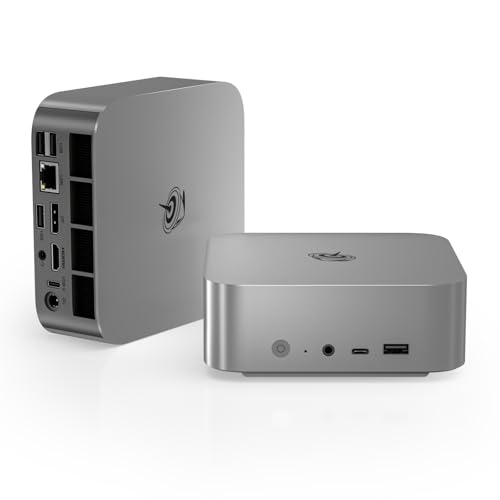
AOOSTAR GEM12+ PRO Barebone (Ryzen 7 PRO 8845HS, No RAM/SSD/OS)
Who it suits: The parts owner in a small home, who can build on a kitchen table for an evening and wants the lowest finished price in the guide.
The name carries the installation terms, so read it first: this is a barebone. What arrives is a chassis holding a Ryzen 7 PRO 8845HS with its Radeon 780M, a 2.68-inch status screen and fingerprint sensor on its face, and empty slots — no RAM, no SSD, no operating system, as the maker’s manual states outright. One discipline note before anything else: the research behind this guide documents no dimensions for this machine, so no footprint figure is printed here. It belongs to the same palm-sized mini class as the other picks — dual M.2 slots, support for up to 128GB of DDR5-5600, dual USB4, dual Intel 2.5GbE — but your Step 1 measurement must be checked against the live listing’s stated dimensions, not against a number this guide declined to invent. The status screen shapes its placement: it wants to sit facing the room, on a desk or shelf front, which in a small space is a real claim on your best surface — or a reason to face it away and ignore the feature.
The engineering inside argues for it. Its native OCuLink port runs on its own channel and does not consume an M.2 slot — the cleanest eGPU exit of the six — and BIOS power modes up to 70W let the 780M be fed properly. The arithmetic is the other half of the review: the kit itself sits at the low end of this guide’s range — check price on Amazon — and even after you add the completion kit (32GB DDR5 plus a 1TB Gen4 SSD) the finished machine lands as the lowest completed total here, comfortably within budget, plus an operating system if you need one — and for less again if your memory and SSD come out of a retired laptop. The debits are a small maker’s: screen-control software complaints, a disorganized driver bundle, Wi-Fi 6 rather than 6E, and at least one Amazon buyer reporting a previously opened unit sold as new — inspect the seals on arrival and use the return window if they tell a story.
- Finishes within budget with new parts — the cheapest completed install in this guide; check price on Amazon.
- Native OCuLink on its own channel: the eGPU port costs no storage slot.
- Up to 128GB of DDR5 and 70W BIOS modes — headroom no complete pick here matches.
Honest limitation: It is a kit, not a computer — RAM, SSD and an OS are yours to supply — and its exact dimensions are yours to pull from the listing before you plan the shelf.
Choose it if you own DDR5 and an NVMe drive, or want the build, and your measured spot is confirmed against the listing. Skip it if you need to unbox and play tonight — the SER8 and K8 Plus are this graphics class, finished.

Minisforum UM890 Pro Barebone (Ryzen 9 8945HS, No RAM/SSD/OS)
Who it suits: The small-desk, multi-monitor worker-player — two or three screens on a compact desk, and the willingness to finish the machine personally.
Its documented dimensions make it the tallest mini in the guide: about 130 × 127 × 66.6 mm, roughly 1.10 liters — still a liter-class box, but check your Step 1 height measurement against that 66.6 mm rather than assuming the slab profile of the SER8. What the height buys is the most expandable platform here: a Ryzen 9 8945HS to 5.2GHz with the highest-clocked Radeon 780M in the guide, two DDR5 slots accepting up to 96GB, two PCIe 4.0 M.2 slots, dual USB4 (one accepting power delivery in), dual 2.5GbE, and video outputs for four displays. That last line is this pick’s installation signature. Four displays means four display cables leaving one small box, plus power, plus peripherals — the fullest cable drop in the guide — and on a small desk that is either a planned, channeled bundle falling neatly behind the desk or a rat’s nest radiating from the center of your workspace. Step 4 exists for this machine.
The kit sits toward the middle of this guide’s range — check price on Amazon — so even with the completion kit added, the finished machine lands within budget, plus an OS if you need one. Minisforum’s own complete version tells the barebone story by contrast: it lives above this guide’s ceiling, which is exactly why the barebone is the version listed here. Two debits must be read before ordering. The OCuLink runs through an included M.2 adapter and consumes one of the two SSD slots whenever an eGPU is connected — a one-drive machine with a dock is a good machine, but the choice should be made now, not at assembly. And measured noise in performance mode is around 43 dB, the loudest figure documented in this guide: on a desk a meter from your ears, that is a presence, and bedroom buyers should weight it accordingly.
- Four display outputs and dual USB4 — the multi-monitor install no other pick attempts.
- Kit plus completion parts still finishes within budget with new parts — check price on Amazon.
- The strongest CPU platform here, with a 96GB memory ceiling.
Honest limitation: The OCuLink adapter occupies an M.2 slot, and at around 43 dB in performance mode it is the loudest documented pick — plan the cables and the room accordingly.
Choose it if your small desk runs multiple monitors and you are building deliberately. Skip it if you want two SSDs and an eGPU simultaneously, a quiet room, or a finished PC — the completed version of this machine lives above this budget.
Minisforum AtomMan G7 Pt (Ryzen 9 7945HX, Radeon RX 7600M XT, 32GB/1TB)
Who it suits: The small-space buyer who refuses integrated graphics — included so you can watch the right machine, with its real size and real price both in plain view.
Grade its installation first, because that is this guide’s job and this machine is the outlier: a vertical body measured by Notebookcheck at 269 × 155 × 64 mm without its stand, about 2.7 liters — nearly three times the volume of the liter-class picks — standing upright on a desk like a slim console rather than disappearing onto a shelf. Then add the part spec sheets photograph separately: a 300W external power supply, the only documented brick in this guide, which needs the full Step 3 treatment — its own ventilated address, its own share of the shelf or floor, its lead planned like a component’s, because at 300W it effectively is one. Together, box and brick are the largest installation in this guide by a wide margin. What that footprint buys is the only real graphics card here: a discrete Radeon RX 7600M XT with its own 8GB of GDDR6 at 120W, paired with a 16-core Ryzen 9 7945HX, 32GB of DDR5 upgradable to 96GB, a 1TB SSD across PCIe 5.0 and 4.0 slots, and single 2.5GbE. Reviewers place it where the specification says: strong at 1080p, capable of selective 1440p — a different gaming category from the five 780M machines, and the only pick that plays demanding games the way a gaming PC is expected to.
The price honesty is unchanged from the base guide, and it is the reason this pick carries a warning instead of a crown. The Amazon listing for this configuration sits above this budget — check the current price on Amazon — and even the deepest verified discount, at Minisforum’s own US store, was still above this budget and came with uncertain stock. No sub-$800 Amazon offer has been verified, and this guide will not pretend otherwise: it is a watch-list pick, listed so that if a genuine sub-$800 offer ever appears you know exactly which machine — and exactly how much room, box plus brick — it is worth pouncing on. Deal-watch rules in their strictest form: alert at the $800 budget line, configuration verified in the cart (barebone versions of this model exist and are not the same purchase), and no stretching because the listing looked close.
- The only discrete graphics card in the guide: an RX 7600M XT with 8GB of memory of its own.
- A 16-core 7945HX whose CPU performance nothing else in this guide comes close to.
- Complete 32GB/1TB configuration, upgradable to 96GB of RAM.
Honest limitation: It is the biggest install here — about 2.7 liters standing upright, plus a 300W brick — and it does not live under $800: its Amazon listing sits above this budget, and even the maker’s own store record never crossed the line.
Choose it if a sub-$800 offer genuinely appears and your measured spot can house box and brick with air around both. Skip it if you are spending $800 this week or your space is truly tight — every machine above it in this guide is an honest answer to both constraints, and this one is an answer to neither.

Comparison Table
| Product | Documented size | Installation character | Link |
|---|---|---|---|
| Beelink SER8 (32GB/1TB) | 134.87 × 134.87 × 44.7 mm, ~0.81 L | Smallest and quietest complete install; sits on a surface — no VESA mount documented | Check on Amazon |
| GMKtec NucBox K8 Plus (32GB/1TB) | 132.08 × 127 × 58.42 mm, ~0.98 L | Complete one-box install with the most cables to plan | Check on Amazon |
| GMKtec NucBox K11 (32GB/1TB) | K8 Plus chassis class, ~0.98 L | Fastest install here; unswitchable RGB, no VESA mount documented, buy on sale | Check on Amazon |
| AOOSTAR GEM12+ PRO Barebone | Not documented in our research — measure from the live listing | A kit: one build evening, then a screen-front desk placement | Check on Amazon |
| Minisforum UM890 Pro Barebone | ~130 × 127 × 66.6 mm, ~1.10 L | A kit: the tallest mini and the fullest cable drop, for multi-monitor desks | Check on Amazon |
| Minisforum AtomMan G7 Pt (32GB/1TB) | 269 × 155 × 64 mm body, ~2.7 L, plus 300W brick | The biggest install here by far — deal watch only, normally above this budget; check price on Amazon | Check on Amazon |
How to Choose a Mini Gaming PC for a Small Space
- Let the measured spot choose the class. If your shelf or cubby cannot state its dimensions, it cannot host a PC. Work the five-step checklist first and let its numbers eliminate picks — a 66.6 mm-tall barebone and a 44.7 mm slab are different answers to the same shelf.
- Refuse the sealed cabinet, whoever suggests it. Closed TV units and shut cupboards are the most tempting placement in a small home and the worst one in this guide: every pick breathes through its case and exhausts real heat under load. Open-backed shelving, a free-standing desk spot or a shelf with air on the vent faces — or a different room plan.
- Count the brick as furniture. The power adapter is a second object with its own footprint, its own heat and its own cable. Give it a ventilated address in the plan — shelf, cable tray, floor by the outlet — and treat the G7 Pt’s documented 300W supply as a component competing for the same scarce space as the PC itself.
- Buy noise as a measurement, not a mood. In a small room the PC sits a meter from your ears. Where this guide documents a figure — about 32 dBA, 36–39 dB(A), about 43 dB — those numbers are specifications that separate a bedroom pick from a study pick. Where no figure is documented, do not let a listing’s “whisper quiet” marketing stand in for one.
- Verify the mount before you plan around it. No pick here carries a documented VESA bracket in our research, and two document its absence. A mini that sits on the shelf is a fine outcome; a mini bought to hang behind a monitor it cannot hang behind is a return.
- Price the finished machine, never the headline. A barebone’s headline price is only the start of a finished computer with new parts and an OS still to settle; a complete machine at its shortage spike is not in this budget at all. Compare completed totals against the $800 budget line — check price on Amazon — and verify the configuration in the cart — barebone and complete versions share near-identical names in this category.
- Feed the graphics you are buying. The 780M shares system memory, so 32GB in dual channel is the correct configuration and 16GB is a measurably worse one wearing the same product name. Every pick here ships or accepts 32GB; keep it that way in the cart.
- Keep the packaging until the install has lived a week. Heat, noise, Wi-Fi behavior and cable regret announce themselves in the first days of real use, in the real room. That week is the last free exit.
The eGPU in a Small Room, Priced in Full
Several picks carry an OCuLink port, and the standard pitch — buy the mini now, add a desktop graphics card later — is a real capability: the port carries PCIe 4.0 x4 bandwidth, enough to run a mid-range desktop card at close to its internal speed. In a small space, though, the honest accounting has two columns. The money column: the dock (Minisforum’s DEG1 is the reference unit) is only the first purchase — check its current price before you plan around it; the dock is an open frame with no power supply, so add a basic 500W PSU; then add the card itself, a new desktop RTX 4060 — together a major second spend on top of the mini, enough to push the all-in total well beyond this guide’s budget. The space column is the one this guide exists to print: that upgrade converts your one-liter PC into a desk installation of mini plus open-frame dock plus a second power supply plus a cable that is not hot-pluggable, all of it needing air. If the room could host that arrangement comfortably, it could very likely have hosted a small tower in the first place.
None of that makes the eGPU path wrong; it makes it a plan with a footprint, not a bonus with a port. It is the right plan when the mini must come first — a two-stage budget, a machine that travels now and docks later, a card destined eventually for a desktop build. It is the wrong plan as a day-one justification: the same total money spent once on a tower buys the card already installed, and our Best Gaming PC Under $800 and Best Budget Gaming PC Under $800 guides track that market. Buy the mini for the room you have; let the eGPU be a deliberate second project, measured like one. Buyers weighing the neighboring shapes at this size should also compare Best Compact Gaming PC For Small Spaces Under $800, Best Small Form Factor Gaming PC For Small Spaces Under $800 and Best Mini PC For Small Spaces Under $800.
Common Buying Mistakes
- Sealing a gaming mini inside a closed cabinet or TV unit. It is the single most expensive placement error at this tier: the machine throttles or cooks in its own exhaust, and no pick in this guide is approved for it.
- Measuring the box and forgetting the brick. The adapter needs a ventilated address and a reachable lead; a plan that only fits the PC fits nothing.
- Assuming a VESA bracket exists because the category usually has one. Our research documents no bracket for any pick here and documents its absence for two — verify the specific listing before the monitor-arm plan hardens.
- Trusting a dimension you read in a guide like this one for a pick whose research documents none. One pick above is deliberately printed without a footprint figure; take its measurements from the live listing, in millimeters, before the shelf is planned.
- Believing a barebone’s kit price is a computer price. RAM, SSD and an operating system stand between the box and a game — and between the box and your desk, since the build itself needs an evening of table space.
- Paying the shortage spike. Listings here swing widely within one season; the reader who buys the K11 at its peak and the reader who buys it on sale own the same PC — check the current price on Amazon first.
- Counting the eGPU dock as the eGPU price — or the eGPU as a small-space accessory. The dock is only a small part of a major upgrade, and the finished arrangement is a second installation, not a footnote.
- Confusing configurations in the cart. Barebone and complete versions sell under near-identical names; the G7 Pt’s barebone is not the complete machine its review describes, and the UM890 Pro’s complete version lives above this budget.
- Ignoring the light and the noise until the first night. Unswitchable RGB and a documented 43 dB performance mode are specifications you will live with at close range; check both before the box is on your desk.
Final Recommendation
- The smallest honest install: Beelink SER8 — the least volume and the least noise, finished out of the box, in whichever configuration shows under $800.
- The best all-round install: GMKtec NucBox K8 Plus — one liter, every port wired once, bought at $800 or less.
- Deal-hunters with a measured spot: GMKtec NucBox K11, on an alert at the $800 budget line — never while it sits well above budget.
- Parts owners: AOOSTAR GEM12+ PRO barebone for the lowest finished price; Minisforum UM890 Pro barebone if the small desk runs several monitors.
- Discrete-GPU or bust: the AtomMan G7 Pt is the machine to watch — with 2.7 liters and a 300W brick to house, and a price that lives in the next tier up.
For most small rooms the answer is the SER8: it is the only pick that wins on both measurements a small space actually feels — the documented 0.81 liters on the shelf and the documented quiet at arm’s length — while still shipping the full 32GB, 1TB, second-slot specification. The K8 Plus is the close second and the better machine for a desk that wires everything at once, its fuller port set bought with a fuller cable plan. The two barebones serve the builders honestly, at finished prices no complete machine here matches, and the K11 rewards anyone patient enough to buy its dip. If your space turns out to be less small than feared — if a compact tower genuinely fits — the neighboring guides Best Compact Gaming PC Under $800 and Best Small Form Factor Gaming PC Under $800 cover the next size up at this same budget, and readers speccing smaller budgets in the same rooms should see Best Mini Gaming PC Under $500 and Best Mini Gaming PC Under $700. Work the checklist, check the live price and the exact configuration, and let the room — measured, aired and cabled on paper — make the final call.
Frequently Asked Questions
Can I put a mini gaming PC inside my TV cabinet?
Not if the cabinet closes. Every pick in this guide cools through its case and exhausts real heat under gaming load, and a sealed unit traps that heat around the machine — expect throttling at best. An open-backed unit with genuine airflow past the intake and exhaust faces is a different matter and passes Step 2 of the checklist; a door that shuts is a refusal, for all six picks, however cool the photograph looks.
Can these mini PCs mount behind a monitor?
Only where the specific listing says so — and you should verify it there. The research behind this guide documents no VESA bracket for any of the six picks, and documents its absence outright for the Beelink SER8 and the GMKtec NucBox K11, both of which are planned as sit-on-a-surface machines. Treat behind-monitor mounting as a per-listing detail to confirm before ordering, not a category promise.
How much clearance does a mini gaming PC actually need?
Enough that its intake and exhaust faces breathe room air rather than their own exhaust — in practice, a hand’s breadth of open space around the vented faces and nothing sealed above or around it. The picks that run their graphics hardest, like the K11 in its 65W mode, argue for more rather than less. If the measured spot cannot offer that air, the spot fails Step 2 and the answer is a different placement, not a smaller fan curve.
Is the power brick really part of the footprint?
Yes — it is a second object with its own size, heat and cable, and in a small room it competes for the same shelf as the PC. Most mini bricks tuck into a cable tray or a ventilated floor spot by the outlet without drama. The exception that proves the rule is documented in this guide: the AtomMan G7 Pt’s 300W external supply, which deserves the same measured planning as the machine itself.
Which of these is quiet enough for a bedroom?
On documented measurements, the Beelink SER8 — around 32 dBA under sustained load, the quietest figure in this guide — is the bedroom pick. The GMKtec NucBox K11’s measured 36–39 dB(A) is a study-desk number, and the UM890 Pro barebone’s roughly 43 dB in performance mode is the loudest documented here and belongs in a room where nobody is sleeping. Where a pick carries no documented figure, this guide does not guess one; check the listing and reviews for the specific machine.
Why is a machine that sits above this budget in an under-$800 guide?
Because it is the only mini PC here with a discrete graphics card, and omitting it would leave the most common small-space question — “which one has a real GPU?” — unanswered. The AtomMan G7 Pt is labeled a deal-watch exception everywhere it appears: its Amazon listing sits above this budget — check the current price on Amazon — its deepest verified discount was at the maker’s own store and still above $800, and no sub-$800 Amazon offer has been verified. It is a machine to monitor, at a size — 2.7 liters plus its brick — to measure for, not a machine at this price.
Is a barebone really cheaper once it fits in my room?
Finished honestly, yes for these two: both the AOOSTAR kit and the UM890 Pro barebone complete within this budget with new memory and storage, below where their complete counterparts sit — and for less again if your parts come from a retired machine. Check price on Amazon for the kit and the parts before you total it up. The room cost is temporary but real: one evening of build space, parts boxes and an OS install before the liter-sized result earns its shelf. Price both columns — money and installation — before choosing.


