
Where to buy
Check the latest price, availability and delivery on Amazon. Orders are placed on Amazon. We may earn a commission from qualifying purchases.
- Best overall for a small space: GMKtec NucBox K8 Plus, Ryzen 7 8845HS, 32GB, 1TB — Check on Amazon
- HP Victus 15L Gaming Desktop (TG02-1020h), Core i5-13400F, RTX 3050, 8GB, 512GB — Check on Amazon
- Beelink SER8 Mini PC, Ryzen 7 8745HS, 32GB, 1TB — Check on Amazon
- GMKtec NucBox K11, Ryzen 9 8945HS, 32GB, 1TB — Check on Amazon
See 2 more Amazon options
- Minisforum UM890 Pro Barebone, Ryzen 9 8945HS, No RAM/SSD/OS — Check on Amazon
- Minisforum UM880 Plus Barebone, Ryzen 7 8845HS, Without RAM/SSD/OS — Check on Amazon
Read the full guide ↓
Disclosure: As an Amazon Associate, reviewstook.com earns from qualifying purchases. Links to Amazon on this page are affiliate links; they cost you nothing extra. Listing details such as price and availability change often, so check the current Amazon listing before you buy.
A small space does not grade a PC the way a spec sheet does. The spec sheet gives you a footprint — a box five inches square, a slim tower fifteen liters — and stops there, but the room grades the installation: the depth of the shelf plus the bend of the cables leaving the back panel, the corner the power brick ends up living in, the path the hot air takes once it leaves the vents, and how much of the machine’s noise arrives at the chair you actually sit in. This guide takes the six verified compact gaming PCs in this budget tier from our main compact guide — five mini PCs of roughly a liter or less and one slim big-brand tower of about 15.5 liters — and re-grades every one of them on exactly those terms. The machines do not change. What changes is the question: not “how fast is it?” but “where does it go, what else has to fit around it, and what does it ask of the room?”
Two honest limits frame everything below. First, there is still no compact RTX 4060 tower in this budget tier — the 4060 prebuilts that dip into this tier are full-size towers on sale, and the console-sized brand machines sit far above this budget — so the only discrete graphics card here is an entry-level RTX 3050 in the one slim tower. The five mini PCs all game on AMD’s Radeon 780M integrated graphics, which means esports and lighter titles run well and demanding games run at 1080p on medium settings with upscaling. Second, every pick below carries maker-stated measurements, but mounting brackets, brick sizes and noise figures are documented for only some of them. Where the research behind this guide has a number, the number is printed; where it does not, the pick is graded by class and you are told plainly to read the live listing.
In this guide
Quick Picks
Short on time, or comparing several options at once? Each row below names a small-space situation and the machine that suits it, with a link to the listing.
| Small-space situation | Pick | Why it stands out in a tight room | Link |
|---|---|---|---|
| Best overall for a small space | GMKtec NucBox K8 Plus (32GB/1TB) | One liter, complete out of the box, with a native OCuLink port keeping a docked-GPU future open | Check on Amazon |
| A shelf that fits one slim tower | HP Victus 15L (TG02-1020h) | The set’s only real graphics card in a 15.5-liter chassis — and no power brick to place | Check on Amazon |
| Bedroom or shared-room desk | Beelink SER8 (8745HS, 32GB/1TB) | Measured around 32 dBA — the quietest machine here by a wide margin | Check on Amazon |
| Most speed per liter, bought on sale | GMKtec NucBox K11 (32GB/1TB) | Fastest CPU in the same one-liter footprint — with the noise and heat to match | Check on Amazon |
| A staged build in a small footprint | Minisforum UM890 Pro Barebone | The tallest, heaviest mini here — a tiny workstation for buyers who already own parts | Check on Amazon |
| Least cash and least weight | Minisforum UM880 Plus Barebone | 0.83 liters and about 0.67 kg — the lightest way onto the dock path, kit-priced | Check on Amazon |
How These Picks Were Chosen
The six machines, their ASINs, their specifications are carried over unchanged from our main compact gaming PC guide, where each was verified against its Amazon listing or the price trackers that record it. Nothing new has been added and nothing has been re-researched for this angle; what is new is the grading. A pick’s place in this guide is decided by five spatial questions, asked in order. How much room does the box itself take, by its maker’s stated measurements? How much room does the installed machine take once cables bend out of its back panel and its exhaust has somewhere to go? Where does its power supply live — inside the chassis, or in a brick that needs a home of its own? How much noise reaches the room, where a measurement exists? And can it be hidden — mounted, tucked, stood in a corner — or must it sit in the open and be looked at?
The dimension discipline is strict, because this is the category where invented numbers do the most damage. Volumes here are computed only from dimensions the makers publish and the base research recorded: the minis run from about 0.8 to about 1.1 liters, and the tower is about 15.5 liters by HP’s own specification. Mounting is claimed only where it is documented — which, in this set, mostly means documenting its absence: the SER8 and the K11 have no VESA mount, and for the remaining minis the research records no bracket, so this guide treats mounting on them as unconfirmed and sends you to the listing’s box-contents line. Noise is quoted only where independent reviewers measured it — the SER8 and the K11 — and everywhere else the pick is graded by cooling design and fan class, in words, with no decibel figure attached. Power bricks get the same treatment: every mini PC here runs from an external adapter, but no brick’s size or wattage is documented in the underlying research, so bricks are graded as objects to place, never as numbers.
We did not use these PCs ourselves. The base research read maker listings, specification pages, price trackers and independent reviews, and compared processors, graphics, memory, storage, ports, dimensions and noise measurements; this guide re-reads that record through a tape measure. The buying cautions travel with the machines unchanged. Two of the complete minis only belong in this budget tier when their live listings dip into it, one tower is a 2023 model sold mostly by third parties now, and both Minisforum kits are barebones whose kit prices exclude the memory, storage and operating system that make them computers. Each review below states its rule in its first lines.
The Space You Cannot See on the Spec Sheet
Four costs decide whether a compact PC actually works in a small space, and none of them appears in a listing’s headline. The first is the power brick’s address. Five of the six machines here are mini PCs, and every mini PC runs from an external power adapter: a second object, trailing two cables, that has to live somewhere — on the floor behind the TV stand, in the corner of the shelf, in the cable tray under the desk. Its reach decides how far from the wall outlet the PC itself can sit, and it wants air around it like any warm component. The sixth machine, the Victus tower, has its power supply inside the chassis, which makes it the only pick in this guide whose entire space cost is the box you measured. When you plan a mini PC install, plan two objects, not one.
The second cost is the cable drop. A mini PC’s stated depth — about two inches for most of these — is the chassis only. Behind it, a display cable, a power lead and, if you wire your network as you should, an Ethernet cable all exit the back panel and need room to bend before they fall. The installed depth of a one-liter mini on a shelf is realistically the chassis plus the bend radius of that bundle, and on a shallow shelf or inside a TV stand that difference is the whole decision. The K11 is the one pick whose port layout is documented in a way that changes this: its OCuLink port sits on the front, so the thick dock cable of a future eGPU setup plugs in where you can reach it rather than adding to the rear bundle. For the other picks, port positions vary by face and are not recorded in the research — check the listing photographs before you commit a shelf depth, and measure for the machine plus its cables, not the machine alone.
The third cost is hot air. A liter of chassis has a liter’s worth of airflow, and every watt these machines draw leaves as heat through vents that need an open path — not a cabinet door, not a wall pressed against the exhaust, not a stack of game cases. Placement rules follow from the physics: open air on the vented faces, clearance behind and above, and never an enclosed cabinet for any pick in this guide. The performance-tuned K11 makes the point with numbers — owner reports describe high temperatures in its 65W performance mode — while the SER8’s vapor-chamber cooler is the opposite answer to the same problem, spreading heat so effectively that the machine can live quietly in the open on a desk. A compact PC in a small room is also a small heater in that room; in summer, that is part of the purchase.
The fourth cost is noise, because small rooms shorten the distance between the fan and your ears. The measured spread in this guide is wide: the SER8 was measured at around 32 dBA under load, close to silent, while the K11 measured 36 to 39 dB(A) under load, plainly audible across a room. On a desk in a dedicated gaming room, that gap barely matters. In a bedroom, a studio flat or a shared living room, it is the difference between a machine you forget and a machine you negotiate with — and the K11 adds a lit top panel whose RGB cannot be switched off, a small fact that matters a great deal at 1 a.m. Where no measurement exists, this guide grades by cooling design instead; a maker’s “whisper quiet” claim is not a number.
The 6 Best Compact Gaming PCs for Small Spaces Under $800
GMKtec NucBox K8 Plus — Ryzen 7 8845HS, 32GB DDR5, 1TB SSD (Complete)
Who it suits: Small-space buyers who want the finished machine — a complete one-liter PC that disappears onto a desk corner or into a TV stand today, with a genuine graphics upgrade kept possible for later.
The K8 Plus takes up about as much room as this category honestly offers: 5.2 × 5.0 × 2.3 inches by its maker’s measurements, just under one liter, a footprint smaller than the paperback it might sit beside. Inside that liter is a complete computer — Ryzen 7 8845HS, Radeon 780M graphics, 32GB of DDR5 across two SO-DIMM slots and a 1TB PCIe 4.0 SSD — so the spatial transaction is simple: one small box, one power brick to give a home to, and no parts shelf, no second purchase, no assembly evening. Its port selection is the richest in the set — a native OCuLink port, dual USB4, dual 2.5-gigabit Ethernet, HDMI 2.1 and DisplayPort 2.1 — and for a small space the Ethernet pair deserves a word: a wired run lets the PC live wherever the shelf is, rather than wherever the Wi-Fi happens to reach, and dual displays plus a dock can all be served from a box this size. The OCuLink port is the placement decision with a future in it: the day the integrated graphics stop being enough, an external dock and a desktop card join the setup — a second object, roughly another footprint on the shelf, that this port makes possible and the other integrated picks mostly cannot match.
Placement grading is honest about what is not documented. The cooling is a dual-fan design that reviewers found competent rather than silent, and no decibel figure is recorded for it — expect an audible fan under sustained gaming load, and give the vents open air rather than a closed cabinet. No mounting bracket is documented in the research for this machine, so do not plan a behind-the-monitor install on the strength of this guide; if the listing shows a bracket in the box, treat it as a bonus. Pricing on this listing is volatile during the current memory shortage, so the live listing is the only price that counts: check price on Amazon before you buy. When the live price fits this budget it is the best small-space compact PC here. When it sits above this budget, wait, or take the K11 when its sale is running.
- About one liter complete — 32GB and 1TB fitted, nothing to add before it earns its shelf space.
- Native OCuLink plus dual USB4 and dual 2.5GbE: the most placement and dock options in the set.
- Complete and ready to run out of the box — check price on Amazon and buy when the live listing fits this budget.
Honest limitation: The listing price is volatile in the memory shortage; cooling is competent, not quiet, and no mounting bracket is documented — check price on Amazon, buy only when it fits this budget, and plan on it sitting in the open.
Choose it if you want the complete one-liter machine with a dock in its future. Skip it if the live listing sits above this budget when you shop, or if the room is a bedroom and silence outranks everything — the SER8 is the quiet pick.

HP Victus 15L Gaming Desktop (TG02-1020h) — Core i5-13400F, RTX 3050, 8GB, 512GB
Who it suits: Buyers whose small space is one defined shelf or desk corner that fits a slim tower — and who want a real graphics card and a big brand’s support more than they want a one-liter footprint.
The Victus is the spatial outlier of this guide and it knows it: 6.1 × 11.71 × 13.27 inches, about 15.5 liters and 13.9 pounds — roughly fifteen times the volume of the minis, and still less than half a typical mid-tower. It needs a shelf at least 6.1 inches wide and 13.3 inches tall, plus clearance above and behind for its exhaust, and it will not hide behind a monitor or inside most TV stands. What that larger claim on your room buys is the only discrete graphics card in the set: an RTX 3050 with its own memory, DLSS support and NVENC encoding, a clear step above every integrated solution here, driven by a 10-core Core i5-13400F that will not bottleneck it. It also buys the simplest power story in the guide — the supply is inside the chassis, so there is no brick to place, no second object trailing cables across the floor. The tower is the whole installation: one box, one shelf, done.
The caveats are structural and they are the base guide’s, kept at full size. The fitted memory is 8GB on a single stick, running single-channel — budget a second stick from day one and count it in the machine’s real price, though not in its footprint, since the upgrade happens inside the case you have already placed. The power supply is a proprietary HP unit with modest wattage, and the cramped interior caps any graphics swap at short, low-power cards: treat the fitted card as the final card. And this is a 2023 model, with much of today’s stock in third-party hands. Check price on Amazon, and buy only when the live listing fits this budget, from a seller you trust. A tower is the pick you will move least and live with longest, so the known ceiling and the known seller matter more, not less.
- A real RTX 3050 discrete GPU — the only one in this guide — in a true 15.5-liter slim tower.
- Internal power supply: no brick to place, the simplest installation here.
- Under 14 pounds and 6.1 inches wide — fits a desk corner or media shelf a mid-tower cannot.
Honest limitation: It ships with 8GB of single-channel RAM you should budget to upgrade immediately, and the proprietary low-wattage PSU plus cramped interior cap all future GPU upgrades — the fitted card is effectively final.
Choose it if your space fits one slim tower and a discrete GPU matters more than upgradability. Skip it if your only spot is a shallow shelf or behind a monitor — that is mini PC territory — or if you plan to upgrade the graphics card later.

Beelink SER8 Mini PC — Ryzen 7 8745HS, 32GB DDR5, 1TB SSD
Who it suits: Buyers whose small space is also a quiet space — a bedroom desk, a shared living room, a study — where the machine will be heard as much as it is seen.
The SER8 is the smallest complete machine in this guide by a whisker — 5.31 × 5.31 × 1.76 inches, about 0.81 liters — and the flattest, a low aluminum slab that slides into the shallow spaces the taller minis cannot: under a monitor riser, on a TV stand shelf, beside a console. Its defining measurement, though, is not a dimension. A vapor-chamber cooler lets its Ryzen 7 8745HS and Radeon 780M run at full tilt without the rising whine that gives most mini PCs away, and independent reviewers measured it at around 32 dBA from close range under load — repeatedly singled out as the quietest fan noise testers had heard from a mini PC. In a small room, that number is a placement feature: this is the pick that can live on the desk, in the open, two feet from where you sit, and be forgotten. The specification around it is the class standard done properly — 32GB of DDR5 expandable to 64GB, a 1TB PCIe 4.0 SSD with a second M.2 slot free, USB4, HDMI 2.1 and DisplayPort 1.4 for up to three displays, and Windows 11 Pro.
Its limits are placement limits, and they are stated plainly. There is no VESA mount — documented, not assumed — so the behind-the-monitor trick this category loves is not available out of the box; the SER8 sits on a surface, albeit a very small patch of one. There is no OCuLink port either, so an external GPU would have to run over USB4, the narrower and higher-overhead version of that connection — possible, but the weaker route, on the machine you might most want to keep for years. Reviewers also found its Wi-Fi, an Intel card inside a metal case, prone to dropouts, with Beelink offering updated antennas for affected units — in a small space, wire it if you possibly can. And the buying rule is strict: this configuration often lists above this budget tier, so it belongs in this guide only when a live configuration fits the budget — check price on Amazon, and consider its 24GB sibling as a mid-range alternative in the same family. Silence is worth a premium; it is not worth an open-ended one.
- Measured around 32 dBA under load — the quietest compact PC in this guide, made for shared rooms.
- The flattest footprint here at about 0.81 liters — fits shallow shelves and TV stands.
- 32GB of DDR5 with headroom to 64GB, a 1TB SSD with a second M.2 slot standing empty, and outputs for three displays.
Honest limitation: No VESA mount and no OCuLink port — it cannot hide behind a monitor and its eGPU route is the weaker USB4 one; recent listings have often sat above this tier, so it only qualifies when the live price fits this budget.
Choose it if quiet outranks the cleanest upgrade path and your spot is a shallow, open surface. Skip it if you are planning an OCuLink dock — buy the K8 Plus — or if the only listings showing sit above this budget.

GMKtec NucBox K11 — Ryzen 9 8945HS, 32GB DDR5, 1TB SSD
Who it suits: Performance-first buyers with a desk in a room of its own — the fastest liter in the guide, for shoppers patient enough to buy it on sale.
The K11 occupies exactly the K8 Plus’s footprint — 5.2 × 5.0 × 2.3 inches, about one liter — and fills it with the strongest CPU in this guide, a Ryzen 9 8945HS boosting to 5.2GHz, with 32GB of dual-channel DDR5, a 1TB PCIe 4.0 SSD, a second M.2 slot, dual USB4, dual 2.5GbE and an OCuLink port mounted on the front of the case. That front port is a genuine small-space detail: a dock cable, when the eGPU day comes, plugs in at the face you can reach instead of thickening the cable bundle behind the machine. GMKtec gives the chip a generous power budget, and reviewers measuring this machine found its Radeon 780M running up to 15% faster than the same graphics in rival boxes. Spatially, nothing in this guide gives you more performance per liter or per square inch of desk.
What the room pays for that power is heat and noise, and this review will not soften either. Reviewers measured fan noise around 36 to 39 dB(A) under load — plainly audible, the far end of this guide’s scale from the SER8 — and owner reports describe high temperatures in the 65W performance mode on the factory thermal paste. Give it open air on every vented face, never a cabinet, and expect a performance-mode machine to announce itself in a quiet room. The top RGB light cannot be switched off, which rules it out of bedrooms for light sleepers regardless of the fan. There is no VESA mount. And the price warning opens the review in the base guide and stays here at full size: this listing swings widely, from genuine sale pricing to inflated spikes — never buy it at an inflated price. Check price on Amazon, stay within this budget, wait for the sale that verifiably comes, and the K11 is the most speed your shelf can hold. Pay an inflated listing price and you have simply overpaid for the same liter.
- Ryzen 9 8945HS — the fastest CPU here — in the same one-liter footprint as the K8 Plus.
- Front-mounted OCuLink port keeps a future dock cable out of the rear cable bundle.
- A genuine sale-watch pick — check price on Amazon and buy only on sale, within this budget.
Honest limitation: The same listing also spikes to inflated prices — walk away when it does. Fans are plainly audible under load (36–39 dB(A) measured), the top RGB cannot be turned off, there is no VESA mount, and it wants open air, not a cabinet.
Choose it if you want maximum performance per liter, your room is your own, and you will wait for the sale. Skip it if it will live in a bedroom or shared room, or if you need it this week at whatever price it is showing.
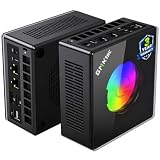
Minisforum UM890 Pro Barebone — Ryzen 9 8945HS, No RAM/SSD/OS
Who it suits: Parts-owning tinkerers building in stages — the strongest kit platform in the class, for buyers whose small space includes a parts drawer already stocked with DDR5 and an SSD.
Read the listing title the way this guide does: barebone means the kit buys a chassis, a motherboard and a Ryzen 9 8945HS, and no RAM, no SSD and no Windows. The box itself is the least mini of the minis: about 5.12 × 5.0 × 2.62 inches, roughly 1.1 liters and about 1.6 kg, a taller, heavier metal chassis built more like a tiny workstation than an appliance. That extra height is the trade to weigh — it will not slide under a monitor riser the way the SER8 does — and what it buys is cooling headroom: a larger fan and the ability to sustain the chip’s 70W mode. Kit now, your existing parts inside it tonight, and later — when funds allow — an OCuLink dock with a desktop card: the native OCuLink port, dual USB4, dual 2.5GbE and RAM headroom to 96GB across two SO-DIMM slots make it the most capable small footprint here.
The value warning is the base guide’s and it is stated without varnish: at current parts prices, completing this kit with new memory and storage can cost more than buying the finished machine — the complete 32GB/1TB version of this same PC is the comparison to beat, so check price on Amazon for both before you commit. The kit wins in exactly two situations: you already own the DDR5 and the SSD, or you want a configuration the factory does not sell, such as 64GB and 4TB across its two M.2 slots. The eGPU endgame must be priced whole, too — a DEG1-class dock is a separate purchase, plus a power supply if you do not own one, plus the graphics card itself, and spatially that endgame is a second footprint on the shelf beside the first. Bought with open eyes and a full parts drawer, this is the best compact platform in the guide. Bought because the kit price looked cheap, it is the most expensive mistake in it.
- The class’s strongest kit platform — 8945HS, a native OCuLink port, twin 2.5GbE and USB4, memory headroom to 96GB.
- Metal chassis with real cooling headroom — sustains the 70W mode the slim boxes cannot.
- A mid-range kit price — real money saved if the parts are already yours; check price on Amazon.
Honest limitation: A kit price is a first installment, not a computer price — at today’s parts prices, finishing it can meet or pass the cost of the finished version, and the docked-GPU endgame adds a premium-tier bill of its own.
Choose it if DDR5 and an SSD are already sitting in your drawer, or if the plan is a staged build that ends at a dock. Skip it if you are buying every part new — the complete K8 Plus is the cheaper finished machine — or if your spot cannot take the tallest mini here.
Minisforum UM880 Plus Barebone — Ryzen 7 8845HS, Without RAM/SSD/OS
Who it suits: The same parts-owning buyer as the UM890 Pro, spending less and placing lighter — and anyone who wants this category’s pricing trap demonstrated on one machine before buying anything.
The UM880 Plus is the gentlest claim on a room in this guide: 130 × 126.5 × 50.4 mm, about 0.83 liters and roughly 0.67 kg, the lightest machine here and joint-smallest in footprint — a box you can hold in one hand and stand in the corner of almost any shelf. Inside is a Ryzen 7 8845HS with Radeon 780M, two DDR5 slots and two M.2 slots, with 2.5GbE and USB4 — the full class performance at a budget-tier kit price — check price on Amazon. One specification needs translating rather than repeating: its OCuLink arrives through an internal adapter board rather than a native port, and the practical consequence lives inside the box — the adapter occupies internal expansion room. For a buyer whose endgame is a dock on the shelf, that trade is worth the saving against the UM890 Pro kit. For a buyer who wants every internal slot free, it is the reason to step up.
This machine is also the documented case study for whole-price arithmetic. A survey of Amazon’s mini PC listings priced this exact exercise and found that a UM880 Plus barebone, completed with a new 32GB DDR5 kit and a 1TB SSD at that day’s prices, totaled more than the complete version of the same machine bought finished. Building it yourself with new parts cost more than buying it finished, because DDR5 memory was retailing at shortage prices in the same survey. That is the memory shortage talking and it will not always be true, but it is true now — so the smallest, lightest footprint in this guide is also the cheapest entry only for the buyer completing it from parts already on the shelf, where the kit price is real money saved rather than the first line of a longer bill. In that situation, nothing here gives you more room back per dollar.
- The lowest-priced route to an OCuLink port here — a budget-tier kit; check price on Amazon.
- About 0.83 liters and 0.67 kg — the lightest footprint here, with the full 780M class performance.
- The survey-documented warning: this kit plus new parts totaled more than the machine bought complete.
Honest limitation: The OCuLink port is an adapter-board implementation rather than a native one, and a build completed with new parts ends up costing more than the finished machine — the kit earns its place only when the parts are already yours.
Choose it if you have DDR5 and an SSD waiting and want the smallest dock-ready start. Skip it if every part would be bought new, or if both M.2 slots and a native OCuLink port are non-negotiable — that combination is the UM890 Pro above.

Comparison Table
| Product | Size (documented) | Graphics | Best small-space use | Link |
|---|---|---|---|---|
| GMKtec NucBox K8 Plus (32GB/1TB) | 5.2 × 5.0 × 2.3 in — ~1.0 L | Radeon 780M + native OCuLink | The complete one-liter PC for a desk corner or TV stand, dock later | Check on Amazon |
| HP Victus 15L (TG02-1020h) | 6.1 × 11.7 × 13.3 in — ~15.5 L, 13.9 lb | RTX 3050 discrete | One slim tower on one shelf — and no power brick to place | Check on Amazon |
| Beelink SER8 (32GB/1TB) | 5.3 × 5.3 × 1.8 in — ~0.8 L | Radeon 780M, USB4 only | Bedrooms and shared rooms — measured around 32 dBA | Check on Amazon |
| GMKtec NucBox K11 (32GB/1TB) | 5.2 × 5.0 × 2.3 in — ~1.0 L | Radeon 780M + front OCuLink | Maximum performance per liter, in a room of its own, bought on sale | Check on Amazon |
| Minisforum UM890 Pro Barebone | 5.1 × 5.0 × 2.6 in — ~1.1 L, ~1.6 kg | Radeon 780M + native OCuLink | The staged-build hub — tallest mini here, strongest kit platform | Check on Amazon |
| Minisforum UM880 Plus Barebone | 5.1 × 5.0 × 2.0 in — ~0.8 L, ~0.67 kg | Radeon 780M + OCuLink (adapter) | The lightest, cheapest dock-ready start for parts owners | Check on Amazon |
How to Choose a Compact Gaming PC for a Small Space
Work through these five steps in order, with a tape measure in hand, before any money moves. The order is the point: each step can rule a machine out, and there is no sense falling for a pick in step five that your shelf rejected in step one.
- Step 1 — Measure the spot, in three dimensions. Width, depth and height, of the actual shelf, desk corner or TV-stand bay the PC will occupy. Compare against documented figures, not adjectives: the minis here are about five inches square and two to two-and-two-thirds inches tall; the Victus needs a shelf 6.1 inches wide and 13.3 inches tall. A listing that refuses to state dimensions is selling you an adjective, not a measurement — treat it as a tower until proven otherwise. Note the height especially: the UM890 Pro’s extra two-thirds of an inch over its siblings is exactly the sort of difference that decides whether a box slides under a monitor riser.
- Step 2 — Reserve the ventilation clearance. Whatever spot you measured, subtract the air the machine needs: open space behind and above the chassis for exhaust, and no vented face pressed against a wall, a cabinet back or a stack of books. If the only spot you have is an enclosed cabinet with a door, stop here — no pick in this guide belongs in one, and the performance-tuned K11, with owner-reported high temperatures in its 65W mode, least of all. A small PC in open air on a small desk beats a hidden PC cooking in a cupboard, every time.
- Step 3 — Give the power brick an address. Five of these six machines run from an external adapter, and the brick is a second object with two cables and its own need for air. Decide where it lives — the floor behind the TV stand, the end of the shelf, a cable tray — and check its reach: the brick’s position decides how far from the outlet the PC can sit. No brick size is documented for any pick here, so treat its dimensions as an arrival-day measurement and leave slack in the plan. The exception is the Victus: its supply is internal, its power story is a single cable, and that simplicity is a real argument for the tower in a genuinely tight install.
- Step 4 — Walk the cable drop. From the back of the placed PC, trace every cable: display, power, Ethernet if you wire it — and in a small space you should, since it frees the PC from having to sit where the wireless signal is kind. Each cable bends before it falls, and that bend is installed depth the spec sheet never mentions. Add it to the chassis depth from step one and re-check the shelf. Note the one documented exception to rear-panel life: the K11’s OCuLink port is on its front face, so a future dock cable arrives where your hand does. For every other pick, read the listing photographs for port layout before you commit — the research behind this guide does not record port faces for them, and this guide will not guess.
- Step 5 — Then, and only then, order. With the spot measured, the air reserved, the brick housed and the cables walked, apply the money rules: check price on Amazon for every pick — the K8 Plus only when its live listing fits this budget, the K11 only on sale and never at an inflated price, the SER8 only when a configuration fits this budget, the Victus within this budget from a seller you trust, and the two kits only if the parts to complete them are already yours. A compact PC bought at the wrong price takes up exactly the same room as one bought well — patience is the cheapest space-saver in this guide.
Three further checks once the five steps narrow the field. Match the noise to the room: the measured spread here runs from about 32 dBA (SER8) to 36–39 dB(A) under load (K11) — in a shared or sleeping room that gap is the purchase; in a gaming room of your own it is nothing, and maker decibel claims are marketing wherever no independent measurement exists. Check what is missing from the box: a mounting bracket (documented absent on the SER8 and K11, unconfirmed for the rest), a second RAM stick (the Victus), an operating system and all internals (both barebones) — the listing’s contents line is worth thirty seconds. Price the whole installation, never the sticker: for the kits, add memory, storage and an OS at today’s prices before comparing with complete machines — the documented UM880 Plus exercise cost more built than bought complete — and for a future dock, add the dock, a power supply and the card itself.
When Even a Compact PC Is the Wrong Answer
Sometimes the honest conclusion of the five steps is that the space cannot take any of these six — a shelf too shallow for any cable drop, a TV unit with no open bay. In that case the answer is not to force a machine into a spot that will cook it; it is to change category. The mini gaming PC and small form factor guides grade the smallest gaming shapes at this budget, and the compact small-spaces guides at the neighboring budgets — Best Compact Gaming PC For Small Spaces Under $500 below this one and Best Compact Gaming PC For Small Spaces Under $1200 above it — work the same measurement discipline at different money. Measure first, and let the room cast its vote before the wallet does.
Common Buying Mistakes
- Measuring the PC and forgetting the installation. Chassis depth is not installed depth — the cable bend behind the back panel and the exhaust clearance are part of the machine, and on a shallow shelf they are the part that decides.
- Putting a compact PC in an enclosed cabinet. A door and a liter of hot air are enemies; every pick here wants open air, and the performance-mode machines need it outright.
- Planning a behind-the-monitor mount you have not verified. Two picks here document no VESA mount at all, and the rest do not document one in the research — check the box-contents line before the bracket becomes the plan.
- Forgetting the brick. A mini PC is two objects, not one; an install planned for the box alone ends with the adapter dangling off the shelf edge.
- Buying the loud machine for the quiet room. A 39 dB(A) performance mode is fine in a gaming room and a misery in a bedroom — and the K11’s always-on top light adds a second reason to keep it out of sleeping spaces.
- Comparing a barebone kit’s price against complete PCs. The kit needs RAM, an SSD and an OS; at current memory prices the documented build of the UM880 Plus cost more finished than the complete machine.
- Counting an eGPU dock as a minor accessory. Dock, power supply and graphics card together exceed the price of the mini PC itself, and they take shelf space of their own. The port is a plan, not a perk.
- Paying the shortage price. Listings in this category swing widely with the memory market — the K11 and the K8 Plus have both swung from genuine sale pricing to inflated spikes. The patient buyer gets the same PC, in the same footprint, for less.
Final Recommendation
- Most small-space buyers: GMKtec NucBox K8 Plus (32GB/1TB), bought when its live listing fits this budget — check price on Amazon.
- One shelf, one tower, no brick: HP Victus 15L (TG02-1020h) — plus the second RAM stick it needs.
- Bedrooms and shared rooms: Beelink SER8, the measured-quiet pick.
- Maximum performance per liter, patient shoppers: GMKtec NucBox K11, on sale only.
- A staged build that ends at a docked GPU: Minisforum UM890 Pro Barebone.
- Parts on the shelf, least room and least cash: Minisforum UM880 Plus Barebone.
Our top two for small spaces at this budget are the K8 Plus — the complete one-liter machine whose live pricing regularly sits within this tier, whose dual Ethernet and native OCuLink make it the most placeable and most future-proof box here — and the Victus 15L, for the buyer whose space is a single honest shelf and who would rather have a discrete GPU, big-brand support and no power brick to house than any upgrade path at all. Between them they frame the small-space choice cleanly: the smallest complete PC with a future, or the simplest installation with a real card. If the room must stay quiet, the SER8 is the connoisseur’s pick; if it must stay fast, the K11 on sale; and if your parts drawer is full, the two Minisforum kits return the most room per dollar in the guide. Buyers whose rooms or budgets differ from this tier should also see the main Best Compact Gaming PC Under $800 guide for the performance-first grading of these same six machines, and the beginners’ version, Best Compact Gaming PC For Beginners Under $800, if this is a first PC. Measure the spot, reserve the air, house the brick, walk the cables — then check the live price and order.
Frequently Asked Questions
How much space does a compact gaming PC actually need?
More than its dimensions say. The minis here measure about five inches square and two to two-and-two-thirds inches tall — roughly 0.8 to 1.1 liters — but the installed machine adds the bend of its rear cables and open air at its vents, so plan the shelf for the box plus its cable drop. The tower pick needs its shelf outright: 6.1 inches wide and 13.3 inches tall, plus clearance. Measure the spot first; the five-step checklist above is the order to do it in.
Can I mount one of these PCs behind my monitor?
Not on the evidence in this guide. Two picks — the Beelink SER8 and the GMKtec K11 — are documented as having no VESA mount. For the other mini PCs, the research behind this guide records no bracket, so mounting is unconfirmed rather than promised: check the live listing’s box-contents line, and if a bracket is not listed, plan on the machine sitting on a surface. The Victus tower, at 15.5 liters and 13.9 pounds, is a shelf machine, full stop.
Can I put a compact gaming PC inside a TV stand or cabinet?
On an open shelf of a TV stand, yes — several of these minis are shaped for exactly that. Inside an enclosed cabinet with a door, no: every pick here exhausts hot air that needs an open path, and the performance-tuned machines run measurably hot and loud when their air is restricted. If the cabinet is the only spot, leave the door open while gaming at minimum, and prefer the SER8, whose vapor-chamber cooling is the most forgiving here.
Where does the power brick go?
Wherever you planned for it in step three of the checklist — the floor behind the TV stand, the end of the shelf, a cable tray under the desk. Every mini PC in this guide runs from an external adapter, and no brick’s size is documented in the underlying research, so leave slack: the brick’s cable reach also decides how far from the outlet the PC itself can sit. The Victus tower is the exception — its power supply is internal, so its whole space cost is the box.
Which of these is quietest in a small room?
The Beelink SER8, and it is not close: independent reviewers measured around 32 dBA under load, the quietest figure recorded for any pick here. At the other end, the GMKtec K11 measured 36 to 39 dB(A) under load and its top RGB light cannot be turned off. The remaining picks have no published measurement in the research, so they are graded by cooling design rather than numbers — treat any maker’s silence claim as unverified.
Is the slim tower or a mini PC better for a small space?
It depends on which space problem you have. The minis win on footprint, weight and hiding places, and two of them can grow a desktop graphics card later through a dock. The Victus wins on simplicity — one box, an internal power supply, a real RTX 3050 today — at the cost of a 15.5-liter shelf claim and a graphics card that is effectively final. If your spot is shallow, choose a mini; if your spot is a single deep shelf and you hate adapters, choose the tower.
Are the barebone kits a good small-space deal?
Only if you already own the parts. A barebone price excludes RAM, storage and an operating system, and at current memory prices the documented build of the UM880 Plus cost more with new parts than the complete machine bought finished. With DDR5 and an SSD already on your shelf, the same kits are the smallest, cheapest strong compact PCs in this guide — footprint and price both shrink. Without them, buy the complete K8 Plus.
- Best Compact Gaming PC Under $800
- Best Compact Gaming PC Under $500
- Best Compact Gaming PC Under $1200
- Best Compact Gaming PC For Small Spaces Under $500
- Best Compact Gaming PC For Small Spaces Under $1200
- Best Compact Gaming PC For Beginners Under $800
- Best Compact Gaming PC For Streaming Under $800
- Best Compact Gaming PC For 1440p Gaming Under $800
- Best Mini Gaming PC Under $800
- Best Small Form Factor Gaming PC Under $800


