
Where to buy
Check the latest price, availability and delivery on Amazon. Orders are placed on Amazon. We may earn a commission from qualifying purchases.
- Best complete stream station: GMKtec NucBox K8 Plus, Ryzen 7 8845HS, Radeon 780M, 32GB/1TB — Check on Amazon
- Beelink SER8, Ryzen 7 8745HS, Radeon 780M, 32GB/1TB — Check on Amazon
- GMKtec NucBox K11, Ryzen 9 8945HS, Radeon 780M, 32GB/1TB — Check on Amazon
- AOOSTAR GEM12+ PRO Barebone, Ryzen 7 PRO 8845HS, No RAM/SSD/OS — Check on Amazon
See 2 more Amazon options
- Minisforum UM890 Pro Barebone, Ryzen 9 8945HS, No RAM/SSD/OS — Check on Amazon
- Minisforum AtomMan G7 Pt, Ryzen 9 7945HX, Radeon RX 7600M XT, 32GB/1TB — deal watch only — Check on Amazon
Read the full guide ↓
Disclosure: As an Amazon Associate, reviewstook.com earns from qualifying purchases. Links to Amazon on this page are affiliate links; they cost you nothing extra. Listing details such as price and availability change often, so check the current Amazon listing before you buy.
A streaming PC does two jobs at once: it renders your game and it encodes the broadcast, in real time, for hours. Before any pick is graded, the workflow is defined. The working standard for a Twitch broadcast is 1080p60 at roughly 6,000 kbps with constant bitrate and two-second keyframes — that is the load every machine below is judged against. YouTube accepts higher bitrates, carries 1440p streams, and takes AV1 ingest today; Twitch reaches AV1 through its Enhanced Broadcasting programme rather than as a universal default. 4K streaming is limited by the platforms, not by anything you can buy: no pick near this budget is held back by its hardware on that front. Grade the encoder first, then the simultaneous load, then everything else.
Within that frame, the honest headline for mini PCs under $800 is better than most streamers expect, with one large caveat. Five of the six picks carry AMD’s Radeon 780M, whose RDNA 3 media engine encodes H.264, HEVC and — genuinely useful for YouTube and for Twitch’s Enhanced Broadcasting — AV1. What no machine in this guide has is NVENC: there is no NVIDIA silicon here, and AMD’s H.264 output is visibly softer than NVENC’s at Twitch’s bitrate, a quality gap stated in every review below rather than smoothed over. The sixth pick is the exception that proves the budget: the AtomMan G7 Pt carries a discrete RX 7600M XT with its own memory and its own encoder, the strongest streaming hardware in the guide — and it sits in a higher tier well above this budget on Amazon, so check the current price on Amazon and treat it as a clearly labeled deal-watch pick, not as an $800 machine. Two of the six are barebone kits that arrive with no memory, no storage and no operating system; a kit price is never a stream-ready price, and every kit below is judged as a completed machine. If an NVIDIA encoder is the whole point of your purchase, say so and buy a tower: an RTX 4060 desktop is the alternative to consider, and its NVENC block is a different tool from anything below. What the minis sell a streamer is a one-liter, low-noise broadcast station that mounts behind a monitor — graded here on exactly that job.
In this guide
Quick Picks
Short on time, or comparing several options at once? Each row below names a streaming job and the machine that suits it, with a link to the listing.
| Streaming job | Pick | Why it stands out | Link |
|---|---|---|---|
| Best complete stream station | GMKtec NucBox K8 Plus (32GB/1TB) | 780M with AV1 encode, dual 2.5GbE, and a native OCuLink port that keeps a future discrete encoder open | Check on Amazon |
| Best for a microphone in the room | Beelink SER8 (32GB/1TB) | The quietest 780M mini reviewers have measured, around 32 dBA under load — silence your microphone can hear | Check on Amazon |
| Best render headroom, bought on sale | GMKtec NucBox K11 (32GB/1TB) | The fastest-tuned 780M here for game-plus-encode loads — check price on Amazon, because its pricing swings widely and timing is everything | Check on Amazon |
| Best for parts owners | AOOSTAR GEM12+ PRO Barebone | A barebone kit with native OCuLink that, once completed, is the cheapest completed stream station here — check price on Amazon | Check on Amazon |
| Best builder’s streaming platform | Minisforum UM890 Pro Barebone | 8945HS, room for 96GB and four displays — completed with new parts, it still fits under the budget | Check on Amazon |
| The discrete-encoder exception | Minisforum AtomMan G7 Pt (32GB/1TB) | A real RX 7600M XT with its own encoder and VRAM — but it sits in a higher tier, so it is a watch-list pick, not an $800 one; check the current price on Amazon | Check on Amazon |
How These Picks Were Chosen
The grading order was reversed from a gaming guide’s. The encoder came first: which media engine each machine carries, which codecs it encodes in hardware, and how its H.264 holds up at Twitch’s roughly 6,000 kbps. Simultaneous load came second — a stream is a game, an encoder, a browser full of chat and alerts, and a local recording all competing for one processor, one pool of memory and one cooling system, so 32GB of dual-channel memory and sustained (not burst) performance were graded as streaming specifications, not luxuries. Only then came the usual mini-PC questions of ports, size and price. Noise was graded as a streaming specification too: a fan your viewers can hear through your microphone is a defect, and measured noise figures are quoted wherever reviewers published them.
The budget was applied as a ceiling on the finished, stream-ready machine, not on a headline. A complete PC earns its place when it fits at or under the $800 budget — check the current price on Amazon before ordering, because pricing here moves often — and any machine above the line at times has that stated in its review. Barebone kits qualify completed: the kit plus 32GB DDR5-5600 memory and a 1TB PCIe 4.0 SSD, plus an OS if you do not own a license or run Linux. Memory and storage are volatile, so no kit price is ever presented as a finished-PC price — check price on Amazon for kit and parts together. A barebone cannot stream on delivery day: it has no memory to run OBS with and no drive to record to, and both reviews below grade the completed specification.
We did not use these PCs ourselves. We read the maker listings and specification pages and the independent reviews that measured them, and compared encoder hardware, memory configuration, storage, networking and physical size, favoring listings that publish their numbers in full. Encoder claims are derived only from the silicon each base specification documents — the map in the next section is the whole of it, and nothing beyond it is claimed for any pick anywhere in this guide. One category was searched for specifically and handled openly: a mini PC with an NVIDIA GPU — and therefore NVENC — that genuinely sells under $800 on Amazon could not be verified, so there is none below; the one discrete machine, the AtomMan G7 Pt, is included as a labeled exception with its higher-tier positioning in plain view.
The Encoder Map: What Each Chip Actually Encodes
Everything in this guide streams through one of two media engines, and the distinction decides your broadcast quality more than any other line on the spec sheet.
The Radeon 780M machines (five picks). The 780M’s RDNA 3 media engine — AMD’s VCN — hardware-encodes H.264, HEVC and AV1. The AV1 encode is real and it matters in two places: YouTube, which accepts AV1 ingest now and returns a visibly cleaner picture at a given bitrate, and Twitch’s Enhanced Broadcasting, which is rolling AV1 out beyond its original beta group. The honest debit sits in the codec you will actually use most. At Twitch’s standard H.264 broadcast, AMD’s encoder output is visibly softer than NVIDIA’s NVENC at the same bitrate — edges smear sooner in fast motion, fine detail in grass, rain and confetti-type scenes breaks up earlier. It is a good encoder; it is not the benchmark encoder, and no review below pretends otherwise. Note also what the 780M’s encoder shares: the same chip renders your game, the same 32GB of system memory feeds both jobs, and the same small cooler sheds both loads. That sharing is the simultaneous-load story told in every review.
The discrete exception (one pick). The AtomMan G7 Pt’s RX 7600M XT is also RDNA 3 silicon, so its codec list is the same — H.264, HEVC and AV1 encode — but the arrangement is better for streaming: the encoder sits on a separate graphics card with its own 8GB of memory and its own thermal budget, so the broadcast encode does not compete with the game’s rendering for memory or bandwidth. Its H.264 carries the same AMD softness at Twitch bitrates; what changes is headroom, not codec quality. It is the strongest streaming hardware in this guide, and it is not an $800 machine — both facts stay attached to it throughout.
What is not here. No pick carries NVENC, because no pick carries an NVIDIA GPU — if a listing or a comment thread tells you otherwise about any of these six, it is wrong. No pick carries Intel Quick Sync either: every processor in this guide is AMD, and the Intel logos that do appear in two spec sheets belong to wired network controllers, which move your stream’s packets and encode nothing. Frame generation, where a game offers it, is a display-side smoothing feature — it is not encoder output, sends nothing to your viewers, and is credited nowhere in this guide as a streaming feature. And x264, OBS’s software encoder, is treated throughout as an emergency fallback only: on these eight-core mobile processors it spends the same CPU cores your game and your chat software are using, and reaching for it as a plan rather than a rescue is how a stream starts dropping frames in two counters at once.
The 6 Best Mini PCs for Streaming Under $800
GMKtec NucBox K8 Plus (Ryzen 7 8845HS, 32GB/1TB)
Who it suits: The streamer who wants one complete purchase that broadcasts well tonight — AV1 encode included — and keeps the only clean route to a discrete encoder later.
As a streaming machine, the K8 Plus is graded first on its media engine: the Radeon 780M’s RDNA 3 VCN encodes H.264 and HEVC for the standard Twitch broadcast and AV1 for YouTube ingest and Enhanced Broadcasting, so this one-liter box covers both platforms’ present and near future without a second PC. The arrangement around the encoder is what lifts it to the top of this guide. Its Ryzen 7 8845HS runs eight Zen 4 cores to 5.1GHz, and the configuration Amazon sells is the right one for simultaneous load: 32GB of DDR5 across two SO-DIMM slots — dual-channel memory matters twice here, because the 780M renders your game out of the same pool the encoder and OBS draw from — upgradable to 96GB, with a 1TB PCIe 4.0 SSD and a second M.2 slot waiting for the recording archive every regular streamer eventually needs. Networking is the other streaming specification, and this is the best-wired pick in the guide: dual 2.5GbE ports on Intel controllers mean the broadcast rides a dedicated wired run while the second port handles a NAS, a capture feed or a second machine. Dual USB4, HDMI 2.1 and DisplayPort 2.1 round out a box of about 0.98 liters running Windows 11 Pro.
The simultaneous-load verdict is the 780M verdict, stated plainly: one chip renders the game, encodes the stream and sheds both loads through one small cooler. Esports and older titles leave comfortable headroom for the encode; demanding games at 1080p on reduced settings with upscaling are a shared-budget exercise where the encoder’s slice is protected by choosing the hardware encoder in OBS and keeping the game’s settings honest. The exit, when that ceiling starts to pinch, is this pick’s signature: a native OCuLink port is a genuine full-bandwidth path to a desktop graphics card — which is also, read with streaming eyes, a future discrete-encoder purchase (a desktop NVIDIA card brings NVENC with it). That path is a second purchase the size of this one — dock, power supply and card are three further buys, none of them priced into this pick — and the connection is not hot-pluggable, so the ritual is shut down, connect, boot. Pricing needs care: this listing is volatile during the current memory shortage, swinging from within this budget to well above it. Check price on Amazon first. At or under the $800 budget this is the best complete mini streaming PC in the guide; above that, wait, or buy the barebone version and complete it yourself.
- RDNA 3 VCN encoder with AV1 encode — YouTube-ready today, Enhanced Broadcasting-ready on Twitch.
- 32GB dual-channel memory and dual 2.5GbE: the simultaneous-load and networking specifications done right.
- Native OCuLink plus dual USB4 — the only complete pick here with a full-bandwidth discrete-encoder exit.
Honest limitation: Its H.264 is AMD’s — visibly softer than NVENC at Twitch’s bitrate — and its pricing is a weather system, so check the current price on Amazon rather than assuming it fits the budget on any given day.
Choose it if you want the complete stream station with the encoder future left open. Skip it if the listing is sitting at its shortage spike, or if NVENC quality is non-negotiable — that requirement points at a tower, not a mini.

Beelink SER8 (Ryzen 7 8745HS, 32GB/1TB)
Who it suits: Streamers whose microphone shares a room with their PC — bedroom and living-room broadcasters for whom fan noise is not a comfort spec but an audio defect.
Every streaming guide should have a pick graded on what the microphone hears, and this is it. Independent reviewers measured the SER8 at around 32 dBA under sustained load — the quietest result in its class, with one respected roundup calling its fan noise the best of any mini PC tested — and a stream is a sustained load: the encode runs for hours at a constant draw, so a machine that stays near-silent under a twenty-minute loop stays near-silent through your longest broadcast. The encoder it runs quietly is the same RDNA 3 VCN as the pick above: H.264 and HEVC for Twitch, AV1 encode for YouTube, fed by a Ryzen 7 8745HS, 32GB of socketed DDR5 (upgradable to 64GB) and a 1TB PCIe 4.0 SSD with a second M.2 slot for recordings. USB4, HDMI 2.1, DisplayPort 1.4, 2.5GbE wired networking and Windows 11 Pro complete the smallest box here, at about 0.81 liters. For a PC that broadcasts from under a television or beside a bed, that acoustic profile is the product.
Two honest debits and one discipline balance the review. The SER8 has no OCuLink port: a USB4 external GPU works, at lower bandwidth and higher dock cost, so its encoder ceiling is closer to final — the 780M it ships with is, realistically, the encoder it keeps. Reviewers also found Wi-Fi dropouts on some units, an Intel wireless card working inside a metal case, with Beelink offering updated antennas; for a streamer this is nearly moot, because the wired-Ethernet rule in the OBS section below applies to every pick in this guide regardless — plug this one in and the dropout reports stop being your problem. Pricing is the discipline: the 32GB/1TB configuration often sits above this budget, while the 24GB/1TB configuration is more likely to fit under it — check price on Amazon for the exact configuration. Verify which is in your cart — 24GB still feeds a stream comfortably, but it is a different machine — and buy only a configuration that fits at or under the $800 budget.
- Around 32 dBA measured under sustained load — the quietest streaming mini in this guide, graded as a microphone specification.
- The full 780M encoder set, AV1 included, with 32GB socketed memory and a spare M.2 slot for the recording archive.
- Smallest complete machine here, at roughly 0.81 liters.
Honest limitation: No OCuLink, so the future-encoder exit is the slower, pricier USB4 kind — and the configuration showing under $800 may be the 24GB one, so the cart check is part of the purchase.
Choose it if your stream room is a quiet room and your microphone is close. Skip it if an OCuLink discrete encoder is already in your plans — the K8 Plus above is built for that path.

GMKtec NucBox K11 (Ryzen 9 8945HS, 32GB/1TB)
Who it suits: Patient deal-hunters whose streams lean on demanding games — buyers who want the most render headroom an integrated encoder leaves for the game, and can let a price alert do the shopping.
The streaming case for the K11 is a simultaneous-load case. Its Ryzen 9 8945HS runs its Radeon 780M at a higher power budget than most rivals — NotebookCheck’s review measured the 780M up to 15% faster than competing systems carrying the same graphics — and in a one-box stream, render headroom is encoder protection: the frames the game does not struggle for are the frames the broadcast does not drop. The encoder itself is the familiar RDNA 3 VCN set (H.264, HEVC, AV1 encode), the memory is the correct 32GB of dual-channel DDR5 upgradable to 96GB, storage is a 1TB SSD with a second M.2 slot, and the port list matches the flagship brief — front-mounted OCuLink for a future discrete encoder, dual USB4, dual 2.5GbE for a wired broadcast run, HDMI 2.1 and DisplayPort 2.1, Windows 11 Pro — in the same roughly one-liter chassis as its sibling.
Price is the reason this pick wears a warning label rather than a crown. Its pricing swings widely — sometimes dipping under this budget on sale, sometimes sitting well above it — so check price on Amazon and let timing decide. The ownership notes matter more to a streamer than to a gamer, so they are stated at full size: measured fan noise of roughly 36–39 dB(A) under load is audible in a quiet room — a microphone consideration, not a deal-breaker — owner reports describe high temperatures around 91°C in the 65W performance mode on factory thermal paste, which is exactly the sustained-load profile a long broadcast applies, the case has no VESA mount, and the top RGB lighting cannot be switched off, a genuine annoyance in a bedroom studio. None of that disqualifies the fastest 780M here; all of it belongs in a streaming review. Set an alert for a dip under the $800 budget, buy only on that dip, run the performance mode with the thermal reports in mind, and ignore the listing the rest of the year.
- The fastest-tuned Radeon 780M in this guide, per independent measurement — render headroom is dropped-frame insurance.
- Front OCuLink, dual USB4 and dual 2.5GbE — the full flagship port set, wired networking included.
- Seen on sale under the budget at times — check the current price on Amazon.
Honest limitation: The same listing also sits well above the budget at other times — this pick is a sale to catch, not a price to expect — and its sustained-load heat reports and unswitchable RGB are streaming-room debits, not footnotes.
Choose it if you can wait for the deal and your games are the demanding kind. Skip it if you must buy today and the current listing sits above the budget — at that level it belongs to a different guide entirely.
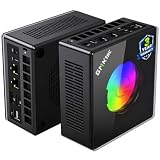
AOOSTAR GEM12+ PRO Barebone (Ryzen 7 PRO 8845HS, No RAM/SSD/OS)
Who it suits: Builders with memory and an SSD already in a drawer — or anyone who wants the cheapest honest route to a finished streaming mini whose encoder exit costs no storage.
Read the name carefully: this is a barebone. What arrives is a Ryzen 7 PRO 8845HS and its Radeon 780M inside a chassis fitted with a 2.68-inch status screen and a fingerprint sensor — plus empty slots where the RAM, SSD and operating system should be, exactly as the maker’s manual states outright. It cannot run OBS, cannot record, cannot stream, until you complete it; everything in this review grades the completed machine. Completed, it is a genuinely strong streaming proposition. The encoder is the RDNA 3 VCN set — H.264, HEVC and AV1 encode — and the platform feeds it properly: support for up to 128GB of DDR5-5600, two M.2 slots, dual USB4, dual Intel 2.5GbE networking, and BIOS power modes up to 70W for buyers who want the 780M’s simultaneous-load budget set deliberately. The distinction that matters most to a streamer is its OCuLink: a native port on its own channel that does not consume an M.2 slot. On the UM890 Pro below, connecting an external GPU costs you a drive bay; here, the future discrete encoder and a two-drive recording archive coexist. The completion math is the rest of the review: check price on Amazon for the kit, add a completion kit (32GB DDR5 plus a 1TB Gen4 SSD) and the finished machine still lands under the budget — the lowest completed position here — plus an OS if you need one. With salvaged parts, it finishes for little more than the kit itself.
The debits are a small maker’s debits, unchanged by the streaming angle. The status screen’s control software has drawn owner complaints, the driver download is a disorganized bundle rather than a clean support page — set aside an evening for the build and the driver hunt before your first broadcast, not the hour before it — wireless is Wi-Fi 6 rather than 6E (moot under this guide’s wired rule), and at least one Amazon buyer reported receiving a previously opened unit sold as new: inspect yours on arrival and use the return window if the seals tell a story. None of these touch the silicon, and the silicon is the point: the same encoder class as the complete machines above, with the best OCuLink implementation of the six, at the lowest finished price — provided your parts drawer or your willingness to build does the rest.
- Completed with new parts and still under the budget — the cheapest finished streaming mini here; check price on Amazon for the kit and parts.
- Native OCuLink on its own channel: the future discrete encoder does not cost you an SSD slot or your recording drive.
- Up to 128GB of DDR5 and BIOS power modes to 70W — the simultaneous-load budget is yours to set.
Honest limitation: It is a kit, not a computer — RAM, SSD and an OS are yours to supply before it streams anything — and the maker’s software and driver support are visibly rougher than Beelink’s or Minisforum’s.
Choose it if DDR5 and an NVMe drive are already in your drawer, or you enjoy building and want the cheapest finished total here. Skip it if you want to unbox and broadcast tonight — the K8 Plus is the same encoder, finished.

Minisforum UM890 Pro Barebone (Ryzen 9 8945HS, No RAM/SSD/OS)
Who it suits: Enthusiast builders building a streaming platform deliberately — the strongest CPU here, the deepest memory ceiling, and outputs for a multi-monitor broadcast desk — who are happy to finish the machine themselves.
Like the pick above, this is a barebone: no RAM, no SSD, no operating system in the box, and no streaming until you install all three. Completed, the UM890 Pro is the connoisseur’s streaming platform. Its Ryzen 9 8945HS runs to 5.2GHz with the Radeon 780M at the highest clock in this guide, so the encoder — the same RDNA 3 VCN set, H.264, HEVC and AV1 encode — is backed by the most simultaneous-load headroom of any integrated pick here: eight fast cores for the game, the encode’s supporting cast of chat, alerts and browser sources, and a local recording, with two DDR5 slots accepting up to 96GB so the shared memory pool never becomes the argument. Two PCIe 4.0 M.2 slots hold the system drive and a dedicated recording drive, dual USB4 (one accepting power delivery in) and dual 2.5GbE wire the desk, and video outputs for four displays suit a broadcast layout of game, chat, preview and dashboard without a dock. Check price on Amazon for the kit, add a completion kit and the finished machine still sits comfortably under the budget, plus an OS if you need one. Minisforum’s finished version makes the case unaided: the complete 32GB/1TB machine generally sits above this ceiling, so the kit is the only honest way this platform gets under $800.
Two debits are streaming-specific, and both must be read before ordering. The first is this pick’s defining compromise: the UM890 Pro’s OCuLink runs through an included M.2 adapter, which consumes one of the two SSD slots whenever an external GPU is connected. For a gamer that is a footnote; for a streamer it is an architectural choice — the day you dock a discrete encoder is the day your recording drive leaves the machine, unless your archive lives on the remaining slot or on the network. The GEM12+ PRO above does not force that trade. The second is acoustic: measured noise in performance mode is around 43 dB, the loudest figure in this guide — tower-like rather than whisper-class, and a real consideration if the machine shares a room with your microphone rather than a closet or the next room. Buy the kit for the platform: the strongest CPU here, the deepest memory ceiling, and a finished position that leaves room in the $800 budget for the kit list further down.
- Ryzen 9 8945HS and the highest-clocked 780M here, with room for 96GB — the most simultaneous-load headroom of the integrated picks.
- Four display outputs and dual 2.5GbE — a broadcast desk wired without a dock.
- A lower-tier kit position, for a finished machine that still fits under the budget — check price on Amazon.
Honest limitation: The OCuLink adapter occupies an M.2 slot, so a docked discrete encoder and a second internal recording drive exclude each other — and at around 43 dB in performance mode it is the loudest pick here, in a guide where microphones are listening.
Choose it if the build is a deliberate project and CPU headroom and display outputs outrank quiet in your priorities. Skip it if you want two internal drives and an eGPU at once, a quiet room, or a finished PC — the completed version of this machine lives above this budget.
Minisforum AtomMan G7 Pt (Ryzen 9 7945HX, Radeon RX 7600M XT, 32GB/1TB)
Who it suits: The one streamer this guide cannot serve at $800 — the mini PC buyer who wants a discrete encoder on its own card — included so you can watch the right machine instead of settling for the wrong one.
Everything above this review encodes on the same chip that renders the game. This machine does not. Inside a vertical body of about 2.7 liters, fed by a 300W external power supply, sit a 16-core Ryzen 9 7945HX — desktop-replacement silicon, up to 5.4GHz — and a discrete Radeon RX 7600M XT with 8GB of its own GDDR6 at 120W. For streaming, the arrangement is the point: the card’s RDNA 3 media engine encodes H.264, HEVC and AV1 from its own memory and thermal budget, so a demanding game and a high-quality local recording stop negotiating with each other — the simultaneous-load compromise that shapes every other review in this guide simply relaxes. Sixteen cores run the supporting cast without breathing hard, and reviewers place the gaming side where the specification says it should be: strong at 1080p, capable of selective 1440p at sensible settings. The configuration is complete as sold: 32GB of DDR5 (upgradable to 96GB), a 1TB SSD, and storage slots of PCIe 5.0 and 4.0. Its H.264 still carries AMD’s softness at Twitch bitrates — a discrete card buys headroom, not a different codec personality — and its networking is a single 2.5GbE port where the K8 Plus offers two. If this guide’s budget were $1,200, this would be its streaming performance pick.
At this budget its higher-tier positioning is the review. Check the current price on Amazon: this configuration sits well above the $800 budget there, and even the deepest verified discount at Minisforum’s own US store still landed above the budget, with uncertain stock. No verified offer under the budget on Amazon is claimed here: this is a watch-list pick, named so that if a genuine offer under the budget ever surfaces — a clearance, a coupon stack, a price error honored — you know which machine deserves the pounce. Before that day, buying one means overshooting this budget, and its honest comparison set is the $1,200 tier, not the minis above. Deal-watch rules apply: an alert set for the $800 budget, the configuration checked in the cart (barebone versions are a different purchase), and no stretching because a listing looked close.
- A discrete RX 7600M XT with its own 8GB and its own encoder — game and broadcast stop sharing a chip.
- 16-core 7945HX: simultaneous-load headroom no other pick here approaches.
- Complete 32GB/1TB configuration, upgradable to 96GB of RAM.
Honest limitation: It has not lived under the $800 budget — it sits in a higher tier on Amazon, and even the maker’s own store offers stayed above the line. Monitor it and check price on Amazon; do not budget for it here.
Choose it if a genuine sub-$800 offer appears, or your budget grows to meet its real tier. Skip it if the $800 is being spent this week — the six machines above are honest answers at this price, and this one is not.

Comparison Table
| Product | Encoder | Best streaming use | Link |
|---|---|---|---|
| GMKtec NucBox K8 Plus (32GB/1TB) | 780M RDNA 3 VCN — H.264/HEVC/AV1 | The complete stream station, with the discrete-encoder exit kept open | Check on Amazon |
| Beelink SER8 (32GB/1TB) | 780M RDNA 3 VCN — H.264/HEVC/AV1 | Quiet rooms: the broadcast your microphone cannot hear being made | Check on Amazon |
| GMKtec NucBox K11 (32GB/1TB) | 780M RDNA 3 VCN — H.264/HEVC/AV1 | The fastest iGPU for demanding games, bought on sale | Check on Amazon |
| AOOSTAR GEM12+ PRO Barebone | 780M RDNA 3 VCN — H.264/HEVC/AV1 | Lowest finished price; eGPU exit that costs no storage | Check on Amazon |
| Minisforum UM890 Pro Barebone | 780M RDNA 3 VCN — H.264/HEVC/AV1 | The builder’s platform: CPU headroom, memory ceiling, four displays | Check on Amazon |
| Minisforum AtomMan G7 Pt (32GB/1TB) | RX 7600M XT discrete — H.264/HEVC/AV1 | Discrete encoder on its own card — deal watch only, sits in a higher tier; check price on Amazon | Check on Amazon |
Setting Up OBS on a Mini PC: The Streaming Section
Pick the hardware encoder, always. On every pick in this guide, OBS should be set to the AMD hardware encoder — never x264 as a plan. On the five 780M machines that means the RDNA 3 VCN block; on the G7 Pt it means the discrete card’s media engine, which is the one arrangement here where the encode costs the game nothing. For Twitch, encode H.264 at roughly 6,000 kbps; for YouTube, H.264 at a higher bitrate, or AV1 where your setup supports it — every pick here encodes AV1 in hardware, which is this guide’s quiet advantage over older streaming hardware. Whichever platform: constant bitrate (CBR) and a two-second keyframe interval are the settings the platforms are built around, and a simultaneous local recording belongs on the same hardware encoder, not on spare CPU cores you do not have.
Read the three lag counters like instruments. OBS reports three distinct failures, and each has a different fix. Rendering lag means the GPU could not composite your scene in time — on a 780M machine the fix is to lower the game’s settings or cap its frame rate, because the same chip is rendering both the game and your overlay scene; on the G7 Pt it rarely appears. Encoding lag means the encoder itself was overrun — lower the encode resolution or frame rate (a 1080p60 game sent as a 720p60 stream is a respectable broadcast), check that you are on the hardware encoder rather than x264, and on the integrated picks, close the second game, the extra capture and the background render that are sharing the chip. Network lag — dropped frames with both other counters clean — is almost never the PC: it is the connection, and its fix is below.
Wire it. No exceptions in this guide. Every pick here ships with at least one 2.5GbE port, most with two, and a broadcast is the least forgiving traffic your network carries: a Wi-Fi dropout that a download would never notice is a hole in your stream. The SER8’s reported Wi-Fi dropouts make the point for one pick, but the rule is set-wide — run the cable, even across a room, even temporarily on stream days. If a wired run is genuinely impossible, that constraint should choose your pick (favor the machines with the strongest wireless and test inside the return window), not excuse the attempt.
Rehearse inside the return window. Before your first real broadcast, run a private or test stream for a full hour at your full intended load — your most demanding game, your real scene, recording on — and read all three counters at the end of it. Sustained load is where this category’s truths live: the K11’s thermal reports, the UM890 Pro’s 43 dB, the SER8’s silence. An hour of rehearsal in week one is the cheapest diagnostic in streaming, and it is only free while the return window is open.
What Else You Will Spend: The Kit Around the PC
The PC is the middle of a streaming budget, not the whole of it. The rest is listed in the order it deserves your money — without prices, because none of it is part of any pick above and none belongs inside a PC’s price.
- A microphone, first. Viewers forgive a soft picture years before they forgive bad audio, and every encoder verdict in this guide matters less than this purchase. It is also where the SER8’s measured silence pays out: a quiet PC lets a sensitive microphone sit closer and work less hard.
- Lighting, second. A lit face at a modest camera beats an expensive camera in a dark room, and lighting is the cheapest picture upgrade in streaming.
- A webcam, third. Only after the microphone and the light; the camera is the item the other two make look good.
- A capture card, only for console. If you stream a console, a capture card feeds it into one of these minis — several picks here make excellent dedicated capture-and-encode boxes. If you stream PC games played on the same machine, a capture card does nothing at all: the game is already in the PC. Do not let a bundle sell you one.
How to Choose a Mini PC for Streaming Under $800
- Start with the encoder, not the product names. Under $800, mini-PC streaming means AMD’s RDNA 3 VCN: H.264 and HEVC for today’s Twitch, AV1 encode for YouTube and Enhanced Broadcasting. Its H.264 is visibly softer than NVENC at Twitch bitrates — if that specific gap is the one you cannot accept, your machine is a tower with an NVIDIA card, and this guide says so rather than selling around it.
- Grade the simultaneous load, not the benchmark. A stream is a game plus an encoder plus chat software plus a recording on one chip. Thirty-two gigabytes in dual channel is the correct memory configuration — the iGPU renders and encodes out of that pool — and sustained performance beats burst clocks over a three-hour broadcast.
- Price the finished, stream-ready machine. A barebone kit is not a finished computer: with new parts and an OS still to settle, it streams nothing until then. Compare completed machines against completed machines, and check price on Amazon for the kit and the parts together.
- Decide your encoder exit before you buy. A mini’s internal encoder is forever. OCuLink is the full-bandwidth route to a future discrete encoder (a desktop NVIDIA card brings NVENC with it); USB4 is the slower, pricier route; and the route itself is a second purchase — dock, power supply and card — never a footnote. Note the implementations: the GEM12+ PRO’s native port costs no storage; the UM890 Pro’s adapter costs an SSD slot.
- Match the box to the room it broadcasts from. Measured noise is a streaming specification: the SER8’s roughly 32 dBA, the K11’s 36–39 dB(A), the UM890 Pro’s roughly 43 dB are numbers your microphone will grade nightly. A closet or a second room forgives what a desk beside the mic does not.
- Treat this tier’s pricing as volatile, not fixed. A memory shortage has moved these listings sharply within a single season. For every pick, check the current price on Amazon; set alerts, verify the configuration in the cart (this category reuses model names across barebone and complete versions, and across 24GB and 32GB configurations), and walk away above the $800 budget.
- Plan the recording archive on day one. Regular local recording eats storage at a rate that surprises new streamers. The second M.2 slot most picks here carry is not a luxury — it is where your broadcasts live.
Common Buying Mistakes
- Believing a barebone’s kit price is a streaming price. RAM, SSD and an operating system stand between the box and your first broadcast; price the finished machine.
- Setting OBS to x264 on an eight-core mini and blaming the PC. The hardware encoder exists on every pick here; the software encoder spends the cores your game is using and drops frames in two counters at once.
- Streaming over Wi-Fi because the desk is far from the router. Every pick here has wired 2.5GbE for a reason; the cable is the cheapest dropped-frame fix in this guide.
- Buying 16GB — or a single memory stick — behind an integrated GPU. The 780M renders and encodes out of system RAM; starving it makes both jobs slower at once.
- Paying the shortage spike. The reader who buys the K11 when its pricing spikes and the reader who buys it on sale under the budget own the same stream station — check price on Amazon before paying.
- Counting the eGPU dock as the eGPU price. The dock is the cheap part of a dock-plus-power-supply-plus-card purchase the size of the PC itself — and on the UM890 Pro it also costs an SSD slot.
- Confusing configurations in the cart. Barebone and complete versions, and 24GB and 32GB configurations, sell under near-identical names — verify RAM, SSD and OS on the actual listing before paying.
- Buying a capture card to stream games played on the same PC. It does nothing there; capture cards are for consoles and second machines.
Final Recommendation
- Most mini-PC streamers: GMKtec NucBox K8 Plus — buy at $800 or less.
- Quiet rooms and close microphones: Beelink SER8, in whichever configuration shows under $800.
- Demanding games, patient buyers: GMKtec NucBox K11, on an alert for a dip under the $800 budget — never when it sits well above the budget.
- Parts owners and builders: the AOOSTAR GEM12+ PRO barebone for the cheapest finished total; the Minisforum UM890 Pro barebone for the deepest platform.
- Discrete encoder or bust: the AtomMan G7 Pt is the machine to watch — and an RTX tower under this budget is the machine to buy this week.
Our top two for streaming at this budget are the K8 Plus, the complete station whose AV1-capable encoder, dual wired networking and native OCuLink exit cover both today’s broadcast and tomorrow’s discrete card, and the SER8, whose measured silence is a streaming feature no spec sheet headline captures. Between them they cover the two shapes this search takes: the streamer who wants headroom and exits, and the streamer whose microphone shares the room. If patience is yours, the K11 on sale is the fastest integrated encoder platform the tier offers; if your parts drawer is full, the two barebones finish cheaper than everything else here; and if your games demand a discrete encoder today, the honest signposts point to Best Mini Gaming PC Under $1200 for the G7 Pt’s real tier, or to a tower under this same budget. Streamers speccing smaller or simpler should also see Best Mini Gaming PC For Streaming Under $500 and Best Mini Gaming PC For Streaming Under $700, and those set on this size at this price can compare the neighboring shapes in Best Compact Gaming PC Under $800 and Best Small Form Factor Gaming PC Under $800. Check price on Amazon and verify the exact configuration before ordering — at this tier that homework is the entire difference between a deal and a missed opportunity.
Frequently Asked Questions
Can a mini PC under $800 really stream?
Yes — within the integrated-encoder definition this guide states up front. The 780M machines here hardware-encode H.264, HEVC and AV1 while they game, run esports and older titles with comfortable headroom, and handle demanding games at 1080p on reduced settings with upscaling. What they cannot match is NVENC’s H.264 quality at Twitch bitrates or a discrete card’s separation of game and encode — which is why the one discrete machine is listed as a watch pick from a higher tier, and why an RTX tower at this budget remains the raw streaming-performance winner.
Is AMD’s encoder good enough for Twitch?
Good enough is the honest phrase. At Twitch’s roughly 6,000 kbps, the RDNA 3 encoder produces a clean, watchable broadcast whose H.264 is visibly softer than NVENC’s in fast motion and fine detail — a difference your viewers are unlikely to name and a difference this guide will not hide. Where AMD’s encoder pulls ahead of older hardware is AV1: YouTube accepts it today, Twitch is rolling it out through Enhanced Broadcasting, and every pick here encodes it in hardware.
Do I need a second PC or a capture card to stream with a mini?
No. A single mini from this guide plays and encodes on one box, and a capture card adds nothing to that arrangement. A capture card earns its place when the game runs somewhere else — a console, or a gaming PC you want to keep unloaded — in which case one of these minis makes a fine dedicated encode box. The two-PC setup is a refinement, not a requirement, at this level.
What does an OCuLink eGPU really cost, all-in?
Think in purchases, not in a dock price: the dock, a power supply the dock does not include, and a desktop graphics card are three separate buys that together rival the cost of the mini itself. It is the right plan if the mini must come first and the discrete encoder later — a desktop NVIDIA card on that dock is also the only route by which any pick here ever gains NVENC. It is the wrong plan as a justification for buying a weak machine today.
How much RAM does a streaming mini PC need?
Thirty-two gigabytes, in two sticks. The integrated GPU reserves system memory for rendering and encoding, OBS and your chat software live in the same pool, and dual-channel bandwidth is part of the performance you are paying for. Every pick in this guide ships or accepts 32GB; a 16GB configuration at this budget is a false economy, and the 24GB configuration of the SER8 should be bought knowingly, not by cart accident.
Why is there no NVENC mini PC under $800?
Because, on verified Amazon listings, there isn’t one at this level. No mini PC with an NVIDIA GPU could be verified at or under this budget; the current discrete mini — the AtomMan G7 Pt, with an AMD card — sits in a higher tier on Amazon (check price on Amazon), and even its deepest verified discount at the maker’s own store was still above budget. This guide lists it as a labeled exception rather than inventing a budget position it has not held, and names the RTX tower as the honest NVENC route at the $800 budget.


