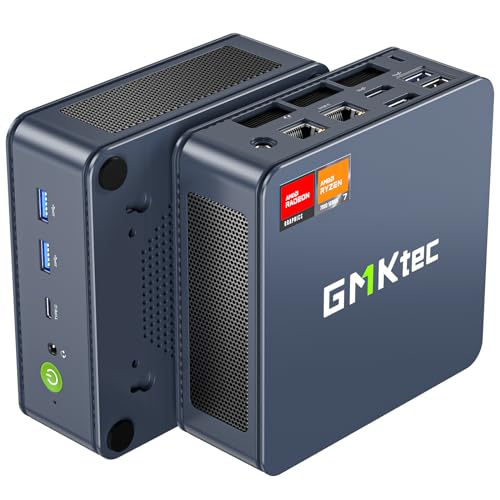
Where to buy
Check the latest price, availability and delivery on Amazon. Orders are placed on Amazon. We may earn a commission from qualifying purchases.
- Best encoder in this budget tier: GMKtec NucBox K6, Ryzen 7 7840HS, Radeon 780M, 32GB DDR5, 1TB SSD — Check on Amazon
- Beelink SER5 MAX Mini PC, Ryzen 7 7735HS, Radeon 680M, 24GB, 500GB — Check on Amazon
- GMKtec M5 Plus Mini PC, Ryzen 7 5825U, 32GB RAM, 1TB SSD — Check on Amazon
- ACEMAGIC Mini Gaming PC, Ryzen 7 7735HS, Radeon 680M, 24GB, 512GB — Check on Amazon
See 2 more Amazon options
- GMKtec NucBox M6 Ultra, Ryzen 5 7640HS, Radeon 760M, 16GB, 512GB — Check on Amazon
- GMKtec NucBox M6 Mini PC, Ryzen 5 6600H, Radeon 660M, 16GB DDR5, 512GB — Check on Amazon
Read the full guide ↓
Disclosure: As an Amazon Associate, reviewstook.com earns from qualifying purchases. Links to Amazon on this page are affiliate links; they cost you nothing extra. Listing details such as price and availability change often, so check the current Amazon listing before you buy.
A streaming PC has two jobs that fight each other. The first is playing the game. The second is turning that gameplay into a clean, steady feed — compressing every frame in real time without stealing so much of the machine that the game stutters. On a tower, those jobs are divided between a graphics card’s rendering silicon and its dedicated encoder block. On a mini PC under $500 there is no graphics card at all: every machine in this guide renders and encodes on one laptop-class chip, with the encoder, the game and your streaming software all drawing from the same memory pool and the same thermal budget. That is the honest starting point, and everything below is graded against it.
So let us define the workflow this guide is actually grading, because “streaming” covers very different loads. The standard target is Twitch at 1080p60 with a constant bitrate around 6,000 kbps and a two-second keyframe interval — the settings OBS asks for on day one. YouTube is more generous: higher bitrates, 1440p uploads that earn a 1080p stream a better processing tier, and AV1 live ingest. Twitch’s AV1 support exists through its Enhanced Broadcasting programme — real, but still limited rather than universal. And 4K streaming is limited by the platforms, not by anything you can buy — no mainstream service takes a 4K live feed at a bitrate that does it justice — so no pick here is graded on it. The honest summary: these six minis can stream talk, desktop, creative and console-fed content beautifully, they can stream the games they play well — esports, indie, older titles — from the same box, and they cannot stream a demanding modern game rendered on the same chip at settings worth watching. That last job needs a discrete graphics card this budget does not contain.
What decides success inside that frame is the encoder — the small block of silicon that compresses your video — and this set’s encoder map is unusually interesting for this budget tier. Two of the six picks carry AMD’s RDNA 3 media engine, which encodes AV1 as well as H.264 and HEVC. Three carry the older RDNA 2 engine, H.264 and HEVC only. And one carries Vega-era hardware, the oldest encoder here. There is no NVIDIA silicon in this set, so there is no NVENC anywhere in this guide, and no Intel silicon, so no Quick Sync either — every encoder claim below is an AMD claim, derived from the chip each listing documents. Below: the encoder map, quick picks, six reviews re-ranked for streaming, a comparison table, an OBS setup section, the rest of the kit in purchase order, the mistakes that ruin first streams, and the questions new streamers ask most.
The Encoder Map: What Each Chip in This Set Can Actually Send
Streaming guides for tower PCs argue about NVENC generations. This guide has a different map, and it is worth learning before the reviews, because encoder-first grading is what separates this ranking from the base gaming guide’s. AMD’s integrated graphics encode video through a media engine called VCN, whose capability is set by the graphics architecture, not the name on the box.
The strongest encoder here belongs to RDNA 3. The Radeon 780M in the NucBox K6 and the Radeon 760M in the M6 Ultra both carry the RDNA 3 media engine, which encodes H.264, HEVC and AV1 in hardware. AV1 matters for two concrete reasons: YouTube accepts AV1 live, and Twitch’s Enhanced Broadcasting uses it — and even where you send plain H.264 today, an RDNA 3 machine owns the format the platforms are moving toward. One honesty note applies to all AMD picks equally: AMD’s H.264 encoding is visibly softer than NVIDIA’s NVENC at Twitch’s bitrates, a difference viewers notice in fast motion and fine detail. It is a quality gap, not a failure — the feed is watchable and stable — but no pick here produces NVENC-grade H.264.
The middle of the map is RDNA 2. The Radeon 680M in the Beelink SER5 MAX and the ACEMAGIC, and the Radeon 660M in the NucBox M6, encode H.264 and HEVC in hardware — and that is the whole list. RDNA 2 has no AV1 encode, in any driver, on any setting; if a listing or a forum post tells you a 680M machine will “do AV1,” it is confusing AV1 decoding, which these chips support for playback, with encoding, which they cannot do. For a Twitch H.264 stream today that limitation costs nothing. For YouTube AV1 or Twitch’s Enhanced Broadcasting it is a hard wall, and it is factored into the rankings below. At the bottom sits the M5 Plus’s Vega-architecture graphics: H.264 and HEVC encoding exists, but it is the oldest and softest encoder here — one more reason that machine is graded as a dedicated streaming box for other devices’ gameplay.
Two fallback notes complete the map. Every pick can encode with x264, the software encoder that runs on the processor itself — an emergency fallback only on these chips, because the same cores are busy playing the game; the eight-core picks tolerate it at fast presets for talk content, and on the six-core picks it competes with everything. And a second-PC pattern runs through the whole guide: a mini that cannot render a demanding game can still be an excellent streaming machine when a console or another PC renders and a capture card hands it the picture.
In this guide
Quick Picks
Short on time, or comparing several options at once? Each row below names a streamer type and the mini PC that suits it, with a link to the listing.
| Streamer type | Pick | Why it stands out | Link |
|---|---|---|---|
| Best encoder, deal hunters | GMKtec NucBox K6, Ryzen 7 7840HS | RDNA 3 encoder with AV1, 32GB to share — check price on Amazon | Check on Amazon |
| Best same-box game streamer | Beelink SER5 MAX, Ryzen 7 7735HS | 680M game headroom plus 24GB for game, OBS and browser together | Check on Amazon |
| Best dedicated stream box | GMKtec M5 Plus, Ryzen 7 5825U | 32GB and 1TB for capture-fed streams and the recording archive | Check on Amazon |
| Best desk-and-stream value | ACEMAGIC Mini Gaming PC, Ryzen 7 7735HS | 680M encoding, Windows 11 Pro, triple monitors for the streaming desk | Check on Amazon |
| Best AV1 on a budget platform | GMKtec NucBox M6 Ultra, Ryzen 5 7640HS | RDNA 3 encoder and USB4 — check price on Amazon | Check on Amazon |
| Best second PC for streamers | GMKtec NucBox M6, Ryzen 5 6600H | Lower-tier positioning — a check-price-on-Amazon, upgradeable encode-and-record box | Check on Amazon |
How These Picks Were Chosen
The budget was applied the way a buyer experiences it: the complete machine — processor, memory, storage and Windows — at or under $500 in the United States. Barebones kits — which still need memory, a drive and an operating system bought separately — were excluded however attractive the headline price, because the finished machine costs a different and larger number. Every product below is a real Amazon listing, and because prices in this category move constantly, the reviews do not print a fixed figure for any pick — check the current price on Amazon for each one instead. One pick, the NucBox K6, is included only when its current price falls within this guide’s budget, and its review says so in its first lines, with the walk-away rule that governs it.
On top of that base test, this variant applied a streaming filter with four parts. First, the encoder: which hardware encoder the documented silicon carries, which formats it can send, and an honest note that AMD’s H.264 runs visibly softer than NVENC at Twitch bitrates. Second, simultaneous load: streaming is never one program. It is the game, OBS compositing your scenes, a browser holding chat and alerts, and a voice app, all running at once on one chip — so memory, core count and cooling endurance were graded as streaming specifications, not luxuries. Third, recording room: a streamer who records locally for edited videos needs drive space the way a gamer needs frames, and small fitted drives are graded harder here than in the base guide. Fourth, the wired rule: every pick was checked for a real Ethernet port, because the most effective streaming upgrade costs nothing and is a cable — Wi-Fi, however fast its logo, is not a streaming plan.
We did not use these machines ourselves. We read the maker listings and specification pages, took each pick’s encoder capability from the documented graphics architecture rather than from listing adjectives, and discounted maker performance claims throughout. Where a listing family sells several configurations under one title — the standing hazard of this category — each review names the exact configuration its recommendation belongs to. The result is a ranking that differs from the base gaming guide’s: the machine with the most memory and storage rises, the machine with the weakest encoder falls, and the deal pick stays on top only because its encoder, not just its graphics, is the best silicon in the set.
The 6 Best Mini PCs for Streaming Under $500
GMKtec NucBox K6 — Ryzen 7 7840HS, Radeon 780M, 32GB DDR5, 1TB SSD
Who it suits: The patient streamer. Someone building a small one-box setup for esports, indie and older games who wants the best encoder this budget can reach — and who will walk away without regret if the price is wrong on the day they shop.
For streaming, the K6’s story is its media engine as much as its graphics. The Ryzen 7 7840HS pairs the Radeon 780M — the strongest integrated graphics in this guide, a clear step above the 680M class — with the RDNA 3 generation of AMD’s VCN encoder, which sends H.264, HEVC and AV1. That gives this machine three honest streaming lives. On Twitch today it encodes H.264 in hardware while the 780M renders the game, the arrangement every pick in this guide attempts and this one attempts with the most headroom. On YouTube it can send AV1 live, the format YouTube handles best. And for Twitch’s Enhanced Broadcasting it owns the AV1 hardware that programme is built around, while every RDNA 2 pick below is locked out of it. The support act is equally strong: 32GB of DDR5 in two socketed sticks is the most memory in this guide — the game, OBS, your chat browser and your voice app all live in that pool at once — and a 1TB PCIe 4.0 drive is the only fitted storage here that treats local recording as a normal activity rather than a negotiation. Dual 2.5G Ethernet means the wired rule in our OBS section is satisfied twice over.
The conditions are the same ones the base guide set, and they bind just as hard here. Check the current price on Amazon first: it belongs in this under-$500 guide only when the 32GB/1TB configuration’s current price falls within the budget. So the rule is absolute: when it sits within budget, this is the best streaming mini PC in the guide; when it sits above budget, you are shopping in the next tier’s territory and should compare there instead. The second condition is acoustic. The K6’s small dual-fan cooler works audibly under sustained load, and a streaming load is a sustained load — the encoder runs for hours, not minutes. Under a desk or behind a monitor it is a murmur; beside a sensitive microphone in a small room, it is a placement problem to solve once, properly, rather than discover live.
- RDNA 3 encoder: H.264, HEVC and AV1 in hardware — ready for YouTube AV1 and Twitch Enhanced Broadcasting, with the graphics headroom to use them.
- 32GB of socketed DDR5 and a 1TB drive: the simultaneous-load and recording headroom streaming actually consumes.
- Dual 2.5G Ethernet, USB4 and Wi-Fi 6E — wired streaming with ports to spare.
Honest limitation: It is a deal-only pick — often sitting above budget — and its fans are audible under the sustained loads streaming imposes, which a microphone will notice if the machine sits beside it.
Choose it if you can shop patiently, will buy only when the current price on Amazon falls within budget, and want one small box that plays and encodes lighter games with the best silicon in the set. Skip it if you need to buy this week regardless of where its current price sits, or your stream is a demanding modern game — no pick here does that job, and this one’s premium does not change it.

Beelink SER5 MAX Mini PC — Ryzen 7 7735HS, Radeon 680M, 24GB, 500GB
Who it suits: The one-box streamer who wants to buy today at a real price: esports, indie and older-AAA streams from a single small machine, with no sale-watching and no second PC.
If the K6 is the deal, the SER5 MAX is the dependable streaming buy. Its Radeon 680M is this tier’s resident graphics class — esports and indie titles at 1080p with frame rates to spare, the older AAA catalogue at medium settings — and its RDNA 2 media engine encodes H.264 and HEVC in hardware, which is precisely what a Twitch stream consumes today. What lifts it to second place for streaming, above its identical-silicon rival below, is the configuration around the encoder. Twenty-four gigabytes of memory is the sweet spot for simultaneous load on an integrated machine: the graphics borrow their share, the game takes its share, and OBS, a chat browser and a voice app still fit without the machine swapping into stutters mid-stream. That balance is exactly what a 16GB machine strains at, and it is why this pick, not a cheaper one, is the guide’s same-box recommendation. Check the current price on Amazon — it is an in-budget shelf option, worth more to a streamer with a schedule than a deal that may not recur.
The limitations are two, and both are permanent. The first is the encoder’s ceiling: RDNA 2 encodes no AV1, so YouTube AV1 live and Twitch’s Enhanced Broadcasting are closed to this machine forever — it is a superb H.264 streamer and will never be anything else. The second is the memory itself: the 24GB of LPDDR5 is soldered to the board. It is enough, genuinely, for the workload above — but it is also the final word, and a streamer whose setup grows into more scenes, more apps and a hungrier game will meet the ceiling with no upgrade path. Storage is the softer constraint: the 500GB M.2 drive is a standard part you can replace with a larger one, and a streamer who records every session should plan that swap rather than discover it. One buying caution from the base research: a different SER5 MAX variant built on the older 5800H exists under another listing — the facts and the recommendation here belong to the 7735HS machine, so confirm the processor name before paying.
- 680M rendering plus hardware H.264 encoding: the complete same-box arrangement for Twitch today.
- 24GB of memory — the simultaneous-load sweet spot for game, OBS, chat and voice on one chip.
- Positioned within the budget: check price on Amazon.
Honest limitation: No AV1 encode, ever — RDNA 2’s ceiling — and the soldered 24GB is the machine’s memory for life.
Choose it if your stream is your gameplay, your games are the classes this chip plays well, and you want to buy once at a price that exists. Skip it if AV1 is part of your plan today, or you expect your setup’s appetite to outgrow 24GB — the K6 on deal answers both, at the cost of patience.

GMKtec M5 Plus Mini PC — Ryzen 7 5825U, 32GB RAM, 1TB SSD
Who it suits: The console streamer, the talk-show and desktop streamer, and the two-PC household — anyone whose gameplay happens on another device and who needs a tireless little box to encode it, record it and file it away.
This is the pick that only makes sense in a streaming guide, and it makes complete sense here. Judged as a games machine, the M5 Plus is the weakest in this set: its Ryzen 7 5825U uses Vega-architecture graphics, the oldest design here, and its own gaming map is esports at modest settings, indie and retro happily, and the recent catalogue effectively not at all. But a dedicated streaming box does not render the game. It receives a picture — from a console through a capture card, or from a gaming PC on the same network — and its real specifications are the ones this machine leads the guide in: 32GB of memory, tied for the most here, so OBS, overlays, a browser full of dashboards and a recording encoder run without contention; a full 1TB NVMe drive with a second slot beside it, the only fitted storage in this guide sized for a recording archive rather than despite one; and dual 2.5G Ethernet, so the capture feed, the upload and the household network each get their lane. Its eight-core processor shrugs at the desktop workload that is a stream box’s life. Check the current price on Amazon — it sits in the lower part of this budget tier, and does all that while leaving room in the budget.
The honest limitation is the encoder: the Vega-generation media engine is the oldest and softest in this guide. It encodes H.264 and HEVC — enough for a clean Twitch talk or console stream — but its H.264 runs visibly softer than the RDNA engines above it in fast motion, it offers no AV1 in any mode, and it should never be asked to encode gameplay it is also rendering beyond the lightest titles. Its value exists only when something else plays the game. Bought as a one-box game streamer it is the wrong purchase, and the two picks above it are the right ones. Bought as the second box — the quiet, capacious, always-on half of a streaming setup — it is arguably the most useful object in this guide.
- 32GB of memory and 1TB of storage with a second slot: built for OBS, dashboards and a recording archive.
- Dual 2.5G Ethernet — the capture feed and the upload never fight over one port.
- Lower-tier positioning in this budget — check price on Amazon: a dedicated stream box that leaves budget for the capture card.
Honest limitation: The Vega encoder is the oldest and softest here — H.264/HEVC only, no AV1 — and the machine’s own gaming graphics are the weakest in the guide.
Choose it if your gameplay lives on a console or a gaming PC and you need the streaming half of the setup to be small, quiet and capacious. Skip it if one box must both play and stream your games — that buyer needs the 680M picks above.

ACEMAGIC Mini Gaming PC — Ryzen 7 7735HS, Radeon 680M, 24GB, 512GB
Who it suits: The desk streamer: one box that runs the workday across three monitors, then streams esports and older titles at night, with Windows 11 Pro’s tools in between.
Under the streaming lens, the ACEMAGIC is the SER5 MAX’s silicon wearing a desk worker’s clothes. The recipe is identical where it counts — a Ryzen 7 7735HS, Radeon 680M graphics, 24GB of memory — so the streaming story is the same story: hardware H.264 and HEVC encoding from the RDNA 2 media engine, a memory pool big enough for game, OBS and chat to coexist, and the same permanent ceiling, because RDNA 2 will never encode AV1. Where this machine argues its own case is the streaming desk around the stream. Three 4K display outputs mean the classic three-screen streamer layout — game, OBS and chat, each on its own panel — runs from this one box without a dock or a compromise. Windows 11 Pro brings the remote desktop and drive-encryption features that matter to streamers who also work on the machine. The networking is 2.5G Ethernet with Wi-Fi 6, satisfying the wired rule with speed to spare. And check the current price on Amazon — it is competitively positioned among the 680M picks, for a configuration that gives up nothing that matters to a streamer.
So why fourth and not second, on identical silicon? Two small reasons, both about certainty. The base research documents the Beelink’s memory as soldered LPDDR5 with a known track record; for this pick the verified sources establish 24GB of RAM without establishing its type, and this guide does not guess — the practical consequence is identical on day one (24GB is 24GB, and if it is soldered it is equally final), but a buyer planning around memory should know which facts are documented and which are not. The second reason is the buying itself: ACEMAGIC sells several configurations under closely related listings, and the recommendation that earns this pick its place belongs to the 7735HS with 24GB specifically. Confirm the processor and memory in the listing’s configuration selector before paying, because a cheaper variant in the same family is a different and weaker computer. Support is maker-direct, as with every pick here. Neither caution dents the value.
- The 680M streaming arrangement — hardware H.264, 24GB pool — check price on Amazon.
- Triple 4K display output: the game/OBS/chat three-screen desk from one box.
- Windows 11 Pro and 2.5G Ethernet for a machine that works all day and streams at night.
Honest limitation: The same RDNA 2 ceiling as its rival — no AV1 encode — and the value lives in one specific variant inside a multi-configuration listing family.
Choose it if your streaming desk is also your work desk and three monitors are the plan. Skip it if variant selectors make you nervous and you would rather choose the Beelink’s simpler, fully documented proposition.

GMKtec NucBox M6 Ultra — Ryzen 5 7640HS, Radeon 760M, 16GB, 512GB
Who it suits: The forward-looking streamer on a strict budget: lighter games played and streamed from one box today, AV1 hardware already in hand for where the platforms are going.
The M6 Ultra is the interesting contradiction of this guide — the second-best encoder here, attached to the tightest memory fit. Its Ryzen 5 7640HS is a Zen 4 processor carrying Radeon 760M graphics of the RDNA 3 design, which means its media engine encodes H.264, HEVC and AV1: the same format list as the K6 at the top of this guide, in a machine whose 16GB/512GB configuration is positioned within budget — check the current price on Amazon. For a YouTube streamer, or a Twitch streamer watching Enhanced Broadcasting roll out, that is the only AV1 hardware in this guide that does not demand deal-hunting. The platform around it is the newest here: USB4 for fast docks and capture devices, dual 2.5G Ethernet, Wi-Fi 6E, triple 4K display output, Windows 11 Pro, and two M.2 slots, so the recording drive can grow by addition rather than replacement.
What holds it at fifth is simultaneous load, the tax every one-box streamer pays. Sixteen gigabytes is the floor for a machine whose graphics borrow from the same pool the game, OBS and your browser are drinking from, and while the 760M renders a half-step behind the 680M in games, the memory is the tighter squeeze: the stream will hold, but the margin for a hungrier game or heavier scenes is the thinnest in this guide. The 512GB fitted drive is the second squeeze for anyone recording locally — mitigated, genuinely, by that second slot. And the buying caution from the base guide stands at full size: this listing family also sells a 32GB variant that sits far above this guide’s budget. The in-budget claim belongs to the 16GB configuration alone, so confirm the variant in the cart before paying; a buyer who lands on the 32GB variant has left this guide’s territory. Bought correctly, this is the pick for the streamer whose games are light, whose platform ambitions are not, and who would rather own AV1 now than apologise for its absence later.
- RDNA 3 encoder with AV1 positioned within budget — check price on Amazon, with no deal required, unlike the K6.
- Newest platform here: Zen 4, USB4, dual 2.5G Ethernet and a second M.2 slot for the archive.
- Triple 4K display output and Windows 11 Pro for the working streamer’s desk.
Honest limitation: 16GB is the tightest simultaneous-load fit in this guide — game, encoder, OBS and chat share one small pool — and the listing’s 32GB variant sits far above budget.
Choose it if AV1 matters to you now, your games are esports, indie and older titles, and you will add a second drive as the archive grows. Skip it if your one-box workload is already heavy — the 24GB 680M picks above hold a stream together with less strain.

GMKtec NucBox M6 Mini PC — Ryzen 5 6600H, Radeon 660M, 16GB DDR5, 512GB
Who it suits: The two-PC streamer and the beginner who wants a streaming station that can grow: a cheap second box for encoding and recording today, with socketed memory and spare drive slots for tomorrow.
Read as a games machine, the M6 is this guide’s modest pick — its Radeon 660M sits a clear class below the 680M, honest for esports, indie, retro and older titles at 1080p, and largely out of its depth in recent releases. Read as a streaming purchase, it is something else entirely: the cheapest credible streaming station in this guide. Its RDNA 2 media engine encodes H.264 and HEVC in hardware, which is all a dedicated box needs when a console or a gaming PC is doing the rendering — the encoder does not care whether the picture arrived from its own graphics or from a capture card. Around that encoder sits the best growth story here: 16GB of DDR5 in standard SO-DIMM slots, replaceable and expandable on a free afternoon, and two SSD slots, so the recording archive grows the same way. USB4, dual 2.5G Ethernet and Wi-Fi 6E complete a specification built to be kept. Its positioning completes the argument: check the current price on Amazon — it sits in the lower part of this budget tier, at which point it stops competing with the picks above and starts competing with capture hardware and streaming sticks, while leaving much of the budget for the kit below.
The limitations are the mirror of its virtues. As a one-box game streamer it is the weakest serious option here: the 660M renders the lightest game map in this guide bar the Vega pick, its encoder is RDNA 2 with no AV1, and 16GB — though socketed and fixable — is a tight starting pool for game plus OBS plus chat. The fitted SSD is a PCIe 3.0 drive, fine for recordings, unremarkable for loading. And the base guide’s buying caution applies verbatim: this listing family includes barebones variants sold under the same name, so confirm the cart holds the complete 16GB/512GB Windows machine, not a kit that still needs memory, a drive and a licence. Judge it as what it is — the streaming setup’s second box and the beginner’s upgradeable starter station — and at its lower-tier positioning it is very hard to beat.
- Hardware H.264 encoding for capture-fed and console streams — check price on Amazon for its lower-tier positioning.
- Socketed DDR5 and dual SSD slots — the only pick here whose streaming headroom can be bought later.
- USB4 and dual 2.5G Ethernet give it second careers in media and server duty when the setup changes.
Honest limitation: The weakest one-box streaming arrangement here — 660M rendering, RDNA 2 encoding with no AV1, and a 16GB starting pool.
Choose it if it will serve as a second PC beside a console or gaming rig, or as a first station you intend to grow. Skip it if one box must play demanding games and stream them too — spend the whole budget on a 680M pick instead.

Comparison Table
| Product | Encoder (documented silicon) | Best streaming use | Link |
|---|---|---|---|
| GMKtec NucBox K6 | RDNA 3 VCN — H.264 / HEVC / AV1 | Best encoder and most headroom — check price on Amazon | Check on Amazon |
| Beelink SER5 MAX | RDNA 2 VCN — H.264 / HEVC | The dependable same-box game streamer — check price on Amazon | Check on Amazon |
| GMKtec M5 Plus | Vega VCN — H.264 / HEVC | Dedicated stream box: capture-fed encoding and the 1TB archive | Check on Amazon |
| ACEMAGIC Mini Gaming PC | RDNA 2 VCN — H.264 / HEVC | 680M streaming with a three-monitor desk — check price on Amazon | Check on Amazon |
| GMKtec NucBox M6 Ultra | RDNA 3 VCN — H.264 / HEVC / AV1 | AV1 hardware positioned within budget, on the tightest memory fit | Check on Amazon |
| GMKtec NucBox M6 | RDNA 2 VCN — H.264 / HEVC | The upgradeable second PC for streamers — check price on Amazon | Check on Amazon |
Setting Up OBS on a Mini PC: The Streaming Section
Hardware is half the stream; settings are the other half, and on a mini PC they matter more than on a tower, because there is no spare power to waste. This is the setup we would hand any buyer of the six machines above.
Pick the encoder your silicon actually has. In OBS, set the output encoder to the AMD hardware encoder — it will appear as the AMD/AMF hardware option — on every pick in this guide. For Twitch, encode H.264: it is what the platform takes from everyone today. On the two RDNA 3 picks (K6, M6 Ultra), AV1 becomes your choice for YouTube live, and for Twitch only through Enhanced Broadcasting if your account is in the programme. Never select x264 except as an experiment or an emergency: software encoding spends the same processor cores your game needs, and on these chips that trade shows up as stutter in both the game and the feed. Set rate control to CBR — constant bitrate — because the platforms expect it: around 6,000 kbps for a 1080p60 Twitch stream, with a two-second keyframe interval, which Twitch requires. YouTube accepts higher bitrates and rewards a 1440p stream with better processing even when viewers watch at 1080p — a legitimate trick on the RDNA 3 picks, and workable on the RDNA 2 picks with HEVC or H.264 at a higher bitrate.
Run the wire. Every pick in this guide has a real Ethernet port — most have two — and the rule is absolute: stream on the cable, never on Wi-Fi. Wi-Fi’s problem is not its average speed, which is plenty; it is its variance. A stream is a metronome — the same bitrate, every second, for hours — and wireless delivers that in bursts interrupted by interference, neighbours and walls, each gap landing in your feed as a freeze. A cable removes the entire category of problem for the price of being a cable. If the router is in another room, a long cable or a powerline run is a streaming upgrade no setting can substitute for.
Read the three counters before you blame the hardware. When a stream stutters, OBS tells you which of three things failed, and each has a different fix. Frames missed due to rendering lag mean the graphics are saturated — the game is taking everything the chip has and OBS cannot composite your scenes: lower the game’s settings or cap its frame rate so the encoder and compositor get their share. Skipped frames due to encoding lag mean the encoder is overloaded: check that you are on the hardware encoder and not x264, and step the output resolution or frame rate down a rung. Dropped frames are the network counter — the connection, not the computer: that is the wired rule above, a bitrate your upload cannot sustain, or a household sharing the line. Diagnosing which counter moved turns a ruined evening into a five-minute fix, because on one chip the three budgets are visibly connected: an uncapped game starves the encoder, an overloaded encoder starves the game, and both look identical until you read the numbers.
Rehearse inside the return window. Before your first public stream, run a private one-hour test at your full intended load — the hungriest game you plan to stream, every scene and alert active, recording turned on if you intend to record — and watch the three counters and the fans for the whole hour. A mini PC that is fine for twenty minutes can heat-soak by minute fifty, and a configuration that is wrong (the cheaper variant of a listing family, the barebones kit) announces itself in that hour too. Do this while the return window is open and every problem this guide has warned about is still free to fix.
How to Choose a Mini PC for Streaming Under $500
- Choose the encoder generation first, because it never changes. RDNA 3 (K6, M6 Ultra) encodes AV1 and is ready for YouTube AV1 and Twitch’s Enhanced Broadcasting. RDNA 2 (SER5 MAX, ACEMAGIC, M6) encodes H.264 and HEVC only — everything Twitch uses today, nothing it is adding tomorrow. Vega (M5 Plus) is the oldest and softest. The encoder is silicon; no driver, setting or upgrade in this form factor revises it.
- Decide one box or two before you decide anything else. One box playing and streaming suits esports, indie and older games, and points to the K6 on deal or the 680M picks. Two boxes — console or gaming PC rendering, mini encoding — suits everything else, and points to the M5 Plus or the M6. Most disappointed buyers skipped this decision, not a specification.
- Treat memory as the streaming budget, because it is. Game, OBS, chat browser and voice app share one pool with the graphics. Thirty-two gigabytes is comfort, 24GB is the working sweet spot, 16GB is a floor you will feel. Socketed memory (K6, M6, M5 Plus) lets you fix a tight fit later; soldered memory (the Beelink’s 24GB) must be bought right on day one.
- Size the drive for the archive, not the install. If you record locally — and most growing streamers do — recordings accumulate relentlessly. The M5 Plus’s 1TB and second slot, and the second slots in the M6 pair, are streaming specifications. A 500GB drive with no expansion plan is a deadline.
- Set a walk-away price for deal picks and honour it. The K6 is the best streaming machine here when its current price falls within budget, and a different conversation entirely when it sits above budget. Check the current price on Amazon, set an alert, and let the in-budget picks carry you if the sale never comes.
- Wire it, and count the ports your desk needs. An Ethernet port is a streaming feature — every pick here has at least one, most have two. Triple display output runs the game/OBS/chat desk from one box; USB4 keeps fast docks and capture devices in play.
- Confirm the variant in the cart, every time. Listings in this category sell barebones kits, smaller memories and weaker processors under one family title. Each recommendation in this guide belongs to a named configuration; a cart showing a different one is a different computer.
The Rest of the Kit: What Streaming Adds to the Shopping List
The PC is the largest purchase in a streaming setup, not the only one. This section lists what else a streamer buys, in the order it matters — deliberately without prices, because accessory prices swing hard. Nothing here belongs inside a pick’s price: budget the machine first, then add the kit separately.
The microphone comes first. Viewers forgive a soft picture long after they forgive bad audio; a stream that sounds clear holds people a sharper, harsher one loses. A USB microphone is the standard beginner purchase, and its placement matters as much as its model: near your mouth, away from the machine. That second clause is mini-PC-specific: the higher-power picks’ fans are audible under sustained load, so the machine goes under the desk or behind the monitor, the microphone stays close to you, and the geometry solves the noise problem for free.
Lighting comes second. If a camera is part of your stream, one light pointed at your face does more for the picture than any camera upgrade, because cameras in ordinary room light are noisy and dim while cameras in decent light are all respectable. It is the simplest large improvement in the whole setup.
The webcam comes third. A standard USB webcam is the right starting point; any pick here handles its feed without noticing the load. Spend here only after the microphone and the light, and only if your format puts you on screen — many successful talk, desktop and gameplay formats never show a face at all.
The capture card is console-only. This is the purchase beginners most often make wrongly: a capture card brings a picture from another device — a console, a second PC, a camera — into the streaming machine. If you stream PC games from the same PC you play them on, a capture card does nothing; OBS captures the game directly. Buy one when, and only when, a console or a two-PC setup enters your plan — when it turns the M5 Plus and M6 picks above into proper dedicated streaming boxes.
Common Buying Mistakes
- Believing a 680M or 660M machine will “do AV1” because it can play AV1 video. Decoding is not encoding: RDNA 2 has no AV1 encode, and no setting adds it.
- Selecting x264 in OBS because it sounds like the quality option. On one chip it spends the game’s own cores; the hardware encoder exists precisely to avoid that trade.
- Streaming over Wi-Fi because the speed test looked fast. Streams fail on variance, not averages — run the cable.
- Paying an above-budget price for the K6 because a guide filed it in this budget tier. A deal pick is a conditional pick: above its walk-away threshold, the value that earned it the listing has evaporated.
- Buying a capture card for same-PC game streaming, where it does nothing at all — and skipping the microphone, which does everything.
- Choosing the cheapest variant in a listing’s configuration selector and receiving a weaker processor or half the memory the review described — or a barebones kit with no memory, drive or Windows at all.
- Buying a 16GB machine for a growing one-box setup when the graphics, the game and OBS all drink from the same pool.
- Discovering the recording archive has filled the drive mid-season because 500GB was treated as a specification instead of a countdown.
Final Recommendation
- Best encoder, patient buyers: GMKtec NucBox K6 — AV1 and the most headroom, only when it falls within budget — check price on Amazon.
- Same-box streamers, buying today: Beelink SER5 MAX.
- Dedicated stream box: GMKtec M5 Plus.
- Desk-and-stream value: ACEMAGIC Mini Gaming PC.
- AV1 on a budget platform: GMKtec NucBox M6 Ultra.
- Second PC and upgraders: GMKtec NucBox M6.
Our top two for most readers are the Beelink SER5 MAX, the complete same-box streaming arrangement at an in-budget positioning when you shop, and the GMKtec NucBox K6, which beats it on encoder, memory and storage the moment its current price falls within budget and should be ignored the moment it does not. Between them they state the philosophy: the encoder is the streaming specification, simultaneous load is the tax that decides whether a stream holds, and a mini earns its place by being small, quiet and wired rather than by pretending to be a tower. Streamers whose gameplay lives on a console should start from the M5 Plus instead; beginners assembling a first setup will find the gentler on-ramp in Best Mini Gaming PC For Beginners Under $500; and buyers who want the dedicated category view should cross to Best Streaming PC Under $500 or step up to Best Mini Gaming PC For Streaming Under $700. Check the current price on Amazon and the exact configuration before you order — in this category, those two habits are worth more than any single specification.
Frequently Asked Questions
Can a mini PC under $500 really stream games?
Yes — the right games, from the right arrangement. Talk, desktop, creative and console-fed streams are comfortable on every pick here. Same-box game streaming works for the games these chips play well: esports, indie and older titles at 1080p, with the hardware encoder carrying the feed. What no pick here does is render a demanding modern game and encode it on the same chip at settings worth watching — that job needs a discrete graphics card; the honest routes are a console feeding one of these as a stream box, a second PC, or a larger budget.
Do I need AV1 to start streaming?
No. Twitch’s standard today is H.264, which every pick in this guide encodes in hardware, and a new streamer loses nothing by starting there. AV1 matters for YouTube live, where it is the best-handled format, and for Twitch’s Enhanced Broadcasting as it rolls out — which is why the two RDNA 3 picks (K6 and M6 Ultra) are graded as the forward-looking choices, and the RDNA 2 picks are excellent for today with a ceiling tomorrow.
Why does everyone say to stream on a cable?
Because a stream is a metronome, not a speed test. Your connection must deliver the same bitrate every second for hours; Wi-Fi delivers in bursts, with interference carving gaps that appear as dropped frames and freezes. Every pick in this guide has a wired Ethernet port — most have two — and using it removes the single largest cause of ruined first streams at zero ongoing cost.
Is the K6 worth waiting for over the SER5 MAX?
The wait buys three things: the AV1 encoder the Beelink can never have, 32GB of socketed memory instead of 24GB soldered, and double the storage for recordings. If your stream is Twitch H.264 today and your games are the 680M’s classes, the Beelink at its in-budget positioning is the rational purchase — the best deal is the one that exists on the day you want to go live. If AV1 or a growing setup is in your plan, set the alert and be patient.
Can one of these be a second PC for my existing setup?
That is one of the best uses in this guide. A console or gaming PC renders the game; a capture card hands the picture to the mini; the mini runs OBS, overlays, chat and the recording archive without touching the gaming machine’s performance. The M5 Plus is built for exactly that job — memory, storage and dual Ethernet — and the M6 does it cheaper with upgrades in reserve. The full two-box picture sits alongside the single-box one in Best Mini PC For Streaming Under $500.
How loud will the machine be on stream?
At the desktop, nearly silent — these are laptop parts sipping power. Under a sustained streaming load the small fans spin up and become audible, more so on the higher-power picks like the K6. The fix is placement, not settings: the machine goes under the desk or behind the monitor, the microphone stays close to you, and the geometry keeps fan noise out of the recording. Give the vents clearance rather than sealing it in a cabinet.


