Where to buy
Check the latest price, availability and delivery on Amazon. Orders are placed on Amazon. We may earn a commission from qualifying purchases.
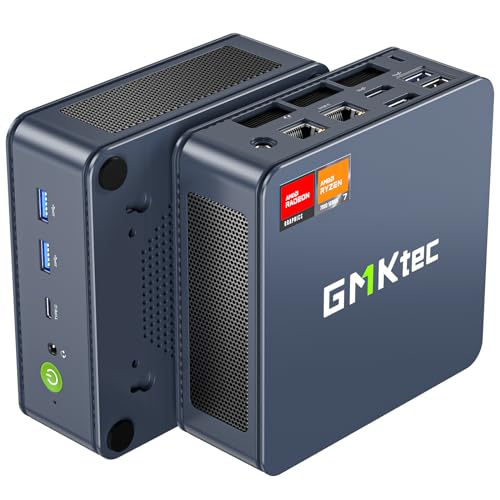
- Strongest graphics here — check the current price on Amazon before you buy: GMKtec NucBox K6, Ryzen 7 7840HS, Radeon 780M, 32GB DDR5, 1TB SSD — Check on Amazon
- Beelink SER5 MAX Mini PC, Ryzen 7 7735HS, Radeon 680M, 24GB, 500GB — Check on Amazon
- ACEMAGIC Mini Gaming PC, Ryzen 7 7735HS, Radeon 680M, 24GB, 512GB — Check on Amazon
- GMKtec NucBox M6 Ultra, Ryzen 5 7640HS, Radeon 760M, 16GB, 512GB — Check on Amazon
See 2 more Amazon options
- GMKtec NucBox M6 Mini PC, Ryzen 5 6600H, Radeon 660M, 16GB DDR5, 512GB — Check on Amazon
- GMKtec M5 Plus Mini PC, Ryzen 7 5825U, 32GB RAM, 1TB SSD — Check on Amazon
Read the full guide ↓
Disclosure: As an Amazon Associate, reviewstook.com earns from qualifying purchases. Links to Amazon on this page are affiliate links; they cost you nothing extra. Listing details such as price and availability change often, so check the current Amazon listing before you buy.
A small space changes what a gaming PC has to be. The question stops being “how fast is it?” and becomes “where does it actually go — and what else has to fit around it?” A mini PC answers that question better than any other kind of computer: the whole machine is roughly the footprint of a paperback book, it can sit on a shelf, tuck beside a monitor or ride on the back of a display, and it leaves a studio desk, a dorm room or a shared living room looking like a room rather than a workstation. This guide takes the six mini gaming PCs we recommend under $500 and grades them the way a small room grades them: installation first. Where each box can live, where its power brick has to live, how its cables fall, how much air it needs around it, and how its heat behaves in a tight spot — alongside the gaming honesty this tier always requires.
That honesty, up front: nothing under $500 in this form factor carries a discrete graphics card. Every machine below renders its games on graphics integrated into the processor, borrowing memory from the system pool. The strongest of them is comparable to an entry-level graphics card from a few years ago, which makes this tier excellent for esports, indie games and the deep back catalogue of older AAA titles at 1080p — and the wrong tool for the newest releases at high settings, for ray tracing, or for native 1440p in demanding games. What the money buys instead is the installation itself: a complete Windows computer that draws laptop-class power, idles almost silently, and can genuinely disappear into a small room. If raw frames are the priority and floor space is free, a tower spends this budget better, and this guide says so again in its own comparison section. If the room is the constraint, read on — but measure before you order, because the checklist near the end of this guide is the difference between a machine that vanishes and a machine that almost fits.
In this guide
Quick Picks
Short on time, or comparing several options at once? Each row below names a buyer type and the mini PC that suits it, with a link to the listing.
| Buyer type | Pick | Why it stands out | Link |
|---|---|---|---|
| Most gaming, tightest desk | GMKtec NucBox K6, Ryzen 7 7840HS | Radeon 780M in a one-hand box — under $500 only on sale, and it wants open air | Check on Amazon |
| Best everyday buy | Beelink SER5 MAX, Ryzen 7 7735HS | Radeon 680M — check price on Amazon; a settled, undemanding install on any shelf | Check on Amazon |
| Multi-monitor small desk | ACEMAGIC Mini Gaming PC, Ryzen 7 7735HS | 680M graphics and triple 4K output — one small box runs the whole desk | Check on Amazon |
| Newest platform, easy cabling | GMKtec NucBox M6 Ultra, Ryzen 5 7640HS | Zen 4, USB4 and a second SSD slot — check price on Amazon | Check on Amazon |
| Smallest spend, room to grow | GMKtec NucBox M6, Ryzen 5 6600H | Socketed memory and dual SSD slots, positioned toward the accessible end of this tier — check price on Amazon | Check on Amazon |
| One box, five jobs | GMKtec M5 Plus, Ryzen 7 5825U | 32GB and 1TB fitted from the factory — the shelf-friendly all-rounder | Check on Amazon |
How These Picks Were Chosen
The starting point is the same six machines as our main under-$500 mini gaming guide, with the same verified listings and the same buying rules — nothing here is a different computer wearing a new label. The budget was applied to the complete machine: processor, memory, storage and Windows at or under $500 in the United States, with barebones kits excluded because finishing one costs more and turns it into a different purchase. One pick, the NucBox K6, belongs here only while its current price fits this budget, and its review states the walk-away rule that governs it. Prices move constantly in this category, so check the current price on Amazon before you buy.
What changes in this guide is the grading. Each machine was assessed as an installation before it was assessed as a games machine, on five things. Form-factor class: all six belong to the same mini-PC class — a single small box, no tower, no separate components — so none of them asks for floor space or a desk of its own. The brick: machines of this class run from an external power adapter, and that brick is part of the installation whether buyers plan for it or not; it needs a home with air around it, not a burial under cables. Cable drop: a mini PC still collects a power lead, at least one display cable, usually Ethernet and a USB or two, and where those cables exit and fall decides whether the install looks clean or cluttered. Heat and airflow: a small box moves its heat through small vents with small fans, so the air around it is part of its cooling system — clearance is a specification, not a courtesy. Access: in a tight install, a machine you must pull out of its nook to add a drive or change memory is a different ownership experience from one you open in place, so upgrade access counted.
One discipline needs stating plainly, because small-spaces guides are where it is most often broken: the verified sources behind these six listings document no dimensions, no volumes, no weights, no mounting brackets and no noise figures for any of them. So this guide prints none. You will not find a litre figure or a centimetre measurement below, for any pick, because none was verified — and a measurement invented for a guide about measuring would be a poor joke. What the reviews grade instead is form-factor class and behaviour: how a machine of this type, with this chip and this cooling arrangement, behaves in a shelf, on a desk or behind a screen. Where a physical detail decides your purchase — the exact footprint, whether a mounting bracket is in the box — the reviews say so and send you to the live listing’s specification table and box photographs, which is where that fact honestly lives. The pick order follows the main guide, for a related reason: six machines of one form-factor class, with no verified size difference between them, cannot honestly be re-ranked by size, so the order stands on gaming merit and the installation grading runs through every review instead.
The gaming grading underneath is unchanged. Integrated graphics class first, because it can never be changed later; memory capacity and whether it is soldered or socketed second, because the graphics drink from the same pool; storage and second slots third; ports last. Maker performance claims were discounted throughout, and each graphics class is translated into the game categories it honestly covers rather than the ones its listing implies. Where a listing family sells several configurations under one title — the standing hazard of this category — the review names the exact configuration its recommendation belongs to.
The 6 Best Mini Gaming PCs Under $500 for Small Spaces
GMKtec NucBox K6 — Ryzen 7 7840HS, Radeon 780M, 32GB DDR5, 1TB SSD
Who it suits: The small-room buyer who still wants the most gaming this budget can render — and who has an open shelf or a spot on the desk with air around it, rather than a cubbyhole.
The K6 carries the strongest integrated graphics in this guide. Its Ryzen 7 7840HS pairs Radeon 780M graphics with 32GB of DDR5-5600 in two socketed sticks and a 1TB PCIe 4.0 SSD, and the gaming map is the widest here: esports at high frame rates with settings in hand, the older AAA catalogue at 1080p medium-to-high, and recent releases that make the 680M picks drop to low becoming modest rather than reluctant. It remains integrated graphics — no ray tracing worth naming, no native 1440p in demanding titles — but it is the ceiling of the class. Connectivity is a class up as well: USB4, HDMI and DisplayPort outputs, dual 2.5G Ethernet and Wi-Fi 6E, which matters in a small install because one box can serve as games machine, work machine and wired network citizen without a dock.
As an installation, the K6 is the most demanding of the six, and the demand is air. A dual-fan cooler working in a small chassis is audible under sustained gaming loads, and this machine asks more of its cooling than the lower-power picks: it wants open placement — on the desk, on an open shelf, behind a monitor with space behind it — and it is the pick most firmly refused a sealed cabinet or a stuffed cubby, where its own exhaust becomes its intake. The brick needs the same honesty: give the adapter a ventilated home on the shelf or the floor, not a cable drawer. The buying condition is the other half of the review. This machine usually sits above this guide’s tier, and it belongs here only for the 32GB/1TB configuration while its current price fits this budget — check price on Amazon. The rule is absolute: while the current price on Amazon fits the budget it is the best small-space gaming mini here; when it sits above the tier, set an alert and take a 680M pick instead.
- Radeon 780M graphics — the strongest integrated graphics in this guide, in the same one-hand box as everything else here.
- 32GB of socketed DDR5 and a 1TB SSD: the memory can grow without replacing the machine or its install.
- USB4, dual 2.5G Ethernet and Wi-Fi 6E — one box covers gaming, work and wired networking duties.
Honest limitation: It is a deal-only pick whose small fans are audible under sustained load, and it needs open air more than any other machine here — the wrong pick for a closed cabinet.
Choose it if your spot is an open shelf or desk corner, you can wait until its current price fits the budget, and gaming is the machine’s main job. Skip it if the only home available is enclosed, or you need to buy this week regardless of where its current price sits — check the current price on Amazon first.

Beelink SER5 MAX Mini PC — Ryzen 7 7735HS, Radeon 680M, 24GB, 500GB
Who it suits: The buyer who wants the tier’s reference machine in the tier’s easiest install — a box that goes on a shelf, asks for nothing exotic, and is forgotten about.
The SER5 MAX is the settled shelf choice done properly. Its Ryzen 7 7735HS carries the Radeon 680M, the graphics class that defines honest mini gaming at $500: esports and indie titles at 1080p with high frame rates, the big older AAA catalogue at 1080p medium, recent releases at low settings with FSR upscaling doing honest work. The 24GB of memory deserves its sentence even in an installation guide, because integrated graphics borrow from the system pool — 24GB lets the graphics take a generous share while the game and Windows still breathe, a balance 16GB machines strain at. Storage is a standard 500GB M.2 NVMe drive, and this pick sits squarely in this tier’s resident band — check price on Amazon.
The install is the undemanding kind. A mature, widely owned design with no deal-watching attached: place it where its vents can breathe, drop its cables behind the shelf, give the brick a home with air around it, and the machine’s contribution to the room is finished. The limitation is internal and permanent: the 24GB of LPDDR5 memory is soldered to the board. It will never be 32GB, and since the graphics feed from the same pool, that ceiling quietly caps the machine’s later years — no hardship for the gaming classes above or for desktop work, a real finiteness for anyone whose ambitions grow. The storage, by contrast, is a standard replaceable M.2 drive, so the 500GB is a starting point; in a tight install, note that swapping it means pulling the machine out of its spot once, in year two, rather than living with a wall. One buying caution carried from the research: a different SER5 MAX variant built on an older processor exists under a different listing — confirm the delivered machine is the 7735HS configuration reviewed here.
- Radeon 680M graphics backed by 24GB of memory — the configuration this tier is balanced around.
- Positioned squarely in this tier outside sale season too — check the current price on Amazon.
- A settled, widely owned design — the lowest-drama installation in this guide.
Honest limitation: The 24GB of LPDDR5 memory is soldered and can never be upgraded — the machine’s memory ceiling is fixed on the day it is installed.
Choose it if you want the dependable 680M machine placed once and forgotten. Skip it if you expect your needs to outgrow 24GB — that buyer wants socketed sticks, in the K6 when its current price fits the budget, or the M6 below.

ACEMAGIC Mini Gaming PC — Ryzen 7 7735HS, Radeon 680M, 24GB, 512GB
Who it suits: The small-desk multi-tasker — one box that drives a multi-monitor work desk all day and a game at night, so no second machine needs a home.
The ACEMAGIC shares its recipe with the Beelink above: a Ryzen 7 7735HS, Radeon 680M graphics and 24GB of memory, which means the gaming story is the same story — esports at high frame rates, older AAA at 1080p medium, recent releases at low with upscaling, and no ray tracing or native 1440p in demanding games at any point in its life. Its own arguments are in the surrounding detail. The drive is 512GB rather than 500GB, a trivial difference; the operating system is Windows 11 Pro, a real one for buyers who use remote desktop or drive encryption; networking is 2.5G Ethernet with Wi-Fi 6; and the display outputs run to three 4K screens. Check price on Amazon: it sits comfortably within this tier, in the same resident band as the Beelink above.
For a small space, the triple display output is the installation headline, and it cuts both ways. One small box running two or three monitors removes the need for a second computer entirely — the single most effective space-saving move in this guide. But three display cables, a power lead and a network cable all leave the same small chassis, so this is the pick where cable discipline is earned or lost: route the drops together, straight down behind the desk, and the install stays invisible; let them splay and the smallest PC in the room becomes the centre of its mess. The buying caution is about the listing, not the machine: ACEMAGIC sells several configurations under closely related listings, and the recommendation that earns this pick its place belongs to the 7735HS with 24GB specifically. Confirm the processor and memory in the configuration selector before paying, because a cheaper variant in the same family is a different, weaker computer. Support is maker-direct, as with every pick here.
- 680M graphics and 24GB of memory — check price on Amazon — the tier’s resident class without the wait.
- Triple 4K display output — one box can retire a second desk machine entirely.
- Windows 11 Pro and 2.5G Ethernet for a work-and-play desk.
Honest limitation: Several configurations share this listing family, and the value belongs to one of them — pick the wrong variant in the selector and a weaker machine arrives.
Choose it if your small desk runs multiple monitors and one box must do everything. Skip it if variant selectors make you nervous — the Beelink’s simpler proposition asks less care.

GMKtec NucBox M6 Ultra — Ryzen 5 7640HS, Radeon 760M, 16GB, 512GB
Who it suits: The buyer who values the newest platform and the tidiest future cabling over the last step of graphics muscle — esports, indie and older titles are the library.
The M6 Ultra pairs this guide’s newest architecture with its middle graphics class. Its Ryzen 5 7640HS is a Zen 4 processor — six cores, a generation newer than the 7735HS above — carrying Radeon 760M graphics: fewer compute units than the 680M of a newer RDNA 3 design, landing a half-step behind in the same broad band. Esports and indie titles will not notice the difference; older AAA plays at 1080p medium with slightly more settings-tuning; recent releases remain low-settings-with-upscaling games, as they are on every pick here. Around that core sit USB4, dual 2.5G Ethernet, Wi-Fi 6E, triple 4K display output and Windows 11 Pro. For the 16GB/512GB configuration, check price on Amazon — it is positioned within this tier without depending on a sale.
The installation argument is about tomorrow’s cables. USB4 means a single lead can run to a dock or a fast drive, which is how a small desk stays small when peripherals multiply; and the detail upgraders should circle is the second M.2 slot — storage grows by adding a drive, not by replacing one, which in a fitted nook is the difference between a five-minute job and a re-installation. Two cautions ride along. The capacity one: 16GB is the floor for a machine whose graphics share system memory, the tightest memory fit in this guide, adequate for the gaming classes above and no more. The buying one: this listing family also sells a 32GB variant that sits in a higher tier, well above this guide’s budget. The under-$500 recommendation belongs to the 16GB configuration alone, so confirm the variant in the cart before paying — a buyer who lands on the 32GB variant has left this guide’s territory and should be comparing a tier up instead.
- The freshest platform in the guide: a Zen 4 processor, RDNA 3 graphics and USB4 fitted as standard.
- Two M.2 slots — storage grows by addition, the friendliest upgrade a tight install can have.
- No sale required: the 16GB/512GB configuration sits within this tier — check the current price on Amazon.
Honest limitation: For graphics that drink from the system pool, 16GB is the least headroom in this guide, and the family’s 32GB variant sits in a higher tier beyond this budget — the variant in the cart has to be checked.
Choose it if ports, platform and a second drive slot matter more than the last step of graphics performance. Skip it if your gaming is heavy enough that headroom and the 680M’s extra muscle are the entire argument.

GMKtec NucBox M6 Mini PC — Ryzen 5 6600H, Radeon 660M, 16GB DDR5, 512GB
Who it suits: The upgrader working in a small room on a small budget — modest graphics now, in the machine here that is easiest to open, improve and keep.
The M6’s Ryzen 5 6600H carries Radeon 660M graphics, a clear class below the 680M, and its honest game map should be read before anything else: esports and indie titles at 1080p, older AAA at low-to-medium settings, retro and emulation with room to spare, and recent releases only in their lightest forms or through cloud streaming. What the machine offers in exchange is the best growth story in this guide, positioned toward the accessible end of this tier. The 16GB of DDR5 sits in standard SO-DIMM slots — replaceable, expandable, the single most valuable trait a mini PC can carry — and two SSD slots let storage grow the same way. USB4, dual 2.5G Ethernet and Wi-Fi 6E complete a specification built to be kept. Check price on Amazon: it sits toward the lower end of this tier, which helps leave room in the overall budget for the monitor, the controller and the games.
In a small space, that upgradeability has a specific installation meaning: the machine you can open is the machine you do not have to replace, and replacement is the most disruptive event a fitted corner can suffer. Memory and a second drive go in on a free afternoon, in place, and the install survives. The limitations are the graphics class, which should not be talked around — the 660M is roughly two-thirds of the idea of the 680M, and a buyer set on the recent AAA catalogue will feel the gap in every session — plus a PCIe 3.0 fitted SSD, whose loading times are fine and whose benchmark bragging is not, and a six-core processor where the picks above carry eight. One ordering caution from the research: this model family also appears in barebones form, so confirm the cart holds the complete 16GB/512GB Windows machine, not a kit that still needs memory, a drive and an operating system bought separately.
- Memory in standard slots and two SSD bays — no pick here offers an easier upgrade path.
- Positioned toward the lower end of this tier — check price on Amazon: the headroom helps fund the rest of the setup.
- USB4 and twin 2.5G Ethernet ports set it up for media and server work after its gaming years.
Honest limitation: Only one pick’s graphics are weaker than the Radeon 660M’s; it sits a full class under the 680M machines, and recent AAA titles are mostly out of its reach.
Choose it if your games are esports, indie, retro and older titles, and the machine must be openable in its nook for years. Skip it if your library is recent releases — put the whole budget into a 680M machine instead.

GMKtec M5 Plus Mini PC — Ryzen 7 5825U, 32GB RAM, 1TB SSD
Who it suits: The buyer whose small PC is honestly an all-rounder — light gaming, heavy desktop work, media serving and home-lab duty — and who would rather have capacity everywhere than graphics muscle anywhere.
This review starts with the weakness, because the weakness defines the machine: inside the M5 Plus, a Ryzen 7 5825U renders games on Vega-architecture integrated graphics — the oldest design in this guide — and its gaming map is the lightest of the six — esports at modest settings, indie and retro titles happily, older AAA at low settings, and the recent catalogue effectively not at all except through cloud streaming. What the money buys instead is the most complete small computer in this guide: 32GB of DDR4 memory — double the M6 pair, more than the 680M picks — and a full 1TB NVMe drive with a second slot beside it, fitted from the factory — check price on Amazon, as it sits comfortably within this tier. Dual 2.5G Ethernet, triple 4K display output, Wi-Fi 6E and Windows 11 Pro complete the résumé.
As an installation, this is the consolidator. A media server, an emulation box, a download station and a spare-room desktop would normally be four objects competing for shelf space in a small home; the M5 Plus is all four in one box, and consolidation is the deepest space-saving there is. Its memory is standard DDR4 rather than soldered, so even this capacity-first machine keeps an upgrade path, and the second SSD slot means the 1TB is a beginning rather than a boundary. What will never improve is the graphics — Vega is Vega, permanently — so a buyer whose gaming ambitions are rising should treat this as the wrong shelf entirely and take a 680M pick. But for the buyer whose library is strategy backlogs, retro emulation and indie titles, and whose machine also runs the household’s media without sleeping, this is the most useful all-rounder in the guide, comfortably within this budget tier.
- 32GB of memory and a 1TB drive fitted before it leaves the factory — this guide’s capacity pick.
- Dual 2.5G Ethernet and triple 4K output: one box absorbs the media-server and home-lab jobs too.
- Positioned comfortably within this tier — check the current price on Amazon — as a complete all-rounder.
Honest limitation: By a wide margin these are the weakest graphics in the guide; demanding games played locally are not this machine’s job now and will not become it.
Choose it if gaming is the lightest of the machine’s duties and consolidation is the heaviest. Skip it if gaming is the reason for buying — all five picks above play games better than this one does.

Comparison Table
| Product | Graphics class | Installation character | Link |
|---|---|---|---|
| GMKtec NucBox K6 | Radeon 780M | Strongest gaming here; wants open air and a ventilated home for its brick | Check on Amazon |
| Beelink SER5 MAX | Radeon 680M | The settled shelf install — place it, cable it, forget it | Check on Amazon |
| ACEMAGIC Mini Gaming PC | Radeon 680M | One box for a multi-monitor desk; cable discipline decides the result | Check on Amazon |
| GMKtec NucBox M6 Ultra | Radeon 760M | USB4 keeps future cabling to one lead; second SSD slot avoids re-installs | Check on Amazon |
| GMKtec NucBox M6 | Radeon 660M | The openable nook machine — memory and storage grow in place | Check on Amazon |
| GMKtec M5 Plus | Vega (integrated) | The consolidator — four household jobs absorbed into one small box | Check on Amazon |
Measure Before You Buy: The Five-Step Checklist
Every disappointment in a small-space install is a measurement that was skipped. Work through these five steps in order, before any money moves — they take ten minutes and a tape measure, and they apply to all six picks equally.
- Measure the spot. Decide where the machine will actually live — shelf, desk corner, behind the monitor, media-unit surface — and measure the space as it is, not as you hope it is: width, depth, and the height to the shelf above. Then check the exact footprint of the machine you are buying on its live Amazon listing’s specification table, because the verified research behind this guide documents no dimensions for any pick, and the listing is the only honest source of that number. A mini PC is small, but “small” has ended more installs than “slow” ever has.
- Check the ventilation clearance. The spot needs open air on the sides where the machine breathes and room above it for heat to leave. If the measured space is an enclosed cabinet, a closed cubby or a drawer, stop here: no pick in this guide is cleared for a sealed home, and the correct move is a different spot, not a different machine. Open-backed shelving and the space behind a monitor pass this step; a door that closes does not.
- Give the brick an address. Every machine in this class runs from an external power adapter, and the brick is a physical object with a cable at each end. Decide now where it will sit — on the shelf beside the machine, on the floor below, on a ventilated surface of its own — and confirm the lead reaches from there to the wall socket without tension. A brick buried under cables or sealed in a drawer is a small heater in a bad home; a brick with air around it is a non-event for the machine’s whole life.
- Plan the cable drop. Count what will actually be plugged in: power, one or more display cables, Ethernet if you are wiring it (recommended — it also removes Wi-Fi’s load from a small room’s air), a keyboard and mouse lead or receiver, perhaps a controller. Decide where that bundle falls — straight down behind the desk or shelf is the tidy answer — and check nothing in it has to stretch, kink sharply or cross a walkway. Behind a monitor, leave enough slack to tilt and turn the screen without dragging the machine.
- Then order — and confirm the configuration in the cart. Only now does the purchase happen, and it ends with the category’s standing habit: the recommendation in this guide belongs to a named configuration, so check the processor, memory and storage in the cart against the review before paying. For the K6, this step also carries its walk-away rule — the order happens only while its current price on Amazon fits this guide’s budget, or it does not happen this week.
Heat, Airflow and the Sealed-Cabinet Refusal
A mini PC cools itself the way a laptop does: small fans pulling air through small vents in a small chassis. That system works well in open air and badly in a box. Inside a sealed cabinet, the machine’s exhaust has nowhere to go, the air around it warms until the intake is breathing its own output, and the results are entirely predictable — fans running harder and louder, performance trimmed by thermal limits, and component life spent faster than it should be. This is why the refusal in this guide is strict and applies to all six picks without exception: none of them belongs in a sealed cabinet, a closed cubby or a drawer while it is running. The K6, which asks the most of its cooling, is refused most firmly; the lower-power picks are refused too, because the physics does not grade on a curve.
The good news is that a small room offers plenty of honest homes. An open shelf is the default answer and suits every pick. The back of a monitor works where the display’s maker provides for mounting and the listing confirms what is in the box — check before assuming, since no mounting hardware is documented for any pick in the verified research behind this guide. A desk corner with air on two sides is fine. What each of these homes shares is a path for warm air to leave and cool air to arrive. Noise follows the same physics: at the desktop these machines are near-silent, under a sustained gaming load their fans become audible — the K6 most, the modest picks least — and distance plus an open placement is the whole remedy. A machine behind a monitor or under a shelf edge is measurably less present in the room than the same machine beside your keyboard, with no hardware change at all.
How to Choose a Mini Gaming PC for a Small Space
- Learn the graphics ladder first, because you can never change it. Ranked as this guide ranks them: the Radeon 780M on top, the 680M as the tier’s resident class, the 760M a half-step behind on a newer design, and the 660M and Vega graphics clearly below both. The graphics class is the machine’s permanent gaming ceiling — choose it first and compromise it last.
- Treat memory as graphics memory, because it is. Integrated graphics borrow from the system pool, so capacity shapes gaming directly. Twenty-four or 32GB is the comfortable zone at this budget; 16GB works with the least headroom. Prefer two sticks over one where the configuration offers a choice — dual-channel memory feeds integrated graphics measurably better.
- Decide soldered versus socketed before anything else. Soldered memory (the Beelink’s 24GB) is fast and final: buy all you will ever want on day one. Socketed memory (the K6, M6 and M5 Plus) can grow later, in place, without disturbing the install. Neither choice is wrong in itself; the wrong move is buying soldered while quietly planning to upgrade.
- Storage: treat 512GB as the floor and a second slot as the future. Modern games are large and a 500GB drive fills faster than new owners expect. A second M.2 slot (M6 Ultra, M6, M5 Plus) lets you add space without discarding the original drive — the cheapest, least disruptive upgrade in the category.
- Count the cables your spot can honestly host. Triple display output is an asset only if the drops can be routed together; USB4 is the tidiest future because one lead can serve a dock. Ports are cheap in a listing and impossible to add later — but so is cable chaos in a small room.
- Give conditional picks a walk-away rule — and mean it. The K6 is the best machine here while its current price fits this budget, and a different conversation when it sits above this tier. Check the current price on Amazon, set an alert, and if the right offer never arrives, let the machines that live in this tier every day do the job instead.
- Match the machine to the room’s real jobs. A gaming-only corner wants graphics first; a shelf that must also serve media, work and home-lab duty is exactly the M5 Plus’s argument. The smallest install is the one box that replaces three.
What Gaming at $500 in a Mini PC Actually Looks Like
Since no honest guide in this category can quote a frame rate that covers a whole library, here is the map by game class. Esports and competitive titles — the Counter-Strikes, Leagues, Rocket Leagues and Valorants — are the home turf: the 680M picks run them at 1080p with high frame rates at sensible settings, and the 660M pick covers them comfortably too. For indie games, 2D titles and the whole retro and emulation catalogue, every pick here is effectively unlimited — the M5 Plus very much included. The older AAA catalogue — the big releases of roughly five-plus years ago — is the tier’s sweet spot: 1080p at medium settings on the 680M machines, a half-step more headroom on the 780M, a half-step less on the 760M and 660M.
At the newest AAA releases, the map runs out. On every pick they are low-settings games, typically with FSR or another upscaler rendering below 1080p and reconstructing upward, and some are effectively cloud-streaming games on this hardware. Ray tracing, in any playable sense, is not a feature of this tier, and native 1440p belongs to lighter titles and upscaling rather than demanding games — buyers whose library is mostly new releases should read Best Mini Gaming PC For 1440p Gaming Under $500 for the honest version of that question, or step up to Best Mini Gaming PC Under $700, where the graphics classes change character. That is not these machines failing — it is the physics of integrated graphics at $500, and any guide that tells you otherwise is selling you a return shipment.
Mini PC or the $500 Tower? The Honest Comparison
Fairness requires this section, because the same $500 spent on a tower buys more frames. This series’ tower guides document small-brand desktops at or near this budget carrying previous-generation discrete cards — GTX 1660 Super and RX 580 class graphics — and a card of that class is simply faster than any integrated graphics here: more settings, more headroom, and the option of replacing the card itself in three years, which no mini PC offers. If the machine will live under a desk with space to spare and gaming is its primary job, the tower is the rational purchase and Best Gaming PC Under $500 is the guide to read.
But a tower is a piece of furniture, and this guide exists for rooms where furniture is the problem. The mini PC’s case rests on everything that is not frames: a footprint a tower cannot approach, laptop-class power draw — tens of watts in ordinary use against a tower’s several hundred under load — near-silent idling, and second careers as a media PC, an always-on home server or a spare-room desktop that a gaming tower never gets asked to perform. Buyers weighing the two form factors directly will find the dedicated comparison in Best Small Form Factor Gaming PC Under $500 and the wider shelf in Best Compact Gaming PC Under $500. Buy the tower for frames; buy the mini for the room. Confusing the two is the only real mistake.
Common Buying Mistakes
- Ordering first and measuring later. The checklist above exists because “it is tiny, it will fit somewhere” is how machines end up on top of radiators and inside cupboards.
- Sealing the machine in a cabinet or drawer because the room looks tidier that way. It looks tidier for a week; then the heat, the fan noise and the throttling arrive together.
- Forgetting the brick. The box is small; the box plus its power adapter plus its cable bundle is the real installation, and only the planned version of it is tidy.
- Assuming a mounting bracket is in the box. No mounting hardware is documented for any pick in this guide’s verified sources — check the live listing before planning a behind-monitor install.
- Believing the word “gaming” in a listing title implies a graphics card. It never does at this price — the graphics are integrated, and which class of integrated graphics is the whole decision.
- Paying the K6’s everyday asking price without checking first, on the strength of a guide listing it in this budget tier. A conditional pick is a conditional pick: when its current price sits above the tier, the value that earned it the listing has evaporated — check price on Amazon before you order.
- Letting a configuration selector choose for you — the cheapest variant in the family is a weaker processor or half the memory the review described.
- Ending up with a barebones kit — by accident, or on purpose without pricing the memory, drive and Windows licence it still needs before it is a computer.
- Judging a mini PC as a failed tower. Smaller, quieter and thriftier is a different product, not a deficient one — buyers who wanted a tower should buy one before the return window becomes the plan.
Final Recommendation
- Most gaming in the least room: GMKtec NucBox K6 — only while its current price fits this budget, and only there, on an open shelf. Check price on Amazon.
- Most buyers, buying today: Beelink SER5 MAX — the settled install, positioned squarely in this tier. Check price on Amazon.
- Multi-monitor small desk: ACEMAGIC Mini Gaming PC.
- Newest platform and ports: GMKtec NucBox M6 Ultra.
- Upgraders on a budget: GMKtec NucBox M6.
- Capacity and consolidation: GMKtec M5 Plus.
Our top two for most small rooms are the Beelink SER5 MAX, the tier’s resident 680M machine and its lowest-drama installation, and the GMKtec NucBox K6, which beats it on every specification the moment its current price fits this budget and should be ignored the moment it does not. Between them they state this tier’s philosophy: integrated graphics chosen with open eyes, a spot measured before it is filled, and air treated as a specification. The full gaming-first treatment of the same six machines lives in Best Mini Gaming PC Under $500; first-time buyers will find the gentler on-ramp in Best Mini Gaming PC For Beginners Under $500; living-room and streaming setups are covered by Best Mini Gaming PC For Streaming Under $500; tighter budgets by Best Mini Gaming PC For Small Spaces Under $400; and buyers whose room is small but whose budget is not should look at Best Mini PC Under $500 before stepping up. Check the current price on Amazon, the exact configuration and the listing’s own dimensions before you order — in a small space, those three habits are the whole game.
Frequently Asked Questions
Can I put a mini gaming PC inside a TV cabinet or cupboard?
Not while it is running, and this guide refuses the idea for all six picks. A mini PC exhausts its heat into the air immediately around it; seal that air in and the machine breathes its own output, runs its fans harder, trims its performance and ages faster. Open-backed furniture, an open shelf or the space behind a monitor are the honest homes. If the only available spot is enclosed, the answer is a different spot — or a different kind of machine — not a braver mini PC.
Can I mount one of these behind my monitor?
Possibly — but verify it for the specific machine before you plan around it. The verified research behind this guide documents no mounting bracket or VESA provision for any of the six picks, so this guide claims none. Check the live listing’s specification table and “what’s in the box” photographs for the machine you are buying; if a bracket is listed there, the behind-monitor install is the cleanest one in this guide, provided the display cables keep enough slack to tilt the screen. If it is not listed, an open shelf delivers the same invisible result.
How much clearance does a mini PC actually need?
Enough that its vents are never against a wall, a shelf back or another warm object, and that warm air has somewhere to go — in practice, open air on the sides that breathe and nothing stacked on top of the machine. The checklist’s second step is the operative one: if you can close a door on the spot, it fails; if air can move through it freely, it passes. When in doubt, give the machine the same courtesy you would give a laptop under load, because mechanically that is what it is.
Where does the power brick go?
Somewhere with air around it, decided in advance — step three of the checklist. On the shelf beside the machine, on the floor below the desk, or on its own ventilated surface are all good answers; inside a cable drawer, under a pile of leads or sealed in the same cabinet you were refused for the machine are all bad ones. The brick also has a cable at each end, so its address decides part of the cable drop: place it, then route from it.
Will one of these drive my 1440p or 4K monitor?
Yes as a display, with a distinction. Every pick here outputs 4K happily for desktop work, video and light games, and several drive three screens at once — which is how a small desk gets big-screen productivity from one small box. Rendering demanding games at those resolutions is a different claim, and this tier does not make it: demanding play happens at 1080p, sometimes with upscaling to the bigger screen. The full picture is in Best 1080p Gaming PC Under $500 — in any form factor, 1080p is this budget’s native language.
How loud will it be in a small room?
On the desktop, almost nothing — laptop components at idle sip power and barely turn a fan. Under a sustained gaming load the fans spin up and become audible, more on the higher-power picks like the K6, less on the modest ones, and a small room forgives less noise than a large one. Placement is the remedy: behind the monitor, under a shelf edge or simply across the desk reads far quieter than beside the keyboard, and an open placement that lets the fans run slower beats a tight one that makes them work.
Mini PC or tower at $500 — which should I actually buy?
Frames or footprint. A $500 tower with a previous-generation discrete card plays demanding games at higher settings and can be upgraded for years, but it is a piece of furniture that needs floor or desk volume and a place for its heat. A mini PC plays a lighter map of games and disappears into the room. If gaming is the machine’s main job and space is no object, the tower is the buy. If the room is the constraint, buy the mini — and read Best Budget Gaming PC Under $500 either way before deciding.


