Where to buy
Check the latest price, availability and delivery on Amazon. Orders are placed on Amazon. We may earn a commission from qualifying purchases.
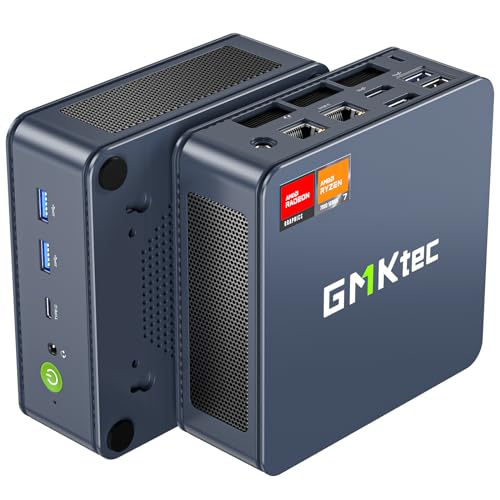
- Strongest graphics here, when its sale price is live: GMKtec NucBox K6, Ryzen 7 7840HS, Radeon 780M, 32GB DDR5, 1TB SSD — Check on Amazon
- Beelink SER5 MAX Mini PC, Ryzen 7 7735HS, Radeon 680M, 24GB, 500GB — Check on Amazon
- ACEMAGIC Mini Gaming PC, Ryzen 7 7735HS, Radeon 680M, 24GB, 512GB — Check on Amazon
- GMKtec NucBox M6 Ultra, Ryzen 5 7640HS, Radeon 760M, 16GB, 512GB — Check on Amazon
See 2 more Amazon options
- GMKtec NucBox M6 Mini PC, Ryzen 5 6600H, Radeon 660M, 16GB DDR5, 512GB — Check on Amazon
- GMKtec M5 Plus Mini PC, Ryzen 7 5825U, 32GB RAM, 1TB SSD — Check on Amazon
Read the full guide ↓
Disclosure: As an Amazon Associate, reviewstook.com earns from qualifying purchases. Links to Amazon on this page are affiliate links; they cost you nothing extra. Listing details such as price and availability change often, so check the current Amazon listing before you buy.
If this is your first gaming PC, a mini PC is a genuinely kind place to start — no parts to assemble, no tower the size of a suitcase, just one small box that arrives with Windows installed and plays games the evening it lands. But there is one fact to absorb before anything else in this guide, because every honest expectation follows from it: at under $500, no new mini PC contains a separate graphics card. The picture in all six machines below is drawn by graphics built into the processor itself, borrowing memory from the system. That is not a trick or a defect. It is simply how this price and this size work, and it sorts games into clear piles: esports, indie and retro titles play beautifully; the big releases of a few years ago play well at 1080p; the very newest games ask for low settings and upscaling, and a few are better streamed from the cloud. Ray tracing and demanding games at native 1440p are not on this menu at all, on any machine here, and any listing that hints otherwise is marketing.
Because this guide is written for beginners, it does three extra things. It explains the handful of technical words that actually decide your purchase, in plain English, before asking you to compare anything. It walks you through your first evening with the machine, step by step, from where to put it to the settings change most new owners never learn about. And it is blunt about the two traps that catch first-time buyers in this category: paying full price for a machine that only makes sense on sale, and clicking the wrong version of a machine inside a listing that sells several. The six picks below were chosen to minimise both traps. One of them — the strongest — is a deal-only pick with a strict walk-away price. The others sit at real prices you can pay today, and the differences between them come down to graphics strength, how much memory they carry, and whether that memory can ever be changed.
In this guide
Quick Picks
Short on time, or comparing several options at once? Each row below names a buyer type and the mini PC that suits it, with a link to the listing.
| Buyer type | Pick | Why it stands out | Link |
|---|---|---|---|
| Best graphics, if you can wait for a sale | GMKtec NucBox K6, Ryzen 7 7840HS | Radeon 780M and 32GB of changeable memory — under $500 only on deal | Check on Amazon |
| Best first buy, no sale-watching | Beelink SER5 MAX, Ryzen 7 7735HS | Radeon 680M positioned within this budget — check price on Amazon, from a widely owned, well-understood machine | Check on Amazon |
| Best value with Windows 11 Pro | ACEMAGIC Mini Gaming PC, Ryzen 7 7735HS | Same 680M graphics, 24GB, three-monitor output — check the current price on Amazon | Check on Amazon |
| Best newer platform | GMKtec NucBox M6 Ultra, Ryzen 5 7640HS | Newer processor design, USB4 and room for a second drive, at list price | Check on Amazon |
| Best if you like the idea of upgrading later | GMKtec NucBox M6, Ryzen 5 6600H | Memory you can change and two drive slots, positioned toward the lower end of this budget — check price on Amazon | Check on Amazon |
| Best when games are only part of the job | GMKtec M5 Plus, Ryzen 7 5825U | 32GB of memory and a 1TB drive fitted from the factory, dual 2.5G networking | Check on Amazon |
How These Picks Were Chosen
The budget was applied the way a first-time buyer experiences it: the whole, finished computer — processor, memory, storage and Windows — at or under $500 in the United States. That ruled out barebones kits, which look cheap because they leave you to buy the memory, the drive and the Windows licence separately; their real finished cost is a bigger, different number, and pricing it up is nobody’s idea of a first purchase. Every machine below arrives complete, and where a price moves around — in this category, prices move constantly — the reviews point you to check the current price on Amazon rather than printing a figure you should hold us to. One pick, the NucBox K6, earns its place on sale pricing alone; its review states the walk-away rule in its opening lines, and the rule is not decorative.
We did not use these machines ourselves. We read the maker listings and specification pages and compared the things that decide a mini PC’s gaming life, in this order: the integrated graphics class, because it is fixed forever; the memory, both how much there is and whether it can ever be changed, because the graphics borrow from it; the storage, and whether a second drive can join later; and the ports — fast USB, display outputs, wired networking — that decide what the machine can grow into. Maker performance claims were discounted throughout, and each graphics class is translated below into the kinds of games it honestly covers, with no invented frame rates or benchmark scores anywhere. Where one listing sells several versions of a machine under a single title — the standing hazard of this category — the review names the exact version its price belongs to, and the setup walkthrough later in this guide shows you how to confirm that the version you ordered is the version that arrived.
Thirteen Words Worth Knowing Before You Buy
None of this vocabulary is hard; it is just rarely explained. Read these once and the rest of the guide — and every listing page — gets easier.
- Mini PC. A complete desktop computer in a box roughly the size of a paperback book. Everything a tower does, at laptop power levels, minus the room to fit a separate graphics card.
- Integrated graphics. The picture-drawing hardware built into the processor. All six picks use it. It shares the machine’s memory instead of having its own, which is why memory size matters so much in this guide.
- Graphics card (discrete GPU). A separate, dedicated picture-drawing component — the part that makes big towers fast at games, and the part none of these six machines has. When a $500 mini PC listing says “gaming”, this is the thing it does not contain.
- RAM (memory). The machine’s short-term workspace, measured in gigabytes (GB). Windows, your game and the graphics all draw from the same pool here, so 24GB or 32GB is comfortable, and 16GB is the workable floor.
- Soldered memory. Memory permanently attached to the board at the factory. It can never be added to or replaced. Of these six, the Beelink SER5 MAX’s 24GB is soldered — what you buy is what you keep, for the machine’s whole life.
- Socketed memory (SO-DIMM). Memory fitted as small removable sticks that a owner can swap for bigger ones later. The NucBox K6, NucBox M6 and M5 Plus use it. For the ACEMAGIC and the M6 Ultra, this guide makes no promise either way — treat their fitted memory as the memory you will live with, and buy enough of it.
- SSD (storage). The drive your games and files live on, also measured in GB (1TB is roughly 1,000GB). Modern games are big, so a 500GB drive fills faster than new owners expect; a second slot, where one exists, is the cheapest future fix.
- Barebones kit. A mini PC sold without memory, storage or Windows — a shell awaiting parts and extra spending. None of the six picks is a barebones kit in the version reviewed here; all six arrive complete. One warning travels with that: the NucBox M6’s listing family also sells a barebones version, so check the version in your cart says it includes memory, storage and Windows.
- Renewed. A refurbished, previously owned machine sold with a fresh warranty of some kind. None of the six picks is renewed — all six are new machines, so this word is here only so a listing elsewhere cannot confuse you.
- Refresh rate (Hz). How many times per second your monitor redraws the picture. Many monitors can do more than the 60Hz Windows often defaults to; setting the real rate is a two-minute job covered in the walkthrough below, and skipping it leaves smoothness you paid for switched off.
- Upscaling (FSR). A trick where the game draws at a lower resolution and software rebuilds the picture to fill your screen. AMD’s version is called FSR, it is how the newest games stay playable on integrated graphics, and it costs a little sharpness rather than any money.
- USB4. A fast, modern USB port shape (USB-C) that carries data quickly enough for fast external drives and docks. The K6, M6 Ultra and M6 have it; it is a nice-to-have that ages well, not a gaming requirement.
- Driver. The software that lets Windows talk to the hardware. On these machines the graphics driver arrives through Windows Update, which is why letting updates finish on your first evening is a setup step and not housekeeping.
The 6 Best Mini Gaming PCs Under $500 for Beginners
GMKtec NucBox K6 — Ryzen 7 7840HS, Radeon 780M, 32GB DDR5, 1TB SSD
Who it suits: The beginner who can be patient. You want the strongest graphics this budget can reach, you are willing to wait for a sale, and you will walk away calmly if the price is wrong on the day you look.
Start with the processor, because it is the whole story. The Ryzen 7 7840HS carries Radeon 780M graphics — the fastest integrated graphics in this guide, a clear step above the 680M class that otherwise defines this tier — and it is fed by 32GB of DDR5-5600 memory fitted as two socketed sticks, alongside a 1TB PCIe 4.0 SSD. In plain game terms, that widens every pile from the introduction: esports titles run at high frame rates with settings to spare, the older big releases play at 1080p medium-to-high rather than just medium, and the recent games that push the 680M picks down to low settings become modest rather than reluctant. The connections match the ambition: USB4, HDMI and DisplayPort outputs, dual 2.5G Ethernet, Wi-Fi 6E. It remains integrated graphics — no ray tracing worth the name, no demanding games at native 1440p — but it is the ceiling of what integrated graphics currently do, in a box you can hold in one hand.
Now the condition, in the plainest words this guide has: at its everyday pricing, this machine sits above this guide’s budget. It is in an under-$500 guide for one reason — sale pricing has repeatedly pulled this exact 32GB/1TB version within budget. So the rule is absolute. When the current price on Amazon is within this guide’s budget, this is the best mini gaming PC here. When it sits above budget, you are shopping in a different guide’s territory, and the right beginner move is to set a price alert and buy one of the 680M machines below today, or wait. Its other honest cost is noise: a small dual-fan cooler working through a small box is audible under long gaming sessions, more than the gentler picks — a murmur under a desk, a presence beside your head at midnight.
- The strongest integrated graphics in this guide: Radeon 780M.
- 32GB of memory in two socketed sticks, plus a 1TB SSD: nothing about the memory is a dead end.
- USB4, dual 2.5G Ethernet and Wi-Fi 6E — connections from a class above.
Honest limitation: It is a deal-only pick. At its everyday price it is over this guide’s budget, and its small fans are audible under sustained load.
Choose it if you can shop patiently, will buy only when the current price on Amazon is within this guide’s budget, and want the most gaming integrated graphics can give. Skip it if you need to buy this week at whatever price is showing — the next two picks exist for you.

Beelink SER5 MAX Mini PC — Ryzen 7 7735HS, Radeon 680M, 24GB, 500GB
Who it suits: The beginner who wants this tier’s standard graphics class at a real price, today, from a machine lots of other people already own — and who is comfortable that its memory size is fixed forever.
If the K6 is the sale, this is the shelf price done properly. The Ryzen 7 7735HS carries Radeon 680M graphics, the class that defines honest mini gaming at $500: esports and indie games at 1080p with high frame rates, the big older releases at 1080p medium, and recent games at low settings, usually with FSR upscaling helping. Beelink fits 24GB of memory, a number worth understanding as a beginner: because the graphics borrow from the same pool, 24GB lets the picture-drawing take a generous share while Windows and the game still have room — a balance the 16GB machines visibly strain at. The 500GB M.2 NVMe drive is a standard part you can replace with a bigger one later, and the positioning is the point: it sits toward the top end of this budget — check price on Amazon. This is the pick that is actually within budget on the day you go looking, not in a sale you missed.
The limitation is built into the board and should be bought with open eyes: that 24GB of LPDDR5 memory is soldered. It will never become 32GB or 64GB, and since the graphics drink from the same pool, the ceiling gently caps the machine’s later years too — plenty for the game piles above and for everyday desktop work, finite for anyone whose ambitions grow into heavy multitasking. One buying check matters here: a different SER5 MAX version built on an older Ryzen 7 5800H with weaker Vega graphics exists under a different listing, so confirm the machine in your cart is the 7735HS version — the walkthrough below shows you how to check what actually arrived. Support is maker-direct rather than a big-brand network, which is the normal arrangement at this price.
- Radeon 680M graphics with 24GB of memory to feed them — the balanced setup of this tier.
- Positioned toward the top end of this budget in real life — check price on Amazon.
- The 500GB drive is a standard M.2 part, replaceable when it stops being enough.
Honest limitation: The 24GB of memory is soldered and can never be upgraded — the ceiling is set on the day you buy it.
Choose it if you want the dependable 680M machine at a dependable price, with no sale to chase. Skip it if you expect your needs to grow into more memory — that buyer wants socketed sticks: the K6 on deal, or the M6 below.

ACEMAGIC Mini Gaming PC — Ryzen 7 7735HS, Radeon 680M, 24GB, 512GB
Who it suits: The beginner who wants the same 680M graphics as the Beelink, a touch more storage, Windows 11 Pro and a machine that can run a proper multi-monitor desk.
The recipe here matches the SER5 MAX almost exactly, which makes the gaming story easy: the same Ryzen 7 7735HS, the same Radeon 680M, the same 24GB of memory — so esports at high frame rates, older big releases at 1080p medium, recent games at low settings with upscaling, and no ray tracing or native 1440p in demanding titles, now or ever. The argument for this machine lives around that core. The drive is 512GB rather than 500GB, a trivial difference. The operating system is Windows 11 Pro rather than Home, a real one if you use its remote-desktop or drive-encryption features. The wired networking runs at 2.5G with Wi-Fi 6, and the display outputs stretch to three 4K screens, which suits the beginner whose first gaming PC is also the desk’s work machine — two monitors all day, a game at night. Check the current price on Amazon: it is positioned toward the upper end of this budget, giving up nothing that matters.
The caution is about the clicking, not the computer. ACEMAGIC sells several versions under closely related listings, and the price that earns this pick its place belongs to the 7735HS with 24GB version specifically — before paying, confirm the processor and memory in the listing’s configuration selector, because a cheaper version in the same family is a different, weaker machine wearing a similar name. Ninety seconds on the listing page, and the walkthrough below shows you how to verify the delivered machine matches. Support is maker-direct, as with every pick here; buyers who prize an established brand’s service network may weigh the Beelink accordingly. Neither point is a reason to skip it — this is among the most 680M gaming this budget buys without waiting for anything.
- The tier’s standard 680M graphics with 24GB of memory — check price on Amazon.
- Windows 11 Pro, 2.5G Ethernet and three-screen 4K output for desk-and-media duty.
- 512GB of storage, a shade more than the other 680M pick ships with.
Honest limitation: The listing family carries several versions; the value lives in one specific variant, and choosing the wrong one in the selector buys a weaker machine.
Choose it if you want 680M gaming and a proper multi-monitor desk. Skip it if version selectors make you nervous and you would rather have the Beelink’s simpler proposition.

GMKtec NucBox M6 Ultra — Ryzen 5 7640HS, Radeon 760M, 16GB, 512GB
Who it suits: The beginner who values a newer, longer-lived platform over the last step of graphics power — and whose gaming leans toward esports, indie and older titles rather than the newest releases.
The M6 Ultra pairs the newest processor design in this guide with the middle graphics class. Its Ryzen 5 7640HS is a Zen 4 chip — six cores, a generation newer than the 7735HS above — carrying Radeon 760M graphics: fewer graphics cores than the 680M but of a newer design, landing about a half-step behind it in practice. For a beginner, the honest translation is that the game piles barely move: esports and indie titles will not notice the difference, older big releases play at 1080p medium with a little more settings-tuning, and recent releases remain low-settings-with-upscaling games, as they are on every pick here. What the newer platform buys instead is the surrounding future: USB4 for fast docks and drives, dual 2.5G Ethernet, Wi-Fi 6E, three 4K display outputs, Windows 11 Pro, and — circle this one — two M.2 drive slots, so a second SSD can be added later without throwing the first away. The 16GB/512GB version is the configuration positioned within this budget — check price on Amazon — with no sale involved.
Two cautions, one about capacity and one about clicking. Capacity first: 16GB is the floor for graphics that share system memory, and while it covers the game piles above, it is the tightest memory fit in this guide — the 24GB and 32GB picks exist precisely because headroom is comfort. Clicking second: this listing family also sells a 32GB version that sits far above this guide’s budget. The claim to belong in this guide belongs to the 16GB version alone, so confirm which one is in your cart; a buyer who lands on the 32GB price has wandered into step-up-tier territory and should compare there instead. Bought correctly, the M6 Ultra is the forward-looking pick — the machine whose ports and platform will feel current longest, at a small cost in graphics muscle today.
- Newest platform here: Zen 4 processor, newer-design graphics, USB4 as standard.
- A second M.2 slot waits empty, so more storage is an addition, never a replacement.
- Positioned within budget: the 16GB/512GB version — check price on Amazon.
Honest limitation: 16GB of memory is the tightest fit in this guide for graphics that share the pool, and the listing’s 32GB version sits far above budget — version discipline is required.
Choose it if a newer platform, rich ports and that second drive slot outweigh the final step of graphics muscle. Skip it if heavy gaming is the plan — you will want the 680M’s muscle and more memory headroom than this offers.

GMKtec NucBox M6 Mini PC — Ryzen 5 6600H, Radeon 660M, 16GB DDR5, 512GB
Who it suits: The beginner who likes the idea of learning to upgrade — someone who would rather have modest graphics in a machine they can open, improve and keep than stronger graphics sealed shut.
Every guide has a pick that wins on what it lets you do later; this is that pick. The Ryzen 5 6600H carries Radeon 660M graphics, a clear class below the 680M, and the honest game map shrinks accordingly: esports and indie at 1080p, older big releases at low-to-medium settings, retro and emulation with room to spare, and recent releases only in their lightest forms or via cloud streaming. In exchange, you get the best upgrade story in this guide, positioned toward the lower end of this budget. Its 16GB of DDR5 memory comes on standard SO-DIMM sticks you can pull out and replace with bigger ones — the most valuable trait a mini PC can have — and two SSD slots let storage grow by the same logic. USB4, dual 2.5G Ethernet and Wi-Fi 6E round out a specification that reads like a machine built to be kept. The positioning finishes the argument: it sits toward the lower end of this budget — check price on Amazon — at which point it stops competing with the picks above and starts competing with games consoles, while leaving meaningful room in your budget for a monitor, a controller and some games.
The limitation is the graphics class, and it should not be talked around: the 660M is roughly two-thirds of the idea of the 680M, and a beginner whose heart is set on recent big releases at 1080p will feel the gap in every session. The fitted SSD is also an older PCIe 3.0 drive — loading times are fine; bragging rights are not — and the processor has six cores where the picks above carry eight. Two buying notes from the glossary apply directly here: this listing family also sells a barebones version with no memory, drive or Windows, so confirm the complete version is the one in your cart. None of it matters to the buyer this machine is for. Judge it as the longevity play: a lower-priced complete mini gaming PC here that can grow with its owner.
- Memory in swappable slots and two SSD bays — the most room to grow in this guide.
- Positioned toward the lower end of this budget — check price on Amazon: the budget left over is a feature.
- USB4 and twin 2.5G Ethernet ports set it up for media and server second jobs.
Honest limitation: The Radeon 660M is the second-weakest graphics here — a full class below the 680M picks, with recent big releases largely beyond it.
Choose it if your library is esports, indie, retro and older games, and opening a machine to improve it sounds like fun rather than a chore. Skip it if recent releases are what you play — put the full budget into a 680M machine instead.

GMKtec M5 Plus Mini PC — Ryzen 7 5825U, 32GB RAM, 1TB SSD
Who it suits: The beginner whose “gaming PC” is honestly an all-rounder — light gaming, everyday desktop work, media serving and household jobs — and who would rather have capacity everywhere than graphics muscle anywhere.
Let the limitation lead, because it defines the machine: the Ryzen 7 5825U uses Vega-architecture integrated graphics, the oldest design in this guide, and its gaming map is the lightest here — esports at modest settings, indie and retro titles happily, older big releases at low settings, and the recent catalogue effectively not at all except through cloud streaming. What the money buys instead is the most fully equipped small computer of the six. Thirty-two gigabytes of DDR4-3200 memory — double the M6 pair, more than the 680M picks — and a full 1TB NVMe drive with a second slot beside it, fitted from the factory and positioned toward the lower end of this budget — check price on Amazon. Dual 2.5G Ethernet, three 4K display outputs, Wi-Fi 6E and Windows 11 Pro make it the natural media server, emulation box and spare-room desktop of the six, and its eight-core processor shrugs at the browser-tab and office workloads that are most mini PCs’ actual daily life.
That is the honest shape of this pick: the machine for the buyer who games lightly and computes heavily, or who is buying one small PC for a household where gaming is one job among five. The memory is standard DDR4 in sockets rather than soldered, so even this capacity-first machine keeps an upgrade path, and the second SSD slot means the 1TB is a beginning rather than a wall. What it will never do is grow better graphics — Vega is Vega, permanently — so a beginner whose gaming ambitions are rising should treat this as the wrong shelf entirely and take a 680M pick above. But if your library is farming games, retro emulation, strategy backlogs and a media library that never sleeps, this is among the most useful objects in the guide, with room left in the budget.
- The capacity pick: 32GB of memory and a full 1TB of storage, fitted before it ships.
- Dual 2.5G Ethernet and three 4K outputs: the best media-server and home-jobs résumé here.
- A complete all-rounder well within budget — check price on Amazon.
Honest limitation: Its Vega-architecture graphics trail everything else here by a wide margin; demanding games played locally are not its job, today or ever.
Choose it if games are the lightest job on the machine’s list and capacity the heaviest. Skip it if games are the reason for buying — all five picks above play them better.

Comparison Table
| Product | Graphics class | Best use | Link |
|---|---|---|---|
| GMKtec NucBox K6 | Radeon 780M | Strongest mini gaming here — when the deal price is live | Check on Amazon |
| Beelink SER5 MAX | Radeon 680M | The dependable first buy, positioned within budget | Check on Amazon |
| ACEMAGIC Mini Gaming PC | Radeon 680M | 680M value with Windows 11 Pro and three-screen output | Check on Amazon |
| GMKtec NucBox M6 Ultra | Radeon 760M | Newest platform, USB4 and a second drive slot | Check on Amazon |
| GMKtec NucBox M6 | Radeon 660M | Changeable memory and dual drives on the smallest budget | Check on Amazon |
| GMKtec M5 Plus | Vega (integrated) | 32GB and 1TB capacity for all-round and server duty | Check on Amazon |
Your First Evening: Setup, Step by Step
None of this is difficult, and the order matters more than any single step. Budget an unhurried hour; most of it is waiting for updates.
- Choose the spot first. These machines want open air around their vents: on the desk, or mounted behind the monitor where several of them are designed to live. Never seal one inside a closed cabinet — a small box cools itself with room air, and a cabinet takes that away. If fan noise at night matters to you, behind the monitor beats beside your pillow.
- Connect the power. Use the adapter in the box, and give its brick a sensible home rather than dangling it by its cable. There is nothing to switch or configure; the adapter is simply part of the machine’s footprint.
- Plug the monitor into the mini PC’s own display sockets. HDMI, DisplayPort or USB-C, whichever your monitor takes — every display output on these boxes is driven by the integrated graphics, so there is no wrong hole to choose. (Owners of big towers are told to plug into the graphics card rather than the motherboard; a mini PC has no separate card, so that trap does not exist here. The box’s own sockets are the right ones.)
- Add keyboard, mouse and — if you possibly can — a network cable. Every pick here has a wired Ethernet port, and a cable makes the first evening’s downloads faster and steadier than Wi-Fi. You can switch to wireless afterwards if the desk demands it.
- Switch on and follow the Windows setup prompts. Language, account, privacy choices — there are no wrong answers that cannot be changed later. Let it finish rather than interrupting it.
- Run Windows Update, restart, and run it again. Repeat until it reports you are up to date. This is not housekeeping: on these machines the graphics driver — the software that decides how well games run — arrives through Windows Update, so skipping updates means skipping performance.
- Set your monitor’s real refresh rate. Windows often leaves a fast monitor at 60Hz. Go to Settings, Display, Advanced display, and choose the highest refresh rate your monitor offers. Two minutes, and the smoothness you paid for is actually switched on.
- Check that the machine you received is the machine you ordered. Open Settings, System, About, and compare three things against your order: the processor name, the memory size and the storage size. This step exists because of this category’s habits: the Beelink should read Ryzen 7 7735HS, not the older 5800H of its namesake version; the ACEMAGIC should read 7735HS with 24GB; the M6 Ultra should be the 16GB version you paid for, not the far pricier 32GB variant — and if you ordered the M6, it should have arrived as a complete machine with memory, storage and Windows, not the barebones version its listing family also sells. Anything wrong is a returns-window conversation, and day one is when it is free.
- Install a game store and set your expectations in the settings menu. Steam, the Epic Games Store or GOG — pick one, sign in, download something from the esports or indie pile first so your first impression is the machine at its best. For settings: 1080p is this tier’s native resolution; older big releases at medium; the newest at low, with FSR upscaling switched on where the game offers it.
What Else You Will Spend
The PC is not the whole purchase, and beginners deserve the full list up front. In rough order of importance: a monitor comes first if you do not already own one — every pick here can drive a good 1080p screen, and several can run two or three displays for desk work. A keyboard and mouse follow if they are not already in a drawer somewhere. A controller is worth it if your library leans toward the couch-friendly piles. And the games themselves, though the esports and indie piles include plenty that cost little or nothing to start. No prices are printed for any of this, deliberately: listings and sales move too fast for a figure here to stay honest, and none of it belongs inside any pick’s price.
Two machine-specific catches belong in the same budget conversation, counted as machine plus its fix rather than hidden inside a headline. The Beelink’s 500GB drive is the one most likely to feel small in year two; the fix is a larger standard M.2 drive swapped in later — a planned purchase, not a surprise. And the two 16GB picks, the M6 Ultra and the M6, sit at the memory floor: on the socketed M6, the fix is a bigger pair of memory sticks whenever you feel the squeeze, which is exactly the upgrade its review promised. The K6’s catch is not money at all — it is patience, and it is covered by the walk-away rule above.
Upgrades in Plain Terms
Here is the sentence this whole section exists to say plainly: no pick in this guide can have its graphics upgraded, and no graphics-card swap is promised for any of them. The graphics are part of the processor, and the processor is not a swap-in part in machines of this size. Tower guides can promise a graphics-card upgrade where a named power supply and a standard case are documented; none of these six machines is a tower, none documents that arrangement, so the promise is not made — for any pick, in any wording. An external graphics card over USB4 exists as a niche, expensive hobbyist experiment; treat it as trivia, not as a plan.
What genuinely can grow: memory, on the picks where it is socketed — the K6, the M6 and the M5 Plus can all take bigger sticks later, which is real, useful life extension. Storage can grow almost everywhere: the Beelink’s drive can be replaced with a larger one, and the M6 Ultra, M6 and M5 Plus each have a second slot so a new drive joins the old one instead of evicting it. For the ACEMAGIC and the M6 Ultra’s memory, no upgrade promise is made either way — buy the configuration you need. The beginner’s summary: choose the graphics class for the games you want, choose memory for the years you want, and let storage be the thing you fix later, because it is the one thing you always can.
How to Choose a Mini Gaming PC Under $500
- Learn the graphics ladder first, because you can never change it. In this guide’s order: the Radeon 780M sits on top, the 680M is the resident class of the tier, the 760M runs a half-step behind with a newer design, and the 660M and Vega graphics sit clearly below. Everything else can be improved, replaced or worked around; the graphics class is the machine’s permanent gaming ceiling.
- Treat memory as graphics memory, because it is. Integrated graphics borrow from the system pool, so capacity shapes gaming directly. Aim for 24GB or 32GB if you can; 16GB works, but it is the floor, and floors creak. Two memory sticks beat one — a single-stick setup quietly taxes the graphics — which is one more reason to confirm the exact version in the listing.
- Decide soldered versus socketed before anything else. Soldered memory (the Beelink’s 24GB) is fast and final: buy all you will ever want on day one. Socketed sticks (the K6, M6 and M5 Plus) can grow later. Neither choice is a mistake — buying soldered while quietly planning to upgrade is.
- Storage: about 512GB is the floor, a second slot is the future. Games are enormous now, and a 500GB drive fills up faster than any new owner believes. A second M.2 slot (M6 Ultra, M6, M5 Plus) lets you add space without discarding the original drive — the cheapest upgrade in this category.
- Give the deal pick a walk-away rule and mean it. When the current price on Amazon is within this guide’s budget, the K6 leads this guide; when it sits above budget, it belongs to another one. Set the alert, and if the sale never comes, let the everyday picks above do the job.
- Count the ports your desk actually needs. Three display outputs for the work-and-play desk, USB4 for fast docks and tomorrow’s accessories, dual Ethernet if the machine will moonlight as a server. A port costs nothing in a listing and cannot be added afterwards.
- Buy the silence and size on purpose. The mini PC’s whole argument is the empty desk, the laptop-level power draw and the near-silent idle. If none of those matter to you, the tower alternative deserves a hard read before you pay for them — start with Best Gaming PC Under $500.
- Confirm the version in the cart, every time. Under one family title, listings quietly sell barebones kits, smaller memories and weaker processors side by side. The price in this guide belongs to a named version; if the cart shows a different one, you are looking at a different computer.
Common Buying Mistakes
- Assuming the word “gaming” in a listing title means a graphics card is inside. At this price there never is one — the graphics are integrated, and their class is the whole decision.
- Paying the K6’s full everyday price because a headline somewhere said “under $500”. A deal pick is a conditional pick: cross the walk-away price and the value that justified its place here has evaporated.
- Buying a barebones kit by accident — the M6’s listing family sells one — or on purpose, without pricing the memory, drive and Windows licence that turn it into a computer.
- Choosing the cheapest version in a listing’s selector and receiving a weaker processor or half the memory the review described — the ACEMAGIC and M6 Ultra listings both demand this check.
- Skipping the first-evening checks: leaving the monitor at 60Hz, and never verifying the delivered configuration while the return window is still open.
- Buying soldered memory too small for a machine meant to last five years, when the graphics drink from the same pool.
- Expecting ray tracing, native 1440p or high settings in new releases from integrated graphics, then blaming the machine for physics.
- Blowing the whole $500 on the box and leaving nothing for a monitor, controller or games, when the cheaper picks exist precisely to fund them.
Final Recommendation
- Best graphics, if you can wait: GMKtec NucBox K6 — only when the current price on Amazon is within this guide’s budget, and only then.
- Most beginners, buying today: Beelink SER5 MAX.
- Value with desk credentials: ACEMAGIC Mini Gaming PC.
- Newest platform and ports: GMKtec NucBox M6 Ultra.
- Future upgraders on a budget: GMKtec NucBox M6.
- Capacity and second careers: GMKtec M5 Plus.
For most readers the top two are the Beelink SER5 MAX — the tier’s resident 680M machine at a price that is actually there when you shop — and the GMKtec NucBox K6, which out-specs it the moment a deal price goes live and should be ignored the moment it doesn’t. Together they sum up the tier: graphics chosen with open eyes, memory treated as the long-term decision it is, and size, silence and power draw counted as features rather than apologies. The fuller comparison of all six, without the beginner framing, lives in Best Mini Gaming PC Under $500; living-room and streaming setups are covered by Best Mini Gaming PC For Streaming Under $500; desk-space questions by Best Mini Gaming PC For Small Spaces Under $500; and buyers who started here but really want tower frames should cross to Best Compact Gaming PC Under $500 or the broader Best Mini PC Under $500 guide. Check the live price and the exact version before you order — in this category, those two habits are worth more than any single specification.
Frequently Asked Questions
I’ve never owned a gaming PC. Which of these is the least hassle?
The Beelink SER5 MAX, with the ACEMAGIC a close second. Both carry the tier’s standard 680M graphics at prices that are actually live when you shop, so there is no sale to time and no walk-away rule to police. The one task the ACEMAGIC asks of you is confirming the 7735HS/24GB version in its listing’s selector before paying. The K6 is a better machine on paper, but only inside its deal window, and chasing that window is a hobby in itself — a fine second purchase skill, an unnecessary first one.
Do I have to build anything, or open the machine up?
No. All six picks arrive as complete, working computers with Windows installed; your first evening is cables, prompts and updates, exactly as the walkthrough above lays out. A screwdriver only enters the story later and optionally, if you choose to add memory or a drive to one of the picks that allows it — and by then it will feel like a choice rather than an obligation.
Why is there no graphics card — and will games still run?
Because at this size and price, the graphics live inside the processor. And yes, games run — the right ones, at the right settings. Esports, indie and retro titles play excellently on every pick here; the older big releases play well at 1080p medium on the 680M and 780M machines; the newest releases are low-settings games with upscaling, and some belong on a cloud service at this hardware level. What no pick here does is high settings in new releases, ray tracing, or native 1440p in demanding games — that takes a separate graphics card, which this budget in this form factor does not contain.
The K6 is showing well over $500 when I look. Did I miss something?
No — you found its everyday price, and the guide’s rule exists for exactly this moment. The K6 belongs in an under-$500 guide only because sale pricing has repeatedly pulled it within this guide’s budget; at its everyday pricing above budget it is competing against machines from the next tier up, on their turf. Either set a price alert and wait, or buy the Beelink or ACEMAGIC today and be playing tonight. Both are correct; paying the everyday price because a headline said “under $500” is the only wrong move.
Can I just plug one of these into my TV?
Yes — every pick here connects over HDMI and will run a 4K TV happily for desktop work, video and light games, and several can drive multiple screens at once. One distinction matters: displaying a 4K picture is easy, but rendering demanding games at that resolution is a different and much heavier job, and it is not one this tier claims. Demanding play happens at 1080p, sometimes upscaled to fill the bigger screen — 1080p is this budget’s native language in any form factor, as Best 1080p Gaming PC Under $500 lays out.
What can I upgrade later, once I know more?
Storage, almost always; memory, sometimes; graphics, never. In all six picks the graphics are built into the processor itself. Memory grows only where it sits in sockets — the K6, M6 and M5 Plus — and where it is soldered, as in the Beelink, the size you buy is the size for life. Most picks accept a larger or additional SSD. An external graphics card over USB4 exists as a niche, expensive hobbyist path, not a plan; buy the graphics class you need today, and read Best Budget Gaming PC Under $500 if upgradeability turns out to be your top priority after all.


