Where to buy
Check the latest price, availability and delivery on Amazon. Orders are placed on Amazon. We may earn a commission from qualifying purchases.
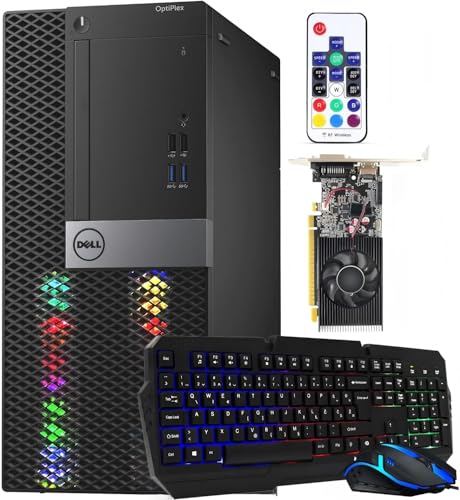
- Best streaming route: Dell RGB Gaming Tower, Core i7 6th Gen, GTX 1050 Ti, 16GB RAM (Renewed) — Check on Amazon
- MINISFORUM UM870 Slim Barebone Mini PC, Ryzen 7 8745H, No RAM/SSD/OS — Check on Amazon
- GMKtec M5 Plus Gaming Mini PC, Ryzen 7 5825U, 32GB RAM, 1TB SSD — Check on Amazon
- Beelink SER5 MAX Mini PC, Ryzen 7 5800H, 16GB RAM, 500GB SSD — Check on Amazon
See 2 more Amazon options
- AMD Ryzen 5 5600G Desktop Processor with Radeon Graphics — the from-parts build — Check on Amazon
- KAMRUI E3B Mini Gaming PC, Ryzen 5 7430U, 32GB RAM, 512GB SSD — Check on Amazon
Read the full guide ↓
Disclosure: As an Amazon Associate, reviewstook.com earns from qualifying purchases. Links to Amazon on this page are affiliate links; they cost you nothing extra. Listing details such as price and availability change often, so check the current Amazon listing before you buy.
Streaming asks a PC to do two jobs at once: play the game, and compress that game into a broadcast, sixty times a second, for hours. A machine that games well on its own can still fall apart the moment OBS opens, because the second job needs hardware of its own — an encoder — and at a $400 build budget the encoder is where the truth comes out. So this guide grades the way a streamer has to: encoder first. The workflow it grades against is the real one. On Twitch, the working standard is roughly 6,000 kbps at constant bitrate for a 1080p60 stream. YouTube accepts higher bitrates, carries 1440p streams, and takes AV1-encoded live video. Twitch’s AV1 path exists only through its Enhanced Broadcasting programme. Those platform facts decide what the silicon below is worth: an encoder that cannot produce AV1 is not a defect on Twitch today, and an encoder that can is a YouTube advantage and a future one — but neither fact rescues hardware that has to render the game and encode it with the same few watts.
Here is the honest shape of this budget. Five of the six routes in this guide play and encode on a single integrated chip, where the game, the graphics and the video encoder all share one processor and one pool of memory. That works — for esports and older games, streamed at sensible resolutions. One route, a renewed tower, carries the set’s only discrete graphics card and therefore its only dedicated hardware encoder. One route, a barebone you complete yourself, holds the strongest integrated graphics here and the set’s only AV1 encoder — if the parts to finish it are already on your shelf. And the true from-parts build is here: priced out part by part, it lands well over this budget before an operating system, kept in the guide because its empty graphics slot is the only encoder upgrade path any of these routes will ever have. Nothing at $400 streams modern AAA games at high settings. What $400 can honestly start is a real channel: lighter games, encoded properly, on a wired connection, with settings chosen for the hardware instead of against it.
In this guide
Quick Picks
Short on time, or comparing several routes at once? Each row below names a streamer type and the route that suits it, with a link to the listing.
| Streamer type | Pick | Why it stands out | Link |
|---|---|---|---|
| Best streaming route | Dell RGB Gaming Tower (Renewed), GTX 1050 Ti | The only dedicated hardware encoder in the guide — buy only when the live price fits this guide’s budget; check price on Amazon | Check on Amazon |
| Best encoder, if you own parts | MINISFORUM UM870 Slim Barebone, Radeon 780M | The only AV1 encoder here and the strongest graphics — check price on Amazon; memory and SSD not included | Check on Amazon |
| Best for long, busy streams | GMKtec M5 Plus, Ryzen 7 5825U, 32GB / 1TB | Room for the game, OBS, browser sources and recordings at once — check price on Amazon | Check on Amazon |
| Best complete box for streaming | Beelink SER5 MAX Mini PC, Ryzen 7 5800H | The strongest CPU among the finished boxes, complete out of the box — check price on Amazon | Check on Amazon |
| Best future encoder upgrade | Ryzen 5 5600G from-parts build | An empty slot and a 650W supply wait for a real encoder card — honestly totaled well over budget all-new | Check on Amazon |
| Best for the tightest budget | KAMRUI E3B, Ryzen 5 7430U, 32GB / 512GB | A finished PC at the low end of the budget tier — light-game streams, or a second box that runs OBS; check price on Amazon | Check on Amazon |
How These Picks Were Chosen
Every route was graded encoder-first, from the silicon its listing actually documents — nothing was credited with an encoder its hardware does not have. That discipline produces this set’s encoder map, and it is worth reading before any single review. The renewed Dell’s GTX 1050 Ti carries NVIDIA’s Pascal-generation NVENC: a dedicated encode block that works separately from the card’s game-rendering cores, which is exactly what a one-machine stream wants — but it is an older NVENC generation, visibly softer than the NVENC in Turing-and-later cards at Twitch bitrates, and it has no AV1 encode. The four Vega-graphics routes — the Beelink, the GMKtec, the KAMRUI and the 5600G build — encode through AMD’s integrated hardware encoder in H.264, which is the codec Twitch runs on; that encoder shares the chip, the power budget and the system memory with the game itself, so on those machines the game and the broadcast are always negotiating. The barebone’s Radeon 780M is RDNA3 silicon, and its encoder is the only one in this guide that can produce AV1 — a genuine advantage for YouTube live and for wherever Twitch’s AV1 support goes next, and worth nothing extra on a standard Twitch stream today, where it will be encoding the same H.264 as everything else here. No other pick in this guide encodes AV1, and any listing or review that suggests a 1050 Ti or a Vega APU does is wrong.
The second grading axis is simultaneous load, because streaming is never just a game plus an encoder. A real session is the game, OBS compositing scenes, a browser feeding alerts and overlays, a chat window, a voice app, and often a local recording being written to disk at the same time — for hours. That is why memory and storage are graded harder in this guide than in a pure gaming guide at the same budget: the two 32GB machines hold the whole supporting cast without squeezing the game, the 16GB machines are workable but tighter, and the 500GB-class drives are graded as recording space that will fill, not as a neutral specification. The third axis is the budget itself, charged against the finished PC. Memory, storage and an operating system are added to anything that lacks them at live Amazon prices, and the finished total is described honestly whether it flatters the route or not. The from-parts build’s worksheet total — over budget at current prices — is stated wherever the build is recommended.
We did not stream on these machines ourselves. The grading rests on the maker listings and specification pages, price-history records for the exact listings, and the documented encoder capabilities of the named silicon. Performance language is settings-based throughout — which class of game, at which resolution, encoded which way — and no frame-rate figures are claimed for any route. Two picks carry explicit buy-only-within-budget rules because their prices drift across the budget line in both directions, and those rules are part of the recommendation, not fine print.
The 6 Best Gaming PC Builds for Streaming Under $400
Dell RGB Gaming Tower (Renewed) — Core i7 6th Gen, GTX 1050 Ti, 16GB RAM, 512GB SSD
Who it suits: Streamers who want the one thing no other route at $400 offers — a dedicated hardware encoder — and who are willing to buy renewed and to watch the price until it behaves.
Every other route in this guide asks one integrated chip to render the game and encode the stream simultaneously. This tower separates the jobs. Its GeForce GTX 1050 Ti has 4GB of its own memory and an NVENC encode block — dedicated silicon whose only work is turning frames into broadcast video. While the card’s rendering cores draw the game, NVENC compresses it, and the ageing 6th-generation Core i7 is left to run the game logic, OBS and the supporting cast instead of also carrying a software encode. For a one-machine stream at this budget, that division of labour is the whole argument, and it is why a renewed tower with a 2016-era card outranks newer integrated machines for this particular job. The rest of the specification is the refurbished business-tower recipe: 16GB of DDR4, a 512GB SSD, built-in WiFi and Windows 11 Pro, sold as Amazon Renewed in Refurbished – Excellent condition by STG USA with a 90-day refund or replacement window.
The encoder honesty cuts both ways. Pascal NVENC is a real hardware encoder, and offloading the encode is a genuine advantage over any shared-chip route here. It is also an old NVENC generation: at Twitch’s roughly 6,000 kbps, its H.264 output is softer than what the NVENC in RTX-era cards produces from the same scene, and there is no AV1 encode on this card — AV1 encoding begins with NVIDIA’s RTX 40-series, two generations and a market away. Plan the stream around what the hardware is: 720p60 or a modest 1080p output for esports and older titles, encoded on NVENC, will look clean and stay stable; expecting it to carry a demanding modern game at maximum settings while broadcasting is asking a decade-old card to be two newer ones. The 512GB drive is the other streaming-specific catch — local recordings accumulate faster than game installs shrink, so treat a recording archive as something you manage or move, not something this drive absorbs forever. And the platform is finished: the CPU generation has no upgrade path, and the refurbished tower’s unpublished power supply limits which hungrier card could ever replace the 1050 Ti.
Price-history records for this exact listing show it drifting above and below this guide’s budget over time. The rule is therefore printed plainly: buy it only on a day the live price fits the budget — check price on Amazon before ordering. On the other days, wait, or take one of the new complete boxes below. Renewed also means a previous life: use the 90-day window properly and stress-test the machine — games plus a test stream — inside it.
Total cost to a working PC: the tower itself — check price on Amazon and buy only when it fits this guide’s budget; Windows is already fitted, so nothing else is owed.
- The only dedicated hardware encoder in the guide — NVENC works while the card renders.
- A real tower with a discrete card: system memory is not shared with the graphics.
- Windows 11 Pro already installed, backed by the 90-day Renewed refund-or-replacement window.
Honest limitation: Pascal NVENC is an older, softer encoder generation with no AV1, the machine is renewed on a dead-end CPU platform, and its price spends about half its life above this budget.
Choose it if a hardware-encoded one-machine stream matters most and the live price fits this guide’s budget. Skip it if the price is up, or renewed condition is a deal-breaker — the complete mini PCs below are new.

MINISFORUM UM870 Slim Barebone — Ryzen 7 8745H, No RAM, No SSD, No OS
Who it suits: Builders with a parts shelf — DDR5 SO-DIMMs and an M.2 drive already in hand from a retired or upgraded laptop — who can complete the strongest streaming silicon in this guide for the price of the kit alone.
Completed, this is the best streaming machine in the guide, and it is not close on the silicon. The Ryzen 7 8745H is an eight-core processor whose Radeon 780M graphics are a clear class above the Vega graphics in every other pick — the strongest game rendering here — and because the 780M is RDNA3 silicon, its hardware encoder is the only one in this set that can produce AV1. That matters in specific, nameable ways: YouTube accepts AV1 live today, so a YouTube-first channel gets the newest codec’s cleaner picture at a given bitrate; Twitch’s AV1 path runs through Enhanced Broadcasting, so the advantage there is coming rather than current; and for the standard Twitch stream, the same encoder produces the same H.264 as everything else in this guide. What is the point, every night, is that the 780M renders lighter games better than any Vega chip here while its encoder works, and the eight cores carry OBS and the supporting cast with the most headroom of any route in this guide.
Now the condition, at full size, because it is the entire review: as sold, this is not a computer. The listing title says it plainly — barebone, no RAM, no SSD, no operating system — and this guide prices the completion instead of waving at it. At live Amazon prices for a 16GB DDR5 SO-DIMM kit and a 500GB NVMe drive, completing the kit with new parts pushes the total well over this guide’s budget before an operating system. The route is real for exactly one buyer: the one whose memory and drive are already owned. For that builder the out-of-pocket cost is the kit alone — check price on Amazon — for the strongest integrated streaming platform under discussion anywhere in this guide, in a slim chassis with USB4, HDMI and DisplayPort output and 2.5GbE networking, whose memory and storage can still grow afterwards.
Two checks before ordering. The donor memory must be DDR5 SO-DIMM — the DDR4 most older laptops carry does not fit these slots, and discovering that on build night is the classic way this route goes wrong. And a Windows license tied to a donor laptop generally does not transfer, so the operating system is Linux at no cost or a new license priced separately.
Total cost to a working PC: the kit itself — check price on Amazon. Completed with new memory and storage, it lands well over this guide’s budget before an OS. Completed from salvaged DDR5 and a drive you own: the kit price and nothing more. The kit price alone is never the PC’s price.
- Radeon 780M: the strongest integrated graphics here, and the set’s only AV1 encoder.
- Eight-core 8745H with USB4 and 2.5GbE in a slim, modern chassis.
- For builders with donor parts, the best streaming performance per out-of-pocket dollar in the guide.
Honest limitation: It is not a PC as sold — memory, storage and OS are all missing, and bought new they push the real total well over this guide’s budget; even completed, its encoder shares the chip with the game.
Choose it if the DDR5 and the NVMe drive are sitting on your shelf already. Skip it if they are not — the complete boxes below deliver a streamable PC for less money.

GMKtec M5 Plus Gaming Mini PC — Ryzen 7 5825U, 32GB RAM, 1TB SSD
Who it suits: Streamers whose sessions are long and busy — game, OBS scenes, browser alerts, chat, voice and a local recording all running at once — and who want the complete box with the most room for all of it.
Streaming punishes exactly the two specifications this machine doubles. Its Ryzen 7 5825U is an eight-core APU with Radeon graphics in the Vega 8 class, encoding through AMD’s integrated hardware encoder in H.264 — the same shared-chip arrangement as the other Vega routes, with the same honest ceiling: esports and older games, rendered and encoded by one processor. What GMKtec fits around that chip is what earns this rank. There is 32GB of DDR4 memory, which for an APU streamer is doing double duty — the graphics borrow system memory, so the game, its frame buffer, OBS and a browser full of alert sources are not all fighting over 16GB — and a full 1TB NVMe SSD, which is the only drive in this guide with genuine room for a local recording habit. Add dual 2.5GbE networking — the wired connection this guide insists on, in its best form in the set — WiFi 6E and Windows 11 Pro, and the M5 Plus is the most session-proof complete box here. It sits in this guide’s budget tier — check price on Amazon, because its pricing moves around and the live listing is the only figure that counts.
The limits are the class limits, stated rather than softened. The 5825U’s Vega-class graphics are the graphics forever — there is no slot and no card in this machine’s future — so the games it can play-and-encode are the lighter end of any library, and demanding titles will push you to lower rendering resolutions sooner than the Dell’s discrete card would. The encoder is integrated AMD H.264: entirely serviceable at Twitch bitrates for the games this chip can run, with no AV1 and no dedicated block to hide behind when the game gets heavy — when rendering and encoding contend on one chip, the stream settings in the OBS section below are how you referee. Memory expands to 64GB and the dual-slot storage design reaches 4TB, so the two things a streamer actually outgrows — RAM headroom and recording space — both stay open even though the graphics never change.
Total cost to a working PC: the machine itself — check price on Amazon. There is nothing left to buy to make it a computer.
- 32GB of memory and 1TB of storage fitted — the simultaneous-load and recording headroom the angle rewards.
- Dual 2.5GbE LAN: the best wired networking in the guide, plus WiFi 6E.
- Dual-slot storage and memory headroom to 64GB keep the streamer’s two real upgrades open.
Honest limitation: The encoder shares one chip with the game, there is no AV1, and the integrated-graphics ceiling is permanent — it can also spend the entire budget on its own.
Choose it if your streams are long, busy and recording-heavy and you want one finished purchase. Skip it if the live price is at list and the Beelink below is on deal — check both listings before ordering.

Beelink SER5 MAX Mini PC — Ryzen 7 5800H, 16GB RAM, 500GB SSD
Who it suits: Streamers who want the strongest finished box for the least money — a complete, licensed machine that can be broadcasting a light-game stream the evening it arrives.
The SER5 MAX is the benchmark the rest of this guide is measured against, and for streaming its virtues are specific. The Ryzen 7 5800H is an eight-core chip running at a 54W TDP — more sustained power than most laptop-derived APUs get — with Radeon integrated graphics in the Vega 8 class and AMD’s integrated H.264 hardware encoder. Eight strong cores matter to a streamer in a way they do not to a pure gamer: OBS, the browser sources, the chat and the voice app all live on the CPU while the encoder works, and this is the most capable processor among the complete sub-$400 boxes here. It arrives finished — 16GB of DDR4, a 500GB SSD, Windows 11 Pro installed, WiFi 6, Bluetooth 5.2 and triple-display output over HDMI, DisplayPort and Type-C, so a second screen for chat and OBS costs you a cable, not a port hunt. It is a complete, licensed, stream-capable machine in this guide’s budget tier — check price on Amazon — for roughly what the parts routes below spend before they are computers.
Grade its two streaming catches at full size. Sixteen gigabytes of memory is workable but genuinely tighter for this angle than for gaming alone — the game, its graphics borrowing from the same pool, OBS and a browser together will use most of it, which is why the 32GB GMKtec ranks above it for busy sessions despite the weaker deal. The memory is socketed and upgradeable to 64GB, so the catch has a documented fix, costed the honest way — as machine plus fix, whenever you choose to do it. The 500GB SSD is the second catch: fine for a focused game library, quick to fill once local recordings join it, and swappable up to 2TB when it does. What never changes is the graphics: the Vega-class integrated GPU is part of the processor, there is no PCIe slot, and its ceiling — esports and older titles at 1080p on low-to-medium settings — is the ceiling it keeps. Buy it as a finished streaming starter, not as a platform.
Total cost to a working PC: the machine itself — check price on Amazon — with memory, storage and Windows already inside. As with every route here, the monitor, keyboard and mouse are separate purchases.
- Complete and licensed out of the box — the only assembly is plugging it in and opening OBS.
- Eight-core 5800H at 54W: the strongest CPU among the complete sub-$400 boxes, for the stream’s supporting cast.
- Triple-display output makes the chat-and-OBS second screen a cable, not a project.
Honest limitation: 16GB is tight under a full streaming session and 500GB fills with recordings; the integrated graphics and encoder can never be upgraded.
Choose it if you want the most stream-capable finished machine per dollar today. Skip it if your sessions are recording-heavy and long — the GMKtec’s memory and storage are the better fit.

The From-Parts Build — AMD Ryzen 5 5600G on AM4
Who it suits: Builders whose channel is a long-term project — anyone who can accept a modest encoder today in exchange for the only route in this guide whose encoder can be replaced tomorrow.
Judge this build twice, because it is two different streaming machines at two different times. Today, assembled, it is a Vega 7 machine: the Ryzen 5 5600G is a six-core, twelve-thread APU whose Radeon Vega 7 integrated graphics encode through AMD’s integrated H.264 hardware encoder, sharing the chip and the memory with the game — the same arrangement, and the same lighter-games ceiling, as the KAMRUI below. Its six cores also make software x264 encoding a real fallback for light titles in a way it is not on weaker chips, though every thread spent encoding is a thread the game wanted. As a day-one streamer it is unremarkable, and this guide will not dress it up. Tomorrow is the argument. This is the only route here that ends in a standard tower: a B550 motherboard with its PCIe slot empty, a mesh case, and a reputable 650W power supply chosen deliberately oversized. The day a discrete graphics card goes into that slot, the streaming story transforms — the encode moves to a dedicated NVENC block, the APU’s graphics retire, and if the card is from NVIDIA’s RTX 40-series or later, AV1 encoding arrives with it. No mini PC, no barebone and not even the renewed Dell — with its finished platform and unpublished, refurbished power supply — offers that second act.
Now the total, described the way this guide promised, at live Amazon prices. The parts are the 5600G itself, a B550 micro-ATX board, a 16GB dual-channel DDR4-3200 kit — two sticks, because APU graphics run on memory bandwidth and single-channel memory would tax the exact performance the build exists for — a 500GB NVMe drive, a mesh case and the 650W supply. The memory line is the painful one: the current memory spike has pushed mainstream DDR4 kits far above what calmer markets charged for them. Totalled, the worksheet lands well over this guide’s budget before an operating system — not close, because memory and storage inflation is the reason, and independent builders pricing complete lists from live Amazon carts have reached the same conclusion. Windows is excluded because no verified license price is used in this guide; Linux costs nothing, and an existing license’s transfer terms are yours to check rather than assume.
So the labels are honest ones. Bought all at once today, this is a build well over this budget whose streaming is ordinary. Bought the way budget builds actually happen — parts staged across months, memory when the market cools, the graphics card as the planned second stage — it is the only route whose second year can include a genuinely good encoder.
- The only standard tower: an empty PCIe slot and a 650W supply waiting for a real encoder card.
- Nothing proprietary anywhere: every component is a standard part that can be replaced or upgraded.
- The APU streams esports and older titles from day one, so the build is usable between stages.
Honest limitation: At current Amazon prices the parts total well over this guide’s budget before an operating system — about half again over it — and its day-one streaming is Vega-class, no better than the cheapest complete box here.
Choose it if you are building for the channel you intend to have in a year, and can stage the purchases. Skip it if you need to be live within this budget this month — that is what the complete boxes above exist for.
KAMRUI E3B Mini Gaming PC — Ryzen 5 7430U, 32GB RAM, 512GB SSD
Who it suits: The strictest budgets — streamers whose games are light, or anyone who wants a cheap, complete second machine whose whole job is running OBS.
Start with the price tier, because it is the argument: this 32GB configuration sits at the low end of this guide’s budget tier — check price on Amazon. For that, the machine is genuinely complete — a Ryzen 5 7430U with six cores and twelve threads, Radeon RX Vega 7 integrated graphics with AMD’s integrated H.264 hardware encoder, 32GB of DDR4 fitted as a proper two-stick dual-channel kit, a 512GB M.2 SSD, WiFi 6, Bluetooth 5.2, triple-display output, a VESA plate in the box and Windows. Graded as a play-and-stream box, it is the weakest renderer in this guide: Vega 7 is a step below the Vega 8-class graphics above it, the six-core CPU is a step down from the eight-core chips, and its honest territory is esports, indie and older games streamed at modest output resolutions. Within that territory it works, and the 32GB of memory is a real streaming asset — OBS, browser sources and chat sit comfortably alongside the game instead of squeezing it.
Its second role is the one streamers discover a year in: the dedicated streaming box. A mature channel often separates the jobs — one machine plays, another encodes — and a complete PC at this price, mountable behind a monitor, is a credible second machine: it runs OBS, encodes through its hardware encoder, and takes its feed from a capture card connected to the gaming PC or console. That arrangement is described here as a workflow, not a bundle — the capture card is kit, costed in the kit section below and never inside this machine’s price. The catches are the class catches: the graphics are fixed forever, the 512GB drive is recording space that will fill, and if the live price has climbed back toward list, the Beelink above is simply the better buy — check both before ordering.
Total cost to a working PC: the machine itself — check price on Amazon. Complete as it stands.
- Lowest complete cost in the guide — a finished, stream-capable PC at the low end of the budget tier.
- 32GB dual-channel memory fitted: room for OBS and its sources beside the game.
- VESA plate included — mounts behind a monitor, which suits a dedicated streaming box perfectly.
Honest limitation: Vega 7 graphics and a six-core CPU make it the weakest play-and-stream machine here; its streams are light games at modest resolutions, full stop.
Choose it if the lowest finished price matters most, or you are buying a second box to encode with. Skip it if you want the strongest integrated streaming under $400 in one machine — that is the barebone route, if you own its missing parts.
Comparison Table
| Route | Encoder | Honest total cost | Link |
|---|---|---|---|
| Dell Gaming Tower, GTX 1050 Ti | Dedicated Pascal NVENC (H.264, no AV1) | Drifts above and below the budget; buy only when the live price fits it — check price on Amazon | Check on Amazon |
| MINISFORUM UM870 Slim, Radeon 780M | Integrated AV1 + H.264 (RDNA3) | Kit alone is budget-tier; completed with new parts it lands well over budget | Check on Amazon |
| GMKtec M5 Plus, 5825U, 32GB / 1TB | Integrated AMD H.264, shared chip | Budget tier, complete — check price on Amazon | Check on Amazon |
| Beelink SER5 MAX, 5800H | Integrated AMD H.264, shared chip | Budget tier, complete — check price on Amazon | Check on Amazon |
| Ryzen 5 5600G from-parts build | Integrated AMD H.264 today; a slot for NVENC later | Well over budget all-new, before OS | Check on Amazon |
| KAMRUI E3B, 7430U, 32GB | Integrated AMD H.264, shared chip | Low end of the budget tier, complete — check price on Amazon | Check on Amazon |
Setting Up OBS on a $400 Streaming Build
Hardware decides what is possible; these settings decide whether it happens. They are written for the machines in this guide — integrated encoders, one discrete Pascal card, no headroom to waste — and they assume OBS Studio, which is free, on a wired connection.
Choose the encoder your silicon actually has. On the renewed Dell, select the NVENC H.264 encoder: the encode leaves the CPU alone, which is the entire reason that machine ranks first here. On the completed UM870, you have a genuine choice — AV1 for a YouTube stream, H.264 for Twitch — and the wrong choice is AV1 to Twitch outside Enhanced Broadcasting, where the platform is not asking for it. On the four Vega routes, select the AMD hardware encoder and let it carry the broadcast; keep software x264 as a fallback for the eight-core machines streaming light games, and expect it to cost the game performance on the six-core ones. Whichever encoder you pick, use constant bitrate — CBR is what the platforms are built around — with a keyframe interval of two seconds, which Twitch requires and YouTube expects. For bitrate, Twitch’s working ceiling is roughly 6,000 kbps; on this hardware: a clean 720p60 stream at a moderate bitrate looks better to a viewer than a starved 1080p one, and the machines here will hold 720p60 in their honest game classes all night. YouTube’s higher bitrate allowance and 1440p pipeline reward the UM870’s AV1 — but they cannot invent rendering power the Vega machines do not have.
Read the three lag counters like a dashboard. OBS reports three distinct failures, and each has its own fix — confusing them is how beginners lose weekends. Rendering lag means the graphics side is overloaded: on the shared-chip machines the game and the OBS scene are competing for the same integrated GPU, so the fixes are to lower the game’s settings or rendering resolution, cap the game’s frame rate, and keep OBS scenes simple. Encoding lag means the encoder itself cannot keep up: drop the output resolution a step, move to a faster encoder preset, and confirm you selected the hardware encoder at all — a stream accidentally running on x264 is the single most common cause. Network lag, reported as dropped frames, is not the PC’s fault and no setting inside the encoder fixes it: it is the connection, and its fix is below.
Wire the connection. This rule has no exceptions at this budget. Every route in this guide should stream over an Ethernet cable, not WiFi — including the machines with good wireless, and including the ones where reaching the router means a long cable along a skirting board. WiFi drops frames in bursts that no bitrate reduction fully cures, and dropped frames are the one flaw every viewer notices. The GMKtec’s dual 2.5GbE and the UM870’s 2.5GbE make the wired path easy; on the others, the cable is still the cheapest quality upgrade in this guide. Then rehearse: run a private test stream or a local recording at your broadcast settings for an hour with your real game, your real scenes and your real overlays before the first public stream. Every problem in this section announces itself in rehearsal, politely, instead of on air.
How to Choose a Gaming PC Build for Streaming Under $400
- Grade the encoder before the graphics. A streaming PC is two machines in one box. The question is never just “can it play this game” but “can it play this game while a hardware encoder compresses it” — which is why a renewed tower with a dedicated NVENC block outranks newer integrated boxes for this job.
- Match the codec to the platform. Twitch runs on H.264 at roughly 6,000 kbps CBR today, with AV1 arriving through Enhanced Broadcasting; YouTube takes higher bitrates, 1440p and AV1 now. Every route here serves Twitch. Only the completed barebone serves YouTube’s AV1 path — decide which platform your channel actually lives on before paying the barebone’s completion conditions for it.
- Total the finished PC, never the anchor product. Add memory, storage and the operating system to anything that lacks them, at live prices, before comparing routes. A barebone kit becomes a far pricier PC once completed with new parts; a complete box is a PC at its own live price. Check price on Amazon for both before comparing. Streaming does not exempt anyone from this arithmetic.
- Count memory and storage as streaming specifications. OBS, browser sources, chat and voice apps live beside the game for hours, and local recordings eat drives. At this budget, 32GB and 1TB are not luxuries in a streaming machine — they are the difference between a session that holds together and one that slowly comes apart.
- Buy the power supply and the slot for the second build. If streaming is a project rather than an experiment, the from-parts build’s empty PCIe slot and 650W supply are the only encoder upgrade path in this guide. Every sealed box’s encoder is the encoder it dies with.
- Give every drifting pick a walk-away price, then honour it. The Dell earns a yes when its live price fits the budget and a no when it drifts above it, and the mini PCs cycle through deal prices every week. At this budget, timing is often the largest single saving available.
What Else You Will Spend: The Streaming Kit, in the Right Order
The PC is not the whole channel, and the honest way to budget the rest is by what viewers actually judge — which is not the order most beginners buy in. None of the items below is included in any pick’s price in this guide, and no accessory prices are quoted here, because none was verified for this batch; treat this as an order of operations, and price each item live when its turn comes.
First, a microphone. Viewers forgive a soft picture within minutes and a bad voice never. Your voice is the channel’s constant presence — it narrates every game, fills every quiet moment, and is the thing subscribers actually attach to. A clear, close, consistently placed mic is the highest-value purchase in streaming after the PC itself, and it is bought before anything else on this list.
Second, light. A camera’s picture is made of light before it is made of sensor, and a modest camera in decent light outperforms an expensive one in a dim room every time. Lighting also fixes the problem beginners misdiagnose as a bad webcam: noise, smearing and autofocus hunting are usually a dark room asking the sensor to guess.
Third, the webcam. Only now does the camera itself earn its place in the order — because with a good microphone and real light in front of it, the camera you already have, or a modest one, will look better than the premium model you were about to buy first would have looked in the dark. Buy the camera to fit the lit scene, not to rescue an unlit one.
Last, and only for some, a capture card. A capture card does one job: bringing a video feed from outside the PC into it. If you game on the same PC you stream from — every route in this guide used the normal way — you do not need one; the PC captures itself. A capture card enters the budget only when the source is a console, or when a second PC plays while the first encodes — the arrangement the KAMRUI review describes. Buying one for a one-PC setup is the most common wasted purchase in beginner streaming, which is why it is last, conditional, and absent from every total in this guide.
Common Buying Mistakes
- Believing a machine at this budget streams like one from a far higher tier because the encoder has a famous name. Pascal NVENC is a genuine hardware encoder and an old one; AV1 lives on RTX 40-series cards and RDNA3 integrated graphics, and nothing in between gains it by optimism.
- Reading a barebone kit’s price as a PC’s price. The UM870 Slim kit is a chassis and a processor until memory, storage and an operating system join it — a route well over budget when those parts arrive new.
- Streaming over WiFi because the box advertises fast wireless. Dropped frames are a connection problem with a cable-shaped solution; every route in this guide should be wired.
- Setting 1080p60 at maximum bitrate on integrated graphics and blaming the platform for the result. The honest output for shared-chip machines in demanding moments is 720p60 — chosen in OBS, not suffered through.
- Accidentally streaming on x264. One wrong encoder selection turns the CPU into the encoder and the game into the casualty; check the OBS output settings before every first stream on a new machine.
- Buying the capture card first. For a one-PC setup it captures nothing the PC cannot already capture; the microphone was the first purchase, and it still is.
- Forgetting the operating system in the total — or assuming a laptop’s Windows license transfers to a barebone or a new build. Read the terms before relying on them; the honest budget lines are Linux at no cost or a license bought on purpose.
- Chasing the renewed Dell above its walk-away price. History says the in-budget days come around regularly; once it drifts over the line you are paying over-budget money for a machine the new mini PCs beat at their deal prices.
- Recording everything to a 500GB drive and discovering storage mid-season. Local recordings are a storage budget; the 1TB machine, an external archive habit, or lower recording quality — pick one on purpose.
Final Recommendation
- Most streamers: the renewed Dell tower, bought only when its live price fits the budget — the only dedicated encoder at the budget.
- Builders with donor parts: MINISFORUM UM870 Slim — the strongest graphics and the only AV1 here.
- Long, busy, recorded sessions: GMKtec M5 Plus, with 32GB and 1TB already fitted.
- Best finished box per dollar: Beelink SER5 MAX — complete and licensed; check price on Amazon.
- Playing the long game: the Ryzen 5 5600G from-parts build, staged toward a real encoder card.
- Tightest budget or a second box: KAMRUI E3B — a finished PC at the low end of the budget tier.
Our top two routes are the renewed Dell, because a dedicated NVENC block is the single most valuable streaming asset $400 can hold and it holds the only one, and the completed UM870 Slim, because for the builder with parts on the shelf it pairs the strongest rendering in the guide with the only AV1 encoder — the two honest shapes of this search: the encoder you can buy finished, and the encoder you can complete yourself. Everyone else should start from the session they actually run: busy and recorded, take the GMKtec; simple and immediate, take the Beelink; patient and building, take the 5600G worksheet and its second act. Streamers ready to step up a tier should see Best Gaming PC Build For Streaming Under $500 and Best Gaming PC Build For Streaming Under $700, and anyone still deciding should compare Best Gaming PC For Streaming Under $400 and Best Streaming PC Under $400. Wire the connection, set the encoder your silicon actually has, rehearse before you go live — at $400, the homework is not a step in the process; it is most of the quality.
Frequently Asked Questions
Can you really stream on a $400 PC build?
Yes — within an honest territory. Esports, indie and older games, played at 1080p on low-to-medium settings and streamed at 720p60 or a modest 1080p output through a hardware encoder, are achievable on every route in this guide, and the renewed Dell’s dedicated NVENC does it with the least strain. Modern AAA games at high settings, played and broadcast from the same $400 machine, are beyond all of them — that ambition belongs to higher tiers, and no settings menu changes it.
Which encoder should I use in OBS on these machines?
The hardware one your silicon documents. NVENC H.264 on the renewed Dell’s GTX 1050 Ti; the AMD hardware encoder in H.264 on the Vega machines and the 5600G build; AV1 on the completed UM870 if your platform is YouTube, H.264 if it is Twitch. Set constant bitrate with a two-second keyframe interval, and treat x264 software encoding as a fallback for the stronger eight-core chips on light games — never as the plan.
Does any PC under $400 encode AV1?
One route in this guide does: the MINISFORUM UM870 Slim, once completed, because its Radeon 780M is RDNA3 silicon. Nothing else here does — not the GTX 1050 Ti, whose Pascal NVENC predates AV1 encoding by two NVIDIA generations, and not the Vega APUs. AV1 encoding on the NVIDIA side begins with the RTX 40-series. Any listing implying a 1050 Ti or a Vega chip encodes AV1 is wrong, however the headline is worded.
Is 720p streaming a failure at this budget?
No — it is the professional choice on this hardware. A stable, clean 720p60 stream at a sensible bitrate retains viewers; a starved or stuttering 1080p stream loses them in the first minute. Resolution is the last thing to raise as your hardware improves, after stability, audio and consistency.
Do I need a capture card to stream PC games?
No. A PC captures its own gameplay in software — that is what OBS does on every route in this guide. A capture card is only for bringing in an outside feed: a console, or a second PC in a two-machine setup. It is a legitimate later purchase for those arrangements and a wasted one for a single-PC channel.
Why is the from-parts build in a $400 guide if it costs well over budget?
Because it is the truth about building in November 2026, printed rather than hidden: memory and storage inflation puts the honest worksheet well over this budget before an operating system, and this guide says so wherever the build appears. It earns its place as the only route whose encoder can be upgraded — its empty slot and 650W supply are a future discrete card’s home — and as the staged route builders actually finish over time. If you need to be live within this budget this month, the complete boxes are the answer, and the guide ranks them above it.
Should I stream over WiFi if the mini PC has WiFi 6 or 6E?
No. Fast wireless is for downloading games and for everything that is not a live broadcast. Streaming is a sustained, unforgiving upload, and WiFi’s bursty interference shows up as dropped frames — the one defect every viewer can see. Run the cable, whichever route you choose; it is the cheapest quality upgrade in this guide.
- Best Gaming PC Build Under $400
- Best Gaming PC Build For Streaming Under $500
- Best Gaming PC Build For Streaming Under $700
- Best Gaming PC For Streaming Under $400
- Best Streaming PC Under $400
- Best Budget Gaming PC For Streaming Under $400
- Best Gaming PC Build For Beginners Under $400
- Best Gaming PC Build For Small Spaces Under $400
- Best Gaming PC Build For 1440p Gaming Under $400
- Best Barebones Mini PC Under $400


