Disclosure: As an Amazon Associate, reviewstook.com earns from qualifying purchases. Links on this page are affiliate links; they cost you nothing extra. Prices and availability change often, so check the current Amazon listing before you buy.
The best gaming mice for pc are not the ones with the longest specification sheets; they are the ones whose shape disappears into your hand so completely that your aim becomes a thought rather than a negotiation. PC gaming now spans tactical shooters decided by single pixels, battle royales built on tracking, MOBAs that punish a misclicked ability and slow strategy titles where comfort across four hours is the whole contest, and the modern esports mouse has evolved to serve the fast end of that spectrum: light, wireless, sensor-perfect and honest about its switches. This guide explains how to choose among five verified examples, each excellent, each aimed at a slightly different hand and philosophy, and it teaches the fitting method that matters more than any single model, because a mouse is the most personal object on your desk.
Key Takeaways for PC Mouse Shoppers
- Shape is the first specification; sensor quality at this level is a solved problem across all five picks.
- Weight under roughly sixty grams suits fingertip and claw players; palm players should test before worshipping lightness.
- Polling rate beyond the standard brings diminishing returns most players cannot feel; battery and shape matter more daily.
- Every mouse here was verified against a live listing, with its official image, before being linked.
- Measure your hand and name your grip before reading the reviews; the right answer depends on both.
Where Should You Buy, and What Should You Verify?
All five mice are sold through Amazon, and the listings matter because this category is plagued by near-identical model names across generations. Verify the exact variant, since several of these families include wired, older or differently sized siblings that photographs alone will not distinguish. Check the colour and edition in the listing title against the mouse you intend to receive, confirm what the box includes, particularly the wireless receiver and any high-polling dongle, and read the returns terms with the seriousness of someone who knows that mouse fit can only be judged by a week of play. Keep your hand measurements beside you while you shop; they are in the buying guide further down this page.
In this guide
Quick Picks: Five Esports-Grade Mice
| Mouse | Badge | Signature trait | Link |
|---|---|---|---|
| Razer Viper V3 Pro | Best all-round esports pick | 54 g, high-end optical sensor, 8K polling support | Check price on Amazon |
| Logitech G Pro X Superlight 2 | Best proven tournament shape | HERO 2 sensor, hybrid switches, USB-C | Check price on Amazon |
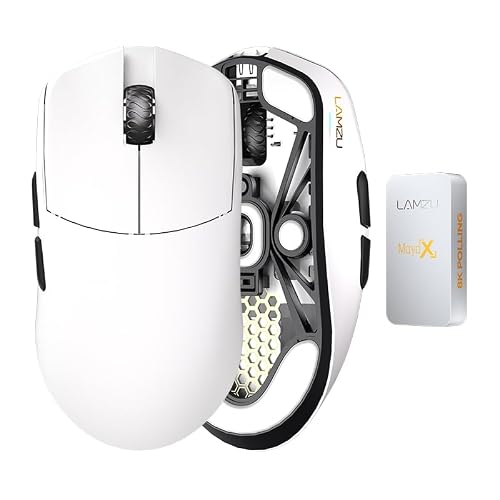
| Lamzu Maya X | Best ultralight for smaller hands | 47 g, PAW3950 sensor, symmetrical shell | Check price on Amazon |
| ENDGAME GEAR XM2w 4k | Best claw-grip specialist | 4K polling, Kailh GX switches, about 63 g | Check price on Amazon |
| BenQ Zowie U2-DW 4K | Best driverless purity | 60 g, 4K enhanced receiver, no software required | Check price on Amazon |
Read the table as five answers to five questions. The Viper V3 Pro answers the player who wants the current flagship formula with nothing left to upgrade. The Superlight 2 answers the player who values a shape refined across years of professional play. The Maya X answers smaller hands and weight absolutists. The XM2w 4k answers the claw gripper who finds mainstream shapes too safe. The U2-DW answers the purist who wants tournament hardware without a software suite living on their PC. None of them is the wrong mouse; each is the wrong mouse for somebody, and the reviews below are written to find that somebody honestly.
How Were These Mice Chosen?
The pool was restricted to wireless esports mice whose listings could be verified exactly, whose sensors sit at the current competitive standard, and whose shapes represent genuinely different philosophies rather than five copies of one idea. Mainstream gaming mice with heavy bases, excessive buttons or novelty features were left to other guides, as were wired-only models, because the PC players this page serves have largely settled the wireless question: modern esports wireless is, for practical purposes, indistinguishable from a cable while freeing the mouse from cable drag entirely. What remained was a shortlist where the deciding variables are the human ones, hand size, grip style and tolerance for software, which is exactly where a good guide can help.
setting desk height so the mouse arm stays level
keeping your mouse hand comfortable in long sessions

Razer Viper V3 Pro — Best All-Round Esports Mouse
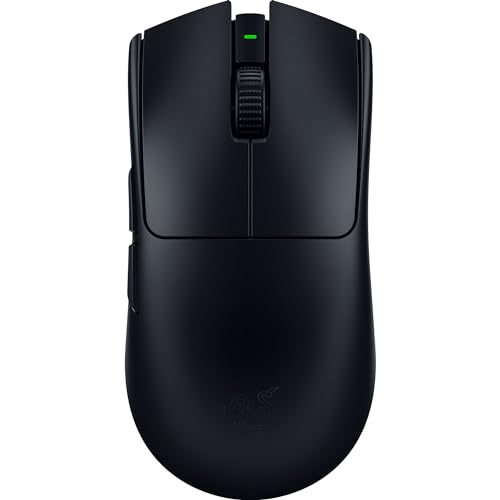
Badge: Best all-round. The Viper V3 Pro is Razer’s flagship distilled: the verified listing describes a 54-gram wireless esports mouse in black with a high-resolution optical sensor rated in the tens of thousands of DPI, third-generation optical switches, eight programmable controls, a battery life figure in the ninety-hour class and support for true 8000 Hz polling. The shape is a refined symmetrical design, safe without being bland, with a gentle hump that suits claw and fingertip grips and enough length that relaxed palm players do not feel exiled. Optical switches remove the double-click lottery that haunts mechanical switches over years of use, which matters on a mouse bought to be a long-term instrument.
Mini spec box — Viper V3 Pro
- Weight: 54 g on the listing
- Sensor: high-end optical, very high maximum DPI
- Switches: optical, third generation
- Polling: up to 8000 Hz supported
- Battery: long-life class, around ninety hours claimed
In play, the Viper’s virtue is the absence of arguments. The clicks are crisp and even, the shell does not creak under a tense grip, the wireless link is invisible, and the mouse offers enough buttons for ordinary game bindings without turning into a keypad. Its eight-thousand-hertz polling is best understood as headroom: at lower rates it sips battery for weeks, and players with high-refresh monitors who enjoy experimenting can raise the rate and judge with their own hands whether the smoothness repays the battery cost. This is the mouse for the player who wants to stop researching mice, which is a larger population than enthusiast forums admit.
Strengths
- Complete flagship package with no obvious missing piece.
- Optical switches promise long, consistent click life.
- Shape flatters the two most common competitive grips.
Trade-offs
- Flagship positioning means a flagship checkout total.
- Highest polling rates shorten battery intervals noticeably.
- Palm-dominant players may still prefer a taller ergonomic shell.
Best for: competitive players wanting one definitive wireless mouse for years. / Not suited for: palm-grip players seeking a sculpted ergonomic shape, or bargain hunters.

Logitech G Pro X Superlight 2 — Best Proven Tournament Shape
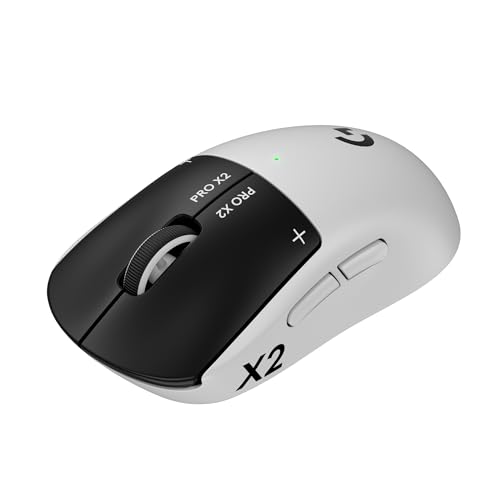
Badge: Best proven shape. The Superlight lineage is the closest thing competitive gaming has to a standard-issue mouse, and the second generation keeps the beloved silhouette while modernising the internals. The verified listing describes a lightweight black wireless mouse with hybrid optical-mechanical LIGHTFORCE switches, the HERO 2 sensor with tracking up to thirty-two thousand DPI, five programmable buttons and USB-C charging. The shape is a masterclass in inoffensiveness: medium size, symmetrical, gently crowned, a mouse that disappears under palm, claw and fingertip alike and lets technique, rather than furniture, decide the aim.
Mini spec box — G Pro X Superlight 2
- Sensor: HERO 2, up to 32,000 DPI per the listing
- Switches: LIGHTFORCE hybrid optical-mechanical
- Buttons: five programmable
- Charging: USB-C
- Shape: medium symmetrical, the tournament standard
Choosing the Superlight 2 is choosing the known quantity. Its clicks carry a mechanical crispness some players prefer to purely optical switches, its software ecosystem is mature, and its resale and accessory world, skates, grips, cases, is the deepest in the category, which matters to players who maintain their gear. The compromises are equally known: the button count is minimal, the shape excites nobody, and players with very small hands may find even this medium shell a handful in fingertip grip. For a first serious esports mouse, though, its very predictability is the recommendation; you will learn your own preferences against a neutral reference, which is the best education this category offers.
Strengths
- The most battle-tested silhouette in modern esports.
- Hybrid switches blend optical speed with mechanical feel.
- USB-C charging finally matches the rest of the desk.
Trade-offs
- Five buttons will frustrate MMO and MOBA binders.
- Safe shape offers little guidance to an undecided grip.
- Premium pricing for a deliberately understated design.
Best for: players who want the reference esports mouse and a neutral platform for their technique. / Not suited for: players needing many side buttons or a strongly sculpted grip.

Lamzu Maya X — Best Ultralight for Smaller Hands
Badge: Best ultralight. Lamzu built its reputation by taking weight seriously before the giants did, and the Maya X is its larger-bodied flagship at a startling forty-seven grams. The verified listing describes an ultra-lightweight symmetrical wireless mouse in white with optical switches, a maximum of thirty thousand DPI, a dust-proof encoder and the PAW3950 sensor, on a Nordic wireless platform. Forty-seven grams changes the physics of a flick: the mouse starts and stops with an immediacy that heavier shells cannot imitate, and players who aim with their fingertips, especially on smaller hands that performance brands historically underserve, will feel courted by this design in a way the mainstream flagships rarely manage.
Mini spec box — Maya X
- Weight: 47 g on the listing
- Sensor: PixArt PAW3950, up to 30,000 DPI
- Switches: optical
- Encoder: dust-proof design
- Shell: symmetrical, white finish listed
Ultralight is a philosophy with a price beyond money. A mouse this light exposes every tremor and rewards a relaxed hand; players who grip hard will wrestle it, and players whose technique relies on the mouse’s own momentum for stopping will overshoot until they recalibrate. The Maya X also asks its owner to accept a specialist brand’s ecosystem, smaller than Logitech’s or Razer’s, in exchange for its focus. For the right hand, though, small, fingertip-led, tired of being an afterthought in flagship sizing, it is the most exciting mouse on this page, and the one most likely to be described by its owner with genuine affection.
Strengths
- Featherweight shell makes flicks feel telepathic.
- Top-tier sensor and modern wireless platform.
- Shape finally centres smaller hands and fingertip aim.
Trade-offs
- Large palm-grip hands will find it insubstantial.
- Lightness amplifies an unsteady hand’s tremor.
- Smaller brand ecosystem for accessories and support.
Best for: fingertip and claw players with small-to-medium hands chasing minimum weight. / Not suited for: palm grippers or players who like a mouse with heft and presence.

ENDGAME GEAR XM2w 4k — Best for Committed Claw Grippers
Badge: Best claw specialist. Endgame Gear designs from the grip outward, and the XM2w 4k is its wireless claw statement. The verified listing describes a mouse of about sixty-three grams in a Dark Frost finish, with 4000 Hz polling, Kailh GX switches and the PixArt PAW3395 sensor. The shape is the argument: a pronounced rear that fills the palm’s heel and invites the fingers to curl, giving claw players a locked, repeatable hold that flatter mice cannot offer. Where the Viper and Superlight aim to suit everyone, the XM2w aims to suit one grip completely, and claw players who have spent years adapting to safe shapes will recognise the feeling of a mouse finally agreeing with them.
Mini spec box — XM2w 4k
- Weight: about 63 g on the listing
- Sensor: PixArt PAW3395
- Switches: Kailh GX
- Polling: 4000 Hz wireless
- Shape: claw-oriented symmetrical shell
The trade-offs follow from the specialisation. Palm players will find the rear hump intrusive, fingertip players may find the mouse more present than they want, and its weight, while hardly heavy, concedes the ultralight contest to the Maya X by a wide margin. Its polling ceiling of four thousand hertz is, in practice, beyond the threshold most players can distinguish, and the mouse spends the saved complexity on its switches and shape. Choose it when your grip is settled and claw-shaped; it is a specialist tool, and it behaves like one, superbly within its brief and unapologetically outside it.
Strengths
- Shape gives claw players a genuinely locked-in hold.
- High polling and a proven sensor cover the spec bases.
- Switch feel is a highlight owners consistently praise.
Trade-offs
- Specialist shape excludes palm and relaxed grips.
- Heavier than the ultralight competition here.
- Less suited to being a household’s only, shared mouse.
Best for: committed claw grippers in medium-to-large hands. / Not suited for: palm players, fingertip minimalists, or the grip-undecided.

BenQ Zowie U2-DW 4K — Best Driverless, No-Nonsense Tournament Mouse
Badge: Best purist pick. Zowie’s philosophy has always been that a tournament mouse should work identically on any PC on Earth without software, and the U2-DW 4K is that philosophy with modern wireless. The verified listing describes a sixty-gram symmetrical esports mouse with an enhanced 4K receiver, a 3950-class sensor, 4K polling and a driverless design. Settings live on the mouse itself, in hardware, so the mouse you practise with at home is bit-for-bit the mouse that works on a tournament PC, a friend’s rig or a fresh Windows install, with no account, no suite and no update deciding otherwise.
Mini spec box — U2-DW 4K
- Weight: 60 g on the listing
- Sensor: 3950 class
- Polling: 4K via enhanced receiver
- Software: none required, driverless by design
- Shape: symmetrical, esports-tuned
The U2 shape itself is a study in controlled curves, with sides that guide a claw or relaxed claw hold and a profile that stays out of the palm’s way. What you surrender is customisation theatre: no per-button remapping suite, no RGB choreography, no cloud profile. What you gain is a particular peace. Players who compete, who travel between PCs, or who simply resent software rent-seeking on their peripherals will understand the appeal immediately. Everyone else should at least respect the coherence of a mouse that knows exactly what it refuses to be.
Strengths
- Driverless design behaves identically on every PC.
- Enhanced receiver delivers high polling without fuss.
- Shape refined for competitive claw-style holds.
Trade-offs
- No software means no elaborate remapping or macros.
- Minimalist presentation will bore feature collectors.
- Button and DPI changes happen on the mouse, old-school style.
Best for: competitors, LAN players and purists who want hardware that just works. / Not suited for: players who live in peripheral software or need many programmable buttons.
How Do the Five Mice Compare?
| Mouse | Weight class | Grip sweet spot | Polling ceiling | Personality |
|---|---|---|---|---|
| Viper V3 Pro | 54 g | Claw and fingertip | 8000 Hz | Complete flagship |
| G Pro X Superlight 2 | Light, around 60 g | All three, neutrally | High-rate capable | Reference standard |
| Maya X | 47 g | Fingertip, smaller hands | High-rate capable | Ultralight specialist |
| XM2w 4k | About 63 g | Committed claw | 4000 Hz | Grip specialist |
| U2-DW 4K | 60 g | Claw and relaxed claw | 4000 Hz | Driverless purist |
The table’s most important column is the grip one, because it is the only column your hand will consult during a match. Notice how little separates the mice on paper beyond it: sensors are uniformly superb, polling is ample everywhere, weights cluster in a narrow band with one featherweight outlier. That convergence is the story of the modern esports mouse. The engineering race has been run and won by everyone, which transfers the decision, happily, back to the player’s hand, where it always belonged.
How Do You Choose? Start With Your Hand, Not the Internet
Measure your hand from fingertip to wrist crease and across the knuckles, and write both numbers down. Then watch yourself play for one match and name your grip honestly: palm, where the whole hand rests on the shell; claw, where the palm’s heel touches and the fingers curl; or fingertip, where only the fingers steer and the palm floats. Most players are a hybrid with a dominant flavour, and the dominant flavour is what to buy for. Small hands under roughly seventeen centimetres should look first at the Maya X and the Viper; medium hands can consider everything; large hands above twenty centimetres should weight the XM2w and the Viper and treat the Maya X as a fingertip-only proposition.
Next, decide your relationship with weight. Lightness reduces the effort of starting and stopping the mouse, which fingertip and low-sensitivity players feel as freedom, but it also removes the stability that a heavier shell lends a tense hand. There is no virtue in suffering for a number: a player who aims calmly at sixty grams should not chase forty-seven out of ideology. Then polling: treat anything above the classic one thousand hertz as refinement rather than revolution, worth having, visible to some players on high-refresh monitors, and never worth sacrificing shape or battery sanity to obtain. Finally, buttons and software: count the bindings your main games genuinely need, and be honest about whether you enjoy peripheral software or merely endure it, because the Zowie exists for the endurers.
Budget framing in this category is simple to state. These are flagship-tier instruments, priced like it, and their cost buys shape refinement, switch quality and wireless excellence rather than raw sensor numbers, which cheaper mice now approximate well. A player on a budget serves themselves best by buying a previous-generation shape they have tested over a current flagship they have not, because fit compounds daily while specifications merely impress once. And every player, at every budget, should exploit the returns window as a fitting room: order the strongest candidate, play a genuine week, and let your hand file its report.
How Do You Set Up and Maintain an Esports Mouse?
Begin with DPI at a level your games can scale sensibly, and set your in-game sensitivity so a full pad sweep turns your character roughly a full circle in shooters, then refine by feel over days rather than minutes. Set polling to the standard rate first and raise it only as a deliberate experiment, noting battery life as you go. Turn off any operating-system pointer acceleration for gaming, because a consistent one-to-one relationship between hand and cursor is the entire point of the hardware you just bought. Place the receiver close to the pad, ideally on the desk with a clear line to the mouse, since wireless excellence assumes a short, unobstructed conversation.
Maintenance is minutes per month. Keep the sensor lens clean with a dry cloth, clear the skate edges of the dust felt they accumulate, and replace skates when the glide turns scratchy or uneven, because worn feet quietly rewrite a mouse’s feel. Charge on a rhythm rather than in a panic, and store the mouse away from direct sun and radiators like any precision plastic. Grip tape is a legitimate tuning tool for players whose hands sweat or whose shell feels slick, applied sparingly to the contact points; the gloves guide linked from this page covers the other half of that problem. Treat the mouse as an instrument and it will repay you with the highest compliment equipment can offer, which is never being thought about during a match.
audio settings for hearing the game your mouse plays
desk height that keeps the aiming arm level
What Mistakes Do PC Players Make When Buying a Mouse?
Buying by sensor specification is the classic error, because at this level every sensor tracks flawlessly and the differences live in shape, clicks and weight, the things a spec sheet describes worst. Copying a professional’s mouse is the second error; professionals choose within sponsor catalogues and possess hands that are not yours. Third is chasing minimum weight as a moral position and discovering that your tense grip needed the stability you removed. Fourth is ignoring the returns discipline, keeping a nearly-right mouse out of inertia and spending a year adapting your hand to a shell your hand voted against in week one.
Fifth, players forget the ecosystem around the mouse: a pad too small for their sensitivity, a receiver buried behind a metal PC case, a desk edge that greets the wrist. The mouse is the visible star of a system whose supporting cast decides much of the performance. Audit the pad, the receiver placement and the desk before blaming the mouse for a glide that stutters, because in this guide’s experience the star is innocent more often than the stage.
How Do Grip Styles Really Differ in Practice?
Grip taxonomy sounds like forum trivia until you watch hands at work. The palm player rests the whole hand on the mouse and steers from the shoulder and forearm, favouring control and comfort over raw speed; they need length, height and a shell that supports the arch without forcing the fingers to hover. The claw player contacts the mouse at the heel of the palm and the curled fingertips, creating a tense, precise cage that excels at vertical movement and rapid clicking; they need a rear that fills the palm’s base and sides that let the fingers pinch. The fingertip player floats the palm entirely and dances the mouse on five contact points, achieving the fastest micro-corrections in gaming at the cost of stability; they need lightness, a low profile and nothing behind the fingers to collide with.
Most real hands blend these, drifting towards palm in calm moments and claw in fights, which is why the safe shapes from Razer and Logitech sell so well: they forgive the blend. The specialists in this guide, the XM2w for claw and the Maya X for fingertip, reward players whose blend has settled into a conviction. If you do not yet know your conviction, buy the forgiving mouse first and let a year of play reveal it; your second mouse can be the specialist, chosen with evidence, and the first becomes the household’s excellent spare rather than a mistake.
What Role Do Clicks and Scroll Wheels Play?
Specifications worship sensors, but players touch switches. Click feel decides how confident a tap feels in a tactical shooter, how tiring a MOBA’s thousand clicks become, and whether a mouse still feels trustworthy in year three. Optical switches, used by the Viper and the Maya X, actuate with light and are immune to the contact degradation that produces double-clicks; hybrid switches, in the Superlight 2, chase the best of both worlds; the XM2w’s Kailh GX switches are chosen for a particularly defined, mechanical crispness that claw players, who click from curled fingers, appreciate disproportionately. None of these is objectively best, which is why click preference is the one thing worth testing in a shop or through a friend’s desk before committing.
The scroll wheel is the category’s quiet scandal, ignored in reviews and used constantly in games for weapon switching and scrolling. A good wheel has distinct, quiet steps and a middle click that does not demand a shove. Zowie’s driverless seriousness extends here, and every mouse in this guide at least respects the wheel as a control rather than a decoration. When you test a mouse, click the wheel fifty times while thinking about something else; the wheel you forget is the wheel that works, and the one that keeps announcing itself will annoy you for years in small, deniable ways.
How Should Left-Handed and Ambidextrous Players Choose?
Left-handed mouse users live in a market that mostly designs for the other hand, which makes this guide’s symmetrical shortlist genuinely good news: every pick here is a symmetrical shell usable in either hand, though side-button placement may favour the right hand on some models and should be checked on the listing if your left thumb expects buttons. Ambidextrous players who switch hands to rest one should value that symmetry twice over. The deeper advice for left-handed players is to buy from the verified flagship tier rather than from the neglected budget corner, because that is where the symmetrical engineering effort currently lives, and to accept a smaller candidate pool in exchange for mice that were designed, rather than mirrored, for their hand.
How Does a Mouse Fit Into Different Genres on PC?
A tactical shooter player buys for the flick and the hold: a stable shape, trustworthy clicks and a sensor that never spins out during the fastest correction of their life, which is why the flagship formula dominates that scene. A battle royale player adds tracking to the brief, long smooth pursuits of moving targets where glide consistency and a shape that stays comfortable through a twenty-minute match matter as much as the initial flick. A MOBA or RTS player clicks hundreds of times a minute and leans on the wheel and side buttons, and should interrogate switch fatigue and button placement harder than weight. An MMO player leaves this guide’s shortlist honestly behind, because their game wants a button grid no esports mouse carries, and forcing an esports mouse into that role serves nobody.
The lesson generalises beyond mice: peripherals are genre equipment, and the best mouse for pc gaming is a phrase that dissolves, on inspection, into a hand, a grip and a library of games. This guide’s five picks cover the fast, precise centre of PC gaming superbly. If your library lives at that centre, choose among them with confidence. If it lives at the edges, take the fitting method, hand, grip, buttons, week-long trial, and apply it wherever your games actually live.
What About Wired Holdouts and Hybrids?
Some excellent players still prefer a cable, for reasons that deserve respect rather than evangelism: a wired mouse never needs charging, costs less at the same shape quality, and suits a desk where the mouse never travels. Modern paracord-style cables and a simple bungee have also narrowed the drag argument considerably. The honest position of this guide is that wireless has won the flagship tier on merit, which is why the shortlist is wireless, but a wired version of a shape you love, where a maker offers one, is not a compromise; it is the same instrument with a different power supply. Buy the shape, then argue about the cable with whatever energy remains.
The Week-Long Trial: How to Judge a Mouse Properly
Day one with a new mouse proves almost nothing, because novelty feels like improvement and unfamiliarity feels like error, sometimes in the same hour. Give a candidate a structured week. Spend the first two days at your established sensitivity, in familiar content, resisting adjustments while your hand maps the shell. On day three, allow one sensitivity refinement if your flicks consistently overshoot or undershoot in one direction, since a new weight legitimately shifts the calibration. Days four and five belong to your hardest content, ranked matches or the aim trainer routine you trust, where the mouse must perform under the stress that reveals creaks, slips and click doubts. Day six is for the long session, the comfort audit, where you learn what your wrist and fingers think of the arrangement after hours rather than minutes.
On day seven, return to your old mouse for one session. The comparison is the verdict: if the old mouse feels like a stranger’s shoe, the new one has been adopted by your hand and the trial is over. If the old mouse feels like coming home, believe that feeling and use the returns window, because a hand’s homesickness is data no review can outrank. Keep brief notes through the week, particularly about where your fingers rest without being told, since a mouse that your hand organises itself around unbidden is a mouse whose shape agrees with your anatomy in the way this entire guide has been trying to arrange.
Hands, Health and the Long Career of a PC Player
A mouse is held for thousands of hours across a gaming life, and the fit decisions in this guide are also, quietly, health decisions. A shell that forces your fingers to pinch to keep hold, a weight that your wrist must constantly arrest, a shape that twists the forearm away from neutral: each is a small tax levied per movement and collected, with interest, in the evening’s stiffness. Players should treat persistent tingling, numbness or pain as a stop signal rather than a training obstacle, change the setup variables this guide controls, size, grip, weight, desk height, and seek professional advice if symptoms persist, because no peripheral is worth an injury and no rank has ever compensated anyone for one.
The positive version of the same point is more encouraging. A well-fitted mouse, at a well-set desk, with breaks taken like they matter, lets a player practise for years with their technique as the only variable improving, which is the real secret behind the longevity of the best PC players. Equipment guides rarely get to say something this unfashionable: the best mouse is partly the one that lets you stop buying mice, settle, and spend your attention on the games for a decade. Every pick in this guide was chosen with that settlement in mind.
Second Mice, Travel and the Household Spare
Serious players often end up owning two mice, and the pattern is worth planning rather than drifting into. The common arrangement pairs a flagship at the main desk with the previous mouse, demoted to laptop bag or household spare, which is why buying a forgiving shape first and a specialist second composes so well over time. Travel players should value the driverless virtue beyond its home convenience: the Zowie’s guarantee of identical behaviour on any machine is worth real money to anyone who plays on venue, campus or friends’ PCs. Households sharing one gaming PC should negotiate the mouse the way they negotiate the chair, by fit priority for the primary player and tolerance from everyone else, because a mouse, unlike a monitor, is worn rather than watched, and compromises in fit are paid by the hour.
Why Do So Many Players Own a Drawer of Almost-Right Mice?
Because the category’s marketing speaks in specifications while hands speak in shapes, and the translation between the two languages is a week of play that cannot be downloaded. Every mouse in the drawer was, at unboxing, exciting and defensible; each was retired by a centimetre here, a hump there, a click that tired the finger by the second hour. The way out of the drawer is the discipline threaded through this guide: measure, name the grip, shortlist by shape, trial for a week, and return without sentimentality when the hand votes no. Players who adopt it usually stop at one or two purchases and describe the result with the least marketable sentence in gaming, that their mouse is fine and they no longer think about it. Fine, sustained for years, is what the flagship money in this guide is actually buying.
How to Read Mouse Marketing Without Being Read by It
A short field guide to the numbers on the box will inoculate you against most regret in this category. DPI figures in the tens of thousands describe a ceiling nobody uses, included because sensor generations are marketed by their summits; ignore the summit and ask instead whether the sensor is a known flagship part, which in this guide it always is. Polling rate is real but logarithmic in feel, each doubling quieter than the last, and its honest cost is printed nowhere on the box: battery life, which can fall from weeks to days at the highest settings. Battery claims themselves are measured at the gentlest settings, so treat them as best-case weather reports. Weight is the one honest number in the marketing, and even it excludes the cable-free reality that skates, grips and your own hand add grams the scale in the advertisement never met.
Switch ratings in tens of millions of clicks describe laboratory endurance, not the feel in your finger tonight, and shape dimensions in millimetres, while genuinely useful, only become knowledge when compared against a mouse your hand already knows. The mature shopper reads the box for the few hard facts, weight, dimensions, sensor model, switch type, and then goes looking for the thing the box cannot contain, which is a week of their own hand’s testimony. Retailers’ returns policies, unglamorous as they are, have done more for mouse satisfaction than any specification of the last decade.
A Final Word on Settling
Every guide in this family ends by arguing, in its own vocabulary, for the same unfashionable virtue: fit the equipment to the person, then leave it alone long enough for skill to grow in the quiet. Mice make the argument most sharply because the temptation to keep shopping is engineered into the category’s release calendar, with a new flagship arriving whenever the old one’s novelty fades. Resist on evidence. If your current mouse passes the week-long trial’s tests, if your hand forgets it during matches and your notes show no recurring complaint with its name on it, then the best gaming mouse for your PC is already plugged into it, and the correct purchase is none. Spend the money on the pad, the chair, the desk height, or the games themselves, and let the drawer of almost-right mice stay exactly as full as it is today.
What Changes When You Switch From an Ordinary Mouse?
Players upgrading from a heavy office mouse or an ageing gaming model should expect a recalibration week that this guide’s trial section describes, plus a few specific surprises worth naming in advance. The first is how much of your old technique was compensation: the death grip that a heavy, slippery mouse demanded, the extra wrist English that a laggy sensor required, the sensitivity chosen to hide a shape’s flaws. A modern esports mouse removes the need for each compensation, and the hand, loyal to its habits, keeps performing them for days, which is why new mice so often feel wrong before they feel revelatory. The second surprise is sound and feel: crisp optical or hybrid clicks and a clean glide on fresh skates make the desk itself seem quieter and more precise, a reminder that a mouse is an instrument you hear as much as one you hold.
The third surprise is the one that justifies the category: sometime in the second week, usually mid-match and unannounced, the mouse disappears, and the player’s attention is entirely inside the game for the first time in months. Every pick in this guide is capable of delivering that moment to the hand it fits, and no specification can promise it to the hand it does not, which is why this article has spent its length on measurement, grip and honest trial rather than on the numbers race the boxes want you to run.
Final Recommendation
For most competitive PC players, the Razer Viper V3 Pro is the complete answer and the Logitech G Pro X Superlight 2 is the proven one; choose between them by click feel and by which shape your hand prefers after a week. Smaller hands and weight devotees should go directly to the Lamzu Maya X. Committed claw players owe themselves the ENDGAME GEAR XM2w 4k. Purists, travellers and the software-weary should take the BenQ Zowie U2-DW 4K and enjoy the silence where a settings suite used to live. Measure your hand, name your grip, use the returns window without shame, and the mouse you keep will stop being equipment and start being instinct.
Frequently Asked Questions About Gaming Mice for PC
Is wireless really as good as wired for competitive play?
At the level of the mice in this guide, yes. Modern esports wireless links are effectively indistinguishable from cables in latency and stability, while removing cable drag, which was always the larger real-world problem. The remaining wired advantages are price and never thinking about a battery, which is why wired mice still make sense at a fixed desk on a budget.
How much DPI do I actually need?
Far less than any of these sensors offer. Most competitive players use effective sensitivities built on a few hundred to a couple of thousand DPI, scaled in game. The enormous maximum figures are headroom and marketing, harmless but irrelevant. What matters is that the sensor tracks flawlessly at your chosen setting, which every pick here does.
Does 8000 Hz polling make a visible difference?
Some players on high-refresh monitors perceive a smoother cursor path, and the cost is battery life and a little system load. It is best treated as an experiment: run it for a week, then return to a lower rate for a week, and keep whichever your own hands can actually distinguish. Never let polling rate outrank shape in a purchase decision.
How long do these mice last?
Years, with optical and hybrid switches removing the classic double-click failure from the worry list. Batteries age slowly, skates wear and are replaceable, and shells survive ordinary desk life easily. The usual reason to replace a mouse from this class is a changed hand, a changed grip or curiosity, not failure.
Should I use the software that comes with my mouse?
Use it if it serves you: setting DPI, polling and bindings once is a fair exchange. You are not obliged to let it live in your system tray forever, and several mice here store settings onboard so the software can be removed afterwards. The Zowie in this guide exists for players who would rather skip the question entirely.
How do I stop my wireless mouse from ever dying mid-match?
Build a charging ritual instead of relying on memory: a fixed night each week, or the moment a session ends at a low-battery warning, with the cable kept plugged in at the desk so the rescue takes seconds. Players who use the highest polling rates should charge more often, since those modes spend battery like a sports car spends fuel. A mouse that dies in a final round once will teach the ritual permanently, but the tuition is avoidable.
Can I use one of these mice for work as well?
Comfortably, for most desk work, since a light, precise mouse with a good wheel serves documents and spreadsheets as happily as games. Players who live in spreadsheets may miss a free-spinning wheel or extra buttons, and the driverless Zowie offers the least to customise for office macros. For a mixed desk, the flagships with onboard profiles let one button layout serve the game and another serve the workday, provided you enjoy the five minutes of configuration that requires.
When should I replace my mouse skates?
When the glide develops a scratchy patch, when one corner starts catching, or when the mouse feels different travelling in one direction than another. Skates are consumables by design, and a fresh set can make a two-year-old mouse feel newly bought for very little money. Keep a spare set in the desk drawer beside the charging cable, and change them on a clean surface so dust does not seal itself under the new feet.
How do I know my hand size category?
Measure from the tip of your middle finger to the first crease of your wrist. Under about seventeen centimetres is small in mouse terms, seventeen to twenty is the medium band most flagships are designed around, and above twenty is large. Width across the knuckles refines the verdict. Compare your numbers with the grip guidance in this guide rather than with a single model’s marketing, because categories are consistent even when product names are not.
Are lighter mice always better for aim?
No. Lighter mice start and stop with less effort, which many players love, but they also provide less inherent stability, and a tense or heavy-handed player can aim worse on an ultralight until their touch recalibrates, and occasionally forever. The best weight is the one your hand forgets, and players find it by trialling across the range in this guide rather than by chasing the smallest number on the internet.
What mouse pad should pair with these mice?
A large, consistent cloth pad suits most players, sized to your sensitivity so your widest turn never reaches an edge, and replaced when its glide becomes patchy. Hard and glass surfaces serve a minority who love their speed. Whatever the material, a worn pad will sabotage a great mouse, so budget the pad as part of the mouse purchase rather than as an afterthought.