Disclosure: As an Amazon Associate, reviewstook.com earns from qualifying purchases. Links on this page are affiliate links; they cost you nothing extra. Prices and availability change often, so check the current Amazon listing before you buy.
The best desk height for gaming is not a single number, and any guide that hands you one without asking how tall you are is guessing with your shoulders. Desk height is a relationship: between the floor and your elbows, between your elbows and the keyboard, between your eyes and the screen. Get it right and long sessions feel strangely effortless, because your arms stop paying a tax on every mouse movement. Get it wrong by even a few centimetres and the bill arrives as shrugged shoulders, a forward-leaning neck and wrists that bend when they should float. This guide gives you the method, the measurements for your own body, the common heights that suit common heights of player, and two verified height-adjustable desks for readers whose current desk cannot be persuaded to the right altitude.
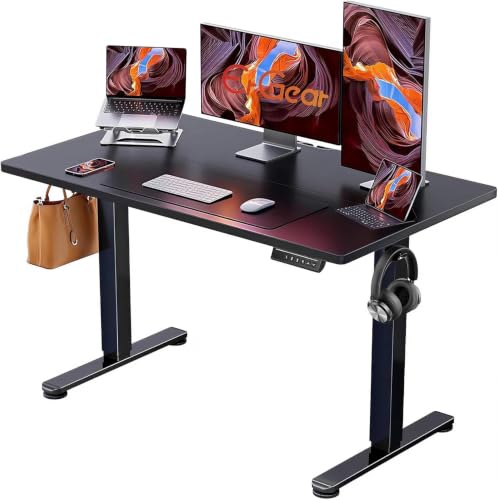
Key Takeaways on Gaming Desk Height
- Your elbows are the referee: forearms level, shoulders dropped, wrists straight.
- Most players land with the desktop somewhere in the high-sixties to mid-seventies of centimetres, but your leg length has the final vote.
- Chair height and desk height are one system and must be set together, chair first.
- A fixed desk at the wrong height can be rescued by keyboard trays, monitor arms and footrests, in that order of honesty.
- Adjustable desks earn their keep in shared rooms, where two bodies need two heights from one surface.
The Rule Everything Else Serves
Sit in your chair with your feet flat and your back supported. Let your upper arms hang vertically, relaxed, as if you were standing in a queue. Bend the elbows to roughly a right angle so the forearms point forwards, level with the floor. The height of your forearms at that moment, measured from the floor, is the height your keyboard surface wants to be, within a centimetre or two. That is the whole science in one posture. Every table of recommended heights in this guide is just that posture pre-measured for typical bodies, and every product recommendation exists to help a real desk reach the altitude your elbows voted for.
Notice what the rule does not mention: the desktop itself. If your keyboard can live at elbow height on a tray beneath a higher desk, the rule is satisfied while the desk stays grand. If you play on a laptop, the rule collides with the screen, which is why laptop gamers so often end up with a separate keyboard or a raised machine. And if you use a controller for long stretches, the rule relaxes, because the pad rests in your lap and the desk becomes a shelf; this guide’s numbers are written for keyboard and mouse play, the posture gaming desks are actually bought for.
Reference Heights by Player Height
| Player height (approx.) | Typical desk height | Typical seat height |
|---|---|---|
| 150–160 cm | 60–66 cm | 38–43 cm |
| 160–170 cm | 66–70 cm | 43–46 cm |
| 170–180 cm | 70–74 cm | 46–49 cm |
| 180–190 cm | 74–78 cm | 49–52 cm |
| 190 cm and above | 78–84 cm | 52–56 cm |
Treat the table as a starting grid, not a verdict. Bodies distribute their height differently: a player with long legs and a short torso needs a taller seat and a comparatively modest desk, while a long-torsoed player needs screen height more than desk height. Use the table to find your neighbourhood, then confirm with the elbow rule in your own chair, because the elbow rule has never once been wrong about a specific body, while tables are wrong about individuals every day. If your measurement lands between rows, favour the row that keeps your feet most honestly flat, since feet are harder to compensate for than elbows.
Where Can You Buy a Desk That Reaches Your Number?
If your current desk is fixed far from your number, the two desks below are sold through Amazon and were verified against live listings for this guide. Both are electric height-adjustable models in a 48-by-24-inch footprint, which means either can be driven to the exact centimetre your elbows requested and returned there by memory preset after a sibling, partner or standing session moves it. Before ordering any adjustable desk, check its stated height range covers your target with room at both ends, check its capacity against everything your desktop carries, and measure the room: a rising desk needs cable slack and a clear path above it.
In this guide
Quick Picks: Verified Adjustable Desks
| Desk | Badge | Standout trait | Link |
|---|---|---|---|
| ErGear 48 x 24 Electric Standing Desk | Best memory-preset value | Four memory presets, steel frame, 176 lb capacity | Check price on Amazon |
| Huuger 48 x 24 Electric Standing Desk | Best with built-in power | Power outlets and USB-C on the desk, hooks, steel frame | Check price on Amazon |
The ErGear is the straightforward instrument: a stable steel-framed electric desk whose four memory presets make it ideal for a desk shared between a seated gamer and anyone else in the house. The Huuger answers a different irritation, the cable-and-charger sprawl, by building power outlets and a USB-C port into the desk itself and adding hooks for headsets and bags. Both share the same sensible footprint for a single-monitor or compact dual-monitor gaming setup, and both exist in this guide for one reason: they can be set, precisely and repeatably, to the height the first half of this article taught you to find.
How Were These Desks Chosen?
The selection filtered for desks whose listings could be verified exactly, whose height adjustment was electric rather than a hand crank few owners actually turn, whose capacity honestly covered a gaming load of monitors, PC peripherals and elbows, and whose footprint suited the bedrooms and spare rooms gaming desks really inhabit. Exotic gaming-branded desks with shallow adjustment ranges were passed over, as were oversized executive models whose minimum height already exceeds a shorter player’s target. Two survivors might look like a short list; it is better read as a standard met twice.
chairs that pair with a well-set desk
wrist rests and desk mats for long sessions

ErGear 48 x 24 Inch Electric Standing Desk — Best for Shared Desks and Exact Presets
Badge: Best memory-preset pick. The ErGear’s verified listing describes a 48-by-24-inch electric standing desk in black, with a stable steel frame, a stated capacity of 176 pounds and four memory presets. Those presets are the feature a gaming household will use daily without ever praising aloud: preset one is your seated gaming height, found by the elbow method; preset two might be a standing height for queue-time stretches or a taller partner’s workday; and the desk returns to each with a button press instead of a fresh round of guesswork. In a shared room, presets convert an argument about whose height the desk was left at into a non-event.
Mini spec box — ErGear 48 x 24
- Surface: 48 by 24 inches, black on the checked listing
- Adjustment: electric, with four memory presets
- Frame: steel, stated capacity 176 lb
- Assembly: described as easy on the listing
- Role: sit-stand desk for home office and gaming
Capacity deserves a sentence of respect. One hundred and seventy-six pounds covers a pair of monitors on arms, a desktop PC if it lives on the surface, speakers, and the weight of a player leaning on the front edge during a tense clutch, which players do more than they admit. The 48-inch width is the honest constraint: it suits a single large monitor or two modest ones, a keyboard and a large mouse pad, but a triple-monitor command centre will outgrow it, and streamers with sprawling capture hardware should measure their layout before falling for the presets. Within its intended footprint, it is the desk this guide would put under a developing player whose height, and therefore ideal desk height, is still changing year by year.
Strengths
- Four presets make exact gaming height a one-button habit.
- Steel frame and honest capacity suit real gaming loads.
- Electric adjustment gets used; cranks mostly do not.
Trade-offs
- Forty-eight inches wide will crowd triple-monitor ambitions.
- No built-in power, so cable management is your own project.
- Standing is a bonus feature, not a reason to skip breaks.
Best for: shared desks, growing players and anyone who wants their exact height on a button. / Not suited for: very wide multi-monitor rigs or buyers wanting integrated power.

Huuger 48 x 24 Inch Electric Standing Desk — Best for Taming Cables and Chargers
Badge: Best with built-in power. The Huuger’s verified listing describes a 48-by-24-inch electric height-adjustable desk in black with a stable steel frame, power outlets and a USB-C port built in, plus two hooks. The integrated power changes daily life in a small but constant way: the phone charges where it lies, the headset’s dongle and the controller cable stop emigrating to a distant wall socket, and the rising desk carries its own power with it instead of stretching a cable to its limit at full height. The hooks swallow the headset and the day’s bag, keeping the floor around the chair’s casters clear, which anyone who has rolled over a headset cable will appreciate in their bones.
Mini spec box — Huuger 48 x 24
- Surface: 48 by 24 inches, black on the checked listing
- Power: built-in outlets plus a USB-C port
- Extras: two hooks for headset or bag
- Frame: steel, height adjustable electrically
- Role: home office, computer and gaming desk
As a gaming desk its virtues are the same family as the ErGear’s: electric travel to your measured height, a footprint that fits real rooms, and a surface big enough for a monitor, keyboard and generous mouse pad. The choice between the two is therefore about your desk’s existing ecosystem. If a power strip already lives happily under your desk and presets are your priority, the ErGear’s four memories lead. If your current setup is a charger farm with cables breeding in the dark, the Huuger’s built-in power cleans the whole arrangement in one purchase. Neither desk will fix a monitor sitting at the wrong height, so budget for a riser or arm if your screen cannot meet your eyes once the desk is set.
Strengths
- Built-in outlets and USB-C end the charger safari.
- Hooks keep headset and bag off the caster battlefield.
- Electric range lets the desk match the player, not vice versa.
Trade-offs
- Same 48-inch ceiling on sprawling multi-screen layouts.
- Integrated power means one more cable run to plan carefully.
- Preset count and behaviour should be confirmed on the listing.
Best for: players whose desk doubles as the household charging station. / Not suited for: buyers who need maximum width or who already have power fully solved.
How Do You Set Your Desk Height, Step by Step?
Work in the only order that makes sense: chair first, desk second, screen third. Set the chair so your feet rest flat with your knees near ninety degrees and your back genuinely supported, resisting the urge to perch. Now, sitting tall with shoulders deliberately dropped, bend your elbows to a right angle and have someone measure from the floor to the underside of your forearm; a stack of books can substitute for a helper if you mark the wall at forearm level and measure afterwards. That figure is your keyboard target. Adjust the desk, tray or keyboard platform to put the keys there, then play for twenty minutes and interrogate your shoulders. If they have crept upward, the surface is a touch high; if your wrists bend upward to reach the keys, it is a touch low or the keyboard sits too far back.
Screen height follows. With the desk set, your eyes should meet the screen’s upper third when you sit tall, and the display should sit roughly an arm’s length away, further for larger panels. A monitor that cannot reach that height on its own stand needs a riser or an arm, and this is not optional decoration: a low screen will drag your head forward and quietly undo the desk work within an hour. Finally, place the mouse on the same plane as the keyboard, close enough that your elbow stays near your ribs during play, and give the mouse pad enough depth that low-sensitivity sweeps never push the mouse onto a desk edge or a cable.
Record the result. Adjustable-desk owners should store the seated figure as a preset and note the number somewhere permanent; fixed-desk owners should write down the combination of chair height, tray position and riser that achieved it. Setups get borrowed, moved for cleaning and rebuilt after upgrades, and the player who can restore their geometry in two minutes owns an advantage that never appears on a spec sheet. Recheck after any growth spurt, any new chair, and any change of keyboard, because a thicker keyboard or a new wrist rest shifts the target by exactly the small amounts this entire guide exists to respect.
What If Your Desk Is Fixed and Wrong?
Most gaming happens at fixed desks, many of them inherited, so rescue methods matter. If the desk is too high, the classic fix is a keyboard tray that drops the keys to elbow level while the desktop stays where it is; the tray must be wide enough for mouse and keyboard together, or the mouse ends up exiled at desktop height and the shoulders split the difference painfully. If no tray is possible, raise the chair until the elbows clear, and restore the feet with a footrest, accepting the compromise knowingly. If the desk is too low, risers under its legs or a thicker desktop can add the missing centimetres, and a monitor arm becomes essential because a low desk drags the screen down with it.
What not to do is hunch and hope. Players adapt to a wrong height so gradually that they attribute the resulting aches to age, talent or the game itself, when a tape measure would have named the culprit in a minute. Also avoid the opposite vanity of setting a desk by a photograph of a professional setup; those desks are built around those bodies and those chairs. Your elbows remain the only authority with jurisdiction over your desk, and they have already told you their preference if you performed the measurement honestly.
How Does Desk Height Interact With Aim?
Mouse aim is a lever system, and desk height sets its angles. With the surface at elbow height, the forearm rests lightly and the hand travels across the pad powered by the arm for large movements and the fingers for small ones, a division of labour every aiming guide quietly assumes. Raise the surface and the shoulder must lift to keep the hand on the mouse, turning every long session into a slow shrug; the first symptom is not pain but inconsistency, as tired shoulders produce slightly different movements each hour. Lower the surface too far and the wrist bends and bears weight, which steals the fine end of your control and makes low-sensitivity play feel like stirring something thick.
None of this makes desk height a substitute for practice, and this guide will not pretend a centimetre is worth a rank. The claim is narrower and more defensible: a correct height removes a variable, so the aim you trained in the morning is the aim available in the evening, and your practice hours compound instead of leaking. Players chasing marginal gains usually shop for sensors and switches first because those arrive in exciting boxes. The tape-measure gain is free, immediate and permanent, which is precisely why it gets skipped, and why this page exists.
choosing a chair for fortnite-length sessions
mice that reward a well-set desk
What Mistakes Do Players Make With Desk Height?
The champion mistake is setting the desk to match the chair’s highest comfortable look rather than the body’s geometry, usually because the chair was bought first and the desk inherited. Second comes copying a standard height from the internet, most often a number written for office workers of average height in another decade, and then enduring it as if it were a law. Third is forgetting that peripherals have thickness: a mechanical keyboard on a tall wrist rest can raise the effective surface by several centimetres, enough to move a correct desk into shrug territory without anything visibly changing. Measure to the keys, not to the desktop, whenever the stack on top of the desk is thick.
Fourth, players set everything once and never revisit it, even as they grow, change chairs or switch from a compact keyboard to a full-size board that pushes the mouse further right and the elbow further out. Fifth, standing-desk owners sometimes game standing for entire evenings out of health enthusiasm, then wonder why their aim and their calves both deteriorate; standing is a fine interlude between matches and a poor platform for precision play. The pattern across all five mistakes is the same: treating height as a purchase rather than as a measurement that must be renewed whenever anything in the system changes.
Should You Game Standing Up?
Standing deserves a balanced word because adjustable desks invite the experiment. Standing between matches, during queues and while reviewing footage is an uncomplicated good: it unloads the spine, wakes the legs and breaks the session into chapters. Standing during precision play is a trade most players lose, because the body’s sway becomes one more input the mouse hand must cancel, and because feet fatigue quietly distorts posture over an hour. The sensible rhythm for owners of desks like the two picks above is seated play at your measured height, standing for the gaps, and a short walk for the long breaks, which together deliver the variety that bodies actually want. Anyone with a medical reason to manage sitting time should build their personal rhythm with professional guidance rather than with a furniture guide’s generalities.
Does the Right Height Change by Genre?
The elbow rule is universal, but genres lean on it differently, and knowing your main game helps you fine-tune within the centimetre or two of tolerance. Tactical shooter players, who hold still and aim in small corrections, benefit from the lower edge of their range, where the forearm rests most completely and the shoulder is quietest. Players of fast arena shooters and building-heavy battle royales move the whole arm constantly and often prefer the middle of the range, where the arm can travel without the desk edge ever greeting the forearm mid-swing. Strategy and MMO players, whose sessions are the longest and whose movements are the gentlest, should weight pure endurance: the height at which they can sit for three hours and forget the desk exists, which the twenty-minute test in the setup section will identify if they extend it honestly.
Racing and flight players leave this guide’s assumptions entirely, because a wheel or stick clamps to the desk and rewrites its geometry; for them the desk must suit the hardware’s mounting and the pedal position under it, and the elbow rule applies to the wheel’s rim rather than to a keyboard. Sim racers should read the racing wheel guide linked from this page and treat desk sturdiness as their first variable, since force feedback will find every wobble a keyboard never could. The general principle survives all these variations, though: measure the body in the posture the game actually demands, and set the furniture to that posture rather than to a catalogue photograph.
What About Desk Depth, Width and Everything Around the Height?
Height gets the headlines, but depth decides whether the height can be used. A desk shallower than about sixty centimetres forces the monitor close, the keyboard to the edge and the elbows into the air, at which point the correct height becomes theoretical. Depth in the seventy-to-eighty centimetre range lets a monitor sit at a healthy distance while the forearms land fully on the surface, and it gives low-sensitivity players the mouse territory their technique consumes. Width is simpler: enough for the monitor arrangement, the keyboard centred on the player rather than on the desk, and the mouse pad’s full sweep, with speakers and towers exiled to the edges or the floor before they start taxing that territory.
The space beneath deserves the same respect. A modesty panel, a drawer unit or a PC tower parked where knees expect to be will push the player sideways or backwards out of the geometry the height was set for. Cable trays under the rear edge are welcome; anything under the front half is a posture tax. Players shopping for desks like the two picks in this guide should photograph their current under-desk region and be honest about what must fit beneath the new one, because a clear kneehole is worth more than a second drawer in every gaming scenario this page can imagine.
How Should Parents Set Desk Height for Young Players?
Children meet adult furniture everywhere, and gaming desks are where the mismatch does its longest daily damage because sessions are long and posture is unsupervised. The elbow rule works for a ten-year-old exactly as it works for an adult; only the numbers shrink, often below the minimum height of standard desks and even below the floor of many adjustable models’ ranges. The rescue kit is humble: a chair that descends far enough, a footrest to restore feet that a raised chair strands, and a keyboard position, sometimes on a tray, that meets small elbows where they are. Parents should also expect to redo the measurement twice a year during growth spurts and to treat a sudden preference for perching or kneeling on the chair as a measurement announcement rather than a behaviour problem.
An adjustable desk earns a special recommendation in these households, because it grows with the player in thirty seconds and serves a parent at a different preset in between. That is the honest core of the ErGear pick’s appeal for families: not standing, not novelty, but a desk whose correct height is a moving target finally given a moving desk. Whatever the furniture, teach the young player the shoulder test from this guide, dropped shoulders, level forearms, straight wrists, and they will carry a self-check into every school desk, club setup and future office they ever sit at, which is worth more than any single product linked from this page.
Troubleshooting: Match the Symptom to the Centimetre
| Symptom after an hour | Likely cause | First adjustment |
|---|---|---|
| Shoulders ache, feel raised | Surface slightly high | Lower desk or raise chair a touch, recheck feet |
| Wrists bend upward, forearms press the edge | Surface high or keyboard too far | Bring keyboard closer, then lower surface |
| Neck bends to view screen | Monitor low, whatever the desk does | Raise screen to eye level with riser or arm |
| Thighs numb, feet restless | Seat high relative to desk needs | Add a footrest or lower the whole stack |
| Lower back rounds by evening | Sitting too far from the desk | Move closer, support the back, check depth |
Work the table in order and change one thing at a time, giving each adjustment a full session before judging it, because bodies report slowly and confound variables enthusiastically. If a symptom survives the whole table, stop adjusting furniture and consider whether the cause is session length, eyesight or something a clinician should hear about; a desk guide’s jurisdiction ends where persistent pain begins, and respecting that boundary is part of giving honest advice.
How Do You Maintain an Adjustable Desk So It Keeps Its Promises?
Electric desks are machines, and small habits keep them honest. Keep the travel path clear above and below, because a desk that meets a shelf or a sleeping cat mid-rise will stop, complain or tilt its load. Manage cables with enough slack for full height and a little disrespect for gravity, ideally in a spine or tray that travels with the desk. Wipe the lifting columns occasionally so dust does not become grinding paste, and exercise the full range monthly even if you mostly sit, since mechanisms that never travel can grow reluctant. If the desk ever rocks, check the floor and the foot levellers before blaming the frame; rooms are rarely as flat as desks are honest.
Owners of the two picks in this guide should also protect the presets’ value by treating them as configuration, not decoration: when a new chair arrives, re-measure and re-save rather than inheriting the old number out of laziness. And everyone, adjustable or not, should repeat the elbow measurement after any significant change in their own body, because desks are not the only things in the room whose dimensions move across a year.
What Will You Actually Feel When the Height Is Right?
Players expecting a revelation are usually disappointed for the best possible reason: correctness feels like nothing. The shoulders stop filing reports. The mouse hand’s movements in hour three resemble its movements in hour one closely enough that practice transfers between them. Breaks become choices rather than rescues. That nothing is the product, and it is why this guide keeps refusing to sell excitement. A gaming setup’s furniture should be the least interesting thing in the room, outshone by the game, the company and the player’s own improving skill, and desk height, properly measured and quietly maintained, is where that uninteresting excellence begins.
Desk Height in Small Rooms, Dorms and Shared Spaces
Compact living rearranges the problem without cancelling it. A dorm desk is usually fixed, shallow and shared with study, which makes the rescue hierarchy in this guide the whole game: chair set correctly, a tray or a raised chair plus footrest to meet the elbows, and a laptop or monitor lifted on whatever stable stack the room allows. Students should measure before buying anything, because dorm furniture dimensions are published by most institutions and a five-minute read can prevent a year of shrugging. In shared flats, the adjustable desk’s presets stop being a luxury and become diplomacy, letting a tall flatmate’s workday and a shorter player’s evening coexist on one surface without a nightly negotiation conducted in centimetres.
Small rooms also punish depth greed. A deep desk in a tiny bedroom can push the chair against the bed and eliminate the recline and the legroom the setup needs, so a shallower desk at the correct height, with the monitor on an arm to reclaim distance, often serves better than a grand surface at the wrong one. The two 48-by-24 picks in this guide were chosen partly with these rooms in mind: large enough for a real gaming layout, modest enough to leave the rest of the room alive. Measure the room’s floor plan as carefully as the body, because a desk that fits the player but not the door has failed at the first hurdle.
A Short History of Why Desks Are the Height They Are
The standard desk height is an inheritance from the typewriter era filtered through office furniture manufacturing, optimised for an average adult writing and typing at a fixed surface, and standardised because factories need one number more than bodies need the right one. Gaming inherited that number by accident, along with the office chair, and spent years blaming players’ posture for discomforts that were really a mismatch between a standardised surface and unstandardised humans. The recent spread of affordable electric desks is the first mass correction to that inheritance, and it explains why this guide treats adjustability as a fit feature rather than a wellness fashion. Your desk is the wrong height for the same reason one-size shoes would be the wrong size: not malice, just manufacturing convenience, and now, finally, optional.
What Happens When Two Players Share One Desk?
Couples, siblings and flatmates sharing a gaming desk inherit a geometry dispute that love alone cannot settle, because two bodies rarely vote for the same centimetre. The adjustable desk dissolves the dispute mechanically, provided the household adopts the discipline of presets: each player’s seated height saved, each player restoring their own on arrival, and a house rule that nobody freehands the desk into a third, unnamed height. Fixed-desk households must compromise more cleverly, usually by setting the surface for the taller player’s elbows and giving the shorter player a tray or a raised chair with a footrest, since it is easier to lower a keyboard or raise a seat than to lower a desktop. The monitor, cruellest of all, must serve both eye levels, which is the strongest argument in shared setups for a monitor arm over a fixed stand.
There is a social layer worth one sentence: the player who arrives second should never have to excavate the setup from the first player’s geometry in silence and resentment. A note on the desk with both sets of numbers, chair settings included, turns the handover into a thirty-second ritual, and rituals, unlike arguments, scale gracefully across years of shared play.
How Do Esports Venues and Clubs Handle Desk Height?
Venues standardise because they must, and the standard they choose is a compromise wearing a uniform. Players who compete away from home should therefore treat their home measurement as portable knowledge: know your floor-to-forearm figure, know how your chair compensates when a venue desk sits above or below it, and carry the small rescues that travel, a footrest habit, a riser request, a keyboard you trust at a slightly foreign altitude. Clubs buying furniture for many bodies face the fleet version of the same problem and increasingly solve it the way this guide recommends for families, with adjustable desks whose range covers the widest span of players, because a club desk that fits only the average member fits, in practice, almost nobody who sits at it for long.
The One-Evening Experiment That Settles Every Argument
If this guide’s method sounds theoretical, run the experiment that converts sceptics. Choose a game you know well enough that your performance is stable, and play three comparable sessions on three evenings: one at your current height, one with the keyboard surface raised by roughly two centimetres using stable books beneath a board or a tray adjustment, and one lowered by the same amount, keeping the chair and screen as constant as the changes allow. Note only three things after each session: where tension gathered, whether your late-session aim felt like your early-session aim, and how often you thought about your body at all. Most players find one condition clearly quieter than the others, and the direction of that quiet tells them which side of correct they have been living on, often to their surprise, since many discover their inherited desk was high rather than low, or the reverse of everything they assumed.
The experiment costs nothing, takes three evenings, and produces the only review of your desk that was ever written about your body. Do it before buying an adjustable desk and you will shop knowing your target to the centimetre; do it after buying one and you will set the preset with a confidence no table in this guide could give you. Either way, you will have replaced the internet’s favourite argument with a measurement, which is the most gaming-desk sentence this page knows how to write.
What About Gaming at a Dining Table or Kitchen Counter?
A large share of gaming happens at furniture that was never asked to be a desk, and the height method travels there too, with caveats. Dining tables often sit near standard desk height, which is why they feel almost right, but their aprons and crossbars steal the knee room that lets a player sit close, and their chairs rarely adjust. The rescue is the same stack in miniature: raise the seat with a firm cushion if elbows sit low, add a footrest if the cushion strands the feet, and lift the screen on a stand or a stack of cookbooks that have finally found their calling. Kitchen counters and breakfast bars sit far higher, suiting standing play and little else; a tall stool can make them workable for casual sessions, but nobody should grind ranked at a counter and blame their aim afterwards. The principle to carry away is that any surface becomes a gaming desk the moment its height is made to meet your elbows, and remains an obstacle until it does.
One Last Check: The Photograph Test
Before you declare the setup finished, borrow the trick coaches use and photograph yourself from the side, mid-session, without posing. Compare the photograph with the posture this guide describes: feet grounded, shoulders down, forearms level, head above the spine rather than reaching for the screen. Discrepancies between the posed setup and the photographed reality are normal, because bodies drift towards old habits for the first week, and the photograph is how you catch the drift early. Repeat the picture after a fortnight of conscious resets. When the candid photograph finally matches the intended posture without effort, the height work is done, and the desk can return to its proper role as the least interesting, most reliable object in your gaming life.
Why Do Reviewers and Friends Disagree About the Perfect Height?
Because they are reporting different bodies with complete sincerity. A reviewer who finds a desk ideal at one setting and a friend who calls the same desk a shoulder trap are both telling the truth, and the argument dissolves the moment heights of players enter the conversation. This is also why comment threads about desk height read like arguments about shoe size conducted by people who have forgotten feet differ. When you read advice anywhere, including here, translate it through your own measurement before adopting it, and be suspicious of any recommendation that arrives as a bare number with no body attached. The number in this guide that matters is the one your forearms produced, and every table printed above it is only there to help you sanity-check that figure against the crowd.
Desk Height for Streamers and Creators
Players who broadcast add a second audience to their geometry, and it changes the calculation in small, interesting ways. A camera wants the desk and the player framed together, which can tempt a creator to set the surface for the shot rather than for the shoulders, a trade that costs comfort nightly for a benefit the audience cannot actually see, since viewers judge a stream by its energy and its gameplay, never by its centimetres. Set the desk for the body, then move the camera, its angle and its crop to find the picture; cameras are infinitely more adjustable than spines. Microphone arms complicate the under-desk map and deserve routing that respects the knee space this guide has defended throughout, and a boom that forces the player to sit sideways for the microphone’s convenience has its priorities exactly backwards.
Creators also sit longer than almost anyone, in sessions that blend gaming, editing and administration at the same surface, which makes the adjustable desk’s case at its strongest: one preset for play, one for editing posture, one for standing during a long render review. If any reader of this guide can justify the motorised purchase on workload alone, it is the creator, and even they should run the elbow measurement first, because a desk that travels beautifully between three wrong heights is still wrong three times a day.
Final Recommendation
Measure first, and let the number shop for you. If your current desk can reach your elbow height, keep it and spend nothing; this guide’s happiest outcome is a reader who buys nothing but a tape measure’s worth of certainty. If it cannot, and especially if the desk is shared or the player is still growing, choose the ErGear for its four memory presets and straightforward steel build, or the Huuger if built-in power and hooks solve your desk’s second-biggest problem while the motor solves the first. Set the chair, set the desk, set the screen, write the numbers down, and then go and enjoy the strange luxury of a setup you no longer think about.
Frequently Asked Questions About Gaming Desk Height
What is the standard desk height, and is it right for gaming?
Most fixed desks are built around a common office height in the low-to-mid seventies of centimetres. That suits an average-height adult reasonably and everyone else approximately, which is another way of saying it is exactly right for a minority of players. Use it as a starting point, then let the elbow measurement in this guide adjust the verdict to your body.
How do I know if my desk is too high?
Your shoulders will tell you: they creep towards your ears while you play, your forearms press into the desk edge, and your wrists bend to reach the keys. A simpler test is to rest your hands in playing position and look at your shoulders in a mirror or a webcam view; if they are not visibly dropped and relaxed, the surface is asking them to work.
Can a desk be too low for gaming?
Yes. A low surface forces the wrists into extension, drops the screen towards your lap and encourages a curled posture over the keyboard. Tall players at shallow, low desks feel it first. Raising the desk on risers and lifting the monitor on an arm usually cures the whole stack together.
Does desk height matter for controller players?
Far less, because the controller rests in the lap and the desk becomes a stand for the screen. What matters then is monitor height and distance, plus a chair that supports a slightly reclined posture. Keyboard and mouse players should treat desk height as critical; controller players can treat it as a screen-placement question.
How much height range should an adjustable desk have?
Enough to cover your seated target with margin below it and your standing comfort above it. Shorter and younger players should scrutinise the minimum height especially, since many adjustable desks do not descend as far as a small player’s elbows require. Check the range on the listing against your measured target before ordering.
How do I measure desk height correctly?
Measure from the floor to the top of the surface at the front edge, with the desk empty and the floor covering as it will be in use, since a thick rug adds height the tape should know about. For the height that matters, though, measure your body: chair set, feet flat, forearm level, floor to forearm. That second figure is the target the first figure, or a tray beneath it, must be made to meet.
Do I need a new desk if mine is a few centimetres off?
Almost never. A few centimetres is tray, footrest and chair-adjustment territory, and those rescues cost a fraction of a desk while teaching you exactly where your body wants to be. Reserve the new-desk decision for surfaces that are far from your number, unstable, too small for your layout, or shared between bodies whose numbers differ enough that one fixed height must lose. When you do buy, buy the adjustment range first and the styling last.
How high should a desk be for a standing gaming break?
The same elbow rule applies upright: stand tall, bend the elbows to a right angle, and the forearms name the height, which for most adults lands noticeably above their seated figure. Use standing for queues, reviews and calls rather than for precision play, and alternate in short spells. If your legs tire quickly, that is information about duration, not a failure of character or furniture.
Is a standing desk worth it for gaming alone?
For gaming alone, the standing function is a pleasant extra and the electric adjustment is the real purchase, because it finds and remembers your seated height exactly. Players who also work at the desk gain more, and households sharing the desk gain most of all. Judge the premium against how often the height will genuinely change, not against the fantasy of gaming upright all evening.
Should my mouse pad and keyboard be at the same height?
Yes, on the same plane, so the aiming arm never climbs or drops between keyboard and mouse. A stepped setup, keyboard on a tray and mouse on the desk, forces a constant small lift that fatigue magnifies across an evening. If a tray is your solution to a high desk, it must be wide enough to carry both devices together.