Disclosure: As an Amazon Associate, reviewstook.com earns from qualifying purchases. Links on this page are affiliate links; they cost you nothing extra. Prices and availability change often, so check the current Amazon listing before you buy.
The best deskmats wrist rests solve two problems at once: they give your keyboard and mouse one smooth, stable surface to live on, and they put soft, even support under the heels of your hands so long typing and gaming sessions feel less tiring. A desk mat on its own protects your desk and improves mouse glide, but it does nothing for the hard edge your wrists rest against. A wrist rest on its own cushions that contact point, but it can slide around, clash with your mat, and leave your mouse area unsupported. Combining the two — either as a matched set or as a carefully paired mat and rest — is the setup most people end up happiest with.
This guide compares seven combinations and standalone pieces that cover the main ways people build this setup: a matched gel memory foam set, two full-size desk mats from office and gaming brands, two full-size keyboard wrist rests with different fill materials, a compact mouse pad with a built-in gel cushion, and a gliding wrist rest that moves with your hand. Every linked product below was verified against Amazon’s own catalog data before this guide was written, and each one is presented with honest trade-offs, because the right choice depends on your keyboard size, your desk depth, and whether you type, game, or do a bit of both.
Where to buy
Every pick in this guide is sold through Amazon, and each product section below carries a plain link to its listing so you can check price on Amazon and confirm the current size, color, and configuration before ordering. Desk mats and wrist rests are frequently sold in several sizes under one listing, so always confirm the dimensions on the listing page match the size discussed here. If a pick is out of stock in the size you need, the comparison table further down makes it easy to jump to the closest alternative.
Key takeaways
- A matched set, like the Gimars gel memory foam set, is the simplest way to get a desk mat area and wrist support that work together without measuring anything twice.
- Full-size desk mats from Logitech and KTRIO cover the keyboard-and-mouse zone completely; pair them with a separate rest such as the HyperX or Glorious if you want cushioning as well as coverage.
- Gel and memory foam feel different: gel-infused rests feel cooler and spring back faster, while plain foam rests feel firmer and more stable under the palm.
- Height matters more than softness. A rest that lifts your wrist far above the keyboard can bend the wrist upward, which defeats the purpose; aim for a neutral, straight wrist line.
- If your mouse hand does most of the moving, a gliding rest like the DeltaHub Carpio 2.0 supports the wrist without anchoring it to one spot.
In this guide
Quick picks
| Pick | Best for | Type | Link |
|---|---|---|---|
| Gimars Gel Memory Foam Set | Best overall matched set | Keyboard rest + mouse cushion set | Check price on Amazon |
| Logitech Studio Series Desk Mat | Best desk mat for office setups | Full desk mat, 28 x 12 in | Check price on Amazon |
| KTRIO Large Gaming Mouse Pad | Best desk mat for gaming | XXL desk mat, 31.5 x 15.7 in | Check price on Amazon |
| HyperX Wrist Rest (Full Size) | Best keyboard wrist rest | Cooling gel memory foam rest | Check price on Amazon |
| Glorious Full Size Keyboard Wrist Rest | Best firm foam rest | Foam rest, 18 x 4 x 1 in | Check price on Amazon |
| MROCO Ergonomic Mouse Pad with Gel Wrist Rest | Best mouse-side support | Mouse pad with built-in gel rest | Check price on Amazon |
| DeltaHub Carpio 2.0 | Best gliding wrist rest | Moving wrist rest, large, right-handed | Check price on Amazon |
How these picks were chosen
We started from the way people actually search for this category: most want one purchase that covers the whole keyboard-and-mouse area, and a smaller group wants to upgrade one piece of an existing setup. So the list deliberately mixes matched sets, standalone desk mats, standalone keyboard rests, a mouse pad with an integrated rest, and a gliding rest. A product only earned a linked spot here if its current Amazon listing could be verified directly, its size and materials were clear from the listing, and it represented a genuinely different approach from the other picks rather than a near-duplicate.
Three filters did most of the work. First, sizing honesty: desk mats are sold in everything from compact pads to full desk covers, and a pick had to state real dimensions that suit a normal keyboard plus mouse. Second, base stability: every mat and rest here uses a rubber or otherwise non-slip base, because a wrist rest that creeps forward during the day quickly becomes more annoying than helpful. Third, surface quality: the mat picks use smooth cloth or coated surfaces that work with optical and laser mice, and the rest picks use fabrics that do not feel sticky against skin. Products that failed verification, had unclear sizing, or duplicated another pick’s exact role were left out or mentioned only in passing.
One honesty note: comfort accessories are personal. Wrist rests are comfort aids for your desk setup, not medical devices, and nothing in this guide should be read as a promise about pain or health outcomes. If you have persistent wrist discomfort, the right move is to look at your whole workstation — chair height, keyboard angle, and breaks included — and to talk to a qualified professional. What a good desk mat and wrist rest can legitimately do is remove the hard desk edge from the equation and make a neutral wrist position easier to hold, and that is the standard these picks were judged against.
Detailed reviews

1. Gimars Gel Memory Foam Set — best overall matched set
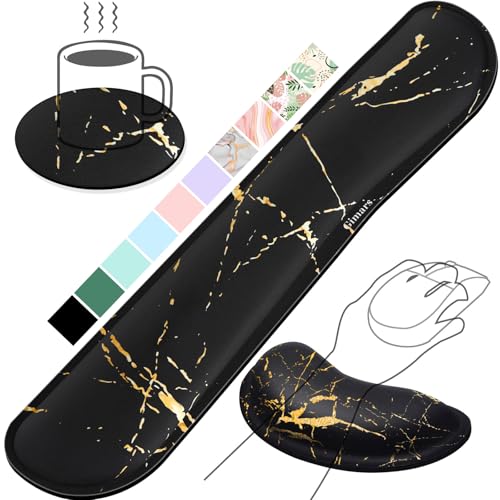
Badge: Best overall. If you want to solve the whole desk-surface problem in one order, this is the pick. The Gimars set pairs an enlarged keyboard wrist rest with a matching mouse wrist cushion, both filled with a gel memory foam blend and covered in a smooth, fine fabric. Because the two pieces were designed together, the heights match, the look matches, and you do not have to guess whether a separately bought rest will sit at the same level as your mouse support.
- Contents: keyboard wrist rest plus mouse wrist cushion
- Fill: gel memory foam
- Cover: smooth superfine fabric
- Use case: office, laptop, and desktop typing
The enlarged keyboard rest is the headline piece. It is long enough for full-size keyboards, so both wrists get support during typing rather than just the hand that happens to be centered. The gel component gives the foam a slightly cooler, denser feel than basic memory foam, and it recovers its shape between sessions instead of developing two permanent dents where your wrists sit. The mouse cushion uses the same fill in a smaller footprint, which keeps the whole setup feeling consistent when you move between keyboard and mouse all day.
Who it suits: anyone building a comfortable desk from scratch, anyone whose current setup is a bare desk, and laptop users who dock at a desk with an external keyboard. Because it is a set, it is also the easiest gift-style purchase in this guide — there is no sizing puzzle to solve beyond checking that the keyboard rest fits your desk depth. Pair it with a keyboard from our guide to the best ergonomic keyboards and you have the two biggest comfort pieces of a workstation sorted in one pass.
Strengths
- Matched heights and materials across keyboard and mouse support, so the setup feels like one system.
- Gel memory foam feels cooler and rebounds better than basic foam rests.
- Enlarged keyboard rest covers full-size keyboards, not just compact boards.
Trade-offs
- It is a wrist rest set, not a full desk mat, so your mouse still glides on the desk or a separate pad.
- The marbling colorway in this listing will not suit every desk aesthetic; check the listing for other finishes.
- Gel foam has a break-in period and can feel firm for the first few days.
Best for: buyers who want one matched purchase for keyboard and mouse wrist support. Not suited for: buyers who specifically want a giant mat covering the whole desk — look at the KTRIO or Logitech picks instead. Check price on Amazon
2. Logitech Studio Series Desk Mat — best desk mat for office setups
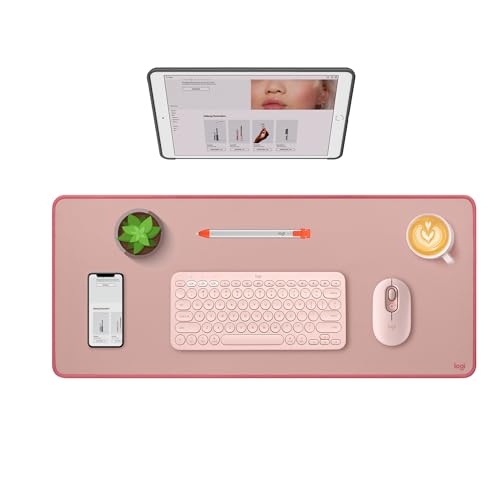
Badge: Best for tidy office desks. Logitech’s Studio Series desk mat is the polished, office-friendly end of this category: a 28 by 12 inch mat with a rubber anti-slip base, a spill-resistant surface, and a soft feel that makes a desk look finished rather than cluttered. It is a mat rather than a cushioned rest, so think of it as the foundation layer — it defines your working area, protects the desk, and gives your mouse a consistent glide surface.
- Size: 28 x 12 in (large)
- Base: anti-slip rubber
- Surface: spill-resistant, easy-gliding
- Color of verified listing: Darker Rose
The 28-inch width fits a full-size keyboard with room for a mouse beside it, and the 12-inch depth keeps it from swallowing a smaller desk. The surface has the fine, even texture that office mice and high-sensitivity gaming mice both track well on, and the spill resistance is genuinely useful if your desk doubles as a coffee station. Logitech sells this mat in several colors; the verified listing here is the Darker Rose version, so check the listing if you want a more neutral tone.
On its own, this mat adds a thin layer of padding but no real wrist cushioning — that is by design, and it is why this guide treats desk mats and wrist rests as a pair. Add the HyperX or Glorious rest below in front of your keyboard and you have the classic two-piece version of this setup: premium mat, dedicated rest. Readers refining a home-office desk may also like our roundup of angled keyboard risers, which pairs naturally with a mat-and-rest layout.
Strengths
- Clean, professional look with a spill-resistant, easy-wipe surface.
- Anti-slip rubber base stays put without adhesive.
- Size suits full-size keyboards while still fitting modest desks.
Trade-offs
- No built-in wrist cushioning; most people will want a separate rest.
- Shallower than gaming XXL mats, so very low-sensitivity mouse users may run out of room.
- Color availability varies by listing; confirm the shade before ordering.
Best for: office and home-office desks that need a tidy, protective foundation layer. Not suited for: anyone expecting cushioning from the mat alone. Check price on Amazon
3. KTRIO Large Gaming Mouse Pad — best desk mat for gaming
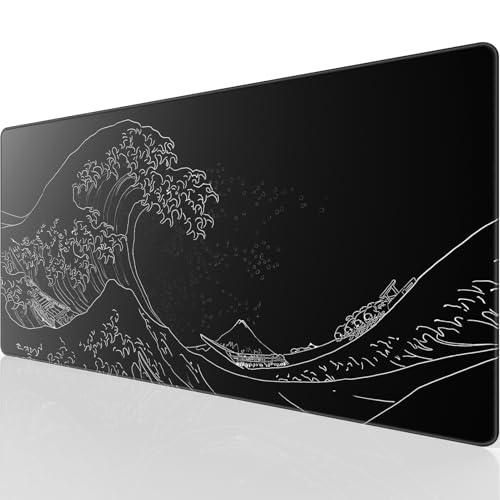
Badge: Best for gamers and big mouse movements. The KTRIO large desk mat stretches the format: 31.5 by 15.7 inches of smooth micro-weave cloth with stitched edges and a non-slip rubber base. That extra depth and width is exactly what low-sensitivity players need for wide mouse sweeps, and it also gives keyboard wrists a padded landing zone across the full front edge of the desk.
- Size: 31.5 x 15.7 in (XXL)
- Surface: smooth micro-weave cloth
- Edges: stitched, anti-fray
- Design of verified listing: Kanagawa Wave
Stitched edges matter more than they sound. Cheap large mats fray at the front edge precisely where your wrists and forearms rub all day; the KTRIO’s stitching keeps that edge flat and intact, which also makes the front of the mat comfortable enough that some typists use it without a separate rest for shorter sessions. The micro-weave surface is tuned for consistent mouse tracking rather than maximum speed, which suits mixed work-and-play use.
The Kanagawa Wave artwork on the verified listing is bold — great if your setup is a battlestation, less ideal for a minimalist office. KTRIO sells plainer versions under similar listings, so treat this pick as the size-and-surface recommendation and choose the finish that fits your room. If you prefer a pure cloth surface comparison, our guide to cloth gaming mouse pads covers the gaming side of this category in more depth.
Strengths
- Generous XXL footprint for keyboard, mouse, and wide gaming sweeps.
- Stitched edges resist the fraying that ruins cheaper large mats.
- Smooth micro-weave surface tracks consistently for work and play.
Trade-offs
- The artwork finish is a statement; not everyone wants it on a work desk.
- Cloth surface absorbs spills rather than repelling them, unlike the Logitech mat.
- Too deep for shallow desks — measure before ordering.
Best for: gamers and anyone who wants maximum padded coverage. Not suited for: small desks or buyers who need a spill-proof surface. Check price on Amazon

4. HyperX Wrist Rest (Full Size) — best keyboard wrist rest
Badge: Best dedicated keyboard rest. HyperX built its name on gaming gear, and its full-size wrist rest is the most typing-focused standalone rest in this guide: cooling gel layered with memory foam, an anti-slip underside, and a length made for full-size keyboards. If your desk mat situation is already sorted and only your keyboard hand needs help, this is the piece to add.
- Size class: full size (also sold in tenkeyless, compact, and mouse sizes)
- Fill: cooling gel plus memory foam
- Base: anti-slip
- Brand line: HyperX gaming accessories
The gel layer is the difference you feel first. Plain memory foam warms up under your wrists over a long session; the gel-infused build stays noticeably cooler and distributes pressure a little more evenly across the heel of the hand. The foam underneath still does the slow, contouring work memory foam is known for, so the rest feels supportive rather than squishy. The anti-slip base keeps it planted on both bare desks and cloth mats, which matters because a rest that migrates forward slowly changes your typing angle without you noticing.
Size discipline is the one thing to get right. This verified listing is the full-size version; HyperX sells the same rest in tenkeyless and compact lengths, and a rest that overhangs your keyboard on both sides is merely untidy, while one that is too short leaves your number-pad hand unsupported. Match the rest to your board — readers downsizing to a smaller board can browse our guide to 60 percent gaming keyboards and then pick the compact rest size to match.
Strengths
- Cooling gel layer stays comfortable through long sessions.
- Memory foam contours without bottoming out.
- Multiple size versions make it easy to match your keyboard.
Trade-offs
- Keyboard-only support; your mouse hand needs its own solution.
- Gaming branding and styling may not suit a formal office desk.
- Foam rests are spot-clean only, so spills are a hassle.
Best for: typists and gamers adding support to an existing mat or desk. Not suited for: buyers who want a one-piece mat-and-rest combo. Check price on Amazon

5. Glorious Full Size Keyboard Wrist Rest — best firm foam rest
Badge: Best for people who dislike squishy rests. Not everyone wants gel. The Glorious full-size rest uses a foam interior with a deliberately medium firmness, in an 18 by 4 by 1 inch profile with anti-fray stitching and a nonskid rubber base. It holds your wrists at a consistent height instead of letting them sink, which many touch-typists prefer because key reach stays predictable.
- Dimensions: 18 x 4 x 1 in
- Fill: foam interior, medium firmness
- Edges: anti-fray stitching
- Base: nonskid rubber
That one-inch profile is worth pausing on. A rest’s job is to bring the surface up to meet your hands so your wrists stay roughly straight while your fingers float over the keys — you rest the heels of your palms on it between bursts of typing rather than planting your wrists and reaching. The Glorious rest’s firm foam makes that floating posture easier to learn than a deep, soft gel rest, because your hands do not sink and tilt. The stitched edges and rubber base give it the same stay-put, no-fray practicality as the better desk mats in this guide.
Glorious also sells compact and tenkeyless lengths, plus a wooden version for people who want a hard rest; the verified pick here is the full-size foam model, which is the most versatile of the line. It pairs especially well with the low-profile mechanical boards covered in our guide to 75 percent mechanical keyboards — just step down to the matching rest length if your board is shorter than full size.
Strengths
- Medium-firm foam keeps wrist height consistent and predictable.
- Full 18-inch length suits full-size keyboards.
- Stitched edges and nonskid base are built for daily use.
Trade-offs
- Firm feel will disappoint anyone expecting a soft gel cushion.
- One-inch height can be too tall for very low-profile keyboards.
- Foam-only fill does not have the cool touch of gel models.
Best for: touch-typists who want stable, repeatable wrist height. Not suited for: buyers who want the softest possible cushion. Check price on Amazon

6. MROCO Ergonomic Mouse Pad with Gel Wrist Rest — best mouse-side support
Badge: Best for the mouse hand. Keyboards get most of the attention in this category, but plenty of people feel desk fatigue in the mouse hand first. The MROCO pad builds the rest into the pad itself: a 9.4 by 8.1 inch mouse pad with a raised gel cushion along the front edge, a smooth Lycra surface, and a non-slip PU base. Your wrist sits on the gel while your hand moves the mouse above it, so support and tracking surface always stay in the same relationship.
- Size: 9.4 x 8.1 in
- Rest: built-in gel cushion
- Surface: smooth Lycra
- Base: non-slip PU
The integrated design is the appeal. There is nothing to align, nothing to knock out of place, and the whole thing is small enough for laptop bags, hot desks, and the cramped side of a dual-monitor setup. The gel cushion has a cooling feel similar in spirit to the HyperX rest, and the Lycra top is the classic low-friction fabric that office mice glide on happily. MROCO sells this pad in many colors and patterns; the verified listing is the black version.
Be honest about the limits, though: this is a mouse solution only. It will not help your keyboard wrist, and its compact tracking area frustrates low-sensitivity gamers. Treat it as the finishing piece — pair it with a keyboard rest from this guide, or compare it against the arm-support style options in our roundup of armrest mouse pads if you want support that extends to the forearm.
Strengths
- Built-in gel rest keeps support and pad perfectly aligned.
- Compact size fits small desks and travels well.
- Smooth Lycra surface and non-slip base are proven, simple tech.
Trade-offs
- Supports the mouse hand only; keyboard wrist still needs a rest.
- Small tracking area is not enough for low-sensitivity gaming.
- Gel pads can eventually split at the seam after heavy long-term use.
Best for: office workers whose mouse hand tires first. Not suited for: gamers or anyone wanting full-desk coverage. Check price on Amazon

7. DeltaHub Carpio 2.0 — best gliding wrist rest
Badge: Best for active mouse users. Every other pick in this guide stays still. The Carpio 2.0 does the opposite: it is a sculpted wrist rest on gliding feet that travels with your mouse hand across the desk, so your wrist keeps its support at the far edges of a big monitor setup instead of only in one home position. This verified listing is the large, right-handed, black version; left-handed and smaller versions exist under the same product family.
- Type: gliding wrist rest for mouse use
- Version: large, right-handed
- Design: sculpted cradle with easy-glide base
- Use case: office, laptop, and gaming mouse work
The idea takes a day to get used to and then feels obvious. With a fixed rest, wide mouse movements pull your wrist off the cushion or force you to pivot from the wrist itself. With the Carpio, the support moves with you, so the motion comes from the arm and shoulder in a smoother arc. It works on hard desks and on top of desk mats, and because it cradles the heel of the hand rather than the wrist crease, it avoids pressing on the most sensitive part of the wrist.
It is also the most specialized pick here: it does nothing for your keyboard hand, the gliding feel is strange for the first hours, and precision artists who plant their wrist as a pivot may actively dislike it. But for spreadsheet navigators, video editors, and anyone sweeping across an ultrawide all day, it solves a problem no fixed rest can. DeltaHub also sells a gaming version; the standard 2.0 in this listing is the better all-round choice.
Strengths
- Support travels with your hand across the whole desk.
- Cradle shape supports the palm heel rather than the wrist crease.
- Works on bare desks and desk mats alike.
Trade-offs
- Mouse-hand only, and handedness and size must be chosen correctly.
- Gliding motion has a real adjustment period.
- Premium positioning compared with simple foam rests.
Best for: ultrawide and multi-monitor users who move the mouse a long way. Not suited for: buyers who want one static rest for both hands. Check price on Amazon
Desk mat, wrist rest, or both: what each piece actually does
It helps to be precise about what you are buying, because the product names in this category blur together. A desk mat is a surface product. It protects the desk from scratches, spills, and the slow polishing effect of a mouse moving over the same patch for years. It gives the mouse sensor a uniform texture to track on, which can feel more consistent than bare wood, laminate, or glass. It also defines a visual zone: keyboard here, mouse there, everything else off the mat. What a standard desk mat does not do is meaningfully cushion your wrists — even a 3 or 4 millimeter mat is a surface, not a support.
A wrist rest is a support product. Its job is to fill the gap between the desk and the heel of your hand so that your wrist is not resting on a hard edge or hanging at an angle while your fingers work. The support should be under the palm heel, it should roughly match your keyboard’s front height, and it should be soft enough to spread pressure without being so soft that your hand sinks and tilts. A wrist rest does nothing for mouse tracking, desk protection, or the mouse hand unless you buy a mouse-specific model — which is why the category splits into keyboard rests, mouse rests, and matched sets.
The combination works because the two products solve adjacent halves of the same problem, and because a mat gives rests a consistent surface to sit on. On a bare desk, a rest can skate on dust or stick unevenly; on a mat, the rubber base grips the same texture every day, and the whole keyboard zone feels like one deliberate workstation instead of three objects that happen to be near each other. If budget forces a choice, buy for the symptom: hard-edge discomfort means the rest first, while tracking inconsistency, desk damage, or a chaotic-looking setup means the mat first — then add the other piece later, since both are sold in standard sizes that pair easily.
Three ready-made combinations from this guide
The one-order setup: the Gimars set on its own, optionally over any plain mat you already own. This is the lowest-effort route and the one we recommend to anyone starting from a bare desk, because keyboard and mouse support arrive matched in height and feel.
The office setup: the Logitech Studio Series mat with the Glorious full-size rest in front of the keyboard and the MROCO pad under the mouse. This trio looks professional, wipes clean, and supports both hands with a firm, consistent geometry that suits long writing and spreadsheet days.
The gaming setup: the KTRIO XXL mat as the base, the HyperX full-size rest for keyboard sessions, and the Carpio 2.0 for mouse-heavy games and editing work. The XXL surface swallows wide mouse arcs, the gel rest stays cool through long sessions, and the gliding rest keeps support under the mouse hand wherever it roams. Players who split time between keyboard-heavy and mouse-heavy titles will feel the difference in this combination fastest.
Comparison table
| Product | What it covers | Fill / surface | Choose it if… |
|---|---|---|---|
| Gimars Gel Memory Foam Set | Keyboard + mouse wrists | Gel memory foam | You want one matched set and no measuring |
| Logitech Studio Series Desk Mat | Full keyboard + mouse area | Spill-resistant mat, rubber base | Your office desk needs a tidy foundation layer |
| KTRIO Large Gaming Mouse Pad | XXL keyboard + mouse area | Micro-weave cloth, stitched edges | You game with wide, low-sensitivity mouse sweeps |
| HyperX Wrist Rest (Full Size) | Keyboard wrist | Cooling gel + memory foam | Your mat is sorted and only typing needs support |
| Glorious Full Size Wrist Rest | Keyboard wrist | Medium-firm foam, 1 in profile | You dislike squishy rests and want stable height |
| MROCO Mouse Pad with Gel Rest | Mouse wrist | Built-in gel cushion, Lycra top | Your mouse hand tires first and space is tight |
| DeltaHub Carpio 2.0 | Mouse wrist, moving | Sculpted gliding cradle | You sweep across large or multiple monitors |
How to Choose the Best Deskmats Wrist Rests for Your Desk
Start with coverage. Measure the width of your keyboard and add the mouse zone you actually use. Full-size keyboards are roughly 17 to 18 inches wide; a 28-inch mat like the Logitech covers that plus a reasonable mouse area, while a 31.5-inch mat like the KTRIO adds room for bigger movements or a phone and notebook at the side. Depth matters just as much: mats between 12 and 16 inches deep support the keyboard and leave the front edge under your wrists, which is where a mat quietly does comfort work even without a cushion.
Then decide how support should feel. Gel-infused foam, as in the Gimars set and the HyperX rest, feels cooler and slightly denser, and it springs back quickly when you lift your hands. Plain memory foam feels warmer and slower, molding to you over the first minutes of a session. Firm foam, like the Glorious rest, barely compresses at all and keeps a constant geometry. None of these is objectively best; they suit different hands and habits. If you rest heavily and type for hours, gel or firm foam holds up better. If you type lightly and want a plush feel, softer foam is pleasant — just expect it to compress more over the months.
Check the height against your keyboard. This is the most skipped step and the most important one. Sit at your desk, put your hands over the keyboard in typing position, and look at your wrists from the side: they should be roughly straight, not bent up toward the ceiling or drooping down to the desk. A rest that is too tall for a low-profile keyboard bends the wrist upward; too short for a tall mechanical board and it does nothing. As a rule of thumb, the top of the rest should sit close to the height of your keyboard’s front edge. If you use a tall mechanical keyboard, a one-inch rest like the Glorious is appropriate; with a slim laptop-style keyboard, a lower gel rest is the safer match.
Think about the base and the edges. A rubber or PU non-slip base is non-negotiable — a rest that slides is worse than none. Stitched edges on cloth mats and rests prevent the front edge from curling and fraying where your arms rub. If your desk sees coffee, a spill-resistant mat surface like the Logitech’s is worth prioritizing over cloth. And if you work on glass or very smooth desks, confirm the base material grips; most rubber bases do, but it is worth a glance at the listing details.
Finally, match the solution to the hand that needs it. Typists need keyboard-side support; mouse-heavy workers — designers, editors, spreadsheet users — often need mouse-side support more. Some people need both, which is why matched sets exist. Buy for the hand that actually gets tired instead of copying someone else’s setup wholesale, and consider a gliding rest if your mouse travel is measured in feet rather than inches.
How to set up and care for your mat and rest
Placement: position the keyboard rest directly in front of the keyboard, close enough that the heels of your palms land on it when your fingers reach the home row, with no gap that tempts you to stretch. The rest is a parking spot for pauses and a light support while typing — avoid pressing your wrists down hard into it while actively reaching for keys, because sustained pressure plus reaching is the combination that makes wrists unhappy. For mouse rests, the cushion should sit under the heel of the palm, not under the wrist crease itself.
Posture basics: a wrist rest works best as part of a simple ergonomic picture — chair height set so your elbows sit at roughly desk height, keyboard flat or slightly negatively tilted rather than propped up on its rear feet, and regular short breaks to move your hands. The rest cannot fix a desk that is too high or a chair that is too low, so adjust those first and let the rest fine-tune the result.
Cleaning: cloth mats can usually be hand-washed in cool water with a drop of mild detergent, rinsed, and air-dried flat — never wring a rubber-backed mat hard, and keep it out of direct heat. Spill-resistant mats like the Logitech wipe clean with a damp cloth. Foam and gel rests are spot-clean only: a damp cloth with mild soap on the cover, then air-dry completely before use. Keep all of these away from harsh solvents, which attack rubber bases and foam alike. A quick weekly shake-out and wipe keeps the surface glide consistent and stops dust from grinding into cloth surfaces.
How long desk mats and wrist rests last
Buyers often ask whether these are one-time purchases. Realistically, a good cloth desk mat lasts several years: the rubber base stays grippy, and the main wear signs are a polished glide patch where the mouse lives and some fading on printed designs. Stitched edges, as on the KTRIO mat and the Glorious rest, significantly delay the fraying that usually ends a mat’s life. Spill-resistant coated mats age even more gracefully because they can be wiped instead of washed, and washing is what slowly breaks down rubber backings.
Wrist rests have a shorter comfort life because foam is a consumable material. Memory foam and gel blends gradually take a set where your hands rest most; the rest still works, but the plush first-month feel fades over one to two years of daily use. Firm foam ages slowest of all, which is another point in the Glorious rest’s favor for heavy users. A simple rotation habit — flipping a reversible rest end-for-end every few weeks, if the design allows — evens out the wear. When a gel cushion starts to feel lumpy or a foam rest no longer springs back overnight, replacement is cheap and the difference is immediately noticeable, so treat rests as refreshable comfort gear rather than permanent furniture.
Common mistakes to avoid
- Buying a rest that is too tall. More cushion is not more comfort; excess height bends the wrist upward and can feel worse than a bare desk within a week.
- Planting your wrists and reaching. Resting the palm heels lightly is fine; anchoring your wrists and stretching your fingers to distant keys concentrates strain instead of relieving it.
- Guessing the size. A tenkeyless rest under a full-size keyboard leaves the number-pad hand unsupported. Measure your keyboard, then buy.
- Expecting a mat alone to cushion. Thin desk mats protect and smooth the surface; real cushioning comes from a rest. Plan the pair.
- Ignoring the base. A rest without a grippy base creeps forward all day and quietly ruins your typing angle.
- Treating comfort gear as a cure. These products improve comfort at the desk; persistent pain deserves a proper workstation assessment and professional advice, not a bigger cushion.
Final recommendation
For most people, the Gimars gel memory foam set is the easiest right answer: matched keyboard and mouse support, a cool and resilient fill, and no compatibility guessing. If your priority is a beautiful, tidy desk foundation, start with the Logitech Studio Series mat and add the HyperX rest in front of your keyboard. Gamers should build around the KTRIO XXL mat, firm-foam fans should go straight to the Glorious rest, mouse-hand sufferers should add the MROCO pad or the Carpio 2.0 depending on how far their mouse travels, and everyone should measure their keyboard and check rest height before ordering. Get those two numbers right and almost any pick on this list will feel like an upgrade within a day.
Matching the setup to how you actually work: four desk scenarios
The picks above cover the main materials and shapes, but the right combination depends less on the product list than on the shape of your working day. A rest that feels perfect during a two-hour writing session can feel wrong during a full day of spreadsheet work, because the two activities load your hands differently. Work through the scenario closest to your own routine before you settle on a pairing.
The all-day typist
If most of your day is keyboard work with short mouse trips, your keyboard rest does nearly all the supporting and your mouse rest is a minor player. Prioritise a keyboard rest whose height matches your keyboard’s front edge, and keep the mouse side simple: a wide mat plus a small gel mouse rest is enough. The mistake typists make is buying a tall, plush keyboard rest for a slim keyboard, which bends the wrist upward instead of keeping it level. Check the height relationship first, the material second.
The mouse-heavy editor or designer
Photo editing, CAD work, and video timelines keep one hand on the mouse for hours, often with slow, precise movements. Here the mat matters as much as the rest: a smooth, consistent surface keeps small movements predictable, and a low-profile mouse rest supports the heel of the hand without lifting the wrist so high that fine control suffers. If you work this way, a gliding-style rest or a modest gel pad usually beats a tall foam block, and a larger mat gives your forearm a consistent surface when you slide back from the desk edge.
The gamer who shares a desk with work
A desk that hosts work by day and games by night has conflicting needs. Work favours support and a tidy surface; fast-paced games favour a free, low-friction mouse area and often no mouse rest at all, because a rest can catch during wide swipes. The practical compromise is a large mat covering both zones, a keyboard rest you keep in place for both activities, and a mouse rest you can slide aside in seconds. Removable, separate pieces beat fixed sets here, because the setup has to change character twice a day.
The laptop user with an external keyboard
Laptop keyboards sit low and flat, so people who dock a laptop and add an external keyboard often inherit a height mismatch they never planned. Measure from the desk to the top of your keyboard’s front row area rather than guessing from product photos. Slim keyboards pair with low gel rests; tall mechanical boards pair with firmer, higher rests. If you also raise the laptop on a stand, check that your chair height and desk edge still let your forearms rest roughly level, because a wrist rest cannot fix a chair that sits too low.
A two-minute self-check before you buy
Sit at your desk in your normal posture and look at your hands. If your wrists bend upward to reach the keys, your rest needs to be lower or your keyboard flatter. If the heel of your hand presses into the desk edge, a rest will help immediately. If your mouse hand drifts off the side of a small pad during normal work, size up the mat before you upgrade anything else. These three observations, made honestly, predict satisfaction better than any material description.
Frequently asked questions
Do I need both a desk mat and a wrist rest?
Not always, but they do different jobs. A desk mat gives you a consistent, protective surface for keyboard and mouse; a wrist rest cushions the contact point under your hands. If your desk is hard and your wrists rest on its edge all day, the rest matters more. If your mouse tracking is inconsistent or your desk surface is precious, the mat matters more. Many people end up with both, which is why this guide covers matched sets and pairings.
Should a wrist rest be gel or foam?
Gel-infused rests feel cooler and spring back faster, suiting people who rest heavily or work in warm rooms. Plain memory foam feels warmer and molds slowly to your hands. Firm foam holds a constant height and suits touch-typists who dislike any squish. There is no universal winner — match the fill to how the options above are described and to how you already know your hands behave during long sessions.
How thick should a keyboard wrist rest be?
Thick enough that the top of the rest sits near the height of your keyboard’s front edge, keeping your wrist straight rather than bent. For tall mechanical keyboards that often means around an inch; for slim low-profile keyboards, a lower gel rest is usually better. The Glorious rest in this guide is a true one-inch profile, while the gel options sit lower and compress more under weight.
Can a wrist rest help with wrist discomfort?
A well-matched rest can make long desk sessions more comfortable by removing the hard desk edge and supporting a neutral wrist position, and that is the honest extent of the claim. These are comfort accessories, not medical treatments. If you have ongoing pain, numbness, or tingling, get your workstation assessed and seek professional advice rather than relying on any accessory.
How do I clean a desk mat without ruining it?
For cloth mats, hand-wash in cool water with mild detergent, rinse well, and air-dry flat away from heat. Spill-resistant mats need only a wipe with a damp cloth. Foam and gel rests should be spot-cleaned only. Avoid harsh chemicals and machine heat, both of which degrade rubber bases and foam fills.
What size desk mat should I buy for a full-size keyboard?
Start at 28 inches wide and 12 inches deep, which covers a full-size keyboard plus a normal mouse zone — that is the Logitech mat’s footprint. If you use low mouse sensitivity, keep a notebook on the desk, or simply like the full-coverage look, step up to an XXL mat around 31.5 by 15.7 inches like the KTRIO. Always measure your desk depth first; an overhanging mat curls and annoys.
How long should I use a wrist rest each day?
A wrist rest is support for pauses and light contact, not a shelf to lean on continuously. Rest the heels of your hands on it while you think, read, or pause between bursts of typing, and keep your hands floating lightly while you actually type. Pressing down into the rest all day compresses the soft tissue on the underside of the wrist, which defeats the comfort purpose. If you notice you are leaning hard, treat that as a signal to check your chair height, desk height, and keyboard position rather than buying a thicker rest.
Why does my new desk mat curl at the edges?
Mats are shipped rolled, and the rubber base remembers the roll for a while. Lay the mat flat with the curled edge weighted under a few heavy books for a day or two, or roll it gently in the opposite direction before laying it out. Heat speeds the process slightly, so a warm room helps, but keep mats away from radiators and direct heat sources that can damage the base. A mat that still curls after several days flat is usually too large for the space and is catching on a monitor stand or desk edge, so check the fit as well.
Should my desk mat and wrist rest come from the same brand or set?
There is no functional reason they must match. Mats and rests touch your hands in different places and wear out on different schedules, so buying each on its own merits usually beats buying a matched set for its looks. The two checks that matter are height and footprint: the rest must suit your keyboard’s height, and the mat must be large enough that the rest sits fully on it rather than half on the mat and half on the desk, which creates a rocking edge you will feel all day. Beyond those two checks, mix freely — a gel rest on a cloth mat from another maker is a perfectly sensible desk, and replacing whichever piece wears out first, independently, is one of the quiet advantages of separates.