Where to buy
Check the latest price, availability and delivery on Amazon. Orders are placed on Amazon. We may earn a commission from qualifying purchases.
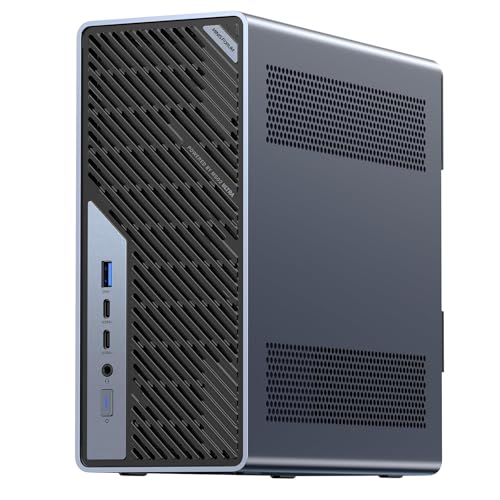
- Best overall workstation: Minisforum MS-02 Ultra Mini Workstation, Core Ultra 9 285HX, 32GB, 1TB — Check on Amazon
- GMKtec EVO-X2, Ryzen AI Max+ 395, 64GB Unified Memory, 1TB — Check on Amazon
- Skytech King 95, Ryzen 7 9800X3D, RTX 5070 Ti, 32GB, 1TB — Check on Amazon
- iBUYPOWER Y40 PRO, Ryzen 9 7900X, RTX 5070 Ti, 32GB, 2TB — Check on Amazon
See 2 more Amazon options
- Lenovo Legion T7, Core Ultra 7 265KF, RTX 5080, 32GB, 1TB — Check on Amazon
- Apple Mac mini M4 Pro, 24GB Unified Memory, 512GB — Check on Amazon
Read the full guide ↓
Disclosure: As an Amazon Associate, reviewstook.com earns from qualifying purchases. Links to Amazon on this page are affiliate links; they cost you nothing extra. Listing details such as price and availability change often, so check the current Amazon listing before you buy.
This guide exists because of a confusion that costs people money every week. A workstation that can display a 1440p desktop is not a workstation that can render games at 1440p. Every machine below will happily drive a 2560×1440 monitor — that is the easy part, and integrated graphics have done it for years. Rendering a modern game at that resolution is a different demand entirely: 1440p is roughly 3.69 million pixels per frame against 1080p’s 2.07 million, about 78 percent more work on every single frame, before shadows, reflections and texture loads are counted. So this guide grades all six picks on the rendering question, prints a verdict for each one, and refuses to blur the two meanings of “1440p” anywhere on the page.
The verdicts, up front. Three picks — the two RTX 5070 Ti towers and the RTX 5080 tower — render demanding games natively at 1440p; for them the resolution is a floor, not a stretch. The unified-memory mini renders lighter titles natively at reduced settings and upscales the rest. The Mac mini is a media machine that displays 1440p beautifully and games there selectively. And the guide’s most workstation-shaped machine, the ECC platform mini, is graded Display only: it will run your 1440p monitors all day and render almost nothing modern at that resolution until you add a card to its slot. That spread is not a defect in the list. It is the honest shape of this budget, where workstation traits and gaming traits peak on different hardware — and the reviews below grade each machine against the job it is actually for.
In this guide
Quick Picks
Short on time, or comparing several options at once? Each row names a buyer and the machine that suits them, with the 1440p verdict stated in the open.
| Buyer type | Pick | Why it stands out — and its 1440p verdict | Link |
|---|---|---|---|
| Best overall workstation | Minisforum MS-02 Ultra, Core Ultra 9 285HX, 32GB, 1TB | ECC memory to 256GB, dual 25GbE, PCIe 5.0 x16 slot. Verdict: Display only — integrated graphics | Check on Amazon |
| Best for local AI and large models | GMKtec EVO-X2, Ryzen AI Max+ 395, 64GB, 1TB | 64GB unified memory the GPU can address almost in full. Verdict: Upscaled — native only in lighter titles | Check on Amazon |
| Best GPU render node | Skytech King 95, Ryzen 7 9800X3D, RTX 5070 Ti | 5070 Ti 16GB with a published 850W Gold PSU. Verdict: Native 1440p | Check on Amazon |
| Best multi-core value | iBUYPOWER Y40 PRO, Ryzen 9 7900X, RTX 5070 Ti | 12 cores plus 5070 Ti at a value position in this tier — check price on Amazon. Verdict: Native 1440p | Check on Amazon |
| Best GPU compute, deal only | Lenovo Legion T7, Core Ultra 7 265KF, RTX 5080 | RTX 5080 that fits this budget only when its live listing is in tier — check the current price on Amazon. Verdict: Native outright — a native-4K card | Check on Amazon |
| Best for video and media work | Apple Mac mini M4 Pro, 24GB, 512GB | Hardware ProRes engines, up to three displays. Verdict: Display first — gaming is selective | Check on Amazon |
How These Picks Were Chosen
The six machines are the verified set from our workstation research at this budget: real Amazon listings with checked ASINs — check price on Amazon for the current figure on each one. Two picks sit in this tier only when their live listing is positioned in budget and say so wherever they appear — the Legion T7 normally sits in a higher tier and belongs to the under-$3,000 guide at that positioning, and the King 95 belongs here only when its current price on Amazon fits this budget. Nothing was added to this variant, and no specification was borrowed from any other guide.
What this variant adds is a rendering audit, applied to the documented hardware of each pick and to nothing else. For every machine we asked three questions. First: can its graphics hardware render current games at 2560×1440 with settings a player would accept — the standard behind the Native verdict. Second: where it cannot, does it carry a documented upscaling path, and what does that path honestly deliver — the Upscaled verdict, which means the game renders lower, typically at 1080p, and is reconstructed to the panel. Third: is the machine’s 1440p story purely about outputs — the Display only verdict, which is a statement about monitors, not an insult; two of the finest work machines in this guide carry it. Upscaling is credited only where the hardware supports it. DLSS belongs to NVIDIA’s Tensor-core RTX cards and appears in this guide attached to the three towers that have them, with its published internal resolutions stated. The Radeon mini gets FSR credited generically, with no invented figures. The Intel-integrated platform and the Mac get no upscaler credit at all, because none is documented for them in our research.
The workstation grading from the base research is carried unchanged. One pick supports ECC memory and we claim it for that pick only. The three towers are render nodes, not certified workstations — no ISV certification exists anywhere in this guide, and the certified lines were verified above this budget. The caveats from the base research are exactly as documented; the 1440p lens re-grades the machines, it does not re-spec them.
Rendering Is Not Displaying: The 1440p Test
Keep one piece of arithmetic in mind while reading the reviews. A 1080p frame is 1920×1080 — about 2.07 million pixels. A 1440p frame is 2560×1440 — about 3.69 million. The jump between them is not a quarter more work, as the “1440 is 1.33× 1080” shorthand suggests when people compare only the vertical number; it is roughly 78 percent more pixels shaded, textured and lit on every frame. A graphics engine that cruises at 1080p can be brought to its knees by the same scene at 1440p, which is why the verdicts below are graded per machine rather than assumed from the monitor each one can drive.
Where a pick carries an RTX card, DLSS changes the arithmetic honestly and we say how. DLSS renders below the panel resolution and reconstructs upward. At a 1440p output, NVIDIA’s published scaling puts DLSS Quality at an internal render of about 1707×960, Balanced at about 1485×836, and Performance at about 1280×720 — a 720p-class render wearing a 1440p output. Those modes are legitimate tools and the towers below use them well, but they are headroom and insurance, not native rendering, and this guide never lets the word “1440p” quietly mean a 960p render. At 4K output, DLSS Quality renders about 2560×1440 internally — which is why the strongest tower here treats today’s 1440p as its floor and tomorrow’s 4K panel as a Quality-mode proposition. FSR, on the one Radeon pick, is credited as the same class of tool without figures: our base research documents no internal resolutions for it, so none are printed. Any guide that quotes you an upscaler’s numbers should be able to say whose numbers they are; the ones on this page are NVIDIA’s published DLSS figures, attached only to DLSS hardware.
One more distinction runs through the reviews: VRAM. Upscaling reduces the render load, but it cannot rebuild a texture budget. The towers’ 16GB cards hold 1440p texture sets comfortably; the unified-memory mini shares its pool between system and graphics, which is a capacity advantage and a bandwidth reality at once; and the platform mini’s integrated graphics were never designed for this question at all. Each review grades its machine on the hardware it actually has.
The 6 Best Workstation PCs for 1440p Gaming Under $2,500
Minisforum MS-02 Ultra Mini Workstation — Core Ultra 9 285HX, 32GB, 1TB
Who it suits: Professionals whose work is infrastructure-shaped — virtualization, shared storage, long-running compute — and who want the one genuinely workstation-built platform in this tier, with gaming as a later, slot-shaped possibility.
1440p verdict: Display only. Say it plainly, because this machine leads the guide and the verdict could otherwise mislead: out of the box, the MS-02 Ultra renders games on integrated Intel graphics, and integrated graphics do not render modern games at 1440p. The lightest older titles at low settings are the honest ceiling of the silicon as shipped. What it does superbly is everything around the panel: the maker’s listing specifies four video outputs across USB4 v2 80Gbps ports, a further USB4 port and HDMI 2.1, so a multi-monitor 1440p desk — the working environment most buyers of this machine actually mean by “1440p” — is fully supported, all day, in silence-adjacent mini-PC form. DLSS is not available to this pick: there are no Tensor cores here, and no upscaler figure is claimed for it anywhere in this guide.
The gaming route this machine does offer is structural, and it is real: a PCIe 5.0 x16 slot that accepts a low-profile, dual-slot graphics card later. Fit one and the verdict changes with the card — within two hard limits the base research documents. The internal power supply is 350W, which caps the class of card the machine can feed, and reviewer coverage notes the CPU’s power limit steps down with a discrete card installed. This is an expansion path for a workstation card or a modest gaming card, not a route to a flagship GPU, and the review grades the machine as shipped, not as hypothetically upgraded.
Why it leads a workstation guide despite the verdict: it is the only machine here built like a workstation from the motherboard out. The Core Ultra 9 285HX brings 24 cores and 24 threads up to 5.5GHz. Four DDR5 SO-DIMM slots take memory to 256GB, and the platform supports ECC memory — claimed for this machine only, because its documentation supports the claim. Storage starts at 1TB across four M.2 2280 positions, two of them on the networking card. That networking is dual 25GbE SFP+ on an Intel E810 controller, plus 10GbE and 2.5GbE. It runs Windows 11 Pro — check price on Amazon for the current figure. The documented limitations ride along unchanged: the power supply fan is audible under sustained load, and owner reports describe Linux and Proxmox driver and PCIe passthrough quirks, with Windows and Hyper-V the smoother path.
- ECC memory support across four SO-DIMM slots, up to 256GB — this guide’s only ECC claim.
- Dual 25GbE SFP+ plus 10GbE and 2.5GbE; four documented video outputs for a 1440p desk.
- PCIe 5.0 x16 slot: the upgrade path that can change this pick’s gaming verdict later.
Honest limitation: As shipped, it is a Display-only gaming machine; the card you add later is limited to low-profile designs under a 350W ceiling, and the PSU fan is audible under sustained load.
Choose it if your work rewards memory integrity, capacity and networking, and your gaming is light or planned around a future low-profile card. Skip it if native 1440p gaming is the purchase — the towers below exist for exactly that.

GMKtec EVO-X2 — Ryzen AI Max+ 395, 64GB Unified Memory, 1TB
Who it suits: AI developers, researchers and technical artists whose models overflow a 16GB graphics card — and who also play games on the same desk, at settings this silicon can honestly hold.
1440p verdict: Upscaled. The Radeon 8060S — 40 RDNA 3.5 compute units fed by a 64GB unified memory pool — is the strongest integrated graphics in this guide by a wide margin, and its 1440p story is a graded one. Lighter and older titles, and esports-style games at reduced settings, render natively at 1440p. Demanding modern titles render at 1080p and are upscaled to the panel with FSR, which is credited here generically and without figures, because our base research documents none. DLSS is denied explicitly: this is Radeon hardware with no Tensor cores, and any listing or guide that attaches DLSS to this machine is wrong. The listing advertises quad-display output, so driving the 1440p panel itself — alongside others — was never the question; the render load is.
The memory architecture cuts both ways for gaming, and the review says both. The pool is the advantage: AMD’s guidance lets the graphics engine address up to 48GB of the 64GB, so texture sets and game worlds that would strangle a small discrete card simply fit. The reality is bandwidth and shared contention: the same pool feeds a 16-core CPU, and integrated graphics at their best remain a class below a 16GB RTX card for raw 1440p throughput. That is why the verdict is Upscaled rather than Native, and why buyers whose primary purpose is native 1440p gaming should read the tower reviews first.
The workstation case is the base research’s case, unchanged. The Ryzen AI Max+ 395 is a genuine 16-core, 32-thread workstation-class part; the 64GB pool is precisely what large local AI models ask for — check price on Amazon for the current listing. Around the core: a 1TB PCIe 4.0 SSD, Wi-Fi 7 and USB4. The limitations are architectural and permanent: the memory is soldered LPDDR5X, so 64GB is the lifetime specification; the 128GB configuration of this same machine sits in a higher tier, far outside this budget; there is no PCIe slot; and the single 1TB drive makes fast external or network storage a planned second purchase for media-heavy work.
- 64GB unified pool; graphics can address up to 48GB — texture and model capacity no 16GB card matches.
- The strongest integrated graphics here: native 1440p in lighter titles, FSR upscaling for the rest.
- 16-core / 32-thread CPU half makes it a complete workstation, not just an AI box.
Honest limitation: Demanding games at 1440p are an upscaled experience, the memory can never be upgraded, and there is no PCIe slot.
Choose it if local AI capacity is the purchase and 1440p gaming is a strong second life for the same machine. Skip it if native 1440p gaming is the point — that is the towers’ job, in the same tier.

Skytech King 95 — Ryzen 7 9800X3D, RTX 5070 Ti, 32GB, 1TB
Who it suits: Players and creators who want one tower that renders games natively at 1440p today and does GPU render work with published internals — and who will check the current price on Amazon and buy only when the live listing fits this budget.
1440p verdict: Native. The RTX 5070 Ti with 16GB of GDDR7 is a genuine native-1440p card: current games render at the full 2560×1440 on this hardware without reconstruction doing the heavy lifting. DLSS is present as what it should be on a card of this class — headroom. If a future title or a high-refresh panel asks for more, NVIDIA’s published figures put DLSS Quality at a 1440p output rendering about 1707×960 internally, Balanced about 1485×836, and Performance about 1280×720; the honest reading is that Quality buys smoothness at a modest internal cost, while Performance is a 720p-class render and should be chosen knowingly. The same card also frames the next panel honestly: at a 4K output, DLSS Quality renders about 2560×1440 — today’s native resolution becomes tomorrow’s upscaled one, which is a reasonable definition of headroom.
The workstation grading from the base research applies in full, because this is a gaming tower graded as a render node. Skytech publishes what most builders hide — an 850W Gold ATX 3 power supply, named in the listing — alongside 32GB of DDR5-5600 and a 360mm liquid cooler; a named PSU defines the machine’s future, since the next GPU upgrade is a card swap rather than a rebuild. The processor gets the honest paragraph it got in the base guide: the Ryzen 7 9800X3D’s large cache is a gaming trait that does little for render or compile queues, and CPU-bound buyers should read the Y40 PRO review before this one. The budget condition is load-bearing: this exact configuration belongs in this guide only when its current price on Amazon fits the under-$2,500 budget, so check price on Amazon before treating it as an in-tier pick.
The class limitations are stated once and stand: no ECC memory, no ISV-certified driver program, Windows 11 Home rather than Pro; the graphics card brand may vary under Skytech’s listing note, so the contracted spec is the 5070 Ti model and its 16GB, not a board partner; the King 95 name covers a configuration family, so match the model number — ST-KING95-1671-W-AM — at checkout; and the 1TB drive is the guide’s joint-smallest, a cheap internal fix in a standard tower rather than a flaw.
- Native 1440p rendering from a 16GB RTX 5070 Ti, with DLSS held in reserve as documented headroom.
- Published 850W Gold ATX 3 PSU and 360mm liquid cooling — upgrade math you can do before buying.
- Nothing is soldered into place: memory, storage and the graphics card can all be replaced or upgraded in the case.
Honest limitation: A render node, not a certified workstation — and it belongs in this guide only when the current price on Amazon fits this budget; check price on Amazon before buying.
Choose it if native 1440p gaming and GPU rendering share your day, you want documented internals, and the current price on Amazon fits this budget. Skip it if the live listing sits above this tier, or your loads are CPU-bound — the twelve-core pick below is the better fit there.

iBUYPOWER Y40 PRO — Ryzen 9 7900X, RTX 5070 Ti, 32GB, 2TB
Who it suits: Generalist professionals — developers, editors, freelancers — who game at 1440p on the same machine they compile and render on, and who buy on deal cycles.
1440p verdict: Native. The same RTX 5070 Ti 16GB as the King 95 earns the same verdict: demanding games render at the full panel resolution on this card, and DLSS stands behind it as documented headroom — Quality at a 1440p output rendering about 1707×960 internally for high-refresh or future-title insurance, with Balanced (about 1485×836) and Performance (about 1280×720) as progressively cheaper renders to choose with open eyes. Where this tower separates itself for a mixed workload is everything around the card: twelve cores and twenty-four threads from the Ryzen 9 7900X for the compile jobs, CPU render buckets and VM stacks that share a working day with the games, and a 2TB NVMe drive — double the other towers — so the game library and the project files are not fighting over the guide’s joint-smallest storage.
Its value position in this tier is the other half of the story — check price on Amazon for the current figure, and buy it on its deal cycle rather than against it. On that basis this is the most complete tower in the guide for a mixed CPU-and-GPU workload. A native-1440p verdict is only worth having on a monitor that can show it, which is a point the monitor section below returns to.
The base research’s central caveat stands at full strength: the verified listing material for this model does not publish a power supply wattage, and this guide does not invent one. For a machine bought to work for years and to accept a future GPU, the PSU is a specification to confirm with the seller before ordering, and this review makes that a condition rather than a footnote. The platform limits are shared with the other towers — no ECC, no certified drivers, Windows 11 Home — and the keyboard and mouse in the box are a small, real convenience the other picks do not all match.
- Native 1440p from the RTX 5070 Ti, with twelve cores behind it for the work half of the day.
- 2TB of storage — the only tower here that does not make you budget a second drive immediately.
- Value-leaning position in this tier — check the current price on Amazon before ordering.
Honest limitation: The listing does not publish a PSU wattage — confirm it with the seller before buying a machine you intend to upgrade.
Choose it if your work mixes CPU and GPU loads and your gaming is native-1440p. Skip it if unpublished internals are a deal-breaker on a work purchase — the King 95 documents its power supply in full.

Lenovo Legion T7 — Core Ultra 7 265KF, RTX 5080, 32GB, 1TB
Who it suits: GPU-bound players and render artists who can buy when a deal is live and want the strongest graphics card this budget can be stretched to cover.
1440p verdict: Native outright. The RTX 5080 is a native-4K class card; at 1440p the resolution is its floor, not its achievement. Demanding games render at the full panel with settings headroom the 5070 Ti towers spend on the render itself, and the DLSS ladder becomes a refresh-rate tool: Quality at a 1440p output renders about 1707×960 internally for very high refresh chasing, and the card’s real upscale story points at the next panel — at a 4K output, DLSS Quality renders about 2560×1440 and even Performance renders about 1920×1080, figures worth stating precisely because they show how far above this guide’s resolution the silicon sits. Nothing in this set renders 1440p more comfortably, and the review does not pretend the contest is close.
Everything else about this pick is conditional, and the condition is its position against this budget. In its usual higher-tier positioning it belongs in our under-$3,000 guide; it belongs here only when its current price on Amazon fits the under-$2,500 budget, so check the current price on Amazon before treating it as an in-tier pick. The rule is printed wherever the pick appears: when the live listing fits this budget it is arguably the strongest workstation-adjacent tower in the guide; when it sits in its usual higher tier, it is an excellent machine in the wrong guide, and there is no middle reading. Between promotions the listing returns to that higher positioning, and a buyer who needs a machine this week should follow the pointer in the final recommendation rather than stretch.
On the documented hardware, the supporting cast answers the objections the other towers raise: Intel’s Core Ultra 7 265KF brings 20 cores for compile and encode work alongside the card; the configuration carries 32GB of DDR5-5600 and a 1TB SSD; it is the only tower here shipping Windows 11 Pro; and an 850W power supply appears in the model’s published specification. The workstation grading is the render-node grading with class limits intact — a consumer Intel platform without ECC memory, GeForce rather than certified professional drivers, gaming-tower support rather than a workstation contract — and the maker’s workstation lineage confers no certification on this machine. Storage at 1TB is the joint-smallest in the guide, in a chassis with room to add more.
- RTX 5080 16GB — native 1440p with headroom to spare; 1440p is this card’s floor.
- 20-core Core Ultra 7 265KF and Windows 11 Pro — the only tower here with both answers.
- 850W PSU in the model’s published specification.
Honest limitation: The deal is the pick: in its usual positioning this is an under-$3,000 machine, not an under-$2,500 one — check price on Amazon and buy it from this guide only when the live listing fits this budget. The render-node class limits apply regardless: no ECC, no ISV certification.
Choose it if the current price on Amazon fits this guide’s budget and maximum 1440p headroom is the point. Skip it if the deal has ended or the purchase cannot wait for the next one — the King 95 is the steadier route to the same native verdict.

Apple Mac mini M4 Pro — 24GB Unified Memory, 512GB
Who it suits: Video editors, audio producers, photographers and Apple-ecosystem developers who want a quiet media workstation positioned in the lower part of this tier — and who game on it selectively, in the titles that suit it.
1440p verdict: Display first. Apple’s published specification for this model supports up to three displays, across three Thunderbolt 5 ports and HDMI at the rear — so the 1440p desk is fully served, and for the media work this machine exists for, the panel question ends there. Gaming is the selective part. The M4 Pro’s 16-core GPU is a capable integrated-class engine: lighter and well-optimized titles render natively at 1440p, and demanding titles are played at reduced internal resolutions with per-title scaling options doing the reconstruction. No upscaler is named for this pick, because our base research documents none for it — and DLSS is denied outright, there being no NVIDIA hardware in the machine. Grade it as a superb display machine and a part-time gaming one, and the fit is honest.
The media case is the base research’s case and it is strong: a 12-core CPU (eight performance, four efficiency), 273GB/s of memory bandwidth, and dedicated hardware engines for ProRes and AV1 — fixed-function silicon that Final Cut, Logic and ProRes-heavy Premiere or Resolve pipelines consume directly, in a near-silent box that disappears behind a monitor. It is positioned in the lower part of this guide’s tier — check price on Amazon for the current figure. For a media professional, that position matters because the machine is only part of the desk: the calibrated 1440p monitor, the audio interface and the external storage their work touches daily belong in the same setup budget.
The limitations are Apple’s standing ones and they are absolute. Memory and storage are fixed at purchase: 24GB and 512GB are this configuration’s lifetime specification, the drive is tight for media work, and fast external storage is a planned companion rather than an upgrade — memory-bound buyers should check the 48GB configuration before ordering this one. It runs macOS only, excluding Windows-only professional software outright. And its GPU is not a CUDA device, so Blender and AI pipelines built on NVIDIA compute belong on the towers. Choose it because your software lives in Apple’s world; choose it as a gaming machine and the fit fails fast.
- Hardware ProRes and AV1 engines; up to three displays per Apple’s published specification.
- Positioned in the lower part of this tier — check the current price on Amazon.
- Near-silent, monitor-sized footprint for a media desk built around a 1440p panel.
Honest limitation: 24GB and 512GB are sealed at purchase, it runs macOS only, and 1440p gaming is selective rather than native-by-default.
Choose it if your professional software is Apple-native and media-focused, with gaming as a lighter second use. Skip it if native 1440p gaming, Windows software or CUDA compute is the purchase.

Comparison Table
| Product | Type | 1440p gaming verdict | Best use | Link |
|---|---|---|---|---|
| Minisforum MS-02 Ultra, 285HX, 32GB, 1TB | Mini workstation platform | Display only (integrated graphics; slot upgrade path) | ECC memory, 25GbE networking, virtualization, expansion | Check on Amazon |
| GMKtec EVO-X2, AI Max+ 395, 64GB, 1TB | Unified-memory mini | Upscaled (native in lighter titles) | Local AI models too large for a 16GB graphics card | Check on Amazon |
| Skytech King 95, 9800X3D, RTX 5070 Ti | Gaming tower, render node | Native 1440p | GPU rendering and gaming with published internals | Check on Amazon |
| iBUYPOWER Y40 PRO, 7900X, RTX 5070 Ti | Gaming tower, render node | Native 1440p | Mixed CPU + GPU professional work, on deal | Check on Amazon |
| Lenovo Legion T7, 265KF, RTX 5080 | Gaming tower, render node | Native outright (native-4K class card) | Maximum GPU compute when the deal is live | Check on Amazon |
| Apple Mac mini M4 Pro, 24GB, 512GB | Media mini workstation | Display first (selective gaming) | ProRes video, audio and Apple-ecosystem development | Check on Amazon |
Pairing a 1440p Monitor With These Machines
A verdict is only as good as the panel it lands on, so the pairing rules here are argued strictly from what the base research documents about each machine’s outputs — and where it documents nothing, this section says so instead of guessing. The platform mini’s listing specifies four video outputs across its USB4 v2 80Gbps ports, a further USB4 port and HDMI 2.1: a multi-monitor 1440p desk is its home territory, and a single-cable docked setup is the natural way to run it. The unified-memory mini’s listing advertises quad-display output, so it too will surround a 1440p panel with second screens for the work half of the day. The Mac mini’s ceiling is Apple’s own published specification — up to three displays — across its Thunderbolt 5 ports and HDMI. For the three towers, our research documents the graphics cards rather than a port inventory, and port counts vary by board partner — the King 95’s card brand may vary under its listing note — so the exact outputs are a live-listing check at purchase, not a figure this guide prints.
Two class-level rules follow. First, buy the panel for the verdict you chose: a Native tower earns a high-refresh 1440p monitor, because the silicon can feed one; an Upscaled or Display-first pick is better served by putting its panel budget toward color accuracy and panel quality at the resolution, since its gaming will not use extreme refresh headroom. Second, do not buy a 4K gaming monitor for this class of machine as a gaming upgrade: at 4K the towers move from native rendering to DLSS Quality territory (an internal render of about 2560×1440), which is a fine experience but a different one from the native verdict you paid for — and for the three non-tower picks, a 4K panel changes nothing about what they render. The monitor is the second half of a 1440p purchase; the verdict table above is how you size it.
How to Choose a Workstation PC for 1440p Gaming Under $2,500
- Start with the verdict, not the badge. “Workstation” and “1440p” are both words that hide the real question. Decide whether you need native rendering, honest upscaling, or simply a machine that drives the panel for work — the six picks split cleanly along those lines, and the shortlist makes itself.
- Count memory before compute for AI-shaped work. If a model will not load, clock speed is irrelevant — the job never starts. The discrete GPUs here carry 16GB; the unified-memory pick lets graphics address up to 48GB of its pool. If your largest model or scene exceeds a card, the verdict table’s gaming order is not your order.
- Treat ECC as a platform decision. Error-correcting memory exists in this guide on exactly one platform, and it arrives with that platform’s whole shape — mini chassis, integrated graphics, a Display-only gaming verdict. If long-running work needs it, that shape is the trade-off; if it does not, do not pay for the word.
- Match cores to the non-gaming load. Rendering and gaming lean on the GPU; compiling, CPU rendering, VMs and multitasking lean on cores. Eight famous gaming cores are not twelve ordinary ones, and twenty cores with the strongest card is its own answer — the reviews grade them accordingly.
- Read DLSS figures like an adult. At a 1440p output, Quality renders about 1707×960 internally and Performance about 1280×720. Both are useful; neither is native. When any guide quotes an upscaling resolution, ask whose published figure it is — the ones here are NVIDIA’s, attached only to RTX hardware.
- Demand published internals on a work purchase. A named PSU wattage decides whether the next GPU upgrade is a swap or a rebuild. One pick here leaves that figure unpublished; treat the gap as a question to put to the seller before the machine becomes infrastructure, not a surprise to meet later.
- Respect deal discipline at this tier. Two picks belong here only when their live listing fits this budget, and that condition is part of the recommendation. Check the current price on Amazon before ordering; when the live listing sits above this tier, switch picks or step up to the under-$3,000 guide — do not quietly stretch the budget and call it the same purchase.
- Budget the whole setup. The 1440p panel, storage beyond the joint-smallest 1TB drives, backup and the second purchase each machine implies — a low-profile card, fast external storage, the 48GB configuration — belong in the same budget conversation.
Common Buying Mistakes
- Reading “supports 1440p” as “renders at 1440p”. Every pick here drives the panel; three render demanding games at it natively. The verdict column exists because the output specification cannot tell you which.
- Buying the platform workstation for gaming day one. The MS-02 Ultra is the finest work machine in this guide and a Display-only gaming machine as shipped. Its slot is a plan, not a present capability.
- Letting DLSS Performance wear the native label. A 1280×720 internal render upscaled to the panel is a legitimate choice and a different product from native 1440p. Choose it knowingly or not at all.
- Attaching DLSS to hardware that cannot run it. The Radeon mini, the Intel-integrated platform and the Mac have no Tensor cores. Any listing copy that implies otherwise is a reason to distrust the listing, not to upgrade the pick.
- Shopping local AI by graphics card model instead of memory capacity. A 16GB card is a hard wall; a unified pool three times that size is a different category of tool — even though its gaming verdict is lower.
- Treating a temporary deal position as a permanent one. The Legion T7 visits this budget only when its live listing fits the tier; buying it in its usual higher-tier positioning while citing this guide is the most expensive mistake on this page — check price on Amazon first.
- Pairing a native tower with a 1080p monitor — or a Display-first pick with a flagship gaming panel. The verdict and the panel are one purchase; mismatching them wastes whichever half cost more.
- Filling 1TB in the first month. Four of six picks ship a single terabyte, and games at this tier are among the largest tenants. Budget the second drive with the machine.
Final Recommendation
- Native 1440p gaming with published internals: Skytech King 95 — when its current price on Amazon fits this budget.
- Native 1440p plus twelve cores, bought on deal: iBUYPOWER Y40 PRO.
- Maximum 1440p headroom, deal live only: Lenovo Legion T7.
- Local AI capacity with upscaled gaming: GMKtec EVO-X2 64GB.
- The platform workstation, gaming later: Minisforum MS-02 Ultra.
- Apple-ecosystem media work: Mac mini M4 Pro.
The 1440p answer at this budget depends on which machine the resolution is for. If the panel is a gaming panel first, the towers divide by temperament: the King 95 for documented internals when its live listing fits this budget, the Y40 PRO for the balanced twelve-core build on its deal cycle, and the Legion T7 as the splurge that only makes sense while its deal is live — in its usual higher-tier positioning it is covered in Best Workstation PC Under $3000, not here. If the panel is a work surface that games visit, the honest picks invert: the EVO-X2 pairs the guide’s AI capacity with an upscaled gaming life, and the MS-02 Ultra is the workstation purchase of the six, with gaming deferred to its slot. Media professionals in Apple’s world should take the Mac mini for its media engines and lower-tier position, and buyers whose workloads or budgets sit below this tier should also see Best Workstation PC For 1440p Gaming Under $1500 and Best Workstation PC Under $1500. Whichever verdict you choose, confirm the exact configuration and check the current price on Amazon before you order — at this budget, that homework is the difference between a workstation and an expensive PC.
Frequently Asked Questions
Which of these actually renders games natively at 1440p?
Three: the two RTX 5070 Ti towers (King 95 and Y40 PRO) and the RTX 5080 Legion T7, for which 1440p is below its native-4K class. The EVO-X2 renders lighter titles natively and upscales demanding ones; the Mac mini games selectively at reduced internal resolutions; the MS-02 Ultra is graded Display only as shipped, because its graphics are integrated until a card goes into its slot.
Is DLSS Quality at 1440p actually rendering at 1440p?
No — and the numbers are published, so there is no excuse for blur. At a 1440p output, DLSS Quality renders about 1707×960 internally and reconstructs the rest; Balanced renders about 1485×836 and Performance about 1280×720. The output on your monitor is a 1440p image, and on the RTX towers it is a good one — but the render is the render, and this guide grades native and upscaled machines differently because of it.
Can the EVO-X2 use DLSS?
No. DLSS requires NVIDIA Tensor cores, and the EVO-X2’s Radeon 8060S has none. Its upscaling path is FSR, credited in its review generically and without figures because our research documents none. The same denial applies to the MS-02 Ultra’s integrated Intel graphics and to the Mac mini: three of the six picks have no DLSS, whatever any listing implies.
Does the MS-02 Ultra game at all?
Lightly, as shipped — older and undemanding titles at low settings on its integrated graphics — and properly only after its PCIe 5.0 x16 slot is filled, within the limits the review states: a low-profile, dual-slot card under a 350W internal supply, with a documented CPU power-limit step-down when a card is installed. Buy it for ECC memory, networking and capacity; treat gaming as the expansion project it honestly is.
Should I buy the Legion T7 if the deal has ended?
Not from this guide. The recommendation holds only while its current price on Amazon fits this guide’s budget — check the current price on Amazon before ordering. In its usual higher-tier positioning the machine is an under-$3,000 purchase and is covered in that guide. If the deal is dead and the need is current, the King 95 is the steadier route to the same native verdict.
What monitor should I pair with a native-1440p tower?
A high-refresh 1440p panel — the silicon can feed one, and the pairing section above argues the case from each machine’s documented outputs. What not to do is buy a 4K gaming monitor as an upgrade for this class: the towers then render below native and upscale (DLSS Quality at 4K renders about 2560×1440 internally), which spends the native verdict you paid for. Exact port counts on the towers vary by board partner, so confirm them on the live listing.
Is a gaming tower a workstation?
It is a render node, and the distinction survives the 1440p lens unchanged. The towers render, encode and game at full speed; what they lack is the platform layer — ECC memory, certified professional drivers, a workstation support contract. Only the MS-02 Ultra offers part of that layer here, and full ISV certification still lives in the dedicated workstation lines above this budget, as the base research verified.
- Best Workstation PC Under $2500
- Best Workstation PC Under $1500
- Best Workstation PC Under $3000
- Best Workstation PC For Beginners Under $2500
- Best Workstation PC For Streaming Under $2500
- Best Workstation PC For Small Spaces Under $2500
- Best Workstation PC For 1440p Gaming Under $2500
- Best Mini PC Under $2500
- Best Gaming PC Under $2500
- Best Prebuilt Gaming PC Under $2500


