Where to buy
Check the latest price, availability and delivery on Amazon. Orders are placed on Amazon. We may earn a commission from qualifying purchases.
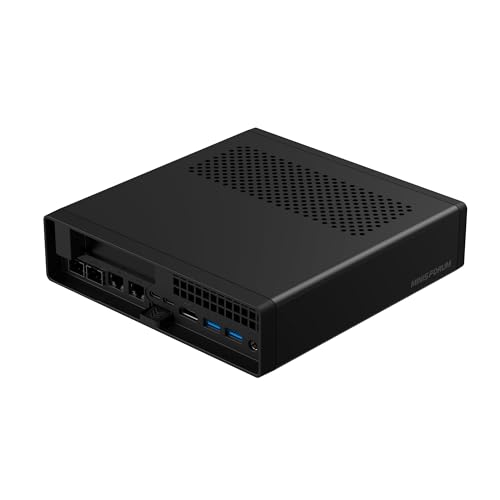
- Smallest documented footprint in this guide: Minisforum MS-A2 Mini Workstation, Ryzen 9 HX, PCIe x16 Slot, Dual 10G SFP+ — Check on Amazon
- Skytech Omega Gaming PC, Ryzen 7 7700X, RTX 4070 Super 12GB, 32GB DDR5 — Check on Amazon
- Minisforum MS-01 Mini Workstation, Core i9-13900H, Dual 10GbE SFP+, PCIe Slot — Check on Amazon
- AtomMan G7 Ti Mini PC, Core i9-14900HX, RTX 4070 Laptop GPU, 32GB DDR5 — Check on Amazon
See 2 more Amazon options
- Thermaltake LCGS View i4770, Core i7-14700KF, RTX 4070 12GB, Liquid Cooled — Check on Amazon
- Apple Mac mini M4 Pro, 24GB Unified Memory, 512GB SSD — Check on Amazon
Read the full guide ↓
Disclosure: As an Amazon Associate, reviewstook.com earns from qualifying purchases. Links to Amazon on this page are affiliate links; they cost you nothing extra. Listing details such as price and availability change often, so check the current Amazon listing before you buy.
A small room changes what a workstation purchase actually is. In a spare bedroom, a studio apartment or a converted closet office, the machine does not just have to be fast — it has to fit a specific shelf, breathe in a specific corner, keep its cables out of a specific walkway, and dump its heat into air you are also sitting in. At $1,500 that tension is sharper than at any cheaper tier, because this shelf splits in two: four of the six machines below are minis that can live on or behind a desk, and two are full-size towers that need a floor spot of their own and will heat the room like it. Both shapes are legitimate workstations. They are not interchangeable installations, and buying the wrong shape is the most expensive mistake this budget offers — more expensive than buying the wrong processor.
One measurement warning belongs at the top, because it governs the whole guide. The verified research behind these picks documents exactly one size figure: the MS-A2’s volume, about 1.78 litres. For the other five machines, the sources document no dimensions, no volumes and no weights — so this guide prints none, for any of them, and claims no VESA bracket for any pick either, because none is documented. Where a measurement matters, the reviews say so and send you to the live listing and your own tape measure, which is Step 1 of the checklist below. What the sources do document richly is the rest of the installation: which machines are towers and which are minis, which run hot and loud under sustained load (one mini is measured at 42 to 45 dB(A) with all cores working), which outputs each box actually carries for the cable drop, and which picks are deal-conditional. That is what this guide grades.
The workstation honesty note from the base tier still applies in full: none of these six machines is ISV-certified, and none is credited with ECC memory, because none of the listings documents it. Certified lines — HP Z, Dell Precision, Lenovo ThinkStation — live above this price. What $1,500 buys is prosumer hardware with real expansion, real networking and real sustained performance, in two very different physical shapes. Below: the quick picks graded for installation, a section on what “installed” actually means at this tier, a five-step measure-before-you-buy checklist, six full reviews, a comparison table, the mistakes that waste money and floor space, and the questions small-room buyers ask.
In this guide
Quick Picks
Short on time, or comparing several options at once? Each row below names a small-space situation and the machine that suits it, with a link to the listing.
| Buyer type | Pick | Why it stands out | Link |
|---|---|---|---|
| Smallest documented footprint | Minisforum MS-A2 Mini Workstation | About 1.78 litres documented, with a PCIe slot and dual 10G inside | Check on Amazon |
| Floor space available, rendering to do | Skytech Omega, Ryzen 7 7700X / RTX 4070 Super | Desktop 12GB CUDA card in a full tower — a floor install, not a desk one | Check on Amazon |
| Cable-heavy network corner | Minisforum MS-01 Mini Workstation | Four Ethernet ports on a mini: the install is the cabling, not the box | Check on Amazon |
| Densest power per shelf | AtomMan G7 Ti Mini PC | 24 cores and a 140W laptop GPU in mini form — plan its air carefully | Check on Amazon |
| Sustained loads, floor-standing | Thermaltake LCGS View i4770 | Liquid-cooled 20-core tower; belongs on the floor — check price on Amazon | Check on Amazon |
| Quietest small-room citizen | Apple Mac mini M4 Pro, 24GB / 512GB | Documented as quiet under creative load; front ports ease the cable drop | Check on Amazon |
How These Picks Were Chosen
The workstation criteria come first, unchanged: every pick is an Amazon listing positioned within this guide’s $1,500 budget in the United States, judged on sustained-load behavior, memory ceiling, usable expansion and networking. Check the current price on Amazon before you buy, because three of the six picks are deal-conditional and only belong here when their current price falls within the budget. Nothing in that paragraph changes because your room is small.
What changes is the second grading pass, which is installation. Each machine was graded on five things. First, form-factor class: mini or tower, because that single fact decides whether the machine competes for desk surface or for floor. Second, documented measurements only: a volume or dimension is printed in this guide only where the verified sources behind the base guide document it — which is exactly one machine — and the absence of a figure is treated as a fact to plan around, not a gap to fill with a plausible number. Third, heat and noise under sustained load, because in a small room the machine’s exhaust is the room’s climate and its fan is a voice in every call; documented figures (the MS-01’s 42 to 45 dB(A) at full CPU load) and documented qualitative findings (the MS-A2 runs audible under sustained load) are stated as such. Fourth, the cable drop: which display and network outputs the sources actually verify, since a small desk feels every cable. Fifth, the power arrangement: the two towers run internal power supplies — the Skytech’s 750W Gold unit is published; no wattage is documented for the Thermaltake, so none is claimed — while the minis in this class run from external adapters whose wattages the sources do not document, so the checklist treats the adapter as furniture to place, not a number to quote.
One refusal runs through all of it. No pick in this guide is recommended for placement inside a sealed cabinet, a closed media console or any enclosure without open airflow — not the towers, whose sustained loads would cook in one, and not the minis, whose small fans move small volumes of air and depend on the room around them. That refusal appears in the footprint section, the checklist, the choosing advice, the mistakes and the FAQ, because it is the single most common way small-space buyers kill a workstation slowly.
What “Installed” Actually Means at This Tier
A workstation’s footprint is not the box. It is the box plus the air the box needs, plus the power supply’s address, plus every cable that leaves the back panel, plus the heat that ends up in the room. At this budget the four terms separate the six picks more honestly than any benchmark does.
The box. Two of these machines are full towers. They do not go on a small desk; they stand on the floor beside it, and the floor spot they need includes clearance at the front for intake and at the back for exhaust and cables. Four are minis, and among the minis only the MS-A2 carries a documented volume — about 1.78 litres. The MS-01, the G7 Ti and the Mac mini are all mini-class machines by design, but their verified sources publish no dimensions this guide can print, so their exact shelf fit is a live-listing figure plus your tape, not a number from this page. Treat any guide that prints precise measurements for all six as guessing.
The air. Every machine here exhausts its workload into your room. The towers move the most air and the most heat — that is what sustained multi-core and GPU work is — and in a small room a tower rendering for four hours is a space heater with a deadline. The minis move less air but concentrate it: the MS-01’s documented 42 to 45 dB(A) at full CPU load is the sound of a small fan doing a big job, and the MS-A2 is documented as audible under sustained load as well. The Mac mini is the documented exception, running quietly under the creative loads it was built for. None of this is a defect; it is a placement input. A loud-under-load mini belongs away from the microphone and the bed, not in a cabinet — the cabinet is worse.
The brick. The towers simplify this term: an internal supply and one power cord. The minis each add an external adapter to the furniture plan. The sources do not document adapter wattages for any of the four minis, so this guide claims none — what it claims is the placement rule: the adapter needs open air of its own, a spot where it is not buried under cables or soft furnishings, and a cable run that does not cross the walkway. A brick wedged behind a sealed console is the same mistake as the cabinet, one size smaller.
The cables. Count them from documented outputs only. The MS-A2’s listing documents HDMI plus two USB-C display outputs; the MS-01 documents two USB4 ports plus HDMI, alongside four Ethernet ports — two 10G SFP+, which need transceivers or DAC cables that are stiffer and shorter than ordinary Ethernet; the G7 Ti’s listing documents HDMI 2.1 and USB4; the Mac mini carries three Thunderbolt 5 ports and HDMI at the back and two USB-C ports at the front, the friendliest arrangement here for things you plug in daily. For the two towers, no port count is claimed: the Skytech’s fitted GPU brand may vary by batch, and no verified output count exists in the sources for the Thermaltake. Plan the towers’ cable drop on delivery day, from the card that actually arrives.
Three placement classes follow. Open desk or shelf is the default for the minis: visible, ventilated, reachable. Floor-standing is the towers’ class, and a knowing compromise for a mini that outgrows the desk. Inside furniture is refused for all six — a sealed cabinet turns every thermal figure in this guide into a countdown.
Measure Before You Buy: The Five-Step Checklist
- Measure the spot. Tape-measure the shelf, desk corner or floor area the machine will actually occupy — width, depth and height — and write the numbers down. Then take the candidate’s dimensions from its live Amazon listing (for the MS-A2, the documented volume is about 1.78 litres; the other five publish their figures on their listings, not in this guide’s sources) and check them against your numbers with room to spare on every side the machine breathes from.
- Check the ventilation clearance. Whatever the spot, it needs open air on the intake and exhaust sides and nothing soft against the vents. If the only available spot is inside a cabinet or console with a door, stop here: no pick in this guide is cleared for that placement, and the correct purchase is a different spot, not a different PC.
- Give the brick an address. For a mini, decide now where its external adapter will live — on the floor tray, on the shelf behind the machine, on the power strip’s end — in open air, off soft furnishings, with its cable neither stretched nor crossing the walkway. For a tower, this step is the power cord’s route from case to outlet, with the same walkway rule.
- Plan the cable drop. List what will plug in: displays (from the documented outputs in each review), Ethernet — remembering that SFP+ ports on the two Minisforum minis need transceivers or DAC cables, which are second purchases with their own bulk — plus keyboard, drives and docks. Route the bundle so it falls behind the desk, not across it, and confirm your monitor cables reach the spot you measured in Step 1.
- Then order. Only now check the current price on Amazon against this guide’s $1,500 budget — the Skytech, the Thermaltake and the Mac mini only belong here when their current price falls within that budget — confirm the configuration in the cart, and buy. A machine that fits the room but sits over budget is still the wrong purchase; a machine within budget that does not fit is worse.
The 6 Best Workstation PCs for Small Spaces Under $1,500
Minisforum MS-A2 Mini Workstation — Ryzen 9 HX, PCIe x16 Slot, Dual 10G SFP+
Who it suits: The small-room professional whose desk is tiny but whose workload is not — virtualization, development, capture or network work that needs a platform, not an appliance.
Installation grade: the only pick with a documented size figure — about 1.78 litres — and the natural first choice for a crowded desk. It runs from an external adapter (wattage not documented in the sources; give it the Step 3 treatment), its documented display outputs are HDMI plus two USB-C, and its dual 10G SFP+ ports add transceiver or DAC cabling behind the box. Two installation warnings are documented, not decorative: the machine is audible under sustained load, so in a one-room home it belongs away from the bed and the microphone; and airflow around its PCIe slot area is limited, which argues for a low-profile, modest-power card in the slot rather than anything ambitious — a hot card in the smallest box in this guide is a thermal argument you will lose. No VESA bracket is documented for this pick in the verified sources; if behind-monitor mounting is your plan, confirm it on the live listing before ordering rather than assuming it.
As a workstation, the platform case is the strongest in this guide. The documented configuration pairs a 16-core, 32-thread Ryzen 9 HX processor (up to 5.4GHz) with 32GB of DDR5 and a 1TB SSD, around a physical PCIe x16 slot wired for x8 bandwidth — real expansion for a capture card, a low-profile GPU or another network card — plus two 10-gigabit SFP+ ports on an Intel X710 controller, dual 2.5-gigabit Ethernet, three storage positions across M.2 and U.2, and two DDR5 SO-DIMM slots that take memory to 96GB. Configured this way it sits toward the upper part of this guide’s budget — check price on Amazon. A barebone version sits lower in the range — a sensible route only if you already own the DDR5 and storage it needs, because completing it from scratch can erase the saving. As shipped, graphics are the integrated Radeon 610M: displays and light CAD viewing, with any GPU-heavy work waiting on the card you fit yourself. Independent coverage also found relatively high idle power draw — a small, always-on warmth worth knowing about in a small room.
- Documented ~1.78L volume — the only verified size figure in this guide.
- A real PCIe x16 slot (x8 electrical) — capture cards, GPUs and NICs are genuine options.
- Two 10G SFP+ ports plus two 2.5G ports: NAS work at full network speed.
- Socketed DDR5 to 96GB and three storage positions.
Honest limitation: Audible under sustained load, integrated graphics as shipped, and the slot area’s limited airflow caps the card you should add.
Choose it if your desk is small and your machine needs to change jobs over its life. Skip it if you need CUDA rendering on day one with no further purchases — that is the Skytech below, at floor-standing size.

Skytech Omega Gaming PC — Ryzen 7 7700X, RTX 4070 Super 12GB, 32GB DDR5
Who it suits: The small-room creator who has a floor spot to give — beside the desk, not on it — and whose work is GPU rendering, CUDA development or heavy video timelines.
Installation grade: a full tower, and this guide grades it as one. It stands on the floor; it needs intake and exhaust clearance like any tower; and during a long render it returns tower-scale heat to a small room, which in summer is a genuine cost of the purchase. Its documented 750W Gold power supply is internal — the one published PSU figure in this guide — so the cable plan is a single power cord plus the display cables from the fitted card. That card’s brand may vary by batch on Skytech’s listings, which means its display outputs vary too: no port count is claimed here, and multi-monitor buyers should confirm the exact card on the live listing and again on delivery day. It ships with Windows 11 Home rather than Pro. None of this is hidden in the review because at this size, the installation facts are the purchase.
The workstation case for the tower is a single specification: a desktop GeForce RTX 4070 Super with 12GB of GDDR6X memory, the strongest CUDA and GPU-rendering tool in this guide — Blender, DaVinci Resolve, Premiere Pro, Unreal and local AI workloads run on it at a level no integrated or laptop part here matches. Around it sit a Ryzen 7 7700X (8 cores, 16 threads), 32GB of DDR5, a 1TB Gen4 NVMe SSD and that published 750W Gold supply, which makes the upgrade ceiling a known number rather than a guess. Its positioning moves around, and the condition is strict: check the current price on Amazon, and only consider it when that price falls within this guide’s $1,500 budget; above that line, leave it. It is, unapologetically, a gaming machine in presentation — RGB memory, showcase case — graded here purely on render throughput and installability.
- Desktop RTX 4070 Super with 12GB — the strongest rendering and CUDA card in this guide.
- Published 750W Gold PSU, internal: one power cord, a known upgrade ceiling.
- Ordinary tower serviceability — memory, storage and the GPU can all be swapped.
Honest limitation: It is a floor-standing tower that heats the room it renders in, its price is deal-dependent, and the fitted GPU brand may vary.
Choose it if you have the floor spot and the GPU is the workload. Skip it if your only available space is the desk surface — every mini in this guide exists for that room.

Minisforum MS-01 Mini Workstation — Core i9-13900H, Dual 10GbE SFP+, PCIe Slot
Who it suits: The network-heavy professional in a small space — homelab administrator, infrastructure developer, studio whose project files live on a fast NAS.
Installation grade: mini-class, with no dimensions documented in the verified sources — take its measurements from the live listing at Step 1 of the checklist. The defining installation fact is not the box but what leaves it: two 10-gigabit SFP+ ports and two 2.5-gigabit ports mean up to four network cables, and the SFP+ pair needs transceivers or DAC cables that are stiffer, shorter and bulkier than ordinary Ethernet. Budget the space behind the machine for that bundle, not just for the chassis. The second documented fact is sound: at full CPU load the MS-01 measures around 42 to 45 dB(A), the loudest documented figure in this guide — ordinary in an office, a real presence in a quiet studio or a bedroom office, and a reason to place it away from a recording microphone. It is not, under any reading, a sealed-cabinet machine. No VESA bracket is documented for this pick; treat mounting as a live-listing question.
The workstation substance is networking depth that nothing else here matches: the two SFP+ ports run on an Intel X710 controller, one of the 2.5G ports is an Intel i226-LM with vPro remote management, and the display outputs are documented as two USB4 ports plus HDMI — three displays from verified outputs. A Core i9-13900H (14 cores, 20 threads, up to 5.4GHz) drives three M.2 storage slots with a U.2 option via the included adapter. The PCIe x16 slot is wired for x8 and physically limited to half-height, single-slot cards — capture cards, extra NICs and modest accelerators, not full-size GPUs — and ServeTheHome’s extensive testing found that some cards never initialize in it, so a specific card should be checked against owner reports before the machine is bought around it. Memory is socketed DDR5 with an official ceiling of 64GB (a higher owner-reported figure is deliberately not claimed). The listing sits in the upper part of this guide’s budget — check the current price on Amazon before you buy. Its Iris Xe integrated graphics draw the same line as the MS-A2’s: displays and light acceleration, nothing heavier, until a suitable low-profile card goes in the slot.
- Two 10GbE SFP+ ports (X710) and two 2.5GbE ports, one carrying vPro management.
- Three M.2 slots and a U.2 option — room for storage-heavy builds.
- A PCIe slot sized for capture and network cards, within its documented half-height limits.
Honest limitation: The loudest documented machine here under load (42–45 dB(A)), the slot takes only half-height single-slot cards, and some cards are documented not to initialize.
Choose it if your workstation’s real job is moving data and the cables have somewhere to live. Skip it if your room is a quiet studio or you need silent running under load.

AtomMan G7 Ti Mini PC — Core i9-14900HX, RTX 4070 Laptop GPU, 32GB DDR5
Who it suits: The creator whose desk has almost no spare surface but whose work needs CUDA — a small desk or a location bag, with one honest caveat about which GPU this is.
Installation grade: mini-class, dimensions not documented in the verified sources — live listing plus tape measure at Step 1. The installation story is density: a 24-core processor and a laptop GPU running at up to 140W generate tower-class heat inside a mini chassis, so this pick earns the strictest version of the guide’s air rule — open placement, clearance on every vented side, and absolutely no enclosure. No load-noise figure is documented for it in the sources, so none is claimed; plan on the physics rather than a number. Its documented outputs are HDMI 2.1 and USB4, a short and manageable cable drop. Like the other minis it runs from an external adapter whose wattage the sources do not document — give the brick open air and a walkway-free run. No VESA bracket is documented.
The hardware case is the highest core count in this guide: a Core i9-14900HX with 24 cores and 32 threads, 32GB of DDR5-5600 across two SO-DIMM slots (upgradeable to 96GB), a 1TB SSD with a second SSD slot, and the RTX 4070 Laptop GPU. The configured 32GB/1TB build sits near the top of this guide’s budget — check price on Amazon. The naming discipline matters more in this review than any other, so here it is without softening: that GPU is the laptop part, with 8GB of memory — a clear, material step below the 12GB desktop RTX 4070 and 4070 Super in the two towers. Work that fits inside 8GB renders properly; work that does not fit fails outright, and no settings panel negotiates with that limit. The barebone sits below the configured build in the range, but the gap between them only pays if DDR5 and an SSD are already in your drawer, since buying those parts can cost more than the gap.
- Core i9-14900HX with 24 cores — more than any other pick here.
- RTX 4070 Laptop GPU run at up to 140W — genuine CUDA, mini-sized.
- Memory in slots to 96GB, plus a second SSD slot.
Honest limitation: The densest heat package in the guide demands open placement, and the GPU is the 8GB laptop part, not the 12GB desktop card.
Choose it if desk space is scarce, your GPU workloads fit in 8GB, and the shelf breathes. Skip it if your scenes are VRAM-bound or your only spot is enclosed — buy the tower, or a different room arrangement.

Thermaltake LCGS View i4770 — Core i7-14700KF, RTX 4070 12GB, Liquid Cooled
Who it suits: The professional with floor space whose bottleneck is sustained multi-core throughput — long renders, big compiles, simulation and encode queues — and who can wait for a sale.
Installation grade: a liquid-cooled full tower, floor-standing by design. The liquid cooling exists to hold clock speeds through the long middle of a render, and a tower’s airflow is the honest way to keep a 20-core CPU fed for hours — but all of that heat still ends up in your room, and in a small room a day of sustained load is a climate decision as much as a computing one. No PSU wattage is documented for this pick in the verified sources, so none is claimed; no display-output count is claimed either, for the same reason. Plan its cable drop from the delivered machine. It is the pick least compatible with a small desk and most compatible with a small room that has one good floor corner with open air around it — and it is flatly refused, like everything here, for sealed furniture.
The specification is the sustained-load case: a Core i7-14700KF with 20 cores (8 performance, 12 efficiency), a desktop RTX 4070 with 12GB, 32GB of DDR5-5600 and a 1TB NVMe SSD. What holds this pick back is not the hardware; it is the price tag’s behavior. This model is typically positioned above this guide’s budget, and its only ticket in is when its current price drops into this budget range. No pick in this guide is more strictly deal-only: when it falls within the $1,500 budget it may be the best sustained-load value on the page, while at its typical positioning it belongs in a higher tier and should be shopped there instead. Check the current price on Amazon first; if it is not within budget, wait for it to come back into range or buy the Skytech instead.
- Core i7-14700KF with 20 cores — matched only by the G7 Ti for sustained multi-core work.
- Desktop RTX 4070 with 12GB, liquid-cooled for render-length loads.
- Full-tower serviceability and thermal headroom.
Honest limitation: A floor-standing tower that is typically positioned over budget — this pick only belongs here when its current price falls within this guide’s budget.
Choose it if your workloads run for hours, your floor corner is free, and its current price falls within budget. Skip it if you need to buy this week at whatever price is showing, or your space is desk-only.

Apple Mac mini M4 Pro — 24GB Unified Memory, 512GB SSD (MCX44LL/A)
Who it suits: The Mac-based creator in a small room — Final Cut or Resolve timelines, audio production, Apple-ecosystem development — who values quiet as a specification.
Installation grade: mini-class, and the best-mannered machine in this guide for a small room: the base research documents it doing its media work quietly, and its port layout is the most small-desk-friendly here — three Thunderbolt 5 ports plus HDMI at the back for the permanent cables, and two USB-C ports plus a headphone jack at the front for the things you plug in daily, so the cable drop splits neatly into “behind” and “within reach.” Apple publishes support for up to three displays, the only monitor-count claim made for this pick. No dimensions are documented for it in the verified sources behind this guide, so none are printed — Step 1 applies to the Mac exactly as to the others. Two installation costs are structural: the fitted storage is 512GB, tight for video work, which makes an external SSD a planned second box on the desk rather than an accessory; and this configuration carries Gigabit Ethernet, not 10-gigabit — no faster claim is made.
The creative case is the silicon: a 12-core CPU (8 performance, 4 efficiency) and 16-core GPU, 24GB of unified memory at 273GB/s of bandwidth, and hardware acceleration for ProRes and AV1, which is why timeline work in ProRes codecs, Logic sessions and Xcode builds run so elegantly on it. Its Amazon positioning moves above and below this guide’s budget, which earns it a strict rule of its own: at or under $1,500 it is a pick; above that line, check the current price on Amazon and treat an over-budget price as an argument for patience, not for stretching. The limitations are permanent and stated plainly: memory and storage are part of the chip package, so 24GB and 512GB are what this machine will have on its last day of work; it runs macOS only — no CUDA, no Windows-only engineering software, no PCIe slot. Inside Apple’s ecosystem it is superb; measured as a general-purpose workstation platform, nothing else in this guide is as sealed.
- Dedicated ProRes and AV1 hardware engines — media codecs are its home turf.
- Documented quiet running, with front ports that ease a small desk’s cable drop.
- Thunderbolt 5 throughout, with up to three displays per Apple’s published specification.
Honest limitation: Memory and storage can never be upgraded, 512GB makes an external SSD a planned second box, and its price has been seen above $1,500 as often as below it.
Choose it if your software lives on macOS, 24GB fits your projects, and quiet matters. Skip it if CUDA, Windows software, internal expansion or a future memory upgrade is on your list.

Comparison Table
| Product | Form-factor class | Installation note | Link |
|---|---|---|---|
| Minisforum MS-A2 Mini Workstation | Mini workstation (~1.78L documented) | Audible under sustained load; slot area airflow is limited | Check on Amazon |
| Skytech Omega, 7700X / RTX 4070 Super | Gaming tower, graded as render station | Floor-standing; internal 750W Gold PSU documented | Check on Amazon |
| Minisforum MS-01 Mini Workstation | Mini workstation, network-first | 42–45 dB(A) at full CPU load; four network cables to route | Check on Amazon |
| AtomMan G7 Ti Mini PC | Compact mini with laptop GPU | Densest heat package here; open placement is mandatory | Check on Amazon |
| Thermaltake LCGS View i4770 | Liquid-cooled tower | Floor-standing; only when its current price is within budget — check price on Amazon | Check on Amazon |
| Apple Mac mini M4 Pro, 24GB / 512GB | macOS mini | Quiet under load; plan an external SSD as a second box | Check on Amazon |
How to Choose a Workstation PC for a Small Space Under $1,500
- Decide the shape before the specification. If the machine must live on the desk, your shortlist is the four minis and the towers are not “bigger options” — they are a different purchase that needs a floor spot. If a floor corner is free and the workload is GPU rendering or sustained multi-core work, the towers’ volume is cooling, and cooling is sustained speed.
- Trust only documented measurements. This guide prints one size figure — the MS-A2’s roughly 1.78 litres — because that is the one figure its verified sources document. For every other pick, take the dimensions from the live listing and check them against your Step 1 tape numbers. A precise measurement you cannot source is a return shipment waiting to happen.
- Grade the heat for the room you have. Sustained work turns electricity into warm air at the rate your workload demands. A tower rendering all afternoon will raise a small room’s temperature; a mini under the same load moves less heat but concentrates its noise. Match the machine’s thermal character to the room’s size and to what else happens in it — sleep, calls, recording.
- Price the noise honestly. The MS-01’s documented 42 to 45 dB(A) at full CPU load and the MS-A2’s documented audibility under sustained load are placement facts: fine in a working office, a genuine problem beside a microphone or a bed. The Mac mini’s documented quiet is worth real money in a one-room home. No load-noise figure is documented for the G7 Ti or the towers in these sources, so none is claimed — plan from their class, not from an invented number.
- Count the cables, including the ones you buy separately. SFP+ ports on the MS-A2 and MS-01 need transceivers or DAC cables; the Mac’s 512GB makes an external SSD a planned second box; a tower’s display cables depend on the card that actually ships. The installed machine is the box plus all of it, and small desks feel every addition.
- Buy the memory ceiling, not just today’s configuration. Every Windows pick here ships 32GB except the Mac’s fixed 24GB. The road upward decides the machine’s working life: 96GB on the MS-A2 and G7 Ti, 64GB on the MS-01, standard slots in the towers, nothing at all on the Mac. In a small space, a machine you must replace is also a machine you must re-install — buy the ceiling and skip that.
- Check slot wiring before planning an upgrade. Both mini workstations describe their slot as PCIe x16; both are wired for x8 bandwidth, the MS-01’s is physically limited to half-height, single-slot cards, and the MS-A2’s slot area has documented limited airflow. That is plenty for capture cards, NICs and low-profile accelerators — and a hard stop for full-size, high-power GPUs.
- Name the GPU precisely. One name, three different parts: “RTX 4070” in this guide means a desktop 4070 Super 12GB, a desktop 4070 12GB and a laptop 4070 8GB, depending on the pick. It is VRAM that decides which render scenes and AI models fit in the first place. Buy the memory figure and the form factor, never the badge.
- Decide whether you need certification before you shop. If your CAD or engineering software must run on ISV-certified drivers — a common requirement in firm and client work — none of these machines qualifies at any size, and the correct purchase is a certified line (HP Z, Dell Precision, Lenovo ThinkStation) at a higher budget. For Resolve, Blender, Premiere, development and data work, certification adds little and this hardware adds a great deal.
- Apply the budget strictly. For the Skytech, the Thermaltake and the Mac mini, buy only when the current price on Amazon falls within this guide’s $1,500 budget. The tier several of these machines normally live in is covered in Best Workstation PC Under $2500.
Heat Is a Room Specification, Not a PC Specification
Every CPU and GPU in this guide advertises a boost clock, and no workstation works at its boost clock. Boost is a sprint figure; professional work is the opposite shape — a render, a compile run or an export queue holds most cores near their maximum for tens of minutes or hours, and the speed the machine settles at is set by its cooling. In a large office that is the end of the thought. In a small room it is the beginning of one, because the heat the cooling removes from the silicon does not disappear — it moves into the air around your chair, and the fan that moves it becomes part of the room’s soundscape for the length of the job.
The practical reading rule is to match the machine’s thermal design to your load’s duty cycle and your room’s tolerance. Bursty work — a photo export here, a short compile there, timeline scrubbing between edits — suits a dense mini perfectly, because bursts are what boost clocks are for and the room barely notices. All-day sustained load is the towers’ argument: their volume holds clock speeds and spreads the exhaust, at the cost of the floor spot and a warmer room by evening. The middle case is where small-room buyers most often misjudge: a mini running sustained loads in a small, closed room will be both audible and warm, and the documented figures in this guide — 42 to 45 dB(A) for the MS-01 at full load, audibility for the MS-A2 — are the honest preview of that experience. None of these machines is badly designed. They are designed for different rooms, and the checklist at the top of this guide exists to make sure yours is the right one.
Common Buying Mistakes
- Putting any of these machines in a sealed cabinet or closed console. It is refused for all six picks in this guide, towers and minis alike — the enclosure, not the workload, becomes the thermal limit.
- Buying a tower for a desk-only room, or a mini for a workload that needed a tower’s GPU and cooling. Shape first, specification second.
- Trusting a dimension you cannot source. Only the MS-A2’s volume is documented in this guide’s research; for the other five, measure the spot and read the live listing — do not plan a shelf around a number from a comment thread.
- Assuming a VESA bracket exists because a machine is small. No pick in this guide has a documented bracket in its verified sources; confirm mounting on the live listing or plan for shelf placement.
- Burying the power brick. An adapter under cables or soft furnishings overheats quietly for months. It gets open air and its own address, per Step 3.
- Reading “RTX 4070” as one product. The 8GB laptop part shares a name with the 12GB desktop parts and not much more; VRAM-bound work fails on whichever one you misread.
- Planning a full-size or high-power GPU into a mini’s slot without checking the physical limits — half-height and single-slot on the MS-01, x8 wiring on both minis, limited slot-area airflow on the MS-A2.
- Assuming a card works because it physically fits. Owner reports document MS-01 cases where a fitted card never initializes at all; look your exact card up before buying around it.
- Paying over this guide’s budget for the Thermaltake or the Mac mini just because a guide named the machine. A pick is a machine at a price that fits the budget; cross that line and you are making a different, worse purchase.
- Forgetting the transceivers and the second box. SFP+ ports need modules and cabling that RJ45 ports do not, and the Mac’s 512GB makes an external SSD a planned purchase — both belong in the space plan and the budget from day one.
Final Recommendation
- Smallest desk, platform ambitions: Minisforum MS-A2 Mini Workstation.
- Floor spot free, GPU rendering: Skytech Omega, at or under $1,500.
- Network corner with cable room: Minisforum MS-01 Mini Workstation.
- Densest shelf power: AtomMan G7 Ti Mini PC, placed in open air.
- Sustained loads, floor-standing: Thermaltake LCGS View i4770, only when its current price is within budget.
- Quiet one-room studio on macOS: Apple Mac mini M4 Pro, at or under $1,500.
Our top two at this budget are the Minisforum MS-A2, because it is the only pick whose size is a documented number — about 1.78 litres — while still offering the slot, ports and memory ceiling of a machine bought to grow, and the Skytech Omega, because if a floor corner is free, its desktop RTX 4070 Super makes GPU rendering a solved problem within this budget. Between them they cover the two shapes this search usually takes: a mini bought to expand, and a tower bought to render. The Apple Mac mini M4 Pro is the easiest machine here to live next to in a one-room home — documented quiet, front ports, bought within budget — and it is the first alternative if your software lives on macOS. If your work moves data more than pixels and your corner has room for its cables, the MS-01’s networking is the better spend; if desk space is scarce and your GPU workloads fit in 8GB, the G7 Ti puts 24 cores and a CUDA card in a book-sized box placed in open air; and if sustained multi-core loads run for hours daily, the Thermaltake’s liquid-cooled tower earns its floor space — when its current price falls within this guide’s $1,500 budget, not at its typical over-budget positioning. Readers setting up their first dedicated machine should also see Best Workstation PC For Beginners Under $1500, and those whose desk doubles as a broadcast desk can compare Best Workstation PC For Streaming Under $1500. Run the five-step checklist before you order, check the current price on Amazon against this guide’s budget, and buy the machine whose installed shape — box, air, brick and cables — your room can actually hold.
Frequently Asked Questions
Can I put one of these workstations inside a cabinet or media console?
No — and this guide refuses that placement for all six picks, not just the towers. Sustained workstation loads produce sustained heat, and a sealed enclosure removes the airflow every one of these machines depends on: the towers would throttle and cook their components, and the minis, whose small fans move small volumes of air, would do the same faster and quieter. If the machine must live in furniture, the furniture needs open-backed, ventilated construction with clearance on the vented sides — at which point it is a shelf, and the five-step checklist applies as written.
How big are these machines, exactly?
Exactly one figure is documented in the verified research behind this guide: the MS-A2’s volume, about 1.78 litres. The other five picks’ sources document no dimensions, volumes or weights, so this guide prints none rather than inventing them. Take each candidate’s measurements from its live Amazon listing, compare them against the spot you taped in Step 1 of the checklist, and leave clearance on every side the machine breathes from.
Can I mount one of the minis behind my monitor?
Not on this guide’s evidence. No VESA bracket is documented for any pick in the verified sources — not for the MS-A2, the MS-01, the G7 Ti or the Mac mini. Some machines in this class ship with brackets and some do not, and the only honest route is to confirm it on the live listing for the exact configuration you are buying. Until then, plan for open shelf or desk placement, which all four minis are graded for.
Which of these is quietest in a small room?
On documented evidence, the Mac mini M4 Pro: the research behind this guide records it running quietly under the sustained creative loads it was built for. The documented figures elsewhere are warnings rather than virtues — the MS-01 measures around 42 to 45 dB(A) at full CPU load, and the MS-A2 is documented as audible under sustained load. No load-noise figure is documented for the G7 Ti or either tower in these sources, so this guide claims none for them; judge them by class — a 24-core mini and two full towers are not silent machines — and by placement.
Is a $1,500 PC a real workstation, or a gaming PC in disguise?
This guide contains both, and labels each as what it is. Minisforum’s two minis are workstation platforms by construction — expansion slots, 10-gigabit networking, high memory ceilings. Skytech’s and Thermaltake’s towers are gaming machines assessed here on workstation merits: desktop GPUs, cooling that lasts, standard parts. What none of them is, is ISV-certified — that is the honest boundary of this budget, and it matters if your firm or client requires certified CAD drivers.
How much memory does a $1,500 workstation actually need?
At this tier the working standard is 32GB, and every Windows pick in this guide ships exactly that. The ceiling matters more: 96GB on the MS-A2 and G7 Ti, 64GB on the MS-01, ordinary slots in both towers. Virtualization, growing datasets and heavy multitasking all expand into memory across a machine’s working life, so buy headroom above today’s need. The Mac mini is the exception: its 24GB is permanent, and it has to fit your workload for as long as you own the machine.
Should I buy a mini workstation or a tower for a small room?
Buy the mini if the machine must share your desk or shelf, if expansion means network and capture cards rather than full-size GPUs, and if your heavy loads arrive in bursts. Buy the tower if the GPU is the workload, if sustained loads run for hours daily, and if a floor corner with open air is genuinely free — volume is cooling, and cooling is sustained speed. The comparison most buyers actually face is laid out in Best Workstation PC Under $1500 alongside the step-down options in Best Workstation PC Under $1200 and the gaming-leaning alternatives in Best Workstation PC For 1440p Gaming Under $1500.


