Where to buy
Check the latest price, availability and delivery on Amazon. Orders are placed on Amazon. We may earn a commission from qualifying purchases.
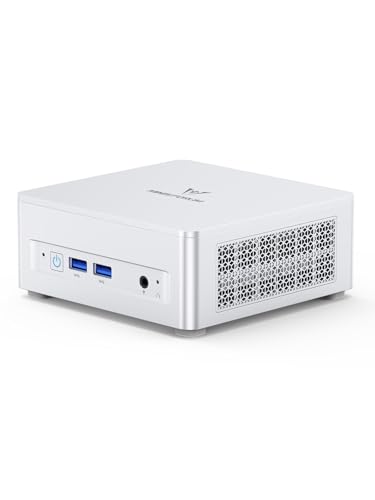
- Best overall streaming workstation under $800: Minisforum UM870 Slim, Ryzen 7 8745H, Radeon 780M, 32GB RAM, 1TB SSD — Check on Amazon
- Beelink SER8, Ryzen 7 8745HS, Radeon 780M, 32GB RAM, 1TB SSD — Check on Amazon
- GMKtec NucBox K8 Plus, Ryzen 7 8845HS, Radeon 780M, 32GB RAM, 1TB SSD, OCuLink — Check on Amazon
- Minisforum UM890 Pro Barebone, Ryzen 9 8945HS, Radeon 780M, no RAM/SSD/OS — Check on Amazon
See 2 more Amazon options
- GMKtec NucBox M6 Ultra, Ryzen 5 7640HS, Radeon 760M, 32GB RAM, 512GB SSD — Check on Amazon
- Apple Mac mini, M4, 16GB unified memory, 256GB SSD — Check on Amazon
Read the full guide ↓
Disclosure: As an Amazon Associate, reviewstook.com earns from qualifying purchases. Links to Amazon on this page are affiliate links; they cost you nothing extra. Listing details such as price and availability change often, so check the current Amazon listing before you buy.
Streaming from a work PC is a specific kind of multitasking, and it deserves to be defined before any product is named. One machine is running your main application — a game, an IDE, a design tool, a DAW — while OBS captures the screen, encodes the picture into a broadcast feed and pushes it up your internet connection, with a chat window, a browser and a second or third monitor open beside it. The platform targets are fixed numbers: Twitch broadcasts run at roughly 6,000 kbps in constant bitrate (CBR) with a two-second keyframe interval, which makes Twitch a test of encoder quality at a tight bitrate. YouTube accepts far higher bitrates, takes 1440p ingest and supports AV1 where the encoder hardware offers it, which makes YouTube a test of what your encoder silicon can do. Streaming in 4K remains platform-limited rather than hardware-limited — Twitch does not offer it as a standard route — so no pick is graded on a 4K promise nobody can keep.
That framing produces an unusual shopping list. Every machine in this guide is a mini PC built around integrated graphics, so the encoder story is the whole ballgame: five of the six picks carry AMD’s RDNA 3 media engine, which encodes H.264, HEVC and — the genuinely modern part — AV1 in dedicated hardware, and the sixth is Apple’s M4, whose media engine covers H.264 and HEVC but offers no AV1 encode at all. There is no NVIDIA NVENC anywhere in the six picks and no Intel Quick Sync either — no NVIDIA or Intel silicon exists in them; the one NVENC machine in this guide is a gaming tower discussed later, in prose, deliberately not a pick. What $800 buys, graded honestly, is a quiet, small, core-rich workstation that can hold a professional workload and a broadcast encode at the same time — provided you choose the encoder per platform as the reviews below set out, and keep expectations about playing demanding games and streaming them from the same integrated GPU realistic. The quick picks, encoder map, six reviews, OBS section, comparison table, kit costing and mistake list follow.
In this guide
Quick Picks
Short on time, or comparing several options at once? Each row below names a type of streamer and the machine that suits them, with a link to the listing.
| Streamer type | Pick | Why it stands out | Link |
|---|---|---|---|
| Best overall | Minisforum UM870 Slim | 780M AV1 encode for YouTube, socketed 32GB, three displays for game/OBS/chat | Check on Amazon |
| Best for quiet rooms | Beelink SER8 | Measured around 32 dBA under load — the microphone-friendly pick | Check on Amazon |
| Best CPU fallback | GMKtec NucBox K8 Plus | Fastest sustained clocks here for x264, plus an OCuLink route to a discrete GPU later | Check on Amazon |
| Best for builders | Minisforum UM890 Pro Barebone | The strongest chip here for software encoding — once you complete the build yourself | Check on Amazon |
| Best value | GMKtec NucBox M6 Ultra | RDNA 3 encoder with AV1, socketed 32GB — check price on Amazon | Check on Amazon |
| Best for macOS | Apple Mac mini (M4) | Silent, polished hardware H.264/HEVC encoding — with no AV1 encode and fixed memory | Check on Amazon |
How These Picks Were Chosen
The ceiling was applied to complete, working machines: every product below is a real Amazon listing intended to fit the under-$800 budget. Check the current price on Amazon for each pick and confirm the live price still fits the budget. Two picks are volatile enough that their reviews stress that discipline outright. The one barebone is judged on its completed cost, parts included, and cannot stream anything the evening it arrives.
On top of the usual workstation filters — 32GB of RAM as the multitasking floor on every Windows pick, socketed memory preferred, storage capacity read twice — this variant applies an encoder-first grading. Each pick’s broadcast hardware is identified from the silicon its listing documents: the media engine generation, which codecs it encodes in hardware, and whether AV1 encode exists at all. No encoder claim in this guide is upgraded beyond what the documented chip supports, and where a platform’s encoder is its weak point — AMD’s H.264 block at Twitch bitrates is the honest example — the review says so and names the workaround instead of letting a spec sheet imply parity. We did not use these PCs ourselves; the grading rests on maker listings and specification pages and independent review coverage, including the measured noise figures quoted where they exist.
Two workstation honesty rules carry over unchanged: no pick is described as ISV-certified and none is credited with ECC memory, because nothing in the verification chain establishes either. And noise is graded as a broadcast specification, not a comfort footnote — a fan your microphone can hear is a production flaw — which is why the set’s one independently measured figure, the SER8 at around 32 dBA under load, carries real weight in the rankings.
The Encoder Map: What Each Chip in This Set Actually Broadcasts
An encoder is the piece of hardware that turns your screen into the compressed video your viewers receive, and it matters more to stream quality than any other single component in these machines. Dedicated encoder hardware does this work on its own silicon block, leaving the CPU and the graphics engine free for the application you are actually showing. Software encoding (x264, running on the CPU) competes with that application for cores. The map below is derived only from the chips documented in the six listings — nothing here is assumed from a product family’s reputation.
- Radeon 780M (RDNA 3 VCN) — UM870 Slim, SER8, K8 Plus, UM890 Pro. AMD’s RDNA 3 media engine encodes H.264, HEVC and AV1 in hardware through OBS’s AMF encoder. AV1 encode is this set’s headline: for YouTube, where AV1 ingest is supported and bitrates are generous, it produces the cleanest picture these machines can send. The honest caveat is H.264 at Twitch’s roughly 6,000 kbps: AMD’s H.264 encoding trails NVIDIA’s NVENC in fine detail at that tight bitrate, so Twitch-first streamers on these picks should read the per-pick notes — several of these eight-core chips can run x264 in software as a genuine alternative — a route no weaker mini could offer.
- Radeon 760M (RDNA 3 VCN) — M6 Ultra. One rung down in graphics compute, the same encoder generation: H.264, HEVC and AV1 hardware encode are all present. What the step down actually costs a streamer is not the encoder but the fallback — six CPU cores instead of eight leave less headroom for x264, and less graphics power for the application being captured.
- Apple M4 media engine — Mac mini. Apple’s silicon carries dedicated hardware encode for H.264 and HEVC, which OBS on macOS uses through the platform’s VideoToolbox encoders, and it is efficient and quiet doing it. AV1 on this chip is decode-only: there is no AV1 encode on the M4, and this guide does not pretend otherwise. A YouTube streamer on the Mac sends HEVC or H.264 where the Windows minis can send AV1.
- What is not in this set: no pick contains an NVIDIA GPU, so there is no NVENC — the encoder Twitch streamers are usually told to buy — and no pick contains an Intel CPU, so there is no Quick Sync either. The CyberPowerPC tower discussed later in this guide carries a desktop RTX 4060 whose Ada-generation NVENC encodes H.264, HEVC and AV1; its Core i5-13400F is an F-suffix chip with its integrated graphics fused off, so it contributes no Quick Sync at all. That tower is the set’s encoder benchmark, and it is a reference point, not a pick.
The practical summary: YouTube streamers get a real, current-generation AV1 advantage from the four 780M machines and the M6 Ultra; on Twitch, the contest is AMD’s hardware H.264 against each chip’s x264 strength, and the rankings below grade exactly that.
The 6 Best Workstation PCs for Streaming Under $800
Minisforum UM870 Slim — Ryzen 7 8745H, Radeon 780M, 32GB RAM, 1TB SSD
Who it suits: The professional who streams their work — development, design, teaching, creative process — and wants the tier’s best all-round machine to also be the broadcast desk’s center.
Start with the encoder, because that is this variant’s question. The UM870 Slim’s Ryzen 7 8745H pairs eight cores and sixteen threads (boosting to 4.9GHz) with the Radeon 780M, whose RDNA 3 media engine gives OBS a hardware AV1 encoder alongside H.264 and HEVC. For a YouTube-first streamer that is the strongest broadcast position in this guide: send AV1 at YouTube’s generous bitrates and the picture holds detail that H.264 at Twitch rates cannot. For Twitch, use the AMF H.264 encoder at roughly 6,000 kbps CBR and accept its known softness in fine detail — or, on calmer content, let the eight cores run x264 and compare the two on your own footage; this chip has the headroom to make that a real choice rather than a desperate one. Around the encoder sits the full workstation specification: 32GB of DDR5-5600 in two SO-DIMM slots, upgradeable to 96GB; a 1TB PCIe 4.0 SSD with a second M.2 slot empty; USB4 for one-cable docking; HDMI 2.1 and DisplayPort 1.4 for up to three displays — application on one, OBS and chat on the others, which is the correct streaming desk layout; 2.5GbE wired networking; Windows 11 Pro; and a VESA bracket in the box for mounting the whole thing behind a monitor, out of the microphone’s way.
Two honest notes belong here. The maker’s claim of noise below 35dB in performance mode from its phase-change cooling is a maker figure, not a measurement — the machine’s reputation for quiet running is good, but the independently measured quiet champion here is the SER8 below, and a streamer placing a microphone close should treat the claim accordingly. The fitted Wi-Fi module is MediaTek silicon, which has historically meant extra driver work under Linux; for streaming the point is simpler — broadcast on the wired 2.5GbE port, as the OBS section below insists, and the Wi-Fi question mostly evaporates. On price, check the current price on Amazon: pricing can move around this budget, and third-party sellers can ask more than Amazon’s own offer. Buy when the live price fits the under-$800 budget; above it is a shortage premium the hardware cannot justify.
- RDNA 3 hardware AV1 encode — the YouTube streamer’s strongest position in this guide.
- Three displays from documented ports: application, OBS and chat each get a screen.
- Socketed 32GB to 96GB, a free second M.2 slot, USB4 docking and 2.5GbE wired networking.
Honest limitation: The sub-35dB noise figure is a maker claim rather than a measurement, and its hardware H.264 is the softer option at Twitch bitrates — the x264 fallback is part of the purchase.
Choose it if you want one machine that does the whole tier’s work and broadcasts it, YouTube-first or dual-platform. Skip it while the listing sits above $800 — wait for the dip, or take the M6 Ultra below and put the savings toward the kit.

Beelink SER8 — Ryzen 7 8745HS, Radeon 780M, 32GB RAM, 1TB SSD
Who it suits: The voice-led streamer — podcasts, commentary, teaching, narrated work — broadcasting from a quiet room where the microphone hears everything the fans do.
The SER8’s encoder position matches the UM870 Slim’s exactly: a Ryzen 7 8745HS (eight cores to 4.9GHz) and the Radeon 780M’s RDNA 3 media engine, meaning hardware AV1 for YouTube and the same H.264-versus-x264 decision on Twitch. What separates this pick is the specification streamers feel and gamers never think about: noise, measured. Its vapor-chamber cooling is the measured one: independent reviewers have recorded around 32 dBA under load at ordinary desk distance — about the ambient level of a quiet room — and roundups of this machine class keep naming it the quietest under sustained load. Sustained is the operative word for broadcasting: a stream holds a machine under combined application-plus-encode load for hours, not minutes, and a fan note that never rises lets a microphone sit close without a noise gate strangling quiet sentences. Underneath the quiet sits the full tier standard: 32GB of DDR5 in slots that reach 64GB, a 1TB PCIe 4.0 SSD beside an empty second M.2 bay, USB4, HDMI 2.1 and DisplayPort driving three displays, 2.5GbE and Windows 11 Pro.
The honest limitation is price discipline, so here it is plainly. This listing’s pricing can sit above this budget, and sold-out listings can drift higher still; a lower-priced 24GB configuration also exists. This is therefore a buy-at pick: check the current price on Amazon, and at a live price at or under the $800 budget, ideally well under, it is arguably the most pleasant streaming workstation here; above that budget, the UM870 Slim above does the same work and sends the same codecs without the premium. Make sure the cart holds the 32GB/1TB configuration, not the 24GB variant, and let the right price arrive in its own time.
- Measured around 32 dBA under load — the microphone-friendly machine in this guide.
- Same RDNA 3 encoder set as the top pick: AV1 for YouTube, x264 headroom for Twitch.
- The tier’s full specification — 780M graphics, 32GB in slots, 1TB plus a second SSD bay.
Honest limitation: Its pricing can sit above this budget, so this pick earns its place only when the current price on Amazon is at or under the budget line.
Choose it if your voice is the product and your room is quiet. Skip it if you must buy this week at any price — the UM870 Slim does the same work without the premium.

GMKtec NucBox K8 Plus — Ryzen 7 8845HS, Radeon 780M, 32GB RAM, 1TB SSD
Who it suits: The Twitch-first streamer who wants the strongest software-encoding fallback in the set, and the growing channel that may one day bolt on a discrete GPU.
The K8 Plus runs the same 780M encoder as the two picks above — RDNA 3 hardware H.264, HEVC and AV1 — but its Ryzen 7 8845HS holds the fastest sustained clocks of the complete machines here (eight cores to 5.1GHz), and for streaming that distinction has a specific use. Twitch’s roughly 6,000 kbps H.264 is where AMD’s hardware encoder is at its softest; a chip that can run x264 in software while your application is open converts that weakness into a settings choice. Not every workload leaves eight fast cores half-idle — a heavy game streamed from this same box will contest those cores — but for the work-streaming this guide is about (development, design, lighter games), the K8 Plus offers the set’s most credible software-encode route. Its second streaming asset is a door no other complete pick has: an OCuLink port, which accepts an external GPU dock later. Fit a desktop NVIDIA card in that dock one day and this machine gains NVENC without being replaced — the only upgrade path in the guide that changes the encoder story rather than just the storage. Dual USB4, dual 2.5GbE, display outputs for up to four monitors per the listing family, 32GB of DDR5-5600 in two slots and a 1TB PCIe 4.0 SSD with a second M.2 slot complete a specification with no soft corner.
The catch is pricing volatility — the worst in this guide — and honesty requires it up front. Its price has swung widely, at times spiking well above this budget when the memory shortage pushed up the whole category. A spike does not improve the machine; it only worsens the market. The rule is therefore hard: check the current price on Amazon, buy only when the live price fits the under-$800 budget, and walk away from shortage-premium listings — when the price is spiked, patience is the right purchase. One checkout discipline matters too: make sure the cart holds the complete 32GB/1TB machine, because GMKtec also sells this chassis as a barebone under a lookalike listing, and the kit’s price is not this machine’s price.
- Fastest sustained CPU clocks of the complete picks — the set’s best x264 fallback for Twitch.
- OCuLink expansion: the only complete pick that can grow a discrete GPU (and NVENC) later.
- Dual USB4, dual 2.5GbE and up to four displays for a multi-screen broadcast desk.
Honest limitation: No price in this guide moves like this one, so the recommendation holds only when the current price on Amazon sits at or under the $800 budget.
Choose it if Twitch is your platform and expansion headroom matters. Skip it while the live listing wears a shortage premium; the price discipline applies to every pick here, and to this one most of all.

Minisforum UM890 Pro Barebone — Ryzen 9 8945HS, Radeon 780M, No RAM/SSD/OS
Who it suits: The builder-streamer: the technically confident buyer who already holds a Windows licence or runs Linux, and wants the strongest encoding CPU in the set on their own terms.
Take the listing title literally, the way this guide does: barebone means a box containing a processor, a motherboard and a cooler — no RAM, no SSD, no operating system. It cannot stream, record or indeed boot the evening it arrives, and any honest review starts there. Completed, though, it is the set’s software-encoding champion. The Ryzen 9 8945HS out-powers everything else here — eight cores boosting to 5.2GHz — and x264 quality scales with exactly that: sustained clocks and core throughput. Its Radeon 780M also runs at the full clock here, carrying the same RDNA 3 hardware encode set (H.264, HEVC, AV1) for the YouTube route. The chassis supports the build properly: dual 2.5GbE, dual USB4 with power-delivery input, two DDR5 SO-DIMM slots to 96GB, two PCIe 4.0 M.2 slots and four-display output. Fit 32GB of DDR5-5600 and a 1TB PCIe 4.0 SSD and the completed hardware can fit this budget, with every component chosen by you — but check the current price on Amazon for the kit and current parts prices first, because the kit alone is only part of the cost.
Now the honesty the kit price hides. The completed hardware cost leaves the operating system out entirely: add a paid Windows licence and the total can cross the $800 budget, while Linux users pay nothing extra and take the best of the deal. One expansion subtlety matters to streamers planning ahead: OCuLink on this chassis arrives via an included M.2 adapter plate, and using it costs one of the two M.2 slots — an external GPU leaves a single SSD bay, on a machine whose recordings also want that space. Platform measurements also put it near 43dB in performance mode — the loudest machine here under full load; a microphone will hear it, so plan the mic placement and a noise gate into the setup, or run it in a quieter power mode and give back some of the clock advantage you bought it for. Everything here also leans on parts pricing: memory and storage prices move, and another spike would hand the safer arithmetic back to the factory-built UM870 Slim.
- Strongest processor in the guide — the best x264 software-encoding headroom here.
- Full 780M RDNA 3 hardware encode set once completed, with RAM to 96GB.
- Completed to 32GB/1TB in hardware, with parts you chose — check price on Amazon for the kit.
Honest limitation: The kit price excludes RAM, SSD and the operating system; it is also the loudest pick here at around 43dB in performance mode, and its OCuLink adapter consumes an M.2 slot.
Choose it if you hold a spare licence or run Linux and take pleasure in specifying your own hardware. Skip it if you need to be live this week — every complete pick above this one can stream the evening it arrives.
GMKtec NucBox M6 Ultra — Ryzen 5 7640HS, Radeon 760M, 32GB RAM, 512GB SSD
Who it suits: The value-minded streamer whose broadcast is their work — coding, writing, data, office-plus — and who would rather fund the microphone with the savings than buy cores they will not use.
The M6 Ultra’s streaming surprise is that the step down barely touches the encoder. Its Ryzen 5 7640HS (six cores, twelve threads, to 5.0GHz) pairs with the Radeon 760M — one rung below the 780M in graphics compute, but built on the same RDNA 3 media engine, so OBS still gets hardware H.264, HEVC and AV1 encode. A YouTube streamer on this pick sends the same modern codec as the top pick; what they give up is margin. Six cores leave a thinner x264 fallback for Twitch, the graphics have less headroom for the application being captured, and sustained heavy multitasking sits closer to the ceiling. For the talking-and-working formats that dominate work-streaming, that margin is rarely the binding constraint — the microphone is, and this pick’s position in the tier is the argument: it sits toward the value end of this under-$800 set, leaving real headroom in the budget for the rest of the kit — check price on Amazon. The workstation skeleton is intact: the full 32GB of DDR5 in two socketed slots, USB4 for one-cable docking, outputs for three 4K displays, dual 2.5GbE wired networking and Windows 11 Pro.
The honest limitation is storage. The fitted drive is a 512GB PCIe 3.0 SSD — half the tier’s standard capacity, and a generation behind on throughput. Streaming makes this concrete rather than abstract: local recordings of your own broadcasts accumulate fast, and a drive shared between work and an archive of past streams fills sooner than buyers expect. The chassis provides further M.2 expansion per the maker’s documentation, so the remedy is a second drive rather than a new PC — plan for it knowingly. A 1TB version is sold under a separate listing — check the current price on Amazon for both, and if this 512GB configuration is ever priced like the 1TB one, leave it.
- Same RDNA 3 encoder generation as the top picks — hardware AV1 included.
- Positioned toward the value end of the tier, leaving genuine budget room for the streaming kit — check price on Amazon.
- 32GB in sockets, USB4 docking, three 4K displays, dual 2.5GbE.
Honest limitation: Six cores thin the x264 fallback, and the fitted 512GB PCIe 3.0 SSD is half the tier’s standard capacity — recordings will want a second drive.
Choose it if your format is work-and-talk rather than heavy gameplay. Skip it if you archive every broadcast locally or run core-hungry applications while live.

Apple Mac mini (M4) — 16GB Unified Memory, 256GB SSD
Who it suits: The streamer whose work and audience already live in Apple’s ecosystem — iOS and macOS development streamed live, Apple-first creative tools, anyone leaving an Intel Mac behind.
Grade the Mac on its encoder first, as this variant grades everything. Apple’s M4 carries a dedicated media engine with hardware encode for H.264 and HEVC, which OBS on macOS reaches through the platform’s VideoToolbox encoders; it is efficient, and the machine stays near-silent while doing it, which a microphone appreciates as much as any specification in this guide. The boundary is AV1: the M4 decodes AV1 but does not encode it, so the YouTube AV1 route the five Windows picks offer is simply absent here — a Mac streamer sends HEVC or H.264 to YouTube and H.264 to Twitch, at quality those codecs can reach, and no settings page will change that. Within those codecs the platform is polished: the 10-core CPU keeps OBS, chat and a browser comfortable alongside light and medium workloads, three displays are supported (up to two 6K panels over Thunderbolt, per Apple’s specifications), and the documented wired connection is Gigabit Ethernet — the slowest port in this set, and still more than a hundred times the bitrate of any stream in this guide. It is positioned toward the lower end of this tier among the complete machines here — check the current price on Amazon.
The limitations are structural, and streamers should meet them before checkout rather than after. Memory and storage leave the factory soldered and stay that way: the 16GB and 256GB in this configuration are what it retires with. Sixteen gigabytes shared between the application, OBS, chat and a browser is workable for work-streaming but is the tightest multitasking ceiling in this guide, and 256GB disappears under professional tooling and local recordings faster than buyers expect — plan on external or network storage for archives from day one. And there is no Windows on it at all: if your professional software is Windows-only, this is not a cheaper workstation but a different platform entirely. Buy from Amazon’s own offer and check the current price on Amazon: third-party asks can sit well above it on this listing, and no Mac mini justifies a markup.
- Hardware H.264/HEVC encode and near-silent manners — a natural podcast and commentary machine.
- The sole door into macOS and Xcode under $800 — check price on Amazon.
- Three-display support including 6K panels, with documented Gigabit wired networking.
Honest limitation: No AV1 encode exists on this chip, and 16GB of memory plus 256GB of storage are soldered and unchangeable — the tightest ceilings in the guide, forever.
Choose it if your work lives in Apple’s ecosystem and your codecs are H.264/HEVC. Skip it if you want YouTube AV1, 32GB of RAM, or any Windows application.

Setting Up OBS on These Machines
Every pick in this guide runs OBS, and the settings below are the difference between the encoder you bought and the stream your viewers see. Start from the per-pick encoder assignment, which follows directly from the encoder map: on the four 780M machines and the M6 Ultra, select the AMF hardware encoder — AV1 for YouTube, H.264 for Twitch, with x264 as the alternative on the eight-core picks when your application leaves cores free. On the Mac mini, select the VideoToolbox hardware encoder, H.264 for Twitch and HEVC or H.264 for YouTube, knowing AV1 is not on the menu. On the barebone UM890 Pro, all of this applies only after the build is completed and an operating system exists.
Whatever the encoder, the platform settings are constants. Use CBR (constant bitrate): variable bitrate produces exactly the quality collapses in busy scenes that audiences notice, to save bandwidth nobody asked you to save. Set the keyframe interval to two seconds, which Twitch requires and YouTube expects. Match the bitrate to the platform: around 6,000 kbps is Twitch’s practical ceiling for most channels, so picture quality there is won by encoder choice and a clean source, not by pushing numbers the platform will trim; YouTube accepts far more, and its 1440p ingest tier is worth using on the RDNA 3 picks even if most viewers watch at 1080p, because the platform processes higher-resolution ingest more generously.
When a stream stutters, OBS’s stats window separates the three possible causes, and each has a different fix — treating them as one problem called “lag” is how streamers waste money. Frames missed due to rendering lag means the graphics engine could not composite the scene in time: the application being captured is saturating the GPU. Fix it at the source — cap the application’s frame rate, lower its render resolution or effects, and give OBS priority — not by touching the encoder. Skipped frames due to encoding lag means the encoder itself is overloaded: on a hardware encoder, step the output resolution or frame rate down; on x264, move one preset step faster or hand the job back to the hardware block. Dropped frames (network) means the connection, not the computer, is failing: no setting in OBS repairs an upload path, and the fixes are physical — wire the machine, lower the bitrate, or find out what else is uploading.
Which brings up the rule this section exists to state: stream on wired Ethernet, never on Wi-Fi. Every pick here documents a wired port — 2.5GbE on the UM870 Slim and SER8, dual 2.5GbE on the K8 Plus, the UM890 Pro and the M6 Ultra, Gigabit Ethernet on the Mac mini — and even the slowest of those exceeds a stream’s bitrate by two orders of magnitude. What wired gives you is not speed but stability: no interference dips, no roaming hiccups, no neighbor’s network contesting the channel mid-sentence. The moment a cable is plugged in, the UM870 Slim’s MediaTek Wi-Fi caveat and the Mac’s wireless conveniences alike stop mattering — which is exactly where a broadcast machine should live.
Comparison Table
| Product | Processor / Graphics | Broadcast encoder | Best use | Link |
|---|---|---|---|---|
| Minisforum UM870 Slim | Ryzen 7 8745H / Radeon 780M | RDNA 3 hardware H.264/HEVC/AV1; x264 fallback on 8 cores | The all-round streaming workstation, YouTube-first | Check on Amazon |
| Beelink SER8 | Ryzen 7 8745HS / Radeon 780M | RDNA 3 hardware H.264/HEVC/AV1; x264 fallback on 8 cores | Voice-led streams in quiet rooms (~32 dBA measured) | Check on Amazon |
| GMKtec NucBox K8 Plus | Ryzen 7 8845HS / Radeon 780M | RDNA 3 hardware H.264/HEVC/AV1; strongest x264 fallback here | Twitch-first streaming, OCuLink growth path | Check on Amazon |
| Minisforum UM890 Pro Barebone | Ryzen 9 8945HS / Radeon 780M | RDNA 3 hardware H.264/HEVC/AV1; best x264 CPU once completed | Builders: strongest encoder CPU, your own parts — completed cost varies, check price on Amazon | Check on Amazon |
| GMKtec NucBox M6 Ultra | Ryzen 5 7640HS / Radeon 760M | RDNA 3 hardware H.264/HEVC/AV1; thinner x264 fallback on 6 cores | Value: full encoder set at the value end of the tier — check price on Amazon | Check on Amazon |
| Apple Mac mini (M4) | Apple M4 10-core / 10-core GPU | Hardware H.264/HEVC (VideoToolbox); no AV1 encode | macOS streaming and Apple-platform development | Check on Amazon |
How to Choose a Streaming Workstation PC Under $800
- Name your platform before your PC. YouTube rewards the RDNA 3 picks’ AV1 encode and generous bitrates; Twitch compresses everyone to roughly 6,000 kbps of H.264, where the contest becomes encoder quality and x264 headroom. The right pick differs by destination.
- Grade the encoder from the chip, not the brochure. What matters is which media engine the documented silicon carries: RDNA 3 VCN encodes AV1, Apple’s M4 media engine does not, and nothing in this set has NVENC or Quick Sync. Any listing copy implying otherwise is marketing, not specification.
- Count the cores your fallback needs. Hardware encoding leaves the CPU free; x264 does not. The eight-core picks can genuinely choose between the two on Twitch; the six-core M6 Ultra and the shared-memory Mac have thinner margins — fine for talk-and-work formats, limiting for heavy gameplay.
- Treat 32GB of RAM as the streaming floor too. The application, OBS, a chat client and a browser are four tenants in one memory pool. Every Windows pick fits 32GB in upgradeable slots; the Mac’s soldered 16GB is the ceiling you accept on day one.
- Price the noise as a broadcast spec. Your microphone hears the machine for the whole stream. The SER8’s measured ~32 dBA under load is a production feature; the barebone’s ~43dB performance mode is a production cost to plan around with placement and gating.
- Check the display math against the broadcast desk. Streaming wants at least two screens — content and control — and prefers three. Every pick drives three or more from documented ports; confirm the port mix matches your monitors before ordering.
- Plan recording storage like a work product. Local recordings are your archive and your clips source. The 1TB picks hold a working archive; the M6 Ultra’s 512GB and the Mac’s 256GB need a second drive or network storage planned from the start.
- Complete the barebone arithmetic before admiring it. Kit price plus memory plus storage plus an operating system is the real price — check the current price on Amazon for the kit and current prices for the parts and licence you need — and until that arithmetic is done, the machine streams nothing at all.
- Buy calmly, not at a spike. Prices in this category can swing sharply during a memory shortage. Check the current price on Amazon; the machine bought calmly when its live price fits the budget is identical to the one bought in a panic at a premium.
The Tower Alternative, Named Plainly
One comparison earns a section of its own because it redirects a whole class of reader. If your stream is a demanding game played on the same machine, integrated graphics is the wrong tool at any encoder quality: the GPU is already busy rendering the game, and this budget does reach a discrete GPU in tower form: a CyberPowerPC Gamer Xtreme configuration built on a desktop RTX 4060 can sit within this budget tier, particularly when it is on sale at Amazon. That machine carries the encoder this whole guide lacks — the 4060’s Ada-generation NVENC, with hardware AV1 encode and the H.264 quality at Twitch bitrates that made NVENC the default recommendation — while its Core i5-13400F, an F-suffix chip, contributes no Quick Sync of its own. It trades everything the minis offer — size, silence, power draw, socketed memory depth in some configurations — for that card. If you game hard and stream the same session, believe the requirement and buy the tower when its current pricing fits the budget. If you stream your work, the minis above are the better-shaped tool, and the tower’s graphics card would spend your streams doing nothing while its fans fill your recordings. The honest question is never which PC wins in the abstract — it is which specification your broadcast actually reads.
The Rest of the Kit, Costed Without Prices
A streaming setup is more than the PC, and this guide deliberately prices none of it — peripheral prices date faster than any other numbers, and the ordering matters more than the amounts. Buy in this sequence. First, the microphone. Audio is the half of the broadcast audiences forgive least; a modest dedicated USB or XLR microphone, placed close and paired with the quietest machine you can manage, improves a stream more than any encoder setting in this article. Second, lighting and a camera, if your format shows your face: even light on the presenter beats a better sensor in the dark. Third, the second and third screens your pick’s documented ports already support, so chat and OBS stop competing with your content for the same display. Last, and only for some, a capture card: it exists to bring an external source — a game console, a camera, a second PC — into this machine. For streaming this PC’s own screen, which is every scenario in this guide, a capture card does nothing at all, and buying one for that purpose is the kit mistake we see most. Spent in this order, the headroom the M6 Ultra leaves in the budget buys a better broadcast than the gap between it and the top pick.
What “Workstation” Honestly Means at $800
Two terms carry real weight in professional computing, and this guide uses neither loosely. ISV certification means a hardware vendor and a software vendor have tested one named machine-and-driver combination against one named professional application, and will support that pairing when it breaks. ECC memory detects and corrects the single-bit errors ordinary RAM silently passes through. No machine in this guide carries ISV certification, and none is credited with ECC support, because no listing or platform in the set establishes either — and for streaming, neither matters: broadcasts need cores, encoder silicon, memory headroom and quiet, all of which this tier genuinely delivers. What this tier does not deliver is a gaming rig’s graphics — a streamer whose content is a demanding modern game played at high settings on the same box should buy the tower discussed above instead of asking integrated graphics to be two machines at once. The workloads that fit here: streamed development and teaching, design and photo process broadcasts, podcasts and commentary, 1080p editing workflows, and small-channel game streaming in lighter titles. Knowing which list you are on is worth more than a guide that calls everything a streaming workstation and hopes.
Common Buying Mistakes
- Streaming over Wi-Fi because the cable run is annoying. Dropped network frames are the most common stream fault and the cheapest to prevent: every pick here documents a wired port, so use it.
- Leaving OBS on variable bitrate or the wrong keyframe interval. CBR with two-second keyframes is the platform contract; encoders cannot compensate for a feed that ignores it.
- Diagnosing every stutter as “lag.” Rendering lag, encoding lag and network drops are three different failures with three different fixes, and OBS’s stats window already tells you which one you have.
- Buying a capture card to stream the PC’s own screen. It captures external sources only; for the machine itself it is an expensive ornament.
- Assuming a newer integrated GPU means a better Twitch picture. At roughly 6,000 kbps of H.264, encoder implementation matters more than graphics tier — and the strongest route on several picks here is the x264 fallback buyers overlook.
- Ignoring fan noise until the first recording. A microphone hears sustained-load volume as part of your voice track; the measured and maker-claimed figures in these reviews are broadcast specifications.
- Comparing a barebone kit price against complete machines. A kit is a starting point, not a computer; run the full arithmetic — memory, storage, operating system — before calling it the bargain, and remember it streams nothing until you do.
- Buying a spiked listing. Shortage pricing can push picks in this guide well past where they belong in this tier. Check the current price on Amazon in each review and let a bad price sit.
- Accepting soldered ceilings unknowingly. 16GB of memory and 256GB of storage that can never grow will meet your archive of recordings within the year, whatever the benchmarks say this month.
Final Recommendation
- Most streamers: Minisforum UM870 Slim.
- Quiet rooms and voice-led formats: Beelink SER8 — bought at $800 or less.
- Twitch-first, with growth plans: GMKtec NucBox K8 Plus — when its current price has settled, never at a spike.
- Builders and Linux users: the UM890 Pro Barebone, finished with parts you choose.
- Tight budgets with real broadcasts: GMKtec NucBox M6 Ultra.
- Apple-ecosystem work: the Mac mini (M4), bought from Amazon itself — check the current price on Amazon.
Our top two for most readers are the UM870 Slim, because it gathers the whole package — RDNA 3 AV1 encode, socketed 32GB, 1TB, three displays, wired 2.5GbE — at a friendly position in the tier, and the SER8, because measured quiet under sustained load is the quality a microphone notices on every single stream. The K8 Plus is the Twitch hedge, with the set’s best software-encoding fallback and an OCuLink door to a discrete GPU; the barebone UM890 Pro is the strongest encoding CPU here for anyone licensed and willing to finish it; the M6 Ultra proves the modern encoder survives at the value end of the tier; and the Mac mini remains the polished, silent door into macOS, AV1 encode excepted. Readers whose work is lighter should also see Best Workstation PC For Streaming Under $700, and those who want a dedicated gaming-streaming machine rather than a workstation that broadcasts should step across to Best Streaming PC Under $800. Whichever you choose, verify the configuration in the cart, check the current price on Amazon and confirm it fits this budget, plug in the Ethernet cable, and set CBR with two-second keyframes before your first broadcast.
Frequently Asked Questions
Can a mini PC really run a stream and my work at the same time?
Yes, and the reason is architectural: the hardware encoder is a separate silicon block, so on the RDNA 3 picks and the Mac, encoding costs the CPU and graphics engine very little. What the stream genuinely shares is memory and attention — which is why this guide treats 32GB as the floor and multiple displays as the correct desk. The workload that breaks the pattern is a demanding game rendered and streamed on the same integrated GPU; that is the tower’s job, stated plainly in its section above.
Which is better for Twitch: AMD’s hardware encoder or x264?
It depends on the cores you can spare. AMD’s AMF H.264 encoder costs almost nothing to run but is softer in fine detail at Twitch’s roughly 6,000 kbps. x264 on an eight-core chip at a medium preset can look cleaner, provided your application is not already using those cores. The 780M picks here let you test both on your own content; the six-core M6 Ultra and the Mac have thinner margins, so their hardware encoders are the sensible default.
Does AV1 encoding actually matter for a small streamer?
On YouTube, yes: AV1 ingest at YouTube’s bitrates delivers visibly cleaner fine detail than H.264, and the platform’s 1440p tier compounds the advantage. On Twitch, not yet — the broadcast standard there remains H.264 at around 6,000 kbps, so AV1 hardware earns nothing on that platform today. Five of the six picks carry AV1 encode for the YouTube route; the Mac mini does not carry it at all, which is a platform fact, not a settings problem.
Why does everyone insist on wired Ethernet for streaming?
Because a stream is a sustained upload, and sustained uploads expose every instability wireless connections hide during bursty use. A wired port — even the Mac mini’s Gigabit, the slowest documented here — carries a 6,000 kbps stream with two orders of magnitude to spare, at the same quality in minute ninety as in minute one. OBS’s dropped-frame counter is, in practice, mostly a Wi-Fi report.
Is the barebone UM890 Pro really cheaper for streaming?
In hardware, it can be: the kit alone sits well below a complete machine in this tier, and completing it with memory and storage can still fit this budget — with the strongest encoding CPU in this guide inside it — but check the current price on Amazon for the kit and current parts prices first. The saving evaporates once a full-price Windows licence enters the arithmetic, and the machine cannot stream until the build is finished and an operating system installed. Licence holders and Linux users keep the bargain; everyone else should total their own version before deciding.
Which of these is quietest through a long stream?
The SER8, on measurement rather than claim: around 32 dBA under load at typical desk distance, which is why it anchors the voice-led recommendation. The UM870 Slim’s below-35dB figure is a maker claim for its phase-change cooling — plausible company, different evidence. The barebone UM890 Pro, at around 43dB in performance mode, is the one pick whose noise must be actively managed with distance and a gate.
Should I buy the Mac mini for streaming instead of a Windows mini?
If your work lives in Apple’s ecosystem — Xcode above all — then yes: no other pick here substitutes for it, and its hardware H.264/HEVC encoding is efficient while the machine stays near-silent. Otherwise, weigh the trade honestly: the Mac trades polish and quiet against real absences — no AV1 encode, half the Windows picks’ memory, a quarter of their storage, all of it soldered for life. For platform-neutral streaming work, the Windows machines give you more broadcast capability at this budget.
- Best Workstation PC Under $800
- Best Workstation PC Under $500
- Best Workstation PC Under $700
- Best Workstation PC Under $1200
- Best Workstation PC For Beginners Under $800
- Best Workstation PC For Small Spaces Under $800
- Best Workstation PC For Streaming Under $700
- Best Workstation PC For Streaming Under $1200
- Best Streaming PC Under $800
- Best Mini PC Under $800
- Best Home Office PC Under $800


