Where to buy
Check the latest price, availability and delivery on Amazon. Orders are placed on Amazon. We may earn a commission from qualifying purchases.
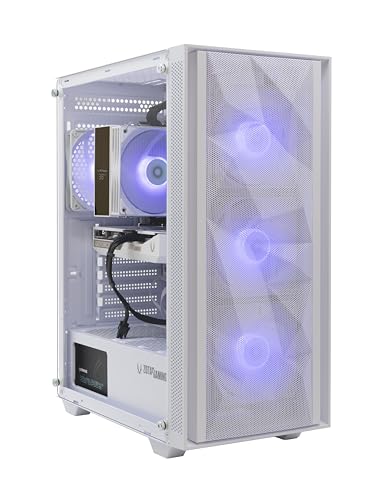
- Best overall white build: ZOTAC MEK Gaming PC, Ryzen 5 9600X, RTX 5060 White Edition, 16GB DDR5, 1TB NVMe — Check on Amazon
- Skytech Archangel, i5-14400F, RTX 4060, 32GB DDR5 RGB, 2TB SSD, White — Check on Amazon
- Thermaltake LCGS Quartz i1460, i5-14400F, RTX 5060, RGB ToughRam, White — Check on Amazon
- Skytech Shiva, Ryzen 5 5600X, RTX 4060 Ti, White In Win 101 Case — Check on Amazon
See 2 more Amazon options
- ZER-LON Gaming PC, Ryzen 5 5500, RTX 4060, White, RGB Fan x4 — Check on Amazon
- STGAubron Gaming PC, Ryzen 5 5500, RTX 3050 6GB, White, RGB Fan x6 — Check on Amazon
Read the full guide ↓
Disclosure: As an Amazon Associate, reviewstook.com earns from qualifying purchases. Links to Amazon on this page are affiliate links; they cost you nothing extra. Listing details such as price and availability change often, so check the current Amazon listing before you buy.
Start with the sentence most guides in this category avoid: not one of the six machines below is small. A white gaming PC under $1,200 is a desktop tower — every pick here is a full-size case with a glass side panel, internal power supply and a row of fans — because at this budget the white treatment lives on towers, and the genuinely compact white machines are mini PCs covered by different guides. So this guide does not pretend otherwise, and it does not grade these systems as if they were small. It grades the installation instead: what each tower asks of a small room once it is actually in it. The footprint that matters is not the box alone. It is the box plus the air clearance its vents need, plus the loop of cable dropping behind the desk, plus the heat it pushes into a room that may only hold a few cubic metres of air, plus the chair space you still need in front of it. A tower that “fits” on paper and cooks in practice has not fit at all.
White cuts both ways in a small room, and both directions are graded below. In its favour, a white case reads visually lighter than a black one of identical size — it reflects the room’s light instead of swallowing it, and in a bedroom or studio corner that difference is real. Against it, the glass panel turns the interior into furniture you look at every day: cable runs, dust on the fans and a graphics card that may or may not be white are all on permanent display, and dust shows on white and glass faster than on a black steel box under a desk. Every review below therefore carries two grades: the white grade from the base research (complete, partial or case-only, by what the listing documents in white) and an installation grade argued from the machine’s form-factor class, its documented cooling layout and what living with it in a small room involves. One discipline runs through the guide: the base research documents no case dimensions and no mounting pattern for any of these six systems, so this guide prints none. Where a measurement would decide your purchase, the checklist sends you to the live listing’s stated dimensions and your own tape measure — the only sources that can honestly give it.
In this guide
Quick Picks
Short on time, or comparing several options at once? Each row below names a buyer type and the system that suits it, with a link to the listing.
| Buyer type | Pick | Why it stands out | Link |
|---|---|---|---|
| Best overall white build | ZOTAC MEK, Ryzen 5 9600X, RTX 5060 White Edition | The only pick whose graphics card is a documented white edition, on a current AM5 platform, with an easy-clean magnetic dust grill | Check on Amazon |
| Best showpiece and capacity | Skytech Archangel, i5-14400F, RTX 4060 | White glass case, RGB ring fans and RGB memory, with 32GB RAM and 2TB storage — install it once and never open it | Check on Amazon |
| Best current-generation value | Thermaltake LCGS Quartz i1460, RTX 5060 | White chassis, RGB ToughRam and motherboard-synced lighting; full-length PSU cover hides the cable mess behind glass — check price on Amazon | Check on Amazon |
| Best graphics card | Skytech Shiva, Ryzen 5 5600X, RTX 4060 Ti | The tier’s native-1440p card inside a white In Win 101 mATX mid-tower — the smallest case class in this set | Check on Amazon |
| Best budget white build | ZER-LON AOV4060, Ryzen 5 5500, RTX 4060 | White case and four RGB fans on a full RTX 4060 system positioned at the budget end of this tier — check price on Amazon | Check on Amazon |
| Cheapest full white presentation | STGAubron White, Ryzen 5 5500, RTX 3050 6GB | Six RGB fans plus RGB keyboard and mouse in white — the whole desk arrives in one box; check price on Amazon | Check on Amazon |
How These Picks Were Chosen
The six systems are exactly the six verified picks of the base guide to the best white gaming PC under $1,200 — same ASINs, same specifications, same white grades — re-graded here for the reader whose constraint is the room rather than the colour alone. Nothing was added and nothing was swapped: if a machine sits close to the ceiling, or its value depends on a coupon being live at checkout, that condition is restated in its review at the same strength as the base guide states it. The budget was applied as a ceiling on the whole system, and where a pick lives close to that ceiling, the review says so plainly and points you to check the current price on Amazon.
We did not use these systems ourselves, and we did not measure them — which is precisely why this guide prints no measurements. The base research read the maker listings, specification pages and manuals and recorded what each listing documents: the graphics card and its memory, the processor and platform, the memory and storage, the power supply where the maker publishes it, and the white layer separately (case colour and panel construction, whether the graphics card is a named white edition or an unspecified brand, whether the memory and cooler are documented as white or RGB). What the base research does not contain, for any of the six, is a set of case dimensions, a volume, a weight or a VESA mounting pattern. Rather than import figures from other models — a number documented for a different machine is a false promise to a reader measuring a shelf — this variant grades installation at the level the evidence supports: form-factor class, panel and vent layout as documented, whether the power supply is internal (it is, on all six), and the upkeep each finish demands. Exact dimensions belong to the live listing and to Step 1 of the checklist below.
The white grading itself is unchanged from the base guide, because a small room does not alter what a listing contracts. A complete white build documents the case, the graphics card and the memory or cooler in white or matching RGB. A partial build documents the case and some interior pieces but leaves the graphics card — the largest object in the window — unspecified or brand-may-vary. A case-only build documents the shell alone. Two listing habits matter: “GPU brand may vary” means the card’s colour is not contracted, and listing renders routinely show a more coordinated interior than the machine that arrives. Judge the spec block, not the photograph — in a small room you will be looking at the real interior, at close range, every day.
The Installed Footprint Is Bigger Than the Box
A tower’s true footprint has five parts, and only the first is the case. The second is air: every pick here breathes through some combination of front, top and rear vents, and each vent needs open room in front of it — a mesh front panel pushed against a wall is a blocked intake wearing a mesh costume. The third is the cable drop: power, display, network and peripherals all leave from the rear, bend, and fall, and that bend radius plus the hanging loop claims depth behind the case that the case’s own depth never mentions. The fourth is heat: a gaming tower under load is a small space heater, and in a small room the exhaust has nowhere to dilute — a machine comfortable in a living room can make a box bedroom unplayable in August, and the only cure is an exhaust path that leaves the room’s breathing zone rather than recirculating into it. The fifth is you: the chair, your knees and the swing of the door all share the same floor the tower wants.
That arithmetic produces three honest placement classes for this set. Floor-standing beside the desk is the recommended default for all six: the case sits on the floor or a low stand, vents face open room, the cable drop falls straight behind the desk, and the glass panel still shows from the chair. On the desk is a knowing compromise — it lifts the machine out of the floor dust and puts the white interior at eye level, which is half the point of buying it, but it spends desk surface a small room may not have and puts fan noise at ear height. Inside furniture — a cabinet, a closed media unit, a wardrobe conversion — is refused for every pick in this guide, without exception: a sealed enclosure starves the intakes and returns the exhaust to the machine as intake air, and no white finish is worth a system that throttles or cooks. If the only spot in the room is inside a cabinet, the honest answer is not a different pick from this list; it is a different kind of computer, and the mini PC and small-form-factor guides linked at the end cover machines built for that life.
Two white-specific placement notes complete the picture. Dust is the tax on glass and white: it settles visibly on white fan frames and shows through the panel within weeks in a floor placement, so picks with documented dust filtration earn real credit below, and any floor placement should be on a stand or board rather than carpet, which both chokes bottom airflow and feeds the case dust. And light is a placement input too: six RGB fans in a small bedroom are a night-light whether you planned one or not, so a pick whose lighting runs through motherboard software — dimmable, schedulable, off — is worth more in a sleeping room than one running fixed presets.
Measure Before You Buy: The Five-Step Checklist
Work through these five steps in order, before ordering, for whichever pick you choose. The order is the point: each step can veto the purchase while vetoing is still free.
- Step 1 — Measure the spot. Tape-measure the exact floor or desk area the tower will occupy: width, depth and the height to anything above it. Then open the live Amazon listing for your chosen pick and read the case dimensions in its own spec block — the base research for this guide documents no dimensions for any pick, so the listing and your tape are the only honest sources, and if the listing’s stated depth plus the cable bend behind it exceeds your measured depth, the machine does not fit, whatever the photographs suggest.
- Step 2 — Check the ventilation clearance. Stand at the measured spot and trace where air must travel: in through the front or bottom, out through the top or rear. Every face that vents needs open room beyond it, and the exhaust path should lead away from where you sit and sleep. If the spot is enclosed on three or more sides, stop here — that is the sealed-cabinet refusal, and no pick in this guide is exempt from it.
- Step 3 — Give the power cord an address. All six picks run internal power supplies, so there is no external brick to place — the “brick address” for this set is the wall outlet and the cord run. Identify the actual socket the machine will use, confirm the cord reaches it without crossing the chair’s rolling zone or a doorway, and plan the power strip’s home now rather than draping it later. Four picks publish the supply inside the case (650W Gold on the ZOTAC and the Archangel, 600W Gold on the Quartz and the Shiva); the ZER-LON and the STGAubron publish none, one more reason their upgrade plans wait for the delivered unit’s label.
- Step 4 — Plan the cable drop. Count what leaves the rear panel: display cable to the monitor, Ethernet if you wire it (you should — a small room is no excuse for gaming over congested Wi-Fi when the router is usually metres away), keyboard, mouse, headset, and the monitor’s own power. Each cable needs its bend and its fall; route them in one bundle down one rear corner of the desk so the glass side stays the clean side. Confirm the monitor’s position and the tower’s position let every cable reach without tension — a taut display cable is a port failure on a schedule.
- Step 5 — Only then order. With the spot measured, the air path open, the outlet claimed and the cable run planned, place the order — and keep the delivery-day checks from the base guide: photograph the interior through the glass before powering on, confirm the graphics card model and colour against what the listing documented, the memory and storage sizes, and the power supply label where it was unpublished. In a small room the machine is furniture from day one; the return window is when a wrong configuration is still a free fix.
The 6 Best White Gaming PCs for Small Spaces Under $1,200
ZOTAC MEK Gaming PC — Ryzen 5 9600X, GeForce RTX 5060 Twin Edge OC White Edition, 16GB DDR5, 1TB NVMe
Who it suits: Small-room buyers who want the white build to survive close inspection — this tower will sit a metre from your chair, and this is the one pick whose interior is contracted to look the way the listing promises.
The ZOTAC MEK earns the top spot in this angle for the same reason it topped the base guide, plus one reason that only matters in a small room. The base reason: it is the only system here whose graphics card is a named white edition in the listing’s own product information — a ZOTAC GAMING GeForce RTX 5060 Twin Edge OC White Edition with 8GB of GDDR7 — inside a white case with a seamless tempered-glass panel, so the two largest surfaces in the window are white by contract, not by render. The small-room reason is upkeep: ZOTAC documents an easy-clean magnetic dust grill on this machine, and in a room where the PC lives close to the floor, the bed and you, dust management is not a footnote — it is the difference between a weekly wipe and a monthly strip-down. A tower air cooler with a temperature display and a built-in digital display round out a presentation that is considered rather than loud, which suits a room that is also a bedroom. Underneath: a Ryzen 5 9600X on the current AM5 platform, 16GB of DDR5, a 1TB NVMe SSD, a published 650W 80 Plus Gold power supply, Wi-Fi 6E and Bluetooth 5.3, Windows 11 Home, and ZOTAC’s one-year complete-system warranty with a three-year GPU warranty behind it.
Installation grading is favourable but not free. The power supply is internal, so the install is the standard tower pattern — floor beside the desk, rear to the cable drop, vents to open room — and the published 650W Gold unit means the outlet plan from Step 3 is the whole power story. The glass panel faces the room, so place the machine where the panel is the side you see from the chair. The honest limits carry over from the base research unchanged: 16GB of memory is this tier’s floor (the AM5 platform makes adding more straightforward later, without moving the case), and the listing does not document the motherboard colour or cable sleeving — the white is contracted for case and card, with board and cabling unspecified rather than assumed. On price, check the current price on Amazon: this build sits at the top of this budget tier, and the premium for the complete-white treatment over a plain RTX 5060 system is modest for a contracted white card. One confirmation from the base guide is load-bearing: a different MEK configuration built on a Ryzen 5 5500 also circulates, so verify this ASIN still resolves to the 9600X white-edition listing before ordering.
- Graphics card is a contracted white edition (RTX 5060 Twin Edge OC White Edition), not a brand-may-vary lottery — the interior survives close-range viewing.
- Easy-clean magnetic dust grill documented — the most practical upkeep feature in this guide for a floor placement.
- Current AM5 platform with a published 650W Gold power supply; three-year GPU warranty behind the one-year system cover.
Honest limitation: 16GB of memory is the tier’s floor, and the motherboard colour and cable sleeving are not documented — the white contract covers the case and the card, not every last cable behind the glass.
Choose it if the machine will live in plain sight in a small room and you want the documented interior to match the promise. Skip it if day-one capacity is the priority — 32GB and 2TB are the Archangel’s territory below.

Skytech Archangel — Intel Core i5-14400F, GeForce RTX 4060, 32GB DDR5 RGB, 2TB SSD, White
Who it suits: Buyers whose small room doubles as the showroom — who want the biggest, brightest white presentation in the tier and a machine they can install once and never open again.
The Archangel is the installation minimalist’s pick disguised as the maximalist’s. Its specification is the most generous in the guide — an Intel Core i5-14400F, 32GB of DDR5-5600 RGB memory, a 2TB NVMe SSD and a published 650W Gold power supply — and in a small room that generosity has a specific installation meaning: the two upgrades every other pick eventually needs (more memory, more storage) are already done, so this tower goes into its measured spot once and stays closed. The white layer the listing documents is the white tempered-glass case itself, four RGB ring fans and the lit memory, with a mesh front on the current edition — confirm that mesh-front configuration on the live listing at import, because Skytech revises case editions under the same family name. Skytech assembles in the USA and covers the machine with a one-year parts and labour warranty and lifetime free technical support.
The installation caveats mirror its strengths. A showpiece case is the largest visual object in this guide’s class, and in a small room it will be the furniture: place it where the glass works for you — floor-standing beside the desk with the panel toward the chair — and respect the mesh front, which needs open air in front of it and rules out pushing the case flush into a corner. The white grading stays partial, exactly as the base guide graded it: Skytech’s “GPU brand may vary” clause means the RTX 4060’s maker and colour are not contracted, and the largest single object in the window may arrive black — a fact to accept knowingly before it is a metre from your bed. On price, check the current price on Amazon: the Archangel sits at the top of this budget tier, and most of what you pay is the doubled memory and storage rather than the colour, so the capacity is where the value lies.
- 32GB of DDR5 RGB memory and a 2TB SSD — the install-once pick; no upgrade opening the case in its first years.
- White glass case with four RGB ring fans and a mesh front on the current edition; published 650W Gold power supply.
- Assembled in the USA with a one-year parts and labour warranty and lifetime free tech support.
Honest limitation: The RTX 4060’s brand — and therefore its colour — may vary, so the biggest component in the window is not contracted white; the mesh front also demands open air ahead of it, which constrains tight corner placements.
Choose it if you want the showpiece look with capacity you will never outgrow at this tier, installed once. Skip it if a possibly black graphics card would bother you at close range every day — buy the ZOTAC instead.

Thermaltake LCGS Quartz i1460 — Intel Core i5-14400F, GeForce RTX 5060, 16GB RGB ToughRam, 1TB NVMe, White
Who it suits: Small-room buyers who want the tidiest interior behind glass for the least money in the current-generation class — and whose room is also where they sleep.
Thermaltake builds this system from its own parts catalogue, and the installation-relevant detail is tidiness. Independent reviews and roundups of this exact configuration confirm a white chassis with a 3mm tempered-glass side panel, a mesh front, an ARGB tower air cooler, RGB ToughRam memory — and a full-length power supply cover, the unglamorous feature that hides the cable bundle at the case floor. In a tower across the room that cover is a nicety; in a small room, with the glass at reading distance, it is the difference between an interior that looks managed and one that shows every cable the builder stuffed out of sight. The lighting is synced through the motherboard’s software rather than a bundled remote, which matters in a sleeping room for a practical reason: one software ecosystem means the fans and memory can be dimmed or switched off at night from the same place, instead of hunting a remote. The hardware is current — an Intel Core i5-14400F, an RTX 5060 with 8GB, 16GB of DDR4-3600 ToughRam, a 1TB NVMe SSD and a published 600W 80 Plus Gold power supply, with Wi-Fi and Windows 11 fitted — and the RTX 5060 renders 1440p natively in lighter games while leaning on DLSS upscaling in heavier ones.
Two base-guide caveats survive intact. The platform is DDR4 on an LGA1700 board: serviceable, and cheaper to expand than DDR5, but a finished generation with no processor upgrade path worth planning around. And the white grading is partial in a specific way — chassis, cooler and memory are documented light-coloured or RGB, but the listing material does not name the graphics card’s colour, so assume the card is standard until the live listing says otherwise. Expansion deserves the same live check the base guide demanded: configuration coverage of this system notes a single populated M.2 slot arrangement, so confirm the live listing’s storage expansion before planning a second SSD into the install. Value remains one of the pick’s best arguments: check the current price on Amazon — it is positioned as an accessible entry to a current-generation white system in this guide.
- Full-length PSU cover keeps the cable floor hidden behind glass — the tidiest documented interior presentation in this class.
- Motherboard-synced ARGB lighting: one ecosystem to dim or darken in a sleeping room.
- Current-generation RTX 5060 with a published 600W Gold power supply, positioned accessibly within this guide’s current-generation class — check price on Amazon.
Honest limitation: The DDR4/LGA1700 platform is a finished generation, the graphics card’s colour is not documented, and the storage expansion arrangement needs confirming on the live listing before a second drive is planned.
Choose it if you want current graphics and a managed, single-software lighting setup for the least money here. Skip it if a long processor upgrade path matters more — the AM5 ZOTAC above brackets it.

Skytech Shiva — AMD Ryzen 5 5600X, GeForce RTX 4060 Ti, 16GB DDR4, 1TB NVMe, White
Who it suits: Buyers with the least floor to spare who still want the strongest graphics card in the guide — the Shiva’s case is the one documented member of a smaller form-factor class in this set.
The Shiva’s installation argument starts with its case. The In Win 101 is documented in the base research as an mATX mid-tower with tempered glass — a showpiece case from a smaller class than the full towers around it — which makes this the pick whose box asks the least of a measured spot, while remaining unmistakably a tower: it stands on the floor or the desk, breathes through its vents like the rest, and is refused a sealed cabinet like the rest. Do not let the class label do more work than it can: the base research documents no dimensions for this case either, so Step 1 still runs through the live listing’s stated measurements and your tape. Inside the white case sit three RGB fans and a high-performance ARGB air cooler, and the hardware is the previous generation done properly: a Ryzen 5 5600X, an RTX 4060 Ti with 8GB — the tier’s native-1440p card, the only one here that renders mainstream titles at the full resolution rather than upscaling to it — 16GB of DDR4-3200, a 1TB NVMe SSD, a published 600W Gold power supply, Wi-Fi and Windows 11 Home, assembled in the USA under Skytech’s one-year parts and labour warranty with free technical support.
The trade-offs are the base guide’s, unchanged. AM4 and DDR4 are finished: the 5600X is a capable gaming processor, but there is no upgrade path here that does not start with a new motherboard and memory, so this machine is bought as a complete object and installed as one. The white grading is partial — the case is documented white and the fans are RGB, but Skytech reserves “GPU brand may vary,” so the 4060 Ti’s colour is not contracted, and a black card in the white In Win case is a real possibility to accept before ordering. Price needs the most care of any pick in the guide: check the current price on Amazon and check whether a coupon is live at checkout, because the value case depends on it — the cart total, coupon clipped, is what counts. With a coupon applied it is the strongest graphics value among the white systems in this tier; without one, judge it more cautiously.
- RTX 4060 Ti 8GB — the set’s one card that renders mainstream titles natively at 1440p.
- White In Win 101 mATX mid-tower — the smallest documented case class in this set, with three RGB fans and an ARGB air cooler.
- 600W Gold power supply, published in the listing; assembled in the USA.
Honest limitation: The AM4/DDR4 platform is finished with no meaningful upgrade path, the card’s colour is not contracted, and its value depends on a coupon being live at checkout, so confirm the cart total before ordering.
Choose it if floor space is the tightest constraint and 1440p performance is the priority. Skip it if you plan to upgrade the processor later, or if no coupon is live at checkout.

ZER-LON Gaming PC (AOV4060) — AMD Ryzen 5 5500, GeForce RTX 4060, 16GB DDR4, 1TB NVMe, White
Who it suits: Buyers who want a real RTX 4060 behind white glass at the budget end of this tier, and who will grade the installation plainly: a standard tower, a standard black interior, and a positioning that leaves room in the overall budget for the stand, shelf or desk changes a small room may need.
The ZER-LON’s specification is the same hardware class as systems higher in this tier — a Ryzen 5 5500, an RTX 4060 with 8GB, 16GB of DDR4, a 1TB NVMe SSD, Wi-Fi 5 and Windows 11 Home, in a white case with four RGB fans — and its positioning reflects a smaller brand’s budget placement, comparable to plain black RTX 4060 systems rather than premium white builds, with only a modest premium for the white case. Check the current price on Amazon. For a small room, that budget positioning leaves room for the install itself: the low stand that lifts the case off carpet, the shelf board, or the longer cables a proper drop requires, and still leaves the machine the value pick of the six. The RTX 4060’s limits are the familiar ones — 8GB of memory and a 1080p-native rendering class that negotiates 1440p through DLSS rather than owning it.
What the money does not buy is documentation, and in a small room documentation gaps land closer to home. The white execution is case-only by this guide’s grading: the case and its four RGB fans are specified, and nothing behind the glass — card colour, board, cabling — is documented at all, so expect a standard black interior at close range and be pleasantly surprised if it is otherwise. The platform is AM4 with DDR4, a finished generation, and Wi-Fi 5 is a generation behind the dearer picks — one more argument for the wired Ethernet run in Step 4, which a small room usually makes easy. The power supply is not published in the verified listing data, which caps the sensible GPU upgrade path until you can read the label on the unit that arrives; the install itself is unaffected, since the supply is internal like every pick here. None of that disqualifies the machine. It is a white 4060 system positioned like a plain black system, from a smaller brand with a thinner paper trail, and buyers who understand that trade are getting strong value in this guide.
- Full RTX 4060 hardware positioned at the budget end of this tier, with only a modest premium for the white case over plain equivalents — check price on Amazon.
- 1TB NVMe SSD fitted behind a white case carrying four RGB fans.
- Windows 11 Home and 16GB of memory fitted — nothing else to buy before the first session.
Honest limitation: Case-only white grading — no interior component colour is documented — on a finished AM4/DDR4 platform with Wi-Fi 5 and an unpublished power supply whose label gates any upgrade plan.
Choose it if money is the hard constraint and a real RTX 4060 outranks a coordinated interior. Skip it if you are paying for the complete-white look at close range — that is the ZOTAC at the top of this guide.

STGAubron Gaming PC, White — AMD Ryzen 5 5500, GeForce RTX 3050 6GB, 16GB DDR4, 1TB SSD, RGB Fan x6
Who it suits: Buyers furnishing a small room in one purchase — the complete white desk presentation, peripherals included, for the least money in the guide — whose gaming is honestly 1080p.
This is the presentation-focused pick, and in a small room its completeness is an installation feature in itself. The white case carries six RGB fans — the most in the guide — and the box includes an RGB keyboard and mouse, so the desk reads as one white-and-lit setup the day it arrives, with nothing else to buy, place or cable beyond the monitor. Underneath sit a Ryzen 5 5500, 16GB of DDR4, a 1TB SSD, Wi-Fi 6 and Bluetooth 5.0 under Windows 11 Home. Check the current price on Amazon — it is positioned as the cheapest route in this guide. Six fans also means the most air movement in the guide, which cuts both ways in a small room — cooling is not the worry; fan presence at close range is, and a floor placement beside the desk rather than on it keeps the noise where it belongs. As a piece of room furniture that also plays games, nothing else in this guide competes at its budget positioning.
The grading must stay just as plain about the rest. Its graphics card, an RTX 3050 with 6GB, sits a full class below the 4060 machines above: honest 1080p at medium-to-high settings, DLSS doing real work in modern titles, and no honest route to 1440p. The white execution is case-and-peripherals: six lit fans and a white shell, with the card and board colours undocumented, so the interior behind the glass is a standard build wearing a white case. The power supply is not published in the verified data for this brand, which limits upgrade planning until the delivered unit’s label can be read. And the base guide’s delivery-day warning stands at full strength: this listing family’s own storage descriptions have contradicted themselves in sibling research for this batch — headline and body text disagreeing — so verify the delivered configuration against the order on arrival, while the return window is open. Bought as the cheapest complete white presentation with a 1080p card inside, it is a fair product — check price on Amazon before ordering.
- Six RGB fans plus RGB keyboard and mouse included — the fullest white presentation in this guide, and the fewest extra boxes to place in a small room.
- Positioned as the cheapest entry in this guide by a wide margin — check price on Amazon.
- Wi-Fi 6 and Bluetooth 5.0 — wireless a generation newer than the ZER-LON’s.
Honest limitation: The RTX 3050 6GB is a 1080p card a full class below the guide’s 4060 systems, the interior colours are undocumented, the power supply is unpublished, and the delivered configuration should be verified on arrival.
Choose it if the white desk presentation is the purchase and your gaming is 1080p esports and back-catalogue. Skip it if your library is modern AAA or your monitor is 1440p — the five systems above it exist for exactly that.

Comparison Table
| Product | Graphics card | White grade | Installation note | Link |
|---|---|---|---|---|
| ZOTAC MEK, 9600X, RTX 5060 | RTX 5060 8GB, white edition | Complete (case + card documented) | Magnetic dust grill for easy cleaning; published 650W Gold PSU | Check on Amazon |
| Skytech Archangel, 14400F, RTX 4060 | RTX 4060 8GB, brand may vary | Partial (case, fans, RGB memory) | 32GB/2TB means install once, never open; mesh front needs open air | Check on Amazon |
| Thermaltake Quartz i1460, RTX 5060 | RTX 5060 8GB, colour undocumented | Partial (case, cooler, RGB memory) | Full-length PSU cover hides cables; motherboard-synced lighting | Check on Amazon |
| Skytech Shiva, 5600X, RTX 4060 Ti | RTX 4060 Ti 8GB, brand may vary | Partial (white case, RGB fans) | mATX mid-tower — smallest case class in the set; native 1440p card | Check on Amazon |
| ZER-LON AOV4060, RTX 4060 | RTX 4060 8GB, colour undocumented | Case-only | Standard tower install; PSU unpublished, label gates upgrades | Check on Amazon |
| STGAubron White, RTX 3050 6GB | RTX 3050 6GB, colour undocumented | Case-only (plus lit peripherals) | Six fans and peripherals in the box — the whole desk in one delivery | Check on Amazon |
How to Choose a White Gaming PC for a Small Space Under $1,200
- Measure before you fall in love. Run the five-step checklist first. A tower that cannot clear its own cable bend or breathe in the only available spot is the wrong tower, however white it is — and the genuinely small machines live in the mini PC and small-form-factor guides, not this one.
- Grade the white before you judge value. First decide which grade you are shopping for — complete, partial or case-only — then verify it against the listing’s spec block rather than its photographs, component by component: case, card, memory, cooler. In a small room the interior sits at reading distance, and undocumented colours get noticed daily.
- Treat “GPU brand may vary” as “GPU colour unknown.” The card’s model and memory are contracted; its colour is not. If a black card in a white case would bother you, only a named white-edition card in the spec block removes the risk — in this guide, that is the ZOTAC alone.
- Refuse the cabinet, whatever the room tempts you to do. A closed media unit or wardrobe conversion starves every tower here. Floor-standing beside the desk is the default; on-desk is a compromise you choose knowingly; inside furniture is not a placement, it is a slow failure.
- Count the heat, not just the footprint. A gaming tower is a small heater. In a small room, plan the exhaust path — out of the case, away from the chair and the bed — and prefer the placement that gives hot air somewhere to go that is not back into the intakes.
- Ask how the lighting is controlled. Motherboard-synced ARGB (the Thermaltake) can be dimmed or darkened from one piece of software — a real feature in a room you sleep in. Preset-only lighting in a six-fan case is a night-light you did not choose.
- Separate the colour premium from the capacity premium. A white system’s premium may be paying for colour or for doubled memory and storage. The Archangel is the second kind; know which kind you are paying for, and remember the pure colour premium at this tier is usually modest next to the capacity premium.
- Read the power supply line before planning upgrades. Four picks publish Gold-rated units (ZOTAC 650W, Archangel 650W, Quartz 600W, Shiva 600W), and those figures bound what the machine can grow into. Where no PSU is published — the ZER-LON and the STGAubron — upgrade planning starts with the label on the delivered unit.
- Check the live price, not the headline. These listings move between deal events, and picks near the ceiling can cross it. Check the current price on Amazon for the pick you want — for the coupon-dependent Shiva, confirm the coupon is live in the cart — and let the deal come to you.
Common Buying Mistakes
- Buying the tower first and measuring the room second. The checklist exists because the return of a full-size tower is the most avoidable errand in this category.
- Sealing the PC inside furniture to make the small room look tidy. The tidiness lasts until the first long session; the throttling is forever. No pick in this guide is exempt.
- Believing the render. Listing photographs show coordinated white interiors that the shipped configuration does not always guarantee; the spec block is the contract, the picture is an aspiration — and in a small room you view the real thing at close range.
- Paying complete-build money for a case-only build. A white shell over a standard black interior is a fair product at the ZER-LON’s and STGAubron’s budget positioning and a poor one at the top of this budget.
- Ignoring “GPU brand may vary” on the one purchase where colour is the point. On a white build in a small room, that clause decides the look of the whole window, every day.
- Placing the case on carpet. It chokes bottom airflow, feeds the fans dust, and shows on white faster than anywhere — a low stand or board is the cheapest installation upgrade there is.
- Counting a coupon headline as the final price. The Shiva’s value case depends on the coupon being clipped — the cart total at checkout is what counts.
- Skipping the delivery-day check. Variant drift is normal in this market — verify the card, memory size and storage against the listing while returns are still free, especially on the STGAubron, whose listing family has contradicted its own storage descriptions.
Final Recommendation
- The genuine white build, easiest to live with: ZOTAC MEK with the RTX 5060 White Edition.
- Install once, never open: Skytech Archangel.
- Tidiest interior for least money: Thermaltake LCGS Quartz i1460.
- Least floor, strongest graphics: Skytech Shiva.
- White on a budget: ZER-LON AOV4060.
- Cheapest full presentation: STGAubron White.
Our top two for a small room are the ZOTAC MEK and the Skytech Archangel, for installation reasons as much as colour ones. The ZOTAC is the only system here that contracts the whole point of the purchase — a white graphics card in a white case — and its magnetic dust grill makes it the easiest tower here to keep clean at floor level, on the platform with the longest future. The Archangel’s premium turns out to be capacity rather than colour, and 32GB with 2TB means the case goes into its measured spot once and stays closed for years. If the floor itself is the binding constraint, the Shiva’s mATX mid-tower is the smallest documented case class in the set and carries the strongest card — bought with a coupon live at checkout or not at all. Readers whose rooms rule out a tower altogether should start instead with Best Mini PC For Small Spaces Under $1200 or Best Small Form Factor Gaming PC For Small Spaces Under $1200, and those on a tighter ceiling should also see Best White Gaming PC For Small Spaces Under $800. Whatever you choose: measure the spot, keep the air path open, refuse the cabinet, and photograph the interior the day it arrives.
Frequently Asked Questions
Is any of these PCs actually small?
No — and this guide would rather say so than stretch a definition. All six are desktop towers with glass side panels and internal power supplies. The Shiva’s In Win 101 is documented as an mATX mid-tower, the smallest case class in the set, but it is still a tower that stands on a floor or a desk. If your space genuinely cannot take a tower, the machines built for that life are mini PCs and small-form-factor systems, covered by the guides linked in the final recommendation.
Can I put one of these towers inside a cabinet or media unit?
No. That refusal applies to all six picks without exception. A sealed or near-sealed enclosure starves the intake vents and feeds the machine its own exhaust as intake air; the results are heat, noise, throttling and shortened component life. If the only available spot is inside furniture, the honest purchase is a different class of computer, not a different pick from this list.
Can I mount one of these PCs behind my monitor or on the wall?
None of the six listings documents a VESA pattern or any mounting provision, so this guide claims mounting for no pick — these are towers designed to stand, not to hang. Behind-monitor mounting is a mini PC feature; readers for whom it is the deciding requirement should start with the mini PC small-spaces guide rather than improvise a mount for a glass-sided tower.
How do I know whether a specific pick will fit my desk or floor space?
From the live listing and a tape measure, in that order — the research behind this guide documents no case dimensions for any of the six, so no figure printed here could honestly answer the question. Read the dimensions in the listing’s own spec block, add the cable bend behind the case and the clearance its vents need, and compare the total against your measured spot (Step 1 and Step 2 of the checklist). If the listing’s numbers and your numbers disagree with the plan, believe your numbers.
Does a white PC show dust more than a black one in a small room?
Yes, visibly — dust reads grey against white fan frames and through a glass panel, and a floor placement in a small room collects it faster than a desk placement in a large one. It is a cosmetic cost, not a performance one, and it is manageable: a stand or board instead of carpet, and a pick with documented dust filtration helps — the ZOTAC’s easy-clean magnetic grill is the strongest upkeep feature documented in this set.
What should I check when the PC arrives?
Everything the listing documented, while the return window is open — in a small room the machine is furniture from day one, so a wrong configuration is both a performance and a placement problem. Photograph the interior through the glass, then confirm the graphics card model, memory and its colour if one was specified, the memory size and stick count, the storage size, and the power supply label where it was unpublished. Compare against the listing’s spec block rather than its photographs; integrators revise components under the same model name, and the delivery-day check is the only moment a discrepancy costs you nothing.
- Best White Gaming PC Under $1200
- Best White Gaming PC For Small Spaces Under $800
- Best White Gaming PC For Small Spaces Under $1500
- Best White Gaming PC Under $800
- Best White Gaming PC Under $1500
- Best White Gaming PC For Beginners Under $1200
- Best White Gaming PC For Streaming Under $1200
- Best White Gaming PC For 1440p Gaming Under $1200
- Best Gaming PC Under $1200
- Best Prebuilt Gaming PC Under $1200


