Where to buy
Check the latest price, availability and delivery on Amazon. Orders are placed on Amazon. We may earn a commission from qualifying purchases.
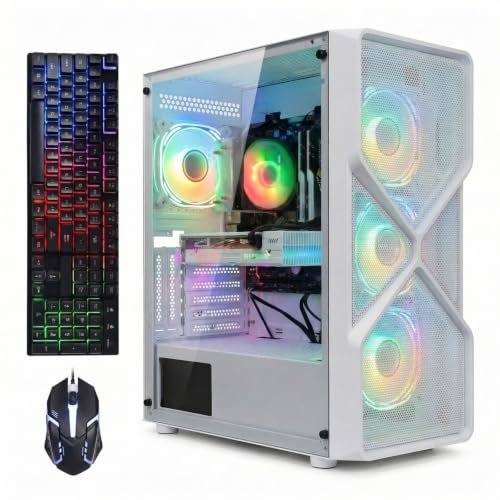
- Best first white gaming PC under $800 for most beginners: STGAubron Gaming PC, Ryzen 5 5500, RTX 3050 6GB, White, Keyboard & Mouse Included — Check on Amazon
- ZER-LON Gaming PC, Ryzen 5 5500, RTX 4060, White — Check on Amazon
- LXZ Gaming PC, Ryzen 5 5500, RTX 3050 8GB, 32GB RAM, White — Check on Amazon
- HP Victus 15L Gaming Desktop, i5-13400F, RTX 3050, White — Check on Amazon
See 2 more Amazon options
- abytespark Gaming PC, Core i7-7700, RTX 4060, White — Check on Amazon
- STGAubron Gaming PC, Ryzen 7 5700X, RTX 3060 12GB, White (watchlist — read the review) — Check on Amazon
Read the full guide ↓
Disclosure: As an Amazon Associate, reviewstook.com earns from qualifying purchases. Links to Amazon on this page are affiliate links; they cost you nothing extra. Listing details such as price and availability change often, so check the current Amazon listing before you buy.
Buying your first gaming PC is confusing enough without adding a color requirement, so this guide is written the way a patient friend would explain it: every technical term is defined in plain language before it is used to judge anything, and every machine below is graded on what its listing actually documents — including how white it really is. Nothing here assumes you know what a graphics card does, why memory matters, or which hole the monitor cable goes into.
Three honest facts before the picks. First, $800 in a white case buys a 1080p gaming PC — the standard resolution of most monitors — and a good one, but not the sharper 1440p class of machine, whatever a listing headline implies. Second, white PCs cost a little more than identical black ones: across this guide’s research the premium is usually modest at fair prices, paid in cash or in slightly older parts. Third, two of the six machines are only worth buying at or under $800 on the day you shop — their live prices move, and they can sit above the budget entirely. Both carry their warning everywhere they appear, not in fine print: the walk-away rule — check the current price on Amazon and buy only when it sits inside the budget — is part of the recommendation.
One more promise, specific to beginners: every machine here is a complete, finished computer — assembled, with Windows installed, ready to plug in. None of them is a second-hand renewed unit, none is a barebones kit that still needs parts and an operating system bought separately, and none has its memory permanently soldered in place. Where a machine has a catch — and two of them do — the catch is named in plain words and counted as a separate extra cost, never folded quietly into the machine’s price.
In this guide
Quick Picks
Short on time, or comparing several options at once? Each row below names a first-time buyer type and the machine that suits it, with a link to the listing.
| First-time buyer type | Pick | Why it stands out | Link |
|---|---|---|---|
| Best first PC for most beginners | STGAubron Gaming PC, RTX 3050 6GB, White | Keyboard and mouse in the box, calm pricing that stays under $800 without a sale | Check on Amazon |
| Best graphics card | ZER-LON Gaming PC, Ryzen 5 5500, RTX 4060, White | The strongest graphics card in the guide — buy only at $800 or below | Check on Amazon |
| Best for a busy household PC | LXZ Gaming PC, RTX 3050 8GB, 32GB RAM, White | Double the memory of the others, so games and everyday apps stop competing | Check on Amazon |
| Best if you want a big brand behind it | HP Victus 15L, i5-13400F, RTX 3050, White | A real manufacturer’s warranty — but budget a second memory stick from day one | Check on Amazon |
| Best card on the oldest platform — caution | abytespark Gaming PC, i7-7700, RTX 4060, White | A modern graphics card paired with a 2017 processor; read the review before the price tempts you | Check on Amazon |
| Strongest hardware, watchlist only | STGAubron Gaming PC, Ryzen 7 5700X, RTX 3060 12GB, White | Often listed above budget — check price on Amazon; buy only if it reaches $800 or below | Check on Amazon |
How These Picks Were Chosen
The budget was applied as a ceiling with sale discipline. A machine qualifies if its live listing can sit at $800 or below — check the current price on Amazon on the day you shop — and where a machine only qualifies when its live price dips inside the budget, the review says so and states the walk-away rule plainly. Two picks are labeled deal-watch in plain language: the HP, which often sits above the ceiling, and the second STGAubron, which usually sits above the budget as well, included as a watchlist entry because beginners will find it on their own and wonder. The abytespark carries a third kind of warning: check price on Amazon before judging it at all — its live price on the day you look is the entire decision.
We did not use these PCs ourselves. We read the maker listings and specification data, and compared processors, graphics cards, memory, storage, published power supplies and — because this is a white-PC guide — the documented color of each visible component. That color filter excluded more machines than any other: white editions of well-known lines were checked and left out when their pricing never reaches this budget, including pricier white machines from well-known lines that sit well above it. A white guide that quietly fills itself with much more expensive PCs would not answer the search you made.
Two further rules shaped the list. First, no invented figures: where a listing does not publish a power supply wattage, a graphics card’s memory figure, or the color of a component, the review does not assert one — it flags the gap as something to confirm on the live listing. That rule is why this guide promises a graphics-card upgrade for none of the six machines: an upgrade promise needs a published power supply with headroom and a standard case, and no listing here documents both. Second, whiteness is graded end to end — a white case is the floor, not the achievement — and a short section after the reviews scores all six on that scale.
The Beginner’s Glossary: Thirteen Terms, in Plain Language
Every term used in the reviews below is defined here first. Read this once and the rest of the guide — and most PC listings anywhere — will make sense.
- Processor (CPU). The computer’s general-purpose brain: it runs Windows, your games’ logic, your browser and everything else. More and newer cores — the individual workers inside it — mean a machine that stays smooth when several things happen at once.
- Graphics card (GPU). A separate, specialized processor whose only job is drawing the game on your screen. In a gaming PC this is the single most important part for how good games look and how smoothly they run. Every pick in this guide has one; ordinary office PCs often do not.
- Video memory (VRAM). The graphics card’s own private memory, printed in the card’s name as 6GB, 8GB or 12GB. Games store their textures — the surfaces you see — there. More video memory means the card ages more gracefully as games get heavier. It is not the same thing as the PC’s main memory, below.
- Memory (RAM). The computer’s short-term workspace, measured in gigabytes (GB). 16GB is the working minimum for gaming today, 32GB is comfortable, and 8GB is not enough — one pick below ships with 8GB and is treated in this guide as a machine plus the extra stick it needs.
- Storage (SSD). Where your games and files live permanently, also measured in GB or TB (1TB is roughly 1,000GB). SSD is the fast modern kind; every pick here has one. Modern games are large, so 1TB fills up faster than first-time buyers expect.
- Integrated graphics. A small graphics capability built into some processors — fine for desktop work and video, far too weak for serious gaming. It matters to beginners for one practical reason, explained in the setup section: it decides what happens if you plug the monitor into the wrong sockets.
- The F-suffix. Intel processor names ending in F — like the i5-13400F in the HP below — have their integrated graphics switched off entirely, so the monitor must plug into the graphics card: the motherboard’s own sockets produce no picture at all. Only one pick here is an F model, and its review flags it in bold terms.
- Prebuilt. A finished computer assembled by the seller. All six picks are prebuilts: they arrive complete, with Windows installed and ready. The alternative — buying parts and building it yourself — is a weekend of risk for a first-timer.
- Renewed and barebones. Two listing words worth knowing. Renewed means a used machine that has been checked and resold; barebones means a partly-built computer that still needs parts — usually memory, storage and an operating system — bought and fitted before it can be used. None of the six picks is either: all are sold as new, complete desktops, and if you see either word in a listing elsewhere, the price is not the whole story.
- Soldered memory. Memory permanently fixed to the board, impossible to upgrade later — common in tiny mini PCs and laptops. All six picks here are desktop towers whose memory sits on removable sticks, so a later memory upgrade stays possible; the HP’s fix depends on exactly that.
- DLSS and frame generation. Graphics-card features that make games run more smoothly: DLSS draws the game at a lower internal sharpness and reconstructs a sharper picture, and frame generation (on the RTX 4060 picks) creates additional in-between frames. Both are legitimate ways to play; neither turns a 1080p card into a true 1440p card, and this guide never counts them as one.
- Power supply (PSU). The box inside the PC that converts wall power for all the parts, rated in watts. Its size decides whether a future graphics-card upgrade is safe. Budget listings often do not publish it — several here do not — and an unpublished power supply is treated in this guide as a reason no upgrade is promised, not as a detail to guess.
The 6 Best White Gaming PCs Under $800 for Beginners
STGAubron Gaming PC — Ryzen 5 5500, RTX 3050 6GB, White (Model ABR1722)
Who it suits: The true first-time buyer — someone setting up a gaming desk from nothing, who wants one box to arrive with everything in it and a price that behaves without having to watch for a sale.
This is the guide’s recommendation for most beginners, and the reason is completeness. The verified specification is a Ryzen 5 5500 processor, an RTX 3050 graphics card with 6GB of video memory, 16GB of main memory, a 1TB SSD, Wi-Fi 6 and Bluetooth 5.0 — and the box also contains an RGB keyboard and mouse, which none of the other five picks include. For a first setup that matters: the PC, the keyboard and the mouse arrive together, and only a monitor remains on the shopping list. Its positioning is the calmest in the guide too: it sits comfortably inside this budget tier at ordinary times — check price on Amazon to confirm the live figure before you buy. Measured against the black version of the same model family, the white one carries a modest premium — the honest cost of the color on this machine.
What the graphics card means, in beginner terms: the RTX 3050 6GB is an entry-level gaming card. It plays esports titles — the competitive games most first-time buyers actually live on — very comfortably, and modern big-release games honestly at 1080p with medium-to-high settings, with DLSS upscaling to lean on in the heaviest ones. It is a clear class below the RTX 4060 in the ZER-LON below — less video memory, no frame generation, less headroom as games get heavier — and that gap is the trade this pick makes for its price and its included extras. It is a fair trade for a first machine, as long as you make it knowingly.
Two cautions, both about the brand rather than the parts. STGAubron is a budget assembler, not a household name: its listings do not publish the power supply wattage, which is why no future graphics-card upgrade is promised for this machine — it may be possible, but it cannot be verified, and beginners should not buy on unverifiable promises. The model family is documented in this batch’s research to carry listing inconsistencies — a sibling configuration’s page has contradicted itself about its storage size — so confirm the configuration on the live listing before ordering, and check what arrives against it while the return window is open. Do not assume white peripherals until the live listing confirms them.
- The only pick with a keyboard and mouse in the box — the closest thing here to a complete first setup.
- Newer wireless than the ZER-LON offers: Wi-Fi 6 with Bluetooth 5.0.
- The fullest documented white presentation in the guide: white case with six lit fans.
Honest limitation: The RTX 3050 6GB is entry class — a full step below the 4060 — the power supply wattage is unpublished so no upgrade can be promised, and the bundled keyboard and mouse are documented as backlit, not as white.
Choose it if this is your first gaming PC and you want the fewest separate purchases and the least price drama. Skip it if you already own a keyboard and mouse and play demanding new releases — the same money aimed at the ZER-LON’s card is the better spend for you.

ZER-LON Gaming PC — Ryzen 5 5500, RTX 4060 8GB, White (Model AOV4060)
Who it suits: The beginner who already has (or is separately buying) a keyboard and mouse, wants the strongest graphics card the budget allows, and is patient enough to buy when the price dips instead of the day the old computer dies.
The ZER-LON is the performance pick: it is the only white RTX 4060 machine in this batch’s verified research that belongs in this under-$800 tier — check the current price on Amazon, because it does not sit inside the budget every day. The rest of the build is the standard budget recipe: the same Ryzen 5 5500 as the STGAubron above, 16GB of memory, a 1TB SSD, Wi-Fi 5 and Windows 11 Home, in a white tower with four RGB fans. The graphics card is the entire argument. The RTX 4060 is a genuine class above the 3050s here: strong 1080p gaming at high settings in modern titles, high-refresh esports play, and DLSS 3 frame generation, a smoothness feature no 3050 offers. Translated for a beginner: this is the machine most likely to still feel adequate in three years.
The catches are timing and platform. Timing: its live price moves, and it can sit above the budget. The rule is mechanical: check price on Amazon and buy at $800 or below; if it sits above the budget when you shop, wait or choose another pick, and do not let enthusiasm talk you into overpaying on the wrong day. Platform: the Ryzen 5 5500 is an older generation on a finished socket — a future processor upgrade eventually means a new motherboard too — and its older connection standard costs the card a few percent in some games.
- The strongest graphics card in the guide — RTX 4060 with frame generation — in a documented white case.
- Belongs in this budget tier when bought with discipline — check the current price on Amazon before ordering.
Honest limitation: Its live price can sit above the budget, so the $800 walk-away rule is part of the pick; the processor platform is a generation older than the HP’s, Wi-Fi is the older 5 standard, and only the case and fans are documented white.
Choose it if graphics performance is your priority and you can time the purchase. Skip it if you need to buy today at whatever it costs, or you want the complete in-the-box setup — that is the STGAubron above.

LXZ Gaming PC — Ryzen 5 5500, RTX 3050 8GB, 32GB RAM, White
Who it suits: The beginner whose PC will also be the household’s everything machine — games plus a browser full of tabs, chat and a video call in the background — and who installs a lot of games at once.
Every other machine in this guide ships with 16GB of memory or less; this LXZ ships with 32GB, and for a shared household that is the specification that decides daily smoothness. Sixteen gigabytes runs a game happily on its own, but first PCs rarely run a game on its own — voice chat, a browser, a launcher and Windows all want workspace too. With 32GB, that crowd stops competing. The rest of the verified build is the white version of the budget recipe: a Ryzen 5 5500, an RTX 3050 in its 8GB form — the better of the two 3050 versions, with more video memory for texture-heavy games than the 6GB card in the STGAubron — and a 1TB SSD, in a case the listing sells explicitly as the white model.
The cautions here are about paperwork, not hardware. This listing family’s page mixes information from more than one configuration — a different processor and graphics card combination appears in the same page data — so confirm the exact configuration in the cart before you pay, and again against the delivered machine. Pricing needs the same care: the wider LXZ line spans more than one configuration, and headline pricing can belong to a lesser configuration with half the memory rather than this 32GB build. Check price on Amazon for the exact configuration in your cart, treat $800 as a hard ceiling, and let the configuration in your cart — not the headline — decide. Whiteness documentation stops at the case, making this the guide’s quiet white option.
- Twice the memory of any other pick here — 32GB — so games stop fighting your browser, chat and launcher for workspace.
- The roomier 8GB edition of the RTX 3050, kinder to texture-heavy games than the 6GB card above.
Honest limitation: The listing family mixes variant data, so the configuration must be confirmed in the cart and on delivery; the live price for this exact 32GB build must be checked on Amazon, and the documented whiteness stops at the case.
Choose it if memory headroom and a big installed library are your real constraints. Skip it if you want the strongest graphics card outright — that is the ZER-LON — or a listing that needs no detective work at all.

HP Victus 15L Gaming Desktop — Core i5-13400F, RTX 3050, White (TG02-1020h)
Who it suits: The beginner — or the parent buying for one — who wants a famous manufacturer’s warranty, service network and published specifications behind the machine, and who can wait for a sale and do one simple upgrade.
The Victus 15L is the only big-brand machine in this guide, and for a nervous first-time buyer that structure is genuinely worth money: HP publishes its specifications properly and supports the machine through a national network. The verified configuration pairs an Intel Core i5-13400F — a newer, stronger processor than the Ryzen 5 5500s around it — with an RTX 3050 graphics card, in a compact white chassis of about 15.5 liters. Two warnings follow, because both change how you buy and set it up.
Warning one: the F in 13400F. That letter means this processor has no integrated graphics at all. On this machine — and only this machine in the guide — the monitor cable must go into the graphics card’s sockets on the back, never the motherboard’s sockets higher up: the motherboard sockets are dead and will show a black screen. Beginners panic over this daily and conclude the PC is broken; it is simply plugged into the wrong holes. Warning two: memory. This configuration ships with 8GB of RAM — half the working minimum — in a guide where every other pick has 16GB or 32GB. The fix is a second memory stick, which the removable-stick design allows — but it is a second purchase, so count the Victus as machine plus fix and compare the full setup, not the headline alone.
Its live price often sits above this guide’s ceiling, so check the current price on Amazon before judging it. It is a deal-watch pick: at or under $800 with the memory fix accounted for, it is the support-conscious buy of the guide; when it sits above the budget it belongs in a higher-budget guide. The verified material does not headline this card’s video memory figure, so none is claimed here — confirm it on the live listing. And the compact proprietary case limits future graphics-card upgrades — the standing trade of this small format. Buy it for what it is, not for what it might become.
- Backed by an actual manufacturer: HP’s warranty, service network and properly published specifications.
- A white chassis of roughly 15.5 liters — the smallest footprint in the guide, closer to a console than a tower.
Honest limitation: It ships with 8GB of memory, so the real cost is the machine plus a second stick; its live price can sit above the ceiling, so check price on Amazon; the F-suffix processor makes the monitor-plug rule unforgiving; and the compact proprietary case caps graphics upgrades.
Choose it if brand support tops your list, you can buy on a dip to $800 or below, and you are comfortable adding a memory stick. Skip it if you want 16GB in the box on day one with nothing to add, or you dream of upgrading the graphics card later.

abytespark Gaming PC — Core i7-7700, RTX 4060 8GB, White (Model AOV590)
Who it suits: The esports-focused beginner on a strict budget who understands exactly which half of this machine is new. It is included as much as a lesson as a pick — read the whole review before the headline tempts you.
On the headline, this looks like the guide’s best deal: an RTX 4060 graphics card — the same card as the ZER-LON — with 16GB of memory, a 1TB SSD, Wi-Fi 5 and four RGB fans in a white case. Then comes the processor line: a Core i7-7700. Despite the i7 badge, that is a four-core processor from 2017 — far older than the Ryzen 5 5500s here. This is the oldest trick in budget listings: a current graphics card doing headline duty in front of a platform that was already mature years ago. In esports titles and games that lean on the graphics card, the 4060 will still do much of its work. In processor-heavy modern games — big open worlds, simulation titles, anything that also streams or records while it plays — the four old cores will hold the card back. And there is no upgrade path: the processor’s socket is a finished standard, so the next processor means a new motherboard and new memory too — you are buying a finished object with a known ceiling.
One quirk of that old processor matters on setup night, and it is the opposite of the HP’s warning. The i7-7700 does have integrated graphics, so if you plug the monitor into the motherboard’s sockets by mistake, you will get a picture — a slow one, drawn by the weak built-in graphics while your RTX 4060 sits idle. No error message will tell you; games simply run badly, and many beginners blame the PC. The fix is the same rule as everywhere in this guide: monitor into the graphics card’s sockets, always. The pricing discipline is the strictest here: check price on Amazon before judging this listing at all. It earns its place under one rule — if the live Amazon price is at or under $800 and you have read the paragraphs above and still want the card for esports-first play, it is a defensible purchase. Above $800, the ZER-LON is the same card on a far newer platform — skip this one without a second thought.
- RTX 4060 graphics with DLSS 3 — the guide’s joint-best card — in a documented white case with lit fans.
- The brand is not a stranger to this batch’s research — its other towers have been verified in sibling guides.
Honest limitation: The Core i7-7700 is a 2017 four-core processor on a finished socket — it will bottleneck the card in processor-heavy games and offers no upgrade path — and the live price must be checked on Amazon, because the live price is the whole decision.
Choose it if it is live at $800 or less and your gaming is esports-first, with the old platform’s ceiling accepted. Skip it if the ZER-LON sits in the same budget tier, or your games are the processor-heavy kind.

STGAubron Gaming PC — Ryzen 7 5700X, RTX 3060 12GB, White (Model ABR1722)
Who it suits: The patient beginner willing to treat this guide as a watchlist — because this machine usually sits above the under-$800 budget, and this review will not pretend otherwise.
The warning comes first, because everything else in this review is conditional on it: check the current price on Amazon: this listing usually sits above this guide’s budget, full stop. It is included — labeled here, in the quick picks and in the comparison table — because it is the white machine beginners find on their own and wonder about, and because if it ever dips to $800 or below it becomes the best hardware buy in this list: a Ryzen 7 5700X processor with eight cores — two more than every other pick — an RTX 3060 graphics card in its 12GB form, 16GB of memory, a 1TB SSD, Wi-Fi 6 and Bluetooth 5.2, and four RGB fans in a white case. In beginner terms: the 3060 12GB is a step below the 4060 in raw speed and features, but its extra video memory is exactly the specification that decides how gracefully a card ages as game textures grow, and the eight-core processor makes this the one pick that can honestly game and stream or record on a single machine. The sibling guide for that job is Best White Gaming PC For Streaming Under $800, if streaming is your real goal.
Everything else follows the STGAubron pattern from the first review: no published power supply — so no graphics-card upgrade is promised here either — a model family with listing inconsistencies before, and a configuration to confirm live and again on delivery. So the rule for a beginner is absolute and simple to follow. Find it live at $800 or below, with the configuration confirmed in the cart, and it is arguably the best machine in this guide. Find it sitting above the budget, and it belongs to the under-$1,200 conversation — buying it from an under-$800 page at an over-budget price would make this guide a liar. Watch it, or buy one of the picks above.
- Eight processor cores and 12GB of video memory: the hardware combination here ages better than anything else in the guide.
- The one machine here with the cores to game and stream at the same time without apology.
Honest limitation: It usually sits above the budget — check price on Amazon — a watchlist entry governed by a hard rule: $800 or below, or not at all. The brand’s unpublished power supply and history of listing inconsistencies make delivery-day verification mandatory.
Choose it if a live listing at $800 or below lets you confirm the configuration in the cart. Skip it if the price sits anywhere above that line — up there, the under-$1,200 guides are its real competition.

Comparison Table
| Product | Processor / Graphics card | Memory / Storage | Beginner headline | Price basis | Link |
|---|---|---|---|---|---|
| STGAubron Gaming PC (ABR1722, 3050) | Ryzen 5 5500 / RTX 3050 6GB | 16GB / 1TB | Keyboard & mouse included; calmest pricing | Check price on Amazon — sits inside this budget tier | Check on Amazon |
| ZER-LON Gaming PC (AOV4060) | Ryzen 5 5500 / RTX 4060 8GB | 16GB / 1TB | Strongest card; buy on the dip only | Check price on Amazon — buy only at $800 or below | Check on Amazon |
| LXZ Gaming PC | Ryzen 5 5500 / RTX 3050 8GB | 32GB / 1TB | Double memory; confirm the configuration in the cart | Check price on Amazon for this exact build — buy only at $800 or below | Check on Amazon |
| HP Victus 15L (TG02-1020h) | i5-13400F / RTX 3050 | 8GB / 512GB | Big-brand support; count it as machine + memory stick | Check price on Amazon — deal-watch; allow for the extra memory stick | Check on Amazon |
| abytespark Gaming PC (AOV590) | i7-7700 (2017) / RTX 4060 8GB | 16GB / 1TB | Modern card, 2017 platform, no upgrade path | Check price on Amazon — buy only if live at $800 or below | Check on Amazon |
| STGAubron Gaming PC (5700X) | Ryzen 7 5700X / RTX 3060 12GB | 16GB / 1TB | Strongest hardware — watchlist only; check the live price | Check price on Amazon — usually above budget; buy only at $800 or below | Check on Amazon |
How White Is White? A Beginner’s Grading
Grades here rest only on documented facts. The floor is a white case around unspecified parts; the grade rises when lit fans are documented, and again when components or bundled extras are documented to match. On that scale the first STGAubron grades highest (white case, six lit fans, included backlit keyboard and mouse — backlit, note, not documented as white). The ZER-LON, the abytespark and the STGAubron 5700X sit a step below: white case, lit fans, card and memory colors unstated. The HP is a factory white chassis graded on finish quality; the LXZ is case-only on documentation, whatever its photos suggest. The lesson: not one listing here states that its graphics card is a white model, so a fully coordinated interior cannot be documented at this tier — the honest routes are the under-$1,200 white guides, Best White Gaming PC Under $1200, or accepting the case-and-lighting version of white that $800 actually sells.
Your First Evening: A Step-by-Step Setup Walkthrough
Every pick in this guide arrives assembled with Windows installed, so setup night is an hour of plugging in and updating, not building. Work through these steps in order.
- Step 1 — Unbox and inspect before you plug anything in. Photograph the box if it arrives damaged. Check the machine against the configuration you ordered — processor, graphics card, memory, storage — because two brands in this guide have documented listing inconsistencies, and the return window is the easiest time to fix a wrong shipment. Keep the packaging for the first week.
- Step 2 — Place it where air can move. A tower needs open air around its fans, not a sealed cabinet. Leave a hand’s width of clearance at the back and sides; on the desk is fine if there is room.
- Step 3 — Plug the monitor into the graphics card. This is the step everyone gets wrong. On the back of the PC there are two clusters of sockets: the motherboard’s, higher up among the USB ports, and the graphics card’s, a separate horizontal row lower down. The monitor cable goes into the card’s row — always, on every pick here. On the HP Victus, whose i5-13400F has no integrated graphics, the motherboard sockets produce no picture at all: a black screen that looks exactly like a broken PC and is not. On the abytespark, whose older processor does have integrated graphics, the motherboard sockets produce a picture that is quietly slow, because the weak built-in graphics draw it while the RTX 4060 idles — no warning appears, games just run badly.
- Step 4 — Connect keyboard, mouse and internet. Only the first STGAubron includes a keyboard and mouse; for the other five, connect your own. For internet, a cable plugged into your router beats Wi-Fi for gaming stability on every machine here; use wireless only if a cable genuinely cannot reach.
- Step 5 — Power on and let Windows finish setting itself up. The first boot takes longer than every later one. Create your account, connect to your network, and let the initial updates run rather than fighting them.
- Step 6 — Update the graphics driver. The card’s maker provides a free companion app (NVIDIA’s, for every card in this guide) that keeps the driver — the software that lets games talk to the card — current. Install it, let it update once, then set it to notify you rather than interrupt you mid-game.
- Step 7 — Install a game launcher and one game, and play something. Resist installing everything at once. One game, running well, proves the whole chain — monitor in the right sockets, driver current, settings sensible — and gives you a baseline. In the game’s settings, 1080p is the resolution this tier is built for; where a game offers DLSS, turning it on is the intended way to gain smoothness on these cards.
- Step 8 — Victus owners only: order the second memory stick. If you bought the HP, order the matching second stick in the first week — its 8GB is a starting point, not a specification, and the machine-plus-fix total you budgeted is the plan.
What Else You Will Spend: The Honest Extras
The PC’s price is not the setup’s price, and beginners are the buyers most often ambushed by that. In order of importance: a monitor comes first. No pick in this guide includes one, and the PC is useless without it. Every machine here is a 1080p gaming PC, so a 1080p monitor is the correct pairing — paying extra for a sharper 1440p screen buys pixels these graphics cards cannot natively feed, and the variant guide Best White Gaming PC For 1440p Gaming Under $800 explains that arithmetic honestly if you are tempted. Buy the monitor before or with the PC, never after as an afterthought.
Keyboard and mouse come second. Only the first STGAubron includes them; for the other five picks, a basic set is a necessary purchase, not an accessory — budget for one, in white if the theme matters to you, and do not let a bundle photo convince you a set is included when the specification block does not say so. Third, the one extra-cost catch in this guide: the HP Victus ships with 8GB of memory, so its real cost is the machine plus a second memory stick — counted as a fix, separately, exactly as this guide has presented it from the first table. No other pick carries a fix of that kind; the LXZ’s 32GB and everyone else’s 16GB are complete as shipped. Beyond those three, the optional list is short: a headset for voice chat, and a cable long enough to wire the PC to the router. Nothing else is required, and anyone telling a beginner otherwise is selling, not advising.
How to Choose a White Gaming PC Under $800
- Buy the graphics card first, the color second. The RTX 4060 and RTX 3050 are different tiers of gaming whatever color the box is: a white 3050 machine plays at 1080p with medium-to-high settings, while a white 4060 machine plays at high settings and adds frame generation. Let the color break ties, not make them.
- Respect the walk-away rule. Three picks are only in this guide at or under $800: the ZER-LON, the Victus and the STGAubron 5700X — for each one, check the current price on Amazon and walk away when it sits above the budget. A beginner’s most valuable skill is not spotting a good PC — it is not overpaying for one on the wrong day.
- Check the processor’s year, not its badge. A Ryzen 5 from 2022 out-games an i7 from 2017 every time. Listing headlines lead with the graphics card; the processor line is where budget white machines hide their age, and the abytespark is the standing example.
- Confirm the configuration in the cart. The LXZ family’s pages mix more than one configuration’s data, and STGAubron’s listings have contradicted themselves before. Screenshot what you ordered and compare the delivered machine against it during the first week.
- Keep expectations at 1080p. No machine in this guide renders games natively at 1440p — not at $800, and not at $700 either. Buyers with a smaller budget should also see Best White Gaming PC Under $700 and the first-PC treatment at that tier, Best White Gaming PC For Beginners Under $700; buyers who can stretch should compare Best White Gaming PC For Beginners Under $1200 before assuming $800 is the right ceiling.
Common Buying Mistakes
- Plugging the monitor into the motherboard. The most common first-evening mistake in PC gaming: a black screen on the HP’s F-suffix processor, or a silently slow picture on the abytespark’s. The graphics card’s sockets, lower on the back panel, are always the right ones.
- Believing the hero photo. A render shows the machine at its whitest; the specification block is the contract you are actually buying. If the block never calls the card, the memory or the peripherals white, then white is not what has been promised.
- Paying an over-budget price on the wrong day — buying the ZER-LON or the STGAubron 5700X while either sits above the budget, because it appears in an under-$800 guide with a warning you skipped.
- Reading “i7” as fast. Badge names recycle for a decade; the abytespark’s four-core i7 dates from 2017 and is the slowest gaming processor in this guide. Generation beats badge, every time.
- Accepting 8GB of memory as a finished specification. On the Victus it is a starting point with an extra second stick to budget for, not a saving — compare the full machine-plus-fix setup.
- Skipping the cart check on variant-mixed listings. More than one configuration’s data lives on the LXZ family page; only the configuration sitting in your cart is the one you will own.
- Forgetting the monitor in the budget. No pick here includes one, and a PC without a screen is furniture. Budget the whole desk, not the tower.
Final Recommendation
- Most beginners: STGAubron Gaming PC (RTX 3050) — keyboard and mouse in the box, sits inside this budget tier — check price on Amazon.
- Best graphics card: ZER-LON Gaming PC — the white RTX 4060, bought only at $800 or below — check the current price on Amazon.
- Multitaskers and big libraries: LXZ Gaming PC — the 32GB machine with the 8GB card.
- Brand and warranty first: HP Victus 15L — on a dip to $800 or below, counted as machine plus a second memory stick.
- Esports on a strict budget: abytespark Gaming PC — only at a live price of $800 or below, and only with the 2017 platform understood.
- The patient: STGAubron 5700X — a watchlist machine; the day it reaches $800 or below is the day to buy it.
Our top two for a first-time buyer are the white STGAubron RTX 3050, for being the closest thing to a complete first setup that sits comfortably in this budget tier — Check on Amazon — and the ZER-LON, for putting the tier’s best graphics card in a documented white case when its live price sits inside the budget — Check on Amazon. Buyers working in tighter spaces will find the placement treatment in Best White Gaming PC For Small Spaces Under $800, and anyone furnishing the whole desk should compare the wider field in Best White Gaming PC Under $800 and Best Budget Gaming PC Under $800. Whichever you choose: check the live price, confirm the configuration in the cart, plug the monitor into the graphics card, and let the walk-away rule do its work.
Frequently Asked Questions
I plugged everything in and the screen is black. Is my PC broken?
Almost certainly not — this is the most common first-evening problem in PC gaming, and it is a plug in the wrong socket. The monitor must connect to the graphics card’s sockets, the separate row lower on the back panel, not the motherboard’s sockets above them. On the HP Victus the mistake guarantees a black screen, because its i5-13400F has no integrated graphics to fall back on. Move the cable to the card’s row and the picture appears.
My games run, but much worse than expected. What is wrong?
The quieter version of the same mistake: on machines whose processor has integrated graphics — the abytespark here is the example — a monitor plugged into the motherboard produces a picture drawn by the weak built-in graphics while the real graphics card sits idle, with no warning shown. Move the cable to the graphics card’s sockets. If the cable is already correct, check the graphics driver next (step 6 of the walkthrough).
Which of these is the best very first gaming PC?
For most first-time buyers, the white STGAubron RTX 3050: it sits inside this budget tier — check price on Amazon — the keyboard and mouse are in the box, and its 1080p performance covers esports and mainstream titles honestly. If you already own peripherals and want the longest-lasting graphics card, the ZER-LON at or under $800 is the step up. The dedicated first-PC treatment of the tier below is at Best White Gaming PC For Beginners Under $700.
Are any of these PCs second-hand, or kits I have to finish building?
No. All six are sold as new, complete, prebuilt desktops that arrive assembled with Windows installed — none is a renewed unit, none is a barebones kit needing parts and an operating system bought separately, and none has its memory soldered in place, so simple memory upgrades stay possible later.
Can I upgrade the graphics card in one of these later?
This guide promises that upgrade for none of the six, deliberately. A safe promise needs a published power supply with headroom and a standard case, and no listing here documents both — the STGAubron and ZER-LON listings do not publish the power supply at all, the HP’s compact proprietary case physically limits card choices, and the abytespark’s 2017 platform would bottleneck a modern card anyway. Buy each machine for what it verifiably is today, not for a hypothetical upgrade.
How much extra does white cost a beginner, really?
A modest amount at fair prices on the machines where a black twin can be compared: the white versions of these builds sit in the same budget tier as their black counterparts with a small premium for the color — check the current price on Amazon for both versions if you want the live comparison — though the ZER-LON also pays part of its premium in an older processor platform rather than cash. The premium only turns painful when you buy while a listing sits at the top of its range instead of inside the budget.
Why is a PC from this guide often listed above the budget?
Because beginners will find the STGAubron 5700X on their own, and it is the strongest white machine near this budget — eight cores and the 12GB RTX 3060. It is labeled watchlist-only in its heading, its review, the quick picks and the comparison table, with a hard rule: buy it only at $800 or below on the live listing — check the current price on Amazon. When it sits above the budget, it competes in the under-$1,200 guides instead — and its review says exactly that.


