Where to buy
Check price, availability and delivery on Amazon. Orders are placed on Amazon. We may earn a commission from qualifying purchases.
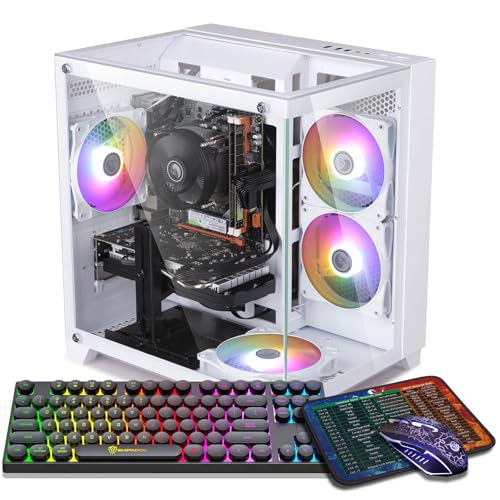
- Best overall white gaming PC for 1440p under $800: ZER-LON Gaming PC, Ryzen 5 5500, RTX 4060, White — Check on Amazon
- STGAubron Gaming PC, Ryzen 5 5500, RTX 3050 6GB, White, RGB Keyboard & Mouse — Check on Amazon
- LXZ Gaming PC, Ryzen 5 5500, RTX 3050 8GB, 32GB RAM, White — Check on Amazon
- HP Victus 15L Gaming Desktop, i5-13400F, RTX 3050, White — Check on Amazon
See 2 more Amazon options
- abytespark Gaming PC, Core i7-7700, RTX 4060, White — Check on Amazon
- STGAubron Gaming PC, Ryzen 7 5700X, RTX 3060 12GB, White — Check on Amazon
Full guide ↓
Disclosure: As an Amazon Associate, reviewstook.com earns from qualifying purchases. Links to Amazon on this page are affiliate links; they cost you nothing extra. Listing details such as price and availability change often, so check the current Amazon listing before you buy.
Stack three filters and watch the market evaporate. White, first: most budget prebuilts never offer the color, so the shelf shrinks before performance enters it. Eight hundred dollars, second: at this ceiling an RTX 4060 is something that happens during a sale, not something that sits in stock. And 1440p, third — the filter that disqualifies almost everything the first two let through, provided the phrase keeps its real meaning: the graphics card drawing all 2560×1440 pixels, frame after frame. Judged that way, the honest headline is that no white PC under $800 is a native-1440p machine that occasionally dips to 1080p. The truth runs the other direction: these are 1080p computers, every one, and the useful question is which can still put a genuinely good picture on a 1440p monitor, by what route, and what that route costs in sharpness.
That gap — between rendering at 1440p and merely displaying it — is the spine of everything below, because it is where this search gets misled. Each pick can light a 2560×1440 panel, and a listing can say “supports 1440p” without lying while games run at 1920×1080 and get stretched to fit. Upscaling is the legitimate bridge — render fewer pixels, reconstruct the rest — and this guide credits it wherever the hardware supports it, with internal resolutions printed rather than implied. What it will not do is call a stretched 1080p render a 1440p experience.
The color needs its own honesty note. In a listing title, “white” ranges from a coordinated build down to a pale steel box around the same black internals everyone else ships, so each pick is graded on what its documentation actually calls white — case, fans, memory, card shroud, bundled peripherals scored separately — never on what a hero photograph implies. The premium for the color is also treated honestly rather than guessed, because this batch of guides tracks the black equivalents: white versions at this tier generally sit a little higher in the band than their black counterparts, and that gap grows when a machine is bought at the top of its pricing swing — check price on Amazon before judging what the color costs.
In this guide
Quick Picks
Short on time? Each row below names a buyer type and the machine that suits it, with the honest 1440p verdict stated rather than implied.
| Buyer type | Pick | Honest 1440p verdict | Link |
|---|---|---|---|
| Best overall | ZER-LON Gaming PC, Ryzen 5 5500, RTX 4060, White | Native 1440p across many titles at moderate settings; DLSS carries the demanding end | Check on Amazon |
| Best complete white package | STGAubron Gaming PC, RTX 3050 6GB, White | A 1080p renderer feeding a 1440p panel; native only at the lightest end | Check on Amazon |
| Best for big game libraries | LXZ Gaming PC, RTX 3050 8GB, 32GB RAM, White | A 1080p renderer; its extra memory eases textures, not resolution | Check on Amazon |
| Best big-brand support | HP Victus 15L, i5-13400F, RTX 3050, White | A 1080p renderer in a compact chassis; fund the second memory stick first | Check on Amazon |
| Best graphics card, oldest platform | abytespark Gaming PC, i7-7700, RTX 4060, White | The card renders 1440p; the 2017 processor throttles it in CPU-heavy games | Check on Amazon |
| Strongest hardware, deal-watch only | STGAubron Gaming PC, Ryzen 7 5700X, RTX 3060 12GB, White | Native 1440p in lighter titles; the 12GB card is the best texture budget here | Check on Amazon |
How These Picks Were Chosen
The ceiling was enforced the way this batch enforces every $800 list: with patience. A machine earns its place when its documented positioning falls within the $800 budget or can realistically dip into it — and whenever admission depends on timing, the review prints the walk-away rule instead of burying it: check price on Amazon, and buy only at or below the ceiling. Two picks wear the deal-watch label openly: one only reaches the ceiling on its better days; the other is documented above the ceiling and has not been verified beneath it. Both stay because each answers a real version of the search — the buyer who needs a big brand, and the buyer hunting the strongest hardware — and both carry the warning in the heading, the review and the tables, not in fine print.
This variant then applies a second filter the base search does not: a rendering audit, three questions per machine. What does the card actually draw — which titles, which settings, which resolution — judged by the class of the silicon rather than the listing’s adjectives? What upscaling hardware sits on the card, since reconstruction quality is a silicon feature, not a menu toggle? All six picks run NVIDIA RTX cards with Tensor cores, so DLSS is genuinely present on every one — yet DLSS on an RTX 4060 and DLSS on an RTX 3050 remain very different propositions, because reconstruction can only polish the frames the card manages to produce. And how much video memory is fitted, since VRAM is the texture budget at this resolution, and an upscaler rebuilds edges and geometry — never texture detail the card discarded for want of somewhere to keep it?
Nobody on this guide’s side has hands-on time with these machines. The work is documentary: maker listings and specification data, read closely, with the documented color of every visible part compared across the set. The color screen cut deepest. Well-known white lines were checked and dropped when their positioning never descends to this budget — white Skytech Archangel RTX 3050 machines, white Skytech Azure and Archangel RTX 4060 machines, and white WIWB Ryzen systems all sit well above this tier in the research. A white guide stuffed quietly with machines from a higher budget would betray the search; so would a 1440p guide stuffed with 1080p machines under an unexamined title.
Rendering at 1440p Is Not Displaying 1440p
Begin with the arithmetic, since the whole guide hangs from it. One 1080p frame is 1920×1080, roughly 2.07 million pixels. One 1440p frame is 2560×1440, roughly 3.69 million — about 78 percent more. Native 1440p means the card shoulders that extra work in full. Displaying 1440p can mean it shoulders none of it: the panel’s resolution describes the screen and the cable, not the rendering pipeline, and every machine below displays the resolution without exception. They part company over what they render.
Three routes lead to a picture on a 1440p screen, and each review grades its pick by the route actually open to it. Route one is native rendering, all 3.69 million pixels drawn by the card itself. At this budget it exists only in slices: the RTX 4060 machines travel it through a broad stretch of modern titles at moderate settings, the RTX 3060 12GB machine travels it in lighter and older games, and for the RTX 3050 picks it shrinks to the lightest esports titles at low settings. Route two is upscaling, where the card renders a smaller internal frame and an algorithm rebuilds a 1440p output from it. This is DLSS’s home ground, and its published scaling figures disclose what is really on the screen: at a 1440p output, DLSS Quality renders internally near 1707×960, Balanced near 1485×836, and Performance near 1280×720. Read that last one again — Performance at 1440p output is a 720p-class render under reconstruction, and any seller who quotes it as “1440p gaming” while omitting the internal figure is hiding the mechanism. Route three is the quiet one: render at 1080p, stretch to fit, say nothing — what a weak card does by default, and the source of the softness that gives budget 1440p its reputation.
Two corollaries matter here. First, VRAM. Upscaling shrinks the pixel count the card must shade; it does nothing to shrink the texture data a 1440p presentation wants resident, and when video memory runs dry the failure is not a gentle blur — it is pop-in, stutter, or settings the game lowers behind your back. That is why the 12GB card below grades above its raw speed at this angle, and the 6GB card below its. Second, frame generation, supported by the two RTX 4060 picks and nothing else here: it synthesizes extra frames between rendered ones and smooths apparent motion, but it renders not one extra pixel of the game world, and is never counted toward a rendering verdict here.
FSR, AMD’s upscaler, is credited generically only: the research behind these machines documents no FSR internal-resolution figures for them, and numbers are never borrowed across upscalers — the figures above belong to DLSS, on the Tensor-core hardware fitted to every pick. Should a title offer FSR instead, treat it as the same bargain in outline and judge it by the picture, not by a transplanted table.
The 6 Best White Gaming PCs for 1440p Gaming Under $800
ZER-LON Gaming PC — Ryzen 5 5500, RTX 4060 8GB, White (Model AOV4060)
Who it suits: The buyer who wants the strongest rendering card this color and ceiling permit, inside a case documented as white, and who can hold out for the dip.
Everything in this guide orbits this machine, for one documented reason: among white RTX 4060 prebuilts in this batch’s research, it is alone in carrying documented positioning beneath the ceiling — check price on Amazon. The recipe around the card is the standard budget-4060 formula: a six-core Ryzen 5 5500, 16GB of DDR4, a 1TB NVMe SSD, Wi-Fi 5 and Windows 11 Home, in a white tower with four RGB fans. The card is the argument. The RTX 4060 is the sole GPU here for which native 1440p counts as a normal mode rather than a special occasion — across a wide span of modern titles it draws the full 2560×1440 at moderate settings, and where the library turns demanding, DLSS becomes the working mode: Quality holding the internal render near 1707×960, which reads genuinely sharp on a 1440p panel, with Balanced and Performance in reserve for the heaviest releases. DLSS 3 frame generation rides along, credited for smoother apparent motion and nothing more.
None of the taxes are hidden. Timing takes the first cut: its positioning swings, and it can sit above the ceiling as readily as within it, so admission to this guide is conditional — strictly buy only when the price on Amazon sits at $800 or under. Platform takes the second: the Ryzen 5 5500 is an older AM4 part limited to PCIe 3.0, which trims a few percent from the 4060’s narrow interface in some titles and dead-ends processor upgrades at the top of a finished socket, while the plain black benchmark at this tier fields a newer i5 for comparable money. Color takes the third: documentation covers a white case and RGB fans, and stays silent on the card’s shroud and the memory sticks — the verified purchase is a white tower with lit fans, and only the live listing settles whether the card matches.
Honest 1440p verdict: The strongest renderer in the set. Native 1440p through many titles at moderate settings, DLSS Quality as the working mode beyond them, frame generation as polish rather than substance.
- An RTX 4060 — DLSS and frame generation included — inside a case whose white finish is documented, not implied.
- Documented positioning inside this ceiling when its pricing dips — check price on Amazon — with a full-size 1TB SSD fitted.
- Four RGB fans on the record, giving the pale case the lit interior its look depends on.
Honest limitation: Its pricing can sit above the ceiling, the platform trails the black benchmark by a generation, the wireless is the older Wi-Fi 5 standard, and whiteness is verified for the case and fans alone — the card’s own color goes unstated.
Choose it if the best 1440p picture this search can honestly yield is the priority and your timing can wait for $800 or less. Skip it if the purchase has to happen today at any price, or a platform with years of CPU upgrades ahead matters more.

STGAubron Gaming PC — Ryzen 5 5500, RTX 3050 6GB, White (Model ABR1722)
Who it suits: Someone furnishing a desk from zero — a first gaming PC, a gift build, a room planned around the white theme and a 1440p monitor — who wants the extras arriving in the same box.
Where the ZER-LON competes on the card, this STGAubron competes on the completeness of the package. Verified specification: Ryzen 5 5500, an RTX 3050 carrying 6GB, 16GB of DDR4, a 1TB SSD, Wi-Fi 6 with Bluetooth 5.0 — and the fullest presentation in the guide, a white case lit by six RGB fans with an RGB keyboard and mouse bundled in. Its positioning is the calmest on the page: it sits comfortably beneath the ceiling at its usual place in the band, with no sale event required — check price on Amazon to confirm. Set against the black counterpart in its own model family, which sits lower in the band, the white premium is the clearest white-tax example available here — a modest step up in positioning, paid for color and fan count.
At this angle, though, the review has to be blunt. The RTX 3050 6GB is an entry-class card whose honest residence is 1080p: medium-to-high settings across most titles, strong esports play, DLSS as a lean-to. Move it to a 1440p panel and native rendering survives only at the lightest fringe — esports and older games at low settings — while the modern library becomes a 1080p-class render presented on the larger screen. DLSS does apply; the 3050 carries Tensor cores. But it reconstructs from a far smaller base, and DLSS Performance at 1440p output means an internal render near 1280×720 — on this card, a frame-rate rescue rather than a sharpness strategy. The tighter constraint is the 6GB of video memory: texture loads at 1440p exhaust that budget first, and no upscaler rebuilds texture detail the card was forced to drop. Buy this as the complete white desk that also drives a 1440p monitor respectably. Do not buy it as a 1440p renderer.
The brand shapes the remaining terms. STGAubron is a budget integrator rather than a household name; its listings leave the power supply wattage unpublished, and family copy in this batch’s research has contradicted itself on a sibling configuration’s storage size. The delivery-day routine therefore matters: confirm the configuration on the live listing before ordering, then check the delivered machine against it while returns are still easy. The whiteness grade needs the same care — case and fans are documented white and lit, while the bundled keyboard and mouse are described as RGB with no color specified, so white peripherals stay unconfirmed until the listing says otherwise.
Honest 1440p verdict: A 1080p renderer on a 1440p panel. Native only at the lightest fringe, DLSS as rescue rather than strategy, and the 6GB texture budget as the binding constraint.
- The most complete documented white presentation here: pale case, six lit fans, keyboard and mouse in the box.
- Positioning that stays under the ceiling at ordinary levels — check price on Amazon.
- Wi-Fi 6 and Bluetooth 5.0, one wireless generation ahead of the top pick.
Honest limitation: The 3050 6GB sits a full class beneath the 4060 and carries the least video memory in the guide; the power supply goes unpublished, and the peripherals’ color is nowhere specified.
Choose it if the finished white desk matters more than the final tier of rendering, and your 1440p monitor mostly serves esports and mainstream titles. Skip it if demanding new releases are the point and you expect them drawn at 1440p — that job belongs to the ZER-LON.

LXZ Gaming PC — Ryzen 5 5500, RTX 3050 8GB, 32GB RAM, White
Who it suits: The buyer whose machine doubles as the household’s everything-PC — a game running beside a dozen tabs, voice chat, a call or a stream — with a large library installed behind a 1440p monitor.
One specification separates this LXZ from the field: 32GB of system memory, where every rival ships 16GB. Sixteen is adequate for a game in isolation, but contemporary play is seldom isolated — the game shares the machine with a voice client, a browser full of guides and chat, and Windows helping itself — and 32GB is where memory stops being the bottleneck in that crowd. The rest of the verified build is the budget recipe in its white edition: Ryzen 5 5500, an RTX 3050 in 8GB form, and a 1TB NVMe SSD in a case marketed explicitly as the white model.
For this angle, that extra memory — both kinds — demands an honest frame, because it is easily oversold. The 8GB card is the stronger of the two 3050 variants at 1440p for a specific reason: the added video memory is headroom for texture-heavy titles, the resource a 1440p presentation consumes first, so this pick’s upscaled picture holds together where the 6GB machine starts shedding detail. The doubled system memory likewise keeps the background pile from reaching the game’s frame times. What neither upgrade does is reclassify the silicon: the GPU core is the same entry-class 3050, native 1440p stays lightest-fringe territory, and demanding titles still make this a 1080p renderer presenting on a 1440p screen. Memory purchases smoothness and texture retention inside the class; it does not promote the machine out of it.
The cautions concern paperwork, not hardware. This listing family’s detail pages blend variant data — a different processor-and-card combination surfaces in the same page content — so the configuration in the cart must be verified before ordering, a warning this batch’s research pins to this ASIN in particular. Pricing asks for equal care: the wider LXZ Ryzen 5 5500 / RTX 3050 line includes lesser 16GB builds that sit lower in the band, and no exact positioning for this 32GB configuration is asserted here — check price on Amazon for the configuration in your cart. Treat $800 as a hard ceiling and let the cart’s configuration — not the headline — make the decision. Documented whiteness stops at the case; fan lighting and component colors go unrecorded, making this the guide’s quiet white option rather than its showpiece.
Honest 1440p verdict: A 1080p renderer with the best memory support in the 3050 group — 8GB of VRAM standing guard over textures, 32GB of system memory over everything else — and the same rendering ceiling as its card class.
- 32GB of system memory, double the field, for gaming inside the modern pile of background applications.
- The 8GB edition of the 3050, carrying more of the texture headroom 1440p spends first.
- A 1TB NVMe drive and a case sold, in so many words, as the white model.
Honest limitation: Variant data is blended across the listing family, so the cart configuration needs checking; check the price on Amazon for the 32GB build, and documented whiteness ends at the case.
Choose it if memory headroom and library size are the real constraints and your 1440p expectations are set by the card’s class. Skip it if rendering strength leads the list — the ZER-LON’s territory — or you want a listing that needs no detective work.

HP Victus 15L Gaming Desktop — Core i5-13400F, RTX 3050, White (TG02-1020h)
Who it suits: The buyer who wants the white PC to come from a manufacturer with a genuine warranty, a service network and a name likely to outlive the machine — and who can wait for pricing to drift within reach.
Alone among the six, the Victus 15L carries a big brand, and both its virtues and its positioning descend from that. The verified configuration matches a Core i5-13400F — newer and stronger than the Ryzen 5 5500s surrounding it — to an RTX 3050 inside a compact white chassis of roughly 15.5 liters that perches on a desk like a console. HP documents its machines properly and backs them through a national network, and the white here is a factory finish rather than a marketplace variant. For a teenager’s PC or a shared family room, that structure matters. One setup note belongs to this pick alone: the 13400F has no integrated graphics, so the display cable must land in the graphics card’s ports — the motherboard’s video outputs are dead on an F-suffix machine, and the classic first-evening black screen is usually that one cable in the wrong socket.
Both problems sit in plain view on the specification sheet, and neither gets softened here. Memory first: the configuration ships with 8GB, half the modern floor, in a guide where rivals carry two or four times as much. Budget for a second stick from day one and treat machine-plus-memory as the true purchase — a starved system is the wrong economy at this resolution. Positioning second: this model usually sits above the ceiling, and the lower positioning it has shown in the past is older history rather than a standing promise — check price on Amazon. The framing is therefore strict deal-watch: at $800 or below with the memory upgrade accounted for, this is the support-conscious buy of the guide; above the ceiling, it belongs in a higher-tier conversation. Rendering places it with the 1080p class — native 1440p only at the lightest fringe, DLSS as the lean-to in heavier titles — and the compact proprietary chassis caps graphics upgrades, which bites harder at this angle than most, since the card is exactly what a 1440p owner will later want to replace. One documentation note: the verified material never headlines this card’s memory size, so none is claimed; confirm it on the live listing.
Honest 1440p verdict: A 1080p renderer in the most desk-friendly chassis here, driven by the 3050 group’s strongest processor — under a fixed ceiling, because the case refuses the larger card a serious 1440p upgrade eventually demands.
- The only manufacturer-backed pick on the page: HP warranty, service network, published specifications.
- The strongest processor among the 3050 picks — a 13th-generation Core i5.
- A compact white chassis near 15.5 liters, the easiest footprint in the guide to live with.
Honest limitation: Memory ships at 8GB, so a second stick is an immediate second purchase; its usual positioning sits above the ceiling — check price on Amazon — and the proprietary compact case restricts graphics upgrades.
Choose it if support and accountability rank first and the buy can wait for a dip to $800 or below. Skip it if 16GB must be in the box on day one, or a later graphics upgrade is part of the 1440p plan.

abytespark Gaming PC — Core i7-7700, RTX 4060 8GB, White (Model AOV590)
Who it suits: The esports-leaning buyer on a hard budget who knows precisely which half of the machine is new — included as much for instruction as for purchase, so the full review deserves reading before the headline price does its work.
The headline flirts with best-deal status: an RTX 4060 with 8GB, 16GB of RAM, a 1TB NVMe SSD, Wi-Fi 5 and four RGB fans inside a white case — the top pick’s very card, from a brand whose towers surface elsewhere in this batch’s research. Then the processor line interrupts: a Core i7-7700, four cores from 2017, three generations behind the Ryzen 5 5500s on this page and six behind the Victus’s i5. The arrangement is the oldest maneuver in the budget-listing playbook — a current card on headline duty, fronting a platform already mature when the card’s architecture was drawn.
At 1440p the imbalance takes a particular shape worth understanding instead of merely fearing. Resolution loads the graphics card far more than the processor — the extra 78 percent of pixels is GPU labor — so through GPU-bound titles, esports games and older releases, the 4060 here performs much of the same work it performs in the ZER-LON: native 1440p at moderate settings, DLSS Quality as the working mode beyond, frame generation layered on top. The invoice arrives with the library’s other half. CPU-heavy modern games, open-world titles, crowded simulation and strategy scenes, and anything that streams or records while playing will collide with four cores from 2017 — and no resolution setting cures a processor bottleneck; lowering settings can sharpen it, by demanding frames faster than the CPU can prepare them. There is no way up, either: the socket is finished, so the next processor drags a new motherboard and memory behind it. The card is the guide’s joint-best renderer; the machine around it is a ceiling with a date stamped on it.
Pricing discipline here is the guide’s strictest. No reliable positioning for this listing stands documented in this batch’s research, so none is claimed at all. The pick earns its place under a single rule: check price on Amazon, and should it stand at $800 or below, with the paragraphs above absorbed, the purchase is defensible for esports-first play with its ceiling understood. Above the ZER-LON’s dip territory it collapses — the same card on a newer platform at a similar position in the band sits at the top of this guide. Whiteness is documented at case-and-fans level, the card’s own color unstated as with most picks here.
Honest 1440p verdict: The card renders 1440p as the top pick’s does — native through many titles, DLSS beyond — and a 2017 processor decides which half of the library is allowed to see it.
- RTX 4060 graphics with DLSS 3, the guide’s joint-best card, in a case documented white with RGB fans fitted.
- Full-size helpings of both memory and storage: 16GB of RAM, a 1TB NVMe SSD.
- A brand with other towers verified across this batch’s research.
Honest limitation: A 2017 four-core processor on a finished socket will bottleneck the card in CPU-heavy games and offers no upgrade path — and with no documented positioning to lean on, the price on Amazon carries the entire decision.
Choose it if the price on Amazon sits at $800 or below and play runs esports-first with the platform ceiling accepted. Skip it if it prices anywhere near the ZER-LON’s dip, or CPU-heavy modern titles anchor the library.

STGAubron Gaming PC — Ryzen 7 5700X, RTX 3060 12GB, White (Model ABR1722)
Who it suits: The patient buyer after the strongest all-round hardware in a white case, content to treat this guide as a watchlist — because as documented the machine is not under $800 — check price on Amazon.
The warning leads, being the review’s most important sentence: as documented, this listing sits above the budget outright — check price on Amazon. It appears — labeled in its heading, its review and the tables — as the deal-watch exception, because readers hunting this search will encounter it on their own and wonder, and should it ever dip to $800 or below it becomes the strongest hardware buy on the page. The specification justifies the attention: a Ryzen 7 5700X with eight cores, two beyond every rival; an RTX 3060 in 12GB form; 16GB of DDR4; a 1TB SSD; Wi-Fi 6 and Bluetooth 5.2; four RGB fans in a white case. The eight-core processor also makes it the one pick genuinely built for gaming and streaming or recording from a single machine without apology.
At this angle the 3060 12GB is the connoisseur’s budget card, and its argument runs through memory. In raw rendering pace it trails the 4060 and offers no frame generation. But 1440p ages a card through its texture budget before its speed: 12GB is half again the memory of the 8GB cards, and texture capacity decides how gracefully a picture survives as releases grow. The grading therefore splits. Native 1440p belongs to this pick in lighter, older and esports titles; the demanding modern library is DLSS country — fully available here, Tensor cores and all — with Quality reconstructing from near 1707×960 in a way the memory can genuinely support, at texture settings the 6GB machine would have surrendered. Ranked purely as renderers the 4060 picks stand higher; ranked by whose picture degrades slowest across coming releases, this one holds a real claim on second place.
The rest follows the STGAubron pattern set out in its sibling review: a budget integrator whose power supply goes unpublished, whose family copy has carried inconsistencies before, and whose configurations want confirming on the live listing and again on delivery. Whiteness grades at case-and-fans — white case, four RGB fans documented, the card’s shroud color unstated. The rule, accordingly, is absolute. At $800 or below on the live listing, verified in the cart, this is arguably the guide’s finest machine. While it sits above the ceiling, it belongs in a higher-budget conversation, and purchasing it from this page at that positioning would make the guide a liar. Watch it — or buy the ZER-LON.
Honest 1440p verdict: Native 1440p through lighter titles, DLSS as the working mode in demanding ones — carried on the texture budget that will age slowest of any card on this page.
- The strongest hardware here: an eight-core Ryzen 7 5700X beside the 12GB RTX 3060, the best-aging card in the guide.
- Wi-Fi 6, Bluetooth 5.2 and a 1TB SSD behind a documented white case with four RGB fans.
- The sole pick honestly suited to gaming and streaming from one machine.
Honest limitation: As documented it sits over budget, full stop — check price on Amazon. It is a watchlist entry under a hard buy-only-at-$800-or-below rule, from a brand whose unpublished power supply and listing inconsistencies demand delivery-day verification.
Choose it if it surfaces live at $800 or below with the configuration confirmed in the cart. Skip it if it hovers anywhere above that line — while it sits above this budget, the under-$1,200 guides are its arena.

Comparison Table
| Product | CPU / GPU | RAM / Storage | Honest 1440p verdict | Price basis | Link |
|---|---|---|---|---|---|
| ZER-LON Gaming PC (AOV4060) | Ryzen 5 5500 / RTX 4060 8GB | 16GB / 1TB | Native through many titles; DLSS carries the demanding end | Check price on Amazon — buy only at or below the $800 budget | Check on Amazon |
| STGAubron Gaming PC (ABR1722) | Ryzen 5 5500 / RTX 3050 6GB | 16GB / 1TB | 1080p renderer on a 1440p panel; native only at the lightest fringe | Check price on Amazon — usually sits within the $800 budget | Check on Amazon |
| LXZ Gaming PC | Ryzen 5 5500 / RTX 3050 8GB | 32GB / 1TB | 1080p renderer; extra memory eases textures, not resolution | Check price on Amazon — lesser configs sit lower; verify the cart configuration | Check on Amazon |
| HP Victus 15L (TG02-1020h) | i5-13400F / RTX 3050 | 8GB / 512GB | 1080p renderer; the compact case caps the eventual GPU upgrade | Check price on Amazon — usually above the budget; deal-watch only | Check on Amazon |
| abytespark Gaming PC (AOV590) | i7-7700 / RTX 4060 8GB | 16GB / 1TB | The card renders 1440p; a 2017 CPU gates the CPU-heavy half of the library | Check price on Amazon — buy only if it sits at or below the $800 budget | Check on Amazon |
| STGAubron Gaming PC (5700X) | Ryzen 7 5700X / RTX 3060 12GB | 16GB / 1TB | Native in lighter titles; the finest texture budget in the guide | Check price on Amazon — documented above the budget; watchlist only | Check on Amazon |
How White Is White? Grading the Six
The word performs different amounts of labor in different listings, so the grading runs on documented facts alone, in three steps. Step one — the floor, and the honest label for most budget white machines — is a pale case around internals of unspecified color. Step two adds lit fans on the record, since a glass-sided white case is a frame for whatever glows within it. Step three requires documented matching components or bundled peripherals carrying the theme onto the desk. Scored on that ladder, the STGAubron 3050 stands highest: white case, six RGB fans, keyboard and mouse in the box — with the caveat that even it documents the peripherals as RGB, never as white. The ZER-LON, the abytespark and the STGAubron 5700X occupy step two: pale case, lit fans, card and memory colors unrecorded. The Victus is a factory-finished white chassis graded on finish rather than lighting. The LXZ, on documentation, is step one — a white case, period — whatever its photography hints.
Two consequences deserve stating plainly. First, the graphics card: behind any glass panel it is the largest visible component, and no listing here identifies its card as a white model. White card editions exist and command their own premiums in the DIY market; in prebuilts at this ceiling, the fitted card is whatever the integrator chose. A fully coordinated interior is simply not documentable at $800 — the routes to it are the under-$1,200 white guides, see Best White Gaming PC Under $1200, or accepting the case-and-lighting interpretation of white that this budget genuinely sells. Second, upkeep: pale cases display the dust and cable clutter that black ones forgive. Add a microfiber cloth to the budget.
Pairing a 1440p Monitor With These Machines
Any honest pairing section for this list opens with a refusal: the research behind these machines records no per-pick port counts and no refresh ceilings, so none are asserted here — a connector glimpsed in a listing photograph is not a specification. The machine you buy declares its outputs on its live listing and on the card’s rear bracket when it lands. What can be graded is the logic of the pairing, in three rules.
Rule one: the panel is fed from the card. The display cable belongs in the graphics card’s ports, never the motherboard’s — on the Victus, whose F-suffix chip carries no integrated graphics, the board’s outputs are dead outright; elsewhere, a cable in the wrong socket leaves the game rendered by the wrong hardware. Rule two: match the panel to the render, not the other way round. All six picks drive a 1440p desktop beautifully, and for desktop work, browsing and video the panel upgrade is real on every one. For games the panel’s resolution is a demand rather than a gift: behind a 3050 pick, a 1440p screen mostly means DLSS reconstruction, or a 1080p render whose softness the larger panel displays more faithfully than a 1080p screen would. An esports-heavy library on a 3050 may be better served by a quality 1080p high-refresh monitor. Rule three: behind the 4060 picks and the 3060 pick, the pairing inverts — those cards use a 1440p panel properly, DLSS covers the demanding end, and the monitor becomes the half of the setup that outlives the PC.
How to Choose a White Gaming PC for 1440p Gaming Under $800
- Grade the render, never the display. Displaying 1440p is universal here; rendering it is the exception. Ask of every candidate: native, reconstructed, or stretched? The reviews above answer in exactly those terms, and a listing that refuses to is answering as well.
- Learn the DLSS numbers before shopping. At 1440p output the internal renders run near 1707×960 for Quality, 1485×836 for Balanced and 1280×720 for Performance. A pitch built on “DLSS Performance at 1440p” is a 720p-class render under reconstruction — sometimes a fair trade, never a synonym for native.
- Card first, color second. The 4060, the 3060 12GB and the 3050 are three distinct rendering classes in any finish. Let the color settle ties between equals; never let it manufacture one.
- Treat video memory as the texture budget. At this resolution VRAM decides how long a picture holds together: 12GB ages slowest, 8GB is the workable middle, 6GB is the wall met first. No upscaler restores textures a card had to discard.
- Run the white tax test. Locate the black twin of any white machine under consideration. White versions here sit a modest step above their black twins in the band; a gap that looks large on the day means the purchase is happening at a pricing swing’s peak, not at a color premium — check price on Amazon for both before deciding.
- Honor the walk-away rule. Three picks belong to this guide only at $800 or under — the ZER-LON, the Victus and the STGAubron 5700X. Check the price on Amazon for each, and walk away while it sits above the ceiling.
- Count system memory as a real specification. The LXZ’s 32GB is the comfortable modern figure, 16GB the working floor, and the Victus’s 8GB a deferred purchase wearing a disguise — factor the extra stick into every comparison it joins.
- Read the processor’s generation, not its badge. A 2017 i7 games slower than a 2022 Ryzen 5, and at 1440p it decides which half of a library the good card may render for. Headlines lead with the card because the CPU line is where budget white machines conceal their age.
Common Buying Mistakes
- Reading “supports 1440p” as “renders 1440p.” Support describes the cable and the panel; rendering describes the card — and at this ceiling it is the exception, not the rule.
- Counting frame generation toward resolution. It constructs frames for the panel; it draws the game at no higher resolution, and exactly two picks here offer it.
- Trusting the hero photograph. The render shows the whitest imaginable version of the machine; the specification block is the contract, and any component whose color the block omits is not promised.
- Paying peak-swing prices for conditional picks — buying the ZER-LON or the STGAubron 5700X while its pricing sits above the ceiling, on the strength of a warning that went unread. Check the price on Amazon first.
- Mistaking “i7” for fast. The abytespark’s four cores from 2017 make it the slowest gaming processor in this guide; generation outranks badge every time.
- Treating 8GB of system memory as a finished specification. On the Victus it is a beginning with a second stick still to budget for, not a saving.
- Skipping the cart check where listings blend variants. The LXZ family page carries several configurations’ data; the one in the cart is the one owned.
Final Recommendation
- Most buyers: ZER-LON Gaming PC — the white RTX 4060 to buy when the price on Amazon sits within the $800 budget; the one pick whose normal mode is native 1440p.
- The complete white desk: STGAubron Gaming PC (RTX 3050) — fans, keyboard and mouse included; purchase it as a 1080p machine that presents gracefully on a 1440p panel.
- Multitaskers and big libraries: LXZ Gaming PC — 32GB of memory and the 8GB card, with the 3050’s rendering ceiling understood.
- Brand and warranty first: HP Victus 15L — on a dip to $800 or below, second memory stick budgeted.
- Esports on a strict budget: abytespark Gaming PC — only at a live price of $800 or below, 2017 platform accepted.
- The patient: STGAubron 5700X — the watchlist machine, bought solely at $800 or below; the slowest-aging 1440p picture here if its positioning ever lands within budget.
The top two are the ZER-LON — the tier’s best rendering card in a documented white case, to buy when the price on Amazon sits inside the ceiling, Check on Amazon — and the white STGAubron RTX 3050, the most complete white package at a positioning that needs no sale to behave, bought with its 1080p rendering class plainly understood, Check on Amazon. Between them they map the two shapes this search takes: a machine that renders toward 1440p and happens to be white, and a white setup that games honestly at the resolution its card can feed. Firm budgets with flexible timing should also see Best White Gaming PC Under $700 and Best Budget Gaming PC Under $800; a first desk assembled from zero is treated in Best White Gaming PC For Beginners Under $800; and anyone intending to stream from the same machine should read Best White Gaming PC For Streaming Under $800 before assuming any single-PC pick here doubles as a streaming rig.
Frequently Asked Questions
Can any white gaming PC under $800 really game at 1440p?
Yes, with the definition held steady. The two RTX 4060 machines render a broad range of modern titles natively at 2560×1440 under moderate settings, and the RTX 3060 12GB machine joins them in lighter games. The RTX 3050 picks are 1080p renderers: on a 1440p panel they upscale or present a smaller render — a legitimate way through esports and mainstream titles, and not native 1440p. What the budget and color together cannot buy is a machine whose default across a modern library is native 1440p at high settings; that tier opens near $1,200, in Best White Gaming PC Under $1200 and Best Gaming PC Under $1200.
Is DLSS Quality actually rendering at 1440p?
No — and that it looks close is the technology’s entire point. At a 1440p output, Quality’s internal render sits near 1707×960 with the balance reconstructed; Balanced works from roughly 1485×836, Performance from roughly 1280×720. On the 4060 and 3060 picks here, Quality is the sensible working mode for demanding games. It remains a reconstruction from about half the pixels, and any guide or listing that relabels it native is rounding in the seller’s favor.
What about 4K — can these machines upscale to a 4K monitor?
They can present on one, and there the claim ends. Native 4K rendering is refused for every pick: the pixel count doubles again beyond 1440p, and no white machine under $800 carries that class of card. For scale, the same DLSS arithmetic at a 4K output runs from an internal render near 2560×1440 at Quality down to near 1920×1080 at Performance — even the strongest pick here would feed a 4K panel a render at or below the resolution this guide is about. On these machines a 4K monitor upgrades the desktop and video, not the gaming.
How much extra does a white gaming PC cost over a black one?
A modest premium at this tier, judged across the black equivalents compared in this batch’s research: white versions sit higher in the band than their black counterparts, for both the ZER-LON 4060 and the STGAubron 3050. The premium turns punitive only when the purchase lands at the top of a pricing swing — check price on Amazon for both versions before deciding.
Are the components inside white gaming PCs actually white?
Some of them, usually — and listings seldom promise beyond that. Here, cases and fans carry documentation as white or lit; no listing identifies its graphics card as a white model, and memory colors pass unmentioned. Expect any component whose color goes unstated to arrive in standard black.
Why does the guide include a PC positioned above this budget?
Because the STGAubron 5700X is the white machine nearest this budget that readers will find unaided — eight cores beside the 12GB RTX 3060, the finest texture budget on the page. It is flagged deal-watch in its heading, review, quick picks and comparison table, under one hard rule: purchase only at $800 or below on the live listing.
Does a white case run hotter or need special care?
Thermally, color changes nothing — airflow is fixed by panels and fans, and mesh-front designs move air identically. The difference is cosmetic upkeep: white exposes dust and cable clutter that black conceals, so the glass panel asks for periodic cleaning and tidy cabling. A chore, not a cooling problem.
- Best White Gaming PC Under $800
- Best White Gaming PC Under $700
- Best White Gaming PC Under $1200
- Best White Gaming PC For Beginners Under $800
- Best White Gaming PC For Small Spaces Under $800
- Best White Gaming PC For Streaming Under $800
- Best Budget Gaming PC Under $800
- Best RGB Gaming PC Under $800
- Best Prebuilt Gaming PC Under $800


