Where to buy
Check the latest price, availability and delivery on Amazon. Orders are placed on Amazon. We may earn a commission from qualifying purchases.
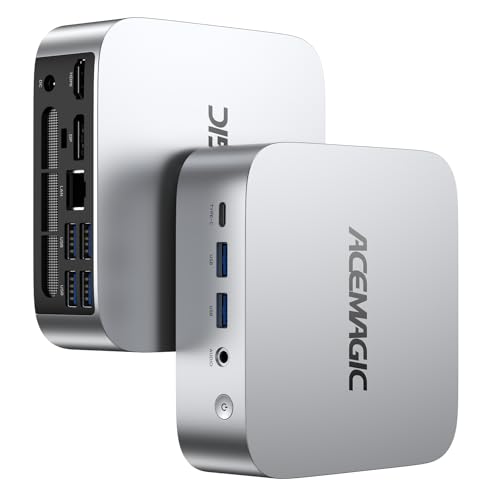
- Best white streaming value under $400: ACEMAGIC Vista V1 Mini PC, Ryzen 5 3500U, 8GB RAM, 256GB SSD — Check on Amazon
- GMKtec NucBox M5 Plus, Ryzen 7 5825U, 32GB RAM, 1TB SSD, Lunar Blue — Check on Amazon
- CHUWI LarkBox X Mini PC, Core i3-1220P, 8GB RAM, 256GB SSD — Check on Amazon
- ACEMAGIC Vista V1 Mini PC, Intel N150, 16GB RAM, 1TB SSD — Check on Amazon
See 2 more Amazon options
- STGAubron Gaming PC Desktop, Core i7, RX 580 8G, 32GB RAM, 512GB SSD, White (over the $400 budget — see the review) — Check on Amazon
- LXZ Gaming PC Desktop, Ryzen 5 5600GT, 16GB RAM, 1TB SSD, Sea View Room White (over the $400 budget — see the review) — Check on Amazon
Read the full guide ↓
Disclosure: As an Amazon Associate, reviewstook.com earns from qualifying purchases. Links to Amazon on this page are affiliate links; they cost you nothing extra. Listing details such as price and availability change often, so check the current Amazon listing before you buy.
A streaming PC has to do three jobs at the same time, and it is worth naming them before any product appears, because every grade in this guide follows from them. Job one is the game itself, rendered well enough that there is something worth watching. Job two is the encode: your broadcast software — OBS, in most setups — compresses the finished picture into the stream you send out, in real time. Job three is everything around the edges: the chat window, the alert and overlay software, the dashboard tabs, the voice processing on your microphone, and the local recording many streamers keep as their edit source. On Twitch, that outgoing stream is typically H.264 at around 6,000 kbps with constant bitrate (CBR) and two-second keyframes. YouTube accepts higher bitrates, higher resolutions including 1440p, and AV1 where the hardware supports it. A 4K live stream, meanwhile, is limited by the platforms — ingest caps, transcoding and viewer bandwidth — far more than by any PC, so no machine in this guide is sold to you as a 4K streaming machine, whatever its listing headline says.
Now place that workload next to this keyword, and the honest shape of the guide appears. You are asking for all three jobs, under $400, in a white or near-white case — and white, as our base guide to Best White Gaming PC Under $400 established the hard way, is barely a stocked category at this price at all. The verified light finishes live on APU mini PCs, and the only genuinely white towers sit above the budget. Streaming adds a second filter on top of the color filter, and it is the stricter one: the encoder. None of the six machines below carries an NVIDIA NVENC encoder, and none of them can encode AV1 in hardware — that silicon simply does not exist in a verified light-finish machine at this money. What they offer instead is a ladder of older AMD and Intel hardware encoders, plus, on two of them, enough CPU cores to let software encoding share the work. This guide grades that ladder pick by pick, encoder first and finish second, and it keeps the base guide’s color grades and budget flags exactly as they were — including the two flagged towers above $400, which stay in the list because they remain the only verified white towers, and because one of them carries the only discrete GPU here.
Set the expectation plainly before the picks: a white streaming PC under $400 is a starter streaming PC. It will run a clean 720p or 1080p Twitch broadcast of esports, indie and older games, with the encoder settings this guide specifies. It will not stream demanding modern titles at high settings, it will not give you AV1, and its picture at 6,000 kbps will be softer than a mid-range NVENC machine’s. If that is the broadcast you are starting — and most channels do start there — the six machines below are the honest ways to buy it in a light finish.
In this guide
Quick Picks
Short on time, or comparing several options at once? Each row below names a streamer type and the machine that suits it, with a link to the listing. The finish grade in each review follows the scale explained under How These Picks Were Chosen.
| Streamer type | Pick | Why it stands out | Link |
|---|---|---|---|
| Best white streaming value under $400 | ACEMAGIC Vista V1 (Ryzen 5 3500U) | Silver-white shell and Vega encoder at the entry end of this budget — check price on Amazon | Check on Amazon |
| Strongest streaming CPU under $400 | GMKtec NucBox M5 Plus (Ryzen 7 5825U) | Eight Zen 3 cores for software encoding, dual 2.5GbE — but pale blue, not white | Check on Amazon |
| Best hardware encoder in the set | CHUWI LarkBox X (Core i3-1220P) | Intel Quick Sync under a genuinely white lid, with slots to fix its memory later | Check on Amazon |
| Cheapest light finish for a light stream | ACEMAGIC Vista V1 (Intel N150) | The same silver-white shell with 16GB and 1TB, for indie and retro broadcasts | Check on Amazon |
| Only white tower with a graphics card | STGAubron Gaming PC (RX 580) | A verified white case and a discrete GPU — over budget, check price on Amazon | Check on Amazon |
| White showpiece that can grow | LXZ Gaming PC (Ryzen 5 5600GT) | Panoramic white glass case, six cores for software encoding — over budget, check price on Amazon | Check on Amazon |
How These Picks Were Chosen
The six machines, their ASINs and their color grades are carried over unchanged from the base white-PC guide, where every one of them was verified against a real Amazon listing — color taken from the listing’s own specification data or the manufacturer’s published color list, never from a flattering thumbnail. Four picks sit at or under the $400 ceiling. Two — the only genuinely white gaming towers that verification could find — sit above it and are flagged as over budget wherever they appear, because a guide that hid the fact that white towers start above this budget would be lying by omission. Prices are not printed in this guide: check the current price on Amazon for every pick before you judge where it sits against the ceiling.
The first question is now the encoder, so the grading needs its terms defined. A hardware encoder is a fixed-function block on the graphics silicon that compresses video without borrowing the cores your game is using. This set contains three hardware-encoder families, and they are not equals. Intel’s Quick Sync, on the LarkBox X’s Core i3-1220P, is the most capable encoder here: a mature H.264 and HEVC hardware encoder that holds up respectably at Twitch bitrates. The N150’s newer Quick Sync generation is the most modern Intel block in the set, but it is paired with a four-core efficiency CPU and the weakest graphics here, which caps what it can feed. AMD’s Vega-generation video engine — fitted to the two Ryzen mini PCs and the LXZ tower — is the oldest encoder family in the set: H.264 in hardware, no AV1 encode and no AV1 decode, and visibly softer output than a modern encoder’s at the same bitrate. The RX 580’s Polaris encoder, in the over-budget STGAubron, is the oldest and softest of all, on legacy driver support. The second route is software encoding — OBS’s x264 encoder on spare CPU cores — which can beat these old hardware blocks for picture quality, but only on machines with cores to spare: the eight-core M5 Plus and, at lighter presets, the six-core LXZ and the ten-core LarkBox X. On the four-core machines it is not a real option while a game is running. One claim is denied for the entire set, in advance: no pick here encodes AV1.
The finish grading is inherited from the base guide and kept at full strength, because the keyword still demands it. Grade A means the case itself is verified white in the listing’s own color field. Grade B means a silver-white metallic finish — unmistakably light, honestly silver in the hand. Grade C means a partial match: a white top over a dark base, or a pale tint that is honestly another color. Each review also grades the setup rather than the shell, because mini PCs in this class ship with black power bricks and cables whatever the casing, and a streamer adds a microphone, a camera and their leads to the pile. The base research’s exclusion list still applies with full force — the strong budget minis whose specification tables state “Color: Black,” the dark gunmetal LCD-fronted box, the N100 machine sold only in black and teal, and the Pearl White Beelink EQ12 that Amazon US does not actually stock in white were all left out there, and no streaming argument resurrects them here.
The 6 Best White Gaming PCs for Streaming Under $400
ACEMAGIC Vista V1 Mini PC — Ryzen 5 3500U, 8GB RAM, 256GB SSD
Who it suits: The first-time streamer building a light-colored desk on a real budget — esports, indie and older games, a 720p or 1080p Twitch broadcast, and money left over for the microphone that will do more for the channel than any encoder in this guide.
Finish grade: B — silver-white metallic. The color case is unchanged from the base guide, because it is still the reason this machine leads a white list. The Vista V1 wears a bright silver-white metallic shell — the lightest casing we could verify as genuinely buyable on a gaming-capable mini under $400. Across a desk it reads as a white setup piece; in your hand it is honestly silver. The listing data does not state the power adapter’s color, and this class of mini ships with black bricks and cables as a rule — so budget the setup as silver-white box, black leads, which matters twice for a streamer because the box and cable runs sit inside the camera frame. The VESA mount in the box is the elegant fix: mount the mini behind the monitor and the whole color question leaves the shot.
As a streaming machine, the 3500U splits its personality honestly. Its Radeon Vega 8 integrated graphics are the strongest in-budget mini GPU in the base guide — esports at 720p to 1080p on low settings, indies, emulation, older releases turned down — and its Vega-generation hardware encoder will compress that picture in OBS without touching the CPU. That encoder is the oldest AMD family here: H.264 only, no AV1 encode or decode, and soft in fast motion at 6,000 kbps. The practical settings follow: broadcast at 720p60 for fast titles or 1080p30 for slower ones and the picture holds together; ask for 1080p60 of a busy shooter and the encoder, not the game, gives up. The CPU offers no second route — four cores and eight threads are fully employed by the game and OBS, so x264 software encoding is not a fallback here. It is sold by ACEMAGIC’s own store on Amazon — check price on Amazon — and its position at the entry end of this budget is the streaming argument as much as the spec sheet: the room it leaves inside the $400 ceiling buys the microphone and the wired cable run this guide’s kit section puts ahead of everything else. One configuration note from the base research: a 16GB version of this same machine is also sold, positioned higher in the same budget band, and for a streamer it is the better buy if in stock, because the 8GB fitted here is shared between the game, OBS, the browser and the chat.
- Silver-white metallic: the lightest verified finish on any gaming-capable mini under $400.
- Vega 8 graphics plus a hardware H.264 encoder: a complete, if entry-level, streaming path in one box.
- Sits at the entry end of this budget, leaving room for the microphone and wired networking that matter more — check price on Amazon.
- VESA mount included — hide it behind the monitor and the finish debate leaves the camera frame.
Honest limitation: The Vega encoder is the oldest AMD family in the set and softens fast motion at Twitch bitrates; 8GB of RAM and 256GB of storage are tight for a game-plus-OBS-plus-browser workload; and there is no AV1 and no CPU headroom for software encoding.
Choose it if you are starting a channel on esports or lighter games and want the desk to read white from day one. Skip it if your games are demanding 3D titles — the encoder and the graphics both run out at the same time, and no setting rescues that.

GMKtec NucBox M5 Plus — Ryzen 7 5825U, 32GB RAM, 1TB SSD
Who it suits: The streamer who cares more about the broadcast than the color chart — someone streaming esports and older titles who wants the strongest streaming foundation under $400 and can live with a pale tint where white was promised.
Finish grade: C — pale Lunar Blue, not white. The base guide’s verdict stands at full size: GMKtec sells this machine in black and in a finish it calls Lunar Blue, a pale blue-grey that is the lightest colorway on any strong mini in this class and is visibly blue next to a genuinely white case. In a white-and-pastel setup it can pass; in a strict all-white build — doubly in one that appears on camera — it is the one piece that is another color. The brick and cables follow the class pattern in black, and both colors sell on the same page, so confirm the Lunar Blue version is selected before ordering. Everything below is the case for accepting that compromise, and for a streamer it is the strongest case in this guide.
Streaming is a cores-and-memory workload wearing a gaming costume, and this is the only in-budget machine specced like it. The Ryzen 7 5825U brings eight Zen 3 cores and sixteen threads: enough to run a light or moderate game on some cores and the x264 software encoder at a veryfast or faster preset on the rest, producing a 6,000 kbps Twitch picture that competes with — and in fast motion usually beats — the Vega hardware encoder also on board as the low-effort option. The 32GB of dual-channel socketed memory is the other streaming spec nobody puts on the box: OBS with layered scenes, a browser full of dashboard tabs, chat and alert software, and a game, all resident at once, without the swapping that makes budget streams stutter. Storage is 1TB with a second slot, which matters the first month you keep local recordings. And it is the one pick whose wired networking is documented at full specification — dual 2.5GbE — so the wired-Ethernet rule can be followed on stated hardware rather than hope. Its Vega 8 graphics handle esports and older AAA at 1080p low or 720p, and it sits at the top of this budget band — check the current price on Amazon before judging what the color surrender costs you.
- Eight Zen 3 cores: the only in-budget pick that can software-encode with x264 while it games.
- 32GB of socketed RAM and 1TB of storage — the streaming workload’s real specifications, met.
- Dual 2.5GbE documented: the set’s only fully specified wired networking, and the streamer’s correct default.
- Positioned at the top of the under-$400 band — check price on Amazon, and weigh the tint against everything above.
Honest limitation: It is not white, and on camera the tint will read as what it is. Its hardware encoder is the same aging Vega block as the cheaper Ryzen mini; the streaming advantage here is CPU and memory, not encoder silicon.
Choose it if the broadcast quality matters more than the color match and your games fit its graphics class. Skip it if the desk has to be truly white on camera — that is the Vista V1 above, or the towers below at tower prices.

CHUWI LarkBox X Mini PC — Core i3-1220P, 8GB RAM, 256GB SSD
Who it suits: The streamer whose games are CPU-friendly — strategy, simulation, esports at low settings, retro and indie — and who wants the best hardware encoder in this set under the whitest lid any mini here wears.
Finish grade: B− — genuinely white top, dark base. The LarkBox X is a two-tone machine: a white top panel with a large round mesh vent over a dark lower body, described by its maker as a black-and-white design. From above and from the front — the angles a desk is viewed from, and the angles a streaming camera sees — it reads as a white machine; from the side, the split is honest and visible. It remains the only mini in the guide where any major panel is true white rather than silver or tint. The included 65W adapter’s color is not stated, so assume the usual black brick and route it out of frame.
The streaming story is the encoder. Intel’s Quick Sync on the Core i3-1220P is a mature hardware H.264 and HEVC encoder — the most capable hardware block in this set — and in OBS it is a one-line choice: select Quick Sync, set CBR and two-second keyframes, and the stream compresses on fixed-function silicon while the chip’s ten cores (two performance, eight efficiency, up to 4.4GHz) handle the game, the scenes and the software. At Twitch’s 6,000 kbps that buys the cleanest hardware-encoded picture in this guide. The counterweights are the two the base guide flagged. The Intel UHD graphics are a light-gaming part — a class below the Vega machines for anything graphically ambitious — so the encoder is polishing a modest picture: strategy, simulation, older titles and low-setting esports are its library. And as shipped, 8GB of single-stick memory and 256GB of storage undersell everything. CHUWI’s mitigation is real — two SO-DIMM slots to 32GB and two M.2 slots — and for a streamer the second memory stick is not an upgrade but a completion: it feeds the graphics dual-channel bandwidth and gives OBS and the browser room to exist. Check the current price on Amazon — it is positioned like the small project it is.
- Quick Sync: the best hardware encoder in the set, and the cleanest hardware-encoded Twitch picture here.
- The only true-white panel on any mini in the guide — it reads white from desk and camera angles.
- Ten-core CPU with real headroom for OBS, scenes and chat software alongside the game.
- Two memory slots and two M.2 slots — the undersized shipped configuration is fixable, and fixing it matters.
Honest limitation: The UHD graphics render a narrower, lighter library than the Vega picks, and the shipped 8GB/256GB configuration holds back both the streaming workload and the graphics until upgraded. No AV1 encode — Quick Sync here is an H.264/HEVC story.
Choose it if your games suit its graphics and you will fit the second memory stick. Skip it if you want the strongest rendering per dollar out of the box — the encoders are better here, the pictures they receive are not.

ACEMAGIC Vista V1 Mini PC — Intel N150, 16GB RAM, 1TB SSD
Who it suits: The lightest-duty streamer in the guide’s audience — indie, retro, 2D and browser-game broadcasts, watch-party and media content — who wants the silver-white shell with memory and storage already generous, at the lowest price here.
Finish grade: B — silver-white metallic, same shell as the Ryzen Vista V1. The grading is identical to the lead pick because the box is identical: bright silver-white metallic, about 3.9 inches square, VESA-mountable, honestly silver in the hand and light across a desk, with the class-standard black power brick the listing does not describe. ACEMAGIC sells the light shell across its budget range, and this configuration is the one for people whose streams are the lighter half of the hobby.
Its streaming profile needs the plainest language in the guide. The Intel N150 is a four-core efficiency chip with a modern generation of Quick Sync — hardware H.264 encoding that is genuinely competent — and no AV1 encode. The problem is the picture it is handed: its UHD graphics handle 2D and indie games, emulation of older systems and video without complaint, and stop there; modern 3D titles are beyond it at any setting worth broadcasting. Four cores also foreclose the software route — with the game, OBS and a browser resident, nothing is left for x264 — so Quick Sync carries the whole broadcast, which it does for the content classes named above at 720p or modest 1080p settings. What this configuration buys instead of graphics is what its Ryzen sibling lacks: 16GB of RAM, a 1TB SSD, dual 4K output, and a position at the very bottom of this budget band — check price on Amazon. For a retro or indie channel that is a coherent machine; for anything heavier it is the wrong tool in a pretty shell.
- The lead pick’s silver-white shell, but with twice the memory and four times the storage.
- Modern Quick Sync hardware encoding — the right silicon for light-content broadcasts.
- The cheapest light-finish streaming machine in the guide — check price on Amazon.
- Quiet, tiny and VESA-mountable; dual 4K output for a two-monitor desk.
Honest limitation: The weakest graphics in the guide and a four-core ceiling: no modern 3D streaming, no software-encoding fallback, no AV1. This is an indie-and-retro broadcast box.
Choose it if your channel is light content and your storage needs are not. Skip it if you play current 3D games on stream — step up to the Ryzen Vista V1 and keep the same shell.
STGAubron Gaming PC Desktop — Core i7, RX 580 8G, 32GB RAM, 512GB SSD, White (over budget)
Who it suits: The streamer for whom “white gaming PC” means a white tower with a real graphics card — and who understands, before paying, that the graphics card is what the money buys and the encoder is not.
Finish grade: A — verified white case. This remains the only machine in the guide whose Amazon listing data states its color outright as White, and it stays in the list as the budget exhibit: it is the genuinely white, discrete-GPU gaming tower closest to this budget that verification could find, which means the honest answer to “a white streaming tower under $400” is that it starts above the budget — check price on Amazon to see the current gap. The case carries three RGB fans, and the box includes an RGB keyboard and mouse — the listing confirms the peripherals are included but does not state their finish, so check the listing before assuming the whole bundle is white; the power cable, as ever, will be black. On a streaming desk it is the one pick that looks like the towers viewers are used to seeing — which is part of what the step over budget buys.
The streaming analysis splits the machine in two. The rendering half is the strongest here: the Radeon RX 580 8GB is a 2017 discrete card that remains a legitimate 1080p gaming part for esports and older AAA titles — categorically stronger than every integrated GPU in this guide — so the picture being broadcast is the best in the set. The encoding half is the weakest here: the RX 580’s Polaris video engine is the oldest and softest encoder in the guide, on a legacy driver cadence, and at Twitch’s 6,000 kbps its H.264 output blocks and smears in fast motion more than any other pick’s. There is no second encoder to hide behind — the listing does not name the Core i7 model (“up to 3.9GHz”), and coverage identifies the platform as fourth-generation class, so this guide makes no Quick Sync claim for it and treats the CPU as an unknown to verify on arrival. The practical broadcast is 720p60 or 1080p30 of genuinely well-rendered games: a better picture, encoded worse. Add the base research’s cautions — a decade-old CPU platform sold as a current gaming tower, and the family’s mixed buyer reports about stability — and the verdict is precise: you are paying for the white case and the card.
- The only verified white case with a discrete GPU anywhere near this budget — the best-rendered picture in the set.
- An included RGB keyboard and mouse and 32GB of RAM take some of the sting out of the over-budget step.
- It is the guide’s key evidence: verified white streaming towers start above this budget, not inside it.
Honest limitation: Over the $400 budget, the softest and oldest encoder in the guide, an unnamed fourth-generation-class CPU platform, and a budget brand with mixed reliability reports. The finish and the GPU are what the money buys; the broadcast encoding is the compromise.
Choose it if a white tower with a real graphics card is the whole point and the over-budget step is within reach — check the current price on Amazon. Skip it if broadcast quality is the metric — the M5 Plus streams better for less, in pale blue.

LXZ Gaming PC Desktop — Ryzen 5 5600GT, 16GB RAM, 1TB SSD, Sea View Room White (over budget)
Who it suits: The showpiece streamer — a white glass tower as the backdrop of the broadcast, a modern platform underneath it, and a plan to add a graphics card later, at which point this becomes a different and much stronger streaming machine.
Finish grade: A− — white panoramic case, white-themed build. LXZ’s “Sea View Room” case is the current white aesthetic in full: a panoramic tempered-glass tower in a listing whose color field states White outright, showing seven addressable RGB fans. It is the best-looking machine in this guide by a distance, and for a streamer whose desk is literally the set, that is a functional spec, not vanity. It is also the clearest measurement of the white tax at tower scale: stepping over budget buys the case, the glass and the fans, wrapped around integrated graphics — check price on Amazon to see where it currently sits. Peripherals are not included, and the listing does not state the power supply’s wattage — a number that matters for the GPU upgrade below and for long sessions under load, and one to confirm with the seller before planning either.
As it ships, the streaming profile is a study in potential. The six-core, twelve-thread Ryzen 5 5600GT is a modern chip with real headroom: alongside a light game it can carry x264 software encoding at lighter presets, lifting its broadcast above what its own Vega 7 hardware encoder — the same oldest-family AMD block as the minis, H.264 only, no AV1 — would produce alone. The Vega 7 graphics are the ceiling: esports and older games at 720p to 1080p low settings, the same rendering class as the minis, in a case five times their size, with 16GB of RAM and a 1TB SSD that serve the workload adequately today. The argument is the one the base guide made, sharpened by the angle: it is the only pick that can become a serious streaming PC later. A standard tower on a current socket accepts a discrete graphics card the day the budget allows — and a modern card brings a modern encoder with it, which no mini here can ever gain. Bought as a white foundation with that upgrade honestly planned, the over-budget step is defensible; bought expecting top-of-band streaming performance today, the minis expose it.
- A verified white panoramic glass case with seven ARGB fans — the guide’s only true streaming-desk showpiece.
- Six modern cores: enough to software-encode lighter broadcasts beyond its Vega hardware encoder.
- The only pick with a real GPU upgrade path — and a GPU upgrade is also an encoder upgrade.
- Its over-budget position measures the white tower premium precisely.
Honest limitation: It sits over budget, ships with integrated graphics and the oldest-family AMD encoder, includes no peripherals, and its listing leaves the PSU wattage unstated — verify it before planning the GPU upgrade the whole case rests on.
Choose it if the white tower is the set your channel broadcasts from and the graphics card is a planned second purchase. Skip it if you want the most streaming per dollar today — every mini above it wins that contest.

Setting Up OBS on These Machines: Encoders, Bitrates and the Three Lag Counters
Every pick in this guide is set up the same way in OBS, and the settings matter more than the small differences between the machines. Choose the encoder per pick: Quick Sync H.264 on the LarkBox X and the N150 Vista V1; the AMD hardware H.264 encoder on the Ryzen Vista V1 and the STGAubron; and on the M5 Plus and the LXZ, test both routes — hardware for simplicity, or x264 at the veryfast or faster preset where their spare cores allow it, the better picture at the same bitrate. Rate control is CBR for live output; set 6,000 kbps for Twitch, with a keyframe interval of two seconds, which Twitch’s ingest expects. For YouTube you may raise the bitrate and resolution where your upload allows, in H.264 from any of these machines; the AV1 option discussed elsewhere is not available on this silicon. Keep the output resolution at the broadcast you actually intend — 720p60 or 1080p30 on the Vega and Polaris machines for fast games, 1080p60 only where the game is slow enough for the encoder to keep up. Viewers reliably prefer the stable picture over a disintegrating higher one.
When a stream stutters, OBS’s statistics view tells you which of three different failures you are looking at — and they have three different fixes. Rendering lag means the GPU could not composite your scene in time: lighten the scene, cap the game’s frame rate so the compositor has headroom, and lower the output resolution — on integrated graphics, leaving the game uncapped is the classic self-inflicted wound. Encoding lag means the chosen encoder could not keep up: on x264, step the preset faster or move to the hardware encoder; on the hardware blocks, drop the output resolution or frame rate, because an old encoder at 1080p60 in a fast game is out of its depth. Dropped frames (network) are neither: the encode was fine and the upload was not, and no OBS setting fixes them — the fixes are a wired Ethernet connection instead of Wi-Fi, a bitrate your upload can sustain for hours, and checking nothing else in the house is saturating the upload. Run the cable before you change a single encoder setting; only the M5 Plus documents its port speed (dual 2.5GbE), but the rule is the same for all six.
Comparison Table
| Product | Finish grade | Streaming encoder | Best use | Link |
|---|---|---|---|---|
| ACEMAGIC Vista V1 (Ryzen 5 3500U) | B — silver-white metallic | Vega-generation AMD H.264 hardware | Best white streaming value under $400 | Check on Amazon |
| GMKtec NucBox M5 Plus (Ryzen 7 5825U) | C — pale Lunar Blue | x264 software on 8 cores, or Vega hardware | Strongest streaming foundation under $400 | Check on Amazon |
| CHUWI LarkBox X (Core i3-1220P) | B− — white top, dark base | Intel Quick Sync H.264/HEVC hardware | Best hardware encoder, whitest mini lid | Check on Amazon |
| ACEMAGIC Vista V1 (Intel N150) | B — silver-white metallic | Intel Quick Sync H.264 hardware | Light indie and retro broadcasts, 16GB and 1TB | Check on Amazon |
| STGAubron Gaming PC (RX 580) — over budget | A — verified white case | Polaris H.264 hardware, oldest in set | Only white tower with a graphics card | Check on Amazon |
| LXZ Gaming PC (Ryzen 5 5600GT) — over budget | A− — white panoramic glass | Vega hardware, or x264 on 6 cores | White showpiece with a GPU upgrade path | Check on Amazon |
How to Choose a White Streaming PC Under $400
- Grade the encoder before the case. The streaming order of merit is not the gaming order. Quick Sync (LarkBox X) is the best hardware block; spare CPU cores for x264 (M5 Plus, then the LXZ) are the flexible route; the Vega hardware encoder is serviceable and old; the Polaris encoder is the floor.
- Match the output to the encoder, not the monitor. On the Vega and Polaris machines, broadcast fast games at 720p60 or 1080p30. A stable lower resolution beats a disintegrating 1080p60 at 6,000 kbps every time.
- Count cores if you want software encoding. x264 needs cores the game is not using. Eight (M5 Plus) works at useful presets; six (LXZ) works at lighter ones alongside lighter games; four (both Vista V1s) does not work — those machines stream on their hardware encoders or not at all.
- Hold the memory line for the streaming workload. Game plus OBS plus browser plus chat is a real multitasking load. The 32GB M5 Plus is comfortable; 16GB is workable; the two 8GB configurations are starter kits — on the LarkBox X the second slot makes it a cheap completion, and on the Vista V1 3500U the 16GB configuration of the same machine is the one to hunt.
- Wire the desk. Sustained upload is the stream. Only the M5 Plus documents its wired speed (dual 2.5GbE); whatever port your pick’s live listing confirms, run the cable. Network dropped frames are the one failure no encoder setting can fix.
- Accept the AV1 answer. No verified light-finish machine under $400 encodes AV1. If AV1 streaming is a genuine requirement, the requirement itself moves you out of this keyword — start from Best Streaming PC Under $400 without the color filter and see what the same money buys in black.
- Decide what “white” has to mean, on camera. A streaming desk is a set. The towers are truly white; the minis are silver-white, two-tone or pale-tinted, each graded in its review. A VESA-mounted mini behind the monitor sidesteps the question entirely — sometimes the whitest streaming PC is the one the camera never sees.
- If a tower is the dream, accept the real floor. Both verified white towers sit above this budget — one with a discrete GPU, an old platform and a weak encoder, the other on a modern platform with integrated graphics and a real upgrade path. Check the current price on Amazon for either before planning around it. Our base guide to Best White Gaming PC Under $400 documents the color research in full, and Best White Gaming PC Under $500 covers the tier where white towers actually live.
What Else You Will Spend: Costing the Rest of the Streaming Desk
The PC is not the whole purchase, and this section deliberately names no prices for the rest — peripheral prices move too much to print responsibly, and the ordering matters more than the amounts. Spend first on the microphone. Viewers forgive a soft picture from an old encoder far sooner than bad audio; a clear voice at 720p retains people that a pristine picture with a headset microphone loses. A USB microphone on an arm, positioned close, is the highest-value addition to any machine in this guide — which is why the cheaper picks that leave budget inside $400 are stronger streaming purchases than their spec sheets suggest. Second, the wired connection: a long Ethernet cable, run neatly — ideally in white, since it will be in frame — removes the most common cause of ruined broadcasts at the lowest cost on this list. Third, a camera if your format uses one, and lighting that makes it look deliberate; on a white desk, light doubles as set design. Fourth, storage: local recordings accumulate fast, and the 256GB picks will force the question within weeks.
One purchase to defer with confidence: the capture card. It belongs to console streaming and two-PC setups. For the single-PC setup every machine in this guide represents, the game and OBS already share the box and a capture card adds nothing at all — buy one only when a console enters the setup. The white monitor, keyboard and mouse that complete the look are real purchases to budget honestly, but they rank behind the microphone and the cable, because the audience experiences the broadcast before it admires the desk.
Common Buying Mistakes
- Trusting the thumbnail. Pale listing photography of a black case is this keyword’s most common trap — check the listing’s color field, and the maker’s color list, before ordering. A streaming desk is photographed for a living; the trap is aimed at exactly you.
- Buying the encoder you read about instead of the one in the box. Articles about NVENC and AV1 describe other machines. Nothing in this set has either — grade what is actually fitted, as the reviews do.
- Setting 1080p60 because the monitor is 1080p. Output resolution is an encoder budget decision. On the Vega and Polaris picks, fast games belong at 720p60 or 1080p30 at Twitch bitrates.
- Streaming over Wi-Fi because the listing advertised fast wireless. Wireless specifications describe the radio, not your sustained upload at hour three. Run the cable.
- Ordering the wrong version of a shared listing. The M5 Plus page sells black and Lunar Blue on one listing; the Vista V1 name covers several chips. The configuration and color you receive are the ones selected at checkout.
- Assuming a white case means a white setup. The brick, the cables, the microphone arm and the camera are usually black. Plan the cable runs and the VESA mount, or accept the contrast as the price of the tier.
Final Recommendation
- Most white-desk streamers under $400: ACEMAGIC Vista V1 (Ryzen 5 3500U).
- Best broadcast quality under $400: GMKtec NucBox M5 Plus.
- Best hardware encoder, whitest mini: CHUWI LarkBox X.
- Light content, generous storage, lowest price: ACEMAGIC Vista V1 (Intel N150).
- White tower plus a graphics card, if the budget stretches: STGAubron Gaming PC (RX 580).
- White showpiece to upgrade into a real streaming rig: LXZ Gaming PC (Ryzen 5 5600GT).
Our top two are the two Ryzen minis, trading places depending on what you value. The M5 Plus is the better streaming machine outright — eight cores for software encoding, 32GB for the multitasking workload, documented dual 2.5GbE — and buyers whose channel matters more than their color chart should take it and accept the pale tint. The Vista V1 3500U is the better white purchase: the lightest verified finish, a complete if entry-level streaming path, and an entry-level position in this budget that leaves room for the microphone and cabling the broadcast actually needs — check its current price on Amazon. Between them sits the LarkBox X, with the set’s best hardware encoder under its genuinely white lid, for streamers whose games suit its graphics and who will complete its memory. The N150 Vista V1 serves light content honestly at the lowest price; the two flagged towers mark the real cost of insisting on a white case with glass — one buying rendering, the other buying a future. New streamers should also read Best Streaming PC For Beginners Under $400 before their first broadcast, and anyone whose space is as tight as their budget should compare Best Streaming PC For Small Spaces Under $400 and Best White Gaming PC For Small Spaces Under $400. Whatever you choose, verify the color field and the configuration on the live listing, wire the desk, and check the current price before you order.
Frequently Asked Questions
Can you actually stream from a white gaming PC under $400?
Yes — a real, watchable broadcast of the games these machines can play. Esports, indie, retro and older titles stream cleanly at 720p60 or 1080p30 on Twitch from every pick here, using the encoder settings in the OBS section above. What you cannot do at this budget in a light finish is stream demanding modern titles at high settings, or use AV1 — no verified machine in the set carries the silicon for either.
Which encoder should I use in OBS on these machines?
Quick Sync on the two Intel picks (the LarkBox X and the N150 Vista V1), the AMD hardware encoder on the Ryzen Vista V1 and the STGAubron, and a choice on the M5 Plus and LXZ: their hardware encoders for simplicity, or x264 at the veryfast or faster preset where their spare cores allow, which produces the better picture at Twitch bitrates. In all cases: CBR, around 6,000 kbps for Twitch, two-second keyframes.
Why is there no AV1 streaming in this guide?
Because none of the six machines can encode it. AV1 hardware encoding lives on current-generation graphics silicon, and no verified light-finish PC under $400 contains any. The Vega and Polaris AMD encoders predate AV1 entirely — the Vega generation cannot even decode it — and the Intel Quick Sync blocks here are H.264/HEVC encoders. YouTube will accept an H.264 stream from every pick; the AV1 quality-per-bit advantage belongs to a higher budget and, today, a darker case.
Is the STGAubron the best streaming pick because it has a graphics card?
It renders the best picture and encodes the worst one. The RX 580 is a genuine discrete GPU, categorically stronger than the integrated graphics here — and its Polaris encoder is the oldest and softest in the set, on legacy drivers, next to an unnamed fourth-generation-class CPU. Buyers are buying the white tower and the rendering; the broadcast encoding is the compromise. If broadcast quality is the metric, the M5 Plus wins it for less money.
My stream drops frames even though the game runs fine. What is wrong?
Almost certainly the network, not the PC. OBS’s statistics separate rendering lag, encoding lag and network dropped frames, and each has a different fix. Network drops mean the upload could not sustain the bitrate — overwhelmingly a Wi-Fi problem over long sessions. Wire the desk with Ethernet, lower the bitrate to what your upload sustains for hours rather than minutes, and only then revisit encoder settings.


