Where to buy
Check the latest price, availability and delivery on Amazon. Orders are placed on Amazon. We may earn a commission from qualifying purchases.
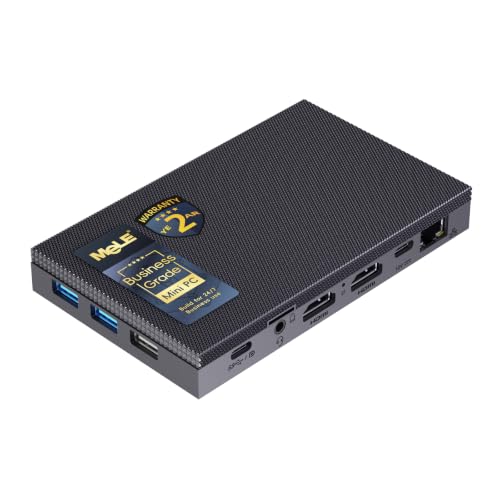
- Best small-space install — silent, fanless, mounts behind a monitor: MeLE Quieter4C Fanless Mini PC, Intel N150, 8GB RAM, 256GB SSD — Check on Amazon
- KAMRUI E3B Mini PC, Ryzen 5 7430U, 32GB RAM, 512GB SSD, VESA mount included — Check on Amazon
- Beelink SER5 MAX Mini PC, Ryzen 7 5800H, 16GB RAM, 500GB SSD — Check on Amazon
- GMKtec M5 Plus Mini PC, Ryzen 7 5825U, 32GB RAM, 1TB SSD, Dual 2.5GbE LAN — Check on Amazon
See 2 more Amazon options
- Dell OptiPlex 7060 SFF, Core i5-8500, 16GB RAM, 512GB SSD (Renewed) — Check on Amazon
- Dell RGB Gaming Tower, Core i7 6th Gen, GTX 1050 Ti 4GB, 16GB RAM (Renewed) — the one pick here that is not small at all — Check on Amazon
Read the full guide ↓
Disclosure: As an Amazon Associate, reviewstook.com earns from qualifying purchases. Links to Amazon on this page are affiliate links; they cost you nothing extra. Listing details such as price and availability change often, so check the current Amazon listing before you buy.
A streaming PC for a small space has to pass two tests, and most listings only talk about one of them. The first test is the stream itself: at $400, no machine here is a single-PC rig for broadcasting modern games at 1080p60. What this money honestly buys is a dedicated encoder box that takes a feed from a gaming PC or console and compresses it, or a light combo machine that plays esports and indie titles while broadcasting them at 720p60. That was true in our main guide to this budget and it is still true here. The second test is the room. A small-space streaming setup lives in a bedroom, a dorm corner, a rented room where the desk is also the dining table — and in those rooms the question is not just what the box does, but where it physically goes, where its power brick sleeps, where its cables fall, and where its heat goes while you are live. This guide grades all six of our verified under-$400 streaming PCs on that second test, installation first, without changing a single fact about what they stream.
The good news is that this budget is unusually kind to small rooms. Four of the six picks are mini PCs — boxes that sit in a palm, disappear onto a shelf, or mount behind a monitor. Two of them can genuinely vanish: the fanless MeLE Quieter4C and the KAMRUI E3B both document VESA mounting in their listings, so they can live on the back of your display, taking no desk at all. The fifth pick, a renewed Dell OptiPlex in small-form-factor trim, is a different kind of small — a flat business desktop that slides onto a shelf or under a monitor riser, with no external power brick to hide. And the sixth pick is the honest exception this guide will not dress up: a full-size renewed tower that is not a small-space machine by any definition, included only because it is the sole under-$400 route to NVIDIA’s NVENC encoder.
One warning belongs at the top, because it decides more returns than any specification: the box is never the whole footprint. A mini PC’s installed size is the box plus its external power adapter, plus the loop of cable that has to fall from its ports, plus the air it needs to breathe. A fanless box needs still air around its case because the case is the cooler. A fan-cooled mini exhales warm air that has to go somewhere other than a sealed cabinet — and on that point this guide is absolute: not one of these six machines may be installed inside a closed, unventilated cabinet, cupboard or TV unit. Small-space streaming done well is quiet, cool and nearly invisible; done badly, it is a hot box in a cupboard dropping frames. The picks below are ranked so you end up with the first kind.
In this guide
Quick Picks
Short on time, or comparing several options at once? Each row below names a small-space situation and the machine that fits it, with a link to the listing.
| Your space | Pick | Why it fits | Link |
|---|---|---|---|
| Quietest room, mic close by | MeLE Quieter4C, Intel N150, 8GB, 256GB | Fanless and silent, VESA-mounts behind a monitor, modern Quick Sync encoder | Check on Amazon |
| Behind-monitor install with real memory | KAMRUI E3B, Ryzen 5 7430U, 32GB, 512GB | VESA mount included, 32GB of RAM for OBS, triple display output | Check on Amazon |
| One mini that plays and streams | Beelink SER5 MAX, Ryzen 7 5800H, 16GB, 500GB | Eight cores in a box roughly five inches square, triple display output | Check on Amazon |
| Dual-PC corner with wired NDI | GMKtec M5 Plus, Ryzen 7 5825U, 32GB, 1TB | Dual 2.5GbE LAN, 32GB and 1TB for heavy OBS scenes and recording | Check on Amazon |
| A shelf, not a desk | Dell OptiPlex 7060 SFF, Core i5-8500 (Renewed) | Flat SFF chassis, internal power supply — no brick to hide, Quick Sync inside | Check on Amazon |
| Floor space to spare, NVENC wanted | Dell RGB Gaming Tower, GTX 1050 Ti (Renewed) | The only NVENC pick — a full-size tower, only buy it at or under $400 | Check on Amazon |
How These Picks Were Chosen
The starting point is the same verified set as our main under-$400 streaming guide: six real Amazon listings — four new mini PCs and two renewed desktops — each with a usable hardware encoder (AMD VCN, Intel Quick Sync, or NVIDIA NVENC), enough CPU headroom for OBS, and outputs for at least two monitors, because streaming from a single screen, alt-tabbing between game and OBS, is a workflow nobody should install on purpose. Listing prices at this tier move weekly with coupons and Prime pricing, so check price on Amazon for the current figure before you buy; one pick, the renewed Dell tower, is carried under a hard rule its review repeats — it qualifies only on days the live price sits at or under $400.
On top of that streaming filter, this guide applies an installation filter, and it is strict about evidence. A pick is graded on its form-factor class, on the placement its listing actually documents, and on the physics of living with it: where the power adapter goes, how the cables leave the box, and how its heat leaves the room. Mounting claims are made only where the base research documents them — the MeLE Quieter4C and the KAMRUI E3B document VESA mounting, so they are the only two picks in this guide described as mountable. For the other mini PCs, no mount is documented in the research behind this guide, so none is promised: plan to sit them flat, and treat any bracket you later find on the live listing as a bonus, not a basis for purchase. Dimensions are treated the same way. Only one pick in this set carries a documented size in the base research — the Beelink, described there as a box roughly five inches square — so this guide grades the rest by form-factor class and documented placement, and invents no measurements.
The ranking itself follows the installation. The two mountable, quietest boxes lead, because in a genuinely small room the best streaming PC is the one you neither see nor hear. The strongest one-PC combo follows, then the dual-PC specialist whose twin network cables make it the most demanding mini to dress neatly. The SFF desktop ranks fifth: bigger than any mini, but flat, brick-free and shelf-friendly. The tower ranks last on this brief, and it is not close — it is a fine budget NVENC machine and a poor answer to the question this page exists to answer.
The Installed Footprint Is Bigger Than the Box
Every mini PC listing photographs the same seduction: a bare box on an empty desk, no cables, no adapter, no context. Your room will not look like that photograph, because a working streaming install adds three things the photo crops out. The first is the power brick. The four mini PCs in this guide run from external adapters, and an adapter is a second object that needs an address: on the desk it eats the space the mini saved, on the floor it collects dust and gets kicked, inside a cabinet it adds its own heat to the box’s. Budget a home for it — a cable tray under the desk, a shelf corner, a spot behind the monitor — before you order, not after the parcel arrives. The two desktops in this guide dodge the problem entirely: their power supplies are internal, so one cable runs from wall to box and that is the whole power story. In a tiny room, that is a real, if unglamorous, advantage.
The second addition is cable drop. A streaming desk is a cable farm even in miniature: power in, one or two display cables out, Ethernet — wired, always, because upload jitter over Wi-Fi drops frames no encoder can recover — plus microphone, camera and capture device over USB. Each cable leaves the box, bends, and falls, and the fall needs slack: a mini pulled tight against a wall by short cables cannot be turned for port access and strains its own sockets. Mounting a box behind a monitor, as the MeLE and the E3B allow, hides the drop behind the screen, which is exactly why those two picks lead this guide. Sitting a mini flat means dressing the drop down the desk’s rear edge — allow the loop, or the install migrates.
The third addition is heat, and it is the one that ends installs. Every machine here converts electricity into warm air that must leave the box’s neighbourhood. The fan-cooled minis exhale it in a directed stream: point that stream at a wall two inches away, or into a closed TV unit, and the machine breathes its own exhaust until it throttles — quietly at first, then audibly, then in your stream’s frame rate. The fanless MeLE has the opposite profile: no exhaust stream, but its case is its heatsink, so it needs ordinary room air moving past it and must never be wrapped, stacked under other warm gear, or laid on soft furnishings that insulate it. The OptiPlex’s flat chassis vents like the office machine it is — fine on an open shelf, unhappy in a sealed one. And the tower moves the most air of all, which is one more reason it belongs on the floor in open room air, not in furniture. The rule that covers all six, stated once and applied everywhere in this guide: if the door closes and there is no ventilation, the PC does not go there. No exceptions for short streams, no exceptions because the cabinet was expensive.
The Encoder Still Decides the Stream
Installation decides where the box lives; the encoder still decides what your viewers see. A quick map, carried from the base research: NVIDIA’s NVENC is the reference standard for streaming quality at platform bitrates, and in this set it appears only in the renewed Dell tower, in its older Pascal generation — respectable, not reference-class. Intel Quick Sync, in the OptiPlex and the MeLE, is the strong second, mature and efficient at the roughly 6,000 kbps ceiling Twitch recommends. AMD’s VCN encoder, in the three Ryzen minis, is the honest third: free in performance terms and perfectly watchable at 720p, softer than the other two in fast motion at 1080p. No pick here encodes AV1 — the MeLE’s chip decodes AV1 for playback, which is a different thing — and no pick turns a $400 budget into a single-PC 1080p60 AAA streaming rig. Plan on 720p60 as this tier’s native stream, or on a dedicated box hardware-encoding a feed that arrives from a console or gaming PC, which is the role the small machines in this guide were born for.
Measure Before You Buy: The Five-Step Checklist
Step 1 — Measure the spot. Decide where the box will live before you decide which box to buy: behind the monitor, on the desk, on a shelf, under a riser. Measure the actual space — width, depth, and the height clearance above it — and check it against the pick’s form-factor class. A mini needs a patch of desk or shelf; a VESA-mounted box needs a monitor whose back you can reach; the SFF desktop needs a flat run of shelf; the tower needs floor. If the spot only exists in your imagination, the install will improvise, and improvised installs overheat.
Step 2 — Check the ventilation clearance. Look at the spot again and ask where the air goes. Fan-cooled boxes need open air at their vents and a path for warm air to escape the furniture entirely; the fanless MeLE needs room air around its case. Then apply the rule with no exceptions: a sealed cabinet, a closed TV unit, a cupboard with the door shut — none of these is a streaming PC’s home, however neatly the box fits inside. If your only spot is enclosed, change the spot, not the rule.
Step 3 — Give the brick an address. For any of the four minis, decide now where the external power adapter will live: cable tray, shelf corner, floor spot that feet never reach. Measure the run from that spot to the wall socket and to the box; an adapter stretched tight is an adapter that gets unplugged by a chair leg. Choosing one of the two desktops deletes this step — internal power supply, one cable — which is worth real money in the smallest rooms.
Step 4 — Plan the cable drop. Count the cables your stream actually runs — power, displays, wired Ethernet, microphone, camera, capture device — and plan their path from the box to where they terminate. Behind-monitor mounting hides the drop behind the screen; a desk or shelf install should route it down the rear edge with slack to spare. Price the Ethernet run to the router as part of the install: streaming over Wi-Fi because the cable was awkward is the most common small-space compromise, and it costs frames every single stream.
Step 5 — Then order. Only now choose the pick whose documented placement matches the spot you measured: mountable and silent, mountable with a fan, flat on a desk or shelf, or standing on the floor. Confirm the exact configuration on the live listing as you order — mini PC listings are families with several variants, and the renewed picks vary by refurbisher — and keep the packaging until the machine has survived a few full streams in its real home, at real room temperature, with the door of the room in its usual position.
The 6 Best Streaming PCs for Small Spaces Under $400
MeLE Quieter4C Fanless Mini PC, Intel N150, 8GB RAM, 256GB SSD
Who it suits: The streamer in the smallest, quietest room — someone whose microphone sits close, whose gameplay happens on a console or another PC, and who wants the streaming box to take no desk, make no noise, and never be thought about again.
On an installation brief, this is the pick to beat, and it is not close. The Quieter4C is fanless: there is no fan to hear, no exhaust stream to aim, and nothing for a nearby microphone to pick up — in a small room, where the mic is always nearby, that silence is worth more than any specification in this guide. Its listing documents VESA mounting, so the box can bolt to the back of a monitor and cease to occupy the room at all: no desk footprint, no shelf, and a cable drop that hides behind the screen it serves. Its power draw, measured in the low teens of watts under load in reviews of this chassis, means the adapter is a minor object and its heat the gentlest in the guide — though gentle is not zero: the case is the cooler, so it needs open room air around it, mounted or not, and must never be sealed into a cabinet or buried under warm gear.
The streaming side of the bargain is the modern version of Intel Quick Sync. The N150’s hardware encoder handles H.264 and HEVC encoding in OBS with a quality that embarrasses the AMD machines here, and the chip decodes AV1 for monitoring modern streams — decode, note, not encode; nothing at this price encodes AV1. The intended workflow is a feed arriving from elsewhere: a console through a capture card, or a gaming PC, encoded at 1080p60 or 720p60 while the four modest cores run OBS, chat and alerts. Its outputs — dual HDMI 2.0 plus USB-C display, triple 4K in total — cover a stream desk’s monitors from behind one of them. Check price on Amazon for the current figure — as a silent Quick Sync box in this budget tier, it asks you to value the silence properly.
- Fanless and silent — no fan noise near the microphone, no exhaust to aim.
- Documented VESA mounting: installs behind a monitor and takes no desk at all.
- Modern Intel Quick Sync encoding, AV1 decode, triple 4K display output.
Honest limitation: The 8GB of memory is soldered — a permanent ceiling — and the 256GB of storage is tight, so this is a fixed appliance for a defined job; its four efficiency cores cannot software-encode or play games, and a fanless case still needs open air, never a sealed cabinet.
Choose it if your room is small, your mic is close, and your gameplay lives on another machine. Skip it if you need one PC that also plays the games, or heavy OBS scenes that will lean on memory it can never gain.

KAMRUI E3B Mini PC, Ryzen 5 7430U, 32GB RAM, 512GB SSD
Who it suits: The beginner in a tight room who wants a new machine that mounts out of sight yet still carries the memory a growing OBS setup eats.
The E3B is the other pick whose listing documents the small-space cheat code: a VESA mount is included in the box, so this mini can live behind your monitor, off the desk entirely, with its cables dropping behind the screen. Behind-monitor is the right home for it for a second reason the base research documents: reviewers found its fan audible under sustained load. On a desk beside a microphone, that audibility is a tax; behind a display, with the panel between fan and mic, it fades into the room. Placement decides whether its one real flaw matters at all. Its external adapter still needs an address, and a mounted install concentrates every cable at the monitor, so dress the drop once, properly, with slack.
As a streaming machine it is the value pick of the whole budget. Thirty-two gigabytes of dual-channel DDR4 — the configuration this ASIN documents, with a 16GB sibling sold under a separate listing, so confirm the build in your cart — is the specification streaming rewards most: OBS, a browser full of chat and alerts, and a light game breathe on 32GB in a way they never do on 8. The Ryzen 5 7430U’s six cores make x264 veryfast at 720p60 a light-games-only arrangement, so the sensible default is AMD’s VCN hardware encoder, clean at 720p60 and serviceable at 1080p30, while the Vega 7 graphics play the esports, indie and older catalogue every APU here plays. Display outputs are properly documented — HDMI 2.0, DisplayPort 1.4 and USB-C — and you should check price on Amazon for the current figure. The fanless MeLE above it is quieter and smaller; nothing else in this budget tier mounts away with this much memory.
- VESA mount included — a genuine behind-monitor install, documented, not improvised.
- Dual-channel 32GB memory — the specification OBS grows into, in a budget-tier new machine.
- Triple display output (HDMI 2.0, DisplayPort 1.4, USB-C) and Windows 11 Pro.
Honest limitation: The fan is audible under sustained load, so where you put it decides whether you hear it; six cores leave little spare for one-PC streaming beyond light games — and the sealed-cabinet refusal applies to it exactly as to every pick here.
Choose it if you want a new, mountable machine with memory headroom in this budget tier. Skip it if absolute silence is the priority — that is the MeLE — or if eight cores for heavier one-PC streaming matter more than mounting.
Beelink SER5 MAX Mini PC, Ryzen 7 5800H, 16GB RAM, 500GB SSD
Who it suits: The one-PC streamer in a small room — a single mini that plays esports and indie games at 1080p and broadcasts them at 720p60, from the corner of a desk or a shelf.
This is the strongest streaming machine in the guide wearing a mini’s body: a box the base research describes as roughly five inches square, containing a genuine eight-core, sixteen-thread Ryzen 7 5800H at a 54W power limit. In installation terms it is a sit-flat pick. No mounting hardware is documented for it in the research behind this guide, so plan on it living on the desk or a shelf, where its small footprint is still a rounding error next to any desktop — and where its fan exhaust needs the usual respect: open air at the vents, no sealed furniture, and an address planned for its external adapter. Triple display output over HDMI, DisplayPort and USB-C means the two-monitor stream desk — game on one screen, OBS and chat on the second — runs without adapters, and the cable drop is a single tidy fall off the desk’s rear edge if you dress it that way.
The streaming case is the one the base guide led with. Eight cores are options: run x264 at veryfast for a 720p60 stream while a light game uses the integrated graphics, or hand the encode to AMD’s VCN hardware encoder — the earlier generation of AMD’s encoding, softer than Quick Sync or NVENC at 1080p in fast motion, and a difference that shrinks to invisibility at the 720p60 this machine should actually stream at — and keep every core for the game and OBS. The 16GB of DDR4 sits in slots, not solder, with the listing supporting upgrades to 64GB and storage to 2TB, so the box can grow with the channel instead of being replaced by it. Check price on Amazon for the current figure — and whatever tier it sits in on the day, the microphone will still improve your stream more than any PC upgrade at this tier.
- Eight cores and sixteen threads — the most OBS and x264 headroom of any new pick here.
- A roughly five-inch-square footprint that sits happily on a desk corner or shelf.
- Socketed RAM upgradeable to 64GB, triple display output, AMD VCN hardware encoder.
Honest limitation: No mounting is documented for it in the base research, so it takes a patch of desk or shelf rather than vanishing behind a monitor; the Vega graphics and VCN encoder cap it at light games and 720p60 streaming, and it must breathe — never in a closed cabinet.
Choose it if one small machine must play and stream, with an upgrade path. Skip it if a behind-monitor install is the whole point — the two picks above document the mounts — or if your games already live elsewhere.

GMKtec M5 Plus Mini PC, Ryzen 7 5825U, 32GB RAM, 1TB SSD
Who it suits: The dual-PC streamer in a compact setup — a gaming rig or console already exists, and this box owns the encode, the overlays and the recording from a shelf or desk corner.
Read the M5 Plus the way a streaming engineer reads it, and two specification lines decide everything. The first is the pair of 2.5GbE Ethernet ports: in an NDI dual-PC setup the gaming machine sends its video feed across the network, and giving that feed its own fast wired path, separate from household traffic, is how network frames stop dropping. The second is 32GB of DDR4 and a 1TB NVMe SSD — double the memory and storage of most of this guide — sized for the heavy OBS scenes, browser sources and local VOD recording that a dedicated streaming box accumulates. The installation cost of those virtues is cables: this is the most connected mini here, with twin network runs joining power, displays and USB, so it rewards a deliberate install — a shelf or a cable tray, the drop dressed once — and punishes being tossed behind other gear where its vents and ports vanish. No mounting is documented for it in the base research; sit it flat, in open air.
Its Ryzen 7 5825U is an eight-core chip with AMD’s VCN hardware encoder, which will hardware-encode a 1080p60 feed arriving from your gaming PC without troubling the CPU, while the cores offer x264 veryfast at 720p60 for content where software encoding’s efficiency shows. As a one-PC gaming streamer it sits a half-step behind the Beelink — the U-series chip plays the same catalogue with slightly less headroom. Triple 4K outputs cover feed, OBS and chat monitors. Check price on Amazon for the current figure — it carries the strongest specification set in the guide. The standard value-brand caveat applies with full force: this model family is sold in several variants, so confirm the exact 32GB/1TB configuration on the live listing before you order.
- Two 2.5GbE Ethernet ports give an NDI feed its own wired path, apart from household traffic.
- 32GB of RAM and 1TB of storage: sized for heavy OBS scenes and local recording.
- Eight-core Ryzen with VCN encoding and triple 4K output, in a mini body.
Honest limitation: The most cable-hungry mini here, with no documented mounting — it needs a dressed, ventilated shelf or desk spot, not a hidden one; and the listing family spans multiple configurations, so verify the build in your cart.
Choose it if you are building a two-PC setup, especially over NDI, in a room where a shelf can be its home. Skip it if you want the tidiest possible install or the strongest single-PC combo — the E3B mounts, the Beelink plays harder.

Dell OptiPlex 7060 SFF Desktop, Core i5-8500, 16GB RAM, 512GB SSD (Renewed)
Who it suits: The budget dual-PC builder with a shelf — someone whose games happen on another machine or a console, who wants a budget-tier credible dedicated encoder box, and whose room suits a flat desktop better than a mini.
The OptiPlex’s small-space case is different in kind, not just degree. As a small-form-factor business desktop it is far bigger than any mini here — nobody mounts it behind a monitor — but its flat chassis slides onto a shelf, under a monitor riser, or into the footprint a games console would take, and it brings the one installation luxury no mini in this guide offers: an internal power supply. There is no brick to house, no adapter cable to dress; one power cord runs to the wall and the install is done. Two DisplayPort outputs are standard on this model — a third was a factory option, so this guide guarantees two monitors and no more — and the business chassis carries a bank of USB ports for microphone, camera and capture device. On a shelf in open air it vents like the office machine it is; in a sealed cabinet it would cook like anything else, and the refusal applies to it unchanged.
Inside is the connoisseur’s streaming weapon: Intel Quick Sync. The Core i5-8500’s UHD Graphics 630 hardware-encodes H.264 and HEVC directly from OBS, at a quality for this tier nothing else here touches — ahead of the AMD VCN in the new minis. Check price on Amazon for the current figure. As a dedicated box the arrangement sings: the other machine plays, this Dell only encodes, and six cores with a dedicated encoder chip credibly cover 1080p60 hardware encoding or a 720p60 x264 veryfast stream. The renewed terms are the price of admission: Amazon Renewed’s 90-day guarantee instead of a new machine’s warranty, unit-to-unit variation, and a feed that must arrive by capture card or NDI — neither included. One quiet virtue: the i5-8500 is on Microsoft’s Windows 11 supported list, which cheaper renewed stock with older chips is not.
- Intel Quick Sync — the best streaming picture quality for its tier in this guide.
- Internal power supply: no brick to hide, the tidiest power story here.
- Flat SFF chassis that lives on a shelf; dual DisplayPort as standard.
Honest limitation: Renewed, with a 90-day programme guarantee rather than a full warranty; too big to mount or hide like a mini, it cannot game beyond the lightest titles, and a capture card or NDI feed is a separate purchase.
Choose it if a shelf is your spot and a dedicated Quick Sync encoder is the job. Skip it if the box must disappear behind a monitor, or if one machine has to play the games as well.
Dell RGB Gaming Tower, Core i7 6th Gen, GTX 1050 Ti 4GB, 16GB RAM, 512GB SSD (Renewed)
Who it suits: The single-PC streamer who specifically wants NVIDIA NVENC and a discrete graphics card under $400 — and who has floor space to give a full-size tower, because that is what this is.
Let the labelling be as plain in this guide as the base research makes it: this is a full-size tower. It does not go behind a monitor, on a shelf, or in a small room’s spare corner; it stands on the floor or consumes a desk entire, and any small-space reading of it is a category error this review will not make. It earns its place on a streaming page for exactly two reasons. It is the only machine here with a discrete GPU — the GeForce GTX 1050 Ti, whose 4GB of dedicated memory opens a wider band of 1080p gaming at low-to-medium settings than any integrated pick — and it is the only one with NVENC, NVIDIA’s hardware encoder, the classic single-PC arrangement where the game keeps the card and the encoder chip keeps the stream. Its internal power supply at least means no brick joins the floor plan.
The generation labels matter as much as the placement. The NVENC here is the Pascal generation, several generations behind current RTX encoders — respectable at 6,000 kbps, roughly comparable to good Quick Sync, not the modern reference standard. The headline “Core i7” is a 6th-generation chip from 2015: four cores on a decade-old platform. And the price carries the guide’s sternest rule: check price on Amazon, and buy it only on a day the live price is at or under $400; above the line, the newer machines above make more sense. As a renewed product it carries the programme guarantee rather than a manufacturer’s warranty, refurbisher configurations vary, and the RGB lighting is decoration that adds no frames. In a small room, its fans and its bulk are both taxes. For the streamer with floor space who wants NVENC in one PC, on a day its live price sits within budget, it remains the only route under $400.
- NVENC lives here and nowhere else in this guide — one machine plays and encodes, the classic arrangement.
- A real discrete GPU: a wider 1080p gaming catalogue than any integrated pick.
- Internal power supply and tower room to upgrade storage, memory and eventually the GPU.
Honest limitation: It is a full-size tower — the opposite of a small-space install — renewed, built on a 2015 four-core platform with an early-generation NVENC, and it qualifies only when its live price is at or under $400 — check price on Amazon before you buy.
Choose it if NVENC in a single PC is the priority, the live price is $400 or less, and the floor space is genuinely spare. Skip it if your space is actually small — every pick above it answers this page’s question better.

Comparison Table
| Product | Form factor | Documented placement | Encoder | Link |
|---|---|---|---|---|
| MeLE Quieter4C, Intel N150 | Fanless mini PC | VESA mounting documented — behind a monitor | Intel Quick Sync (modern) | Check on Amazon |
| KAMRUI E3B, Ryzen 5 7430U | Mini PC | VESA mount included — behind a monitor | AMD VCN + 6-core x264 | Check on Amazon |
| Beelink SER5 MAX, Ryzen 7 5800H | Mini PC, roughly five inches square | Desk or shelf, sits flat | AMD VCN + 8-core x264 | Check on Amazon |
| GMKtec M5 Plus, Ryzen 7 5825U | Mini PC | Desk or shelf, sits flat — most cables here | AMD VCN + 8-core x264 | Check on Amazon |
| Dell OptiPlex 7060 SFF, i5-8500 (Renewed) | Small-form-factor desktop | Flat on a shelf or under a riser; internal power supply | Intel Quick Sync | Check on Amazon |
| Dell RGB Tower, GTX 1050 Ti (Renewed) | Full-size tower — not small | Floor or a whole desk; internal power supply | NVIDIA NVENC (Pascal generation) | Check on Amazon |
How to Choose a Streaming PC for a Small Space
- Start with the spot, not the specs. Behind-monitor, desk corner, shelf, floor — the placement you actually have decides the form factor you can actually use. Every mistake in small-space streaming starts with buying the machine first and negotiating with the room afterwards.
- Claim only the mounting the listing documents. In this guide, VESA mounting is documented for exactly two picks — the MeLE Quieter4C and the KAMRUI E3B. For any other machine, plan a flat install; if a bracket turns up on the live listing, treat it as a bonus, never as the reason you bought.
- Count the whole footprint. Box, power brick, cable drop, breathing room. A mini that saves six inches of desk and spends them on an adapter and a cable nest has saved nothing. The desktops’ internal power supplies delete the brick from that arithmetic entirely.
- Respect the sealed-cabinet refusal. No pick in this guide — fanless included — may run inside a closed, unventilated cabinet or TV unit. Warm air that cannot leave becomes throttling, fan noise and dropped frames, in that order. Open shelf, open desk, behind a monitor in open room air: those are the installs.
- Put noise where the microphone is not. In a small room the mic is always close, so fan placement is audio engineering. A fanless box makes the problem vanish; a fanned mini belongs behind the monitor or across the desk, never beside the mic.
- Wire the Ethernet, however awkward the run. Upload jitter over Wi-Fi drops frames no encoder setting can recover. In small spaces the cable run is usually short — which makes refusing it even harder to justify. A flat cable under a rug beats a stuttering stream.
- Match the machine to the streaming role. A dedicated encoder box, a one-PC light-gaming combo, and a console-streaming appliance are three different jobs. The small machines here excel at the first and third; only the eight-core minis honestly attempt the second, and only at 720p60.
- Check the ceiling before the footprint. A mountable box with soldered memory — the MeLE’s permanent 8GB — is a wonderful appliance and a dead end. If your OBS scenes will grow, the socketed-memory picks age better wherever they sit.
- Verify the configuration in the cart. Mini PC listings are families: the E3B’s 32GB build and its 16GB sibling are different listings, and the M5 Plus spans several variants. The install you planned depends on the machine you actually receive.
Common Buying Mistakes
- Installing any of these machines inside a closed cabinet or TV unit because it fits. Fit is not ventilation; the first long stream will find the heat, and the heat will find your frame rate.
- Assuming every mini PC mounts behind a monitor. Mounting is a documented feature, not a category default — in this set it is documented for two picks, and planning a mount for the others is planning a return.
- Measuring only the box. The brick, the cable drop and the airflow are part of the install; a footprint that ignores them is a footprint that fails on delivery day.
- Placing a fanned mini right beside the microphone. Small rooms forgive many things; fan noise in every broadcast is not one of them. Mount it behind the screen or move it down the desk.
- Wrapping or stacking the fanless box. Its case is its heatsink — insulating it under other gear or soft furnishings is the one install that can make a silent PC unreliable.
- Streaming over Wi-Fi because running the cable felt untidy. Jitter is dropped frames; a visible cable is a cosmetic issue, a stuttering stream is a content issue.
- Buying the renewed tower for a small room because it has NVENC. It is a full-size tower with a price rule attached — floor space first, price at or under $400 second, or not at all.
- Forgetting the rest of the chain. A console or dual-PC setup still needs its feed — a capture card, or NDI over the wired network — and a small room still needs a microphone more than it needs the gap between any two picks here.
Final Recommendation
- Quietest, smallest install: MeLE Quieter4C.
- Behind-monitor value with 32GB: KAMRUI E3B.
- One mini that plays and streams: Beelink SER5 MAX.
- Dual-PC and NDI corners: GMKtec M5 Plus.
- A shelf and budget-tier Quick Sync: Dell OptiPlex 7060 SFF (Renewed).
- NVENC, with floor space to spare: Dell RGB Gaming Tower (Renewed) — only at $400 or under.
Our top two for a small space are the MeLE Quieter4C — the only pick that can be simultaneously invisible, silent and mounted, with a modern Quick Sync encoder doing the streaming work — and the KAMRUI E3B, which mounts away just as completely while carrying the 32GB of memory a growing channel actually uses. If your room offers a shelf rather than a mount, the renewed OptiPlex’s brick-free flat chassis and Quick Sync chip are the most efficient install in the guide; if one machine must play as well as stream from a desk corner, the Beelink’s eight cores earn their small patch of desk. Streamers still deciding their role should read Best Streaming PC Under $400 for the full encoder-first picture, first-timers will find the gentler on-ramp in Best Streaming PC For Beginners Under $400, and anyone whose room is not the constraint can compare the wider field in Best Mini PC For Small Spaces Under $400. Measure the spot, check the air, house the brick, dress the cables — then order, and check the live price when you do.
Frequently Asked Questions
Can I put a streaming PC inside my TV unit or cabinet?
No — not any machine in this guide, and not as a matter of degree. A closed, unventilated cabinet traps the warm air every PC exhales; the fan-cooled machines then breathe their own exhaust until they throttle and drop frames, and the fanless MeLE, whose case is its heatsink, has no safe way to shed heat at all. If the door closes and air cannot move, the PC lives somewhere else: behind the monitor, on an open shelf, or on the desk. This is the single most common small-space installation failure, and it is entirely avoidable.
Which of these PCs can actually mount behind a monitor?
Two, on documented evidence: the MeLE Quieter4C, whose listing documents VESA mounting, and the KAMRUI E3B, which includes a VESA mount in the box. For the Beelink SER5 MAX and the GMKtec M5 Plus, no mounting is documented in the research behind this guide, so plan for them to sit flat on a desk or shelf. The two desktops are furniture-scale machines — a shelf for the OptiPlex, the floor for the tower — and no mounting claim applies to either.
How much space does a mini PC streaming setup really take?
More than the box, less than a desktop — if you count honestly. The box itself is palm-sized (the Beelink is documented in the base research as roughly five inches square), but the working install adds the external power adapter, the fall of display, Ethernet and USB cables, and open air at the vents. A behind-monitor mount hides almost all of that behind the screen; a desk install should budget the rear strip of the desk for the cable drop. The full five-step measurement routine is in the checklist above.
Is a fanless PC a good idea in a small, warm room?
It is the best idea in this guide for audio, with one condition. The MeLE Quieter4C makes no noise at all, which in a small room — where the microphone is always close — is a genuine streaming advantage, and its low power draw means modest heat. The condition is air: a fanless case sheds heat into the room around it, so it needs ordinary open air, must never be sealed into furniture or stacked under warm gear, and in a genuinely hot room its sustained-load temperatures deserve the respect the review describes. Given open air, it is the quietest streaming install under $400.
Do I still need two monitors in a small space?
Yes, and the small space is exactly why the mountable picks matter. Streaming from one screen means alt-tabbing out of your game to touch OBS; the standard desk is a game display plus an OBS-and-chat display. Every pick here drives at least two monitors — most drive three — and mounting the PC behind one of them means the second screen costs you no extra desk for the computer itself. The OptiPlex guarantees two DisplayPort outputs; a third was a factory option, so plan on two from it.
Can these small PCs stream at 1080p60?
In the dedicated-box role, yes: a machine doing nothing but hardware-encoding a feed from a console or gaming PC can manage 1080p60, with Quick Sync ahead of AMD VCN in fast-motion quality at streaming bitrates. As one-PC combos, plan on 720p60 — that is this tier’s honest native stream for the games these machines can play. No pick here plays a modern AAA game and software-encodes a high-quality 1080p60 stream simultaneously, whatever a listing headline implies; ambitions of that shape belong to Best Streaming PC Under $1200 territory.
Is the renewed Dell tower a reasonable small-space buy?
Only if your space is not actually small. It is a full-size tower: it stands on the floor or takes a whole desk, its fans are part of your room’s soundscape, and its case for existing at all is NVENC in a single PC under $400 — valid only on days its live price is at or under $400 — check price on Amazon before you buy. If you have the floor space and the live price is within budget, it is a legitimate budget streaming machine. If your room is genuinely tight, every other pick in this guide answers your question better.


