Where to buy
Check the latest price, availability and delivery on Amazon. Orders are placed on Amazon. We may earn a commission from qualifying purchases.
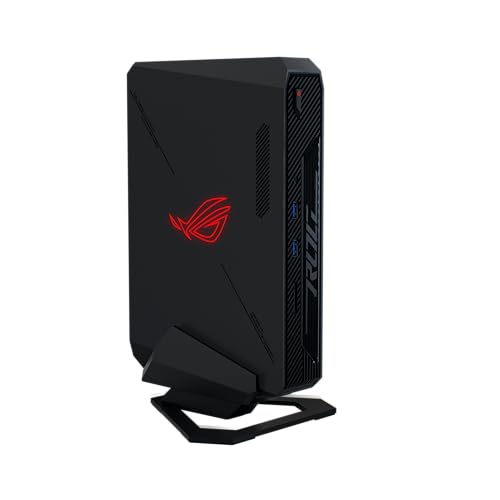
- Best for the tightest spaces: ASUS ROG NUC 970, Core Ultra 9 185H, RTX 4070 Laptop GPU, 32GB, 1TB, 2.5L, vertical stand included — Check on Amazon
- Minisforum AtomMan G7 Pro, Core i9-14900HX, RTX 5070 Laptop GPU, 32GB, 1TB, 33mm-thin slab — Check on Amazon
- ASUS ROG NUC (2025), Core Ultra 9 275HX, RTX 5070 Ti Mobile, 16GB, 1TB, ~3.0L — Check on Amazon
- GMKtec EVO-X2, Ryzen AI Max+ 395, Radeon 8060S, 64GB, 1TB, ~2.8L — Check on Amazon
- Minisforum AtomMan G1 Pro, Ryzen 9 8945HX, desktop RTX 5060, 32GB, 1TB, ~3.8L — Check on Amazon
- ASUS ROG G22CH DB779, Core i7-13700KF, desktop RTX 4070, 32GB, 1TB, ~10.7L — Check on Amazon
Read the full guide ↓
Disclosure: As an Amazon Associate, reviewstook.com earns from qualifying purchases. Links to Amazon on this page are affiliate links; they cost you nothing extra. Listing details such as price and availability change often, so check the current Amazon listing before you buy.
Most “small spaces” PC guides cheat in the same place: they measure the box and stop. The box is the easy part. What decides whether a gaming PC actually works in a small room is everything attached to the box — the power brick that needs its own address on the floor or the shelf, the stand that widens the footprint, the cables dropping off the back edge, and the hot air that has to go somewhere in a room that may not have much air to spare. This guide grades six verified small form factor machines under $2,500 on installation first: published dimensions and computed volume, placement class, brick placement, cable drop, and heat behaviour in a confined space. Performance is covered honestly in every review, but it is graded second, because a fast machine that does not fit your shelf is not a recommendation — it is a return label.
First, the good news, stated plainly because it is not true of most price tiers: every machine in this guide is genuinely small. Five of the six are under four liters by their manufacturers’ published dimensions, and the largest — a console-style desktop at about 10.7 liters — is still a quarter of a mid-tower. Nobody here is selling you a 40-liter tower with “small” in the title. The honesty work in this guide is of a different kind. None of these six machines documents a VESA mount, so if your plan is to bolt a PC to the back of your monitor, none of them can promise it — readers who need that mounting style, or a box smaller than 2.5 liters, belong in the Best Mini Gaming PC Under $2500 guides, where smaller machines live. None of the six belongs inside a sealed cabinet, media-unit cupboard or any other closed box, however roomy it looks: every pick here is actively cooled, and a closed door turns any of them into an oven. And the 2.5-to-3-liter figures quoted for the smallest picks describe the chassis only — the external power adapters most of them run on are second objects that need placing, ventilating and cable-routing of their own.
One more ceiling belongs up front. There is no RTX 5080 small form factor PC under $2,500: the one genuine sub-4-liter RTX 5080 machine, the top configuration of ASUS’s ROG NUC (2025) line, sits in a premium tier well above this budget. What this budget buys in a small box is laptop-class graphics in 2.5-to-4-liter chassis, one integrated-graphics flagship with an unusually large pool of unified memory, one sub-4-liter machine with a swappable desktop card, and one 10.7-liter design carrying a full desktop GPU. Below you will find the quick picks graded by placement, the five-step measuring checklist to run before you order anything, detailed installation-first reviews of all six machines, a comparison table with footprints and power arrangements side by side, and the mistakes that turn a small PC into a loud, hot, badly fitting one.
In this guide
Quick Picks
Short on time, or comparing several options at once? Each row below names the space problem and the machine that solves it, with a link to the listing.
| Space problem | Pick | Why it fits | Link |
|---|---|---|---|
| Smallest documented footprint | ASUS ROG NUC 970 | 2.5 liters, vertical stand in the box — check price on Amazon | Check on Amazon |
| A shelf slot or desk edge, standing upright | Minisforum AtomMan G7 Pro | 33mm-thin slab that stands like a book — check price on Amazon | Check on Amazon |
| Most graphics power per liter | ASUS ROG NUC (2025) | RTX 5070 Ti Mobile in ~3.0 liters — check price on Amazon before you buy | Check on Amazon |
| Memory-heavy work in under 3 liters | GMKtec EVO-X2, 64GB | 64GB of unified memory in ~2.8 liters — plan a home for its 230W brick | Check on Amazon |
| No brick to place, upgrade path kept | Minisforum AtomMan G1 Pro | Internal PSU and a desktop card in a real slot, in ~3.8 liters | Check on Amazon |
| A TV-stand shelf with real depth | ASUS ROG G22CH DB779 | Desktop RTX 4070 and an internal PSU in ~10.7 console-style liters | Check on Amazon |
How These Picks Were Chosen
The first filter was the same one the base $2,500 small form factor guide enforces, because it is the only honest way to build this list: a machine had to publish real dimensions, and the volume computed from those dimensions had to land at roughly 20 liters or less. The six survivors sit between 2.5 and about 10.7 liters. That rule quietly excludes the entire desktop RTX 5070 Ti and RTX 5080 prebuilt market at this price — capable machines, several cheaper than these picks, but 35-to-45-liter towers that answer a different search and live in the general Best Small Form Factor Gaming PC Under $2500 guide’s wider coverage. Every ASIN and specification here traces to a real Amazon listing; where a machine’s fit for this budget depends on its current listing, the review says so plainly, and readers should check the live price on Amazon before deciding.
On top of that filter, this variant re-grades the same six machines on installation evidence, and only on installation evidence the underlying research actually documents. Each pick is classed by how it physically lives in a room: flat slab, upright slab on a stand, compact box, or console-style case. The dimensions and volumes printed are the manufacturers’ published figures and arithmetic done on them — nothing else. Where the research documents an external power adapter, the brick is treated as part of the installation and given a placement discussion; where a machine carries an internal power supply, that is credited as one less object to house. Mounting is claimed for no pick: the research behind this guide documents no VESA pattern for any of the six, so the reviews below treat behind-monitor mounting as unproven for all of them rather than assuming it. Heat is graded qualitatively — cooling design, chassis volume, documented noise findings — because small rooms punish hot, loud machines twice: once in temperature, once in acoustics.
The naming discipline of the base guide carries over unchanged, because a small-spaces reader deserves it as much as anyone: four of the six picks run laptop GPUs, and they are called laptop GPUs everywhere in this guide, including the buy box and the comparison table. An RTX 5070 Laptop GPU is not a desktop RTX 5070 — NVIDIA’s published figures give the desktop card 6,144 CUDA cores and 12GB of memory, the laptop part 4,608 cores and 8GB — and the RTX 4070 generation splits the same way, 5,888 cores and 12GB on the desktop card against 4,608 and 8GB in the laptop part, which independent reviewers place around desktop RTX 4060 Ti class. One pick has no discrete GPU at all; its graphics are integrated into its processor, and it is here for its memory, with that stated in its review rather than buried. We did not use these machines ourselves; we worked from maker listings, specification pages and independent review coverage, and check the live price on Amazon before you buy, because this category reprices weekly.
Five Steps Before You Order: The Small-Spaces Checklist
Every return in this category starts with a measurement somebody skipped. Run these five steps in order, with a tape measure rather than an estimate, before any of the six listings below gets your money.
- Measure the spot — all three dimensions, then the machine’s. Write down the width, depth and height of the exact shelf, desk corner or media-unit bay the PC will occupy, then compare them against the published dimensions in each review below, not against the liter figure. Liters tell you a machine is small; dimensions tell you whether it is small in the direction your furniture cares about. A 33mm-thin slab and a 2.5-liter cube hold similar volumes and fit utterly different spaces. Leave room in the measurement for the stand if the machine uses one — the G7 Pro below, for example, is 33mm thin as a body and roughly 80mm thick on its base.
- Check the ventilation clearance, and refuse the sealed cabinet. Every pick in this guide breathes through its panels and exhausts warm air into the room. A shelf with open air around it is fine; a media-unit bay with an open back is usually fine; a cupboard with a closing door is not fine for any machine here, at any size, however generous the cupboard looks. Small boxes concentrate heat, and a sealed space removes the one thing their cooling design assumes: somewhere for the heat to go. If your only available space has a door on it, the answer is to change the space or change the plan — not to pick the smallest machine and hope.
- Give the power supply an address. Four of these six machines are fed by external adapters, and the one whose adapter is documented in detail — the EVO-X2’s 230W brick — is a substantial object that runs warm and needs air of its own. Decide now where the brick will live: on the floor behind the desk, on the shelf beside the machine, never buried in a cable pile or a closed drawer. The two internal-PSU picks (the G1 Pro and the G22CH) skip this step entirely, which is a genuine installation advantage that raw liter figures hide. Then check the mundane part: the wall socket’s distance, because a brick placed mid-cable-run pulls on both ends.
- Plan the cable drop. Display, network, power and peripherals all leave from the machine’s panels, and in a small room they usually drop off the back edge of a desk or shelf. Count what you will actually plug in, leave slack for the drop rather than stretching cables taut, and keep the exhaust side of the machine out of the cable bundle — cables draped over a vent are a cooling fault you install yourself. Machines that stand vertically concentrate their ports along one edge, which makes for a tidy single drop; flat slabs spread them. Neither is better in the abstract; one of them matches your furniture.
- Then order — and verify on arrival. Only after the space is measured, ventilated, powered and cabled on paper does the listing matter. When the machine arrives, confirm the delivered configuration against the model number before the return window becomes a memory: this category sells barebone and configured styles, and lesser variants, under shared listing pages, and two of the six picks below carry exactly that warning in their reviews. A machine that fits the shelf but is the wrong configuration is still the wrong machine.
The 6 Best Small Form Factor Gaming PCs for Small Spaces Under $2,500
ASUS ROG NUC 970 — Core Ultra 9 185H, RTX 4070 Laptop GPU, 32GB, 1TB (2.5L)
Who it suits: The buyer whose space problem is measured in centimeters, not liters of leeway — a shallow shelf, a narrow desk, a spot beside the TV where the machine has to effectively disappear.
Installation comes first in this guide, and on installation this is the easiest machine here to place. The chassis measures 270 × 180 × 50 mm, which is 2.5 liters — the smallest documented volume in the guide — and ASUS includes a vertical stand in the box, so the machine can stand upright on a footprint roughly the size of its 180 × 50 mm edge rather than lying flat across a shelf. That stand is a small detail with an outsized effect in a small room: it converts desk area into desk height, and height is usually the dimension a shelf has spare. The cable picture is correspondingly simple: one compact box, one display run (Thunderbolt 4 is among its connections), and an SD card reader that saves a dongle on the desk. Like the other sub-4-liter picks it is fed by an external adapter, so step 3 of the checklist applies — the brick needs a floor or shelf address of its own — but there is no second box, no stand to buy separately and no assembly decision to make.
The machine inside the small box is complete and honest about its class. The RTX 4070 Laptop GPU runs at its full 140W power limit, the highest that chip is given, which matters because a laptop GPU’s real performance is set by wattage as much as by name. It remains the laptop part: 4,608 cores and 8GB of memory against the desktop RTX 4070’s 5,888 cores and 12GB, a class independent reviewers place around the desktop RTX 4060 Ti — capable 1080p and 1440p gaming, named correctly. Around it sit a Core Ultra 9 185H, 32GB of DDR5 in slots that accept up to 64GB, and a 1TB SSD. Pricing is straightforward here: this is a complete configuration that fits comfortably inside the budget framing — check price on Amazon for the current listing. The trade-offs are thermal and generational. Two and a half liters is the least air volume here, so under sustained load the fans have the hardest job in the guide — place it with open air around it, never in a closed bay — and its GPU is a generation behind the 2025 NUC below, without the newer silicon’s features.
- 2.5 liters — the smallest documented chassis in the guide — with the vertical stand included.
- Complete 32GB/1TB configuration — check price on Amazon.
- Memory slots accept up to 64GB; Thunderbolt 4 and an SD reader keep the desk free of hubs.
Honest limitation: The smallest box has the least thermal headroom, its laptop GPU carries 8GB where the desktop namesake carries 12GB, and no VESA mounting is documented for it — the included stand is the placement plan, not a monitor mount.
Choose it if the spot is genuinely tiny and open-air. Skip it if your only space is a closed cabinet (true of every pick here, felt first by this one), or you need current-generation graphics.

Minisforum AtomMan G7 Pro — Core i9-14900HX, RTX 5070 Laptop GPU, 32GB, 1TB (slim slab, ~3.0L body)
Who it suits: The buyer whose available space is a slot — the end of a desk, a gap between books on a shelf, the side of a monitor — where thickness, not volume, is the constraint.
No other shape in this guide fits the places this one fits. The body measures 385 × 237 × 33 mm: about three liters of slab, 33mm thin, weighing 2.62 kg, designed to stand vertically like a hardback book. On its stand the full footprint grows to 398 × 260 × 80 mm, which is the number to check against your shelf — the checklist’s warning about measuring the machine as installed, not as photographed, was written for exactly this listing. Stood upright, the slab presents a narrow face to the room and concentrates its connections along its edges, making for a single tidy cable drop behind a desk. Cooling runs through six heat pipes and dual fans inside that thin body, which is engineering worth respecting and a placement rule worth obeying: a 33mm chassis has no spare air inside, so the air outside it must move — open shelf yes, sealed cabinet no, and keep the panel faces clear of books and clutter even though the shape invites shelving it like one.
As a computer, it is the value door into current-generation graphics here. The RTX 5070 Laptop GPU carries 8GB of GDDR7 at around 115W — the laptop part, 4,608 CUDA cores against the desktop RTX 5070’s 6,144 and 8GB against its 12GB, named as such — beside a 24-core Core i9-14900HX, 32GB of DDR5 across two SO-DIMM slots (upgradable to 96GB), 1TB of storage with a second M.2 slot, Wi-Fi 7 and USB4. The configured 32GB/1TB machine and the barebone are sold as different styles under the same listing, so check price on Amazon for the configured style and confirm exactly what is in your cart. Two arrival checks are documented in review coverage and belong in any honest review: some review units shipped with a single 32GB memory stick, which runs memory in single-channel mode and leaves performance on the table — confirm the stick count when yours arrives — and the listing is a style family that also sells the barebone, so the configured style must be the one in your cart.
- 33mm-thin slab body (~3.0L) that stands vertically and fits shelf slots nothing else here fits.
- Current-generation laptop GPU with a complete 32GB/1TB configuration — check price on Amazon.
- Memory upgradable to 96GB and a second M.2 slot — rare headroom in a machine this thin.
Honest limitation: The footprint on its stand (398 × 260 × 80 mm) is much larger than the 33mm headline suggests, the GPU is the 8GB laptop part, and the shared listing mixes barebone and configured styles.
Choose it if your space is a vertical slot and you can keep its faces breathing. Skip it if the shelf depth cannot take the stand’s 260mm, or 8GB of VRAM is too tight for your games.

ASUS ROG NUC (2025) — Core Ultra 9 275HX, RTX 5070 Ti Mobile, 16GB, 1TB (~3.0L)
Who it suits: The buyer with a small, fixed spot — one shelf, one desk corner — who wants the strongest graphics that spot can hold and is willing to check the live listing carefully before committing.
The installation story is a flat slab measuring 282.4 × 187.7 × 56.5 mm, almost exactly 3.0 liters, that stands vertically or lies flat and asks for nothing exotic: open air, a power feed, a display cable. ASUS cools it with a triple-fan system and dual vapor chambers, the most elaborate cooling in this guide, which is what allows the silicon below to live in three liters at all — and it is also why the sealed-cabinet refusal applies to this pick without exception, since a cooling system designed to move heat out of a 56.5mm-thick chassis has no answer for a closed door. Thunderbolt 4 keeps the cable count low, which in a small room is a feature in itself: fewer cables, a shorter drop, less clutter behind the desk. The machine’s footprint discipline is genuinely excellent; nothing about placing it is hard.
What is hard is buying it correctly. The graphics chip is the RTX 5070 Ti Mobile — the laptop version, with 12GB of GDDR7, named in full here as everywhere in this guide — and it is the strongest GPU in this list, paired with a Core Ultra 9 275HX and two SO-DIMM slots. But this family sits in a premium tier in ASUS’s own US store, and this configuration belongs in an under-$2,500 guide only when its current Amazon listing fits the budget — check price on Amazon before you commit. When the listing fits, it is the pick to beat; when it does not, it is outside the budget and the reviews around it become the better buys. It also ships with 16GB of memory where the comfortable gaming standard is 32GB, and the fix is a second SO-DIMM bought separately, so factor that extra purchase into the real installed cost of the complete machine. The family’s ceiling underlines the tier’s honesty: the RTX 5080 configuration of this same chassis sits well above this budget in a premium tier, which is why no 5080 appears in this guide.
- RTX 5070 Ti Mobile with 12GB GDDR7 — the most graphics silicon in this guide, in ~3.0 liters.
- Triple-fan, dual-vapor-chamber cooling and Thunderbolt 4; a flat slab that places anywhere open.
- Two SO-DIMM slots, so the 16GB it ships with can grow with a second stick bought separately.
Honest limitation: Its fit for this budget depends on its current Amazon listing — check price on Amazon — and the 16GB shipping configuration makes the second memory stick a near-mandatory extra purchase.
Choose it if its current listing fits the budget and your spot has open air. Skip it if the live price is at shelf level, or your space plan involves any kind of enclosed furniture.

GMKtec EVO-X2 (64GB) — Ryzen AI Max+ 395, Radeon 8060S, 64GB, 1TB (~2.8L)
Who it suits: The buyer whose small desk has to hold a workstation as well as a games machine — local AI models, large creative projects, heavy multitasking — in under three liters of chassis.
The box itself is among the smallest here: 193 × 185.8 × 77 mm, about 2.8 liters, a compact slab that sits flat and takes roughly a paperback’s footprint of shelf. The installation complication is the second object. The EVO-X2 runs on an external 230W power adapter, and 230W bricks are not phone chargers — this one needs a deliberate address with air around it, on the floor behind the desk or a ventilated shelf section, never inside the cabinet the machine itself was just refused entry to. Budget that footprint honestly and the EVO-X2 is a tidy install; ignore it and the “2.8-liter” machine colonizes twice the space its headline claims. Cable planning is otherwise unremarkable, and the machine’s modest heat output for its class — its graphics are integrated, with no separate GPU heating the chassis — makes it one of the calmer roommates in this guide for a small, warm room.
There is no discrete graphics card inside: the Radeon 8060S is integrated into AMD’s Ryzen AI Max+ 395, and what that processor brings is memory architecture nothing else here can match — 64GB of LPDDR5X unified memory on a 256 GB/s bus, shared between CPU and GPU. Notebookcheck places the 8060S roughly on par with the RTX 4070 Laptop GPU for gaming, which makes this a credible 1080p and 1440p machine by integrated standards, and for memory-hungry work it is in a class of one: this 64GB/1TB configuration is a premium-tier Ryzen AI Max+ 395 machine — check price on Amazon — shipping with Windows 11 Pro. The limitation mirrors the strength. The memory is soldered — 64GB is generous today and fixed forever, and the 128GB configurations of this same machine sit in a higher premium tier, far outside this budget. Buy it for what the memory does, with gaming as a strong second talent, and it earns its place on a small desk; buy it as a pure gaming PC and stronger graphics-focused options live elsewhere in this guide.
- 64GB of unified LPDDR5X memory — more than the other five picks’ workloads can use, in ~2.8 liters.
- Radeon 8060S integrated graphics placed by reviewers around RTX 4070 Laptop class.
- 64GB/1TB configuration with Windows 11 Pro — check price on Amazon.
Honest limitation: The 230W external brick is a second warm object that needs its own ventilated placement, and the 64GB memory is soldered with no upgrade path at any price.
Choose it if memory-heavy work shares the desk with your games and the brick has a home. Skip it if gaming is the whole job, or your shelf has no room for the adapter beside the box.

Minisforum AtomMan G1 Pro — Ryzen 9 8945HX, Desktop RTX 5060, 32GB, 1TB (~3.8L)
Who it suits: The buyer in a small room who still thinks like an upgrader — and who values an installation with no power brick to hide.
Start with the installation advantage no liter figure captures: the G1 Pro’s 350W power supply is internal. The ~3.8-liter chassis (Minisforum’s figure; reviewers measuring the box recorded 12.4 × 8.5 × 2.25 inches) is the whole installation — one object, one power cord, nothing warm living separately on the floor. In a small room where every object competes for the same shelf, that simplicity is worth real money, and it makes the cable drop the cleanest here: power in, display out, network if you use the 5GbE port. The counterweight is acoustic. Reviewers found this machine loud under heavy load, and in a small room loud is close — there is no far corner to banish it to — so placement has to do the work: as far from your ears as the room allows, on an open surface, never enclosed. Its graphics arrangement is also the most future-friendly in the guide: the RTX 5060 is a desktop low-profile card (a Gigabyte OC model at 145W) mounted in a genuine PCIe x16 slot, so a future low-profile card can replace it — the only GPU upgrade path in this guide.
The platform around the slot is serious: a 16-core Ryzen 9 8945HX, 32GB of DDR5 SO-DIMM upgradable to 96GB, a 1TB PCIe 4.0 SSD with a second M.2 slot, 5GbE, Wi-Fi 7 and Windows 11 Pro — check price on Amazon, and compare with Minisforum’s US store if you wish. Two review findings deserve prominence. The machine ships in an 80W “Gaming Mode” that holds back roughly a fifth of its performance behind a software toggle — find that setting on day one, or you will be using a machine you did not pay for. And Minisforum’s control utility has shipped with a driver component that Windows Defender flags, documented in review coverage and worth knowing before you install the maker’s software. Neither cancels the slot or the internal PSU; both belong in an honest account of what arrives at your small desk.
- Internal 350W PSU — no brick to place, ventilate or trip over; the whole install is one box.
- Desktop RTX 5060 in a real PCIe x16 slot — the guide’s only graphics upgrade path.
- Memory to 96GB, a second M.2 slot and 5GbE — check price on Amazon.
Honest limitation: Documented loudness under heavy load is a real placement constraint in a small room, it ships in a power-limited mode you must switch off yourself, and future card upgrades are limited to the low-profile format.
Choose it if you want one-box installation and upgradeability in under four liters. Skip it if the machine must sit close to your ears in a quiet room.
ASUS ROG G22CH DB779 — Core i7-13700KF, Desktop RTX 4070, 32GB, 1TB (~10.7L)
Who it suits: The buyer whose “small space” is a living room rather than a desk — a TV stand or media shelf with real depth, where a console-shaped machine belongs and a tower would sprawl.
This is the largest machine in the guide and the only one whose placement conversation starts with furniture rather than desk corners. The chassis measures 11.50 × 32.30 × 28.69 cm — about 10.7 liters computed, in the 10L class ASUS markets — shaped to sit in media furniture the way a console does. Measure that furniture honestly before ordering: the depth and height are within most TV stands’ reach, but the machine still needs open air around it, and the sealed-cabinet refusal applies with full force — a media unit with a closing door is the single most tempting and most wrong home for this pick. Placed on an open shelf, its installation is the simplest here in one respect: the 600W 80+ Gold power supply is internal, so there is no brick at all, and a wired keyboard and mouse are included in the box. One box, one power cord, a display run to the TV — the living-room install writes itself.
The reason to accept 10.7 liters is what fills them: a desktop RTX 4070 DUAL with 12GB of GDDR6X — all 5,888 CUDA cores at desktop power, the only full desktop graphics card in this guide, with no laptop asterisk anywhere near it. Around the card sit a Core i7-13700KF, 32GB of DDR5, a 1TB PCIe 4.0 SSD and Wi-Fi 6E, running Windows 11 Home. Check price on Amazon for the current DB779 listing; on hardware alone it offers full desktop graphics in a console-style case. The cautions are about configuration discipline. The memory is SO-DIMM and ASUS rates 32GB as the machine’s maximum — the amount it ships with — so there is no memory growth path. And the G22CH name covers lesser variants: a version with a Core i7-13700F and 16GB has also been offered by third-party importers, so do not assume every G22CH listing is the DB779. The model number to match, on the listing and on the box, is DB779.
- Desktop RTX 4070 12GB — the only full desktop GPU in the guide, in a console-style ~10.7L case.
- Internal 600W 80+ Gold PSU and included keyboard and mouse: the fewest objects to place here.
- Desktop configuration for a living-room shelf — check price on Amazon.
Honest limitation: At ~10.7 liters it needs a real shelf, not a desk corner; its 32GB memory ceiling is also its shipping configuration; and variant drift in the G22CH line makes the DB779 model check mandatory.
Choose it if the machine lives in the living room on an open shelf. Skip it if the space is a closed media cabinet, a backpack, or a desk measured in centimeters.

Comparison Table
| Product | Footprint (published dimensions) | Power arrangement | Graphics (named in full) | Price | Link |
|---|---|---|---|---|---|
| ASUS ROG NUC 970 | 2.5L (270 × 180 × 50 mm); vertical stand included | External adapter | RTX 4070 Laptop GPU, 8GB, 140W | Check price on Amazon | Check on Amazon |
| Minisforum AtomMan G7 Pro | ~3.0L slab (385 × 237 × 33 mm body; 398 × 260 × 80 mm on stand) | External adapter | RTX 5070 Laptop GPU, 8GB | Check price on Amazon | Check on Amazon |
| ASUS ROG NUC (2025) | ~3.0L (282.4 × 187.7 × 56.5 mm) | External adapter | RTX 5070 Ti Mobile, 12GB | Check price on Amazon | Check on Amazon |
| GMKtec EVO-X2 (64GB) | ~2.8L (193 × 185.8 × 77 mm) | External 230W adapter — a second object to place | Radeon 8060S integrated | Check price on Amazon | Check on Amazon |
| Minisforum AtomMan G1 Pro | ~3.8L (maker figure) | Internal 350W PSU — no brick | Desktop RTX 5060 low-profile, 8GB, in PCIe slot | Check price on Amazon | Check on Amazon |
| ASUS ROG G22CH DB779 | ~10.7L (11.50 × 32.30 × 28.69 cm) | Internal 600W 80+ Gold PSU — no brick | Desktop RTX 4070, 12GB | Check price on Amazon | Check on Amazon |
How to Choose a Small Form Factor Gaming PC for a Small Space
- Choose by placement class before performance class. A vertical slab, a stand-mounted cube, a flat box and a console-style case solve four different rooms. Decide which shape your furniture accepts — slot, shelf, desk corner, TV stand — and the shortlist writes itself; then compare graphics inside that class.
- Measure the machine as installed, not as photographed. Stands widen footprints (the G7 Pro grows from 33mm thin to an 80mm-thick, 260mm-deep installation on its base), and bricks add a second object. The dimensions in the comparison table above are the starting point; your tape measure on your actual shelf is the decision.
- Count objects, not just liters. An internal-PSU machine is one object and one power cord. An external-adapter machine is two objects, two placements and a cable between them. In a genuinely small room, the object count often matters more than the difference between 2.5 and 3.8 liters.
- Treat ventilation as a hard constraint, not a preference. Open shelf, open desk, open-backed media bay: acceptable. Anything with a closing door: refused, for all six picks, regardless of size. If the only available space is enclosed, the correct purchase is different furniture placement, not a smaller PC.
- Put noise on the placement plan. Small rooms have no far corner. Machines documented as loud under load need distance or an open room; the smallest chassis have the least thermal headroom and work their fans hardest. A PC that fits the shelf but sits a meter from your ears at full tilt will be moved or returned.
- Read the GPU’s full name before the room gets a vote. Four of these six machines run laptop GPUs with 8GB or 12GB where desktop namesakes carry more; one has integrated graphics. The room chooses the shape, but the silicon decides whether the games you play will run — check both, in that order, and let neither substitute for the other.
- Verify the configuration against the model number. Style-family listings sell barebone and configured versions on one page, and model lines drift into lesser variants. DB779, the configured G7 Pro style, the 64GB EVO-X2 — the specific configuration is the product, and confirming it in the cart and on the box is part of the installation.
Common Buying Mistakes
- Putting a small gaming PC inside a closed media cabinet. It is the most natural placement in a small room and the most reliably destructive: every machine here exhausts heat into its surroundings, and a sealed cabinet gives that heat nowhere to go. Open the space up or choose a different space.
- Measuring the chassis and forgetting the brick. External adapters — the EVO-X2’s 230W unit is the documented example — are warm, sizeable objects that need ventilated placement of their own. A “2.8-liter” install with nowhere for its brick is not a finished install.
- Trusting the headline thickness. A 33mm slab on an 80mm stand base occupies the stand’s footprint, not the slab’s. Measure stands, feet and cable bend radius as part of the machine.
- Assuming a VESA mount exists because the machine is small. No pick in this guide documents one. If behind-monitor mounting is the plan, confirm it on the live listing for the specific machine — or shop the mini PC guides, where mounting is a standard feature.
- Draping the cable drop over the exhaust. Cables routed across a vent are a cooling fault installed by hand. Plan the drop to leave from the port side and fall clear of every panel that breathes.
- Buying the ROG NUC (2025) without checking its current listing inside a $2,500 plan. It belongs here only when the live listing fits the budget, and the configuration still ships with 16GB of memory.
- Ordering a barebone by accident from a style-family listing. The G7 Pro’s page sells a barebone with no RAM, no SSD and no Windows beside the configured machine; completing it yourself can end up less straightforward than buying the configured unit.
- Ignoring the G1 Pro’s shipping power mode. It arrives limited to an 80W gaming mode that hides about a fifth of its performance behind a software toggle; finding that toggle is part of setting the machine up.
- Matching the wrong G22CH variant. The lesser 13700F/16GB version is not the DB779. The model number is the product.
Final Recommendation
- Tightest spaces: ASUS ROG NUC 970 — 2.5 liters, stand included, no deal-hunting required.
- A vertical slot or shelf edge: Minisforum AtomMan G7 Pro — measure the stand, mind the style selector.
- Maximum power in ~3 liters: ASUS ROG NUC (2025) — check price on Amazon and buy only when the listing fits the budget.
- Memory-heavy work on a small desk: GMKtec EVO-X2 (64GB) — with a planned home for its brick.
- One-box install with an upgrade path: Minisforum AtomMan G1 Pro — placed away from ears.
- Living-room shelf, desktop GPU: ASUS ROG G22CH DB779 — on an open shelf, never behind a door.
Our top two for small spaces are the ROG NUC 970 and the AtomMan G7 Pro, because they solve the two most common versions of the problem. The NUC 970 is the disappearance act: 2.5 liters, a stand in the box, a complete 32GB configuration — check price on Amazon — Check on Amazon. The G7 Pro is the slot-filler: a 33mm slab with current-generation graphics — check price on Amazon — provided its stand fits your shelf and its configured style is the one in your cart — Check on Amazon. Readers whose space problem comes with a smaller budget should start from the Best Small Form Factor Gaming PC Under $1500 guide, and readers who need the same installation thinking at the tier above can see the Best Small Form Factor Gaming PC Under $3000 coverage. Whichever machine you choose: run the five steps first — measure the spot, check the ventilation, give the power supply an address, plan the cable drop, and only then order.
Frequently Asked Questions
Can I put one of these PCs inside my TV cabinet or media unit?
Only if the unit is open — an open-backed bay or a shelf without a closing door. Inside a sealed cabinet, no: all six machines in this guide are actively cooled and exhaust heat into the space around them, and a closed door traps that heat until the machine throttles or worse. This refusal applies to the 2.5-liter NUC 970 exactly as much as to the 10.7-liter G22CH; smaller does not mean cooler-running in a sealed box, it means the heat is concentrated in less air.
Can I mount one of these PCs behind my monitor?
Not on the evidence in this guide. The research behind these picks documents no VESA mounting pattern for any of the six machines, so this guide claims it for none of them. The NUC 970 includes a vertical stand, which solves the same desk-space problem a different way. If behind-monitor mounting is a hard requirement, check the live listing of the specific machine for a documented mount — or start from the Best Mini PC Under $2500 guides, where VESA mounting is commonly documented.
How much room does the power brick really take?
More than the listings suggest. Four of the six picks run on external adapters, and the one documented in detail — the EVO-X2’s — is a 230W unit: a warm, brick-sized object that needs open air and a floor or shelf address of its own. Plan the installation as two objects wherever a brick is involved. The G1 Pro and the G22CH carry internal power supplies and skip the problem entirely, which is a real advantage in the smallest rooms.
Which of these is best for a living room?
It depends on the furniture. For a TV stand with a deep, open shelf, the G22CH is the console-shaped answer with a desktop graphics card. For a spot beside or behind the TV where the machine must vanish, the 2.5-liter NUC 970 or the 3-liter ROG NUC (2025) fit the smaller shadow — both still need open air, and both pair naturally with a wireless controller. The Best Small Form Factor Gaming PC For Streaming Under $2500 guide covers the living-room streaming side of the same machines.
Are small gaming PCs loud in a small room?
They work harder per liter — the same heat in a fraction of a tower’s air volume means smaller fans spinning faster — and a small room gives the noise nowhere to dissipate. Reviewers documented the G1 Pro as loud under heavy load, and the smallest chassis here have the least thermal headroom of all. Placement is the mitigation: open air, maximum distance from your seat, and never an enclosed space, which makes both the heat and the noise worse.
What if my space is smaller than any of these machines?
Then the honest answer is a different category. Below 2.5 liters you are in mini PC territory, where the machines are smaller, the graphics are mostly integrated, and VESA mounting is a standard feature rather than an undocumented hope. The Best Mini Gaming PC Under $2500 guide covers that end of the market. What you should not do is force one of these six into a space it does not fit — a gaming PC that overheats in a too-small, too-closed spot is worse than a smaller machine honestly chosen.


