Where to buy
Check the latest price, availability and delivery on Amazon. Orders are placed on Amazon. We may earn a commission from qualifying purchases.
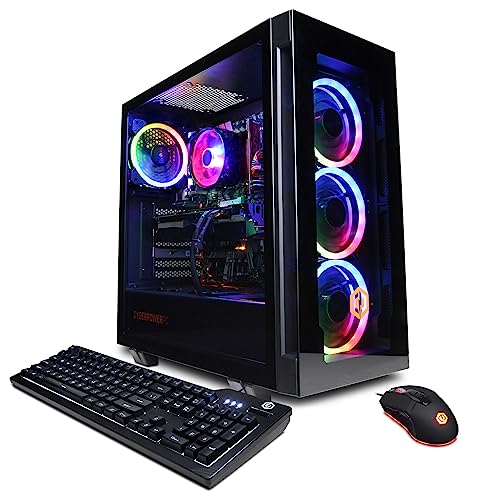
- Best overall: CyberPowerPC Gamer Xtreme VR, i7-13700F, RTX 4060 Ti 16GB — Check on Amazon
- iBUYPOWER Scale, Ryzen 5 7600, RTX 4060 Ti — Check on Amazon
- Skytech Blaze4 Mini, Ryzen 7 5700, RTX 4060 Ti — Check on Amazon
- Thermaltake LCGS Quartz i1460, i5-14400F, RTX 5060 — Check on Amazon
See 2 more Amazon options
- CyberPowerPC Gamer Master, Ryzen 7 8700F, RTX 4060 Ti — Check on Amazon
- Skytech Archangel, i5-14400F, RTX 4060, 32GB RAM, 2TB SSD — Check on Amazon
Read the full guide ↓
Disclosure: As an Amazon Associate, reviewstook.com earns from qualifying purchases. Links to Amazon on this page are affiliate links; they cost you nothing extra. Listing details such as price and availability change often, so check the current Amazon listing before you buy.
Twelve hundred dollars is the budget where a prebuilt gaming PC stops being a compromise you apologize for. Below it, every tier gives something up — an older graphics card, a finished platform, memory you will replace within the year. At $1,200 the resident graphics class is the GeForce RTX 4060 Ti, in both its 8GB and 16GB forms, with the newer RTX 5060 alongside it, and that class carries a precise meaning this guide will use throughout: native 1440p. Native means the game is rendered internally at 2560×1440, at high settings, without upscaling reconstructing the image from a lower resolution. That is what these machines genuinely do. What they do not do is native 4K — at 3840×2160 this GPU class leans on DLSS or FSR upscaling to stay smooth, and any listing that implies otherwise is selling you the upscaling, not the resolution.
Buying a prebuilt rather than building also means buying a company, not just a parts list. So this guide judges the six machines below on the things that decide ownership after the first week: whether the builder publishes its power supply or leaves it a mystery, whether the case and motherboard are standard parts you can service and upgrade yourself, and what stands behind the machine when something fails — one whole-system warranty from a single builder, instead of a drawer of separate component warranties. On those measures the six picks separate cleanly. Two disclose Gold-rated power supplies by wattage; the others leave the PSU unpublished, and their reviews say so and tell you what to check on delivery day. Prices, as always in this category, move often — check price on Amazon for the current figure — because prebuilt prices swing sharply between sale events, and two of these picks are only worth buying when discounted within this budget.
One more thing deserves saying at the top, because it reverses the usual advice. In late 2026, building your own equivalent machine usually costs more than these prebuilts, not less — memory prices have spiked hard enough to break the old DIY arithmetic. There is a full section on that below. If you came here planning to be talked out of a prebuilt, this is the tier and the moment where the prebuilt is frequently the rational buy.
In this guide
Quick Picks
Short on time, or comparing several options at once? Each row below names a buyer type and the machine that suits it, with a link to the listing.
| Buyer type | Pick | Why it stands out | Link |
|---|---|---|---|
| Best overall | CyberPowerPC Gamer Xtreme VR (GXiVR8040A14) | RTX 4060 Ti with 16GB VRAM — the longest-lived GPU in this guide — check price on Amazon — strongest when discounted within budget | Check on Amazon |
| Best everyday price | iBUYPOWER Scale | AM5 platform and RTX 4060 Ti, check price on Amazon — positioned as an everyday option under budget | Check on Amazon |
| Best value on sale | Skytech Blaze4 Mini | RTX 4060 Ti performance best when discounted, with a published 650W Gold PSU — check price on Amazon | Check on Amazon |
| Best current generation | Thermaltake LCGS Quartz i1460 | RTX 5060 and DLSS 4, check price on Amazon | Check on Amazon |
| Best eight-core AM5 | CyberPowerPC Gamer Master (GMA2900A) | Ryzen 7 8700F on a B650 board, check price on Amazon | Check on Amazon |
| Best for big game libraries | Skytech Archangel | 32GB of RAM and a 2TB SSD — double the memory and storage of the rest | Check on Amazon |
How These Picks Were Chosen
The budget was applied as a ceiling, not a target: every machine below is a real Amazon listing positioned at or regularly within the $1,200 budget in the United States — check price on Amazon for the current figure before you buy. Two picks can drift above the $1,200 budget between sales; their reviews flag that clearly, and they earn their places only when discounted back within budget. Anything wearing a last-generation card at this money, or an 8GB card presented as a 1440p flagship without qualification, was excluded.
We did not use these machines ourselves. We read the maker listings and specification pages, and compared graphics cards and VRAM, processors, memory configuration, storage, and — because this is a prebuilt guide — the ownership details builders publish or hide. Three of those deserve explanation. First, the power supply: a named wattage with an 80 Plus rating is a spec you can plan an upgrade around; an unpublished PSU is a ceiling you cannot see, so it is scored as a real debit wherever it occurs. Second, serviceability: every builder in this guide assembles from standard retail-style parts — ATX cases, standard motherboards, replaceable power supplies — rather than the proprietary boards and power bricks of the big office-PC brands, which means a failed part in year three is a shopping trip, not a write-off. Third, warranty structure: a prebuilt carries one whole-system warranty from one company, and the listings differ in what they state, so each review tells you what is documented and what to confirm on the live listing before ordering.
The graphics hierarchy at this tier is simple and worth memorizing. The RTX 4060 Ti 16GB and 8GB share the same GPU; the 16GB version’s extra memory buys texture headroom and longevity at 1440p, not raw speed today. The RTX 5060 is the newer architecture with DLSS 4 and multi frame generation — a feature that inserts generated frames to raise displayed frame rates in supported games, without reducing input latency the way genuinely rendered frames do. The plain RTX 4060, in the capacity pick, is a step down in speed that its review weighs honestly against the 32GB of RAM and 2TB of storage it buys instead.
The 6 Best Prebuilt Gaming PCs Under $1,200
CyberPowerPC Gamer Xtreme VR — i7-13700F, RTX 4060 Ti 16GB (GXiVR8040A14)
Who it suits: The 1440p buyer who intends to keep the same graphics card for four or five years, and who can wait for a sale to land.
The specification that matters here is two words long: sixteen gigabytes. This Gamer Xtreme VR pairs an Intel Core i7-13700F with the 16GB version of the RTX 4060 Ti, 16GB of DDR5 memory and a 1TB NVMe SSD, and at 1440p that VRAM figure is the difference between a card that ages gracefully and one that starts forcing texture settings down as games grow heavier. The GPU itself is no faster than the 8GB version — the extra memory is headroom, not horsepower — but headroom is exactly what a buy-it-once prebuilt purchase should be spending on, because the graphics card is the one component in the box you cannot cheaply fix later. The i7-13700F is the strongest all-round processor in this guide, with cores to spare for streaming, recording and the background clutter of a real desktop, and the DDR5 platform leaves a cleaner memory upgrade path than the DDR4 machines below.
The condition is the price — check price on Amazon before you buy. This configuration is a $1,200 pick only when it is discounted within budget, and this guide’s recommendation is written that way deliberately. When discounted within budget it is the best overall machine here; at its regular premium positioning it belongs to the next tier up and should be compared there. Two ownership notes. CyberPowerPC does not headline this model’s power-supply wattage in its listing material, so the PSU is unpublished: check the label on the unit when it arrives, and treat any future GPU upgrade as conditional on what that label says. And the memory configuration — whether the 16GB arrives as one stick or two — is not confirmed in the listing data we verified; if it arrives as a single stick, a matching second stick is the cheapest performance upgrade in this entire guide.
- RTX 4060 Ti with 16GB of VRAM — the texture headroom that decides how a card ages at 1440p.
- Core i7-13700F: the strongest general-purpose CPU in this guide, with streaming headroom.
- DDR5 platform and a 1TB NVMe SSD as standard.
Honest limitation: It is only a sub-$1,200 machine when discounted — check price on Amazon — and its power supply wattage is not published in the listing.
Choose it if you can buy it discounted within the $1,200 budget and want the longest-lived GPU at this budget. Skip it if you are buying today at its regular price — the iBUYPOWER below is the better everyday purchase.

iBUYPOWER Scale — Ryzen 5 7600, RTX 4060 Ti (SCA5N46T01)
Who it suits: The buyer who wants to purchase once this week — not stalk sales — and who values an upgradeable platform over a headline discount.
The Scale is the calmest purchase in this guide. It is positioned as an everyday option within this budget — check price on Amazon for the current figure — rather than a deal-only pick, so there is no need to stalk sales to justify it. At this tier it pairs a Ryzen 5 7600 with an RTX 4060 Ti 8GB, 16GB of DDR5-5200 and a 1TB NVMe SSD, and the Ryzen chip is the strategic heart of the pick. It sits on AMD’s AM5 socket, the one platform in this guide with a future: the motherboard in this case will accept later Ryzen generations, so a processor upgrade in three years is a chip swap rather than a new motherboard and memory as well. Every other machine here rides a finished socket — Intel’s LGA1700 or AMD’s older AM4 — which is fine value today and a dead end tomorrow. The Scale is also the most completely documented purchase of the six: the listing includes a keyboard and mouse in the box and states a one-year warranty, the kind of whole-system cover that is the core argument for buying prebuilt at all.
The honest limitation is printed in its own spec sheet: the 16GB of memory ships as a single stick (16×1), which leaves the memory running in single-channel mode and gives up a measurable slice of performance in CPU-sensitive games until you add a second stick. Budget for one additional DDR5 stick — not a trivial add in the current memory market — and treat the machine as a two-part purchase. iBUYPOWER also does not publish this model’s PSU wattage in the listing material we verified, so the same delivery-day label check applies before any future graphics upgrade. Neither debit overturns the pick. A current platform, a real 1440p card and a price that does not depend on a sale event make this the recommendation for anyone buying on an ordinary Tuesday.
- AM5 platform — the only socket in this guide that accepts future CPU generations.
- Positioned within the $1,200 ceiling as an everyday purchase — check price on Amazon.
- Keyboard and mouse included, one-year warranty stated in the listing.
Honest limitation: The 16GB of RAM ships as a single stick, so memory runs single-channel until you add a second; the PSU wattage is unpublished.
Choose it if you want the upgradeable platform and a price that needs no sale. Skip it if you will never open the case — the single-stick penalty then stays unpaid, and the Blaze4 Mini’s value case strengthens.

Skytech Blaze4 Mini — Ryzen 7 5700, RTX 4060 Ti (ST-BLAZE4MINI-1266-B-AM)
Who it suits: The patient value hunter — the buyer willing to set a price alert and wait for this machine’s documented low rather than buying on a schedule.
No machine in this guide makes the prebuilt-versus-DIY argument more bluntly. The Blaze4 Mini combines a Ryzen 7 5700, an RTX 4060 Ti 8GB, 16GB of DDR4-3200 memory and a 1TB SSD, and when discounted it offers value that, at the time of writing, no parts list in the companion build guide could match for this graphics class — check price on Amazon. Skytech also does the thing this guide keeps asking builders to do: it publishes the power supply, a 650W 80 Plus Gold unit, which means the upgrade conversation can be had with real numbers instead of a flashlight and a label hunt after delivery. The eight-core Ryzen 7 5700 is a capable, honest processor for gaming and everyday creation work, and the whole package is the clearest demonstration in the tier that a system integrator’s bulk pricing currently beats the retail parts shelf.
Now the two debits, both structural. The first is the price’s other face: its value depends heavily on timing, so the Blaze4 Mini is a superb purchase when discounted within budget and an ordinary one at its regular positioning — set an alert, buy the dip, and walk away if it sits above this budget, where the iBUYPOWER’s platform argument takes over. The second is the platform itself. The Ryzen 7 5700 rides the AM4 socket with DDR4 memory, a finished generation: there is no processor upgrade path that does not also mean a new motherboard and new RAM. You are buying this machine as a complete, closed answer — excellent frames per dollar today, and a full platform replacement when it eventually feels slow. Judged as exactly that, it is the value pick of the guide. One listing note applies to Skytech generally: the listing text reserves that the graphics card brand may vary between units. The model and VRAM are the contracted spec; the badge on the cooler is not.
- Strong value when discounted — RTX 4060 Ti performance at a positioning DIY currently cannot answer — check price on Amazon.
- Power supply published: 650W 80 Plus Gold, so upgrade planning starts from facts.
- Eight-core Ryzen 7 5700 and a 1TB SSD round out a complete, balanced build.
Honest limitation: The AM4/DDR4 platform is finished — no CPU upgrade path — and the price is timing-dependent, so check price on Amazon and buy only when it sits within budget.
Choose it if you can catch it discounted within budget and want maximum value today. Skip it if it is sitting at its regular positioning, or if a future in-case CPU upgrade matters to you — that is the Scale’s whole case.

Thermaltake LCGS Quartz i1460 — i5-14400F, RTX 5060 (S2QT-B760-560-LCS)
Who it suits: The buyer who wants the newest graphics architecture and its feature set, and is willing to trade a little memory-generation future for it.
The Quartz i1460 is the current-generation entry in this guide: an Intel Core i5-14400F paired with the GeForce RTX 5060, 16GB of DDR4-3600 memory and a 1TB NVMe SSD, positioned comfortably inside this budget — check price on Amazon for the current figure — with no sale-stalking required. What the RTX 5060 buys over the 4060 Ti machines around it is not a different performance class — it plays in the same native-1440p league — but a newer toolkit: DLSS 4 with multi frame generation, which in supported titles can multiply displayed frame rates by generating additional frames. Read that feature precisely. Generated frames raise the number your frame counter shows and can make motion look smoother; they are not rendered frames, they do not reduce input latency, and in fast competitive games many players switch the feature off. Bought as a bonus on top of honest native performance, it is genuinely valuable; bought as a substitute for it, it would be a mistake this guide will not make on your behalf.
Thermaltake’s LCGS line also earns an ownership point: coverage of this configuration documents a 600W 80 Plus Gold power supply, so the second builder in the guide publishes its PSU, and the case is a standard, serviceable tower from a company that sells cases and cooling as its main business — parts support and airflow are home turf. The debits are generational. The platform is LGA1700 with DDR4 memory: both finished standards, so like the Blaze4 Mini this is a closed purchase with no processor or memory-generation upgrade ahead of it, and the 16GB arrives in a DDR4 kit that cannot follow you to a future build. The i5-14400F itself is a strong, efficient gaming chip that will not hold the 5060 back at 1440p. Buy the Quartz for what is new in the graphics card and sound in the chassis, with eyes open about what is finished underneath.
- RTX 5060 with DLSS 4 — the newest feature set in the guide, positioned under budget — check price on Amazon.
- 600W 80 Plus Gold PSU documented for this configuration; standard Thermaltake tower.
- Core i5-14400F is an efficient, well-matched partner for 1440p gaming.
Honest limitation: LGA1700 and DDR4 are both finished platforms, and multi frame generation raises displayed frame rates without reducing input latency — it is a bonus, not performance.
Choose it if current-generation features matter and you are buying a closed, complete machine. Skip it if upgrade path is a priority — both AM5 picks outlive it.

CyberPowerPC Gamer Master — Ryzen 7 8700F, RTX 4060 Ti (GMA2900A)
Who it suits: The buyer who wants eight cores and the AM5 platform together — streaming, recording or heavy multitasking alongside 1440p play — within this budget.
The Gamer Master is the second AM5 machine in this guide, and its proposition differs from the iBUYPOWER’s by emphasis. Where the Scale sells the platform, this sells the processor on it: a Ryzen 7 8700F with eight cores, on a B650 motherboard, with 16GB of DDR5, a 1TB PCIe Gen4 SSD and the same RTX 4060 Ti 8GB graphics class as the rest of the tier’s front rank. This configuration is positioned under budget — check price on Amazon for the current figure. For a player who streams or keeps a second workload running while gaming, the two extra cores over the six-core picks are the kind of headroom you feel in year two rather than week one, and because the socket is AM5, the platform story matches the Scale’s: a future Ryzen chip drops into this same board and memory.
Three cautions, all stated in the verified record. First, the 8700F has no integrated graphics — the F is doing real work in that name — so if the graphics card ever fails or is removed for sale, the machine has no display output of its own; a small thing, until the day it is the only thing. Second, CyberPowerPC does not publish this model’s PSU wattage in the material we verified, so the delivery-day label check applies before planning any GPU upgrade. Third, and most important at publish time: this model family has drifted. Newer variants under similar names now ship an RTX 5060 Ti in a higher tier, so confirm on the live listing that the configuration in front of you is the 4060 Ti build described here — the model name alone is no longer a guarantee. With that check done, this is the multitasker’s pick of the tier.
- Eight-core Ryzen 7 8700F on an AM5/B650 platform — cores and future in one box.
- RTX 4060 Ti class graphics, positioned under budget — check price on Amazon.
- PCIe Gen4 storage and DDR5 memory as standard.
Honest limitation: No integrated graphics, an unpublished PSU wattage, and a model family whose newer variants wear similar names with different cards — verify the exact configuration on the live listing.
Choose it if you stream or multitask and want AM5 with more cores. Skip it if you want the set-and-forget purchase — the Scale’s documentation is cleaner.

Skytech Archangel — i5-14400F, RTX 4060, 32GB RAM, 2TB SSD (ST-ARCH4-1247-W-AM)
Who it suits: The buyer whose bottleneck is not frame rate but capacity — a huge installed library, a second workload’s worth of memory, and no patience for storage management.
Every other machine in this guide ships 16GB of memory and a 1TB drive. The Archangel ships 32GB of DDR5-5600 and a 2TB SSD, and in late 2026 that is not a trim detail — it is the headline. A 32GB DDR5 kit bought at retail currently carries a steep premium of its own thanks to the memory price spike, which means the Archangel’s memory and storage specification, bought as parts, would consume most of a rival’s price advantage before a graphics card entered the basket. What the capacity buys in practice: a library of modern hundred-gigabyte games installed at once instead of rotated, memory headroom that streaming, browser clutter and creation apps consume without touching the game’s share, and no storage anxiety in year three. Skytech again publishes the power supply — 650W 80 Plus Gold — so the machine’s one real compromise can be addressed later from a position of knowledge.
The compromise is the graphics card: a plain RTX 4060 8GB, a clear step below the 4060 Ti class that leads this guide. At 1080p it is entirely comfortable; at 1440p it plays natively in many titles but with less headroom, leaning sooner on DLSS upscaling in the heaviest games, and its 8GB of VRAM is the first specification in this machine that will age. The honest framing is a trade, not a flaw: Skytech spent the budget on the two things that are currently ruinously expensive to add yourself, and one thing — the GPU — that is the easiest single swap in any tower, on a published 650W Gold supply that can support a stronger card later. Its positioning fits that story: when discounted within budget, its capacity value is unmatched here — check price on Amazon. Buy it as a platform with storage and memory already solved, and a graphics upgrade penciled in for a future sale.
- 32GB of DDR5 and 2TB of storage — double both, in a market where that much RAM alone commands a premium at retail.
- Published 650W 80 Plus Gold PSU, ready to support a future graphics upgrade.
- Its capacity for the tier makes its value the best in the guide — check price on Amazon.
Honest limitation: The RTX 4060 8GB is a step below the 4060 Ti class — fine at 1080p and adequate at 1440p with upscaling help, but it is the first part of this machine that will feel old.
Choose it if library size and memory headroom are your real constraints. Skip it if maximum 1440p frame rates are the whole point — every 4060 Ti pick above it is faster today.

Comparison Table
| Product | Graphics | Best use | Link |
|---|---|---|---|
| CyberPowerPC Gamer Xtreme VR (GXiVR8040A14) | RTX 4060 Ti 16GB | Longest-lived 1440p card — buy when discounted within budget | Check on Amazon |
| iBUYPOWER Scale | RTX 4060 Ti 8GB | AM5 upgrade path as an everyday option — check price on Amazon | Check on Amazon |
| Skytech Blaze4 Mini | RTX 4060 Ti 8GB | Maximum value when discounted — check price on Amazon | Check on Amazon |
| Thermaltake LCGS Quartz i1460 | RTX 5060 | Newest architecture and DLSS 4 features | Check on Amazon |
| CyberPowerPC Gamer Master (GMA2900A) | RTX 4060 Ti 8GB | Eight AM5 cores for streamers and multitaskers | Check on Amazon |
| Skytech Archangel | RTX 4060 8GB | 32GB RAM and 2TB storage for big libraries | Check on Amazon |
What “Native 1440p” Actually Means at This Tier
Resolution claims are where gaming PC marketing gets slippery, so this guide uses one definition throughout and it is worth a paragraph of its own. A game running at native 1440p renders every frame internally at 2560×1440 pixels. A game using DLSS or FSR upscaling renders at a lower internal resolution — often nearer 1080p — and reconstructs a 1440p image from it; the picture can look very close, and the frame rate is higher, but the machine has not done native-1440p work. Frame generation goes a step further, inserting synthesized frames between rendered ones. All six machines here can output to a 1440p or 4K monitor, and all of them will show you impressive frame counters at 4K with upscaling and generation engaged — but the honest capability statement for this GPU class is: native 1440p at high settings in the great majority of current games, upscaled 1440p in the heaviest few, and 4K only as an upscaled experience. If native 4K is your actual requirement, the budget for it starts several tiers above this one, and no wording on a listing changes that.
Prebuilt or Build It Yourself? The Honest Late-2026 Answer
The traditional advice — build it yourself and pocket the savings — was written when memory was cheap. Run the current comparison. A self-built AM5 machine in this class, priced from current Amazon listings, comes out above this budget at prevailing prices: a Ryzen 5 7600X and a B650 board are still reasonable, but a 32GB DDR5-6000 memory kit now commands a steep premium over its long-run level, an RTX 5060 also sits well above its best levels, and a 1TB SSD, power supply, case and a Windows license add substantially more. The graphics cards that define this guide’s top picks fare worse still as standalone parts: RTX 5060 Ti 16GB cards sit in a premium tier on their own, and the 4060 Ti generation has effectively left retail. Only if several separate best-case discounts coincide does the same build approach this budget — a rain check, not a shopping list.
Set that against the prebuilts above: the Blaze4 Mini as a complete value system, the iBUYPOWER Scale with a warranty and peripherals in the box, and the 16GB Gamer Xtreme when discounted within budget — check price on Amazon for each. System integrators buy memory and graphics cards at contract prices the retail shelf is not currently offering you, and at this moment that gap is worth a substantial amount. Building still buys real things — exact part selection, a power supply you chose by name, the knowledge of your own machine — and this guide’s companion build coverage exists for readers who value them: Best Gaming PC Build Under $1200. But on total price for equivalent performance, in this market, the prebuilt wins at $1,200, and pretending otherwise would be nostalgia rather than advice.
How to Choose a Prebuilt Gaming PC Under $1,200
- Decide what the graphics card’s memory buys you. Same GPU, two sizes: the 4060 Ti 16GB costs its premium in longevity at 1440p textures; the 8GB cards are faster value today. If you keep machines four-plus years, the 16GB premium is the cheapest insurance in the guide.
- Pick a platform, not just a processor. AM5 (Scale, Gamer Master) accepts future CPUs. LGA1700 (Quartz, Archangel, Gamer Xtreme) and AM4 (Blaze4 Mini) are finished — fine as closed purchases, wrong as upgrade plans.
- Demand the power supply in writing. Skytech and Thermaltake publish Gold-rated wattages for picks here; where a builder does not, check the label on delivery day and keep the return window in mind. An unpublished PSU is an unknown ceiling on every future upgrade.
- Count the memory sticks, not just the gigabytes. 16GB as a single stick runs single-channel and leaves performance on the table. Either budget the second stick immediately or choose a configuration that ships dual-channel.
- Read the warranty as the product. A prebuilt’s premium over parts is substantially a whole-system warranty and one support door to knock on. Confirm the stated term on the live listing — the Scale documents one year — and prefer builders whose listings state terms plainly.
- Buy the discount, not the listing. This category’s prices swing sharply between sale events. Two picks here are recommendations only when discounted within budget; set alerts, know your limit, and let a missed sale pass rather than overpaying into the next tier’s territory.
- Verify the exact configuration at checkout. Integrators reuse model families across graphics generations — the Gamer Master name now covers 5060 Ti variants in a higher tier. The GPU model and VRAM in the cart are the contract; the family name is not.
- Match the machine to the monitor you own. These are native-1440p machines. On a 1080p display the plain 4060 Archangel is rationally enough; on a 4K television, understand you are buying an upscaled experience at any pick here.
What the Whole-System Warranty Actually Buys You
The least glamorous difference between these machines and a parts list is the one that matters on the worst day of ownership. A prebuilt carries a single warranty over the whole system: when a machine will not boot in month eight, one company owns the diagnosis, whether the culprit turns out to be the power supply, the motherboard or the graphics card. A self-built machine carries better paper in one sense — individual parts often have longer warranties — but the diagnosis is yours, part by part, with your own spare hardware as the test bench. Neither structure is free: the prebuilt’s cover is priced into the machine, and its term is typically stated in years you should verify on the listing, as the Scale does with its documented one year. What you are buying is the transfer of troubleshooting labor to the builder, plus a single return shipment instead of a component-by-component inquisition.
Two practical corollaries follow. First, keep the box and the paperwork until the warranty is a memory; whole-system service is far smoother with the original packaging. Second, upgrades do not have to wait for the warranty to expire, but they should be reversible and documented — keep every original part you swap, including the Scale’s single memory stick if you add a second, so the machine can be returned to its shipped configuration if it ever goes back. Judged that way, warranty is not a tiebreaker in this guide; it is part of the product, and it is a large part of why the prebuilt premium at this tier is currently money well spent rather than a tax on caution.
Common Buying Mistakes
- Paying the Gamer Xtreme’s regular premium price and calling it a $1,200 purchase. Above budget it competes with the next tier; its recommendation here applies only when discounted within budget — check price on Amazon.
- Assuming “4060 Ti” settles the graphics question. The 8GB and 16GB versions share a name and a GPU but not a lifespan at 1440p — check which one is in the cart.
- Counting frame generation as performance. Multi frame generation raises the displayed counter without reducing input latency; judge these machines on their native rendering, which is genuinely good, and treat generation as a bonus.
- Ignoring the memory configuration. A single 16GB stick quietly taxes CPU-sensitive games until a second stick arrives; several listings in this tier ship exactly that way.
- Planning a GPU upgrade around an unpublished power supply. If the wattage is not in the listing, it is not in your plan — check the physical label first.
- Trusting the model family name. Variants drift: the same family name can hide a different graphics generation in a different tier. Verify GPU, VRAM, memory and storage on the live listing, every time.
- Overbuying for a 1080p monitor, or underbuying for a 4K one. This tier’s honest resolution is native 1440p; spending here to feed a 4K panel natively is money aimed at the wrong tier.
- Skipping the unboxing checks. Confirm the graphics card model, memory size and stick count, and storage capacity in the first days, while the return window makes any listing discrepancy the seller’s problem rather than yours.
Final Recommendation
- Best overall: CyberPowerPC Gamer Xtreme VR with the RTX 4060 Ti 16GB — when discounted within budget; check price on Amazon.
- Best everyday purchase: iBUYPOWER Scale — AM5, an everyday positioning within budget, and no sale required; check price on Amazon.
- Best value on sale: Skytech Blaze4 Mini — when discounted within budget; check price on Amazon.
- Best current generation: Thermaltake LCGS Quartz i1460 and its RTX 5060.
- Best for streamers and multitaskers: CyberPowerPC Gamer Master — eight AM5 cores.
- Best for big libraries: Skytech Archangel — 32GB of RAM and 2TB of storage.
Our top two are a study in timing. The CyberPowerPC Gamer Xtreme VR is the machine to own — the 16GB 4060 Ti is the card most likely to still feel adequate in four years, and its i7 has headroom for everything else a desktop does — but only when discounted within budget; set the alert and be patient. The iBUYPOWER Scale is the machine to buy today: a current AM5 platform, the same graphics class in 8GB form, a documented one-year warranty, and a positioning that stays within this budget. Between them they cover the two honest ways to shop this tier — wait for the flagship’s price to come to you, or take the platform that is fairly priced every day. Readers speccing a first machine should also see Best Prebuilt Gaming PC For Beginners Under $1200, and those weighing the generic shortlist against this one can compare Best Gaming PC Under $1200 and Best Budget Gaming PC Under $1200. Check the live price and the exact configuration before you order — at this tier, those two checks are most of the homework.
Frequently Asked Questions
Is $1,200 enough for a prebuilt that plays at 1440p?
Yes — natively, which is the meaningful version of the claim. The RTX 4060 Ti and RTX 5060 class renders current games at 2560×1440 at high settings without upscaling in the great majority of titles, reserving DLSS or FSR for the heaviest few. What $1,200 does not buy is native 4K; at that resolution every machine here is upscaling, whatever the listing implies.
Should I build instead of buying prebuilt at this budget?
In the current market, building the equivalent usually costs more. Priced from current Amazon listings, a comparable AM5 parts list totals well above this budget at prevailing prices — memory kits that historically sat in a lower tier now command a steep premium — while complete prebuilts in this guide sit within budget; check price on Amazon. Build if you value exact part choice and the process itself; buy prebuilt if the question is performance per dollar this year. The full parts-side picture is in Best Gaming PC Build Under $1200.
Is the RTX 4060 Ti 16GB worth it over the 8GB?
For a keeper, yes. The two cards are equally fast today; the 16GB version’s extra memory is texture headroom that decides how gracefully the card handles future 1440p games. If you upgrade every couple of years, the 8GB cards are the better value — the Scale and Blaze4 Mini are built on exactly that logic.
What should I check when the PC arrives?
Four things, inside the return window: the graphics card model and VRAM match the listing; the memory size and whether it is one stick or two; the storage capacity; and the power supply’s label wattage, especially on the picks whose listings do not publish it. Any mismatch is a return, not a compromise.
Which of these is best for streaming while gaming?
The Gamer Master, for its eight AM5 cores, with the Gamer Xtreme’s i7-13700F close behind. All six carry NVIDIA cards with hardware video encoding, which does most of the streaming work; the extra CPU cores are for everything running alongside. Purpose-built options are covered in Best Prebuilt Gaming PC For Streaming Under $1200.
Can I upgrade these machines later?
Yes — that is a real advantage of these builders over proprietary brands: standard cases, motherboards and power supplies mean parts swap normally. The AM5 machines accept future CPUs; the finished-platform machines take graphics, memory and storage upgrades, bounded by their power supplies — published 650W and 600W Gold units on the Skytech and Thermaltake picks, label-check-first on the others.
Why does this guide tell me to check the price on Amazon instead of giving one price?
Because prebuilt prices move sharply between sale events, and a single printed price would be wrong most of the year. Checking the live listing tells you what a machine costs today and whether it still sits within this budget; the guidance in each review tells you when a pick stops being the pick. Always confirm the live price at checkout.
- Best Prebuilt Gaming PC Under $1200
- Best Prebuilt Gaming PC Under $800
- Best Prebuilt Gaming PC Under $1500
- Best Prebuilt Gaming PC For Beginners Under $1200
- Best Prebuilt Gaming PC For 1440p Gaming Under $1200
- Best Prebuilt Gaming PC For Small Spaces Under $1200
- Best Gaming Desktop Under $1200
- Best Gaming PC Under $1200


