Where to buy
Check the latest price, availability and delivery on Amazon. Orders are placed on Amazon. We may earn a commission from qualifying purchases.
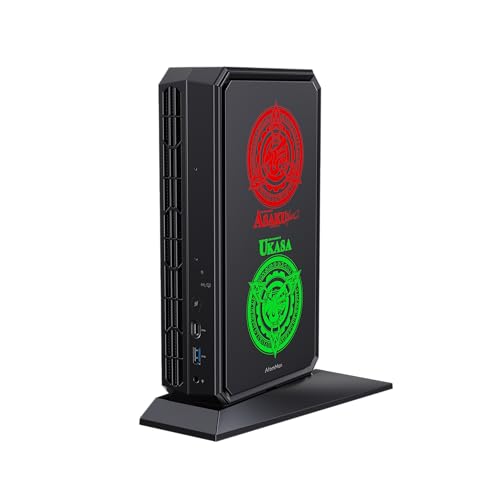
- Best for streaming: Minisforum AtomMan G7 Pt, Ryzen 9 7945HX, RX 7600M XT, 32GB, 1TB — Check on Amazon
- Beelink SER9 Pro, Ryzen AI 9 HX 370, Radeon 890M, 32GB, 1TB — Check on Amazon
- Minisforum UM890 Pro, Ryzen 9 8945HS, Radeon 780M, 32GB, 1TB — Check on Amazon
- Beelink SER8, Ryzen 7 8745HS, Radeon 780M, 32GB, 1TB — Check on Amazon
See 2 more Amazon options
- Apple Mac mini, M4, 24GB Unified Memory, 512GB SSD — Check on Amazon
- Minisforum MS-01 Mini Workstation, Core i9-13900H, 32GB, 1TB — Check on Amazon
Read the full guide ↓
Disclosure: As an Amazon Associate, reviewstook.com earns from qualifying purchases. Links to Amazon on this page are affiliate links; they cost you nothing extra. Listing details such as price and availability change often, so check the current Amazon listing before you buy.
A streaming PC has two jobs that fight each other. The first is the game, the creative app or the desktop you are showing. The second is the broadcast itself: capturing that picture, compressing it in real time and pushing it up your internet connection, every second, for hours. A mini PC under $1,200 can do both jobs at once — but only if you buy it for the second job first, because the part that decides your stream’s picture quality is not a core count or a benchmark. It is the encoder — the small block of silicon that turns frames into a compressed video stream. This guide grades all six machines encoder-first, and the encoder map at this budget has a shape you should know before you spend anything. There is no NVIDIA graphics chip in any pick below, which means there is no NVENC — the encoder most streaming advice is written about — anywhere in this guide. What you get instead is AMD’s VCN encoder in four machines, Intel Quick Sync in one, and Apple’s media engine in one — real, workable encoders that are not interchangeable, and the differences between them are exactly what this guide is for.
First, the workflow every pick is graded against. A typical Twitch broadcast runs at about 6,000 kbps with constant bitrate (CBR) encoding and a two-second keyframe interval, usually at 1080p60 or below. YouTube accepts higher bitrates, carries 1440p streams, and takes AV1 live ingest; Twitch’s AV1 path exists through its Enhanced Broadcasting programme and is still the limited route rather than the default. Streaming in 4K is limited by the platforms, not by your hardware. Three encoder questions follow from that workflow. Does the machine have a hardware encoder at all, so the broadcast does not steal CPU from the game? Which codecs can it encode — H.264 everywhere here, AV1 only on some? And what is left over — cores, memory, storage, quiet — for everything else the stream needs at the same time? One honesty note applies to the whole guide: AMD’s VCN encoder produces a visibly softer H.264 picture than NVIDIA’s NVENC at Twitch’s bitrates — a documented trade-off of this entire category, priced into every recommendation below. If NVENC is non-negotiable, the honest answer is a tower.
In this guide
Quick Picks
Short on time, or comparing several options at once? Each row below names a streaming job and the machine that suits it, with a link to the listing.
| Streaming job | Pick | Why it stands out | Link |
|---|---|---|---|
| Best for streaming overall | Minisforum AtomMan G7 Pt, RX 7600M XT, 32GB, 1TB | The only discrete encoder here — on its own card, memory and thermals | Check on Amazon |
| Best integrated streamer | Beelink SER9 Pro, HX 370, 32GB, 1TB | RDNA 3.5 VCN with AV1 encode and twelve cores in a 0.82L box | Check on Amazon |
| Best upgrade path | Minisforum UM890 Pro, 8945HS, 32GB, 1TB | AV1-capable 780M today, OCuLink for a discrete encoder later | Check on Amazon |
| Quietest stream room | Beelink SER8, 8745HS, 32GB, 1TB | Same AV1-capable encoder class, measured about 34.6 dB(A) under load | Check on Amazon |
| Best for macOS streamers | Apple Mac mini, M4, 24GB, 512GB | A polished media engine — H.264/HEVC only, no AV1 encode | Check on Amazon |
| Best stream-network box | Minisforum MS-01, i9-13900H, 32GB, 1TB | Quick Sync plus dual 10GbE — infrastructure first, encoder second | Check on Amazon |
How These Picks Were Chosen
The grading order in this guide is encoder, then simultaneous load, then everything else. Encoder first, because it is the one part of a streaming PC you cannot upgrade around, compensate for with settings, or fix with a peripheral: the encoder your machine ships with is the picture your viewers get, for the life of the machine. Every encoder claim below is derived from the silicon the base listings and maker specifications document for each pick — nothing is credited to a chip that does not have it. AV1 encoding is credited only to the four AMD machines, whose RDNA 3 and RDNA 3.5 VCN encoders have it. It is explicitly denied to the MS-01’s Intel Iris Xe, whose Quick Sync encodes H.264 and HEVC and handles AV1 on the decode side only, and to the Mac mini’s media engine, which encodes H.264 and HEVC through VideoToolbox and likewise decodes AV1 without encoding it. And NVENC is credited to no pick at all, because no pick contains an NVIDIA GPU.
Simultaneous load is the second grade, because a stream is never just an encoder. While the encoder compresses, the same machine is rendering the game or desktop, running OBS itself, holding browser sources, chat, alerts and a local recording, and feeding it all up a network connection. That is graded here on documented hardware: core counts (sixteen in the G7 Pt, twelve in the SER9 Pro, fourteen in the MS-01, eight in the two 780M minis), memory as shipped (32GB in five picks, 24GB fixed in the Mac), and storage, because a local recording is a large file and a 512GB drive fills in a way a 1TB drive does not. Noise is graded as a streaming specification too, not a comfort footnote: your microphone sits in the same room as this machine, and fan noise under load is part of your broadcast. Pricing is handled one way throughout: check the price on Amazon for every pick before you buy, the MS-01 keeps the strictest buy-only-inside-the-budget rule in the guide, and the barebone warnings stay where they were — a streaming PC that arrives as a kit streams nothing.
The Encoder Map: What Each Machine Can Actually Send
Before the reviews, the whole guide on one page. The G7 Pt’s RX 7600M XT carries AMD’s RDNA 3 VCN encoder on a discrete card: H.264, HEVC and AV1 encode, running on the card’s own silicon with its own 8GB of memory, separate from the processor. It is the strongest encoder in this guide and the only discrete one. The SER9 Pro’s Radeon 890M carries the RDNA 3.5 generation of the same VCN design, integrated into the processor: the same codec list, AV1 encode included, sharing power and memory bandwidth with the CPU and graphics it sits beside. The UM890 Pro and SER8 carry the Radeon 780M, whose RDNA 3 VCN also encodes AV1 — the codec list matches the flagships; the simultaneous-load headroom around it is what differs. The Mac mini’s M4 media engine encodes H.264 and HEVC through VideoToolbox, cleanly and efficiently, and that is the end of its list: AV1 is decode-only on this chip, so a Mac-based AV1 workflow is not available at any setting. The MS-01’s Iris Xe Quick Sync encodes H.264 and HEVC — Quick Sync’s H.264 is a respectable broadcast encoder — and also decodes AV1 without encoding it. No pick here has a dual-encoder arrangement, and none is credited with one.
What this means in practice. For Twitch today, every pick here sends H.264 at about 6,000 kbps CBR, and the honest ranking inside that shared job is picture quality per bitrate: VCN’s H.264 is visibly softer than the NVENC picture, Quick Sync sits respectably in the same conversation, and VideoToolbox is clean for the talk-and-desktop end of streaming. For YouTube, the four AMD picks can additionally send AV1, which is the sharper tool at higher bitrates and 1440p — if your channel is YouTube-first, that codec line is the single biggest dividing line in this guide, and it cuts between the AMD four and the other two, not between cheap and expensive. For a dedicated second-PC setup, where the mini only encodes a feed captured from another machine, the encoder does all the work and the game does none, which reshuffles the value order — the reviews grade that job separately where it changes the answer.
The 6 Best Mini PCs for Streaming Under $1,200
Minisforum AtomMan G7 Pt — Ryzen 9 7945HX, Radeon RX 7600M XT, 32GB DDR5, 1TB SSD
Who it suits: Streamers who want the strongest broadcast this budget’s mini PCs can produce — the one machine here whose encoder is a discrete card with its own memory, backed by the most CPU headroom in the guide.
Every other pick in this guide encodes with silicon that shares a chip, a power budget and a memory pool with the processor running the rest of the stream. The G7 Pt does not. Its Radeon RX 7600M XT is a discrete graphics processor with its own 8GB of GDDR6, fed a full 120W, and its RDNA 3 VCN encoder — H.264, HEVC and AV1 — works on that card while the sixteen-core Ryzen 9 7945HX handles the game, OBS and everything else. The honest label matters and this guide keeps it: the 7600M XT is a mobile GPU, the class of chip built for gaming laptops, not the desktop card its name resembles. Named correctly, it is still the encoder and graphics ceiling of this guide by a wide margin, and for a streamer the separation is the point: when a demanding scene hits, the encode does not compete with the render for the same silicon, which is precisely the failure mode that drops frames on integrated machines. Memory is socketed DDR5, upgradeable to 96GB, and storage pairs a PCIe 5.0 slot with a PCIe 4.0 one, so a dedicated recording drive can be added later.
The compromises are size, power and price discipline. The body measures roughly 269 × 155 × 64 mm without its stand — about 2.7 liters — and it is fed by a 300W external power brick, so plan the desk around a machine that is small, not tiny; its fans work hard under a full game-plus-encode load, and it belongs away from the microphone. On price, this is a premium machine at the top of the budget: check the configured 32GB/1TB build’s price on Amazon before you buy, and treat any listing that pushes it past this guide’s budget as a hard no. Minisforum’s own store also runs promotions on it. Then the configuration warning — the most important one in this guide. A barebone G7 Pt also exists: no memory, no storage, no operating system, priced uncomfortably close to the configured machine and genuinely easy to confuse with it. The link here is to the configured machine. If the number in front of you resembles the barebone’s, check the style selector before you celebrate the deal.
- The only discrete encoder in the guide — RDNA 3 VCN with AV1, on its own card and memory.
- Sixteen cores of simultaneous-load headroom behind the encode.
- Socketed memory to 96GB and two storage slots for a dedicated recording drive.
Honest limitation: At roughly 2.7 liters plus a 300W brick it is the least mini machine here, its mobile GPU is not the desktop card its name suggests, and AMD’s H.264 at Twitch bitrates is still visibly softer than NVENC — the best encoder in this guide is not the best encoder in streaming.
Choose it if streaming is the reason you are spending $1,200 on a small PC, especially for YouTube AV1 or demanding one-box game streams. Skip it if desk footprint and silence are the priority — that is the SER9 Pro and SER8 below — or if a barebone-style price makes you think you are getting this configuration cheaply.

Beelink SER9 Pro — Ryzen AI 9 HX 370, Radeon 890M, 32GB LPDDR5X, 1TB SSD
Who it suits: Streamers who want the strongest integrated streaming package in the smallest box — an AV1-capable encoder, twelve cores and 32GB, in a machine that disappears behind a monitor.
The SER9 Pro is the best integrated answer to the streaming question at this budget. Its Radeon 890M carries the RDNA 3.5 generation of AMD’s VCN encoder, so the codec list is complete — H.264 and HEVC for Twitch today, AV1 encode for YouTube and for Twitch’s Enhanced Broadcasting route — and it sits beside a twelve-core Zen 5 processor running to 5.1GHz, which is real simultaneous-load headroom for the game, OBS, browser sources and a local recording. The 32GB of LPDDR5X memory is shared between the system and the graphics, which is the integrated arrangement’s standing caveat — a demanding game plus a high-bitrate local recording will negotiate over that pool in a way the G7 Pt’s separate card memory never has to. Against that, the machine itself is about 0.82 liters (135.5 × 135.5 × 44.7 mm by the maker’s stated dimensions), with USB4, Wi-Fi 6, 2.5GbE and display output over HDMI, DisplayPort and USB4 — small and quiet enough to sit near the desk without entering the audio.
Pricing is this pick’s honest complication: the 32GB/1TB build’s Amazon price moves around, and it has been seen both comfortably inside this budget and drifting above it. The rule that follows is simple: when it sits inside the budget it is the best integrated streamer in this guide, and past that line you are paying a premium for a machine that regularly sells for less — check the price on Amazon, wait, or take the UM890 Pro below. Two configuration warnings outrank the price. Memory is soldered LPDDR5X, so 32GB is permanent; a 64GB build exists in the range, and choosing it on day one is the only memory upgrade this machine will ever offer. And the “SER9 Pro” name is now also used for a cheaper model built on a Ryzen 7 H 255 with weaker 780M graphics, priced substantially lower — if the listing in front of you looks like a bargain, check which chip is actually in it before assuming you found a bargain, because for streaming the chip is the encoder.
- RDNA 3.5 VCN — H.264, HEVC and AV1 encode, the complete codec list.
- A dozen Zen 5 cores inside a metal chassis of roughly 0.82 liters.
- Three-display output, USB4, 2.5GbE networking and Windows 11 Pro included.
Honest limitation: The encoder shares silicon, power and memory with the game it is broadcasting — the integrated compromise, at its best-executed — and the memory is soldered, so the capacity you buy is the capacity you keep. Sources also disagree about the storage layout (listing copy describes two M.2 slots; at least one detailed spec table lists one), so check the live listing if a second, dedicated recording SSD matters to you. There is no OCuLink port.
Choose it if you want one small, quiet box that streams and plays on the same desk. Skip it if you plan to grow memory later, or the live price has drifted above $1,200 — the next pick covers the first case and the SER8 covers the budget.
Minisforum UM890 Pro — Ryzen 9 8945HS, Radeon 780M, 32GB DDR5, 1TB SSD
Who it suits: Streamers who keep computers a long time — a complete AV1-capable encoder today, and the only documented route in this guide to a discrete encoder later, through its OCuLink port.
The UM890 Pro’s streaming story starts with an encoder that needs no apology. Its Radeon 780M carries AMD’s RDNA 3 VCN: H.264 and HEVC for Twitch, AV1 encode for YouTube — the same codec list as the two picks above it, on integrated silicon a class below the SER9 Pro’s 890M in graphics muscle. For the encode itself that class difference matters less than streamers fear; what the 780M shares with every integrated pick is the negotiation problem — one chip rendering the game and compressing the broadcast at once — and its eight-core 8945HS has less simultaneous-load headroom behind it than the twelve- and sixteen-core picks. What the UM890 Pro has that neither of them offers is a future: two DDR5 SO-DIMM slots take memory to 96GB, two M.2 2280 slots take storage to 8TB, and a native OCuLink port connects an external GPU dock — which, for a streamer, means the documented path to a desktop card and its encoder later, without replacing the machine. The port selection is the most complete in this guide: two USB4 ports, dual 2.5GbE networking, Wi-Fi 6E and display outputs for up to four screens, in a chassis of about 1.1 liters (130 × 127 × 66.6 mm) that reviewers have praised for whisper-quiet cooling — an asset in a stream room. As a complete Windows 11 Pro system it sits in the upper half of this budget — check its price on Amazon before you buy.
Two honest notes. The OCuLink route is an invitation, not an upgrade in the box: the dock, a power supply and a desktop card are all extra purchases on top, and the encoder upgrade should be budgeted honestly as a second purchase, never folded into this machine’s price. And here the configuration warning bites hardest. A barebone UM890 Pro — no memory, no SSD, no Windows — is priced well below the complete system, as a kit missing those parts should be. Both products are legitimate; only one of them is a computer when the box opens. The link here goes to the complete 32GB/1TB system, and if you deliberately shop the barebone instead, add up the memory, SSD and Windows licence you must buy separately before calling it the cheaper route — once those are in the cart, the saving usually evaporates.
- RDNA 3 VCN with AV1 encode — the full codec list on integrated silicon.
- Native OCuLink: the guide’s only documented route to a discrete encoder later.
- Socketed memory to 96GB, two SSD slots, dual 2.5GbE and quad display output.
Honest limitation: The 780M is a class below the 890M and the eight-core CPU is the tightest simultaneous-load budget among the AMD picks — demanding one-box game streams will feel it first — and the barebone version sharing this model name is a standing invitation to order the wrong thing.
Choose it if you upgrade machines instead of replacing them, or you want the OCuLink encoder path held open. Skip it if you want maximum integrated graphics now and will never open the case — that is the SER9 Pro.

Beelink SER8 — Ryzen 7 8745HS, Radeon 780M, 32GB DDR5, 1TB SSD
Who it suits: Streamers whose room is the studio — podcast-style, talk and desktop streams, and lighter game streams — who need the machine’s noise out of the microphone and most of the budget still in their pocket.
The SER8 makes its streaming case on the two specifications that surround the encoder rather than the encoder. The encoder is the same RDNA 3 VCN found in the UM890 Pro — H.264, HEVC and AV1 encode from the Radeon 780M — so the codec list is complete and the YouTube AV1 route is open. The first is noise, and here the SER8 has what no other pick can show: a measurement. Notebookcheck’s review recorded an average of about 34.6 dB(A) under full synthetic load, which makes it one of the quietest machines in its class by instrument rather than by adjective — and for a streamer, that number is not comfort, it is production quality, because fan noise that never reaches the microphone never has to be gated, filtered or apologized for. The second is price: the 32GB/1TB configuration is a mid-range buy that sits well inside this budget — check its price on Amazon — for the same encoder class as the pick above it, with 32GB of socketed memory (upgradeable to 64GB), a 1TB SSD, triple display output over HDMI, DisplayPort and USB4, and a 2.5GbE port.
What you give up is specific, and fair to name: the 780M is a class below the SER9 Pro’s 890M for gaming and graphics work, there is no OCuLink port for a future GPU dock, and the eight-core CPU is a step behind the HX 370 in heavy sustained work — so demanding one-box game streaming, where the render and the encode fight hardest, is where this machine’s ceiling shows. For talk, desktop, creative and console-capture work, and for lighter games, that ceiling is not the one you hit. One listing warning: several configurations share this model’s listing family, 16GB/512GB styles among them — confirm the selected style is the 8745HS with 32GB and 1TB before ordering, because the family makes the smaller machine easy to buy by accident.
- The same AV1-capable RDNA 3 VCN encoder as the UM890 Pro.
- Measured around 34.6 dB(A) under load — the quietest stream room in this guide.
- Socketed 32GB memory and a 1TB drive, while sitting well inside the budget.
Honest limitation: Graphics and CPU both sit a class below the SER9 Pro, there is no OCuLink, and the listing family mixes configurations — read the style selector carefully.
Choose it if your stream is voice-led — talk, desktop, creative work, console capture — and silence near the microphone is worth more than graphics headroom. Skip it if demanding one-box PC game streaming is the main job; that is what the G7 Pt is for.

Apple Mac mini — M4 Chip, 24GB Unified Memory, 512GB SSD
Who it suits: Streamers inside Apple’s ecosystem — talk, desktop, creative and console-capture broadcasts — who value a silent, polished machine and whose platform already supports their workflow.
The Mac mini’s streaming hardware is genuinely good at the job it can do. Apple’s M4 media engine encodes H.264 and HEVC through VideoToolbox with the efficiency the platform is known for, the ten-core CPU handles OBS and its supporting cast comfortably, and the 5 × 5 inch enclosure is effectively silent — in a voice-led stream room, it is as quiet a machine as this guide offers. This configuration pairs the M4 with 24GB of unified memory and a 512GB SSD, with three Thunderbolt 4 ports, HDMI, and support for up to three displays. Check its price on Amazon before you buy. For a streamer whose tools are macOS-native and whose broadcast is talk, desktop, creative work or a console fed through a capture card, it is a fast, cool, set-it-down-and-forget-it streaming box.
The limitations are structural, permanent, and specific to streaming in ways a general guide would not stress. First, the codec ceiling: the media engine encodes H.264 and HEVC, and AV1 on this chip is decode-only — there is no AV1 encode at any setting, so the YouTube AV1 route that the four AMD picks offer is simply not available here, today or after any update this hardware will receive. Second, the fixed specification: memory and storage are fixed at purchase, and 24GB with a 512GB drive is a tighter simultaneous-load budget than any other pick here — a long local recording at high bitrate will fill 512GB in a way the 1TB machines postpone, and the fix is an external drive bought separately, budgeted as machine plus drive, never hidden inside this pick. Third, the platform: it runs macOS, not Windows, and streaming tooling, capture devices and plug-ins must be checked against macOS support individually — that is homework, not a dealbreaker, but it is homework the Windows picks do not assign. Buy it as what it is: the best small streaming computer for people who already live in Apple’s world, bought in the configuration they will still want in five years.
- M4 media engine — clean, efficient H.264/HEVC encoding in a near-silent box.
- The 24GB configuration — check its price on Amazon.
- A trio of Thunderbolt 4 ports driving up to three displays.
Honest limitation: No AV1 encode — decode only — and memory and storage can never be upgraded, with the 512GB drive the tightest recording budget in this guide. It is also a macOS machine, so every capture device and plug-in in your chain needs its own macOS check.
Choose it if your software life is Apple’s and your stream is voice- or desktop-led. Skip it if YouTube AV1 matters to you, you need Windows streaming tools, or you record long sessions locally — the AMD picks serve all three better.

Minisforum MS-01 Mini Workstation — Core i9-13900H, 32GB DDR5, 1TB SSD
Who it suits: Builders whose stream runs on infrastructure — a home network, a separate gaming machine, a lab — and who want the mini PC as the network and encoding node rather than the star of the desk.
Read as a streaming machine, the MS-01 is two products sharing one chassis, and they grade very differently. The encoder is Intel’s Quick Sync on the Iris Xe graphics of its Core i9-13900H: H.264 and HEVC encode, respectable at the first and serviceable at the second, with AV1 handled on the decode side only — AV1 encode is explicitly not available on this silicon, and this guide will not soften that into a maybe. The graphics around it are the weakest in this guide, so one-box game streaming beyond the lightest titles is not its job. The infrastructure, though, is unmatched here: dual 10GbE SFP+ ports on an Intel X710 controller plus dual 2.5GbE — one with Intel vPro for remote management — three M.2 storage slots plus a U.2 option, memory to an official ceiling of 64GB, and a physical PCIe slot (x16 in size, wired for x8, half-height and single-slot) that no other pick offers. As a dedicated encoding node fed by a capture card, as the box that runs the network your stream depends on, or as a recording server for a setup whose gaming happens elsewhere, those are the specifications that matter — and nothing else here has them.
It also carries the strictest price rule in this guide, earned by the listing’s own behaviour: its Amazon price is known to swing across the budget line, and it has been seen above this budget. So: check the price on Amazon, and the MS-01 belongs in this guide only when it sits at or under $1,200 — it does not belong in your cart above that line. Two working limitations deserve the same plainness for streamers specifically. Testers measured 42 to 45 dB(A) under full CPU load — the loudest machine in this guide, audible in a quiet room where the Beelinks are not, so it belongs in another room or a rack, not beside the microphone. And ServeTheHome’s testing found some PCIe cards never initialize in the slot; if your plan is a capture card in that slot, check your intended card against owner reports before building around it.
- Quick Sync H.264/HEVC encode, with AV1 decode only — stated plainly.
- Dual 10GbE SFP+ plus dual 2.5GbE with vPro — stream networking nothing else here matches.
- Three M.2 slots, a U.2 option and a real PCIe slot for a capture card.
Honest limitation: Its Amazon price can drift above this budget, so the buy-only-at-$1,200-or-under rule is part of the recommendation — check the price on Amazon before you order — and its integrated graphics are the weakest here, with the loudest cooling in the guide.
Choose it if you are building the network and nodes around a stream, not the desk machine itself. Skip it if the live price is above $1,200, or you want one box that plays and streams — the G7 Pt and SER9 Pro are those machines.

Comparison Table
| Product | Encoder | Best streaming use | Link |
|---|---|---|---|
| Minisforum AtomMan G7 Pt | RDNA 3 VCN, discrete — H.264/HEVC/AV1 | Demanding one-box game streams; YouTube AV1 | Check on Amazon |
| Beelink SER9 Pro, HX 370 | RDNA 3.5 VCN, integrated — H.264/HEVC/AV1 | The best integrated streamer in the smallest box | Check on Amazon |
| Minisforum UM890 Pro | RDNA 3 VCN, integrated — H.264/HEVC/AV1 | Streaming now, a discrete encoder via OCuLink later | Check on Amazon |
| Beelink SER8 | RDNA 3 VCN, integrated — H.264/HEVC/AV1 | Voice-led streams in the quietest room | Check on Amazon |
| Apple Mac mini, M4 | VideoToolbox — H.264/HEVC, no AV1 encode | macOS talk, desktop and console-capture streams | Check on Amazon |
| Minisforum MS-01 | Quick Sync — H.264/HEVC, no AV1 encode | Encoding node and stream-network infrastructure | Check on Amazon |
Setting Up OBS on These Machines
Whichever pick you buy, the broadcast is configured in OBS the same disciplined way, and most streaming problems blamed on hardware are actually one of three settings or counters below. Start with the encoder choice, because it is the one the machine decides for you. On the four AMD picks, select the AMD hardware encoder (AMF) in OBS — H.264 for Twitch, AV1 where your platform takes it — and never let the encoder fall back to software x264 while a hardware block sits idle; x264 on these processors is an emergency fallback for a talk scene, not a game-stream plan, and on the eight-core picks it will compete with the game for exactly the cores the game needs. On the MS-01, select Quick Sync. On the Mac mini, select the Apple VT hardware encoder. Then set the rate control to CBR — constant bitrate — at about 6,000 kbps for Twitch, with a keyframe interval of two seconds; YouTube accepts higher bitrates and rewards them, so raise the number there rather than here. CBR with two-second keyframes is what the platforms are built around, and drifting from it is the cause of a surprising share of “my stream looks bad” reports.
When a stream stutters, OBS tells you which of three counters is responsible, and each has its own fix — learn to read them before you spend money. Rendering lag means the graphics ran out of room composing the scene: the fix is to cap the game’s frame rate, lower the game’s settings, or reduce the OBS canvas, because the encoder cannot send frames the GPU never finished. On the integrated picks this is the counter you will meet first, and it is a settings problem first. Encoding lag means the encoder itself is overloaded: drop the output resolution or frame rate a step, move the encoder preset toward performance, and confirm you are actually on the hardware encoder — encoding lag on a machine with an idle VCN or Quick Sync block is almost always a software-encoder accident. Network lag — dropped frames on the network counter — is not the computer’s fault at all: it is the connection, and its fix is below. Diagnose by counter, fix by counter, and rehearse the whole chain for an hour at full load inside the machine’s return window, with your real game, your real scenes and a local recording running, before the window closes.
The network rule is absolute and has no wireless exception: stream on a wired Ethernet connection. Every pick here has a wired port — 2.5GbE on the AMD machines, faster still on the MS-01 — and a cable costs less than any other upgrade you will ever make to stream quality. Wi-Fi is for the machine that watches streams, not the machine that sends them. Two smaller disciplines close the section. Record locally only if you have rehearsed it — the recording shares the encoder session and the drive, and on the Mac mini’s 512GB drive it shares a small drive at that. And place the machine for the microphone: the quiet picks earn their place near the desk, the G7 Pt and MS-01 earn a little distance, and no encoder setting fixes a microphone that can hear your computer.
Costing the Rest of the Stream
The computer is the largest single purchase in a streaming setup, not the whole of it. This section deliberately names no prices: accessories are not part of any pick above, and what follows is its own budget list, in the order viewers actually notice the difference. Microphone first. Audio is the half of a stream viewers forgive least; a modest microphone placed close, on a stand that gets it off the desk and away from keyboard and fan noise, improves a broadcast more than any encoder upgrade in this guide. Lighting second. A single soft light on your face does more for a camera picture than a better camera does; cameras are sensors starved of light, and feeding the one you have beats replacing it. Webcam third — or a camera you already own, connected properly — bought after the light that makes it look good. Capture card last, and only for console streaming. A capture card exists to bring a signal from another device — a console, a second PC, a camera — into the streaming machine. For games played on the same PC that streams them, a capture card does nothing at all, and buying one for a one-box setup is the most common wasted purchase in this category. None of these items is included with any pick in this guide or required to start, and the microphone is the only one that should delay your first broadcast if the budget forces a choice.
How to Choose a Mini PC for Streaming
- Name your platform first; it draws the codec line. Twitch today is an H.264 broadcast at about 6,000 kbps CBR, and every pick here can send it. YouTube takes higher bitrates and AV1 — and AV1 encode exists only on the four AMD picks. If your channel is YouTube-first, that single fact eliminates the Mac mini and MS-01 before any other comparison begins.
- Decide one box or two. One-box streaming — game and broadcast on the same machine — is where the G7 Pt’s discrete encoder and the SER9 Pro’s twelve cores earn their money. A dedicated encoding box fed by a capture card works the encoder alone, and at that job the quiet SER8 and even the MS-01 grade far higher than their one-box ranking suggests.
- Never buy an encoder by the GPU’s gaming reputation. The encode block is a separate piece of silicon with its own codec list. The MS-01’s graphics are this guide’s weakest and its Quick Sync still broadcasts respectably; the Mac’s graphics are strong and its encoder still stops at HEVC. Read the encoder map, not the benchmark chart.
- Count the whole simultaneous load, not just the game. OBS, browser sources, chat, alerts, a local recording and the encode all run at once. The 32GB machines absorb that cast comfortably; the Mac’s fixed 24GB and 512GB drive are the tightest budget here, and storage for recordings is a line item, not an afterthought.
- Grade noise as a microphone specification. The SER8’s measured ~34.6 dB(A) and the MS-01’s measured 42–45 dB(A) are both streaming facts. A machine that lives beside the microphone should be bought on its measured noise, not its marketing adjectives.
- Confirm the configured style, every single time. Barebone versions — no memory, no SSD, no Windows — share model names and listing families with complete machines in this category, the G7 Pt and UM890 Pro included. A streaming PC that arrives as a kit streams nothing; check the style selector before ordering.
- Apply the price rules in the reviews. The MS-01 above all has a listing that swings across the budget line, and the SER9 Pro’s price moves with supply. A machine priced above $1,200 is not an under-$1,200 pick, whatever a guide says — check the price on Amazon and wait for one that fits the budget.
- Check the chip behind a familiar name. A “SER9 Pro” built on an H 255 carries a different, weaker encoder-and-graphics package than the HX 370 version reviewed here. For streaming, the chip is the encoder — read the title before you read the price.
Common Buying Mistakes
- Assuming every modern chip encodes AV1. It does not: in this guide AV1 encode exists only on the AMD RDNA 3 and 3.5 machines. The MS-01’s Quick Sync and the Mac’s media engine decode AV1 and stop there — a YouTube AV1 plan built on either is built on a codec the machine cannot send.
- Hunting for NVENC in a mini PC guide. There is no NVIDIA encoder in any pick here. AMD’s VCN H.264 is visibly softer than NVENC at Twitch bitrates; streamers for whom that difference is decisive should buy a tower with a desktop NVIDIA card — see Best Streaming PC Under $1200.
- Streaming over Wi-Fi because the desk is far from the router. The fix is a cable, a switch, or moving the machine — not a faster wireless plan. Every pick here has wired Ethernet; use it.
- Leaving OBS on the software encoder. x264 fallback on an eight-core mini means the game and the broadcast fight for the same cores. Select the hardware encoder — AMF, Quick Sync or VideoToolbox — on day one.
- Ordering the barebone and expecting a streaming PC. Kits with no memory, SSD or operating system share names and listing pages with complete machines throughout this category. Check the style before you check out.
- Buying a capture card for a one-box setup. A capture card imports a signal from another device. Games played and streamed on the same PC never pass through one; the money belongs to the microphone.
- Ignoring the price rules on swing listings. An MS-01 priced above the budget line is not an under-$1,200 pick in any guide, including this one. The rule is the recommendation.
- Recording everything to a small drive. Long local recordings at high bitrates are large files; on a 512GB machine they crowd the system within weeks. Budget the external drive with the machine, not after a full-disk warning mid-stream.
- Placing the loud machine beside the microphone. The MS-01’s 42–45 dB(A) under load and the G7 Pt’s working fans are placement facts. Distance and a door are encoder settings too — the ones OBS does not have.
Final Recommendation
- Best streaming mini PC: Minisforum AtomMan G7 Pt — the only discrete encoder here.
- Best integrated streamer: Beelink SER9 Pro.
- Streamers who upgrade: Minisforum UM890 Pro, for the OCuLink encoder path.
- Quiet, voice-led streams: Beelink SER8, and keep the difference for the microphone.
- macOS streamers: Apple Mac mini, M4, 24GB/512GB — H.264/HEVC only.
- Stream infrastructure: Minisforum MS-01 — at or under $1,200 only.
Our top two are the Minisforum AtomMan G7 Pt, because it is the only machine here whose encoder is a discrete card with its own memory — the arrangement that survives demanding one-box streams — and the Beelink SER9 Pro, because it packages the complete AV1-capable codec list and twelve cores into a box that vanishes from the desk. Between them they cover the two honest shapes of this search: the strongest broadcast a mini PC can send, and the smallest machine that sends a full-codec one. If your stream is voice-led and your room is quiet, the SER8 is this guide’s way of telling you the encoder you need can cost far less than the top of this budget — see Best Mini PC Under $1200 for the general-purpose view of the same machines. If your plans include a discrete encoder later, the UM890 Pro holds that door open; if your life is Apple’s, the Mac mini needs no defense beyond its codec ceiling being acceptable to you; and if you are building the network a stream runs on, the MS-01 at the right price is unmatched. Check the live price and configuration before you order, wire the Ethernet cable before your first broadcast, and rehearse at full load inside the return window.
Frequently Asked Questions
Can a mini PC really stream and play games at the same time?
Yes, within the class limits stated in this guide. The G7 Pt separates the jobs — a discrete card encodes while sixteen cores run the game — and the SER9 Pro’s twelve cores and RDNA 3.5 encoder handle the combined load for the large majority of games at sensible settings. The eight-core integrated picks manage lighter games and every kind of talk, desktop and console-capture stream. What no mini here does is match a tower with a desktop NVIDIA card, whose NVENC encoder and graphics headroom remain the one-box streaming benchmark.
Which of these mini PCs can stream in AV1?
The four AMD machines: the G7 Pt, SER9 Pro, UM890 Pro and SER8, whose RDNA 3 and RDNA 3.5 VCN encoders encode AV1. The Mac mini and the MS-01 cannot — their media engines decode AV1 but encode only H.264 and HEVC. AV1 matters today mainly for YouTube’s higher-bitrate and 1440p ingest; Twitch’s AV1 route runs through its Enhanced Broadcasting programme and is still the limited path, and 4K streaming is limited by the platforms rather than by any hardware in this guide.
Is AMD’s encoder good enough for Twitch?
Yes, with the trade-off stated plainly: VCN’s H.264 picture at Twitch’s roughly 6,000 kbps is visibly softer than NVENC’s at the same bitrate, most noticeably in fast, detailed scenes. and the gap narrows to a non-issue for talk, desktop and slower-paced content. If your channel is fast-paced gameplay and picture-per-bit is your top priority, that is the honest case for a tower — the mini PC category does not contain an NVENC machine at this price.
Do I need a capture card to stream from a mini PC?
Only if the picture comes from somewhere else — a console, a camera, or a second PC dedicated to gaming. If the game runs on the same mini PC that streams it, OBS captures it directly and a capture card adds nothing. In a two-machine setup the capture card is essential, and in that arrangement the streaming mini works its encoder alone, which is the job the quieter and infrastructure-led picks grade best at.
How much memory and storage does a streaming mini PC need?
Thirty-two gigabytes is the comfortable figure for one-box streaming — game, OBS, browser sources and chat together — and five of the six picks here ship with it. The Mac mini’s 24GB is workable for voice- and desktop-led streams and tighter for demanding one-box play. For storage, recordings decide: a 1TB drive absorbs long local recordings without management, while the Mac’s 512GB needs an external drive budgeted alongside it. Both figures are configuration facts to verify at order time, not upgrades to assume later — on the SER9 Pro and Mac mini, later does not exist.
Should I buy a mini PC or a tower for streaming at $1,200?
Buy the tower for the broadcast itself: a desktop NVIDIA card brings NVENC, the encoder the streaming world is calibrated around, plus graphics headroom no mini matches. Buy the mini for the room it sits in: a machine that mounts behind a monitor, sips power, stays out of the microphone and travels. If your audience would notice the encoder, start from the tower guides; if your desk would notice the tower, buy from this one, eyes open about the softer H.264 picture.
Is it worth spending $1,200 when $800 streaming mini PCs exist?
Only for a named streaming reason: the G7 Pt’s discrete encoder, the SER9 Pro’s stronger integrated package, a 96GB memory ceiling, or the MS-01’s networking. For talk, desktop and console-capture streaming, the $800 tier — the SER8 in this guide is one of its machines, encoder and all — sends the same codecs for noticeably less, and Best Mini PC For Streaming Under $1500 shows what the step above buys if the budget grows instead. Spend the difference on the microphone before you spend it on the machine.
- Best Mini PC Under $1200
- Best Mini PC Under $800
- Best Mini PC Under $1500
- Best Mini PC For Beginners Under $1200
- Best Mini PC For Small Spaces Under $1200
- Best Mini PC For Streaming Under $800
- Best Mini PC For Streaming Under $1500
- Best Mini PC For 1440p Gaming Under $1200
- Best Mini Gaming PC Under $1200
- Best Streaming PC Under $1200
- Best Home Office PC Under $1200
- Best Workstation PC Under $1200


