Where to buy
Check the latest price, availability and delivery on Amazon. Orders are placed on Amazon. We may earn a commission from qualifying purchases.
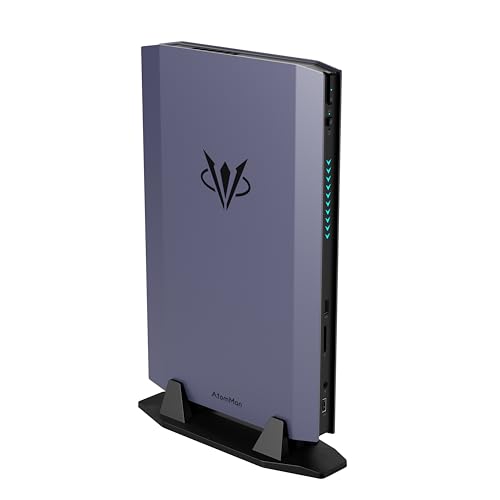
- Best for native 1440p in a mini: AtomMan G7 Ti Mini PC, Core i9-14900HX, RTX 4070 Laptop, 32GB DDR5, 1TB SSD — Check on Amazon
- AtomMan G1 Pro Mini PC, Ryzen 9 8945HX, Desktop RTX 5060, 32GB DDR5, 1TB SSD — Check on Amazon
- AtomMan G7 Pt Mini PC, Ryzen 9 7945HX, RX 7600M XT, 32GB DDR5, 1TB SSD — Check on Amazon
- ASUS NUC 14 Performance Barebone Kit, Core Ultra 7 155H, RTX 4060 Laptop, No RAM/SSD/OS — Check on Amazon
See 2 more Amazon options
- GMKtec EVO-X1 Mini PC, Ryzen AI 9 HX 370, Radeon 890M, 32GB LPDDR5X, 1TB SSD, OCuLink — Check on Amazon
- Beelink SER9 Pro Mini PC, Ryzen AI 9 HX 370, Radeon 890M, 32GB LPDDR5X, 1TB SSD — Check on Amazon
Read the full guide ↓
Disclosure: As an Amazon Associate, reviewstook.com earns from qualifying purchases. Links to Amazon on this page are affiliate links; they cost you nothing extra. Listing details such as price and availability change often, so check the current Amazon listing before you buy.
A 1440p monitor is the easiest purchase in this whole search, and the most misleading. Every machine in this guide can light one up: plug any of these six minis into a 2560×1440 screen and the desktop, the browser and the video player will all render at a crisp native 1440p, because displaying 1440p costs a modern PC almost nothing. Games are a different transaction entirely. Rendering a game at 1440p means computing roughly 78 percent more pixels than 1080p, frame after frame, and that is where this category’s small boxes separate into honest classes. Graded on rendering — the only grading that matters for gaming — exactly one machine here is a native-1440p gaming PC in the full sense, two more reach the resolution with help, and the rest are 1080p renderers that upscale their output to fill your panel. This guide grades all six on that basis, says which is which in plain terms, and never lets a display specification impersonate a rendering capability.
The naming problem that haunts mini PCs matters doubly at this resolution. The “RTX 4070” in the top pick is the Laptop GPU — 4,608 CUDA cores and 8GB of memory on NVIDIA’s own published specification, against the desktop card’s 5,888 cores and 12GB — and the “RX 7600M XT” in the third pick is an 8GB mobile chip, not the 16GB desktop card its name echoes. At 1080p those discounts are survivable; at 1440p, where memory and bandwidth are the binding constraints, they decide what a machine can honestly do. The budget context deserves the same honesty: a tower with a desktop RTX 4070 SUPER, 32GB of memory and a 1TB SSD — a Skytech Omega — sits in this same budget tier on Amazon, and it renders native 1440p without negotiation. The minis below sell liters and watts instead: the largest is under four liters, the smallest is 0.82 liters, and every one of them sips power from a laptop-style adapter or a modest internal supply. Buy one because the size is the point, and grade it by what it renders. That is what this guide does, pick by pick.
Rendering Is Not Displaying: the Distinction This Guide Runs On
Two different jobs hide inside the phrase “1440p gaming.” The first is display output: sending a 2560×1440 signal to a monitor. Every pick here does that natively, over its documented outputs, and for desktop work, text and video the result is genuinely 1440p — sharp, spacious and exactly what the panel was bought for. The second job is rendering: the graphics hardware computing each frame of a game at that resolution before the signal is sent. That is the expensive job, and it is the one the product names obscure. When a mini renders a game at 1080p and the result is scaled up to fill a 1440p screen, the screen is displaying 1440p and the game is not. The picture is softer than native, because 1080p does not divide into 1440p evenly — the scale is a non-integer roughly 1.33× per axis, so the scaler is inventing in-between pixels rather than mapping clean ones. Rendering at 720p and scaling up is at least arithmetically tidy — exactly 2× per axis, four pixels out for every one computed — but it is visibly a 720p-class image wearing a 1440p frame.
Upscaling technology is how the middle picks in this guide bridge that gap, and it needs describing precisely because it is marketed loosely. DLSS, on the NVIDIA machines here, renders the game below the panel’s resolution and reconstructs the output. At 1440p output, DLSS Quality renders internally at roughly 1707×960; Balanced renders at roughly 1485×836; Performance renders at roughly 1280×720 — which is to say, DLSS Performance at 1440p output is a 720p-class render, whatever the badge on the settings screen claims. The reconstruction is genuinely good, and DLSS at Quality is a legitimate way to game on a 1440p panel; it is simply not native rendering, and this guide never calls it that. AMD’s FSR does the same job on the Radeon machines and is credited generically here — this guide prints no internal-resolution figures for FSR, because the base research documents none, and FSR’s numbers are never borrowed from DLSS’s table. Frame generation, where a pick’s graphics suite offers it, belongs in a separate mental box entirely: it interpolates additional frames to smooth motion on the display. It changes how fluid the picture feels. It does not change the resolution the game is rendered at, and it is credited in this guide strictly as smoothing, never as resolution. Finally, cloud gaming services deserve their one honest mention: a streamed game is rendered on a server and can arrive genuinely presented at 1440p, which makes it the one route by which even the smallest pick below can show a 1440p-rendered game — at the price of a subscription, a fast connection and some input lag, and as a property of the service, not of the machine.
In this guide
Quick Picks
Short on time, or comparing several options at once? Each row below names a buyer type and the machine that suits it, with a link to the listing.
| Buyer type | Pick | Why it stands out | Link |
|---|---|---|---|
| Best native 1440p in a mini | AtomMan G7 Ti | Full-power RTX 4070 Laptop — the one pick reviewers aim at 1440p — in about 2.55 liters — check price on Amazon | Check on Amazon |
| Best desktop GPU — deal only | AtomMan G1 Pro | A real desktop RTX 5060 with DLSS in 3.8 liters; buy only when its current price sits within this budget — check price on Amazon | Check on Amazon |
| Best value discrete GPU | AtomMan G7 Pt | 16-core Ryzen 9 and RX 7600M XT rendering 1080p and upscaling — check price on Amazon | Check on Amazon |
| Best for parts owners | ASUS NUC 14 Performance Barebone | RTX 4060 Laptop kit with DLSS upscaling; you supply RAM, SSD and OS | Check on Amazon |
| Best route to native 1440p later | GMKtec EVO-X1 | Radeon 890M today, and the OCuLink port that lets a desktop card render natively tomorrow | Check on Amazon |
| Smallest 1440p desktop | Beelink SER9 Pro | Radeon 890M in 0.82 liters — a native 1440p desktop that upscales its games | Check on Amazon |
How These Picks Were Chosen
The budget was applied the way a buyer experiences it: the price of a machine you can actually game on. Configured machines needed to sit within this guide’s budget for the configuration named — check the current price on Amazon for each pick, as the pricing of the named configuration is what counts. Two picks are conditional and are framed that way everywhere they appear: the G1 Pro, whose everyday Amazon pricing sits above the budget and which qualifies only when promotional pricing brings it within this budget, and the ASUS NUC barebone kit, which is labeled a kit in every mention, whose completion cost is discussed openly, and which earns its place only for buyers who already own the memory and storage it lacks — completing it with new parts takes the total over this budget, and its review says so plainly.
On top of the budget sat this variant’s grading filter, and it is a rendering filter. Each pick was graded on the resolution its graphics hardware honestly renders games at — not the resolution its outputs can display. Native 1440p rendering is credited only where the silicon’s class supports it: the full-power RTX 4070 Laptop that independent reviewers aim at 1440p, and, for lighter and older titles, the desktop RTX 5060. Everything else is graded as what it is — a 1080p renderer with upscaling, or, for the integrated machines, a 1080p-class renderer whose output is scaled to the panel. DLSS internal-resolution figures are printed only for the three machines with RTX hardware, because DLSS exists only there; on the AMD machines DLSS is denied outright and FSR is credited generically, with no figures attached. No frame-rate figures are claimed for any machine; performance is described by the class independent reviewers place each chip in, from the chip makers’ published specifications — core counts, memory capacity and power limits.
That discipline excluded the same tempting names the base guide excluded, and the exclusions stand. The AtomMan G7 Pro, with an RTX 5070 Laptop, is the category’s flagship, but its barebone version alone sits high in the tier above this budget and configured versions sit higher still — there is no honest way into this guide. The Strix Halo machines built on AMD’s Ryzen AI Max+ 395 and its Radeon 8060S graphics fail on price rather than merit: after the memory shortage repriced the category, the cheapest in-stock 64GB configuration on Amazon sits well above this budget. And no mini with a desktop RTX 4070 SUPER — the card that renders 1440p natively at this money without argument — sits within this budget on Amazon; that card at this tier exists only in towers, which is why the tower is named in this guide rather than hidden from it.
The 6 Best Mini Gaming PCs for a 1440p Monitor Under $1,500
AtomMan G7 Ti Mini PC — Core i9-14900HX, RTX 4070 Laptop, 32GB DDR5, 1TB SSD
Who it suits: Buyers whose 1440p monitor is non-negotiable and who want the one mini at this budget that renders games at that resolution natively — in a box of about 2.55 liters that stands on a desk like a small console.
Start with the wattage, because at 1440p the wattage is the review. The G7 Ti’s RTX 4070 Laptop runs at up to its full 140W power limit, and that single fact is what separates this machine from the long list of minis and thin laptops carrying the same GPU name at half the power and delivering a fraction of the result. Fed properly, the chip is the one in this guide that independent reviewers place around the desktop RTX 4060 Ti class and aim at 1440p gaming — which, translated into this guide’s grading, means native 1440p rendering at high settings across a wide stretch of current games, with DLSS held in reserve rather than spent as a necessity. Where a title does outrun the chip, the DLSS ladder is the honest one printed in this guide’s explainer: Quality reconstructs a 1440p output from an internal render of roughly 1707×960, close enough to native that most players stop auditing it; Performance drops the internal render to roughly 1280×720, and should be understood as the 720p-class mode it is. The machine around the GPU supports the ambition: a 24-core Core i9-14900HX, 32GB of DDR5 in two SO-DIMM slots that grow to 96GB, two M.2 storage slots, Wi-Fi 7, and switchable silent and performance modes. Its documented outputs — HDMI 2.1 and USB4 — are the modern pairing a 1440p high-refresh panel wants. Configured with 32GB and 1TB, check price on Amazon for the current listing; a barebone version is also offered — check the current price on Amazon for that style as well, and confirm which style is selected before you order.
The honest limitation lives in the GPU’s full name and its memory. This is the RTX 4070 Laptop: 4,608 CUDA cores and 8GB of GDDR6 on NVIDIA’s published specification, against the desktop 4070’s 5,888 cores and 12GB — and the desktop 4070 SUPER in a same-money tower is faster again. At 1440p, 8GB of VRAM is the ceiling that binds first: textures load at the resolution you play at, and upscaling reconstructs pixels but cannot rebuild texture detail the memory could not hold. Demanding titles will ask for texture compromises sooner on this machine than on a 12GB card, and no upgrade changes that, because the graphics are soldered for life. Pricing in this category moves with the memory market like everything else here, so check the current price on Amazon before you buy. Judged strictly as a 1440p mini, though, this is the only pick that does the resolution natively as its normal mode — everything below it is negotiating.
- RTX 4070 Laptop at up to 140W — the full-power chip, and the guide’s only native-1440p renderer.
- DLSS as headroom rather than necessity, with HDMI 2.1 and USB4 outputs documented.
- Socketed DDR5 to 96GB and two M.2 slots — the machine around the GPU can grow.
Honest limitation: The GPU is the laptop part — 8GB of VRAM is the texture ceiling at 1440p — and it can never be upgraded.
Choose it if native 1440p rendering in a mini is the requirement and your library fits an 8GB card. Skip it if you play the heaviest current releases with texture packs, or the size was never a real constraint — the tower named in this guide renders 1440p faster for less.

AtomMan G1 Pro Mini PC — Ryzen 9 8945HX, Desktop RTX 5060, 32GB DDR5, 1TB SSD
Who it suits: Buyers who want a genuine desktop graphics card — desktop silicon, desktop drivers, DLSS — in a mini PC, and who are disciplined enough to buy it only when its price drops into this budget.
The G1 Pro’s claim is uniqueness: inside its 3.8-liter chassis sits an actual desktop RTX 5060, a low-profile Gigabyte card drawing 145W in a real PCIe slot, driven by a Ryzen 9 8945HX with 32GB of DDR5 and a 1TB SSD, powered by a 350W internal supply rather than a brick. Graded for 1440p, the honest description is a split one. The desktop 5060 is a 1080p-first card that reaches upward: lighter, older and esports titles render natively at 1440p comfortably, while demanding current games are a DLSS conversation — rendered below the panel’s resolution and reconstructed, at internal resolutions this guide prints rather than hides (Quality at roughly 1707×960 internal for a 1440p output; Performance at roughly 1280×720, a 720p-class render). Its DLSS suite also includes frame generation, credited here strictly as display-side smoothing: it makes motion feel fluid, and it does not add a single rendered pixel. Two day-one items from hands-on coverage belong in any buyer’s first hour: the machine ships in an 80W gaming mode that withholds roughly a fifth of its performance behind a manual toggle — change it before judging anything — and the low-profile card, despite sitting in a standard slot, is not a realistic future swap. Treat this as a desktop GPU you cannot upgrade.
The condition attached to this pick is the pick. The configuration’s list pricing sits well above this budget; its everyday Amazon pricing also sits above the budget; it has only qualified for this guide when promotional pricing has brought it within this budget. At the price you will most often see, this is not an under-budget product at all. Bought within this budget, it is a distinctive and legitimate choice — the only desktop card in the guide. Bought above this budget, you have paid a premium over the G7 Ti for a slower 1440p renderer. The discipline is the difference between those two purchases, and this guide will keep repeating the rule wherever the machine is mentioned: within this budget, or not at all.
- The only configured pick whose graphics card is genuine desktop silicon — an RTX 5060 in a PCIe slot.
- DLSS upscaling and frame generation, with an internal 350W power supply and 5GbE.
- A Ryzen 9 8945HX and 32GB of DDR5 keep everything behind the card in class.
Honest limitation: Everyday pricing is above this budget — check price on Amazon and buy only when it sits within this budget — and at 1440p the card is DLSS-fed in demanding titles, not native.
Choose it if desktop graphics silicon is the requirement and the current price on Amazon sits within this budget. Skip it if the price has drifted back up, or you want native 1440p as the normal mode — that is the G7 Ti above.

AtomMan G7 Pt Mini PC — Ryzen 9 7945HX, RX 7600M XT, 32GB DDR5, 1TB SSD
Who it suits: Value hunters who accept the honest shape of this machine — a strong 1080p renderer that upscales to a 1440p panel — in exchange for a flagship-class CPU and the lowest configured price of any discrete-GPU pick here.
The G7 Pt’s processor is arguably the best in this guide: a Ryzen 9 7945HX, sixteen full-performance cores in a mobile package. Its graphics are the Radeon RX 7600M XT running at 120W — again the full-power version of its chip — and the grading for 1440p follows from that silicon without decoration. This is a native-1080p gaming machine. On a 1440p panel, lighter and older titles can be rendered at the panel’s resolution at reduced settings, but the machine’s normal mode for current games is rendering at 1080p and letting FSR upscale the result to fill the screen — a softer picture than native, arrived at honestly, and described that way in every section of this review. FSR is credited generically throughout this guide and no internal-resolution figures are printed for it; what can be said is that the upscaled result is the standard, workable compromise of this class, and that the saving this machine offers against the G7 Ti — it sits in a lower tier within this budget — can go a long way toward the monitor to enjoy it on. The rest of the specification mirrors the flagship formula: 32GB of socketed DDR5 up to 96GB, PCIe 5.0 storage support, switchable power modes, a chassis of about two and a half liters, and for pricing, check the current price on Amazon for the configured style.
The name needs its warning at full size, because at 1440p the distinction is load-bearing. The RX 7600M XT is a mobile GPU with 8GB of memory. The desktop RX 7600 XT is a different card with twice the memory, and buyers cross-shopping desktop builds will be misled by the family resemblance — at 1440p, where texture memory binds, the difference between 8GB and 16GB is not a detail. There is no DLSS on this machine, and none is claimed: upscaling here means FSR, and ray tracing is present but modest, as on all of AMD’s mobile parts of this class. The power supply is a 300W external brick, the largest in this guide — the physical price of feeding sixteen cores and a 120W GPU from a small box, and a real item in the desk plan. None of that dents the value case. It defines it: the strongest CPU in the guide and a real discrete GPU, graded as a 1080p renderer, for the least money.
- Ryzen 9 7945HX — sixteen cores, the strongest CPU in this guide.
- RX 7600M XT at 120W with socketed DDR5 to 96GB and PCIe 5.0 storage support.
- Sits in a lower tier than the guide’s top pick — check price on Amazon.
Honest limitation: It renders at 1080p and upscales to the panel — not native 1440p — and the GPU is the 8GB mobile chip, not the 16GB desktop card its name echoes.
Choose it if you want discrete graphics and a flagship CPU for the least money, and upscaled 1440p is an acceptable picture. Skip it if native 1440p rendering or DLSS is the point of the purchase.

ASUS NUC 14 Performance Barebone Kit — Core Ultra 7 155H, RTX 4060 Laptop, No RAM/SSD/OS
Who it suits: Buyers who already own DDR5 SO-DIMM memory and an NVMe SSD, and who want a major brand’s warranty behind the kit — accepting that, for 1440p, this is an upscaling machine.
This pick is a kit, labeled one everywhere in this guide: the box holds the chassis, a Core Ultra 7 155H and an RTX 4060 Laptop that ASUS’s specification runs at up to the full 140W, in about two and a half liters. No memory, no storage, no operating system — nothing in the listing pretends otherwise. Graded on rendering, the 4060 Laptop at full power is a 1080p-native chip that upscales to a 1440p panel, and its route up is the good one: DLSS, with the figures this guide prints for RTX hardware — Quality reconstructing 1440p output from an internal render of roughly 1707×960, Performance from roughly 1280×720, the latter understood as a 720p-class render rather than a resolution. That places the completed kit a clear step above the integrated machines below for a 1440p desk, and a clear step below the G7 Ti’s 4070 Laptop. What the kit adds over every mini specialist here is ASUS’s ROG NUC line behind it: a global brand’s warranty, documentation and resale value, in the smallest discrete-GPU form factor the big brands sell. For the kit itself, check price on Amazon — its position within this budget depends on the current listing.
The limitation is arithmetic, and during the memory shortage the arithmetic is brutal. A 32GB DDR5-5600 SO-DIMM kit is itself a substantial purchase during the shortage; add an SSD and a Windows license and a kit bought on its own completes well over this guide’s budget, for a machine that upscales to 1440p rather than rendering it. The arithmetic only closes if the parts genuinely cost you nothing because they are already on your shelf, or if you catch the kit at a particularly favourable current price on Amazon and complete it modestly. Buyers starting from an empty parts shelf should read this pick as the warning it doubles as: in a memory shortage, a barebone kit is a coupon for people who already bought the expensive parts, and every configured machine in this guide is the better 1440p purchase for everyone else.
- An RTX 4060 Laptop run at up to 140W, in roughly 2.5 liters of ROG NUC.
- DLSS upscaling to the 1440p panel — the strongest upscaling route in the guide’s lower half.
- Kit pricing varies — check price on Amazon; it works best if your parts shelf is stocked.
Honest limitation: Nothing about it is a computer until memory, storage and an OS go in — and at current DDR5 pricing, adding them with new parts carries the total well past this budget.
Choose it if DDR5 SO-DIMMs and an SSD are already sitting on your shelf, or the kit’s current price on Amazon is particularly favourable. Skip it if you are starting from zero parts — a configured G7 Pt costs less, and the G7 Ti renders natively.

GMKtec EVO-X1 Mini PC — Ryzen AI 9 HX 370, Radeon 890M, 32GB LPDDR5X, 1TB SSD, OCuLink
Who it suits: Planners — buyers who will game at upscaled 1440p today and want the one credible, wired path by which a mini in this guide later becomes a native-1440p machine without being replaced.
As delivered, the EVO-X1’s rendering story is the integrated one, and this guide grades it without varnish. Its Ryzen AI 9 HX 370 carries the Radeon 890M — sixteen RDNA 3.5 compute units, the strongest integrated graphics in this category — and that chip renders games at 1080p or below. On a 1440p panel its output is FSR-upscaled: a native 1440p desktop wrapped around games that are not rendered there. For esports titles, indies, emulation and the back catalogue that is a perfectly good picture, and the machine’s documented outputs — USB4 and triple-display support — run the panel without complaint. What justifies this pick’s place above its twin is a single port. The EVO-X1 has OCuLink, a direct PCIe connection that hands graphics duty to a desktop card in an external dock with far less lost than USB4 connections manage. That is the only mechanism in this guide by which an integrated pick grows into native 1440p rendering: the small box stays, the card arrives when a game demands it. Bought alone, the machine sits in the lower part of this budget tier — check price on Amazon for the current listing — with dual 2.5GbE networking and two M.2 slots around the same HX 370 and soldered 32GB as its sibling.
Both honest costs of that story are accounted for in this guide, and a 1440p buyer should hold them together. The memory is soldered: the 890M shares system RAM, so the 32GB you buy is simultaneously your memory ceiling and your graphics budget, and the eGPU path upgrades your graphics later — never your RAM. And the upgrade itself is an invoice, itemized in the base guide’s accounting and repeated wherever this pick’s future is mentioned: docks of the DEG1 type are sold without a power supply, a new desktop RTX 4060 is a substantial additional purchase, and the two-stage total lands at tower money, spent deliberately across two purchases to keep the computer small. OCuLink is also a raw PCIe link rather than a friendly hot-plug connector, so the dock is a desk fixture you connect and leave. Decide now whether future-you will actually buy it: an OCuLink port never used is a spec-sheet line, but a used one makes this the only pick here whose 1440p story improves after purchase.
- OCuLink port — the only documented route by which an integrated pick here reaches native 1440p later.
- Radeon 890M today, with dual 2.5GbE and two M.2 slots around it.
- Sits in the lower part of this budget tier — check price on Amazon.
Honest limitation: As delivered it upscales to 1440p rather than rendering it, memory is soldered at 32GB, and the native-1440p future adds a substantial additional purchase when you buy it.
Choose it if you want top integrated graphics now and a real graphics upgrade later. Skip it if you know you will never buy a dock — the SER9 Pro below is smaller, and the G7 Pt has a discrete GPU already.

Beelink SER9 Pro Mini PC — Ryzen AI 9 HX 370, Radeon 890M, 32GB LPDDR5X, 1TB SSD
Who it suits: Buyers for whom size is the whole point — a 0.82-liter machine that mounts behind the 1440p monitor itself — and whose gaming runs to esports titles, indies and older games that an upscaled picture serves well.
The SER9 Pro is the smallest machine in this guide by a wide margin: 0.82 liters, a metal slab that disappears behind a display. Its Ryzen AI 9 HX 370 and Radeon 890M are the strongest integrated graphics you can buy in a mini PC, and the pairing with a 1440p panel deserves a precise description rather than a dismissal. The desktop is genuinely 1440p — text, browsing and video render natively at the panel’s resolution over its documented USB4 output, and for the hours a PC spends doing those things this is a true 1440p computer. Games are rendered at 1080p or below and upscaled with FSR to fill the panel: lighter and older titles hold up well, current demanding releases are simply not this machine’s contest, and no setting changes that arithmetic. Within those terms the machine is complete and quiet in its 32GB/1TB configuration — check price on Amazon for the current listing, and note that pricing for this class has been under pressure during the memory shortage. Buyers working with an even tighter footprint will find the same grading applied at stricter sizes in the Best Mini Gaming PC For Small Spaces Under $1500 guide.
The limitations are structural and permanent, and at 1440p one of them tightens. The 32GB of memory is soldered, and on an integrated-graphics machine that matters twice: the 890M has no memory of its own, so the capacity you buy is both your system ceiling and the pool the graphics draw from — a pool that a 1440p desktop and an upscaled game are sharing. Beelink sells a 64GB version, and buyers who keep machines for years should hunt for it. Second, there is no OCuLink port, so the upgrade path that rescues its sibling’s 1440p story is closed here: what the SER9 Pro renders on delivery day is what it will render for life. One listing warning belongs at full size: lower-priced machines now appear under the SER9 Pro name built on the weaker Ryzen 7 H 255 with Radeon 780M graphics. The pick in this guide is strictly the HX 370 / 890M configuration — confirm the delivered configuration against the model before you accept a listing as this machine. For buyers whose gaming is settled and light, none of this is a flaw; it is the definition of the smallest honest 1440p desk.
- The category’s strongest integrated graphics, the Radeon 890M, in 0.82 liters.
- A genuinely native 1440p desktop, with games upscaled to the panel.
- The 32GB/1TB configuration sits within this budget tier — check price on Amazon.
Honest limitation: Games are rendered at 1080p or below and upscaled — never native 1440p — and soldered memory plus no OCuLink means that never changes.
Choose it if the smallest possible PC matters more than rendering resolution. Skip it if native 1440p gaming is the requirement — that requirement is the G7 Ti, or the tower, and nothing smaller.
Comparison Table
| Product | Graphics | What it honestly does at 1440p | Link |
|---|---|---|---|
| AtomMan G7 Ti | RTX 4070 Laptop, 8GB, up to 140W | Renders natively at 1440p; DLSS as headroom | Check on Amazon |
| AtomMan G1 Pro | Desktop RTX 5060, 8GB — deal only | Native in lighter titles; DLSS-fed in demanding ones | Check on Amazon |
| AtomMan G7 Pt | RX 7600M XT mobile, 8GB, 120W | Renders at 1080p; FSR upscales to the panel | Check on Amazon |
| ASUS NUC 14 Performance Kit | RTX 4060 Laptop, 8GB, up to 140W | Renders at 1080p; DLSS upscales to the panel | Check on Amazon |
| GMKtec EVO-X1 | Radeon 890M integrated + OCuLink | Upscales today; a desktop card renders natively later | Check on Amazon |
| Beelink SER9 Pro | Radeon 890M integrated | Native 1440p desktop; games upscaled to the panel | Check on Amazon |
Pairing These Minis With a 1440p Monitor
A monitor pairing is two decisions, and only one of them is about the cable. The cable decision is documented per pick, and this guide claims no port that the base research does not document. The G7 Ti’s listing documents HDMI 2.1 and USB4 outputs — the modern pairing a 1440p panel wants, with the bandwidth for high refresh rates at this resolution. The EVO-X1 documents USB4 and triple-display support. The SER9 Pro documents USB4. For the G7 Pt, the G1 Pro and the NUC kit, the base research does not enumerate display outputs, so this guide invents none: check the live listing’s port list before you order, and confirm the machine offers a full-bandwidth output — a current HDMI or a DisplayPort-class connection — rather than assuming one. No monitor prices are quoted anywhere in this section, because the base research documents none; the panel is a separate purchase with its own market.
The second decision is refresh rate, and it should follow the rendering grade, not the panel’s marketing. A high-refresh 1440p monitor earns its premium only behind a machine that renders fast enough to feed it: the G7 Ti, whose native rendering and DLSS headroom can use those hertz in the titles that suit it, and the G1 Pro in its lighter native titles. Behind the 1080p renderers — the G7 Pt, the completed NUC kit — a high-refresh panel still serves the desktop and lighter games, but the demanding titles are upscaled, and upscaling does not manufacture frames the renderer never produced. Behind the integrated machines, the honest pairing is a good 1440p panel bought for its desktop sharpness — text is where the SER9 Pro’s native 1440p output pays you back every day — with refresh rate as a secondary consideration. Whichever pairing you choose, set the monitor’s real refresh rate in Windows after setup; panels routinely arrive running at a default 60Hz whatever their box promised, and a 1440p high-refresh panel left at 60Hz is the most common wasted money in this entire search.
How to Choose a Mini Gaming PC for 1440p Under $1,500
- Grade the render, not the display. Every machine here displays 1440p. Ask instead what resolution the game is computed at: native, DLSS-reconstructed, FSR-upscaled, or scaled from 1080p. That single question sorts this entire guide.
- Read the GPU’s full name, including the suffix. “RTX 4070” in a mini is the Laptop GPU — 4,608 cores and 8GB against the desktop card’s 5,888 and 12GB. “7600M XT” is an 8GB mobile chip, not the 16GB desktop card. At 1440p, the memory gap inside those names is the purchase.
- Ask for the GPU’s power limit. A laptop GPU fed 140W and the same GPU fed 80W behave like different products. The picks here whose makers publish a full-power figure — the G7 Ti, the G7 Pt, the ROG NUC kit — are telling you something; listings that hide the wattage are also telling you something.
- Treat upscaling figures as render resolutions. DLSS Quality at 1440p output renders at roughly 1707×960 internally; Performance renders at roughly 1280×720, a 720p-class render. Neither is native, and a seller who calls Performance “1440p gaming” without the internal number is selling you the frame, not the picture.
- Count VRAM before cores at this resolution. Textures load at the resolution you play at, and upscaling cannot rebuild detail the memory could not hold. The 8GB ceiling shared by every discrete pick here is the specification that will age first; it argues for texture settings managed honestly rather than for a different mini, since no mini at this price carries more.
- Check whether the memory is socketed or soldered. Socketed DDR5, as in the two discrete-GPU AtomMan machines, grows to 96GB. Soldered LPDDR5X, as in both 890M machines, is permanent — and because the iGPU shares that pool with the system, a 1440p desktop and a game draw from the same fixed budget. Buy the larger soldered capacity if you buy soldered.
- Price the whole purchase, not the headline. A barebone kit needs memory, storage and an OS; an eGPU plan needs a dock, a power supply and a card; a deal-conditional machine needs the discipline to wait for its price. The honest total is the only total that fits a budget — the Best Gaming PC For 1440p Gaming Under $1500 guide shows what the same money renders when size is not the constraint.
- Confirm the exact configuration behind the price. Mini listings mix barebone and configured styles, and different processors under one famous name — the SER9 Pro’s H 255 namesake is the standing example. The current listing that qualifies a machine for this guide belongs to a named configuration; verify the style selected on the listing is that configuration and check the current price on Amazon before you check out.
Common Buying Mistakes
- Believing “outputs 4K” or “supports 1440p” describes gaming. Those are display specifications. The rendering question — what resolution the game is computed at — is the one that decides the picture.
- Reading DLSS Performance as 1440p. At 1440p output it renders internally at roughly 1280×720. It is a 720p-class render with good reconstruction, and it should be chosen knowingly, not discovered later.
- Assuming frame generation raises resolution. It interpolates frames to smooth motion on the display. It adds fluidity, never rendered detail.
- Believing a mini’s “RTX 4070” is the desktop card. It is the Laptop GPU — fewer cores, 8GB instead of 12GB — and the same discount applies to every familiar name in this category, including the “7600M XT” that is not the 16GB desktop 7600 XT.
- Paying the G1 Pro’s everyday price. Above this budget it stops being this guide’s pick; the machine only makes sense at its promotional pricing, and the G7 Ti renders 1440p better within this budget.
- Ordering a barebone kit in a memory shortage before pricing what completes it. Pricey DDR5 SO-DIMM kits during the shortage turn a barebone kit into a completed computer well over this budget that upscales to 1440p.
- Choosing an 890M mini for current AAA games because its desktop is 1440p. The desktop is native; the games are rendered at 1080p or below and upscaled. Both halves of that sentence are the product.
- Leaving the monitor at its default refresh rate. Panels arrive set to 60Hz regardless of the box; the high-refresh pairing you paid for exists only after you set it.
Final Recommendation
- Native 1440p rendering in a mini: AtomMan G7 Ti.
- A desktop card, on promotion only: AtomMan G1 Pro.
- Best value, upscaled honestly: AtomMan G7 Pt.
- A big brand, for parts owners: ASUS NUC 14 Performance Barebone.
- Upscaled today, native later: GMKtec EVO-X1.
- The smallest true 1440p desktop: Beelink SER9 Pro.
The short version of this guide fits in one sentence: at $1,500 in a mini, native 1440p rendering is a one-machine answer — the G7 Ti — and everything else is a negotiation you should enter with the internal numbers in front of you. The G1 Pro negotiates with a real desktop card and DLSS when its price behaves; the G7 Pt negotiates cheapest and most honestly; the NUC kit negotiates for parts owners only; the EVO-X1 is the one negotiation that can be settled later, by dock; the SER9 Pro declines to negotiate and sells you the smallest genuine 1440p desktop instead. If the budget is the flexible part, the neighboring tiers frame the choice — Best Mini Gaming PC For 1440p Gaming Under $1200 shows what survives the cut and Best Mini Gaming PC For 1440p Gaming Under $2500 shows what the next rung buys — and if the size was never a hard requirement, Best 1440p Gaming PC Under $1500 covers the machines that render this resolution without the mini premium at all. Decide which resolution your games must actually be rendered at, read the GPU’s full name, price the whole purchase including the parts the headline leaves out, and check the live price and configuration before you order.
Frequently Asked Questions
Is DLSS Quality actually rendering at 1440p?
No. At 1440p output, DLSS Quality renders the game internally at roughly 1707×960 and reconstructs the 2560×1440 image from that render plus data from previous frames. The result is genuinely good — close enough to native that it is the sensible mode on the RTX machines in this guide — but the internal render is 1707×960, and any description that calls it native 1440p rendering is wrong. DLSS Balanced renders at roughly 1485×836 internally, and Performance at roughly 1280×720, which is a 720p-class render whatever the output badge says.
Which of these minis actually renders games at native 1440p?
One outright: the AtomMan G7 Ti, whose full-power RTX 4070 Laptop is placed by independent reviewers in the desktop 4060 Ti class and aimed at 1440p. The G1 Pro’s desktop RTX 5060 renders lighter and older titles natively at 1440p and leans on DLSS in demanding ones. The G7 Pt and the completed NUC kit render at 1080p and upscale; the two Radeon 890M machines render at 1080p or below and upscale, though the EVO-X1 can add a desktop card by OCuLink dock and render natively from then on. All six display a native 1440p desktop — that half is never in question.
Can a Radeon 890M mini PC game on a 1440p monitor?
Yes, with the terms stated plainly. The desktop, video and text are native 1440p and look exactly as sharp as the panel promises. Games are rendered at 1080p or below and upscaled with FSR to fill the screen: esports titles, indies, emulation and older games carry that well, and demanding current releases are beyond what any integrated graphics honestly does at this output. If your library is the lighter kind, the SER9 Pro and EVO-X1 are complete, quiet 1440p-desk machines. If it is not, no setting fixes the arithmetic — you need a discrete GPU.
Why is there no DLSS on the AMD picks?
Because DLSS is NVIDIA’s technology and runs only on RTX hardware. The G7 Pt’s Radeon graphics and the 890M machines use AMD’s FSR for the same job — rendering below the panel’s resolution and reconstructing upward. This guide credits FSR generically and prints no internal-resolution figures for it, because the underlying research documents none; the figures printed here belong to DLSS alone and apply only to the three RTX machines. A listing or review that quotes DLSS numbers for a Radeon machine has mixed up two different technologies.
Is a mini gaming PC worth it for 1440p when a tower is faster for less?
Only when smallness itself is worth paying for. A desktop RTX 4070 SUPER tower — the Skytech Omega named earlier — sits in this same budget tier on Amazon and renders native 1440p with 12GB of memory and upgrade room no mini offers. The mini buys liters, watts, quiet and portability: a machine under four liters (or under one) that mounts behind the very monitor it serves and runs from a laptop-style adapter. If none of that is a real requirement, buy the tower and keep the change; if it is, the G7 Ti is the one pick here that does not ask you to compromise on the rendering itself.
Can I upgrade one of these minis to render 1440p natively later?
Only one, and only one way. Graphics are soldered in every mini here, memory upgrades do not change rendering class, and the G1 Pro’s slotted desktop card is a low-profile part that is not a realistic swap. The exception is the EVO-X1: its OCuLink port lets an external dock and a desktop graphics card take over rendering entirely — at the itemized cost of a dock, a power supply for it and the card, which together rival the price of the mini itself. Storage upgrades are open on most picks, and socketed memory grows on the two discrete-GPU AtomMan machines, but rendering class is bought on day one everywhere except the EVO-X1.
Why is the AtomMan G7 Pro (RTX 5070 Laptop) not a pick?
It is the category’s flagship, and no honest accounting fits it into this budget: the barebone version alone sits high in the tier above — before memory, storage and an operating system — with configured versions higher still. This guide names it as the ceiling and moves on. If its configured pricing ever falls within this budget, it would displace the G7 Ti at the top of this list — and it would still be a laptop GPU with 8GB, graded by the same rendering rules as everything else here.
- Best Mini Gaming PC Under $1500
- Best Mini Gaming PC Under $1200
- Best Mini Gaming PC Under $2500
- Best Mini Gaming PC For Small Spaces Under $1500
- Best Mini Gaming PC For Streaming Under $1500
- Best Mini Gaming PC For Beginners Under $1500
- Best Compact Gaming PC Under $1500
- Best Small Form Factor Gaming PC Under $1500
- Best Mini PC Under $1500
- Best Barebones Mini PC Under $1500
- Best Prebuilt Gaming PC Under $1500
- Best Gaming PC Under $1500


