Where to buy
Check the latest price, availability and delivery on Amazon. Orders are placed on Amazon. We may earn a commission from qualifying purchases.
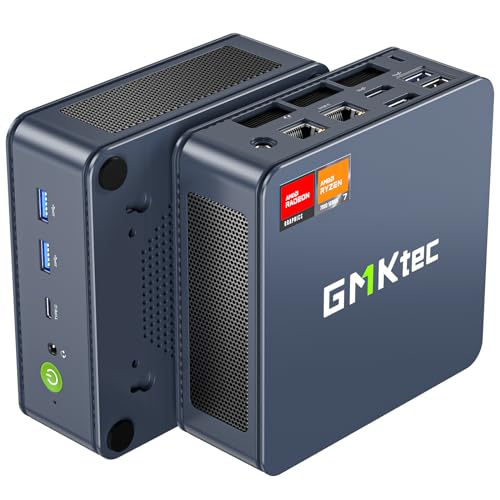
- The only honest native-1440p route here, on deal: GMKtec NucBox K6, Ryzen 7 7840HS, Radeon 780M, 32GB DDR5, 1TB SSD — Check on Amazon
- Beelink SER5 MAX Mini PC, Ryzen 7 7735HS, Radeon 680M, 24GB, 500GB — Check on Amazon
- ACEMAGIC Mini Gaming PC, Ryzen 7 7735HS, Radeon 680M, 24GB, 512GB — Check on Amazon
- GMKtec NucBox M6 Ultra, Ryzen 5 7640HS, Radeon 760M, 16GB, 512GB — Check on Amazon
See 2 more Amazon options
- GMKtec NucBox M6 Mini PC, Ryzen 5 6600H, Radeon 660M, 16GB DDR5, 512GB — Check on Amazon
- GMKtec M5 Plus Mini PC, Ryzen 7 5825U, 32GB RAM, 1TB SSD — Check on Amazon
Read the full guide ↓
Disclosure: As an Amazon Associate, reviewstook.com earns from qualifying purchases. Links to Amazon on this page are affiliate links; they cost you nothing extra. Listing details such as price and availability change often, so check the current Amazon listing before you buy.
Every mini PC in this guide can put a 1440p picture on your monitor. That sentence is true, and it is also the trap this whole page exists to disarm — because displaying 1440p and rendering a game at 1440p are two completely different jobs, and at under $500 only one of these six machines renders any games natively at that resolution at all, and then only the lighter end of the library. Start with the fact that shapes everything below: no new mini PC at this price contains a discrete graphics card. All six picks render games on graphics integrated into the processor, fed from the same memory pool the system uses, and the strongest of those integrated GPUs is roughly an entry-level graphics card of a few years ago. Hook any of them to a 1440p monitor and the desktop, the browser, video and text will be genuinely, natively 1440p and lovely. Start a demanding game and the rendering quietly drops to 1080p or below, with upscaling stretching the result back up to fill the panel. That is not a scam and it is not a failure — it is the honest physics of this budget — but a buyer who understands it buys a different machine, sets different settings, and is happier than a buyer who reads “supports 1440p” on a listing and believes the game will follow.
So this guide grades the six picks on the rendering side of the line. The GMKtec NucBox K6, with the Radeon 780M and 32GB of memory, is the one machine here that truly renders a slice of the games library at native 1440p — esports, indie and older titles at reduced settings — and it is a deal-only pick that normally sits in a higher tier above this budget — check price on Amazon to see whether it is inside this budget on the day you shop. The two Radeon 680M machines behind it are 1080p renderers that upscale cleanly and drive a beautiful 1440p desktop the rest of the day. The 760M and 660M picks render lower still and lean harder on upscaling, and the Vega machine at the bottom is included for buyers whose 1440p need is a desktop, not a game render. Below: the render-versus-display distinction explained properly, quick picks, the six reviews graded on this angle, a comparison table, a monitor-pairing section built only from documented outputs, the mistakes this keyword attracts, and the questions buyers ask most.
Rendering 1440p Is Not Displaying 1440p
A 1440p monitor — 2560×1440 pixels — asks two separate questions of the computer feeding it. The first is whether the machine can output that signal, and the answer for every pick here is yes: these are modern mini PCs with HDMI, DisplayPort and USB4 outputs documented up to 4K, so a 1440p desktop is trivially within reach, at full sharpness, all day. The second question is how many of those pixels the graphics hardware actually computes for each frame of a game, and that is where the budget bites. A game rendered natively at 1440p computes about 78 percent more pixels than the same game at 1080p. Integrated graphics that are already working honestly at 1080p do not have that headroom spare, so the standard arrangement — in these machines and in most laptops — is to render the game at a lower internal resolution and upscale the finished frame to the panel’s 1440p. The picture on screen is 1440p-shaped. The detail inside it is 1080p-class or lower. Menus, text and the desktop stay razor sharp because they are drawn natively; the game world underneath is softer than a true 1440p render, and no setting changes that arithmetic.
Two scaling facts are worth carrying into the reviews. Upscaling from 1080p to a 1440p panel is a non-integer scale — about 1.33 times on each axis — so the upscaler cannot map pixels neatly and the result is a little softer than the same render shown on a native 1080p screen. Upscaling from 720p, by contrast, is an exact doubling on each axis, which is why very low internal renders can still look surprisingly tidy on a 1440p panel even though the detail is plainly 720p-class. AMD’s FSR upscaling is the tool these machines use — every pick here is Radeon graphics — and this guide credits it generically and honestly: it reconstructs a convincing 1440p-shaped image from a lower render, it costs far less than native rendering, and it does not create detail that was never rendered. One technology is absent from this entire guide, and its absence is a fact, not an oversight: DLSS is NVIDIA-only, there is no NVIDIA hardware of any kind in this set, and any listing or review that implies DLSS support on these machines is wrong. Frame generation, where a game offers it, belongs in the same honest box: it interpolates extra frames to make motion look smoother on the panel. It is a display-side comfort, not resolution, and it never turns a 1080p render into a 1440p one.
There is one route by which these machines genuinely present games rendered at 1440p or better, and it is not in the box: cloud gaming. A streaming service renders the game on a server with a real graphics card and sends the picture down your connection, so the mini PC becomes a display terminal and the render-vs-display problem evaporates. The costs are a subscription, a fast and stable connection, and some input lag that competitive players will feel. It is named here because for a buyer whose heart is set on 1440p game pictures at this budget, it is the only fully honest way to get them — the machines below should be bought for what they render themselves, with the cloud as a bonus rather than the plan.
In this guide
Quick Picks
Short on time, or comparing several options at once? Each row below names a buyer type and the mini PC that suits it, with a link to the listing.
| Buyer type | Pick | Why it stands out | Link |
|---|---|---|---|
| Only native-1440p route | GMKtec NucBox K6, Ryzen 7 7840HS | Radeon 780M renders lighter titles natively at 1440p — fits this budget tier only on deal; check price on Amazon | Check on Amazon |
| Best 1440p desk, honest render | Beelink SER5 MAX, Ryzen 7 7735HS | 680M renders at 1080p and upscales cleanly; 24GB feeds the shared pool | Check on Amazon |
| Triple-screen 1440p desk | ACEMAGIC Mini Gaming PC, Ryzen 7 7735HS | Same 680M render, triple 4K-class output for a multi-monitor desk | Check on Amazon |
| Newer platform, lighter library | GMKtec NucBox M6 Ultra, Ryzen 5 7640HS | 760M renders below 1080p in heavier games; USB4 and a second SSD slot | Check on Amazon |
| Cheapest route to the panel | GMKtec NucBox M6, Ryzen 5 6600H | 660M upscales esports and older titles; socketed memory, positioned at the lower end of this tier — check price on Amazon | Check on Amazon |
| 1440p desktop, light gaming | GMKtec M5 Plus, Ryzen 7 5825U | A sharp 1440p desktop and media machine; gaming renders at low resolutions | Check on Amazon |
How These Picks Were Chosen
The budget was applied the way a buyer experiences it: the complete machine — processor, memory, storage and Windows — at or under $500 in the United States, exactly as in the base guide these six are drawn from, Best Mini Gaming PC Under $500. Barebones kits were excluded, because their finished cost is a different number. Every product below is a real Amazon listing; check the current price on Amazon for each pick, as pricing changes often. One pick, the NucBox K6, is included on deal pricing alone, and its review states the walk-away rule that governs it in its opening lines.
What changed for this angle is the grading order. The base guide graded graphics class first; this guide grades the render pipeline first — what internal resolution each graphics class can honestly sustain in which game categories, how much memory the integrated GPU can borrow while it does so, and how cleanly the result upscales to a 1440p panel. That is why memory capacity is graded harder here than in the base guide: at 1440p output the graphics reserve and the frame buffers grow, the system and the GPU are bidding for the same pool, and a 16GB machine feels that bid sooner than a 24GB or 32GB one. Display outputs were graded only from what the base research documents — HDMI, DisplayPort and USB4 arrangements and the triple-4K support several of these listings state — and no port, refresh ceiling or panel figure has been invented for any pick. Maker claims were discounted throughout: a listing that says “1440p gaming” about integrated graphics is describing the output connector, and these reviews translate each class into the render it actually sustains instead.
We did not use these machines ourselves. We read the maker listings and specification pages behind the base guide’s verified research and re-examined them for this question. Performance characterisations stay class-level — the 780M a clear step above the 680M, the 760M a half-step behind it, the 660M and Vega clearly below — with no benchmark scores and no per-game frame rates claimed anywhere, because none were verified and inventing them would break the guide’s one rule. Where a listing family sells several configurations under one title, the standing hazard of this category, the review names the exact configuration the price belongs to and tells you to confirm it in the cart.
The 6 Best Mini Gaming PCs for a 1440p Setup Under $500
GMKtec NucBox K6 — Ryzen 7 7840HS, Radeon 780M, 32GB DDR5, 1TB SSD
Who it suits: The patient buyer who wants the only machine in this guide that renders any games natively at 1440p, and who will walk away without regret if the current price on Amazon is not inside this budget on the day they shop.
The K6 earns the top spot on this angle for one reason: its Radeon 780M is the strongest integrated graphics here by a clear class, and it is fed by 32GB of socketed DDR5-5600 — the largest memory pool in the guide, which matters doubly when the GPU borrows its frame buffer from that same pool at 1440p output. The honest render map looks like this. Esports, indie and older titles genuinely render at native 1440p on this machine, at reduced settings — the real thing, not an upscale. The older AAA catalogue renders at 1080p and upscales to the panel, or renders at 1440p only with settings trimmed hard. Recent demanding releases render at 1080p or below with FSR upscaling, exactly as they do on every pick here, and ray tracing is not a playable feature. No other machine in this guide can make the first of those claims, and it is why the K6 — a deal pick in the base guide — becomes the headline pick on this one. Its documented outputs (USB4, HDMI and DisplayPort, with triple 4K display support in the model’s specifications) mean the panel side is never the problem: it will drive a 1440p monitor natively for desktop work all day and a second screen beside it.
The condition is unchanged from the base guide and stated as plainly: this configuration normally sits above this budget tier, and it belongs here only when deal pricing brings the 32GB/1TB configuration inside the tier — check the current price on Amazon before you plan around it. When it is inside this budget it is the best 1440p answer this budget has; when it is not, the correct move is to wait for a deal or choose one of the 680M picks below. Its other honest cost is thermal: the small dual-fan cooler works audibly under sustained gaming loads, and this chip asks more of it than the lower-power picks ask of theirs. Behind a monitor — where this guide expects it to live — that is a murmur, not a problem.
- Radeon 780M: the only graphics here that render lighter titles natively at 1440p.
- 32GB of socketed DDR5 — the deepest shared pool in the guide for the GPU to draw from.
- USB4, HDMI and DisplayPort outputs with dual 2.5G Ethernet and Wi-Fi 6E.
Honest limitation: A deal-only pick — it often sits above this budget tier when it is not on deal — and even its 780M renders demanding modern games at 1080p or below, not 1440p.
Choose it if native 1440p rendering in lighter titles is the point of the purchase and you can shop patiently. Skip it if you are buying this week at whatever price is showing — the 680M picks below are there every day.

Beelink SER5 MAX Mini PC — Ryzen 7 7735HS, Radeon 680M, 24GB, 500GB
Who it suits: The buyer who wants the best 1440p desk in the guide — a natively sharp desktop, text and video — paired with the tier’s most dependable 1080p game rendering, at a price that is actually there when they shop.
Grade this machine on the distinction and it grades well. On the display side it is flawless for the purpose: a 1440p monitor shows a native 1440p desktop, crisp text and clean video, and the machine’s daily life as a work and media PC loses nothing to any pick here. On the render side the Radeon 680M is a 1080p engine, and this guide will not pretend otherwise: esports and indie titles render at 1080p with headroom and upscale to the panel, the older AAA catalogue renders at 1080p medium, and recent releases render lower with FSR doing the stretching. What the SER5 MAX does better than any other 1080p renderer here is feed that engine. Its 24GB of memory is the configuration detail that matters on this angle, because the GPU’s share comes out of the system pool: 24GB lets the graphics take a generous allocation while Windows, the game and a browser full of tabs still breathe, where a 16GB machine starts making trades. Check the current price on Amazon — this pick is positioned at the top end of this budget tier on an ordinary day, not only in a sale you missed.
The limitation is permanent and should be bought knowingly: that 24GB of LPDDR5 is soldered to the board. It will never grow, and because the graphics drink from the same pool, the ceiling applies to the machine’s rendering future as much as to its desktop future — comfortable for the game classes above, finite for growing ambitions. The 500GB M.2 drive, by contrast, is a standard part you can replace with a larger one when it fills, so treat storage as a year-two errand rather than a flaw. One variant warning from the base research bears repeating at full size: a different SER5 MAX built on the older 5800H with Vega graphics exists under a different listing — the machine reviewed here is the 7735HS/680M configuration, and the cart should say so before you pay.
- Radeon 680M rendering at 1080p with the cleanest upscale story of the everyday-price picks.
- 24GB of memory feeding the shared pool — the headroom this angle rewards.
- Positioned at the top end of this budget tier in real life — check price on Amazon.
Honest limitation: It does not render games natively at 1440p, and the soldered 24GB means it never will render them any better than it does on day one.
Choose it if your monitor is 1440p but your library is esports, indie and older titles that upscale gracefully. Skip it if native 1440p rendering is the requirement — only the K6 above attempts it, and only on deal.

ACEMAGIC Mini Gaming PC — Ryzen 7 7735HS, Radeon 680M, 24GB, 512GB
Who it suits: The multi-monitor buyer — the same 680M rendering as the Beelink, wrapped in the guide’s best documented display-output story, in the same budget tier.
The silicon story is identical to the pick above: a Ryzen 7 7735HS whose Radeon 680M renders esports and indie at 1080p, older AAA at 1080p medium, and recent releases lower with FSR upscaling to the panel. On the render side of the line, nothing separates the two machines, and this guide scores them as equals there. Where the ACEMAGIC argues its case is the display side, which for a 1440p buyer is half the purchase. Its outputs are documented to run three 4K-class displays, so a desk built around a 1440p gaming panel flanked by a second monitor — chat, a guide, a stream preview — is this machine’s home turf, every screen driven natively at its own resolution for desktop work while the game renders at 1080p on the main one. Add Windows 11 Pro, 2.5G Ethernet with Wi-Fi 6, 24GB of memory feeding the shared pool and a 512GB drive, and the package is the most desk-complete in the guide. Check the current price on Amazon — it sits in the upper part of this budget tier, giving up nothing that matters.
The cautions here concern the purchase rather than the hardware. ACEMAGIC sells multiple configurations under closely related listings, and the positioning that earns this pick its place belongs to the 7735HS with 24GB specifically — confirm the processor and memory in the listing’s configuration selector before paying, because a cheaper variant in the same family is a weaker computer with a weaker render. This guide also deliberately makes no claim about whether this pick’s memory is soldered or socketed, because the verified sources do not establish it; buyers for whom that distinction decides the purchase should treat the Beelink’s documented soldered 24GB or the K6’s documented socketed 32GB as the known quantities. Support is maker-direct, as with every pick here. Ninety seconds on the listing page is the whole price of the value on offer.
- The tier’s 680M render with 24GB behind it — check price on Amazon.
- Triple 4K-class display output — the multi-monitor 1440p desk pick.
- Windows 11 Pro and 2.5G Ethernet round out the desk credentials.
Honest limitation: The same 1080p render ceiling as every 680M machine, and the value lives in one specific variant of a multi-configuration listing.
Choose it if the 1440p panel is one screen among two or three and the desk matters as much as the game. Skip it if variant selectors make you nervous — the Beelink’s simpler proposition is the alternative for a reason.

GMKtec NucBox M6 Ultra — Ryzen 5 7640HS, Radeon 760M, 16GB, 512GB
Who it suits: The buyer on the newest platform whose library leans light — esports, indie, older titles — and who wants USB4 and a second drive slot more than the last step of render muscle.
The M6 Ultra’s Ryzen 5 7640HS is a Zen 4 processor carrying Radeon 760M graphics: fewer compute units than the 680M in a newer RDNA 3 design, landing a half-step behind it in the same broad band. Translated to this angle, that means the render sits one rung lower than the picks above. Esports and indie titles render at 1080p and upscale to the panel comfortably. Older AAA titles render at 1080p only with settings trimmed, or below it. Recent releases render below 1080p with FSR carrying more of the picture — watchable, playable in the lightest cases, and plainly an upscaled image rather than a rendered one. Native 1440p rendering is not in this machine’s vocabulary outside the lightest 2D and retro fare. What the newer platform buys back is everything around the render: USB4, dual 2.5G Ethernet, Wi-Fi 6E, triple 4K-class display output for the desktop side, Windows 11 Pro, and two M.2 slots so storage grows by addition. The 16GB/512GB configuration is the one positioned inside this budget tier — check the current price on Amazon.
The capacity caution is sharper on this angle than in the base guide. Sixteen gigabytes is the tightest memory fit here, and at 1440p output the shared-pool bid — system, game and graphics reserve — is felt earliest on this machine; it is enough for the game classes above and tight for anything heavier. The buying caution matches: this listing family also sells a 32GB variant positioned well above this budget tier, and the fit for this guide belongs to the 16GB configuration alone, so the cart check is not a formality. This guide makes no soldered-or-socketed claim for this pick’s memory, because the verified sources do not establish one; the documented upgrade is the second M.2 slot. Bought as what it is — the forward-looking platform pick for a lighter library — it is a good machine. Bought as a 1440p renderer, it is the wrong one.
- Newest architecture here: Zen 4 CPU, RDNA 3 graphics, USB4 as standard.
- Two M.2 slots and triple 4K-class output for the desk side of the setup.
- Positioned inside this budget tier in its 16GB/512GB configuration — check price on Amazon.
Honest limitation: The render sits a rung below the 680M picks and drops below 1080p in heavier games, and 16GB is the tightest shared pool in the guide.
Choose it if your games are light, your desk is multi-screen and platform longevity is the priority. Skip it if rendering is the priority — the same tier offers a 680M machine above.

GMKtec NucBox M6 Mini PC — Ryzen 5 6600H, Radeon 660M, 16GB DDR5, 512GB
Who it suits: The upgrader on a budget who already owns — or is about to buy — a 1440p monitor for work, and wants a cheap, openable machine that upscales a light games library onto it.
Set expectations by the graphics class and this pick makes sense. The Radeon 660M is a clear class below the 680M, and its render map on a 1440p panel is: esports and indie titles rendered at 1080p and upscaled, older AAA rendered at low-to-medium around 1080p or below it, retro and emulation with room to spare, and recent releases only in their lightest forms or via cloud streaming — which, as the opening section noted, is the one route by which this machine presents genuinely 1440p-rendered games. Nothing here renders natively at 1440p. What the machine offers instead is the guide’s best upgrade story at the lower end of this tier: 16GB of DDR5 in standard SO-DIMM slots that can be replaced and grown — the single most valuable trait in a mini PC, and a real answer to the shared-pool squeeze, since a memory upgrade later directly feeds the graphics — plus two SSD slots, USB4, dual 2.5G Ethernet and Wi-Fi 6E. Its positioning at the lower end of this tier completes the argument — check the current price on Amazon — and it leaves more headroom in the overall setup budget for the 1440p monitor itself.
The limitation is the graphics class and it should not be talked around: the 660M is roughly two-thirds of the idea of the 680M, and on a 1440p panel the upscale distance is longer, so softness in heavier titles is more visible than it would be on a 1080p screen. The fitted SSD is a PCIe 3.0 drive — loading times are fine, bragging rights are not — and the 6600H is a six-core part where the 680M picks carry eight. The base guide’s buying caution also applies: this listing family includes barebones variants, and the price in this review belongs to the complete 16GB/512GB machine with Windows fitted, so confirm the configuration in the cart. Judge the M6 as the longevity play — the cheapest complete route onto a 1440p desk that can grow — and it earns its place. Judge it as a games renderer and the picks above it exist precisely for you.
- Socketed DDR5 memory and dual SSD slots — the upgrade path that feeds the graphics later.
- Positioned at the lower end of this tier — check price on Amazon — with headroom left for the monitor.
- USB4 plus dual 2.5G Ethernet leave it media and server careers after its gaming years.
Honest limitation: The weakest render of the Radeon picks — nothing native at 1440p, and upscaling has furthest to travel to reach the panel.
Choose it if the 1440p monitor is mainly for work and the games are esports, indie and retro. Skip it if games are the point — spend the whole budget on a 680M pick instead.

GMKtec M5 Plus Mini PC — Ryzen 7 5825U, 32GB RAM, 1TB SSD
Who it suits: The buyer whose 1440p requirement is a desktop — sharp text, big spreadsheets, media on a large panel — and whose gaming is the lightest duty the machine will see.
Let the limitation lead, because on this angle it defines the machine: the 5825U’s Vega-architecture graphics are the oldest and weakest here, and this is not a 1440p gaming machine in any rendering sense. Esports at modest settings, indie and retro happily, older AAA at low settings rendered well below the panel’s resolution, and the recent catalogue effectively not at all except through cloud streaming. What the M5 Plus does at 1440p, it does superbly: it displays it. The desktop, documents, browser and video are rendered natively at the panel’s resolution by the display pipeline, which asks almost nothing of the graphics cores, and with 32GB of memory and a 1TB drive fitted from the factory this is the most comfortable large-screen desktop in the guide — the machine for a 1440p or 4K monitor used for work all day and a light game at night. Dual 2.5G Ethernet, triple 4K-class output, Wi-Fi 6E and Windows 11 Pro complete the all-rounder résumé, positioned comfortably inside this budget tier — check the current price on Amazon.
The honest framing is that this pick is in the guide to catch a real buyer: the one who typed a 1440p gaming keyword but whose actual week is ninety percent desktop. For that buyer the render ceiling never binds, the capacity binds daily, and this machine wins. For anyone whose gaming is heavier than light, the ranking is the warning — every pick above this one renders games better, and the Vega graphics will never improve, because integrated graphics are fixed for the life of the machine. The memory being standard socketed DDR4 and the second SSD slot mean the capacity story can still grow; the graphics story is closed on day one. Buy it for the desk and the server shelf, and it is the most useful object in this tier here. Buy it for the games, and it is the guide’s one wrong shelf.
- A genuinely native 1440p desktop with 32GB of memory and 1TB fitted — the capacity pick.
- Triple 4K-class output and dual 2.5G Ethernet: the media and home-lab résumé.
- Positioned comfortably inside this budget tier — check price on Amazon.
Honest limitation: Vega graphics are the weakest in this guide by a wide margin; demanding local gaming is not this machine’s job, today or ever.
Choose it if the 1440p panel is for work and media and gaming is incidental. Skip it if games are the point of the purchase — start at the top of this guide instead.

Comparison Table
| Product | Graphics class | Honest 1440p verdict | Link |
|---|---|---|---|
| GMKtec NucBox K6 | Radeon 780M | Renders lighter titles natively at 1440p; demanding games at 1080p upscaled | Check on Amazon |
| Beelink SER5 MAX | Radeon 680M | Native 1440p desktop; games render at 1080p and upscale | Check on Amazon |
| ACEMAGIC Mini Gaming PC | Radeon 680M | Same 1080p render; the multi-monitor 1440p desk pick | Check on Amazon |
| GMKtec NucBox M6 Ultra | Radeon 760M | Renders at or below 1080p; upscaling carries heavier titles | Check on Amazon |
| GMKtec NucBox M6 | Radeon 660M | Light titles upscale from 1080p; the rest render lower or stream | Check on Amazon |
| GMKtec M5 Plus | Vega (integrated) | A native 1440p desktop machine; gaming renders at low resolutions | Check on Amazon |
Pairing These Mini PCs With a 1440p Monitor
Everything in this section is built from the display outputs the base research actually documents for these six machines — no port, refresh ceiling or panel specification has been invented for any of them, and where a detail is not documented the advice is to read it off the live listing before ordering. The K6’s outputs are documented as USB4, HDMI and DisplayPort, with the model’s specifications crediting triple 4K display support. The ACEMAGIC, the M6 Ultra and the M5 Plus are each documented with triple 4K-class display output. The M6 documents USB4 among its ports. The SER5 MAX’s review in the base guide does not pin a port list, so this guide claims none for it beyond the plain fact — true of every pick here — that it drives a 1440p monitor natively for desktop work. 4K-class output support is worth translating: a machine documented to drive 4K displays is not straining to drive a 1440p one, so the panel connection is never the weak link in any of these setups. The render is.
With that established, the pairing advice is practical. Use a wired connection — HDMI or DisplayPort — from the machine to the panel rather than a dock’s video passthrough where you can avoid it, because the documented outputs are on the machine itself and every adapter is a variable. On a multi-monitor desk, the triple-output picks (ACEMAGIC, M6 Ultra, M5 Plus) let the game live on the 1440p panel while a second screen carries everything else, all rendered natively for desktop purposes. Set the game’s internal resolution deliberately rather than letting it default to the panel’s: on the 680M picks and below, 1080p internal with the game’s upscaling enabled is the intended configuration, not a compromise you stumbled into, and on the K6 it is worth testing lighter titles at native 1440p first and stepping down only where the settings demand it. If the monitor is still to be bought, buy it for the desktop you will stare at all day — that image is genuinely 1440p on every pick — and let the games upscale; a buyer who instead plans to step up a tier later should read Best Mini Gaming PC Under $700 and the broader Best 1440p Gaming PC Under $500 guide, where discrete graphics enter the conversation, before committing the whole setup to this tier’s ceiling.
How to Choose a Mini PC for 1440p Gaming Under $500
- Decide which 1440p you actually need. A 1440p desktop — text, video, workspace — is native on every pick here. A 1440p game render is native only on the K6, only in lighter titles, and only on deal. Most buyers typing this keyword need the first and imagine the second; knowing which one you are is the whole purchase.
- Grade the render, not the output. Every listing in this category advertises high-resolution display support because the connector can do it. The question that decides your gaming is the graphics class — 780M, then 680M, then 760M, then 660M and Vega — and it can never be upgraded.
- Treat memory as the render’s fuel tank. Integrated graphics borrow from the system pool, and 1440p output enlarges the draw. The K6’s 32GB and the 680M picks’ 24GB are graded up on this angle for exactly that reason; 16GB works and binds soonest.
- Know whether the memory can grow. Socketed memory (K6, M6, M5 Plus) can be expanded later, which directly feeds the graphics. Soldered memory (the Beelink’s 24GB) is final — buy the whole requirement on day one.
- Use upscaling as the plan, not the apology. On five of these six machines the intended gaming configuration is a lower internal render with FSR upscaling to the panel. Set it deliberately, prefer it over a struggling native render, and never mistake it for one.
- Ignore DLSS claims on this hardware. DLSS requires NVIDIA RTX graphics. There are none in this set, none at this price in this form factor, and any suggestion otherwise — in a listing, a review or an advertisement — is an error.
- Give the deal pick its walk-away rule. The K6 is the guide’s answer only when the current price on Amazon sits inside this budget tier, and a different, more expensive conversation when it does not. Check the current price on Amazon before you shop and let the everyday picks in this tier carry you if the deal never comes.
- Confirm the variant in the cart, every time. These listings sell other processors, smaller memories and barebones kits under the same family title. The render described in each review belongs to a named configuration; if the cart shows another one, you are buying a different computer.
Common Buying Mistakes
- Reading “supports 1440p” or “4K output” in a listing as a promise about game rendering. It describes the connector. The render is set by the graphics class, and at this budget that class is integrated.
- Setting a game’s resolution to 1440p on a 680M-or-below machine and concluding the machine is broken when it struggles. The intended configuration is a 1080p-or-lower render with upscaling; the struggle is the physics, not a defect.
- Believing frame generation adds resolution. It interpolates frames for smoother motion. The underlying render is unchanged, and a 1080p render with generated frames is still a 1080p render.
- Hunting for DLSS settings on a Radeon machine, or paying a premium for a listing that name-drops it. There is no DLSS on any pick here; FSR is the upscaler this hardware uses.
- Buying the K6 when its current price sits above this budget tier because a guide filed it under this keyword. Deal picks are conditional picks; when the current price is outside the tier the value that earned the listing is gone — check price on Amazon first.
- Buying the cheapest variant in a configuration selector — a weaker processor or half the memory — and expecting the reviewed machine’s render.
- Starving the shared pool: buying 16GB for heavy multitasking around games, when the graphics are drawing from the same memory the browser tabs are.
- Judging these machines against a tower with a discrete card. A $500 tower renders more, as Best Gaming PC Under $500 shows; the mini’s case is the desk, the silence and the second careers, covered in Best Mini Gaming PC For Small Spaces Under $500. Confusing the two products is the only real mistake.
Final Recommendation
- Native 1440p rendering, patient buyers: GMKtec NucBox K6 — only when check price on Amazon shows it inside this budget tier.
- Best 1440p desk with an honest render: Beelink SER5 MAX.
- Multi-monitor 1440p setups: ACEMAGIC Mini Gaming PC.
- Newest platform, lighter library: GMKtec NucBox M6 Ultra.
- Cheapest route onto the panel: GMKtec NucBox M6.
- 1440p desktop first, gaming second: GMKtec M5 Plus.
Our top two for most readers are the Beelink SER5 MAX and the GMKtec NucBox K6, and the choice between them is this guide in miniature. The Beelink is there every day at the budget, drives a beautiful native 1440p desktop, and renders the tier’s games at 1080p with the deepest everyday memory pool behind the upscale. The K6, the moment its deal price is live, is the only machine here that renders any of the library at the panel’s own resolution — and the moment the deal is gone it should be ignored until it returns. Buyers who would rather start from the broader picture should read the base guide, Best Mini Gaming PC Under $500; first-time buyers will find the gentler on-ramp in Best Mini Gaming PC For Beginners Under $500; living-room setups are covered by Best Mini Gaming PC For Streaming Under $500; and buyers who decide the render ceiling is the problem should cross to Best Compact Gaming PC Under $500 or the wider Best Mini PC Under $500 guide, where the form factors — and eventually the graphics — change character. Check the current price on Amazon and the exact configuration before you order; in this category those two habits are worth more than any single specification.
Frequently Asked Questions
Can any mini PC under $500 really render games at native 1440p?
One, partly, on deal. The GMKtec NucBox K6’s Radeon 780M renders esports, indie and older titles natively at 1440p at reduced settings — when check price on Amazon shows it inside this budget tier, which happens on deals rather than every day. Everything else in this guide, and everything else at this price in this form factor, renders games at 1080p or below and upscales to the panel. Demanding modern games render below 1440p on all six picks without exception.
Is upscaled 1440p the same as native 1440p?
No, and the difference is visible once you know to look for it. Upscaling reconstructs a 1440p-shaped frame from a lower-resolution render; fine detail, distant textures and thin geometry are softer than a native render because they were never computed. It is a good technology — it is what makes this entire guide viable — and on a 1440p panel the desktop around the game stays natively sharp, which hides much of the gap. But it is a reconstruction, not the resolution itself.
Do these mini PCs support DLSS?
No. DLSS is NVIDIA’s technology and requires RTX graphics hardware. Every pick in this guide uses AMD Radeon integrated graphics, there is no NVIDIA hardware in the set, and no DLSS internal-resolution figure applies to any of them. The upscaler these machines use is AMD’s FSR. Any listing or review implying DLSS support on these models is mistaken.
Will one of these drive my 1440p monitor for work?
Yes — completely, on every pick. Displaying a 1440p desktop is a light task for the display pipeline, and these machines output natively at the panel’s resolution for text, browser, documents and video, several of them to three high-resolution screens at once. The render-versus-display distinction only bites inside games. If the machine’s main job is a sharp large-screen desktop, even the M5 Plus at the bottom of this guide does it natively; compare Best 1080p Gaming PC Under $500 if the panel itself is still undecided.
Does frame generation make a game 1440p?
No. Frame generation inserts interpolated frames between rendered ones so motion looks smoother on the panel. It changes how the image moves, not how much detail it contains; the underlying render resolution is exactly what it was before the feature was switched on. Treat it as a comfort setting, never as a resolution claim.
Should I buy a 1440p monitor for one of these machines?
Yes, if the desktop matters to you — and for most buyers it should, because the desktop is where the panel’s resolution is genuinely delivered, every day, by every pick here. Buy the monitor for the workspace and let games upscale onto it. The exception is the buyer whose machine is purely a games box and whose library is demanding: that buyer is spending against this tier’s ceiling, and the honest routes are the K6 on deal, a cloud subscription, or a different form factor entirely.


