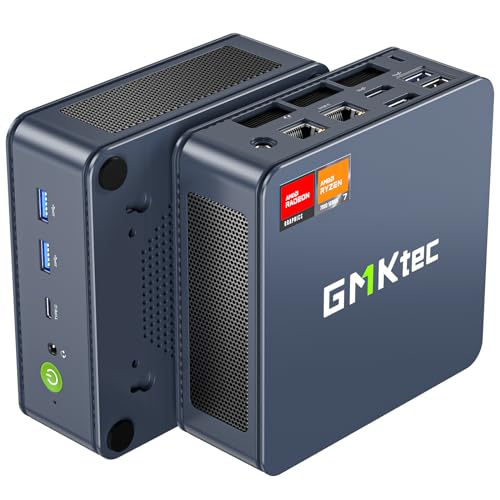
Where to buy
Check the latest price, availability and delivery on Amazon. Orders are placed on Amazon. We may earn a commission from qualifying purchases.
- Best graphics under $500, on deal: GMKtec NucBox K6, Ryzen 7 7840HS, Radeon 780M, 32GB DDR5, 1TB SSD — Check on Amazon
- Beelink SER5 MAX Mini PC, Ryzen 7 7735HS, Radeon 680M, 24GB, 500GB — Check on Amazon
- ACEMAGIC Mini Gaming PC, Ryzen 7 7735HS, Radeon 680M, 24GB, 512GB — Check on Amazon
- GMKtec NucBox M6 Ultra, Ryzen 5 7640HS, Radeon 760M, 16GB, 512GB — Check on Amazon
See 2 more Amazon options
- GMKtec NucBox M6 Mini PC, Ryzen 5 6600H, Radeon 660M, 16GB DDR5, 512GB — Check on Amazon
- GMKtec M5 Plus Mini PC, Ryzen 7 5825U, 32GB RAM, 1TB SSD — Check on Amazon
Read the full guide ↓
Disclosure: As an Amazon Associate, reviewstook.com earns from qualifying purchases. Links to Amazon on this page are affiliate links; they cost you nothing extra. Listing details such as price and availability change often, so check the current Amazon listing before you buy.
Five hundred dollars is where the mini gaming PC stops being a curiosity and becomes a real way to play. It is also where the category’s one big honesty test lives, so let us pass it in the first paragraph: no new mini PC at this price has a discrete graphics card. The graphics in every machine below are integrated into the processor, sharing the system memory, and the strongest of them is roughly comparable to an entry-level graphics card of a few years ago — genuinely good for esports, indie games and the enormous back catalogue of older AAA titles at 1080p, and genuinely not enough for the newest releases at high settings, for ray tracing, or for native 1440p in demanding games. What $500 buys instead of a graphics card is everything around the gaming: a complete, quiet, laptop-powered computer the size of a paperback that sips electricity, mounts behind a monitor, doubles as a media PC and a household server, and leaves the desk exactly as empty as it found it.
Within that honest frame, this tier has a clear pecking order. The resident graphics class at $500 is AMD’s Radeon 680M — the Beelink and ACEMAGIC picks below carry it within this budget tier. The stronger Radeon 780M exists here too, but only as a deal-dependent option: the GMKtec NucBox K6 that carries it usually sits above this tier and earns its place only when its current price falls within budget — check price on Amazon before counting on it. Below the 680M sit the 760M and 660M picks, which trade graphics muscle for a newer platform or a position lower in the band, and one capacity-first machine whose graphics are the weakest here and whose 32GB of memory and 1TB drive are the point. Below are the quick picks, detailed reviews of all six, a comparison table, a section on what gaming at this level actually looks like game by game, the honest mini-versus-tower comparison, the soldered-versus-socketed memory question that decides how long these machines stay useful, the mistakes that waste money in this category, and the questions buyers ask us most.
In this guide
Quick Picks
Short on time, or comparing several options at once? Each row below names a buyer type and the mini PC that suits it, with a link to the listing.
| Buyer type | Pick | Why it stands out | Link |
|---|---|---|---|
| Best graphics, deal hunters | GMKtec NucBox K6, Ryzen 7 7840HS | Radeon 780M and 32GB of socketed DDR5 — under $500 only on sale | Check on Amazon |
| Best everyday buy | Beelink SER5 MAX, Ryzen 7 7735HS | Radeon 680M near the top of this budget tier, no sale-watching required — check price on Amazon | Check on Amazon |
| Best value with Windows 11 Pro | ACEMAGIC Mini Gaming PC, Ryzen 7 7735HS | 680M graphics, 24GB, triple 4K output, near the top of this tier — check the current price on Amazon | Check on Amazon |
| Best newer platform | GMKtec NucBox M6 Ultra, Ryzen 5 7640HS | Zen 4 with Radeon 760M, USB4 and a second SSD slot within this budget tier | Check on Amazon |
| Best for upgraders on a budget | GMKtec NucBox M6, Ryzen 5 6600H | Socketed RAM and dual SSD slots, positioned low in this budget tier — check price on Amazon | Check on Amazon |
| Best for storage and second jobs | GMKtec M5 Plus, Ryzen 7 5825U | 32GB of RAM and 1TB fitted from the factory, dual 2.5G LAN | Check on Amazon |
How These Picks Were Chosen
The budget was applied the way a buyer experiences it: the complete machine — processor, memory, storage and Windows — at or under $500 in the United States. Barebones kits that need memory, a drive and an operating system bought separately were excluded however attractive the headline price, because their finished cost is a different and larger number. Every product below is a real Amazon listing, and in this category prices move constantly, so check the current price on Amazon for every pick before you buy rather than relying on any figure printed elsewhere. One pick, the NucBox K6, is included as a deal-dependent option alone, and its review says so in its first lines and gives the walk-away rule that governs it.
We did not use these machines ourselves. We read the maker listings and specification pages and compared the things that decide a mini PC’s gaming life: the integrated graphics class first, because it cannot be changed later; then memory capacity and whether that memory is soldered or socketed; then storage size and whether a second drive can be added; then the ports — USB4, display outputs, wired networking — that decide what the machine can become after its gaming years. Maker performance claims were discounted throughout: a mini PC listing that promises to run everything is telling you about its marketing, and the reviews below translate each graphics class into the game categories it honestly covers instead. Where a listing family sells several configurations under one title — the standing hazard of this category — the review names the exact configuration this guide describes and tells you to confirm it in the cart.
Two mini-specific filters sat on top of all that. The first is the longevity filter: a mini PC’s graphics are fixed forever, so the things that can change — memory and storage — matter more here than in any tower guide we publish, and machines that let you change them earned credit for it. The second is the honesty-about-purpose filter: these are small, quiet, low-power computers that also play games, and they were judged as that, not as failed towers. A buyer who needs raw frames per dollar should read the tower comparison later in this guide and choose with open eyes; a buyer who needs the desk space, the silence or the portability is exactly who these six are for.
The 6 Best Mini Gaming PCs Under $500
GMKtec NucBox K6 — Ryzen 7 7840HS, Radeon 780M, 32GB DDR5, 1TB SSD
Who it suits: The patient buyer. Someone who wants the strongest integrated graphics this budget can reach, can wait for a sale, and will walk away without a flicker of regret if the price is wrong on the day they shop.
The K6’s processor is the story. The Ryzen 7 7840HS is a Zen 4 chip whose Radeon 780M graphics are the fastest integrated graphics in this guide — a clear step above the 680M class that otherwise owns this tier, with the memory to feed them: 32GB of DDR5-5600 fitted as two socketed sticks, and a 1TB PCIe 4.0 SSD. Around that core sits the connectivity of a machine a class up: USB4, HDMI and DisplayPort outputs, dual 2.5G Ethernet, Wi-Fi 6E. In game terms the 780M widens every category the other picks cover — esports titles run at high frame rates with settings to spare, the older AAA catalogue plays at 1080p medium-to-high rather than medium, and the recent releases that ask the 680M to drop to low settings with upscaling become merely modest rather than reluctant. It is still integrated graphics, with everything that means — no ray tracing worth the name, no native 1440p in demanding games — but it is the ceiling of what integrated graphics currently do, in a box that sits in one hand.
Now the condition, stated as plainly as the guide can state it: this machine usually sits above this guide’s budget. It belongs here only as a deal-dependent option in its 32GB/1TB configuration: check the current price on Amazon, and count it in this tier only when that price falls within budget. So the rule is absolute: when it sits within this budget, this is the best mini gaming PC in the guide; when it sits above it, it is competing in a different guide’s territory, and the correct move is to set a price alert and buy one of the 680M picks below, or step up a tier deliberately. The machine’s other honest cost is thermal: a small dual-fan cooler moving air through a small box works audibly under sustained gaming loads, and the K6 asks more of its cooling than the lower-power picks do. Under a desk or behind a monitor that is a murmur; beside your head on a quiet desk at midnight, it is present.
- Radeon 780M graphics — the strongest integrated graphics in this guide.
- 32GB of DDR5 in two socketed sticks, plus a 1TB PCIe 4.0 SSD: nothing about the memory is a dead end.
- USB4, dual 2.5G Ethernet and Wi-Fi 6E — connectivity a class above this tier.
Honest limitation: It is a deal-dependent pick. When its current price sits above this guide’s budget it does not belong in this tier, and its small fans are audible under sustained load.
Choose it if you can shop patiently, will buy only when its current price on Amazon falls within this budget, and want the most gaming an integrated GPU can give. Skip it if you need to buy this week at whatever the price happens to be — that buyer is served by the next two picks.

Beelink SER5 MAX Mini PC — Ryzen 7 7735HS, Radeon 680M, 24GB, 500GB
Who it suits: The buyer who wants this tier’s resident graphics class today, without sale-watching — and who values a mature, widely owned machine with a known track record.
If the K6 is the deal, the SER5 MAX is the everyday option done properly. Its Ryzen 7 7735HS carries the Radeon 680M, the graphics class that defines honest mini gaming in this tier: esports and indie titles at 1080p with high frame rates, the big older AAA catalogue at 1080p medium, and recent releases at low settings, usually with FSR upscaling doing honest work. Beelink pairs it with 24GB of memory — a configuration worth pausing on, because integrated graphics borrow their video memory from the system pool, and 24GB means the graphics can take a generous share while Windows and the game still have room to breathe, a balance 16GB machines visibly strain at. The storage is a standard 500GB M.2 NVMe drive, and the machine is positioned near the top of this budget tier — check price on Amazon — which is to say, this is the pick framed around the budget itself, rather than around a sale you have to catch.
The limitation is written into the hardware and should be bought with open eyes: the 24GB of LPDDR5 memory is soldered to the board. It will never be 32GB or 64GB, and because the graphics feed from the same pool, that ceiling is also a soft ceiling on the machine’s later years — fine for the gaming classes above and for desktop work, finite for anyone whose ambitions grow into heavy multitasking or large local projects. The storage, by contrast, is a standard M.2 drive you can replace with a larger one, so the 500GB is a starting point rather than a wall; plan for that swap in year two rather than resenting it. Beelink’s support is maker-direct rather than a big-brand network, the standard arrangement in this tier. Buy the machine for what it is — the tier’s reference design at the tier’s reference position — and it will not surprise you.
- Radeon 680M graphics with 24GB of memory to feed them — the balanced configuration of this tier.
- Positioned near the top of this budget tier in real life — check the current price on Amazon.
- Storage is a standard M.2 NVMe drive, replaceable when 500GB stops being enough.
Honest limitation: The 24GB of LPDDR5 memory is soldered and can never be upgraded — the machine’s memory ceiling is set on the day you buy it.
Choose it if you want the dependable 680M machine at a dependable position in this tier — check price on Amazon. Skip it if you expect to keep the machine long enough to want more memory — that buyer wants socketed sticks, and should look at the K6 on deal or the M6 below.

ACEMAGIC Mini Gaming PC — Ryzen 7 7735HS, Radeon 680M, 24GB, 512GB
Who it suits: The value hunter who wants the same 680M silicon as the Beelink, a little more storage, Windows 11 Pro and triple-monitor desk duty — in a value-focused package.
Put the ACEMAGIC beside the SER5 MAX and the family resemblance is exact, because the recipe is the same: a Ryzen 7 7735HS with Radeon 680M graphics and 24GB of memory, which means the gaming story is the same story — esports at high frame rates, older AAA at 1080p medium, recent releases at low with upscaling, and no ray tracing or native 1440p in demanding titles, now or ever. Where this machine argues for itself is the surrounding detail. The drive is 512GB rather than 500GB, a trivial difference; the operating system is Windows 11 Pro rather than Home, a real one for buyers who use its remote desktop and drive-encryption features; the networking is 2.5G Ethernet with Wi-Fi 6; and the display outputs run to three 4K screens, which makes this the natural pick for the buyer whose mini PC is also the desk’s work machine, driving a pair of monitors all day and a game at night. Check price on Amazon for its current position in this tier — it is framed as a value alternative to the Beelink, for a configuration that gives up nothing that matters.
The cautions are about the buying, not the machine. ACEMAGIC sells multiple configurations under closely related listings, and the positioning that earns this pick its place belongs to the 7735HS with 24GB configuration specifically — confirm the processor and memory in the listing’s configuration selector before paying, because a cheaper variant in the same family is a different and weaker computer. Support is maker-direct, as with every pick in this guide, and buyers who prize a long-established brand’s service network should weight the Beelink accordingly. Neither caution is a reason to skip the machine; both are reasons to spend ninety seconds on the listing page. On its positioning in this tier, this is a strong 680M option within this budget without waiting for a deal — check the current price on Amazon.
- The tier’s resident 680M graphics with 24GB of memory — check price on Amazon.
- Windows 11 Pro, 2.5G Ethernet and triple 4K display output for desk-and-media duty.
- 512GB of storage — marginally the roomiest of the 680M picks as shipped.
Honest limitation: The listing family carries several configurations; the value lives in one specific variant, and choosing the wrong one in the selector buys a weaker machine.
Choose it if you want 680M gaming plus a proper multi-monitor desk setup in a value-focused package. Skip it if variant selectors make you nervous and you would rather choose the Beelink’s simpler proposition.

GMKtec NucBox M6 Ultra — Ryzen 5 7640HS, Radeon 760M, 16GB, 512GB
Who it suits: The buyer who values a newer platform over raw graphics count — Zen 4 efficiency, USB4, a second SSD slot — and whose gaming leans toward esports, indie and older titles rather than the newest releases.
The M6 Ultra is the newest architecture in this guide wearing the middle graphics class. Its Ryzen 5 7640HS is a Zen 4 processor — six cores, a generation newer than the 7735HS in the picks above — carrying Radeon 760M graphics: fewer compute units than the 680M, of a newer RDNA 3 design, landing in the same broad performance band a half-step behind. In the game classes that matter here the practical difference is small: esports and indie titles will not notice, older AAA plays at 1080p medium with slightly more setting-tuning, and recent releases remain low-settings-with-upscaling machines, as they are on every pick in this guide. What the newer platform buys is everything else: USB4 for fast docks and storage, dual 2.5G Ethernet, Wi-Fi 6E, triple 4K display output, Windows 11 Pro, and — the detail upgraders should circle — two M.2 slots, so a second SSD can be added later without discarding the first. The 16GB/512GB configuration is positioned within this budget tier without depending on a deal — check the current price on Amazon.
Two cautions, one of capacity and one of buying. The capacity caution: 16GB is the floor for a machine whose graphics share system memory, and while it is enough for the gaming classes above, it is the tightest memory fit in this guide — the 680M picks’ 24GB and the K6’s 32GB exist precisely because headroom is comfort here. The buying caution: this listing family also sells a 32GB variant positioned far above this guide’s budget. The within-budget positioning belongs to the 16GB configuration alone, so confirm which variant is in the cart before paying; a buyer who lands on the 32GB variant has left this guide’s territory and should compare against the step-up tier instead. Bought correctly, the M6 Ultra is the forward-looking pick: the machine whose ports and platform will feel current longest, at a small cost in graphics muscle today.
- Newest platform here: Zen 4 processor, RDNA 3 graphics, USB4 as standard.
- Two M.2 slots — storage grows by addition, not replacement.
- Positioned within this budget tier: the 16GB/512GB configuration — check price on Amazon.
Honest limitation: 16GB of memory is the tightest fit in this guide for graphics that share the system pool, and the listing’s 32GB variant sits far above budget — variant discipline is required.
Choose it if platform, ports and a second drive slot matter more to you than the last step of graphics performance. Skip it if your gaming is heavy enough that memory headroom and the 680M’s extra muscle are the whole point.

GMKtec NucBox M6 Mini PC — Ryzen 5 6600H, Radeon 660M, 16GB DDR5, 512GB
Who it suits: The upgrader on a budget — the buyer who would rather have modest graphics in a machine they can open, improve and keep than stronger graphics sealed in a box.
Every guide has a pick that wins on what it lets you do later, and this is that pick. The NucBox M6’s Ryzen 5 6600H carries Radeon 660M graphics, a clear class below the 680M: the honest game map is esports and indie titles at 1080p, older AAA at low-to-medium settings, retro and emulation with room to spare, and recent releases only in their lightest forms or via cloud streaming. What the machine offers in exchange is the best upgrade story in this guide, at an accessible position low in this tier. The 16GB of DDR5 memory sits in standard SO-DIMM slots — replaceable, expandable, the single most valuable trait a mini PC can have — and there are two SSD slots, so storage grows the same way. USB4, dual 2.5G Ethernet and Wi-Fi 6E complete a specification that reads like a machine built to be kept. Its position low in this budget tier completes the argument — check price on Amazon — at which point it stops competing only with the picks above and starts competing with games consoles and streaming sticks, while leaving room in the overall setup budget for a monitor, a controller and a library.
The limitation is the graphics class, and it should not be talked around: the 660M is roughly two-thirds of the idea of the 680M, and a buyer whose heart is set on the recent AAA catalogue at 1080p will feel the gap in every session. The fitted SSD is also a PCIe 3.0 drive — loading times are fine, benchmark bragging is not — and the 6600H is a six-core part where the picks above carry eight. None of that matters to the buyer this machine is for. Judge it as the guide’s longevity play: a complete mini gaming PC positioned low in this tier that can grow — more memory, a second drive — as its owner’s needs do, bought in a way that leaves the rest of the setup affordable in the same month.
- Socketed DDR5 memory and dual SSD slots — the best upgrade path in this guide.
- Positioned low in this budget tier — check the current price on Amazon: room left in the setup budget is a feature.
- USB4 and dual 2.5G Ethernet give it second careers in media and server duty.
Honest limitation: The Radeon 660M is the second-weakest graphics here — a full class below the 680M picks, and recent AAA titles are largely beyond it.
Choose it if your games are esports, indie, retro and older titles, and you want a machine that can be opened and improved. Skip it if recent releases are your library — spend the whole budget on a 680M pick instead.

GMKtec M5 Plus Mini PC — Ryzen 7 5825U, 32GB RAM, 1TB SSD
Who it suits: The buyer whose “gaming PC” is honestly an all-rounder — light gaming, heavy desktop work, media serving and home-lab duty — and who would rather have capacity everywhere than graphics muscle anywhere.
Let the limitation lead, because it defines the machine: the M5 Plus’s Ryzen 7 5825U uses Vega-architecture integrated graphics, the oldest design in this guide, and its gaming map is the lightest here — esports at modest settings, indie and retro titles happily, older AAA at low settings, and the recent catalogue effectively not at all except through cloud streaming. What the money buys instead is the most complete small computer in this guide. Thirty-two gigabytes of DDR4 memory — double the M6 pair, more than the 680M picks — and a full 1TB NVMe drive with a second slot beside it, fitted from the factory and positioned in the middle of this budget tier — check price on Amazon. Dual 2.5G Ethernet, triple 4K display output, Wi-Fi 6E and Windows 11 Pro make it the natural media server, emulation box, download station and spare-room desktop of the six, and its eight-core processor shrugs at the browser-tab and office workloads that are most mini PCs’ actual daily life.
That is the honest shape of this pick: it is the machine for the buyer who games lightly and computes heavily, or who is buying a small PC for a household where gaming is one job among five. The memory being standard DDR4 rather than soldered means even this capacity-first machine keeps an upgrade path, and the second SSD slot means the 1TB is a beginning. What it will never do is grow better graphics — Vega is Vega, permanently — so a buyer whose gaming ambitions are rising should treat this as the wrong shelf entirely and take the 680M picks above. But a buyer who knows their library is Stardew Valley, retro emulation, strategy backlogs and a Plex server that never sleeps will find this one of the most useful objects in the guide, with room left in the overall setup budget.
- 32GB of memory and 1TB of storage fitted from the factory — the capacity pick of the guide.
- Dual 2.5G Ethernet and triple 4K output: the best media-server and home-lab résumé here.
- Positioned in the middle of this budget tier — check price on Amazon — a complete all-rounder within budget.
Honest limitation: Vega-architecture graphics are the weakest in this guide by a wide margin; demanding local gaming is not this machine’s job, today or ever.
Choose it if gaming is the lightest of the machine’s duties and capacity is the heaviest. Skip it if games are the point of the purchase — every pick above this one plays them better.

Comparison Table
| Product | Graphics class | Best use | Link |
|---|---|---|---|
| GMKtec NucBox K6 | Radeon 780M | Strongest mini gaming here — when its current price on Amazon falls within budget | Check on Amazon |
| Beelink SER5 MAX | Radeon 680M | The dependable 680M machine near the top of this budget tier | Check on Amazon |
| ACEMAGIC Mini Gaming PC | Radeon 680M | 680M value with Windows 11 Pro and triple 4K output | Check on Amazon |
| GMKtec NucBox M6 Ultra | Radeon 760M | Newest platform, USB4 and a second SSD slot | Check on Amazon |
| GMKtec NucBox M6 | Radeon 660M | Socketed memory and dual SSDs, positioned low in this tier | Check on Amazon |
| GMKtec M5 Plus | Vega (integrated) | 32GB and 1TB capacity for all-round and server duty | Check on Amazon |
How to Choose a Mini Gaming PC Under $500
- Learn the graphics ladder first, because you can never change it. In this guide’s order: the Radeon 780M sits on top, the 680M is the resident class of the tier, the 760M runs a half-step behind it with a newer design, and the 660M and Vega graphics sit clearly below. Every other specification can be improved, replaced or worked around; the graphics class is the machine’s permanent gaming ceiling, so it should be the first thing you choose and the last thing you compromise.
- Treat memory as graphics memory, because it is. Integrated graphics borrow from the system pool, so capacity and speed directly shape gaming. Twenty-four or 32GB is the comfortable zone at this budget; 16GB works but leaves the least headroom. Dual-channel memory matters too — a single-stick configuration quietly taxes the graphics, which is one more reason to confirm the exact configuration in the listing.
- Decide soldered versus socketed before you decide anything else. Soldered LPDDR5 (the Beelink’s 24GB) is fast and final: buy all the memory you will ever want on day one. Socketed SO-DIMM (the K6, M6 and M5 Plus) can grow later. Neither is wrong; buying soldered while planning to upgrade is.
- Storage: 512GB is the floor, a second slot is the future. Modern games are large, and a 500GB drive fills faster than new owners expect. A machine with a second M.2 slot (M6 Ultra, M6, M5 Plus) lets you add space without discarding the original drive — the cheapest upgrade in this whole category.
- Give deal picks a walk-away price and mean it. The K6 is the best machine here when its current price on Amazon falls within this budget, and a different conversation entirely when it sits above it. Set the alert, fix your walk-away threshold in terms of this budget, and let the picks that live in this tier every day carry you if the deal never comes.
- Count the ports your desk actually needs. Triple display output for the work-and-play desk, USB4 for fast docks and tomorrow’s accessories, dual Ethernet if the machine will moonlight as a server. Ports are cheap in a listing and impossible to add later.
- Buy the silence and size on purpose. A mini PC’s case for existing is the empty desk, the laptop-class power draw and the near-silent idle. If none of those matter to you, the tower comparison below deserves a hard read before you pay for them.
- Confirm the variant in the cart, every time. Mini PC listings sell barebones kits, smaller memories and weaker processors under the same family title. This guide describes a named configuration; if the cart shows a different one, you are looking at a different computer.
What Gaming at $500 in a Mini PC Actually Looks Like
Since no honest guide in this category can quote you a frame rate that covers a whole library, here is the map by game class, which is how these machines should be judged. Esports and competitive titles — the Counter-Strikes, Leagues, Rocket Leagues and Valorants — are the home turf: on the 680M picks they run at 1080p with high frame rates at sensible settings, and even the 660M pick covers them comfortably. Indie games, 2D titles and the retro and emulation catalogue are effectively unlimited on every pick here, the M5 Plus included. The older AAA catalogue — the big releases of roughly five-plus years ago — is the sweet spot of the tier: 1080p at medium settings on the 680M machines, a half-step more headroom on the 780M, a half-step less on the 760M and 660M.
The newest AAA releases are where the map ends. On every pick in this guide they are low-settings games, typically with FSR or another upscaler rendering below 1080p and reconstructing upward, and some are effectively cloud-streaming games on this hardware. Ray tracing is not a feature of this tier in any playable sense, and native 1440p belongs to lighter titles and upscaling rather than demanding games — buyers whose library is mostly new releases should read Best Mini Gaming PC For 1440p Gaming Under $500 for the honest version of that question, or step up to Best Mini Gaming PC Under $700, where the graphics classes change character. None of this is a failure of these machines; it is the physics of integrated graphics at $500, and a guide that pretends otherwise is selling you a return shipment.
Mini PC or the $500 Tower? The Honest Comparison
Fairness requires this section, because the same $500 spent on a tower buys more frames. The tower guides in this series document small-brand desktops carrying previous-generation discrete cards — GTX 1660 Super and RX 580 class graphics — at or near this budget, and a discrete card of that class is simply faster than any integrated graphics here: more settings, more headroom, and a graphics card that can itself be replaced in three years, which no mini PC offers. If the machine will live under a desk, driving one monitor, and gaming is its primary job, the tower is the rational purchase and Best Gaming PC Under $500 is the guide to read.
The mini PC’s case rests on everything that is not frames. It is the size of a paperback against a tower’s piece of furniture, and many mount behind the monitor to vanish entirely — the whole premise of Best Mini Gaming PC For Small Spaces Under $500. It draws laptop-class power, tens of watts in ordinary use against a tower’s several hundred under load, which matters in a dorm, a small apartment or a room that is already warm. It idles nearly silently and travels in a jacket pocket’s larger cousin, the backpack. And it moonlights — as the media PC under the TV, the always-on home server, the second computer in a household — in ways a gaming tower simply does not get asked to. Buy the tower for frames; buy the mini for the life around the frames. Both are defensible; confusing the two is the only real mistake.
The Memory Question: Soldered vs Socketed
No decision in this guide outlives the purchase like the memory decision, because in a mini PC the memory is three things at once: the system’s RAM, the graphics card’s VRAM, and — depending on how it is fitted — either a fixed fact or an open door. Soldered LPDDR5, as in the Beelink SER5 MAX’s 24GB, is fast memory permanently attached to the board. It is not a defect; it is a design that trades every future option for a slim, efficient machine, and it is the right choice for a buyer whose needs are known and stable. What it demands is honesty at purchase: the 24GB you buy is the 24GB of year five, and the graphics will draw from that same pool for the machine’s whole life.
Socketed SO-DIMM memory — the K6’s two DDR5 sticks, the M6’s DDR5 slots, the M5 Plus’s DDR4 — is the opposite trade: a slightly larger machine whose memory can be doubled on a free afternoon, years later, with a simple stick swap. For gaming specifically the practical advice is simple. Whatever you buy, prefer two sticks over one, because dual-channel memory feeds integrated graphics measurably better; prefer 24GB or more if the memory is soldered, because there is no later; and if you buy 16GB socketed, know that the upgrade you are deferring is the best-value one in this entire category. The graphics ceiling never moves — but a machine with memory headroom stays a good computer long after it stops being a good gaming PC, and that second career is where mini PCs earn their keep.
Common Buying Mistakes
- Believing the word “gaming” in a listing title implies a graphics card. At this price it never does — the graphics are integrated, and the class of that integration is the whole decision.
- Buying the K6 when its current price sits above this budget because a guide listed it in this tier. Deal-dependent picks are conditional picks; above your walk-away threshold, the value that earned the listing is gone.
- Buying a barebones kit by accident — or on purpose, without pricing the memory, drive and Windows licence that turn it into a computer.
- Choosing the cheapest variant in a listing’s configuration selector and receiving a weaker processor or half the memory the review described.
- Buying soldered 16GB for a machine meant to last five years, when the graphics drink from the same pool.
- Expecting ray tracing, native 1440p or high settings in new releases from integrated graphics — and blaming the machine for a physics problem.
- Spending the entire $500 on the box and nothing on the monitor, controller or games, when the M6-class picks leave budget for exactly that.
- Judging a mini PC as a failed tower. It is a different product — smaller, quieter, thriftier — and buyers who wanted a tower should buy one before the return window becomes the plan.
Final Recommendation
- Best graphics, patient buyers: GMKtec NucBox K6 — only when its current price on Amazon falls within this budget.
- Most buyers, buying today: Beelink SER5 MAX.
- Value with desk credentials: ACEMAGIC Mini Gaming PC.
- Newest platform and ports: GMKtec NucBox M6 Ultra.
- Upgraders on a budget: GMKtec NucBox M6.
- Capacity and second careers: GMKtec M5 Plus.
Our top two for most readers are the Beelink SER5 MAX, the tier’s resident 680M machine at a position in this tier that does not depend on catching a deal — check price on Amazon — and the GMKtec NucBox K6, which beats it on every specification the moment its current price on Amazon falls within budget and should be ignored the moment it does not. Between them they state this tier’s whole philosophy: integrated graphics chosen with open eyes, memory treated as the long-term decision it is, and size, silence and power draw counted as features rather than apologies. Beginners assembling a first setup will find the gentler on-ramp in Best Mini Gaming PC For Beginners Under $500; living-room and streaming setups are covered by Best Mini Gaming PC For Streaming Under $500; and buyers who started here but really want tower frames should cross to Best Compact Gaming PC Under $500 or the broader Best Mini PC Under $500 guide. Check the live price and the exact configuration before you order — in this category, those two habits are worth more than any single specification.
Frequently Asked Questions
Can a mini PC under $500 really play games?
Yes — the right games, at the right settings. Esports, indie and retro titles play excellently on every pick in this guide; the older AAA catalogue plays well at 1080p medium on the 680M and 780M machines; the newest releases are low-settings games with upscaling, and some belong on a cloud service at this hardware level. What no mini PC at this price does is high settings in new releases, ray tracing, or native 1440p in demanding games — that requires a discrete graphics card, which this budget in this form factor does not contain.
Is the Radeon 780M worth waiting for a deal over the 680M?
If your library leans toward demanding games, yes: the 780M is a clear class above the 680M, and the K6 that carries it also brings 32GB of socketed memory and a 1TB drive, so the deal buys a better machine in every direction at once. If your library is esports, indie and older titles, the 680M is already past your needs, and the Beelink or ACEMAGIC at their everyday positions in this tier is the better purchase — check the current price on Amazon for each; the best option is the one that fits this budget on the day you want to play.
Can I upgrade a mini gaming PC later?
Storage, usually; memory, sometimes; graphics, never. The graphics are part of the processor in every pick here. Memory can be upgraded only where it is socketed — the K6, M6 and M5 Plus — and is fixed forever where it is soldered, as in the Beelink. Most picks accept a larger or additional SSD. An external GPU over USB4 exists as a niche, expensive hobbyist path, not a plan; buy the graphics class you need today.
Will one of these drive my 1440p or 4K monitor?
Yes as a display, with a distinction. Every pick here outputs 4K to a monitor or TV happily for desktop work, video and light games, and several drive three screens at once. Rendering demanding games at those resolutions is a different claim, and it is not one this tier makes: demanding play happens at 1080p, sometimes with upscaling to the bigger screen. For the full picture see Best 1080p Gaming PC Under $500 — 1080p is this budget’s native language in any form factor.
How loud and hot does a mini gaming PC get?
At the desktop, nearly silent — these are laptop parts sipping power. Under a sustained gaming load the small fans spin up and become audible, more so on the higher-power picks like the K6, less on the modest ones. They run warm to the touch, which is normal for the form factor; give the vents clearance rather than sealing the machine in a cabinet, and sit it behind the monitor if fan noise at midnight matters to you.
Mini PC or tower at $500 — which should I actually buy?
Frames or footprint. A $500 tower with a previous-generation discrete card plays demanding games at higher settings and can be upgraded for years; a mini PC plays a lighter map of games but takes no desk, sips power, stays quiet and moonlights as a media PC or server. If gaming is the machine’s main job and space is no object, buy the tower. If the machine must disappear into a room, travel, or do five jobs of which gaming is one, buy the mini — and read Best Budget Gaming PC Under $500 either way before deciding.


