Where to buy
Check the latest price, availability and delivery on Amazon. Orders are placed on Amazon. We may earn a commission from qualifying purchases.
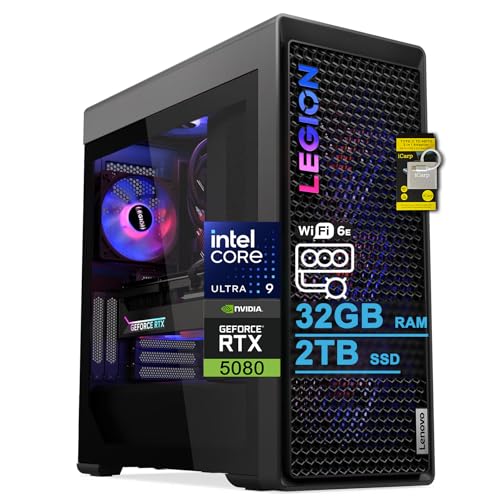
- Best overall for work and 1440p play: Lenovo Legion Tower 7i Gen 10, Core Ultra 9 285K, RTX 5080, 32GB RAM, 2TB SSD — Check on Amazon
- Alienware Aurora ACT1250, Core Ultra 9 285, RTX 5080, 32GB RAM, 1TB SSD — Check on Amazon
- iBUYPOWER Y40 PRO, Ryzen 9 7900X, RTX 5070 Ti, 32GB RAM, 2TB SSD — Check on Amazon
- ZOTAC MEK Gaming PC, Ryzen 7 9700X, RTX 5070 Ti, 32GB RAM, Windows 11 Pro — Check on Amazon
See 2 more Amazon options
- CLX Set, Ryzen 7 9800X3D, RTX 5080, 32GB RAM expandable to 256GB, 2TB SSD — Check on Amazon
- Skytech King 95, Ryzen 7 9800X3D, RTX 5070 Ti, 32GB RAM, 1TB SSD — Check on Amazon
Read the full guide ↓
Disclosure: As an Amazon Associate, reviewstook.com earns from qualifying purchases. Links to Amazon on this page are affiliate links; they cost you nothing extra. Listing details such as price and availability change often, so check the current Amazon listing before you buy.
Most “1440p gaming” guides at lower budgets are exercises in managing disappointment: the panel says 2560×1440, but the game is quietly rendering at 1080p or below and being stretched up to fill it. This guide is the opposite problem, and it is worth saying so in the first paragraph. Every machine below carries either an RTX 5080 or an RTX 5070 Ti — two graphics cards that render modern games natively at 1440p, at high settings, as their normal mode of operation. At a $3,000 ceiling shared with home-office duty, native 1440p is not the aspiration; it is the baseline. The real questions are narrower and more interesting: how much headroom above native you want, whether upscaling should be a tool you reach for or a crutch you depend on, which of these towers will still be driving your desk properly in five years, and — because this is a home office guide — whether the same machine earns its keep between nine and five.
One distinction runs through everything that follows, and getting it straight now will save you money later. Display resolution is what your monitor shows; render resolution is what the graphics card actually draws. Your office desktop, your documents, your browser text — those are always displayed at the panel’s full 1440p, pin-sharp, on any machine in this guide, because drawing a desktop is trivial work. Games are different: a game can render internally at a lower resolution and upscale the result to fill the 1440p panel. That is not cheating — modern upscaling is genuinely good — but it is not native rendering either, and the difference shows in fine detail, in foliage and fences and text overlays, if you know to look. This guide grades every pick on what it honestly renders, names the upscaling arithmetic where upscaling is involved, and treats DLSS as what it is at this tier: headroom you can spend on higher refresh rates or heavier effects, not a substitute for a card that can do the job unaided.
The office half of the brief has not gone away. These are $3,000 towers bought by people whose desks also produce income — video editors, developers, designers, data workers — and several picks below are in this guide at deal prices only, so check the current price on Amazon before you buy. If your work is documents and email and your gaming is an hour of something light, the honest advice is the same as it is in our base guide: buy the machine from Best Home Office PC Under $800, put a good 1440p monitor in front of it, and keep the difference. This page is for the reader whose evenings include demanding games at 1440p and whose days include work that justifies flagship hardware — and who wants one tower to do both jobs without lying about either.
In this guide
Quick Picks
Short on time, or comparing several options at once? Each row below names a buyer type and the machine that suits it, with a link to the listing.
| Buyer type | Pick | Why it stands out | Link |
|---|---|---|---|
| Best overall for work and 1440p play | Lenovo Legion Tower 7i Gen 10 | RTX 5080, 24-core Ultra 9 285K, 2TB SSD and Thunderbolt 4 — native 1440p with the most headroom here | Check on Amazon |
| Best premium brand and support | Alienware Aurora ACT1250 | RTX 5080 and a 1000W Platinum power supply — check price on Amazon; it stands out at its deal price | Check on Amazon |
| Best value — keep the difference | iBUYPOWER Y40 PRO | RTX 5070 Ti and 2TB storage — native 1440p while sitting well below the top of this budget tier; check price on Amazon | Check on Amazon |
| Best documented monitor setup | ZOTAC MEK Gaming PC | The only pick whose graphics outputs are published: HDMI 2.1b plus three DisplayPort 2.1b, and Windows 11 Pro | Check on Amazon |
| Best memory expandability | CLX Set | RTX 5080 with four RAM slots rated to 256GB — at its deal price only | Check on Amazon |
| Best office by day, gaming by night | Skytech King 95 | 9800X3D and RTX 5070 Ti with a published 850W Gold ATX 3 power supply | Check on Amazon |
How These Picks Were Chosen
The starting point is the same six verified machines as our base guide to the Best Home Office PC Under $3000 — real Amazon listings, positioned at or under the $3,000 ceiling in the United States, with deal-dependent picks flagged as deal-only choices. What changed is the judging. Here each machine was re-graded on 1440p criteria: the graphics card’s genuine native-rendering ability at 2560×1440, its graphics memory (both cards in this guide carry 16GB, which matters because textures are loaded at the resolution you intend to display, and upscaling cannot rebuild texture detail the card never loaded), the processor’s ability to feed high-refresh play, and the display outputs the listing actually documents — because a 1440p high-refresh monitor is only as good as the port you connect it to.
We did not use these machines ourselves. We read the maker listings and specification pages and compared what is published. Where a listing does not publish something — a power supply wattage one maker leaves unstated, a full port count several listings never document — the review says so rather than filling the gap with an assumption, and monitor claims are made only where outputs are documented in the verified material. Prices change often in this category, so check the current price on Amazon before you buy, and note that two picks here are in budget only at their deal prices. Anything about gaming is stated in terms of rendering resolution and settings class, never invented frame-rate figures: a claim that a card renders natively at 1440p is a claim about the workload it sustains, and it is made here only for the two card classes where that is honestly true.
Two filters sat on top. The first is the honesty filter from the base guide: a pick earns its place only if a plausible home-office professional’s work justifies it, with the gaming treated as the second job rather than an excuse. The second is specific to this angle: no pick gets credit for 1440p it does not render. Upscaling is described accurately where it belongs — as a quality-of-life tool on top of native capability — and the one marketing habit this guide refuses is calling an upscaled picture “1440p gaming” without saying what was actually drawn.
Render Resolution vs Display Resolution: The One Idea This Guide Runs On
A 1440p monitor always displays 2560×1440 pixels. What varies is how many of those pixels the game actually rendered. At native 1440p, the card draws all of them, every frame, and the image carries the full detail of the render: crisp texture work, clean edges on distant geometry, legible fine text. Below native, the card draws a smaller image and an upscaler reconstructs the 1440p frame from it. The reconstruction is smart — it uses motion data and prior frames — but it is reconstruction. The practical consequences are the ones buyers actually notice: slightly softer fine detail, occasional shimmer on thin objects like fences and power lines, and texture detail capped by what was loaded, because textures are chosen for the display resolution and rendered detail is chosen separately.
DLSS, NVIDIA’s upscaler, works at published per-axis scaling factors, and the arithmetic is worth knowing exactly, because marketing rarely prints it. At a 1440p output: DLSS Quality renders at roughly 1707×960 internally and upscales from there; DLSS Balanced renders at roughly 1485×836; DLSS Performance renders at roughly 1280×720 — which is to say, a 720p-class render wearing a 1440p frame. On the cards in this guide, the sensible way to hold those numbers is: native rendering is the default and needs no apology; DLSS Quality is a nearly free way to buy headroom for a high-refresh panel or heavier ray-traced effects; DLSS Performance at 1440p output is a compromise you make consciously, for the most demanding titles, knowing the render underneath is 720p-class. Every pick below is an RTX card, so DLSS is available on all six — but on all six it is graded as headroom, not as the mechanism that makes 1440p possible.
Frame generation needs the same plain treatment, because it is the feature most often sold as resolution. It is not resolution. Frame generation inserts additional displayed frames between rendered ones; the motion looks smoother, the displayed frame rate climbs, but no additional rendered detail exists in the generated frames, and the underlying render resolution is unchanged. Treat it the way you would treat a good interpolation setting on a television: pleasant, sometimes valuable, and entirely separate from the question of what the card drew. This guide credits it nowhere as a rendering capability.
Finally, the office corollary, which is the reason this distinction matters less at a desk than in a gaming chair: everything that is not a game renders at the panel’s native resolution, always. Text, spreadsheets, code, video calls, photo editing at the pixel level — all of it is drawn at full 1440p by any machine here, including the integrated graphics of a far cheaper PC. When a colleague says their new 1440p setup “looks incredibly sharp for work,” that sharpness is the panel, and it is real, and it costs nothing in graphics power. The graphics card earns its money in exactly one place: the rendered frame inside your games. Buy it for that, sized honestly, and the rest of the desk takes care of itself.
The 6 Best Home Office PCs for 1440p Gaming Under $3,000
Lenovo Legion Tower 7i Gen 10 — Core Ultra 9 285K, RTX 5080, 32GB RAM, 2TB SSD
Who it suits: The professional who wants the strongest version of both jobs — heavy creation work by day, and 1440p gaming with enough headroom that settings menus become a matter of taste rather than negotiation.
The RTX 5080 is the headline for this angle, and its honest description is simple: it renders modern games natively at 1440p at high to ultra settings as its ordinary mode, with headroom left over. That headroom is the real purchase. It is what lets you turn ray-traced effects on without dropping the render resolution to compensate, and what makes DLSS a choice — Quality mode when you are chasing a high-refresh panel’s ceiling — rather than a requirement. The card’s 16GB of graphics memory is the other half of the story: at 1440p, texture budgets are set by the display resolution, and 16GB loads the full texture set the game intends, instead of quietly streaming in lower detail. Around the card, Lenovo has built the most complete professional specification in this guide: a 24-core Core Ultra 9 285K (the listing quotes up to 5.6 GHz) for compiles, exports and batch work; 2TB of SSD storage so game and project libraries both live on the fast disk; a 360mm liquid cooler that sustains long loads quietly; an 850W power supply; Wi-Fi 6E and 2.5-gigabit Ethernet; and Thunderbolt 4, which is the one documented route here to a dock-driven multi-monitor desk. Keyboard and mouse are in the box. Check the current price on Amazon — Lenovo’s own direct channel positions comparable configurations higher in the tier, so the Amazon listing is the channel to watch.
Two limitations belong in bold, and both come from the base guide’s research. Lenovo’s own listing text puts the memory maximum at 32GB, and 32GB is what the machine ships with — so, on paper, it arrives already at its ceiling. Thirty-two gigabytes is years of headroom for gaming and most professional work, but a buyer whose plans include 64GB for virtual machines or very large datasets should verify the figure on the live listing before ordering, because it is the guide’s one genuine specification conflict. And it ships with Windows 11 Home; professionals who need BitLocker, Remote Desktop hosting or domain features will budget for a Pro upgrade. Neither point touches the gaming case — this is the strongest 1440p machine here by a clear margin — but at this tier both deserve reading before the purchase rather than after.
- RTX 5080: native 1440p at high settings with headroom for ray tracing or high-refresh play.
- The 24-core Ultra 9 285K is the most powerful work processor in this guide.
- Thunderbolt 4, 2.5Gb Ethernet, 2TB SSD and 360mm liquid cooling.
Honest limitation: Per its own listing text, memory tops out at the 32GB fitted, and the Windows edition in the box is Home, not Pro.
Choose it if you want the most complete machine here for both jobs and the most native-1440p headroom money in this guide buys. Skip it if 64GB of memory is a firm part of your future, or your gaming is light enough that the 5070 Ti picks below are already more card than you will ever load.

Alienware Aurora ACT1250 — Core Ultra 9 285, RTX 5080, 32GB RAM, 1TB SSD
Who it suits: Buyers who want the same flagship graphics tier as the Legion wrapped in the one genuinely premium package in this guide — a polished case, a global support brand — and who are disciplined enough to buy it only at its deal price.
On the 1440p question, this machine matches the Legion card for card: the RTX 5080 renders natively at 1440p at high settings with the same headroom story — DLSS as an option for high-refresh chasing or ray-traced effects, never as a necessity — and the same 16GB texture budget. The Core Ultra 9 285 is a 24-core processor by Intel’s specification, and the 1000W Platinum-rated power supply is the strongest and most efficient in this guide, which is genuine future headroom for whatever card eventually replaces the 5080. A 240mm liquid cooler handles the processor, and the fit and finish are Alienware’s actual product: this is the pick for a client-facing office where the tower is visible. The buying rule is simple: check price on Amazon and buy it only at its deal price, when it sits within this guide’s ceiling — at that point it competes with everything here; at its usual higher positioning it is over this guide’s ceiling and simply not eligible. Dell-direct comparable configurations sit higher still, which makes the Amazon deal the only sensible channel.
The trade-offs are the standing Alienware ones. The motherboard and power supply use Dell’s proprietary formats, so a failure in year six means Dell parts rather than standard ones — the opposite of the serviceability a decade-minded buyer wants. Storage is 1TB, the thinnest in the guide, on a machine aimed at people with large game and project libraries; budget for a second drive. And the Amazon listing contradicts itself in places — the processor is described with two different core counts in different sections (20 in places, against Intel’s 24-core specification), and the liquid cooling is described both as fitted and as an option — so verify the exact configuration on the live page before ordering and keep screenshots of what you bought. None of this changes the rendering verdict; it changes who should pay for it.
- RTX 5080 with a 1000W Platinum power supply — flagship rendering plus the most PSU headroom here.
- A premium case and finish, backed by a global support brand.
- Deal-price pick — check price on Amazon; its deal positioning is where it competes.
Honest limitation: Dell’s proprietary motherboard and PSU formats work against long-term self-service, storage stops at 1TB, and its usual positioning sits over this guide’s ceiling.
Choose it if the brand, the finish and the support network are worth paying for and the deal price is live. Skip it if a decade of self-service is your plan, or the live price is drifting toward its typical figure — the Legion offers the same card in a more standard tower.

iBUYPOWER Y40 PRO — Ryzen 9 7900X, RTX 5070 Ti, 32GB RAM, 2TB SSD
Who it suits: The buyer who wants genuine native 1440p and a serious work machine, and would like to keep part of the budget for the 1440p monitor this guide assumes you are pairing it with.
The RTX 5070 Ti is the value story of this entire tier, and it deserves a plain statement: it renders modern games natively at 1440p at high settings. One tier below the 5080 buys you a smaller reserve — less room to stack ray-traced effects on top of native rendering, a little more reason to reach for DLSS Quality when a demanding title meets a high-refresh panel — but the rendering itself is native, the 16GB of graphics memory loads the full 1440p texture set, and for the large majority of players this card, not the 5080, is where the money stops being audible. Around it: a 12-core Ryzen 9 7900X built for sustained multi-threaded work, 32GB of DDR5 memory, and 2TB of NVMe storage matching the Legion’s capacity. A keyboard and mouse are in the box, and the warranty is a stated one-year manufacturer term. Its positioning is the headline: it sits well below the flagship towers in this tier — check price on Amazon. That leaves room in the overall desk budget for this machine plus a good 1440p high-refresh monitor, rather than spending the whole budget on the tower alone — and the monitor, as the pairing section below argues, is half the experience.
The limitation is a documentation gap the guide refuses to paper over: the power supply wattage is not published in the verified listing material. On a tower you intend to keep for years, the PSU decides whether a future graphics card is a drop-in or a rebuild, so confirm the wattage and rating on the live listing — or with iBUYPOWER — before buying, and treat a vague answer as a reason to choose the ZOTAC or Skytech below, whose power supplies are published. One further caution: a different configuration, built around a 7800X3D, is also sold as the Y40 PRO under a separate listing — order against the Ryzen 9 7900X specification, not the name alone.
- RTX 5070 Ti: native 1440p at high settings, with 16GB for full texture budgets.
- 12-core Ryzen 9 and 2TB storage — near-flagship work specification.
- Positioned well below the flagships in this tier: leaves budget for the monitor that completes the setup — check price on Amazon.
Honest limitation: The power supply wattage is not published in the verified listing material — confirm it before buying a machine you plan to keep for years.
Choose it if you want native 1440p and a rational total budget for the whole desk. Skip it if an unpublished PSU is a deal-breaker for you and the figure cannot be confirmed — the picks below print theirs.

ZOTAC MEK Gaming PC — Ryzen 7 9700X, RTX 5070 Ti, 32GB RAM, Windows 11 Pro
Who it suits: The buyer speccing the desk as carefully as the tower — someone running a multi-monitor office setup who wants the gaming monitor connected properly, and who needs the professional Windows edition the other five picks leave out.
For this angle, this machine’s distinction is not its card — the RTX 5070 Ti renders natively at 1440p at high settings, with the same 16GB texture budget and the same DLSS-as-headroom story as the Y40 PRO — but its documented outputs. The specification publishes the graphics card’s ports: one HDMI 2.1b and three DisplayPort 2.1b. That is the only pick in this guide whose monitor claims can be made from published outputs rather than assumption, and it matters concretely for a 1440p desk: a high-refresh 1440p panel wants a DisplayPort connection (or a recent HDMI) from the card, and this machine documents three of them alongside the HDMI — a gaming panel plus office monitors, all driven from the card, no dock arithmetic required. The rest of the specification is thoroughly grown-up: it is the only pick shipping Windows 11 Pro, with the BitLocker and Remote Desktop features a working office actually uses; 32GB of DDR5-6000, the fastest memory speed published in this guide; a 1TB NVMe SSD; a 750W 80+ Gold power supply with wattage and rating stated plainly; Wi-Fi 6E and Bluetooth 5.3. Check the current price on Amazon.
The honest limitations are about ceilings. The Ryzen 7 9700X is an eight-core processor — excellent and efficient, and entirely sufficient for gaming, where the card does the work — but in a guide where rivals field 12 and 24 cores, heavy compile queues and render batches will finish sooner elsewhere. And while the 750W power supply is honestly published and entirely correct for the fitted 5070 Ti, no pick in this guide leaves less room above it for a future flagship graphics card. Storage is 1TB, shared with the Alienware as the guide’s thinnest. None of these touches the 1440p verdict; they define the buyer — a professional whose work is serious but not render-farm serious, whose desk runs several monitors, and who would rather have every port and watt published than a specification with gaps.
- Windows 11 Pro in the box — the only pick here shipping the professional edition.
- Documented graphics outputs (HDMI 2.1b + 3× DisplayPort 2.1b) for a multi-monitor desk driven from the card.
- A specification with nothing held back: DDR5-6000 memory, a 750W Gold PSU, Wi-Fi 6E.
Honest limitation: Eight processor cores is the fewest among the guide’s serious picks, 750W leaves the least room for a future flagship graphics card, and storage is 1TB.
Choose it if you need Windows 11 Pro, run multiple monitors, and want a specification with nothing hidden. Skip it if your income rides on render or compile throughput — that is what the 24-core Legion and the 12-core Y40 PRO are for.

CLX Set — Ryzen 7 9800X3D, RTX 5080, 32GB RAM (Expandable to 256GB), 2TB SSD
Who it suits: The buyer whose memory needs will grow into the machine over a decade — data work, virtual machines, huge projects — and who is disciplined enough to buy only at this listing’s deal price.
The gaming half of the case is flagship class: the RTX 5080 renders natively at 1440p at high to ultra settings with the guide’s full headroom story, and the Ryzen 7 9800X3D is the one processor in this guide whose famous feature is actually aimed at this angle — its cache design is engineered for games, and at 1440p, where the card does most of the work but the processor still feeds it, it is a legitimately strong pairing rather than the compromise it represents for pure creation work. The office half of the case is one published figure: the motherboard carries four memory slots rated to 256GB. It ships with 32GB of DDR5-5600, but the ceiling is the story — this is the only pick here that can grow from an office machine into a genuine memory-heavy workstation without replacing the platform. The rest is flagship throughout: 2TB of NVMe storage, an 850W Gold power supply confirmed in the manufacturer’s specification material, a 360mm liquid cooler, and standard-parts boutique construction that can be serviced like a self-build.
Now the two cautions, and they are substantial. First, the price, because it swings widely: check the current price on Amazon. It belongs in this guide only at its deal positioning — when its live price sits above this guide’s ceiling it is not eligible at all, however good the hardware is. Second, the balance of the specification: the X3D premium buys creation work almost nothing over a conventional eight-core chip, so the office justification for this machine rests on the memory ceiling and the 5080, not on the processor’s badge. Buy it for those, at its deal price, and it is a shrewd decade purchase that also happens to be one of the two strongest gaming machines here; buy it at the wrong week’s price, and it is the guide’s easiest mistake.
- RTX 5080 plus the 9800X3D — a flagship gaming pairing, native 1440p with headroom.
- Four memory slots with a 256GB ceiling — the one genuine memory growth path in this guide.
- 2TB storage, published 850W Gold PSU and 360mm liquid cooling.
Honest limitation: A live price that swings widely makes this a deal-price-only pick, and the gaming-specialist processor’s premium buys creation work little.
Choose it if memory growth is your decade plan, you game seriously at 1440p, and the live price is at its deal positioning, within this guide’s budget. Skip it if the live price has drifted toward its highs, or 64GB is a ceiling your memory needs will never test — buy the Legion instead.

Skytech King 95 — Ryzen 7 9800X3D, RTX 5070 Ti, 32GB RAM, 1TB SSD
Who it suits: The hybrid worker this price tier quietly describes more often than any other: a serious machine on the desk from nine to five, and the household’s gaming rig after hours — with the budget justified by both jobs.
The 1440p case is straightforward and strong. The RTX 5070 Ti renders natively at 1440p at high settings with 16GB for full texture budgets; the 9800X3D is a gaming-specialist processor whose cache serves exactly this second job; and the fundamentals underneath are the most upgrade-friendly in the guide — a power supply that is published and properly specified at 850W Gold, ATX 3 standard, which is the detail that decides whether a graphics card upgrade in year five is an afternoon or an ordeal, plus a 360mm liquid cooler and 32GB of DDR5-5600 memory. Check the current price on Amazon — it sits below the 5080 flagships in this tier while giving up nothing in build fundamentals. For the buyer whose evenings genuinely include demanding games at 1440p, this is the machine where the spend is easiest to defend: one tower, two jobs, and the gaming job done natively rather than by upscaling courtesy.
The office-side honesty mirrors the CLX’s: the 9800X3D’s cache premium buys pure office and creation work little — as a work processor it is a strong eight-core chip, but the Legion’s 24 cores clear heavy queues in a different league and the Y40 PRO’s 12-core Ryzen 9 costs less. Storage is 1TB, the guide’s thinnest tier, shared with the Alienware and ZOTAC. Two listing cautions complete the picture: the graphics card brand may vary, as the listing itself states — for this angle that matters less than it might, since every 5070 Ti is the same rendering class, but the delivered card’s port selection is worth checking against your monitor plan on arrival — and near-identical King 95 variants exist under other listings, so match the model number (ST-KING95-1671-W-AM) before ordering.
- RTX 5070 Ti plus the 9800X3D: native 1440p gaming after hours, serious work machine by day.
- An 850W Gold ATX 3 power supply with its rating in print, and 360mm cooling — the upgrade-friendly fundamentals, done properly.
- Positioned below the guide’s 5080 flagships in this tier — check price on Amazon.
Honest limitation: The gaming-specialist processor’s premium buys pure office and creation work little, storage is 1TB, and the graphics card brand may vary by listing.
Choose it if one tower must do a professional day job and native-1440p gaming at night. Skip it if the machine will never be gamed on — that money buys more work cores in the Legion or the Y40 PRO.

Comparison Table
| Product | Processor / Graphics | Best use | Link |
|---|---|---|---|
| Lenovo Legion Tower 7i Gen 10 | Ultra 9 285K (24-core) / RTX 5080 | Native 1440p with the most headroom, plus the strongest work specification | Check on Amazon |
| Alienware Aurora ACT1250 | Ultra 9 285 (24-core) / RTX 5080 | Premium brand and support with flagship rendering — at its deal price | Check on Amazon |
| iBUYPOWER Y40 PRO | Ryzen 9 7900X (12-core) / RTX 5070 Ti | Native 1440p that leaves budget for the monitor | Check on Amazon |
| ZOTAC MEK Gaming PC | Ryzen 7 9700X / RTX 5070 Ti | Windows 11 Pro and documented outputs for a multi-monitor desk | Check on Amazon |
| CLX Set | Ryzen 7 9800X3D / RTX 5080 | Flagship gaming plus memory growth to 256GB — at its deal price only | Check on Amazon |
| Skytech King 95 | Ryzen 7 9800X3D / RTX 5070 Ti | Professional days, native-1440p gaming nights | Check on Amazon |
Pairing the Monitor: Getting 1440p Out of the Card You Bought
A native-rendering card connected carelessly delivers an upscaled-feeling experience anyway, so the pairing deserves its own section. Three things decide what you actually see. First, the connection: a 1440p high-refresh panel should be connected to the graphics card — not the motherboard — over DisplayPort or a recent HDMI, because older HDMI revisions cap the refresh rate a 1440p panel can accept even when the resolution itself connects. Second, the Windows setting: new monitors routinely default to 60Hz until you select the panel’s real refresh rate in Windows display settings, and a 144Hz or 165Hz panel left at 60Hz is the most common way buyers of machines like these silently throw away what they paid for. Third, the render setting in the game itself: leave the render resolution at native 1440p as your default on every pick in this guide, and treat DLSS Quality as the first lever — before lowering settings — when a demanding title or ray-traced effects need headroom. Balanced and Performance are conscious compromises; at 1440p output, Performance is a 720p-class render, and you should know that is what you are looking at when you choose it.
What can be claimed per pick is bounded by what the listings document, and this guide keeps that discipline. The ZOTAC’s card publishes one HDMI 2.1b and three DisplayPort 2.1b outputs — a high-refresh gaming panel plus office monitors, all from the card, is a documented claim there. The Legion documents Thunderbolt 4, which supports dock-driven desk setups. For the other four picks, the verified listings do not publish a full output count, so check the live listing’s port photographs and specification before assuming your exact monitor arrangement connects the way you plan — particularly on the King 95, where the delivered card brand may vary and port selections vary with it. If you are stepping down a tier instead, our Best Home Office PC For 1440p Gaming Under $1500 and Best Home Office PC For 1440p Gaming Under $800 guides apply this same render-versus-display test to cheaper machines — where, honestly, it eliminates more picks than it passes.
How to Choose a Home Office PC for 1440p Gaming Under $3,000
- Start from native, then decide how much headroom to buy. Every pick here renders 1440p natively. The 5080 picks (Legion, Alienware, CLX) buy reserve on top of that — ray-traced effects, higher refresh targets, longer relevance. The 5070 Ti picks (Y40 PRO, ZOTAC, King 95) render natively with a thinner reserve. If your games are demanding and your panel is high-refresh, the reserve is the purchase; if not, it is money parked in a specification.
- Hold the render-versus-display line in every buying conversation. When any listing or salesperson says “1440p gaming,” ask what renders at 1440p. At this tier the answer should be “the game, natively.” Upscaling figures are published arithmetic: DLSS Quality at 1440p output renders around 1707×960 internally, Balanced around 1485×836, Performance around 1280×720. Those are tools, not definitions.
- Count graphics memory, not just the card name. Both cards here carry 16GB, and that is the right budget for 1440p: textures load at display intent, and upscaling cannot invent texture detail that was never loaded. It is one of the quiet reasons this tier ages better than cheaper 1440p claims built on smaller memory buffers.
- Treat frame generation as smoothness, never as resolution. It raises the displayed frame rate without rendering more detail. Pleasant, sometimes valuable — and entirely separate from the question of what the card drew. Do not let it substitute for rendering capability in a buying decision.
- Buy cores for work, cache for games. For creation and productivity work, cores are what you are actually buying — 24 in the Intel flagships, 12 in the Y40 PRO. The X3D chips in the CLX and Skytech aim their premium at games; in this guide, unlike the base one, that premium is at least aimed at one of your two jobs.
- Check the memory ceiling, not just the memory. Every pick ships with 32GB. What separates them is the ceiling: four slots and 256GB in the CLX, against a listing-stated maximum of 32GB in the Legion. A decade purchase is bought on ceilings.
- Verify monitors from outputs, not adjectives. Listings love the phrase “multi-monitor ready.” Count documented outputs instead — the ZOTAC’s HDMI plus three DisplayPorts is a claim you can check; where a listing does not document its outputs, assume nothing and verify on the live page.
- Demand a published power supply. Wattage and efficiency rating decide your upgrade future. Most picks here print theirs (850W Gold, 1000W Platinum, 750W Gold). The exception is the Y40 PRO, which earns its place only after you have confirmed the figure yourself.
- Read the Windows edition. Windows 11 Home is what five of the six machines in this guide ship with. If you need BitLocker, Remote Desktop hosting or business management features, either choose the ZOTAC with Pro in the box or budget for the upgrade.
- Treat deal prices as the price. Either the Alienware is at its deal positioning, within budget, or it is over budget; either the CLX is at its deal positioning, within budget, or it is not eligible here. Decide your walk-away point before you start shopping — check the current price on Amazon — and let a missed deal stay missed.
- Price the whole desk, not the tower. The Y40 PRO plus a good 1440p high-refresh monitor beats a flagship tower in front of a tired 60Hz panel, every evening of the decade. The monitor is half of what “1440p gaming” means.
- Match the model number, not the name. Both the King 95 and Y40 PRO names are stretched over multiple configurations at different prices. The machine the research verified is the one carrying the model number in the review; the same name on a different configuration is a different purchase.
Common Buying Mistakes
- Believing a 1440p monitor makes everything 1440p. The desktop is native; the game’s render is a separate setting, and on lesser machines it is quietly much lower. (On the six machines here it is native — which is the point of the tier.)
- Leaving a high-refresh 1440p panel at its 60Hz Windows default, or connected through a port that caps its refresh rate, and concluding the new PC feels underwhelming.
- Reading DLSS Performance output as “1440p.” At 1440p output it is a render of roughly 1280×720 upscaled — a legitimate compromise in the hardest titles, and a mislabelled one everywhere else.
- Crediting frame generation as rendering power. It smooths motion; it does not draw detail.
- Paying the CLX’s high-week price on the strength of a deal price quoted in a guide. The listing moves widely; only the live price counts — check price on Amazon.
- Starving the monitor budget to feed the tower, then upscaling games to a panel the card could have driven natively had the money been split sensibly.
- Discovering on setup day that the machine holding client data runs Windows Home, and the Pro features the office needs are an upgrade you had not budgeted for.
- Accepting a power supply whose wattage the maker will not publish, on a machine you intend to upgrade. Either get the figure confirmed in writing or buy one of the picks that prints it.
- Assuming “workstation money” means workstation certification. These are powerful consumer towers, not certified workstations; if your software vendor requires certified professional graphics, our Best Workstation PC Under $3000 guide is the right one.
Final Recommendation
- Most professionals who genuinely need this tier: Lenovo Legion Tower 7i Gen 10.
- The premium brand-and-support route: Alienware Aurora ACT1250, at its deal price.
- Best value and the whole-desk budget: iBUYPOWER Y40 PRO.
- Windows 11 Pro and documented monitor outputs: ZOTAC MEK Gaming PC.
- Room to grow memory to 256GB: CLX Set, at its deal price only.
- Work by day, native-1440p gaming by night: Skytech King 95.
Our top two are the Legion Tower 7i, because its RTX 5080, 24-core processor, 2TB of storage and Thunderbolt 4 make it the most complete machine here for both jobs, with the most native-1440p headroom in the guide — and the iBUYPOWER Y40 PRO, because its RTX 5070 Ti delivers honest native 1440p at a positioning in this tier that leaves the monitor properly funded. The ZOTAC is the quiet rational choice for anyone who needs Windows 11 Pro or a documented multi-monitor desk; the CLX is a specialist purchase for memory growth, strictly at its deal price; the King 95 is the honest hybrid; and the Alienware is the premium object, bought for brand and support with open eyes about its proprietary formats. If your gaming is lighter than this tier assumes, the same honesty test applied one step down is in our Best Home Office PC Under $2500 guide, and pure office users belong in Best Home Office PC Under $800. Check the current price on Amazon against the walk-away guidance in each review, confirm the model number, connect the monitor to the card, set its real refresh rate — and then buy once.
Frequently Asked Questions
Do these PCs really render games at native 1440p, or is it upscaling?
Natively. The RTX 5080 and RTX 5070 Ti are both cards whose normal mode at 2560×1440 is to draw every pixel at high settings; that is precisely what separates this tier from cheaper “1440p” guides, where the honest answer is an upscaled 1080p or lower render. DLSS remains available on all six picks, but here it is headroom — spent on high-refresh panels or ray-traced effects — rather than the mechanism that makes the resolution possible. If you ever do engage it, know the arithmetic: at 1440p output, DLSS Quality renders around 1707×960 internally, Balanced around 1485×836, and Performance around 1280×720.
Is 1440p gaming worth it over 1080p for a home office desk?
For the office half, unambiguously: a 1440p panel gives you visibly sharper text and meaningfully more working room than 1080p at typical desk sizes, and every machine here — indeed, far cheaper machines — displays the desktop at full native 1440p. For games, the step up is real but is exactly what this tier pays for: rendering 1440p natively is roughly 1.8 times the pixel workload of 1080p, which is why lower tiers upscale and this one does not have to. Our Best 1440p Gaming PC Under $3000 guide covers the same resolution from a pure-gaming brief if the office half does not apply to you.
RTX 5080 or RTX 5070 Ti — which should I buy for 1440p?
Both render natively at 1440p at high settings, and both carry 16GB of graphics memory, so the difference is reserve, not capability. Choose the 5080 (Legion, Alienware at its deal price, CLX at its deal price) if you run a high-refresh panel, like ray-traced effects turned on, or want the longest relevance from the purchase. Choose the 5070 Ti (Y40 PRO, ZOTAC, King 95) if you would rather fund the monitor properly and accept reaching for DLSS Quality sooner in the most demanding titles. What you should not do is buy the 5080 and connect it to a 60Hz panel — the reserve has nowhere to go.
Can these machines drive a 4K monitor instead?
For office work, yes — displaying a 4K desktop is light work, and documents will look superb. For gaming, be honest about the split: the RTX 5080 picks have genuine 4K capability, with DLSS as the tool that keeps demanding titles comfortable there; the RTX 5070 Ti picks are 1440p cards first, and 4K gaming on them means leaning on upscaling — Quality renders around 2560×1440 internally at 4K output — rather than native rendering. This guide’s recommendation stands: the 1440p high-refresh pairing is the balanced one for this hardware class and this budget. If 4K is the actual goal, start from a 4K brief rather than stretching this one.
Can these machines run multiple monitors?
Where outputs are documented, yes, concretely: the ZOTAC’s graphics card publishes one HDMI 2.1b and three DisplayPort 2.1b outputs, which is a gaming panel plus office monitors driven from the card, and the Legion documents Thunderbolt 4 for dock-driven setups. For the other picks, the listings we verified do not publish a full output count, so check the live listing’s port photographs and specification before assuming a three- or four-monitor setup will connect the way you plan — and on the King 95, check the delivered card, since its brand may vary.
Is a $3,000 PC overkill if my gaming is only a few evenings a week?
Quite possibly, and the honest test is the office half: if your work does not itself justify flagship hardware, a few evenings a week of gaming rarely does either, because the 5070 Ti class appears in much cheaper machines and the 1440p experience at native rendering is preserved. Readers new to speccing a machine may also find our Best Home Office PC For Beginners Under $3000 guide a gentler route through the same six machines. Buy this tier when the desk earns money on the hardware or the decade-long buy-once logic genuinely fits — not for the resolution alone.
- Best Home Office PC Under $3000
- Best Home Office PC Under $2500
- Best Home Office PC Under $1500
- Best Home Office PC Under $800
- Best Home Office PC For 1440p Gaming Under $1500
- Best Home Office PC For 1440p Gaming Under $800
- Best Home Office PC For Streaming Under $3000
- Best Home Office PC For Small Spaces Under $3000
- Best Gaming PC Under $3000
- Best Mini PC Under $3000


