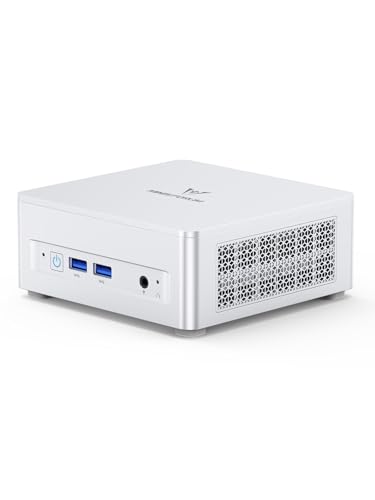
Where to buy
Check the latest price, availability and delivery on Amazon. Orders are placed on Amazon. We may earn a commission from qualifying purchases.
- Best overall for a small space: Minisforum UM870 Slim, Ryzen 7 8745H, 32GB RAM, 1TB SSD — Check on Amazon
- Apple Mac mini, M4 Chip, 16GB Memory, 256GB SSD — Check on Amazon
- Beelink SER8, Ryzen 7 8745HS, 32GB RAM, 1TB SSD — Check on Amazon
- Acer Aspire C27 All-in-One, 27 Inch, Ryzen 5 7430U, 16GB RAM, 512GB SSD — Check on Amazon
See 2 more Amazon options
- GMKtec NucBox M6 Ultra, Ryzen 5 7640HS, 32GB RAM, 512GB SSD — Check on Amazon
- GMKtec NucBox K8 Plus, Ryzen 7 8845HS, 32GB RAM, 1TB SSD — Check on Amazon
Read the full guide ↓
Disclosure: As an Amazon Associate, reviewstook.com earns from qualifying purchases. Links to Amazon on this page are affiliate links; they cost you nothing extra. Listing details such as price and availability change often, so check the current Amazon listing before you buy.
A small-space office is not really a shopping problem — it is a placement problem. The desk is a kitchen table corner, a spare-room shelf, the end of a bedroom dresser, or a patch of worktop that has to go back to being a kitchen by dinner. The six machines in this guide are the same six we recommend to home workers spending up to $800 generally, but this version grades them on a different axis: where the box physically lives, what it needs around it, and how much of your limited surface it takes with it. Five are mini PCs, small enough as a class to sit behind a monitor, under a shelf or on a bookcase. One is an all-in-one whose screen is the whole footprint. Between them they cover every honest answer to “my office is tiny” — provided you measure first — which is why this guide’s advice ends with a five-step checklist to run before any money moves.
Two pieces of honesty belong up front. The first is about size claims. Only one pick in this guide — the Minisforum UM870 Slim — comes with dimensions and a mounting solution documented in our research (130 × 127 × 50mm, with a VESA mount in the box), so it is the only machine here we can promise fits a specific hiding place. For the rest, our research documents no dimensions, volumes or mounting patterns, and we will not invent any: they are graded by form-factor class, and the checklist routes you to the live listing to measure the exact unit you are buying. The second is about money. Eight hundred dollars is more than documents, email and video calls require — the machines in our $500 guide do that work completely — and prices in this tier move often, as memory and SSD costs shift. Check the price on Amazon for each pick before you buy, and treat the live listing — not any printed figure — as the number that matters.
In this guide
Quick Picks
Short on time, or comparing several options at once? Each row below names a small-space situation and the machine that suits it, with a link to the listing.
| Your space | Pick | Why it stands out here | Link |
|---|---|---|---|
| Best overall for a small space | Minisforum UM870 Slim, Ryzen 7 8745H | The only pick with documented dimensions and a VESA mount in the box — it can vanish behind your monitor | Check on Amazon |
| Smallest box on the desk | Apple Mac mini, M4 Chip | A five-inch-square footprint and near-silence — if your work lives in macOS or a browser | Check on Amazon |
| Best for a shared room | Beelink SER8, Ryzen 7 8745HS | Near-silent under load, so it can live in the open in a bedroom or studio — check price on Amazon | Check on Amazon |
| Best one-object desk | Acer Aspire C27 All-in-One, 27 Inch | Screen, PC, webcam and speakers in a single unit — one power cord, nothing else to place | Check on Amazon |
| Best value mini | GMKtec NucBox M6 Ultra, Ryzen 5 7640HS | 32GB of socketed memory, USB4 and triple displays at a value-tier position — check price on Amazon | Check on Amazon |
| Best for ports in a tight corner | GMKtec NucBox K8 Plus, Ryzen 7 8845HS | OCuLink, dual USB4, dual networking and four-display output — check price on Amazon before ordering | Check on Amazon |
How These Picks Were Chosen
The budget was applied the way a careful buyer would apply it: every machine below is a real Amazon listing chosen for this under-$800 tier in the United States. Because prices in this category move often, check the price on Amazon for each pick before ordering, and walk away from any listing that has drifted well above this tier when you shop. Machines positioned permanently above this budget were left out entirely, however strong they might be.
On top of the usual home-office filters — every pick drives at least two external displays from its own named ports, memory and storage were weighed for longevity, and warranty terms were read as a specification — this guide applies an installation filter. A pick earns a documented installation fact only where the underlying research records one: a dimension, a volume, a mounting pattern, a maker’s noise figure. Where the research records nothing, the pick is graded by its form-factor class — mini-PC slab, five-inch-square desktop, 27-inch all-in-one — and the review says so, pointing you to the live listing for the measurements that decide fit. No dimension, volume, VESA pattern or noise figure has been carried over from any other guide or guessed from a photograph.
Three installation questions then decide the order. The first is the footprint itself: how much surface disappears under the machine, and whether it can leave the surface entirely — behind a monitor, on a wall, under a shelf. The second is the entourage: every mini PC arrives with a power supply that needs a home of its own, plus a drop of cables to monitors, network and peripherals, and in a small room that entourage is often larger than the computer. The third is air. Small machines breathe through their cases, and a pick that needs open air around its vents is a poor match for the closed cabinet or sealed hutch that small rooms tempt you toward — this guide refuses the sealed cabinet for all six picks, and the reviews grade each machine on how much breathing room its cooling design honestly needs. One more route was researched seriously and appears below as a section rather than as linked picks: renewed one-liter business desktops, the original small-office machines, judged on the warranty behind them and the years realistically left in them.
The 6 Best Home Office PCs for Small Spaces Under $800
Minisforum UM870 Slim (Ryzen 7 8745H, 32GB RAM, 1TB SSD)
Who it suits: Small-space workers who want the computer to disappear entirely — mounted behind the monitor, with the full $800-tier specification inside it.
This is the only pick in the guide whose installation can be described in numbers, because it is the only one whose research documents them: the case measures 130 × 127 × 50mm — 0.82 liters — and a VESA mount is included in the box. That combination makes it the one machine here that can genuinely leave your desk surface altogether, bolted to the back of a monitor where it takes no footprint at all and its cables drop straight down behind the screen. Inside that case sits the full tier specification rather than a cut-down one: a Ryzen 7 8745H (eight cores, sixteen threads, to 4.9GHz) with Radeon 780M graphics, 32GB of DDR5-5600 in two socketed SO-DIMM slots (upgradeable to 96GB), and a 1TB PCIe 4.0 SSD with a second M.2 slot free. The rear USB4 port carries data, video and power, so a USB-C monitor or dock can run the desk down a single cable; HDMI 2.1 and DisplayPort 1.4 complete a three-display setup, networking is 2.5-gigabit Ethernet plus Wi-Fi 6E, and it arrives with Windows 11 Pro and a two-year warranty.
The installation details are as good as the headline. Minisforum cools the chip with a phase-change thermal layer, three copper heat pipes and a large, slow fan, and rates the machine below 35dB in its performance mode — quiet enough that behind-monitor mounting puts what little sound it makes behind a screen as well. The honest debits: the chassis is plastic, its single USB-C port is on the rear panel with none on the front (a real consideration once the box is mounted out of reach — plan the cable drop before you bolt it down), two rear USB ports are still USB 2.0, and the fitted MediaTek Wi-Fi card has poor Linux driver support, so Linux users should budget for an Intel replacement card. Two buying disciplines apply. On price: check the price on Amazon before ordering, since third-party sellers on this listing can sit well above this tier. On configuration: this chassis is also sold in other configurations through near-identical listings, so confirm on delivery day that what arrived is the configured 32GB/1TB Windows machine you ordered.
- Documented 130 × 127 × 50mm case with a VESA mount in the box — the only true zero-footprint install here.
- Eight-core Ryzen 7 8745H with Radeon 780M graphics, 32GB of socketed DDR5 and two M.2 slots — nothing cut down for size.
- Rear USB4 runs a docked desk down one cable; maker-rated below 35dB, with a two-year warranty.
Honest limitation: A plastic chassis with its only USB-C port on the rear, a MediaTek Wi-Fi card Linux users will want to replace, and pricing that can drift above this tier — check the live price on Amazon before buying.
Choose it if your monitor has free VESA holes and you want the computer gone from the desk entirely. Skip it if the live price has drifted well above this tier when you shop — at that point, the Beelink below is the smarter purchase.

Apple Mac mini (M4 Chip, 16GB Memory, 256GB SSD)
Who it suits: Apple-ecosystem workers who want the smallest, quietest object on the desk and will never open it.
Graded purely as furniture, the Mac mini is the easiest placement in this guide: a five-inch-square box that is effectively silent in office use, draws little power, and asks for nothing around it but air. Apple’s M4 chip (ten CPU cores, ten GPU cores) delivers desktop-class performance from that footprint, and macOS is a genuinely low-maintenance place to work — no driver hunting, no fan noise on calls, and a resale value years from now that none of the Windows minis will match. Display support is verified from Apple’s own specifications: up to three external displays — two at up to 6K over Thunderbolt plus a third at up to 5K over Thunderbolt or 4K over HDMI — through three rear Thunderbolt 4 ports and an HDMI port, with two USB-C ports and a headphone socket on the front for the peripherals you reach for daily. Networking is Gigabit Ethernet, Wi-Fi 6E and Bluetooth 5.3. Check the price on Amazon before ordering — third-party sellers on the listing sometimes ask considerably more than Apple’s own offer, so stick with a listing at this tier’s level and never pay a marked-up ask.
The small-space catch is not the box; it is what the box’s specification adds back to the desk. Nothing inside a Mac mini can be upgraded: the 16GB of memory and 256GB of storage are fixed for the machine’s life, and 256GB fills quickly once a photo library and a few years of files arrive — so most buyers should plan an external SSD from day one, and that drive is a second object with its own cable in a room where objects are the problem. Plan for the Mac, and measure the Mac, as machine plus drive. The other limit is absolute rather than spatial: it runs macOS and nothing else, so if your employer or clients depend on Windows-only software, no amount of tidiness makes it the right answer. For the browser-based, Apple-living worker, though, it is the machine here least likely to be thought about between purchase and replacement.
- The smallest documented footprint in the guide — a five-inch-square box, effectively silent, sipping power.
- Three-display support verified against Apple’s own specifications, over Thunderbolt 4 and HDMI.
- Check price on Amazon — third-party asks on this listing can run high, so buy from Apple’s own offer at this tier’s level.
Honest limitation: Memory and storage are fixed forever at 16GB and 256GB — the thinnest specification here — so an external drive joins the desk from day one, and it runs macOS only.
Choose it if your work lives in a browser or Apple’s apps and the tidiest possible desk is the priority. Skip it if you need Windows software, expect to upgrade memory or storage later, or keep large files on the machine itself.

Beelink SER8 (Ryzen 7 8745HS, 32GB RAM, 1TB SSD)
Who it suits: Workers whose office shares a room with their life — a bedroom desk, a studio flat — where the machine must live in the open and be inaudible doing it.
Our research documents no dimensions or mounting pattern for the SER8, so it is graded here by its form-factor class — a mini-PC slab in the same class as the Minisforum above — and the checklist below sends you to the live listing to measure the exact unit before ordering. What the research does document is the trait that decides its placement: the SER8’s vapor-chamber-style cooling has made it one of the quietest mini PCs in its class under sustained load, and in a small space that is an installation feature, not a luxury. A machine you cannot hear does not need hiding; it can sit in the open on a shelf or beside the monitor through a day of calls, which frees you from the mount-or-vanish problem entirely. The specification matches the top pick closely: a Ryzen 7 8745HS (eight cores, sixteen threads, to 4.9GHz) with Radeon 780M graphics, 32GB of DDR5 in two slots upgradeable to 64GB, and a 1TB PCIe 4.0 SSD with a second M.2 slot free. Displays run over HDMI 2.1, DisplayPort 1.4 and USB4 — three screens — with 2.5-gigabit Ethernet, Wi-Fi 6 and Windows 11 Pro fitted.
Two honest notes decide whether it is your pick. The first is price discipline: check the price on Amazon before ordering, because this listing can sit above this guide’s tier. It belongs here only as a disciplined purchase: wait until the live price sits within this budget, and it is arguably the nicest home office machine in the guide; pay a marked-up ask unchecked and you have simply overpaid. The second is that its advantages over the UM870 Slim are refinement — build, acoustics, a cleaner port layout — not speed; their office performance is effectively the same, so if a documented behind-monitor mount matters more than silence, the Minisforum is the pick, and if silence matters more, this is. Light photo editing is comfortable on the 780M, and the calm cooling keeps long export sessions civilized in a shared room.
- The quietest machine in this guide under sustained load — built to live in the open in living spaces.
- Full specification: 8745HS, 32GB of upgradeable DDR5, 1TB SSD plus a free second M.2 slot.
- Three-display output over HDMI 2.1, DisplayPort 1.4 and USB4, with Windows 11 Pro installed.
Honest limitation: Its live price can sit just over this guide’s line, making it a pick to buy only when the Amazon price is back within this tier — and what the money buys is refinement, not extra performance, over the Minisforum above.
Choose it if your desk shares a room with your life and fan noise would reach you all day. Skip it if you need to buy today at whatever the listing says, or if a documented mounting solution matters more than quiet — the UM870 Slim is the better-documented install.

Acer Aspire C27 All-in-One (27 Inch, Ryzen 5 7430U, 16GB RAM, 512GB SSD)
Who it suits: Small-space workers starting from an empty surface who want exactly one object on it — no separate box, monitor, webcam or speakers to place.
Every other pick in this guide is a box that still needs a monitor, a webcam and speakers before it is a workstation, and each of those is another placement decision. The Aspire C27 collapses them into one: a 27-inch Full HD IPS panel at 120Hz with slim bezels, and behind it a Ryzen 5 7430U processor, 16GB of DDR4 memory, a 512GB NVMe SSD, Wi-Fi 6E, a 2MP webcam with a physical privacy shutter, speakers and Windows 11 Home. Acer’s configuration includes a wired keyboard and mouse, so the box it arrives in is genuinely the whole purchase — and the whole installation is one unit on the desk and one power cord leaving it, the shortest cable drop in this guide. Check the price on Amazon before ordering — as a premium all-in-one in this tier, it should sit within this guide’s budget when you buy.
Grade it as what it is, though: the largest single object here. A 27-inch screen needs desk depth — enough room to sit at a comfortable viewing distance — and our research documents no stand footprint for it, so measure your surface and check the live listing’s dimensions before ordering; on a shallow shelf-desk, the screen you cannot push back far enough is a worse outcome than a mini PC ever causes. The performance trade should be understood just as clearly. The 7430U is a six-core laptop-class chip a clear tier below the eight-core Ryzen 7 machines above, the 16GB of memory and 512GB of storage sit a tier below the 32GB/1TB standard the minis set, and the integrated graphics are for office work, media and light photo editing — not regular video work. An all-in-one also couples the screen’s life to the computer’s: when the PC side ages out, a perfectly good display goes with it, and internal upgrades are far more limited than in any mini here. Bought for the one-object desk it creates, it keeps its promises exactly. Bought expecting mini-PC performance, it will disappoint — the minis are where the performance lives.
- The complete desk in one object: 27-inch 120Hz screen, webcam with privacy shutter, speakers, keyboard and mouse.
- One power cord and no separate box to place — the simplest installation in the guide.
- A complete workstation for mini-PC money — check price on Amazon.
Honest limitation: A laptop-class processor, 16GB of memory and graphics a tier below the mini PCs; the screen needs real desk depth, and when the computer ages out, the screen goes with it.
Choose it if you need a screen anyway and your desk has the depth for a 27-inch panel. Skip it if your surface is shallow, you already own good monitors, or you plan to upgrade components over the machine’s life.

GMKtec NucBox M6 Ultra (Ryzen 5 7640HS, 32GB RAM, 512GB SSD)
Who it suits: Small-space workers who want the tier’s defining features in a mini-PC-class box — and would rather put money toward the monitor arm or mount than toward a pricier computer.
Like the SER8, the M6 Ultra is graded by form-factor class: our research documents no dimensions or mounting hardware for it, so treat it as a mini-PC slab whose exact measurements you confirm on the live listing before ordering. What is documented is the specification, and it reads like a deliberate answer to the question “which parts of the $800 spec actually matter?” It keeps the parts that matter: 32GB of DDR5 in two SO-DIMM slots (dual channel, upgradeable), a USB4 port for one-cable docking, triple 4K display output across USB4, HDMI 2.0 and DisplayPort, dual 2.5-gigabit Ethernet, and Windows 11 Pro. Its Ryzen 5 7640HS has six cores and twelve threads to 5.0GHz — two cores fewer than the Ryzen 7 machines above, a difference office work, browsing and calls will never show you. It sits at the value end of this tier — check the price on Amazon — and in a small room that positioning matters: a value-tier mini leaves more of the budget for the monitor arm, shelf or second screen that makes the room work.
The savings show in two places, stated here rather than discovered later. The fitted SSD is a 512GB PCIe 3.0 drive — half the capacity of the 1TB drives above and a generation slower — though further M.2 slots (including a PCIe 4.0 one) make adding fast storage later a small job inside the box, rather than an external drive joining the desk. And the Radeon 760M graphics sit a step below the 780M in the Ryzen 7 picks: entirely capable of driving three office displays and handling light photo work, but the wrong choice if your side projects include regular video editing. GMKtec’s warranty on the Amazon listing is one year — the shortest in this guide, against the UM870 Slim’s two. One configuration note: the linked listing is the 512GB configuration reviewed here, so check the configuration line matches before ordering. Judged as a small-space purchase rather than a spec-sheet contest, this is the pick that proves the tier’s headline features do not require the tier’s headline price.
- 32GB of dual-channel, socketed DDR5 and a USB4 port at a value-tier position — this tier’s essentials, for less.
- Triple 4K display output and dual 2.5GbE networking in a mini-PC-class box.
- Spare M.2 slots keep future storage inside the case instead of on the desk.
Honest limitation: The bundled 512GB SSD is PCIe 3.0, the 760M graphics sit a class below the 780M picks, and the listing’s warranty is one year — the shortest here.
Choose it if you want 32GB, USB4 and three screens at a value-tier position. Skip it if you regularly edit video or want the strongest integrated graphics — that is what the Ryzen 7 picks above charge extra for.

GMKtec NucBox K8 Plus (Ryzen 7 8845HS, 32GB RAM, 1TB SSD)
Who it suits: The small-space worker who is also the household’s tinkerer — many screens, many peripherals, a home network to run — and can give the cables a managed home.
Graded by class like the other GMKtec pick — no dimensions or mounting pattern are documented in our research, so measure from the live listing — the K8 Plus is the maximal mini here. Its Ryzen 7 8845HS is the strongest chip in the guide (eight cores to 5.1GHz, Radeon 780M graphics), and the port selection is in another league: an OCuLink port that can carry a desktop graphics card in an external dock, two USB4 ports, dual 2.5-gigabit Ethernet, HDMI 2.1 and DisplayPort — enough outputs for a four-screen desk, and enough networking for the machine to double as a small home server after hours. Memory is 32GB of dual-channel DDR5 in two SO-DIMM slots (the listing claims expansion to 128GB), storage is a 1TB PCIe 4.0 SSD with a second M.2 slot free, and Windows 11 Pro is installed; the linked listing is the complete configuration, so confirm the configuration line says so before ordering. For the office itself, the ports are the entire argument — docks, drives, a second network, all without adapters stacked on adapters.
The small-space honest note is that every one of those ports is also a cable, and this pick has the heaviest cable drop in the guide: two display cables minimum, two network runs if you use both ports, USB4 drops to docks, and — if the OCuLink port is ever exercised — an external graphics dock that is a second box with its own power supply, at which point the “mini” installation is a shelf of equipment. Buy it for the ports you will plug in this year, and give the drop a planned route — a cable channel, a desk grommet, a shelf edge — rather than letting it colonize the surface the machine was bought to save. The price catch is the widest in the guide and is stated plainly: this listing’s price moves more than any other pick here, and it can drift well above this tier. The rule is non-negotiable: check the price on Amazon, buy only when it sits within this under-$800 budget, and walk away from a marked-up listing. When its price is in line, it is the most expandable small computer here; when it is not, it does not belong in your cart.
- OCuLink plus dual USB4: the only pick that can add a desktop graphics card later — in a dock you must also find room for.
- Dual 2.5GbE networking plus HDMI 2.1 and DisplayPort — four-display desks and home-server duty both covered.
- The strongest processor in the guide, 32GB of socketed DDR5 and a free second M.2 slot.
Honest limitation: Its price is the most volatile in the guide — it can drift well over budget — and its port count means the heaviest cable management here. When the live price sits within this tier it is excellent; above that it does not belong in your cart.
Choose it if you will actually use the ports and can route the cables properly. Skip it if the listing is priced well above this tier, or your desk is a normal two-monitor setup the other picks serve identically.

Comparison Table
| Product | Processor / Graphics | Installation profile | Link |
|---|---|---|---|
| Minisforum UM870 Slim | Ryzen 7 8745H / Radeon 780M, 32GB, 1TB | Documented 130 × 127 × 50mm; VESA mount in box — zero footprint behind a monitor | Check on Amazon |
| Apple Mac mini | Apple M4, 16GB, 256GB | Five-inch-square box; plan an external SSD as a second object | Check on Amazon |
| Beelink SER8 | Ryzen 7 8745HS / Radeon 780M, 32GB, 1TB | Mini-PC class; near-silent, so it can live in the open in shared rooms | Check on Amazon |
| Acer Aspire C27 All-in-One | Ryzen 5 7430U, 16GB, 512GB, 27″ screen | One object and one power cord; needs desk depth for the 27-inch panel | Check on Amazon |
| GMKtec NucBox M6 Ultra | Ryzen 5 7640HS / Radeon 760M, 32GB, 512GB | Mini-PC class at a value-tier position — check price on Amazon | Check on Amazon |
| GMKtec NucBox K8 Plus | Ryzen 7 8845HS / Radeon 780M, 32GB, 1TB | Mini-PC class with the heaviest cable drop — plan the route before it arrives | Check on Amazon |
Measure Before You Buy: The Five-Step Checklist
Every disappointment in a small-space setup is a measurement that happened after the purchase instead of before it. Run these five steps in order — they take one evening with a tape measure and the live listings open — and the machine you order will be the machine that fits.
- Measure the spot. Start where the computer will actually live, not where you hope it might. For a behind-monitor mount, confirm the monitor has free VESA holes and enough clearance behind the panel for the box and its cables — the UM870 Slim is the documented case here at 130 × 127 × 50mm with its mount in the box; for every other pick, take the dimensions from its live listing and compare them against the space, because our research documents none. For a shelf or bookcase, measure depth as well as width: the box, its cables’ bend radius and the power supply all share that depth. For the Acer C27, measure desk depth against a 27-inch screen’s comfortable viewing distance — if you cannot sit far enough back, no specification fixes it.
- Check the ventilation clearance. Every machine here breathes through its case, and every one needs open air around its vents — a few centimetres on the intake and exhaust sides, more above a hard-working box. This step is also a refusal: do not plan to seal any of these six inside a closed cabinet, a shut hutch or a drawer, however tidy that looks in a photograph. Heat that cannot leave shortens the machine’s life and makes its fan audible doing it. If the only available spot is enclosed, change the spot — a wall mount, an open shelf, the back of the monitor — not the rule.
- Give the power supply an address. The computer is not the only object arriving. Mini PCs run from a power supply whose brick or cord needs a home: on the floor beside the desk leg, on the shelf behind the box, never buried in the cable tangle where its heat has nowhere to go, and never where it becomes the thing your foot finds in the dark. Decide that address now, while the tape measure is out — in a small room the brick is routinely the piece that ends up colonizing the surface the computer was bought to save. The Acer C27 is the exception that proves the step: its single power cord is the whole question.
- Trace the cable drop. Count what will actually be plugged in and follow each cable from port to destination. A three-monitor mini needs three display drops (or one USB4 cable to a dock, on the picks that offer it — the UM870 Slim’s rear USB4 exists for exactly this); the K8 Plus can generate the heaviest drop in the guide if its dual networking and four displays are all exercised; the Mac mini’s drops are tidy until the external SSD joins them. Cables need length, a route — behind the desk, down a channel, along a shelf edge — and slack for the day you move things. If the drop has nowhere honest to go, the setup will look improvised no matter which machine you buy.
- Then order — with the live price and the configuration checked. Only now does money move, and it moves with the discipline the reviews set: check the price on Amazon for each pick, and order only when the live price sits within this under-$800 tier — the K8 Plus in particular can drift well above it, and third-party asks on the Mac mini and UM870 Slim listings can run high. Before paying, read the listing’s configuration line once more — configured machine, not a barebone or lookalike variant; the right memory and storage; the operating system you expect. On delivery day, repeat that check against the machine in front of you while the return window is open.
How to Choose a Home Office PC for a Small Space
- Start with the honesty test. If your work is documents, email, browsing and calls, you do not need this tier — the machines in Best Home Office PC Under $500 do that job completely, and in a small room the money saved buys the monitor arm, the shelf or the chair you will actually notice. Spend at this level only when you can name what the money buys: extra screens, heavier multitasking, creative side work, or years of additional service.
- Decide where the computer lives before choosing it. Behind the monitor, on an open shelf, beside the screen, or as the screen — each answer points at a different pick in this guide. The UM870 Slim is the only documented behind-monitor install; the Acer is the only one-object answer; the quiet minis are the ones that can live in the open in a shared room.
- Treat documented dimensions as a feature. A pick whose research records its size and mounting can be promised to a specific hiding place; a pick graded by class cannot, however small it looks in photographs. Measure the class-graded picks from their live listings, and never import a dimension from a different model that merely shares a name or a brand.
- Count your monitors, then count the cables. Two displays is the working minimum now, and three is fast becoming normal. Every pick here drives at least two from named ports; the UM870 Slim, SER8, K8 Plus and M6 Ultra drive three or more. In a small room, prefer the route with the fewest drops: a USB4 dock or monitor can collapse a three-cable tangle into one cable.
- Treat 32GB of memory as this tier’s dividing line. Dozens of tabs, large spreadsheets and a video call at once is where 16GB machines start to feel their age. At $800, 32GB should be fitted, not promised — and prefer socketed memory (UM870 Slim, SER8, K8 Plus, M6 Ultra) over soldered, so the machine grows instead of being replaced.
- Read the storage line as a footprint line. 1TB fitted means no external drive on the desk; 512GB is workable if files live in the cloud; 256GB — the Mac mini — means an external SSD from day one, a second object to place and cable. A free internal M.2 slot is worth real money in a small room: it turns a storage shortage into a ten-minute internal upgrade.
- Buy the noise level, not just the specification. An office PC runs all day in the room you live in, and in a small room you are always at working distance from it. The SER8 and UM870 Slim are built and reviewed as near-silent machines and the Mac mini is effectively inaudible; if a listing says nothing about acoustics, assume you will hear it on calls.
- Check the live price and keep your budget. Prices here move often as memory costs shift. Both the SER8 and the K8 Plus are excellent within this under-$800 tier and poor value above it. Fix your budget before you shop, check the price on Amazon for each pick, and let marked-up listings pass instead of chasing them.
- Check the warranty like a specification. Terms here range from one year (the M6 Ultra’s listing) to two (the UM870 Slim) to Apple’s support system. On a machine bought to be forgotten about for five years, treat the warranty as the maker’s own estimate of its reliability.
- Match the operating system to your work, not to the hardware. The Mac mini, for all its tidiness, is simply the wrong tool when your work depends on Windows-only software. If your employer is browser-based and you live in Apple’s ecosystem, the choice reverses just as completely.
Renewed Business Desktops: The Original Small Offices
Every machine above has a shadow competitor positioned well below this tier and designed for exactly this problem: the renewed business desktop. When companies retire fleets of one-liter office PCs, authorized refurbishers clean, test and resell them with Windows 11 Pro installed. Lenovo’s ThinkCentre M75q Gen 2 is the typical example — a six-core Ryzen machine sold through renewed Amazon listings in configurations from 16GB/256GB up to 32GB of memory with a 1TB drive fitted by the refurbisher; HP’s EliteDesk and Dell’s OptiPlex minis follow the same pattern. For pure office work, a renewed business mini at a budget-tier position does the documents-and-browsers job about as well as anything in this guide, and pretending otherwise would be dishonest. We link no single listing, deliberately: renewed configurations are sold under many near-identical refurbisher listings, and none could be pinned reliably enough to recommend.
Two questions decide whether a renewed machine is a bargain. The first is warranty: a new mini PC carries a maker’s warranty of one to two years; a renewed machine’s protection is whatever the refurbisher states — some are Microsoft Authorized Refurbishers with proper support and a written term, others are effectively sold as seen. Buy renewed only where warranty and returns are written down. The second is longevity: a business mini from a few years ago has a proven, serviceable design with socketed parts, but its processor is a generation or three behind, its realistic remaining life is three to five years rather than five to eight, and its graphics serve office displays only. Our judgment for small spaces: renewed wins for a second desk, a spare, a tight budget, or a pure-office workload with a good refurbisher behind it — the one-liter class was mounting behind monitors before it was fashionable. New wins when this is your only computer, when you want the 780M’s display and creative headroom, and when the five-to-eight-year horizon is the point of spending $800.
Common Buying Mistakes
- Sealing a mini PC inside a closed cabinet or hutch. It looks tidy for a week and cooks the machine for years; every pick in this guide needs open air around its vents.
- Measuring the computer but not its entourage. The power supply, the cable bends behind the box and the dock all share your shelf depth — measure the installation, not the product shot.
- Assuming every mini PC mounts behind a monitor. In this guide only the UM870 Slim documents a VESA mount in the box; for the rest, check the live listing for mounting points before planning a zero-footprint install.
- Buying a 27-inch all-in-one for a shallow desk. If you cannot sit at a comfortable distance from the panel, the one-object desk becomes the one-object problem.
- Paying a marked-up price. Listings here can swing widely; buying a K8 Plus at a price well above this tier because a guide listed it “under $800” — without checking the live price on Amazon first — is the easiest way to waste money in this category.
- Ordering the lookalike configuration. Several of these models are also sold as barebones or in lesser configurations under near-identical listings; the price looks like a bargain because part of the computer is missing. Read the configuration line before you pay.
- Forgetting the Mac mini’s second object. Its 256GB fills on a schedule, so the external drive is part of the purchase — and part of the footprint — from day one.
- Spending $800 on a pure office workload. Documents and browsers do not use this tier’s hardware; the cheaper guides exist because they are the honest answer for most desks, small rooms included.
- Skipping the arrival check. Five minutes confirming the processor, memory and storage match your order is what stands between you and living with the wrong configuration from a lookalike listing.
Final Recommendation
- Most small-space workers: Minisforum UM870 Slim — check price on Amazon.
- The smallest desk object: Apple Mac mini M4 — check price on Amazon, with an external drive planned.
- A desk in a shared room: Beelink SER8 — buy only when its live price sits within this tier.
- One object, one cord: Acer Aspire C27 All-in-One — check price on Amazon.
- The essentials at a value tier: GMKtec NucBox M6 Ultra.
- Ports and future expansion: GMKtec NucBox K8 Plus — buy only when its live price sits within this tier.
Our top two for a small office at this budget are the Minisforum UM870 Slim — the only pick that can be promised to a specific hiding place, with documented dimensions, a mount in the box, three displays and memory and storage that can grow — and the Apple Mac mini, for Apple households that want the smallest, quietest object on the desk and accept its fixed specification and external drive as the price of that tidiness. If the budget is firm and today is buying day, the GMKtec M6 Ultra delivers this tier’s defining features at a value-tier position and leaves money for the arm or shelf that makes the room work; if your desk needs a screen anyway, the Acer C27 delivers the whole workstation in one line and one object. Workers in even tighter quarters should see Best Home Office PC For Small Spaces Under $500, first-time buyers should start with Best Home Office PC For Beginners Under $800, and anyone whose office corner doubles as a streaming corner should read Best Home Office PC For Streaming Under $800. Whichever you choose: run the five-step checklist before you order, set your budget before you shop, and check the price on Amazon for the pick you choose.
Frequently Asked Questions
Can I mount one of these PCs behind my monitor?
One of them, on documented evidence: the Minisforum UM870 Slim ships with a VESA mount in the box and its case dimensions are documented at 130 × 127 × 50mm, so it is the only pick here we can promise fits that install. For the other mini PCs, our research documents no mounting pattern — some may offer one, but check the live listing for mounting points and measure the space behind your panel before planning around it. The Acer C27 needs no mount; it is the monitor.
Will a mini PC overheat in a closed cabinet?
It is the fastest way to shorten its life. These machines cool themselves with air drawn through the case, and a sealed cabinet or shut hutch traps the exhaust heat around the intake until the fan runs constantly and the hardware lives hot. Every pick in this guide is graded on open-air placement — on the desk, on an open shelf, or behind a monitor with air around it. If a spot is enclosed, change the spot, not the rule.
How much desk does the Acer C27 actually need?
One object’s worth of surface — but a deep one. The 27-inch screen wants a comfortable viewing distance, so a shallow shelf-desk that forces you to sit close is the wrong home for it, however tidy the single-unit idea sounds. Our research documents no stand footprint for the C27, so take its dimensions from the live listing, measure your surface honestly, and remember its one real installation gift: a single power cord, with no separate box, brick or cable drop to place.
Is the Mac mini really the smallest option here?
As a single box, yes — a five-inch-square footprint is the smallest documented placement in the guide, and it is effectively silent. But measure the whole installation, not the box: its fixed 256GB of storage means most buyers add an external SSD immediately, and that drive plus its cable is a second object on the same small desk. Planned for and measured as machine plus drive, it is still exceptionally tidy — just not one object.
Why does this guide point you to the live listing instead of printing prices?
Because prices in this category move too much for a printed number to stay honest for long. Memory and storage costs have climbed steeply, and a single listing can move a long way within weeks — the K8 Plus is the most volatile pick in this guide. A printed price would be stale before you finished reading, so check the price on Amazon before you buy, and stick to this guide’s under-$800 budget.
Can I upgrade these machines later?
The four Windows mini PCs, yes: memory sits in standard slots and each has spare storage room, so they grow with you. The K8 Plus can additionally connect an external graphics dock through its OCuLink port — the only graphics upgrade path here, and one that adds a box to your space. The Mac mini cannot be upgraded in any way — 16GB of memory and 256GB of storage are what it keeps for life. The Acer all-in-one allows the least of any Windows pick here, and its display cannot outlive the computer behind it.


