Where to buy
Check the latest price, availability and delivery on Amazon. Orders are placed on Amazon. We may earn a commission from qualifying purchases.
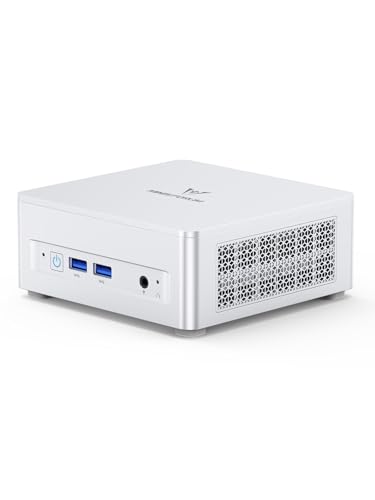
- Best overall for 1440p gaming: Minisforum UM870 Slim, Ryzen 7 8745H, 32GB RAM, 1TB SSD — Check on Amazon
- GMKtec NucBox K8 Plus, Ryzen 7 8845HS, 32GB RAM, 1TB SSD — Check on Amazon
- Beelink SER8, Ryzen 7 8745HS, 32GB RAM, 1TB SSD — Check on Amazon
- GMKtec NucBox M6 Ultra, Ryzen 5 7640HS, 32GB RAM, 512GB SSD — Check on Amazon
See 2 more Amazon options
- Apple Mac mini, M4 Chip, 16GB Memory, 256GB SSD — Check on Amazon
- Acer Aspire C27 All-in-One, 27 Inch, Ryzen 5 7430U, 16GB RAM, 512GB SSD — Check on Amazon
Read the full guide ↓
Disclosure: As an Amazon Associate, reviewstook.com earns from qualifying purchases. Links to Amazon on this page are affiliate links; they cost you nothing extra. Listing details such as price and availability change often, so check the current Amazon listing before you buy.
This guide needs to start with the sentence most pages chasing this search would rather bury: not one of the six machines below has a discrete graphics card. Every pick is a home office PC — five mini PCs and one all-in-one — running integrated graphics, because that is what a home office budget at this tier honestly contains. So “1440p gaming” here has to be defined before it can be recommended, and the definition turns on a distinction this guide will repeat until it sticks: the resolution a game is displayed at is not the resolution it is rendered at. Every machine below can light up a 1440p monitor and show you a sharp 1440p desktop. Rendering a demanding modern game natively at 2560×1440, pixel for pixel, is a different and much heavier job — and on integrated graphics it is realistic only for lighter, older and esports titles, at reduced settings. For everything heavier, the honest recipe on this hardware is to render at 1080p or below, let upscaling and the panel carry the image to 1440p, and accept that the result is a good-looking approximation rather than native detail.
Judged on those honest terms, the picks separate cleanly. Three of them carry AMD’s Radeon 780M — the strongest integrated graphics in this class — fed by 32GB of fast dual-channel memory they can borrow from, and those three are the real 1440p candidates: lighter games rendered natively at the panel’s resolution, heavier ones rendered lower and upscaled with FSR where a game offers it. One pick steps down to the Radeon 760M and is graded as a 1080p-render machine. The Mac mini’s graphics silicon is strong but its games library, not its chip, is the binding constraint. And the all-in-one’s own screen is a 1080p panel, which makes it the one pick that does not truly take part in this guide’s question at all. One more absence should be stated before it is searched for in vain: there is no DLSS anywhere in this guide, because DLSS requires NVIDIA RTX hardware and no pick here has an NVIDIA GPU of any kind. What follows is the quick picks, the reasoning, six full reviews, a comparison table, monitor-pairing advice, the mistakes that waste money on this search, and the questions buyers ask.
In this guide
Quick Picks
Short on time, or comparing several options at once? Each row below names a 1440p gaming situation and the machine that suits it, with a link to the listing.
| Buyer type | Pick | Why it stands out | Link |
|---|---|---|---|
| Best overall for 1440p gaming | Minisforum UM870 Slim, Ryzen 7 8745H | Radeon 780M with 32GB of socketed memory to borrow from — check price on Amazon | Check on Amazon |
| Best upgrade path to real 1440p | GMKtec NucBox K8 Plus, Ryzen 7 8845HS | The same 780M today, plus an OCuLink port that can add a desktop graphics card later | Check on Amazon |
| Best for long, quiet sessions | Beelink SER8, Ryzen 7 8745HS | 780M performance with the calmest sustained-load cooling here — check price on Amazon | Check on Amazon |
| Best value 1080p-render pick | GMKtec NucBox M6 Ultra, Ryzen 5 7640HS | Radeon 760M and 32GB of memory — render lower, upscale, and check price on Amazon | Check on Amazon |
| Best for Mac households | Apple Mac mini, M4 Chip | Strong graphics silicon and verified high-resolution display support — inside a small macOS games library | Check on Amazon |
| Best for a clutter-free desk | Acer Aspire C27 All-in-One, 27 Inch | A complete one-box desk — but its built-in screen is 1080p, so read its review before choosing it for 1440p | Check on Amazon |
How These Picks Were Chosen
The starting set is the six machines from our home office guide at this budget — real Amazon listings positioned in this budget tier in the United States — re-graded here purely as 1440p gaming machines. The budget discipline carries over unchanged: check price on Amazon for every pick, because live prices move, and anything positioned permanently in a premium tier above this budget stayed excluded. We did not use these machines ourselves; the grading below is built from the maker listings and specification pages behind the original guide — processor and graphics silicon, memory type and capacity, storage, the actual display-output ports, and warranty terms.
The first filter is render honesty, applied per graphics chip rather than per headline. The Radeon 780M in the top three picks is the ceiling of current integrated graphics, and it earns a split verdict: native 1440p rendering is credited only for lighter, older and esports-style games at reduced settings, where the silicon genuinely reaches it, and explicitly not for demanding modern releases, which are graded as 1080p-render-and-upscale machines. The Radeon 760M sits one class below and is graded a notch more conservatively again. The Mac mini’s ten-core GPU is capable silicon, graded on the titles macOS actually offers. The Acer’s integrated graphics are the weakest here, and its review grades it accordingly. No pick is credited with native 1440p it cannot do, and no pick is credited with 4K gaming at all — a 4K frame carries roughly four times the pixel work of a 1080p frame, and nothing in this guide is within reach of that.
The second filter is upscaling, and it is where this guide refuses the usual sleight of hand. DLSS is NVIDIA technology that runs on RTX graphics cards; no machine here has one — there is no NVIDIA GPU in any of the six — so DLSS is denied for every pick, plainly and without exception. The upscaling these machines can use is AMD’s FSR, which the Radeon picks can enable in games that offer it, and this guide credits FSR generically: it reconstructs a 1440p image from a lower internal render, which is a legitimate and useful trade, but it does not restore detail the render never drew, and no internal-resolution figures are quoted for it because the underlying research documents none. Frame generation, where a game offers it on the Radeon machines, is treated the same way throughout: it interpolates additional frames to smooth motion on the display. That is a display-side comfort, not rendering — it adds no real detail and is never counted here as 1440p capability.
The third filter is memory, because integrated graphics have no memory of their own. A 780M borrows its frame buffer and texture space from system RAM, so the pool it borrows from is a gaming specification, not an office one. That is why the four Windows minis’ 32GB of dual-channel DDR5 grades up so strongly for this angle — there is enough for the game, the operating system and the graphics borrowing at once — and why the two 16GB machines, the Mac mini and the Acer, are marked down: their ceilings are fixed and shared. The fourth filter is the display path, judged only from documented outputs: the ports each maker actually publishes, named in the reviews, because a 1440p panel can only show what the cable feeding it can carry. Finally, one route is named for completeness rather than recommended as a pick: cloud gaming services render the game on a data-centre machine and stream the picture, so they are the one way these boxes can present a genuinely 1440p-rendered image in demanding titles — at the cost of a fast, preferably wired connection and some input lag, and dependent on a subscription rather than on anything you own.
The 6 Best Home Office PCs for 1440p Gaming Under $800
Minisforum UM870 Slim (Ryzen 7 8745H, 32GB RAM, 1TB SSD)
Who it suits: The home worker who games at the same desk — wanting the strongest integrated graphics this budget offers, in the box that runs them quietly and can be upgraded for years.
For this angle, the UM870 Slim’s specification reads in a different order than it does for office work. The headline is the Radeon 780M: the integrated graphics built into its Ryzen 7 8745H (eight cores, sixteen threads, boosting to 4.9GHz), and the strongest iGPU in this guide. Around it sits the support act that integrated graphics live or die by — 32GB of DDR5-5600 in two socketed SO-DIMM slots, upgradeable to 96GB, so the 780M borrows rendering memory from a deep, fast, dual-channel pool instead of fighting the operating system for a shallow one. Graded honestly, that combination renders lighter, older and esports games natively at 1440p at reduced settings, and handles demanding modern titles the way this whole class must: render at 1080p or below, upscale to the panel with FSR in games that support it, and keep settings sensible. It is not a native-1440p machine for heavy games and this review will not call it one — but within integrated graphics, nothing at this budget does the job better.
The rest of the machine supports the role. A 1TB PCIe 4.0 SSD sits in one of two M.2 slots, so a growing games library has somewhere to go. The display outputs are documented and sufficient for a serious panel: USB4, HDMI 2.1 and DisplayPort 1.4 drive up to three displays, and any of those connections will feed a 1440p monitor properly — the pairing section below covers which to choose for a high-refresh panel. Cooling matters more in games than in documents, because gaming loads are sustained loads: Minisforum’s phase-change thermal layer, three heat pipes and large slow fan are rated by the maker below 35dB in performance mode, and reviewers describe the machine as near-silent in normal use, so long sessions stay civilised in a shared room. It VESA-mounts behind a monitor (bracket in the box) from a 130 × 127 × 50mm, 0.82-litre chassis, carries a two-year warranty, and runs Windows 11 Pro with 2.5-gigabit Ethernet and Wi-Fi 6E. The debits carry over from the office guide: a plastic chassis, the only USB-C port on the back, two rear USB 2.0 ports, and a MediaTek Wi-Fi card whose Linux driver support is poor — Windows gamers are unaffected, Linux users should plan an Intel card swap. Pricing is the last honesty item: check price on Amazon before you buy. When its live price sits within this budget tier it is the best 1440p gaming buy in this guide, and third-party sellers can push it into a premium tier where it is much less compelling.
- Radeon 780M — the strongest integrated graphics here — backed by 32GB of socketed, dual-channel DDR5 it can borrow from.
- Documented USB4, HDMI 2.1 and DisplayPort outputs feed a 1440p panel properly, with two more displays besides.
- Quiet under sustained load, VESA-mountable, two-year warranty, and memory and storage that can both grow.
Honest limitation: Native 1440p is for lighter titles at reduced settings; demanding games are a render-at-1080p-and-upscale proposition. Add a plastic chassis, a rear-only USB-C port and a live price that can drift above this budget — this is a buy-on-a-dip machine, not a buy-at-any-price one.
Choose it if you want the best integrated-graphics gaming this budget honestly offers, at the desk you also work at. Skip it if the listing is near its highs when you shop — the SER8 below, bought on its own dip, does the same gaming for similar money — or if native 1440p in demanding games is a hard requirement, because no pick in this guide meets it.

GMKtec NucBox K8 Plus (Ryzen 7 8845HS, 32GB RAM, 1TB SSD)
Who it suits: The buyer who wants 780M gaming today and refuses to accept integrated graphics as the permanent ceiling — because this is the one pick that can outgrow them.
As shipped, the K8 Plus games much like the Minisforum above: its Ryzen 7 8845HS is the strongest processor in this guide (eight cores to 5.1GHz) with the same Radeon 780M graphics, 32GB of dual-channel DDR5-5600 in two SO-DIMM slots — the listing claims expansion up to 128GB — and a 1TB PCIe 4.0 SSD with a second M.2 slot free. The 1440p verdict as delivered is therefore the same split verdict: lighter and esports titles rendered natively at 1440p at reduced settings, demanding games rendered at 1080p and upscaled with FSR where offered. What separates this machine, and earns it second place for this angle specifically, is a port the others do not have. OCuLink can carry a desktop graphics card in an external dock, which makes the K8 Plus the only pick in this guide with a documented route to genuine, native 1440p gaming in demanding titles — later, and at further cost: the dock, a power supply for it and the card itself are separate purchases, none of them priced inside this machine’s, and this guide does not pretend otherwise. Bought with that plan in mind, the premium over the UM870 Slim is an option on a real graphics card. Bought without it, the two machines game identically and the Minisforum is usually cheaper.
The remaining specification serves a gaming desk well: dual USB4 alongside HDMI 2.1 and DisplayPort gives documented output for up to four displays, dual 2.5-gigabit Ethernet keeps a wired connection — the one this guide recommends for gaming and the one cloud gaming effectively requires — free of adapters, and Windows 11 Pro is installed. The catch, stated as plainly here as in the office guide, is price behaviour: this listing is volatile and can spike well above this budget tier. The rule is non-negotiable: check price on Amazon, buy only when the live price fits this budget, and walk away from a spike. At the right tier it is the most future-proof pick here; at the spike it is simply the wrong purchase.
- OCuLink: the only documented route in this guide from integrated graphics to a real desktop graphics card later.
- Strongest CPU here, the same 780M, 32GB of socketed memory and a free second M.2 slot.
- Dual USB4, HDMI 2.1, DisplayPort and dual 2.5GbE — four-display desks and wired gaming covered.
Honest limitation: As delivered it is an integrated-graphics machine with the same native-1440p limits as the pick above, and its price is the most volatile in the guide. The eGPU route is real but is three further purchases, not a feature in the box.
Choose it if the OCuLink plan is genuine — you can see yourself adding the dock and card when a game demands it. Skip it if the listing is spiking, or if you know you will never buy the dock: without it, this is the UM870 Slim’s gaming at a less disciplined price.

Beelink SER8 (Ryzen 7 8745HS, 32GB RAM, 1TB SSD)
Who it suits: The player whose desk is in a bedroom, studio flat or shared room — who wants the 780M’s gaming with cooling that stays quiet through long evening sessions.
The SER8’s gaming hardware mirrors the top pick’s almost exactly: a Ryzen 7 8745HS (eight cores, sixteen threads, to 4.9GHz), Radeon 780M graphics, 32GB of DDR5 in two slots upgradeable to 64GB, and a 1TB PCIe 4.0 SSD with a second M.2 slot free. Its 1440p verdict is therefore the same, and this review will not manufacture a difference the silicon does not support: native 1440p rendering for lighter, older and esports games at reduced settings; 1080p rendering with FSR upscaling for demanding ones; no DLSS, because there is no NVIDIA hardware here; no native 4K, because there is no integrated hardware anywhere for that. Display output runs over HDMI 2.1, DisplayPort 1.4 and USB4 — three screens, any of them a properly fed 1440p panel — with 2.5-gigabit Ethernet, Wi-Fi 6 and Windows 11 Pro fitted.
Where the SER8 genuinely differs is in what happens twenty minutes into a session. Gaming is a sustained load, and sustained load is where small PCs get loud or get slow. Beelink’s vapor-chamber-style cooling has made this machine’s reputation as one of the quietest in its class under exactly that kind of load — the pick for a desk where a fan winding up and down all evening is a real cost, and where steady acoustics usually travel with steady clocks. The trade is price discipline: its live price can sit above this guide’s budget tier, so check price on Amazon before you buy. It belongs here only as a disciplined purchase: when the live price fits this budget, this is arguably the most pleasant gaming-and-working machine in the guide. Above that tier, you have paid a premium for refinement while the UM870 Slim games identically.
- The same 780M gaming as the top pick, with the calmest sustained-load cooling in the guide.
- 32GB of upgradeable DDR5, 1TB SSD plus a free second M.2 slot.
- Three displays driven over HDMI 2.1, DisplayPort 1.4 and USB4, with Windows 11 Pro installed.
Honest limitation: Its live price can sit just over this budget line, so check price on Amazon and treat it strictly as a within-budget pick — and nothing about it renders a single extra pixel over the other 780M machines. You are paying for quiet and build, not frames.
Choose it if your gaming happens in a room where noise matters and you are willing to wait for the dip. Skip it if you are buying today at the listing’s current ask, or if the desk is somewhere a fan would never bother you — the same graphics cost less above.

GMKtec NucBox M6 Ultra (Ryzen 5 7640HS, 32GB RAM, 512GB SSD)
Who it suits: The realistic gamer — happy to render at 1080p and let a 1440p panel upscale, in exchange for keeping a meaningful slice of the budget for the panel itself.
The M6 Ultra is where this guide’s honesty gets cheaper. Its Ryzen 5 7640HS (six cores, twelve threads, to 5.0GHz) carries Radeon 760M graphics — a clear step below the 780M in the three picks above — and the correct way to grade it for 1440p is as a render-lower machine: native 1440p only for the lightest and oldest titles, with the normal plan being a 1080p render upscaled to the panel, FSR assisting in games that offer it. That is not a dismissal. A 1080p render upscaled to a 1440p screen is the same arrangement the 780M picks fall back to in demanding games; the M6 Ultra simply starts there in more titles, and charges less for the honesty. What keeps it competitive is everything around the graphics: 32GB of dual-channel DDR5 in two SO-DIMM slots, so the 760M borrows from the same deep pool as its bigger siblings, a USB4 port, and documented triple-4K display output across USB4, HDMI 2.0 and DisplayPort — any of which will feed a 1440p monitor, with DisplayPort or USB4 the better choice for a high-refresh panel. Dual 2.5-gigabit Ethernet and Windows 11 Pro complete a specification that reads like the tier above, minus the graphics class.
Its positioning is the argument’s other half: it sits in a lower tier than the 780M picks — check price on Amazon — which is part of why it leaves more of this budget for the panel itself. The compromises are the ones the office guide documented. The fitted SSD is a 512GB PCIe 3.0 drive — half the capacity of the 1TB picks and a generation slower, though further M.2 slots, including a PCIe 4.0 one, make adding storage easy, and a games library will eventually ask you to. GMKtec’s warranty on the Amazon listing is one year, the shortest in this guide. And the six-core chip will show its two missing cores in long rendering or compiling work long before it shows them in games. For a desk whose gaming is esports, indies and a back catalogue — which is most desks, honestly — this is the pick that spends the least to reach the same upscaled picture, and leaves money where a 1440p setup actually notices it: in the monitor.
- Radeon 760M graded honestly as a 1080p-render, upscale-to-1440p machine — check price on Amazon.
- 32GB of socketed dual-channel memory and USB4, matching the pricier picks where it counts.
- Triple-display output and dual 2.5GbE; spare M.2 slots make the small fitted SSD an easy fix.
Honest limitation: The 760M renders fewer titles natively at 1440p than the 780M picks — in demanding games you are further from native, more often. The 512GB PCIe 3.0 SSD and one-year warranty are the tier’s floor, not its standard.
Choose it if your games are the lighter kind and you would rather fund the 1440p panel properly than chase the last integrated-graphics tier. Skip it if you play recent, demanding releases and want every native-1440p scrap the class offers — that is the 780M’s job, above.

Apple Mac mini (M4 Chip, 16GB Memory, 256GB SSD)
Who it suits: The Apple household that games lightly — wanting a silent, tiny machine whose graphics are strong, and whose games happen to live in the smaller macOS catalogue.
On silicon alone, the Mac mini would rank higher in this guide. Apple’s M4 pairs a ten-core CPU with a ten-core GPU in a five-inch-square box that is effectively silent, and its display support is the best documented here, verified from Apple’s own specifications: up to three external displays, two at up to 6K over Thunderbolt plus a third at up to 5K over Thunderbolt or 4K over HDMI, through three rear Thunderbolt 4 ports and an HDMI port, with two USB-C ports and a headphone jack on the front, Gigabit Ethernet, Wi-Fi 6E and Bluetooth 5.3. Feeding a 1440p panel — including a high-refresh one — is trivially inside that envelope, and for the games macOS offers, the M4 renders lighter titles natively at 1440p comfortably. The constraint is not the chip. It is the catalogue: a large share of the games a Windows buyer means by “1440p gaming” are simply not published for macOS, no upscaling technology changes that, and there is no DLSS here either — DLSS is NVIDIA’s, and this is Apple’s silicon. Buy this machine for the games it verifiably plays, not for the games its specifications gesture at.
The structural limits from the office guide apply with extra weight for gamers. The 16GB of unified memory is shared between CPU and GPU exactly as the Windows minis’ RAM is — but here it can never grow, and neither can the 256GB SSD, which a handful of modern game installs will fill; an external SSD is a day-one budget item, not an accessory. Check price on Amazon: sales can undercut its standard list tier, though third-party sellers on the listing sometimes ask considerably more, so buy at or near its usual list tier, never above it. Judged as a Mac that also games, it is excellent. Judged as a gaming purchase first, its library ceiling is the honest headline.
- Strong ten-core GPU silicon and the best-documented display support in the guide — 1440p panels are easy for it.
- Effectively silent and tiny, with resale value none of the Windows picks will match.
- Positioned in a mid-range tier, with sales sometimes taking it below its usual list tier — check price on Amazon and buy at that tier or below.
Honest limitation: The macOS games library is the ceiling — many headline titles never arrive — and the 16GB of memory and 256GB of storage are fixed forever, with game installs pressing on both from day one.
Choose it if your household is Apple’s, your games are confirmed available on macOS, and silence matters. Skip it if gaming is the purchase’s main purpose or your library lives on Windows — the Windows minis above play more of it.

Acer Aspire C27 All-in-One (27 Inch, Ryzen 5 7430U, 16GB RAM, 512GB SSD)
Who it suits: The buyer who wants one object on the desk and games only casually — and who understands, before paying, that this machine’s 1440p story is the weakest in the guide.
The C27’s problem for this search is printed on its own specification: the screen it comes with is a 27-inch Full HD IPS panel — 1920×1080, at a genuinely pleasant 120Hz — which means the all-in-one cannot display 1440p on the display it is. Behind that panel sit a Ryzen 5 7430U (six cores, twelve threads, to 4.3GHz) with integrated Radeon graphics that are the weakest rendering hardware in this guide, 16GB of DDR4 memory, a 512GB NVMe SSD, Wi-Fi 6E, a 2MP webcam with a privacy shutter, Windows 11 Home, and a wired keyboard and mouse in Acer’s configuration. Graded as a gaming machine, the honest summary is short: light and older games at its own panel’s 1080p at modest settings, and nothing in its documented specification supports a native-1440p claim of any kind. A buyer determined to game at 1440p from this desk would be shopping for a separate 1440p monitor as well — at which point the one-box premise that justifies the machine has dissolved, and one of the mini PCs above is simply the better purchase.
None of that makes it a bad machine; it makes it a machine for a different guide. As a complete desk it remains compelling — screen, computer, webcam and speakers in one box, nothing else to buy or cable — and it is positioned in this budget tier as a complete desk — check price on Amazon before you buy. Its standing debits are unchanged: the 7430U is a laptop-class chip a tier below the eight-core minis, the 16GB and 512GB are a tier below their 32GB/1TB standard, and when the computer side ages out, a perfectly good screen goes with it. It closes this guide because the search brought it here, and because saying plainly why it does not fit the search is worth more than quietly leaving it out.
- One box is the whole desk — 27-inch 120Hz screen, privacy-shutter webcam, speakers, keyboard and mouse included.
- A complete setup in this budget tier — check price on Amazon.
- A 512GB NVMe SSD and Wi-Fi 6E keep the fundamentals current.
Honest limitation: Its built-in display is 1080p and its integrated graphics are the weakest here — as a 1440p gaming machine it does not qualify, and no accessory short of a separate monitor and a different PC changes that.
Choose it if a clean, single-object desk matters more than gaming and your play is casual at 1080p. Skip it if 1440p is the point of the purchase — every mini PC above serves that goal better.

Comparison Table
| Product | Graphics | Honest 1440p verdict | Link |
|---|---|---|---|
| Minisforum UM870 Slim | Radeon 780M, 32GB, 1TB | Native 1440p in lighter titles at reduced settings; 1080p render + upscale for demanding games | Check on Amazon |
| GMKtec NucBox K8 Plus | Radeon 780M, 32GB, 1TB | Same split verdict today — plus the only route to a real graphics card later, via OCuLink | Check on Amazon |
| Beelink SER8 | Radeon 780M, 32GB, 1TB | Same rendering verdict, with the quietest sustained-load cooling for long sessions | Check on Amazon |
| GMKtec NucBox M6 Ultra | Radeon 760M, 32GB, 512GB | A 1080p-render machine that upscales to the panel; native 1440p only for the lightest titles | Check on Amazon |
| Apple Mac mini | Apple M4 GPU, 16GB, 256GB | Native 1440p in lighter macOS titles; the games library, not the chip, is the limit | Check on Amazon |
| Acer Aspire C27 All-in-One | Integrated Radeon, 16GB, 512GB, 27″ screen | Not a 1440p machine — its own panel is 1080p and its graphics are the weakest here | Check on Amazon |
How to Choose a Home Office PC for 1440p Gaming Under $800
- Start with the render question, not the monitor question. Every pick here can display 1440p. What separates them is what they render. List the games you actually play: if they are esports titles, indies and older releases, the 780M picks render them natively at 1440p at reduced settings; if they are recent demanding releases, every pick in this guide is a render-at-1080p machine, and you should choose on that basis instead of on a headline.
- Know which upscaling you are actually getting. On these machines it is AMD’s FSR, in games that offer it — never DLSS, which needs an NVIDIA RTX card that no pick here contains. FSR is a good tool used honestly: it builds the 1440p picture from a smaller render. It is not native detail, and any guide that prices it as native is selling you something.
- Treat memory as the graphics card’s fuel tank. Integrated graphics borrow system RAM for rendering and textures. The four Windows minis’ 32GB of dual-channel DDR5 is a gaming feature, not an office luxury; the Mac mini’s 16GB and the Acer’s 16GB are shared ceilings that demanding games will feel first. At this budget, socketed 32GB is the specification to insist on.
- Count documented outputs, then match the cable to the panel. The pairing section below works through it per pick, but the rule is simple: a 1440p high-refresh monitor wants DisplayPort or USB4/USB-C from these machines, and the port list on the listing — not a “supports 4K” headline — is what to verify.
- Decide whether the eGPU option is real for you. The K8 Plus’s OCuLink port is the only documented path in this guide to a desktop graphics card later. If you will genuinely buy the dock, its power supply and a card when a game demands native 1440p, the option has value. If you will not, it is a port you paid for and never used, and the UM870 Slim games identically today.
- Set a budget limit and keep it. This category’s prices swing sharply with memory costs. The SER8 is excellent within this budget and poor value above it; the K8 Plus is the most volatile pick here. Check price on Amazon before you shop, decide your limit in advance, and let a spike pass.
- Budget for the whole setup, panel included. A 1440p gaming desk is a PC plus a 1440p monitor. The M6 Ultra, in a lower tier — check price on Amazon — leaves more of this budget for that panel; the Acer C27 includes a screen, but a 1080p one. Compare the whole setup, not just the box — and if you do not own a 1440p monitor yet, a lower-tier PC plus the right panel is usually the better gaming purchase.
- Check the library before the silicon. The Mac mini’s graphics are strong and its catalogue is small. Whatever machine you choose, confirm your actual games run on its operating system and its graphics class before the specifications persuade you.
Pairing a 1440p Monitor With These PCs
The monitor is half of this purchase, and it is the half buyers most often mismatch. The natural partner for every mini PC here is a 27-inch-class 1440p panel: at that size the resolution is sharp for work, and it is the resolution these machines were graded against. A high-refresh panel — the 144Hz class and above — is a perfectly sensible buy even though integrated graphics will not feed it native 1440p at those rates in demanding games: the panel will outlive this PC, high refresh also flatters the lighter titles that do render natively, and a variable-refresh (adaptive sync) panel smooths exactly the kind of uneven frame rates integrated graphics produce. What not to buy for these machines is a 4K gaming panel: it widens the gap between render and display, makes upscaling work harder, and spends money on pixels none of these PCs can fill with games.
Connection choice comes from each pick’s documented outputs, and it matters more than most listings admit. The UM870 Slim and SER8 offer HDMI 2.1, DisplayPort 1.4 and USB4 — use DisplayPort or a USB-C connection for a high-refresh 1440p panel, and keep HDMI for a second or third screen. The K8 Plus adds a second USB4 port to the same arrangement. The M6 Ultra’s documented outputs are USB4, HDMI 2.0 and DisplayPort: its HDMI generation is the older one, so for a high-refresh 1440p panel prefer its DisplayPort or USB4 and treat HDMI as the office-screen connection. The Mac mini’s Thunderbolt 4 and HDMI outputs are documented by Apple up to 6K-class displays, so a 1440p high-refresh panel is comfortably inside its display envelope — display-side only, as its review explains. The Acer C27 is the exception that proves the section’s rule: its screen is built in at 1080p, and our underlying research does not document an external display output for it, so anyone planning a 1440p side monitor should verify the port list on the live listing before assuming one exists. Whichever pick and panel you pair, finish the job in software: monitors commonly default to 60Hz, so open the display settings, set the panel’s real refresh rate, and confirm the resolution is the panel’s native 1440p — the single most common reason a new setup “doesn’t look any better” is that nobody told it to be.
What Real Native 1440p Costs — and When to Stop Reading This Guide
Some readers will reach this point and recognise that the machine they actually want renders demanding games natively at 1440p, full stop. That machine exists; it is simply not a home office mini PC. Native 1440p in modern releases is discrete-graphics work, and the honest route to it at this money is a gaming PC with a real graphics card — start with Best 1440p Gaming PC Under $800 — or, within this guide, the K8 Plus plus an OCuLink dock and card bought later, which turns it into a later upgrade step. Stepping up a tier also changes the answer: Best Home Office PC For 1440p Gaming Under $1200 covers the budget where stronger hardware begins to appear. And the shadow route from our office guide deserves its sentence here too: renewed business desktops — off-lease ThinkCentre-class minis found in renewed listings in a lower budget tier — are fine office machines whose graphics are older and weaker than anything reviewed above. For gaming at 1440p they are a step backwards, not a shortcut, and they are mentioned so that nobody buys one expecting otherwise. What this guide’s six machines genuinely offer is a working, honest middle: a sharp 1440p desk for work, native rendering where the silicon honestly reaches it, competent upscaled gaming everywhere else, and no pretending about which is which.
Common Buying Mistakes
- Reading “drives a 1440p monitor” as “renders games at 1440p”. The first is a display fact every pick meets; the second is a rendering claim only lighter titles satisfy on integrated graphics.
- Expecting DLSS. It is NVIDIA RTX technology. No pick in this guide has an NVIDIA GPU, so no pick offers it — whatever a marketplace headline implies.
- Counting frame generation as performance. Interpolated frames smooth motion on the display; they add no rendered detail and do not turn a 1080p render into a 1440p one.
- Buying the Acer C27 for 1440p. Its built-in screen is 1080p. It is a good one-box desk and, for this specific search, the wrong machine.
- Paying a spike price. The K8 Plus is volatile and can spike well above this budget tier; buying at the spike because a guide listed it in this budget is the easiest money-waster in this category.
- Underbuying memory for an integrated GPU. Sixteen shared gigabytes is where demanding games feel the ceiling first; the 32GB socketed machines exist precisely because the graphics borrow from the same pool.
- Leaving the new panel at its defaults. A 1440p high-refresh monitor set to 60Hz in the operating system delivers neither the sharpness nor the smoothness you paid for.
- Assuming the Mac mini plays the Windows catalogue. Check your actual games are published for macOS before its silence and size persuade you.
Final Recommendation
- Most buyers: Minisforum UM870 Slim — check price on Amazon — the strongest integrated graphics here, properly fed.
- A path to real native 1440p later: GMKtec NucBox K8 Plus — check price on Amazon, and only when its live price fits this budget.
- Long sessions in a shared room: Beelink SER8 — check price on Amazon, and buy only within this budget.
- The honest value pick: GMKtec NucBox M6 Ultra — render at 1080p, upscale, and fund the panel with the savings.
- Apple households: Mac mini M4 — check price on Amazon, at its usual list tier or below — for the games macOS actually offers.
- A one-box desk, gaming secondary: Acer Aspire C27 — check price on Amazon.
Our top two for 1440p gaming at this budget are the Minisforum UM870 Slim, for the complete package — the class’s best integrated graphics backed by 32GB of socketed memory, documented outputs for a proper panel, quiet sustained cooling and a two-year warranty — and the GMKtec NucBox K8 Plus, for buyers who want the same gaming today with the only documented route to a real graphics card tomorrow. Between them they cover the two honest shapes this search takes: the best integrated graphics can do, and integrated graphics with an exit. If your desk is also a first home office, Best Home Office PC For Beginners Under $800 covers the wider setup, and if the office is a corner of another room, Best Home Office PC For Small Spaces Under $800 grades the same machines by footprint. Count your games before your pixels, decide your budget limit before you shop, set the new panel’s refresh rate when it arrives — and hold on to the distinction this guide opened with. Displayed at 1440p is easy. Rendered at 1440p is earned. These machines do the first for everyone and the second where it counts.
Frequently Asked Questions
Can these PCs really game at 1440p?
Yes — with the definition this guide has used throughout. All six can display a 1440p desktop, and the three Radeon 780M picks render lighter, older and esports games natively at 1440p at reduced settings. Demanding modern games are rendered at 1080p or below and upscaled to the panel on every pick, including the 780M machines. If a seller or a headline tells you an integrated-graphics PC plays everything natively at 1440p, that claim — not this guide’s split verdict — is the one to distrust.
Do any of these PCs support DLSS?
No. DLSS is NVIDIA’s upscaling technology and it runs only on RTX graphics cards. No machine in this guide has an NVIDIA GPU at all — the graphics here are AMD Radeon integrated, Apple’s M4 GPU, and the Acer’s integrated Radeon — so DLSS is unavailable on every pick, in every game. The upscaling these machines can use is AMD’s FSR on the Radeon picks, in titles that offer it, and macOS games use their own platform options. Any buying decision that assumes DLSS on this hardware is built on a misunderstanding.
Is an upscaled 1440p picture the same as native 1440p?
No, and the difference is worth understanding rather than fearing. A native 1440p frame is drawn pixel for pixel at 2560×1440. An upscaled frame is drawn at a lower resolution — 1080p, say — and then reconstructed to fill the panel, using information from previous frames and the image itself. Fine detail, distant textures and crisp edges are where the reconstruction cannot invent what was never rendered. In motion, at a normal viewing distance, a good upscale is a genuinely pleasing picture and the right trade for this hardware class; it is simply a different product from native rendering, and this guide grades the two separately so you know which one each pick is selling you.
Which cable should I use for a 1440p high-refresh monitor?
DisplayPort or USB-C/USB4, from the documented outputs of the Windows minis: the UM870 Slim, SER8 and K8 Plus all publish DisplayPort and USB4 alongside HDMI 2.1, and the M6 Ultra publishes DisplayPort and USB4 alongside an older HDMI 2.0 — which is why its review steers high-refresh panels to the other two connections. The Mac mini’s Thunderbolt 4 output is documented well beyond 1440p. Then set the panel’s refresh rate in the operating system’s display settings; out of the box, many panels sit at 60Hz until told otherwise.
Can these PCs handle a 4K monitor?
For the desktop, largely yes — the mini PCs’ documented outputs are rated for 4K-class and higher displays, and the Mac mini’s are verified to 6K. For games, no. A 4K frame carries roughly four times the pixel work of a 1080p frame, and nothing with integrated graphics in this guide renders modern games there. Buy the 1440p panel: it is the resolution this hardware class can feed honestly, for work and for play.
Is the K8 Plus’s OCuLink port a graphics card?
No — it is a connection, and the distinction costs money. OCuLink lets the K8 Plus use a desktop graphics card sitting in an external dock, but the dock, a power supply for the card and the card itself are three separate purchases beyond the PC’s price, and none is included or priced in this guide. What the port buys is possibility: it is the only documented route in this guide by which any pick can become a genuine native-1440p gaming machine for demanding titles. Valuable if you will use it; dead weight if you will not.
Why does this guide say “check price on Amazon” instead of giving a price?
Because in this category prices move too much for a printed number to stay honest. Memory and storage costs have risen sharply, and the same listing can swing sharply in weeks — the K8 Plus is volatile and the SER8 can trade on both sides of this guide’s budget. A hard printed price would be wrong by the time you read it. Always check price on Amazon on the live listing, and hold to the budget limit you set before you shop.


