Where to buy
Check the latest price, availability and delivery on Amazon. Orders are placed on Amazon. We may earn a commission from qualifying purchases.
- Best overall for home office: GMKtec M5 Plus Mini PC, Ryzen 7 5825U, 32GB RAM, 1TB SSD — Check on Amazon
- Beelink SER5 MAX Mini PC, Ryzen 7 5800H, 16GB RAM, 500GB SSD — Check on Amazon
- KAMRUI E3B Mini PC, Ryzen 5 7430U, 32GB RAM, 512GB SSD — Check on Amazon
- Dell OptiPlex 7060 SFF Desktop, Core i5-8500, 16GB RAM, 512GB SSD (Renewed) — Check on Amazon
- MeLE Quieter4C Fanless Mini PC, Intel N150, 8GB RAM, 256GB SSD — Check on Amazon
See 1 more Amazon option
- BOSGAME P4 Mini PC, Ryzen 7 5700U, 32GB RAM, 1TB SSD — Check on Amazon
Read the full guide ↓
Disclosure: As an Amazon Associate, reviewstook.com earns from qualifying purchases. Links to Amazon on this page are affiliate links; they cost you nothing extra. Listing details such as price and availability change often, so check the current Amazon listing before you buy.
A home office PC has a different job from a gaming PC, and at $400 the difference works in your favor. Office work is not limited by graphics or by raw single-core speed; it is limited by memory, by how many monitors the box can drive, and by whether the machine stays quiet and out of the way through a full day of calls. Four hundred dollars, spent with those priorities, buys a genuinely comfortable work machine: five of the six picks below ship with 16GB of RAM or more — three of them with 32GB — every one can run two monitors, and most can run three. The honest ceiling of the tier is just as clear: these are laptop-class processors in small boxes, plus one renewed business desktop, and none of them is a workstation for heavy video editing, CAD or large local AI models. For documents, spreadsheets, browser-heavy research, email, video calls and light photo work, though, $400 is not a compromise budget. It is the budget where the compromises stop mattering.
Two decisions shape this guide. The first is memory: a browser with thirty tabs, a chat app, a video call and a spreadsheet open at once will use whatever RAM you give it, and the difference between 8GB and 32GB is the difference between a machine that swaps to disk by mid-afternoon and one that never thinks about it. The second is the fork between new and renewed. The new mini PCs below carry maker warranties and modern wireless; the renewed Dell OptiPlex costs less, opens without tools, takes standard desktop parts and arrives with a keyboard and mouse in the box — but its warranty is Amazon Renewed’s 90-day guarantee rather than a manufacturer’s year. Both routes are legitimate, and the guide scores them on the same office tests. Below are the quick picks, detailed reviews of all six machines, a comparison table, a section on choosing between renewed and new, the mistakes that waste money at this tier, and the questions home workers ask most.
In this guide
Quick Picks
Short on time, or comparing several options at once? Each row below names a worker type and the machine that suits it, with a link to the listing.
| Buyer type | Pick | Why it stands out | Link |
|---|---|---|---|
| Best overall for home office | GMKtec M5 Plus, Ryzen 7 5825U, 32GB, 1TB | 32GB of RAM and 1TB of storage with triple 4K output — the no-compromise spec at this price | Check on Amazon |
| Best processing power | Beelink SER5 MAX, Ryzen 7 5800H, 16GB, 500GB | The strongest CPU in this guide, run at a desktop-style 54W | Check on Amazon |
| Best budget 32GB | KAMRUI E3B, Ryzen 5 7430U, 32GB, 512GB | 32GB of dual-channel RAM in a budget-tier package, with two SSD slots | Check on Amazon |
| Best business desktop (renewed) | Dell OptiPlex 7060 SFF, Core i5-8500, 16GB, 512GB | A real office desktop with keyboard and mouse included — check price on Amazon | Check on Amazon |
| Best silent pick for calls | MeLE Quieter4C, Intel N150, 8GB, 256GB | Fanless — zero fan noise on calls, and it mounts behind a monitor | Check on Amazon |
| Best for storage and networking | BOSGAME P4, Ryzen 7 5700U, 32GB, 1TB | 1TB fitted, dual 2.5GbE LAN — an office PC that can double as a home server | Check on Amazon |
How These Picks Were Chosen
The budget was applied as a ceiling, not a target: every machine below is a real Amazon listing in this budget tier in the United States, and because mini PC prices move weekly with coupons, this guide does not print fixed product prices — check price on Amazon for the current listing. One pick, the renewed Dell, fluctuates with refurbisher stock, so check its live listing before you buy. Anything that reached the budget only by cutting memory to 8GB while wearing a fast-sounding processor name was excluded unless its silence earned it a specific place, because for office work memory is the specification that decides how the machine feels at 4 p.m.
We did not use these machines ourselves. We read the maker listings and specification pages and compared the things office work actually loads: RAM capacity and whether it can be upgraded, storage size and spare slots, the count and type of display outputs (verified from listings and maker specifications, never assumed — a USB-C port only counts as a display output where the maker says it carries video), the Windows edition installed, wired and wireless networking, and what the warranty really is. Windows 11 Pro appears on all six picks; where a listing’s details matter to the verdict — the Dell’s standard-versus-optional video ports, the KAMRUI’s second SSD slot being SATA-only — the review says so rather than repeating the headline.
Two office filters sat on top of all of that. The first is the two-monitor filter: a home office machine that can only drive one screen forces a laptop-style workflow on a desktop purchase, so every pick here drives at least two displays from its own ports. The second is the five-year filter: a work machine should be repairable and upgradeable enough to stay useful — socketed RAM and standard SSDs score, soldered memory is flagged wherever it appears, and the renewed pick had to come from a business line with parts and documentation everywhere, not from a consumer tower with a proprietary power supply.
The 6 Best Home Office PCs Under $400
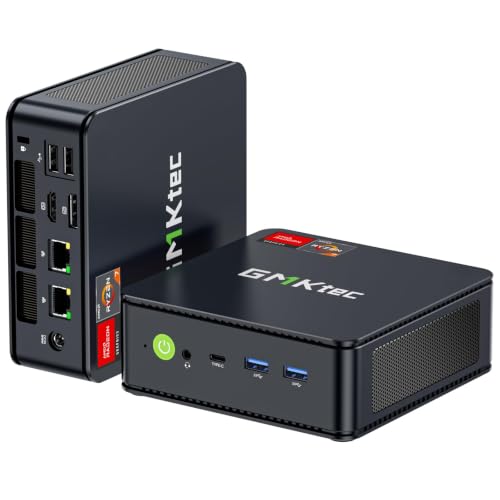
GMKtec M5 Plus Mini PC — Ryzen 7 5825U, 32GB RAM, 1TB SSD
Who it suits: The browser-heavy knowledge worker — dozens of tabs, two or three monitors, chat and calls running all day — who wants the machine to disappear as a concern.
The specification reads like the answer to this guide’s own checklist. The Ryzen 7 5825U is an eight-core, sixteen-thread processor boosting to 4.5GHz, and it is backed by 32GB of DDR4 memory in two slots — expandable to 64GB if a future workload ever asks — and a 1TB NVMe SSD in one of two M.2 slots, so a second drive can be added rather than the first replaced. For office work, the 32GB is the headline: Chrome or Edge with a research session’s worth of tabs, Outlook, Teams or Zoom, a couple of spreadsheets and a PDF editor can all stay resident without the machine paging to disk, and that headroom is what a work PC is actually for. Display output is triple 4K across HDMI, DisplayPort and USB-C, so a three-monitor desk needs no dock and no dongles. Networking is unusually complete for this tier — Wi-Fi 6E, Bluetooth 5.2 and dual 2.5GbE Ethernet ports — and it ships with Windows 11 Pro, whose BitLocker encryption and Remote Desktop hosting are the two Pro features home workers genuinely use.
Check price on Amazon before you buy: pricing for the M5 Plus moves often in this tier, so use the live listing rather than any fixed figure. The limitations are the class limitations. The 5825U is a laptop processor: strong for office loads, out of its depth in sustained rendering or heavy data work. GMKtec is a value brand whose support runs through the seller rather than a domestic service network, so keep the Amazon return window in mind when you set it up. And like every mini PC here, it has a small fan — quiet in office use, but not the silence of the fanless MeLE below. Judged purely as a specification for desk work, though, nothing else in this guide displaces it.
- 32GB of socketed DDR4 and 1TB of NVMe storage — the headroom spec, fitted from the factory.
- Triple 4K display output (HDMI, DisplayPort, USB-C) runs a three-monitor desk without a dock.
- Dual 2.5GbE LAN, Wi-Fi 6E and Windows 11 Pro complete an unusually full office checklist.
Honest limitation: A laptop-class processor and value-brand, seller-led support — the performance ceiling and the warranty experience are both a step below business-line hardware.
Choose it if your workday is measured in open tabs and monitors and you want the fullest spec under $400. Skip it if your work is sustained heavy compute, or a domestic warranty network matters more than specification.

Beelink SER5 MAX Mini PC — Ryzen 7 5800H, 16GB RAM, 500GB SSD
Who it suits: Workers whose bottleneck is processing rather than memory — big spreadsheets that recalculate, light photo editing, data tools, or a side workload of code — and who value a maker with an established name in this category.
The SER5 MAX’s Ryzen 7 5800H is the strongest processor in this guide: eight cores and sixteen threads boosting to 4.4GHz, and Beelink runs it at a 54W power setting rather than the throttled 15W of a thin laptop, so its sustained performance feels like a desktop’s. Around that chip sit 16GB of DDR4 and a 500GB SSD, both user-upgradeable — the memory to 64GB, the storage to 2TB — which makes the as-shipped specification a starting point rather than a verdict. Display output matches the GMKtec: HDMI, DisplayPort and USB-C driving three screens. Wi-Fi 6 and Bluetooth 5.2 are built in, Windows 11 Pro is installed, and the whole machine measures roughly 5 by 4.4 by 1.65 inches, small enough to mount behind a monitor and free the desk entirely. Check price on Amazon for the current listing — in this tier it is the performance-focused option.
The trade against the GMKtec above is explicit and worth understanding. You get a faster processor and Beelink’s longer track record; you give up half the RAM and half the storage as shipped. For a worker whose day is a dozen tabs and a heavy spreadsheet habit, that trade favors the Beelink — processor speed is what they feel. For the forty-tab researcher, the missing 16GB will be felt first, and while the upgrade is a five-minute job with standard laptop memory, it is an extra purchase the GMKtec does not ask for. Storage is the same story in miniature: 500GB is ample for documents and cloud-synced work, tight for local photo and video libraries. Buy it knowing which kind of worker you are, and it is the sharpest tool here.
- Ryzen 7 5800H at a 54W setting — the most processing power in this guide, sustained like a desktop.
- Triple display output over HDMI, DisplayPort and USB-C, in a box about five inches square.
- RAM and SSD both upgradeable (to 64GB and 2TB), so the spec can grow with the job.
Honest limitation: It ships with 16GB of RAM and 500GB of storage — browser-heavy workers will want the memory upgrade the GMKtec already includes.
Choose it if your work loads the processor — recalculating models, light editing, compiling — and 16GB covers your tab habit. Skip it if you know your browser sessions eat memory; start with 32GB instead.

KAMRUI E3B Mini PC — Ryzen 5 7430U, 32GB RAM, 512GB SSD
Who it suits: The value-first worker who has read the memory argument and wants 32GB in a budget-tier package — a second desk, a family office, a small business equipping several seats.
The E3B’s proposition is simple: the RAM headroom of our top pick in a budget-tier package. Its Ryzen 5 7430U is a six-core, twelve-thread chip boosting to 4.3GHz, and around it KAMRUI fits 32GB of dual-channel DDR4 — two 16GB sticks, expandable to 64GB — and a 512GB M.2 SSD. Unusually at this price, there are two M.2 slots, though read the fine print the listing itself provides: one accepts NVMe PCIe or SATA drives, the second is SATA-only, so a future storage upgrade should be planned as a SATA drive or a replacement of the main NVMe. Display output is triple, verified from the maker’s own specification table on the listing: HDMI 2.0, DisplayPort 1.4 and a USB-C port, each capable of 4K at 60Hz. Wi-Fi 6, Bluetooth 5.2 and gigabit Ethernet cover networking, Windows 11 Pro is installed, and the box includes a VESA mount and an HDMI cable — small inclusions that matter when the alternative is a second order. It is the 32GB configuration that earns the pick — check price on Amazon for the current listing; a 16GB version exists under a separate listing, so confirm the configuration in your cart says 32GB.
Two honest notes. The 7430U’s name sounds newer than the chip is: it is a refreshed Zen 3 part, a close relative of the 5800U-generation silicon rather than a current-generation design — for office work the distinction is academic, but buyers comparing spec sheets should know the number flatters it. And the E3B is actively cooled, with reviewers noting the fan becomes audible under sustained heavy load; in ordinary office use it is unobtrusive, but it is not a silent machine. Support, as with the other value brands here, runs through the seller. None of that dents the core value: if the budget is firm and the tab count is high, this is a strong work-comfort option in this tier.
- 32GB of dual-channel DDR4 in a budget-tier package — a direct route to real memory headroom.
- Two M.2 slots and a 64GB memory ceiling give it a genuine upgrade path.
- Triple 4K output (HDMI 2.0, DisplayPort 1.4, USB-C), with VESA mount and HDMI cable in the box.
Honest limitation: The processor is an older-architecture part under a new-sounding name, and the second SSD slot is SATA-only — check both the cart configuration and your upgrade plans.
Choose it if you want 32GB and triple displays in a budget-tier package, across one desk or several. Skip it if you need the strongest processor or a completely silent desk — the Beelink and the MeLE cover those.
Dell OptiPlex 7060 SFF Desktop — Core i5-8500, 16GB RAM, 512GB SSD (Renewed)
Who it suits: The traditionalist who wants a real business desktop — serviceable, documented, built for a decade of office duty — and is comfortable buying renewed to get one for the price of a mini PC.
This is the guide’s renewed pick, and it plays by different rules, so the review scores it on them. The OptiPlex 7060 is Dell’s business small-form-factor line: a six-core Core i5-8500, 16GB of DDR4, a 512GB SSD and Windows 11 Pro, with Wi-Fi and Bluetooth fitted and — a genuine practical advantage — a keyboard and mouse included in the box per the listing. Two longevity points separate it from the cheaper renewed stock that floods this category. First, the i5-8500 is an 8th-generation chip that sits on Microsoft’s supported-processor list for Windows 11, so the operating system is there legitimately and updates normally, unlike the 6th- and 7th-generation machines often sold with Windows 11 installed off-list. Second, the platform is a standard business desktop: the cover comes off without tools, memory and storage are ordinary desktop parts, and Dell’s documentation and a global supply of spares mean almost anything that fails can be replaced for a few dollars. Display output is two monitors as standard via its pair of DisplayPort connectors; Dell’s specification for the platform lists a third video port as a factory option that varies by unit, so if you need a third screen, check the rear panel of the exact machine on the live listing rather than assuming.
Check price on Amazon before you buy: renewed pricing follows refurbisher stock and moves with availability, so use the live listing rather than any fixed figure. What the money does not buy is a manufacturer’s warranty: the protection is Amazon Renewed’s guarantee, a 90-day floor rather than a year, and the machine itself is a 2018 platform whose fan, while modest, is a fan, and whose graphics are Intel’s integrated UHD 630 — fine for office displays and video calls, not a gaming part. Buy it as what it is: the most serviceable, best-documented computer in this guide, in a budget-tier renewed package, with a shorter safety net than the new machines carry.
- A genuine business desktop: tool-less access, standard parts, Dell documentation and spares everywhere.
- The i5-8500 is on Microsoft’s Windows 11 supported list — no off-list operating system compromises.
- Keyboard and mouse included — check price on Amazon for the current renewed listing.
Honest limitation: Renewed means a 90-day Amazon Renewed guarantee instead of a manufacturer’s year, on a 2018 platform; the third display output was a factory option, so verify the exact unit.
Choose it if you value serviceability, documentation and a complete in-box setup over newness. Skip it if a full manufacturer warranty is non-negotiable, or you need three monitors guaranteed.
MeLE Quieter4C Fanless Mini PC — Intel N150, 8GB RAM, 256GB SSD
Who it suits: Anyone whose workday is wall-to-wall calls — support, sales, teaching, therapy, podcasting — and who needs the desk itself to make no sound at all.
The Quieter4C’s product is silence, engineered rather than marketed: there is no fan anywhere in the design, so there is no fan noise to leak into a call, no bearing to wear, and nothing moving to fail. The chassis is a slab about 5.2 by 3.2 by 0.7 inches that mounts behind a monitor with the included VESA hardware and effectively vanishes. Inside, an Intel N150 — a four-core efficiency chip boosting to 3.6GHz — is paired with 8GB of memory and a 256GB NVMe SSD, and the port selection is better than the size suggests: two HDMI 2.0 outputs plus USB-C display output drive three 4K screens, with gigabit Ethernet, Wi-Fi 6, Bluetooth 5.2 and Windows 11 Pro fitted. For the workload it is aimed at — email, documents, web apps, a call client, a second screen of notes — it is genuinely sufficient, and it sips power doing it, drawing roughly what a couple of LED bulbs do. Check price on Amazon for the current listing before you buy.
The limitation is structural and must be bought with open eyes: the 8GB of memory is soldered, and 8GB is the ceiling for the life of the machine. A disciplined user running documents, mail and calls will not hit it; a forty-tab researcher will, and no upgrade exists — that worker should take the KAMRUI or GMKtec above and accept a quiet fan instead. The N150 is likewise an efficiency processor: entirely adequate for office applications, the wrong choice for heavy spreadsheets or local media work. This pick is a specialist. If your pain point is noise — a microphone that hears your current PC, a shared room, a baby asleep in the next one — it solves the problem completely, and nothing else in the guide can say that.
- Truly fanless: zero moving parts, zero fan noise on calls, nothing to wear out.
- Triple 4K output from two HDMI ports and USB-C, in a slab that hides behind a monitor.
- Windows 11 Pro and an NVMe SSD — no corners cut on the software or storage side.
Honest limitation: 8GB of soldered memory is a permanent ceiling, and the N150 is an efficiency chip — heavy multitaskers should buy a 32GB pick instead.
Choose it if silence is your first requirement and your workload is documents, mail and calls. Skip it if your browser habit is measured in dozens of tabs — the memory cannot grow.

BOSGAME P4 Mini PC — Ryzen 7 5700U, 32GB RAM, 1TB SSD
Who it suits: The home worker whose PC also does household duty — photo library, file storage, a media or backup server — and who wants the storage and networking to support both jobs.
On paper the P4 matches our top pick’s memory and storage — 32GB of RAM and a 1TB SSD behind an eight-core Ryzen 7 5700U — and then adds the networking line that makes it interesting: dual 2.5GbE Ethernet ports alongside Wi-Fi 6E and Bluetooth 5.2. For a pure desk worker that second fast Ethernet port is a spare; for a home where the office PC also hosts shared files, backups or a media library, it is the difference between a computer and a small server, and at this price nothing else in the guide offers it. Triple 4K output over HDMI, DisplayPort and USB-C covers the desk side, and Windows 11 Pro is installed — Pro’s Remote Desktop hosting pairs naturally with the server role. Check price on Amazon for the current listing — it sits in the budget-to-mid-range part of this tier and is one of the stronger value lines here for storage plus networking.
The cautions are about the listing, not the concept. This product family has also been sold in a 5825U variant under near-identical titles, so the discipline is to confirm the live listing’s configuration line — processor, 32GB, 1TB — matches what you intended before ordering, and to check the machine’s system information on arrival while the return window is open. BOSGAME is a value brand, with support through the seller, and the 5700U, while a capable eight-core chip, is a step behind the GMKtec’s 5825U and the Beelink’s 5800H in sustained work. Buy it for the combination — memory, storage and dual fast networking in one inexpensive box — rather than as the fastest machine here, and it earns its place.
- 32GB of RAM and 1TB of storage matched with dual 2.5GbE LAN — an office PC and home server in one.
- Triple 4K output and Wi-Fi 6E cover the desk side completely.
- 32GB, 1TB and dual networking in one box — check price on Amazon for the current listing.
Honest limitation: The listing family includes a near-identically named variant with a different processor — verify the exact configuration on the live listing and again on delivery.
Choose it if your work PC doubles as the home’s file and media hub. Skip it if you want the simplest purchase with the least configuration-checking — the GMKtec is the tidier buy.

Comparison Table
| Product | Memory & storage | Displays | Best use | Link |
|---|---|---|---|---|
| GMKtec M5 Plus, Ryzen 7 5825U | 32GB (to 64GB), 1TB NVMe, 2 slots | 3 × 4K (HDMI, DP, USB-C) | The fullest office spec under $400 | Check on Amazon |
| Beelink SER5 MAX, Ryzen 7 5800H | 16GB (to 64GB), 500GB (to 2TB) | 3 × 4K (HDMI, DP, USB-C) | Processor-heavy office work | Check on Amazon |
| KAMRUI E3B, Ryzen 5 7430U | 32GB (to 64GB), 512GB, 2 slots | 3 × 4K (HDMI, DP, USB-C) | 32GB headroom on the tightest budget | Check on Amazon |
| Dell OptiPlex 7060 SFF (Renewed), i5-8500 | 16GB, 512GB, desktop parts | 2 × DisplayPort (3rd was an option) | Serviceable business desktop, keyboard and mouse included | Check on Amazon |
| MeLE Quieter4C, Intel N150 | 8GB soldered, 256GB NVMe | 3 × 4K (2 × HDMI, USB-C) | Silent, call-friendly desk | Check on Amazon |
| BOSGAME P4, Ryzen 7 5700U | 32GB, 1TB | 3 × 4K (HDMI, DP, USB-C) | Office PC plus home file/media server | Check on Amazon |
How to Choose a Home Office PC Under $400
- Buy memory before processor. Office slowness is almost never the CPU; it is the moment open applications exceed RAM and the machine starts swapping to disk. 16GB is the comfortable floor for a modern browser-and-calls workload, 32GB is the buy-once answer, and 8GB is only acceptable in the fanless specialist where silence is the point.
- Count display outputs, then check what they are. Two monitors is the home office standard and three is increasingly common. Verify the actual ports on the listing — HDMI, DisplayPort, and USB-C only where the maker states the port carries video — rather than counting holes in a photo.
- Check whether the memory can grow. Socketed DDR4 in two slots (the GMKtec, Beelink, KAMRUI and Dell here) means a cheap upgrade in year three. Soldered memory (the MeLE) means the number on the box is the number forever.
- Prefer an SSD, and check for a second slot. Every pick here boots from solid-state storage. A spare M.2 slot — full NVMe on the GMKtec, SATA-only on the KAMRUI’s second slot — is the difference between adding storage and replacing it.
- Take Windows 11 Pro if it costs nothing extra. All six picks include it. BitLocker protects a work laptop’s worth of documents on a desktop, and Pro’s Remote Desktop hosting lets you reach the machine from another room or another computer — features Home edition withholds.
- Decide your warranty philosophy before you shop. A new mini PC carries a maker’s warranty, typically a year, administered through the seller. A renewed business desktop carries Amazon Renewed’s 90-day guarantee but offers standard parts and total serviceability in exchange. Neither is wrong; buying one while expecting the other is.
- Match the processor to the real workload. Documents, mail, web apps and calls run well on every chip here, including the fanless N150. Big recalculating spreadsheets, light photo work and development tools justify the 5800H-class picks. Sustained rendering, CAD and heavy video work justify none of them — that is a different budget.
- Plan the desk, not just the PC. VESA-mountable mini PCs disappear behind a monitor; the Dell needs a shelf’s worth of space but brings ten USB ports and a keyboard and mouse in the box. Measure the desk and count your peripherals before choosing the shape.
- Check the live price. Mini PC prices at this tier move weekly with coupons and Prime pricing. Check price on Amazon for each pick and compare the live listings before you order, rather than relying on any fixed figure.
Renewed Business Desktop or New Mini PC? The Warranty and Longevity Ledger
The renewed Dell in this guide sits in the budget tier and raises the question the whole tier turns on, so it deserves a direct answer. A renewed business desktop and a new mini PC fail differently, and the right choice is the one whose failure mode you are better equipped for. The Dell’s protections are structural: it is built from standard parts, its cover opens without tools, its documentation is public, and every component in it — memory, drive, fan, power supply — can be replaced cheaply years from now. Its risk is temporal: it is a 2018 machine, its guarantee is 90 days, and a component that was going to fail early in its second life will do so on your desk. The mini PCs invert the trade. Their protections are contractual — a maker’s warranty, typically a year, on a new machine with a new drive and a new fan — and their risk is structural: compact boards, seller-led support, and in the fanless case soldered memory mean that a serious failure after the warranty is usually a replacement, not a repair.
Longevity has a second axis that matters more than either: software support. A work machine must run a supported operating system for as long as you own it. The Dell earns its place partly because its 8th-generation processor is on Microsoft’s Windows 11 supported list, so it will take updates on the normal track for years; renewed machines built on 6th- and 7th-generation chips, however cheap, are running Windows 11 outside that list and should be priced as the gamble they are. The new mini PCs, built on current platforms, have no such question over them. Our summary: if you are comfortable opening a case and swapping a part, the renewed business desktop is the best value in this guide and will likely outlast everything else here. If you would rather never think about hardware at all, buy the new machine with the warranty and let the contract carry the risk.
Quiet Desks: Noise, Calls and Shared Rooms
Home offices share walls, rooms and sometimes a kitchen table, so noise is a working specification rather than a luxury. Three of the noise facts in this guide are worth separating. The fanless MeLE makes no fan noise at all — it is the only pick whose silence is guaranteed by physics rather than by a light workload, which is why it is the recommendation for anyone whose microphone is open for a living. The actively cooled mini PCs are quiet in office use because office loads are light; their fans answer sustained processor load, so the worker who renders or compiles will hear a machine that the email-and-documents worker will not. The renewed Dell sits between: a single modest desktop fan, audible in a silent room, unremarkable in a normal one. Placement buys quiet as surely as hardware does — a mini PC mounted behind a monitor, off the desk surface that would otherwise amplify it, is quieter than the same machine sitting on the desk — and a machine that is never asked to swap to disk because it has enough RAM is quieter in practice than its fan curve suggests, because swapping and the fan spin that follows it arrive together.
Common Buying Mistakes
- Buying 8GB of RAM for a browser-heavy job because the processor name sounded fast. Memory decides how the machine feels by mid-afternoon; the chip decides how a spreadsheet recalculates. Most office workers should fund the memory first.
- Assuming every USB-C port carries video. Some do, some are data-only. This guide only counted USB-C as a display output where the maker’s own listing or specifications say it carries a picture.
- Counting a mini PC’s headline price as the whole cost. Monitors, keyboard and mouse are separate on every new pick here — the renewed Dell is the exception, with keyboard and mouse in the box.
- Buying renewed stock on a pre-2018 processor just to save money. Machines built on 6th- and 7th-generation chips run Windows 11 outside Microsoft’s supported list; the 8th-generation floor is where renewed stops being a gamble.
- Treating a renewed listing’s configuration as guaranteed. Refurbishers fit options — including that third video port — unevenly. Check the live listing’s configuration line and the machine itself on arrival, inside the return window.
- Ignoring configuration variants on mini PC listings. Several families here sell 16GB and 32GB versions, and at least one sells a different processor under a near-identical title. The configuration in the cart is the product; verify it before and after delivery.
- Skipping the live-price check in a coupon-driven category. Prices move weekly across this guide, so check price on Amazon before you order instead of assuming any fixed figure.
- Expecting workstation work from an office budget. Heavy video editing, CAD, large local AI models and serious gaming are beyond every machine here; they are the honest reasons to move to a higher tier rather than to blame an office PC in this tier.
Final Recommendation
- Most home workers: GMKtec M5 Plus — 32GB, 1TB and three 4K outputs remove every ordinary office bottleneck at once.
- Processor-led workloads: Beelink SER5 MAX — the strongest CPU here, and upgradeable when the job grows.
- Tightest budgets, several desks: KAMRUI E3B — 32GB in a budget-tier package is the value line of the guide.
- Serviceability and a complete box: Dell OptiPlex 7060 (Renewed) — standard parts, documentation and keyboard and mouse included.
- Silence for calls: MeLE Quieter4C — fanless, provided your workload fits its 8GB ceiling.
- Office plus home server: BOSGAME P4 — dual 2.5GbE networking makes it two machines in one.
Our top two for a home office at this budget are the GMKtec M5 Plus, for the worker who wants the specification question settled in one purchase, and the Beelink SER5 MAX, for the worker whose applications load the processor and who is happy to add memory later. Between them they cover most desks; the KAMRUI undercuts both on price, the Dell outlasts both on serviceability, the MeLE outsits both in silence, and the BOSGAME outconnects both as a home server. Workers equipping a first desk from nothing should also see Best Home Office PC For Beginners Under $400, and those whose work is outgrowing this tier can step up with Best Home Office PC Under $500. Count your monitors, count your tabs, decide whether a warranty or a screwdriver is your preferred safety net, and check the live price before you order — at $400, that homework is the whole difference between a work machine and a compromise.
Frequently Asked Questions
Is 16GB of RAM enough for a home office PC, or do I need 32GB?
16GB is enough for a disciplined workload: email, documents, a call client and a moderate set of browser tabs. 32GB is the right answer for research-heavy work — dozens of tabs held open across days — or for anyone who keeps several heavy applications resident at once. Three of the six picks ship with 32GB at this tier; the fanless pick’s 8GB is the exception, bought deliberately for silence.
Can these PCs really run two or three monitors?
Yes — every pick was required to drive at least two displays from its own ports, and five of the six drive three at 4K. The renewed Dell is the careful case: two DisplayPort outputs are standard on the platform, and a third video port was a factory option that varies by unit, so three-monitor buyers should confirm the exact machine on the live listing. Note that USB-C only counts where the maker states it carries video, as it does on the mini PCs here.
Is a renewed business desktop a safe buy for work?
It is a calculated one. You get business-grade hardware, standard replaceable parts and public documentation in a budget-tier renewed package, in exchange for Amazon Renewed’s 90-day guarantee instead of a manufacturer’s year. The safety rules are to buy a platform whose processor is on Microsoft’s Windows 11 supported list — 8th-generation Intel or newer — and to test the machine thoroughly on arrival, while returns are easy. Bought that way, renewed business desktops are the value pick of this tier.
What does Windows 11 Pro give a home worker over Home?
Mainly BitLocker drive encryption, which protects work documents if the machine is stolen, and Remote Desktop hosting, which lets you connect to the office PC from another computer — Home can only connect outward. Pro also defers feature updates more gracefully. Since all six picks here include Pro at no premium, there is no reason to settle for Home at this budget.
Can a home office PC under $400 handle any gaming?
Light gaming only, and this guide makes no stronger claim. The Ryzen mini PCs’ integrated Radeon graphics are fine for older and casual titles at modest settings, and the Dell’s integrated Intel graphics are a step below that; none of these machines has a discrete graphics card, and modern demanding games are not their job. If gaming matters alongside work, the same budget framed differently is covered in Best Home Office PC For 1440p Gaming Under $400 — read its honesty notes before expecting much.
How long should a $400 home office PC last?
Four to six years of office duty is a fair expectation for the new picks with socketed memory, because a RAM or SSD upgrade in year three resets the clock. The renewed Dell’s chassis and parts ecosystem can run longer still, with the caveat that its platform is already several years old. The fanless pick has the fewest parts that can wear out and the least room to grow — its life is set by its 8GB of memory meeting your workload, which for call-and-documents work can be many years.


