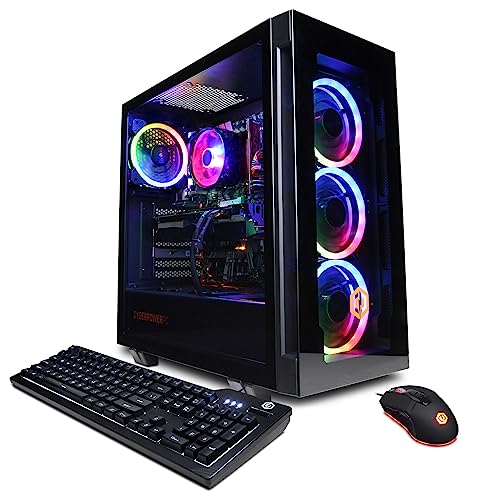
Where to buy
Check the latest price, availability and delivery on Amazon. Orders are placed on Amazon. We may earn a commission from qualifying purchases.
- Best overall for streaming: CyberPowerPC Gamer Xtreme VR (GXiVR8040A14), RTX 4060 Ti 16GB — Check on Amazon
- CyberPowerPC Gamer Master (GMA2900A), Ryzen 7 8700F, RTX 4060 Ti — Check on Amazon
- Thermaltake LCGS Quartz i1460, RTX 5060 — Check on Amazon
- Skytech Archangel, RTX 4060, 32GB RAM and 2TB SSD — Check on Amazon
See 2 more Amazon options
- iBUYPOWER Scale (SCA5N46T01), Ryzen 5 7600, RTX 4060 Ti — Check on Amazon
- Skytech Blaze4 Mini, RTX 4060 Ti — Check on Amazon
Read the full guide ↓
Disclosure: As an Amazon Associate, reviewstook.com earns from qualifying purchases. Links to Amazon on this page are affiliate links; they cost you nothing extra. Listing details such as price and availability change often, so check the current Amazon listing before you buy.
A streaming PC does two jobs at once, and the second job is the one most buying guides forget to grade. The first job is the game: rendered frames, high settings, a 1440p monitor fed properly. The second job starts the moment you press Start Streaming — your machine has to take those frames, compress them into a broadcast, hold that broadcast steady for hours, record it if you ask it to, and do all of that without stealing enough performance to make the game stutter on your own screen. This guide grades both jobs, in that order of honesty: encoder first, then the simultaneous load of game plus broadcast plus everything running beside them, then the game itself.
So the workflow needs defining before any machine gets praised. On Twitch, the working standard is a 1080p60 broadcast at around 6,000 kbps with constant bitrate (CBR) — that is roughly the ceiling the platform expects most channels to send, and the encoder setting every pick below is judged against. YouTube plays by roomier rules: it accepts far higher bitrates, it will take a 1440p stream and treat it better in transcoding, and it supports AV1 live encoding, which squeezes more visible quality out of the same connection. Twitch’s own AV1 route exists through its Enhanced Broadcasting programme rather than as a universal switch. The practical translation: a streamer in 2026 wants a hardware encoder that speaks AV1 for YouTube and the future, and speaks excellent H.264 through that same hardware block for Twitch today. Every machine in this guide carries exactly that — one dedicated NVIDIA encoder block with AV1 encode — and none of them carries a second one. That tie is real, and it means the ranking below is decided by everything around the encoder: processor headroom, memory configuration, recording space, and overall balance.
Two more honesty notes before the picks. First, no machine here has an Intel integrated-graphics encoder to fall back on: every Intel processor in this set carries the F suffix that deletes the integrated graphics, and the AMD chips offer no broadcast-grade second encoder either, so the buying advice is written for a one-encoder reality — the NVIDIA block does the broadcasting, and the processor’s job is to feed the game and the stream’s supporting cast without getting in its way. Second, $1,200 buys a superb one-machine stream at 1080p60 and a genuine 1440p stream on YouTube; it does not buy a 4K broadcast, which is a platform limitation as much as a hardware one — audiences are served transcoded ladders topped at sensible resolutions, and the streamers you watch in “4K” are mostly sending 1440p. For most streamers we would start with the CyberPowerPC Gamer Xtreme VR at the top of this guide, whose sixteen-core processor and 16GB graphics card leave the most room around the encoder, or the CyberPowerPC Gamer Master for the eight-core AM5 version of the same argument. Below are the quick picks, the encoder map for the whole set, detailed reviews of all six machines, a comparison table, a full OBS setup section, a price-free costing of the kit around the PC, the mistakes that ruin first streams, and the questions new streamers ask before ordering.
In this guide
Quick Picks
Short on time, or comparing several options at once? Each row below names a streamer type and the machine that suits it, with a link to the listing.
| Streamer type | Pick | Why it stands out | Link |
|---|---|---|---|
| Best overall for streaming | CyberPowerPC Gamer Xtreme VR (GXiVR8040A14) | RTX 4060 Ti 16GB encoder card plus the set’s deepest processor headroom | Check on Amazon |
| Best eight-core streaming value | CyberPowerPC Gamer Master (GMA2900A) | Ryzen 7 8700F on AM5 — cores for the game, the chat and the clip tools | Check on Amazon |
| Best newest encoder | Thermaltake LCGS Quartz i1460 | RTX 5060’s current-generation encoder block for Twitch and YouTube | Check on Amazon |
| Best for recording everything | Skytech Archangel | 32GB of RAM and a 2TB SSD — the simultaneous-load pick | Check on Amazon |
| Best long-term platform | iBUYPOWER Scale (SCA5N46T01) | AM5 socket with room to grow into future processors | Check on Amazon |
| Best AM4 streaming option | Skytech Blaze4 Mini | RTX 4060 Ti encoder card on an eight-core AM4 platform | Check on Amazon |
How These Picks Were Chosen
The budget was applied as a ceiling for the whole machine: every PC below is a real Amazon listing in this under-$1,200 tier in the United States — check the current price on Amazon before you buy, because listing prices change often. That discipline bites harder for streamers, whose budget usually has to cover more than the tower.
On top of the budget filter sat a streaming filter with three layers. The first layer is the encoder itself: the dedicated hardware block on the graphics card that turns gameplay into broadcast. We credited only what the documented silicon actually contains — the card model named in each listing, read against its manufacturer’s architecture — and nothing else. No encoder was inferred from a processor’s brand, no second encoder was assumed, and no card in this guide was credited with a capability from a different generation. The second layer is simultaneous load: streaming is a game, an encoder, a compositor, a browser full of chat and dashboards, voice software and often a recording, all running at once, so processor cores, memory capacity and memory configuration were graded as streaming specifications, not gaming footnotes. A single stick of RAM is a mild gaming compromise and a sharper streaming one, and its review grades it that way. The third layer is recording space: a streamer who records locally — for clips, for VODs, for insurance against a dropped connection — writes large files for hours at a time, so storage capacity is graded as a broadcast feature here, which is why the one 2TB machine earns a place its graphics card alone would not.
We did not benchmark these systems or broadcast from them ourselves. Performance is described by tier and by task — what class of stream, at what resolution, with what running beside it — rather than with frame-rate figures we did not measure. Where a listing leaves a specification unpublished, the review says so instead of filling the gap.
The Encoder Map: One NVENC Each, AV1 Everywhere, Quick Sync Nowhere
Because the encoder decides the broadcast, its facts deserve a section of their own before the reviews argue about everything else. All six machines use an NVIDIA GeForce RTX 40-series or 50-series card, and every one of those cards carries a single NVENC hardware encoder block with AV1 encode support: the RTX 4060 Ti in both its memory sizes, the RTX 4060, and the RTX 5060, whose encoder is the newest generation of the block. Single means single — no pick here has the dual-encoder arrangement of the flagship cards above this tier, and no review below will imply otherwise. For the workflow defined above, one block is genuinely sufficient: it encodes a 1080p60 Twitch broadcast in H.264, or a 1440p YouTube stream in AV1, while the game renders on the same card, because the encoder is separate silicon from the rendering cores.
Just as important is what this set does not contain. Intel’s Quick Sync encoder lives in Intel integrated graphics, and every Intel processor in this guide — the i7-13700F and both i5-14400F builds — carries the F suffix that removes those graphics entirely. There is no Quick Sync reserve encoder in any of these machines, and this guide claims none anywhere, because a streamer who plans around a backup encoder that does not exist will discover the fact live. The AMD side is symmetric: the Ryzen 7 8700F and Ryzen 7 5700 have no integrated graphics either, and the Ryzen 5 7600’s basic integrated graphics are credited only as a spare output for a chat monitor — the broadcast belongs to NVENC on that machine too. Software encoding (x264) exists in OBS on all six machines as an emergency fallback and nothing more: at quality presets worth watching it consumes exactly the processor headroom the game and the stream’s supporting software need, which is why the OBS section below sets every pick to its hardware encoder.
One last clarification, because listings blur it deliberately: frame generation is not a streaming feature. Generated frames raise the counter on your own monitor in supported games; your broadcast still leaves the machine at the frame rate and resolution you configured in OBS, and your viewers’ experience is set by the encoder settings, not by a doubled local frame count. Judge these cards as renderers and encoders.
The 6 Best Gaming PCs for Streaming Under $1,200
CyberPowerPC Gamer Xtreme VR (GXiVR8040A14) — i7-13700F, RTX 4060 Ti 16GB
Who it suits: The streamer who plays demanding games on the same machine that broadcasts them, and wants the most room around the encoder that this budget can buy.
Start with the two components a streaming workload actually leans on. The graphics card is the 16GB version of the RTX 4060 Ti, and its encoder is the single Ada-generation NVENC block with AV1 encode that every card in this guide shares — for Twitch it sends H.264 at 6,000 kbps CBR without troubling the game’s rendering, and for YouTube it can send AV1 at 1440p. What the 16GB version buys a streamer, beyond the texture headroom it buys a pure gamer, is sharing room: the game holds its textures in that memory while OBS composites scenes, browser sources and overlays on the same card, and the two tenants evict each other far less often than they do in 8GB. At 1440p — as a game resolution or a YouTube stream resolution — it is the version of this card a streamer should want. The processor is the other half of the case. The Core i7-13700F brings sixteen cores to a workload that is really four workloads — game, encoder supervision and compositing, chat and dashboard software, recording — and it absorbs the supporting cast without borrowing from the game’s share. Around them sit 16GB of DDR5 memory and a 1TB PCIe Gen4 NVMe SSD on a B760 board, with Wi-Fi and Windows 11 Home.
The conditions are the same ones the base guide prints, unchanged. Check the current price on Amazon before you buy. The listing also leaves its exact RAM stick configuration less clear than we would like. For a streamer that question matters more than usual, because a single stick’s single-channel memory squeezes exactly the game-plus-software load this machine is bought for; confirm on the live listing whether the 16GB arrives as two sticks, and if it is one, plan a matched second stick as a machine-plus-fix purchase from the start. And hold the F-suffix fact in mind: the 13700F has no integrated graphics, so this machine’s encoder map is the one printed above — NVENC, full stop — which is entirely workable, as long as nobody plans a Quick Sync backup that does not exist. On its specifications, this is the most complete one-box streaming answer under $1,200: the deepest processor headroom in the set, the joint-largest graphics memory, and an encoder that covers both platforms’ present and future.
- RTX 4060 Ti with 16GB of VRAM — texture room shared between the game and the broadcast.
- Single NVENC with AV1 encode — Twitch H.264 today, YouTube AV1 at 1440p when you want it.
- Sixteen-core i7-13700F leaves real capacity for chat, dashboards and recording beside the game.
Honest limitation: The RAM stick configuration should be confirmed on the listing, and there is no integrated-graphics encoder to fall back on — check price on Amazon before ordering.
Choose it if you stream the games you play, at 1440p or high-refresh 1080p, and want one machine to do both jobs for years. Skip it if you want the newest encoder generation instead — the Quartz below carries that newer block.

CyberPowerPC Gamer Master (GMA2900A) — Ryzen 7 8700F, RTX 4060 Ti
Who it suits: The multitasking streamer — game on the main screen, chat, alerts and clip tools on the other — who wants eight full cores and a living platform underneath them.
The Gamer Master’s streaming argument is the processor, stated plainly. The Ryzen 7 8700F puts eight cores on AMD’s AM5 socket, on a B650 board, beside an RTX 4060 Ti 8GB whose single NVENC block with AV1 encode does the broadcasting. At 1440p the game alone would not separate those eight cores from a six-core rival, because the graphics card limits both; a stream separates them immediately. The encoder runs on its own silicon, but everything around it — OBS’s scene compositing, the browser holding chat and the dashboard, voice software, the recording writing to disk — draws on the processor, and eight cores divide that supporting cast with less argument than six. The rest of the specification holds the tier’s standard: 16GB of DDR5 memory, a 1TB PCIe Gen4 SSD, Wi-Fi and Windows 11 Home. Check price on Amazon for the current listing. It is an eight-core AM5 streaming machine on the one socket in this guide with future processors still coming to it and DDR5 that carries forward when they arrive.
Two honest notes, both inherited from the base guide and both sharper for streamers. The 8700F has no integrated graphics — the F is the tell — which means no spare display output from the processor and no second encoder of any kind; the NVENC block is the whole broadcast department, and the day a graphics card has a problem is the day there is no fallback picture for troubleshooting. With a healthy card you will never notice. And CyberPowerPC sells several near-identically named Gamer Master configurations — the family now includes variants built around a newer card — so confirm on the live listing that the machine in the cart is this one: 8700F, RTX 4060 Ti, B650. That verification habit matters doubly for a streamer, because the wrong sibling changes the encoder generation or the card class the whole workflow was planned around. Verified on the listing, this is the pick for the streamer who agreed with the top pick’s logic and wants eight AM5 cores for the supporting cast, alongside the microphone the kit section below insists on.
- Eight-core Ryzen 7 8700F on AM5/B650 — cores for the stream’s supporting cast, on a living platform.
- RTX 4060 Ti’s single NVENC with AV1 encode covers Twitch and YouTube from one block.
- Check the current price on Amazon for this configuration.
Honest limitation: No integrated graphics, so there is no fallback display output or backup encoder if the card ever fails; and the model family has similar siblings, so verify the exact configuration on the listing before ordering.
Choose it if your stream runs a full supporting cast of software and you want the platform to outlive the card. Skip it if pure gaming performance is the only metric — the Scale further down offers the same card and socket, with fewer cores.

Thermaltake LCGS Quartz i1460 — i5-14400F, RTX 5060
Who it suits: The streamer buying this week who wants the newest encoder generation without extra fuss.
The Quartz carries the youngest silicon in this guide. Its GeForce RTX 5060 holds the current generation of the NVENC block — still a single encoder, as the encoder map states, with AV1 encode — and the current generation of DLSS upscaling and multi frame generation for the game side. For a streamer the encoder’s generation matters in a specific, unglamorous way: newer blocks hold quality better at the fixed bitrates the platforms allow, and the 5060’s block is the one that will age slowest against Twitch’s 6,000 kbps ceiling and YouTube’s AV1 ladder. The game side is equally at home: the 5060 renders natively at 1440p at high settings, the resolution a 1440p YouTube stream wants as its source. Frame generation deserves the honest framing this guide applies everywhere — it smooths motion on your own monitor in supported titles, it does not reduce input latency, and it sends nothing extra to your viewers, whose stream is set by the encoder configuration. Around the card sit an Intel Core i5-14400F, 16GB of DDR4-3600 memory, a 1TB NVMe SSD, a 600W 80 Plus Gold power supply published in the specification, Wi-Fi and Windows 11. Check price on Amazon for the current listing.
The trade is the platform, and it is the same trade the base guide prints. The i5-14400F rides Intel’s LGA1700 socket with DDR4 memory — a finished platform, whose next processor generation will not drop into this board and whose RAM will not carry forward; the upgrade this machine will actually get is a graphics card swap into that properly specified 600W Gold supply. The 14400F also carries the F suffix, so the encoder map’s warning applies in full: no integrated graphics, no Quick Sync reserve, NVENC or nothing. For streaming as it is actually practised — one hardware encoder, well configured — that is no hardship, and the simultaneous-load grading is kind to this machine: the processor’s core count is ample for the supporting cast, and the memory arrives as a normal specification rather than a fix-it project. What you are buying is the newest encoder and a current-generation renderer in this under-$1,200 tier, in a glass-sided case from a maker whose business is cases and cooling. If you want the newest encoder without extra fuss, this is your streaming PC.
- RTX 5060 — the set’s newest NVENC generation, with AV1 encode.
- Check price on Amazon for the current listing.
- 600W 80 Plus Gold power supply, published in its specification.
Honest limitation: The LGA1700/DDR4 platform is finished — the future upgrade is a graphics card swap only — and the F-suffix processor means no Quick Sync backup encoder exists; frame generation should be valued as local smoothness, not as stream quality.
Choose it if you want to buy once and stream at 1080p60 or YouTube 1440p now. Skip it if a multi-year processor upgrade path matters more than the newest encoder — the two AM5 picks in this guide are built for that.

Skytech Archangel — i5-14400F, RTX 4060, 32GB RAM, 2TB SSD
Who it suits: The streamer who records everything — full sessions saved locally for clips and edits — and whose game library and archive are the real storage problem.
Every other machine in this guide spends its budget the same way: encoder card first, capacity later. The Archangel is the deliberate exception, and streaming is the angle where its argument gets stronger rather than weaker. Its encoder is not the compromise: the plain RTX 4060 carries the same single NVENC block with AV1 encode as the 4060 Ti cards above, so the broadcast itself — Twitch H.264 at 6,000 kbps, YouTube AV1 — is encoded by identical silicon. What steps down is the game rendering: the 4060 is a superb 1080p card and a 1440p card with settings negotiated rather than maxed, and this review will not pretend otherwise. What steps up is everything the simultaneous load touches. Skytech doubles the field’s memory to 32GB of DDR5-5600, so the game, OBS, the browser holding chat and dashboards, voice software and the recording stack stop negotiating over RAM. And it doubles the storage to a 2TB SSD, which for a record-everything streamer is not a luxury specification: local recordings at stream quality consume drive space by the hour, and the 1TB machines in this guide will eventually force the delete-or-stop-recording decision mid-season. The Archangel’s owners never meet it. An Intel Core i5-14400F and a 650W Gold power supply, with Wi-Fi and Windows 11, complete the build.
Check the current price on Amazon before you buy — the 32GB and 2TB are specifications the rest of this tier does not match as delivered. Two inherited caveats apply in full. The 14400F is an F-suffix processor, so there is no Quick Sync reserve encoder — the encoder map’s rule holds here as everywhere in this guide. And the platform is LGA1700, finished like the Quartz’s, with the same graphics-swap-only future. Read the streaming choice cleanly: if your broadcast is 1080p60 — the Twitch standard — and your habit is recording locally, the Archangel trades a game-rendering step you may rarely miss for double the memory and storage your workflow uses every single session. If your stream is a 1440p YouTube broadcast of demanding games at high settings, that trade runs the wrong way: take the 16GB CyberPowerPC at the top of this guide and budget a second drive for when the archive grows.
- Same single NVENC with AV1 encode as the 4060 Ti picks — the broadcast is not the compromise.
- 32GB of DDR5-5600 — the simultaneous load’s memory negotiation, ended.
- 2TB SSD — a season of local recordings without the delete-to-continue ritual.
Honest limitation: The RTX 4060 is a full step below the 4060 Ti/5060 cards as a game renderer — excellent at 1080p, a settings negotiation at native 1440p — and the LGA1700 platform is finished; the F-suffix processor means no backup encoder.
Choose it if you stream at 1080p60, record everything, and keep a big library installed. Skip it if your stream’s source is native 1440p at high settings — that is what the top of this guide is for.

iBUYPOWER Scale (SCA5N46T01) — Ryzen 5 7600, RTX 4060 Ti
Who it suits: The streamer thinking in five-year terms — willing to perform one small, planned fix in exchange for the only platform here with a genuine future.
The Scale’s streaming specification starts correctly. A Ryzen 5 7600 on AMD’s AM5 socket pairs with an RTX 4060 Ti 8GB, whose single NVENC block with AV1 encode handles the broadcast exactly as the top pick’s card does; the encoder, once again, is not where these machines differ. AM5 is the socket with a future AMD has publicly committed to — processors not yet released will drop into this board, and the DDR5 memory carries forward when they do — so the machine a streamer grows into can grow a new processor without becoming a new purchase. The Ryzen 5 7600’s basic integrated graphics earn their single credit here: a spare output for a chat monitor, nothing more, with the broadcast assigned to NVENC where it belongs. Check the current price on Amazon before you buy. A keyboard and mouse are in the box, and a one-year manufacturer warranty stands behind it.
The asterisk is printed in the listing’s own title, and streaming grades it harder than gaming does: the 16GB of memory is a single stick, 16×1. A lone stick runs memory in single-channel mode, which costs real performance in processor-sensitive moments — and a stream manufactures those moments constantly, because the game, OBS’s compositing and the supporting software are all drawing on the same halved bandwidth at the same time. The fix is the guide’s best first upgrade and should be budgeted from the start, planned as machine plus fix rather than discovered mid-season: a matched 16GB DDR5-5200 stick turns the Scale into a 32GB dual-channel machine better equipped for simultaneous load than most of this tier. Judged as delivered, it is a very good streaming PC with one deliberate corner cut, exactly where a stream feels it. Judged as a platform plus a stick of RAM, it is the smartest long-term buy under $1,200.
- AM5 socket — the one platform here that future processors are still coming to.
- Check price on Amazon for the current listing.
- Keyboard and mouse included; one-year manufacturer warranty.
Honest limitation: The 16GB of RAM ships as a single stick, so the machine runs single-channel until you add a second — a compromise a simultaneous streaming load feels sooner than a game alone does. Plan that small purchase from the start.
Choose it if your channel is a long-term project and you value the upgrade path. Skip it if the case will never be opened — the single-stick compromise then stays one, and the picks above arrive complete.

Skytech Blaze4 Mini — Ryzen 7 5700, RTX 4060 Ti
Who it suits: The streamer who accepts an older platform to get an RTX 4060 Ti encoder and eight cores, and who is also planning the kit around the PC.
Strip the Blaze4 Mini down to its specification and it is a simple one: an RTX 4060 Ti 8GB — the same single NVENC block with AV1 encode as the guide’s top pick — a Ryzen 7 5700 with eight cores for the stream’s supporting cast, 16GB of DDR4 memory, a 1TB SSD, a 650W Gold power supply, Wi-Fi and Windows 11. Check price on Amazon for the current listing. For a streamer, the appeal is the combination itself: the same broadcast encoder as the top of this guide, plus eight cores for the supporting software, on an older platform — leaving the kit section below, a proper microphone first, then lighting, as the next priority, which will improve a young channel’s perceived quality more than any component upgrade in this guide.
The compromises are the platform’s age, stated openly. The Ryzen 7 5700 sits on AM4 with DDR4 memory — the previous AMD generation, finished as a platform, so the upgrade story is a graphics card swap into the 650W supply and nothing beyond it; the 5700 also has no integrated graphics, so the encoder map’s one-block rule applies without even a spare display output. The “Mini” in the name is doing marketing work — check the case dimensions on the listing against your space rather than picturing a console-sized box. And Skytech’s listing notes the graphics card brand may vary: the GPU model and its 8GB are the contracted specification, the board partner is not. None of that dents the core proposition. For a streamer, this machine sends the same broadcast the top of this guide sends, and the microphone remains the purchase that makes the broadcast sound like it matters.
- RTX 4060 Ti with single NVENC and AV1 encode — the same broadcast block as the top pick.
- Eight-core Ryzen 7 5700 gives the stream’s supporting software room to work.
- A 650W Gold power supply leaves honest room for a future card swap.
Honest limitation: The AM4/DDR4 platform is finished with no integrated graphics at all — check price on Amazon and weigh the older platform carefully before ordering.
Choose it if the older platform is an acceptable trade for the 4060 Ti encoder and eight cores, and you are also planning your microphone and lighting. Skip it if you want a living platform or the newest encoder generation — the Scale offers the platform and the Quartz offers the encoder.

Comparison Table
| Product | Encoder | Platform | Best streaming use | Link |
|---|---|---|---|---|
| CyberPowerPC Gamer Xtreme VR (GXiVR8040A14) | Single NVENC, AV1 encode (RTX 4060 Ti 16GB) | Intel LGA1700, DDR5 | Demanding games streamed from one box | Check on Amazon |
| CyberPowerPC Gamer Master (GMA2900A) | Single NVENC, AV1 encode (RTX 4060 Ti 8GB) | AMD AM5, DDR5 | Eight cores for the stream’s supporting cast | Check on Amazon |
| Thermaltake LCGS Quartz i1460 | Single NVENC, AV1 encode (RTX 5060, newest generation) | Intel LGA1700, DDR4 | Newest encoder generation | Check on Amazon |
| Skytech Archangel | Single NVENC, AV1 encode (RTX 4060) | Intel LGA1700, DDR5 | 32GB RAM and 2TB for recording everything | Check on Amazon |
| iBUYPOWER Scale (SCA5N46T01) | Single NVENC, AV1 encode (RTX 4060 Ti 8GB) | AMD AM5, DDR5 | The long-term platform — add a second RAM stick | Check on Amazon |
| Skytech Blaze4 Mini | Single NVENC, AV1 encode (RTX 4060 Ti 8GB) | AMD AM4, DDR4 | 4060 Ti encoder on an older AM4 platform | Check on Amazon |
Setting Up OBS on Any of These Machines
Every pick in this guide configures the same way at the encoder line, because every pick’s broadcast runs on the same kind of silicon. In OBS, set the encoder to the NVIDIA NVENC option for your card — on the RTX 5060 machine it appears as the current-generation NVENC entry — and not to x264. Software encoding is the emergency fallback discussed in the encoder map, and on a one-machine setup it spends the processor headroom your game and your stream’s supporting software are already sharing. Set the rate control to CBR (constant bitrate): around 6,000 kbps for a 1080p60 Twitch broadcast, and considerably higher on YouTube, where the platform accepts it and where a 1440p AV1 stream from any of these cards is a realistic configuration rather than an aspiration. Set the keyframe interval to 2 seconds — the value Twitch requires and the safe default everywhere — and choose a quality-oriented NVENC preset, stepping it down only if the encoding counter described below complains. Then run the broadcast from a wired Ethernet connection. That rule has no exceptions in this guide and applies to all six machines, including the ones whose Wi-Fi looks convenient on the listing: a stream is an hours-long, zero-jitter upload, wireless interference drops frames in bursts, and no encoder setting repairs a connection problem. If the router is in another room, the cable run is part of the streaming setup, not an optional accessory.
OBS reports its own health in three counters, and a new streamer should know which problem each one is naming, because the fixes are entirely different. Rendering lag means the graphics card is saturated — the game is consuming so much of the GPU that OBS cannot composite its scenes on time. The fix is on the game side: cap the in-game frame rate, lower the heaviest settings, and remember that your viewers watch a 60-frame broadcast regardless of how many frames your own monitor shows. This is the counter the 16GB top pick resists best, because memory pressure and rendering pressure arrive together at 1440p. Encoding lag means the encoder block itself is overcommitted — rare on NVENC at sane settings, usually from an over-ambitious preset or a second simultaneous encode, such as streaming and recording at different settings; align the recording with the stream or step the preset down. Network dropped frames mean the connection, full stop: the encoder produced frames the upload could not carry. Lower the bitrate, check the cable, and suspect the Wi-Fi you were told not to use. Read the counter before touching a setting — each of the three problems masquerades as “stream lag,” and only one of them is fixed in the encoder menu.
What the Rest of the Stream Costs
The PC is the largest purchase in a streaming setup, but it is not the whole purchase, and this section exists so the remainder is planned rather than discovered. It names no prices and no products, because none were verified for this guide — treat it as an order of priorities, and cost each item against live listings when you buy it. Nothing here belongs inside any pick’s price above.
Buy the microphone first. Viewers forgive a soft picture far sooner than they forgive bad audio, and the gap between a headset microphone and a dedicated one is the largest quality jump available to a new channel at any budget — larger than any component difference inside this guide. Lighting comes second: a modest, deliberate light on your face does more for a camera image than a camera upgrade does, because small sensors are starved for light long before they are starved for resolution. The webcam comes third, and it comes third precisely because the first two purchases make a mid-range camera look like a flagship. The capture card comes last and is conditional: it exists to bring an external source — a games console — into the PC, and a streamer who plays on the PC itself does not need one at all. If a console joins the setup later, the card joins then, and any of these machines will host it without drama. Ordered this way, the kit money follows the audience’s actual experience: what they hear, then how you are lit, then the camera, then the extra source.
How to Choose a Streaming PC Under $1,200
- Grade the encoder first, and only from the card’s name. Every pick here carries a single NVENC block with AV1 encode, which covers Twitch’s H.264 present and YouTube’s AV1 future. Anything a listing implies beyond the documented card — a second encoder, a processor-based backup — should be verified against the silicon, not the marketing.
- Assume there is no backup encoder. Every Intel chip in this tier’s listings tends to carry the F suffix, and the AMD chips offer no broadcast second encoder either. Plan the workflow around the one block you actually have; it is sufficient, as long as the plan is honest.
- Count the simultaneous load, not just the game. Processor cores, memory capacity and memory configuration are streaming specifications. Sixteen gigabytes as two sticks is a finished specification; as one stick it is a planned fix — and a stream feels the difference sooner than a game does.
- Size the storage for your recording habit. If you record locally, drive space is a broadcast feature: 1TB serves a stream-only setup, while a record-everything workflow will outgrow it and should either start at 2TB or budget the second drive.
- Match the source resolution to the platform. Twitch’s working standard is 1080p60 at about 6,000 kbps CBR; YouTube rewards a 1440p AV1 stream. A card that renders your games natively at your stream’s resolution — 1440p for the Ti and 5060 picks — keeps the broadcast honest at both.
- Check the current price on Amazon before you buy. Listing prices change often, and a streamer whose budget also carries a microphone should confirm the live listing and the exact configuration before ordering.
- Wire the connection into the purchase plan. A streamed PC on Wi-Fi is an unfinished setup. If the router is not in the room, the Ethernet run is a line item in this purchase, whichever machine you choose.
- Confirm the exact configuration in the cart. Builders sell families of near-identical model names, and the encoder generation rides on the exact card in the exact configuration. Verify the GPU model, memory and RAM configuration on the live listing before paying.
Common Streaming Mistakes
- Planning a workflow around Quick Sync on an F-suffix processor. The integrated graphics — and their encoder — are not present; the stream you designed around them fails on the first night.
- Encoding in x264 on a one-machine setup “for quality,” then blaming the PC when the processor runs out of room for the game, the encoder and everything else at once.
- Streaming over Wi-Fi because the listing advertised it proudly. Dropped frames are a connection verdict, and the fix is a cable, not a setting.
- Reading the wrong lag counter — lowering encoder presets for what is actually rendering lag, or replacing a router for what is actually a saturated graphics card.
- Judging a card by its frame-generation counter and expecting the stream to inherit it. Viewers receive the encoded broadcast at the configured frame rate; generated frames stay home.
- Buying the tower with the entire budget and streaming through a headset microphone. The audience hears the microphone on every stream; it should be the kit’s first purchase, not its afterthought.
- Ignoring a single-stick RAM configuration until the stream stutters — then blaming the encoder for a memory-bandwidth problem with an inexpensive, planned fix.
- Recording everything to a nearly full 1TB drive, and discovering the space ran out during the session that mattered.
Final Recommendation
- Most one-box streamers: CyberPowerPC Gamer Xtreme VR (GXiVR8040A14).
- Multitaskers on a living platform: CyberPowerPC Gamer Master (GMA2900A).
- Buying today for the newest encoder: Thermaltake LCGS Quartz i1460.
- Recording everything at 1080p60: Skytech Archangel.
- Five-year planners: iBUYPOWER Scale and one added RAM stick.
- Older-platform value hunters: Skytech Blaze4 Mini — and prioritise the microphone in the kit.
Our top two for the streamer behind this search are the CyberPowerPC Gamer Xtreme VR, for the sixteen cores and 16GB card that leave the most room around the shared encoder, and the CyberPowerPC Gamer Master, for the eight-core AM5 version of the same one-box argument. Between them they cover the two shapes this purchase takes: the deepest headroom in the set, and the platform you grow into. If the channel starts today, the Quartz’s newest-generation encoder is the calm choice; if the archive matters as much as the broadcast, the Archangel is the honest one. Streamers working to a tighter ceiling should also see Best Gaming PC For Streaming Under $800 and the broader Best Gaming PC Under $800, and those ready to step past this tier will find dual-encoder territory beginning above it in Best Gaming PC For Streaming Under $1500. Check the current price on Amazon, confirm the configuration in the cart, wire the Ethernet run, and the stream that goes live will be the stream this guide described.
Frequently Asked Questions
Can one PC under $1,200 really game and stream at the same time?
Yes — that is precisely the workload this tier is built for. The hardware encoder on every card here compresses the broadcast on dedicated silicon while the game renders, so the stream’s cost to the game is small; the real negotiation is over processor cores, memory and storage for everything running beside the game, which is what the reviews grade. A 1080p60 Twitch broadcast or a 1440p YouTube stream from a single one of these machines is a normal configuration, not a stunt.
Do any of these PCs have Quick Sync as a backup encoder?
No, and this guide states it plainly rather than letting the assumption survive to your first stream. Every Intel processor in the set carries the F suffix, which removes the integrated graphics where Quick Sync lives; the AMD processors offer no equivalent second encoder for broadcast purposes either. Each machine has exactly one streaming encoder — its NVENC block — which is genuinely sufficient for the workflow, provided the workflow is planned around the truth.
Is AV1 encoding worth caring about at this budget?
For YouTube, yes, today: AV1 live delivers visibly cleaner quality at a given bitrate, and every card in this guide encodes it. For Twitch, the working standard remains H.264 at around 6,000 kbps CBR, with AV1 arriving through the platform’s Enhanced Broadcasting programme rather than as a universal option — and the same NVENC block that encodes AV1 also encodes the H.264 Twitch needs, so nothing about the purchase is a bet. You are buying one encoder that speaks both languages.
Should I stream and record at the same time?
You can on any of these machines, and recording locally is cheap insurance against connection drops as well as a clip library. Two disciplines apply: align the recording with the stream’s encoder settings where possible, because a second, different encode is the commonest cause of encoding lag on a single-encoder card; and respect the storage arithmetic — recordings at stream quality accumulate by the hour, which is why the 2TB Archangel exists in this guide and why the 1TB picks’ reviews mention the archive explicitly.
Does frame generation make my stream smoother for viewers?
No. Frame generation raises the frame counter on your own monitor in supported games by synthesizing frames locally; your broadcast is encoded at the resolution and frame rate configured in OBS — 1080p60 for Twitch, for example — and viewers receive that encoded stream. Value frame generation as local smoothness while you play, and judge a streaming card by its encoder and its native rendering, which is how this guide ranks them.
Why does the RAM configuration matter so much for streaming?
Because streaming multiplies the tenants of the memory. A game alone on a single stick loses some performance in processor-sensitive moments; a game plus OBS compositing, a browser holding chat and dashboards, and voice software, all drawing on single-channel bandwidth at once, loses it sooner and more visibly. That is why the Scale’s single stick is graded as a planned machine-plus-fix purchase for streamers, and why the Archangel’s 32GB is a streaming specification rather than a luxury.
What else do I need besides the PC?
A wired Ethernet connection to the router, which this guide treats as non-negotiable, and then the kit in the order the costing section sets out: a dedicated microphone first, lighting second, a webcam third, and a capture card only if a console is joining the setup — a PC-only streamer does not need one. None of it is included with any pick; plan it as a separate part of the setup alongside the PC.
- Best Gaming PC Under $1200
- Best Gaming PC For Streaming Under $800
- Best Gaming PC For Streaming Under $1500
- Best Gaming PC Under $800
- Best Gaming PC Under $1500
- Best Gaming PC For Beginners Under $1200
- Best Gaming PC For Small Spaces Under $1200
- Best Streaming PC Under $1200
- Best 1440p Gaming PC Under $1200
- Best Budget Gaming PC Under $1200
- Best Prebuilt Gaming PC Under $1200


