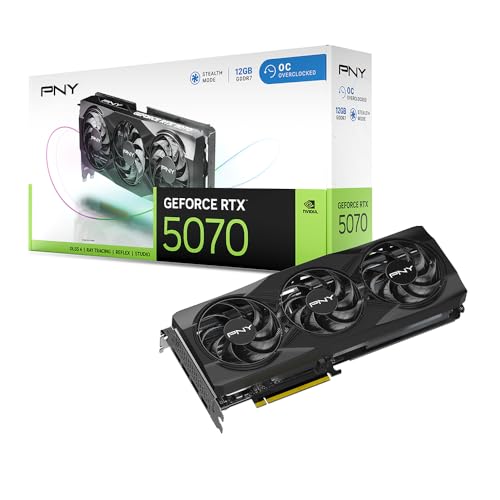
Where to buy
Check the latest price, availability and delivery on Amazon. Orders are placed on Amazon. We may earn a commission from qualifying purchases.
- Best overall build: Ryzen 7 7700X + RTX 5070 build, anchored on the PNY RTX 5070 OC Triple-Fan — Check on Amazon
- Best value build: Ryzen 7 7700X + RTX 4070 Super build, anchored on the Gigabyte RTX 4070 Super Eagle OC — Check on Amazon
- Best for high-refresh gaming: Ryzen 7 7800X3D + RTX 5070 build, anchored on the Ryzen 7 7800X3D — Check on Amazon
- Best for VRAM headroom: Ryzen 7 7700X + RX 9070 build, anchored on the Sapphire PURE RX 9070 — Check on Amazon
See 2 more Amazon options
- The prebuilt that beats building: Skytech Omega, Ryzen 7 7700X, RTX 4070 Super, 32GB DDR5 — Check on Amazon
- The newest-GPU prebuilt: MSI Codex Z2, Ryzen 7 8700F, RTX 5070, 32GB DDR5, 2TB SSD — Check on Amazon
Read the full guide ↓
Disclosure: As an Amazon Associate, reviewstook.com earns from qualifying purchases. Links to Amazon on this page are affiliate links; they cost you nothing extra. Listing details such as price and availability change often, so check the current Amazon listing before you buy.
Fifteen hundred dollars is where a self-built gaming PC is supposed to come into its own: enough money for a genuinely fast graphics card, a modern platform with years of upgrade life, and none of the mystery components that prebuilt makers hide inside their cases. The builds below deliver that — with one condition that shapes this entire guide, and that we will state once here and then prove line by line. Component prices in late 2026 are violently uneven. The same 32GB DDR5 kit can sit at the affordable end of this tier in one rotation and far above it in the current memory spike, and the RTX 5070 class swings just as widely between its favorable rotations and its expensive stretches. So every build on this page is a buying rule, not a promise: check the current price on Amazon for each line, buy the volatile parts when their pricing is favorable, in whatever order those moments arrive, and the build lands under $1,500. Pay spike pricing for the graphics card and the memory kit and no build in this class fits, which is exactly why two complete prebuilt PCs earn places in a build guide this year.
The honesty note for the tier belongs up front: the RTX 4070 Ti Super does not fit a $1,500 parts budget, and neither does its successor class. A card from that class alone can consume more than this entire budget, leaving nothing for the other parts a PC needs, and no verified new Amazon listing for a 4070 Ti Super leaves room for the rest of a complete machine. What $1,500 honestly buys is the RTX 4070 Super / RTX 5070 class, AMD’s RX 9070 with its 16GB of VRAM, and a Ryzen 7000 platform underneath. Below are the quick picks, six fully itemized build paths — four to assemble yourself, two to buy assembled because they can beat building on total cost when their pricing is favorable — a comparison table, the parts-spike problem explained, a build-versus-prebuilt scoreboard, the mistakes that waste money at this tier, and the questions builders ask before ordering.
In this guide
Quick Picks
Short on time, or comparing several options at once? Each row below names a builder type and the path that suits it, with a link to the listing for its defining part — or, for the two prebuilts, the whole machine. Check the current price on Amazon from each link before you decide.
| Buyer type | Pick | Why it stands out | Link |
|---|---|---|---|
| Best overall build | Ryzen 7 7700X + RTX 5070 (PNY OC Triple-Fan) | Current-generation GPU with DLSS 4, positioned to fit the budget with Windows included when the volatile parts are bought in favorable rotations — check price on Amazon | Check on Amazon |
| Best value build | Ryzen 7 7700X + RTX 4070 Super (Gigabyte Eagle OC) | The same performance class positioned lower in the tier, when the card is bought in one of its favorable rotations — check price on Amazon | Check on Amazon |
| Best for high-refresh gaming | Ryzen 7 7800X3D + RTX 5070 | The strongest gaming CPU of its generation — but its premium position in the tier eats the Windows budget | Check on Amazon |
| Best for VRAM headroom | Ryzen 7 7700X + RX 9070 (Sapphire PURE) | 16GB of VRAM and the lowest-positioned complete path on this page — check price on Amazon | Check on Amazon |
| Best prebuilt instead | Skytech Omega (7700X, RTX 4070 Super) | Complete with Windows and positioned to undercut the equivalent DIY path when its pricing is favorable — check price on Amazon | Check on Amazon |
| Best newest-GPU prebuilt | MSI Codex Z2 (8700F, RTX 5070, 2TB) | Current-generation GPU with double the storage of the DIY builds — check price on Amazon | Check on Amazon |
How These Picks Were Chosen
The budget was applied to the whole machine, not to a headline part. Every DIY path below is itemized down to the cooler and the operating system — graphics card, processor, motherboard, memory, storage, power supply, case, cooler, and a Windows 11 Home license — because a build guide that totals everything except the parts that bust the budget is advertising, not advice. Where a path only works under a condition, the condition is printed in the review itself: one build below sits right at the top of the parts budget and is pushed over the line by its Windows license, and we say so rather than quietly dropping the license from its list.
We did not assemble these machines ourselves. We worked from the makers’ listings and specification pages, comparing the numbers that decide a build’s life: VRAM capacity, the power supply’s published wattage and certification, memory speed, and socket longevity. Prices change too often to print responsibly, so this guide does not print them: for every pick with an Amazon listing, check the current price on Amazon, and treat the positioning language in each review — where a part sits within this tier, and whether it needs a favorable rotation to fit — as the durable guidance. Two filters sat on top of that positioning. The first is the named-parts filter: every component in a DIY path is a specific, reputable model you can inspect before buying — no unnamed power supplies, no unspecified memory, no “GPU brand may vary.” The second is the platform filter: all four DIY paths sit on AMD’s AM5 socket with DDR5 memory, because a $1,500 build in 2026 should not be a dead end, and AM5 is the platform with a documented upgrade future.
The two prebuilts were admitted under a stricter rule than the DIY paths, not a looser one: a factory machine only belongs in a build guide when, at its favorable pricing, it can undercut the honest DIY cost for the same performance class, Windows included. Both machines below can clear that bar, and their reviews concede what building still wins — specified parts, a published-quality power supply you chose yourself, and per-part warranties — because on the weeks when graphics cards and memory are priced favorably for retail buyers, the DIY paths take the lead back.
The 6 Best Gaming PC Builds Under $1,500
Build 1 — Best Overall: Ryzen 7 7700X + RTX 5070
Who it suits: The builder who wants the current-generation machine: a Blackwell graphics card with DLSS 4 and multi-frame generation, on the platform that will accept AMD’s next CPU generations, with no part in the box that needs apologizing for.
The parts list — check the current price on Amazon for each line before you buy:
- Graphics card: PNY RTX 5070 OC Triple-Fan, 12GB GDDR7 — the defining line of this build; buy it in a favorable rotation
- Processor: AMD Ryzen 7 7700X, 8 cores, up to 5.4 GHz — the value position in the AM5 line
- Motherboard: MSI B650 Gaming Plus WiFi, AM5, DDR5
- Memory: 32GB (2×16GB) DDR5-6000 kit — buy this line only when its pricing is favorable (see the spike section below)
- Storage: 1TB PCIe Gen4 NVMe SSD, in the WD Black SN850X class
- Power supply: Corsair RM750e 750W, 80+ Gold, fully modular, ATX 3.1
- Case: Montech AIR 903 MAX, four 140mm fans included
- Cooler: Thermalright Peerless Assassin 120 SE — a modestly positioned cooler that performs well above its position
- Operating system: Windows 11 Home (USB retail)
Budget position: this path is built to land under the budget with the license included, provided the graphics card and memory are bought when their pricing is favorable. The logic of the pairing is balance. The RTX 5070 is the current-generation card of this class: 12GB of GDDR7, DLSS 4 with multi-frame generation, and raster performance in the RTX 4070 Super’s neighborhood, which makes it the natural card for high-refresh 1440p. The 7700X is the value CPU of the AM5 line right now — positioned well below its X3D siblings — and at 1440p the graphics card, not the processor, decides frame rates in nearly every game, so the room saved against a 7800X3D is better held for the GPU. Around those two, every supporting part is a named, inspectable choice: a B650 board with WiFi 6E and a 2.5Gb LAN, the memory speed AMD’s platform is tuned for, a 750W Gold power supply with the native 12V-2×6 connector this GPU generation uses, and a dual-tower air cooler that punches far above its modest position in the cooler market.
- Current-generation GPU: DLSS 4 and multi-frame generation extend the card’s useful life beyond its raw raster speed.
- Every part is named and published — a 750W Gold PSU with a stated model, not a wattage rumor.
- AM5 platform: the board and memory carry forward to future Ryzen generations.
Honest limitation: The budget fit is a discipline, not a guarantee. The linked PNY card and the memory kit both swing widely, and buying either during a spike stretch pushes this build out of the tier entirely. The 12GB of VRAM is also the class ceiling — enough for 1440p today, not a 4K texture buffer.
Choose it if you want the newest GPU feature set and can time two purchases — card and memory — to their favorable rotations; check price on Amazon for both before committing. Skip it if you need to order everything this week regardless of where pricing sits; that buyer is served by the prebuilts below, and this guide will not pretend otherwise.

Build 2 — Best Value: Ryzen 7 7700X + RTX 4070 Super
Who it suits: The builder who shops performance per dollar rather than generation badges, and who is willing to let a previous-generation card do current-generation work.
The parts list — check the current price on Amazon for each line before you buy:
- Graphics card: Gigabyte RTX 4070 Super Eagle OC, 12GB GDDR6X — a buy-in-a-favorable-rotation pick; check price on Amazon
- Processor: AMD Ryzen 7 7700X
- Motherboard: MSI B650 Gaming Plus WiFi
- Memory: 32GB (2×16GB) DDR5-6000 kit — buy only when its pricing is favorable
- Storage: 1TB PCIe Gen4 NVMe SSD
- Power supply: Corsair RM750e 750W Gold, fully modular
- Case: Montech AIR 903 MAX
- Cooler: Thermalright Peerless Assassin 120 SE
- Operating system: Windows 11 Home (USB retail)
Budget position: the most affordable route to this performance class with a license included, when the card is bought in a favorable rotation. The RTX 4070 Super was the value high point of its generation: 12GB of GDDR6X, DLSS 3 frame generation, and raster speed that trades blows with the RTX 5070 that replaced it. What the newer card adds is multi-frame generation and GDDR7; what it does not add is a reason to pay a premium for the same class of 1440p performance. Gigabyte’s Eagle OC is a workmanlike version of the card — a triple-fan Windforce cooler, a factory overclock, no lighting tax — and its pricing behavior is the whole story of this build: positioned high enough on an ordinary week to be a poor buy, and low enough in its favorable rotations to be the best value in this guide. Everything beneath the card is identical to Build 1, deliberately: at this budget the platform should be bought once and bought properly, and the contest between builds should happen at the graphics card, where the money actually shows on screen.
- 4070 Super raster performance matches the class of the card that replaced it, positioned lower in the tier in its favorable rotations.
- Shares Build 1’s named platform — same board, PSU, cooler and case discipline.
- The lowest-positioned NVIDIA path on this page once Windows is counted.
Honest limitation: This is the most price-conditional build here. Outside its favorable rotations the card pushes the whole build out of the tier; the value case exists only for a buyer who waits for the right rotation. The card is also a discontinued generation — stock thins over time, and when the favorable rotations stop coming, Build 1 is the natural alternative.
Choose it if you can watch pricing for a few weeks and pounce when the card’s position drops. Skip it if you are buying on a deadline, or if multi-frame generation is specifically what you are shopping for — that feature belongs to the 50-series build above.

Build 3 — Best for High-Refresh Gaming: Ryzen 7 7800X3D + RTX 5070
Who it suits: Competitive and high-refresh players — the 240Hz monitor crowd — whose games are CPU-limited at 1080p and 1440p, and who already own a Windows license or a monitor budget separate from this one.
The parts list — check the current price on Amazon for each line before you buy:
- Processor: AMD Ryzen 7 7800X3D, 8 cores with 3D V-Cache — check price on Amazon
- Graphics card: PNY RTX 5070 OC Triple-Fan, 12GB GDDR7 — buy in a favorable rotation
- Motherboard: MSI B650 Gaming Plus WiFi
- Memory: 32GB (2×16GB) DDR5-6000 kit — buy only when its pricing is favorable
- Storage: 1TB PCIe Gen4 NVMe SSD
- Power supply: Corsair RM750e 750W Gold, fully modular
- Case: Montech AIR 903 MAX
- Cooler: Thermalright Peerless Assassin 120 SE
- Operating system: Windows 11 Home (USB retail) — and it does not fit; see the budget note
Budget position: the parts alone sit right at the top of this tier — and adding a fresh Windows license pushes the build over budget. We are stating that plainly because it is the most useful fact in this review. The 7800X3D’s 3D V-Cache made it the defining gaming CPU of its generation, and it no longer sits at the extravagant end of the CPU market the way it did at launch. In CPU-limited games, the esports titles and simulation games where frame rates run into the hundreds and the processor sets the ceiling, it is simply faster than the 7700X in a way no settings change can imitate. But it carries a clear premium over the 7700X, and at 1440p in GPU-limited games that premium buys almost nothing — the graphics card is the bottleneck and both CPUs feed it equally. So this build is a specialist: it fits the budget only for a builder who carries a license over from a previous machine, and for everyone else it is an over-budget build wearing a badge it has not earned. If that is you, buy Build 1 and spend the difference on the monitor this CPU deserves.
- The strongest gaming CPU of its generation for CPU-limited, high-refresh play.
- Same named platform as the other DIY paths — the premium is spent entirely on the processor.
- The X3D premium over the 7700X is smaller than it has historically been.
Honest limitation: With a new Windows license the build is over budget, full stop. And in GPU-limited 1440p gaming the extra CPU money is nearly invisible; this build earns its premium only where the processor is the limit.
Choose it if you play CPU-limited titles at high refresh rates and already own a Windows license. Skip it if you need the license in the budget, or your games are GPU-limited — Build 1 is the same machine for your use, positioned lower in the tier.

Build 4 — Best for VRAM Headroom: Ryzen 7 7700X + RX 9070
Who it suits: The builder who mods games, plays texture-heavy titles, or simply refuses to watch a VRAM counter — and who wants the most headroom left in the budget in exchange for giving up NVIDIA’s feature stack.
The parts list — check the current price on Amazon for each line before you buy:
- Graphics card: Sapphire PURE RX 9070, 16GB GDDR6 — positioned at the accessible end of its class; check price on Amazon
- Processor: AMD Ryzen 7 7700X
- Motherboard: MSI B650 Gaming Plus WiFi
- Memory: 32GB (2×16GB) DDR5-6000 kit — buy only when its pricing is favorable
- Storage: 1TB PCIe Gen4 NVMe SSD
- Power supply: Corsair RM750e 750W Gold, fully modular
- Case: Montech AIR 903 MAX
- Cooler: Thermalright Peerless Assassin 120 SE
- Operating system: Windows 11 Home (USB retail)
Budget position: the lowest-positioned complete path in the guide, and the only build with real slack in it once Windows is included. The RX 9070 is AMD’s answer to the 4070 Super / 5070 class: raster performance in the same neighborhood, FSR upscaling and frame generation, and the specification that will age best in this entire guide — 16GB of VRAM, a third more than every NVIDIA card here carries. VRAM is the one component you cannot upgrade later, and it is the limit that texture-heavy games and modded installs hit first; 12GB is a 1440p budget for today, 16GB is headroom for the machine’s whole life. Sapphire’s PURE is the white-finished version of its Pulse design — the same GPU in a shell built for white cases — and Sapphire’s cards have the strongest reputation of AMD’s board partners. The trade is stated plainly in the limitation below, because it is a real one: you give up DLSS, which remains the best upscaling and frame-generation stack, and you take AMD’s ray-tracing performance, which trails NVIDIA’s in this class. For raster-first players the exchange favors this build; the headroom it leaves in the budget can fund the 2TB SSD upgrade the whole page wishes it had room for.
- 16GB of VRAM — the only future-proofed memory capacity in this guide.
- The lowest-positioned path here once Windows is counted, leaving genuine upgrade slack.
- Sapphire is AMD’s most reputable board partner; the PURE suits white builds.
Honest limitation: No DLSS, and ray tracing trails the NVIDIA class. Also note the boundary of the family: the faster RX 9070 XT does not fit this budget — its cards sit in a higher tier on Amazon US — so this build is the non-XT card, chosen because it is the one that fits.
Choose it if raster performance and VRAM headroom outrank ray tracing and DLSS in your games. Skip it if you play ray-traced titles heavily or stream with NVIDIA’s encoder and software stack — Builds 1 and 2 exist for you.

Pick 5 — The Prebuilt That Beats Building: Skytech Omega (Ryzen 7 7700X, RTX 4070 Super)
Who it suits: The honest comparison shopper — including the would-be builder who priced this page’s parts during a spike stretch and watched every path sail out of the tier.
What the machine is: a complete Skytech Omega desktop with a Ryzen 7 7700X, an RTX 4070 Super 12GB, 32GB of DDR5, a 1TB NVMe Gen4 SSD, a published 750W Gold power supply, Wi-Fi and Windows 11 Home installed — the same specification as Build 2 on this page, assembled and warranted as one machine. Check the current price on Amazon, because the comparison turns on it: when this machine’s pricing sits in its favorable range, it can undercut building its twin yourself — a twin whose own budget fit already requires the graphics card and memory to be caught in favorable rotations. At that point the factory machine is the cheaper route, arrives in one box, and its cost does not depend on your timing two separate component deals. This is the concession this guide owes you in plain language: in the current parts market, the prebuilt can win on total cost. It happens because system integrators buy memory and graphics cards at contract pricing the retail market is not offering you this year, and the Omega’s favorable rotations pass some of that through.
What building still wins is everything the invoice does not show. Skytech does not let you choose the motherboard model, the memory kit’s timings, or the power supply’s brand — the wattage and Gold rating are published, which puts this machine ahead of most prebuilts, but the specific units are theirs to pick, and the graphics card’s board brand may vary. Your warranty is one company’s, for the whole box, rather than per-part warranties on components you chose. And this machine’s pricing is volatile in its own right — in its expensive stretches it costs more than the DIY build it twins. The recommendation is conditional in both directions: when its current price on Amazon sits in the favorable range, buy this and skip the build entirely; when it sits high, build Build 2 and wait for the card’s favorable rotation instead.
- Positioned to undercut the equivalent DIY path when its pricing is favorable, complete with Windows.
- Published 750W Gold PSU and a full 32GB of DDR5 — no hidden 16GB downgrade.
- One box, one warranty, no assembly risk or parts-timing discipline required.
Honest limitation: The favorable pricing is a rotation, not a standing position; in its expensive stretches this machine loses its value case entirely. Component brands inside are the maker’s choice, and the GPU brand may vary.
Choose it if you catch it in its favorable range, or you value a finished, warranted machine over parts control. Skip it if its live price sits in its expensive range — at that point the DIY paths, patiently bought, are the better arithmetic.

Pick 6 — The Newest-GPU Prebuilt: MSI Codex Z2 (Ryzen 7 8700F, RTX 5070, 2TB)
Who it suits: The buyer who wants Build 1’s current-generation graphics card and double its storage, without assembling anything — and who catches this machine on one of its deep rotations.
What the machine is: MSI’s Codex Z2 in its A8NVP-436US configuration — a Ryzen 7 8700F, an RTX 5070, 32GB of DDR5, a 2TB SSD and Windows 11 Home. Check the current price on Amazon before judging it: in its favorable rotations this machine is positioned to undercut Build 1’s DIY path while carrying twice the storage, which is the upgrade every build on this page wants and none of them could comfortably afford inside the budget. The 8700F is the one specification to understand before buying: it is an 8-core Zen 4 chip with a 5.0 GHz boost, close to the 7700X in gaming, but it is a former APU design with half the L3 cache and PCIe 4.0 graphics lanes rather than 5.0 — a real but small step down in CPU specification that most players at 1440p will never measure, traded here for the bigger SSD. MSI is also a motherboard and graphics-card manufacturer in its own right, which shows in the machine’s coherence, though not in its published specifications: the listing does not publish the power supply’s wattage, and that omission is exactly the kind of thing the DIY paths on this page exist to avoid.
The price discipline matters even more here than with the Skytech. This listing is volatile — it spends long stretches positioned far above this tier — so the pick only makes sense in its favorable rotations: there it beats building; anywhere near its highs it is among the worst buys on the page. Set a tracker alert, confirm the model code A8NVP-436US at checkout (other Codex Z2 configurations share the name with different parts inside), and let the deal come to you.
- RTX 5070 and 2TB of storage, positioned to undercut Build 1 in its favorable rotations, with Windows included.
- 32GB of DDR5 fitted, where several rivals in this class quietly ship 16GB.
- Built by a company that also manufactures the boards and cards inside it.
Honest limitation: The most volatile pricing in this guide — positioned far above the tier for long stretches, so the recommendation applies only in its favorable rotations. The power supply wattage is not published, and the 8700F’s cache and PCIe 4.0 lanes are a small specification step down from the 7700X.
Choose it if you want the 5070 class with 2TB and no assembly, and you can wait for its rotation. Skip it if you are buying this week at whatever it costs — at unfavorable pricing, Build 1’s parts, or the Skytech in its favorable range, are the rational buys.

Comparison Table
| Path | GPU | CPU | Budget position | With Windows | Link |
|---|---|---|---|---|---|
| Build 1 — Best overall (DIY) | RTX 5070 12GB | Ryzen 7 7700X | Fits the budget when the volatile parts are bought in favorable rotations | Fits, license included | Check on Amazon |
| Build 2 — Best value (DIY) | RTX 4070 Super 12GB | Ryzen 7 7700X | Lowest-positioned NVIDIA path, in the card’s favorable rotations | Fits, license included | Check on Amazon |
| Build 3 — High-refresh (DIY) | RTX 5070 12GB | Ryzen 7 7800X3D | Parts alone sit at the top of the tier | Over budget with a fresh license | Check on Amazon |
| Build 4 — VRAM headroom (DIY) | RX 9070 16GB | Ryzen 7 7700X | Lowest-positioned complete path on the page | Fits, license included, with slack | Check on Amazon |
| Pick 5 — Skytech Omega (prebuilt) | RTX 4070 Super 12GB | Ryzen 7 7700X | Can undercut its DIY twin in favorable rotations | Included | Check on Amazon |
| Pick 6 — MSI Codex Z2 (prebuilt) | RTX 5070 12GB | Ryzen 7 8700F | Can undercut Build 1 in favorable rotations, with 2TB storage | Included | Check on Amazon |
How to Choose a Gaming PC Build Under $1,500
- Total the whole machine before you fall for a graphics card. A build is nine purchases, not one. Write down card, CPU, board, memory, SSD, PSU, case, cooler and Windows, and check the current price on Amazon for every line — a fast card inside an over-budget cart is not a $1,500 build with a fast card; it is an over-budget build.
- Buy the two volatile lines in their favorable rotations, in any order. The graphics card and the DDR5 kit swing widely between rotations. Trackers exist for both; buy whichever becomes favorable first, store it, and let the stable lines — board, PSU, case, cooler — be bought whenever. The builds above only exist for buyers who shop this way.
- Do not pay spike pricing for memory. A 32GB DDR5-6000 kit does not get faster when it gets more expensive. If the memory line is in its spike range, the correct purchase is no purchase — or the prebuilt, whose maker did not pay retail for RAM.
- Name your power supply or do not buy it. The DIY advantage in one sentence: a Corsair RM750e is a known 750W Gold unit with a native 12V-2×6 cable and a seven-year warranty. Any build — yours or a factory’s — whose PSU is described only by wattage, or not described at all, is hiding the part most likely to limit the machine’s next GPU.
- Match the CPU to your bottleneck, not to a ranking. At 1440p in GPU-limited games, the 7700X and 7800X3D deliver the same experience despite the X3D’s premium. In CPU-limited competitive titles the X3D is worth every cent. Know which games you play before you pay the premium — and if you pay it, know that it consumes the Windows budget in this tier, as Build 3 shows.
- Treat 12GB of VRAM as a 1440p budget, 16GB as a lifespan. Every NVIDIA card in this class carries 12GB. It is enough for high-refresh 1440p today; the RX 9070’s 16GB is the choice for texture mods, heavy titles and keeping the card longer. VRAM cannot be upgraded — it is the one specification to buy for the machine’s whole life, not its first year.
- Keep the platform, flex the card. All four DIY paths share one AM5 platform because boards and DDR5 are the parts you keep across upgrades. If a total must shrink, shrink the graphics card a class and upgrade it later; do not shrink the board, memory capacity or PSU to fund a card — that trade mortgages the machine to pay for its most replaceable part.
- Price the prebuilt before you order parts. This year, of all years: integrators buy components at contract pricing, and two factory machines on this page can undercut honest DIY totals in their favorable rotations. Check them first. If a prebuilt with published specifications beats your cart clearly, the remaining reasons to build are control and craft — legitimate reasons, but name them honestly rather than claiming savings that are not there.
- Budget the license like a part. Windows 11 Home is a real line in the total — check the current price on Amazon for the retail USB, and check Microsoft’s own store as the reference. A retail license also transfers to your next build, which an OEM key does not. However you fund it, it belongs in the budget; guides that omit it are understating every build.
The Late-2026 Parts Spike, Explained
Every budget claim in this guide carries an asterisk, and this section is the asterisk, in full. Component pricing on Amazon in late 2026 is two markets sharing one storefront: a deal market, where parts rotate through favorable pricing, and a spike market, where the same parts sit at levels that would have been implausible a year earlier. The memory market is the extreme case: mainstream 32GB DDR5-6000 kits, including name-brand CL30 kits such as Corsair’s Vengeance line, have swung from the affordable end of the market to the top of it within the same season. Storage has followed the same pattern, with flagship Gen4 drives such as the WD Black SN850X 1TB moving well above their usual position. Graphics cards swing widest of all: the PNY RTX 5070 anchoring Build 1 moves between genuinely favorable rotations and stretches where it is positioned far outside this tier.
What this means in practice: the builds above, bought line by line at spike pricing, do not fit this budget — not one of them — and any guide that prints a tidy total without telling you which market it shopped in is hoping you will not do the addition. Bought patiently, line by line as pricing becomes favorable, the same builds fit. The distance between those two outcomes is not a discount; it is a shopping method. Set tracker alerts on the graphics card and the memory kit, buy the stable parts whenever, and accept that a build at this budget takes weeks to assemble on paper before it takes an afternoon to assemble on a desk. Readers who cannot shop that way are not failed builders — they are the prebuilt market, and Picks 5 and 6 are positioned for them.
Build or Buy at $1,500: The Honest Scoreboard
On total cost, right now, buying can win. In their favorable rotations, the Skytech Omega can undercut its DIY twin with Windows included, and the MSI Codex Z2 can undercut Build 1 while doubling its storage. Neither machine is a straw man: both carry 32GB of DDR5, current or near-current graphics, and — in the Skytech’s case — a published 750W Gold power supply. Integrators are not paying the retail memory spike, and this year that structural advantage is worth more than the integrator’s margin. A guide that will not say this is selling you a hobby as if it were a savings plan.
On everything except the invoice, building still wins, and the wins are concrete. Your PSU is a named Corsair unit with a seven-year warranty, not a wattage claim — MSI does not even publish the Codex’s wattage. Your motherboard is a specific B650 board you chose; your memory is a 6000 MT/s kit you specified rather than whatever was on the integrator’s shelf; your graphics card is an exact model with a known cooler, not “brand may vary.” Each part carries its own warranty, so a failure in year four costs you one component’s RMA, not the whole machine’s. And the platform is yours to upgrade on your schedule. Pay for those things knowingly and building is worth it. Claim you are also saving money this year, at unfavorable retail pricing, and you are not.
Common Buying Mistakes
- Budgeting for an RTX 4070 Ti Super or RTX 5070 Ti build at $1,500. Cards in that class alone can exceed the entire budget before the other eight parts are priced.
- Totaling a build without Windows, a cooler or a case, then discovering the real budget was far higher. Every path in this guide counts all nine lines; hold any parts list you are given to the same standard.
- Paying the DDR5 spike. A 32GB kit at spike pricing is the same kit that rotates through far more favorable pricing. Buying it at spike pricing converts a build in this tier into one well above it, just to save a few weeks of patience.
- Buying the graphics card first and the platform cheap. A bargain B650 board with weak power delivery, a 16GB memory kit and an unnamed PSU will cap every future upgrade — the card is the easiest part to replace, so it should be the last place the budget is defended.
- Paying the X3D premium for GPU-limited games. At 1440p with the graphics card as the bottleneck, the 7800X3D’s premium buys almost nothing measurable — and in this tier it specifically buys it instead of a Windows license.
- Assuming the prebuilt is the lazy overpay. In their favorable rotations, both prebuilts here can undercut the DIY paths. Check their live prices before ordering parts; assuming either answer — build or buy — without pricing both is the mistake.
- Ordering a Codex Z2 by name alone. Multiple configurations share the name; the pick on this page is model A8NVP-436US with the RTX 5070 and 2TB drive. Confirm the model code at checkout.
- Judging the RTX 5070 by its worst listing or its best deal. The same card rotates between favorable and spike pricing. The honest picture is the rotation — buy in the favorable part of it, and treat any single-day price, high or low, as weather rather than climate.
Final Recommendation
- Most builders: Build 1 — Ryzen 7 7700X + RTX 5070, built to fit the budget with Windows when the volatile parts are bought in favorable rotations.
- Value hunters with patience: Build 2 — the RTX 4070 Super build, the lowest-positioned NVIDIA path when the card’s pricing is favorable.
- High-refresh competitive players with a license already: Build 3 — the 7800X3D build, whose parts alone sit at the top of the tier.
- VRAM-first and modded-game players: Build 4 — the RX 9070 build, the lowest-positioned complete path with Windows included.
- Anyone who prices the parts during a spike stretch: Pick 5, the Skytech Omega in its favorable range — or Pick 6, the MSI Codex Z2, if the 2TB drive matters more.
Our top two paths at this budget are Build 1, for the builder who can time a graphics card and a memory kit to their rotations and wants the current-generation machine with every part named, and the Skytech Omega, for the buyer who prices honestly and finds the factory machine cheaper — this year, in its favorable rotations, it can be. Between them they cover the two shapes this search actually takes in late 2026: build it properly and patiently, or buy it complete, and let the spike be the integrator’s problem. Builders working to a tighter total should also see Best Gaming PC Build Under $1200, and those who would rather skip parts selection entirely can start with Best Budget Gaming PC Under $1500 and Best Gaming PC Under $1500. Set the tracker alerts before you order anything, confirm the Codex’s model code if that is your pick, and check every live price on the day — at $1,500, in this market, the homework is not a preliminary to the build. It is the build.
Frequently Asked Questions
Can you really build a gaming PC with an RTX 5070 for under $1,500?
Yes — for a patient buyer, which is the only honest way to answer in this market. Build 1 on this page is positioned to fit the budget with a Windows license included, using an RTX 5070 bought in a favorable rotation and a 32GB DDR5 kit bought when its pricing is favorable. Bought at spike pricing, the identical build lands well outside this tier. The build fits the budget for a buyer who times the volatile lines, not for a one-cart buyer, and this guide describes both ways rather than hiding the second.
Why is there no RTX 4070 Ti Super or RTX 5070 Ti build?
Because the graphics card alone breaks the budget. Cards in that class can consume more than the entire $1,500 on their own, and no verified new Amazon listing for an RTX 4070 Ti Super leaves room for a CPU, board, memory, storage, PSU, case, cooler and Windows underneath it. The realistic ceiling of this tier is the RTX 4070 Super / RTX 5070 class and AMD’s RX 9070, which is what the six paths here are built on.
Is it cheaper to build or buy a gaming PC at $1,500 right now?
Right now, buying can be — in the prebuilts’ favorable rotations. The Skytech Omega, complete with Windows, can undercut building its specification yourself, and the MSI Codex Z2 can undercut the comparable DIY path while doubling its storage. Integrators buy memory and graphics cards at contract pricing and are insulated from the retail DDR5 spike. Building still wins on specified parts, power-supply quality you chose yourself, and per-part warranties — but in late 2026 it does not automatically win on the invoice, and this page will not claim it does. Check the current price on Amazon for both prebuilts before you decide.
How much does Windows add to a build, and can I skip it?
Treat the license as a full line in the budget, not a rounding error: check the current price on Amazon for Windows 11 Home retail USB, and use Microsoft’s own store as the reference point. A retail license is transferable to your next build, which is worth having at this tier. You can install Windows unactivated and activate later — the machine works, with personalization limits and an activation watermark — which is the legitimate way to stage the cost; what you should not do is pretend the license is free in a build total, or buy a suspiciously cheap key from an opaque seller and call the saving real.
7700X or 7800X3D for a $1,500 build?
It depends on your bottleneck, and the budget makes the answer sharper. The 7800X3D carries a clear premium over the 7700X. In GPU-limited gaming at 1440p they perform alike, and the premium is better kept or spent elsewhere. In CPU-limited competitive and simulation titles the X3D is meaningfully faster and worth it — but in Build 3 that premium is exactly what pushes the build over budget once a Windows license is added. Buy the X3D with your eyes open, or if you already own a license.
Is 12GB of VRAM enough, or should I get the RX 9070’s 16GB?
For high-refresh 1440p in current games, 12GB is a workable budget — it is what every NVIDIA card in this class carries, and the RTX 5070 and 4070 Super builds here are built around it. The RX 9070’s 16GB is the safer long-term specification for texture-heavy games, modded installs and keeping the card through more release cycles, and Build 4 is also the lowest-positioned path on the page. The exchange is DLSS and stronger ray tracing on the NVIDIA side against capacity and positioning on the AMD side; neither answer is wrong, but VRAM is the one part of the decision you cannot revise later.
What should I upgrade first in a year or two?
Storage, then the graphics card — which is why these builds protect the platform. A 2TB SSD is the upgrade every 1TB build wants first, and the AM5 board, DDR5 kit and 750W Gold power supply in the DIY paths were specified so that a future GPU or a drop-in newer Ryzen CPU needs no other part replaced. That upgrade headroom is the concrete thing building buys you over the prebuilts: their next GPU is limited by a power supply you did not choose and, in the MSI’s case, one whose wattage was never published.


