Where to buy
Check the latest price, availability and delivery on Amazon. Orders are placed on Amazon. We may earn a commission from qualifying purchases.
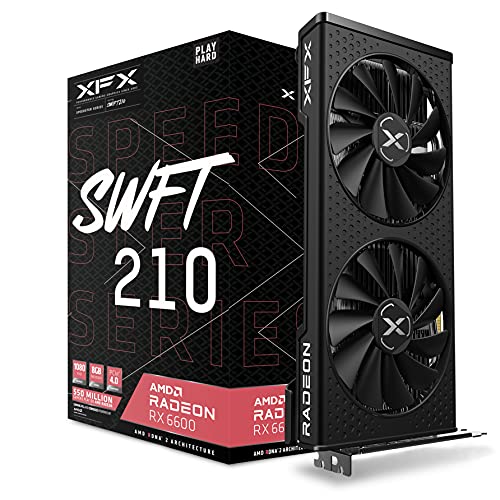
- Strongest renderer in the guide: XFX Speedster SWFT 210 Radeon RX 6600 8GB — the card anchoring the all-new parts build — Check on Amazon
- abytespark Gaming PC, GTX 1660 Super — the only complete tower here, and the only pick that touches native 1440p today without assembly — Check on Amazon
- MINISFORUM UM870 Slim Barebone — the strongest integrated graphics in the guide, described below with the parts it still needs — Check on Amazon
- Beelink SER5 MAX Mini PC, Ryzen 7 7735HS — a finished 1440p-desktop machine whose games render lower and upscale — Check on Amazon
See 2 more Amazon options
- STGAubron Gaming PC, Ryzen 5 5500 and RX 580 — 8GB of VRAM and an upgradeable platform, a buy only on a price dip — Check on Amazon
- AMD Ryzen 5 5600G — the staged build: a 1440p desktop now, a real 1440p gaming card in the empty slot later — Check on Amazon
Read the full guide ↓
Disclosure: As an Amazon Associate, reviewstook.com earns from qualifying purchases. Links to Amazon on this page are affiliate links; they cost you nothing extra. Listing details such as price and availability change often, so check the current Amazon listing before you buy.
Before any pick in this guide can be judged, one distinction has to be made plainly, because the whole search turns on it: the resolution a game is rendered at and the resolution your monitor displays are two different numbers, and at this budget they are almost never the same number. A 1440p monitor shows 2560 × 1440 pixels — about 3.7 million of them, roughly 78% more than 1080p’s 2.1 million — and something has to compute every one. When a graphics chip renders a game at 1080p and the result is upscaled to fill a 1440p panel, the picture on your desk is 1440p-shaped but 1080p-made: softer than native rendering, far cheaper to produce, and the honest working method of every affordable machine in this guide. Native 1440p rendering — the game itself computed at 2560 × 1440 — is the expensive version, and at this budget it survives only in lighter, older and esports titles on the strongest hardware here. This guide grades all six paths on which of those two things each one actually does, title class by title class, and never lets a pick borrow the word “1440p” for a render it did not perform.
The second honesty is inherited from the base guide, and the 1440p angle does not repeal it: at this budget there is no all-new parts build at any resolution that stays within the budget once every part is counted. The classic basket — Ryzen 5 5500, B550 board, 16GB of DDR4, 500GB NVMe, Radeon RX 6600 — sits well above the budget before a Windows licence, because the memory and NAND shortage pushed memory and SSD costs up sharply — check price on Amazon for each part before you plan around it. So the six paths below are the same six honest routes as the base guide — two genuine DIY builds, one barebone completion dismantled line by line, and three complete systems that beat building right now — re-graded for a reader whose desk carries, or will carry, a 1440p monitor. If your panel is 1080p and staying that way, the base guide at Best Gaming PC Build Under $500 is the same money spent without the resolution question. This one is for the 1440p desk: what renders natively, what upscales, what merely displays, and which path turns into a true native-1440p machine later.
In this guide
Quick Picks
Short on time, or comparing several options at once? Each row names a buyer type and the path that suits it, with its honest 1440p verdict stated in the row. Check price on Amazon for each pick — the reviews explain what is included and what still needs to be added.
| Buyer type | Pick | 1440p verdict | Link |
|---|---|---|---|
| Strongest 1440p renderer | Ryzen 5 5500 + RX 6600 parts build (XFX SWFT 210) | Native 1440p in lighter titles; 1080p render + upscaling in demanding ones | Check on Amazon |
| Best complete tower | abytespark Gaming PC, GTX 1660 Super | Native 1440p in older/lighter games at reduced settings; 6GB is the ceiling | Check on Amazon |
| Strongest integrated graphics | MINISFORUM UM870 Slim completion | Native 1440p desktop; games render at 1080p or below and upscale | Check on Amazon |
| Best zero-effort 1440p desk | Beelink SER5 MAX Mini PC | Native 1440p desktop and video; games render at 1080p, upscaled | Check on Amazon |
| Best texture pool on a dip | STGAubron Gaming PC, RX 580 | 8GB holds 1440p textures; the old GPU renders most games at 1080p | Check on Amazon |
| Best staged route | Ryzen 5 5600G APU build | Weakest renderer today; the empty slot is the road to native 1440p | Check on Amazon |
How These Picks Were Chosen
The set is the base guide’s set, unchanged: the same six verified paths, the same ASINs, the same verified hardware, the same deal rules. What changed is the grading. Each path was re-scored on three questions the base guide did not need to ask. First, what does it render natively at 2560 × 1440, and in which class of game — esports, older AAA, or current releases? Second, when it cannot render natively, how good is its honest fallback: which upscaling technology its documented hardware actually supports, and how much video memory it has for the texture load that a 1440p output carries even when the render underneath is smaller? Third, what is its road forward — does the path contain a slot, a socket or a power supply that lets a future card turn it into a genuine native-1440p machine, or is its 1440p story finished at purchase?
Two grading rules follow from those questions and are applied without exception. Upscaling is credited only where the documented silicon supports it, and the technologies are never blurred together. There is no RTX graphics card anywhere in this set, so DLSS — NVIDIA’s RTX-only upscaler — is supported by none of the six picks, including the one NVIDIA tower: the GTX 1660 Super is a GTX card with no Tensor cores, and GTX has never run DLSS. What the AMD-based picks offer instead is FSR, AMD’s upscaling, which this guide credits generically and only at that level: the base research documents no FSR internal-resolution figures for this hardware, so none are printed, and no FSR number is ever dressed up as a DLSS number or vice versa. And video memory is graded as a 1440p specification in its own right, because upscaling reconstructs pixels but textures are loaded for the resolution on the panel — an 8GB card and a 6GB card upscaling from the same render are not the same machine at 1440p output.
The money discipline is the base guide’s, carried over whole. Every path is described with RAM, storage and the operating system’s position stated in print; a barebone’s headline is treated as a starting point, never as a complete computer; and every deal rule survives the re-angle at full size — most importantly the STGAubron tower’s buy-only-on-a-dip rule — buy it only when it checks within this guide’s budget on Amazon, which appears in its buy box line, review, the mistakes section and the final recommendation, exactly as in the base. Prices move often in this market; check price on Amazon before ordering, the memory and SSD lines first.
Rendered at 1440p, Displayed at 1440p
This section exists because the difference it describes is where budget disappointment is usually manufactured. A monitor does not render anything; it displays what it is sent, at its own native resolution, and it will happily display a 1080p render stretched across its 3.7 million pixels. The stretching is not free of consequences. 1080p into 1440p is a non-integer scale — about 1.33× per axis — so the image is resampled rather than cleanly multiplied, and the result is a softness that no settings menu removes. (The clean integer case in this family runs the other way: 720p into 1440p is an exact 2×2 scale, one rendered pixel becoming four, which is why a 720p render can look surprisingly tidy on a 1440p panel while a 1080p render can look faintly smeared.) In-game render scaling and upscaling technologies exist precisely to do this job better than the monitor’s dumb stretch: the interface, text and HUD are drawn natively at 1440p while the 3D scene underneath is rendered smaller and reconstructed. When this guide says a pick “does 1440p,” it always says which half of that sentence it means.
Graded against that standard, the honest map of this set is short. Native 1440p rendering of current, demanding games: nothing here — that capability begins several tiers above this budget class. Native 1440p in esports and older titles at reduced settings: the RX 6600 build and, a step behind it, the GTX 1660 Super tower. A native 1440p desktop — text, browsing, video, office work, all genuinely computed at 2560 × 1440 — with games rendered at 1080p and upscaled: every pick in the guide, including the integrated ones, because displaying a desktop is cheap and rendering a game is not. And one staged exception: the APU build, whose graphics today are the weakest here but whose empty PCIe slot is the only mechanism in the guide that converts into native 1440p gaming later without replacing the machine. Keep the map in mind through the reviews; each pick is placed on it explicitly.
The 6 Best Gaming PC Builds for 1440p Gaming Under $500
1. The All-New DIY Build — Ryzen 5 5500 and Radeon RX 6600 (XFX Speedster SWFT 210)
Who it suits: Builders who want the strongest rendering hardware this budget’s honest routes can assemble, and who accept that the real all-in cost — not the keyword’s number — is what this build requires — check price on Amazon for the parts.
The basket is the base guide’s basket, hidden nowhere. It combines the Ryzen 5 5500, six Zen 3 cores with a bundled cooler, the ASRock B550M-HDV motherboard, a 16GB (2×8GB) DDR4-3200 kit — the shortage-hit line — a Kingston NV3 500GB NVMe drive, a Montech XR-class mid-tower case, a Thermaltake Smart 500W power supply, and the anchor, the XFX Speedster SWFT 210 edition of the Radeon RX 6600 with 8GB of GDDR6 — check price on Amazon for each part, as the combined total sits well above this guide’s budget, with Windows still to account for — run unactivated or licensed on top. For the 1440p reader that outlay buys the only card in this guide that renders the resolution natively as a normal mode of operation rather than an exception: in esports titles and older AAA games, the RX 6600 computes 2560 × 1440 itself, at reduced-to-medium settings, and that is a genuinely different experience from everything below it in this list.
In demanding current releases the same card steps down to the set’s shared honest workflow: render at 1080p, let upscaling carry the result to the panel. The upscaler here is AMD’s FSR — this is an AMD card, and DLSS is not merely absent but architecturally impossible on it, a point this guide states rather than glosses because search results routinely blur the two. The 8GB of VRAM is the pick’s second 1440p asset and the reason it outranks the NVIDIA tower below: textures are loaded for the displayed resolution even when the render is upscaled, and 8GB holds a 1440p texture load that a 6GB card starts to spill. The platform underneath is the third asset. B550 leaves a real CPU upgrade path alive, the case and 500W supply are standard parts, and the card itself is one swap away from a stronger native-1440p GPU when budgets recover — this build’s 1440p story improves with a single component, which is more than most of this guide can say.
- The set’s strongest renderer: native 1440p in esports and older titles, 1080p-render-plus-upscaling in demanding ones.
- 8GB of VRAM — the texture headroom that matters at 1440p output, shared only with the RX 580 pick.
- Every part new, warranted and replaceable; check price on Amazon for the CPU, board, RAM, SSD, card, case and power supply before you commit.
Honest limitation: Well above this guide’s budget before an operating system, this build is a stretched-budget option — and even then, native 1440p is a lighter-titles capability, not a blanket one.
Choose it if you can stretch and want the most native 1440p this guide can honestly sell. Skip it if the budget is a hard ceiling — the complete tower directly below renders its lighter titles natively too, for less overall.
2. The Complete Tower — abytespark Gaming PC, GTX 1660 Super
Who it suits: Buyers with a 1440p monitor and a hard budget who want a finished machine that renders at least some of its games natively at the panel’s resolution — no assembly, no parts basket, no waiting.
This tower is the arithmetic that decides the guide, and the 1440p angle strengthens rather than weakens it. Complete, assembled and Windows-licensed, with a discrete GTX 1660 Super 6GB, 16GB of RAM and a 1TB NVMe drive, check price on Amazon — it is a complete system positioned within this guide’s budget tier, unlike the parts basket above, in a market where the RAM and SSD inside it carry a premium on their own. The 1660 Super is a 2019 card, but it is a real discrete GPU, and at 1440p it earns the second rung honestly: older AAA games and esports titles render natively at 2560 × 1440 at reduced settings, which makes this the only pick in the guide that delivers any native-1440p gaming within this guide’s budget. Everything heavier follows the shared workflow — render at 1080p, upscale to the panel — and the card’s age shows there in a specific way this guide will not blur: the 1660 Super is a GTX card, built without the Tensor cores DLSS requires, so NVIDIA’s upscaler is denied to it outright. Its upscaling route is the generic one its titles offer, and its native render is therefore worth more to it than to any other pick here — it has no premium reconstruction to fall back on.
The ceiling, though, is printed on the card: 6GB of VRAM. At 1440p output, textures are loaded for the panel’s resolution even under an upscaled render, and 6GB is the tightest fit in this guide — the specification that will push texture settings down first as games grow, and the reason this tower ranks below the more expensive build above it. The platform caveats from the base guide travel at full size: the processor behind the listing’s “Core i7” headline is documented in the listing’s own fields as an i7-7700, a capable 2017 quad-core on a dead-end platform with no upgrade path; the power supply wattage is unpublished; the brand is a small one; and this listing family’s configuration has drifted before, so the exact CPU and storage must be confirmed on the live listing and you should check price on Amazon before ordering. None of that overturns the verdict for the reader it serves: a 1440p panel, a hard budget, games this month. It is the strongest complete answer to that brief.
- Complete with Windows — check price on Amazon — the only native-1440p gaming of any kind available truly within the budget line.
- A real discrete GPU: native 1440p in older and esports titles at reduced settings, 1080p renders upscaled elsewhere.
- 1TB of storage — double the DIY basket’s drive, and recording and library room the builds here do not match.
Honest limitation: 6GB of VRAM is the binding 1440p constraint in this guide, DLSS is architecturally unavailable to its GTX card, and the i7-7700 platform behind it has no upgrade path at all.
Choose it if the budget is hard, the monitor is already 1440p, and you want to play this month. Skip it if you plan to grow the machine — nothing in this tower grows; the staged build at the end of this guide is your route.
3. The Barebone Completion — MINISFORUM UM870 Slim, Priced With Everything It Still Needs
Who it suits: Builders who already own a DDR5 laptop memory kit and an NVMe drive — the only buyers for whom this path’s arithmetic works — and who want the best integrated-graphics 1440p desktop this budget can produce.
The box itself is genuinely appealing: a Ryzen 7 8745H with Radeon 780M graphics, the strongest integrated GPU in this guide, two DDR5 SO-DIMM slots, two M.2 NVMe slots, USB4 and 2.5-gigabit networking — check price on Amazon for the kit. The listing states what the headline does not: this is the barebone version, without RAM, SSD or operating system. Completed from zero, it still needs a 16GB DDR5 SO-DIMM and a 500GB NVMe drive — both premium-priced parts in the current shortage — so the honest completed total sits well above this guide’s budget, OS still excluded. A familiar cautionary pattern stands behind that maths: a sibling barebone can end up costing more once completed than the identical machine bought complete. The kit price is never the computer’s price, in this guide or anywhere honest.
Graded for 1440p, the completed machine splits cleanly in two. As a desktop it is fully native: the 780M drives a 2560 × 1440 panel for text, browsing, video and work without effort, and on a 27-inch 1440p monitor this is the sharpest general-purpose machine in the guide. As a gaming renderer it is an integrated GPU and is graded as one: esports at reduced settings are its home, rendered at 1080p or below and upscaled to the panel, with only the lightest titles reaching for native rendering at low settings. FSR is its upscaling route, credited generically; DLSS is not available to AMD graphics of any kind. What keeps this pick third rather than lower is the salvage case, which is real: if the DDR5 kit and drive come from a dead laptop or a shelved project, the completion cost collapses to the box alone — check price on Amazon — and the result — the best integrated graphics here, in a compact dual-drive chassis — is a notably affordable strong 1440p-desk machine in the guide. Bought from zero, it is the worst value in the guide, and the review says so in those words.
- Radeon 780M — the strongest integrated graphics in the guide — driving a fully native 1440p desktop.
- The completion, itemized: barebone plus a DDR5 SO-DIMM plus an NVMe drive, OS excluded — check price on Amazon for each part.
- For salvage builders the same box completes for the cost of the kit alone — an affordable route here to a capable 1440p desk.
Honest limitation: From zero, a completed total well above the budget before an operating system buys integrated graphics that a finished mini PC below nearly matches — the most expensive way in this guide to acquire a mini PC.
Choose it if the memory and drive are already in a drawer. Skip it if you would buy them new — check price on Amazon and the memory stick alone can cost nearly as much as the computer it completes.

4. The Skip-the-Build Pick — Beelink SER5 MAX Mini PC
Who it suits: Buyers who want a finished, warranted machine in this budget tier whose screen is 1440p — and who understand, before buying, that its games will be rendered at 1080p and upscaled while everything else on the panel is genuinely native.
The Beelink SER5 MAX is the barebone category done the other way: complete. Built around the Ryzen 7 7735HS and its Radeon 680M integrated graphics, with 24GB of LPDDR5 memory and a 500GB PCIe 4.0 NVMe drive, Windows installed, check price on Amazon — it sits at this guide’s budget tier as a complete machine, for less overall than completing the UM870 Slim from zero, with more memory than that completion buys and a warranty on the whole unit. For the 1440p desk its split is the same shape as the pick above it, one class down: the desktop, browser, documents and video are rendered natively at 2560 × 1440, sharp on a 27-inch panel; games are rendered at 1080p at reduced settings and upscaled to fill it. The 680M is a genuine esports performer at that render resolution and handles the older-AAA catalogue at medium settings, but native 1440p rendering of games is not a claim this review makes for it, in any title class that matters.
One specification grades up for this angle, and it is the one usually filed as a limitation. The 24GB of memory is soldered — permanent, unchangeable — but an integrated GPU borrows its frame buffer and texture space from system RAM, and at a 1440p output that shared pool is doing real work: 24GB gives the 680M more texture room than the 16GB machines in this guide can offer their graphics, integrated or otherwise. It is the largest memory pool attached to any renderer here, and for an upscaled-1440p workload it is a genuine, if modest, asset. The permanence cuts the other way everywhere else: there is no graphics slot and never will be, the 680M is the fastest this machine will ever render, and its 1440p story on the day it arrives is its 1440p story forever. Storage can grow along the spec’s second drive path; performance cannot. Buy it as the finished appliance it is — the quietest, smallest, zero-assembly way in this guide to put a 1440p desktop on a desk within budget — and not as a platform with a future chapter.
- Complete at the line: check price on Amazon — with Windows, 24GB of RAM and a 500GB drive — no completion trap of any kind.
- 24GB of shared memory grades up at 1440p output: the biggest texture pool available to any integrated renderer here.
- Fully native 1440p desktop and video; games rendered at 1080p and upscaled, stated plainly.
Honest limitation: Soldered memory and no expansion slot fix its ceiling at purchase — its games will never render above the class they render at today.
Choose it if you want a finished 1440p-desk PC within budget with zero building. Skip it if native 1440p gaming is the actual goal — that future belongs to the slot-carrying builds, not to any mini PC in this guide.

5. The Price-Dip Tower — STGAubron Gaming PC, Ryzen 5 5500 and RX 580
Who it suits: Patient hunters who want the largest texture pool in this guide and the one complete tower whose platform can grow into real native-1440p gaming — and who will wait for a dip into this budget tier before paying anything.
The formula is the forum era’s classic, assembled by someone else: a Ryzen 5 5500 on the live AM4 platform, a Radeon RX 580 8GB, 16GB of DDR4, a 512GB SSD, Windows installed, keyboard and mouse in the box. Its pricing behaviour is the whole review in miniature: it is a premium-priced tower at its everyday level, and only becomes relevant here on a dip. So the base guide’s hardest rule survives this re-angle unsoftened: check price on Amazon and buy only when it falls within this guide’s budget on a dip; above that level it is a skip, because the abytespark tower is the better immediate purchase. Set a price alert and treat patience as a component.
The 1440p grading of this pick is a study in two specifications pulling opposite ways. The renderer is the oldest here: the RX 580 is a 2017 design, and at 2560 × 1440 it natively renders only the lightest titles; everything else is a 1080p render upscaled, on a card whose maker has moved the RX 500 series to a legacy driver cadence — stability and security updates rather than day-one game optimizations — so even that competence is a slowly depreciating asset. But the memory beside it is the guide’s joint-best: 8GB of VRAM, double the headroom class of the 1660 Super tower, and at 1440p output that pool is spent on textures the upscaler cannot invent. An upscaled picture from this machine can carry genuinely 1440p-intent textures on a 1080p-made frame, which is a real, visible advantage over the 6GB pick. And the platform redeems the future: unlike the i7-7700 tower, this one’s AM4 socket accepts years of faster CPUs and any future graphics card — the only complete tower in the guide with a road to native 1440p that runs through a card swap rather than a replacement machine. The unpublished power supply wattage, noted in the base guide, is the one unknown on that road: confirm the fitted unit’s label before the hungrier card is planned around it.
- 8GB of VRAM — textures loaded for 1440p intent even when the render underneath is 1080p.
- The only complete tower here on a live platform: AM4 accepts faster CPUs and a future native-1440p card.
- Documented dip behaviour makes the wait a strategy — check price on Amazon before you buy.
Honest limitation: At its everyday premium pricing it fails this guide’s budget outright, its renderer is the oldest in the guide, and its legacy drivers mean its best gaming days are behind it.
Choose it if you can wait for the dip and value the texture pool plus the upgrade path. Skip it if you are buying this week at its everyday price — check price on Amazon for the abytespark tower, which is the better buy today.

6. The Staged Build — Ryzen 5 5600G Now, a Graphics Card When the Market Allows
Who it suits: Builders whose 1440p monitor is already on the desk, who play esports and older games today, and who would rather own the platform that becomes a native-1440p machine with one future part than the finished machine that never can.
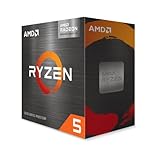
The anchor is the Ryzen 5 5600G — six Zen 3 cores with Radeon Vega 7 integrated graphics and a bundled cooler — check price on Amazon for the processor. Around it, the shared basket lines repeat: the B550M-HDV, a 16GB DDR4-3200 kit, the Kingston NV3 500GB, a Montech XR-class case and the Thermaltake Smart 500W — check price on Amazon for each part. The honest completed total is over budget, stated as plainly here as in the base guide, and it falls under the line only when reused parts close the gap, as the How to Choose section below describes. No operating system is in that total; the path runs Windows unactivated or licensed on top, exactly as documented for the first build.
Today’s rendering needs the same plain speech. The Vega 7 is the weakest graphics in this guide: its home is esports at 1080p low-to-medium settings, its desktop is fully native at 1440p, and between those two facts lies its whole present tense — on a 1440p panel this machine displays beautifully and renders modestly, with games upscaled from 1080p or below and native 1440p rendering out of reach in all but the lightest titles. Two technical notes from the base research matter doubly at this resolution. The integrated graphics borrow system memory and bandwidth, so the 16GB kit must be a dual-channel pair — a single stick taxes the exact performance the build exists to deliver — and part of that memory is effectively a graphics purchase. And the 5600G connects its graphics slot at PCIe 3.0 speed, a small known cost to carry into the future card purchase. That future is the pick: the empty slot, the 500W supply’s headroom and the AM4 platform make this the only route in the guide whose second stage is a single part dropped into a waiting machine — the stage at which native 1440p gaming actually arrives. Judged as a finished 1440p gaming PC it is a promise; judged as the first stage of the only honest two-stage route here, it is the smartest start in a difficult market.
- A complete tower of new parts whose empty PCIe slot is the guide’s clearest road to native 1440p.
- Fully native 1440p desktop from day one; esports at 1080p reduced settings while the card is saved for.
- Basket in full: 5600G, board, RAM, SSD, case and power supply — check price on Amazon for each part.
Honest limitation: The completed build is still over budget, and until the card arrives this is the weakest gaming renderer among the tower paths — a bridge to 1440p gaming, not the destination.
Choose it if you enjoy building and can fund a graphics card within the year. Skip it if you want the strongest gaming performance per dollar today — that is the abytespark tower, two picks up.
Comparison Table
| Path | Price position | What it renders at 1440p | Link |
|---|---|---|---|
| All-new DIY build (Ryzen 5 5500 + RX 6600) | Well above budget — check price on Amazon | Native in lighter titles; 1080p + upscaling in demanding ones | Check on Amazon |
| abytespark tower (GTX 1660 Super) | Within budget tier — check price on Amazon | Native in older/esports titles at reduced settings; 6GB ceiling | Check on Amazon |
| Barebone completion (UM870 Slim) | Above budget from zero; kit only with salvaged RAM/SSD — check price on Amazon | Native desktop; games at 1080p or below, upscaled | Check on Amazon |
| Beelink SER5 MAX mini PC | At the budget line — check price on Amazon | Native desktop and video; games at 1080p, upscaled | Check on Amazon |
| STGAubron tower (RX 580) | Buy only on a dip within budget — check price on Amazon | Lightest titles native; 8GB textures on a 1080p render elsewhere | Check on Amazon |
| APU build (Ryzen 5 5600G) | Over budget — check price on Amazon | Native desktop; lightest games only — the slot is the 1440p plan | Check on Amazon |
Pairing a 1440p Monitor With a $500 Build
The monitor half of this search deserves its own honesty, because a panel bought on the wrong assumption wastes more than any pick in the guide. The sweet spot for everything here is a 27-inch 1440p monitor: at that size, 2560 × 1440 gives a pixel density that makes text and desktop work visibly sharper than 1080p — the benefit every pick in this guide delivers natively, all day, in the applications you stare at longest — without the rendering cost of 4K. Buy the panel for that desktop sharpness and for the machine you will own next, and it is a sound purchase alongside any of these six paths. Buy it expecting the games themselves to arrive rendered at 1440p, and only the top two picks will meet you, only in their lighter titles.
Refresh rate needs the same discipline. A high-refresh 1440p panel is a reasonable forward-looking buy — esports titles on the stronger picks can feed elevated refresh rates at reduced settings, and the staged paths will grow into the panel — but it is a purchase for headroom, not for today: the demanding games in this guide are rendered at 1080p and upscaled, and no refresh-rate figure on a box changes what the graphics hardware computed. Spend on panel quality, size and a variable-refresh range before refresh-rate heroics. And 4K is refused outright for this GPU class: a 4K panel asks for roughly four times the 1080p rendering workload for native output, nothing here is within reach of that in games, and even the upscaled result starts from a render these chips strain to produce. A 4K monitor on a budget build is a sharp desktop wearing an apology. Set the panel to its native 2560 × 1440 output, set its real refresh rate in Windows on day one — panels routinely arrive running at a default 60Hz — and let the render resolution, not the display resolution, be the number your settings menu negotiates.
How to Choose Your $500 Path to a 1440p Desk
- Name which 1440p you are buying. A native 1440p desktop with upscaled games, native rendering in lighter titles, or a staged route to native rendering later are three different purchases wearing one search term. Every pick in this guide is labelled with which one it is; hold any other guide to the same labelling.
- Keep the panel’s output native and scale the render, never the display. Set the monitor to 2560 × 1440 and let in-game render scaling or upscaling do the reducing. Dropping the desktop resolution to 1080p to “help” buys the softness of the non-integer stretch across everything, including the text you read all day.
- Grade VRAM as a 1440p specification. Upscaling reconstructs the frame, but textures load for the displayed resolution. At this budget the 8GB picks — the RX 6600 build and the RX 580 tower — hold 1440p texture loads the 6GB tower spills first; on integrated graphics, the shared memory pool is the same specification wearing another name, which is why the Beelink’s 24GB matters.
- Do not pay for DLSS that is not there. No pick in this set contains an RTX card, so none supports DLSS — including the NVIDIA tower, whose GTX card predates the Tensor cores DLSS requires. The AMD picks’ upscaler is FSR. Any listing or guide crediting DLSS to this hardware class in this tier is telling you something false about the machine.
- If the budget is hard and the need is now, buy complete. The finished systems here were priced from pre-spike inventory and deliver more machine for the budget than any basket of new parts. The abytespark tower for the only native rendering under the line, the Beelink for zero effort and the sharpest appliance desktop.
- If building is the hobby, build the staged path. The 5600G tower’s honest over-budget total — or under the line with reused parts — buys the platform whose single future card delivers the native 1440p the rest of this guide only visits in light titles.
- Count your drawers before your cart. A case, power supply, SSD or DDR4 kit already owned is worth its current replacement cost, and reuse moves these totals substantially: the APU build’s mandatory purchases can fall to the CPU and board alone, and the barebone completes for the kit alone — check price on Amazon — the moment its memory and drive come from a drawer.
- Use price alerts as a build component. The STGAubron tower and the 5600G itself have documented histories of dipping well below their everyday levels. At this budget, timing matters — but the STGAubron rule is absolute: check price on Amazon and buy only when it is within budget on a dip, otherwise skip it.
- Never inherit an old power supply into a discrete-GPU build. It is among the more affordable parts to buy new — check price on Amazon — and the most expensive part to have fail under a card you waited a year to buy.
Common Buying Mistakes
- Believing a budget 1440p build headline. Nothing at this budget renders current games natively at 1440p; a guide that does not separate rendering from displaying is selling the monitor’s specification as the computer’s performance.
- Setting the monitor itself to 1080p to gain performance — the non-integer stretch softens everything, desktop included, when render scaling inside the game would have kept the interface native and sharp.
- Assuming the NVIDIA tower supports DLSS because it is NVIDIA. The GTX 1660 Super has no Tensor cores; DLSS is RTX-only, and this set contains no RTX card at all.
- Counting a barebone’s kit headline as a computer. Completed from zero it is well above budget before an operating system — the most expensive mini PC route in this guide, explained in its review line by line.
- Paying the STGAubron tower’s everyday price. Its value exists only on a dip within this guide’s budget; at its everyday premium level the abytespark tower beats it outright — check price on Amazon for both.
- Buying a single 8GB memory stick for the APU build to save money — integrated graphics live on memory bandwidth, and single-channel RAM taxes the exact rendering the build exists to stage.
- Pairing any of these machines with a 4K monitor for gaming. The panel would out-resolve every renderer here by a factor none can feed; 27-inch 1440p is this class’s ceiling and its sweet spot.
- Following a 2024 parts list and discovering at checkout that the RAM and SSD lines have quietly added a substantial premium — the spike that broke the budget build is documented in Best Gaming PC Build Under $500, and it has not repealed itself.
Final Recommendation
- Hard budget, 1440p monitor, games now: abytespark Gaming PC with GTX 1660 Super — the only native-1440p rendering of any kind truly under the line.
- Committed builders: the Ryzen 5 5600G APU build — honestly over budget when bought new, under budget with reused parts, and one card away from genuine native 1440p.
- Zero-effort 1440p desk: Beelink SER5 MAX — finished and warranted, in this budget tier — check price on Amazon — with the biggest shared-memory pool here.
- Patient hunters: the STGAubron RX 580 tower, bought only within budget on a dip — check price on Amazon — 8GB of textures and a platform that grows.
- Salvage builders with DDR5 in a drawer: the MINISFORUM UM870 Slim completion for the kit alone — check price on Amazon — the strongest integrated graphics in the guide.
- Stretched budgets: the all-new RX 6600 build — the most native 1440p here, as a stretched-budget option — check price on Amazon for the parts.
Our top two for the 1440p reader are the abytespark tower, because it is the only machine that puts any natively rendered 1440p gaming on the desk within budget all-in, and the 5600G APU build, because it is the only route whose tomorrow is better than its today — a real tower, honestly positioned, one card from the resolution this whole search is named after. Between them they cover the two honest shapes of this keyword in a shortage market: display at 1440p now with the rendering you can afford, or stage the rendering properly and let the panel wait. Readers whose monitor is still 1080p should start from Best 1080p Gaming PC Under $500 money instead; those ready to raise the budget will find the all-new build becoming real again in Best Gaming PC Build Under $700; and beginners taking the staged route will find it walked through step by step in Best Gaming PC Build For Beginners Under $500. Keep the panel native, scale the render, count the operating system, and check the live listings before you order.
Frequently Asked Questions
Can a $500 PC really game at 1440p?
At the display, yes; at the render, only in part — and the difference is this guide’s whole subject. Every path here drives a 1440p monitor natively for desktop, video and work. For games, the two discrete picks render lighter and older titles natively at 2560 × 1440 at reduced settings, and everything else in the set renders at 1080p or below and upscales to the panel. Native 1440p rendering of current demanding games does not exist at this budget, from parts or as a complete system.
Is DLSS available on any of these picks?
No. DLSS requires an NVIDIA RTX card with Tensor cores, and this set contains none — the one NVIDIA machine here uses a GTX 1660 Super, a GTX card that predates the requirement. The AMD-based picks use FSR, AMD’s upscaling, which this guide credits generically and never under DLSS’s name. If 1440p upscaling quality is your deciding factor, that distinction — not a shared label — is what you are actually choosing between in this tier.
Is an upscaled 1080p render on a 1440p monitor worse than a 1080p monitor?
No — provided the panel stays at its native output and the game does the scaling. In-game render scaling and upscaling draw the interface and text natively at 1440p and reconstruct only the 3D scene, so the result is sharper than a 1080p panel for everything except the scene’s fine detail, where it is comparable. What is worse is setting the monitor itself to 1080p: the non-integer 1.33×-per-axis stretch then softens the desktop too. The wider complete-system view of this budget is in Best Gaming PC Under $500.
Why does VRAM matter if the game is only rendering at 1080p?
Because textures are loaded for the resolution being displayed, not only the resolution being rendered. An upscaled frame headed for a 1440p panel carries a 1440p-intent texture load, which is why this guide grades the 8GB cards — the RX 6600 build and the RX 580 tower — above the 6GB GTX tower on this angle, and why the Beelink’s 24GB of shared memory is a real asset to its integrated graphics rather than a footnote.
Should I buy the 1440p monitor now, or wait until I can afford a native-1440p PC?
Buy it now if your daily work is text, browsing and video: every pick here renders that desktop natively, and a 27-inch 1440p panel improves the hours you spend outside games immediately. The staged paths then grow into it. Wait only if games are the panel’s sole purpose and native rendering is the expectation — in that case the monitor money is better held until the budget reaches the tiers in Best 1440p Gaming PC Under $500, where the rendering catches up with the display.
What about the barebone — is it a cheaper way onto a 1440p desk?
Only with salvaged parts. Completed from zero, the UM870 Slim totals well above budget before an operating system, because a single 16GB DDR5 stick is a premium-priced part in the current shortage — check price on Amazon. With a DDR5 kit and an SSD already owned, the same box completes for the kit alone and becomes an affordable strong 1440p desk in this guide. The full category treatment is in Best Barebones Mini PC Under $500.
- Best Gaming PC Build Under $500
- Best Gaming PC Build Under $400
- Best Gaming PC Build Under $700
- Best Gaming PC Build Under $1200
- Best Gaming PC Build For Beginners Under $500
- Best Gaming PC Build For Streaming Under $500
- Best Gaming PC Build For Small Spaces Under $500
- Best Budget Gaming PC Under $500
- Best Mini Gaming PC Under $500


